Blog

Breaking News: 2016 Query Store cleanup doesn’t work on Standard or Express Editions

If you’re using SQL Server 2016’s awesome new feature, Query Store, there’s a new bug with automatic cleanup. Books Online explains:

Automatic data cleanup fails on editions other than Enterprise and Developer. Consequently, space used by the Query Store will grow over time until configured limit is reached, if data is not purged manually. If not mitigated, this issue will also fill up disk space allocated for the error logs, as every attempt to execute cleanup will produce a dump file.

To work around it, you can manually clean up specific plans with sp_query_store_remove_plan and sp_query_store_remove_query, or just clear the Query Store out entirely with:

We’ve already added an sp_Blitz check for this in the dev branch of the First Responder Kit (zip download), but just be careful using dev branch code since it’s not quite as well-tested as the master branch.

Screenshot Interview Question: “What would you do if you saw this?”

Interviewing
62 Comments

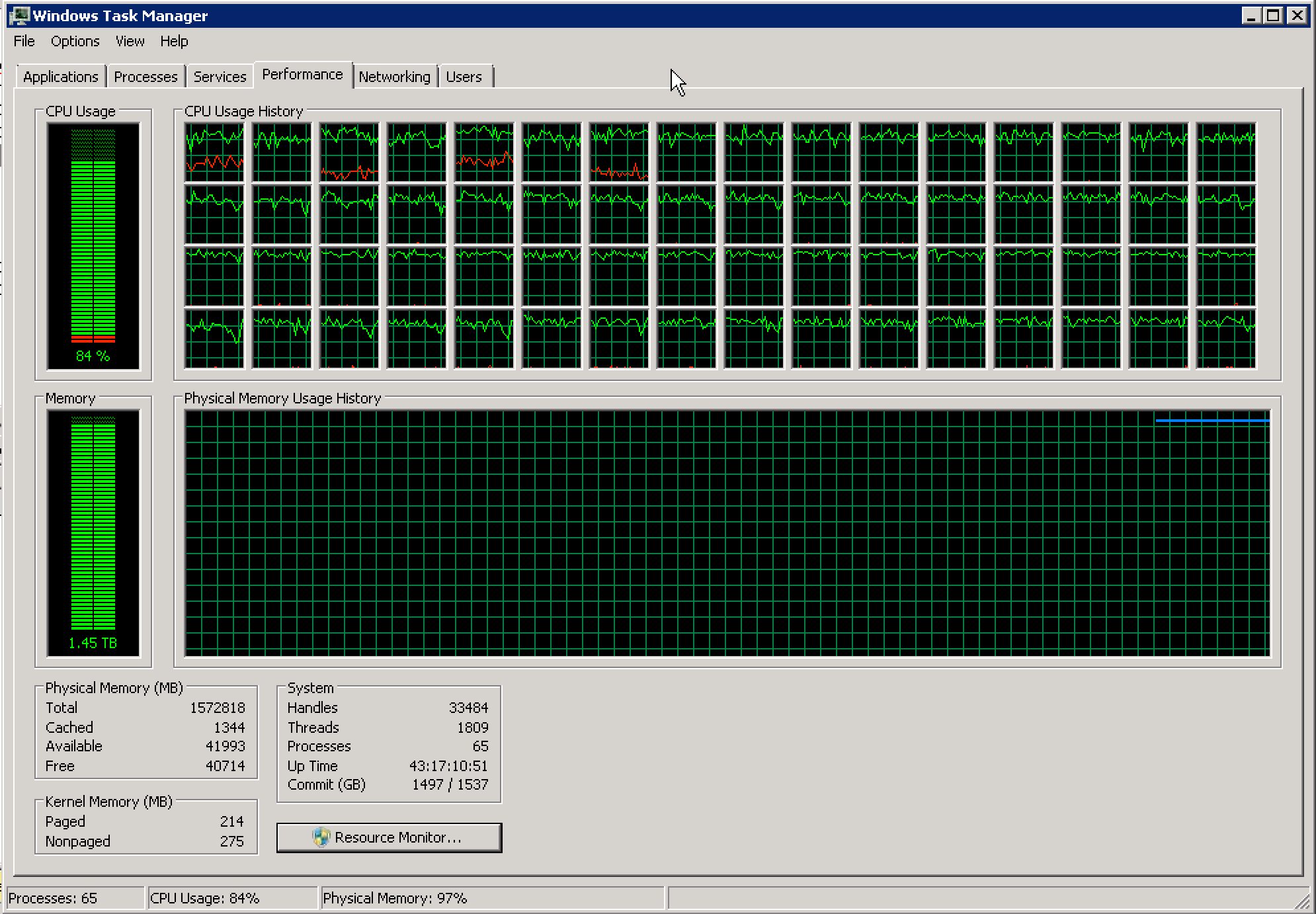
In this week’s episode of our screenshot interview series, you’re applying for a database professional position who will be on call. You’re not necessarily the DBA, but you’re a member of the team on rotation. While you’re on call, you get an email from the help desk asking if there’s a problem on the production data warehouse server, and they attach this screenshot:

Think fast. This SQL Server certainly is doing that.
  1. What do you tell the help desk?
  2. What actions do you take next?

You can leave your answers in the comments, and I’ll circle back in a few days to talk about my thoughts.

Update 2016/07/10 – Great answers, everybody! So many good answers this week. I shouldn’t have been surprised – you folks are exactly the kinds of people who do this for a living, and you’re used to getting woken up on call, I bet.

For the first question, what I tell the help desk, I’d reply with an email that:

  • Ask what drove the call (were they just responding to an automated alert, or had end users called in reporting speed problems?)
  • Ask how long it’s looked like this (was it only a 60-second spike, or a 60-minute spike)
  • Ask if they have a baseline of what’s normal for this server at this day/time (maybe it’s normally 80%, so we’re only looking at an incrementally higher load)
  • Ask if there were any change control activities scheduled for this box or related boxes tonight (like maybe the data warehouse team is reloading 5 years worth of history)
  • Ask if there are any other boxes that are experiencing issues (maybe the SSIS box has high CPU too, indicating that there might be a big load going on)

After all, they only emailed me, not call me. Might just be an FYI.

And what do I do? I’d go back to bed. I’m on call, not on email. If you need me, call me.


[Video] Office Hours 2016/06/29 (With Transcriptions)

This week, Erik, Richie, Doug, and Angie discuss a script for getting more information on a specific index, using partition tables, shrinking data and log files, stress testing SQL servers, as well as some entertaining things to ask Siri!

Here’s the video on YouTube:

You can register to attend next week’s Office Hours, or subscribe to our podcast to listen on the go.


Office Hours Webcast – 2016-06-29

Angie Rudduck: All right, it’s 15 after the hour. We’ll read some questions, maybe. Tammy has got a question that I think Doug had referenced once. “Has anyone installed R for SQL 2016 yet? Have you had any problems? Do you have any idea how to uninstall?” It didn’t install correctly but she thinks it installed when she tried to reinstall.

Doug Lane: Oh, boy. No, I haven’t but I can tell you if you’re planning on going to the PASS Summit this year, there are like five intro to R sessions. It’s bonkers.

Erik Darling: None of them are on installing R.

Angie Rudduck: I was just about to say that. Good luck installing it.

Erik Darling: You’d really think that R would get more pirate jokes out of it.

Richie Rump: [Mimicking a pirate] Arrr!

Angie Rudduck: There is one pirate…

Doug Lane: Yeah, there’s one session that makes a pirate joke in the title.

Erik Darling: Yeah, you’d think they’d all do it because it’s like the most obvious thing. Whatever.

Richie Rump: Next.

Angie Rudduck: Next.


What script do I use to get more information about an index?

Angie Rudduck: All right. James wants to know what script can he use to get more information on a specific index.

Erik Darling: Perhaps you’ve heard of sp_Blitzindex by chance.

Richie Rump: No, I haven’t.

Erik Darling: When you run it, there’s literally a column called “more info” with a script to get more info about an index. Read columns to the right. Your job from now on: read columns to the right. Scroll, my friend.

Doug Lane: There’s also Mode 2 which will tell you a lot of particulars about the indexes on a given table if you want to specify a table. That will give you about as much information as you could possibly need to make whatever decisions you’re trying to make about that index.


What do logical reads mean in STATISTICS IO output?

Angie Rudduck: Rizwan says, “Hi guys, I have a question about SET STATISTICS IO. What does logical reads mean? Does it mean—does data being read from memory or is it being copied to memory?”

Erik Darling: Logical reads is being read in memory. If you see the physical reads when you set STATISTICS IO there are a whole bunch of reads, so you’ll see like physical and read ahead and lob and all the other ones. Physical reads are the ones that you’re reading from disk. Logical reads are the one where you’re reading from memory.

Richie Rump: But won’t it count it for both? Because isn’t the physical reads from disk you would read that and then it would have to read it from memory again?

Erik Darling: You know what? I actually don’t do enough looking at that to tell you. If you know from your lovely website Statistics Parser, then share it with the class.

Richie Rump: I don’t know, that’s what I’ve noticed, right? So when you’re reading from disk, you’ll get the same amount or less, or more from the logical side.

Erik Darling: Right, but if physical reads is zero, then you’re just reading stuff in memory.

Richie Rump: Memory, yeah. Correct.


When should I start using partitioned tables?

Angie Rudduck: Steve wants to know if there’s a rule to start using partitioned tables. Are you concerned with size or performance first?

Erik Darling: Partitioning is not a performance enhancement. Don’t drink that Kool-Aid my friend. Partitioning is a manageability enhancement so that you can swap your data in and out without locking the whole table and doing anything crazy. It also allows you to archive stuff back. You can make stuff read only, put stuff on different filegroups. It allows you a lot of great management things, not really a lot of great performance things. Kendra, over on her new home, littlekendra.com, has a great roundup of why partitioning is not making your queries faster. If you want to go over there, there’s a video and links to several other things where she goes into detail about why partitioning is not a performance enhancement.

Doug Lane: If I remember right, there’s a rule of thumb. Was it like 100 million rows or something like that?

Erik Darling: See the thing is, I wouldn’t want to start partitioning at a table that big. I would want to like—like if I know that I’m going to have a table like an audit table or something that could potentially get big, I would want to do it at the beginning. Because when you start partitioning at a large table size, it’s just obviously some overhead to get everything lined up.

Doug Lane: Yeah, or anything where you know you’re not going to be deleting from the table, you’re just going to be adding as time goes on and you’re going to be adding a lot of rows. That’s a time where you might want to think about partitioning by say year.

Erik Darling: For sure.

Richie Rump: So what about partition elimination?

Erik Darling: What about it?

Richie Rump: Is that a performance enhancement?

Erik Darling: When it happens. Good luck getting it to happen.

Richie Rump: Use your partition key I guess.

Erik Darling: Yeah, all your misaligned, non-clustered indexes. Watch what happens.


Is there a safe way to shrink files?

Angie Rudduck: Let’s reward Richard for asking this question early. “Shrinking data files is not recommended because it disorganizes the indexes. Is there less disorganization if you use EMPTYFILE to move the data in a multi-file filegroup? If the table has varbinary (max) blobs, does that add any other wrinkles to a file shrink/move besides the size?” Why are you shrinking, Richard? Do you have to shrink?

Erik Darling: I get EMPTYFILE, you’re moving stuff around. I’m not sure that that’s the way I’d choose to move things around though. I’d need to know a little bit more about what you’re trying to do and just why you’re trying to do it. Because if it’s just like a one-time data move, then there’s some options. As far as the fragmentation and stuff goes though, I’m actually not sure. I would assume it uses a fairly similar mechanism to EMPTYFILE—or to SHRINKFILE. The only difference is that you’re not actually shrinking anything, right? Like you’re kind of just pushing data out of the one file so I’m not sure that it is as aggressive as just sort of mashing pages together as an actual file shrink would be.

Doug Lane: One of the reasons that we tend to as a group not recommend shrinking data files is because it grew that big for a reason and if you’re going to shrink it, what we’re afraid of when we say don’t do it is that you’re going to get in a cycle where you keep growing and shrinking it. That’s what we want to avoid. But if it got really big for some reason and you know that’s not going to happen on a recurring basis, then we’re actually okay with shrinking data files.

Erik Darling: Even log files.

Angie Rudduck: I did just tell my clients yesterday that I had faith in them shrinking one giant large file, large log file. Actually, I used one of the default ones where it says shrink it to one meg and then grow 25 percent of the database size. Their log file was 30 gigs. Their data file was six.

Erik Darling: That’s an interesting choice.

Doug Lane: Yeah and the log file was almost completely empty.

Angie Rudduck: Yeah.


How can I get started using CLR in SQL Server?

Angie Rudduck: Nate has a question about using CLR in SQL. Do you have a quick how-to or if it’s too much to cover on air, a blog post or article to point him to?

Erik Darling: Richie.

Richie Rump: I think Adam Machanic has some stuff up there as well as there’s a video from Tech Ed a few years back that he kind of goes into some of that stuff. I may—that’s actually a good post to do—I know I’ve got a demo on my site that kind of goes into it a little bit. I have to remember what presentation that was a part of. But it’s actually not too bad. It’s not as hard as you think it is. Testing it is a little bit of a pain but once you get the hang of it, it’s not bad at all.

Erik Darling: Adam Machanic does have a cool blog post where he was writing a CLR string splitter to try and beat out some SQL, like [inaudible 00:07:39] SQL implementations of it. There’s a link there to a pretty cool thread on SQL Server Central where it goes through all the feedback and like figuring out how to do stuff. I’ve done it once and like [DBA compiling 00:07:52] DLL was like me just mashing knuckles on the keyboard. It’s horrible.

Richie Rump: Similar to me, by the way.

Erik Darling: There we go.


How should I stress test a SQL Server that keeps failing?

Angie Rudduck: Dennis wants to know what the best way is to stress test a large SQL Server with 60 cores, a terabyte of RAM, SAN, SSD, xyz, etc. “Our IT claims the server randomly reboots due to heat but has no other information available.” He wants to try and recreate the problem.

Erik Darling: You want to try to overheat that thing?

Doug Lane: I hope this isn’t a production server, although based on the 60 cores I would hope that that’s not sitting around in development either. So for something like this, there are a few tools you can use. There’s OSTRESS and there’s also one called HammerDB but HammerDB is a little bit harder to configure. It’s a little older too. So those would be two stress testing tools. There’s also just for the pure IO side of things, there’s SQL IO which probably don’t want to run on a production box just because it can hammer the SAN to the point where it shuts down. So I would probably start with OSTRESS if you’re looking for a tool that will simulate a heavy production load.

Erik Darling: With a server like that, it sounds like you have some money. So, if you want to do something a little bit fancier, Dell has—well at least for now, until software gets sold off to whoever—has a tool called Benchmark Factory.

Doug Lane: Oh, yes.

Erik Darling: Really throw some heat at your server if you’re interested in spending money on it.


How do I move replication publishers around?

Angie Rudduck: We’ll see if we can answer this question without Tara. From Andrew, “We’re on 2008 R2 SP3.” They’re doing log shipping to another 2008 R2 SP3 server. The log shipping server is also the replication publisher. Is there any way to change the primary to the secondary permanently and have replication follow or do you need to redo replication on the new primary?

Erik Darling: Nope, I don’t know.

Angie Rudduck: Test it in dev and find out. Sorry, Tara is not here. Replication question denied.

Doug Lane: I’m still trying to make sense of the question. Change the primary to secondary, so change the log shipper to the log shippee? Is that what you’re saying?

Angie Rudduck: I think so.

Doug Lane: Yeah, at some point, you’d have to have a cutover where you know you freeze what happens on the primary. Then you’d have to kind of burn all the log shipping down, set it up again. Yeah, replication and log shipping are two completely different features so I don’t think there’s anything you can do with log shipping to make replication magically flip sides. I think you’re going to have to stop everything, tear down what you’ve got, and then reconfigure it. Both for log shipping and for replication.

Angie Rudduck: I think you can repoint log shipping, but replication is scary. So without Tara, test on your own.

Doug Lane: I’d be a little nervous to repoint log shipping exactly in the other direction without knowing that everything was stopped.

Angie Rudduck: Yeah.


How can I find out if I have page contention?

Angie Rudduck: Gordon wants to know if there’s a DMV that will give him information on which page types other than PFS, GAM, and SGAM are causing contention.

Erik Darling: If you’re running sp_WhoIsActive, it will tell you which pages are in trouble if you’re in fact waiting on pages. So if you’re running stuff and you think there’s contention on a particular page, you can run that and it will tell you where it’s happening if it is page contention. So like it will tell you for tempdb it will show you like page latch and it will give you some more information about the pages that it’s hitting. I would go right to sp_WhoIsActive and try to run that and see what’s going on rather than trying to roll your own query. If you want to look at what sp_WhoIsActive is hitting to give you that information, you can do that and you can try to maybe reverse engineer a small part of it to get some page type waits.


How can I copy SSRS permissions from one server to another?

Angie Rudduck: Tommy wants to know do we have a script or process that can be used to copy permissions, users, etc. for SSRS to a new SSRS server? Doug.

Erik Darling: Doug Lane.

Doug Lane: We don’t. There’s an older script that is—yeah, it’s a script—that is sort of retired but it’s still out there if you can find it, RS Scripter. That’s a tool that will allow you to basically just take an instance of a reporting server database and move it somewhere else. The other thing that you can do is reporting services, at least before 2016, and 2016 may not have changed, but it was conveniently compartmentalized to everything being stored in the database. So there are a few configurations settings in like XML files, .config files, but the stuff like users is all stored in just straight up database tables. So it’s the kind of thing where if it’s a production instance you want to be careful, try this out in dev first where you basically take the existing reporting services database, that would be the report server database probably. Then take the settings out of there from like the users and security tables and move them over to the new instance, somewhere in dev, turn it on. Make sure everything is the way it’s supposed to be. But one thing you might run into is when you do that if you try to go to the site on the new server you may get like a permission denied, access is denied error. When that happens you just have to open Internet Explorer, run it as administrator, and go in and assign your user or group permissions to see the home folder. It’s a common problem, even when you aren’t moving databases around. So just be aware of that too.

Angie Rudduck: I’ve run into that a few times before. It was like, “Why does this work only in ‘run as admin?’”

Doug Lane: Yeah.
Angie Rudduck: Speaking to Doug, Tim wants to know when your new video is going to be released.

Doug Lane: Oh, fairly soon. I would expect before the end of July. I don’t have a date but it’s coming pretty soon.

Angie Rudduck: Yay.

Erik Darling: They look awesome though. So get those credit cards ready, or PayPal, I don’t know, your mom’s checkbook.

Richie Rump: Don’t tell your wife how much you really paid for it.


Should I use different drive letters for data, logs, and TempDB?

Angie Rudduck: Mike wants to know with SAN drives if it’s important to keep data files and log files and tempdb all on different drives if using a SAN, non SSD.

Erik Darling: Not really. I mean it’s all working off the same sort of spread out shared pool of stuff anyway so you don’t have to sweat it as much. That was a good rule of thumb back when you had direct attached storage. The only time I’d really break from that is if you’re in a non VM environment and you do have sort of a higher grade of drives for certain things. Then I would of course put tempdb on SSD or flash but if it’s all the same pool of spinning disks, then it doesn’t really matter so much.
Doug Lane: Yeah. You just don’t want tempdb to get promoted and demoted all the time. You want it to stay in the top tier if you have tiering.


How should I handle recursive relationships?

Angie Rudduck: Okay, Wes wants to know if there is hierarchyid data type is better to use than a string in a parent field and a child field. Erik pointed him to Adam Machanic’s blog about “Re-Inventing the Recursive CTE.”

Erik Darling: Yeah, buddy.


How can I copy data quickly between servers?

Angie Rudduck: Now on to Mike who wants to know if anybody knows of a “fast” copy tool. Some of his users continuously want db refreshes from prod to QA and sometimes they are several hundred gigabytes in size and take too long to copy.

Doug Lane: Replication.

Angie Rudduck: Ugh, log ship maybe. With standby mode, right?

Erik Darling: You could try that. You could take a database snapshot. If you’re on a SAN, you could take a SAN snapshot and just pop that on over pretty quick. Aside from that, you’re looking at setting up some, like Angie said, probably like log shipping so that you could have an existing copy and just log ship over to it and catch things up when developers need a refresh.

Richie Rump: Right, there’s also some development methodologies saying that you maybe don’t ever want production in outside of production. So essentially you’re testing QA environments have their own test data that’s [inaudible 00:16:22] and it’s not production data. So that’s something to consider as well. It’s a security risk as well because your QA environments aren’t usually as locked down as your production environments. So if you’ve got sensitive data there, you may want to rethink that.

Erik Darling: One really cool thing you can do is if you don’t want to go through like the hard process of doing this stuff is you can actually just script out all the statistics for your database. So if you script out all the statistics you get a copy of your data that mimics how the data reacts to queries and whatnot without actually having any data having to exist on the disk itself. I believe a fella named Thomas LaRock has a post on how to script out your database statistics, with pretty pictures and screen caps and whatnot so you can head on over there.


Angie Rudduck: Richie, FYI, someone couldn’t hear you so you’re going to have to get closer to that mic.

Richie Rump: Someone couldn’t hear me? [Makes noises close to his mic]

Angie Rudduck: Much better.

Erik Darling: Get inside the mic.


Why is CLR enabled on my SQL Server?

Angie Rudduck: Richie, Kyle wants to know, they have CLR enabled on their server but he doesn’t know why. Is there an easy way to find out if anything is using it?

Richie Rump: Not that I know of but that sounds really interesting and I already made a note of that because I saw the question earlier about investigate and how we would do that.

Doug Lane: Turn it off and listen for the screams.

[Laughter]

Erik Darling: One thing you can do is some of the DMVs that record query execution stuff record CLR time. So you can just check those out and see if there’s any CLR time being recorded on your server. I believe there’s also if you look at specifically at functions I think there’s a flag in one of those DMVs that tells you if it’s a CLR function so it could be like in CLR or something. I don’t have a more specific answer because I’ve never really gone searching for it.

Angie Rudduck: He said he’s considering the try pull the plug method.

Erik Darling: You could do that.


Can I automate adding new databases in my Availability Group?

Angie Rudduck: I don’t know if this question is direct enough but Paige wants to know if there’s a way to automate AlwaysOn Availability Groups to all replicas when a new database is created on the primary.

Erik Darling: In 2016 there is. You can use a feature brand new to Availability Groups called direct seeding. That’s S-E-E-D-I-N-G not S-E-A-T-I-N-G. So that’s pretty cool. Before that, no. There are a bunch of questions on dba.stackexchange.com that have sort of like the beginnings of scripts but the problem is that it’s really hard to just write one that works for everyone because you do have to add the database, take a backup, restore it, or something like that to make it all work. So it’s really hard to just write a one-off script that works for everyone. But you can get some examples of beginning scripts if you search on dba.stackexchange.com for Availability Group automating or some form thereof.


Seriously, I want to shrink a file.

Angie Rudduck: All right, do you guys want to answer a question about shrinking or a mysterious missing file?

Erik Darling: Yes.

Doug Lane: Sure.

Angie Rudduck: So Monica has a database which was sized for future growth at 800 gigs but they’re only using half that. However, other databases have now grown and their data file disk is running out of space. Until they add more disk space, what would be the best way for her to shrink the database file to avoid any downtime?

Erik Darling: You could just shrink it and specify the size to like 50 or 100 gigs larger than what you have now. Does truncate only work on data files?

Angie Rudduck: I don’t know.
Erik Darling: Because if truncate only works on data files, you could throw the truncate only flag on there and it would just lop off the free space.

Angie Rudduck: Would you use the GUI or would you script it out?

Erik Darling: I would script it out because I’m weird like that.

Angie Rudduck: Paranoid.

Erik Darling: Because I spent a lot of money on…

Doug Lane: Truncate used to only work on logs but I think they got rid of that.

Erik Darling: No, truncate only works as a command on logs, it doesn’t work as a backup command on log shipping.

Doug Lane: Oh, okay.

Erik Darling: Yeah, so that doesn’t work. But it still works as a DBCC SHRINKFILE command. I’ve never tried it on a data file, so I don’t know.

Doug Lane: Back when I was a web developer, I used to run into log file problems all the time and I’d just backup log with truncate only, whee! Good-bye. That’s how I solved every problem I had.


Why are my permissions messed up after doing a Windows update?

Angie Rudduck: Let’s try to tackle Mike’s mystery. He’s on SQL 2012 with a two-node cluster. They have log shipping to a reporting server. They did a Windows update reboot and the shared folder on the cluster where log shipping copies from became invisible to the reporting server. They couldn’t re-add it or share it, they had to create a new share network name to get it going again. Any idea what may have caused that?

Doug Lane: Nope.

Angie Rudduck: Yeah, me neither. I was going to say, “Talk to your sysadmin.”

Erik Darling: Permissions maybe? Are you sure it just wasn’t a permissions issue? Like you could temporarily try flipping the security thing to everyone and see if they can see it then. If not then … we’re getting a Lifestyles of the Rich and Famous tour of Doug’s room.


Why is Doug broadcasting from an undisclosed location?

Doug Lane: Clinton tells me, “To buy a poster, man” because I’m behind a giant blank wall here. Yeah, it is kind of blank but…

Richie Rump: Buy more posters, Doug.

Doug Lane: I do have other stuff in the room, I’m not being interrogated.

Angie Rudduck: Except for by you, Clinton.

Richie Rump: Get an X-wing behind you, Doug. Come on, man.

Angie Rudduck: Richie, what’s the shuttle behind you? One of the shuttles, maybe.

Richie Rump: That is a Lego shuttle that they came out with about five years ago along with Slave 1, the TIE fighter, and an X-wing. There you go.

Angie Rudduck: What Star Wars shuttle space thing is that, Doug?

[Doug’s spacecraft model makes noise]

Angie Rudduck: Oh, it has sound.

Doug Lane: Your move, Rump.

[Laughter]

Richie Rump: I could break mine into 1,000 pieces, but I’m not going to, because I don’t want to put it back together.

Erik Darling: Don’t you have a model of the Challenger back there?

Angie Rudduck: Yeah, what is back there?

Richie Rump: Too soon, man. Too soon. Too soon.

Angie Rudduck: Didn’t that happen before I was born?

Erik Darling: Probably, I was in kindergarten.

Doug Lane: Oh, ouch.

Richie Rump: Stop it.

Doug Lane: Ouch.


Is SQL Server 2016 ready for production use?

Angie Rudduck: Speaking of new things. Richard says, “Microsoft seems to be touting that SQL Server 2016 is production ready now” and that shops are using it in production since prerelease. “Given its many performance and other features, do you feel it’s solid enough to deploy in production now or would you wait for a particular number of CUs or service packs?”

Erik Darling: I would just roll that sucker out. No, so it is, it is pretty much production ready. It is in RTM. You’re going to have your problems but the things that I would want to do is start running everything on it in production immediately because Microsoft changed the way they’re supporting things. So like you’re not going to get a service pack, there’s no guarantee of a service pack. You’re going to get cumulative updates every so often when they feel like it. So who knows how long you’d be waiting. If you want to upgrade, the only thing I’d be really careful of is the new cardinality estimator stuff. Which I think Doug looks like he wants to talk about.

Doug Lane: That hasn’t really changed since 2014. So if you’re on 2014 then you already know what the cardinality estimator is going to do. But there’s also features like the Query Store that will allow you to go back and look at what happened, which is pretty exciting because we never had the ability to do that in SQL Server before without using a monitoring tool. So that’s pretty exciting. There’s a bunch of other stuff obviously, like R, that are new in 2016. So if that sort of thing excites you, then you can rush out to that too. I know a lot of shops will go like one CU behind basically. Microsoft is committed to doing more frequent CU cycles now, well, so they say. As opposed to going like a year plus between full blown service packs. So updates will be happening supposedly quicker. So if you did want to wait, you wouldn’t have to wait as long if your old policy was to wait for the first service pack.


What database diagramming tools do you recommend?

Angie Rudduck: All right. I think we have time for one more question. I’m hoping Richie can help us with this one. James wants to know what database diagraming/ERD tool or tools you recommend.

Richie Rump: I think there’s two—there’s three big ones out there. One I’ve never used, I’m not even going to mention it. The other two is ERwin and it’s now Idera’s ER/Studio. Both are really good. Both do comparable things. Take a look at them. Both are fairly expensive per seat. So if you’re trying to get it for the entire team, it’s going to be pretty pricey. So I would talk to either of those and take a look at it. My personal preference is ER/Studio but that’s only because I’ve used it longer than ERwin. So take the demo, take them for a whirl. They both are very similar and check them out.

Erik Darling: There’s also Oracle SQL Developer if you—just kidding.

Doug Lane: No love for Visio?

Richie Rump: Diagraming tools, that’s not really a tool. That’s something else.

Erik Darling: It’s SSIS that doesn’t do anything.

Richie Rump: They bought Visio for BizTalk and only BizTalk.

Erik Darling: All right, that’s two more mentions of BizTalk than I want to deal with.

Angie Rudduck: Agreed. Let’s get out of here.

Erik Darling: We’re at something 46 past the hour, so let’s go back to work.

Angie Rudduck: Bye, guys.

Erik Darling: Bye, everyone

Doug Lane: Thanks, everyone.

Erik Darling: Thanks for coming.

Wanna attend the next webcast live? Register here.


Availability Group Direct Seeding: TDE’s Frenemy

From the Mailbag

In another post I did on Direct Seeding, reader Bryan Aubuchon asked if it plays nicely with TDE. I’ll be honest with you, TDE is one of the last things I test interoperability with. It’s annoying that it breaks Instant File Initialization, and mucks up backup compression. But I totally get the need for it, so I do eventually get to it.

The TL;DR here

Is that if you encrypt a database that’s already taking part in a Direct Seeding relationship, everything is fine. If you already have an encrypted database that you want to add to your Availability Group, Direct Seeding has a tough time with it.

I don’t think this is an outright attempt to push people to AlwaysEncrypted, because it has a lot of limitations.

Let’s walk through this

Because I love reader sanity checks, here we go. Microsoft tells you how to add a database encrypted with TDE to an existing Availability Group here.

wordswordswordsblahblahblah

That all sounds good! So let’s follow directions. We need a database! We also need a password, and a certificate. Alright, we can do this. We’re competent adults.

Alright, cool. We did that. Now we have to get all up in our database and scramble its bits.

SQLCMD Appreciation Header

Few things in life will make you appreciate SQLCMD mode like working with Availability Groups. You can keep your PowerShell. $.hove-it; I’m with SQLCMD.

Stick with me through the next part. You may have to do this someday.

What did we do?

Exactly what we did. We backed up our certificate to a network share, created a private key for it, and then on two replicas we created master passwords, and created certificates using the backup of our certificate from the primary. We did this in one SSMS window. Magical. Then we added our encrypted database to the Availability Group.

If this database weren’t encrypted, everything would probably go just fine. I say probably because, you know, computers are just the worst.

But because it is encrypted, we get some errors. On our Primary Replica, we get normal startup messages, and then messages about things failing with a transient error. Not sure what a transient error is. It forgot to tie its shoelaces before running to jump on that freight car.

Log du jour
Log du jour

On our Replicas, we get a different set of messages. Backup failures. Database doesn’t exist. More transient errors. This time you left an open can of pork beans by the barrel fire.

I failed college algebra, again.

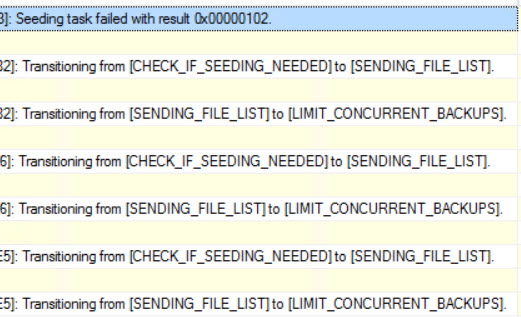
Over in our Extended Events session that tracks automatic seeding, we get an error code! searching for it doesn’t really turn up much. New features. Good luck with them.

Ungoogleable errors.

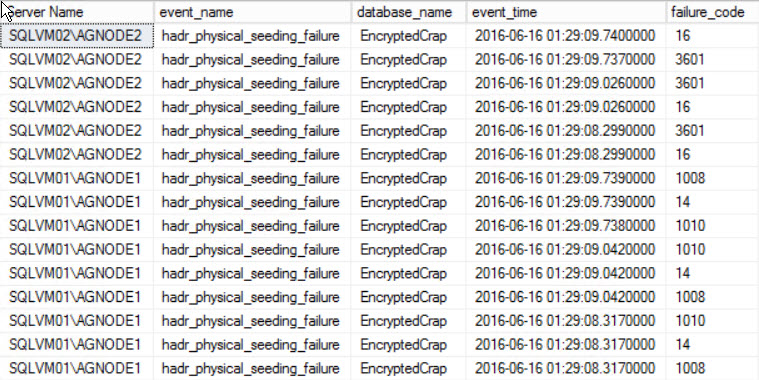
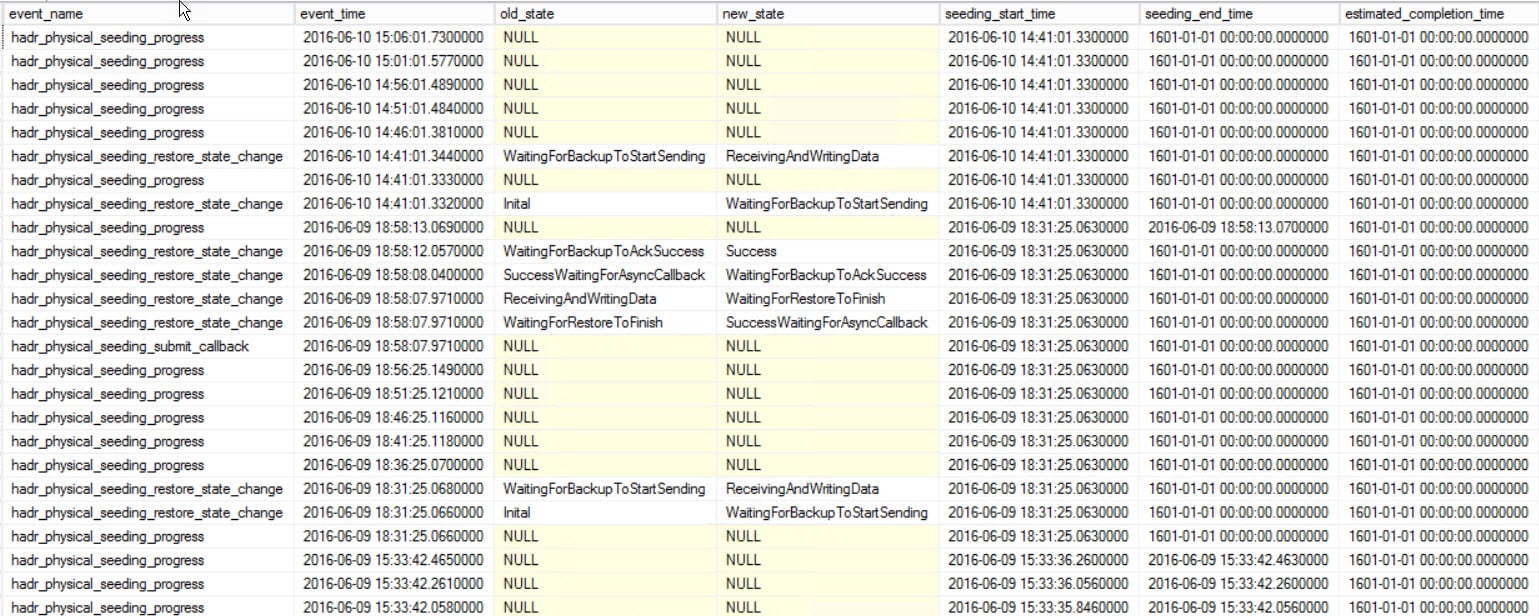
One bright, shiny star of error message-y goodness shows up in our Physical Seeding Extended Event session. Look at all those potentially helpful failure codes! An individual could get a lot of useful information from those.

Attempting Helpful.
Attempting Helpful.

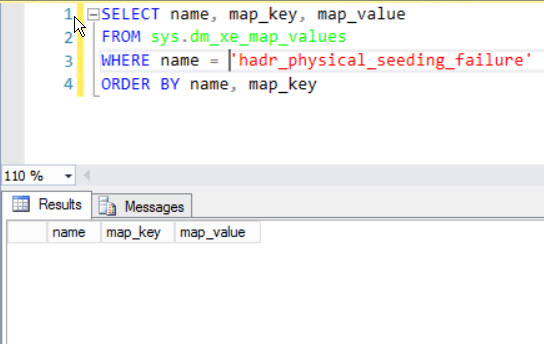
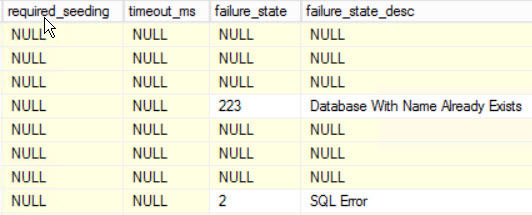
If only you weren’t being laughed at by the Gods of HA/DR. Some of the physical_seeding Extended Events have values here, but none of the automatic seeding ones do.

Feature Complete.
Feature Complete.

As of now

I don’t have a work around for this. The alternatives are to decrypt, and then re-encrypt your database after you add it, or add it the old fashioned way. Maybe something will change in the future, but as of now, these don’t appear to be compatible.

I’ve opened a Connect Item about this. I’d appreciate votes of the upward variety, if you feel so inclined.

Thanks for reading!


Availability Group Direct Seeding: Extended Events and DMVs

As of this writing, this is all undocumented

I’m super interested in this feature, so that won’t deter me too much. There have been a number of questions since Availability Groups became a thing about how to automate adding new databases. All of the solutions were kind of awkward scripts to backup, restore, join, blah blah blah. This feature aims to make that a thing of the past.

There’s also not a ton of information about how this works, the option hasn’t made it to the GUI, and there may still be some kinks to work out. Some interesting information I’ve come across has been limited to this SAP on SQL blog post, and a Connect item by the Smartest Guy At SanDisk, Jimmy May.

The SAP on SQL Server blog post says that this feature uses the same method as Azure databases to create replicas; opening a direct data link, and Jimmy’s Connect item points to it being a backup and restore behind the scenes. The Extended Events sessions point to it being a backup and restore, so let’s look at those first.

Bring out your XML!

We’re going to need two sessions, because there are two sets of collectors, and it doesn’t make sense to lump them into one XE session. If you look in the GUI, there’s a new category called dbseed, and of course, everything is in the super cool kid debug channel.

New Extended Event Smell

Quick setup scripts are below.

Since this is so new

I haven’t quite narrowed down which are important and which yield pertinent information yet. Right now I’m grabbing everything. In a prelude to DBA days, I’m adding the StackOverflow database. With some session data flowing in, let’s figure out what we’re looking at. XML shredding fun is up next.

To get information out of the Automatic Seeding session…

Every time I have to work with XML I want to go to culinary school and become a tattooed cliche on Chopped. Upside? Brent might hire me to be his personal chef. Downside? I’d only be cooking for Ernie.

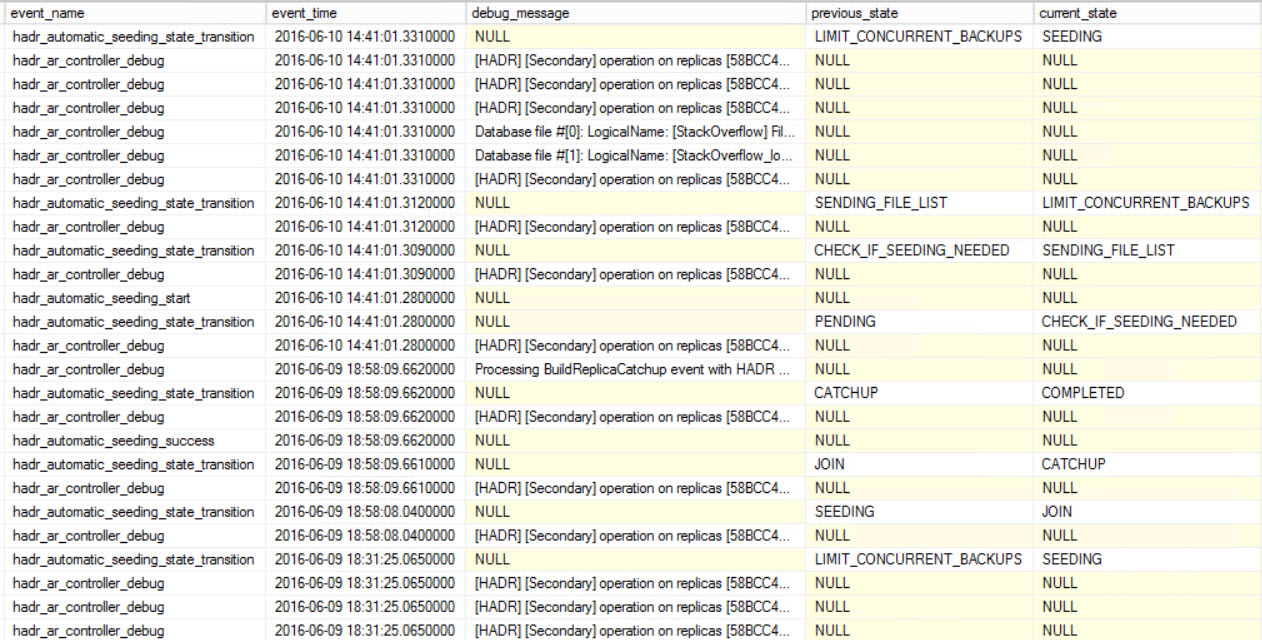
Here’s a sample of what we get back

I’ve moved the ‘less interesting’ columns off to the right.

Frenemy.
Frenemy.

These are my first clues that Jimmy is right about it being a backup and restore. One of the columns says “limit concurrent backups” and, we’re also sending file lists around. Particularly interesting is in the debug column from the hadr_ar_controller_debug item. Here’s pasted text from it.

Hey look, a restore

While I didn’t see an explicit backup command to match, we did pick up data like this:

A streaming backup! How cute. There’s more evidence in the Physical Seeding session, so let’s look there. Prerequisite XML horrors to follow.

And a sampling of data…

What an odd estimated completion date.

The old state and new state columns also point to backup and restore operations. I assume the completion date points to 1600 BECAUSE THIS IS ABSOLUTE WITCHCRAFT.


Ooh! Metrics!
Ooh! Metrics!

Ignore the smaller sizes at the bottom. I’ve clearly been doing this with a few different databases. The disk IO and network metrics are pretty awesome. Now I have to backtrack a little bit…

The SAP on SQL Server blog post talks about Trace Flag 9567 being used to enable compression. It says that it only has to be enabled on the Primary Replica to work, but even with it turned on on all three of my Replicas, the compression column says false. Perhaps, like parallel redo logs, it hasn’t been implemented yet. I tried both enabling it with DBCC TRACEON, and using it as a startup parameter. Which brings us to the next set of collectors…

Update from the comments: Luis and Robert point out that parallel redo is in RTM, just not documented yet

DMVs

These are also undocumented, and that kind of sucks. There are two that ‘match’ the XE sessions we have.

These can be joined around to other views to get back some alright information. I used these two queries. If you have anything better, feel free to let me know.

But we get sort of different information back in a couple places. This is part of what makes me wonder how fully formed this feature baby is. The completion estimate is in this century, heck, even this YEAR. The compression column is now a 0. Just a heads up, when I DIDN’T have Trace Flag 9567 on, that column was NULL. Turning it on changed it to 0. Heh. So uh, glad that’s… there.

I smell like tequila.

Oh look, it’s the end

I know I said it before, but I love this new feature. There’s apparently still some stuff to work out, but it’s very promising so far. I’ll post updates as I get more information, but this is about the limit of what I can get without some official documentation.

Thanks for reading!


Availability Group Direct Seeding: How to fix a database that won’t sync

This post covers two scenarios

You either created a database, and the sync failed for some reason, or a database stopped syncing. Our setup focuses on one where sync breaks immediately, because whatever it’s my blog post. In order to do that, I set up a script to create a bunch of databases, hoping that one of them would fail. Lucky me, two did! So let’s fix them.

You wimp.
You wimp.

You have to be especially vigilant during initial seeding

Automatic failover can’t happen while databases sync up. The AG dashboard reports an unhealthy state, so failover is manual. The good news is that in the limited test scenarios I checked out, Direct Seeding to Replicas will pick back up when the Primary is back online, but if anything really bad happens to your Primary, that may not be the warmest or fuzziest news.

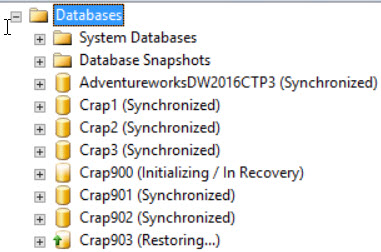
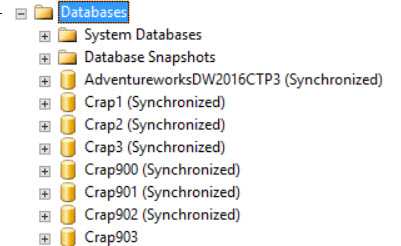
Here’s our database stuck in a restoring state.

Poor Crap903
Poor Crap903

Now let’s look in the error log. Maybe we’ll have something good there. On the Primary…

Okie dokie. Good to know. On the Replica, you’ll probably see something like this…

Oh, correct the problem. You hear that, guys? Correct the problem.

IF ONLY I’D THOUGHT OF CORRECTING THE PROBLEM.

Sheesh

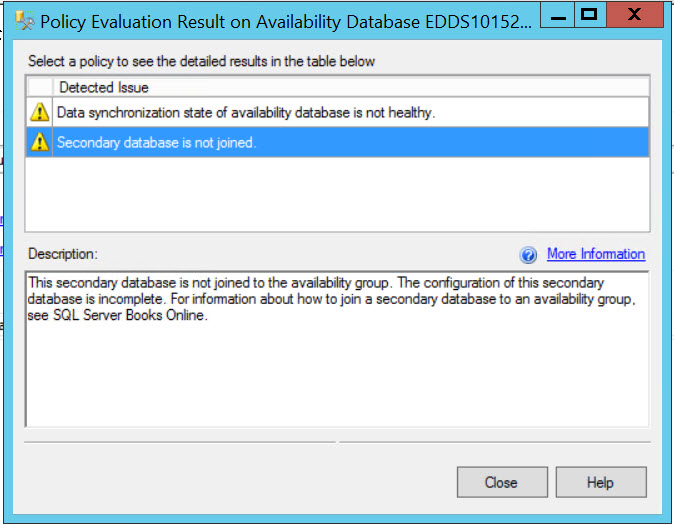
So what do we do? We can check out the AG dashboard, see a bunch of errors, and then focus in on them.

Sit, DBA, sit. Good DBA.

Alright, let’s see what we can do! We can run a couple magical DBA commands and see what happens.

ALTER DATABASE [Crap903] SET HADR RESUME

ALTER DATABASE [Crap903] SET HADR AVAILABILITY GROUP = SQLAG01;

Oh come on.
Oh come on.
THE SALES GUY SAID THIS WOULD BE SO EASY WTF SALES GUY

The two errors were:
Msg 35242, Level 16, State 16, Line 1
Cannot complete this ALTER DATABASE SET HADR operation on database ‘Crap903’.
The database is not joined to an availability group. After the database has joined the availability group, retry the command.

And then

Msg 1412, Level 16, State 211, Line 1
The remote copy of database “Crap903” has not been rolled forward to a point in time that is encompassed in the local copy of the database log.

Interesting! What the heck does that mean? If Brent would give me his number, I’d call and ask. I don’t understand why he won’t give me his number. Well, let’s just kick this back off. We kind of expected that not to work because of the errors we saw in the log before, but it’s worth a shot to avoid taking additional steps.

Right? Wrong. Digging into our DMVs and Extended Events, they’re telling us that a database with that name already exists. What’s really lousy here is that this error doesn’t appear ANYWHERE ELSE. It’s not in the dashboard, it’s not in regular, documented DMVs, nor in the XE health session. It’s only in the undocumented stuff. If you’re going to use this feature, be prepared to do a lot of detective work. Be prepared to cry.

Crud.
Crud
Double crud
Double crud

What we have to do is go back, remove the database from the Availability Group again, then drop it from our other Replicas. We can’t just restore over what’s already there. That would break all sorts of laws of physics and whatever else makes front squats harder to do than back squats.

Since our database is in a restoring state, it’s a few steps to recover it, set it to single user so no one does anything dumber than our AG has done, and then drop it.

Drop it like it's crap.
Drop it like it’s crap.

When we re-add the database to our Availability Group, it should start syncing properly. Lucky for us, it did!

I'm not highly available and I'm so scared.
I’m not highly available and I’m so scared.

There’s no Tinder for databases.

I'm highly available. Call me.
I’m highly available. Call me.

New features are hard

With direct seeding, you have to be extra careful about named instances and default database creation paths. If you used named instances with default database paths to Program Files, or different drive letters and folder names, this isn’t going to work. You don’t have an option to change those things. SQL expects everything to be there in the same place across all of your Replicas. I learned that the annoying way. Several times. Troubleshooting this was weird because I still can’t track down a root cause as to why anything failed in the first place. For the record, I created 50 databases, and two of them didn’t work for some reason.

Correct the problem. Just correct the problem.

Thanks for reading!


First Responder Kit Updated, and sp_AskBrent is now sp_BlitzFirst

We’ve released the first fully open source version of our SQL Server First Responder Kit: sp_Blitz, sp_BlitzCache, sp_BlitzIndex, sp_BlitzRS, sp_BlitzTrace, and the newest member: the newly renamed sp_BlitzFirst.

I wanted to rename sp_BlitzFirst because as an open source project, it’s going to have more than just my own answers as to why your SQL Server is slow. So I asked for your naming suggestions, and we got over 300! Here’s my favorites in no particular order:

  • sp_BlitzNow – Tara Kizer
  • sp_BlitzTriage – Michael J. Swart
  • sp_BlitzPerformance – Andy Mellon
  • sp_BlitzGauge – Daryl
  • sp_BlitzDiagnose – Nick Molyneux
  • sp_BlitzyMcBlitzFace – Eric
  • sp_BlitzStatus – Paul Goldstraw
  • sp_AskCommunity – Michel Zehnder
  • sp_Blitz911 – David Hirsch
  • sp_BlitzPulse – Hondo Henriques
  • sp_BlitzFirst – Joshua Birger

So many of these were just fantastic, and I’m not gonna lie: I was this close to picking sp_BlitzyMcBlitzFace. We were joking in the company chat room that it would be hilarious to say to a client, “Now we’re going to find out why the server is slow by running sp_BlitzyMcBlitzFace.” Eric, the first suggester, wins an Everything Bundle just because.

I went with Joshua Birger’s sp_BlitzFirst because as a trainer, it instantly helps me tell the story of how the scripts work. It’s easy for me to stand up and say, “Run sp_BlitzFirst…first.” I love it, and Joshua also wins an Everything Bundle.

Go download the latest version, check out the changes, and enjoy. For questions about how the scripts work, where to chat with us, or how you can contribute, check out the readme on the project’s home page.


Interview Question Follow-up: How do you respond?

SQL Server
20 Comments

Normally I’d update the original post

But I wanted to add a bit more than was appropriate. For my interview question, I asked how you’d respond to a developer showing you progress they’d made on tuning a sometimes slow stored procedure.

While a lot of you gave technically correct answers about the recompile hint, and the filtered index, and the table variable, no one really addressed the fact that I was asking you to respond to a person that you work with about a problem on a system that you share.

To be honest, if I asked this question in an interview and someone started reading me a riot act of things that were wrong with the example, I’d be really concerned that they’re unable to work as part of a team, and that they’re not really a good fit for a lead or mentoring type role. I’m not saying you’re not technically proficient, just that I don’t want to hire the Don’t Bother Asking style DBA. I’ve been guilty of this myself at times, and I really regret it.

This is true about, and a problem for, us as a technical community. Very few people have learned everything the hard way. The nature of most SQL Server users is community and sharing oriented. Blogging, presenting, writing free scripts, etc. And that rules. If you’re interested in something, but don’t have direct experience with it, you can usually find endless information about it, or ask for help on forums like dba.se, SQL Server Central, etc. and so forth.

We’re really lucky to have way-smart people working on the same product and sharing their insights so that we don’t always have to struggle and find 10,000 ways to not make a light bulb. Or deal with XML. Whatever. Who else would have this much of an answer about making a function schemabound? Not many! Even fewer would ever find this out on their own. You would likely do what I do, and recoil in horror at the site of a scalar valued function. Pavlov was right, and he never invented a lightbulb.

Let’s look at this together

What I really wanted to get was some sense that you are able to talk to people, not just recite facts in an endless loop. When someone junior to you shows some promise, and excitement, but perhaps not the depth of knowledge you have, make some time for them. It doesn’t have to be the second an email comes through. Let’s not pretend that every second of being a DBA is a white-knuckled, F5 bashing emergency. You can spare 30 minutes to sit down and talk through that little bit of code instead of side-eyeing your monitoring dashboard.

That’s far more powerful than just telling them everything that’s wrong with what they’ve spent a chunk of their time working on.

Acknowledging effort is powerful

“Hey! You’ve really been cranking on this!” or “Cool, those are some interesting choices.” or at least leading with some positive words about their attempt to make things better is a far more appropriate way to start a conversation with a co-worker than pointing out issues like you had to parse, bind, optimize, and execute the thing yourself.

They may not be right about everything, or maybe anything, but if you just shut them down, they’ll start shutting you out. That does not make for good morale, and they won’t be the only people who notice.

Make an effort

When you spend most of your time in front of a computer, you start to forget that there are actual people on the other end. If they’re coming to you for help, guidance, or even just to show you something, it’s a sign of respect. Don’t waste it by being Typical Tech person.

Thanks for reading!

Angie says:  As the only team member to most recently be a Junior DBA, I’d like to point out how much I appreciated it when my mentors came to MY desk to watch me try and do something, or when they locked their computer when I was at their desk with questions so it was clear that I had their full attention.  It’s the little things that make the most impact sometimes!


[Video] Office Hours 2016/06/22 (With Transcriptions)

This week, Brent, Richie, Doug, and Tara discuss Growing databases, most useful SQL certifications, replication issues, group discounts, backup software and more.

Here’s the video on YouTube:

You can register to attend next week’s Office Hours, or subscribe to our podcast to listen on the go.

Office Hours Webcast – 2016-06-22


Brent Ozar: All right, we might as well get started here. Let’s see, we’ve got all kinds of questions pouring in today. We’ve got 75 folks in here, let’s go see what they’re asking questions about. Going through… oh, Scott asks an interesting question. Scott says, “How would you handle a new manager that insists his databases should not grow?”

Doug Lane: Insist his business should not grow.

Brent Ozar: I like it.

Richie Rump: Monster.com?

Brent Ozar: Yeah, you’re never allowed to sell anything. You’re never allowed to add new data. What I would do is make sure that he understands that update statements don’t make the database grow. So if he updates your salary, it doesn’t take additional space in the database, it just changes an existing number.

Tara Kizer: I wonder if there’s more to the question though. Is the manager SQL Server savvy and is saying preallocate it big enough that it never has to auto grow? He is probably not a good manager though, doesn’t understand SQL Server technology or databases in general.

Doug Lane: We’re quick to judge in these parts.

Brent Ozar: Scott says, “No, he is not technical.”

Tara Kizer: And he’s saying that SQL databases should not grow. That is just odd.

Richie Rump: If he’s not technical, why is he giving technical advice? That doesn’t make any sense.

Brent Ozar: It’s probably a budgeting thing. He’s like, “Look, I’ve got to keep my budgets the same number. It’s very important.” Scott says, “He is very used to monitoring the database.” What you do is, I had a monitor—I shouldn’t say—okay, we’ll I’ve started down the road so I just might as well. So I had a manager once, not in my department but in another department, who was asking anal things like that. Like, “Oh, I want to make sure CPU never goes above five percent.” So what we did was we hooked up his monitoring tool to point at a server no one used and we just called it SQL whatever and told him that’s where his stuff lived. He was totally happy. He was completely happy. Thought we were amazing. Yep, that’s my job.


Brent Ozar: All right, so Gordon asks a related question. Gordon says, “I’m not really sure what to set autogrowth to on my very large databases.” Usually when people say VLDB they mean like a terabyte or above. He says, “Yes, I should be growing manually during a suitable maintenance window, but I also have an autogrowth value set just as well in case. Is one gig a good number or what should I do for a one terabyte database?”

Tara Kizer: I used one gigabyte on the larger databases, sometimes even maybe a little bit bigger. As long as you have the instant file initialization for the data files so they could be zeroed-out so that the growth isn’t a slow growth. Log files may be a little bit smaller. I did a lot of times [inaudible 00:02:25]. Sometimes I did one gigabyte on larger databases where I knew the patterns and it was going to use a larger file for certain things. But I tried to preallocate those.

Doug Lane: And IFI is something that comes on by default if you want it to in SQL 2016.

Tara Kizer: Oh really? I didn’t know that.

Brent Ozar:          There’s a checkbox in the install.

Doug Lane: There’s a little checkbox that says, “I want IFI to work with this installation.”

Brent Ozar: Microsoft calls these things “delighters.” They’re trying to add delighters into the product. I’m like, “I am delighted! That’s actually wonderful.”

Richie Rump: It’s just faster.

Brent Ozar: It is faster. It’s just faster. And they’re right. I like them.

Doug Lane: It works.


Brent Ozar: I have an interesting question from Wes. Wes asks, “What are the most useful SQL Server certifications?” So we’ll go through and ask these folks for their opinion. Richie, we’ll get started with you because you’re on the left on my monitor. What do you think the most useful SQL Server certifications are?

Richie Rump: The one you have. That’s it. That’s the only useful one.

Brent Ozar: The A+?

Richie Rump: Yeah. Certified Scrum Master. No, the MCM, right? I mean that’s by far the most useful one you have. I mean as soon as you get it, you’re recognized as an expert anywhere.

Brent Ozar: You say that but nobody still believes that I actually passed that test, for rightful reasons. I wrote a check, it was a really large check. Then I brought another bag of $20s and I gave that to the instructor and off we went. Tara, how about you?

Tara Kizer: I’m against SQL Server certifications. A while ago they had all these practice tests online and I am a terrible test taker. I felt like at the time I was really good at what I did, you know, SQL Server, DBA for a long time, and I could not pass the test. So I feel like it’s for people that don’t have experience that are just trying to get their foot in the door. I already had experience, I don’t know that certifications are required at any job when you have as many years of experience as I do but I could not pass the test. I also wasn’t willing to study for these tests. Some of the stuff is just useless information I didn’t need to know. So why add that stuff to my brain?

Brent Ozar: Doug, how about you?

Doug Lane: It depends on how you define useful because is it useful in the sense that it will get you a job or is it useful in the sense that it will make you better at your job? Certifications will tell you what you don’t know as you test for them but apart from their value as actually holding the certification, there’s very little value to it. It’s the kind of thing where you decide if you want it on your resume or not. In most cases, it won’t matter. Again, apart from exposing blind spots in what Microsoft thinks you should know about SQL Server, it’s really not going to help you that much.

Brent Ozar: It does teach you a lot—go ahead.

Richie Rump: As a former hiring manager of both developers and data folks, I never looked at certifications at all. It didn’t help you; it didn’t hurt you. It just never came into play because it’s just a test. It’s not exactly how you work, like Tara said, it’s just a test.

Tara Kizer: I had one job that if you did do the certifications that it was something to put on your review, that this was something that you worked towards. So it was a review cycle thing, a possible extra bonus or promotion, but it was just a bullet point on the review. You had all the other stuff on your review as well.

Brent Ozar: For the record, we don’t bonus our employees that way. If you want to take a test, that’s cool. We’ll pay for it. We also pay for passes or fails, it doesn’t matter because I know from taking them too, I’m like, I walk in, I look at the test, I’m like, “They want you to know what? XML, what?”

Tara Kizer: And there will be more than one right answer. They want the most perfect answer and it’s like, well, there’s three of them here that could be the right answer.

Brent Ozar: Yeah.

Richie Rump: PMP was crazy like that. I mean it was, “Oh look, they’re all right. But what’s righter-er-er?”

Brent Ozar: PMP, Project Management Professional?

Richie Rump: Professional, yep.

Brent Ozar: There we go.


Brent Ozar: Nate Johnson says, “It may be a waste of 15 minutes of company time but I do enjoy these pregame antics.” For those of you who just listen to the podcast, you miss out on when you come in and join live we just shoot the poop—there goes a bunch of old jokes but I’m just going to keep right on, I’m not going down there.


Brent Ozar: Tishal asks, “Is it possible to see the size of the plan cache using T-SQL?” The answer is yes and none of us know how by memory. There is a DMV for it, if you Google for that, there’s a DMV for it. In the show notes, we’ll go find that and track it down for you.


Brent Ozar: David asks, “Replication question.” And then he never types it in. Oh, no, he does later. “We us replication extensively. In this scenario…” What do you mean your scenario? Is this like a game show? Are you trying to test us? “We have a bunch of reference tables that hardly ever change replicated out to dozens of locations. Should we use transactional replication or snapshot replication or an ETL process and just refreshing them once a day would be fine?”

Doug Lane: What are you the most comfortable managing?

Brent Ozar: Oh, look at that Doug. Go on, elaborate.

Richie Rump: Welcome back.

Doug Lane: If you feel really good about setting up some sort of SSIS package to do this, then by all means do and get away from replication. But this is the kind of thing where it really comes down to a comfort level. Replication will never be your best friend. It’s just too finicky and complicated and aggravating to work with. But it can get the job done.

Brent Ozar: When you say finicky and complicated and aggravating to work with, that describes most of my best friends so I’m not sure what you mean by… yeah, Richie is pointing at himself.

Tara Kizer: I had a scenario like this for reference tables. We actually did not replicate them. The only time that these tables changed was during deployment. So if we needed them on the subscriber database, we just deployed to both the publisher and the subscriber for those tables. That way we didn’t have to add them to the publication. There’s not really any overhead as far as transactional or snapshot except when it has changes coming through. But why have them in there if they hardly ever change and it’s part of a deployment process?


Brent Ozar: James asks, “What’s the best practice for setting minimum server memory? There’s a lot of guides out there on how you set max server memory but what should I set min server memory to?”

Tara Kizer: We took the max server memory, best practice, four gigabytes or ten percent whichever is greater, then we divided it by two. That was our min server memory. That was our standard across all servers.
Brent Ozar: I like that. I think in our setup guide it doesn’t even give advice on it because we never—if that’s your biggest problem, you’re in really good shape. I love that you’re asking this question because that’s a really good, detail-oriented question.

Tara Kizer: We had the standard because we were mostly a clustered environment. We had, I don’t even know how many clusters, maybe 100 clusters or so, a lot of them were active active, not a lot of them, but some of them were active active and you want to make sure that when the failover occurs and you’re running on one node that the SQL instances—the one that has to failover can get memory. We would set max down also in the active active environment.

Doug Lane: It also kind of depends on how much you’re piling on that server because if it’s your Swiss Army knife server, you’re probably going to have trouble if you’re trying to run Exchange and other stuff on it, but you know [inaudible 00:09:37]. You’ve got all the BI stack running on it too then you want to make sure that under no circumstances can other stuff steal away from SQL Server to the point where your database engine is actually beginning to starve a little bit. So keep in mind whatever else is on that box. If you really just have a dedicated SQL Server database engine box, then yeah, it’s not going to be as big of deal because it will take whatever it needs and there really won’t be competition for that memory in terms of like it getting stolen away.


Brent Ozar: Mandy asks, “We’ve got SQL Server 2014 and our tempdb files are on local solid-state drives. Recently we’re starting to see higher and higher IO waits on those tempdb files, upwards of 800 milliseconds. I’m new to solid-state, is this normal or is this indication of a problem?” That’s a good question. My guess is, depending on how old the solid-state drives are, their write speed actually degrades over time. It can get worse over time. The other thing that’s tricky is depending on how many files you have, if you spider out tempdb to say one file per core and you’ve got 24 cores, solid-state may not be able to handle that workload as well. So generally speaking, we aim for either four or eight tempdb files when we first configure a server. This is one of those instances where more can actually harm you rather than having fewer but I would just check to see. You can run CrystalDiskMark against those solid-state drives and see if write speed has degraded since they were new. It’s certainly not normal though.


Brent Ozar: Wes asks, “Are any of you speaking at the PASS Summit?” Well, all of us will be speaking, we’re all going to be standing around the hallway talking to all of our friends. Are we going to be presenting? That we don’t know yet. That announcement comes out today. So we’ll find out later today. I keep looking over at Twitter to see whether or not it’s come out and it hasn’t come out. So as soon as it comes out, we’ll say something.


Brent Ozar: Wes says—and I have no idea what this is in reference to—“Use Walmart as a precedent.”

Richie Rump: Enough said. I don’t think we need to say anything more about that.

Doug Lane: For the “adios pantalones” shirt.

Brent Ozar: That’s probably true.


Brent Ozar: Next up, Tim says, “I’m fighting for only using stored procs. I don’t want to use inline SQL even for simple queries. My developers are fighting against this and they want to use things like Entity Framework. Am I wrong for pushing hard for only using stored procs?”

Tara Kizer: I have a lot of experience on this topic. I was very, very pro stored procedures for the longest, longest time. Slowly, as developers changed, they wanted to use prepared statements, parameterized queries from the applications, and we didn’t want to stop them from the rapid development that they were doing so we did allow that. Once we realized that the performance was the same between stored procedures and prepared statements, parameterized queries, it became okay from a performance standpoint. However, from a security standpoint, you’re having to give access to the tables rather than just to the stored procedures. So that was just something that we had to think about. But as far as Entity Framework goes, I know Richie is very pro Entity Framework. Entity Framework, and what’s the other one? NHibernate. There are some bad things that it does that can really, really harm performance. So it’s something that you have to watch out for. They use nvarchar as their datatype for string variables and if your database is using varchar, you’re going to have a table scan on those when you do a comparison, the where clause, and you’ll be able to tell in the execution plan. It will say, “An implicit conversion occurred.” You’ll see that it said nvarchar and you’ll be like, “Whoa, why?” Your table is using varchar. It’s because of the application specifies nvarchar. Something that you can override, but if you’re not overriding it, this is what they’re going to do.

Richie Rump: So this just in, that is not a bug. That is a problem with the developer’s code. They didn’t specify that the column was a varchar so because .NET uses Unicode as their string type, it automatically assumes everything is nvarchar. So there’s a way that we could go in and say, “Hey, this column is nvarchar.” If you don’t do that, that will cause the implicit conversions. That’s only if you’re using code first. If you’re using the designer, the designer does the right thing and doesn’t put the N in front of it so it doesn’t put it as nvarchar so you get that implicit conversion. So that’s only for code first and if the developers aren’t really doing the right things when they’re doing their mappings in code. And just because I have Julie Lerman’s phone number doesn’t mean that I’m pro Entity Framework.

Tara Kizer: You’re pro because you speak about it. You present on the topic.

Richie Rump: Oh, okay. So if you go to the pre-con, you’ll hear me talk more about it but it’s more of a heavy, it’s a balanced way—we’re not going to be able to tell developers not to use. Microsoft is saying to use it. So if you’re saying that, then you’re saying, “Don’t do what Microsoft says,” and that’s a much bigger uphill battle than you probably want to face as a DBA. So the general rule of thumb is usually for most things, it’s okay. But for complex things, if it’s going to be complex in the SQL, it’s going to be complex in the link, and now there’s two hops it’s got to go through to figure out what the actual plan is. One it’s got to change that link into a SQL statement and it’s got to change that SQL statement into a plan. That’s probably going to be 50 pages long, which nobody ever wants. So at that point, cut your losses, then do a stored procedure and everybody is okay. But there’s a big difference between when we have to write SQL as developers, when we’re typically not very good at it, as opposed to, “Oh here, let me just do context.tablename.get” and then it just does it for us. So there’s a speed issue here to development and there’s usually a lot more developers than there are of you. So unless you want to stay up all night writing SQL statements…

Brent Ozar: Is that a threat?

Richie Rump: Yeah. You guys get paid more than us so I don’t understand what that is either.


Brent Ozar: John says, “I just saw your announcement about pre-con training in Seattle. Do you guys offer group discounts?” We do actually. If you’re going to get five or more seats, shoot us an email at help@brentozar.com or just go to brentozar.com and click on contact up at the top. Then you can contact us, tell us which class you want to go to and we can for five or more seats we give group discounts there.


Brent Ozar: Gordon asks, “If I’ve got an Azure VM that replicates data, I want to send it down to an on-premises database. It’s a VM, it’s not using Azure SQL database, what are my HA and DR options?”

Tara Kizer: That’s unusual to go in that direction. I don’t have an answer but I’ve never heard of anyone doing that.

Brent Ozar: Should be able to use replication, log shipping, AlwaysOn Availability Groups, anything that you can use on-premises you can use up in Azure VMs, I’ve got to be really careful when I say that. The hard part of course is getting the VPN connection between on-premises and your on-site stuff. That’s where things get to be a bit of a pain in the rear.


Brent Ozar: Jennifer asks, “Is the MCM still available?” No. They broke the mold after I got mine, thank goodness.

Tara Kizer: Yeah, 2008 R2 was the last version right? I mean it was the only version really. It’s been a while.

Brent Ozar: Whoo hoo.


Brent Ozar: Kyle Johnson asks—I try not to use last names but Kyle, that’s a generic enough last name and your question is so cool, it doesn’t matter. It’s totally okay. You shouldn’t be ashamed of this question. It’s a good question. I’m not just saying that to get you a gold star on the fridge. He says, “I was on a webinar yesterday where you covered sp_BlitzIndex. Are you aware of any scripts or [inaudible 00:17:06] columnstore indexes? Or is there anything I would look at in order to learn whether or not columnstore is a good fit for me?” Everyone is silent. So there’s your answer. The closest I would go to is Nikoport, N-I-K-O-P-O-R-T.com, Niko Neugebauer he’s from Portugal, he’s got a really hard to pronounce last name—has lots of information about columnstore indexes. He’s like Mr. Columnstore.


Brent Ozar: Tim says, “I’ve just inherited a data warehouse project.” Well, you have really crappy relatives, Tim. “With five weekly updated data marts. The largest table is closest to 300 million rows and it’s approaching a terabyte. My loads are taking longer than usual. What’s the best way to diagnose performance tuning on stuff like this?” So, data warehouse that’s got a bunch of data marts, tables approaching a terabyte, and my loads are taking longer. Where should I look for performance tuning?”

Tara Kizer: What is it waiting on?

Brent Ozar: What is it waiting on? And how do you find that out?

Tara Kizer: You run a query, a saved script. I don’t have the DMVs memorized. I mean, you could run sp_WhoIsActive I guess. I assume that would work in this environment and while it’s running, see what it’s waiting on. You know, is it a disk issue? Something else?

Brent Ozar: My favorite of course because I’m me is sp_BlitzFirst. sp_BlitzFirst, if you run it with the SinceStartup equals one parameter, SinceStartup equals one will tell you what your waits stats have been since startup.

Richie Rump: The script formerly known as sp_BlitzFirst.

Brent Ozar: Yeah, we’re running a contest now to figure out a new name for it because we just open sourced a whole bunch of our scripts and I don’t want to have it called sp_BlitzFirst anymore because the strangers are going to start checking in code and I don’t want that answer to be reflecting on me. “I asked Brent and it said I was a moron.”

Richie Rump: That’s already in there.

Brent Ozar: Yeah, it’s in right at the end.


Brent Ozar: Ankit asks, “How do I troubleshoot SQL recompilations increasing on SQL Server?” So there’s a Perfmon counter recompilations a second and recompilations is increasing. What should he go look at it?

Doug Lane: Did anyone recently add option recompile?

Brent Ozar: Oh, okay. I like that.

Doug Lane: Like someone may have tried to solve a parameter sniffing problem on a frequently run query. Just one idea.

Brent Ozar: Some yo-yo could be running update stats continuously. You can capture a profiler trace—this is horrible—you could capture a profiler trace and capture compilation events and that will tell you which SQL is doing it. How else would I troubleshoot that? Oh, no, you know I’m surprised Tara didn’t ask the question—it’s the question that we usually ask, “What’s the problem that you’re trying to solve? What led you to recompilations a second as being an issue that you want to track down?” That’s an interesting thing.

Tara Kizer: I wonder if it’s due to they say that your recompilations should be like 10 percent or under of your compilations. I wonder if that’s something that they’re monitoring, maybe that’s increased. Or maybe it’s a counter that they’re already tracking and the number has gone up.

Brent Ozar: Yeah, I don’t think any of us—have any of you guys run into a situation where that was the problem, recompilations a second?

Tara Kizer: That’s a Perfmon counter that I always pull up along with the compilations and I just take a quick peek at it and then I delete those two counters from the screen. A very, very quick peek.

Brent Ozar: Yes, yeah.

Tara Kizer: Of course, if recompilations are occurring more frequently, you probably have more CPU hits. So if you see that your CPU has risen, maybe it is something to look into.

Brent Ozar: If you put a gun to my head and said, “Make up a problem where recompilations a second is the big issue.” Like if I had a table that was continuously being truncated and then repopulated, truncated, and repopulated where the stats are changing fast enough that was causing compilations, even then I don’t think it’s going to be too many recompilations a second. So that’s a really good question.


Brent Ozar: Tim asks a great question. This isn’t the other Tim, who also asked a great question as well, it’s a different Tim. “Is performance tuning approached differently from a transactional system versus an analytical system? When you approach an online system versus a reporting system do you do troubleshooting for performance any differently?”

Tara Kizer: I don’t as far as reporting but I’ve never really supported a true OLAP environment.

Doug Lane: Yeah. There are so many options that don’t apply to regular OLTP environment that do apply to OLAP, specifically talking about cubes because they’re all different kinds of models that you can do. You can do hybrid. You can do ROLAP OLAP. All different ways of kind of choosing how much of that data you want to compile ahead of time. So the troubleshooting process would be very different if you’re talking about SSAS cubes for example. If you’re talking about the source data, usually people don’t care about the underlying data because that ends up in some other final format, like a cube, so I mean I guess if I were to look at a database that was just straight—what would that be, it’s been a while—ROLAP I think, where you get it right out of the database. Then I suppose I would use some of the same troubleshooting steps, like looking at wait stats, looking at long-running queries, and so on and so forth. But if you’re talking about troubleshooting a cube, that’s a whole different bag from OLTP.


Brent Ozar: Adam asks—not that your question—I just said “Adam asks.” It’s not that your question is bad. I didn’t say it was a good question. It’s still a good question. I can’t say “good question” every time or else people won’t take me seriously. “How would you approach doing replication in AGs?” So if I have the publisher in an Availability Group, do I have to reconfigure replication again when I failover to my DR replica?”

Tara Kizer: So the distributor isn’t supported as far as AG. So if the DR’s environment has its own distributor, the answer is yes you do. Hopefully you’re scripted and hopefully when you have done a failover to DR it wasn’t an automatic event. Usually because DR is so far apart you can’t have automatic failovers occur. So if it was a manual DR, hopefully you were in downtime window, all the applications were down. You made sure that there was no data that was left behind, you know, that hadn’t been fully sent to the subscriber. If that’s the case, you just need to run your scripts to start up replication again right where you left off. You don’t have to reinitialize. This is a topic that I’ve done quite a bit, failover to DR, using replication AGs, pretty much every technology.


Brent Ozar: And we have a bad question from Nate. I’m not going to lie, this question is bad, Nate. You shouldn’t feel bad, but it’s a bad question. He says, “Is a self-referencing linked server as slow as a real linked server? And is it generally a bad idea or not?” How’s that work guys?

Tara Kizer: What problem are you trying to solve? Why are you self-referencing itself?

Brent Ozar: I’ve seen people do this and it wasn’t a good idea then either but I’m just going to repeat what they did. So they had linked servers inside their code so that they could have the same code whenever they moved it from server to server. Then sometimes they would have reporting servers where they changed the linked server to point somewhere else. They thought that somehow doing linked server queries was going to abstract that away. Like they could move some of the tables at some point to another server. So for those of you who are only listening to the audio version and not seeing our faces, none of our faces are happy at this point. We’re all sad. Sadly, it is as slow as a regular “linked server.” SQL Server doesn’t know that that’s a remote server.

Brent Ozar: Let’s see here, what’s up next? All kinds of questions here. Nate says, the context: he has a replicated view that points at two servers. So what you should do because this is kind of a multi-paragraph thing. He’s got a few things inside there. Post this on dba.stackexchange.com. Post in as much details as you can and talk about what the problem is you’re trying to solve. Generally when we talk about doing reporting servers, we’d rather scale up than scale out to multiple servers. You kind of see why here. Managing multiples is kind of a pain in the rear.

Tara Kizer: I think that the answer should be just don’t use linked servers though. If you need to be able to contact another server, do that through the application, not within SQL Server. Programming languages can handle this, joining two different datasets together.

Brent Ozar: Yeah. Conor Cunningham has a great talk at SQLBits when he talks about the difficulties of distributed queries. It’s pretty bad.


Brent Ozar: Nate also asks—Nate redeems himself by asking another question. Nate says, “Finally, a backup software question. What do you guys like/prefer in terms of backup software? There’s a bunch of different versions out there. Whose tools should I buy? Are they all compatible with Ola scripts?” I think Ola scripts work with everything at this point, like Idera, Redgate, and LiteSpeed. In terms of like who we prefer, we’re kind of vendor agnostic since we don’t have to manage anybody’s backup software. But just in terms of experience, we’ll go through and ask. Richie, have you ever used third party backup software and how was your experience and which ones were they?”

Richie Rump: I’ve never used backup software.

Brent Ozar: All right, Richie doesn’t use backup. He just puts things in GitHub and lets the rest of the world backup his source code.

Richie Rump: I let the DBAs handle that.

Brent Ozar: Tara, how about you?

Tara Kizer: I have a long answer. I’ve been using SQL Server a long time and backup compression didn’t exist in older versions, so yes, we started off with Quest LiteSpeed, worked really, really well. It was fairly expensive. We wanted to get the Redgate’s SQL Toolbelt and they gave us a deal and we were able to get the backup software—we were able to completely replace all of our LiteSpeed licenses, which we had already paid for, it’s not like we got a refund from all these and we put Redgate out there instead. The reason why we did that is because all new incoming servers were going to use the Redgate software instead. So it made sense to have one tool rather than multiples. But both of them we did testing, we did a ton of testing on them, they pretty much produced the same compression ratio, the same file size, the same restore time. I mean, absolutely everything was—the difference was so minor. One was just cheaper than the other.

Brent Ozar: Yeah, everything is negotiable. Back like ten years ago, there might have been differences, today, not so much. Doug, how about you? Have you used any third party backup tools?

Doug Lane: I yield my time to the consultant from California.

Brent Ozar: Nice. I’ve used all of them as well. They’re all good. Anything is better than trying to roll your own.

Tara Kizer: And, yes, I mean they definitely are compatible with Ola, especially the two that he’s listed. I know you said that they probably are, these two specifically are.

Brent Ozar: Yeah, absolutely. Well that wraps up our time for today. Thanks everybody for coming and hanging out with us. We will see you guys next week. Adios, everybody.

Tara Kizer: Bye.

Doug Lane: Bye-bye.


What’s the Greatest Compliment You Ever Received?

It takes as little as one word. One word from a co-worker, blog commenter, or Stack Overflow user can make you feel like a champ. (Or a chump, depending on the word.)

(Let’s focus on feeling like a champ.)

What’s the greatest compliment you ever received about your professional work? Did someone compliment your tenacity, your calm under pressure, your ability to make chaos orderly, or maybe how you rescued a doomed project? Do you remember you felt when you heard it? Does it still influence you today? Share it in the comments!

Here’s mine, from 2010: “You’re a great researcher.”

When I think about all the different ways being a good researcher makes me better at my work, I can’t help but put that compliment at the top of my list. I’ll never forget it. What compliment will you never forget?

Erik says: The best compliment I ever got? “Your a idiot.”

Brent says: “You’re taller than you look on the webcasts.”


The Worst Way to Judge SQL Server’s HA/DR Features

We love to help people plan for disasters

We’re not pessimists, we’ve just seen one too many servers go belly up in the middle of the night to think that having only one is a good idea. When people ask us to help them, we have to take a lot into consideration. The first words out of the gate are almost always “we’ve been thinking about Availability Groups”, or some bastardized acronym thereof.

Don’t get me wrong, they’re a fine thing to think about, but the problem is that usually people’s only exposure to them, if they have any exposure to them outside of thinking about them, is just in setting them up.

Usually with VMs.

On their laptop.

With a few small test databases that they just created.

And they’re really easy to set up! Heck, even I can do it.

But this is the worst way to judge how well a solution fits your team’s abilities.

Everything’s easy when it’s working

When things get hard, and when most people figure out they’re in way over their heads, is when something goes wrong. Things always wait to go wrong until you’re in production. In other words, driving a car is a lot easier than fixing a car.

If you don’t have 2-3 people who are invested mainly in the health and well-being of your Availability Groups, practicing disaster scenarios, failing over, failing back, and everything in between, you’re going to really start hating the choice you made when something goes bump in the night.

And stuff goes wrong all the time. That’s why you wanted HA/DR in the first place, right?

Stuff can go wrong when patching

I mean, REALLY wrong

Sometimes index tuning can be a pain in the neck

You need to think before you fail over

Setting them up isn’t the end of the line

Fine, don’t believe me

Play to your strengths

If you’re a team of developers, a lone accidental DBA, or simply a few infrastructure folks who don’t spend their time reading KB articles on SQL and Windows patches, testing those patches in a staging environment, and then pushing your app workload on those patches, you’re going to have a tough time.

Things that are still great:

No, you don’t get all the readable replica glamour, and the databases failing over together glitz, but you also don’t get to find out you’re the first person to Google the error your Availability Group started throwing at 2am, shortly before you, your app, and all your users stopped being able to connect to it.

Try scaling up first

If part of your move to Availability Groups is Enterprise licensing, get some really fast CPUs, and enough RAM to cache all or most of your data. You may not need to offload the stuff that’s currently a headache.

Try some optimism

Optimistic isolation levels like RCSI and SI can help relieve some of the burden from large reporting queries running over your OLTP tables.

Get your script on

No, I don’t mean getting your baby mama’s name tattooed on your neck. I mean scripting out parts of failing over Mirroring or Log Shipping so that it’s not such a bleary-eyed, manual process. Availability Groups don’t keep agent jobs, users, and other custom settings synced from server to server, so you’re going to have to figure that part out anyway.

Still interested in coming up with a HA/DR solution that works for you? Drop us a line!

Thanks for reading!

Doug says: And remember folks, HA/DR solutions sometimes differ between on-premises and cloud. Make sure the cloud features you want to use are fully supported.


30,000 Comments

Blogging, SQL Server
7 Comments

It feels kinda arbitrary, but it’s a champagne moment:

Thanks to everybody who’s ever stopped by, left a comment, and taken part in the discussions. (An extra-special thanks to folks who even addressed us by the right names, and didn’t call everybody else here Brent, hahaha.)

I started this thing over a decade ago, but you, dear reader, are the reason we keep blogging. It feels weirdly appropriate that the 30,000th non-spam comment is about what to name our open source tools. You make this place a party.


We’re Renaming sp_BlitzFirst. What Should the New Name Be?

Yesterday we announced that we’re open sourcing our free SQL Server scripts, and one of those is sp_BlitzFirst. I originally named it that because it had a funny magic-8-ball type feature: if you pass in a question as a parameter, it gives you an answer like “Outlook not so good, Access even worse.”

Cute, but now that it’s open source, it’s time to give it a name that matches the important stuff it does.

Here’s what sp_BlitzFirst does:

sp_BlitzFirst with no parameters gives you a prioritized list of reasons why your SQL Server is slow right now, like a backup running, rollback happening, a data or log file growing, a long-running query blocking others, extremely high CPU use, etc.

sp_BlitzFirst @SinceStartup = 1 shows your wait types, file stats, and Perfmon counter activity since startup.

sp_BlitzFirst @OutputDatabaseName = ‘DBAtools’, @OutputSchemaName = ‘dbo’, @OutputTableName = ‘AskBrentResults’ – plus a few other parameters – captures your wait types, file stats, and Perfmon counters into a table so you can do your own performance trending over time.

So what should we name it?

Most of our other tools start with sp_Blitz, so maybe sp_BlitzPerformanceCheck or sp_BlitzMetrics. I have no idea. But I bet you do, so put in your comments here before end of day on Friday, June 24th, 2016. We’ll pick a winner based on completely random subjective taste, and the first person who suggested that name will get a free Everything Bundle. Good luck!

Tara says: I like sp_BlitzNow. Vote for my pick, and I’ll send you some Brent Ozar Unlimited magnets. I’m kidding. Those things are heavy. Shipping will mean I can’t pay the mortgage. If my pick wins, I’ll give away the Everything Bundle to a random person that commented.

Update 2016/06/27 – the winner has been chosen! Turning off comments. Keep your eyes peeled for the announcement.


We’re open-sourcing the sp_Blitz* scripts.

SQL Server
22 Comments

We’re proud to announce that our First Responder Kit is now on Github, and it now uses the MIT open source license.

What This Means for Users

Good news: it’s still free, and now it’ll be updated even more often. If you’re subscribed to update notifications, we’ll still email you monthly when we release new versions.

Today, we’re not announcing a new release – because we’re in the midst of testing a whole bunch of breaking changes:

  • Parameter names are now all @PascalCase with no underscores. (They used to vary between procs.)
  • Parameter functions are more consistent – here’s the documentation. Right now, this documentation page is kinda long and unwieldy, and we’ll be splitting that up too over time.
  • sp_BlitzFirst is about to be renamed – although I have no idea what to call it, and I’ll ask for your help on that one in tomorrow’s blog post.

If you want a stable, high-quality set of code, get the latest release zip. Don’t work with the source code directly unless you’re in a testing environment, because it will break.

What This Means for Consultants and Software Companies

Our prior copyright license said you couldn’t install this on servers you don’t own. We’d had a ton of problems with consultants and software vendors handing out outdated or broken versions of our scripts, and then coming to us for support.

Now, it’s a free-for-all! If you find the scripts useful, go ahead and use ’em. Include sp_Blitz, sp_BlitzCache, sp_BlitzIndex, etc as part of your deployments for easier troubleshooting.

What This Means for Contributors

The contribution process is now way easier:

  • Search Github issues to see if anyone has requested the feature you’re considering (including closed issues, because sometimes we close stuff that isn’t a good fit for these scripts)
  • Create a new Github issue so other users can discuss your proposed changes
  • Fork the project to a local copy – this gives you your own working version that you can test locally
  • Test your work on case-sensitive instances – ideally, on at least the oldest and newest supported versions of SQL Server (today, 2008 and 2016)
  • Create a pull request to offer your code back up into the public repo, and moderators will test your code

Bonus: if you’re working towards Microsoft MVP status, you can include open source contributions in your list of community activities. Since these tools are now open source, you get more credit for your work.

Head on over to the Github SQL Server First Responder Kit project, and if you’re interested in watching what happens, click the Watch button at the top right. You’ll get emails as people add issues and create pull requests.

Wanna talk about it live? Join SQLServer.slack.com, and we’re in the #FirstResponderKit channel.


[Video] Office Hours 2016/06/15 (With Transcriptions)

This week, Brent, Angie, and Tara talk through your questions about monitoring tools, transactional replication, configuration management, source control software suggestions and much more!

Here’s the video on YouTube:

You can register to attend next week’s Office Hours, or subscribe to our podcast to listen on the go.

Office Hours Webcast – 2016-06-15

Why did some of my drives disappear?

Angie Rudduck: Bruno says he has an instance with several DBs and suddenly a couple of them became unavailable and the physical disks where the data log files disappeared. No Windows events. How can he audit what happened at SQL Server level?

Tara Kizer: It’s unlikely a SQL Server problem. I’ve encountered this many, many, many times. You’ve got to talk to your sysadmins or you’ve got to talk to your SAN admins, server admins, they’ve got to take a look. Something happened. It’s almost certainly not a SQL Server issue.

Angie Rudduck: Yeah, if your drives disappeared, it’s probably not SQL Server’s fault.

Brent Ozar: When the drives disappear, I don’t know that you would see a Windows event unless there’s some kind of error message that pops up from the SAN or whatever. I’m assuming it’s a SAN.

Tara Kizer: You would eventually see a SQL Server error once it finally has to write to disk. I mean, it’s going to be a little bit before that happens since SQL Server does everything in memory. So it’s not going to know about it for a while. But the checkpoint, any kind of writing to disk. It’s finally going to start throwing errors and those should be posted in the event log.

Brent Ozar: Backups.

Tara Kizer: Yeah. We’ve encountered weird bugs on like Cisco hardware that caused it and just various weird things. But it has happened numerous times, across many servers, many different hardware platforms, different SANs. It just happens.

Brent Ozar: I think it’s usually it’s just human error. I mean like Robert Davis, a fellow Microsoft Certified Master, just ran a blog post on how he’s like, “Even I screw up.” Drops the wrong one and all these database transaction logs disappear.
Angie Rudduck: Oh yeah, I’ve dropped two databases from prod before. Two separate occasions I have dropped a database from prod. Thankfully both were quick enough recovery. The second one turned out not really used, so that was okay.

Brent Ozar: It’s a matter of time. That’s how you become senior too, you have to have those experiences.

Angie Rudduck: I was just going to say I feel like something that, I’ve met people having only been a DBA for three years, I run into people who have been DBAs for ten years and I know things they don’t only because it’s things I’ve experienced that they never did because maybe they were a smaller shop and I worked in bigger places. Just all about what experience you had.

Brent Ozar: Yeah, everything that involves replication. Tara knows everything.

Angie Rudduck: Somebody already, “Since Tara is here, blah blah replication” question.

Brent Ozar: Here we go.


What’s the best SQL Server monitoring tool to use?

Angie Rudduck: Constantino—I butchered your name, I’m sorry—he has a long-winded, easy question. Basically they’re trying to look for a good monitoring tool for production servers. They’re looking specifically for health monitoring that can alert them when something happens or is going to happen. So don’t get Ignite, it’s not in your list, but don’t get Ignite. He’s looking for a full-rounded solution. They’ve tested a bunch: Spotlight, Foglight, Redgate, SQL Sentry, Idera. Do we have any favorites that we would point them to for health monitoring and for SQL alerting?

Tara Kizer: SQL Sentry provides both with the performance advisor and then the event manager tools I believe. Both of those together can give you everything you need. At previous jobs, we used SQL Sentry at my last job and previous jobs we used Spotlight. I wasn’t a big fan of Spotlight. It was great for looking at certain things. I did set up some availability group alerts but it wasn’t as comprehensive as I wanted. We also had Foglight which I think is now called Performance Analysis. Then we had SCOM, so Microsoft’s System Center Operations Manager with the SQL Server management pack. But SQL Sentry, their two big tools did replace SCOM and the performance analysis tool for us at the time. But it’s pretty expensive. SCOM plus another tool is not as expensive. But SCOM requires almost a fulltime monitoring person that knows how to use it. It’s very complicated.

Angie Rudduck: Yeah.

Brent Ozar: I’ve used all of those too. I’m fine with all of them. It comes down to personal preference.

Tara Kizer: Yeah.

Angie Rudduck: Did he mention Dell’s? That’s Spotlight, right? Dell is Spotlight.

Tara Kizer: Yeah, Spotlight and Foglight. Foglight is the name that we used to call them. I think it’s Performance Analysis, I think. People may still refer to it as Foglight.

Brent Ozar: They renamed it again.

Tara Kizer: Oh they did? They went back to Spotlight?

Brent Ozar: Yes.

Tara Kizer: Oh, I didn’t know that. They were probably sick of people calling it Foglight and they’re like well we should just call it that too.

Brent Ozar: A friend of mine calls them FogSpot. He’s like, “I don’t know which one it is. I’ll just call it FogSpot.”

Tara Kizer: Yeah, one of them.


What should I do about the replication error “undelivered commands”?

Angie Rudduck: All right. So we will move along. Let’s see—not that one—we will go to Nate, with the transactional replication. They have a setup where often they get stalled transactions from the “alert for undelivered commands job.” Any thoughts?

Tara Kizer: Stalled transactions. I’d probably need to see the full error. So undelivered, so it probably means that it’s sitting at the distributor and it hasn’t been sent to the subscriber. I would take a look at the throughput. Take a look at the distributor and the subscriber to see if there’s any kind of CPU issue, possibly it’s just a lot of data got pushed through. Yeah, I don’t know for undelivered commands. Usually it’s a bottleneck on the publisher with reading the transaction log. Maybe there’s just a lot of stuff in there, you’re not backing it up often enough so the amount of data that has to go through is bigger. Mirroring, availability groups, and—well those can add to replication latency because everything gets stored in the transaction log.
Angie Rudduck: All right. So I realized I missed this very small question from Greg, so I will give him some attention. He said he saw some tweets recently that stated you should have four cores per NUMA node. What do we think about that?

Brent Ozar: Somebody was pulling your leg. It’s not configurable. It just comes down to for Intel processors it’s the number of cores per processor. If you turn on hyperthreading, it’s going to suddenly magically double. There are differences under virtualization, unfortunately, it’s such a huge topic you can’t possibly say, “You should always have four cores.” It depends a lot on the host hardware that you’re using and whether or not that hardware is identical across all of the hosts in your cluster. But yeah, anybody who just says four, they’re over simplifying something. Or it might have been for just one particular guy’s setup, like if one guy had just one host design.

Angie Rudduck: Yay for answers where people are pulling your leg.


What’s the best way to create a SQL Server inventory?

Angie Rudduck: Okay. Samuel wants to know, “What is the best way to create a SQL Server CMDB/inventory without buying third party software?”

Tara Kizer: I don’t know what that is.

Brent Ozar: Configuration management. Idera just had a new tool. If you go to Idera.com and click on free tools, I want to say it’s Instance Check, it’s got something along the names of inventory in it or it’s not discovery, but it’s something along the lines of inventory. So go to Idera and click on free tools. The other thing to search for is Dell Discovery Wizard. Dell Discovery Wizard will go through and survey your network and discover SQL Servers and identify them for you. Put them into a database. Another tool that you can use is SQL Power Doc. SQL Power Doc is an open source PowerShell script from Kendal Van Dyke. If I had to pick one that I like, I used Dell Discovery Wizard a bunch of times. Idera’s looks pretty easy as well. SQL Power Doc, not very easy, but super powerful.

Angie Rudduck: Very good.


Should I use multiple Availability Groups or just one?

Angie Rudduck: Eli has a question about availability groups since Bret Ozar II isn’t here. They’re planning on upgrading from 2008 R2 to 2014 to take advantage of availability groups. They would like to know if there is a performance advantage to having databases spread across multiple AGs instead of one single AG. His example is having the primary on one AG but be on a different node than another primary to take advantage of the hardware.

Tara Kizer: Yeah, I mean, definitely. The first part of your question, there is no advantage to spreading them across multiple AGs unless you are putting the primary on a separate replica. But you know, you do have licensing implications in that case.

Angie Rudduck: Curse licensing. Always out to get you.

Brent Ozar: That was a smart question. I’m glad he said move the split around different primaries because I was like, “No, there is no advantage—Oh yeah.”

Tara Kizer: There is an advantage there.

Angie Rudduck: Tricky wording there.


Why am I getting an external component error when installing SQL Server?

Angie Rudduck: Kimberly, welcome back, I haven’t seen you in a bit. She is installing SQL Server 2008 R2 on Windows Server 2012 R2. This is compatible based on MS docs she checked. However, she’s getting the “external component has thrown an exception error.” What is she missing?

Tara Kizer: I wonder if there is a prerequisite that you need to install first. At least on older versions of SQL Server and Windows it was supported on newer versions of Windows but you had to install something first. I don’t remember what it was and I don’t know that that’s why you’re encountering this error. This is the type of thing that I’d probably open up a support case with Microsoft.

Brent Ozar: The other thing, go download that, whatever the ISO file or the [XE 00:09:32] that you got for the download, go download it again and just save it to another place and try it again. Because I’ve gotten so many funky setup errors just from a corrupted ISO file. Then when I go and get another ISO, like bloop, works perfectly. I’d also say anytime you get them, I’m kind of paranoid like this, but anytime that you get an error during setup, I’d rather wipe Windows and start again. I’m just paranoid. I want to build something that’s going to last forever. So if you’re having repeated errors on the same Windows box, hey, go download a new ISO and then try again on a fresh install of Windows.

Tara Kizer: You can go through the setup logs to see if there’s a better error because that’s probably a pretty generic error. The problem with the setup logs is it’s hard to find the errors. Scroll all the way to the bottom and then you might have to start scrolling back up to see the failure. Because even though it failed, it might have done a lot of extra work afterwards and all of that is going to be logged.

Brent Ozar: There’s like 50 million instances of the word error in the log.

Tara Kizer: Yeah, exactly, it’s awful.

Angie Rudduck: I do like the trick that I learned about filtering the Windows log, starting here during triage. I had no idea about that and then one day when I watched you do triage and you right clicked on the left side bar, I was like, “What? I only knew…” Because half of the time during triage I have to ask the client to move my head because it’s always floating right over the filter log on the right panel in Windows events, so that happens a lot. I’ve been trying to work around not asking them to move my head because it sounds weird to me.


How should we do source control with SQL Server?

Angie Rudduck: Since we’re talking about a lot of software, let’s ask another question from Scott. Do we have any suggestions on source control software? When Richie is not here of course.

Tara Kizer: Yeah, I was going to say, Brent and Richie love Git.

Brent Ozar: So there are two ways you can do this. One is you can do source control before you deploy your code, meaning you go make a stored procedure change, you check the code into GitHub or Subversion or TFS, whatever tool you want to use. That’s proactive. Then you go deploy the code after you’ve checked it in. Man, almost nobody does that. Plus too, you end up having DBAs who need to change indexes in production or need to make an emergency change. So the other way you can do it is reactive source code control which means this tool goes out and looks at your SQL Server every x number of hours and then goes grabs any changes and checks them into source control. So this gives you a postmortem log of everything that changed but not who did it and not the exact time that it changed. I am personally a fan of reactive source control as a DBA. I don’t really care as much about who did it but I want what was changed. I want a breadcrumb list of everything that changed on objects. So Redgate’s source control for SQL Server has that ability that they’ll just go through and patrol your SQL Server periodically and check in any changes. It’s just not the source control that your developers are used to. That proactive change control is really, really hard.

Tara Kizer: We did both proactive and reactive at my last job. We used Visual Studios Team Foundation Server. Anytime we did deployment of the application, that was always proactive. And of course, DBAs, you know, are having to make changes. The DBAs were supposed to go in and do a schema compare and then update TFS. That didn’t always happen. Other tasks were more important. So whoever that next person was that touched that database, when they did the schema compare to create the deployment scripts, they would see that ther are these other things that shouldn’t be in my deployment that they’ve already been deployed to production but weren’t in source control. Besides that though, because you could have databases you never touch again. So besides that, twice a year they went through and did a schema compare against all databases and got them up to date.

Brent Ozar: Scott asks, “I didn’t know about reactive source control. Who makes it?” It’s a technique, not a product. It’s just part of Redgate’s source control as well. I think I even still have a blog post on our blog about how you do it with a batch file. Like I wrote a batch file in VBScript to do it with Visual SourceSafe. I need to burn that in a fire.

Angie Rudduck: That sounds complicated to somebody who’s going to try and totally mess up. That was cool. I was about to ask Tara if you could do them together. So that’s cool that you have seen them both together because I was like I feel like one place we didn’t consider indexes, we didn’t let developers change indexes. So if a DBA throws them in and then doesn’t check it in, that would be great to have the reactive right there.

Tara Kizer: Yeah, as long as you have a schema compare option in the tool that you use. Or you can get another schema compare. Then you can see what the changes are between source control and your database.

Angie Rudduck: Very cool.


What’s the fastest way to modify a big table?

Angie Rudduck: J.H. wants to know, “What is the fastest and/or safest way of exporting a large table and then reimporting it and maintaining its primary key auto identity seed ID … SELECT * into temp table from large table or bulk copy out or something else?”

Brent Ozar: Okay, so I’m going to tell you the terms to google for: modifying a table online Michael J. Swart S-W-A-R-T. So because you said fastest, Michael has an interesting set of blog posts, it’s like a five-part blog post on how you go set up the new table, how you build something to keep the old and new table in sync and then you move data across in batches. So this way end users notice very minimal downtime and yet you’re able to keep the two in sync as you get larger. The only time I would go that route is if, “You cannot take any down time. We’re willing to let you put a whole lot of development work into it” and it’s more than like say 50 gigs in one table. If it’s less than 50 gigs in one table, I would probably just do a select with a tablock and move the data across that way.

Tara Kizer: Then you can use the identity insert option to handle the identities. That way you keep the values the same between the two tables. So SET IDENTITY_INSERT ON. You can only have one table at a time do this so make sure you set it off when you’re done.


How should I manage identity fields with replication?

Angie Rudduck: That’s a perfect follow into Paul’s question. He has existing replication where he wants to change the identity management of primary keys have identity 1 1. He wants to change the primary keys to identify 1 2 on the publisher and identity 0 2 on the subscriber. Is there a way to do this without recreating the tables?

Tara Kizer: You do have the DBCC command where you can change the seed but I don’t think that you can change the increment. Usually, in a scenario like this though what people do is they have the publisher, it’s inserting positive numbers and then on the subscriber inserting negative numbers. So you would have, you know, if it’s an integer, you could have two billion rows for the subscriber and two billion rows in the publisher. That usually satisfies most tables. Otherwise, go to bigint.

Brent Ozar: So there’s a DBCC command to reseed the identity. I cannot remember for the life of me what the syntax is but if you search for that.

Tara Kizer: Yeah, I think it’s [Inaudible 00:16:26] IDENT is the command.

Brent Ozar: Yeah, you just run that on the one where you want to change them.

Angie Rudduck: Good info.


Should I use checksum when taking backups?

Angie Rudduck: Samuel wants to know, “Is it best practice to always add checksum when taking backups?”

Brent Ozar: Did you do that when you were a DBA?

Angie Rudduck: I didn’t.

Brent Ozar: You too, both of you, yeah, yeah.

Angie Rudduck: I didn’t know it existed.

Brent Ozar: I don’t think most people do.

Tara Kizer: I knew it existed. Did we do it? Probably not. It does add overhead to the backups and we were—at least a lot of the critical systems we would always, not always, but we would have a backup restore system. So we were testing our backups regardless. So do you need checksum if you are going to be testing your backups?

Brent Ozar: Yeah, I learned about it after I got started consulting. I’m like, oh, that’s an interesting idea. I went on a little quest of “I’m going to get everybody to do checksum on their backups.” I put it in sp_Blitz as a warning, “Hey, you’re not doing checksums on your backups.” Universally, people were like, “What is that? Why would I want my backups to go slower?” So I took it out as a recommendation just because people don’t like their backups going slower.

Tara Kizer: Does Ola’s solution, does it do the checksum by default?

Brent Ozar: Not by default, yeah.

Angie Rudduck: I think it does.

Brent Ozar: Oh, does it?

Angie Rudduck: Because I’ve been playing around. Yesterday I was playing around, let me double check my savings here but I ran the scripts default and then took a look. So would have to double check, but it’s included as an option at the very least.

Brent Ozar: And doesn’t his do verify by default too out of the box?

Angie Rudduck: Yeah, maybe it does verify by default and not checksum by default. But the verify, I mean the one thing I don’t think people think of is like how it can impact because you might be, “Oh, my one gig backup is taking 20 minutes.” I don’t know. But it’s because it’s just doing the restore verify only command against the backup it just took. So it’s just saying, “Oh, is this still a valid backup?” And at the basic level, right? Correct me if I’m wrong, but it’s only saying, “Oh, yes, I can open this as a file. I don’t know its validity inside.” Just that it could reopen it as needed. So that’s just something to be considerate of, it’s not the saving grace. “Oh, I did verify only.”

Brent Ozar: Yeah, it could be all corrupt data in there. It could be 100 percent corrupt. The way you’re going to have to find out is to run CHECKDB.


Why don’t our SELECT queries show current data?

Angie Rudduck: All right.

Brent Ozar: We’ve got all kinds of questions coming in. It’s crazy.

Angie Rudduck: I know, they’re definitely falling in now. Okay, so Andrea says they have been having issues with data not showing up in reports for sometimes up to 15 minutes. They are an OLTP shop running 2012 Web. Is this possibly a thing with SQL or is it due to something else?

Tara Kizer: I think we would need more information as to how is the data getting into this database? Is it queueing? Is there a backlog in say a Tibco queue or something like that? Or, you talk about reporting, do you have a replicated system? Or in availability groups, readable secondary, maybe there’s a delay in getting the data to those. I don’t think we have enough information to answer it.

Angie Rudduck: Yeah, I agree.

Brent Ozar: It’s never normal to do an insert in SQL Server, commit your transaction, and then not have it be available for a select immediately.


Why am I getting tempdb-full errors when my tempdb is 4GB?

Angie Rudduck: Let’s see what David has to say. He’s getting this on a server with four by one gig temp data, eight gig temp log, insufficient space in tempdb to hold row versions. Need to shrink the version store to free up some space in tempdb.

Tara Kizer: That’s a pretty small tempdb. I’ve supported tempdbs that were half a terabyte in size just because we had business users running ridiculous queries. So, first of all, why is your tempdb so small? Are you shrinking it down? You probably need some more space. Version store, are you running read commited snapshot isolation level? So you need more space for tempdb.

Brent Ozar: And then how much space do you need? Generally, if somebody puts a gun to my head and just says go pick a number, I’m going to go with 25 percent of the size of all the databases combined. So if you have say 100 gigs on the database server, you probably need at least 25 gigs for tempdb.

Tara Kizer: A few jobs ago, we set up hundreds and hundreds of servers. So we just made a policy and tempdb we set at 70GBs. These were shared servers with lots of databases and we didn’t know what was going to occur on them. We would have alerts to warn us if data files or the log file was creeping up on, if they were going to fill up, so we could react to those. But 70 GBs for all of the tempdb data files and I believe 30GBs for the tempdb log file. That was just our default.

Brent Ozar: I don’t get out of bed for less than 70 gigs.

Angie Rudduck: Silly, silly.


If I don’t know monitoring tools, will that hold me back in job interviews?

Angie Rudduck: Ronny supports about 25 prod and dev databases as a DBA. He’s not in the corp Windows DBA group and does not have access to all the tools monitoring performance, etc. “All monitoring I have in place is based on scripts that run and report issues. Will the lack of experience working with the tools like that hurt my chances with pursuing a new DBA job? I know it really depends on what the hiring manager is looking for but is knowing tools like that an important skill to have?”

Tara Kizer: I don’t think it’s an important skill necessarily, I think it’s obviously going to depend company to company but if you don’t have any experience with monitoring tools, I think that that’s fine as long as your other experience, your actual SQL Server experience, is what they’re looking for. You can get up to speed on these tools, I wouldn’t say fairly quickly, but you can at least click around and figure things out and with some guidance get some pretty in-depth knowledge of these tools. For the most part, I don’t think that companies are paying for tools like this. So I think that it’s pretty rare that companies have these tools in place.

Angie Rudduck: Yeah, unless you’re going to a large DBA shop, I don’t feel like you’re probably going to have very many of these tools.

Brent Ozar: And you’d have to know all of them. I mean, you know, if you only knew one and then somebody doesn’t use that one, you’re screwed.

Angie Rudduck: It’s not the same thing as not knowing SQL Server versus MySQL versus Oracle. They all run pretty similarly and nobody expects you to know all of them or they’re only going to hire you if you know this one. Like if you only know Redgate, great, because they’re a Redgate shop. That’s usually not the case.

Brent Ozar: Yeah, when we do interviewing for consultants for example, so when we go and hire people, we will often give them a virtual machine and say, “Now you’re on, take remote control of this thing. Show me why it’s slow.” Or, “Troubleshoot why this query isn’t working.” If someone comes to me and says, “Well, I’m sorry, all I can do is use a tool,” like I only ever troubleshoot this with Dell or Idera or Redgate and I’m lost without a third party tool, you’re not going to do well as a consultant because we can’t rely on those tools either. When we parachute in, man, I have no idea what’s going to be happening on the other end. So it pays better to know the native ways to doing things.


Idle chit-chat about smoking weed and your friend sp_WhoIsActive

Angie Rudduck: I think we have probably time for one more question. Did you guys see anyone while I scroll back and look?

Brent Ozar: Greg says he remembers that the tweets about tempdb stuff was four tempdb files per NUMA node. They were smoking weed too. I don’t know who that was.

Angie Rudduck: They must be in Portland.

Brent Ozar: Yeah, Denver, something like that.

Angie Rudduck: Someone chimes in, Eli says, “The sp_WhoIsActive is your friend about the monitoring” to you Ronny. That is a good point, we love…

Tara Kizer: WhoIsActive and the Blitz stuff.

Brent Ozar: Yeah, free tools. Pro tip: If you’re going to apply for work at our company, you may want to try using our tools. Know that they’re out there. If you come in and use someone else’s tools, it will not be a good time for you.

Angie Rudduck: Yeah, I agree.

Brent Ozar: Not that you ever need to know how to use our tools to work here. We teach you those too after you get here. But, yeah.


Is PostgreSQL better than SQL Server?

Angie Rudduck: Yeah. I feel like there was one that I… There’s a couple that are like…

Tara Kizer: Wes asks the same question, I think he wants—they’re 20 minutes apart.

Angie Rudduck: He really wants me to read his question. Wes, I’m going to tell you my answer is SQL Server pays our bills. Wes wants to know what our thoughts are on Postgres versus Microsoft SQL Server. SQL Server.

Tara Kizer: We’re SQL Server professionals so our answer is going to be SQL Server. If you want me to support your system, I don’t do Postgres SQL so I can’t support it. I mean, I could probably learn it but I don’t really have any interest in learning it.

Brent Ozar: See, I don’t support it either. But I always try to learn about other stuff. There’s stuff that’s really cool about Postgres. Unlogged tables is a classic example. If you search for Postgres on our site, we’ve written a couple blogposts about different features in Postgres that we would want in SQL Server. But boy, at the same time, I kind of like parallelism. Man, Microsoft SQL Server has had parallelism for a long, long time. That’s kind of nice in today’s huge, multicore environments where 16 cores isn’t a big deal. 32 cores isn’t a big deal anymore. Parallelism is pretty freaking awesome. And they’re iterating super fast. So, yeah, I kind of like Microsoft SQL Server. If I was going to start a career from scratch, so like Microsoft is where it’s at in the enterprise environment and Postgres is where it’s at in the startup environment. Well, thanks everybody for hanging out with us today and we will see you guys next week.


Let’s Make a Match: Index Intersection

SQL Server
4 Comments

Most of the time, when you run a query, SQL Server prefers to use just one index on a table to do its dirty work.

Let’s query the Users table in the StackOverflow database (I’m using the March 2016 version today), looking for people with a certain reputation score OR a certain number of upvotes:

Query doing a table scan

If I create an index on each field, will SQL Server use it?

Create the indexes, but SQL Server ignores them

Diabolical. The cost on this query is 74 query bucks – not a small operation, and large enough to go parallel, but SQL Server still turns up its nose at the indexes.

But the indexes weren’t perfect – they weren’t covering. I was doing a SELECT *, getting all of the fields. What happens if I only get the fields that are on the index itself – the clustering key, the ID of the table?

Eureka! Index intersection.
Indexes gone mild!

Presto! Now SQL Server is doing an index seek on two different indexes on the same table in order to accomplish my where clause.

Now, that’s not really index intersection – it’s doing two two index seeks to get two different populations of users – those that match the reputation filter, and those who match the upvotes filter. What happens if we change our query’s OR to an AND?

Query with a key lookup

Now we’re down to a query plan you know and tolerate: an index seek followed by a key lookup. The reason is that the filters on reputation are extremely selective – there just aren’t that many users with those exact reputation numbers.

In order to get real index intersection – finding the overlapping Venn diagram in two filters – we need to use ranges of data that are less selective. It’s an interesting challenge:

  • If either filter is too selective, we get an index seek on that one, followed by a key lookup
  • If neither filter is selective enough, we get a clustered index scan
The unicorn in the wild: index intersection.

Presto! SQL Server is doing index seeks on two different indexes, on the same table, and then finding the rows that match both filters. I can count on one hand the number of times I’ve seen this in the wild, but that probably has to do with the kinds of servers I usually see. I’ll leave that interpretation to you, dear reader.


Questions You Should Ask About the Databases You Manage

SQL Server
18 Comments

First, what data do we have?

  1. Do we store any personally identifiable data?
  2. Does any of that data include children?
  3. Do customers believe that this data will never be seen publicly?
  4. Do customers believe that this data will never be seen by your employees?

Next, what would happen if this data became public?

  1. What would happen if all of the data was suddenly available publicly?
  2. What would happen if the not-really-considered-private data was made public? (Customer lists, products, sales numbers, salaries)
  3. If someone got a copy of our backups, what data would they be able to read?
  4. If someone got the application’s username/password, what data would they be able to read?
1.5TB of flash drives. All your backups in my pocket.

What are we doing to ensure those scenarios don’t happen?

  1. If our backups aren’t encrypted, do we know everywhere that the backups are right now?
  2. How are we preventing people from taking out-of-band backups?
  3. How are we preventing systems administrators from taking snapshot backups or copying backups?
  4. How are we preventing people from running queries, saving the output, and taking them out of the building?
  5. For each of these scenarios, do we have a list of all of the people who could accomplish these tasks?
  6. For each of these scenarios, would we know if they happened?

And finally:

  1. Overall, what risks are out there?
  2. Have you documented the risks in writing?
  3. Has this risk list been given to management?
  4. Or, when any of these scenarios eventually happen, are you going to be the one who was assumed to be protecting the business from this kind of thing?

After all, notice the title of this blog post – you’re managing the databases, right?


Triage Quiz: Is Your SQL Server Safe?

Contrary to popular belief, we spend a lot of time with clients when we’re not blogging, answering questions in Office Hours, or working on new features for the download pack. Something we hear a lot is, “How do we compare to other clients?” or “Is this the worst/best setup you’ve seen?”. This got me thinking, so I’ve created this totally non-scientific “Triage Test” for anyone who wants to know how they’re doing or who has nothing better to do than take quizzes on the internet.

You are just answering questions; no changes to your systems. Here how it works:

  1. Pick ONE production SQL Server for your score
  2. Pick the answer that is closest to your setup
  3. If the answer is the 1st answer, you get 1 point. If it’s the 3rd, you get 3 points. (This would be worth 3 points, right? Right.) Get it?

Despite how honorable everyone who reads our blog is, since we can’t prevent cheating, you’ll have to settle for the glorious prize of having a comment on this post, and hopefully either knowing your server is in a pretty good place or knowing where to start to fix it.


DO YOU HAVE RPO/RTO ESTABLISHED FOR THIS SERVER IF IT GOES OFFLINE (We’ll stick to HA scenario only)?

  1. What’s RPO/RTO?
  2. No, but we have informal goals in the IT department
  3. Yes, we set this within (only) IT
  4. Yes, we have it in writing from the business

Bonus Point: Yes, we set it with business and tested (at least once) that we can meet it


ARE YOU BACKING UP ALL DATABASES ON YOUR SERVER?

  1. What’s a backup?
  2. No, only the ones we use the most
  3. Yes, system and user databases
  4. Yes, full backups for system and user databases, plus transaction log backups on user databases


ARE YOU RUNNING DBCC CHECKDB FOR ALL DATABASES?

  1. What’s DBCC CHECKDB?
  2. No, only the ones we use the most
  3. Yes, system and user databases
  4. Yes, and we log the entire output


DO YOU HAVE DATABASE MAIL ENABLED AND ALERTING ON THIS SQL SERVER?

  1. What’s Database Mail?  What Alerts?
  2. No, Database Mail is enabled but no alerts are configured
  3. Yes, Database Mail is configured and we receive job failure/completion and/or error alert emails
  4. Yes, we have 3rd party SQL Server-specific monitoring software

Bonus Point: What’s your software, and do you like it?


ARE YOU RUNNING SP_BLITZ ON YOUR SERVER?

  1. What’s sp_Blitz®?
  2. No, nothing is wrong with my server
  3. Yes, I ran it once
  4. Yes, I run it on a regular basis

Bonus Point: What shocked you the most in your results?


HOW WELL DID YOU DO?

There are 23 possible points.

Did you do as well as you thought?

Are you surprised by other results?

While there are several other factors that go into keeping your server safe, these are some of the things I use when I triage a client’s server. Hopefully you had a chuckle, and maybe even learned something new along the way.

CHEERS!

Tara says: I first heard about sp_Blitz at PASS 2011 when I attended Brent’s session on it. I was eager to get back to work and run it on my servers. Well that’s until I actually did run it on my servers and saw so many issues: UNSUBSCRIBE. There were things in there that I had never heard of or thought about. Do your servers a favor by running it on your servers periodically.


SQL Server 2016: Availability Groups, Direct Seeding, and You.

One of my least favorite things about Availability Groups

T-SQL Tuesday

Well, really, this goes for Mirroring and Log Shipping, too. Don’t think you’re special just because you don’t have a half dozen patches and bug fixes per CU. Hah. Showed you!

Where was I? Oh yeah. I really didn’t like the backup and restore part.

You find yourself in an awkward position

When you’re dealing with large databases, you can either take an out of band COPY_ONLY backup, or wait for a weekly/daily full. But, if you’re dealing with a lot of large databases, chances are that daily fulls are out of the question. By the time a full finishes, you’re looking at a Whole Mess O’ Log Restores, or trying to work a differential into the mix. You may also find yourself having to pause backups during this time, so your restores aren’t worthless when you go to initialize things.

You sorta-kinda got some relief from this with Availability Groups, but not much. You could either take your backups as part of the Wizarding process (like Log Shipping), figure it out yourself (like Mirroring), or defer it. That is, until SQL Server 2016.

Enter Direct Seeding

This isn’t in the GUI (yet?), so don’t open it up and expect magic mushrooms and smiley-face pills to pour out at you on a rainbow. If you want to use Direct Seeding, you’ll have to script things. But it’s pretty easy! If I can do it, anyone can.

I’m not going to go through setting up a Domain Controller or Clustering or installing SQL here. I assume you’re already lonely enough to know how to do all that.

The script itself is simple, though. I’m going to create my Availability Group for my three lovingly named test databases, and add a listener. The important part to notice is SEEDING_MODE = AUTOMATIC. This will create an Availability Group called SQLAG01, with one synchronous, and one asynchronous Replica.

Critical sensitive data.
 

Empty inside.
Empty inside.

The next thing we’ll have to do is join our Replicas to the AG with the GRANT CREATE ANY DATABASE permission. I prefer to do this in SQLCMD mode so I don’t have to change connections manually.

No more apple strudel!

DO MY BIDDING!
DO MY BIDDING!


Shocked, SHOCKED

And uh, that was it. I had my AG, and all the databases showed up on my two Replicas. Apart from how cool it is, it’s sort of anti-climactic that it’s so simple. People who set their first AG up using this will take for granted how simple this is.

BRB waiting for something horrible to happen.


What’s really nice here is that when you add new databases, all you have to do is add them to the Availability Group, and they’ll start seeding over to the other Replica(s). I need to do some more playing with this feature. I have questions that I’ll get into in another post in the future.


These are empty test databases, so everything is immediate. If you want to find out how long it will take to Direct Seed really big databases, tune in to DBA Days Part 2. If anyone makes a SQL/Sequel joke in the comments, I will publicly shame you.


Healthy green colors!


Thanks for reading!

Update! The Man With The PowerShell Plan himself, Mike Fal, also wrote about this feature for T-SQL Tuesday. Check it out.

Brent says: wanna see this capability get added to SSMS for easier replica setup? Upvote this Connect item.


SQL Interview Question: “How do you respond?”

SQL Server
40 Comments

Brent’s in class this week!

So you get me instead. You can just pretend I’m Brent, or that you’re Brent, or that we’re both Brent, or even that we’re all just infinite recursive Brents within Brents. I don’t care.

Here’s the setup

A new developer has been troubleshooting a sometimes-slow stored procedure, and wants you to review their progress so far. Tell me what could go wrong here.

You are now reading this in Pat Boone's voice.
You are now reading this in Pat Boone’s voice.

Remember, there are no right answers! Wait…