Blog

Announcing the SQL Server Theme Song Winners

Humor, SQL Server
13 Comments

We asked you to pick theme songs to play when SQL Server has issues, and holy cow, you sent in a ton of submissions. We couldn’t possibly pick just one in each category, so each of us picked our own winners – all of whom get a free training video class of their choice. (Folks who won in multiple categories really cleaned up – they got a free Everything Bundle to recognize their spectacular achievement.)

Best Song to Play During a Server Outage

Best Song to Illustrate Your Predecessor’s Skills

Best Song to Accompany an Index Rebuild

Best Song to Play When Examining a Slow Query

Best Song to Play When Corruption is Found

Best Song for a SQL Server with 4GB RAM

Best Song to Play While a Cursor Runs

Best Song to Prepare for a SQL Server Service Pack

Best Overall Match Winner

The best song match has to be playing Meat Loaf’s Two Out of Three Ain’t Bad when corruption is found. For finding this incredible match, James Chorlton wins himself an Everything Bundle. Check out these lyrics:

Baby we can talk all night
But that ain’t getting us nowhere
I told you everything I possibly can
There’s nothing left inside of here

And maybe you can cry all night
But that’ll never change the way I feel
The snow is really piling up outside
I wish you wouldn’t make me leave here

I poured it on and I poured it out
I tried to show you just how much I care
I’m tired of words and I’m too hoarse to shout
But you’ve been cold to me so long
I’m crying icicles instead of tears

And all I can do is keep on telling you
I want you
I need you
But there ain’t no way
I’m ever gonna love you
Now don’t be sad
‘Cause two out of three ain’t bad
Now don’t be sad
‘Cause two out of three ain’t bad

You’ll never find your gold on a sandy beach
You’ll never drill for oil on a city street
I know you’re looking for a ruby
In a mountain of rocks
But there ain’t no Coupe de Ville hiding
At the bottom of a Cracker Jack box

I can’t lie
I can’t tell you that I’m something I’m not
No matter how I try
I’ll never be able to give you something
Something that I just haven’t got
Minimal Logging when you can’t change the code

SQL Server
12 Comments

What a gem!

Minimal logging is super cool. If you follow all the rules, there’s a pretty good chance it will work! Unfortunately, it’s not always up to you. All sorts of ISVs put out all sorts of bad ideas in form of code. Sort of like in Ghostbusters, when Gozer tells the crew to choose the form of the destructor, and Ray thinks of the Stay-Puft Marshmallow Man. Except in your case, the form of your destructor is a flat file bulk loading process that you can’t change any part of.

So here’s the test setup. Usual caveats about doing this in development, alright? Deal? Deal!

Create a table and dump a million rows of crap into it. A million rows is a good starting place for table sizes. I’m leaving it as a HEAP here, because this is one of the few occasions I’m cool with people having HEAPs. Nothing is faster for dumping data into.

Good ol’ HEAPs. Everything is faster when you don’t care.

Since we need to test a bulk process, we’re using BCP. If you’re cool with xp_cmdshell, you can run this. If not, you’re gonna have to crack open a command prompt and run the bcp commands on their own. You’ll probably have to change the file destinations and server names, unless you hacked into my laptop.

This gives us a comma delimited file of all our table data, and a format file to feed to the bulk insert process. You don’t need the format file for this to work, I just prefer to use them when possible. You can do all sorts of cool stuff with format files!

If we had full control, we could very easily load data in through BULK INSERT like this:

That takes about 16 seconds on my laptop, dumping in a million row batch from the file we output. If you’re working with more rows, you may want to break the batch size down into smaller chunks.

Do anything for TABLOCK

The magic happens with the TABLOCK OPTION. Without TABLOCK specified, this runs for around 40 seconds. That’s a bit more than double the time involved when we use TABLOCK, and minimal logging occurs.

But of course, we’re working with a file loading GUI, or something that just doesn’t let us make those kind of changes. So what do we do?

There’s a silly old system stored procedure out there that lets us change certain default options for tables. It is called, shockingly, sys.sp_tableoption. How does it help us here? One of the options is “table lock on bulk load”. That would have been more dramatic if I didn’t give you the link first, huh?

This buys us just about the same real estate as if we used TABLOCK in the BULK INSERT statement. Here are the run times for each!

No TABLOCK:

TABLOCK:

No TABLOCK, table option set:

You don’t have to be an internals wizard

When minimal logging works, the difference in timing and I/O is quite apparent. There are undocumented functions you can use to further prove your point, just don’t run them unless you’re on SQL Server 2014, or 2012 SP2 or higher. On all the other versions, there’s a bug where the function creates threads that won’t go away until you restart. So, yeah. Don’t do that. Unless you’re into thread starvation.

If you’re a customer, this is a good way to prove to your vendor that minimal logging is cool thing to get working. Lots of applications rely on flat file loading. I’m a big proponent of using staging databases that sit in simple recovery model for stuff like this, so you’re not whomping your client-facing database, and you don’t have to switch it from full to bulk logged to use minimal logging.

Thanks for reading!


Generating test data without complicated T-SQL

Load Testing, SQL Server
7 Comments

Sometimes you need garbage

Not because DBAs are the IT equivalent of Oscar the Grouch, but maybe you want to post a question on a forum, and you don’t want to use your own data. At least, you probably shouldn’t just post your own data without masking it. But masking data is annoying, and by the time you get everything in order, someone’s breathing down your neck for an answer.

Your other option is to write T-SQL to generate random data of your choosing, but that can be daunting too. Generating random numbers and dates between ranges, creating relationships, etc. isn’t a ton of fun. Adding more tables makes the whole process exponentially caustic.

Enter the website

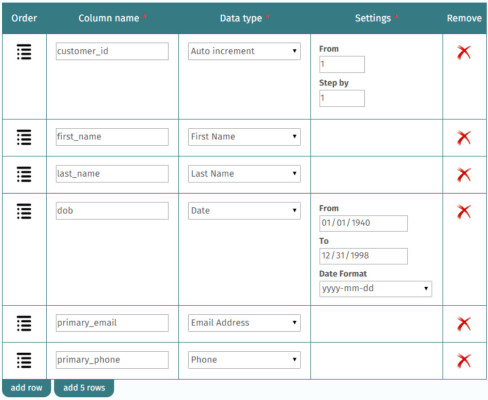
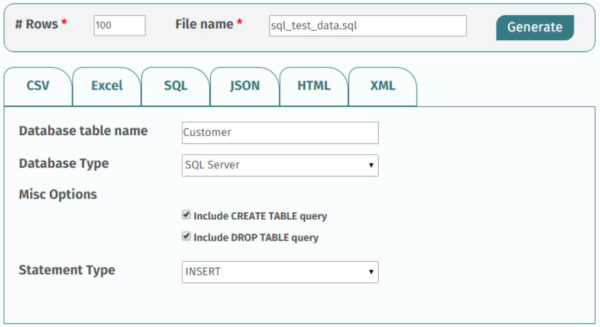
A website I really like to help generate data is over here. It’s really easy to set up data the way you want, and you get a lot of neat customization options for a wide variety of data types.

Cold Gettin' Dumb
Cold Gettin’ Dumb

You can have it generate the data to just about any format you can think of: CSV, Excel, SQL, JSON, HTML, XML, and you have all sorts of options for each type. It’s really awesome.

It's Like That
It’s Like That


Next time you need to generate some test data, consider trying this site out. It’s been really helpful for me on a bunch of occasions. If you like it, donate. There’s no such thing as a free table.

Thanks for reading!


Make Extended Events Great… Finally

SQL Server
13 Comments

SQL Server 2016 is adding some really awesome stuff

Not the least of which is a ton of super cool information in execution plans, and an Extended Events session to expose the same information for all queries. The details are detailed in detail over on this blog post from MS.

For those of you with clicking allergies, a whole mess o’ run-time information is being recorded in execution plans, and by a new Extended Events session called query_thread_profile. Microsoft may be changing, but they still pick horrible names for things. Query Thread Profile sounds like one of those stores the size of a closet that sells four t-shirts that all cost $1000.

Let’s play with Extended Events

You can’t see any of this stuff in the graphical execution plan yet, only the plan XML. It’s only in actual execution plans, and in the XE session. If you read that and paused made a face, yeah, the run-time stats aren’t in cached or estimated plans. With Query Store’s capabilities, it’s probably less necessary to jam this stuff into every DMV and cache, so I’m not all that bummed about it.

Anywho! If you’ve got SQL Server 2016 RC0 or later installed, you can plug this in and run some queries. You will probably need to change the session ID I’m filtering on here.

I’ll be running stuff against StackOverflow, as usual. If you write dumb enough queries, you can really keep a server (laptop) busy for a while. A quick word of warning: this session will store one row per node, per thread, per query. You can really quickly end up with a lot of data in here. You’ll see in a minute what I mean, but let’s run some queries first. You will be sorely disappointed with the data if you don’t run any queries.

Code to parse the session data will be at the end, as usual. Good grief, I have an “as usual” for Extended Events posts. Here’s what we get back.

Information Society
Information Society

That thing I said about nodes and threads, here’s a good example of it. The query plan and text columns will all look about the same, because we ran basically the same query two times twice. Node three of the first query used four threads. Remember that in every parallel execution, there’s one coordinator thread that doesn’t do any actual query work, that’s why you have 0-4 for thread IDs, totaling five.

Looking at the plan from our XML column confirms most of this. But again, cached plans offer less information overall. If you get the actual plan here, you’ll be able to see degree of parallelism information.

We're oh so parallel.
We’re oh so parallel.

Checking out the rest of the results, all the promised information is in there: CPU time, total time, rewinds, rebinds, row information, IO information, and so forth. Very powerful stuff. I hope this turns into an easy way to detect imbalances in parallel plans — when one or more threads process way more rows than the rest. That can really hurt you if, say, one thread ends up processing a million rows, and the rest aren’t doing anything. Not very parallel, that.

But one thing I think is really cool, and it’s not just information you can get from this XE session! You can get it from a couple others that I’ll blog about in the future, is what input(s) queries ran with when they’ve been parameterized, or run as stored procedures with inputs passed in. Not just the compiled value, the run-time value! Hooray. Think of all the nights and weekends you can spend fixing things! Just like I pictured the 21st century.

For our simple queries against the user table, here’s what you get for the execution plan. You can see it’s been, simple… simply… parameter… ized? There’s been simple parameterization. There we go. That’s the @1 smallint business going on in there.

You are going to need much bigger guns!

And here’s what the XE query brings back for query text.

Faced!
Faced!

More trouble coming every day

SQL Server 2016 is looking pretty promising in quite a few areas. I’ll be blogging about all the stuff that catches my eye, so stay tuned.

Thanks for reading!

Begin code!


Announcing sp_BlitzIndex® v3.0, sp_Blitz® v48, More

Lots of fun stuff out this week:

sp_BlitzIndex® v3.0 adds prioritized, streamlined results. We see so many index design disasters, and we know you have a limited amount of time. Doug Lane put a ton of work into focusing the output on the most important issues, things that are easy-to-fix and will have an immediate performance improvement, and we give ’em to you in a prioritized list. This does change the output columns list.

sp_Blitz® v48 adds lots of new checks and performance tuning. Julie Citro cleaned up the RECOMPILE checks, and Erik Darling added new checks for memory dumps, BPE enabled, Agent offline, multiple XE sessions running, better poison wait time alerting, and much more. Since we’re doing more and more kCura Relativity work on servers with hundreds of databases, we’ve done tuning so that almost all of the per-database checks can be removed with @CheckUserDatabaseObjects = 0.

sp_BlitzCache® v2.5.1 fixes a tricky bug. Nick Molyneaux fixed a particularly rare and tricky INT overflow bug (and no, the answer wasn’t BIGINT), and got himself a free Everything Bundle as a thank-you.

Download our First Responder Kit with all our scripts.


2016 Company Retreat Photos

SQL Server
3 Comments

This year, we gathered in Napa, California for our annual company retreat. Here’s some of our favorite memories:

Brent_Ozar_Unlimited_Napa_Retreat_2016_1

Brent_Ozar_Unlimited_Napa_Retreat_2016_2

Brent_Ozar_Unlimited_Napa_Retreat_2016_3

Brent_Ozar_Unlimited_Napa_Retreat_2016_4


Brent_Ozar_Unlimited_Napa_Retreat_2016_6

Brent_Ozar_Unlimited_Napa_Retreat_2016_7

Brent_Ozar_Unlimited_Napa_Retreat_2016_8

Brent_Ozar_Unlimited_Napa_Retreat_2016_9

Brent_Ozar_Unlimited_Napa_Retreat_2016_10

Brent_Ozar_Unlimited_Napa_Retreat_2016_11

Brent_Ozar_Unlimited_Napa_Retreat_2016_12

Brent_Ozar_Unlimited_Napa_Retreat_2016_13

Brent_Ozar_Unlimited_Napa_Retreat_2016_14

OLYMPUS DIGITAL CAMERA

Brent_Ozar_Unlimited_Napa_Retreat_2016_16

Brent_Ozar_Unlimited_Napa_Retreat_2016_17

Brent_Ozar_Unlimited_Napa_Retreat_2016_18

Brent_Ozar_Unlimited_Napa_Retreat_2016_21

Brent_Ozar_Unlimited_Napa_Retreat_2016_19

OLYMPUS DIGITAL CAMERA

Here’s to another fun year of working together and making a difference in the SQL Server community.


The Joy of Joining on NULLs

SQL Server
43 Comments

With all the trouble NULLs cause…

You’d think people would be more inclined to avoid them. Slap a NOT NULL constraint and a default value on your column and call it a day. I’m perfectly fine with bizarro world canary values. If it’s an integer column, some really high (low?) negative number. If it’s date-based, why not have it be the lowest value your choice accomodates?

But no, no, no. Instead of stopping the bleeding, developers tend to just avoid getting blood on the new carpet. Some of the worst performing queries I see have ISNULL(something, '') = ISNULL(somethingelse, '') either in the JOIN or WHERE clause. Still. To this day. In the age of the hoverboard, people are still putting functions where they don’t belong. And I know they have the internet.

But did you really mean that?

Most people will slap together their ISNULL manifesto and call it the dog end of a day gone by. But most of them don’t realize how that changes the logic of the query.

For instance, I see ISNULL(intcol, 0) = 0 pretty often. Most people are surprised that rows with 0 in them will also be included here.

But for joins, well, let’s look at what’s really going on.

Teeny tiny tables, appear!

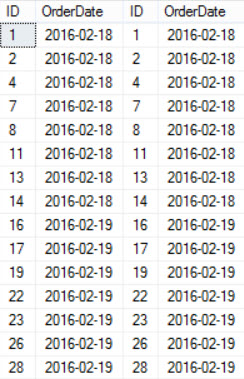
We don’t even need 100 rows for this, but whatever. Let’s join these muddy truckers. Here’s a pretty average inner join, on both ID and OrderDate. It returns 53 rows; all 100 IDs match, but the NULL dates prohibit some joins from occurring.

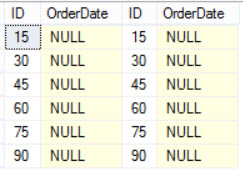
The results will be something like this. IDs are missing where dates are NULL. For us, that’s every 3rd column in t1, and every 5th column in t2.

Missing links
Missing links
Most people will think this will get them out of the woods, but it only fixes six of the NULL joins.

Hey! Something happened!

We’ll call them the FizzBuzz six, because…

Jammin' on the 3. And 5.
Jammin’ on the 3. And 5.

You guessed it, only numbers divisible by three AND five get joined on our canary value. If we switch over to a left join, we’ll at least see where the gaps are.

And uh, carry the... Whatever.
And uh, carry the… Whatever.

Since t1 is the left side, the gaps are every 3rd ID. With t2 on the right side of the join, every 3rd and 5th ID is NULL. To really get the full picture, we’ll need to switch to a full join. This is instructive because it gives us ALL the unmatched rows.

Check out the next three queries, and then why each is important.

For the full join with no WHERE clause, we get back 147 rows. In the next two queries, we filter out NULLs from each of the date columns.

In the second query, 33 rows are missing. That makes sense, because there are 33 rows between 1 and 100 that are evenly divisible by 3.

For the third query, there are 20 rows missing. If you’re not a Mathlete, yes, 20 rows between 1 and 100 are evenly divisible by 5.

This goes back to our unfiltered query: 200 – 20 – 33 = 147.

There are your missing 57 rows.

So what did you really need?

Think carefully about what you’re trying to return with your query. It’s highly unlikely that ISNULL solved your problem, and that you needed all matching results, plus matching results where BOTH are NULL. If you did, this would be a better way to do that:

Killing Join

Remember that joins describe the relationship between your tables, and the where clause describes what you want (or don’t want) to keep from the table relationship.

Think about the first time you stupidly got an apartment with someone you just started dating. You joined your furniture based on the rooms in the apartment, and then filtered out what you weren’t keeping.

If you were me, all your cool guy stuff ended up at the curb. Heckuva where clause, that was.

This post goes out to Paul White, who also wants his t-shirts back. You know who you are!

Thanks for reading!


Contest: SQL Server Theme Songs

Humor
244 Comments

During this month’s Senior DBA Class in Chicago, I started joking with the attendees about what songs they should play during common DBA job tasks, like:

  • Best Song to Play During a Server Outage
  • Best Song to Illustrate Your Predecessor’s Skills
  • Best Song to Accompany an Index Rebuild
  • Best Song to Play When Examining a Slow Query
  • Best Song to Play When Corruption is Found
  • Best Song for a SQL Server with 4GB RAM
  • Best Song to Play While a Cursor Runs
  • Best Song to Prepare for a SQL Server Service Pack

We wanna hear your ideas.

Rules:

  • To submit your songs, leave a comment here (BrentOzar.com) before Wednesday, March 23rd, 2016.
  • Your comment must include the category, the song & singer’s names, and the link to the song’s video. You can enter multiple times.
  • The winners will be chosen by us, the Brent Ozar Unlimited team, judged using completely unreliable and unpredictable methods. Winners will be announced within one week of the contest closing.
  • If multiple people submit the same song in a category, the winner will be the first one.
  • Taxes are the responsibility of the winners.
  • The winner in each category will get a training video class of their choice. (No bundles, just individual classes.)
  • The overall winner will get an Everything Bundle.

I’ll get you started with my favorite song to play during a server outage.

Update March 23rd – comments have been closed. Let the judging commence!


How to Split Strings with SQL Server 2016 & Newer

SQL Server
52 Comments

Before SQL Server 2016, you might have used a function like Jeff Moden’s DelimitedSplit8k function or Adam Machanic’s CLR version. (Aaron Bertrand has a huge post comparing performance of different string splitting methods, too.)

But there’s a new, faster game in town! SQL Server 2016 introduces a brand new STRING_SPLIT function:

Here’s how the results look:

Splitting strings in SQL with the STRING_SPLIT function

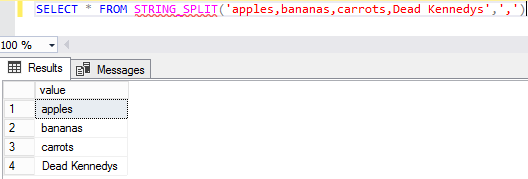
In that example, the ‘ ‘ part at the end is me passing in a space – my list is delimited with spaces. You can do a comma-delimited list, too:

Here’s how it looks:

Splitting a comma-delimited string in T-SQL

And is it faster? Heck yeah, it’s faster, as Aaron Bertrand proved.

You can also join to it with CROSS APPLY

Most people who need to split strings don’t just need to split one. They’ll need to do it a whole bunch of times. To call the function over a table column, you need to use CROSS APPLY.

Like most internal functions, you can’t readily get the code. That’s why I’m not going to do a benchmark test against other options here. It might be unfair if MS leveraged some fancy-pants super-secret-squirrel-sauce.

Getting row numbers using ROW_NUMBER

One thing I’ll point out though, is that if you’re used to using DelimitedSplit8K, you might miss the fact that it also returns a row number. This is particularly useful if you’re always interested in the Nth element of a returned string. In order to get that, you need to call it like so.

Since this function is of the inline table valued variety, you’re free to put all sorts of different predicates on the results it returns, which come back in a column called value. You can use ranges and not equal to constructs just as easily. For brevity I’m just throwing out a couple examples for equality and IN.

Where a lot of people will likely find this useful is for passing lists of values into a stored procedure or other piece of code. You can also perform normal JOINs to it.

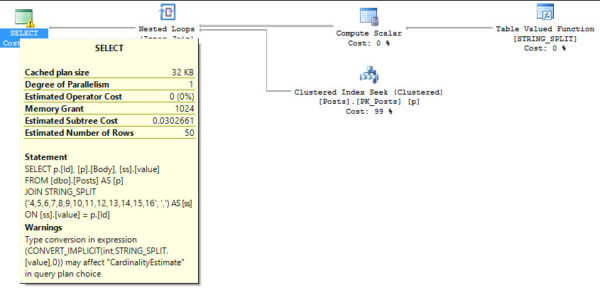
A couple words of warning here, though. Even though this works, if the string is passed in with spaces, there will be spaces in your results. This doesn’t change the join working for numbers, but it may for text data. The other issue, and the reason the numeric join works fine, is that it returns an NVARCHAR datatype. That means you’ll see implicit conversion warnings in your plan if your joins are performed like in this scenario.

My favorite band is The Monkees.

But hey, don’t let that stop you from having a good time. You can use the returned value in CASE statements as well.

If your needs are bit more exotic, and you need to split on CHARACTERS WHOSE NAME SHALL NOT BE PRINTED, you can pass in N/CHAR values as well.

And, of course, you can perform regular Inserts, Updates, and Deletes, with reference to STRING_SPLIT’s value column. Quick example with SELECT…INTO!

Using a prior SQL Server version?

Start with Jeff Moden’s function, but when you create it, name it as STRING_SPLIT. That way, when you move your code to SQL Server 2016 & newer, it’ll automatically work as-is, and it’ll even be faster.


Why most of you should leave Auto-Update Statistics on

Oh God, he’s talking about statistics again

Yeah, but this should be less annoying than the other times. And much shorter.

You see, I hear grousing.

Updating statistics was bringin’ us down, man. Harshing our mellow. The statistics would just update, man, and it would take like… Forever, man. Man.

But no one would actually be able to tell me how long it took. Though many stacks of Necronomicons were wheel-barrowed out and sworn upon for various incantations of “it was faster, we timed it” and “yes, performance improved” and “no, nothing else was different”.

What I would believe, because it’s totally believable, is that perhaps statistics updated, and some plans recompiled, and that recompiling the plans made things take longer.

Okay, fair enough. But no one ever says that. I wish someone would so I could take one look at an execution plan, verify that it looks like Nyarlathotep eating the NYC skyline, and say “yeah, that’d probably take a few to compile a plan for, let’s try to figure out how to break that into smaller pieces”.

Or, you know, something else reasonable.

Where am I going with this? Oh yeah. I measured. With Extended Events. So I’m extra angry about having to use those things again. XML is a hostile datatype. Don’t let the cute and cuddly creatures on those O’Reilly books fool you. Here’s the setup for the XE session.

Then, I ran the same type of workload that I ran to get my statistics thresholds for automatic updates. Except, of course, this time I’m only looking at how long each update took. Not when it happened. We already know that. If you want the query I used to parse the session data, it’ll be at the end of the post. I’d rather spend your ever-shortening attention spans getting to the point.

Here’s the point:

OOH! COLORS!
OOH! COLORS!

Updating statistics, even on some pretty good sized tables, didn’t really take that long. Everything is color-coded, so you can see the row count, how many rows were modified, etc. right next to the corresponding event time and timing. The statistics in red text have nothing to do with our tests, but I left them in there for completeness. They took absolutely minuscule amounts of time.

For the really big tables, which were all in the 10 million to 100 million row range, the statistics update itself never took more than 1 second. It stuck right around the half second mark aside from a few times, in the middle oddly, which I’m blaming on:

  1. AWS
  2. Clouds
  3. Disks
  4. Juggalos.

Now, how you proceed depends on a few things.

  • Do you update statistics often enough to not need to have automatic updates?
  • Are your update routines using FULLSCAN? (auto stats updates sample a percentage of the table)
  • Do you not have data movement during the day (presumably when recompiling queries would be user-facing)?
  • Can you not afford an occasional half second statistics update?
  • Do your queries not benefit from updated statistics?

If you answer yes, yes, no, no, no, you’re not just singing about a dozen Amy Winehouse songs at once, you also might be in a situation crazy enough to warrant turning auto-update stats off.

Thanks for reading!

Begin code!

Brent says: if you’re thinking, “Oh, but my tables have more than a hundred million rows, so stats updates would take way longer,” then it’s time to think about regularly updating your stats during maintenance windows anyway. As long as you’re doing that say, weekly, then what are the odds that you’re going to trip the stats update threshold during the week on a billion row table? And if you do, it’s time to think about partitioned views.


Unique Indexes and Row Modifications: Weird

Indexing, SQL Server
3 Comments

Confession time

This started off with me reading a blurb in the release notes about SQL Server 2016 CTP 3.3. The blurb in question is about statistics. They’re so cool! Do they get fragmented? NO! Stop trying to defragment them, you little monkey.

Autostats improvements in CTP 3.3
Previously, statistics were automatically recalculated when the change exceeded a fixed threshold. As of CTP 3.3, we have refined the algorithm such that it is no longer a fixed threshold, but in general will be more aggressive in triggering statistics scans, resulting in more accurate query plans.

I got unnaturally excited about this, because it sounds like the behavior of Trace Flag 2371. Anyone who has taken a bite out of a terabyte database probably knows about this one. Ever try waiting for statistics to automatically update on a billion row table? You’re gonna need a crate of Snickers bars. I’m still going to write about the 2016 stuff, but I caught something weird when I was working on a way to demonstrate those thresholds. And that something was how SQL tracks modifications to unique indexes. It freaked me out for, like, days.

We’re gonna need a couple tables

But they’ll be slightly different. It’s the only way to really show you how weird it gets inside SQL’s head.

Table 1 has a clustered PK on the ID column. It has a non-unique, nonclustered index on DateFiller and TextFiller.

Table 2 has the same structure, but the clustered PK is on ID and DateFiller. Same nonclustered index, though.

All this code works, I swear. Let’s drop a million rows into each.

Now let’s take a basic look at what’s going on in our indexes and statistics. We just created tables! And inserted a million rows! Each! That has to count for something, right? Here’s a query to check that kind of thing.

Holy heck why don’t we have any statistics? The indexes tracked our million modifications from the insert, but the statistics aren’t showing us anything. They’re all NULL! Right now, SQL has no idea what’s going on in here.

Empty inside
Empty inside

At least, until it has to. If we ran a query with a WHERE clause, an initial statistics update would fire off. Hooray. SQL is lazy. We can skip all that fuss and just update manually. I want a FULLSCAN! No fullscan, no peace. Or something.

If we go back to our DMV query, the stats columns will at least not be NULL now. It will show 1,000,000 rows sampled, and no modifications, and the last stats update column will have a date in it. Wonderful. You don’t need a picture of that. Conceptualize. Channel your inner artist.

Weir it all gets whered

Let’s think back to our indexes.

  • Nuisance has the clustered PK on ID
  • Nuisance2 has the clustered PK on ID, DateFiller
  • They both have non-unique nonclustered indexes on DateFiller, TextFiller

One may posit, then, that they could let their workloads run wild and free, and that SQL would dutifully track modifications, and trigger automatic updates when necessary. This is being run on 2014, so we don’t expect the dynamic threshold stuff. The rule that applies to us here, since our table is >500 rows, is that if 20% of the table + 500 rows changes, SQL will consider the statistics stale, and trigger an update the next time a query runs against the table, and uses those statistics.

But, but, but! It does not treat all modifications equally. Let’s look at some examples, and then buckle in for the explanation. No TL;DR here. You must all suffer as I have suffered.

We’ll start with an update of the nonclustered index on Nuisance.

We use @@ROWCOUNT to verify the number of rows that were updated in the query. Got it? Good. It should show you that 100,000 rows were harmed during the filming of that query. Poor rows.

Here’s the execution plan for it. Since we don’t have a kajillion indexes on the table, we get a narrow plan. There are some compute scalars to come up with the date adding, the replace, and the predicates in our WHERE clause. It’s all in the book. You should get the book.

ACTUAL EXE-CUTIE-PIE

At this point, if you run the DMV query, you should see 100,000 modifications to the nonclustered index on Nuisance. Not enough to trigger an update, but we don’t care about that in this post. It makes sense though, right? We updated 100k rows, SQL tracked 100k modifications.

What if we run the same update on Nuisance2? We still only update 100k rows, but our execution plan changes a little bit…

Split! Sort! Collapse! Fear! Fire! Foes!

And now we have TWO HUNDRED THOUSAND MODIFICATIONS?

What in the wide world of sports?

This is how SQL handles updates on columns with unique constraints, which we’ll get to. But let’s look at a couple other updates first!

If we go back and update just the ID column of Nuisance, something really cool happens.

Two is the loneliest number

It only took two modifications to update one million rows in the clustered index. We still had to update all million rows of the nonclustered index (+1, I’m guessing, to insert the new row for ID 1,000,001).

That’s because, if you’ve been paying attention, nonclustered indexes carry all the key columns of your clustered index. We updated the clustered index, so we had to update our nonclustered index. If we had multiple nonclustered indexes, we’d have to update them all. This is why many sane and rational people will tell you to not pick columns you’re going to update for your clustered index.

If you’re still looking at execution plans, you’ll see the split/sort/collapse operators going into the clustered index again, but only split and sort going into the nonclustered index update.

Oh, yeah. That update.

If we run the same update on Nuisance2, and check back in on the DMVs, it took a million modifications (+5 this time; due to the data distribution, there are net 5 new rows, since there are exactly five unique values in DateFiller). But at least it didn’t take 2 million modifications to update it, right?

I still can't do math.
I still can’t do math.

Bring it on home

Why are there such big differences in the modification counts?

For the update to the ID column of Nuisance, it only took two modifications. This is because of the split/sort/collapse operations.

Split takes the update, and, as the name implies, splits it into inserts and deletes. If you think about what it would look like to change 1 through 1,000,000 to 2 through 1,000,001, it really is only two modifications:

  1. Delete row 1
  2. Insert row 1,000,001

All the other numbers in the range already exist, in order. That’s what the sort does, basically. Orders the values, and whether they need an insert or a delete to occur. The final operation, collapse, removes duplicate actions. You don’t need to delete and re-insert every number.

Unfortunately, for Nuisance2, it results in doubling the modifications required. This is true for the clustered index update, where DateFiller is the second column, and the nonclustered index update, where DateFiller is the leading column.

It doesn’t appear to be the data distribution, or the data type of the column that causes the double working. As things stand in this demo, there are only five unique values in DateFiller. I tried where it was all unique, I also tried it as DATE, and BIGINT, but in each scenario, SQL tracked 2x the number of modifications to each index.

Takeaways

I’m all for unique indexes! I’m even okay with two column PK/clustered indexes. But be really careful when assigning constraints, and make sure you test your workload against them. While they may obviously help read queries, there’s some cost to maintaining them when modifying data.

What I didn’t mention this whole time, because I didn’t want it to get in the way up there, was how long each update query took. So I’ll leave you with the statistics time and IO results for each one.

Thanks for reading!

Brent says: go back and read this again, because you didn’t digest it the first time. Plus, trust me, the time it takes you to read is nowhere near what it took for Erik to get to the root cause on this. (We saw the play-by-play unfold in the company chat room.)


Learning How To Learn: Setting Priorities

SQL Server
2 Comments

Learning is hard

I hate command lines.

It’s rare that I get things right the first, or even tenth time. I have a horrible memory. Seriously. Most of the time I wouldn’t know what day of the week it is if it weren’t printed on my vitamin case. When it comes to SQL, especially commands or complicated syntax, I can only remember concepts. It’s rare that I don’t have to refer to notes or search for things. Ask me how many times I’ve restored a database and had to move files to different drives.

A thousand?

Probably.

But I can’t remember the the with/move/whatever commands.

What was I saying? Oh yeah. Learning.

Right now I’m putting my best feet forward and trying to learn more about Availability Groups, Oracle’s database platform, and R.

At the same time I’m trying to keep up with the latest and greatest from SQL Server. I also have a full time job and a wife and kid.

In case you’re wondering: yes, my blood type is Cafe Bustelo.

Prioritizing is key

Being a consultant, I have to know a lot about a lot of things. I don’t know what problems a client is going to come to us with. I also don’t know what the root cause of that problem is going to be. It’s a good thing I work with such smart people.

So how do I choose what I want to pursue next? I categorize things into buckets:

  • Current
  • Future
  • What-if

Current is stuff I have to know to stay good at what I’m doing now.

Future is stuff I have to know to stay ahead of where SQL Server is going.

What-if is what I want to know if SQL Server ever goes the way of white jeans.

That’s why training is great!

Our in-person and in-video training is a great mix of current and future. You need to know more about SQL Server, and you need the important stuff front and center.

Right now there’s SO MUCH to be excited about with SQL Server, and even more to learn. 2016 is going to introduce a lot of new features, and like most new things, there are going to be problems and limitations. Columnstore indexes finally look ready for the main stage, and Availability Groups are coming to Standard Edition. And of course, the Query Store will be upon us with a rather interesting limitation.

Now if only people would install it…

Thanks for reading!

Brent says: take care of the current issues on your Database Hierarchy of Needs, and then you’ll feel much more comfortable taking the time to learn the future and what-if stuff. This is what I get the most excited about around consulting – we get to take the time to learn stuff before folks start to deploy it.


Microsoft SQL Server is Coming to Linux.

Licensing, SQL Server
29 Comments

Two things: SQL Server is coming to Linux, and no, this isn’t April 1st, although the meeting minutes kinda read that way.

Let’s zoom back for a second: if you want to expand an existing business, you have two good options:

  1. Sell a new product to your existing customers
  2. Sell your existing product to new customers

For years, Microsoft focused on option 1 by adding new features in higher-edition boxes to encourage customers to step up their licensing fees. SSIS, SSRS, SSAS, PDW/APS, Always On Availability Groups, System Center Advisor (aka Atlanta), PDW, Utility Control PointDACpacks, the consolidation appliance, Hekaton, etc. In SQL Server 2016, that effort continues with R and PolyBase.

I haven’t shied away from calling these efforts as I see ’em. That’s why you’re here, dear reader – I give you my honest feedback, and I don’t polish turds.

So it’s time for option 2: selling SQL Server to new customers.

A few years back, Microsoft unveiled a cloud-based version of SQL Server that’s known today as Azure SQL DB.

That worked. New customers used it. It was a cheaper way to get in the door.

In 2016, the way you get your existing product in front of new customers fast is to put it in a Docker container. It’s like a virtual machine, but it’s lighter weight – it includes just your app and its dependencies. However, the Docker ecosystem is all about Linux-based applications.

That means SQL Server has to run on Linux.

Right now, it’s basically a thought exercise.

There are a whole lot of questions that Microsoft has to answer before people will even consider this as a valid deployment option, like:

  • How will it be priced? The open-source market is notoriously fickle about paying for closed-source products, although they’re more open to paying for support and services.
  • How will it perform? The Docker audience will tolerate the performance overhead of containers, but people who want to run it directly on Linux will be comparing this directly to PostgreSQL.
  • What features will it have? The press release uses careful wording of “core relational database capabilities…in mid-2017”, which means the first version will suffer from the same feature limitation challenges Azure SQL DB had at first.
  • How will it be supported? If we’re honest, the SQL Server support experience has been tough even with just a single OS. The Linux community won’t embrace “have you rebooted?”
  • How will improvements be handled? The open source community is super-interactive, and they simply won’t tolerate the Microsoft Connect bug reporting experience.
  • How will deployments and updates work? Linux users want to see apt-get mssql, but traditionally the SQL Server installation and patching process has been much more challenging.
  • Will it be open source? Before you say this is unthinkable, remember that .NET has gone open source.

SQL-Loves-Linux_2_Twitter-002-640x358None of these answers exist today.

None of them.

What we have right now is a press release with vague wording. It makes for a really fun thought exercise, though.

Will it succeed?

I believe Microsoft can get the engineering right. If we were talking about the consumer devices group that produced the Surface RT, I’d say absolutely not. However, this is the SQL Server team, and I bet they’re going to nail it. I’m excited to see what they produce, and I bet it’s going to lead to a better experience for SQL Server on Windows too.

However, I think this is going to be too little, too late for the mid-2017 Docker and Linux database market, especially if Microsoft takes the same $2k-$7k per core pricing approach. I know what Microsoft is thinking: this is still cheaper than Oracle. But we’re talking mid-2017 before the first version ships – so it’s a race between a very mature PostgreSQL (which has the hearts and minds of the open source database community) vs a brand spankin’ new SQL Server (which has one hell of an uphill battle).

I’m really excited to see the race take shape.


SQL Server 2016 Installation Screenshot Tour

SQL Server
24 Comments

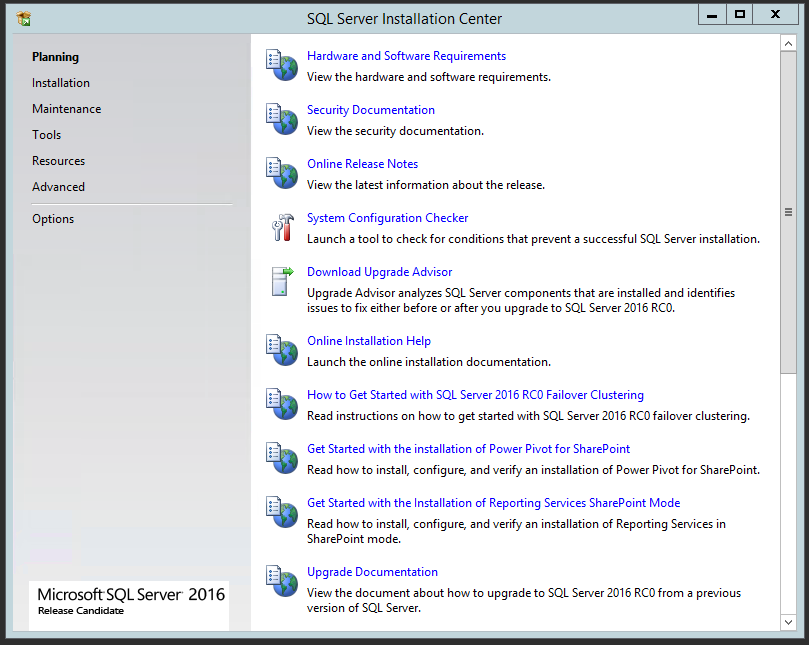
SQL Server 2016 Release Candidate 0 is out. Here’s what the installation process looks like:

Installation Center - not much new here until you click on the Installation tab
Installation Center – not much new here until you click on the Installation tab

Note that on the Installation tab, though, there’s a new line for “Install SQL Server Management Tools.”

Management Tools got promoted (or is it voted off the installation island?)

This is the continuation of last year’s separate SQL Server Management Studio installation process, with its own check-for-updates process separate from SQL Server’s servicing.

For years, some admins have insisted that the management tools should never be installed on the SQL Server itself, and that it should only be administered remotely. I don’t really have a dachshund in that race, but before you get too excited, note that SSMS wasn’t installed by default to begin with. If somebody wanted to check that box, they’ll also be willing to run a separate setup to get SSMS on the server.

I’m going to skip a few screens that haven’t changed, but here’s the new list of features:

SQL Server 2016 feature installation

Note, Management Studio is gone, with Advanced Analytics and PolyBase Query Service showing up.

One thing that still hasn’t changed, in the fine prerequisite print on the right side: you still have to manually install the .NET Framework v3.5. Database admins have been complaining about this for years. The installer still fails if you don’t manually install this first.

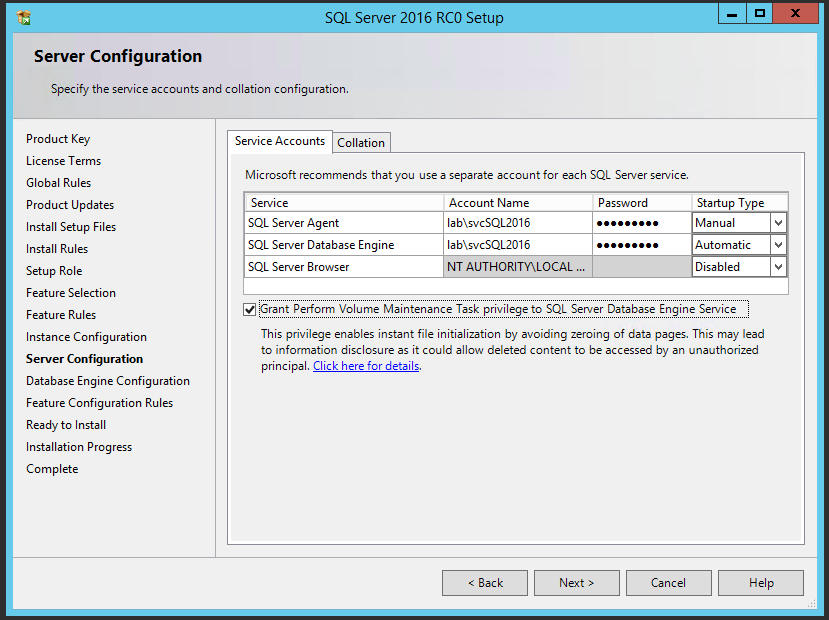
After fixing that and passing setup validation, there’s a new checkbox for enabling Instant File Initialization:

Instant File Initialization permissions

This just grants the necessary permissions to the account you picked during setup. It’s not on by default, which is probably a safe security decision.

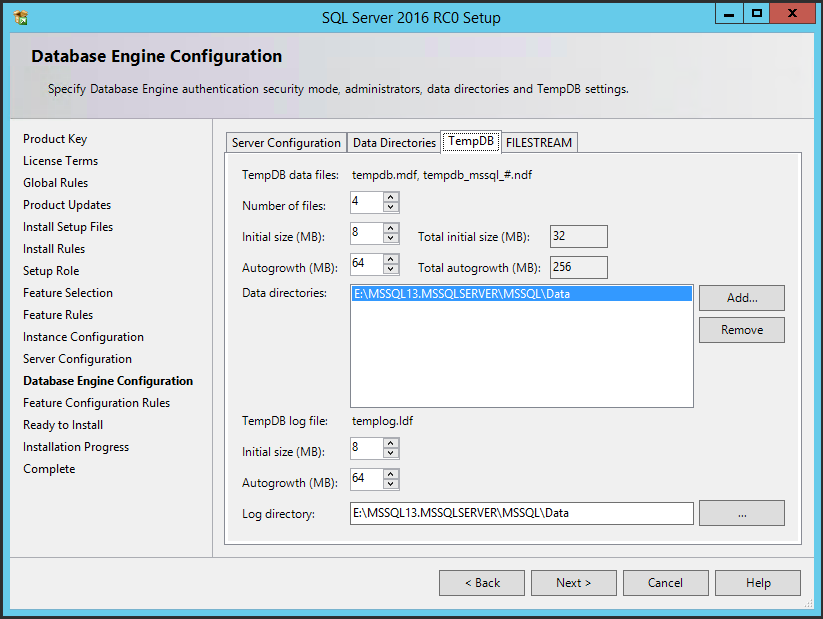
Next up is TempDB – and note how I capitalized that, dear reader:

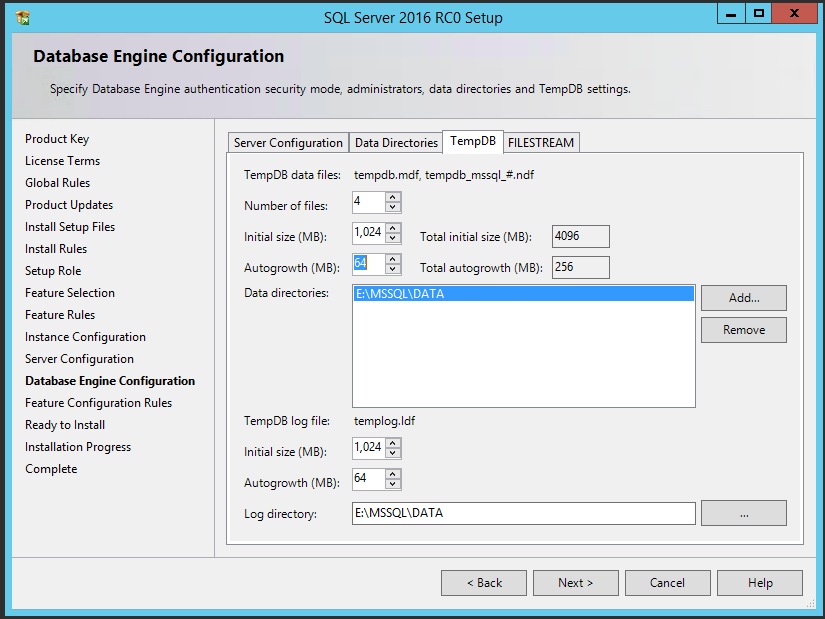
TempDB default configuration on a 4-core VM

Forget the file configuration – the big news here is that Microsoft agrees with me: when discussing the public toilet, it needs a capital T for TempDB.

Also news but not nearly as cool, Microsoft automatically adds more TempDB files by default – the 4 file quantity was picked automatically for me here, as were the 8MB file sizes and 64MB autogrowth increments.

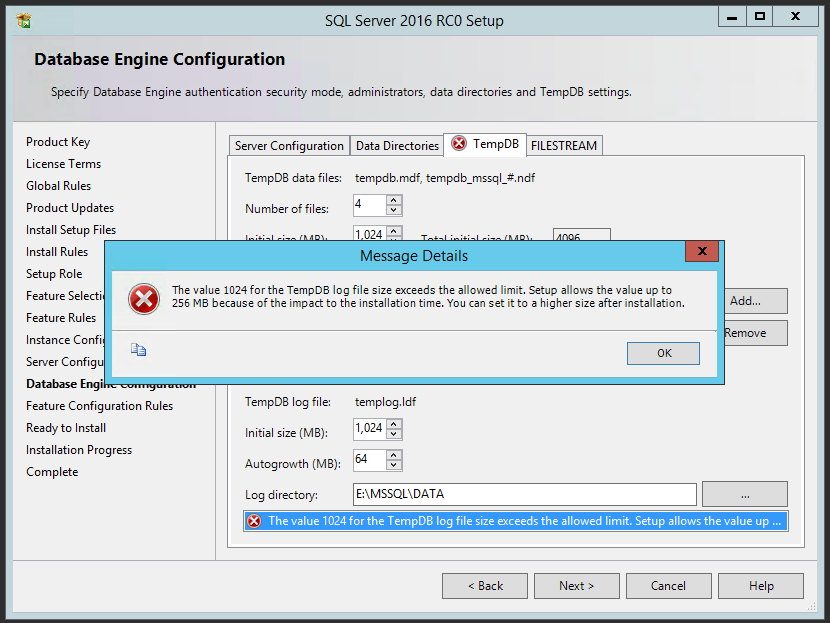
Because I work with data larger than a single digital camera picture, I upsized my files, but you can only go so far:

TempDB configuration

You can put up to 1GB for the data and log file sizes – if you try anything higher, the GUI just silently revises your numbers back down to 1GB. Interestingly, if you hit Next, even a 1GB log file isn’t allowed:

256MB should be enough for anybody

256MB is BS. If you agree with me, vote here.

Carrying on – after installation finishes, here’s what your start menu looks like:

SQL Server 2016 start menu

Yes, 2008. Whatever. Next up, let’s use the management tools installer. While the engine’s installer has grown more complex, the management installer goes in the exact opposite direction:

To install or not to install, that is the only question

No options – you’re just either in, or you’re out. During installation, the part that takes the longest time by far is the VS 2010 installation:

Excellent vintage
Excellent vintage

And we’re done! Off to play with the new features.


Database-Scoped Configurations Replace Trace Flags.

SQL Server
23 Comments

Trace flags are special switches that, when you flip them, enable different behaviors in your SQL Server. Back in the SQL Server 2000-2005 days, these were super-rare undocumented tricks that were handed out by Microsoft support to fix rare cases.

Over time, some trace flags have become so commonplace that they worked their way into some best-practices setup checklists, like:

  • Trace flag 1118 to reduce SGAM contention
  • Trace flag 1117 so when a single file in a database filegroup needs to grow, they all grow together
  • Trace flag 2371 so statistics are recomputed less rarely as tables grow larger
  • Trace flag 4199 to get new query optimizer hotfixes that produce different query plans
  • Trace flag 8048 enables SOFT NUMA when SQL’s NUMA-awareness code doesn’t work on larger systems
  • And a whole lot more trace flags are out there

But trace flags have two big problems: trace flags take effect across the whole server, and most folks aren’t comfortable enabling them.

SQL Server 2016’s New ALTER DATABASE Commands

SQL Server 2016 does away with these unintuitive trace flags by adding new ALTER DATABASE commands:

ALTER DATABASE SET MIXED_PAGE_ALLOCATION ON (or OFF, which is the new default behavior)

ALTER DATABASE MODIFY FILEGROUP [myfilegroup] AUTOGROW_ALL_FILES (or AUTOGROW_SINGLE_FILE, which is still the default)

Plus, file sizes and growths have new sensible defaults: both data and log files default to 8MB in size, and auto-growth is 64MB. (One could argue that 8MB is still on the small side, but some software-as-a-service companies with one client per database still manage to pack thousands of tiny databases per instance.)

So far, so good: the trace flag behaviors are well-tested, almost as if they’ve been in beta for a decade. It’s just that now some of the good ones are on by default, like 1118 and 2371, and the rest are easier to configure safely.

Even Better: DB-level MAXDOP, Parameter Sniffing, Hotfixes

SQL Server 2016 brings a few new fun options with a new command, ALTER DATABASE SCOPED CONFIGURATION. Now, for each database, you can set:

  • MAXDOP – the value of your choice
  • LEGACY_CARDINALITY_ESTIMATION – on or off
  • ONLINE_OPERATION_DEFAULT – on or off
  • PARAMETER_SNIFFING – on or off
  • QUERY_OPTIMIZER_HOTFIXES – on or off

This is simply awesome for shops that have to cram different groups of databases and workloads into the same SQL Server – especially with complex Always On Availability Group deployments with multiple AGs and listeners.

New database scoped configuration options in SSMS 2016

Changes to auto update stats thresholds in SQL Server 2016

SQL Server
11 Comments

TL;DR

As of CTP 3.3, it’s the same behavior as Trace Flag 2371, in 2008 R2 SP1 and onward. That basically means that the bigger your table is, the fewer rows need to be modified before an automatic statistics update occurs.

Slightly longer…

The change was announced over here. At first I thought, woah, cool, they thought about this and made big changes. But no, much like Trace Flags 1117 and 1118 being enabled for tempdb, it’s just…

Remember in Mortal Kombat, when getting to fight Reptile made you cool? Then Mortal Kombat 2 came out, and he was a playable character, and everyone would call your wins cheap if you picked him? That’s sort of what this reminds me of. If you’re new to SQL, you probably won’t appreciate the differences these Trace Flags make. If you’ve been using it for a while, you’ll probably start sentences with “back in my day, we had to add startup parameters…” and chuff off to write miserably long blog posts about unique indexes.

As of 02/23/2016, it sounds like Trace Flag 8048 is also enabled by default in 2016. See quote about soft NUMA at the link.

Moderate testing

I ran tests on some fairly large tables. I tried to run them on tables from 100 million to 1 billion rows, but I blew out the data drive of our AWS instance. So, uh, if you have a bigger server to test stuff out on, be my guest.

The basic concept was:

  1. Load a bunch data into a table
  2. Update it 1000 rows at a time (I know, I know, but updating less than that took FOREVER)
  3. Run a query against it to invalidate stats
  4. If they reset, add a bunch more data and start over

What I ended up with was, well…

Eighth place.
Eighth place.

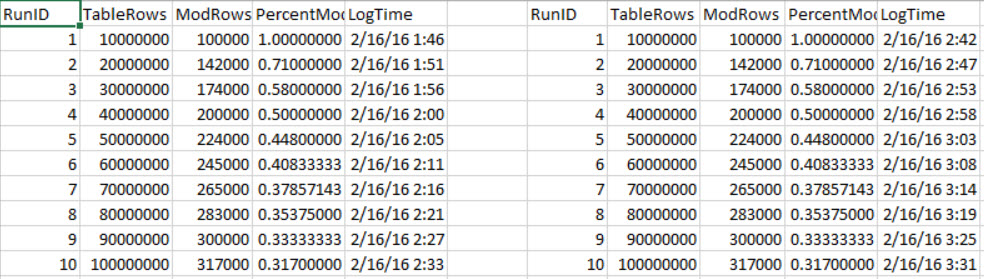
Here’s an abridged version of 10-20 million and 30-40 million rows, and how many modifications they took before a stats update occurred. If you follow the PercentMod column down, the returns diminish a bit the higher up you get. I’m not saying that I’d prefer to wait for 20% + 500 rows to modify, by any stretch. My only point here is that there’s not a set percentage to point to.

And, because you’re probably wondering, turning on Trace Flag 2371 in 2016 doesn’t make any difference. Here’s what 10-100 million look like, in 10 million row chunks.

And then SQL crashed.

If you can guess which side TF 2371 was on for, I’ll give you one merlin dollhairs.

Great expectations

This improvement is certainly welcome as a default, though it’s not all that ‘new’. My 2014 instance comes up with the same thresholds with 2371 enabled. Unless you’re working with pretty big tables, or used to managing statistics updates on your own, you likely won’t even notice the change.

Thanks for reading!

Brent says: It’s kinda like Microsoft is treating trace flags as alpha/beta tests for new features now. That’s right in line with how .com startups use feature flags.


My Favorite System Column: LOG_REUSE_WAIT_DESC

Hidden away in master.sys.databases is one of the coolest diagnostic tools you might ever need:

This spiffy little snippet will tell you why each database’s log file isn’t clearing out. Possible reasons include:

  • Log backup needs to be run (or if you could lose a day’s worth of data, throw this little fella in simple recovery mode)
  • Active backup running – because the full backup needs the transaction log to be able to restore to a specific point in time
  • Active transaction – somebody typed BEGIN TRAN and locked their workstation for the weekend
  • Database mirroring, replication, or AlwaysOn Availability Groups – because these features need to hang onto transaction log data to send to another replica

That’s it. That’s the whole blog post. Listen, they can’t all be 2000-word masterpieces.


Moving Databases with ALTER DATABASE

SQL Server
20 Comments

True story

A long time ago, I had to actually do stuff to databases. One thing I had to do was move data files around. Maybe some knucklehead had put system databases on the C: drive, or a LUN was filling up, or we got a new LUN. You know, whatever. Natural curiosity oft leads one to the internet. If one does not succumb to food and cats, one may find useful information. Or anonymous message boards. Sort of a toss up. What I found was this article. Weird, right? 2009. Brent said to use ALTER DATABASE. It’s new and pretty and smart people do it. What Brent didn’t do was explain how it’s done. Or link to how it’s done. I felt cold and alone. Abandoned. Afraid. “Great post, Brent”, I said sarcastically, and set out to figure out how to work this magic on my own.

I turned to BOL, the destination of all self-loathing people. If you scroll down to the bottom, way down at the bottom, the syntax is there. Of course, moving system databases is a horse of a different color. But hopefully you don’t need that one. For user databases, it’s rather more simple:

  1. Alter the file metadata to the new path
  2. Set the database offline
  3. Physically move the file
  4. Set the database back online

Easy enough!

Run ALTER DATABASE with the new location. We’re moving the data file. If we were moving the log file, it would probably end in “_log” or something. You can find all this information in sys.master_files, except where you’re moving the file to. Just don’t actually move it to C:\Whatever. You may run into problems later. Also, you need the filename. If you don’t include it, SQL won’t complain until you try to set the database back online. Yay!

This is the part that you need to think through. People have to be cool with the database being offline while you move the physical file. This is not a seamless transition. If you’re moving large enough databases, you may want to consider an alternate method, like Mirroring or Log Shipping. They take more work, but you get the whole near-zero-downtime thing out of it. You may want to stage a mock file move to test LUN to LUN copy speeds. See how many GB you can move per minute. That way you’ll at least be able to estimate how long the outage will last. Assuming all that is cool, go ahead and take the database offline.

Now you gotta hurry up and get that file moved. How you do that is up to you. You may prefer to just use Windows Explorer, since it has a status bar, and tells you copy speeds. Good stuff to know if people ask for updates, right? Just to fill space, here’s a PowerShell command. I still hate PowerShell.

Once that finishes, put your database back online.

If you find yourself having to do this often, or if you have to migrate a group of databases, it’s probably worth scripting out.

There you have it

It’s that easy to do. Just make sure you have adequate backups, in case something goes wrong. I take no responsibility for what happens to your data files when they copy across your SAN, or anywhere else.

Thanks for reading!


Out of Office: Time For the 2016 Brent Ozar Unlimited Retreat

SQL Server
3 Comments
Last year's company retreat on the Oregon coast
Last year’s company retreat on the Oregon coast

Thank you for your web visit. Your eyeballs are very important to us. However, we’re out of the office and will be back on Monday, March 7, 2016.

During this period we will have limited access to our email. We’ll still have full access to Twitter, Facebook, and Instagram. We apologize in advance about that, because we’re going to be posting a lot of photos about this year’s company retreat.

This year, we’re heading to wine country – scenic Napa Valley, California. The agenda includes learning about wine, watching people cook, hiking, playing Cards Against Humanity, going on a hot air balloon ride (well, some of us), getting tattoos (even less of us), and oh yeah, talking about our SQL Server business.

For immediate assistance, please contact Microsoft Support at 1-800-642-7676.


How often should I run DBCC CHECKDB?

There’s an old DBA saying…

May you already have a backup restored
A half hour before your boss knows there’s corruption

What? There’s no such thing as old DBA sayings? Well, maybe if you all said something other than “no” once in a while, you’d be more quotable. Hmpf.

Anyway, this is a serious question! And there are a lot of things to consider

  • Do I have a different RTO for corruption?
  • What’s my backup retention policy?
  • How much data do I have?
  • How long are my maintenance windows?
  • Do I have a server I can offload checks to?

Recovery Time Objectification

When you’re setting these numbers with management, you need to make them aware that certain forms of corruption are more serious than others, and may take longer to recover from. If system tables or clustered indexes become corrupt, you’re potentially looking at a much more invasive procedure than if a nonclustered index gets a little wonky — something you can disable and rebuild pretty easily.

Either way, you’re looking at an RTO of at least how long it takes you to restore your largest database, assuming the corruption isn’t present in your most recent full backup. That’s why backup checksums are important. They’re not a replacement for regular consistency checks by any means, but they can provide an early warning for some types of page corruption, if you have page verification turned on, and your page is assigned a checksum.

If you use a 3rd party backup tool that doesn’t allow you to use the backup checksum option, stop using it. Seriously, that’s garbage. And turn on Trace Flag 3023 until you find a replacement that does.

Notice I’m not talking about RPO here. But there’s a simple equation you can do: the shorter your RTO for corruption, the longer your RPO. It’s real easy to run repair with allow data loss immediately. The amount of data you lose in doing so is ¯\_(?)_/¯

Which is why you need to carefully consider…

Backup retention

The shorter the period of time you keep backups, the more often you need to run DBCC CHECKDB. If you keep data for two weeks, weekly is a good starting point. If you take weekly fulls, you should consider running your DBCC checks before those happen. A corrupt backup doesn’t help you worth a lick. Garbage backup, garbage restore. If your data only goes back two weeks, and your corruption goes back a month, best of luck with your job search.

Of course, keeping backups around for a long time is physically impossible depending on…

How much data YOU have

The more you have, the harder it is to check it all. It’s not like these checks are a lightweight process. They chew up CPU, memory, disk I/O, and tempdb. They don’t cause blocking, the way a lot of people think they do, because they take the equivalent of a database snapshot to perform the checks on. It’s transactionally consistent, meaning the check is as good as your database was when the check started.

You can make things a little easier by running with the PHYSICAL ONLY option, but you lose out on some of the logical checks. The more complicated process is to break DBCC checks into pieces and run them a little every night. This is harder, but you stand a better chance of getting everything checked.

Especially if you have terabytes and terabytes of data, and really a short…

Maintenance window

Are you 24×7? Do you have nights or weekends to do this stuff? Are you juggling maintenance items alongside data loads, reports, or other internal tasks? Your server may have a different database for different customer locations, which means you have a revolving maintenance window for each zone (think North America, Europe, APAC, etc.), so at best you’re just spreading the pain around.

Or you could start…

Offloading checks

This is my absolute favorite. Sure, it can be a bear to script out yourself. Automating rotating backups and restores can be a nightmare; so many different servers with different drive letters.

Dell LiteSpeed has been automating this process since at least version 7.4, and it’s not like it costs a lot. For sure, it doesn’t cost more than you losing a bunch of data to corruption. If you’re the kind of shop that has trouble with in-place DBCC checks, it’s totally worth the price of admission.

But what about you?

Tell me how you tackle DBCC checks in the comments. You can answer the questions at the beginning of the post, or ask your own questions. Part of my job is to help you keep your job.

Thanks for reading!

Brent says: if you’re using NetApp SAN snapshots, they’ve also got great tooling to offload corruption checks to your DR site. Licensing gotchas may apply – for both SQL Server and NetApp writeable snaps.