Blog

What’s On My Bookshelf?

15 Comments

After I unpacked my new home office in Chicago, I was struck by the oddball contents of my bookshelf.  You might get a kick out of the list of books I’ve kept around over the years despite moving from state to state.  I’m merciless about discarding books as soon as I’m done reading them, so anything that’s survived has to be pretty good:

My Bookshelves
My Bookshelves

Top shelf, from left to right:

Bottom shelf, from left to right:

  • 101 Salary Secrets – because of my frequent blog posts about the HR side of database administration, I get a lot of questions on the salary topic.  This book crams a lot of info into a tiny package.
  • The Stand – epic work by Stephen King that really captured my apocalyptic imagination.  I’ve read almost everything King wrote, but I keep going back to reread The Stand.
  • A Heartbreaking Work of Staggering Genius – my sister gave me this a few years ago and said it reminded her of me.  I still haven’t finished it, but I love it.
  • So You Wanna Be a Rock & Roll Star – by the drummer of Semisonic, a flash-in-the-pan band I really liked.  Great book, too – reminds you that fame is fleeting.
  • The Art of War – by Sun Tzu, translated by Samuel Griffith.  I use lessons from this book at least once a week, and this would be the other of the two Brent-making-books.
  • Elements of Style – trying to improve my word skillz.
  • Getting Things Done – awesome productivity book.
  • Pygmy – by the author of Fight Club.  Couldn’t resist the cover and the author’s resume, and stashed this away for my next cruise.
  • The Whuffie Factor – everything you need to know about the way the world will work five years from now.  The job market is already changing, and this book isn’t just for businesses.  It’s for IT people too.
  • Unorthodox Strategies from the Art of War – the problem with picking up The Art of War is that it can be cryptic and tough to imagine as relevant to our daily corporate lives.  Sawyer helped me get into The Art of War for the first time.
  • Financial Peace – I declared bankruptcy back in 1996, and I had one hell of a tough time figuring out how to manage my finances.  Dave Ramsey’s book gave me the answers, and I’ve been really happy ever since.  The advice ain’t easy to implement, but the really good things in life take hard work.
  • I Am America (And So Can You) – I really believed my first book would be something like Stephen Colbert’s, a big package of hilariously strung-together falsehoods.  Maybe it’ll be my second.  Books like this call to me because there’s none of that fact-checking crap.
  • Talent Is Never Enough – it’s pop psychology motivational crap, but it’s right.  (Note: it has come to my attention that this book is not in the bookshelf photo.  That’s because it’s currently in my bathroom – I rotate books through there regularly.  Probably too much information, but somebody’s going to notice.  Just so you’ve got proof that I own it, I’ve taken a picture of myself with the book before.)
  • Wikinomics: How Mass Collaboration Changes Everything – you can’t believe everything you read, especially in this book.  It’s filled with dot-com companies that were destined to be The Next Big Thing, and now half of them have gone belly-up.  Good read though.
  • The Non-Runner’s Marathon Trainer – you can judge this book by the cover.  I’d never done any running before picking up this book, and it got me to my first 18-mile run.  It teaches you everything you need to know to train for a marathon – and I mean everything.
  • The Ultimate Hitchhiker’s Guide – most geeks probably read this in high school, then discarded it.  I reread parts of it periodically to remind myself of the kind of writing I strive for.
  • Tax Savvy for Small Business – I started an LLC last year and I keep kicking myself for not doing it sooner.  Unbelievable tax paybacks.

Now, having seen my oddball bookshelf, are there any books you’d recommend to me or the readers?



Using SQL Server Without Monitoring Software is Like Overdriving Your Headlights

Monitoring, Wait Stats
1 Comment

The strength of your car’s headlights, the speed of your reactions, and the power of your brakes determine how fast you can drive safely at night.

Deer in the Headlights

Your headlights give you enough warning time to hit the brakes and stop your car before you hit an object. The better your headlights, the more distance you can see ahead, and the faster you can drive with confidence.

Let’s say your car’s headlights illuminate 350 feet in front of your car. Sure, you can see reflective signs from much farther away, but if a pile of lumber fell off a truck on the highway, it’s not going to be covered with reflective paint. To find out whether that 350 foot distance is far enough, we need to know three things:

  • How fast is your reaction time? – What’s the length of time you see the pile of lumber until the time your foot starts to move on the brake pedal? This length of time is affected by your alertness, your training, your muscle speed, and the iPhone you’re playing with while you’re driving.
  • How fast is your car going? – At 60 miles per hour, your car traveled 132 feet in the 1.5 seconds it took before your foot began to push the brake pedal. The faster you’re going, the more distance your car will travel.
  • How good are your brakes? – A Porsche 911 can stop from 60mph in 100 feet. If you’re going faster, or if your brakes aren’t as good as a 911’s, then you’re going to eat up more distance.

These factors combine to determine your safe stopping distance. Michael Schumacher might be able to drive at 100mph in a Ferrari using candles for headlights. You, however, are pushing the limits of your talents at 30mph even with those expensive fake xenons you installed on your Civic Si. Err on the wrong side of this formula, and you’re doing what’s called overdriving your headlights. People often learn this when the state trooper fills out the forms explaining why they hit the deer.

Monitoring and Forecasting: SQL Server’s Headlights

Most of us don’t bother with predictive analysis – we gather statistics with Perfmon, the DMVs, wait stats, and so on, but we’re looking in the rear view mirror – not ahead of us. Heck, some of us don’t even go that far; we wait until our phone rings and the users scream about dead bodies – uh, I mean, dead queries – lying around. We don’t have the time to project future growth and capacity needs because it’s a painful, time-intensive process with the native tools.

Serious performance tuning, though, requires looking ahead. Imagine being the head DBA for the New York Stock Exchange or NASDAQ systems: you simply can’t afford to wait until your end users call about lag times. You have to predict performance needs as far ahead as possible in order to design and implement an infrastructure to support those needs.

Unfortunately, there’s no quick and easy way to forecast how much our SQL Server CPU, memory and storage needs are going to grow in the next twelve months. DBAs can build their own data warehouses with performance data sourced from the DMVs, wait stats, SQL 2008’s Performance Data Warehouse, or Perfmon counters. To anticipate future needs and look down the road, the DBA would build time-based reports that use historical information to predict the future. This is left as an exercise for the reader.

Another approach is to use your company’s financial metrics to predict system loads. DBAs in the financial industry often relate their system loads to stock trading volumes. They know that at a certain level of stock trading, their systems will have a certain level of loads. Instead of guessing SQL Server load directly, they can look at their financial analysts’ predictions of future stock volumes and use those to predict SQL Server activity. Your business may have similar transaction volumes – sales quantities, employee head counts, or widget production rates – that can help you guesstimate future database loads.

The farther down the road you can see, the more time you buy for reaction and braking.

Reaction Times in the DBA World

Reaction times measure the lag between your monitoring software’s alerts and your first action. Take one step backward if you’ve got an Outlook rule set up to automatically move all performance alerts out of your inbox and into another folder for later perusal. Uh-huh, I thought so. If you want to get a job driving the Ferraris of SQL Servers, you’re going to need to break the rules – specifically, your Outlook rules. Michael Schumacher didn’t win titles driving cars with automatic transmissions, and you can’t do serious SQL Server performance tuning by ignoring alerts.

The first challenge is to reduce false alarms coming from your monitoring system. Reconfiguring your monitoring system can be a constant challenge, especially if your monitoring systems are controlled by a different group in the company. This is one of the things I like about SQL Server monitoring software – the dashboard metrics show a historical high/low range, so you’re only alerted when a metric is outside of the established norm for a given server. Some even refine their baselines based on the day of week and time of day, because a CPU load metric that’s perfectly normal for noon on a workday might be completely out of the ordinary on Saturday at 9AM.

The second challenge is to be able to act faster when the alert comes in. In my experience, reaction times seem to be grouped in sizes of companies:

  • Small companies with one DBA – as soon as the DBA sees the alert, they either know right away exactly what action they’re going to take, or they have to hit the web to figure things out. They don’t have more senior DBAs on staff who may have seen a particular problem before, so some problems take longer than others to research before reacting.
  • Midsize companies with a couple/few DBAs – one DBA might be on call, but they may not know exactly what action they’re going to take right away. They may need to get approval from other DBAs before acting, or they may have security restrictions that stop them from taking serious actions like rebooting servers.
  • Large enterprises with multi-tier support groups, rigid policies, and run books – some problems are handled autonomously by help desk staff or first level support, and more serious problems are quickly escalated to the appropriate staff.

Each type of company has different solutions for reducing reaction times, and this sounds like a great idea for a future blog post series.  Note to self…

Braking Times: The Time Required to Fix Things

Just Like The Ones On Your Neon.

Just as race teams improve their stopping power by using new tools like ceramic brakes, you can use more advanced technology to help you solve problems faster. Some of the examples include:

  • Clustering improves your reaction time when dealing with broken server hardware.
  • Database mirroring helps you recover from a borked SAN or page corruption quicker.
  • SQL Server Enterprise Edition helps your database mirroring become even more powerful by compressing the data and by fetching corrupt pages from the mirror.
  • Virtualization can give you high availability for servers that might not ordinarily be able to afford HA.

Just like ceramic brakes, which can cost upwards of $10,000, none of these technologies are free. If you wanna go seriously fast, you gotta spend serious money, despite what you heard from that guy selling “Type R” stickers on eBay. Start by improving your reaction times first, because that’s free.


Another Giveaway: Keyboards and Mice

48 Comments

Dayton Brown and Netster won themselves 120gb USB hard drives a couple of weeks ago in my Clean Brent’s Office Contest, but now that I’m settling into my new home office in Chicago, I’m finding even more unneeded gear lying around.

If Only I Had Something Insightful to Type

I have no clue how this happened (well, that’s not true – I have a pretty good clue, but I’m too ashamed to admit my stupidity on the blog) but I’ve found myself with half a dozen keyboards and another half-dozen mice.

Drawing time!

Prize Package #1: a Microsoft Natural Ergonomic Keyboard 4000 and a Microsoft Wireless Laser Mouse 6000

Prize Package #42: a Microsoft Natural Ergonomic Keyboard 4000 and a Microsoft Wireless IntelliMouse Explorer 2.0

Prize Package #11: an Apple Bluetooth keyboard and a Microsoft Wireless Presenter Mouse 8000.  Includes a Microsoft USB Bluetooth adapter.

Leave a comment by Sunday the 27th, and on Monday the 28th I’ll draw a winner.

In your comment, put the number of the prize package you’d like to win (only one). This introduces a little strategy; should you pick one you think nobody else will pick, or do you pick the one you really want?  Good luck!

Only one entry per person.  US residents only, because shipping overseas is complicated and I’m lazy.  No purchase required to win – all comments on this entry will be completely free of charge!  It’s your lucky week.

All of this gear is used – albeit lightly, because what human being in their right mind can use this many input devices at home?!?  None of this stuff comes with warranties or batteries, though, so your mileage may vary.  Odds are it all works – I don’t keep stuff around when it breaks, as evidenced by the fact that I’m not holding a drawing for the many Ethernet cables with busted jacks that I’m throwing away.

Update 9/29 – the winners were Brett Flippin (#1), Matthew Chestnut (#42) and Jack Corbett (#11).  Congratulations, guys!


How to Deliver a Killer Technical Presentation

It’s presentation season – time when we start crafting our slide decks for the PASS Summit, the SSWUG Virtual Conference, SQLBits, SQL Connections, the QuestConnect Virtual Conference, you name it.  Today, I’m passing along my presentation tips, and starting at the end….

How to End a Presentation

Call to Action
Call to Action

Marketing gurus say that in order for audiences to really respond to your message, you have to finish up with a call to action: a specific thing you want your audience to go do.  At the end of a successful presentation, your attendees will want to act on your words, but they’ll need your words, your sample scripts, and your recommended reading links in order to do it.

Don’t make the audience scribble down a dozen long links and bullet points.  The people at the back of the room will strain to see the screen, and even if they care enough to write ’em all down, they’ll probably get a lot of it wrong.

Make it easy for your audience by putting everything they need in one place.

Bring People to Your Web Site

Build a single web page on your site with:

  • Your slides
  • Your recommended reading links
  • Your scripts in a downloadable format
  • Your related blog posts on the topic

Yes, include the slides.  Some people like to print out a copy of the slides later as a reminder.  Some people might be so inspired by your talk that they’d like to repeat the same talk to their own user group.

Scared of them stealing your work?  Don’t be – they’re probably still going to use your resources page because you did such a great job of compiling a ton of useful links in one place.  This in turn brings more people to your site, and when those new visitors come to your site, they’ll know the presentation was yours.

To build a short URL, WordPress bloggers can use the GoCodes plugin, which gives you your very own URL shortening tool.  After installing it, click Tools, GoCodes, and you can build your own short links.  If you don’t use WordPress, sign up for an account at Bit.ly and generate your own custom shortlinks.  Make the links catchy.  For example, in my performance tuning presentations, I point to https://www.brentozar.com/go/faster.  It’s easy for me and the audience to remember, and it makes people chuckle.

Update The Page Over Time

After the presentation, you’ll get emails from people saying, “That presentation was great!  Here’s another link you should tell people about.”  You can add that link to your resources page, and immediately everybody else who goes to your resources page will find out about that link too.

Sadly, some of your sample scripts will be wrong.  Your audience will helpfully point out those errors and give you an updated version with your goofups fixed.  Sometimes they’ll even expand on your scripts and give you improved versions with more features.  Update your page whenever this happens, and share the new code goodness with the rest of your audience.

Use Your Blog as Resource Material

In the list of recommended reading materials, include your own blog posts.  Going forward, as you write more related material, don’t forget to revisit your resources pages and add your new blog posts too.  These resources pages can even serve as inspiration when you’re starved for blog ideas.  Go to your resources pages, look at things you’d like to add to your presentation, and blog about them.  Your blog entries can serve as presentation fodder, and vice versa.

Whenever you write a piece of content – a blog entry, a whitepaper for a vendor, or even an email to your coworkers – think about other ways you could use that same content.

When I get a question from a reader or a coworker, I often think right away, “This is a great question, and I bet lots of other people out there have this same exact question.  I’m going to write my response in a way that I can copy/paste the whole thing straight into my blog, or into a SQLServerPedia wiki article.”  When I start writing something that way right from the beginning, it makes the copy/paste much easier.  I don’t have to go back and clean up my language or reword it to exclude a company or product name – I just write it for the public from the start.

I don’t usually pre-think presentations in this manner, because presentations require a lot of design work.  Presentations take crafting in order to build a story.  However, when I’m building a presentation, I’ll search my own blog for material because I’ve already done a lot of the hard work.

My Blogging Guidelines Work for Presentations, Too

Remember when I told you to use images in your posts, and how you should make sure they’re licensed with Creative Commons, and how you should link back to the source?

Payback time!

As you’re compiling presentation material, you’ve already accumulated screenshots and funny photos, and you’ve linked back to the source so you can get higher-resolution copies.  You can use that same material again in your presentation in order to tell your story.

And remember when I told you to start scheduling posts in advance, and if you had enough of them built up you could start bundling them into a multi-part series on the same topic?  A multi-part blog series is an excellent foundation for a presentation.  For example, I put a lot of work into this 3-part blog series:

Months later, when I was looking for presentation topics, I realized I could break those up into slides, talk through ’em, and presto, lots of material.  The bulk of the hard work – tying the material together into a logical order and telling a story – had already been set up for me.

Youre So Vain, You Probably Think This Shirt Is About You
You’re So Vain, You Probably Think This Shirt Is About You

But Everybody Already Read My Blog!

I hate to break this to you, but they didn’t.

And even the ones who did have already forgotten about it.

Heck, I’ve started to write blog posts about a topic, hit up my favorite search engine to clarify something, and then found a blog post I’d already written months/years ago on the exact same topic.  I know I write a lot, but that’s still awkward.

Just because you covered something once in a blog post somewhere doesn’t mean you can’t repeat it in a presentation.  Like the Barenaked Ladies said, it’s all been done.  Bring the same material, but bring what you’ve learned since, and spice it up in a fun way.

Besides, delivering a presentation is completely different than writing blog posts.  Good presentations don’t consist of words on the screen – in fact, that’s probably the best way to categorize a bad presentation.

The Slides Are Your Enemy

Your audience can only pay attention to one thing at a time, and some of your attendees can’t even focus at all.  Sometimes I wish I could lace the water bottles with Ritalin.

The next time you’re attending a presentation, look around the room.  Check out all the things that are distracting your attendees:

  • Blackberries and iPhones
  • Laptops
  • The view outside
  • Other attendees talking
  • People getting up and going to the bathroom

If you’re going to hold the attention of your attendees, you have to view everything in the room as your competitor – and that includes your own slide deck.  Told another way – do you want the audience to remember you, or remember your deck?

Save the Sentences For Your Blog

When people have the choice between listening to you or reading, they’ll take reading every time.  Need proof?  Watch what happens when you change slides.  Every pair of eyeballs in the room goes straight to your slide deck.  Attendees stop processing information coming out of your mouth until they’re done reading the deck.

Beginning presenters are victims too – the words on the slide capture their attention, and they end up standing with their backs to the group, reading words off a slide deck.  Ripping as many words as possible off the slide cures that problem right away.

If you absolutely have to put a sentence on a slide, it should be the only thing on the slide, period.

Save one of your presentation slides as an image, and then resize it to 150 pixels across.  This is actual size for your attendees sitting in the back row of a big room.  Your slides need to be perfectly legible at this size.  If you don’t get the point of the slide at this size, it’s time to edit.

PowerPoint doesn’t make this easy – they use absurdly small font sizes as defaults.  Go into your PowerPoint templates and set the minimum font size to 36.  And yes, that includes code snippets – if your code is more than twenty words, do a demo.

Plan to Fail: Build Demo Slides

People say they want demos, but what they really mean is that they don’t want any more of your gawdawful slides.

If you insist on doing a demo, try it first with coworkers.  If they don’t yell “Wow, that’s cool!,” then your demo is not gonna wow attendees either.  Hone down your demo to be as short as possible and only show the highlights.  Think of your demos as the highlight reel, not the 9-inning baseball game.  Your demos need to be as finely honed as your slides.

You’re not going to practice your demos enough, and they’re going to fail.  Even the best presenters have demo problems.  Plan for it by adding several pages in your slide deck showing screenshots of your demo one step at a time.  That way, when all hell breaks loose, you can switch back over to the deck and say, “Well, that went over like a lead balloon.  Let me show you how it should have looked.”

When You Bomb, Ask Questions

I tell my audiences to interrupt me whenever they’ve got questions.  When things are going great and I’ve got a really interactive audience, 15-20 minutes per hour will be used up with Q&A.  When the audience doesn’t interrupt, I gotta find out why.

Is the audience awake? Start a dialog.  When you finish a slide, turn to a member of the audience, make eye contact, and ask them a question about the slide. Pick a different audience member every time.  Don’t ask whether they understand what you’re saying, because people will usually smile and nod even if they’re clueless.  Good prompting questions include:

  • “You were nodding – have you used this before?  What’d you think of it?”
  • “You were shaking your head – have you tried this and had problems?”  (Don’t be afraid of audience members who disagree – it just gives you more chances to start dialogs with more audience members.)
  • “How many of you have tried something like this?”
  • “What’s the biggest thing stopping you from doing this?”

Is my presentation relevant to them? During a cloud computing presentation in Germany, the attendees just weren’t biting.  I knew it wasn’t because the audience was quiet – I’d seen them partying the night before.  About halfway in, I started asking if attendees could see themselves using cloud-based computing, and if not, why not?  Turned out there were strict laws in Germany about putting any customer data onto the internet, even on private servers.  That was a crummy fact to find out halfway through a cloud computing deck, but at least I knew what was going on, and I could adapt my presentation from that point on.

Do I need to work on my presentation skills? Maybe the audience is awake and your material is relevant, but you’re, uh, a little too calm.  Asking the above sets of questions will help make you a better presenter by livening things up, as will clearing off your slides with less text and more pictures, but sometimes the problem is your delivery.

Fire Yourself Up with Inspiration

Say Hello to My Little Friend

Before I start writing a presentation, I watch a TED talk one of the Steve Jobs keynotes on YouTube.

Before the presentation, I play my favorite upbeat music.  I’ve got an iTunes playlist called “Firing Up” that I use to put myself in the right frame of mind to go out there, kick ass and win people over.  If I’m doing a webcast from home, I’m the only one hearing it, but when I’m doing in-person events I play the music over the meeting room loudspeakers.  After all, the audience needs to get fired up too!

All this sounds like a lot of work – and it is – but the results pay off.  You’ve got great information that I’d love to learn, but I’m tired of sitting through your boring, word-filled decks.  Help a brotha out.


Why Are You Backing Up?

Backup and Recovery
1 Comment

We focus so much on the fine-grained details of exactly when and where we’re backing up our servers.  Sometimes it helps to take a quick step back and ask what we’re trying to protect ourselves, because it’ll help us do a better job of designing a recovery strategy.

Dude, Wheres My Datacenter?
Dude, Where's My Datacenter?

From small problem to big disaster, we need to protect ourselves from:

  • Someone deleting a few rows of data
  • Someone deleting a database
  • A hard drive (or an entire array) failing
  • A server failing
  • The entire datacenter turning into a smoking crater

In all of these events, we need to bring up the most recent copy of the data, as fast as we can.  But that’s not the only time we need protection, because sometimes we need to step back in time:

  • Someone deleted some data, but didn’t tell us right away
  • Hardware (particularly storage) started going bad and gradually corrupted more and more data over time
  • Financial auditors need to see the data the way it looked a year ago

Some backup vendors sell their solution as everything you need in one single package.  Before you sign on the dotted line, step through each of these scenarios with your vendor and ask, “With your solution, how would I protect myself from this particular problem?”


What Presentations Should I Give?

8 Comments

I’m doing another Quest Day with the Experts on October 9th at the Quest Software home office in Aliso Viejo, California, and it’ll be simulcast over the intertubes.  Which two of these presentations would you like to see?  They’re all 200-300 level:

[poll id=”4″]

The poll will close on Friday, September 18th and I’ll pick the top two then.  If there’s another SQL Server engine topic (not SSIS, SSRS or SSAS) that you’re dying to hear about, let me know in the comments.


Know When to Call Professionals For Help

5 Comments

I used to have red-eared slider turtles, and I’ve got a few web pages about how to take care of them.  Every now and then, I get a comment like this:

My turtle is bleeding and he hasn’t eaten in a week.  Should I be concerned?

Credibility Fail
Credibility Fail

Uh, hello.  If the turtle was your son, would you be worried?  (Maybe the answer is no, in which case I’d be worried.)  Obviously, if somebody’s health is involved and there’s something seriously wrong, your first reaction should be to call a doctor, not post a question on a web site.  I’m glad you think of me as so gosh-darned helpful, but I am not a doctor, although I play one on TV.

Similarly, I see questions on web forums asking things like:

My server is down and every time it boots, I get a blue screen.  What should I do?

Uh, hello.  Pick up the phone and call Microsoft for support.  Don’t get me wrong, you can get some fantastic free support on the internet, but if your production server is down, isn’t it worth the cost to open a support ticket with Microsoft?  Be up front with your boss, explain how much the support call costs, and ask if it’s worth the money.  If your boss decides it’s not worth the cost, then you can feel comfortable sitting around hitting refresh while waiting for someone to answer your plea for help.

Otherwise, as long as you’re hitting F5 on your forum of choice, you should open another tab and start looking for another job.


Consulting Line: “You’ve got bats in the cave.”

Consulting Lines
7 Comments

When someone’s got boogers hanging out of their nose, they want to hear about it in the most subtle way possible.

Here's Your Sign
Here’s Your Sign

Blurting out, “Hey, dude, you’ve got a booger hanging out of your nose!” won’t win you any friends. Sure, people will laugh, but they’re not just going to be laughing at the guy diving for the Kleenex. They’re also going to be laughing at your blatant lack of tact in addressing the issue. Ideally, you start by gesturing at your nose. If the poor guy doesn’t take notice, you gradually ramp up the hints until you have to say something out loud. My dad likes to say, “You’ve got bats in the cave,” and that’s his code phrase for boogers in your nose.

When senior DBAs are called in to look at a SQL Server problem, we sometimes run across the equivalent of nose goblins: things that aren’t really causing any serious damage, but they’re somewhat embarrassing and easy to fix.

For example, I was recently working with a client who had some (but not all) of their development databases in full recovery mode, yet they weren’t doing transaction log backups. This happens sometimes to the best of us (well, me at least) when I restore production databases over to a dev server.  The production box has all its databases in full recovery mode, and when they’re restored, they retain their full recovery mode status on the dev box.  The database’s log file will then grow as developers run transactions, and there’s a possibility that the log file will grow out of control if people run huge transactions.

Several of us (including a manager) were working together in a conference room with SQL Server Management Studio up on a projector when I spotted the issue. We had the list of databases up on the screen while we discussed some unrelated issues. The recovery mode didn’t have anything to do with the problem I’d been called in to fix, and I didn’t want to throw anybody under a bus. I casually gestured at the databases in full recovery mode, nodded over at the DBA, and said, “Catch that? I bet you know what happened here, right?”

Sure enough, the DBA recognized the issue right away, nodded, and jotted down a note.

The manager took notice too and asked, “Is that the problem? What are you pointing at?”

“Nothing,” I said, “It’s just a common configuration tweak that pops up every now and then, and it’s easy to fix. It’s totally unrelated to what we’re working on. I just wanted to mention it to him while we had that screen up. Don’t worry about it.”

When you notice someone’s got boogers hanging out of their SQL Server’s nose, be polite and discreet. They’ll like you and they’ll be more likely to take your other advice to heart.


What’s the Easiest IT Job to Get Without Experience?

Professional Development
83 Comments

A reader left an interesting comment on one of my posts:

“Can anyone please give me some suggestion? I am just graduated in IS/IT and don’t have work experience in IT field at all. I am thinking to get Oracle DBA training. Do you think having training will give more likelihood of getting a junior DBA job?  Secondly, in your opinion, which IT job would be easy to get just by having a training in a particular field?”

There’s two questions here.  First, no, I don’t think having formal training as a DBA will help get a junior DBA job without experience.  I’ve blogged about why you can’t get a junior DBA job without experience, and to get that experience, you need to spend time doing systems administration or development.

The second question really interested me, though – what’s the easiest IT job to get without any experience?  My first thought is desktop support, which means repairing end users’ computers and helping them solve issues.  A close second might be phone-based support, but I wouldn’t recommend going that route because it may not be easy to transfer into other IT jobs.

But I bet my readers have other good ideas, so I’ll put it out there.  What’s the easiest IT job to get without experience?


Laptop Virtualization Best Practices – And a Contest!

Virtualization
84 Comments

Whether you’re using Windows or a Mac, if you’re thinking about using virtualization for the first time on your laptop to test out new operating systems like Windows 7 or Windows 2008 R2, there’s a few things you should know.

Get Another Hard Drive

Drive Bay
Drive Bay

Laptop drives aren’t quick to begin with, and running two operating systems simultaneously doesn’t make life any easier for your pokey drive.

Your laptop probably has a removable CD/DVD drive, and that drive bay slot is designed to hold more than just optical drives.  You can pick up a hard drive caddy that slides into that same slot.  Check your laptop’s hardware manual for the exact part number, and then search Ebay for that part number.  Drive bay caddies are usually available for around $20-$40.

Apple Macbook users can swap out their internal drives with the MCE OptiBay drive adapter too.  This voids the daylights out of your warranty, but it’s not as hard as it looks.  I just went through this process with my own Macbook Pro, and I recommend it highly – I have a review of that coming soon.

Pay close attention to the caddy bay specs, and then order a hard drive to match.  Most laptop bay caddies take either a PATA or SATA 2.5″ laptop drive.  Some high-capacity 2.5″ hard drives are a non-standard 12.5mm high instead of 9mm, so make sure you don’t get a drive that’s too thick to fit inside your caddy.  Buy the fastest (not the largest) drive you can afford.  I use the 2.5″ performance test charts at TomsHardware for reference, and the current king-of-the-hill on performance per watt is the Seagate Momentus 5400.6 for around $90.

USB Piggyback Drive
USB Piggyback Drive

If your laptop doesn’t have a drive bay adapter or if you’re not willing to give up that trusty CD/DVD drive, you can also use an external USB hard drive.  Just make sure to get one of the 2.5″ models that doesn’t require external power – the less cables you have to carry, the better.  Then mount it on the back of your laptop display using Velcro tape.  Presto, you can detach it and reattach it whenever you need to pack the laptop into a tight case.

After installation, Windows will see this as just another hard drive that you can partition and format.  When you build virtual machines, store them on this secondary hard drive.  Bonus points for backing up your important files there, too.

Get As Much Memory As Possible

The more memory you have, the better.  I’d consider 4gb the minimum to comfortably run two Windows OS’s simultaneously no matter what virtualization software you’re using.

To find out how much memory your laptop can handle, use the memory configuration tool at Crucial.com.

When It Comes to Virtual CPUs, Less Is More

When building your guest OS’s, always set them up with just one CPU.  Virtualization CPU scheduling has a gotcha: if your virtual OS is set up with two CPUs, then the hypervisor’s scheduler will wait until two cores are available before doing any work in the guest – even if the guest only needs to do one core’s worth of work.  This same concept holds true at the server-level too – don’t set up your ESX guests with 4 CPUs just because you can.

Understand Virtual Networking Modes

The various flavors of hypervisors have three basic network modes for guests:

  • Bridged Networking – aka Home Office Mode. This is the one you’re going to think you want, because each virtual machine gets its own TCP/IP address directly from your home router just like your host machine does.
  • Network Address Translation – aka Starbucks Mode. The hypervisor acts as a little router, and it assigns unique TCP/IP addresses to each guest.  The guests aren’t on the public network directly, but they can access network resources just fine.  This is my favorite because I can switch back and forth between different networks without the guest servers wigging out.  I can suspend them to disk at home, then wake them up at Starbucks and nothing changes.  I highly recommend this mode, especially since it’s easy to switch back and forth between this and…
  • Host-Only Networking – aka Tin Foil Hat Mode. Like Starbucks Mode, each guest gets its own internal TCP/IP address on your laptop’s private network, but there’s no communication with the outside.  This is good for testing software that might have conflicts with other stuff on your network, and it’s also good when you’re on a slow network.  When I’m using my aircard and I don’t have a good signal, I’ll boot up my guests in Host-Only mode so that they don’t try to connect to Microsoft to download updates or anything else that might suck up my precious bandwidth.

Back Up Your Virtual Hard Drives

Installing the Windows guest, configuring it the way you want it, and patching it takes hours.  After you’re done – but before you install any third party software – shut it down and copy the flat files to another directory.

When you want to spin up a new virtual server, just make another copy of those flat files and import them into your hypervisor.  The methods are slightly different depending on what virtualization software you’re using, but all of them are much easier than reinstalling Windows from scratch and patching it.

That’s it for my tips – if you’ve got more to share, feel free to leave ’em in the comments for other folks to get started easier.

Hard Drives, Get Your Hard Drives Here

Oh, And the Contest! Want a Free 120GB 2.5″ USB Drive?

I’m moving to Chicago soon, and I need your help.  I need to clean out my home office, but I hate throwing gadgets away.  Time to give away some of my extra goodies.

Today, since we’re talkin’ USB drives, let’s give those away.  I’ve got two self-powered USB 2.5″ hard drives, both 120 gigs, both exceedingly stylish.  One is a speaker’s gift from the PASS Summit last year, and one is a leather-bound hard drive.  (I have very strange tastes in USB devices.)

To win, just leave a comment here.  Only one comment per person, please.  I’ll draw two comments at random on Saturday Sept 12th at 7AM EST and announce ’em here.  Good luck!


Check All Your MSDB Cleanup Jobs With One Query

Backup and Recovery
21 Comments

Are all of your servers set up to clean out their backup history periodically?

Are you sure?

If you looked back at the monitor with “WTF?” written all over your face, I’ll bring you up to speed.  Here’s the problem: SQL Server stores information about completed backups in the MSDB database.  In older versions of SQL Server, that database isn’t indexed very well, and it can become a performance bottleneck during backups and restores.  I’ve written about one particular case where I cut the company’s backup times by 2/3 just by cleaning out their backup history.

To make sure your servers are keeping their MSDB clean, you can use SQL Server Management Studio 2008’s new multi-server-query-execute feature to quickly query all of your servers.  Go read my article on how to query multiple servers at once in SSMS, and then run this query against your SQL Servers:

The query runs almost instantaneously since it’s sorted by the primary key of the table.  The results of the query are shown here:

Consolidated MSDB Backup History

In that screenshot, I can see right away that three of the servers in my lab have problems.  They don’t have cleanup tasks properly configured.

If you see results like this in your own environment, drop what you’re doing and go add MSDB cleanup tasks to your maintenance plans or add sp_delete_backuphistory to your T-SQL maintenance scripts.  The first time it runs, you may run into some horribly long runtimes and locks, unfortunately.


Managing People Sucks, But You Should Try It Anyway

#SQLPass
15 Comments

I just got asked for advice on what it takes for geeks to rise up through the ranks of your company and become a manager.

I’m probably the worst person to ask.  Check out my wacko career path:

  • 1992 – Went to college determined to learn economics and preach capitalism to the newly freed Russian people.
  • 1993 – Dropped out of college after 3 semesters. Economics bored the hell out of me.
  • 1994 – Went back to work in hotels (had experience from HS)
  • 1996 – Worked my way up the hotel chain, became hotel General Manager.
  • 1997 – Realized management is nothing more than hiring, training, disciplining and firing subordinates – no matter how much you make or how high you go.
  • 1998 – Switched to IT.
  • 1999 – Realized IT was nothing more than buying, installing, repairing and replacing servers.
  • 2000 – Switched to coding.
  • 2003 – Realized development was nothing more than learning languages, mastering them, and then picking a new one when yours was deprecated.
  • 2004 – Pushed into management because of my hotel experience, took it for the moolah
  • 2005 – Burned out on management again, switched to DBA.
  • 2006 – Turned down two offers to manage my team.  Never been happier.
  • 2008 – Switched to “expert,” where I blog, work with the community and work with Quest developers. I blogged about my job here.

The next step is still evolving – I think I’m going to end up working in social media somehow – but you can be damn sure my day job won’t be in management.

My advice: unless you really, passionately love interacting with people – not in chat rooms, but in meatspace – don’t get into management.  I’ve met so many fantastic geeks who thought (just like I did) that management could be learned via a checklist process and studying.  Management requires a whole lot of skills that are completely and wildly different than geekdom.  Your average Gap sales clerk has a better head start on IT management than the best geek.

Being a good manager boils down to one simple thing: motivating people you dislike to do things they dislike.

Your Employees Are The Whammies

Anybody can motivate people they like to do things they like.  That’s not management – that’s being a game show host.

Most people can even motivate people they dislike as long as they’re trying to get those people to do things they like.  You grit your teeth and bear it, and the people grit their teeth and bear you because they’re doing stuff they like.

Managers have to do this nasty task all the time.  You can’t always fire the people you hate, or let your people ignore the tasks they hate.  If you’ve got half a dozen employees, at any one time, at least one of them needs to do something they hate.  Whether it’s filing expense reports on time, improving their soft skills, or dealing with an abusive client, it just never stops.

I’ve learned that I’m no good at motivating people I dislike to do things they dislike, so I’ve adapted.  Rather than having a day job in management, I do some management in my spare time.  This lets me do community management, which consists of getting people I love to do things they love.  If somebody’s a jerk, I give ’em the finger and eject ’em from my community.  The resulting group of people gets to conquer tasks they love.

If you really wanna go for the management track, start by leading a volunteer community first.  It’s the easiest management there is.  If you like that and if you succeed – if people rally around you and your group accomplishes tough challenges – then you’ll stand a better chance of succeeding at tougher kinds of management, like leading employees.

Find your local PASS chapter today and get started in the volunteer community.


Links for 24 Hours of PASS #24hop

#SQLPass
3 Comments

Having problems getting in with your links?  Here’s the links for the rest of the day:

If you don’t see video or can’t hear audio, close your web browsers and the Office LiveMeeting client, then go back in.  Some attendees have had to leave and come back in several times before video works successfully.

If you still can’t get in, check out Tom LaRock’s live stream.  You can watch Tom and listen to the current presentation.  In between sessions, Tom gives his feedback on the topic.  Come join us!

The meetings are being archived, and they’ll be available for replay after the PASS Summit in early November.


SQL Server 2008 R2 Frequently Asked Questions

38 Comments

Got questions about the new features in Microsoft SQL Server 2008 R2?  Can’t wait for R2’s release date?  Here’s the answers I’ve been giving out most often to database administrators wondering about the changes in SQL Server 2008 R2 vs SQL Server 2008.

What will be the SQL Server 2008 R2 release date?

SQL Server 2008 R2 will be released in May 2010.  Despite it being released in the year 2010, it will not be called SQL Server 2010.

SQL Server 2008 R2 Utility Explorer

What’s the cost to upgrade to SQL 2008 R2?

If you’ve got Software Assurance for your SQL Server 2008 licensing, then you get all R2 updates included for free.  If you don’t have SA, then you’ll need to decide whether the new features in SQL Server 2008 R2 vs SQL Server 2008 will be worth the cost of upgrading, because you won’t get SQL 2008 R2 for free.  R2 is not considered a service pack.

What’s new, and what are the new features in SQL Server 2008 vs SQL Server 2008 R2?

From a very high level, here’s the new features in R2 that weren’t in 2008:

  • Database Engine – not much new here.  There’s some infrastructure introductions to support Data-Tier Applications in the future, but they’re not too useful as of the August CTP.  I blogged about it in a 3-part series starting with this article about How SQL 2008 R2 is Like Virtualization for Databases.  If you’ve heard the terms Utility Control Point, Utility Explorer, or SQL Server Utility, I’ve got your answers in that series.
  • Business Intelligence – there’s a ton of new functionality for self-service BI in SQL Server Analysis Services 2008 R2.  Excel 2010 will act as a client for SSAS.  You can learn more about it in this screenshot-packed review of what’s new in Project Gemini and this pivot table tutorial for Project Gemini.
  • Scale-Out Servers – if you need to scale a data warehouse beyond a single server, you’ll want to keep an eye on Project Madison.  It’s the result of Microsoft’s acquisition of DATAllegro.
  • T-SQL Enhancements – got nothin’ for you here.  No new commands, no new data types, no new stored procedure goodies.

Will I need Visual Studio 2010 to edit DAC Packs?

Data-tier application projects, new with SQL 2008 R2, can’t be edited with SQL Server Management Studio.  You’ll need the upcoming release of Visual Studio 2010 to create and edit .dacpac files.

Where can I download the SQL Server 2008 R2 CTP?

MSDN and Technet subscribers can download 2008 R2 Enterprise Edition now for free.  Check in the SQL Server 2008 section of the download site, or click here to download SQL Server 2008 R2 for free.  Keep in mind that this is a preview build, not a feature-compete beta.  It should not be used in production.  When databases are attached to a SQL 2008 R2 server, their version number is upgraded to 660, and these databases cannot be reattached to an older (SQL 2008) server.

How will SQL Server 2008 R2 licensing work for virtual servers?

R2’s licensing has an ugly change for shops who use virtualization.  Right now, if you buy SQL Server 2008 Enterprise Edition now by the CPU, you get unlimited virtualization rights.  If you’ve got a 4-socket virtual host and you buy 4 sockets of Enterprise Edition, you can run as many SQL Servers on that host as you want.  From Microsoft’s SQL Server 2008 Licensing Guide:

“For enterprise edition there is an added option: if all physical processors in a machine have been licensed, then you may run unlimited instances of SQL server 2008 in one physical and an unlimited number of virtual operating environments on that same machine.”

You may not be running SQL Server widely in virtualization environments yet, but ask yourself how many SQL Server 2000 and 2005 instances you’re running today.  SQL Server doesn’t just go away – the instances you install today will still be in production for years to come.  They might not be virtualized today, but they’re gonna be virtual years from now, and today’s licensing saves you a fortune.

Microsoft sees that coming, and they’re changing it in R2.  Review the SQL Server 2008 R2 Editions PDF and you’ll find that R2 Enterprise Edition doesn’t come with unlimited virtualization.  To get that feature, you have to spring for the new Datacenter Edition, which costs around $60k per CPU socket.

If I was a DBA with a budget to buy SQL Server licenses this year, I’d make that purchase now.  In May, Enterprise Edition’s price is going up, and it will have less licensed features.  I’d buy it with Software Assurance anyway, so I’ll get R2’s new features if I want them.  If I didn’t want those new features, I’d still have the flexibility of running unlimited SQL Server 2008 instances in virtualization.

Why isn’t the next version called SQL Server 2010?

Microsoft is following the precedent set with Windows Server 2003 R2, which added some features but wasn’t a groundbreaking change. SQL 2008 R2 does include some pretty cool stuff, but it doesn’t include major earth-shaking changes in the database engine itself.

Where can I read more about the new features and changes?

Here’s what I’ve written so far:


SQL Server Data Compression: It’s a Party!

59 Comments

When I was in high school, Dad and I lived with his mom, my Grandma Ozar, for a couple of years.  We took care of things around the house and made sure her coffee pot was always full.  She could really down that coffee – at least two pots a day.  (Looking back, if we could have reduced her caffeine consumption, she probably wouldn’t have needed so much Valium.)

I Can Quit Anytime I Want*

Grandma and some friends took a road trip to Las Vegas, and while they were gone, I threw an epic party.  We’re talking 30 gallon garbage cans filled with homemade Jungle Juice.  (I’m one of those reasons she couldn’t completely eliminate the Valium.) A couple hundred of my closest friends had a good old time.

A couple of my less-than-closest friends had a little too good of a time at my expense and started trashing the house.  They walked up the staircase smashing the picture frames of every family photo, then started to throw a couch off the second floor balcony.  My security guys (I’m telling you, it was that good of a party) carried them out before they got too carried away.

Cleaning Up After The Party

The next morning, the very-closest-friends did a fantastic job of getting things back to normal.  We replaced all the picture frame glass, got the dirt out of the sofa, vacuumed the place top to bottom, and finished the Jungle Juice.  I thought we’d hidden all our tracks, but we got busted by the tiniest of clues.

Someone had left beer bottle caps on top of door jambs all around the house.

Amazing!  Who thinks of this stuff?  You know they did it on purpose, too – they were just itching to get me into trouble.  One beer cap on one door jamb, I could understand, but all over the house?  Damn.

I was disinherited for that particular shindig.

I learned a valuable lesson: if you’re not absolutely sure you can clean up every trace of everybody else’s messes, you shouldn’t throw parties.  Sooner or later, somebody you can’t trust is going to show up at your party, and they’re going to do something that’ll get you in trouble.  Come to think of it, it’s just like being a DBA.

SQL Server 2008 Data Compression: No Inheritance Either

Microsoft SQL Server 2008’s Data Compression feature lets you compress objects – not just tables, but individual indexes.  This compression does incur a little extra CPU power to handle the compression, but that extra overhead is more than offset by increased IO performance.  Generally speaking, the database server is sitting around waiting on disk subsystems.  Adding a little CPU work while dramatically reducing IO needs results in faster query return times.  You need to test compression to see if it works well in your environment, because it may not work well in heavy-insert databases.

Today, though, I’m going to focus on the dark side of compression: a complete lack of inheritance.

When you compress tables and indexes, it’s a one-time action.  You’re only taking care of what exists today.  If someone (or even you) turns around and creates an index on that same table tomorrow, it won’t be compressed by default.  Whoever creates the index has to make sure that it’s compressed, and there’s nothing in SQL Server Management Studio that will hint to them that other parts of that same object are compressed.

To make matters worse, your development, QA and production environments might all have different compression settings, and you’d never notice it at a glance.  Compression is transparent to applications, so your developers won’t know why one environment performs much differently than another even though they have the same hardware, same indexes, same statistics.

Implementing compression is a multi-step process:

  • Figure out what objects you should compress
  • Plan to handle all of your environments (dev, QA, production)
  • Compress them during a low-activity window
  • Regularly patrol your environments checking for added objects that weren’t compressed
  • Keep your environments in sync

If you don’t stay on top of all of these, you’ll need Valium too.

* – Yes, about that picture.  No, it’s not mine.  Yes, it’s licensed with Creative Commons.  No, it wasn’t even the worst jungle juice picture I could find licensed with Creative Commons.  Yes, I too am amazed that people upload their party pictures to Flickr, let alone license them with Creative Commons.


Blog Better Week: Strunk & White’s Elements of Style

Blogging
13 Comments

This week I’m focusing on how you can improve your blog. So far I’ve talked about why you should schedule blog posts, how to write a product review, how to spice up your blog with pictures, and how to get people to find you online, and today I’m wrapping things up with a book recommendation.  My next series in a couple of weeks will focus on social networking basics.

Everything I know about style, I learned from two dead white guys.

Watching Project Runway is Not Enough

Strunk and White’s classic book The Elements of Style crams a lot into less than 100 pages, and it’s less than $15.  It covers basic rules of grammar, explains frequently misused words, and inspires readers to become better writers.

My first reaction upon reading the Approach to Style section was a revolt.  I don’t want my blog to read like a faceless newspaper article or an encyclopedia entry.  However, the more I dug into the book, the more I realized that it encouraged the reader to follow some simple guidelines in their efforts to build their own unique voice.  When the book’s authors put similar passageways from Faulkner and Hemingway side-by-side to show how two writers convey the same concept, it just plain works.

It’s chock full of examples from famous books I know I should have read a long time ago.  Reading each snippet reinforces the notion that writing really is an art, and that every time we publish a blog entry, Strunk and White each turn another revolution in their graves.

The hilarious presenter and blogger Jimmy May (BlogTwitter) first prompted me to buy this book, and I owe him a debt of gratitude.  I’d also like to thank Mrs. Weathersby, my senior year English teacher, and point out that I learned a valuable lesson in her class.  Although she was horrified to discover that I’d written John Szegda’s term paper for him, I did indeed learn that writing pays off.

I highly recommend The Elements of Style to any blogger who wants to improve their craft, and you can buy it from Amazon.


Blog Better Week: How to Write a Product Review

Blogging, Book Reviews
10 Comments

This week I’m focusing on how you can improve your blog.  So far I’ve discussed how to build your momentum by scheduling posts ahead of time, the basics of search engine optimization, and how to spice things up with pictures.  Tomorrow’s post will finish up the series with a book recommendation for bloggers of all skill levels.

Bloggers – product reviews are timeless content that will attract more readers, especially readers you’ve never had before. People search the web for product reviews, and if they like the quality of your review, they might stick around and read more articles.

Reviews for enterprise-quality products, like SQL Server tools, are really hard to find.  Some magazines task their writers with banging out quick reviews, but the writers may not have your level of IT experience.  They might look at features, get all excited, and not understand how the features would work in real life.

Two Burned Thumbs Up!

Here’s a few tips on how to write a useful review:

Spend at least a month with the product, using it on a daily basis. If you find that the product solves a need, and that you get excited to use the product instead of doing things “the old way”, mention that in your review.  On the other hand, if you have to remind yourself that this product is installed, and if you find yourself cringing when you open it, then that needs to be reflected in your review.

Talk to somebody who’s used it for longer than a month. Ask the vendor for a few contact names of customers.  Granted, these customers have been hand-picked by the vendor because they love the product, but you can still get useful information from them.  Ask the user why they picked the product, how much they paid for it, and whether they’d buy it again.  Ask for at least one thing they don’t like about the product or the company.

Call for support. Even if you’re not having a problem, make one up.  My personal favorite: “Hi, I’m trying to run this on <insert really new or really old OS here>, and whenever I double-click on the desktop icon, nothing happens.”  See how the support experience goes.  If you’re connected directly with the person who wrote the code, that’s a good thing and a bad thing – it means they probably don’t have any customers.  If you’re connected directly with someone who doesn’t even understand the product, that’s just a bad thing.

Make a list of the product’s competitors and ask why they’re different. Don’t just ask the vendor whose product you’re reviewing, either, because those bozos all say the same thing: “Nobody competes with us!  We’re unique!”  Yeah, and so are snowflakes, but there’s a bunch of those too.  Tell your friends about the product, and odds are they’ll know a competitor.  Call or email the competing vendor and ask, “Hey, I’m evaluating Product X – why should I choose your product instead of Product X?”  They’ll be more than happy to tell you all the ways Product X bites the big one.

Introducing - The Pinto Four Wheel Drive
Introducing the Pinto Four Wheel Drive!

Don’t write the review until you can list at least three things you don’t like about the product. If you can’t find those three things, you haven’t used the product long enough.  For example, I’m drinking the Apple Kool-Aid, but even I can tell you three things I don’t like about a piece of Apple hardware within the first month of using it.  (My iPhone: the battery life sucks, it doesn’t fit in docks when it’s got a case on, and the browser keeps reloading pages whenever I switch windows.)

Send your review to the company before you post it. This isn’t an attempt to blackmail the company – rather, you’re asking them if there’s any inaccuracies.  You might have misunderstood how the product worked, or maybe you got some details wrong.  Ask the company’s marketing department to double-check your work before it goes live.

DON’T write too many sponsored reviews. Companies like PayPerPost, ReviewMe and SponsoredReviews offer bloggers $5-$500 per blog post depending on the blog’s popularity and the number of words & links in the review.  Done right, it comes off as somewhat funny and doesn’t offend too many people, as this example post shows.  (It still left me with a slimy feeling, but it’s still the best-written one I’ve seen.)  Done wrong, it exudes spamminess, and readers will unsubscribe from your blog after just a couple of those posts.  I’ve personally avoided these because I’m not in blogging to make money, as I discussed in my series on How to Start a Blog.

Amazon Earnings Report Snippet

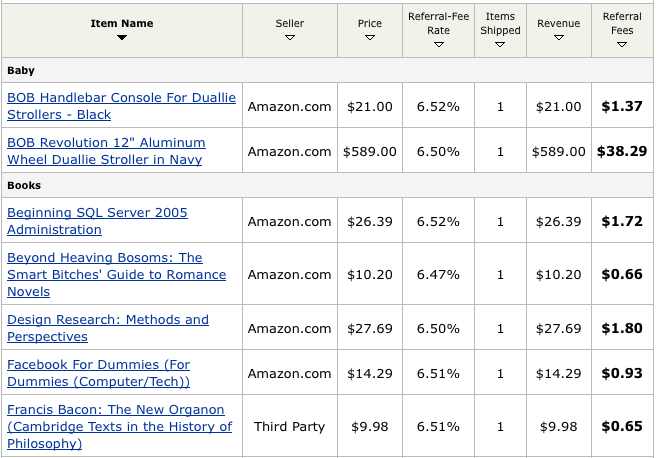
DO include an affiliate link to buy the product. Don’t be ashamed to make a little money off your work.  If you’re going to do a book review, sign up for the Amazon Affiliate program and generate an affiliate link for the book.  Use that link in your review article.  When someone clicks on your Amazon link to order the book, you get a 4% cut of the revenue.  Here’s the hilarious part: no matter what they buy, you get a cut, as evidenced in this screenshot of my Amazon earnings report.  If you’re reviewing something that’s not sold by Amazon, consider signing up for Commission Junction, which offers similar programs for other vendors like Newegg. I don’t make much off these programs – around $100/month – but it’s a nice perk.

Include product pictures, and link them to buy the item. People love clicking on pictures, even if they’re not scantily clad models.  Take advantage of that psychological impulse and use your aforementioned affiliate link so that when they click on the picture they go straight to the store to buy the item.  (If this kind of tip gets you all excited, check out Problogger’s series on how they made over $100k with the Amazon Associates program.)

If a company approaches you directly about writing a review, it’s not uncommon to ask for compensation in the form of their products.  For example, if a software company asks you to review their Widgetizer Pro, they’ll include a few free licenses too.  Consider using one for yourself and giving a couple away to your readers – maybe via a contest, choosing a random commenter on that blog post.  However, don’t be suckered into putting dozens of hours of your own time into researching the product, testing it, and writing the review, all in exchange for $250 of licensing.  Put a dollar amount on your time, estimate what it’ll take to do a fair job on the review, and ask the company to either compensate you as a consultant or ask for more freebies in exchange for the review.  If you don’t, then you probably won’t put the full amount of time into the review, and your readers will be able to tell you’re doing a puff piece.  Rule of thumb: if your knowledge of the product consists of reading the brochure, you’re not doing justice to your readers.

If you accept compensation, disclose that in the review. Just mention in the review that the gear was provided to you by Company X in exchange for the review.  If you were paid to write the review, things get more complicated – the FTC is considering holding bloggers liable for their sponsored reviews.

Finally, think twice before you body-slam a product. If a product just doesn’t float your boat, consider returning it to the company and not posting anything on your blog.  Maybe you weren’t the target audience after all, or maybe the product could get better in a version or two.  Send your feedback to the company so they can help improve their work.  If you roast a company’s product in your review, other companies will think twice before sending you a product for review.

This happens to me too – authors have sent me several books for review, but I didn’t end up posting the reviews on my blog.  I’ve forwarded my thoughts over, explained why I wasn’t such a big fan, but wished them the best of luck in their work.  No sense in burning bridges – you only have one online reputation.  Guard it carefully.

At the same time, if the product does something really boneheaded, like putting your production servers in danger, then you should probably identify that product before somebody makes a dumb investment.  After all, a lot of people bought Pintos….

Next Up: A Small Book That Makes a Big Difference In Your Blog Skills


Blog Better Week: Spice Things Up with Images

Blogging
6 Comments

This week I’m focusing on how you can improve your blog. So far I’ve talked about why you should schedule blog posts and the basics of search engine optimization.  Tomorrow’s post will cover how to write a product review on your blog.

Your writing is boring.

Bored Blog Reader
Your Blog Readers

I’ve read your blog.  I know you’re struggling to be funny, and I appreciate that.  I struggle with it too.  We can’t all come up with ways to weave detective stories into our SQL Server blog posts.

Cheat: add pictures to distract us from your writing.

Your writing can be dead serious and technically complex, but you can still liven things up with a romance novel cover, a drag queen, or a guy making fun of himself.  There’s just two simple rules you have to follow when adding images to your blog.

Rule #1: Don’t Steal Pictures

I hate plagiarism.  I hate it when people pass off my writing as their own, and I know my photographer friends feel the same way about their creative work.

Fortunately, some photographers don’t mind sharing their work as long as it’s properly attributed and linked.  There’s plenty of places to get free images for your blog, and my favorite is Flickr’s advanced search.  Put in your search terms, and then scroll to the bottom of the page and check the box that says “Only search within Creative Commons-licensed content.”  These are images that you can reuse as long as you link back properly to the original image.  (When I’m doing presentations with Creative Commons images, I put the link on the bottom of the slide.)

When you have trouble finding good pictures, turn your search around.  Instead of searching for technical terms related to your article’s topic, search for words that describe the emotion you’re trying to convey, like funny, confusing, challenge, broken, etc.  Sort by “Interesting”, and Flickr will show you the images people love the most.  I’m always surprised by how many great photos I find this way, and how well they work in the blog entry even though they didn’t initially appear to have anything in common with my point.

Side note – I tend to reuse funny images when I find real gems, so I mark them as favorites in Flickr.  If you ever wonder what my next presentation will include, check out what photos I’ve bookmarked recently, and that’ll give you a peek into my brain.

Before you edit the file (change the orientation, crop it, add a funny lolcats-style caption) double-check the usage rights.  It’s on the right side of the photo page on Flickr where it says “Some Rights Reserved.”  Some photos allow Remix use, whereas some don’t allow modifications.

Rule #2: Don’t Steal Bandwidth

When you find a picture you want to use, right-click on it and save it to your computer.  Upload it to your blog, and make the photo be a hyperlink back to the original web page, not the image.  The web page has information about the author and links to their other photos.

Don’t just put an IMG SRC tag that point directly to the other person’s web server.  This uses too much of their bandwidth at no gain to them.  Savvy webmasters will figure out what you’re doing and take action.

Next Up: How to Write a Product Review On Your Blog


PASS Board of Directors Nominations Open

#SQLPass
0

I never attended a Professional Association for SQL Server (PASS) meeting until I went to my first nation-wide summit in Denver in 2007.  I lived in an area (South Florida) that didn’t have a PASS presence, and I was just going to the PASS Summit for the SQL Server training.

I thought the PASS Board of Directors was something that didn’t really matter to me.  When I got to the summit, I saw the election, and I thought, “What do these people do?  I’ve never heard of most of these candidates.”  I scanned over their bios, cast an uninformed vote for some folks who appeared well-qualified but that I’d never heard of.

I thought I was stupid for not knowing these candidates.  I was wrong.

See, I dunno about you, but I want a professional organization that is actively building a sense of community, that is actively getting out there shaking hands and kissing babies, and that makes me feel like I’m wanted.  I want PASS to be out there in the face of every single DBA, asking them, “How can I make your job easier?  How can I make it easier for you to find your next job?  How can I help improve your skills?”

Steve Jones wrote a great blog entry about who should run for PASS Board of Directors, and I’d only add one thing:

If you haven’t heard of somebody, it’s not your fault – it’s theirs.

When I write up my list of endorsed candidates, that’s going to be my first qualification.  Somebody might be the greatest organizer on the planet, but if they can’t get their own personal name out there, how the hell are they going to get PASS’s name out there?  And yes, I know that PASS requires a lot of different skillsets, but in volunteer organizations these days, everybody has to be an evangelist.

SQL Server skills don’t matter for Board of Directors members.  I haven’t sat in the BoD meetings, but my guess is that Tom LaRock isn’t busting out SSMS to optimize stored procedures.  I’m pretty sure Andy Warren isn’t debating the merits of cursors versus set-based operations.  When choosing Board of Directors candidates, we need to focus on people who can market themselves and market their projects.

If you know somebody who’s a great evangelist, somebody who can convince people to band together and contribute to a common goal, then talk to them about running for the Board of Directors.  Here’s Steve’s article about what it takes, and here’s how to apply.

(And no, I’m not running, and I echo Grant Fritchey’s thoughts on the matter when he says, “My current position is completely in line with William Tecumseh Sherman; I will not accept if nominated and will not serve if elected. Not yet anyway.” I’d love to help the community, but my spare time’s spoken for this year.)


Blog Better Week: The Basics of SEO

Blogging
5 Comments

This week I’m focusing on how you can improve your blog. Yesterday I kicked things off with why you should schedule blog posts.  Tomorrow I’ll break some bad news to you – your blog is boring.

I blog to help other people.

I’m only successful if they can find me.

Avoid the hot dogs.
No, not every player is a winner.

Picture yourself walking through a carnival jam-packed with crazy idiots, insightful geniuses, and half-clothed hotties all vying for your attention.  They’re all screaming at the tops of their lungs, enticing you into their carnival tent to see their freak show.  Some are free, some cost money, and all are desperate to get you inside.  When you finally pick a tent and go in, you find that even inside the tent, while you’re trying to focus on what you went in for, there’s even more barkers inside trying to get you to go to another tent.

The Internet isn’t fair. The Internet IS a fair.

You might be crafting the smartest, most well-written blog out there, but you’re still out there, and you’re out there along with a gazillion other carnies.  Some of them are trying to make money off their booth, and they’re going to do whatever it takes – fair, slimy or otherwise – in order to get people in the door.

Your one weapon, the great equalizer, is the search engine.

Search engines want to hook their users up with the best content possible.  The better the search results, the more likely the readers are to come back to that same search engine again.  Search engines make money off ads, so they too are carnies hawking their wares.  They want to help you help them help their users. (Triple score! I just won a giant stuffed banana!)  Making your site easier for search engines is called Search Engine Optimization (SEO).

Step 1: Break your blog posts into sections.

This assumes that your posts are longer than a couple hundred words – and frankly, they need to be.  The less content you have, the less search engines have to work with.  Less isn’t more when it comes to blog posts.

For every couple/few paragraphs, throw in a header like you see here.  In WordPress, you should use Heading 3, because Headings 1 & 2 are already used for higher-level titles in your blog (like the blog title and post titles).  Use descriptive words in those headings, words that match the kinds of things people are searching for.  For examples, check out my entry last week about truncate_only, and look at what words I used.

At the same time, you have to walk the line between serving the search engines and serving readers.  If you just stuff your headings chock full o’ keywords, your blog won’t be enjoyable to read.  Make the headlines fun first, and SEO-friendly second.

Step 2: Specify summaries and keywords for your posts.

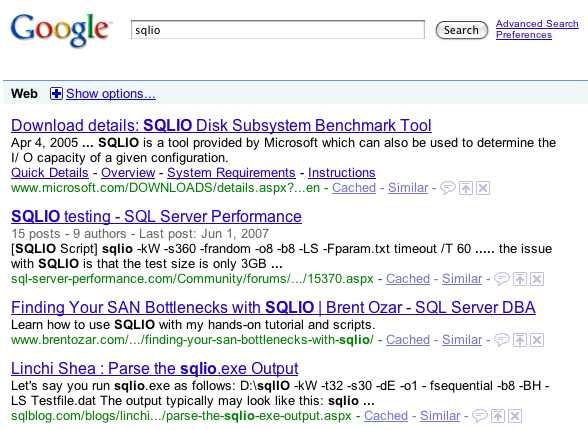
If you go to a search engine and search for SQLIO, here’s what shows up:

SQLIO Search Results

See the one-sentence explanations below each page title?  Read through those more closely.  Which ones look the most inviting to the readers?

In the battle for visitors, this is like your opening shot.  You only get a tiny amount of screen real estate, and every pixel counts.  Instead of making the search engine guess what your article is about or using a random sentence from your post, why not tell it exactly what to show?  You can!

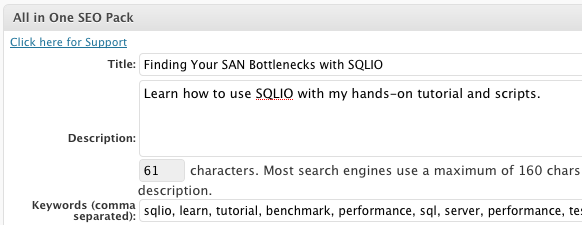
If you’re using WordPress, install the All in One SEO Pack.  After installation, it’ll warn you that it must be configured.  Just go to the settings page and click the Enable radio button.  All done.  Then, when editing a blog post, you’ll have these fields at the bottom of the post:

All in One SEO Pack
All in One SEO Pack

Without the All in One SEO Pack plugin, WordPress tries to guess the post’s Title, Description and Keywords.  The plugin gives you fine-tuned control over exactly what your post is about.

I don’t set these fields on every blog post I write, because I don’t expect most of ’em to have long-lasting search engine power.  The more work I put into a post, though, the more likely I am to put some effort into the SEO fields so that more folks can find my work.

Step 3: Publish a sitemap.xml file.

If you’re using WordPress, all you have to do is install the Google XML Sitemaps Generator plugin.  There’s not much to configure, but set yourself a reminder in your favorite task management software to check the settings once a month.  I’ve had some problems when my file permissions changed and the plugin was no longer able to write the sitemap file.  If that happens, the plugin shows instructions on how to fix it, but unless you go into the plugin’s configuration page, you’ll never know there’s a problem.  It doesn’t send an email or alert you other than showing an error on the config page.

If you’re using a different kind of blog, I got nothin’ for ya.  It’s up to you to figure out how it works.

After publishing a sitemap.xml file, sign up for Google Webmaster Tools.  It’s a completely free service that gives you valuable statistics and diagnostics about your blog, your readers and your search engine optimization.  Once a month, I log into Webmaster Tools to find out if Google’s had any problems indexing my blog.

These steps take a little work, but I’ve found that over time they make a big difference.  Of course, if you’re lazy, there’s a solution for that too.

Enter the Snake Oil: Search Engine Optimization

Wherever there’s carnivals, there’s snake oil vendors: people selling mythical potions that will cure all ailments.  In this case, the ailment is your low search engine ranking, and there’s a long list of vendors who’d love to give you a hand with that problem.

If you pay someone $500 to do search engine optimization for you and boost your search rankings, how do you know if they succeeded?  They’ll tell you that it may take days or weeks for the search engines to notice the changes.  They’ll tell you that your mileage may vary, and that all sales are final, no refunds allowed.  You might even be working on your blog yourself at the same time, and it’s impossible to tell how much improvement was due to their efforts versus yours.

Some SEO vendors do a fantastic job, but they’re priced outside the reach of most bloggers (including me).  If you’re dead set on spending money on search engine optimization, check out the book Landing Page Optimization by Tim Ash.  It explains how to build out sections of your site specifically for search engine visitors and how to get them to stick around.

I’d recommend my favorite SEO company to you here, but then I’d lose my competitive advantage.  After all, the other carnies are reading this too…

WordPress SEO Tutorial Video from Google

Matt Cutts (BlogTwitter) is a member of Google’s Webspam team.  He spoke at WordCamp San Francisco about how WordPress bloggers can make their web site more searchable.  It’s a 45-minute long video, so warm up that plate of bacon and get cozy.