Blog

Microsoft Ignite Morning Keynote Liveblog #MSIgnite

SQL Server
0

Summary: Microsoft announced SQL Server 2016, with the first public preview coming this summer. The SQL Server 2016 release dates for the download were not announced. Here’s the SQL Server 2016 PDF data sheet, and here’s the SQL 2016 announcement.

As it happened:

8:00AM – Good morning, folks. This week, Microsoft’s new infrastructure conference, Ignite, opens in my current hometown of Chicago. Gotta love it when the conference comes to you – along with a sold-out crowd of 20,000 attendees.

Before talking about this morning’s keynote, let’s put the timing in context. Last week at the Microsoft Build conference in San Francisco, Microsoft made a few data-related announcements:

Given that Build is a developer-focused conference, where the audience would really have loved to hear dates, see demos, etc, and didn’t get them, I don’t expect to see more details coming out of this morning’s Ignite keynote.

However, there are two types of keynotes today. First up this morning, we have Satya Nadella doing the overall keynote. With the infrastructure focus of Ignite, I’d expect to see a heavy focus on Windows, O365, SharePoint, System Center, and Azure.

Later this afternoon, we have another set of keynotes: foundation keynotes, including one dedicated just to SQL Server. I’m much more excited about that one, and I’ll liveblog that one as well.

This morning, though, it’s all about Windows. So why am I here? Well, I got my start as a sysadmin, and I’ve never seen Satya Nadella in person before, and hey, it’s only about 20 blocks south of my house.

The keynote starts in about 90 minutes, and you can watch online at Ignite.Microsoft.com.

8:18AM – the logistics of filling a room this big, wow. It’s an air traffic control style job, with dozens of staffers waving lit batons around, filling up one section at a time. The front sections are reserved for press, a tech leaders forum, and so on.

8:30AM – the button-down DJ explained that the live online feed is about to start, so he left the stage. He’s a warmup act, evidently. The music continues even though he’s not onstage. This is actually a political statement that human beings are no longer needed for block-rockin’ beats, and Microsoft is about to unveil their new product, IntelliDJ.

8:36AM – The audience is cackling about the awkward transcriptions onscreen.

8:38AM – How the hell is the WiFi still working this well? Witchcraft!

8:40AM – A Microsoft Band on one hand and an old-school watch on the other is the new socks with sandals.

8:43AM – Transcriptions good for laughs. “So whale you’re watching the keynote…”

8:48AM – Sounds like like the keynote streaming site is suffering issues already. If there’s 20K people here, I wonder how many people are trying to stream the video live. I don’t envy Microsoft – that’s hard work.

8:53AM – The pre-keynote-show is a neat idea, but talking to people about the motivation behind their tweets? Really?

8:58AM – It took two days to lay out the 15,000 chairs in this room. I believe it. Wow.

9:00AM – The WiFi failed me briefly, but only briefly. Nice job keeping this up and running!

9:03AM – The room goes dark, and they’re playing Microsoft’s version of the Dolby theater intro.

9:06AM – Common walks off the stage, and Satya Nadella takes over. The air conditioning just kicked on big time, too. Or maybe it’s the cloud coming in.

9:09AM – Satya: “We are the only company that feels deeply about both companies and organizations, and bringing them together to empower transformations.” Uhh, okay, no.

9:11AM – Mobile first, cloud first – but it’s not about the mobility of a single device. It’s about the mobility of the experience. It’s about the cloud back end, and adding intelligence to your experiences. (Interesting take – one way to read that is, me: “We’re giving up on one device to rule them all, and just putting our experiences on every device.”)

9:14AM – Satya: “There are going to be more devices than people on the planet.” In an environment like that, Microsoft can be a winner. Not THE winner, just one of multiple winners, and that’s a good thing. Microsoft has had a tough time selling devices that consolidate – for example, Surface Pro simply isn’t selling as the tablet that can replace your laptop, but if it’s just one of your devices, it makes much better sense.

9:17AM – Satya: IT is Innovation & Transformation. Cute. “Microsoft is the productivity and platform company that will thrive in the mobile-first, cloud-first world.”

9:20AM – Satya: “It is important to us to build trust into the core of the operating system…that’s not a bolt-on, you have to build that in.” That’s a tough sell here – it hasn’t historically been one of this platform’s strengths.

9:22AM – Announcing Windows Update for Business, but no details on that yet.

9:25AM – Satya’s talking a lot about letting people make their own technology choices, but letting IT staff get the control and compliance they need.

9:26AM – Office 2016 is going into a new public preview, Skype for Business will have live broadcasting features, Office Delve will have more organizational analytics. Will show you all of these as the keynote proceeds.

9:27AM – There’s been multiple announcements so far, but just kinda glossed over, no clapping.

9:28AM – Satya says SQL Server 2016 is “the biggest database breakthrough you’ve ever seen.” Makes the version number official, apparently – doesn’t seem to be a code name.

9:34AM – Satya telling the story about Fujitsu selling lettuce grown in their old clean rooms. “So think about it,” he says to the attendees. Okay. I’m thinking. How is Microsoft reinventing themselves, is that what you want me to think about?

9:35AM – “Realmadrid is an amazing brand. Everyone knows about them.” I have no idea who they are. The attendees apparently do, though – the first round of applause we’ve had yet as the CEO comes onstage.

9:38AM – Satya: “You’re like a software company now.” Talking about the work Realmadrid does in analyzing data about their fans. Pretty vague.

9:40AM – Details are starting to come out about Windows Update for Business.

9:41AM – Joe Belfiore coming out to talk about Windows 10, then Gurdeep Singh Pall will talk about reinventing productivity with Windows, O365, and Dynamics. Brad Anderson will talk about security.

9:44AM – Joe: “My mission is to convince you, and give you the tools to go back with, to get your end users to love Windows 10.” Sounds perfect for this audience. Alright, I’m in. Show me what you’ve got.

9:48AM – Joe says about 5-8% of users use Alt-Tab to switch between apps. Adding multiple desktop support. Hold down control/Windows/right-arrow and switch between desktops, or left-arrow to go back. Dragging an app from one desktop to another got the first spontaneous audience applause.

9:51AM – Demoing Cortana, asking her questions aloud. This is especially useful in today’s workplace with open cubes and meeting rooms. Oh, wait, hold on, I’m being told…

9:54AM – Demoing Cortana connecting to PowerBI. “What’s the number of people at Ignite by country?”  Pops them up on a map with circle graphs and no numbers, not really useful at all.

9:58AMAnnouncing SQL Server 2016 – and the feature list!

10:04AM – Demoing Continuum, a new way of changing the Windows user interface to change between tablet mode and laptop mode depending on how you hold the device.

10:12AM – Demoing Windows Hello, a new authentication mechanism that works through the webcam. He takes a cloth off a webcam, and it unlocks his laptop in a matter of seconds without the user doing anything.

10:18AM – Belfiore off the stage. Good demos, relevant to this audience. Nothing jaw-dropping or magical, just steady progress. I don’t think he delivered on his commitment to get users excited about the Windows 10 UI, though.

10:19AM – Gurdeep: “Even as I speak, some of you are swiping right on Tinder.” HA!

10:21AM – Gurdeep is explaining how millennials are different by saying that his kid came up and told him “yolo.” Uhhhh..

10:23AM – Millennials work wherever they are. (News flash – seriously, this is not a millennial thing.)

10:24AMOffice 2016 Public Preview now available.

10:25AM – At Microsoft, we consider ourselves the custodians of productivity. (Again, news flash – millennials would probably tell you otherwise.)

10:27AM – Users can now create their own groups and teams on the fly, share things with them, schedule meetings. (I literally can’t even.)

10:29AM – “We’re making a huge bet on video for meetings….Polycom, Crestron…” (What year is this?)

10:32AM – Showing a HoloLens video and saying it’s a real, live product that’s that good. The reviews say otherwise.

10:36AM – Julia White coming onstage to do demos.

10:37AM – “This is the YouTube for the enterprise.” Well, in our company, I know what we would have: cats. Lots and lots and lots of cats.

10:40AM – Demoing the use of Delve to store files, share expertise, contact people. Isn’t this what SharePoint was supposed to be? When would I use one over the other?

10:46AM – Demoing live collaboration in Word that works just like Google Docs. Widespread applause. Have that many people really not seen Google Docs? Or are they clapping because Microsoft’s finally getting closer after all these years?

10:47AM – Sway will be part of O365 Business and Education soon.

10:52AM – Some awkward demos around collaboration and inking.

10:55AM – Julie’s off the stage. Her part seemed extreeeeemely rushed – guessing the prior presenters ran too long. This keynote is supposed to be over in 5 minutes. Oops, my bad. Thought it was 9AM-11AM, but it’s til 11:45AM.

10:59AM – Brad Anderson taking the stage to talk security. After 2 hours in a folding chair, I’m out. Time to grab some coffee and snacks, then I’ll blog the afternoon keynote that focuses on SQL Server.



New sp_Blitz® and sp_BlitzCache® Updates

SQL Server
16 Comments

Ah, spring, when a young man’s fancy lightly turns to thoughts of updating his DMV queries.

sp_Blitz®, our free health check stored procedure, brings several new checks and a whole crop of fixes and improvements. I’d like to call your attention to one in particular.

Julie Citro fixed check 1, THE VERY FIRST CHECK IN THE SCRIPT, which had a logic bug when looking for databases that had never been backed up. Sure, the next line had a workaround, but nobody caught this for years. All of you who ever read the source code, Julie Citro is officially a better tester than you.

sp_BlitzCache™, our performance tuning tool, has new updates too.

You can now run with @reanalyze = 1 first and sp_BlitzCache™ won’t break. You can run sp_BlitzCache™ from multiple SPIDs! If you had triggers, sp_BlitzCache™ would start to pick itself up – this has stopped.

Also, an integer overflow has been fixed – queries using more than 28,000 days of CPU since start up will no longer cause an arithmetic overflow.

You can grab the updated scripts in our First Responder Kit.


Basic VMware and Hyper-V Terminology for the SQL Server DBA

Virtualization
3 Comments

SQL Server DBAs often need to work with virtualization– and frequently need to work with multiple virtualization platforms. Many platforms have similar features, but they often have different names, and it’s hard to remember what everything’s called.

I’ve got a little cheat sheet for you for two of the platforms! (No offense, Xen fans, please don’t come after me.)

What is it? VMware name Hyper-V name
Management Tools, Free vSphere / web client Hyper-V Manager (snap-in)
Management Tools, Paid vCenter Server System Center Virtual Machine Manager
Automatic migration to another host if one fails High Availability (HA) High Availability (configured via a role in a Windows Failover Cluster)
Moving a VM from host to host vMotion Live Migration
Moving a VM from one storage subsystem to another Storage vMotion Storage Migration
Automatic load balancing DRS (Distributed Resource Scheduler) Dynamic Optimization in VMM (Virtual Machine Manager, a part of System Center)
Rules to keep VMs from being too close Affinity Rules for DRS Availability Sets, part of Intelligent Placement in VMM


Microsoft SQL Server Licensing Simplified into 7 Rules

Licensing, SQL Server
203 Comments

Licensing is really complex, but as long as you know these seven rules, you can go a long way:

  1. If you query it, you have to license it. (Backups and corruption checks are not considered querying.)
  2. You have to license all of the processor cores that the operating system sees, even if you’re not allowing SQL Server to use all of them with tricks like processor affinity masking.
  3. Standard Edition costs about $2k USD per core, but caps out at 24 cores and 128GB RAM.
  4. Enterprise Edition costs about $7k USD per core.
  5. Software Assurance is an ongoing maintenance fee that gives you the right to upgrade to newer versions of SQL Server, plus…
  6. If you’re covered under Software Assurance, you get two free standby servers of equivalent size. (Standby means you’re not querying it, other than offloading backups or checkdb.)
  7. If you’re covered under Software Assurance, and you want to cram a bunch of VMs or containers onto a single host, you can license all of the CPU cores in the host with SQL Server Enterprise Edition and Software Assurance, and then run an unlimited number of VMs with SQL Server on that host.

Then to learn more, get Microsoft’s free SQL Server 2022 Licensing Guide. It’s really straightforward, and I’ve used that many times to quickly disprove wacky claims from sales reps.

Got a question not answered by these rules? Head over to the Microsoft licensing chat.

Want help? Talk to Brent for free.

See sample findings now

If you need to reduce your Enterprise Edition licensing exposure, we can help.

Our SQL Critical Care® is a quick, easy process that identifies your top bottlenecks and gives you the easiest, cheapest way past them. We can help you reduce the number of CPU cores you need to run your workloads.

Learn more, see sample deliverables, and book a free 30-minute call with Brent.


Should You Be a SQL Server DBA? (video)

SQL Server
24 Comments

Have you ever wondered if you should be a SQL Server Database Administrator? If you think this might be the right career path for you, watch this video and take our quiz!

Got limited time or need to restart the quiz? No problem, we’ve got a table of contents with time indicators below.

https://www.youtube.com/watch?v=zYI7UGi14jw

“Should You Be a SQL Server DBA?” Table of Contents:

00:21 – Getting the wrong job stinks
00:44 – Getting the right job is awesome
01:44 – Get paper and pen, it’s quiz time!
02:11 – Question 1
02:38 – Question 2
03:09 – Question 3
03:22 – Question 4
03:39 – Question 5
03:59 – Question 6
05:39 – Question 7
06:41 – Question 8
07:26 – Time to score this thing!
07:33 – Scoring Question 1
08:45 – Scoring Question 2
10:25 – Scoring Question 3
11:38 – Scoring Question 4
12:49 – Scoring Question 5
13:43 – Scoring Question 6
15:37 – Scoring Question 7
17:25 – Scoring Question 8
19:28 – What does this all mean?
20:29 – Traits of a happy DBA
21:33 – Learn more at BrentOzar.com/go/Career

Brent says: if you think this quiz is just for people who aren’t in the DBA business already, think again. Kendra’s title is “SHOULD you be a DBA?” And, uh, some of us probably shouldn’t. (I love this stuff though.)


Are Index ‘Included’ Columns in Your Multi-Column Statistics?

Indexing, SQL Server
3 Comments
Internals Cat populates the density vector

When you create an index in SQL Server with multiple columns, behind the scenes it creates a related multi-column statistic for the index. This statistic gives SQL Server some information about the relationship between the columns that it can use for row estimates when running queries.

But what if you use ‘included’ columns in the index? Do they get information recorded in the statistics?

Here’s my Index

To test, we’ll create an index with multiple key columns and included columns. I’m using a restored copy of the StackOverflow database.

First Stop: sys.Stats and Friends

The sys.stats DMV lets me query metadata out about my statistics, and I can join up to find out how many columns it has, what order they are in, when they were updated, and all sorts of info:

Here’s the first few columns of the results:

statistics-columns-order

This doesn’t show FavoriteCount or LastEdit date. My index key columns are in the statistic, in the same order they appear in the index.

What About DBCC SHOW_STATISTICS?

We can see a representation of the statistic with more information. We just plug in the name of the table and the statistic to DBCC SHOW_STATISTICS, like this:

This returns a few result sets. We get information about the header of the statistics, some density information about the relationship between the columns, and a histogram that shows the distribution of rows for the leading column in the statistic.

dbcc show statistics output


That Density Vector Has Three Rows!

Check that out, the density vector has a third row to help SQL Server estimate data distribution for OwnerUserId, PostTypeId, and the Id column. We didn’t specify the Id column anywhere in our index!

The Id column is the key of the clustered index on this table. SQL Server decided that it would also be interesting to know the density information of that as a third column.

What if the Index Was Unique? Would it Still Sneak In the Clustering Key?

The index above doesn’t have unique data, but let’s test a different index:

Here’s the density vector:

dbcc show statistics output unique index

SQL Server decided that tracking the density information for the combination of Name and Id was still useful, even though this is a unique index and SQL Server didn’t have to sneak that column into the key of the index to make it unique behind the scenes.

Included Columns Weren’t in the Density Vector, but My Clustering Key Was!

In other words, included columns won’t be in the density vector unless they happen to also be in the key of your clustered index.


And Party and Alt Shift

SQL Server
53 Comments

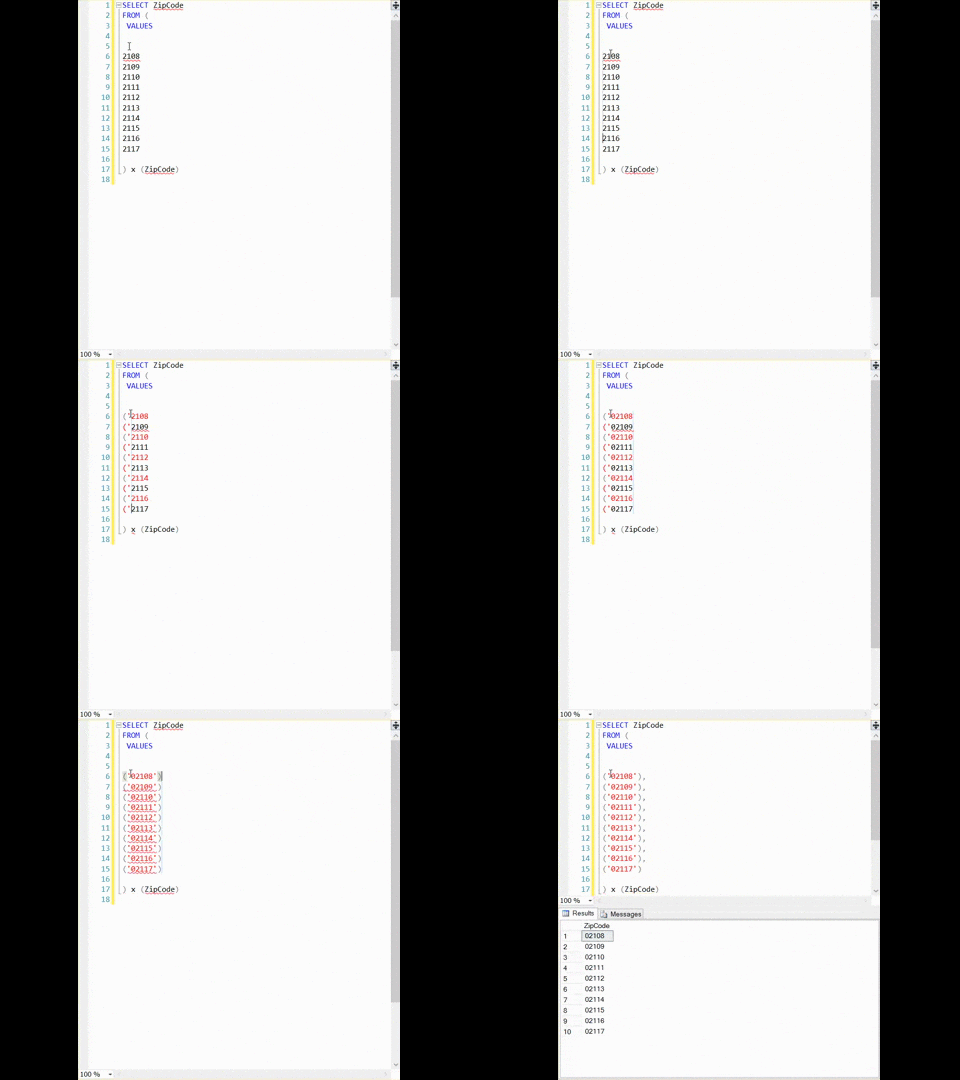
This is a cool SSMS trick I picked up a while back

Though not nearly as far back as I wish I had. It’s so cool I made a .gif of it in action. When you’re done putting your socks back on, I’ll tell you how it works.

AltShiftDemo
This .gif was brought to you by the Cool SSMS Tricks Foundation, in association with Worldwide .gifs


Pure ALT+SHIFT magic.

Hold down both keys at the same time, and use your up and down arrow keys to navigate vertically. There will be a thin grey line showing you exactly which rows you’ve grabbed. Then Just type normally. I uh, simulated a typing error, to illustrate that you can also delete text doing this. Yeah.

It really makes doing simple multi-line edits a breeze, especially if you don’t feel like setting up Excel formulas to do similar tasks. These are random Massachusetts zip codes, which is why they get a leading zero, and quotes.

Can you feel the efficiency?!

Kendra says: What in the…. holy cow, that actually works!

Brent says: I knew about that trick, but ZOMG PEOPLE THERE IS A PRODUCTIVITY GIF IN OUR BLOG


Happy Fourth Birthday to Us, 40% Off Presents for You

Company News, SQL Server
15 Comments

Four years ago this month, we turned this blog into a consulting company.

We’ve had so much fun over the last few years, and we’re really proud of what we’ve built:

  • Over 500 SQL Critical Care® patients
  • Thousands of training video customers
  • Thousands of in-person training attendees at dozens of classes and pre-cons
  • Hundreds of free YouTube videos watched by over a million people
  • Almost 50,000 email subscribers
  • Several million web site viewers
  • A handful of awesome full time employees

Let’s celebrate. Between now and Tuesday 4/28, discount code Our4thBirthday gets you 40% off online sales of our training videos. Enjoy!


How to Evaluate NoSQL Case Studies [Video]

SQL Server
3 Comments

Every now and then, one of our clients considers adopting an alternative database platform – sometimes NoSQL, sometimes a brand new relational database. They’ll ask for our help in evaluating the vendor’s solution.

One of the best ways to do it is ask the database vendor to set us up on a WebEx or GoToMeeting with one of their happy customers. I want to hear from the technical folks, not management.

I run the call with six PowerPoint slides – here’s how:

https://www.youtube.com/watch?v=fUaY3AacyGw&amp


When is a Hyper-V Virtual Machine Not Really a Virtual Machine?

SQL Server
2 Comments
Former Sysadmins
Former Sysadmins

When you set up a Windows Server, you might be tempted to add a bunch of roles, just in case you want to use them in the future. Don’t do it: things can get weird.

If you add the Hyper-V role to Windows Server 2012 and higher, it changes some things about how Windows behaves. Your server is now a host. And the host starts to behave in some ways like a virtual machine — it’s now the “Parent Partition”, which is a “quasi-virtual machine”.

There are limits to the number of logical processors that any virtual machine partition might see, so if you have more than 64 logical processors, this can limit what’s available in the Parent Partition / host operating system, and really confuse you.

When SQL Server starts up, it checks to see if you’re virtualized. If the Hyper-V role is enabled, it will think it’s running in a VM. This could end up in a sticky situation if you have a licensing audit and hyper-threading is enabled — you’re supposed to license all the logical processors in a virtual machine regardless of hyper threading.

But good news, this is an easy problem to solve:

  • Don’t install the Hyper-V role “just in case” on a SQL Server
  • If someone else sets up your SQL Servers, check the installed roles before going live
  • Don’t ever design an architecture where a Hyper-V host does double-duty and is also a SQL Server
  • If you log onto a Hyper-V host, look at ‘Logical processors’ to see the total count (‘Host logical processors’ may be lower)

“Breaking” News: Don’t Install SQL Server 2014 SP1

Yesterday, Microsoft announced availability of Service Pack 1, saying:

As part of our continued commitment to software excellence for our customers, this upgrade is available to all customers with existing SQL Server 2014 deployments via the download links below.

Yeah, about that commitment to software excellence.

This morning, the download is gone:

Notice: The SQL SSIS team has found an issue with SP1 installation if SSIS catalog is present in the SQL Server instance.They are currently investigating this issue including possible workarounds and fixes.

Oof – the term “possible workarounds and fixes” doesn’t sound good for those who jumped in and applied the patch. A commenter on the MS Data Platform Insider blog reported that it hosed the master database broke the instance in a way suspiciously similar to a similar bug in SQL Server 2012 SP2.

(And jeez, what is it with service packs lately? Remember the SQL 2012 SP1 100% CPU issue? I’m starting to think you’re safer with cumulative updates than with service packs.)

Remember, kids, don’t rush into patching. If your servers are mission critical, test in your staging environment first – staging is the DBA’s development. (No, your development environment isn’t staging – because your developers make their living in the dev environment, and if you broke that with SP1 yesterday, you’ll be slaving away today to get your dev instance back up and running.)

Update: the fix is in. If you applied SP1, follow the instructions in this StackExchange post.


Moving Databases Made Easy – SQL Server on a File Share

Storage
12 Comments

We’ve all had to move a database. For databases above a small size, this is a painful process. While there are a number of ways that you can move a database without downtime, they all involve a lot of extra work. What if there were something easier?

Every database is unique and precious.

What’s the Real Problem?

For most people, moving a database is a one time thing – you’re moving to a new server. That’s pretty much it. I spent 5 minutes staring at my ceiling trying to figure out other reasons that most people might move a database from one SQL Server to another.

For some people, though, databases could move on a regular basis. Think about it like this – you host a software as a service (SaaS) application. You’ve got one database per relative unit of work (customer, forum, cat picture collection). These databases can sit idle for months before, suddenly, there’s tremendous activity.

Normally, you wouldn’t make each SQL Server capable of handling peak load for any section of your SaaS. Instead, you would probably have a few servers ready to handle the worst load and move your busiest database over to those servers.

Typically, this is going to involve a small outage and setting up something like database mirroring or log shipping in order to move the database with minimal down time.

SMB to the Rescue!

Microsoft has supported housing SQL Server databases on a file share for a while now. If you’re not familiar with the idea, I recommend checking out the MSDN article Install SQL Server with SMB Fileshare as a Storage Option.

Moving a database with SMB is straight forward – detach the database from the old server, attach the database to the new server, bring the database online. For most of us, this quick change is much preferred to other methods of moving the database.

SMB File Shares and You

Although SMB file shares are a new technology, they’re worth considering for new SQL Servers. SMB file shares make it easy to move databases between SQL Servers. If you want to learn more about using SMB check out the MSDN article on using SMB and SQL Server.

Brent says: If your storage area network (SAN) is using older connectivity methods like 2Gb or 4Gb FC, and your Ethernet is 10Gb, you might even see a performance boost.


SELECT INTO and non-nullable columns

SQL Server
22 Comments

SELECT…INTO  is one of my favorite SQL Server features.

It’s great for creating table skeletons with false WHERE clauses (1=2), moving a real table to a staged/temp location for testing, etc.

In SQL Server 2014

It acquired the ability to go parallel, which is pretty neat, but that’s not what we’re talking about here.

It has some limitations

Chief among them is this:

Indexes, constraints, and triggers defined in the source table are not transferred to the new table, nor can they be specified in the SELECT…INTO statement. If these objects are required, you can create them after executing the SELECT…INTO statement.

Which is… Sort of true. There’s a trick, and I’ll show you a quick example here with another of my favorite things: a Numbers table.

Trying to add the PK constraint here fails, because the column is NULLable

Msg 8111, Level 16, State 1, Line 37
Cannot define PRIMARY KEY constraint on nullable column in table '#NumbersTest'.
Msg 1750, Level 16, State 0, Line 37
Could not create constraint or index. See previous errors.

We can verify this by looking at the table metadata:


name     is_nullable
N           1

So how do we fix this? We could alter the table, but that won’t leave us with the lasting satisfaction of proving BOL wrong on a technicality. We’ll adjust our code a bit, and try again.

This time, with the addition of an ISNULL check on the column, it ‘inherits’ the not NULLable property, and the PK constraint adds successfully. We can verify that by checking the table metadata, if you don’t believe me:

name     is_nullable
N           0

Note that this same behavior does not occur if you replace ISNULL() with COALESCE()

And with that, you can clean up the test tables. Or keep them around. Do some math. Whatever blows your hair back.

Got a favorite use for a numbers table outside of string splitting or doing date math? Let me know in the comments! I may write a follow up.

Brent says: Wow. That is a really slick trick.

Kendra says: I know some people have bias against SELECT INTO because it seems sloppy and you have to go the extra mile to get the right types, but it can be a great tool. Don’t rule it out.

Jeremiah says: I really like this method – it’s a quick way to copy tables without using other cumbersome techniques


The @DBAreactions Guide to In-Memory OLTP (Hekaton)

At SQLbits last month, I presented a new session: Cool Story, Bro – The DBAreactions Guide to SQL Server 2014. I wanted to have some fun while educating folks about the surprise gotchas of the newest features.

Here’s the In-Memory OLTP (Hekaton) section of the session:

Our sp_Blitz® has long warned you if Hekaton is in use, and its Hekaton detail page shows some of the limitations.


Can DBCC SHRINKFILE Cause Blocking in SQL Server?

It sure can.

The lock risks of shrinking data files in SQL Server aren’t very well documented. Many people have written about shrinking files being a bad regular practice— and that’s totally true. But sometimes you may need to run a one-time operation if you’ve been able to clear out or archive a lot of data. And you might wonder what kind of pains shrinking could cause you.

One pain it could cause you is blocking and lock waits. It’s easy to reproduce, here’s how.

A Recipe for LCK_M_X Lock Waits and Blocking

I was able to easily reproduce blocking in my restored copy of the StackOverflow database on SQL Server 2014 by doing a few things.

I rebuilt a non-clustered index on the Posts table with this command:

This ate up some space, and gave shrink something to do!

I then started a data modification and left an open transaction running:

And then, in another session, I started to shrink the data file:

Behold, Blocking!

Shrink starts up and slogs its way through things, and soon enough, lock waits appear. This view is from Adam Machanic‘s sp_WhoIsActive:

lock waits
I’ll take LCK_M_X Waits for 15,000, Alex!

If I run that with @get_locks=1, I can see details on exactly what lock SHRINKFILE is after:

Yep, it’s waiting on a page lock in kl_Posts_OwnerUserId_CreationDate.

But How Many Locks did SHRINKFILE Really Need?

Maybe it needed just a few locks… right?

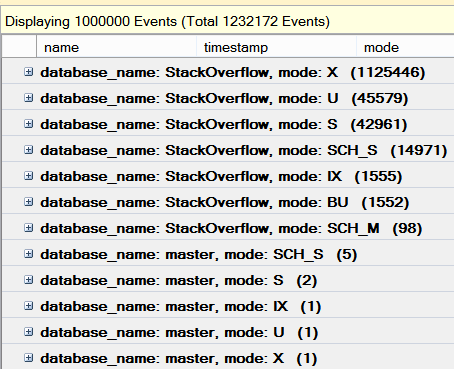
Well, I ran a trace against my session that did that shrinkfile command, and here’s the number of locks by database and type that it caught…

a few locks
Lock mode: XTreme

And this was a FAST run, except for that blocking!

Shrinking files is painful

It can actually be worse than this — on a few runs, I was able to reproduce blocking with SCH_M locks that could cause even nastier blocking chains.

Shrinking is slow, tedious work. It eats CPU, steals your IO, and always takes longer than you want. And if it has work to do and you’ve got users or processors modifying that data, lock contention ensues.

Worst of all, at the end of shrinking a database, nobody will ever thank you. Be careful out there, and if you must run it make sure you don’t leave it unattended.

Brent says: whoa, I never even thought about that. Maybe we should design indexes to improve DBCC SHRINKDB speed.

Erik says: if you do this more than once, I will come find you.


Is Your SAN Administrator Out to Get You?

SQL Server
9 Comments
WE WANT RAID 10!!!!
WE WANT RAID 10!!!!

DBAs often complain about SAN Administrators. “You can’t trust them.” I’ve seen established DBAs write publicly that they resort to lying about how SQL Server works to get what they want from a SAN Administrator.

That’s pretty toxic. Other DBAs start to think it’s normal to have a terrible relationship with your SAN Administrator.

But it’s not normal. And if there’s a terrible relationship between DBAs and the SAN team, that’s the DBA team’s fault, too.

The first SAN team I ever worked with

I’m pre-disposed to like SAN Administrators because I’ve worked with great people. When I started out with SQL Server at a small dot com, we had a two person SAN team and many terabytes of data across both SQL and NOSQL solutions. Our software team and our data grew insanely quickly.

The SAN team had more fun than almost anyone in the building. They had to work super hard. They got paged a lot. They were sometimes grumpy on the phone at 3 am, just like the DBAs. But they were funny and smart and the kind of people who could magically turn a crappy situation into a good time.

They didn’t always want to make everything RAID 10, and they didn’t always automatically believe the problem was the SAN when I said, “the SQL Server’s slow.” But they worked with me every time when I had a problem, and we always found a solution.

Over time, I learned ways to show them real metrics when I really needed more storage speed rather than just saying, “it’s slow.”

Most SAN Administrators I Work With Today

I still work with SAN Administrators frequently. They’re usually helpful – in fact, they’re often happy that someone would like to hear how the SAN is configured and why it’s set up that way.

Most SAN Admins I meet work alone or in small groups. They’re super busy, and sometimes mistakes get made (just like DBAs). But also like DBAs, I’ve found them to be pretty happy when there’s a real reason that justifies investing in better hardware. They’re able to admit when something’s not right, fix it, and move on.

Remember, The SAN Admin had just as much training as you did

That’s right, they probably didn’t get any training either. The storage world changes fast, and they have to try to keep up.

Yes, they get taken out to nice dinners by the SAN vendor, and you don’t. But think about how your job looks to the people over at the helpdesk. Ever gotten a bottle of scotch from the developers as a reward for saving the day? Ever had flextime and rolled into the office late? It’s not just the SAN admins who have some perks.

Your SAN Admin isn’t out to get you. They just have a lot of customers.

Your mission as a DBA is to make your databases perform as well as the business needs them, and protect the RPO and RTO of your customers. The SAN Administrator’s goal is to provide enough storage capacity and performance as the business needs. They’ve got a lot of customers– the performance of every one of your databases isn’t at the top of their list. When the database is slow, it’s hard for them to know that the issue is the storage.

I’m not saying that there aren’t bad SAN Admins out there. There certainly are.

But don’t be the person who misrepresents things and thinks someone’s out to get them. Aspire to be more like my old SAN team: the kind of person who can turn a crappy situation into a good time. That’s usually a lot more effective.

Brent says: wait a minute – I never got a bottle of Scotch from my developers. I mean, I got hit over the head with a bottle once, but there wasn’t any alcohol left in it.


How Do I Know My Query Will Be Fast In Production?

SQL Server
9 Comments

We’ve all had this problem before – the production server is significantly more powerful than the development server. You tune a query and you’re pretty sure you’ve made it faster, but there’s that doubt in the back of your mind. There are so many things that can change performance – memory, CPU count, disk performance – how can you tell that you’ve made a query better?

Measuring Slowness

When you know you have a slow query that you need to tune, run it in production one last time. But, before you do that, gather CPU and IO metrics using STATISTICS IO and STATISTICS TIME:

You’ll get a bunch of jibber jabber in the “Messages” tab that documents how much CPU time was spent compiling and running your query as well as information about logical IO. Save this off to a text file for now.

Measuring Fastness

Go to your dev server. Tune your query. I’ll wait.

As you’re tuning your query, pay attention to the CPU time and logical IO numbers that you’re getting back from STATISTICS IO and STATISTICS TIME. These are a relative indication that things are getting better. If there are CPU differences, you’re likely to see different CPU numbers on that dev machine, but that’s OK. We’re looking to compare total logical IO and total CPU time in milliseconds.

If you want an easy route to compare your results, you can paste the output from STATISTICS IO and STATISTICS TIME into statisticsparser.com. This will go through the results and push the data into a nice table for your perusal.

How Much Faster Will my Query Be?

Using STATISTICS IO and STATISTICS TIME to tune helps me figure out how well I’m doing compared to where I started from. Some queries move around a lot of data. In these cases, it can help to know how much faster dev is than production.

If you really want a reasonable comparison between dev and production, you can find some guidance in the Fast Track Data Warehouse Reference Guide. There’s a section of this document about measuring the MCR (Maximum Consumption Rate) and BCR (Base Consumption Rate) of your SQL Server. These numbers reflect 100% cache reads and 100% disk reads, respectively.

Once you have MCR and BCR, you make effective predictions about how query performance could differ between the two. This gives you the power to predict, with some margin of error, how fast newly developed queries can run.

But is it Faster?

Between STATISTICS IO and STATISTICS TIME you can determine if a query is going to use fewer resources. The MCR and BCR give you relative numbers for how fast a server can process data. Between these measurements, you can predict how a query will perform between environments and what kind of impact your changes will have.

Brent says: as you get used to doing these measurements, you’ll also be able to tell if a new dev-only query is going to be fast enough in production, too. You’ll know how many logical reads is slow (or fast) in your environment.

Erik says: The hardest thing for me to ever get was commensurate data to test on in dev. If you don’t have it, get it. If you have it, don’t waste it.


CTEs, Inline Views, and What They Do

SQL Server
10 Comments

By now, you have probably heard of CTEs

And you may have even heard them referred to as Inline Views. Really, an Inline View can be any type of derived table. It’s very easy to illustrate when one may turn into a performance problem with CTEs, if you aren’t careful.

A lot of people think that when you call a CTE, the results are somehow persisted in a magical happy place and the underlying query just hangs back admiring the output as it sails into the upper deck.

Take the following example, which serves no real purpose.

It has a perfectly reasonable execution plan, and will lead a happy life.

I am from the future

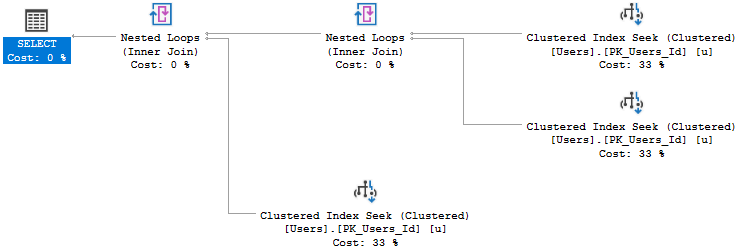
Now, let’s join that to itself.

Doesn’t get much easier than that. But what happened with the plan?

SPOOKY

Huh. That’s a whole other index operation. So just like when you join to a view, the view has to be executed and returned. In fact, if you keep throwing joins that reference the original CTE, you’ll keep getting more index operations.

Did someone say they wanted another index operation? Because I thought I heard that.

TEH TRES

To sum things up, CTEs are a great base

From which you can reference and filter on items in the select list that you otherwise wouldn’t be able to (think windowing functions), but every time you reference a CTE, they get executed. The fewer times you have to hit a larger base set, and the fewer reads you do, the better. If you find yourself referencing CTEs more than once or twice, you should consider a temp or persisted table instead, with the proper indexes.


Find Corrupted Indexed Views with DBCC CHECKDB

If you’ve got indexed views, or are thinking of using them, this is important.

First, go read the blog post, “An Indexed View Bug with Scalar Aggregates” by Paul White. It will take a minute, but it’s important to understand.

Paul shows a scenario where the data in a certain kind of indexed view can become out of sync with the base tables. You can still query the indexed view and return data using the demo code on his blog– but it’s incorrect data.

He mentions that you can identify the problem with DBCC CHECKDB or DBCC CHECKTABLE, but there’s something that’s not obvious: your regularly scheduled CHECKDB jobs are probably not going to identify if your indexed views are corrupted in this way.

CHECKDB doesn’t run EXTENDED_LOGICAL_CHECKS by default anymore

If you are using compatibility level 100 or higher (SQL Server 2008+), CHECKDB won’t validate the indexed view data against the base tables unless you specifically request it to do the extra work.

Here, I’ll prove it. I used the code in Paul White’s post to reproduce the bug on a SQL Server 2014 database. And then I ran plain old CHECKDB:

successful checkdb

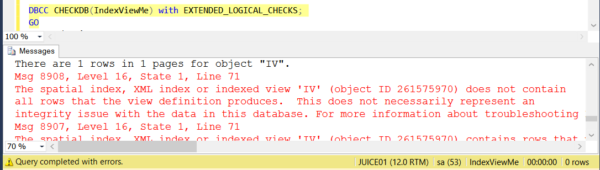
But as soon as I ran it with EXTENDED_LOGICAL_CHECKS, the world wasn’t so rosy:

checkdb indexed view corruption

The same thing is true of DBCC CHECKTABLE. I only find out about the issue if I do logical checks when running it against the indexed view:

checktable extended checks corruption

Don’t Assume CHECKDB Will Catch Everything

It doesn’t run every possible check by default.

If you use indexed views and you suspect you might be impacted by this bug, it might be time for some EXTENDED_LOGICAL_CHECKS. But be careful, Books Online warns that it doesn’t run this by default anymore because “Running this query can have a very high effect on performance, and its progress cannot be tracked.” For sensitive environments, you can restore a full backup to another server and run CHECKDB against the restored database.


Identity Columns in Oracle

Oracle
6 Comments

Many databases have the ability to create automatically incremented numbers. In SQL Server, we can use an IDENTITY property on a column to get autoincrementing numbers. But what can do we in Oracle?

Sequences

Sequences work in all recent versions and editions of Oracle. The default way to do this is pretty simple:

Now that SQL Server supports sequences, you could use sequences to help with portability between both systems, but there’s a gotcha – SQL Server’s next value syntax is different from Oracle’s. That means you’d need to use a trigger based solution if you didn’t want code to change.

Identities

What about identities? With SQL Server, we just mark a column as having an identity value. Magic! It’s done for us. Oracle is a commerical database, surely it has a magic option, right?

Oracle introduced identity columns with Oracle 12c. This lets developers keep using the code they’re used to. Check this out:

This lets you keep using the same kind of inserts that you would normal use for SQL Server, with one execption. Oracle gives you some flexibility for generating identities – you can generate them ALWAYS (the default) or BY DEFAULT (when a value isn’t provided).

If you really want to mimic SQL Server’s identity behavior, including IDENTITY INSERT then you can create your table like this:

You can even go so far as to protect yourself from trying to insert NULL values into the table using the ON NULL clause:

Sequences and Identities in Oracle and SQL Server

If you want to make sure you can reuse as much code as possible between Oracle and SQL Server, identity columns are a safe bet. The vast majority of code won’t need to change and your application will be none the wiser.

Brent says: when people talk about porting their application from one database back end to another, this is a good example of how it’s so tricky. Sure, both databases have exactly the same functionality available, but even something as simple as an identity column is syntactically different between them.

Erik says: In case anyone’s wondering, it didn’t hurt getting inserted into an Oracle table. The bathrooms in Tablespace were very clean.