Blog

Moving Databases with ALTER DATABASE

SQL Server
20 Comments

True story

A long time ago, I had to actually do stuff to databases. One thing I had to do was move data files around. Maybe some knucklehead had put system databases on the C: drive, or a LUN was filling up, or we got a new LUN. You know, whatever. Natural curiosity oft leads one to the internet. If one does not succumb to food and cats, one may find useful information. Or anonymous message boards. Sort of a toss up. What I found was this article. Weird, right? 2009. Brent said to use ALTER DATABASE. It’s new and pretty and smart people do it. What Brent didn’t do was explain how it’s done. Or link to how it’s done. I felt cold and alone. Abandoned. Afraid. “Great post, Brent”, I said sarcastically, and set out to figure out how to work this magic on my own.

I turned to BOL, the destination of all self-loathing people. If you scroll down to the bottom, way down at the bottom, the syntax is there. Of course, moving system databases is a horse of a different color. But hopefully you don’t need that one. For user databases, it’s rather more simple:

  1. Alter the file metadata to the new path
  2. Set the database offline
  3. Physically move the file
  4. Set the database back online

Easy enough!

Run ALTER DATABASE with the new location. We’re moving the data file. If we were moving the log file, it would probably end in “_log” or something. You can find all this information in sys.master_files, except where you’re moving the file to. Just don’t actually move it to C:\Whatever. You may run into problems later. Also, you need the filename. If you don’t include it, SQL won’t complain until you try to set the database back online. Yay!

This is the part that you need to think through. People have to be cool with the database being offline while you move the physical file. This is not a seamless transition. If you’re moving large enough databases, you may want to consider an alternate method, like Mirroring or Log Shipping. They take more work, but you get the whole near-zero-downtime thing out of it. You may want to stage a mock file move to test LUN to LUN copy speeds. See how many GB you can move per minute. That way you’ll at least be able to estimate how long the outage will last. Assuming all that is cool, go ahead and take the database offline.

Now you gotta hurry up and get that file moved. How you do that is up to you. You may prefer to just use Windows Explorer, since it has a status bar, and tells you copy speeds. Good stuff to know if people ask for updates, right? Just to fill space, here’s a PowerShell command. I still hate PowerShell.

Once that finishes, put your database back online.

If you find yourself having to do this often, or if you have to migrate a group of databases, it’s probably worth scripting out.

There you have it

It’s that easy to do. Just make sure you have adequate backups, in case something goes wrong. I take no responsibility for what happens to your data files when they copy across your SAN, or anywhere else.

Thanks for reading!


Out of Office: Time For the 2016 Brent Ozar Unlimited Retreat

SQL Server
3 Comments
Last year's company retreat on the Oregon coast
Last year’s company retreat on the Oregon coast

Thank you for your web visit. Your eyeballs are very important to us. However, we’re out of the office and will be back on Monday, March 7, 2016.

During this period we will have limited access to our email. We’ll still have full access to Twitter, Facebook, and Instagram. We apologize in advance about that, because we’re going to be posting a lot of photos about this year’s company retreat.

This year, we’re heading to wine country – scenic Napa Valley, California. The agenda includes learning about wine, watching people cook, hiking, playing Cards Against Humanity, going on a hot air balloon ride (well, some of us), getting tattoos (even less of us), and oh yeah, talking about our SQL Server business.

For immediate assistance, please contact Microsoft Support at 1-800-642-7676.


How often should I run DBCC CHECKDB?

There’s an old DBA saying…

May you already have a backup restored
A half hour before your boss knows there’s corruption

What? There’s no such thing as old DBA sayings? Well, maybe if you all said something other than “no” once in a while, you’d be more quotable. Hmpf.

Anyway, this is a serious question! And there are a lot of things to consider

  • Do I have a different RTO for corruption?
  • What’s my backup retention policy?
  • How much data do I have?
  • How long are my maintenance windows?
  • Do I have a server I can offload checks to?

Recovery Time Objectification

When you’re setting these numbers with management, you need to make them aware that certain forms of corruption are more serious than others, and may take longer to recover from. If system tables or clustered indexes become corrupt, you’re potentially looking at a much more invasive procedure than if a nonclustered index gets a little wonky — something you can disable and rebuild pretty easily.

Either way, you’re looking at an RTO of at least how long it takes you to restore your largest database, assuming the corruption isn’t present in your most recent full backup. That’s why backup checksums are important. They’re not a replacement for regular consistency checks by any means, but they can provide an early warning for some types of page corruption, if you have page verification turned on, and your page is assigned a checksum.

If you use a 3rd party backup tool that doesn’t allow you to use the backup checksum option, stop using it. Seriously, that’s garbage. And turn on Trace Flag 3023 until you find a replacement that does.

Notice I’m not talking about RPO here. But there’s a simple equation you can do: the shorter your RTO for corruption, the longer your RPO. It’s real easy to run repair with allow data loss immediately. The amount of data you lose in doing so is ¯\_(?)_/¯

Which is why you need to carefully consider…

Backup retention

The shorter the period of time you keep backups, the more often you need to run DBCC CHECKDB. If you keep data for two weeks, weekly is a good starting point. If you take weekly fulls, you should consider running your DBCC checks before those happen. A corrupt backup doesn’t help you worth a lick. Garbage backup, garbage restore. If your data only goes back two weeks, and your corruption goes back a month, best of luck with your job search.

Of course, keeping backups around for a long time is physically impossible depending on…

How much data YOU have

The more you have, the harder it is to check it all. It’s not like these checks are a lightweight process. They chew up CPU, memory, disk I/O, and tempdb. They don’t cause blocking, the way a lot of people think they do, because they take the equivalent of a database snapshot to perform the checks on. It’s transactionally consistent, meaning the check is as good as your database was when the check started.

You can make things a little easier by running with the PHYSICAL ONLY option, but you lose out on some of the logical checks. The more complicated process is to break DBCC checks into pieces and run them a little every night. This is harder, but you stand a better chance of getting everything checked.

Especially if you have terabytes and terabytes of data, and really a short…

Maintenance window

Are you 24×7? Do you have nights or weekends to do this stuff? Are you juggling maintenance items alongside data loads, reports, or other internal tasks? Your server may have a different database for different customer locations, which means you have a revolving maintenance window for each zone (think North America, Europe, APAC, etc.), so at best you’re just spreading the pain around.

Or you could start…

Offloading checks

This is my absolute favorite. Sure, it can be a bear to script out yourself. Automating rotating backups and restores can be a nightmare; so many different servers with different drive letters.

Dell LiteSpeed has been automating this process since at least version 7.4, and it’s not like it costs a lot. For sure, it doesn’t cost more than you losing a bunch of data to corruption. If you’re the kind of shop that has trouble with in-place DBCC checks, it’s totally worth the price of admission.

But what about you?

Tell me how you tackle DBCC checks in the comments. You can answer the questions at the beginning of the post, or ask your own questions. Part of my job is to help you keep your job.

Thanks for reading!

Brent says: if you’re using NetApp SAN snapshots, they’ve also got great tooling to offload corruption checks to your DR site. Licensing gotchas may apply – for both SQL Server and NetApp writeable snaps.


SQL Server 2005 End Of Support: Keep Calm And Do This Stuff

SQL Server
6 Comments

Ask not for whom the bell tolls

It tolls for SQL Server 2005. Which means in a few short months, you’ll need to get out of Dodge. I’m sure you all have your upgrade ducks in a row, you’ve studied the breaking changes, the upgrade path, and maybe even downloaded the latest upgrade advisor. Smarty pants you are! I’m proud of you.

But chances are, that database of yours has been around for a while. If you’re not regularly upgrading SQL Server, you may forget to do a few things after you get that fossil to its new museum.

Page, but verify

Turning this on is a good step towards catching corruption early. This will put SQL Server in the habit of giving all your data pages a checksum as it writes them to disk, that it will validate when it reads them back into memory. If something spooky happened to a page, it will ring the alarm. Follow the link for some scripts to figure out if it’s turned on, and turn it on if it’s not.

Mind your compatibility level

When going to 2014 (as of today, 2016’s RTM hasn’t been announced yet), you’ll have to decide whether or not the new cardinality estimator suits you. There’s not a cut and dry answer, you’ll have to test it on your workload. If you’d like some of the more modern SQL features added to your arsenal, you can bump yourself up to 2012-levels to get the majority of them.

Who owns this thing?

Most people don’t log in as sa. Right? Heh. NO SERIOUSLY. Okay, your Windows login is a sysadmin anyway, so it doesn’t matter. Cool. But when you restore a database, the owner becomes whomever restored it. It’s generally considered pretty smart to make sa the owner. This goes for your Agent jobs, too!

You’ve gotten so big!

Careful about how you’re growing out your files. The majority of SQL users aren’t standing around with calipers and a magnifying glass deciding how much to manually grow files by. That’s special. Chances are you’re relying on percent autogrowth for your data and log files. Problem is, the bigger your files get, the more they grow by. What’s 10% of 5TB? BASICALLY A RHINOCEROS!

Does anyone know what’s in here?

Updating stats is important enough on its own, but Microsoft has put it in the upgrade steps for both 2014 and 2016. Perhaps they’re being collected differently in newer versions? I haven’t seen much of a “why” on this, but it’s not something I’d want to get caught out there on. But I’m sure that you, studious as you are, are updating them regularly anyway.

Since you’ve got this whole new server

Now is a great time to check out our Download Pack! We have a setup guide, and all our scripts are in there too. You can really dodge a lot of the common mistakes and oversights people make when setting up a new server.

Thanks for reading!

Brent says: when Microsoft doesn’t support something, we don’t support it either. This means we won’t do our SQL Critical Care® on SQL 2005, and our First Responder Kit script will be SQL 2008+ only. (This makes our life easier when it comes to testing and support.)


Getting Started With Oracle: Working With Numbers

Oracle
11 Comments

Math is math is math

I haven’t found any tremendous differences working with numbers between Oracle and SQL Server. Both offer pretty standard functions to calculate your calculations. Oracle has MOD(), SQL Server uses %. This is likely something you’ll want to be aware of if you’re working cross-platform, but nothing earth shattering.

One really interesting thing I’ve found with Oracle is that it only has one data type for numbers when you create a table. SQL Server has tinyint, int, bigint, decimal, numeric, float, and money (does REAL count?).

Oracle, well, it just uses NUMBER. The difference here is that you have the option to specify precision and scale. You can only do that in SQL Server for types more precise than integers.

One area where Oracle has a leg up on SQL Server is when it comes to concatenating numbers and strings together. It will implicitly convert numbers to strings, where SQL Server will just throw awful red text at you. Wah, error converting data types. At minimum, it makes your code way more clean. How many times have you written some dynamic-ish SQL only to have to CAST/CONVERT a bunch of values to strings? Probably a million. Maybe more. This also goes for dates.

I mean, you can try to use CONCAT or FORMAT in SQL Server.

If you hate your server.

And performance.

And baby animals with big eyes.

Don’t you lose my number

Working with numbers is usually one of the easier things to do in databases. Just match your data types and you’re good to go. As long as you’re not covering up years of “accounting irregularities” it should go pretty smoothly.

One major area of difference is, as I mentioned, that Oracle will do you a solid and convert numbers to strings when you’re concatenating. I think this in large part because Oracle differentiates the concatenation operator (||) from the addition operator (+). We’ll look more closely at that next time, because there’s a bit more to say about working with strings in general.

Thanks for reading!

Brent says: wow, only one datatype for numbers sounds awesome, actually. The simpler, the better there.


Getting Started With Oracle: Working With Strings

Oracle
9 Comments

The almighty string

It’s so good for holding all sorts of things. Chicken roulade, beef roulade, salmon roulade. It’s also the way you should store phone numbers. If I could go back in time to when I first started working with SQL, that’s what I’d tell myself. Stop. Just, please, for the love of Codd, STOP TRYING TO STORE PHONE NUMBERS AS INTEGERS. It will only end in heartbreak and weird exponential notation.

But we’re here to talk about Oracle. And strings. And stuff you can do with them. I spent one Christmas writing a text parser that my wife still brings up when we go shopping. So this is an important area to me.

First things first, man

Oracle ships with a function to put your strings in proper case. It sounds trivial to most people, until you look at the amount of time, energy, and forum posts that have gone into getting the same behavior out of SQL Server. Why this isn’t built in is beyond me. I guess we really needed CHOOSE and IIF instead. Those are super helpful. Game changers, the both.

But check this out!

I LOVE YOU ALL CAPS
I LOVE YOU ALL CAPS

But it doesn’t end there! I’m going to skip over the CONCAT function, because it only takes two arguments. In a situation where you need to do something like ‘Last Name, First Name’ you have to concatenate the comma + space to the last name. I think you actually end up typing more than just writing the whole thing out. So how do you do that?

You use the double pipes (||) to tell Oracle to mush everything together. A slightly more complicated example is if you needed to generate a ‘password’ based on some different bits of data.

Oracle is nice enough to let you put it all together without whinging about data types:

Hint: don't actually generate passwords like this.
Hint: don’t actually generate passwords like this.

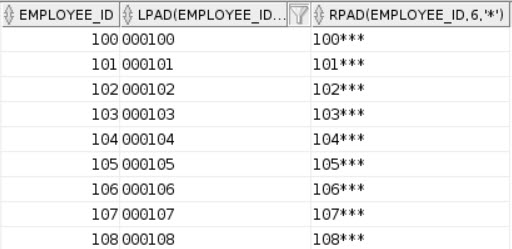
Oracle also has easy ways to pad strings, using LPAD and RPAD. This beats out most methods I’ve seen in SQL Server, using RIGHT/LEFT and some concatenation inside. It’s another situation where if you mix data types, the conversion happens automatically.

What you get is about as expected: strings padded to 6 digits with the character of your choosing.

Rubber Room
Rubber Room

SQL offers RTRIM and LTRIM to remove leading and trailing spaces from strings. If you need to remove other stuff, you have an additional step of replacing them, or calculating substrings. Oracle’s TRIM function gives you several different ways to have it operate. Oracle also has REPLACE, but whatever. It does what you think it does.

TRIM by itself will remove trailing and leading spaces. You can also hint it to only do trailing, leading, or both, and additionally specify which character you want to remove. In the example above. I found a phone number that started with a 6 and ended with four 6s. Below is how each run of the TRIM function worked:

Several Sixes
Several Sixes

It’s much more flexible and useful than SQL Server’s trimming functions, because it can be used to trim off things other than spaces.

Second String

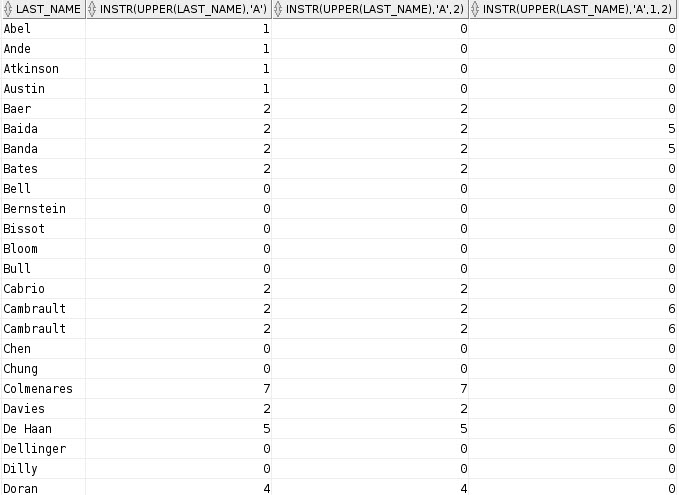
Oracle has a really cool function for searching in strings, cleverly titled INSTR. It takes a few arguments, and sort of like CHARINDEX, you can tell it where in the string to start searching. The real magic for me is that you can also specify which OCCURRENCE of the string you want to find. The only downside is that it appears to be case sensitive.

That runs, but it only gets us a hit for people whose names start with A:

A is for Ack
A is for Ack

All those B names have an a for the second character. But it’s easy to solve though, just use the UPPER function (or LOWER, whatever).

Just like CHARINDEX or PATINDEX, it returns the position of the string you’re searching for. The last column is where it’s super interesting to me. I love that kind of flexibility. Here are the results:

I want all positions!

And just like with SQL Server, you can use substrings and character searching to parse out text between two characters. This is made a bit easier in Oracle by being able to specify the nth occurrence of a character, rather than having to a separate call to CHARINDEX.

And you get that there string parsing magic to just the middle three digits.

Middling.
Middling.

That’s a lot harder when the strings aren’t uniform. We could just just as easily specified the constant positions in SUBSTR. But hey, declaring variables in Oracle is hard work. Seriously. There’s a lot of typing involved. And a colon. It’s weird.

Strung Out

This is as far as I’ve gotten with string manipulation in Oracle. I tried to figure out the stuff that I used to have to do in SQL Server a lot first. That usually makes the rest make more sense down the line. This is one area where I think Oracle clearly wins out. Though there’s a lot of conversation, and rightly so, about if the database is the proper place to do string manipulations like this.

Many people don’t have a choice. SQL either acts as the presentation layer, or the DBAs/developers who have to make these changes only have access to the data at the database level. It’s not rare that someone only knows some form of SQL, either.

Whatever your philosophy on the matter, it’s likely going to keep happening. Oracle makes it much easier to remedy some pretty common issues. One item I didn’t cover is using the LISTAGG function, which is another thing that SQL’s workarounds for are quite hacky, error prone, and involve XML. I can see why it would be a pretty big turn off for more people to have to implement it over a simple function call.

Thanks for reading!

Brent says: Oracle’s string functionality is a good example of why it’s so hard to port apps from one platform to another. It’s not just a matter of mapping functionality exactly, but also finding simpler ways to write the same queries.


Getting Started With Oracle: Date Math

Oracle
16 Comments

As soon as you store a date value

Someone is going to want to do something with it. Bucket it into a 30/60/90 day window, figure out how many times something happened between it and current, filter on it, or send you creepy anonymous cards on your birthday full of doll hair and coupons for lotion.

Since Oracle is apparently no slouch, it can do all this stuff for you. No more awkwardly counting days on your fingers or messing up your day-at-a-time Far Side desk calendar trying to look 6 months into the future. Not for you, smarty pants. We’re gonna use some SQL.

Just like home

If you add a number to a date value, Oracle adds that many days to the date. It’s exactly the same as GETDATE() + whatever in SQL Server. Below will add and subtract 365 days from the hire date of each employee.

Check out those headers!

One thing I really like that Oracle does, that SQL Server doesn’t do, is replace calculated column headers with the syntax behind them. It can be annoying if there’s really long or complicated syntax behind it, but it’s generally nicer to have something there. SQL Server just says “No column name” when you do the same thing. Both scenarios bring their own good reasons to alias columns to the table. Get it? Table. HEH!

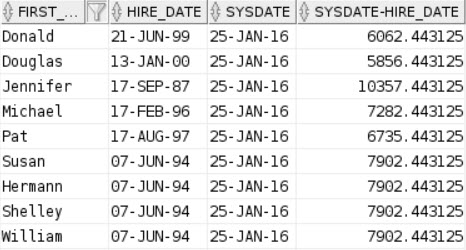
One big difference you’ll find is that adding or subtracting two date values in Oracle leaves you with a number, not a date. The number you’re left with is the number of days between the two days.

This is some old sample data.

It’s really easy to get the number or months between two dates, or add months to a date. You can use the MONTHS_BETWEEN and ADD_MONTHS functions to do that.

These are areas where I think SQL Server is a bit ahead of Oracle. DATEADD and DATEDIFF offer you a lot more flexibility and range of motion to pull out or add different intervals. I know there are Oracle workarounds with some additional math operators, but they’re not as straightforward to me.

A couple other neat options are NEXT_DAY and LAST_DAY. Next day tells you the next time the day of the week you choose occurs after the date you pass in, and LAST_DAY gives you the last day of the month for the date you pass in.

The NEXT_DAY function would be useful in a situation where the Monday following someone getting hired, they had to get their picture taken for their badge, or whatever.

SQL Server has EOMONTH (2012+), but curiously, neither platform has FIRST_DAY, or SOMONTH functions, to give you the first day of the month. That seems odd to me considering the amount of syntax that goes into getting back to the first day of the month (SELECT DATEADD(MONTH, DATEDIFF(MONTH, 0, @date), 0)).

You can also add years and months to a date using the TO_YMINTERVAL function. Um. Confetti?

Finally, if you need to get individual parts of a date, you can use the EXTRACT function:

This is pretty close to the DATEPART function in SQL Server.

Rudimentary Can’t Fail

Both Oracle and SQL Server store dates and times in the same way, though the way they’re presented and some of the ways we work with them vary between the two platforms. They’re not too far off from each other, and both have strengths and weaknesses. SQL Server makes it really easy to pass in dates, but Oracle is far less ambiguous about which dates it will compare, which can be error prone. Either way, if you’re developing an application to work with either platform, or if you need to port code over, you have your work cut out for you when it comes to working with dates.

Thanks for reading!

Brent says: those headers, are you kidding me? It puts the plain English formula as the field name? That’s amazing.


Getting Started With Oracle: Working With Dates

Oracle
7 Comments

Contrary to popular belief

You will not burst into eternal flames if you’re a SQL Server guy or gal, and you happen to be within 100 feet of an Oracle database. You might feel lost and confused for a while, but you probably felt the same way when you opened up SSMS for the first time.

I’ve been trying to expand my horizons a bit, so I followed some reasonably simple download instructions to get my feet wet in the ocean of gold hundred dollar bills and lobster/veal hybrids that is Oracle. The next thing I needed was some sample data, so I grabbed the HR stuff. I don’t need anything too complicated yet.

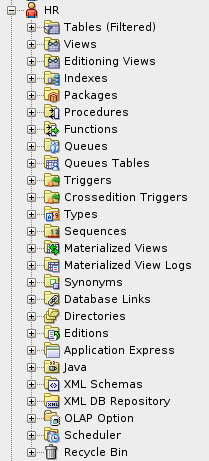
Is that Oracle handles multi-tenancy a bit differently than SQL Server does, at least up until 12c and the introduction of pluggable databases. Where in SQL Server you create databases, in Oracle you create users and schema. Creating an Oracle database happens when you install the software. It’s weird at first. Like when you move into a new apartment and keep reaching to the wrong side to switch the bathroom light on.

If you want to see what data exists for other users, you expand the Other Users node to view tables, indexes, and views, etc.

Sympathy for the Larry

Why start with dates?

No reason! We’ll talk about numbers and string later.

Another minor quirk when working with Oracle is that you can’t do what you do in SQL Server:

In Oracle, you have to reference the DUAL table; it’s just one column called DUMMY and one row with an X in it.

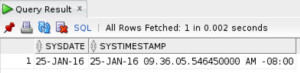
Retrieving system dates goes like this:

SYSDATE just gives you the date, SYSTIMESTAMP gives you date, time and timezone offset.

Deep breaths!
Deep breaths!

The first thing you’ll notice is that Oracle presents dates differently — DD-MON-YY — which is something that, curiously, I have seen pop up as a requirement for people to do with SQL Server. Because SQL Server is a great presentation layer.

(It’s really not.)

Format is everything

If you do want to make your dates look a little prettier, you have to do a little wrangling with the TO_CHAR function. It allows you to specify string formatting of date and time data.

Modern Art.
Modern Art.

Which naturally bring us to comparing dates

You didn’t look at all that stuff and think you’d get off easy, did you? SQL Server jumps through a lot of hoops to let you pass in date values as predicates. Oracle, not so much. You have to do some hand holding.

Below are some queries where I tried to pass in date literals with varying degrees of success. Well, okay, the degrees of success were pretty binary. Not a lot of grey area when queries error out, huh?

The main point to take away here is that Oracle is much pickier about this than SQL Server is. It’s totally fine to pass in ‘2000-01-01’ and a lot of different variations in formatting and delimiting and still get valid results back. Whether that’s good or bad is up to you. I like the ease and flexibility of SQL Server, but I also like that there’s far less ambiguity in Oracle.

I’m learning at the same time some of you are

So if there are any mistakes, misgivings, trick shots, or better ways to do things than I have written, feel free to leave comments.

Join me next time where I’ll look at some date math examples!

Thanks for reading!

Brent says: wow, I’m surprised it doesn’t take yyyy-mm-dd without the “DATE” prefix. I’ve been trying to break my American habits and use the yyyy-mm-dd format in my demos to work better with a worldwide audience, and now I feel like I’m behind again.


The Top 4 Job Tasks DBAs Forget

It’s easy to get caught up in daily incidents, tickets, and special projects. Like a good scout, though, a core task in a DBA’s job is to be prepared. You have to set time aside in your schedule to:

1. Practice responding to corruption. Gail Shaw’s “Help, my database is corrupt, now what?” post should be on your bookmark toolbar. On your development server, stop the service, bust out a hex editor, and purposely break some of your database pages. Don’t try to figure out which pages you’re corrupting – act like your storage, and just trash random pages in the file. Then start the SQL Server back up, run DBCC CHECKDB, and follow Gail’s checklist.

2. Automate the restore of full and log backups. When problems strike and you have to restore a database, you don’t have time for the pain of clicking through GUIs. It gets even worse when multiple related databases are involved, or heaven forbid, all of the databases on the server. If you’ve got a third party backup tool, rehearse the complete rebuild of a database or a whole database server. If you’re using native backups, check out this MSSQLtips post on generating restore scripts from all the database files in a folder.

3. Set your monitoring tool’s thresholds. If you’ve got an Outlook rule to dump all of your alerts into a different folder, you’re losing the monitoring game. Spend time tweaking the thresholds so that you don’t get spammy alerts. The whole point of a good monitoring tool is that you get alerted when something is truly wrong, and you can take action before users figure things out. If an alert’s not actionable, it needs to go.

Take time for you.
Take time for you.

4. Take care of yourself. This job is about serving and protecting the data. When disaster strikes, you need to be practiced, ready, and in the zone. You can’t do that if you’re constantly fighting fires and working sixty hours a week. You have to set a hard stop, walk away, and recharge your batteries.

If you’re lucky enough to love what you do, then learning stuff and playing with company servers after hours can feel like a recharge. Sure, it’s even better than working – but never forget what you’re really working for. Work to live – don’t live to work.


No but really, how big should my log file be?

SQL Server
26 Comments

Most of you are going to hate this

And TL;DR, there’s a script at the end of the post. But like The Monster At The End Of This Book, it’s worth it not to skip the middle.

There are about a billion but-what-ifs that could come into play. I can’t possibly answer all of those for you. But that’s not the point of this post, anyway! If you’re in a special circumstance, using some fancy features, or doing something utterly deranged to your database, this isn’t the post, or script, for you.

I mean really, unless the size of your log file is causing you some dramatic pain, leave it alone. You should probably go invent cold fusion if log file size is the worst issue in your database. Congratulations.

This is also a lousy place to ask me if you can shrink your log file. I have no idea how or why it got that size. There’s free space now because you’re using FULL recovery model and you took a log backup, or you’re in SIMPLE and your database hit a CHECKPOINT. No magic there. It may very well grow to that size again, so shrinking it could be a really dumb idea.

So what’s the point? Lots of people ask me this question: clients, Office Hours attendees, random passerby on the street who recognize me (even without my Robot). I usually give them the same answer and explanation, unless I have ample evidence that their fancy and/or deranged ways require a different estimate.

From the ivory tower

A good STARTING POINT for your log file is twice the size of the largest index in your database, or 25% of the database size. Whichever is larger.

Why?

If the largest object in your database is larger than 25% of your database, you are likely running some type of maintenance. Index rebuilds require the size of the object being rebuilt in log space. I usually rule of thumb twice that space, in case you’re doing anything else while you’re doing that maintenance, like ETL, reports, dragging data to and fro, purging data, whatever. If you’re only ever reorganizing the largest object, you may not need all that space. Are you sure you’re ONLY ever reorganizing that? I’ll wait.

But 25% seems so random!

Well, kinda. but you’re here for a starting point. If you’re not Super DBA and taking baselines and trending your database file sizes over time, random is better than nothing. It buys you some leeway, too.

  • If you miss a log backup (maintenance plans got you down?)
  • If you’re not taking frequent enough log backups (can I interest you in RPO/RTO insurance?)
  • If you run other long/large transactions (SSIS won’t save you)

You’ll have a fair amount of room to do your dirty work. Most sane and rational people consider this to be a positive thing.

But what if my log file still grows?

Well, then you found out you need a bigger log file. Or you need to take log backups more frequently. Perhaps those hourly log backups aren’t working out as you planned, hm?

And if your log file never grows, you’ll look really smart. And you’ll never have to wait for your log file to expand. They don’t benefit from Instant File Initialization the way data files do.

Show me the script already

It’s all right under here. Don’t forget to change the USE statement. All sizes are in GB. If your database is smaller than 1GB, you’re one of those lucky DBAs who can take vacations and stuff. Go do that. Life is short.

If your database is under 1GB, and your log file is over 1GB, start taking log backups. I’m pretty sure you’re not.


Stored Procedure Cached Time vs SQL Statement Cached Time

SQL Server
3 Comments

I recently ran into a performance problem that had me scratching my head. How could a stored procedure’s plan have changed, and yet it not be reflected in sys.dm_exec_procedure_stats?

So here’s what happened and what I knew:

  • 7:45am: Users were complaining that a page was timing out
  • 8:00am: Developer emailed the offending stored procedure and input parameter values
  • 8:30am: Developer reports that the page is fast again
  • 8:35am: I start troubleshooting even though it’s already fixed as we need to figure out what happened
  • UPDATE STATISTICS job runs every 30 minutes
  • WhoIsActive data saved every 30 seconds

I just knew that the UPDATE STATISTICS job caused the stored procedure to be recompiled and get a better execution plan. But I needed to confirm it.

I first ran the stored procedure with the provided input parameter values and checked the execution plan.

I ran DBCC SHOW_STATISTICS against each of the indexes in the plan and checked the Updated column in the first result set. One of the indexes did get updated.

Example DBCC SHOW_STATISTICS using StackOverflow database:
DBCC SHOW_STATISTICS(‘dbo.Posts’, ‘PK_Posts__Id’);

I next checked when the plan was cached and which plan was in cache:

It returned 2 rows: one for the application executions and one for my adhoc execution. I could tell which one was mine as execution_count=1.

Often times, my plan will be different than the app’s plan, but this time they were the same. If they are different though, you can mimic the app in SSMS by using its SET options. To get those options, grab the options_text value of the app’s username for the Login event in an XE session (use the System Monitoring\Connection Tracking event session template). Run those SET options in an SSMS query window and then run the stored procedure in that same window. You should have the same execution plan as the application.

The app’s plan was cached the day before. But wait a second! My assumption was that it had recompiled this morning due to the updated stats.

I dug into the WhoIsActive data:

It did have a different execution plan that morning!

But why would the cached_time value show the day before?

I scratched my head for a bit and then took to Twitter (#sqlhelp). Kendra replied and said to check the SQL statement’s compile time, not the proc’s compile time.

SQL Statement Cached Time:

And there it was. The cached time was from that morning.

I’m unclear why the cached_time didn’t change in sys.dm_exec_procedure_stats when the stored procedure’s plan did change when the SQL statement’s plan changed as a result of updated stats.

Brent says: even if you’ve got a monitoring tool, it can be helpful to log sp_WhoIsActive results into a table so that you can go back for troubleshooting later. Just make sure to set up a job to clean out that table periodically.


New York City: The Data That Never Sleeps

SQL Server
4 Comments

I love living in the city

Blog posts about people’s favorite data sets seem to be popular these days, so I’m throwing my hat in the ring.

NYC has been collecting all sorts of data from all sorts of sources. There’s some really interesting stuff in here.

Another personal favorite of mine is MTA turnstile data. If you’re a developer looking to hone your ETL skills, this is a great dataset, because it’s kind of a mess. I actually had to use PowerShell to fix inconsistencies with the older text files, which I’m still recovering from. I won’t spoil all the surprises for you.

Of course, there’s Stack Overflow.

You can’t go wrong with data from either of these sources. They’re pretty big. The main problem I have with Adventure Works is that it’s a really small database. It really doesn’t mimic the large databases that people deal with in the real world, unless you do some work run a script to make it bigger. The other problem with Adventure Works is that it went out of business a decade ago because no one wanted to buy yellow bikes. I’ve been learning a bit about Oracle, and their sample data sets are even smaller. If anyone knows of better ones, leave a comment.

Anyway, get downloading! Just don’t ask me about SSIS imports. I still haven’t opened it.

Thanks for reading!


When Shrinking Tempdb Just Won’t Shrink

SQL Server, TempDB
71 Comments

I am not a proponent of shrinking databases, but sometimes you have to because your momma said to. Sometimes that database is tempdb.

It used to be that we were warned against shrinking tempdb because it could cause corruption, so your only recourse was to restart the SQL Server service. Paul Randal let us know that this is no longer a problem.

LET’S SAY YOU HAVE TO SHRINK TEMPDB

Like your life depended on it. Or perhaps you needed the alerts to stop.

If a user ran an atrocious adhoc query that caused your tempdb to grow so much that it caused your disk space alert to fire and:

  • you needed that alert to stop
  • the storage team is not going to give you more space
  • the user promised to never do that again

So you try to shrink tempdb, but it just won’t shrink.

Try clearing the plan cache:
DBCC FREEPROCCACHE

And then try shrinking tempdb again.

I came across this solution recently when I had to shrink tempdb. I tried shrinking each of the 8 data files plus CHECKPOINTs, repeatedly. It would not budge. I almost threw in the towel and emailed out that the space issue would be fixed during our next patching window, but then I found David Levy’s reply. DBCC FREEPROCCACHE worked like a charm.

Brent says:
not-mad-amazed


A funny thing happened on my way to set up Mirroring…

I’ve set up Mirroring about a billion times

I’m not bragging about that. I’d rather say that I set up a billion AGs, and not one of them ever failed. But then I’d be lying to you; those things fail like government programs. One thing I’d never done, though, is set up Mirroring with a Witness. I never wanted automatic failover, because it’s only one database at a time. If for some reason one database out of all that I had mirrored ever turned Ramblin’ Man and failed over to another server, there would understandably be some application consternation. Not to mention any maintenance and internal operations. They don’t react well to sudden database unavailability.

Of course, doing anything for the first time is horrible. Just ask my second wife.

Here’s where things got awkward

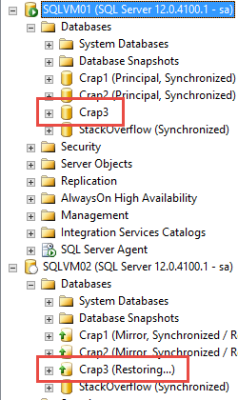
I have my databases! This is my top secret development environment. Stack Overflow is in an AG, and I had set up two other Mirrors: one synch and one asynch. I wanted to have a variety of setups to test some scripts against.

Everything looks good!

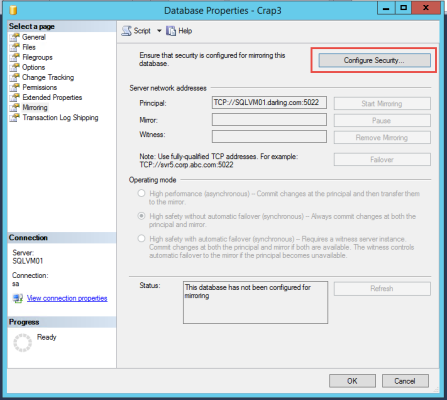
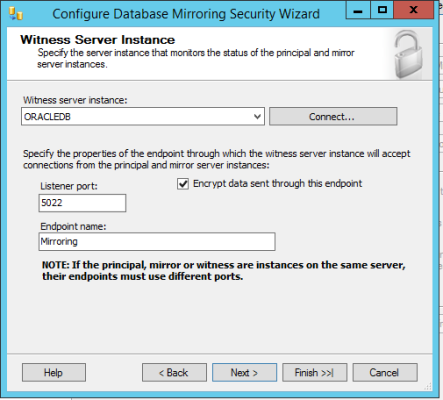
Alright, let’s set up Mirroring…

Configuring stuff is cool, right?
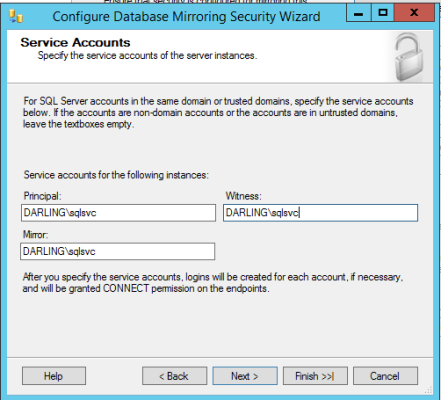
Yeah yeah next next next
Service accounts whatever BORING
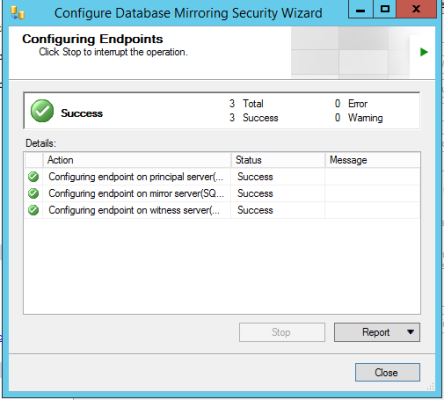
GREEN LIGHT GO!
GREEN LIGHT GO!

This is so easy. Seriously. Why doesn’t everyone do this? Why do you complicate your short, short lives with Availability Groups? Are they AlwaysOn? Are they Always On? WHO KNOWS? Not even Microsoft.

I'm hitting this button and jumping into a mile of Laphroaig.
I’m hitting this button and jumping into a mile of Laphroaig.

HIGH FIVES ALL ARO-

Y THO?
Y THO?

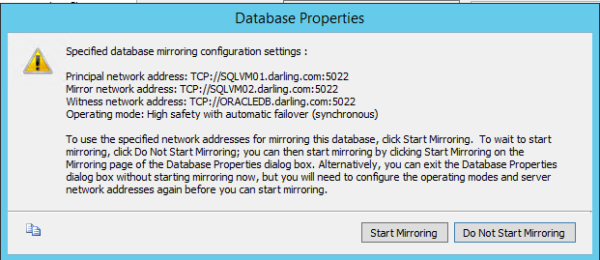
This is the error text:

Super Sleuth

Alright, that’s silly. I used the GUI. Instead of going to bed I’ll spend some time checking all my VM network settings. BRB.

I’m back. They were all correct. I could ping and telnet and set up linked servers and RDP. What in the name of Shub-Niggurath is going on with this thing?

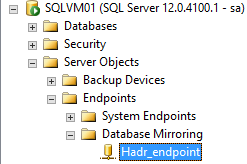
I can even see the Endpoint! So close, and yet so far~~

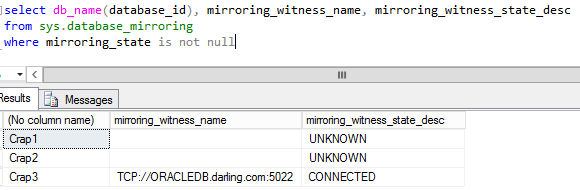
The Endpoint is showing up on the Witness and what is this?

Where are we now?

This is a good time for a quick recap

  1. Mirroring is up and running synchronously
  2. The endpoint is configured on the witness
  3. We get an error when we try to connect the witness

TO THE ERROR LOG!

I should have done this hours ago.

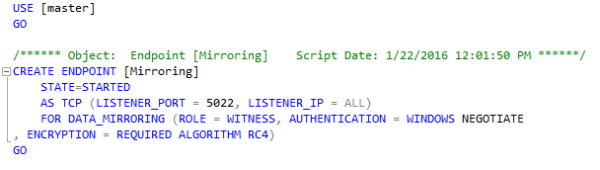
Well whaddya know? That’s a really good clue. Encryption and stuff. There’s no compatible algorithm. Ain’t that somethin’? You’d think that Microsoft would be cool about setting up the same kind of encryption across all the different Endpoints, if using different encryption would cause the setup to fail. Right guys? Heh. Right? Hey, hello?

NOPE.

Alright, let’s see what I need to be a matchmaker.

The Cure - Primary
The Cure – Primary
Oh. AES. Okay. Cool. Thanks.
RC4 WHY WOULD YOU DO THAT?

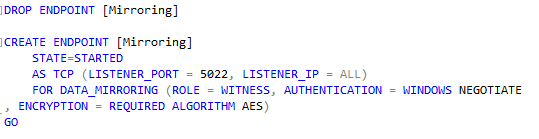
Since we have them both scripted out already, let’s just drop and re-create the Witness Endpoint with the right encryption algorithm.

INTO THE TREES
INTO THE TREES

That did not result in a forest fire. I’m hopeful. Sort of. It’s been a long night and I think I can see tomorrow from here.

Scriptin'
Scriptin’

Meanwhile, back on the Primary…

I AM SO SMRT
I AM SO SMRT

It worked! Now I have a Witness, and I can shut all my VMs down. That was so much fun.

What did we learn?

Microsoft hates you and doesn’t want you to sleep. Just kidding. Mostly. But seriously, why would they do that?

It mostly goes to show that it’s always a smart idea to use that little script button at the top of (most) GUIs in SSMS. Who knows what kind of foolishness you’ll find? A little reading can save you a lot of time troubleshooting errors that make you feel insane.

Thanks for reading!

Introducing Our Latest Employee, Richie Rump (aka @Jorriss)

Company News, SQL Server
19 Comments
Richie Rump, aka @Jorriss

During our very first training class, we showed the students how we use SET STATISTICS IO ON to get the number of logical reads performed on each table in a query, and then sum ’em up to see the query’s overall impact. It’s kind of a painful, manual process.

Sitting in the back row of the class (because that’s how he rolls), Richie Rump saw that process and thought to himself, “I bet I could make that easier.”

The bad news is that he probably didn’t learn much the rest of that day in class, because he immediately started building StatisticsParser.com.

The good news is that you got StatisticsParser, hahaha.

That kind of mentality is what we’re all about. We look for SQL Server tasks that are complex, and figure out how to make them easier for free. Whether it’s our blog posts, our community presentations, or our tools, we’re always looking for new ways to make your job suck less.

So let’s talk to Richie and figure out what makes him tick.

Brent: I think of each person as a toolbox. Over time, as we experience situations and solve problems, they become tools in our toolbox. I think back to my time in hotels, my work in accounting, and even my love of cars as various tools in my toolbox that I can use to get things done. What are some of the tools in your toolbox that make up who you are?

Richie: This surprises some but I spent almost five years as a project manager. I even earned the dreaded Project Management Professional (PMP) certification. I also started my career as a Access database programmer (way back in Access 2.0). Most of my career I spent using Microsoft tooling like Visual Basic, ASP, C#, and the .NET framework. I also spent a fair amount of time as a software architect. After my time as a project manager I pivoted my career towards the data side and absorbed all of the SQL Sever knowledge that I could. I spent almost twelve years in the supply-chain management vertical and have spent time in the accounting, payment processing, and legal areas as well. After reading all of that I feel old.

Brent: Today, you’re a serial (or maybe parallel) community activist – starting dotNet Miami, helping put on the South Florida Code Camp, co-founded the Away From the Keyboard podcast, built StatisticsParser and sp_DataProfile, give community presentations, etc. Take me back to the first time you said to yourself, “I should create something that gives back.”

Richie: That probably would be starting dotNet Miami. For years I followed the SQL Server community and the WordPress communities. I was always impressed by their generosity in not only their sharing of technical knowledge but in the way they care for each other as human beings. I looked around the developer community in Miami and wondered “Why can’t we have a .NET community like that in Miami?” So I grabbed a few people and met at a sports bar and we talked about starting a group. Six months later dotNet Miami was born. We’re still going strong and are committed to being a place where we can grow as technologists and as people. My favorite description of dotNet Miami is “We are not competitors, we are comrades.”

Brent: For years, you’ve been making our classes and webcasts more fun by poking fun at us. Now, you’re going to be on the other side. How do we help raise the next generation of the peanut gallery?

Richie: It takes commitment that’s for sure. I think the whole peanut gallery thing came from getting to know the team personally. Twitter conversations, in-person conference discussions, and training classes all lead to not me to poke fun at the Brent Ozar Unlimited team, but have a friendly conversation with friends. So you want to join the peanut gallery? Get to know us better over Twitter, chat with us at a conference, or join us for in-person training. (See what I did there?)

Brent: One last thing everybody’s gonna ask: where’s @Jorriss come from?

Richie: Ha! Back in the early days of the Internet we had these things called “handles”. For a while I was going by richier but that never sat well with me. So one night in college, a bunch of us geeky types were creating personas that would live in the Star Wars universe (don’t judge). There was a character in Timothy Zhan’s Heir to the Empire trilogy called Joruus C’baoth that I dug so I changed it a bit and out came Jorriss Orroz. From there the handle just stuck. Bonus points if you can figure out where the Orroz comes from.


Should I Worry About Index Fragmentation?

Index Maintenance, SQL Server
34 Comments

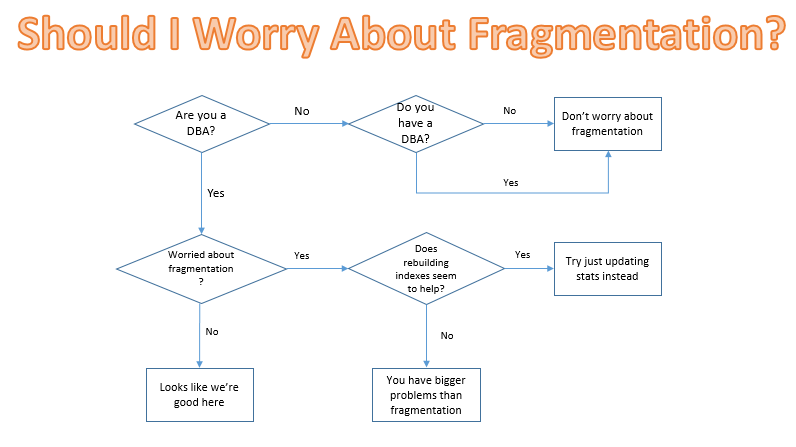
Here’s a handy flowchart for whenever you find yourself worrying about fragmentation:

Screen Shot 2016-01-26 at 9.08.14 AM

*Talk to your doctor about whether fragmentation is a problem for you. Seek help for index maintenance lasting longer than four hours. Serious side effects may occur if all index maintenance is ignored completely.

Brent says: pop quiz: what are you doing more often, rebuilding indexes or running DBCC CHECKDB?


SQL Server Agent is an application server.

SQL Server
16 Comments
Application server.
Application server.

SQL Server Agent is a job scheduler.

When we first get started managing SQL Server, we usually use it for backups, index maintenance, DBCC CHECKDB, and other common maintenance tasks.

And then one day, we say, “Hey, I need this T-SQL script to run once a day.” We add an Agent job for it. It’s a rare occasion, we think. Not really a big deal.

The next thing you know, the entire business’s lifeline depends on dozens – or heaven forbid, hundreds or thousands – of intricately interwoven and ill-documented Agent jobs. Nobody knows what they do – they just have to run.

Except many of them don’t. They fail for one reason or another, but then they work the next time, and we just hope and pray everybody ignores it.

Eventually, some of them start failing permanently. When we try to figure out what’s going on with them, we ask around about who wrote the script, and it always turns out it was some guy who left the company months ago. Nobody knows how to debug his stuff, or if it even matters. We’ll just leave it in place and maybe it will start working again.

Don’t let yourself get to this place.

To make your life easier, keep application-logic Agent jobs out of your production SQL Servers.

If someone needs application logic, and it has to be an Agent job, it doesn’t actually have to be on the production database server. Give them their own Standard Edition VM where they can go to town, creating any Agent jobs they want. However, those users are 100% responsible for managing the success and failure of their Agent jobs because these are applications, not databases. There are no databases on this server – or if they are, they ain’t backed up or production-quality. This server is for jobs that can point at any SQL Server.

In addition, give them a VM in the DR environment where they can sync their jobs. Source control and deployment is totally up to them.

This way, it lets you focus: if there’s a failing job on the production SQL Server, you own it.

To help you pull it off, consider using my SQL Server support matrix. It sets clear expectations about what you’ll allow in dev, QA, production, and mission-critical production boxes.


Don’t Use Scalar User-Defined Functions in Computed Columns.

T-SQL
27 Comments

Scalar functions in computed columns cause all queries that hit that table to execute serially. But it gets worse!

Scalar functions in computed columns
cause index maintenance to go single-threaded.

If you’re running Expensive Edition, index rebuilds can be both online and parallel. That’s pretty cool, because it keeps all your gadgets and gizmos mostly available during the whole operation, and the parallel bit usually makes things faster.

That is, unless you have a computed column in there that references a scalar function. I decided to write my test function to not perform any data access so it could be persisted. It’s dead simple, and I’m tacking it on to a column in the PostLinks table of the Stack Overflow database.

For this one, all we have to do is turn on actual execution plans and rebuild the index, then drop the column and rebuild again.

Here are my execution plans. The rebuild I ran when the table had my computed column in it stayed serial.

Hi, I'm garbage.
Hi, I’m garbage.

Parallel, sans computed column:

Dude, you're getting a parallel.
Dude, you’re getting a parallel.

They cause DBCC CHECKDB
to go single-threaded, too.

Probably the most important maintenance item you should be doing, aside from backups, is running DBCC CHECKDB. Seriously, if you’re not doing them both, start today. Ola Hallengren has basically done all the work for you. Back when I had a real job, I used his scripts everywhere.

Before we were so rudely interrupted by a soap box, we were talking about parallelism. This part was a little bit more complicated, but don’t worry, you don’t have to follow along. Just look at the pretty pictures. Sleep now. Yes. Sleep.

The first couple times I tried, the DBCC check never went parallel. Since I’m on my laptop, and not a production server, I can set Cost Threshold for Parallelism to 0. You read that right, ZE-RO! Hold onto your drool dish.

With that set, I fire up Ye Olde Oaken sp_BlitzTrace so I can capture everything with Extended Events. You’ll need all three commands, but you’ll probably have to change @SessionId, and you may have to change @TargetPath. Run the first command to start your session up.

With that running, toss in your DBCC command. I’m only using DBCC CHECKTABLE here to simplify. Rest assured, if you run DBCC CHECKDB, the CHECKTABLE part is included. The only checks that DBCC CHECKDB doesn’t run are CHECKIDENT and CHECKCONSTRAINT. Everything else is included.

Run DBCC CHECKTABLE, add the computed column back, and then run it again. When those finish, run the sp_BlitzTrace commands to stop and read session data. You should see execution plans for each run, and they should be way different.

Hell Yeah.
Hell Yeah.
Hell No.
Hell No.

So even DBCC checks are serialized. Crazy, right? I’d been hearing about performance hits to varying degrees when running DBCC checks against tables with computed columns for a while, but never knew why. There may be a separate reason for regular computed columns vs. ones that reference scalar functions. When I took the equivalent SQL out of a function, the DBCC check ran parallel.

Of course, those online index rebuilds running single threaded might be a blessing in disguise, if you haven’t patched SQL recently.

I don’t have much of a grand closing paragraph here. These things can seriously mess you up for a lot of reasons. If you’re a vendor, please get away from using scalar functions, and please please don’t use them in computed columns.

Thanks for reading!

It’s Now Easier to Query sp_BlitzFirst’s Historical Tables

SQL Server
4 Comments

When you want to know why the server’s slow, you can ask Brent. sp_BlitzFirst® checks a lot of DMVs to find common causes of server slowness.

When you turn on @ExpertMode = 1, you can see additional information like file stats, wait stats, and Perfmon counters.

To log those to a table permanently, check out the @Output parameters. In this example, I’m writing all of the working tables to the DBAtools database:

That creates the tables if they don’t already exist, and then adds the result sets each time it runs so you can track performance over time.

Why was the server slow yesterday afternoon?

When it’s time to query the data back out, you can add the @AsOf parameter with a date & time to see the main result set of alert results as of that moment in time:

The query goes 88mph, and then goes back in time

That returns results within 15 minutes of either side of your time so you can see if there were any problems leading up to (or after) that moment. It’s really useful when someone says the server was slow last night.

However, that only shows the basic result set of sp_BlitzFirst® – not the detailed file/Perfmon/wait stats results. For those, you’re best off querying the tables directly for trending purposes.

v20: You Can Query Your File/Perfmon/Wait Statistics Over Time, Too

When you use the @parameter (or PerfmonStats or WaitStats), the latest version of sp_BlitzFirst® automatically creates a matching view, too, with a suffix of _Deltas. For example, if your results are in DBAtools.dbo.WaitStats, then sp_BlitzFirst automatically creates a view called WaitStats_Deltas. Querying that view will give you trending data over time because it automatically matches up samples for you to get running averages.

This way, if you run sp_BlitzFirst® in an Agent job every 5 minutes, you can track your SQL Server’s statistics over time. You can query it back out with SSMS, or your favorite reporting tool.

You can grab sp_BlitzFirst® along with all our other scripts in our handy download pack. Enjoy!


What Is a Staging Environment and How Do You Build One?

Architecture, SQL Server
4 Comments

If you’re a full time production database administrator, you need a staging environment.

This is where you test infrastructure tasks like failing over mirroring, doing a disaster recovery role swap, cluster quorum changes, log shipping configuration, and patching. You need to test this stuff repeatedly so that when you’re under pressure in the production environment, you feel comfortable and confident. Bonus points if you use this environment to build checklists and screenshots for rarely-done tasks like recovering from corruption.

You can’t use the development or QA environment because many of these tasks will take the entire environment down – sometimes by design, and sometimes by accident. If you’re in the middle of testing a patch at 9:30AM, and something breaks, and you’ve got a meeting starting at 10AM, you don’t want to have the entire developer team sitting idle because their SQL Server is down. You want to be able to leave this environment in a broken state for hours or days without feeling clock pressure.

Staging is the DBA’s development environment.

You’re not going to use it for load testing or performance tuning, just rehearsing and testing infrastructure changes you might make in production. As such, the hardware quality and quantity doesn’t have to matter, but it needs to be as logically similar as possible.

For example, if your production environment consists of a 3-node production failover cluster and a 2-node cluster in DR, with log shipping across the two, then you’re going to want at least one cluster, plus a separate server to log ship to.

The individual nodes can be low-powered boxes – think single-CPU desktops with 16GB RAM and a couple of $250 1TB SSDs. (You want SSDs because you’re going to be doing a lot of backup/restore on these.) In theory, they can be VMs too, but often sysadmins freak out when you start asking for several terabytes of shared storage space for a staging environment. For $250, I can just avoid that argument altogether.

Use SQL Server Developer Edition – it’s free – and this whole thing costs you less than a grand.