Blog

Demoing Latch Waits with Stupid Tricks

Development
0

Say you’ve got PAGELATCH_UP or PAGELATCH_EX waits, and you’re wondering what might be causing ’em.

I’m going to keep the brutally simple approach of building a stored procedure to simply dump hard-coded values into a table at high speed. I don’t want to select from other tables since they might introduce some other types of waits, especially when I’m demoing concurrency quickly.

So let’s create a stored procedure that does an insert into a table:

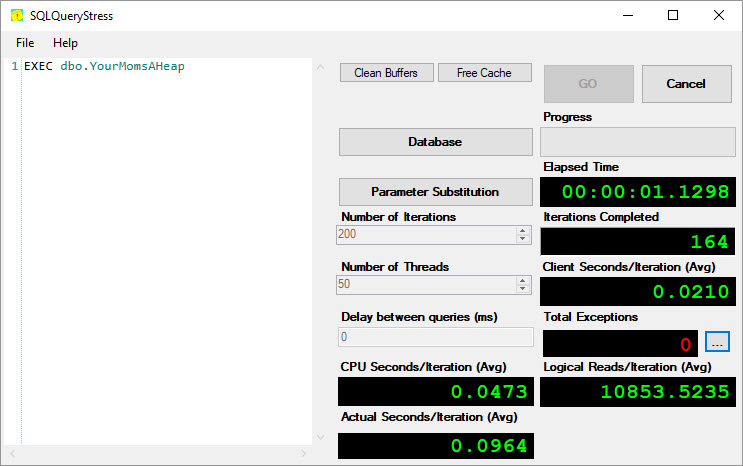
And then use SQLQueryStress to run 200 threads with it:
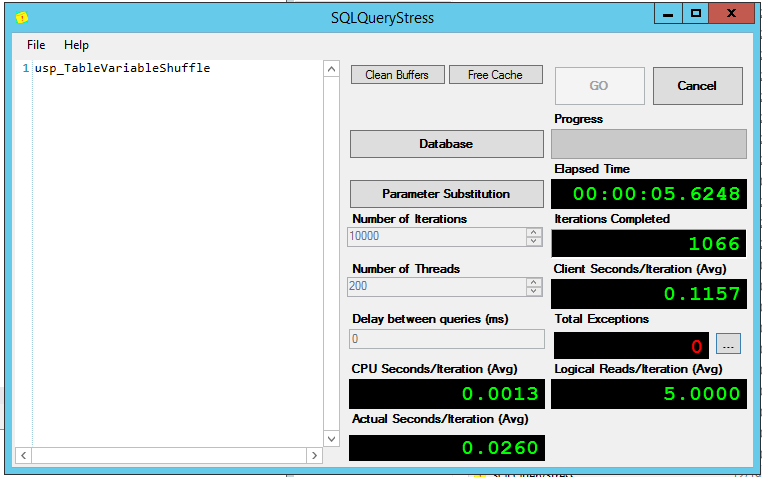
SQLQueryStress, stressin’ the queries

When we run sp_BlitzFirst @ExpertMode = 1 to take a live sample of wait stats, the results aren’t all that impressive:

Small fries

Because frankly, our code isn’t all that impressive. We’re only inserting 3 rows. What if we insert a lot more? Let’s build SQL dynamically:

That gives me a nice long list of values:

Valuable values

That I can dump into my stored procedure:
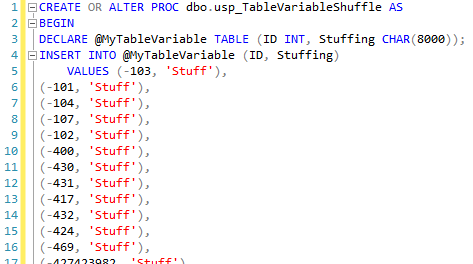
I could go on and on

And now, when I run it from 200 threads of SQLQueryStress, the waits for inserting 1,000 hard coded values at a time – each of which needs a page for its whopper CHAR(8000) field – look a little different:

Like cowboy up, but different

That’s what it looks like when your system is under heavy contention due to a lot of queries partying in table variables: in each second, each core on this system is spending 48 seconds waiting on PAGELATCH_UP. That’s awesome.

What about temp tables instead, you ask? Same symptoms: PAGELATCH_UP.

How about PAGELATCH_EX?

You don’t see exclusive locking on temp tables and table variables because they’re per-session. Global temp tables, however, that’s another story:

Again, use your system-generated list of values to throw in 1,000 rows each time. Don’t bother selecting anything from the temp table or deleting the rows – that’d only slow us down. The result: exclusivity:

All my PAGELATCH_EXes live in Texas

Now, everybody’s fighting over the right to insert into a single shared object, the global temp table. The same thing happens if you use a user table:

You end up in a brutal fistfight for exclusive rights to insert rows into an existing page:

PAGELATCH_EX waits hitting user tables

You can change the severity of the waits by adding or removing fields on the tables involved. Want to simulate more contention on a single page? Remove the CHAR(8000) field. Want to throw big fields in the mix? Toss in some off-row NVARCHAR(MAX) – but like we generated a hard coded list of IDs ahead of time, do something similar with your other fields, too, lest you end up locked in contention for the source table.

When I’m facing unusual waits like these in production, I love demoing them with the simplest queries possible. This way, we can quickly show how hardware helps (or doesn’t help) a particular bottleneck – especially as opposed to just changing the code or indexes.



How Table Variables Mess With Parallelism

This Is A Parallel Query

Hi There

This Is A Temp Table

This Is A Parallel Insert Into A Temp Table

Sort of asterisk

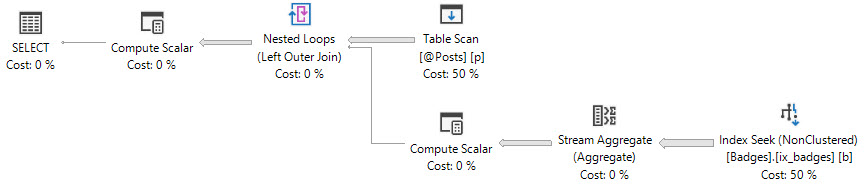
(The Insert isn’t parallel, but the part of the plan leading up to it is)

This Is A Table Variable

This A Serialized Insert Into A Table Variable

Yeah Nah®

The XML Tells Us Why

This Is A Parallel Query Against A Temp Table

I Feel Pretty

The Estimate Tells Us Why

Good Guess®

This Is A Serial Query Against A Table Variable

Face Gym

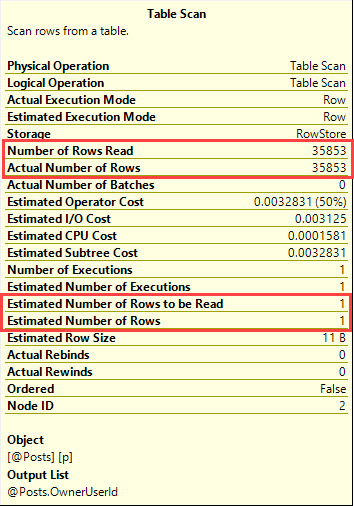
The Estimate Tells Us Why

Bad Guess®

Two Different Limitations

Inserts and other modifications to table variables can’t be parallelized. This is a product limitation, and the XML warns us about it.

The select could go parallel if the cardinality estimate were more accurate. This could potentially be addressed with a recompile hint, or with Trace Flag 2453.

Temp Tables don’t have those limitations, however they do incur some overhead. Accurate table and column cardinality aren’t free.

There isn’t much more of a point to this post except to consolidate this stuff in one place where it’s not all side notes.

Thanks for reading!


Stupid T-SQL Tricks

Bad Idea Jeans, T-SQL
33 Comments

Presented without comment:

Next up, can you break up a query with spaces? Yep:

Well if you can do that – can you break up a query across lines? Sure you can:

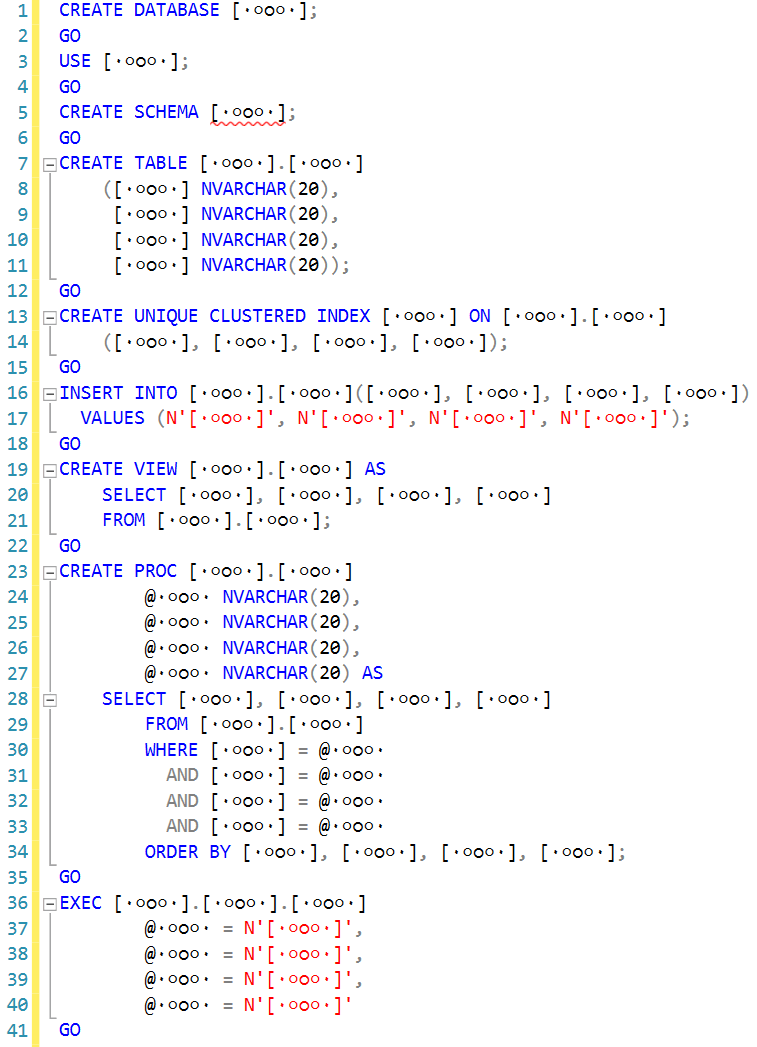
And now, brace yourself: this one is so weird that I can’t even embed it in the blog. I’m just going to show you a picture of it first:

Look carefully. This shouldn’t work, right?

You’re probably going to go through a few phases as you look carefully at that code:

  1. “Is it going to work?”
  2. “No – that can’t possibly work.”
  3. (Then you’re going to copy/paste the code from a Github gist and try it, but here’s the key: don’t try to edit it yet, just run it.)
  4. “How did that work?”
  5. “Why doesn’t the proc return any results?”

And then you’re going to try editing it, and things are going to get really weird. I wish I had a webcam to see your face as you worked through it. I’ll follow up with the secret in a later post. Here’s your only clue: Solomon Rutzky knew what it was as soon as he saw the code.


Is Your Database Databasic?

Pumpkin Spice

When I’m looking at someone’s server, it’s easy to tell the kind of care it’s been under.

We’ve written a lot about servers that have gotten the wrong kind of care. You know, no backups, no checkdb, but someone managed to turn auto create stats off for every database, and enable affinity masking. That’s not what I’m here to talk about today.

No, no. We’re here to talk about those servers that lack the self-awareness to realize they’re getting the bare minimum out of life.

Juicy

The first sign is always the hardware

You’ll see two or four CPUs, and a pittance of RAM.

Someone may have set MAXDOP, Cost Threshold for Parallelism, and Max Server Memory, but those settings will make about as much difference as putting your Sauvignon Blanc in Riedel stemware.

The second sign is always the software

Q: How do you spell apathy?

A: RTM

Uptime is great. A year of uptime is impressive.

It’s impressive in the same way that Elon Musk met Grimes; so many people had to not do their jobs for that to happen, one may find themselves literally-can’t-even-ing.

The third sign is always the indexes

Sure, you have them. They’re there. Clustered, nonclustered. Some included columns. Some more included columns.

But most of them have DTA in the name, and then some incomprehensible list of Ks and numbers. Some much longer than others.

This is the equivalent of letting Jenny McCarthy pick your pediatrician. Sure, she’ll pick a doctor, but now you’re partially responsible for the next plague.

The fourth sign is always the code

You don’t even have to scroll down past the comments usually.

Snake Oil

But when you do, you’ll be greeted by a DISTINCT, and a dozen LEFT JOINs, finally culminating in WHERE final_left_join.id IS NULL. While the code is old, it certainly doesn’t predate NOT EXISTS.

This is as morally reprehensible as juice cleansing.

Ugg

It doesn’t take much to get your database out of basic mode. Our First Responder Kit is a great place to start.

Thanks for reading!


First Responder Kit Release: Just When You Think There’s Nothing New Left To Do

T*m* f*r An*th*r F*rst R*spond*r K*t R*l**s*.

All joking aside! A big thank you goes out to a few people this go around:

@jadarnel27 for not only contributing a bunch of Super Professional T-SQL, but also for writing a web scraping application to compile a list of current SQL Server versions.

@nedotter @ktaranov and Aleksey Nagorskiy for putting together a brand new stored proc: sp_BlitzInMemoryOLTP, to examine your In Memory stuff. For documentation on that, head on over to http://nedotter.com/archive/2018/06/new-kid-on-the-block-sp_blitzinmemoryoltp/.

@EmanueleMeazzo has done an outstanding job working on both PowerBI and the backing queries in sp_BlitzFirst lately. I’m amazed anyone has this much patience — both for dealing with us, and with PowerBI.

Now that we’re done being all emotional, let’s get to the nitty gritty.

You can download the updated FirstResponderKit.zip here.

sp_Blitz Improvements

#1565: When determining processor speed and power settings, we weren’t accounting for people being on AMDs. I know, I know. Who would ever do that to their SQL Server? (@jadarnel27)
#1585@rsocol let us know that we weren’t ignoring DBCC USEROPTIONS. Consider it done!
#1592@Tisit let us know about some row duplication when checking for procs with recompile. This has been fixed with the healing power of DISTINCT.
#1606@CCUMan let us know about an arithmetic overflow issue they were hitting. Darn milliseconds.
#1603: Microsoft announced some new ignorable AG waits, along with some other surprises and gotchas around AGs:

When the host server has 32 or more CPU cores, each database will occupy 16 parallel redo worker threads and one helper worker thread. It means that all databases starting with the 7th database (ordered by database id ascending) that has joined availability group it will be in single thread redo or serial redo irrespective which database has actual redo workload. If a SQL Server Instance has a number of databases, and it is desired for a particular database to run under parallel redo model, the database creation order needs to be considered. Same idea can be applied to force a database always runs in serial redo model as well.

sp_BlitzCache Improvements

#1559: Fixed an issue where unsafe XML characters weren’t displaying correctly in clickable columns
#1561 A friendly user finally helped us track down when some data was causing truncation errors when looking at cached paramaters. Blame it on CASE expressions in WHERE clauses.
#1564 & #1578: SET OPTIONS for stored procs and statements are now logged in the cached execution parameter clickable column.
#1575: Fixed math for tallying proc and statement costs
#1594@tompazourek hates leading spaces. He let us know by changing the SUBSTRING arguments for the warnings column

sp_BlitzFirst Improvements

#1557: When we show CPU usage from ring buffers, we were only showing the most recent one. Now we show you all of them so you can see if something went terribly wrong recently.
#1581: We fixed sp_BlitzFirst to only alert when only > 20GB of memory is free. Thanks to @dbadave87for letting us know about that one!
#1586@EmanueleMeazzo fixed a little bug around dynamic view creation, reported by @smcnaughton. Yay, we didn’t have to do any work.
#1603: Same as in sp_Blitz.

sp_BlitzIndex Improvements

#1588: More clear wording around what aggressive index warnings are and mean, and how to approach fixing them.

sp_BlitzQueryStore Improvements

Just about the same stuff as sp_BlitzCache.

PowerBI

#1579: Standard deviations! @EmanueleMeazzo added a couple new pages to help you figure out if any current metrics are much higher than usual. This is badass.

sp_BlitzLock

@jadarnel27 added some great stuff:
#1572: Added deadlock priority to the results
#1573: Filtered out Heaps from deadlock index info.
#1597: Added the entire deadlock graph for easy distribution

I’m starting to think Josh has a deadlock problem.

sp_BlitzInMemoryOLTP Improvements

Initial release! Mazel tov! This is a soft release, meaning it’s not in any of the bulk installer scripts yet. After you nice people have had some time to kick it around, we’ll throw it in there as well.

sp_BlitzWho Improvements

Nothing this time around

sp_DatabaseRestore Improvements

Nothing this time around

sp_BlitzBackups Improvements

Nothing this time around

sp_AllNightLog and sp_AllNightLog_Setup Improvements

Nothing this time around

sp_foreachdb Improvements

Nothing this time around

For Support

When you have questions about how the tools work, talk with the community in the #FirstResponderKit Slack channel. If you need a free invite, hit SQLslack.com. Be patient – it’s staffed with volunteers who have day jobs, heh.

When you find a bug or want something changed, read the contributing.md file.

When you have a question about what the scripts found, first make sure you read the “More Details” URL for any warning you find. We put a lot of work into documentation, and we wouldn’t want someone to yell at you to go read the fine manual. After that, when you’ve still got questions about how something works in SQL Server, post a question at DBA.StackExchange.com and the community (that includes us!) will help. Include exact errors and any applicable screenshots, your SQL Server version number (including the build #), and the version of the tool you’re working with.

You can download the updated FirstResponderKit.zip here.


New Training Videos on Memory Grants, Paging, Reporting, Variables, and More

Company News
3 Comments

This week, Erik’s added several new videos to his T-SQL Level Up: Level 2 course:

And to celebrate their release, you can watch ’em free this week.

Students with eagle eyes will notice new “Mark as Complete” buttons beneath each video, too. This makes it easier for you to track which sessions you’ve already watched, versus which ones you still need to nail down.

Go get your learn on!


[Video] Office Hours 2018/5/30 (With Transcriptions)

Videos
0

This week, Brent, Erik, Tara and Richie discuss severity 16 error warning, best way to move databases from SQL 2008 R2 to SQL Server 2014, adding Analysis services to a cluster, taking to higher management, deadlocks in a transaction log shipping setup, syncing date between an on-prem and Azure SQL DB server, log backups, renaming SQL Server VMs, Docker, SP_Blitz question, and more.

Here’s the video on YouTube:

You can register to attend next week’s Office Hours, or subscribe to our podcast to listen on the go.

Enjoy the Podcast?

Don’t miss an episode, subscribe via iTunes, Stitcher or RSS.
Leave us a review in iTunes

Office Hours – 5-30-18


Can I ignore severity 16 errors?

Brent Ozar: Alright, let’s see here. Steve asks, “I set up the alerts on my SQL Server per y’all’s suggestions, but why do all the references I can find say to ignore the warning severity 16 occurred on server name?” I want to say sev16 is one of the ones that you can – it usually indicates a T-SQL problem, so people say you shouldn’t worry about T-SQL problems. I still want to know. I still want to know if those kinds of errors happen. But if you have the kind of crappy application that throws sev16 errors all the time, I can understand why people would want to mute it.

Erik Darling: Yeah, you know, if you have so many errors coming out of your application that you’re getting error fatigue or alert fatigue, I would just limit it to the really high severity stuff like 19 through 25 so I know when stuff is really hitting the fan and not necessarily not every little peep and squeak the SQL Server makes.

Tara Kizer: It looks like our script does do 16 to 25, so maybe 19 to 25 is a better choice.

Brent Ozar: And I always wanted to know 16, but you’re not the first person to say that too.


Should I upgrade in place or build a new server?

Brent Ozar: Augusto asks, “Hi, if you have to choose between in-place upgrades or migrations and you’re moving between SQL 2008 R2 to SQL Server 2014 and you have a tight maintenance window and a very large database, what would you do?”

Erik Darling: Log shipping.

Brent Ozar: From the old cluster to the new one?

Erik Darling: Yeah, man.

Brent Ozar: And why would you do that?

Erik Darling: That’s my preferred way to fly just because it’s so dead simple to set up. Like, with mirroring, you know, you could add a lot of overhead to your system if you do synchronous. You might only be on Standard Edition, only be able to do synchronous. So if you’re on Enterprise, you can do async and then flip it to sync at the last minute and then flip over, but I would rather go with log shipping just because it’s so dead simple. It doesn’t really add any overhead because you’re most likely doing log backups anyway. And then when you go do cutover, it’s pretty easy to cut things off at that last log backup, bring things live on the new server and then let people, you know, mess around in there for a little bit. If anything goes terribly wrong, you can still point them back to the old server and have something to go back to. You don’t have that if you do an in-place upgrade. If you do an in-place upgrade, like you know, you get things upgraded, like people get when they start working and something goes terribly wrong, you don’t have a backup plan. You are just miserably stuck with whatever awful thing you did to your server.

Brent Ozar: I could see management saying you could need to do in in-place upgrade if it’s a very large database, depending on what they mean by very large, just because it’s less storage. And I’d be like, no man, that’s plan B.

Erik Darling: Like, how much of your maintenance window are you willing to dedicate to setting up a new server and then in the middle of the night moving things over to that to reassemble what used to work? I don’t want to do that.

Tara Kizer: I will never do an in-place upgrade in production ever, period, end of story. And if management is saying I need to, sorry, not going to do it. I just have to put my foot down. For production, it’s just asking for problems.

Brent Ozar: I like saying no. it sounds weird to say no to management, but at some point, you go, you’re paying me for my advice. You hired me for my expertise. I wouldn’t come to work wearing an asbestos suit; why would I do an in-place upgrade? There’s some things you don’t want to do.

Erik Darling: Why just paint over lead paint?

Brent Ozar: That’s right. That’s what kids are for. You give the kids a scraper and put them to work.

Erik Darling: And if they’re teething, it’s even easier; they just latch right on.

Brent Ozar: Which brings the question, Richie, during your home renovations, why aren’t you making this part of a home-schooling project where you just teach the kids construction? Of course, I guess you have to deal with the aftermath.

Richie Rump: Part of the same reason I don’t do a ton of work offshore; because you can’t control the quality.

Brent Ozar: You can control the quality with your kids it’s just continuously low quality.

Richie Rump: It’s difficult to control the quality; how’s that?

Brent Ozar: Samantha follows up with – she says, “Why aren’t you going to SQL Server 2016? Just bypass 2014. If you get 2016, you also get query store.” For that matter, why not go 2017? 2017 you start to get adaptive query plans, you can run the whole thing on Linux, Docker containers.

Erik Darling: Let your developers start using R and Python live in the database.

Richie Rump: So many bad ideas; it’s amazing.

Tara Kizer: None of my 2016 or 2017 clients that I’ve had so far, and I’ve had two 2017 clients so far, none of them have had query store enabled. It’s very disappointing.

Brent Ozar: It’s so weird. We have it in sp_Blitz, hey, you should put in query store. Nobody puts it in. it’s really weird.

Erik Darling: I wrote a whole stored procedure for it hoping that, like, this is the future, and I’ve used it twice. Every client that I’ve had has been on 2016 – well not every, but, like, a lot of them have had some variation on the story. But they’re like, yeah I tried to turn it on then my CPU shot off the radar for a half hour and I finally had to turn it off. I’m like, okay, well welcome to V1.

Brent Ozar: Weird.


Can I add Analysis Services to an existing cluster?

Brent Ozar: Justin asks, “Once you already have a clustered SQL Server, is there any way to add analysis services to the cluster?”

Tara Kizer: Even if there is, why would you? I don’t want those extra products on my SQL Server. The database engine is what I’m going to have on my cluster. I’m going to have supporting applications, such as my antivirus, you know, net backup or whatever it is, that supports SQL Server instance. But SSIS, SSAS, SSRS, they all get to go on their own boxes somewhere else. They do not get to pollute the SQL Server instance at all. I segregate everything. Nothing goes on the SQL Server boxes.

Brent Ozar: Preach. And too, if you think you’re getting high availability by clustering analysis services, you’re not really getting it. It doesn’t really do health checks on there. So if you go to Books Online they talk about how you can cluster it; it just doesn’t really have any health checking kind of things. What you’re better off, if you want high availability, is you build a couple of separate VMs or a couple of separate physical boxes and you put them behind a load balancer.


Should I switch to log backups every 15 minutes?

Brent Ozar: Next up, Steven says, “My company has a two-hour data loss policy.” Like us, we have a two drink minimum, so I kind of agree with that. He says, “Any suggestions of how to approach convincing them to go to 15-minute transaction log backups?” Oh, that’s an interesting question.

Tara Kizer: What, who are you trying to convince? I set up the job schedules and make sure that I at least hit their goals or better and 15 minutes is better than two hour anyway. Who is responsible for the job schedule here? My managers wouldn’t even have access to look; I would just be telling them frequently.

Brent Ozar: And y’all think she’s joking, but that’s how we roll here inside the company too as well. I don’t have access to do most of the stuff on our production SQL Servers. Richie owns this stuff. When one of us wants access to something, we put in a ticket to Richie. I have no business poking around in there, you know. It’s a bad idea.

Erik Darling: It’s a business’s job to tell you how much data they want to lose. It’s your job to figure out the technical setup that you need to meet those goals. So they shouldn’t be in there saying, no you have to take log backups every two hours. It doesn’t work like that – cart before the horse; whatever that saying is.

Brent Ozar: And I like doing log backups more frequently only because if one fails or two fail you still have enough time there to meet your two hour. If you’re only doing it exactly every two hours and you’re only supposed to lose two hours of data, the first job that fails, you’re screwed. You lost it.


Why are my restores being deadlocked?

Brent Ozar: Oscar asks, “I’ve got a shipped transaction log set up in one of our SQL Server databases and it works just fine, but every now and then it gets deadlocked in the restore job when it’s trying to restore the log backup. Is there any way to prevent deadlocks in a transaction log shipping setup?” I bet you’re getting deadlocks in MSDB. I bet you’re trying to insert update or delete record in MSDB and I bet that’s where you’re getting log shipped. And if you want, you can use sp_BlitzLock – sp_BlitzLock is a really slick stored procedure that Erik wrote to go get you the deadlock graphs and show what you’re being deadlocked between. And it’s probably something like somebody’s manual scripting that’s going and doing things inside the MSDB backup and restore tables. The one I’ve seen it happen a lot is where someone’s cleaning up history continuously. Like every five minutes, they’re trying to delete old records in MSDB. Just do that daily.
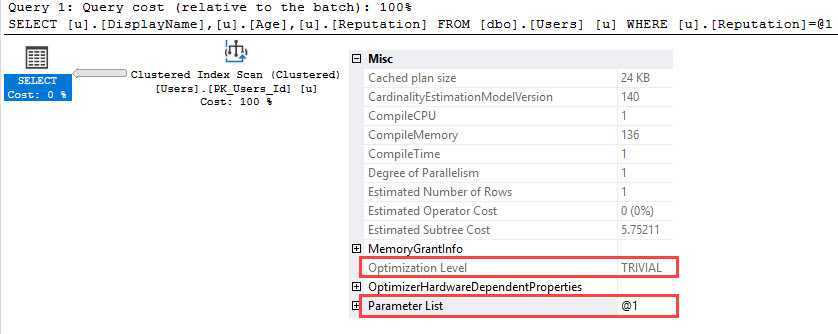
Erik Darling: Or if your MSDB history has just never been pruned and is gigantic and the god-awful thing that goes and looks for where to put in rows, where to delete stuff from, is just getting all lost on its own. I actually blogged a little while back where I put up some of the worst T-SQL that I’ve ever seen in a stored procedure and I wanted people to look at it. And it’s from sp_deletebackuphistory, or whatever that thing is called, and it’s all table variables and poorly written T-SQL with no indexes on anything. It’s like hell on earth whenever anyone wants to try and delete…

Tara Kizer: Like hell on earth, but it works starting with SQL Server 2005. You should have seen the crap-show back in SQL Server 2000. We all had to roll our own code back then and my manager back then realized that if he put an index on one of the tables, MSDB did that fix built in. I’m like, I don’t want to put indexes on tables in MSDB, so we all rolled our own back then. And in SQL Server 2005 or greater, they at least fixed that performance issue. I understand it’s not as fast as it could be, but SQL Server 2000 and earlier was horrible.


How should I keep data in sync with Azure SQL DB?

Brent Ozar: Daniel says he’s inherited an environment where they’re doing a custom database sync between on-premises SQL Server and then Azure SQL DB, which gets manipulated somehow in the production database. “What would you do in order to keep data…

Erik Darling: Excuse me…

Brent Ozar: “How would you recommend syncing data…” Richie… “How would you recommend syncing data between an on-premises SQL Server and Azure SQL DB?”

Tara Kizer: What are they trying to sync? Is that for a failover on-system or is it so you can run reports out there? So I maybe would use transactional replication out there, but maybe use another feature if it’s just for failover purposes. It just depends on what you’re trying to do.
Brent Ozar: Daniel says reporting, he’s doing reporting up in Azure SQL DB. Oh, so then I like Tara’s idea of transactional replication.

Tara Kizer: Well it does work well when it’s working and you don’t have to troubleshoot it and you can tolerate whatever latency that’s there when large transactions happen. It gets a bit of latency.


Where should I do log backups in an AG?

Brent Ozar: Sri says, “I’ve got a multi-site Always On Availability Group. What’s the best way to do log backups?”

Tara Kizer: It says log backups on all the servers. Do your log backups on the primary, that’s it. You certainly can move it to the secondary replica, but it’s going to be out of date, you know. So I do all my backups on the primary replicas. I don’t want my backups to be possibly not up to date.

Erik Darling: I really never understood the point of offloading backups with the AG. I just never got it…

Tara Kizer: What problem are they experiencing that they have to offload this simple task?

Erik Darling: Like, can you even have a good AG environment where backups screw you that hard?

Tara Kizer: I know. What does your I/O look like if that’s your problem?

Erik Darling: Like network disk, like, what is it that’s going on that’s making your server barf that hard taking a backup? It’s odd to me. Odd problem to solve…

Brent Ozar: I’m going to offload readable queries; I’m not going to offload backups because you’re going to pay the same licensing fee no matter what you’re offloading. Just go get rid of the locking problems; move those off.


Should I rename a SQL Server VM?

Brent Ozar: Next up, Guillermo asks, “What should I take into account when I rename a SQL Server VM?”

Erik Darling: Which part? Like just the VM or the SQL Server or…

Brent Ozar: I bet – there’s a Microsoft Knowledge Base article on what you have to do and it has to do with renaming – sp_rename, changing the server’s rename.

Tara Kizer: And it used to be that you had to do extra steps, but it’s much simpler these days.

Erik Darling: Well, I asked because something – I used to always goof-up whenever I made a new VM. Like, I would give the VM a new name in, like Hyper-V or whatever and I would be, like, this is my VM. And then I would like install Windows and go to connect to the VM name that I gave it in the virtualization platform and it’d be like, no that doesn’t exist. And I always forget that I have to change the computer name too to like match the VM name so I would connect right.

Tara Kizer: And there was one operating system – this does not have to do with virtualization, but one operating system where the name needed to be in upper case, and if you had it in lower case, it caused some kind of weird issue because we encountered that and it was horrific. And I forget what operating system it was, but it was a big deal. And this was on a clustered system.

Brent Ozar: And I wouldn’t change names on anything in a cluster either. Forget that. Guillermo says he wants to change the DNS computer name, all of it. I think we would take the same approach here that we would talk about with in-place upgrades. I’d rather build a new SQL Server with the name that you want and everything correct from the get-go and log ship or DR over or database mirror over to it. But this Knowledge Base article from Microsoft is actually fantastic. Books Online has gotten way better over the last several years and you can even be a contributor. You see how there’s these contributors things up here. You can go over and click edit on the right-hand side and you can go in and just edit these. They’re stored in GitHub, but you don’t even have to get fancy with creating a GitHub account or anything like that.

If you scroll all the way down when you’re logged in – I guess you do have to create an account, but you don’t have to go and fork the repo or anything. There’s an edit the page thing down at the bottom where you can just edit the page right there inside your web browser. You don’t have to do a whole lot of the more complex GitHub stuff.

Richie Rump: That’s why it’s gotten better.

Erik Darling: I’ll tell you one thing that bit me real bad with VM setup too is I had an old AG one that was all 2014. And when 2016 came along, I wanted to replace it with that. So it’s deleted all my old 2014 VMs, spun up 2016 VMs with the same name and then expected them to just work out of the box. But then I had to delete a bunch of DNS records, like other crap because it was looking at the wrong IPs, nothing was connecting. It was just a nightmare. So make a new one – please, just make a new one. Name it what you want, think about the children; awful.


Should I use Docker?

Brent Ozar: next up, Steven says, “I’ve heard a lot lately about Docker. What are your stances for Docker for DBAs in 2018? Is this something that DBAs need to worry about? Is this something that developers use?”

Erik Darling: Just stay away from the ones with pleated fronts. Pleated fronts are just miserable. I did it… I did it…

Brent Ozar: What you can’t see, ladies and gentlemen, is that he’s wearing plaid pants.

Richie Rump: Shorts – we know he’s not wearing any pants.

Brent Ozar: And socks and sandals… Now, have any of y’all played around with Docker?

Richie Rump: No. Docker is fun for the dev, but the question is, what problem will you be solving suing Docker? Because Docker is a way to install something very quickly. I believe it runs in its own container and does all this other kind of nifty stuff for the developer or I need to get some code out running. But for a database, what problem are you trying to solve here? So there’s a lot of questions that I would ask – why would I want something in a container? Am I moving it somewhere? Am I installing a lot of these in all these different servers all over the place? If this is going on physical hardware or if it’s going on a VM, just the ease of installation and configuration settings is what you’re getting. And if you’re a DBA, that’s part of your bread and butter, so even I, as a developer, haven’t really seen, for me in what I do, a really big need to be moving stuff to Docker. Serverless does that all for me.

Erik Darling: DBAs are like the most insecure people. Like every new technology that comes along, they’re like is this going to take the DBA job? I read a blog post not too long ago; DBAs worry about R taking their job. Like, what is R going to do that takes a DBA job? Like, what facet of R makes you nervous about your job? Like, no, no one’s going to, you know, look at statistical analysis of your log backups and decide you’re a terrible DBA and fire you. I just don’t understand. Everything that comes out, like, this is going to kill me. I don’t know what’s going to happen.

Brent Ozar: Artificial intelligence…

Erik Darling: Machine learning, the cloud, like everything, people are like the DBA is dead, done, buried, forget about it. And I’m like, you know, five, ten years later there’s still this big stinking pile of us that show up in Seattle every year, so I don’t know.

Richie Rump: You would think after 30 years of hearing your job’s going to be obsolete in the next five years that it would just kind of go over people’s heads, but no, everyone still freaks out about it. It just doesn’t make sense.

Erik Darling: you know, the [Mane Tack] repairman is still hanging out doing stuff.

Richie Rump: He’s still getting paid, I don’t understand…

Erik Darling: Residuals at least.


Why isn’t SQL Server recommended in virtualization?

Brent Ozar: Mark says, “Why is it not recommended to have SQL Server running on a VM?” Whoever’s telling you that, you need to go have a talk with them. He follows up with, “Are there best practices when running SQL Server on a VM?” yeah…

Erik Darling: VMware publishes them. VMware has a whole architecting VMware with SQL Server guide that I would say is a pretty good place to start for advice.

Brent Ozar: SQL Server VMware best practices – the one thing that I would warn you about is in some of these, they’ll talk about, for example, single core SQL Servers by default. So just read some of it with a grain of salt.

Erik Darling: That’s not in this one though. This one is actually pretty sane about how to configure stuff around numa and other things. I’m fairly behind this guide. Like, not 1000%, but…

Brent Ozar: See if it says anything about cores per – oh good, cores per socket, oh that’s great. That’s a good topic to get into. So that’s nice. We’ll throw that back up at the very top. So that is architecting SQL Server on VM vSphere and I got there from Googling that right there.


The First Responder Kit didn’t update itself

Brent Ozar: Marci says, “I installed the latest sp_Blitz scripts on my dev and DR boxes, but then when I ran the install all script on my prod box, it didn’t update the stored procedures.” I bet you ran it in the wrong database.

Erik Darling: Yep.

Brent Ozar: This happens to me every week to the point where Erik had to write a trigger for user databases to make sure that when we try to install them in the wrong database, they’d just get rolled back. A long time ago in a galaxy far, far away, we put a use script up at the top, like use master, so that it would enforce that it would go only in the master database. And then we have users who are like, no I want to put it in any database and I want to just be able to run the script. So we took the use part out…

Erik Darling: Now we have the extra fun part of figuring out which database they got installed in, then go delete all those. Context is everything, folks. Context is everything.

Brent Ozar: Alright, well that’s all the questions we have this week. Thanks, everybody for hanging out with us this week at Office Hours and we will see y’all next week. Adios, everybody.

Erik Darling: Goodbye.


Wanna attend the next Office Hours podcast and ask your own questions? Register here.


Mysterious Forwarded Records

Indexing
7 Comments

Thinking Of You

When people think about Heaps and the problems they can cause, they don’t often think of temp tables and table variables as Heaps.

Of course, without a clustered index, any table is a Heap.

This isn’t an argument for or against indexing temp tables, but while working with a client we came across something strange!

sp_BlitzFirst was reporting hundreds of thousands of Forwarded Records, but there were no Heaps in user databases.

When we dug in closer to what queries were doing, we found lots of places where temp tables had an insert/update pattern.

Setting Up

A close approximation of the problem part of this code looked like this:

A temp table got created, some amount of data was inserted to it, the temp table got updated with values from another table, and then there was a final select from the temp table.

Setting up SQL Query Stress to run that proc across a bunch of threads…

STRASS

And then running sp_BlitzFirst for a 30 second sample:

We get these results back!

A Crapload By Any Other Name

Changing The Pattern

The reason why we warn about forwarded records is that they can cause a lot of additional random I/O. Reads need to jump around from where a row originally was, to where it lives now, and then back to continue reading rows.

In this case, it was simple enough to change the pattern to insert with the same join that performed the update.

If you ever happen across a Forwarded Fetches warning in sp_BlitzFirst, but you’re Heap-free in your user databases, they may be lurking in tempdb.

This can happen with temp tables or table variables — they both occupy space in tempdb, regardless of what someone told you about table variables being in memory only.

Thanks for reading!


Wanna Attend All My Classes for a Year?

Company News
1 Comment
Live Class Season Pass

When I introduced my Live Class Season Pass, buyers got access to my entire new Mastering series for 2018.

I wasn’t sure how buyers would react to the new class lineup – these classes are tough. They’re 3 days of alternating between deep lectures and challenging labs.

You get hands-on access to a beefy SQL Server 2017 VM in the cloud, with a series of live workloads running against the Stack Overflow database.

The reviews have been great!

Mastering Index Tuning reviews

“Excellent class, the ratio explanation to labs worked really well for me. Expectations were high and got met.”

“Excellent class! I used to be scared of interpreting execution plans, but after this class I feel much more confident. Brent is an AWESOME teacher, and his enthusiasm for SQL Server and performance tuning are inspiring!” – Marie McAndrews

“As always Brent exceeded expectations! He has the ability to review the material to make it stick and the demos and labs worked great together. A natural born teacher who has mastered his craft; I highly recommend his training courses; webinars and conference talks. Although I knew enough to get by with index tuning and of course SentyOne plan explorer has index analysis that is great for finding the right index, the material the Brent covered made so much sense and cleared up a lot of the finer points of parsing execution plans that I learned many new tricks. He also takes the time to answer any questions. Take his courses, you won’t be disappointed!!” – Becky Harter

“Fantastic class. Brent is constantly refining his teaching skills to make complex topics understandable. If you want to learn what an index does, go watch How to Think Like the Engine. If you’re ready for the next step, index tuning, take this class.” – Tim Cockerham

Mastering Query Tuning reviews

“This class was a thorough reminder of how skilled Brent Ozar and Erik Darling are at query tuning and how much more I have to learn. The structure of the course was unique and wonderful in that the labs were realistic representations (not AdventureWorks) of many of the same problems that we fight in production every day – with not necessarily one “right answer” to the problem. It was also very cool to see the presenters go off-script and adapt their query tuning approach on the fly. This class is training that is well worth the time.” – Bryan Rebok

“This class gave me a giant toolkit for improving query performance. I found holes in my current process as well. I look forward to finding bad queries now because I can make them so much better. I highly recommend you take this course if you have queries that need to be tuned. You won’t be disappointed or bored while the Brent Ozar team provides a fun but very intense class.” – Kevin Kelso

“Mastering Query Tuning is another fantastic training offering from Brent Ozar Unlimited. Brent and Erik did a fantastic (and entertaining) job of presenting the material and associated triage and tuning methods. The interactive discussion in Slack was very beneficial. The well planned course labs allow attendees to experience, triage, and improve on all of the issues present in the demo database. After spending hours with the lab environment I feel confident that I can diagnose and solve (or at least improve) any of the issues in our production environment.” – Todd Nelson

Mastering Server Tuning reviews

“As with all of Brent’s classes – fantastic. So much great information is presented and the hands-on portion reinforces the concepts.” – Alan O’Neal

“Great mix of lecture and hands-on lab plus the use of the SLACK website for real time communication was amazingly helpful. I always learn a lot from Brent’s classes and the convenience of doing this on-line is perfect when our budget is limited.” – Lori Fry

“Brent has the rare qualities of being knowledgeable, understandable and fun all at the same time. The exercises are well-designed. Plus there is a good balance between instruction and hands-on learning. I highly recommend this course as well as the “Mastering Index Tuning” and “Mastering Query Tuning” courses.” – David Hicks

So what am I changing?

Before, when you bought the Live Class Season Pass, it stuck within one calendar year, like 2018. I designed it that way because I thought I might tweak the lineup for 2019.

The verdict is in, though: y’all love the classes, so I’m keeping the same lineup – just adding more material and continuing to change up the labs over time.

So now, when you buy the Live Class Season Pass, it’s good for one year from the day you buy it. That means if you buy now, you get access to the class through mid-2019. I’ve added new class dates going through May 2019. You can buy with confidence today, and have fun with me over and over through the next year. It’s been so much fun seeing the same students again and again, taking classes over to see if they can do a better job on the lab challenges the next time around. (Plus, we’re giving this out retroactively too – anyone who already bought the Live Class Season Pass after Jan 1st gets a full year of access too, not just the 2018 class dates.)

To celebrate, it’s on sale for $3,995 through the end of June (down from $5,995). If you want to pay via purchase order or check, just choose that option during check-out. As long as we get your payment before the end of June, you’re in.

See you in class – there’s still time to join the 26 other folks in Monday’s Mastering Index Tuning.


How Many Kinds Of Joins Are There?

Quite So

There are three in SQL Server, not counting the Adaptive Join which is just a placeholder for either Nested Loops or Hash Joins.

If you look closely at each of those joins, you’ll see all sorts of interesting things pop up.

Hopefully none of them will be Sorts.

NOT EXISTS

Nested Loops has:

  • Unordered Prefetch
  • Ordered Prefetch
  • And might be Optimized!

Merge has:

  • One to many
  • Many to many
  • With a Bitmap!

Hash has:

  • Residuals
  • “Perfect” hashes
  • With a Bitmap!

But going even further, there’s stuff that isn’t exposed about Hash Joins.

Internally, they might be In-Memory, Grace, or Recursive. You can’t see that anywhere in a query plan, but it’s out there.

This Is Jeopardy

There are things I’d much rather you know and understand about joins, of course.

But the next time someone asks you what types of Joins SQL Server supports, you can have a much longer answer.

Thanks for reading!

Brent says: and then there’s remote joins, which aren’t really a separate kind of join, but just using a join hint to declare which side the join happens on. But I know that you, dear reader, are going to come up with a gazillion edge case examples of other kinds of joins in the comments. That’s how you roll.


Behind Every Trivial Plan Is A Good Demo

Execution Plans, Indexing
0

A While Back

I started this Q&A on Stack Exchange about ISNULL. It’s one of the most common client issues I see, and putting stuff like that out in a different community to get more opinions on it is valuable.

Also, I’m saving up points for a Stack Overflow Swiss Army Knife. That’s what you do with points, right? Like Marlboro Miles?

Hiding Out

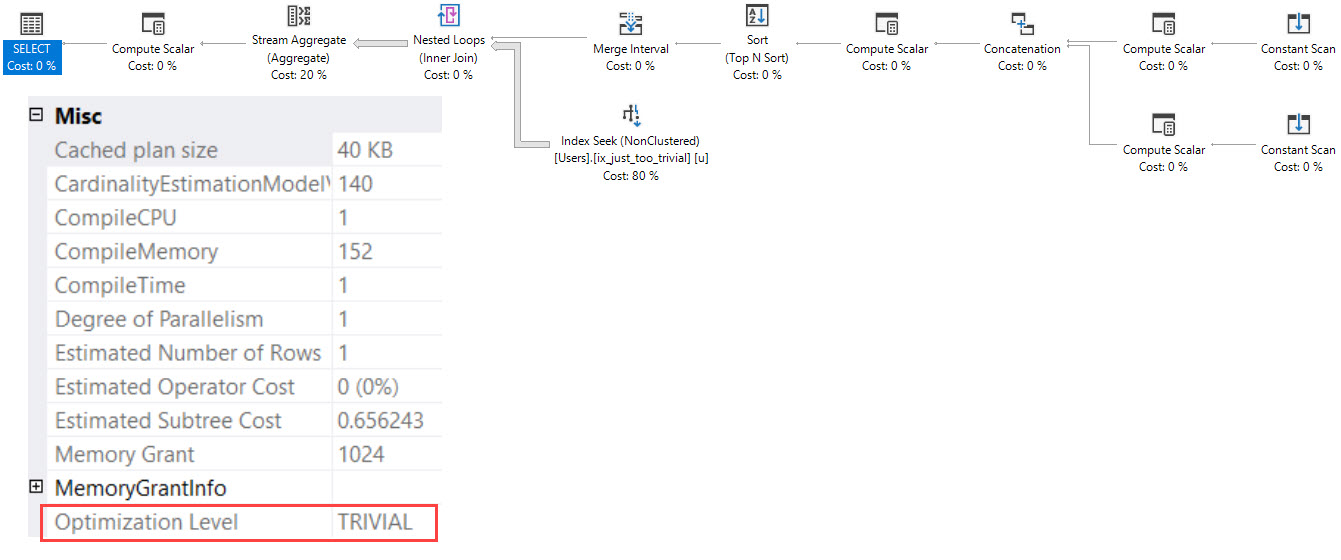
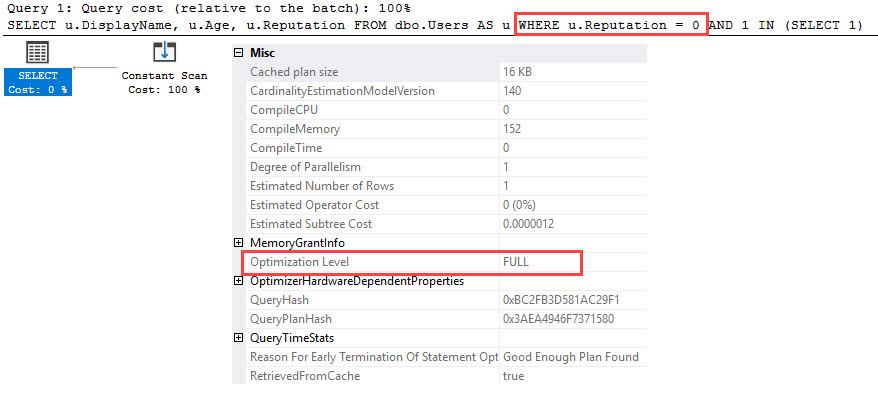
It wasn’t until I was looking at something else entirely, that I realized my starting query was a Trivial plan.

You’re Just Too Trivial

Now… Looking at this plan, you don’t really expect it to be Trivial. There’s kind of a lot going on there.

Via Paul White:

The details of which types of query can benefit from Trivial Plan change frequently, but things like joins, subqueries, and inequality predicates generally prevent this optimization.

Now, I’m not sure if the details have changed, or if this query is just much more Trivial than the syntax or plan make it appear.

But let’s go one step further.

Laying Low

Let’s run this query with a known Trivial plan killer.

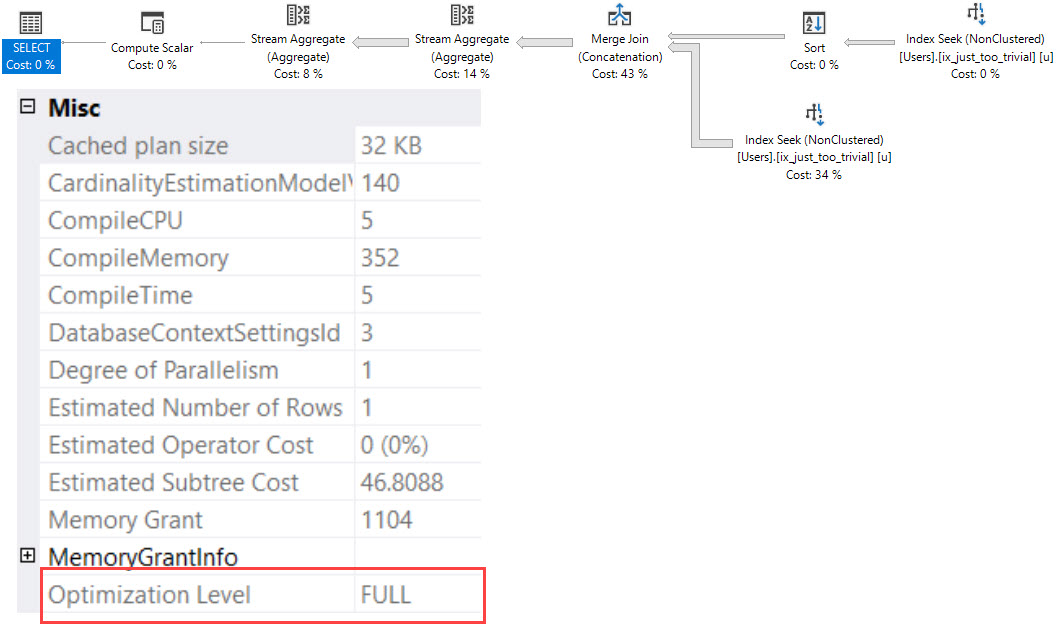
The plan changes quite a bit, and uses a far less common strategy called Index Union.

Oh you’re like a little bunny rabbit.

This is a far more interesting plan, and I was a bit surprised to see it.

If I tried for a week to write a query that got this plan on its own, I’d fail utterly.

Plan Collector

I wish I had this plan in time for this post. It is indeed a sort we did not ask for.

The optimizer chose something between index intersection and sort-merge and a weird kinda-but-not-really Key Lookup.

It performs two ordered seeks into the same index, sorts the side with the inequality predicate on Id, and merges the two inputs together.

For those wondering, the seek without the sort doesn’t need one, because our index is just on Age, and is non-unique.

That means the clustered index key column (Id) is in the key of the index, and since IS NULL is an equality, the Id column is ordered by it next.

After that are Stream Aggregates to do some grouping and counting.

And to think, all this interesting stuff was hiding just a couple search phases beyond a Trivial plan.

Thanks for reading!

Brent says: when people see this, their hands immediately shoot up in the air to ask, “Should I add WHERE (1 = SELECT 1) to all my queries?” I lean towards no on that one because most of your trivial queries just don’t need full optimization, and that further compilation takes longer. I think I can count on one hand the number of times in the last couple years where an under-optimized trivial plan was the main cause of a client’s problems, and I wasn’t even lucky enough to hit that myself. Tara hit it, and the rest of us were all excited to see it, hahaha.


How to Tell If Your SQL Server Has Too Much Memory

Sounds impossible, right? The saying goes that you can never be too rich or too thin or have too much memory.

However, there is one good indication that your SQL Server is probably overprovisioned, and to explain it, I need to cover 3 metrics.

1. Max Server Memory is set at the instance level: right-click on your SQL Server name in SSMS, click Properties, Memory, and it’s “Maximum server memory.” This is how much memory you’re willing to let the engine use. (The rocket surgeons in the audience are desperate for the chance to raise their hands to point out different things that are or aren’t included in max memory – hold that thought. That’s a different blog post.)

2. Target Server Memory is how much memory the engine is willing to use. You can track this with the Perfmon counter SQLServer:Memory Manager – Target Server Memory (KB):

Generally, when you start up SQL Server, the target is set at your max. However, SQL Server doesn’t allocate all of that memory by default. (Again, the experts wanna raise hands and prove how much they know – zip it.)

3. Total Server Memory is roughly how much the engine is actually using. (Neckbeards – seriously – zip it until the end of the post. I’m not playing.) After startup, SQL Server will gradually use more and more memory as your queries require it. Scan a big index? SQL Server will start caching as much of that index as it can in memory. You’ll see this number increase over time until – generally speaking – it matches target server memory.

What if Total Server Memory doesn’t go up?

Say you have a SQL Server with:

  • 64GB memory
  • Max memory set to 60GB
  • 1GB of total database size (just to pick an extreme example)
  • Infrequent query workloads (we don’t have hundreds of users trying to sort the database’s biggest table simultaneously, or do cartesian joins)

SQL Server might just not ever need the memory.

And in a situation like this, after a restart, you’ll see Total Server Memory go up to 2-3GB and call it a day. It never rises up to 10GB, let alone 60GB. That means this SQL Server just has more memory than it needs.

Here’s an example of a server that was restarted several days ago, and still hasn’t used 4GB of its 85GB max memory setting. Here, I’m not showing max memory – just the OS in the VM, and target and total:

Memory metrics over time

In most cases, it’s not quite that black-and-white, but you can still use the speed at which Total Server Memory rises after a reboot to get a rough indication of how badly (and quickly) SQL Server needs that memory. If it goes up to Target Server Memory within a couple of hours, yep, you want that memory bad. But if it takes days? Maybe memory isn’t this server’s biggest challenge.

Exceptions obviously apply – for example, you might have an accounting server that only sees its busiest activity during close of business periods. Its memory needs might be very strong then, but not such a big deal the rest of the month.

How we watch that in SQL ConstantCare®

In our SQL ConstantCare® mentoring, we build automated rules for things we think are no-brainers. For example, it’s easy to find good starting point advice on how you should configure max memory.

For more advanced things, we track metrics over time and give manual advice instead. This is definitely one of those manual issues because there simply aren’t hard-and-fast industry-wide best practices yet. We’re building them as we go.

So for issues like this, we let the admins know just as an FYI. If you wanted to save some money on a smaller cloud VM, or maybe move some of this memory over to a different virtual machine that needs it more desperately, here’s something to consider.


[Video] Office Hours 2018/5/23 (With Transcriptions)

Videos
0

This week, Brent, Tara, and Richie discuss relaying SQL Server performance updates to upper management, differential backups in AlwaysOn Availability environment, replication, Troubleshooting THREADPOOL Waits, an acceptable amount of preemptive waits, Postgres, and the technologies Richie is working with these days.

Here’s the video on YouTube:

You can register to attend next week’s Office Hours, or subscribe to our podcast to listen on the go.

Enjoy the Podcast?

Don’t miss an episode, subscribe via iTunes, Stitcher or RSS.
Leave us a review in iTunes

Office Hours – 5-23-18


What status report should I show management?

Brent Ozar: Marci asks, “I’m looking for general advice on showing my boss a weekly basis of what’s alright with the SQL Server state. I hate SQL Server’s canned reports. I thought about the PowerBI dashboard but it takes much too much technical explaining.” That’s a really good question. So Tara, when you guys wanted to, as database administrators, how did you bubble up to management that, like, everything’s going okay?

Tara Kizer: I mean, honestly I didn’t because I can’t talk the manager speak, so my manager would do that and pass it up…

Richie Rump: Low and slow.

Tara Kizer: I had a more recent client who had really high-up people in the company join the call and they just wanted the executive summary portion and so I would talk and then somebody in that company, a sysadmin type, would have to translate. So no, I’ve never done that actually.

Brent Ozar: Marci laughs. What about you, Richie, when you want to convey to – well even to me, Where do you go to – alright, how do you everything’s okay in the environment?

Tara Kizer: He has monitoring tools…

Richie Rump: Yeah, I mean, I usually go on level of risk; maybe that’s the PM training in me. So if there’s an issue, what’s the risk level – and try to explain, hey, if we have a high priority risk, that means we need to fix something right this second or we’re in danger of losing data and then kind of breaking all the way down. So I usually try to convey it that way. I’ve been kind of lucky with having some CIOs that were previous technical people, so they could kind of understand the technical lingo. And typically, the technical CIO typically would want to go into the deeper levels because they’ve been out of it so long and they’re like, any little thing, and they kind of grasp to it. But, you know, if you’re talking to other executive-level folks, it’s usually best that you just say, okay here’s the risk, here’s the issue, we’re not going to go any deeper than that, but this is the consequence if we don’t fix X, Y or Z.

Brent Ozar: I like the risk thing. Marci says, “My boss does the Charlie Brown wah wah wah wah sound at me whenever I start talking.”

Tara Kizer: One thing that we did provide the management was the system availability. So monthly, was there any unplanned downtime – that type of thing because we did measure that. I guess we could have shown our ticketing system, you know, number of issues per system, that type of thing, but there wasn’t really any metrics that I would have gathered in SQL Server. Availability, obviously, but that was through our monitoring tools.

Brent Ozar: I always sucked at that too and I would just – I ended up going with a list of helpdesk tickets. I’m like, here’s a list of stuff I’m working on now, he’s a list of stuff that I don’t want to put out, [inaudible] because I’m going to start getting danged for having a whole bunch of issues, but those are just the only two things. I always had a tough time with that. Ron says, “Managers need pictures.” I would agree with that now.


Should I do differential backups in an AG?

Brent Ozar: Rob says, “What’s your take on doing differential backups in an Always On Availability Group environment? I realize that they’re not supported.”

Tara Kizer: They’re supported on the primary. I don’t recommend doing backups on the secondaries anyway because they’re out of date. Even a synchronous replica, they can be out of date because SQL Server can silently downgrade them to async if there’s – I forget what it is – some sort of like timeout issue. So I want my backups to be up to date so I have always ran all of my backups on the primary replica. And if you’re having to offload backups to a secondary, I wonder what else is going on in your box, you know. Why are you having to offload them in the first place? So the differentials are supported just fine; all three types of backups are fine on the primary.

Brent Ozar: Yeah, the thing that’s so tough is figuring out when the differential is going to take longer than the full, or like as long as the full, and it makes your restores take longer. Usually, when I’m dealing with an Availability Group, it’s because people want the thing up all the time and as quickly as possible and differentials make restores take longer, not shorter. So it’s kind of tricky. I always kind of aim towards doing backups, fulls daily if I could, but as soon as I get to the point where I can’t do a full backup daily, then I start to get nervous.


What replication technology should we use?

Brent Ozar: Lee says, “We have a wireless connection to SQL Server at a remote site. There’s a desire to set up some kind of replication to our primary site. What would you suggest for the least network intensive replication strategy; log shipping or something else?”

Tara Kizer: Wireless connection? I don’t know about this…

Brent Ozar: A guy with a Pringles can aimed at the…

Tara Kizer: You’re going to have to test what kind of latency you have with transactional replication, log shipping, you know. You could have some significant latency depending upon how busy your system is.

Brent Ozar: I’m a fan of, if you want to get from between two places, like, usually the shortest route is the cloud. Like, how good bandwidth can you get up to the cloud instead of trying to get to your primary site too? Because some systems will have better internet connectivity up than they do to your office, like to a flaky VPN.

Richie Rump: Interns with a USB drive.

Brent Ozar: Good point, yes. Especially redundant, you get several of them, and I don’t mean the USB drives, I mean the interns.

Richie Rump: They’re cheap, sometimes free…

Brent Ozar: Lee says, “It’s up the canyon to our water treatment plant.” I don’t know how real-time it needs to be, but now suddenly I’m really liking the sneakernet idea; that if you only need it for reporting purposes, I bet you have people going up the canyon to the water treatment plant all the time. Get your backups offsite. Start rotating backups offsite, put them in somebody’s USB drives…

Richie Rump: There’s someone on this call that would do it for free.

Brent Ozar: Yeah, maybe the listeners.

Richie Rump: There’s someone here that would do it for free.

Brent Ozar: Not you, not you? Richie doesn’t do anything for free. He doesn’t get out of bed for less than 10,000 query-bucks.

Richie Rump: Well especially hike up a canyon…

Brent Ozar: Oh, I see where you were going with that. there has to be an elevation change and all of a sudden [croostalk]. And the water treatment plant has to smell good. It can’t be just a sewage kind of thing. No one’s going to want to go hiking to a sewage place.


How should I send an error message to Microsoft?

Brent Ozar: Scott says, “We have a new 2017 Enterprise CU6.” And every hour, he’s getting an error. A user request has generated a fatal exception, SQL Server is terminating this session, contact product support services with the dump produced in the log directory. Ooh, “What is the process for passing this on to Microsoft?”

Tara Kizer: Open up a support case with them. I don’t remember what the 1800 number is, but you can go on their website and find that on there. $500 and they’ll figure it out.

Brent Ozar: And assuming it’s a bug in SQL Server, they end up refunding it to you anyway; they refund you the $500, so that helps too. If you have an enterprise agreement, like with premier support, it’s even easier. I would say don’t screw around. Go actually do it. If you’re memory dumping every hour, that can be, what we call in the industry, bad.


How can I simulate THREADPOOL waits?

Brent Ozar: Pablo says, “Ola amigos, what is the root cause of THREADPOOL waits and how can I simulate them? I tried like 500 threads but I just got a little bit of THREADPOOL waits.”

Tara Kizer: You know, it’s funny, my blog post that just went live today, when I was testing it last week, my blog post had nothing to do with THREADPOOL and I kept encountering it. It had nothing to do with blocking, it was just the amount of threads I was pushing through OStress. But if you wanted to, OStress can do it because it can hammer your box. SQL Query Stress just did not help out with that specific blog post.

Brent Ozar: There’s two magic parts there; the queries need to go parallel is the big one. You want to have like a low-cost threshold for parallelism and a wide MAXDOP. So if you’re on like an eight-core box, leave MAXDOP at unlimited – hello THREADPOOL, as soon as you hit a couple of hundred queries that should do it.

Tara Kizer: And then also, just put in – do an update statement on whatever query it is, or whatever table it is, that the selects are all going to be hitting and put it in a transaction and just don’t commit it. So now, you’re going to hit THREADPOOL fairly quickly.

Richie Rump: The wait for Deadpool is over, so go see Deadpool 2 in theatres now.

Brent Ozar: And what was your verdict on that, on Deadpool 2?

Richie Rump: I liked it, but I got all the indie comic X-Men references because I’m like a complete X-Men geek. So I was like all up in it. I was crying when he said his daughter’s name and the whole thing, but again, it was crass, it was bloody, it was violent. It’s kind of what you expect from Deadpool. They tried to put a little more story into it.

Brent Ozar: I’m happy, it really looks like it’s got legs and they’re going to continue doing this for a while, and Domino is utterly amazing. She’s fantastic.

Richie Rump: Zazee Beetz was amazing. I had my questions, like how are you going to do Domino? But no, she was great.


Should I pay attention to preemptive waits?

Brent Ozar: Daryl says, “I’m seeing more preemptive wait types lately. I’m wondering if I need to pay attention to these. What are acceptable amounts of preemptive waits?”

Tara Kizer: Which preemptive though? Is it PREEMPTIVE_OS_PIPEOPS, because that’s XP command shell, so what are you doing with XO command shell at that point? So you need to figure out what type of external stuff you’re calling. And is it SQL Server built-in – is SQL Server doing that or is your code doing that? But PIPEOPS is really the only one that I look for when looking at the list. XP command shell is almost always the case.

Brent Ozar: Let’s see, Lee says, “Thanks for the ideas.” Daryl says, “It’s COM_GETDATA on SQL Server 2014. I’ve never seen that one.

Tara Kizer: No idea.

Brent Ozar: If I had to guess – so normally when we talk about wait types and how much are too much, poison wait types are one thing and we have those listed separately on sp_BlitzFirst. But generally when we talk about wait types, I don’t really worry unless there’s at least, say, half an hour of waits for every hour on the clock. So in the span of an hour of time on the clock, if there’s not at least a half an hour of a kind of wait, I’m not usually too concerned about it. Again, poison waits are different, RESOURCE SEMAPHORE, THREADPOOL, that kind of thing, it’s totally different. But if you’re just like, CX PACKET, PREEMPTIVE whatever, page I/O latch, half an hour in the span of an hour isn’t really that big of a deal.

Tara Kizer: I just looked it up and the COM_GETDATA, if it becomes prevalent in your box, like Brent was saying, but you need to look for the query that’s causing it. And SQL Skills, you know, Paul’s information on that guide, says you might be doing a hash join or a sort. So find the query.

Brent Ozar: And if you were going to go tack down which query it was, how would you go about doing that?

Tara Kizer: Well I would be using sp_whoisactive.

Brent Ozar: That’s true.

Tara Kizer: You can use BlitzWho also. I like to do this via current activity, you’re logging it to a table. And if you do it frequently enough, you should be able to catch it if this guy is a fast query because maybe it’s a fast query. It’s just running so often, the waits are going really high for it. But BlitzCache is good for looking up queries, but you’re not getting the wait information. I need to be tracking queries so it would be sp_whoisactive to a table. It’s a lead info column. You might not catch it at the time though, that’s the problem. [crosstalk]

Brent Ozar: Yeah, people also say out there too, there are things you can do with Query Store or with Extended Events and you totally can, we’re not poo-pooing that, they’re just much harder. They involve setting things up ahead of time, running a lot of tracking. And if it’s not really a big deal then it’s kind of a pain in the rear to catch, whereas sp_whoisactive to a table is a piece of cake.


How should I troubleshoot IIS errors?

Brent Ozar: Pablo asks, “Are there some things that I should check on in IIS when my app is getting error 503 due to high concurrency?” Well, you know, we don’t really do much with IIS around here, especially if it’s 500 level errors. Those are usually application level stuff. You could look in SQL Server at the error log around the same time just to see if you’re seeing something. Richie, have you got anything to add on that one? I’m guessing no.

Richie Rump: No, I ditched IIS a long time ago.

Brent Ozar: Yeah, it’s sad but true. Richie, what kind of technologies are you working with these days?

Richie Rump: Well, I’m trying to do some updates to PasteThePlan but I keep getting some errors popping up in ConstantCare that require my attention, so it’s kind of annoying. But today, I was doing some optimization with views in Postgres, so there we go.

Brent Ozar: What kind of stuff are we looking at adding to PasteThePlan?

Richie Rump: Oh, I – I don’t even know Brent because I just started on the low-level stuff. So adding the serverless functions – not functions, but framework – to the application, and that allows us to more easily deploy the functions to Lambda and kind of hold everything in one spot as opposed to crazy gulp functions that I wrote a long time ago. Doing an upgrade to … 8.1 – in serverless, it’s just change of a text. So that’s another reason we’re doing all of that.

We’re getting rid of some of the GDPR stuff, so like the recent compliance and things like that. Just so you people know, we’re not – we want to go back to Europe at some point. We’re getting ready for it, but it’s going to take us some time. There’s only one of me and my wife doesn’t want me cloned. There’s a new version of the HTML Query Plan, so there’s a whole bunch of new stuff in there we’ll be adding as well as fixing some of the valid XML stuff that I ignore.


How hard is it for a SQL Server DBA to pick up Postgres?

Brent Ozar: Tammy asks, “Speaking of Postgres, how hard is it for a SQL Server DBA to manage? Are there any gotchas?” Well, when we switched to it, we didn’t switch directly to Postgres. Richie, do you want to talk about what we switched to and why?

Richie Rump: We just started Postgres, so there was really no switch to be done there…

Brent Ozar: Well, instead of SQL Server…

Richie Rump: Right, the idea is that it was the – first of all, there’s no SQL in AWS. There is, but it’s a whole lot of different cost level. So when they came out with Aurora about a year and a half ago, we got in the beta really, really early and we were kind of impressed at the cost per performance level that we had there. So we just kind of grew as that service grew and went live when they went live. So it was more of an organic thing for us.

It kind of made a lot of sense. If you’re a SQL Server person, just pick up a book and skim some of the topics. Everything’s going to be so very familiar to you. The indexing is the same. You’re doing the same thing just using a different engine. And some of the syntaxes is different. I know, Brent, you trip on that just a little bit because you haven’t been using it as much as I have. But everything is familiar, but just in a different language a bit.

Brent Ozar: Yeah, I love how easy it is to jump in and write queries, but there are – I’ve got a blog post started with a couple of differences. For example, you can’t just go and declare variables and put in an if statement and go, if this then go do that, if this then go do something else. There’s just a lot of subtle differences in terms of syntax and then a lot of subtle differences in data types, but nothing too big. Like, casting and converting is a little different.

Richie Rump: It’s easier, frankly, from my – and the functions are really, really powerful. So they’re kind of a step ahead of some of the SQL Server stuff as far as internally. Like, I don’t have to do an LTRIM or RTRIM; I can just trim.

Brent Ozar: The date stuff is really powerful. It’s just different, you know, it just takes a while to get used to, but I’ve been really happy with it. The one thing I adore is in the Postgres client, I use Postico. You can just hit the command and period buttons on Apple and it just runs the statement that you’re on. You don’t have to highlight the statement, it just goes, oh your cursor is here, this is the query you must want to run.

Tara Kizer: Then you move back to Management Studio and you’re expecting it to do that type of stuff.

Brent Ozar: It’s terrible. I’m like, what do you mean I have to highlight this like some kind of caveman; come on. And I was in a class and somebody was like, just hit these two keys in SSMS, and I’m like, no, that executes the whole thing. That’s just like control E or, you know – how could SQL Server possibly know what line you want to execute? My cursor is there. My cursor is on it, it’s right there. It’s not hard.

Richie Rump: One of the funny things, I think, about running ConstantCare is that, you know, we have what, somewhere around 50, 60 years combined DBA experience and I have, like, zero, and supposedly I’m administrating these things. So we may have to pass off some of the buck here to someone a little more experienced, other than the DBA noob over here.

Tara Kizer: I have the most amount of years but I have the least amount of knowledge. It doesn’t matter how many years you have.

Brent Ozar: No, man, I don’t know, it’s weird. You talk about people and they say, I have ten years of experience, but they’ve done the same thing for ten years straight. Because we deal with that a lot as consultants, you know, you walk in, you talk to somebody and they’re like, I’ve used SQL Server since four-point whatever, how come you have priority boost on, seriously? It’s not that hard, turn it off.

Or the other question we’ll ask is, when was the last time you went to training or a user group or went to a SQL Saturday, PASS, anything like that, because you can learn a lot at those kinds of events. Alright, well thanks, everyone, for hanging out with us today. That’s all the questions y’all have submitted in. we will go out, grab lunch, and we will see y’all later.

Wanna attend the next Office Hours podcast taping? Register free.


SQL Server Setup Feature List Changes 2008-2017

SQL Server
4 Comments

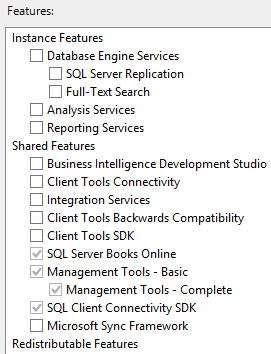
If you happen to install several SQL Servers in a row, you’ll notice differences from over the years in the feature list.

SQL Server 2008

Ah, a simpler time. When you got to the feature selection screen, here were your choices:

SQL Server 2008 feature selection

In case you’ve forgotten, Business Intelligence Development Studio (BIDS) was like SSMS for BI people, and the Microsoft Sync Framework was for rolling your own replication to stuff like handhelds.

SQL Server 2008R2

SQL Server has always had a next-next-next reputation: people threw in the install media, clicked next-next-next, and went live. That approach to installation has always led to great consulting business, but in 2008R2 Microsoft took it to the next level. If you couldn’t be bothered picking features individually, you had a new radio button: “All Features With Defaults.”

JUST INSTALL EVERYTHING, WE’LL DO IT LIVE

Hoo boy. That was a great time for consulting. Also, I’ll call your attention to “SQL Server PowerPivot for SharePoint,” rarely referred to by its acronym, SSPSP.

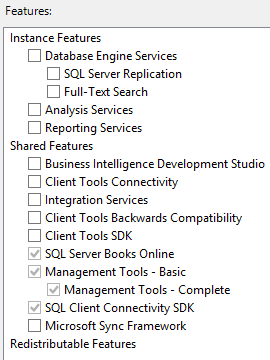
Assuming you weren’t on cocaine, you chose “SQL Server Feature Installation” instead of “All Features With Defaults,” so then you got the normal list of checkboxes. No changes here from SQL Server 2008, same short list:

SQL Server 2008 R2 feature list

No changes here for 2008R2. Moving on.

SQL Server 2012: Featurepalooza

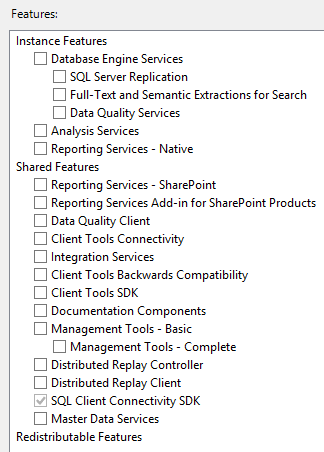
After the PowerPivot and “All Features With Defaults” screen, the feature list came up:

Picking features individually

More features! Some of the “highlights” of the new stuff included:

  • Data Quality Services
  • Reporting Services was split into Native and SharePoint
  • Documentation Components (formerly known as Books Online)
  • Distributed Replay
  • Master Data Services
  • Removed: Business Intelligence Developer Studio (BIDS)
  • Removed: Microsoft Sync Framework

Around this time, when I was talking to DBAs, I talked a lot about the danger of adopting new features. Just because something new is thrown into the box doesn’t mean it’s going to get any kind of adoption, nor any kind of further development from Microsoft. Ask folks who worked with BIDS, DQS, MDS, and Distributed Replay about how that went. (I’ll come back to that, though.)

SQL Server 2014

The PowerPivot and “All Features With Defaults” was still here, and after that, the feature list was the same as 2012:

SQL Server 2014 feature list

No changes. You can kinda think of 2014 as SQL Server 2012 R2.

SQL Server 2016: R, matey

The “All Features With Defaults” and PowerPivot options were removed. Yay! After that, the feature list:

SQL Server 2016 feature list

Changes:

  • R Services (In-Database)
  • R Server (Standalone)
  • PolyBase Query Service for External Data
  • Removed: Client Tools SDK
  • Removed: Management Tools (SSMS, now a separate download)

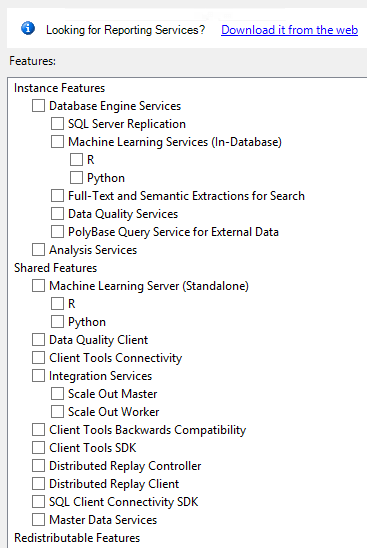
SQL Server 2017

I’m taking a screenshot here of the Windows installer, but of course it was also huge news that setup worked on Linux and in containers. The feature list:

SQL Server 2017 features

Ch-ch-ch-changes:

  • Removed: Reporting Services (now a separate download)
  • Python In-Database
  • Python (Standalone)
  • Integration Services Scale Out Master, Worker

It’s interesting because it seems like there’s two warring camps at Microsoft: one camp who wants to put everything in the SQL Server installer, and another camp who wants separate installers for different services. I’m not sure the “Machine Learning Server (Standalone)” makes more sense to have in this installer – after all, the word “(Standalone)” usually kinda means, uh…well, you get the point.

Remember how I said I used to advise people to think long and hard before using new features? I’m not as concerned about that these days because Microsoft seems to also be deploying variants as cloud services. For example, R, Python, and Integration Services have bright futures in the cloud and on other platforms (like Azure Data Factory.)

One other funny note: all of these installers are currently supported to varying degrees. Microsoft has its hands full – think about the number of people they need to know all these changing features.


A Strange Place For A Memory Grant

If You Hang Around Fetish Bars Long Enough…

You learn things about memory grants in execution plans.

Stuff like the things that usually need memory

  • Hash Join
  • Hash Match
  • Sort
  • Parallelism Exchanges

But there’s something that rarely gets discussed, even in the deepest, darkest, dankest dungeons.

Let’s loosen the clamps and look at it.

Keys and Loops

In this innocent, unassuming, serial, hash and sort free plan, what could be asking for memory?

Oh you loopy things

But here we are with a 5.3 MB memory grant in the small version of Stack Overflow — the one Brent trimmed down to only data up to 2010.

Oh so quiet.

It’s A Lot Like Life

There’s a few different types of Nested Loops Joins. Some may perform prefetching, where they go out and grab rows in anticipation of needing them. Those can be ordered or unordered, depending on the query.

Sometimes, they’re also optimized.

You can either dig through a bunch of XML, or just get the properties of the Nested Loops Join.

A couple things will stand out about it.

Sore thumbs.

One is that the operator received and output memory fractions. The other, and more obvious thing, is that the Optimized attribute is true.

These aren’t normal attributes of a Nested Loops Join operator.

It’s hard to find a lot of good information about them, so here are blog posts I recommend:

Anyway, if you ever see a very simple looking plan asking for an odd memory grant, this could be why.

Thanks for reading!

Brent says: I would just like to go down on record as saying I am going to forget this, and I’m going to be looking at a plan in the near future, wondering where the memory grant comes from, and Erik’s gonna say, “It’s right here, you moron, and why don’t you remember my blog posts? You even wrote a Brent Says on there, for crying out loud.”


How to Reduce the CPU Overhead of Dynamic SQL

Development, T-SQL
14 Comments

Dynamic SQL is a good choice for catch-all type queries, but you have to be careful how you execute the dynamic string.

For frequently executed queries, “EXEC sp_executesql @sql”is a good choice but at the risk of encountering parameter sniffing issues.

For queries that aren’t executed very often, “EXEC (@sql)” can be used, but you could end up with a bloated plan cache with lots of single-use execution plans.

Let’s compare the performance difference between “EXEC (@sql)” and “EXEC sp_executesql @sql” for a frequently executed query.

The query is very fast: takes less than a millisecond to compile and execute.

I usually use SQLQueryStress to load test a query, but it couldn’t deliver what I needed. It maxes out at 200 threads for a single instance. You can run multiple instances of it to get past 200 threads, but each was using a lot of CPU for this load test. Erik pointed me to Microsoft’s ostress utility instead. He blogged about ostress last year.

EXEC (@sql)

Let’s look at the most common way to execute dynamic queries first: EXEC (@sql). The fact that it’s the most common doesn’t mean it’s the right way or the wrong way.

You may wonder why I’m calculating @d inside the proc and not just sending in a value to an input parameter. It was just to make the calls to ostress easy. I could have used a script file via the -i parameter rather than executing a single batch via the -Q parameter. Besides, this is my blog post. I’ll do what I want.

Before starting the test, I cleared out the plan cache so that when I show you the plan cache bloat you won’t wonder what was already in there.

Time to run the load test. I decided on 50 threads with 15000 iterations after running a bunch of tests. I wanted enough threads to cause high CPU utilization and enough iterations to run sp_BlitzFirst with a 30-second sample.

After a minute, I ran sp_BlitzFirst to see what was going on in SQL Server.

Though not horrible waiting time, SOS_SCHEDULER_YIELD is the primary wait here.

CPU was pegged at 100% during this load test.

After the test completed, I examined the plan cache using Kimberly‘s handy plan cache query.

The plan cache totaled 2.3GB, which isn’t that big. But it’s big when you consider that each of the adhoc plans are tiny. Most of the 36,000 adhoc plans were only used once. Why bother storing them in memory if they aren’t going to be reused?

EXEC sp_executesql @sql

Now let’s look at the other way to execute dynamic queries: EXEC sp_executesql @sql.

I again cleared out the plan cache, but this time so that we can see the difference between the two load tests.

I then ran the load test again but calling Test2 this time.

SQL Server was pretty bored with this workload even though it was running more queries per second than the previous test – not much waiting time on anything really.

CPU averaged around 45% during this load test.

Look at that tiny plan cache!

The roundup

ostress settings: threads=50, iterations=15000

Should you just use sp_executesql always?

If you have high CPU utilization and run frequently-executed dynamic queries with “EXEC (@sql)”, consider using “EXEC sp_executesql @sql” instead. You’ll need to be aware of parameter sniffing issues, but you should see a drop in CPU utilization and plan cache size.

Parameter sniffing issues are no joke. I have lost hundreds of hours troubleshooting parameter sniffing issues over the past 15 years. Know how to identify if parameter sniffing is the problem and how to troubleshoot it.

Don’t default to using sp_executesql though. If a query is not executed frequently, “EXEC (@sql)” can work just fine. Just be sure to monitor the adhoc plans in the plan cache.


Trivial Plans, Simple Parameterization and Check Constraints

Execution Plans, Indexing
0

Trivial Plans Are Weird

They’re the optimizer’s “Yes, Dear”.  The thing is, sometimes “Yes, Dear” can miss some important details.

  • Cost based decisions about operators
  • Potential index improvements
  • Contradiction detection for check constraints

Simple parameterization, according to… uh… Official Microsoft documentation? Can only occur in a Trivial Plan.

Which makes sense. Simple parameterization is considered and attempted only when the optimizer thinks that the predicate changing would not have a drastic effect on the query plan.

But That’s Not Always True

Let’s start with a check constraint on the Users table. This is the 2010 data before Mr. Skeet hit 1000k reputation, so it succeeds, and is trusted.

You can verify if constraints are trusted or not by querying the sys.check_constraints view:

Let’s take this query for example:

There’s an obvious problem

Our check constraint should negate our where clause. We shouldn’t need to touch the table at all.

To make things worse, we end up scanning the entire thing.

Bogus.

If we add something goofy to our query, we get the correct plan:

Of course 1’s gonna be in there. It’s 1. We’re selecting 1.  But this is enough to make the optimizer reflect on its choices.

Hustle real hard

Extra Crispy

I know what you’re thinking. I can read your future mind. You think that adding an index would help.

Okay, let’s add an index that covers the entire query.

Same problem.

To make matters worse, if we add a non-covering index…

We get the plan we want, but yet another plan that lies to us about Simple Parameterization.

%$&^%

But Why?

The easy answer is that with a cost based decision to make, the optimizer now has to explore optimizations beyond a trivial plan.

Now it has a choice between

  • Scanning the Clustered Index
  • Seeking into the index on Reputation, and doing a Key Lookup for DisplayName and Age

Comparing that to when the nonclustered index covered the entire query, there was no cost-based alternative. A trivial plan to use a covering index makes the most sense.

To show an absurd example, with the same single key column on Reputation, we can force the optimizer to use it for a query where it would have no benefit whatsoever.

Foolish~

Now I know. This decision is a no-brainer. But it’s still a decision, and one the optimizer has to weigh the cost of each, with no exact matching index.

Fun, right?

Thanks for reading!

Brent says: when you run sp_BlitzCache, you might have noticed the “Trivial” warning in the Warnings column. This is a great example of why we call it out – the query might be in your top 10 most resource-consuming queries not because it’s impossible to get a better query plan for it, but just because SQL Server chose not to take the time to evaluate better plans. Normally, you’ll never have to troubleshoot performance on a trivial query – but once it hits your top 10, that’s when it’s time to dig a little deeper.


Building SQL ConstantCare®: Adding Daily Emails and Recognizing Your Work

SQL ConstantCare
3 Comments

When we first launched SQL ConstantCare®, the workflow was:

  • You sent in data about your SQL Servers daily
  • Our systems sent us (not you) recommendations on what to do
  • Once a week, we reviewed those recommendations, made sure they made sense, adapted them when necessary, and then forwarded ’em on to you

Over time, we became more confident in the system’s recommendations, and we started sending the daily emails directly to some of our customers. The response was super-positive: people loved being able to get faster feedback when new urgent problems pop up.

So starting today, everybody gets the daily per-server emails. Because they’re fully automated, they should arrive within a few minutes of your regularly scheduled data collection. (I’m still doing the manual analysis emails, but now I’m holding off until you get all the basic bat-in-the-cave recommendations fixed.)

However, there are some problems you don’t wanna hear about every day. For example, you don’t wanna keep hearing that your SQL Server build level is unsupported, or that you need to disable Priority Boost – those things require a restart to fix. No sense in pestering you about that every day. So for big-picture restart-required stuff, we’re only alerting you about those on Mondays. Gives you a chance to plan your week – to figure out whether you wanna try to schedule outages sometime later.

On Mondays, we’ve also added a new section to the emails that covers what you’ve fixed recently:

Congratulations! You fixed stuff!

My goal was to give you something you could forward up the management chain to say, “Here’s what I’ve been working on, and here’s what it means to our environment as a whole.”

Toward the end of the year, we’ll give you a roundup of your overall environment that you’ll be able to use for your annual review, too. Since we’re tracking the state of your servers over time, it’s easy for me to build a report that says, “Here’s what my environment looked like at the start of the year – warts and all – and here’s what it looks like now.”

Next up: identifying bored servers

A few selected users started seeing a new piece of advice last week: your SQL Server is bored, and you could probably run CHECKDB and/or backups more frequently in order to reduce your risk of data loss and downtime.

When that advice went out, I immediately got a lot of replies asking, “Wait – I thought my server was busy? What do you mean it’s bored?” Talking with ’em, a lot of them followed up with questions like, “So if my server isn’t busy, what does a busy server look like?” That makes sense, given that 64% of SQL ConstantCare users have 3 servers or less. (77% have 5 or less.) They just don’t have perspective across a wide estate of SQL Servers.

To explain a busy vs bored server, I start by pointing folks to the video How to Measure Your SQL Server, which introduces the concept of Wait Time Ratio. Say for every hour on the clock, your server spends one hour waiting on, say, storage. That’s a ratio of 1:1 – meaning, 1 hour of waits in 1 hour of clock time.

The more hours your server spends waiting on stuff, the higher your wait time ratio is. Here’s an example of a server that’s really hustling:

High wait time ratio

For every hour on the clock, this server spends 12-26 hours waiting on stuff. That axis over on the left hand side is really important.

On the other hand, here’s a bored server:

Low wait time ratio – note the left side axis

For every hour on the clock, this thing doesn’t even spend one minute waiting on things. In a case like this, if you’re only doing monthly full backups and daily differentials, thinking you’re making your server’s workload easier, you’re not really helping. The server’s bored all night anyway. You might as well be doing full backups daily (assuming a small enough set of databases and enough backup space) in order to get a better recovery time objective.

Wanna see if your server’s bored? Start with sp_BlitzFirst @SinceStartup = 1, which tells you your overall wait times since startup. It’s not a perfect measure – it’s a sum of wait times since the server started up, which includes weekends, holidays, etc – but it’s a good free start.


[Video] Office Hours 2018/5/16 (With Transcriptions)

This week, Brent, Erik, Tara, and Richie are back in action again to and are discussing sys.dm_db usage stats, Availability Group troubleshooting, ASYNC Network IO issue, reasons for using a contained database, whether you need to add more CPUs if facing THREADPOOL (or is it Deadpool?) waits, auto-tiering tempdb, and query tuning.

Here’s the video on YouTube:

You can register to attend next week’s Office Hours, or subscribe to our podcast to listen on the go.

Enjoy the Podcast?

Don’t miss an episode, subscribe via iTunes, Stitcher or RSS.
Leave us a review in iTunes

Office Hours – 5-16-18


How do I remove in-memory OLTP?

Brent Ozar: Josh says, “I’m using in-memory OLTP in a synchronized AG, but as it turns out, my workload does not warrant in-memory OLTP and I’d like to back it out now, however, I can’t find the Hekaton ejector-seat handle. Books Online says I need to drop the database. Do you have any creative ideas on how to do this while minimizing downtime?”

Tara Kizer: I mean, nothing. Can’t you just not use the feature? I mean, so what if it’s enabled, as long as you’re not using it.

Brent Ozar: That’s true, you could just stop using it. You’ll still leave the file group there, but why cares?

Erik Darling: What I wouldn’t trust is that like any of the weird Hekaton bugs would just affect it having – like, it’s enabled so you’re exposed to these bugs even if you’re not directly using it. There just might be something floating that just having it turned on causes that I would freak out about.

Brent Ozar: There’s the restore one in one in one of the recent 2017 CUs. I want to say there was a restore – if you had Hekaton, you couldn’t do a restore under some circumstances. (CU4: In-memory databases in an AG hang during recovery. Then CU5: in-memory OLTP takes a long time to recover.)

Erik Darling: For the same reason, I won’t hang pictures with Command Strips over the bed because I’m just afraid, like, in the middle of the night just crashing down on top of me. Like, over the bed, I’m using nails, cement, whatever I can get up there. I’m terrified of outside of my control things and Hekaton, you turn that one, you can’t turn it off. It’s outside of your control. You might have yourself exposed to all sorts of weirdness just having it turned on.

Brent Ozar: So then speaking of that, so in that case, you’ll like what we did. At one point in Mexico, we bought a bunch of wooden carved hearts, three dimensional. They’re like probably two or three inches thick and so Erika was absolutely determined to put these over the bed. And they’re not flat; they’re freaking heart-shaped. So she put Command Strips on the back and she was holding them to the wall where the bed is. Everything seemed cool and in the middle of the night, like once a week, a wooden heart would just fall on us. After a couple of weeks of that we’re like, okay, we’re not doing that.

Erik Darling: More superstitious people would, like, start sleeping in different rooms, get divorced…

Brent Ozar: Because hearts are knocking us on the head. Josh says, “That’s why I’m trying to get rid of it, to reduce the exposure to Hekaton bugs.” Yeah, if you wanted to really get rid of it, the closest thing that I can get is to do like SSIS or something to export all the stuff out of your database over to another database. And then, maybe right at the last minute, use something like Redgate Data Compare in order to find the edge case stuff that didn’t get caught, but man, it is not going to be pretty.

Erik Darling: There are a lot of Command Strips on that answer. I guess you could like shrink the file all the way down, set it to like read-only, no auto growth, but still, it’s there and doing stuff. I don’t know, forget I said anything; it’s a terrible idea too.


What do “user lookups” mean in sp_BlitzIndex?

Brent Ozar: Chris says he’s looking at sys.dm_db_index_usage_stats. He says, “On my table, there’s 300,000 user lookups on a primary key. I think that user lookups means the number of bookmark lookups by user queries. Is that true?”

Tara Kizer: I’ve never looked up that column to see what it means.

Brent Ozar: It should be easy enough to understand, to go test, so I’d always recommend to people – because I love demoing that DMV in operation stats – is go create another table. Go create a table with nothing in it, put five rows in it and build yourself several different execution plans and you can keep seeing how those numbers change. In a perfect world, also do it in a different database that you can off-line and online again quickly so that those stats reset.

Tara Kizer: I was just going to say, even if this is the bookmark lookups, that doesn’t mean they’re a bad thing. I mean, it’s going to have bookmark lookups. You know, the fact that he’s saying bookmark lookups means he’s as old as us and has been using SQL Server for a very long time. So I catch myself and say bookmark lookups still, but these days, people call it key lookups. It doesn’t mean it’s a bad thing. You’re not going to be able to cover every single query, you know. Some of your queries need to return so many columns that you don’t want a non clustered index that covers the entire thing, so you have to do a key lookup at that point. So it’s not necessarily a bad thing. You have to examine the execution plans and look for the expensive key lookups. And if you want to improve those maybe consider covering index or look at Erik’s SELECT* information. You have a blog post on that. I know you have a presentation on it, but…

Erik Darling: Yeah, all sorts of things on that.

Tara Kizer: Yeah, that presentation will show you how to avoid the key lookup without a covering index. So it can do index intersection or do it later on so it’s not as expensive.

Brent Ozar: I would just like to point out that everyone sees that I have Chrome now. I have Google Chrome on my virtual machine [crosstalk]. Why, when I search for Erik Darling SELECT* I get Erik Darling, Every Time I go to Town?

Erik Darling: Oh yeah, there’s a folk singer named Erik Darling. He’s dead.

Richie Rump: Lies, it’s just you.

Erik Darling: If I had a burgeoning folk career, I wouldn’t be here.

Tara Kizer: I like when you say Darling though, you have to say it in Rob Farley’s voice…

Erik Darling: Very specific about that. Where is Rob Farley? I feel like I haven’t seen him do anything online in a while, like hiding.

Brent Ozar: Rob’s going to be the only one who gets this joke, but Rob is in Australia. Rob, ha ha ha – he’s probably not even going to hear that.


My ASYNC_NETWORK_IO goes up during heavy load

Brent Ozar: Pablo asks, “Ola amigos, in some times of day when I have high concurrency, async network I/O goes up and users feel like everything is slow. How can I help or what should I check?”

Tara Kizer: And then he says no application code available, because that’s an important thing because I love seeing that wait stat because it means the problem is not in SQL Server. I get to step away as a production DBA. A sysadmin jack of all trades type person is going to have to troubleshoot this, but as a SQL Server DBA, I’m like, oh the problem’s not mine. So as far as I know, there’s three things that can impact it.

It’s almost always an application problem. It can be an application server issue; if you don’t have enough memory or CPU, the application server could be struggling. And then the third one is a network issue, but it’s almost never a network issue. It’s usually an application involved in that row by row processing while SQL Server is trying to fire-hose the data to the application. So, unfortunately, it is not – there’s nothing to do inside SQL Server; you’re going to need to look external.

Erik Darling: Unless you’re just shoveling way too many rows at the application. So you know, if your user has a dashboard where they’re looking at the top 500 things and you’re shoveling like a million rows in there, you could probably page that query or just cut it down a little bit in some other way to stop shoveling that many rows at the app server. But generally, Tara’s right. Some noodle-head just wrote a for each loop to like present things or some weird presentation layer stuff that goes on once the data hits the application that just isn’t processing things as fast as you’d want.

Tara Kizer: I did see a recent server that the queries were sending over something like 50 million rows each time, but the application was then applying paging to it, so it would then filter it down to like 50 rows or something like that. So then it did a filter and the application got the data. I was like, this isn’t the right way to do things.

Richie Rump: [crosstalk] back in 2003…

Tara Kizer: And we didn’t even have 50 million rows back then.

Richie Rump: That’s right.

Erik Darling: In 2003 there were like five, 10, 15,000 rows at most; it was like nothing then.

Brent Ozar: I think one clue too might be when you say it’s really busy you get this. I would go remote desktop into your app servers and they might be doing 100% CPU, swapping to disk, no memory left. We’ve had a couple of those where we go remote desktop into the app server and it’s got two cores and 4GB of RAM and the thing’s just falling over.

Richie Rump: Exactly.

Brent Ozar: Erik’s phone.

Richie Rump: A phone has more.


Erik’s humor isn’t half bad

Brent Ozar: Marci says, “Richie’s comment reminds me that she’s really enjoying Erik’s sense of humor in the recent blog post. They remind her of the early Brent Ozar posts. They make you think, did he really just say that?”

Tara Kizer: Would that be the Jeremiah stuff?

Richie Rump: Let’s see, it wouldn’t be Brent.

Brent Ozar: It’s been a long time since I said anything offensive. I’ve got to dig back up to that.

Tara Kizer: Erik’s got a wicked sense of humor; a smart sense of humor, but wicked.

Richie Rump: I’ve amended your statement, Brent; it’s been a long time since you’ve said something offensive publicly, how’s that?

Brent Ozar: Touché.

Tara Kizer: We do have fun in that company chat room.

Brent Ozar: We do. This is probably the most fun part of our jobs is just we have a company chat room, which is why I stopped spending so much time on Twitter, because it’s so much more fun now in Slack because you can be as offensive as you want to be, throw GIFs in there, which is a horrible thing for a company owner to say. “I can be as offensive as I want in our company chat room.” It’s probably words that I’m going to regret and come back to haunt me later, but yeah, amusing.

Richie Rump: And now we have them recorded; thanks, Brent.

Brent Ozar: Yes, and especially with my wife being the human resources department and she’s way more offensive than I am…

Tara Kizer: She swore he’s not HR by the way; swears. You’re the closest person.

Brent Ozar: If she ever got hit by a car and I had to handle payroll and insurance, you would know just how good of a human resources person she is. Can you guys use 50s to pay for your surgery?

Erik Darling: By the way, I’m going to get 10 surgeries; a lot of stuff going on.

Brent Ozar: Please get a receipt this time.


Why would I want to use a contained database?

Brent Ozar: Ron asks a question that makes me want to be offensive. Ron says, “Why would I want to use a contained database?”

Tara Kizer: That’s a good question; I’ve never used them.

Brent Ozar: And the silence tells you everything. So the idea was that you would be able to deploy a database with all things like agent jobs and logins in it and then you could, like, vMotion it around the way you move a server around in virtualization with Hyper-V or VMware. That ship just sailed though. Microsoft totally missed that trend and we were just so much better off using virtualization for that, so it just died on the fire.

Richie Rump: Well that and cloud, right, so they also tried to move that idea into the cloud, where you deploy the entire database in the cloud and then everyone kind or realized that that’s kind of a silly idea.

Brent Ozar: And there are things that weren’t in the contained database; they all wanted agent jobs, they all wanted all kinds of stuff. Ron says, “I was asked that by a client and that was my response also.” Yeah…

Erik Darling: I guess if I wanted to do that – so what’s the behavior in a contained database that you’re looking for, that you’re looking to emulate, you know, like what do you want to get out of it? Or did you just hear the word and think, oh I want a contained database? Because that happens to people sometimes, like oh yeah, I’ve heard of that, I should do that.

Richie Rump: [crosstalk] database not to be contained, I mean, what if it gets out? I don’t know.

Erik Darling: Put a leash on that thing, man, give it a name.


How do I migrate from 2012 to 2016?

Brent Ozar: Renuka Devi asks, “Please tell us the steps to follow during a SQL Server migration from 2012 to 2016.”

Erik Darling: That will be $7,995…

Brent Ozar: And there’s no decimal point in there.

Erik Darling: There’s a comma.

Tara Kizer: Exactly, not a decimal point.

Brent Ozar: So why is it that when someone asks us to sketch out a new build or a new infrastructure for moving from 2012 to 2016, why can’t we do it in a paragraph?

Erik Darling: You know, it’s one of those things, when you like think about the high-level stuff, you come up with so many, like, just dead on showstoppers for things you can’t do, won’t do, ways you want to do it. And then when you get further into the details of, like, things you have going on in one place and like getting all that stuff moved over, you know, it’s easy to think about the easy stuff, like logins, agent jobs and that stuff. But then you get into using a new cardinality estimator or anything like that and this is just a lot more testing and planning than you would ever want to get into in a single paragraph, or you could ever do justice to in like a single paragraph.


Why won’t you call me back?

Brent Ozar: Guillermo says, “I sent a question through the contact us page at brentozar.com regarding the training season pass about two weeks ago but haven’t seen a reply. What’s the estimated reply time?” I haven’t seen that. If you want, just shoot us another email. There’s also an email address on the page; try that. maybe something went wrong with the web form. And you can also ask us here too, if you like.

Erik Darling: You know, a lot of people send in questions and mistype their email address and we go to reply and just get a bounce back. There’s like no way for us to like fix the email address. It’s not ever often, like, @gamal.com; it’s always just like some name butchering we can’t fix…

Brent Ozar: 42 characters in it.

Erik Darling: Yeah, exactly.


Does THREADPOOL mean I need to add more cores?

Brent Ozar: Pablo says, “If I don’t have any long-running blocking situations, can THREADPOOL be related to the need to add more CPUs?”

Richie Rump: Threadpool or Deadpool?

Brent Ozar: Which reminds me, and I shouldn’t change the question, but are you going to see Deadpool 2 when it comes out or are you going to wait a while?

Richie Rump: It comes out tomorrow. I’m going to see if I can talk my wife into going on our anniversary since we saw Deadpool on Valentine’s Day.

Erik Darling: Nice.

Richie Rump: She’ll be into it, don’t worry.

Brent Ozar: Wow, happy anniversary in advance; congratulations. I mean, one year is a long time to make it. It’s impressive…

Richie Rump: Or 19.

Brent Ozar: It’s no time at all. So THREADPOOL – if you’re facing THREADPOOL waits, do you need to add more CPU?

Erik Darling: Perhaps.

Tara Kizer: You could.

Erik Darling: I would want to take a look at a few other things first before I go and spend those licensing bucks on SQL Server stuff, like do I have MAXDOP and cost threshold for parallelism set right? Have I tuned my queries and indexes so that only the really necessary ones are actually going parallel and doing parallel things because all those parallel queries, they’ll go out and ask for, like, a whole – well ask for dot threads per parallel branch of their execution. So it’s like, they could ask for a whole lot more threads than just, like, you know, DOP.

Everyone’s under the impression that, you know, you set MAXDOP and that’s the number of cores that SQL Server can use and that will also cap the number of threads, but there is no such cap on that number of threads with MAXDOP. MAXDOP will use a whole mess of stuff. So that’s really important to keep in mind, especially if you’re – what sucks to me, like when I think about max worker threads and MAXDOP and all those other things, is when your max worker threads between one and four cores is 512. There’s no change.

So SQL Server thinks that for a single core and four cores, the best thing you can do is 512. And then after that, it doesn’t double. Like, you go up to eight cores, you don’t get 1024, you go up to 16, you don’t get 2048. Like, it just goes up by tiny increments. So like, you don’t even get that many more worker threads per CPU increment, so early on, you’re much better off tuning the server, tuning settings, tuning queries and indexes to keep only necessary things from going parallel from the get-go.

Brent Ozar: There’s a great post there, What Not to do when Adding Always On Availability Groups Databases by Warwick Rudd. And he goes into more detail with that with the little chart. While you were talking, you reminded me too of this question over here from John Smith Senior about SQL Server threads and degrees of parallelism – or was it this one? I could have sworn there was a Paul White one…

Erik Darling: Yeah, there was a Paul White on somewhere on there.

Brent Ozar: Hang on, I’ve got to find that – alright, cool.


Should I use auto-tiering for TempDB?

Brent Ozar: Alright, next up, we have – Daryl says, “We use auto-tiering on our SAN with a few different RAID levels, but I like RAID 10 for our log files as well as tempdb. I’ve noticed an increase in disk I/O after is set up tempdb with four files, but our processes run in the same timeframe. With tempdb, should I auto-tier it so that it moves around SSD?” My thought on auto-tiering, I adore auto-tiering; I’m a huge fan of it because the problem is, you don’t know which servers are really going to be active. You don’t know which servers are going to have a really hot and heavy tempdb, which ones are going to be sitting around bored and it changes all the time. The more SQL Servers that you have, the harder it is to predict that stuff. So I’m all about stuff like auto-tiering.

I know that the more admins that you have, the more people that you have, the more tempting it becomes to micromanage it. Like, I know that this one should be on RAID 10 and I know – because maybe you have a server that’s really busy and it’s worthless. For example, when I was a DBA, there was one server that just sucked at tempdb, just absolutely hammered it, but it was our website tracking software. Every time employees would go surf the web, it would log stuff into the database.

And we’re all like, we don’t care what performance is for that because it’s a backend server that nobody cares about, so we can just relegate that to the crappiest storage.

Erik Darling: You don’t have one of those, do you? Because I let some other people use my computer sometimes – I don’t know what they do so I’m just…

Brent Ozar: I share my hotspot on the street…

Erik Darling: Yeah, it’s weird, I don’t know. It’s like a whole communal thing out there. I just wanted to double check.

Brent Ozar: Yeah, I have a policy around our employee internet – don’t ask and don’t smell. I just don’t want to know. It was funny, when I first got Erika a cell phone way back in the 90s, late 99, early 2000, I got her a cell phone as a Christmas present and she’s like, you just want to track what I’m doing. And I’m like, no seriously, I don’t care. You can do anything you want. It took probably six months before she realized it and she’s like, you’re not mad at me for anything I’ve texted? And I’m like, I don’t know. I don’t want to look at the phone bill, I don’t care; so then she got into it.


We have a long-running SELECT showing sleeping…

Brent Ozar: Joe asks, “We have a long-running SELECT, over three hours, that has an estimated subtree cost of 0.003 and it’s stuck in the sleeping state. It’s going to keep running until we kill it. How should I resolve that?”

Erik Darling: I would love to see the query plan for that?

Tara Kizer: the query plan, what is it waiting on?

Brent Ozar: And, well if you say suspended, I’m curious.

Erik Darling: It says it’s sleeping, so I wonder if…

Brent Ozar: Should be able to do a BEGIN TRAN… I was going to say, or explicit transactions. So I’m going to use Stack Overflow…

Richie Rump: Is there a narcolepsy wait type? I don’t know.

Erik Darling: Tell that query to stop smoking weed, man.

Brent Ozar: Boom, so I got that SELECT running. Now while that’s running, I’m going to go pop over and run sp_whoisactive in another window once that thing finishes. So sp_whoisactive – so I have a query here it shows as sleeping, and it really doesn’t even matter what the cost of the query is, but once that query is sleeping, it’s just because somebody either restarted a transaction or they have an implicit transaction open. It’s not doing anything. It might be holding locks open.

To check to see if they’d like begun a transaction and held locks, you can do get locks equals one and then this is going to return a little property bag, a little XML property bag here. You can click on it and then it’ll show you if they have any tables locked. Odds are they just had a BEGIN TRAN somewhere and didn’t commit anything, but it’s just SELECTs. If it looks like this, where it’s just a schema level lock on the entire database, it’s fine, you can kill it. If they have a whole bunch of objects involved, then that’s where I’d get a little nervous.

Richie Rump: Brent just showed his age by using the term property bag.

Brent Ozar: How old is that too? It’s probably…

Richie Rump: I believe that was like VB – when I first started using VB and VB3, that was there.

Brent Ozar: Alright, well that’s all the questions we’ve got for this week. Thanks, everybody for hanging out with us this week at Office Hours and we will see y’all next week…

Erik Darling: Adios.

Attend the next Office Hours podcast free.


Stuff People Tell Me Is The Default

Humor
30 Comments

Playing The Odds

Assuming that life carries on as usual for a couple more weeks, I’ll have been a consultant here for three years.

In that time, I’ve had some really interesting conversations with people, mostly about why things are the way they are on their servers.

My favorite response is “isn’t that the default?”, because it’s never the default.

I think that’s called an unforced error.

Here are some of my favorites:
Oh you
  1. Nonclustered Primary Keys
  2. Fill factor < 100
  3. MAXDOP 1
  4. Fifteen minute log backups
  5. Single column indexes
  6. Indexes including every column
  7. Database shrink tasks at the end of maintenance plans
  8. Read uncommitted
  9. Priority Boost

Thanks for reading!

Brent says: Ooo, yeah, my favorite: “SQL Server has built-in emails that alert me when there’s a problem, right?”