Blog

SQL Server Tasks You Probably Shouldn’t Automate

SQL Server
24 Comments

Every now and then I run across an automated script that does something a little suspicious. I’m not saying you should never put these things into a script, but if you do, seriously think about the surprise gotchas when someone runs the script:

  1. DBCC commands other than CHECKDB
  2. sp_configure (and especially RECONFIGURE afterwards)
  3. ALTER SERVER CONFIGURATION
  4. ALTER DATABASE
  5. ALTER AVAILABILITY GROUP
  6. CREATE INDEX or DROP INDEX
  7. KILL
  8. SHUTDOWN
  9. And most of the database engine management stored procedures

If you’re doing any of these on a scheduled basis, take a few minutes to document what you’re doing, why, and whether it’s safe to stop doing it. Your successor will thank you.

Believe me, otherwise she’s going to throw you under the bus when you’re gone, and if you haven’t left something behind to defend you, you’re going to look like That Guy.

Why You Simply Must Have a Date Table [Video]

SQL Server
24 Comments

As a developer, one of the things I can no longer live without is a date table. Who wants to type DATENAME and DATEPART over and over again? Not this guy, and once you have a date table, you won’t want to either.

In this 16-minute video, I’ll give you four reasons why you should stop writing so many date functions and concatenations, and start looking them up in a table instead.


Who’s Allowed to Add Indexes to ISV Apps?

Performance tuning of independent software vendor (ISV) databases is a little tricky.

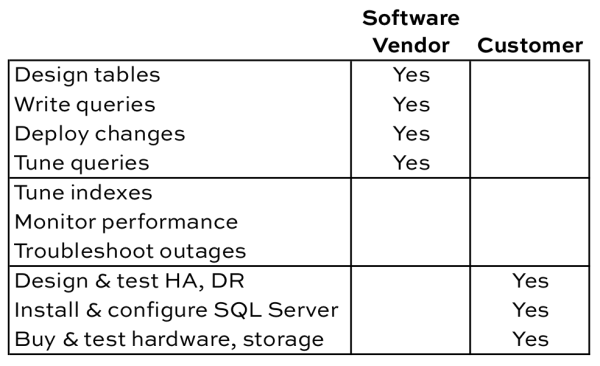
To understand who does what, let’s think through all of the work required with building and hosting a database application:

Who adds indexes and tunes queries?

Typically the two parties involved – the vendor and the customer – start at opposite ends of the table. The software vendor starts by designing their tables, and gradually works down. The customer starts by buying hardware, and works their way up.
In the middle, things kinda fall apart.

When I was a DBA, I thought it was the vendor’s responsibility to put the right indexes on their tables. It’s their app, right? Aren’t they supposed to know how people query their own app? Why am I responsible for reinventing that wheel? Will I lose support if I add indexes?

Now that I’ve worked with a lot of ISVs, I see things differently. Here are their challenges:

Every customer uses the app differently. Some customers really hammer a particular feature hard, whereas others never use it at all. If you index for every possible feature/query, then the database will be dead slow for delete/update/insert operations.

Customers don’t give feature usage or index usage data back to the ISV. Software vendors have no way of knowing what indexes are working well out in the field, or sometimes even know what queries are running on the server. This comes back to our responsibilities grid at the beginning of the post – often even the customers aren’t running any performance monitoring software on their app at all.

Customers won’t upgrade to current versions quickly. Sometimes the ISV fixes performance by improving queries or adding the right indexes, but they only add it in the current version of the software. It takes development time to backport the fixes to older versions, and software vendors only have so much time. If you ask end users if they’d rather pay for new features or backporting stuff to older versions, they vote with their wallet.

Some customers have really bad DBAs (or none at all). Time and again, I’ve seen “DBAs” add dozens – or in one case hundreds – of indexes to an ISV’s tables in an effort to improve performance. The first few indexes make things better, so they start solving every problem by adding more indexes. You can guess how that ends up. As a result, the ISV’s support team starts making rules like “no customer is allowed to add indexes.”

Building a Successful Relationship With Your ISV

When you install a software vendor’s database, show them the list of responsibilities at the top of this post. Say, “I agree to do the stuff in my column – if you’ve got any guidance on things you’d like me to do for your application, send ’em over, and I’ll be glad to follow them.” For example, the vendor may have a list of trace flags they’d like to enable for their app.

Then say, “For the stuff in the middle, who’s responsible?”

If the vendor agrees to tune indexes, then you’ll probably need to give them index usage data and plan cache data on a regular basis to help them tune. I like to be my software vendor’s best customer – I’ll say, “I’ll send you the output of sp_BlitzIndex® and sp_BlitzCache® every week or every month, whatever works for you. I’ll be glad to take my time working with you on the output, and together, we can make the software experience awesome for everybody.”

You’ll be surprised by how often they accept because they’re desperate to find customers willing to give them some diagnostic data about how their software works in the wild.

If the vendor says you’re responsible for tuning indexes, then:

  • Instead of dropping their indexes, disable them, and let their support team know which ones you’re disabling
  • Create your own indexes with your company’s initials, like BGO_CustomerNumber_CustomerName, so you can quickly identify which ones are yours versus which shipped with the product
  • Run sp_BlitzIndex® every month to make sure your indexes are actually helping, not hurting
  • When it’s time to deploy a new version of their app, enable the vendor’s indexes again first, drop your own indexes, run their deployment scripts, and then set things back the way you had ’em (this way you minimize the chance of their deployment scripts breaking)

There’s no right or wrong choice – for example, Sharepoint customers aren’t allowed to touch the database, whereas SAP customers are encouraged to do their own index tuning through the SAP UI. The key is knowing which method your vendor supports right from the start. Otherwise, both sides just assume the other side is taking care of the problem.


Transactional Replication Architecture: Isolating Subscriber Tables

Replication
4 Comments

The best part about transactional replication is that it’s flexible. And the worst thing about transactional replication is that it’s flexible.

A poor replication configuration will cause you performance pains and increase your risks of development and administrative errors. Here’s one important design principle: isolate your replication subscriber tables from one another, and from non-subscriber tables.

Our example environment

We’ve got an environment with two SQL Server databases used for OLTP purposes: SalesDB and CRMDB. Each database uses SQL Server Standard Edition. The databases support different applications, and they’re on totally separate SQL Server instances (and failover clusters).

The SalesDB and CRMDB support completely different applications, but data from selected tables in them both is needed for internal reports. SQL Server transactional replication has been chosen as the technology to keep a copy of the data up to date on the reporting instance. Replication is already in use in the environment and a dedicated SQL Server has been configured for distribution.

There’s still choices to make: how do you configure the subscriber? My recommendation is that each replication subscription be isolated in individual databases. Let’s take a look at why.

The all-in-one subscriber (Avoid This!)

In this model, we have one big database named ReportDB on the Warehouse01 subscriber server. This database holds reporting tables as well as tables from replication subscriptions.

Transactional Replication Architecture 1- Large Subscriber


SQL Server will let you do this, but it’s got some downsides:

1. You’ve got a single transaction log (and a single recovery model) for ReportDB. Not all of the data in ReportDB may be recoverable from other sources. If for any reason you need to be in the FULL recovery model for ReportDB, you’re in a sticky situation if you have to reinitialize replication and reload the subscriber tables: you’ve got to do it fully logged, and your transaction log backups will be bigger and slower.

2. It’s easy for DBAs and Developers to screw this up. You may want to drop all the replication subscriber tables at some point if you have to re-initialize replication. I would much rather isolate drop table commands to a database where everything in the database is replication related, and I don’t have to worry about accidentally dropping the wrong thing! Similarly, it’s much easier to set up security so that application accounts can only read subscriber tables (not write to them), when they’re in their own database.

3. You’ve got fewer options when it comes to reinitialization. The ability to initialize a replication subscriber from a restored backup is huge– running snapshots on your publishers makes your users sad.

Isolated subscribers (Much Better Over Time)

Here’s the alternate model, where each subscriber has its own database:

Transactional Replication Architecture 2 - Isolated Subscriber Tables


Note that the subscriber databases are named in a way that you can identify their role. (As noted by David in the comments, it’s much easier if you don’t re-use the name of a publishing database.)

This model has a lot of benefits:

  • More options to re-initialize
  • Supports different recovery models on replication subscriber databases and ReportDB (which can allow minimal logging during bulk inserts if you’re re-initializing that way)
  • Safer for administrators
  • Easier to set up security
  • Easier for new DBAs to and developers to understand (the architecture is much more transparent)

What If I’m Not Doing it This Way? Do I Have to Change All My Code?

Not necessarily. I’ve worked with this with two different models.

Synonyms: ReportDB could contain synonyms for all the replication subscriber tables. This makes the tables seem like they’re in ReportDB, while they’re actually in other databases.

Dynamically configured procedures. In one environment I worked in where replication was common, there was a configuration table where you configured the name of the replication subscriber databases needed by an application. When code was deployed, the installation process for stored procedures checked this configuration table and dynamically compiled the stored procedures referencing the name of the database in that environment. This sounds like more work, but it was very useful for the developers, who might need to deploy builds to instances configured differently than production.

Want To Learn More About Replication?

We’ve got you covered. Start with these articles:


Brent’s Bad Idea Jeans [Video]

Bad Idea Jeans, Humor, SQL Server
9 Comments

Over the years, I’ve come up with some rather “interesting” answers to SQL Server problems including:

In this 20-minute video, I’ll explain what drove me to these crazy solutions, and it’ll be up to you to decide whether they’re awesome or awful.

https://www.youtube.com/watch?v=wtBSWxPNkNs

For questions & answers about these, tune in to our weekly webcast.


How many CPUs is my parallel query using in SQL Server?

Parallelism can be confusing. A single query can have multiple operators that run at the same time. Each of these operators may decide to use multiple threads.

You set SQL Server’s “max degree of parallelism” to control the number of processors that can be used, but it’s not immediately obvious what this means. Does this setting limit the total number of CPU cores the entire query statement can use? Or does it limit the total number of CPU cores that a single parallel operator within the query can use?

Good news: we can see how it works by running a simple test query and looking at some SQL Server DMVs.

My parallelism test setup

This test is run against a virtualized SQL Server with 4 virtual CPUs. SQL Server’s “max degree of parallelism” setting is at 2. My test instance is on SQL Server 2014.

My simple parallel query

All of my observations are taken while running the following test query against a restored copy of the StackOverflow database. I have ‘actual execution’ plans turned on so that when I query sys.dm_exec_query_profiles, I get some interesting details back.

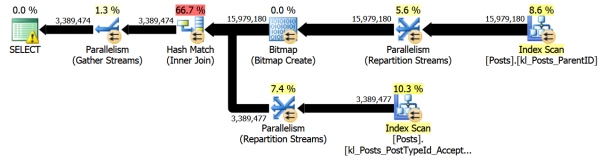
Here’s what the execution plan looks like:

parallel plan

The plan has seven operators with parallel indicators. Two of those operators are scanning nonclustered indexes on the Posts table.

The question we’re exploring here is whether the scans of those nonclustered indexes will use multiple threads that share the same two CPU cores, or whether they will each get two different CPU cores (and use all four).

Starting simple: tasks and workers

While my parallel ‘Posts’ query is executing on session 53, I can spy on it by querying SQL Server’s DMVs from another session:

Here are a sample of the results:
schedulers-workers

The scheduler_id column is key. Each scheduler is mapped to one of my virtual CPU cores. My query is using 2 virtual CPU cores. At this moment I have two tasks on scheduler_id 0, and three tasks on scheduler_id 2.

But why leave it at that, when we can overcomplicate things? Let’s poke around a little more.

dm_exec_query_profiles and query plan nodes

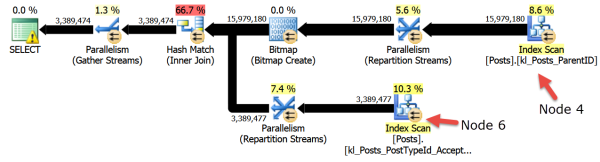
There’s one more thing you need to know about our query plan. Each node in the plan has a number. The index scans are node 4 and node 6:
parallel plan -nodes
If I run my query with ‘actual execution plans’ enabled, I can spy on my query using the sys.dm_exec_query_profiles DMV like this:

cpus-threads-query-nodes
Click to nerd out on this in a larger view

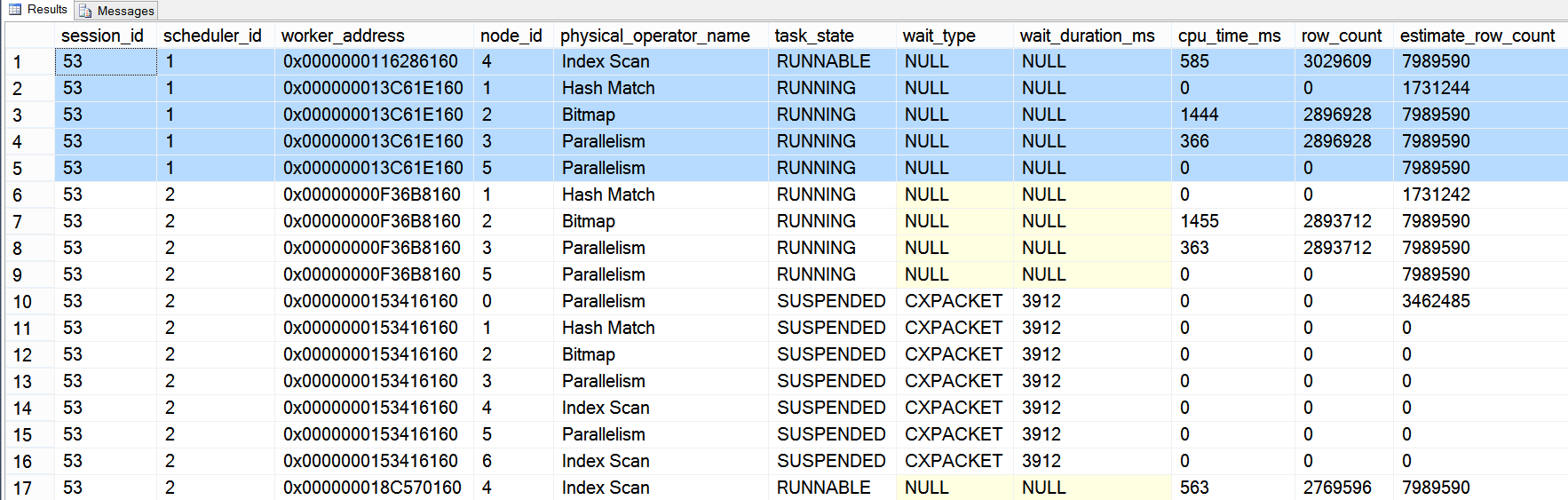
Here’s a sample of the output:

I’ve only got two schedulers being used again – this time it happened to be scheduler_id 1 and scheduler_id 2. Looking at the node_id column, I can see that the index scan on query plan node 4 is using both scheduler_id 1 and scheduler_id 2: the very top line and the bottom line of the output show the current row_count for the runnable tasks. The scan on query plan node 6 isn’t really doing work right at the instance this snapshot was taken.

Recap: Maxdop limits the cpu count for the query

Even if your query has multiple parallel operators, the operators will share the CPUs assigned to the query, which you can limit by the ‘max degree of parallelism’ setting.

Credits: thanks to Paul White confirming that I had the basics of this concept right. If you liked this post, you’d love his great post, Parallelism Execution Plans Suck.


How Would You Change Always On Availability Groups?

SQL Server 2012 introduced AlwaysOn Availability Groups, a way to achieve high availability, disaster recovery, and scale-out reads. SQL 2014 brought some improvements around higher uptime and more scale-out, and all signs point to continued improvements in the next version of SQL Server, too. (I love it when Microsoft brings out features like this and continues to invest in them over time.)

A lot of the emails I get start with, “I’d like you to help me implement AlwaysOn AGs,” but it’s funny – most of the projects don’t end up actually deploying AGs. There’s a few barriers to adoption, and even when you’ve built an Availability Group, management can be a little tricky. Don’t get me wrong – I love the feature – but it comes with some surprises.

Rather than me prejudicing you, I’ll just put it out there as a question:

How would you change AlwaysOn Availability Groups?

Leave your answer in the comments. (And yes, Microsoft is watching.) Bonus points if you link to your Connect request.


Oracle HA & DR Basics [With Video]

Oracle
0

Oracle has different availability and recovery options from SQL Server. Being aware of what these options are and how you can use them will go a long way toward keeping your Oracle boxes just as safe as your SQL Server boxes.

Here’s my 17-minute video explaining it, or you can keep reading and get your learn on silently.

https://www.youtube.com/watch?v=azpXXjft018

Protect the precious data!

Data Guard

Oracle Data Guard is a way to set up and maintain standby databases. There’s a primary (yay!) and one or more standby databases. A standby is initialized from a backup of the primary.

If Data Guard sounds SQL Server log shipping to you, you’d be close to right.

If Data Guard sounds SQL Server database mirroring, you’d also be close to right.

Oracle Data Guard is something of a hybrid between SQL Server log shipping and database mirroring.

When you’re using a physical standby database, Data Guard works by streaming redo log records from the primary to the secondaries. The redo logs are applied at the secondary and the secondary database is kept up to date (for values of up to date). The physical standby is an exact copy of the primary database.

A logical standby database is logically the same as the production database. It has the same data, but the structures can differ. In a logical standby, redo logs are transformed into SQL statements and applied to the standby database. This flexibility gives the DBA options like creating reporting focused indexes, using Data Guard for rolling upgrades, or other helpful scenarios. There are some limitations and considerations for using a logical standby, but the option is there.

It’s also possible to use a snapshot standby. A snapshot standby only gets changes applied periodically. The difference from logical and physical standbys is that the snapshot standby is fully updatable. Users can make changes and validate different scenarios. Whenever you’re ready to resynchronize, the changes made are discarded, the database is converted into a physical standby and changes can be applied again.

Holy cow, that’s a lot to think about. Plus, there are three modes of operation for the Data Guard set up:

  • Maximum performance
  • Maximum availability
  • Maximum protection

Maximum performance is the default configuration for Data Guard. In this mode, asynchronous log record transport is used. Depending on the speed of all pieces of the system, some data loss is possible, depending on network latency and how much data the secondary has been able to process.

Maximum availability tries to stay online and provide zero data loss. The maximum availability mode will synchronously send log records to the standby, but if the standby isn’t available, the primary will wait until a timeout expires. Data Guard will regularly attempt to contact the standby (whenever logs are switched). Once the standby comes back online, Data Guard will start sending logs to the standby. Some data loss is also possible in maximum availability mode.

Maximum protection is synchronous. If the standby goes away, the primary will stall and eventually fail. If there is more than one standby database, the primary is going to wait for at least one standby to respond. Needless to say, it’s recommended to have more than one standby if you’re going to be operating in maximum protection mode.

To complicate matters even further, it’s possible to have a Data Guard Broker as a witness to make help ensure automatic failover for both databases and for clients connecting to Oracle.

We can use Oracle Data Guard to achieve very small windows of data loss with short failovers.

Active Data Guard

Active Data Guard is an additional licensed feature for Oracle Data Guard. Active Data Guard makes it possible to read from the standby servers while still applying log changes to the instance. Active Data Guard is roughly analogous with SQL Server’s AlwaysOn Availability Groups.

Active Data Guard also includes a feature called Far Sync. In this scenario, the DBA sets up a limited Far Sync instance. Far Sync is used to use Active Data Guard for off-site purposes. The Far Sync instance itself is a limited Oracle instance – it can’t be queried. The purpose of the Far Sync instance is to stand in as an intermediary. Log records are moved to the Far Sync instance and then they’re sent to the geographically distant standby.

Basically – the Far Sync instance can be used for disaster recovery. Active Data Guard, with the Far Sync option, gives you one solution for both HA and DR. Depending on how Active Data Guard has been configured, it can be used to allow zero to minimal data loss and support very fast recovery times.

If you lose one piggy bank, you've got more, right?
If you lose one piggy bank, you’ve got more, right?

Oracle RAC

Oracle Real Application Clusters (RAC) is a way to ensure high availability with minimal failover. You can think of it as somewhat similar to SQL Server’s failover clustering, but with RAC all RAC nodes are active and serving data. Oracle RAC does this by having all RAC nodes share the same set of disks. This can lead to some complexities, but it presents a lot of availability options for DBAs looking for a combination of performance and availability.

RAC provides several options for failover. Clients can be made RAC aware – a client can move between different RAC nodes if one node goes down. Depending on requirements, the query can return an error to the client or keep running on the new RAC node. RAC also provides a RAC listener that enables automatic failover between RAC nodes.

DBAs can upgrade RAC with minimal downtime. Individual nodes can be upgraded through a rolling upgrade. The other nodes will see increased load during this time, but it’s a price to pay for the ability to keep serving data during an upgrade. Occasionally updates will come along that can’t be applied through a rolling update process so make sure you read the release notes.

Maximum Availability Architecture.

You can’t read more than a few paragraphs about Oracle HA & DR without seeing the phrase “Maximum Availability Architecture.” Oracle publish a document about the Oracle Maximum Availability Architecture (MAA). Basically, the MAA is a pre-defined set of features that combine multiple Oracle technologies to create a highly available and redundant Oracle environment. The MAA covers instance failure, storage failure, human error, and the loss of a data center. But, like all HA solutions, start with the business requirements and map them to the technology solutions.


Reading the New Fast Track Reference Architectures from HP & EMC

Hardware
14 Comments

James Serra caught three new SQL Server 2014 Fast Track Data Warehouse Reference Architecture designs released by EMC, HP, and Lenovo. I love reading these because they show each vendor’s state-of-the-art storage infrastructure.

Two of them have remarkably similar goals – to hold a 28 TB data warehouse:

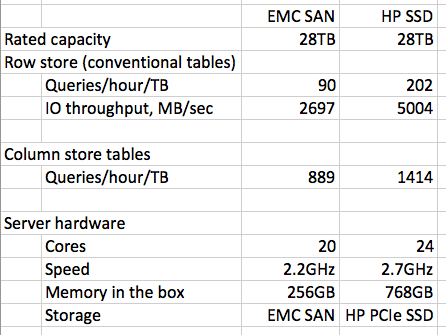
Here’s a simplified summary of their results:

Fast-Track-Reference-Architecture

A few things to take away here – first, and obviously, the HP storage wipes the floor with the EMC storage. It’s not clear from the limited test results if the EMC solution would have been more competitive had it used modern CPUs. The EMC one was built with an HP DL580, a 4-socket server, using older CPUs, and it left two of the CPU sockets empty. That’s quite an odd choice for a benchmark test.

The EMC solution takes up dramatically more rack space than the simple HP 2-u server solution, and involves dramatically more management complexity.

However, if you want automatic failover with minimal downtime and no data loss, local solid state storage probably isn’t going to cut it. It’d be relatively easy to add high availability in the form of Windows failover clustering to the EMC solution, but complex to build reliability into HP’s. (It’d require AlwaysOn Availability Groups or database mirroring, both of which would impact the workload speeds seen here.)

Cost is a tougher question – your mileage may vary given pricing discounts on gear like this, but note that HP’s solution uses four of these $28k USD cards. The solid state storage alone is $100k, which sounds like a lot, but remember that we’re talking about 24 cores of SQL Server licensing anyway – in the neighborhood of $165k just for the software.

Solid state changes the game for everything in databases, and you don’t have to buy the ultra-expensive cards, either. I’d love to see a reference architecture built with Intel’s new PCI Express drives, but since Intel hasn’t been involved in Microsoft Fast Track Data Warehouse Reference Architectures, that’s left as an exercise for the reader.


SQL Server’s Cost Threshold for Parallelism

SQL Server
20 Comments

“Should a query get to use more than one CPU core?” That’s an important question for your SQL Server. If you’re not sure what parallelism is, get started by exploring the mysteries of CXPACKET with Brent. He’ll introduce you to the the setting, ‘Cost Threshold for Parallelism’.

Let’s test Cost Threshold for Parallelism

I generate an estimated execution plan for the following query. I’m running against a copy of the StackOverflow database that doesn’t have many indexes.

I get a parallel plan with an estimated cost of 272.29. (I can tell it’s parallel because of the yellow circle with double arrows on three of the operators.)

execution plan parallel

I decide I’m going to test out ‘Cost Threshold for Parallelism’ and make this plan go serial. This is a server wide configuration, but I’m on my test instance, so no worries.

I run my query again and look at my actual plan this time…

Actual plan- paralleism

Hey wait, that’s still parallel! It has the same estimated cost, and that cost is below where I set the cost threshold for parallelism. This seems broken.

At this point, I might get confused and think SQL Server was using a cached plan. But changing configuration options like cost threshold for parallelism will trigger recompilations– that shouldn’t be it.

What ‘Cost’ is SQL Server Using?

The secret is in the serial plan. I need to look at the estimated cost for this query — it’s the same as our original, but I’ve added a MAXDOP 1 hint to force a serial plan:

Estimated cost - serial plan

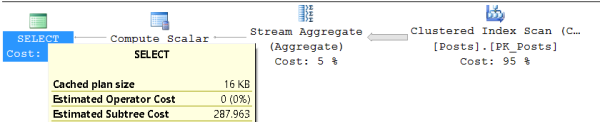
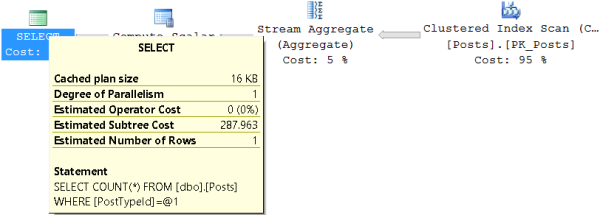
The estimated cost for the serial version of the plan is 287.963, which is over the threshold I set at 275! This is the cost that is being considered and which is above the bar I set for who gets to go parallel. I can prove it by raising my cost threshold to just above this level:

And now when I run my query (with no maxdop hint to force it), I get a serial plan.

serial plan because of cost threshold

Cost Threshold Doesn’t Just Apply to the Plan You See

Behind the scenes, the optimizer is considering many possible plans. The Cost Threshold for Parallelism setting comes into play during that process and uses costs that you don’t see in the final plan.

This can be tricky to remember. Special thanks to Jeremiah, who’s explained this to me in the past (more than once!) This is covered in SQL Server Books Online, but oddly enough most of us don’t seem to find it there.


When Does Index Fragmentation Matter?

A while back, we posted about how SQL Server index fragmentation doesn’t matter. That blog post generated a lot of heated discussion and has served to make people aware that fragmentation may not be the source of their woes. Sometimes, though, there are data access patterns where fragmentation really does matter.

Perpetual Fragmentation

Some data access patterns lead to tables and indexes that will always be fragmented, no matter what you do. If you have frequent data changes in the middle of a table or index, you can see heavy fragmentation.

What’s this pattern look like? Check it out!

TL;DR – The code in this example inserts a large number of rows at the end of the table. 70% of rows are marked as processed and are then deleted. This causes a lot of free space or, as you call it, fragmentation.

The only way to get rid of this fragmentation is to rebuild both the non-clustered index and the clustered index. For this example, the defragmentation reduces the size of the index by more than 3x (from 25 pages to 7 pages) and the table consumes just over 50% less space.

For workloads with a lot of random deletes (or updates that change the size of a row in a way that causes data movement), index defragmentation is necessary. Without index fragmentation, these database will continue to grow in size and result in the usual problems that we associate with fragmentation.

What Doesn’t Cause Perpetual Fragmentation

At this point you might be saying “Ah ha! You’ve proved that I should always defragment my indexes! Constantly! ZOMGWTFBBQ!!!11!11!shiftone!!!!!”

You’re wrong.

For some workloads, you can still avoid index fragmentation – if you’re adding data to the tailing end of the table and deleting data from the beginning of the table, you won’t need to defragment your indexes. Ghost record clean up should take care of deleted rows in this case.

For most workloads, your best bet is still to analyze SQL Server wait statistics and understand the basic problem before you start defragmenting indexes on a regular basis.

Acknowledgements

The original idea for this blog post comes from Hemant K Chitale’s Index Growing Larger Than The Table. Even though SQL Server handles this situation differently from Oracle, the underlying pattern is still interesting for database practitioners.

The random length string code was adapted from T-SQL: Random String.


Why Core-Based Licensing Matters for Performance Tuning

Licensing, SQL Server
38 Comments

If you don’t license all of your SQL Server’s CPU cores, you need to pay particular attention to your server hardware.

Say you’re using an HP DL580 with four CPU sockets, each of which has a Xeon processor plugged in with 10 cores. That’s a total of 40 real cores, or 80 logical processors if you’ve enabled hyperthreading.

In SQL Server’s log at startup, if you’re using an upgraded license capped out at 20 cores, you’ll see a message like this:

SQL Server detected 4 sockets with 10 cores per socket and 20 logical processors per socket, 80 total logical processors; using 40 logical processors based on SQL Server licensing. This is an informational message; no user action is required.

To understand the performance implications, it helps to look at a diagram of the server’s system board:

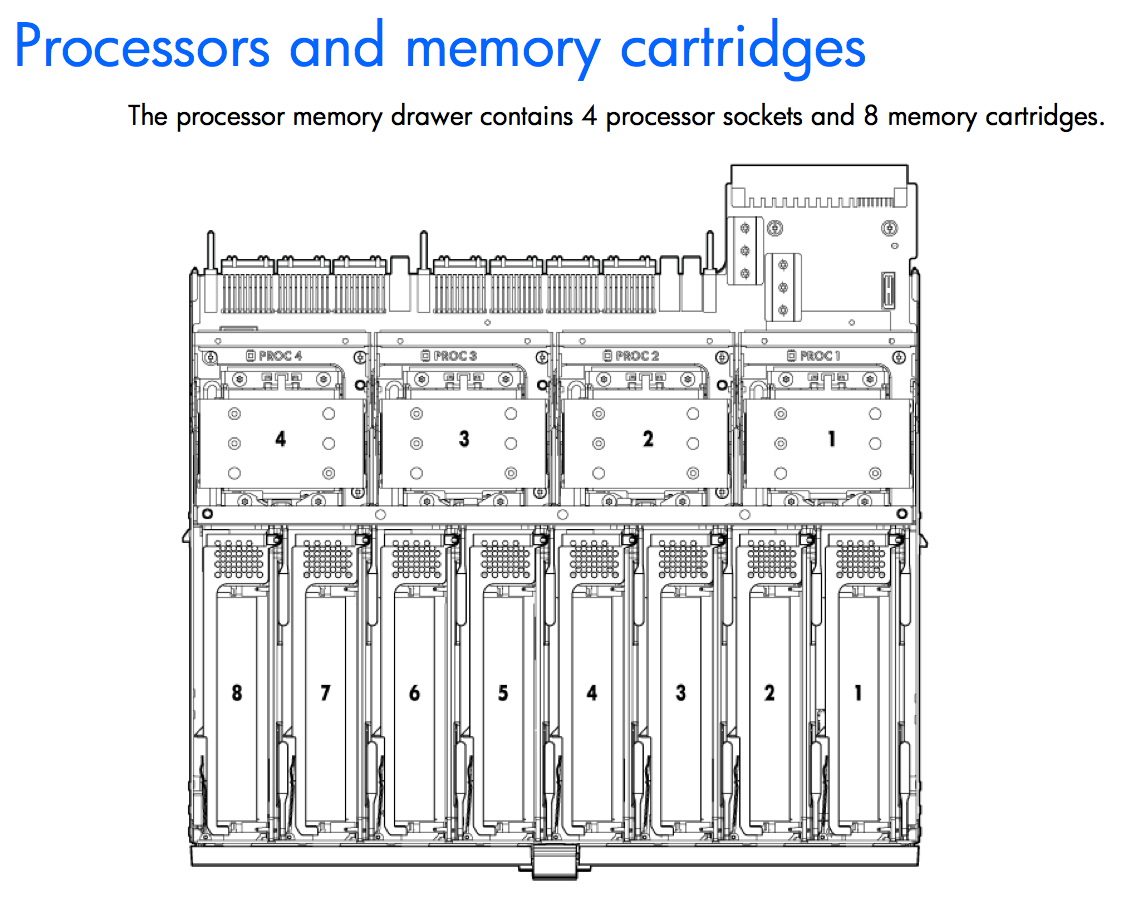
HP DL580 System Board

The 4-3-2-1 across the top are the four Xeon processors, each of which has 10 cores (20 with hyperthreading.)

The 8-7-6-5-4-3-2-1 across the bottom are the memory banks. Memory is not shared across all CPUs – each CPU has its own local banks of memory, a critical concept in NUMA – non-uniform memory access. To learn more about NUMA, check out the virtualization module in my Senior DBA Class.

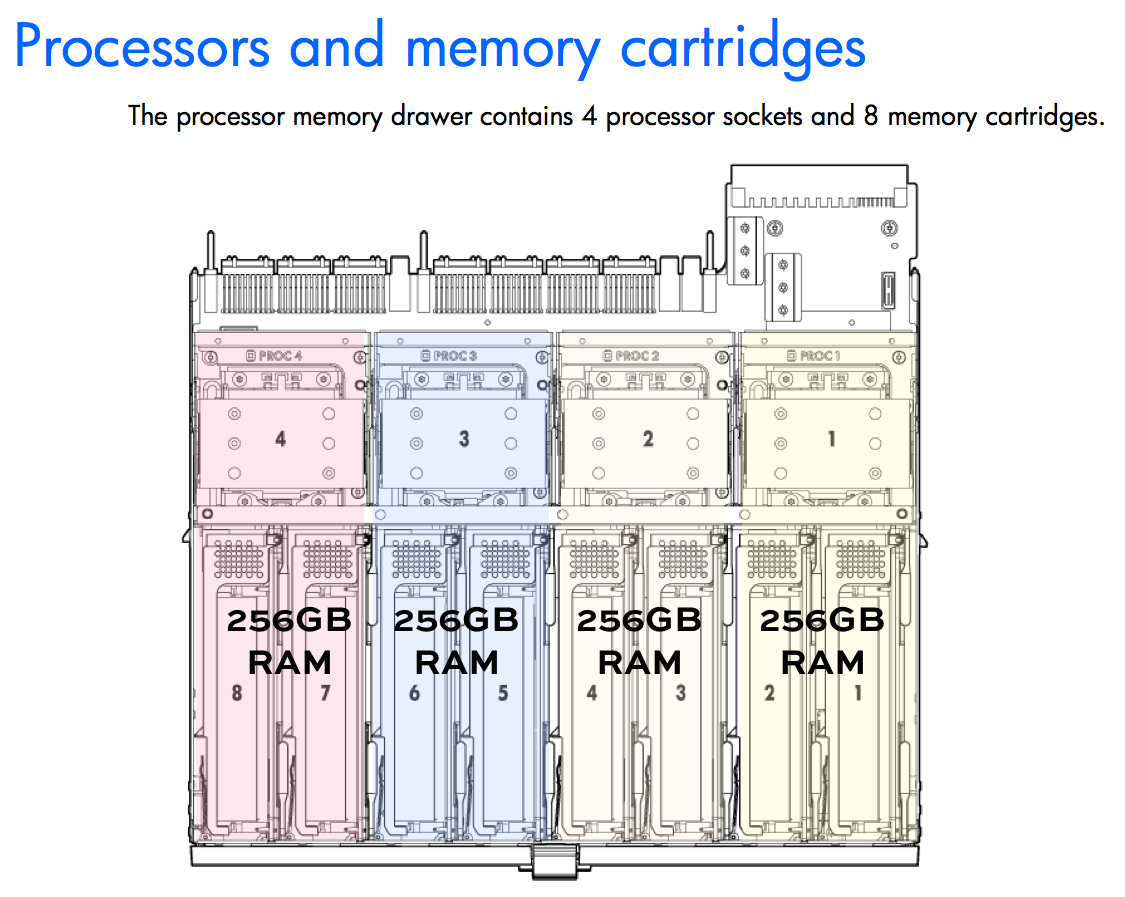
Here’s what that concept means in practice for our server – say we’ve got 1TB of total memory:

System board color coded

Each processor gets its own local memory.

And when SQL Server says, “Hey, you’re only licensed for half of these cores, so I’m only going to turn on half of them,” it will only use the memory in half of the NUMA nodes. In this case, we’re licensed for 40 logical processors, so we have to dig further into DMVs and logs to figure out which NUMA nodes got turned on, and whether or not our memory is even available to us. See, if memory is hooked up to a NUMA node that isn’t enabled, that memory won’t be accessible to SQL Server.

Similar problems exist when you run Standard Edition on a server with more than 4 CPU sockets. Sounds crazy – most of us don’t use servers that large – but this situation pops up a lot when VMs are misconfigured with 8 virtual CPUs, each of which is presented to the guest as its own CPU socket.

How to Know If Your SQL Server is Affected

Run sp_Blitz® and look for the priority 50 warning of “CPU Schedulers Offline.”

How to Fix It

There are lots of ways to fix it, and the right solution depends on your version/edition of SQL Server, your licensing, and your hardware. Here’s the big picture:

Make sure you installed the right binaries. Believe it or not, there’s actually an install for SQL Server Enterprise Edition floating around that’s capped at just 20 cores. Even though you might have paid for more, if you run the wrong installer, sad trombone. Here’s more info about the infamous 20-core-limited installer.

One option is to license all of your sockets and cores. (Hey, listen, you’re the one who wanted a solution.) Don’t buy hardware with more cores than you actually need because CPUs with more cores typically have slower clock speeds (often by 1/3 or 1/2) compared to CPUs with less cores. If you’re limited by SQL 2014 Standard Edition & prior’s cap at 16 cores, you could consider upgrading to SQL 2016 Standard Edition, which will allow you to license up to 24 cores. More than that, though, and you’re looking at Enterprise Edition.

Another option is to use affinity masking to tell SQL Server, “These are the specific cores I want you to use,” and manually load balance the work across all NUMA nodes. Say you’re using SQL Server 2014 Standard Edition, which is limited to 4 sockets or 16 cores, whichever comes first. In the example above, where we have 4 sockets with 10 cores each, you could design your affinity mask to just use 4 cores per socket (4 x 4 = 16) thereby staying within the 16-core limit.

If it’s a VM, tweak the cores/sockets configuration. Some folks accidentally configure an 8-socket, 1-core-per-socket VM, which has 8 cores – but only 4 of them are usable. Just shut your VM down, change your VM cores-per-socket settings, and boot ‘er on back up.

For custom advice on which one is right for you, check out our consulting services.


Using sp_BlitzCache™ Advanced Features

sp_BlitzCache is a fantastic tool for finding the worst queries in your SQL Server. Did you know that it has a number of advanced options available to you? These options can help you dig into your worst queries, slice and dice the data, and get back exactly what you need, without wading through hundreds of results.

Only/Ignore Query Hashes

Version 2.3 of sp_BlitzCache introduced two parameters so you can ignore individual query hashes. Reader Brian Baker had the idea of filtering out a single stored procedure by supplying all of the query hashes for a stored procedure. There’s one problem – there’s no easy way to filter an entire procedure (well, not without making sp_BlitzCache really complex).

Here’s how we’d go about answering Brian’s question:

Step 1: sp_BlitzCache in expert mode.

Keep scrolling right.

Find the stored procedure that you want in the plan cache and then scroll all the way to the right until you get just past the Query Plan column. There you’ll find the Plan Handle. This lets us find a stored procedure. Copy it to your clipboard and then past it into the following script:

Alright, now that we have our query hash(es), you can plug them into sp_Blitzcache:

Or, if you feel like ignoring that particular set of statements:

And, there you have it – how to zoom in on a single procedure, or completely ignore it.

Only Look at Queries or Procedures

This is much simpler, to narrow down the scope of sp_BlitzCache, you can use the @query_filter parameter. This parameter can be one of three values: procedures, statements, all. The default is all and, by default, sp_BlitzCache will look at stored procedures, statements, and triggers. By specifying either “procedures” or “statements”, you can forcesp_BlitzCache to narrow down its scope.

This can be particularly helpful if you have encapsulated your business logic into stored procedures and you want to know where to focus your tuning, rather than worrying about individual statements.

Rapidly Re-Running sp_BlitzCache

Have you ever run sp_BlitzCache and noticed that it takes a while on production systems? And then you realized, after you wandered off and got coffee, that you forgot to use the@export_to_excel parameter?

I’ve done that, too.

sp_BlitzCache now ships with a @reanalyze feature. By default, sp_BlitzCache will analyze your plan cache fresh every time the query is executed. By using @reanalyze = 1, you’re telling sp_BlitzCache to skip collecting data and immediately report on the information that it already has. This is great when you want to export to excel, send the report to your co-workers, and then immediately get to work on the results. It also lets you re-sort the already collected data in a different ways.

There You Have It!

Three fancy features in sp_BlitzCache that you can use to make your life easier and more fun.

What are you waiting for? Download it right now!


How to Restore a Page in SQL Server Standard and Enterprise Edition

One of the many restore features in SQL Server is the ability to restore one or more pages of data. This can be very convenient in some narrow situations – for example, corruption occurs on one page or an oops update is made to one record.

The page restore process is not straightforward, however, and, as I recently discovered, the Books Online article about it is confusing. See, you have to perform the restore offline in all versions except Enterprise Edition – but the only example Books Online gives is…Enterprise Edition.

Here’s a straightforward breakdown of how to do a page-level restore both offline and online. For the sake of brevity, let’s say I have two databases – TestRestoreOnline and TestRestoreOffline. Both are in Full recovery. Each has one damaged page, which I’m going to restore. (For a full demo script, click here.)

Offline

You should already have an existing full backup – mine is at D:\SQL Backups\TestRestoreOffline-Backup1.bak. I also have one transaction log backup, D:\SQL Backups\TestRestoreOffline-LogBackup1.trn.

That is an offline page restore. By putting the database in a NORECOVERY mode before the restores begin, the database can’t be accessed.

Online

An online page restore is only available in Enterprise Edition. This will allow users to access other objects in the database while you are restoring the page(s) needed.

You should already have an existing full backup (D:\SQL Backups\TestRestoreOnline-Backup1.bak) and log backup(s) (D:\SQL Backups\TestRestoreOnline-LogBackup1.trn).

The steps for an online restore differ slightly. The tail-log backup is taken after all the other log backups are applied, instead of at the beginning of the sequence.


#SQLPASS #Summit14 Keynote LiveBlog: Dr. Rimma Nehme

#SQLPass, SQL Server
4 Comments

8:25AM Pacific: Goooood morning Seattle! It’s time for day 2 of the PASS Summit, and this morning we’ve got a technical keynote lined up. I’m a much bigger fan of these than the day 1 marketing keynotes.

Dr. Rimma Nehme from the Microsoft Gray Systems Lab is talking Cloud Databases 101. Here’s the abstract:

Cloud computing has emerged as an extremely successful paradigm for deploying applications. Scalability, elasticity, pay-per-use pricing, and economies of scale are some of the major reasons for the successful and widespread adoption of cloud. A cloud database is a type of database service that is built, deployed and delivered through a cloud platform. In this talk, I’ll give rapid introduction to cloud databases: what they are, where they came from, how they are implemented, and give a rough taxonomy. We’ll look at some of the specific examples of the cloud databases running out there in the wild and the latest state-of-the-art cloud database research.

I’ll be liveblogging it this morning, taking notes. I’m not going to transcribe it line-by-line because these technical keynotes are typically much more … technical … and you can watch the session live on PASS TV anyway.

Refresh the page every few minutes to see the updated notes at the bottom of this page.

8:31AM – The SQLPASS PASSion Award goes to Andrey Korshikov, who’s done all kinds of Russian event organizations in the last few years. Sounds really cool.

Andrey Korshikov
Andrey Korshikov

8:35AM – The next PASS Summit will be back in Seattle again on Oct 27-30th, 2015.

8:36AM – Dr. Rimma Nehme taking the stage.

8:42AM – The clicker isn’t working. Who cares. Confession: before the keynote, she said to me, “You’d better go easy on me.” I told her she has nothing to fear because I love technical keynotes. Yes, dear readers, I’m a softie for keynotes that aren’t trying to sell me things, only teach me things. That’s why we try to do the presentations we do as a company, too. Help by teaching.

8:44AM – Cloud computing characteristics: on-demand self-service, location transparent resource pooling, ubiquitous network access, rapid elasticity, and measured service with pay per use. (See, this is how you kick ass with a technical keynote – that one slide alone teaches everyone in the room something, and it’s accessible at all levels. That slide is awesome.)

8:46AM – Quick & easy deployment means that you can be agile with shorter development cycles and no need to wait for provisioning. Technically, you can do this on-premise in large corporations, but the beauty of the cloud is that it brings large-company IT scale without the red tape and red P&L statements.

8:48AM – “Storage costs are rapidly approaching zero.” For example, Amazon Prime’s free unlimited photo storage is a great example of this – companies can make enough off the storage of your data that they don’t mind eating the storage costs. Think of it as banks that can sit on your money and make money with it – cloud utilities can sit on your data and use it for interesting revenue purposes. While that makes a lot of the geeks in the room feel a little dirty, the public seems to feel it’s a fair tradeoff.

8:50AM – Showing Microsoft’s container-based data center in Chicago.

8:53AM – Dr. Nehme is explaining how container-based data centers improve power efficiency by letting servers run hotter, plus cool them down with more ecological methods like evaporative cooling. Again, this is how you do a killer database keynote – show concepts that are very interesting to your audience regardless of their expertise. Most of the audience has something in common, but not enough expertise on that topic. Play to that, and you can keep them entertained and educated.

8:57AM – Explaining PaaS, IaaS, SaaS etc by breaking them down into infrastructure, platform, software, and applications (Office). I’d love to see a pop quiz to know how many people know the differences between those. That’s our job as data professionals – we do need to know these – and I think a lot of us don’t. (I’m talking about you, dear reader.)

9:00AM – Explaining them with Pizza as a Service as an example.

9:08AM – Dr. Nehme’s focusing on virtualizing SQL Server in the cloud with shared resources. My notes will be less frequent here because I think the topic is covered online pretty well in a lot of resources (not to mention her talk) and I’m not going to add a lot of value here. Nothing against the talk – this actually gets to the heart of what I mentioned earlier, that so many folks need to understand more about services.

9:16AM – “Container-based hardware is 99.9% reliable, but we need 99.99% software.” That means you have to expect whole containers and data centers to fail, and assume you’ll need redundant data centers with the same services and databases. It’s thinking about reliability at a much higher level – for example, you might not bother with redundant power supplies or fans in a server. You can save a lot on power and cooling for the whole data center.

9:18AM – To achieve reliability in this mixed scenario (99.9 vs 99.99), Azure DBs have a primary database, plus three replicas. (It’s not explicitly stated on the slide, but you would assume there would be one or two in the same data center, plus one or two in other data centers or regions, based on how much you want to pay for geo-redundancy.

9:20AM – Each SQL DB node has one database, and multiple tenants are in that same database. They’re just logically separated – they all share the same data file and log file, but that’s not visible to you as a consumer.

9:24AM – “The number of DBAs is significantly smaller than the demand.” This is totally true – all of us are overworked, and there’s plenty more DBA jobs. The cloud (just like virtualization) is designed to offload work from you.

9:26AM – “Do the cost/benefit analysis.” This is one of the tough things for DBAs – most of us aren’t able to precisely identify the costs with on-premise databases. The cloud makes that way easier.

9:27AM – Dr. Nehme is wrapping up, and thanking Dr. DeWitt, who just took the stage. Great job!


Announcing the 2015 #SQLPASS FreeCon (and taking applications)

#SQLPass, SQL Server
3 Comments

Four years ago, we put on the FreeCon: a free invitation-only pre-conference event before the PASS Summit here in Seattle. The FreeCon was like a pre-conference session focused on your career and the SQL Server community. The goal was to spark fires, encourage people to reach for new levels of community contribution, and build connections to help people succeed.

Looking back at the pictures, it’s amazing to see the progress everybody made in their careers since that event. Part of the magic of the FreeCon was identifying the right mix of community leaders and up-and-coming contributors, new bloggers and experienced authors, outstanding presenters and people who’d never gotten up on stage before. The original FreeCon attendees have since gone on to become vendor evangelists, PASS Board of Directors members, published authors, MVPs, and MCMs.

FreeCon SQLSaturday Chicago 2012

We ran a couple more Free-Cons since, and it’s always been one of the most fulfilling events. It’s so fun to help people achieve new levels of success in their careers and the community.

In 2015, we’re taking it up a notch.

We’re gathering 50 people together for FreeCon 2015 on the Monday before the PASS Summit in Seattle, WA. It’s your chance to share ideas about blogging, presenting, careers, and technology with some of the most interesting people in the database community – and we don’t mean us, we mean the rest of you.

Wanna take part? Apply before November 30th. All closed! The winners and … uh, runners-up – will be emailed.


#SQLPASS Summit 2014 Keynote LiveBlog

#SQLPass, SQL Server
7 Comments

10:03AM – Ranga back onstage to finish things up. Thanking Pier 1 for letting them share the exploratory work. And we’re out!

10:00AM – Power BI adding a new authoring and editing mode. James removes the pie chart and replaces it on the fly. Now that is knowing your audience – nice job.

9:58AM – Demoing updated Power BI dashboards. Man, these screens are always so gorgeous – Microsoft is fantastic at reporting front end demos.

9:56AM – Oops. Looks like somebody is running out-of-date Apple software that needs an update. Note the screen.

Time for some Apple updates

9:54AM – “I’ve been watching the Twitter feed, and I kinda have a pulse of where people are sitting.” Talking about why Microsoft is moving to the cloud. “I can ship that service every single week.” It gives Microsoft agility.

9:50AM – Microsoft’s James Phillips takes the stage by briefly recapping his background with Couchbase. (That name has come up a few times today.) “Data is a bucket of potential.” Love that line.

James Phillips
James Phillips

9:49AM – Demoing a phone app to locate items in, you guessed it, Pier 1. Was there some kind of sponsorship deal here? I do love the opportunity to tell a single story though. Just wish they’d have tied it to a single individual’s journey through the store through the entire keynote.

9:44AM – “Using 14 lines of SQL code, you can do real-time analytics.” Uh, that is the easiest part of the entire demo. How about putting Kinects in stores, building the web front end, etc?

9:40AM – Demoing a browser-based SSIS UI for Azure Data Factory.

9:37AM – Sanjay Soni taking the stage and explaining in-store analytics demos using Kinect sensors to watch where customers go using a heat map.

Sanjay Soni taking the stage to do another Pier 1 demo

9:35AM – Apparently the “wave” trick had absolutely nothing to do with the session – maybe some kind of ice-breaker? This keynote has now gone completely surreal. He’s now moved on to machine learning. No segue whatsoever.

9:32AM – Joseph Sirosh, machine learning guy at Microsoft, starts by having the community applaud themselves. And now he’s teaching us to do the wave. Uh, okay.

9:30AM – Demoing a restore of the local portion of the database. Even restoring a database got applause. Tells you how desperately rough that first stretch of the keynote was.

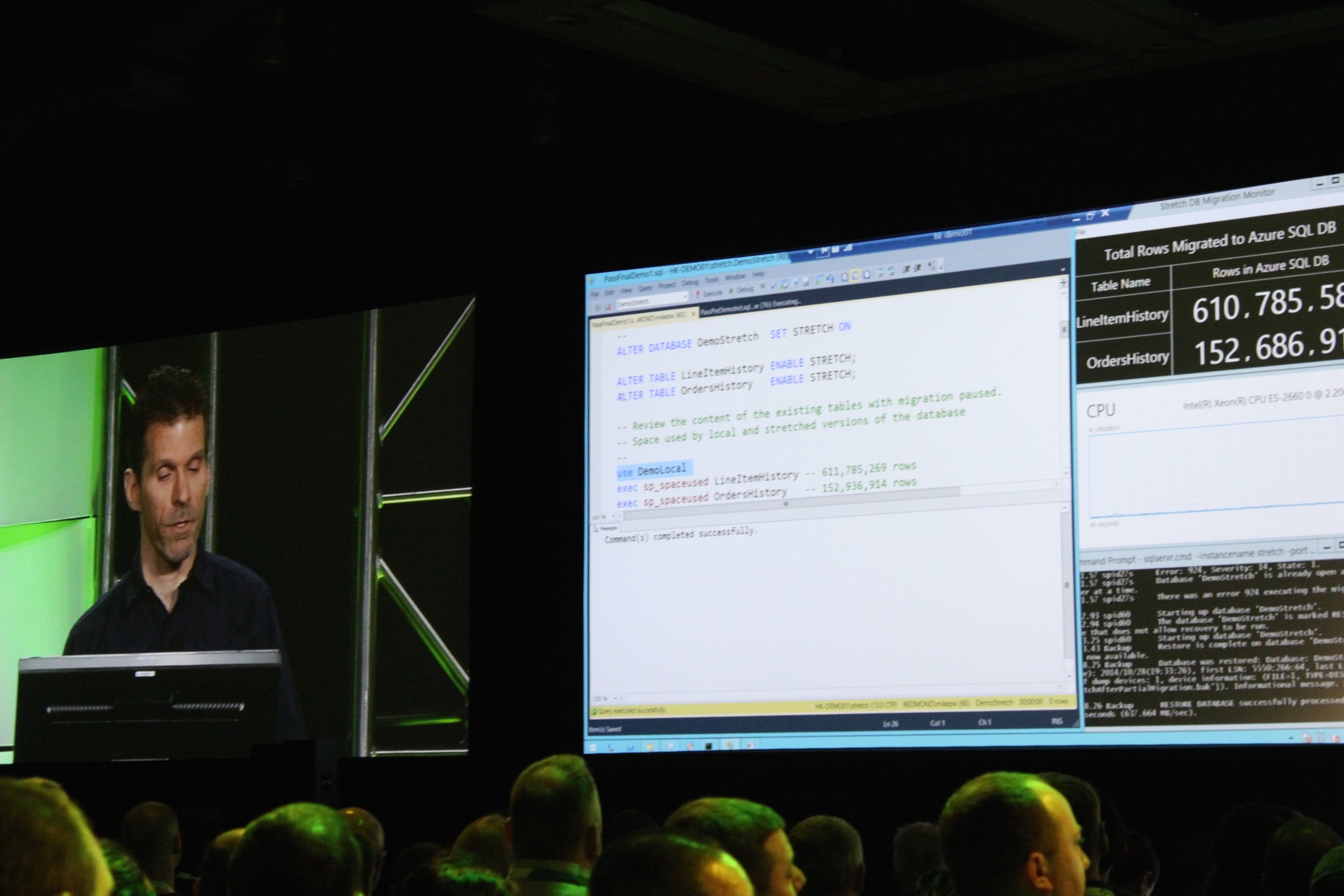
9:26AM – Demoing stretch tables: 750mm rows of data in Azure, plus 1mm rows of data stored locally on the SQL Server. It’s one table, with data stored both in the cloud and local storage. You can still query it as if it was entirely local.

Demoing stretch tables in Azure

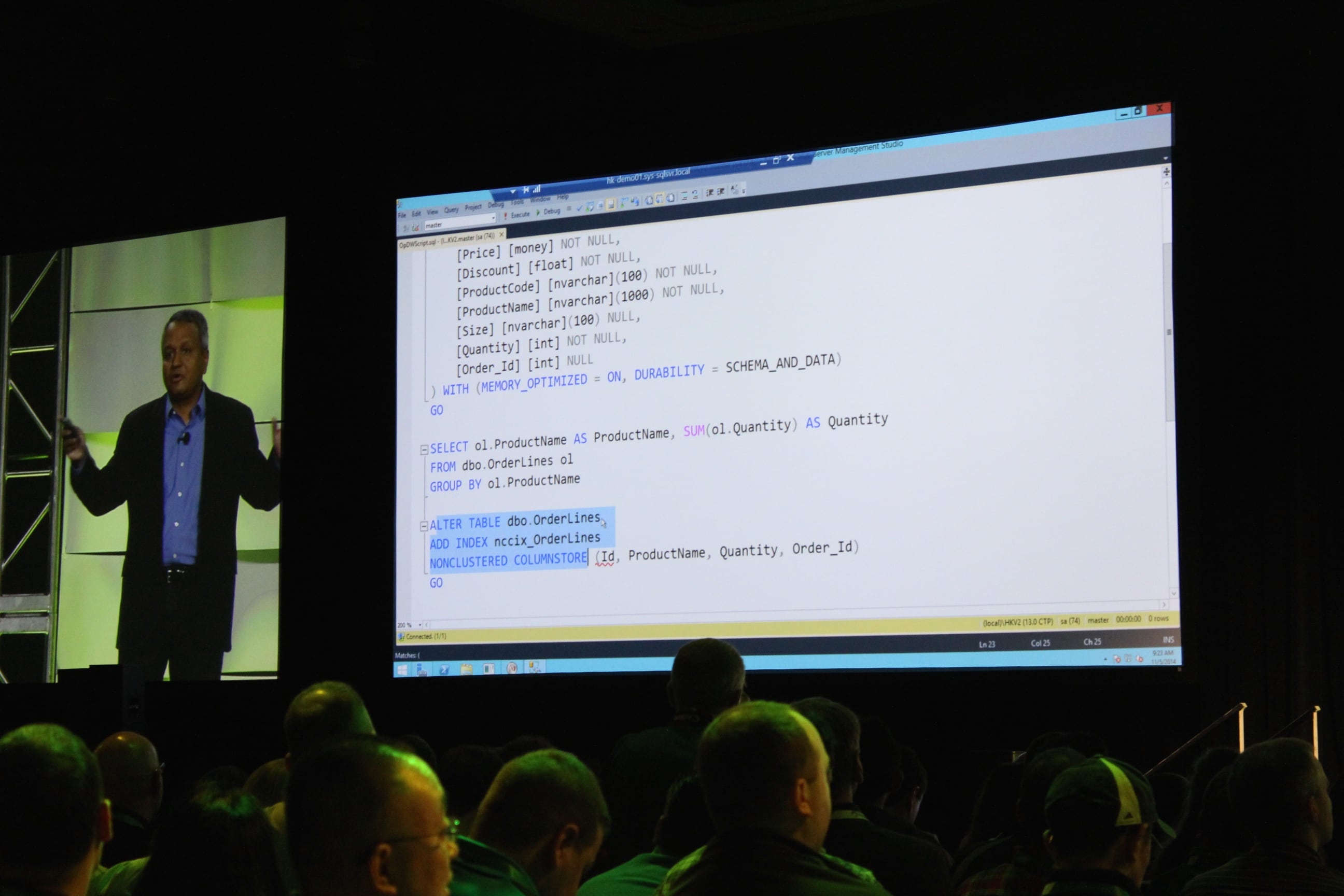
9:22AM – Showing a demo of a Hekaton memory-optimized table, plus a nonclustered columnstore index built atop it. This is genuinely new.

Mike Zwilling's demo of a nonclustered columnstore index atop a Hekaton table
Mike Zwilling’s demo of a nonclustered columnstore index atop a Hekaton table

9:20AM – “What if you could run analytics directly on the transactional data?” Doing a live demo of a new way to run your reports in production.

9:18AM – Ranga announces a preview coming at some point in the future. “And that’s the announcement.” Literally one clap, and it was from the blogger’s table. This is bombing bad.

9:15AM – Uh, big problem here. Ranga just said Stack Overflow is using Microsoft SQL Server’s in-memory technologies. That is simply flat out wrong – Stack does not use Hekaton, Buffer Pool Extensions, or anything like that. Just plain old SQL Server tables. Very disappointing. If you’re at PASS, look for Nick Craver, one of their database gurus who’s here at the conference.

9:12AM – Now talking about something near and dear to my heart: how Stack Overflow is pushing limits.

9:10AM – To recap the demo, Azure SQL Database does geo-replication and sharding.

9:06AM – The utter and complete dead silence in the room tells a bigger story than the demo. This is just not what people come to PASS to see. If you think about the hourly rate of these attendees, even at just $100 per hour, this is one expensive bomb.

8:58AM – Quite possibly the most underwhelming demo I’ve ever seen. If you want to impress a room full of data professionals, you’re gonna need something better than a search box.

8:56AM – Pier 1 folks up to demo searching for orange pumpkins.

Tracy Dougherty doing Pier 1 demo

8:52AM – “The cloud enables consistency.” Errr, that’s not usually how that works. Usually the cloud enables eventual consistency, whereas on-prem enables consistency. I know that’s not the message he’s aiming for – he’s talking about the same data being available everywhere – but it’s just an odd choice of words.

8:49AM – Discussing Microsoft’s data platform as a way to manage all kinds of data sources. This is actually a huge edge for Microsoft – they have the Swiss Army knife of databases. Sure, you could argue that particular platforms do various parts much better – you don’t want to run a restaurant on a Swiss Army knife – but this is one hell of a powerful Swiss Army knife.

8:45AM – Ranga’s off to a really odd start. He starts by talking about Women in Technology and says “We’ll do our best,” and then segues into an odd story about his wife refusing to use online maps. Really, really awkward.

8:41AM – Microsoft’s T.K. Ranga Rengarajan taking the stage.

Ranga Taking the Stage

8:39AM – Watching several minutes of videos about people and stuff. No clapping. Hmm.

8:34AM – Tom’s a natural up on stage, totally relaxed.

Tom LaRock at PASS Summit

8:33AM – Thanking the folks who help make the event possible: sponsors and volunteers.

8:31AM – Hands-on training sessions for 50 people per workshop are available here at PASS. Good reason to come to the conference instead of just playing along online – convince your boss by explaining that you can’t really get this hands-on experience anywhere else as easily.

8:27AM – PASS has provided 1.3 million hours of training in fiscal year 2014. (Would be interesting to see that broken out as free versus paid, and national versus local user group chapters.

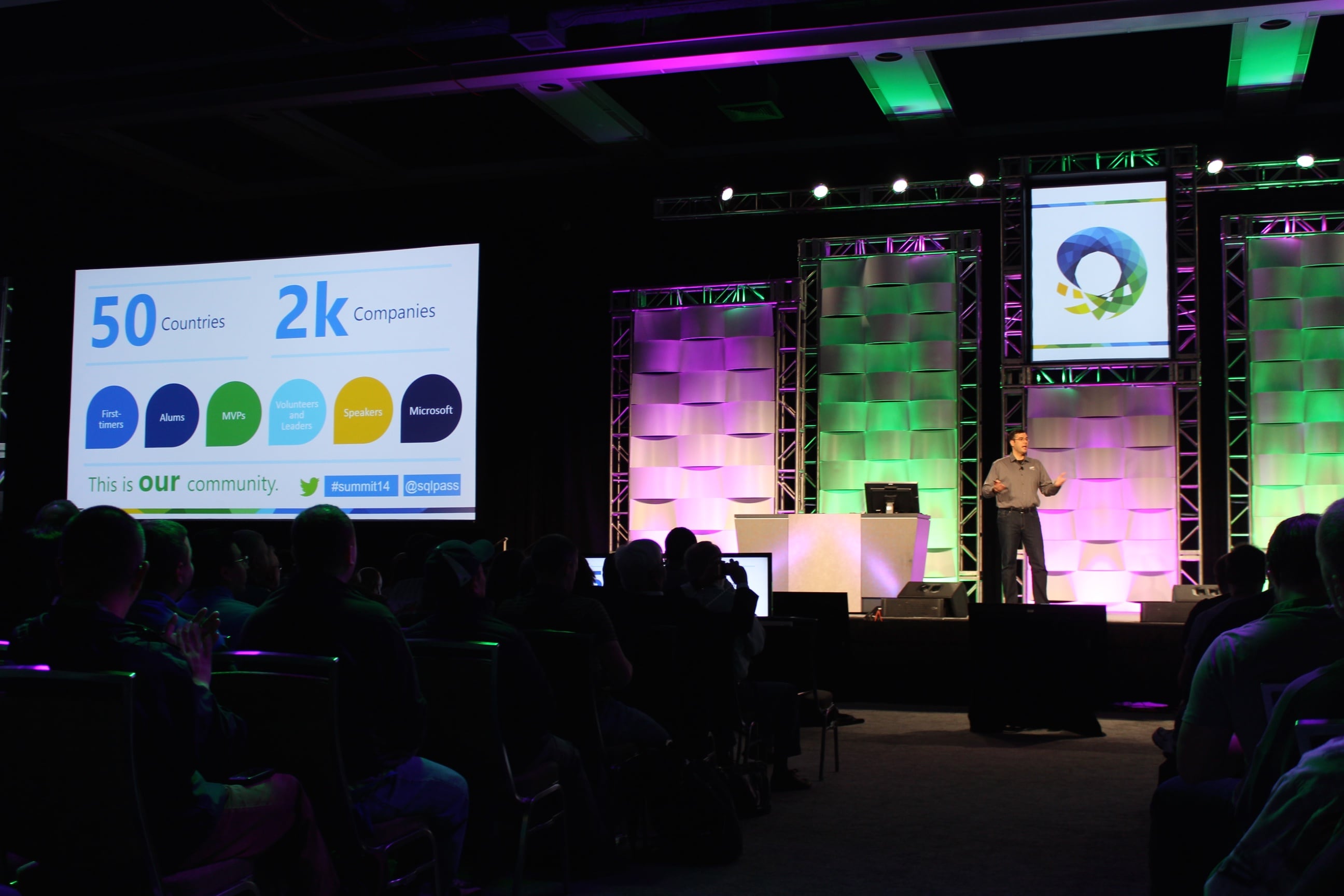
8:22AM – PASS President Tom LaRock taking the stage and welcoming folks from 50 countries, 2,000 companies.

PASS President Tom LaRock

8:18AM – From the official press release: “The PASS Summit 2014 has 3,941 delegates as of last night and 1,959 pre-conference registrations across 56 countries for a total of 5,900 registrations.” The registrations number is always a little tricky because it counts pre-con attendees multiple times, but that delegates number is phenomenal. Nearly 4,000 folks is a lot! This is far and above the biggest Microsoft data event.

8:16AM – Folks are coming in and taking seats.

8:00AM Pacific – Good morning from the Blogger’s Table at the Seattle Convention Center. It’s day 1 of the PASS Summit 2014, the biggest international conference for SQL Server professionals. A few thousand data geeks are gathered here to connect, learn, and share.

The keynote session is about to start, and here’s how this works: I’m going to be editing this blog post during the keynote, adding my thoughts and analysis of the morning’s announcements. I’ll update it every few minutes, so you can refresh this page and the news will be up at the top.

You can watch the keynote live on PASS TV to follow along.

Here’s the abstract:

Evolving Microsoft’s Data Platform – The Journey to Cloud Continues

Data is the new currency and businesses are hungrier than ever to harness its power to transform and accelerate their business. A recent IDC study shows that business that are investing in harnessing the power of their data will capture a portion of the expected $1.6 trillion dollar top line revenue growth over the coming four years. SQL Server and the broader Microsoft data platform with the help of the PASS community are driving this data transformation in organizations of all sizes across the globe to capture this revenue opportunity.

In this session you will hear from the Microsoft Data Platform engineering leadership team about recent innovations and the journey ahead for Microsoft’s data platform. Learn first-hand how customers are accelerating their business through the many innovations included in SQL Server 2014 from ground breaking in-memory technologies to new highly efficient hybrid cloud scenarios. See how customers are revolutionizing their business with new insights using Power BI and Azure Machine Learning and Azure HDInsight services. Learn about the investments were are making Microsoft Azure across IAAS and PAAS to make it the best cloud hosting service for your database applications.

Ignore the first paragraph, which appears to be written for salespeople attending the Microsoft Worldwide Partner Conference, not the Professional Association for SQL Server PASS Summit. The second paragraph – not to mention the neato changes at Microsoft lately – offer a glimmer of hope for us geeks. If Microsoft wants to win market share away from Amazon’s huge lead, they’re going to have to bring out features and services that compete. The terms “investments” and “journey ahead” implies that we’ll be hearing about future features in Azure and SQL Server vNext.

Let’s see what they’re announcing today – and remember, like I wrote last week, my new perspective today is a chillaxed 1960s car show attendee. Bring on the flying cars.

For the latest updates, refresh this page and check the top.


SQL Server Query Store

Execution Plan Hell
Execution Plan Hell

I spend most of my day tuning SQL Server to make it go faster. I’m usually called in after the fact, when the app has become intolerably slow.

One of the first things I ask is, “What’s changed?”

Nobody ever knows with any sense of accuracy.

I understand – until now, SQL Server hasn’t shipped with any kind of change detection or tracking for common execution plan problems.

How We Manage Queries and Plans in SQL Server 2014

A good performance tuner uses tools like sp_BlitzCache®Opserver, and Plan Explorer to identify their top resource-using queries and examine their execution plans. They’re intimately familiar with those plans and how they look today, and the tuner makes ongoing efforts to improve the shape of those plans.

Those tools look at execution plans exposed in dynamic management views and functions, the internal instrumentation tables of SQL Server. Unfortunately, those views clear out whenever SQL Server is restarted. Or the plan cache is cleared. Or statistics get updated. Or you come under memory pressure. Or …you get the picture.

If a query suddenly gets a bad plan and rockets to the top of the resource utilization charts, the tuner examines the root cause of the variation, but she’s often unable to see the prior version of the plan. Sometimes a growing amount of data in one of those tables will influence the optimizer into picking a different execution plan, or maybe someone made an ill-advised sp_configure change. Ideally, we work on the query, statistics, indexes, and sp_configure settings to get the plan back where it needs to be.

The hard part here is that we often have no idea what the plan looked like before. Sure, if we’ve got the budget to get fancy, we install performance monitoring software that tracks the execution plans of all our queries over time.

Even when we know what the plan looked like before, it’s not always easy to get SQL Server to change the execution plan. We end up using tricks like plan guides and hints to get the plan we want. I used to see plan guides as a tool of the devil, but I’ve lived long enough to see myself become the villain.

The SQL Server Query Store: Putting Your Plans on Layaway

Enter a recently declassified session at the PASS Summit. On Wednesday, November 5, Conor Cunningham will unveil the Query Store:

Have you ever come in to work only to have the boss come tell you that your main site is down and the database is “broken”?  Fixing query performance problems can be rough, especially in high-pressure situations.  Microsoft has developed a feature to help customers gain significantly easier insight into production systems and to be able to quickly fix cases where a new plan choice from the query optimizer has undesired performance consequences.  This talk introduces the Query Store, explains the architecture, and shows how it can be used to solve real-world performance problems.  It will now be possible to ask questions like “show me what query plans have changed since yesterday” and to quickly ask the optimizer to “go back” to the query plan that was working fine for you previously.

This is where things get a little tricky for me as an MVP. If I have any advance knowledge of something, I can’t confirm or deny it, and I certainly can’t blog about it. Buuuut…I can read the abstract, put on my thinking cap, and talk about it in terms of what’s already public.

Reading that abstract, you can infer that:

  • SQL Server’s new Query Store will cache queries and execution plans even after they’ve changed (like due to a statistics change on a table)
  • These changes may even persist beyond a SQL Server restart (meaning they’ll have to be written to disk somewhere)
  • The current and prior plans will be exposed in a DMV for you to query (meaning you might be able to roll your own alerts when a plan changes so you can check out whether it’s better or worse)

So the questions you might ask would be:

  • Will this functionality work with read-only databases? Think AlwaysOn Availability Group readable secondaries, or servers used as log shipping reporting boxes.
  • Will it work with plans that are not normally cached? Think trivial plans or Optimize for Ad Hoc Workloads.
  • What happens if you guide a query into an execution plan, and changes to the database mean the plan is no longer valid? Think dropping indexes.
  • Will you be able to see what the query would look like without the frozen plan? Think about adding new indexes or updating stats on a table, and wanting to see whether the new plan would be better or worse without endangering running queries.
  • If the Query Store data is written into the database itself, will the execution plans flow through to other servers? Think AlwaysOn AG secondaries and development servers that are restored from production. This is especially tricky if the feature is considered an Enterprise Edition feature, and thereby restricts the ability to restore the database onto a Standard Edition box like compression & index partitioning.

And of course, will it be Enterprise-only or included in Standard Edition, and what will the release date be? Those last ones are outside of Conor’s control, obviously, but you should still ask them. And then tell me what the answer is when you find out, because I don’t know either.

This Is Gonna Be Big.

I love features like this because everybody wins. It doesn’t require changes to existing applications, it doesn’t require attention out of the box, and it just gives more tools to performance tuners like me.

I don’t usually recommend that PASS attendees sit in forward-looking sessions that cover features that may not be in your hands for quite a while. In this case, I’m making an exception: attend Conor’s session. He’s one hell of a smart guy, and he has incredibly elegant ways of answering questions with honesty and insight. I’m publishing this blog post a little early because I want you to start thinking about the feature and how you’d use it in your line of work. That’ll prep you to ask Conor better questions, and you’ll get the most out of this great opportunity.

Enjoy it, jerks, because I’m giving a lightning talk at the same time. I swear, if you do performance tuning and I see you in my talk instead of Conor’s, I’m gonna make you take over my talk so I can go watch Conor.

Update 10:30AM Pacific: after a discussion on Twitter, Argenis Fernandez and I put some money down. If Query Store is fully functional in Standard Edition, I’ll donate $250 to Doctors Without Borders 2.0. If it’s only fully functional in Enterprise Edition, Argenis will donate $250. Everybody wins! Well, except Express Edition users.


Announcing sp_BlitzCache™ v2.4

SQL Server
7 Comments

Welcome to sp_BlitzCache™ v2.4. This release brings a few changes and bug fixes.

  • Fixed a logical error in detecting the output table. Thanks to Michael Bluett for pointing that out.
  • Sorting by executions per second finally works. Thanks to Andrew Notarian and Calvin Jones for submitting this week.
  • Added a @query_filter parameter – this allows you to only look at “statements” or “procedures” in the plan cache.
  • A check was added to identify trivial execution plans that have been cached. If you’re seeing a lot of these, you need to fix it.
  • The @reanalyze parameter was added. When set to 0, sp_BlitzCache™ will pull fresh data from the plan cache. When set to 1, though, sp_BlitzCache™ will re-read the results temporary table. This is helpful if you want to save off results in Excel and display results so you can tune queries.
  • Added the ability to see a query’s SET options. This is hidden just to the right of the plan in the results grid.
  • Moved the #procs temp table to a global temp table named ##procs. This shouldn’t be a problem because you’d probably get angry if two DBAs were running this stored procedure at the same time any way.

Download it right now!

Update: Denis Gobo noticed that sp_BlitzCache™ could potential clobber global temp tables. Global temp table names have been updated in sp_BlitzCache™ to avoid this in the future. Make sure you’re using v2.4.1.