Blog

#SQLPASS Summit 2014 Keynote LiveBlog

#SQLPass, SQL Server
7 Comments

10:03AM – Ranga back onstage to finish things up. Thanking Pier 1 for letting them share the exploratory work. And we’re out!

10:00AM – Power BI adding a new authoring and editing mode. James removes the pie chart and replaces it on the fly. Now that is knowing your audience – nice job.

9:58AM – Demoing updated Power BI dashboards. Man, these screens are always so gorgeous – Microsoft is fantastic at reporting front end demos.

9:56AM – Oops. Looks like somebody is running out-of-date Apple software that needs an update. Note the screen.

Time for some Apple updates

9:54AM – “I’ve been watching the Twitter feed, and I kinda have a pulse of where people are sitting.” Talking about why Microsoft is moving to the cloud. “I can ship that service every single week.” It gives Microsoft agility.

9:50AM – Microsoft’s James Phillips takes the stage by briefly recapping his background with Couchbase. (That name has come up a few times today.) “Data is a bucket of potential.” Love that line.

James Phillips
James Phillips

9:49AM – Demoing a phone app to locate items in, you guessed it, Pier 1. Was there some kind of sponsorship deal here? I do love the opportunity to tell a single story though. Just wish they’d have tied it to a single individual’s journey through the store through the entire keynote.

9:44AM – “Using 14 lines of SQL code, you can do real-time analytics.” Uh, that is the easiest part of the entire demo. How about putting Kinects in stores, building the web front end, etc?

9:40AM – Demoing a browser-based SSIS UI for Azure Data Factory.

9:37AM – Sanjay Soni taking the stage and explaining in-store analytics demos using Kinect sensors to watch where customers go using a heat map.

Sanjay Soni taking the stage to do another Pier 1 demo

9:35AM – Apparently the “wave” trick had absolutely nothing to do with the session – maybe some kind of ice-breaker? This keynote has now gone completely surreal. He’s now moved on to machine learning. No segue whatsoever.

9:32AM – Joseph Sirosh, machine learning guy at Microsoft, starts by having the community applaud themselves. And now he’s teaching us to do the wave. Uh, okay.

9:30AM – Demoing a restore of the local portion of the database. Even restoring a database got applause. Tells you how desperately rough that first stretch of the keynote was.

9:26AM – Demoing stretch tables: 750mm rows of data in Azure, plus 1mm rows of data stored locally on the SQL Server. It’s one table, with data stored both in the cloud and local storage. You can still query it as if it was entirely local.
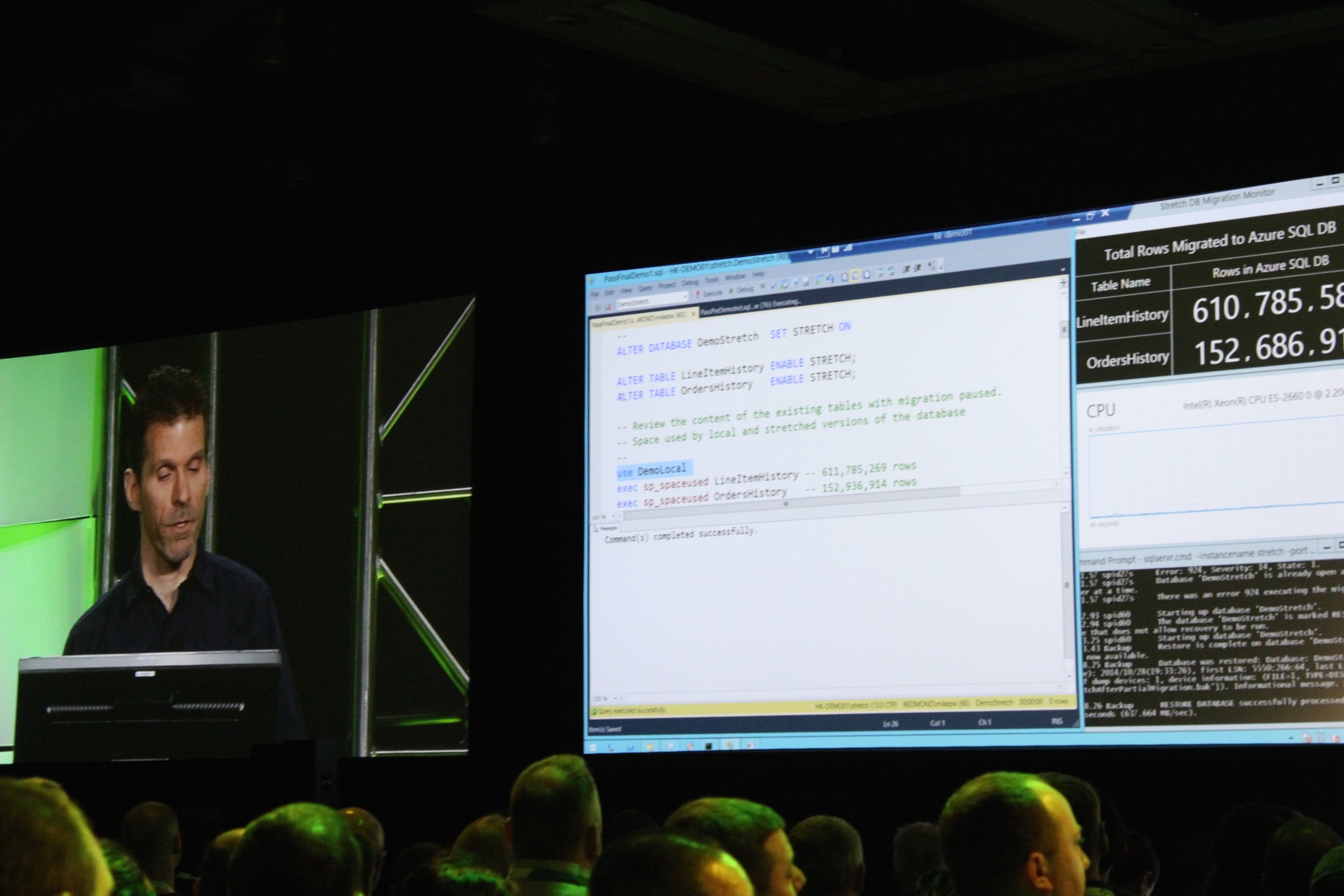
Demoing stretch tables in Azure

9:22AM – Showing a demo of a Hekaton memory-optimized table, plus a nonclustered columnstore index built atop it. This is genuinely new.
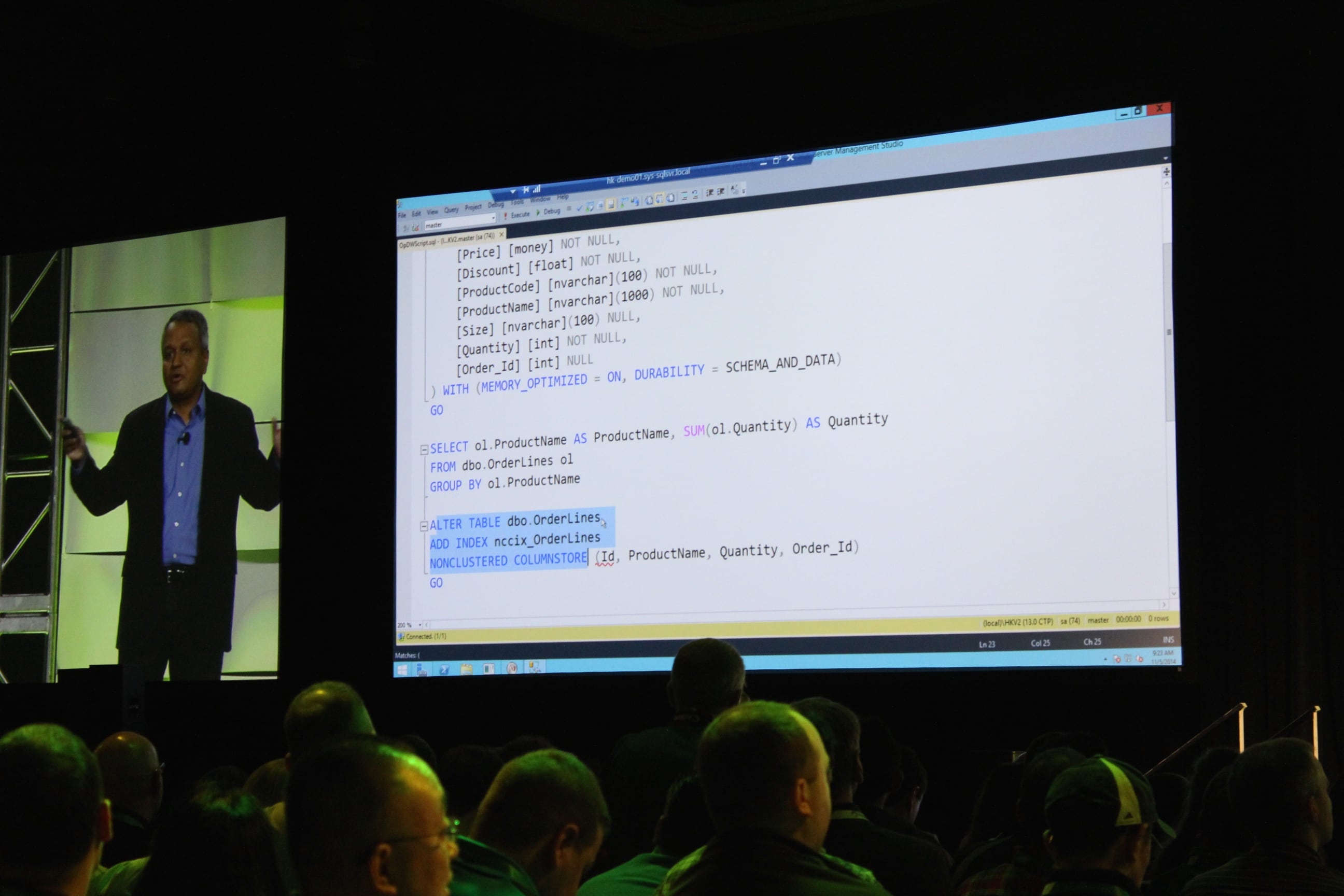
Mike Zwilling's demo of a nonclustered columnstore index atop a Hekaton table
Mike Zwilling’s demo of a nonclustered columnstore index atop a Hekaton table

9:20AM – “What if you could run analytics directly on the transactional data?” Doing a live demo of a new way to run your reports in production.

9:18AM – Ranga announces a preview coming at some point in the future. “And that’s the announcement.” Literally one clap, and it was from the blogger’s table. This is bombing bad.

9:15AM – Uh, big problem here. Ranga just said Stack Overflow is using Microsoft SQL Server’s in-memory technologies. That is simply flat out wrong – Stack does not use Hekaton, Buffer Pool Extensions, or anything like that. Just plain old SQL Server tables. Very disappointing. If you’re at PASS, look for Nick Craver, one of their database gurus who’s here at the conference.

9:12AM – Now talking about something near and dear to my heart: how Stack Overflow is pushing limits.

9:10AM – To recap the demo, Azure SQL Database does geo-replication and sharding.

9:06AM – The utter and complete dead silence in the room tells a bigger story than the demo. This is just not what people come to PASS to see. If you think about the hourly rate of these attendees, even at just $100 per hour, this is one expensive bomb.

8:58AM – Quite possibly the most underwhelming demo I’ve ever seen. If you want to impress a room full of data professionals, you’re gonna need something better than a search box.

8:56AM – Pier 1 folks up to demo searching for orange pumpkins.

Tracy Dougherty doing Pier 1 demo

8:52AM – “The cloud enables consistency.” Errr, that’s not usually how that works. Usually the cloud enables eventual consistency, whereas on-prem enables consistency. I know that’s not the message he’s aiming for – he’s talking about the same data being available everywhere – but it’s just an odd choice of words.

8:49AM – Discussing Microsoft’s data platform as a way to manage all kinds of data sources. This is actually a huge edge for Microsoft – they have the Swiss Army knife of databases. Sure, you could argue that particular platforms do various parts much better – you don’t want to run a restaurant on a Swiss Army knife – but this is one hell of a powerful Swiss Army knife.

8:45AM – Ranga’s off to a really odd start. He starts by talking about Women in Technology and says “We’ll do our best,” and then segues into an odd story about his wife refusing to use online maps. Really, really awkward.

8:41AM – Microsoft’s T.K. Ranga Rengarajan taking the stage.
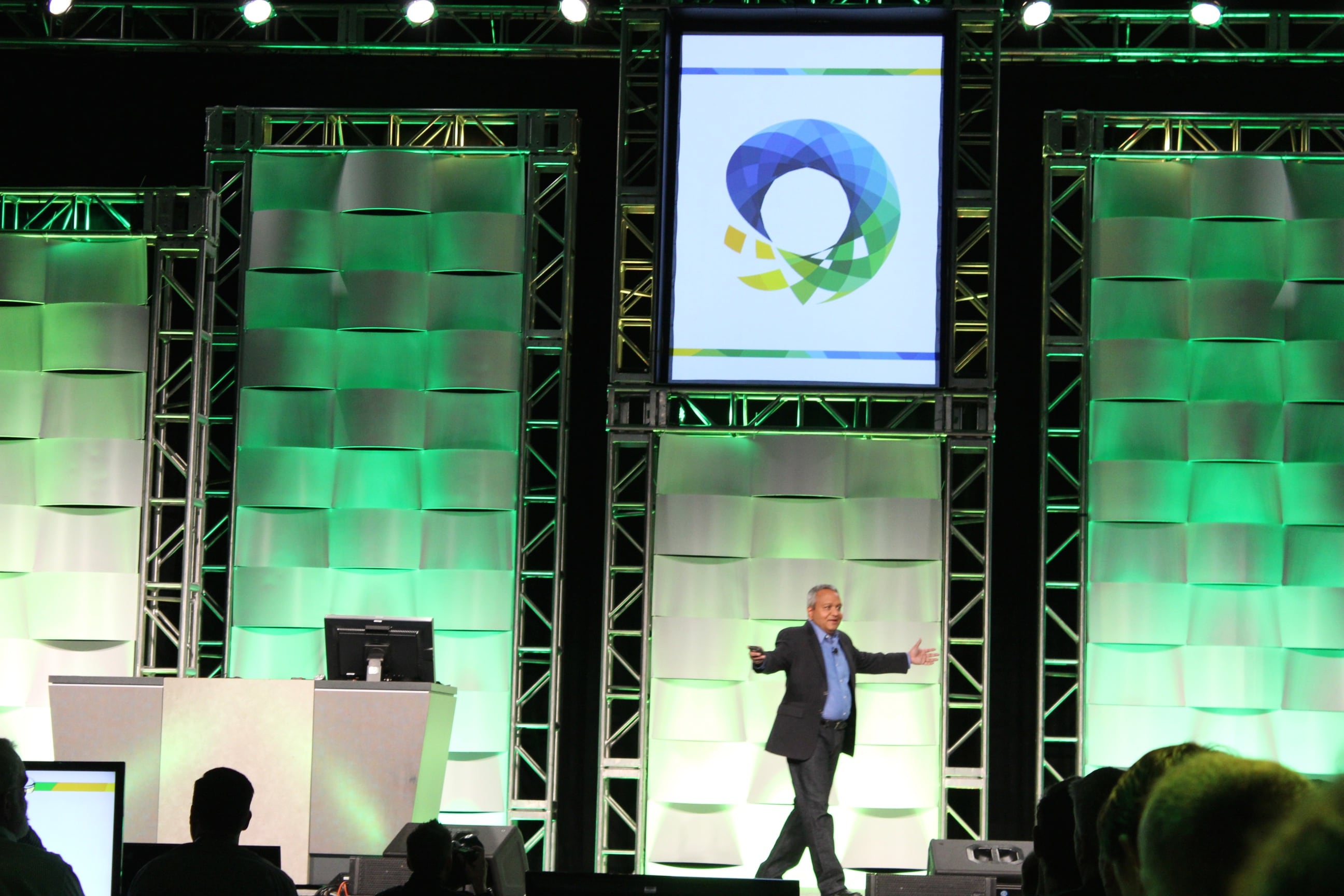
Ranga Taking the Stage

8:39AM – Watching several minutes of videos about people and stuff. No clapping. Hmm.

8:34AM – Tom’s a natural up on stage, totally relaxed.
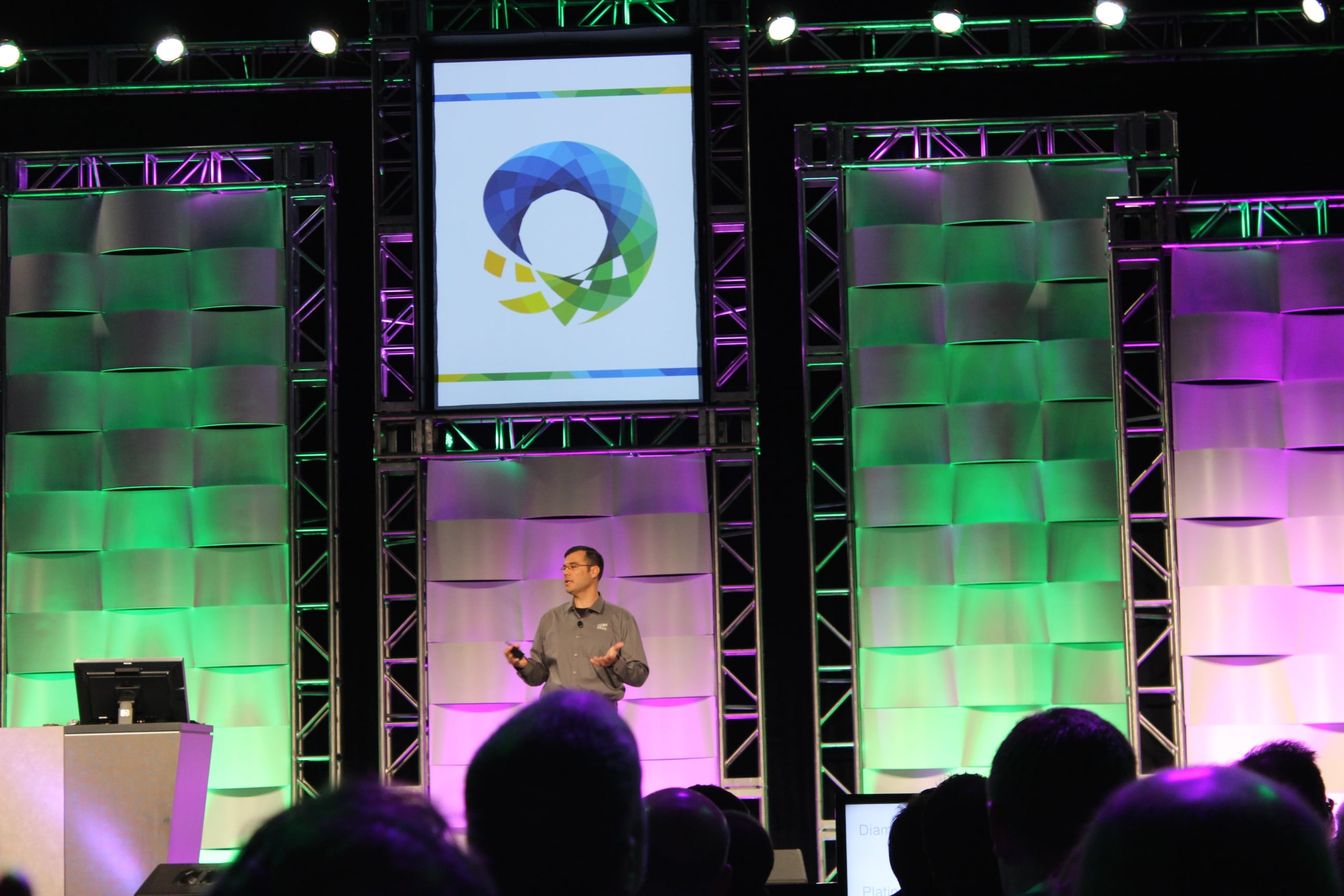
Tom LaRock at PASS Summit

8:33AM – Thanking the folks who help make the event possible: sponsors and volunteers.

8:31AM – Hands-on training sessions for 50 people per workshop are available here at PASS. Good reason to come to the conference instead of just playing along online – convince your boss by explaining that you can’t really get this hands-on experience anywhere else as easily.

8:27AM – PASS has provided 1.3 million hours of training in fiscal year 2014. (Would be interesting to see that broken out as free versus paid, and national versus local user group chapters.

8:22AM – PASS President Tom LaRock taking the stage and welcoming folks from 50 countries, 2,000 companies.
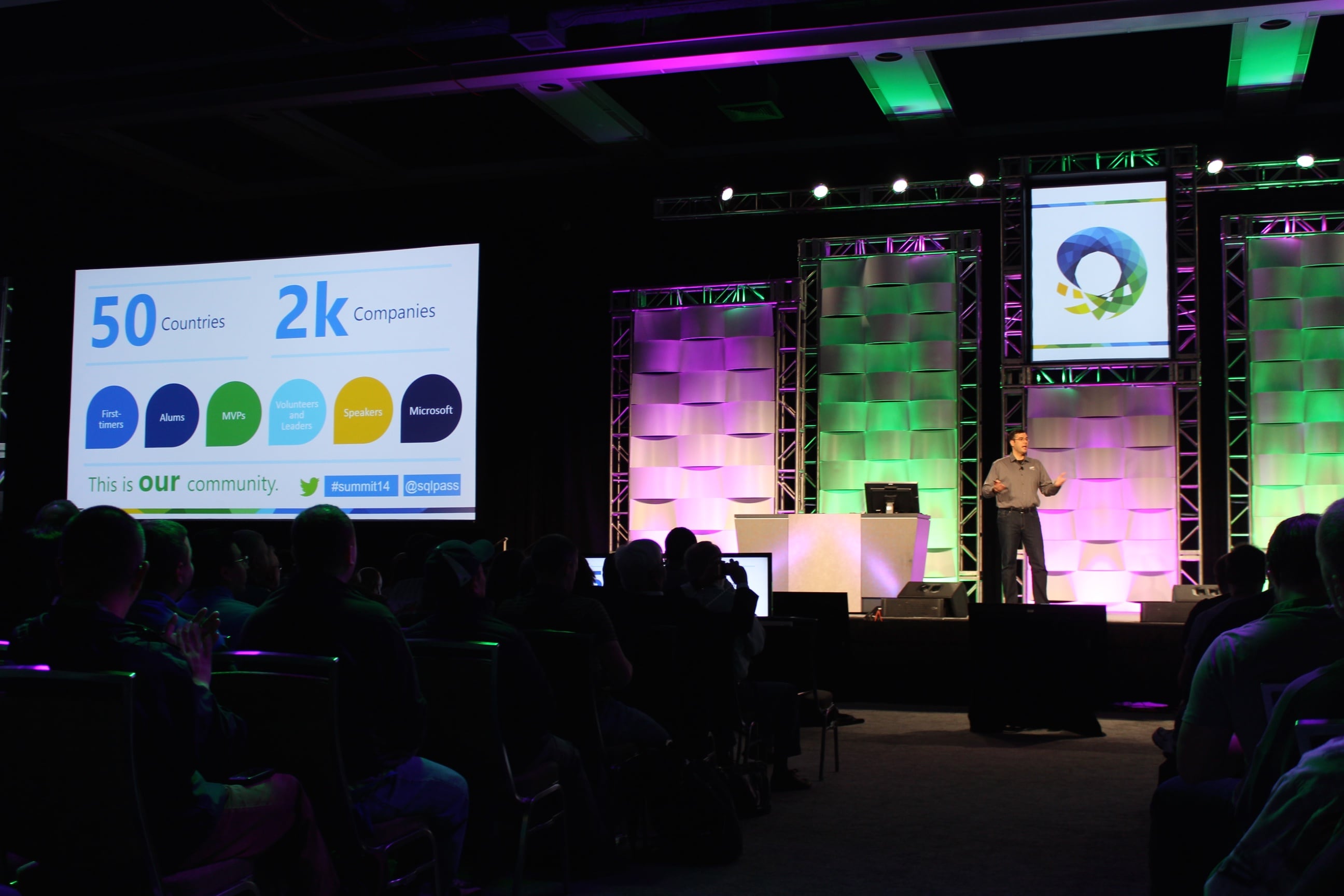
PASS President Tom LaRock

8:18AM – From the official press release: “The PASS Summit 2014 has 3,941 delegates as of last night and 1,959 pre-conference registrations across 56 countries for a total of 5,900 registrations.” The registrations number is always a little tricky because it counts pre-con attendees multiple times, but that delegates number is phenomenal. Nearly 4,000 folks is a lot! This is far and above the biggest Microsoft data event.

8:16AM – Folks are coming in and taking seats.

8:00AM Pacific – Good morning from the Blogger’s Table at the Seattle Convention Center. It’s day 1 of the PASS Summit 2014, the biggest international conference for SQL Server professionals. A few thousand data geeks are gathered here to connect, learn, and share.

The keynote session is about to start, and here’s how this works: I’m going to be editing this blog post during the keynote, adding my thoughts and analysis of the morning’s announcements. I’ll update it every few minutes, so you can refresh this page and the news will be up at the top.

You can watch the keynote live on PASS TV to follow along.

Here’s the abstract:

Evolving Microsoft’s Data Platform – The Journey to Cloud Continues

Data is the new currency and businesses are hungrier than ever to harness its power to transform and accelerate their business. A recent IDC study shows that business that are investing in harnessing the power of their data will capture a portion of the expected $1.6 trillion dollar top line revenue growth over the coming four years. SQL Server and the broader Microsoft data platform with the help of the PASS community are driving this data transformation in organizations of all sizes across the globe to capture this revenue opportunity.

In this session you will hear from the Microsoft Data Platform engineering leadership team about recent innovations and the journey ahead for Microsoft’s data platform. Learn first-hand how customers are accelerating their business through the many innovations included in SQL Server 2014 from ground breaking in-memory technologies to new highly efficient hybrid cloud scenarios. See how customers are revolutionizing their business with new insights using Power BI and Azure Machine Learning and Azure HDInsight services. Learn about the investments were are making Microsoft Azure across IAAS and PAAS to make it the best cloud hosting service for your database applications.

Ignore the first paragraph, which appears to be written for salespeople attending the Microsoft Worldwide Partner Conference, not the Professional Association for SQL Server PASS Summit. The second paragraph – not to mention the neato changes at Microsoft lately – offer a glimmer of hope for us geeks. If Microsoft wants to win market share away from Amazon’s huge lead, they’re going to have to bring out features and services that compete. The terms “investments” and “journey ahead” implies that we’ll be hearing about future features in Azure and SQL Server vNext.

Let’s see what they’re announcing today – and remember, like I wrote last week, my new perspective today is a chillaxed 1960s car show attendee. Bring on the flying cars.

For the latest updates, refresh this page and check the top.


SQL Server Query Store

Execution Plan Hell
Execution Plan Hell

I spend most of my day tuning SQL Server to make it go faster. I’m usually called in after the fact, when the app has become intolerably slow.

One of the first things I ask is, “What’s changed?”

Nobody ever knows with any sense of accuracy.

I understand – until now, SQL Server hasn’t shipped with any kind of change detection or tracking for common execution plan problems.

How We Manage Queries and Plans in SQL Server 2014

A good performance tuner uses tools like sp_BlitzCache®Opserver, and Plan Explorer to identify their top resource-using queries and examine their execution plans. They’re intimately familiar with those plans and how they look today, and the tuner makes ongoing efforts to improve the shape of those plans.

Those tools look at execution plans exposed in dynamic management views and functions, the internal instrumentation tables of SQL Server. Unfortunately, those views clear out whenever SQL Server is restarted. Or the plan cache is cleared. Or statistics get updated. Or you come under memory pressure. Or …you get the picture.

If a query suddenly gets a bad plan and rockets to the top of the resource utilization charts, the tuner examines the root cause of the variation, but she’s often unable to see the prior version of the plan. Sometimes a growing amount of data in one of those tables will influence the optimizer into picking a different execution plan, or maybe someone made an ill-advised sp_configure change. Ideally, we work on the query, statistics, indexes, and sp_configure settings to get the plan back where it needs to be.

The hard part here is that we often have no idea what the plan looked like before. Sure, if we’ve got the budget to get fancy, we install performance monitoring software that tracks the execution plans of all our queries over time.

Even when we know what the plan looked like before, it’s not always easy to get SQL Server to change the execution plan. We end up using tricks like plan guides and hints to get the plan we want. I used to see plan guides as a tool of the devil, but I’ve lived long enough to see myself become the villain.

The SQL Server Query Store: Putting Your Plans on Layaway

Enter a recently declassified session at the PASS Summit. On Wednesday, November 5, Conor Cunningham will unveil the Query Store:

Have you ever come in to work only to have the boss come tell you that your main site is down and the database is “broken”?  Fixing query performance problems can be rough, especially in high-pressure situations.  Microsoft has developed a feature to help customers gain significantly easier insight into production systems and to be able to quickly fix cases where a new plan choice from the query optimizer has undesired performance consequences.  This talk introduces the Query Store, explains the architecture, and shows how it can be used to solve real-world performance problems.  It will now be possible to ask questions like “show me what query plans have changed since yesterday” and to quickly ask the optimizer to “go back” to the query plan that was working fine for you previously.

This is where things get a little tricky for me as an MVP. If I have any advance knowledge of something, I can’t confirm or deny it, and I certainly can’t blog about it. Buuuut…I can read the abstract, put on my thinking cap, and talk about it in terms of what’s already public.

Reading that abstract, you can infer that:

  • SQL Server’s new Query Store will cache queries and execution plans even after they’ve changed (like due to a statistics change on a table)
  • These changes may even persist beyond a SQL Server restart (meaning they’ll have to be written to disk somewhere)
  • The current and prior plans will be exposed in a DMV for you to query (meaning you might be able to roll your own alerts when a plan changes so you can check out whether it’s better or worse)

So the questions you might ask would be:

  • Will this functionality work with read-only databases? Think AlwaysOn Availability Group readable secondaries, or servers used as log shipping reporting boxes.
  • Will it work with plans that are not normally cached? Think trivial plans or Optimize for Ad Hoc Workloads.
  • What happens if you guide a query into an execution plan, and changes to the database mean the plan is no longer valid? Think dropping indexes.
  • Will you be able to see what the query would look like without the frozen plan? Think about adding new indexes or updating stats on a table, and wanting to see whether the new plan would be better or worse without endangering running queries.
  • If the Query Store data is written into the database itself, will the execution plans flow through to other servers? Think AlwaysOn AG secondaries and development servers that are restored from production. This is especially tricky if the feature is considered an Enterprise Edition feature, and thereby restricts the ability to restore the database onto a Standard Edition box like compression & index partitioning.

And of course, will it be Enterprise-only or included in Standard Edition, and what will the release date be? Those last ones are outside of Conor’s control, obviously, but you should still ask them. And then tell me what the answer is when you find out, because I don’t know either.

This Is Gonna Be Big.

I love features like this because everybody wins. It doesn’t require changes to existing applications, it doesn’t require attention out of the box, and it just gives more tools to performance tuners like me.

I don’t usually recommend that PASS attendees sit in forward-looking sessions that cover features that may not be in your hands for quite a while. In this case, I’m making an exception: attend Conor’s session. He’s one hell of a smart guy, and he has incredibly elegant ways of answering questions with honesty and insight. I’m publishing this blog post a little early because I want you to start thinking about the feature and how you’d use it in your line of work. That’ll prep you to ask Conor better questions, and you’ll get the most out of this great opportunity.

Enjoy it, jerks, because I’m giving a lightning talk at the same time. I swear, if you do performance tuning and I see you in my talk instead of Conor’s, I’m gonna make you take over my talk so I can go watch Conor.

Update 10:30AM Pacific: after a discussion on Twitter, Argenis Fernandez and I put some money down. If Query Store is fully functional in Standard Edition, I’ll donate $250 to Doctors Without Borders 2.0. If it’s only fully functional in Enterprise Edition, Argenis will donate $250. Everybody wins! Well, except Express Edition users.


Announcing sp_BlitzCache™ v2.4

SQL Server
7 Comments

Welcome to sp_BlitzCache™ v2.4. This release brings a few changes and bug fixes.

  • Fixed a logical error in detecting the output table. Thanks to Michael Bluett for pointing that out.
  • Sorting by executions per second finally works. Thanks to Andrew Notarian and Calvin Jones for submitting this week.
  • Added a @query_filter parameter – this allows you to only look at “statements” or “procedures” in the plan cache.
  • A check was added to identify trivial execution plans that have been cached. If you’re seeing a lot of these, you need to fix it.
  • The @reanalyze parameter was added. When set to 0, sp_BlitzCache™ will pull fresh data from the plan cache. When set to 1, though, sp_BlitzCache™ will re-read the results temporary table. This is helpful if you want to save off results in Excel and display results so you can tune queries.
  • Added the ability to see a query’s SET options. This is hidden just to the right of the plan in the results grid.
  • Moved the #procs temp table to a global temp table named ##procs. This shouldn’t be a problem because you’d probably get angry if two DBAs were running this stored procedure at the same time any way.

Download it right now!

Update: Denis Gobo noticed that sp_BlitzCache™ could potential clobber global temp tables. Global temp table names have been updated in sp_BlitzCache™ to avoid this in the future. Make sure you’re using v2.4.1.


What Changed Our Career Trajectories?

SQL Server
4 Comments
Jeremiah-Caffeinates-TSQL
Jeremiah has coffee at the PASS Summit

We’re a group of specialists and teachers here at Brent Ozar Unlimited. But we didn’t start that way– we started out as engineers and developers.

So what was it that changed our career trajectories? For each of us, we had a lot of smaller factors along the way, but there have been one or two big game changers that have really made a difference.

Jeremiah: The PASS Summit

The first time I went to the PASS Summit, I attended at my own expense and used up half of my vacation time to attend. I’d been involved in the SQL Server community for a few short months, and I had been chatting via email with a goofy DBA named Brent Ozar.

Brent and I both attended pre-conference sessions, but we were in different ones. It happened that our speakers took breaks at same time, and I ended up running into Brent over on one of the breaks. We chatted and ended up eating lunch together.

I’m a shy person and a big conference can be daunting when you don’t know anybody, so I ended up tagging along with Brent throughout a lot of the conference. The upside of hanging out with Brent is that he’ll talk to anybody – speakers, Microsoft employees, or random attendees. The PASS Summit was my gateway into both the SQL Server community – I made a lot of friends that week – and into my current career.The connections I made at the PASS Summit that year planted the seeds for the rest of my career.

Kendra: Twitter

Someone helped me discover the typo and find it.
Kendra’s first tweet. #SQLHELP didn’t exist yet.

I never would have guessed that Twitter would change my life. And I’ve never been passionate or crazy about Twitter – I think it’s useful, but if I go a day or two without using it, I don’t mind.

But Twitter is the way that I started connecting to the larger SQL Server community. I started following people, then following their friends, and started tweeting about SQL Server. I asked and answered questions. Twitter gave me a sense of what other SQL Server developers and DBAs cared about, what problems they faced, and what they were interested in.

I’m a pretty naturally shy person, and I never knew what to talk to people about at conferences and events when I first met them. Twitter has helped me solve that problem: you can sense the mood of a conference while you’re there. You can tweet about it. You can talk about the tweets with people!

To get started with Twitter, check out our free eBook.

Jes: SQL Saturday

Jes at SQLSaturday Chicago

Specifically SQL Saturday Chicago 2010 – my first! I’d been attending my “local” user group for a few months, I’d been reading blogs, I was participating in forums, and I was even on Twitter before I went to this event. I knew I loved working with SQL Server, and I knew there were people that could help me when I had questions. But getting to attend an event – for free, nonetheless! – and getting to meet these people was amazing.

I remember attending a session by Brad McGeehee, who’d written “Brad’s Sure DBA Checklist”, which I kept in a binder at my desk. I remember getting to watch Chuck Heinzelman and Michael Steineke set up a cluster and test it. I even went to a session by one Brent Ozar about a script called sp_Blitz. At the end of the day, with a full brain, I went to the lobby and saw a group of the presenters sitting around chatting. I bravely approached and joined the circle, which included Brent and Jeremiah, and chatted with them. Had I not attended that event, had I not made the connections I did, I doubt I would be where I am in my career today!

Look for a SQL Saturday near you!

DOUG: SQL CRUISE

Dinner with Vikings
Doug as his true viking self

I’d recently presented at my first two SQL Saturdays when the opportunity came to go on SQL Cruise. A contest that for some cosmic reason I felt was begging me to enter — send in your story of victory with SQL Server and win a free spot on the cruise. I made a video about refactoring bad code with a magical hammer, and won the contest. But that was just the beginning.

During the cruise, I:

  • Had a dream about a murder mystery happening on the cruise, which led me to write and present my SQL Server Murder Mystery Hour session.
  • Got some phenomenal career advice from people like Brent, Tim Ford, and Buck Woody, that is still helping me to this day.
  • Became friends with the three people who ended up hiring me three years later for the best job I have ever had.

That’s my career adventure. What will yours be?

Brent: Meeting “Real” DBAs

In My Native Habitat
The DBAs told Brent this hat would make his code better.

I was a lead developer at a growing software business and I felt like I had no idea what was going on inside the database. Our company suddenly grew large enough to hire two “real” database people – Charaka and V. They were both incredibly friendly, fun, and helpful.

I was hooked. Who were these cool people? Where did they come from? How did they learn to do this stuff?

They both took time out of their busy jobs to answer whatever questions I had, and they never made me feel stupid. They loved sharing their knowledge. They weren’t paranoid about me taking their jobs or stealing their secrets – and looking back, they probably just wanted me to be a better developer.

They insisted that sure, I had what it took to be a database admin. I went for it, and it’s been a rocket ship ever since.


Announcing Two New Classes in Boston & Copenhagen

SQL Server
0

We’ve added two new one-day pre-conference classes to our 2015 calendar:

sqlsat364_web

SQLSaturday Boston Pre-Con: Developer’s Guide to SQL Server Performance – You’re stuck with a database server that’s not going fast enough. You’ve got a hunch that the biggest bottleneck is inside the database server somewhere, but where? In this one-day class, you’ll learn how to use powerful scripts to identify which queries are killing your server, what parts of the database server are holding you back, how to tackle indexing improvements, and how to identify query anti-patterns. The class is just $99 – learn more now. (Class done)

SQLRally Nordic Copenhagen: Performance Tuning When You Can’t Fix Queries – Brent is flying over to Rally again! Here’s the abstract: Your users are frustrated because the app is too slow, but you can’t change the queries. Maybe it’s a third party app, or maybe you’re using generated code, or maybe you’re just not allowed to change it. Take heart – there’s still hope. Brent Ozar does this every week, and he’ll share his proven methodologies to performance tune with indexes, SQL Server configuration switches, and hardware. Learn more now. (Class done)


A Guide to Contributing Code

SQL Server
2 Comments

So you’ve got a great idea for a new feature to add to sp_BlitzSomethingOrOther, what’s the best way to get started?

The Documentation Says…

If you read our code contribution guidelines, you should write new code, write a test, sign an agreement, and then send us your code. That’s technically correct, but it’s a daunting task. After all – five people are going to be looking at your code and then thousands more might be looking at your code.

The documentation is technically correct (like most documentation), but it assumes a lot.

If you go by what the documentation suggests, we’ll definitely see your code, but there’s a decent chance that we’re not going to accept your code contribution.

Start Small

The best way to get started on any existing project is to start small. It’s rare to write a major feature on your first contribution to any new project or product – there’s a significant barrier to entry around code formatting and style, future features, and work in progress.

The best way to help out is to fix a bug in the code.

Right now you’re saying, “Fix someone else’s bugs? No way!”

Hear me out.

When you find and fix a bug in the code, you’re signaling a few things. The first thing you signal is that you have a better eye for detail than the moron who wrote the code. The second thing you signal is that you want to help that moron make their software a little bit better.

Build Trust and Understanding

Contributing small fixes to an existing code base goes a long way to establishing trust. It’s one of the ways that we all work together and bring new employees up to speed with our tools. We don’t throw each other into the deep end (much). Instead we get familiar with our own software tooling by looking for issues and fixing them. We build up trust in each other as we’re building up knowledge.

By fixing bugs, you’re building trust and establishing a working knowledge around a particular code base.

Beyond building trust, you’re also getting an understanding of how a particular piece of code is put together. As an example, sp_BlitzCache is riddled with dynamic SQL, XQuery, XPath, and strange DMV ordering. It’s all done for a reason, and that reason is performance. A few changes would take sp_BlitzCache from finishing in 30-90 seconds to finishing in 30-90 minutes – I should know, I’ve introduced those changes before.

As you’re in the code fixing bugs, you’ll spot places to add more features and functionality. This is a great place to strike up a conversation with the authors about adding those new features, or at least getting them on a roadmap.

Sometimes, we’re already working on a feature but we haven’t made anything about it public yet. You don’t want to spend hours writing a new feature only to see it come out in a completely different format. Building up that relationship of trust means we’ll be chatting with you about our ideas and you’ll be aware of our crazy ideas as they happen.

Code review is hard!

…But Test First

The best reason to start out by fixing bugs is that we have a very strange test set up. By testing your changes the same way we test our changes, you can rest assured that your changes will be accepted on their merit, and not rejected on a technicality.

We test our code changes on multiple versions of SQL Server and we use case sensitive instances. A simple mistake in a column name can stop a query from running, for some users, and we’d rather be safe than sorry.

Too Long; Didn’t Read

In short, the best way to get started contributing to sp_BlitzWhatever is:

  1. Find a bug.
  2. Fix the bug.
  3. Submit your fixes.
  4. Rinse. Repeat.
  5. Work up to implementing bigger fixes & features.

Get started today, head over to http://support.brentozar.com and pick out a bug that someone has found. Submit your ideas at https://www.brentozar.com/contributing-code.


Why You Shouldn’t Use SQL Server’s Activity Monitor

I love free tools. I also love analyzing SQL Server’s wait statistics. But I’m not a fan of Activity Monitor, a free tool in SQL Server Management studio, which helps you look at wait stats.

Activity Monitor just doesn’t give you the whole truth.

I fired up a workload with HammerDB against a test SQL Server 2014 instance. My workload runs a query that’s very intensive against tempdb, and it’s really beating the SQL Server up by querying it continuously on seven threads.

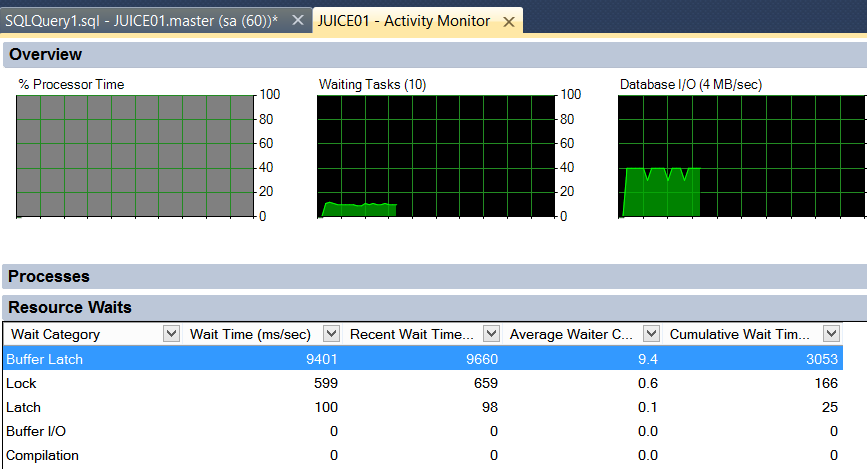
Let’s look at our wait statistics. Here’s what Activity Monitor shows in SQL Server 2014:

ActivityMonitorSQLServer
“Buffer Latch” must be my problem.

Here’s what our free procedure, sp_BlitzFirst shows for a 10 second sample while the workload is running. I ran: exec sp_BlitzFirst @ExpertMode=1, @Seconds=10;

sp_BlitzFirst
Hmmmm, that top wait type doesn’t seem like it was in the first screenshot at all.

Here’s what Adam Machanic‘s free procedure, sp_WhoIsActive, shows for an instant in time during the workload. I ran: exec sp_WhoIsActive

spWhoIsActive
Here I get specifics on exactly what type of wait is is and the related query.

Let’s compare.

Activity monitor groups wait types. It took a whole lot of waits and rolled them up into ‘Buffer Latch’. This isn’t necessarily a bad thing, but I’ve never heard of documentation that explains what’s rolled up into which groups. By comparison, sp_BlitzFirst showed me the specific wait types PAGELATCH_UP, PAGELATCH_SH, and PAGELATCH_EX, with the amounts for each one. sp_WhoIsActive even showed me the type of page that is having the bottleneck (GAM) and the database and data file (tempdb’s data file 1).

Activity monitor leaves out wait types. sp_BlitzFirst showed that in aggregate, my #1 wait was CXPACKET over the sample. That tells me that a lot of my queries are going parallel. That’s not necessarily a bad thing, but it’s important for me to know that about my workload at the time. It helps me know that I want to learn more, and make sure that the right queries are going parallel. (In this case, the query that’s going parallel is pretty cheap, and is just as fast single threaded. My throughput goes up dramatically if I adjust the Cost Threshold setting up a bit.)

Friends don’t let friends use Activity Monitor. It may be convenient, but it doesn’t tell you the truth. Do yourself a favor and use a free tool that gives you wait statistics straight up.

Start with sp_BlitzFirst instead.


Building a Reliable SQL Server for kCura Relativity [Video]

kCura Relativity, SQL Server
0

Your users want Relativity to be up at all times. What’s the first step? How much work is involved? What will it all cost? I’ll give you a simple worksheet to get management and the IT team on the same page, and then show you how to turn those specs into a rough project plan and budget.

You’ll learn how to choose between different high-availability methods, and understand why clustering is such a no-brainer choice in this 22-minute video.

https://www.youtube.com/watch?v=UkpVMPFgQxU

Got questions? Join us for our Tuesday Q&A webcast where I’ll answer your Relativity questions.


Announcing sp_Blitz v36: New Database Checks, Hekaton, Azure Files, More

The latest version of our free SQL Server health check adds some nifty new stuff:

  • Checks for non-default database configurations like enabling forced parameterization or delayed durability
  • Looks in the default trace for long file growths or serious errors like memory dumps
  • Checks Hekaton memory use and transaction errors
  • Warns about database files on network shares or Azure storage
  • Added the server name in the output if you enable @CheckServerInfo = 1
  • Discontinued the Windows app version (was prohibitively expensive to get it into the Windows app store)
  • And miscellaneous bug fixes and improvements

Get the latest version in our free download pack, and if you’ve got questions, hit up support.brentozar.com. Enjoy!


How to Start Conversations With Your Favorite Authors at Conferences

SQL Server
8 Comments
How it feels to say the exact wrong thing.

It can be a tricky to introduce yourself to people at conferences when you read their blogs and watch their presentations and videos. You feel like you know them, but they don’t know you yet. What the heck do you say? So you take a deep breath, you head on over, and then… you say something really awkward.

I’ve totally been there too, with my foot right in my mouth. I am truly socially awkward, so much so that reviewing posts like this helps me get better at small talk before a big event.

Dodge the Backhanded Compliment

“Your presentations are great, even though ____.”

What it sounds like: “You’re not that good.”

What to say instead: “Your presentation on [folding paper towels] was great.”

It’s OK if you already knew how to fold a paper towel, they won’t assume you’ve never seen one before. Just stop before the “even though” or “but”. Less is more! And trust me, a simple concrete statement explaining that someone’s hard work helped you out will truly mean a lot to them. If you want to follow it up with a question to start a conversation, you can chase it with, “What inspired you to present on that topic?” (If you have real criticism, it’s valuable to share that too– after a few sentences. It’s kinda weird to lead with that.)

Sneak Past that Accidental Brush Off

“I wish I could come to your talk, but _____”

What it sounds like: “I’m not coming to your presentation.”

For newer speakers, it’s disheartening for them to hear this: they just hear “I’m not coming” and they immediately picture having to present to a room full of empty seats. That can have kind of a “sad Eeyore” ring because many speakers fear “what if nobody shows up?” (This is really hard to not say by accident, I’m still training myself out of it.)

What to say instead: “I like your title and abstract for [Cool Story, Bro].” It’s OK, you don’t have to attend. But you also don’t have to explain that you’re not going, unless they specifically ask. If you want to start a longer chat, it’s also great to ask them, “I’m thinking of attending Mladen’s session on [Security for Developers]. Do you know any other good sessions on that topic?” Speakers love to help you figure out what session to attend, even if the session isn’t their own.

Ooops, Did I Just Kinda Call You Ugly?

“You look so much _______  in person!”

What it sounds like: “You look short/dumpy/frumpy/bad in some context.” Even if you’re saying they look great now, this, uh, implies that’s not always the case.

What to say instead: “It’s great to meet you face to face.” Don’t worry, they think it’s great to meet you as well. If you’re in a place where you can have a chat, just ask, “How did you get started [publishing hilarious animated gifs on the internet]?”

Pack Your Bags For A Quick Guilt Trip

“Do you remember me? We met at ________.”

What it sounds like: “It makes me feel bad that you don’t remember me. And this might be a trick question and I’m totally trolling you, you won’t know till you answer.”

Some people are really good with names and faces. Oh, how I envy those people! For the rest of us, we do truly feel guilty if we met you before and you know who we are and we don’t remember your name. The real problem with this is that it’s hard for the conversation to not fall flat after this. It doesn’t go anywhere.

What to say instead: “I think we may have met at [a store selling panty hose in Texas] a few years back. It’s great to see you again!” Just adding a little “maybe” in there automatically puts the other person at ease if they don’t remember the situation for whatever reason.

Boy, My Tribe Sure Is Dumb!

“I love your blog posts. My developers are so dumb though! They always are doing _____.”

What it sounds like: “I don’t have anything nice to say about anyone. And maybe you’re a member of that club.”

I think some folks start like this because it’s a way of saying, “we must have this in common, right?” But it just doesn’t work so well. Leading with a negative statement gives the conversation a weird vibe, and you’re gambling that the person actually agrees with you. Sometimes they don’t!

What to say instead: “I can really relate to that blog post you wrote on [juggling chainsaws].” And if you don’t remember a specific post to talk about, but you can think of a topic, just mention that. Letting people know that you read their work is pretty darn exciting for them, all by itself.

I’M NOT REALLY INTERESTED IN YOU

“You talk to ___, a lot right? Where are they?”

What it sounds like: “You’re not that important to me, but your friends are.”

It’s totally normal to talk about what you’ve got in common, but don’t start with the people commonalities. Talk about what’s important to that other person – their work, presentation, family, or even just get coffee.

What to say instead: “What’s the #1 thing on your mind this week?” This lets the person share their excitement with something, and it’s contagious. You might learn something about a fun insider event too!

How to End It, Short And Sweet

Most initial conversations at conferences aren’t very long. You’ve got sessions to go to, there’s tons of people around saying hi to each other. But don’t be afraid to end it: you’ll probably run into one another again soon. Offer to trade business cards! That will help you remember each other– especially if your business card has your picture on it.

Small Talk is Just a Skill

You’ve got to start a conversation somewhere, and at a conference, you start it with small talk. We aren’t all naturally good at it, though.

Know this: even if you do end up with your foot in your mouth, it’s OK. Just smile and keep meeting new people. We’ve all been there, and it’s not nearly as big a deal as it feels like when your face turns red.


Introduction to the Oracle Data Dictionary

Oracle
5 Comments

If you’re going to be working with Oracle, you need to be able to get a better handle on what’s going on with the Oracle database. Just like other database platforms, Oracle provides a data dictionary to help users interrogate the database system.

Looking at System Objects

Database administrators can view all of the objects in an Oracle system through the DBA_% prefixed objects.

You can get a list of all available views through the dba_objects system view:

And the results:

Just over 1000 views, eh? That’s a lot of system views. If you just want to examine a list of tables stored in your Oracle database you can use the dba_tables view to take a look. Here we’ll look at the EXAMPLE database schema:

The curious can use the desc command to get a list of all columns available, either in the dba_tables view, or any of the tables returned by querying dba_tables.

User Objects

A user shouldn’t have access to the DBA_ views. Those are system level views and are best left to people with administrative access to a system. If a user shouldn’t have that level of access, what should they have? Certainly they should have access to their own objects.

Users can view their own data with the USER_ views. There’s a user_objects table that will show information about all objects visible to the current user. If you just want to see your own tables, you can use the user_tables view instead:

Of course, users may have access to more than database objects that they own. In these cases, users can use the ALL_ views to see everything that they have access to:

Running this query nets 52,414 rows in all_objects and 54,325 in dba_objects. Clearly there are a few things that I don’t have direct access to, and that’s a good thing.

System Status with V$ Views

Oracle’s V$ views record current database activity. They provide insight into current activity and, in some cases, they also provide insight into historical activity. There are a number of dynamic performance views (Oracle’s term for the V$ views) covering everything from waits to sessions to data access patterns and beyond.

As an example, you can view all sessions on an Oracle database using the v$session view:

Oracle has a wait interface, just like SQL Server. Waits are available at either the system or session level. The v$system_event view shows wait information for the life of the Oracle process. The v$session_event view shows total wait time at a session level (what has this process waited on since it started). You can look at currently running (or just finished sessions) using v$session_wait.

Using this, we can look into my session on the system with:


Sample output from the Oracle v$session_event table.
I’m waiting on me

Don’t be afraid to explore on your local installation. There’s no harm in playing around with different Oracle features to determine how they work and what kind of information you can glean from them.

You can also use the GV$ views, thanks to Jeff Smith for pointing out my omission. These are views that are designed for Oracle RAC so you can see the health of every node in the RAC cluster. The upside of this is that you can get a big picture of an entire cluster and then dive into individual nodes using the V$ views on each node. You can even execute queries that use the GV$ views, even if you don’t have RAC, and you’ll be just fine.

A Word of Warning

Be careful with the both the data dictionary and the V$ views – querying certain views may trigger license usage to show up in the dba_feature_usage_statistics view. Before using features like Active Session History or the Automatic Workload Repository, make sure that you have the proper features licensed for your Oracle database. Using these optional features for your own education is fine.


Are SQL Server Functions Dragging Your Query Down?

In most coding languages, functions are often-used blocks of code that can be reused from multiple locations, leading to less code – and cleaner code. SQL Server also lets us create functions that can be used the same way. They are reusable blocks of code that can be called from multiple locations. So, if you need to format phone numbers a certain way, or parse for specific characters, you can do so using a function.

The question is, how much work is SQL Server doing when you call a function? If it’s the SELECT clause, is it called once – processing all rows – or once for each row in the result set, regardless if that’s 1 row or 100,00? What if it’s in the WHERE clause?

I’ll let you in on a little secret: if a function is used in the SELECT or WHERE, the function can be called many, many times. If the function is very resource-intensive, it could be causing your query to be very slow – and you would never see the execution of the function within the execution plan of the calling query.

Yep, SQL Server’s execution plans can be a bit vague when it comes to functions – and by “a bit vague”, I mean, “They don’t show up at all”. You need to dig deeper!

I’m going to run a few demos against the AdventureWorks2012 sample database in a SQL Server 2014 instance to show this!

First, I create a scalar-value function that will return the five left-most letters of a LastName.

Then, I create an Extended Events session to track statement completion. (Note: I have only tested this on SQL Server 2014, no lower versions.) (Using SQL Server 2008 R2 or earlier? You could create a server-side trace to capture sp_statement_completed and sql_statement_completed, but it won’t give you some functionality I’ll show later.)

I start the Extended Events session, and then turn on actual execution plans.

I start with a simple query, which returns 19,972 rows.

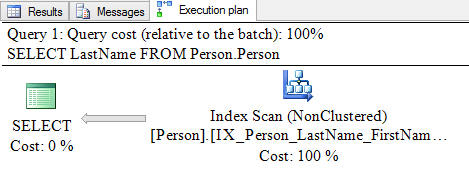
The execution plan shows an index scan and has a cost of 0.10451.

function 1

Looking at the details of the index scan, I see Estimated Number of Executions is 1, and Number of Executions is 1.

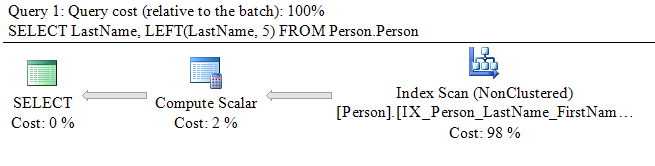
Let’s look at the same query when it performs the same calculation as the function – LEFT(LastName, 5).

There’s now an additional operator – a compute scalar. The cost has risen slightly to 0.106508.

function 2

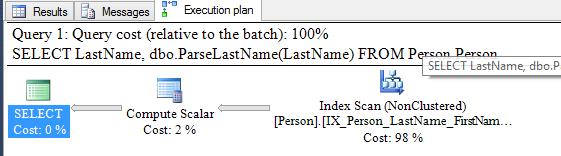
Now, I will modify the query to call the function from the SELECT clause.

Looking at the execution plan, I see an index scan and a compute scalar. The cost is the same as before –  0.106508.

function 3

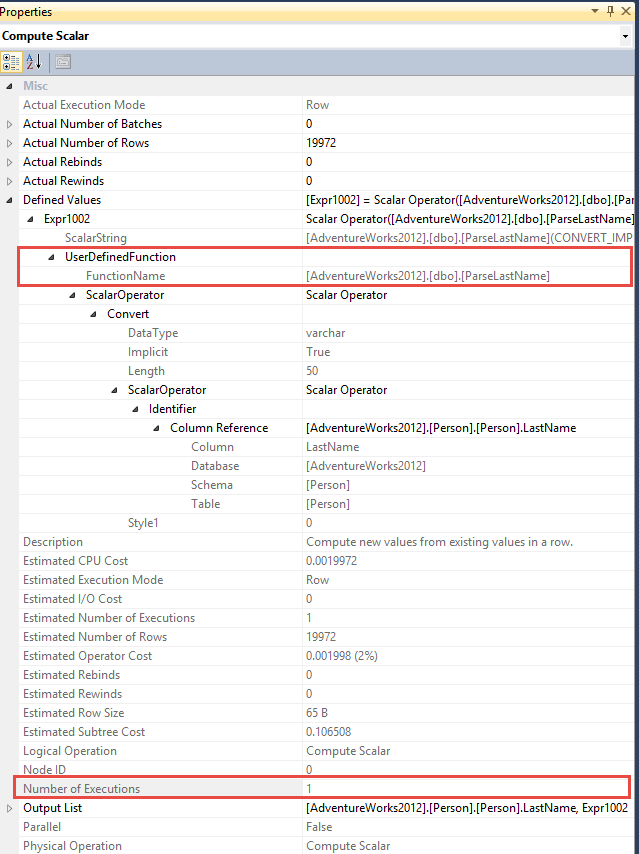
Expanding the properties for the compute scalar, I see the function, but it says there is only one execution.

function 4

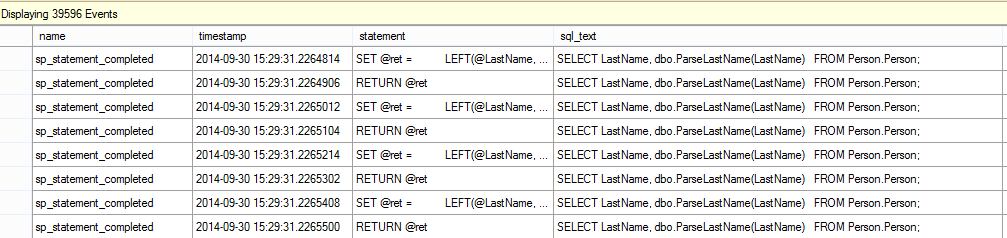
A quick glance at my Extended Events live feed tells a different story.

function 5

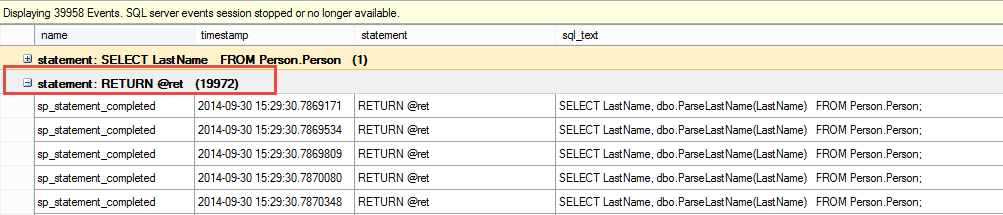
If I add grouping by statement, I can see the function was actually executed 19,972 times – once for each row in the result set.

function 6

That’s a lot more work than advertised!

Does the same thing happen if the function is in the WHERE clause?

Two rows are returned. The execution plan now has an index scan, a compute scalar, and a filter. The cost is 0.118091.

function 7

The Extended Events session again shows 19,972 executions – once for each row in the index.

function 8

The data isn’t filtered out until after the function is called, so it is executed once for each row.

Conclusion

These examples prove that whether one or many rows are returned as the query result set, if a function is used in the SELECT or WHERE, the function can be called many, many times. It could be one of the top resource-consuming queries in your server!

How can you see if a function is bringing your server’s performance down? Look at the top queries in your plan cache using our sp_BlitzCache tool, by total CPU and by number of executions, to see if this is happening to you.


Announcing kCura Relativity 9, Data Grid, Elasticsearch, and SQL Server

kCura Relativity, SQL Server
4 Comments

Today at Relativity Fest in Chicago, kCura Relativity 9 introduces the option to move some text storage out of Microsoft SQL Server and into kCura’s new Data Grid, a tool built atop the open source Elasticsearch.

Is kCura abandoning SQL Server? No, but understanding what’s going on will help you be a better database administrator and developer.

kCura’s Challenges with Microsoft SQL Server

To recap some of my past posts on Relativity, it creates a new SQL Server database when one of the end users creates a new workspace and starts loading data. Over the coming weeks, data pours into SQL Server at completely unpredictable rates. We have no idea how many documents are going to be acquired from subpoenaed hard drives, file servers, backup tapes, Facebook messages, you name it. I’ve seen workspaces grow from zero to ten terabytes in a single week, all without the systems administration teams even knowing it’s happening. They ran their weekly backup size report, and surprise, surprise, surprise.

kcura_relativity

Data streams into Relativity during business hours at the very same time hundreds or thousands of document reviewers are running queries against those very same tables. The entire team is under tight time deadlines, and there’s no way to take databases (let alone servers) offline for loads.

And oh yeah, we’re often contractually bound not to lose any attorney work product whatsoever out of the database.

This is all doable with traditional relational databases, but it ain’t easy. It’s made even tougher by the fact that many Relativity hosting partners are understaffed, many without even a full time database administrator.

How We Helped kCura Plan for Change

For the last couple of years, Andrew Sieja has repeatedly asked me a tough question: “If you were going to redesign Relativity from the ground up, and anything was on the table, what would it look like?” He faced a classic case of Innovator’s Dilemma – his team had built a wildly successful product, but there’s innovation coming from everywhere, and sooner or later somebody was going to beat him to the next level. While SQL Server was getting the job done, alternative data storage platforms beckoned with some really cool advantages, and he needed to take advantage of them before his competitors did.

kCura brought us in to work through the options out on the market. There are a gazillion new data storage & search options out there, and some of them claim to do a phenomenal job on absolutely everything. (Hint: may of these vendors are bluffing.) We helped them prioritize the features they needed most, and then recommended the right fit for them.

The end result is the newly announced kCura Data Grid, an extremely scalable and performant search platform built atop the open source Elasticsearch. You might recognize Elasticsearch from my demos of Opserver, Stack Exchange‘s open source monitoring tool, because Stack also migrated their SQL Server full text search out into Elasticsearch. They’re not alone – Elasticsearch has plenty of high profile case studies.

The Benefits and Risks of Elasticsearch

We typically see 70-90% of a Relativity workspace’s space consumed by extracted text and audit logging, both of which are great fits for Elasticsearch. Pushing that data out of SQL Server potentially means:

  • Reduced storage costs – while SQL Server relies on expensive shared storage (typically $5k-$10k per terabyte), ES achieves redundancy with multiple commodity boxes (typically $1k-$2k per terabyte). This adds up fast for big workspaces.
  • Faster search – ES is mind-numbingly fast. Seriously.
  • Easier scale-out – it’s really, really hard (and expensive) to scale out a single multi-terabyte database across multiple Microsoft SQL Servers when people can create new databases at any time. (It’s even hard enough just to scale a single known database across multiple servers!) It’s easy to add ES replicas for higher performance and availability.

It’s not a silver bullet, and as with any technology change, there are risks and limitations:

  • Security – ES doesn’t have any built in, so kCura had to build their own.
  • Backups – when everything is in one data platform, it’s easy to back up everything at the same moment in time. Split the data, and you run into challenges – but these aren’t really new for Relativity. The databases and the native files couldn’t be backed up to the same point in time either.
  • Management – Relativity hosting partners don’t have ES expertise on staff, and they’ll need training as ES becomes a mission critical part of their infrastructure.

What This Means for SQL Server Developers and DBAs

Microsoft SQL Server is an amazing relational database, a Swiss Army knife of a persistence layer. Sure, it can handle tables and joins, but more than that, it can do things like full text search, spatial data, CLR code execution, and scale-out via multiple methods. You can build a product backed by SQL Server and go a long, long, long way.

I don’t think SQL Server ran out of capabilities here, but kCura needed to plan for orders-of-magnitude growth in storage and search capabilities over the coming years. They grew one hell of a big, powerful business solution with a single database back end, and they’ve got the luxury of a large development staff and a bunch of new data storage options.

Premature optimization is the root of all evil. When you’re building the product you need today, the right database is the one you already know well. As your product grows, keep learning your own database, plus learn the other options out there. The storage and search markets are changing so dramatically every year – don’t make a bet on one today unless you have to, because tomorrow might bring an even better solution for your needs.

For more details about Relativity 9, check out kCura’s Relativity 9 page.


User Group Leaders: Here’s a Thank-You.

SQL Server
7 Comments

If you lead a local SQL Server user group, and you’re coming to the PASS Summit in Seattle next month, we’d like to say thanks.

We’re giving away 5 seats to our Make SQL Server Apps Go Faster class that runs on Monday/Tuesday before Summit. We know you probably have duties you need to attend to on Tuesday, but don’t worry – even if you have to leave early, you’re going to learn a lot.

Email us at Help@BrentOzar.com with the name of the user group you run. Next Saturday, October 18th, we’ll draw 5 emails and notify them about their free tickets, plus a little extra something to say thanks.

See you at Summit, and thanks for everything you do for the community.

The fine print: Only one entrant per user group, please. (If your group has multiple leaders, just nominate someone to enter.)

Update – the contest is closed!


Why We Love Our New SQL Critical Care® Video

SQL Server
3 Comments

We’re really excited about our new video because Epipheo managed to capture our work and our personalities. Here’s our favorite parts:

Brent Loves the Beer Pong

My favorite part is almost a throwaway gag – the database emergency is over, and our hero is moving on to other things:

Back to Work
Back to Work

It’s only on the screen for a second or two, just enough to make the viewer say, “Wait – is that guy doing what I think he’s doing?”

It captures the idea that nobody really wants to work with us. They want the SQL Server to be fast and reliable, and they want it to be invisible. They don’t really want to spend their time working on the database. They want to get back to adding features to their application, managing other servers, or … playing beer pong.

Tread carefully
Tread carefully

Doug Loves to Keep Servers Out of the E.R.

I get a lot of satisfaction from knowing that our clients not only learn to solve the problems they have, but also how to avoid them in the future. We don’t want our clients to be in the same pickle a few months later and need to call someone again. We value success stories over repeat business.

Jes Loves Teaching Rocket Surgery

This is exactly what we do:

Rocket surgery
Rocket surgery

We don’t just find and fix problems, we teach and train people so they are empowered to solve other problems going forward. At heart, I’m a teacher. I don’t hoard my knowledge, or try to be the one person who knows how to fix a problem.

Kendra Loves That Creepy Insect Moment

My favorite moment is the view of the SQL Server, right after the witch doctor fixes things up. It’s smiling but…. then an insect runs right over its teeth. Things are better, but you’ve got this weird feeling of dread. What’s really going on in there?

That creepy insect moment

Epipheo captured this brilliantly. We never want to be the witch doctor. We built our process so that it doesn’t just make the symptoms of your problem go away, but empowers you to understand the cause and the cure.

Jeremiah Loves Saving Money

It’s true, I really do love helping our clients save money. I don’t want to be the person recommending a new infrastructure, built from the ground up, with fine Corinthian leather server racks. We joke about solving computing problems with money, but the truth is that we try to solve problems through ingenuity before we try to solve them with an AmEx.

Turn your head and pay up

Along the way to solving problems with our smarts and yours, we focus on just the important stuff. There’s no 4,300 page report. No incomprehensible advice. Just solutions to your problems.

So what was your favorite part?


Why We Made a Video About SQL Critical Care®

SQL Server
7 Comments

Yesterday, we unveiled our 106-second video about our SQL Critical Care® service. Today, let’s talk about why we did it.

Our web site explains who we are. It’s our storefront. The vast majority of our clients find us in Google, get to know us by reading our blogs, start to trust us by using our scripts, and then finally contact us for personalized help and training.

For that to work well, our web site needs to say, “Brent Ozar Unlimited is a boutique database consulting firm who helps you make SQL Server faster and more reliable. They’re brilliant, fun, and relatable.”

That sounds really simple now, but a few years ago, we had no idea what we wanted the web site to say. To figure it out, we hired Pixelspoke to build our brand identity, logo, and web site. They interviewed us, talked to our clients, and checked at our competitors. They painted a really clear picture of who we were, what we do, and what makes us different. The end result is the web site you see today. They did a magical job, and I think it says a lot that we love their work just as much today as we did two years ago. I still grin when I see our logo.

Last year, we upped our game by having Eric Larsen draw more funny portraits of the team, and rotating those on the site’s home page. We loved the results – the guy is crazy talented. He drew us teaching various SQL Server concepts, and his illustrations managed to capture exactly what we wanted the site to say.

Leveling Up: Explaining Our Process in 106 Seconds

Some customers don’t have time to do the long courtship of gradually getting to know us. Their SQL Server is desperately sick right now, and they don’t have the luxury of getting to know all the possible health providers out there. They’re Googling and judging people by what they see in the first minute.

So this year, we wanted to take our web game up another notch by hiring a partner to build us an amazing 2-minute video. Eric pointed us to his friends at Epipheo. Like us, they’re a company that focuses on exactly one thing – but theirs is making short videos. After examining their portfolio (my personal favorite is Projetech’s) and talking to them, we were hooked.

Epipheo’s mission was to distill who we are, what we do, and what makes us different down into a single video. I’m absolutely convinced they did it.

The video tells the viewer:

  • Your SQL Server is sick, and you don’t know how to get relief.
  • You could throw money at it, but that doesn’t usually work. (Many of our clients even tell us that they’ve already tried this by the time they contact us.)
  • You could hire The Specialist, but he won’t explain what he’s doing, and you have no idea if it’s good or bad
  • You could bring in The Large IT Firm, but it costs a fortune, and they’ll overwhelm you with irrelevant data

Or you could hire us:

  • We focus on the pain that’s bothering you, not a gazillion unrelated “best practices”
  • We work side by side with you, explaining your SQL Server’s symptoms as we go
  • We teach you our techniques so you can repeat the process on your other SQL Servers
  • And then we leave you alone, because we’re not here to drain you dry.

Yep. That’s exactly what our SQL Critical Care® is, and why it’s unique. Next up, we’ll talk about our favorite parts of the video where Epipheo really captured our personalities.


I’m on the latest RunAs Radio Podcast

SQL Server
0

I love going on the RunAs Radio podcast because Richard Campbell is so much fun to talk to. In this show, we talk about the amazing new hardware that has come out lately for SQL Server. Dell and HP have brought out some amazing gear – support for 1.8″ SSDs, 64GB DIMMs, and more. The 2-socket server market is such an amazing space today.

Head over to listen now.


The Third Concern for SQL Server Virtualization: Capacity Planning

Virtualization
0

Our first two concerns in this series were virtualization licensing and recoverability. It’s not enough to have answers for these questions today, though – we have to think about how long the server will be in place.

The server’s expiration date isn’t dictated by IT. If it was up to us, we’d never run an old, unsupported version of anything – but sometimes the business is quite content doing just that. So how do we plan for this from the start?

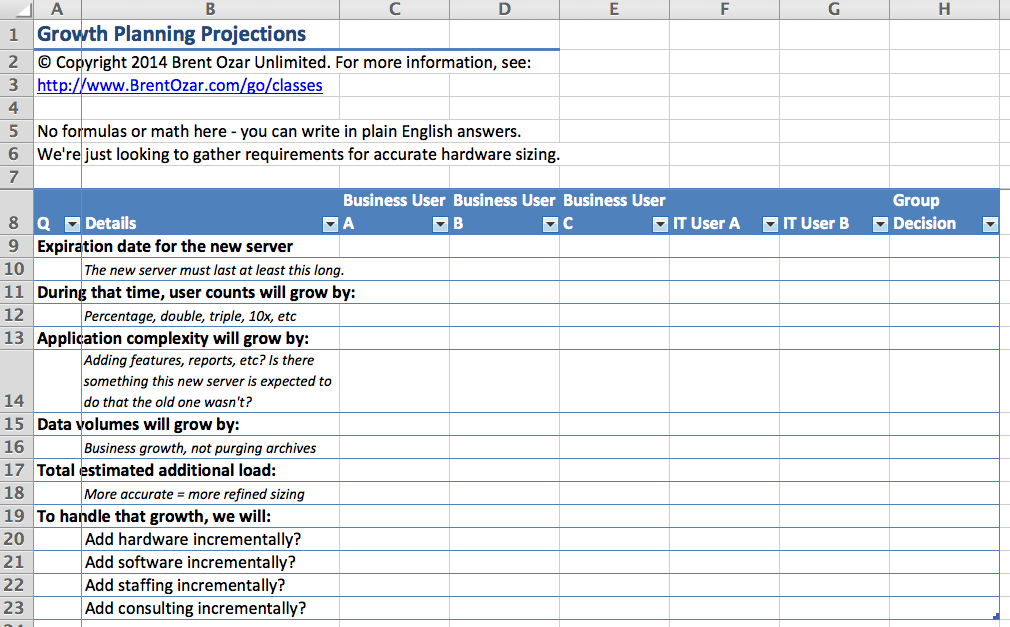
We need to get written answers from the business using a simple worksheet. In our Virtualization, Storage, and Hardware video class, students get an Excel spreadsheet to use when interviewing the business users about the project requirements. Here’s one of the tabs:

Server Sizing Worksheet, Page 2

Start with the first question: how long does this SQL Server need to last? This can be measured in time (like 3 years) or in business growth (like until we quadruple the number of active users).

There are columns for several answers because database servers are rarely one-person projects – people have lots of different opinions, so everybody fills in their answers, and then we come to a group consensus in the last column.

The next several questions ask about how the business, application, and data will change during that time. We’re not looking for exact percentages, but just vague ideas. Are we going to double the number of end users per year? Are we going to start saving files in the database in the next version of our app?

This isn’t just about query performance – remember, we have to be able to do our backups, DBCCs, and restores fast enough to meet the business goals for RPO and RTO. After all, the business isn’t likely to say, “Since we’re growing fast, it’s okay if you lose more data.”

Who Really Answers These Questions?

Every time I teach this class in person, someone raises their hand and asks, “Do business people ever actually have answers for these questions?”

Not usually.

But it opens their eyes to your challenge as a database administrator. How are you supposed to build a perfect server to handle load that the business can’t define?

The less specific the business goals are, the more agile your server design needs to be.

That’s Where Virtualization Shines.

When you’re handed a wildly vague set of business requirements, it’s easy to build a virtual machine sized for today, and then add additional capacity to handle growth of data, users, and app complexity.

But here’s the kicker: you have to actually monitor the growth.

And just buying an off-the-shelf monitoring product ain’t gonna cut it.

Off-the-shelf monitoring products don’t tell you when your number of active users have doubled, when your incoming order rate has quadrupled, or when you’re keeping ten years of sales history instead of two. You have to work with the business to define a list of business metrics that you can monitor via database queries, and then add those metrics to your monitoring software.

For example, when I ran a sales system, I added monitoring queries for the number of orders per day, the number of active salespeople, and the number of orders we kept in the active database. I used my monitoring tool to create line graphs of those numbers every day, and then I sent that report to the stakeholders every month. I could point to the graph and say, “Sales volume has grown by forty percent, and we haven’t archived any data. Without additional investments in hardware, tuning, or staff training, you can expect that performance will degrade accordingly.”

Lines like that open wallets.

But You Gotta Understand Databases, Virtualization, and Business.

This is where I got so frustrated with guidance that says things like, “Set up one data file per virtual core.” If you’ve got a database that’s doubled in size over the past year, and you need to add four additional vCPUs, that guidance means you would have to:

  • Add four LUNs on every SQL Server (primary, disaster recovery, reporting, QA, development – because you’re going to refresh those databases from production)
  • Add four more identically sized data files (which instantly gives you hot spots on those empty files)
  • Rebuild your clustered indexes to even out the load on the old and new data files
  • Watch your transaction logs and backup sizes during this time because you’re going to have a huge change rate

But the one-file-per-core never includes guidance like that. They just expect you to “add files” and call it a day, and they ignore the technical and business side effects. Does the business really want to take a huge slowdown impact while all this happens? Especially if they’re in the midst of a growth spurt? Of course not.

Instead, you have to look at the bottleneck that the SQL Server is really facing, and identify the best way to fix that bottleneck with the least impact to the business.

Growth Planning Questions

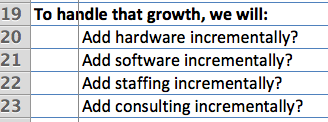
That brings us to the last set of questions on that page of the planning spreadsheet – how will we handle growth when it happens?

If we suddenly acquire our biggest competitor and need to double the data and user load, or if we run a Super Bowl ad, how will we proactively keep the database fast? Are we going to be able to tune code or hire staff – or are we only able to throw hardware at the problem?

Another way to visualize this for management is my Manager’s Guide to Tuning Code – it shows management what your options are, and lets them choose your avenues.

Don’t get me wrong – I love throwing hardware at a problem when it’s the easiest, cheapest, fastest way to solve the pain. But remember that while virtualization makes it easier to throw hardware at a problem quickly, that may not be the easiest/cheapest/fastest solution. And even if you do it, you need to understand the real side effects of tricks like “one data file per volume per core” – because it’s nowhere near easy/cheap/fast in the real world.