Blog

Announcing More Online SQL Server Classes

Company News
0

Our recent class lineup did pretty well, so now we’ve got a new round:

Always On Availability Groups: The Senior DBA’s Field Guide with Edwin Sarmiento – December 20-22, $2,995 – Learn clustering, design, topologies, readable secondaries, monitoring, and troubleshooting.

Expert SSIS Training with Andy Leonard – December 4-5, $1,995 – For SQL Server Integration Services (SSIS) professionals responsible for developing, deploying, and managing data integration at enterprise-scale.

Expert Performance Tuning for SQL Server 2016 & 2017 with Brent Ozar & Erik Darling – November, January, and April – $995 – Your job is making SQL Server go faster, but you haven’t been to a performance tuning class since 2016 came out. Get up to speed in one day. (This is the same class we’re teaching at the PASS Summit with over 300+ folks signed up – but we’ve heard from a ton of folks who can’t make it to Seattle, and wanted us to teach it online, so here you go.)

All of these classes include Instant Replay, the ability to watch the class recordings for one year after your class.

All of these are 50% off right now!

Why? Because we’re going to run a 50% off sale during Black Friday, and we don’t want you buying now, and then doing a giant facepalm when we do the sale. The classes do have a limited number of seats, too, so grab yours now and beat the Black Friday crowd. See you there!

Why Columnstore Indexes May Still Do Key Lookups

I was a bit surprised that key lookups were a possibility with ColumnStore indexes, since “keys” aren’t really their strong point, but since we’re now able to have both clustered ColumnStore indexes alongside row store nonclustered indexes AND nonclustered ColumnStore indexes on tables with row store clustered indexes, this kind of stuff should get a closer look.

Of course, the effects of the sometimes-maligned Key Lookup are sometimes pretty lousy.

When datatypes aren’t supported by columnstore

You may need to mix indexes in cases where you have columns with unsupported datatypes, like MAX, or perhaps just datatypes that don’t have aggregate pushdown support in ColumnStore yet. I hesitate to make a list here, since it could change in a CU, but here’s what the MS doc currently says about it:

The input and output datatype must be one of the following and must fit within 64 bits.
Tiny int, int, big int, small int, bit
Small money, money, decimal and numeric which has precision <= 18
Small date, date, datetime, datetime2, time

Got it? Also!

The aggregates are MIN, MAX, SUM, COUNT and COUNT(*).
Aggregate operator must be on top of SCAN node or SCAN node with group by.
This aggregate is not a distinct aggregate.
The aggregate column is not a string column.
The aggregate column is not a virtual column.

So uh, anything outside of those datatypes and aggregates can potentially inhibit optimal performance (in case you’re wondering, this sentence wasn’t written by a lawyer).

Demoing it with a clustered columnstore index

Here’s how I set the tables up, finally. Remember kids: loading large volumes of data into tables with nonclustered indexes is dumb.

Don’t do it.

We now have the most optimal setup to get a Key Lookup plan: tables with clustered indexes and God-awful single column nonclustered indexes (okay, so there are exceptions here, but for the most part…).

Come and take it

First up, we need a date to work with. I know most of you can sympathize with that problem.

Q: which function do DBAs have the biggest problem with in real life?
A: GETDATE()

Actually, I’m told DBAs make great spouses, because you barely have to see them.

What was I saying? Date? DATE!

Date.

If you want an explanation for the 1 = (SELECT 1), head over here. Otherwise, let’s write some queries.

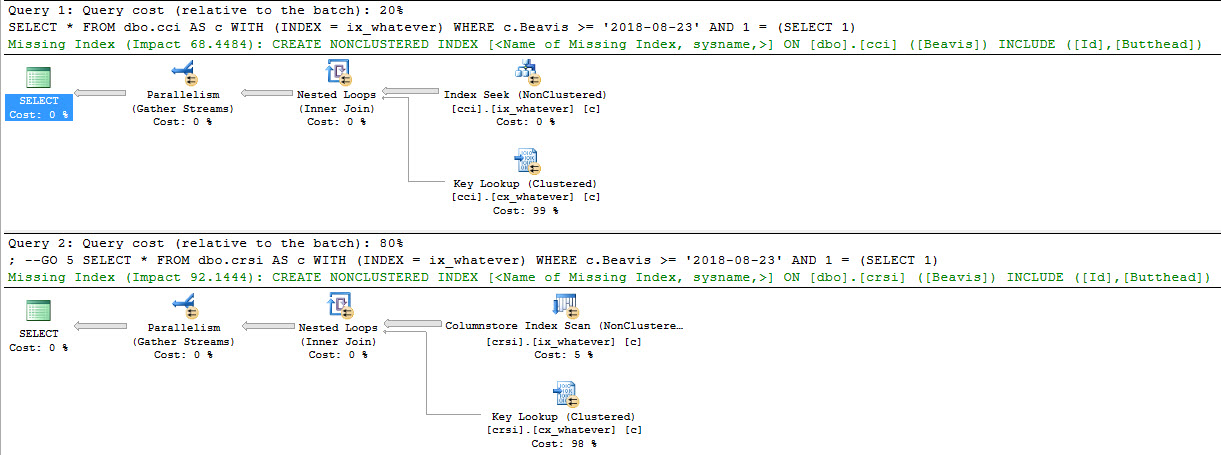
For me, that query returns a value of 2018-08-23. The first thing I discovered is that you really have to jump through hoops to get the Key Lookup to happen. The optimizer’s adversity to choosing Key Lookup plans with ColumnStore indexes is well-meaning.

With regular row store indexes, returning 28k rows out of 10,485,760 with a Key Lookup plan would be a no-brainer for the optimizer.

Hooray for index hints.

Where the wood at?

Looking at screencaps of query plans isn’t too fun, is it? I stuck them on PTP for anyone interested.

And for extra credit, let’s see what sp_BlitzCache says about our queries.

Shortwide

The warnings shown by sp_BlitzCache

It’s nice when you don’t have to do any work to find problems. That’s why I do all the work I do on sp_BlitzCache and sp_BlitzQueryStore. I want to make your life better and easier. Let’s look at some of the warnings we have for each query:

  • Clustered ColumnStore: Missing Indexes (1), Parallel, Expensive Key Lookup, Plan created last 4hrs, Forced Indexes, ColumnStore Row Mode
  • Clustered Row Store:  Missing Indexes (1), Parallel, Expensive Key Lookup, Unused Memory Grant, Plan created last 4hrs, Forced Indexes

Without opening a plan or looking at a single tool tip or hitting f4, we know some things:

  • SQL is angry about missing indexes
  • We have expensive key lookups
  • We’re forcing indexes
  • We have a ColumnStore query operating in row mode instead of Batch mode
  • We have an unused memory grant
  • Both plans are relatively new in the cache (duh)

But focusing on the point of the post, which we should probably do, something kind of obvious happens.

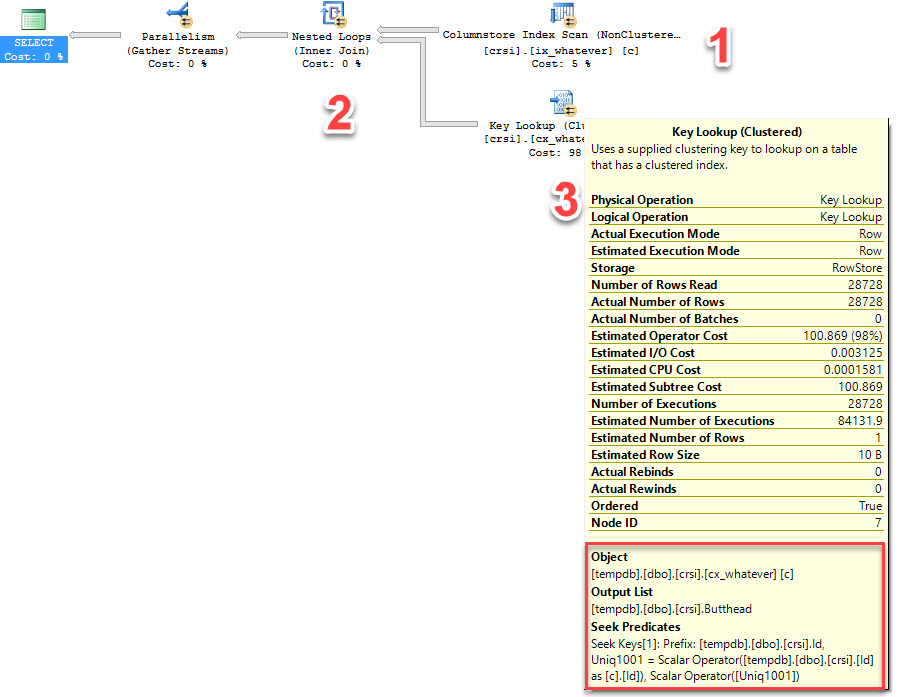
The query that uses the nonclustered ColumnStore index does a typical Key Lookup. It’s able to (1) scan the ColumnStore index in Batch mode, (2) pass those rows to a Nested Loops join, and then (3) ‘join’ the nonclustered index to the clustered index on the clustered index key column.

1, 2, 3, and to the 4

But clustered ColumnStore indexes don’t have key columns.

Let’s look at what happens there!

Loc Out

I’m going to assume that this is a bit like a RID Lookup in a plan using HEAPs. Without a clustered index key column, we need to rely on internal metadata to locate rows. That’s what the Seek Keys[1]: Prefix: ColStoreLoc1000 = Scalar Operator([ColStoreLoc1000]) part of the Key Lookup is doing. Interesting!

Fun yet?

This isn’t a knock against clustered ColumnStore indexes. The team behind them has done awesome work to make them more usable and less painful (remember back when they didn’t work with Availability Group secondaries? Of course you don’t!). I wrote this because I’ve gotten increasingly interested in ColumnStore as it becomes more powerful, and as more people start hopping on newer versions of SQL Server where they’re a viable path to fixing real problems.

Thanks for reading!


Answering Questions For Fun And No Profit

Humor, SQL Server
2 Comments

I love answering questions about SQL

My forum of choice is dba.stackexchange.com because I find the voting and point system with badges for being a decent internet person addictive.

If you like more traditional forums, SQLServerCentral.com has a lot of really smart people on it as well.

When I post questions or answers, I try to make them at least vaguely entertaining. Sometimes it works better than others, and I’m sure the way I write annoys some people who prefer more dry Q&A. I just have a hard time not having a good time.

Famosity

After all, no one likes a finger-wagger.

Personality Plus

Because we send people over to dba.se so often, Brent used his magic internet power to make the company Twitter account send out a link to our answers. Why? So you know that when we send you there, we’re not just punting you off to someone else for help. We really do answer questions all the time.

If you’re going to post a question, make sure to include as much detail as possible. Error messages, query plans, example data, and this one is really important: if you’re going to ask for help with code, make sure you post what you’ve tried, or where you’ve gotten stuck.

The fates are cruel to those who don’t.

And remember! It’s not just SQL Server questions. Folks over there use Oracle, Postgres (the vegan version of Oracle), and even… MySQL. Weird.

Style Guide

If you’re an aspiring blogger, questions on sites like this can be great inspiration for posts.

Heck, doing Q&A is a great way to get comfortable blogging, because it gets you somewhat used to writing, formatting, adding in pictures and links, and all that fun stuff.

It can be a little intimidating getting over the fact that your questions and answers will be scrutinized by millions of strangers, so pick a topic that you’re comfortable with or that you’re interested in, and wait for a question to come along that’s in your wheelhouse.

I promise I’ll upvote you.

Probably.

But I still can’t answer your PowerShell questions.

Thanks for reading!

Brent says: for years, I’ve refused to answer questions privately for free because it just doesn’t help anybody. Post your answers in public, let other folks improve ’em, and let everyone find good answers for free, fast. Seriously, I read some of Erik’s answers just for entertainment purposes. Upvoting means laughter.


Breaking News: Using TDE on 2016? Doing Backups? Time to Patch.

Normally, when you use Transparent Data Encryption (TDE) to secure your database at rest, you can’t get backup compression. Encrypted data basically looks like random data, and random data doesn’t compress well.

SQL Server 2016 introduced the ability to compress your TDE databases. Yay!

Unfortunately, it has bugs that can leave you unable to restore the backup. Boo!

Even worse: compression can get turned on even if you weren’t aware. Booooo! When a database has multiple files created or you’re backing up to a URL, the compression is enabled automatically, and your restore might not work.

Microsoft now says you need to be on SQL Server 2016 RTM CU7 or SP1 CU4 or higher.

Facepalm 2.0

Database administration is hard.

When you install a new version of SQL Server, you get new features – and sometimes, you’re not told about them. For example, when 2016’s TDE compression came out, nobody told you, “If you back up across multiple files, your backups might suddenly be compressed.” You didn’t know that you had a new thing to test – after all, I don’t know a lot of DBAs who have the time to test that the new version of SQL Server successfully performs restores. They restore their production databases into the new version, test a few things, and declare victory – but testing restores FROM the new version’s backups isn’t usually on that list.

Then after you go live, hopefully you start testing your restores, implementing log shipping, and refreshing your dev boxes. That’s when you suddenly discover that your backups aren’t.

Change equals risk: every time you put new software into your environment, you’re gambling that it’s going to improve more than it breaks, and that you can fix the things it breaks. That doesn’t mean you shouldn’t ever change – it brings rewards, too – but just don’t go in naively thinking every piece of software is bug-free, and you need to keep up with all of the different Microsoft SQL Server team blogs. I wish that in 2017, there was a better way to get urgent SQL Server news from Microsoft – but until then, I’ll keep recapping to get the word out about urgent stuff like this. You’re welcome. You can buy me drinks at Summit.


What Would You Put in SQL Server 2019?

SQL Server 2019
186 Comments

If you were leading Microsoft’s development programs, what would you add or change in SQL Server 2019?

Forget licensing or pricing changes – that’s dictated by the marketing teams, and those decisions are made really close to the release date. Instead, let’s think bigger: what are the really big improvements you’d make that would really drive increased adoption?

What features do you think would win people over from expensive platforms like Oracle or DB2, or would you focus on the open source MySQL or PostgreSQL crowds, or the outright NoSQL users?

Erik Says: We used to make posts like this half jokingly, but with MS embracing Community Driven Development, stuff like this can potentially go a lot further. Seriously, take the time to comment, or write your own blog posts about features you want. If you keep quiet, it’s your fault if you don’t see what you want in the product. Me? I’m still pulling for unlogged tables.


The Ghosts of Temp Tables Past

Humor, SQL Server
18 Comments

True story

You may find it hard to believe, but I recently had to fix a small bug in sp_BlitzCache and sp_BlitzQueryStore.

Since both stored procedures have similar functions, they also share some temp table names (mainly the ones for parsing down XML nodes to more manageable chunks).

In the window where I was making adjustments to sp_BlitzCache, I had created one of those temp tables. When I went to run sp_BlitzQueryStore, I was flooded with invalid column name errors. Same temp table name, different column names.

Now, I hadn’t made any changes to BlitzQueryStore yet, and it had been running without error as of the last FRK release.

When I ran sp_BlitzQueryStore from a different SSMS window, it ran fine.

Even though the proc explicitly checks for and drops my temp tables, it was reading from temp tables my session created with different column names.

So what gives?

Demonstrate My Syntax

You’ll need a couple SSMS windows for this.

Run this in one of them. Note that the column name in #t1 is t, here.

In window #2, run this. Note that the column name in #t1 is c, here.

You should get this error (sometimes you have to run the create table statement a couple times in a row, then the proc — I can’t nail it down exactly).

Msg 207, Level 16, State 1, Procedure temp_maker, Line 13 [Batch Start Line 9] Invalid column name ‘t’.
Msg 207, Level 16, State 1, Procedure temp_maker, Line 17 [Batch Start Line 9] Invalid column name ‘t’.

Weird!  FWIW, it also throws the same error if I check for the OBJECT_ID of #t1 instead.

Another dumb creation

Strange newfound respect for tables named #dumb.

Chaos Chaos

I’m sure there’s a fun explanation for this. Perhaps it’s something to do with deferred compilation, or the magic of temp tables in stored procedures.

This isn’t the most practically helpful post. It’s mostly so I remember to avoid doing this again in the future.

And who knows, maybe it’ll save you some time, too.

Thanks for reading!

Reference posts:
Linchi Shea
Sebastian Meine


Kickstarter-Style Ideas for our PASS Summit Pre-Con

SQL Server
34 Comments

Boy, have I got a weird challenge for you, dear reader.

When Erik & I started building Expert Performance Tuning for SQL Server 2016 & 2017, our PASS Summit pre-con, I talked with the PASS staff about the attendance record for pre-cons. I thought, “Wouldn’t it be cool if we had the biggest pre-con ever?”

Turns out the record attendance number is 269. Gulp. That’s a pretty big number to beat, especially when pre-con sales might be down this year given the Halloween date, and the fact that there’s a good lineup of pre-cons on Tuesday. So you can imagine my surprise when I asked for a sales update last week, and…

Sure, they look trustworthy

You’ve already bought 279 seats.

You beat the record, and we’re still over a month out from the event!

So that got us to thinking in the company chat room: what would it be like to run a Kickstarter-type set of stretch goals? What would you folks want if we hit 300, 350, or 400 attendees?

Keep in mind that they shouldn’t be bulky physical items like t-shirts or hoodies because we can’t easily drag 300 t-shirts into the conference center. But what about virtual goods, or small things that are easy to carry in?

We’re already giving every attendee an Enterprise/Everything Bundle for 1 year, but here’s some of the other things we’ve thought about as stretch goals:

  • Longer bundle access (say, 2 years or 3)
  • Bundle access for a friend, too
  • Special 1-time-only commemorative stickers

That’s where you come in, dear reader: what would you want? We’ll pick our favorites this week, and if you were the first one to suggest something we end up doing, we’ll give you a free Enterprise/Everything Bundle too.

Update – here’s the goals we came up with.


Why You Should Use Top 100, But Not More Than That

Execution Plans, Memory Grants
0

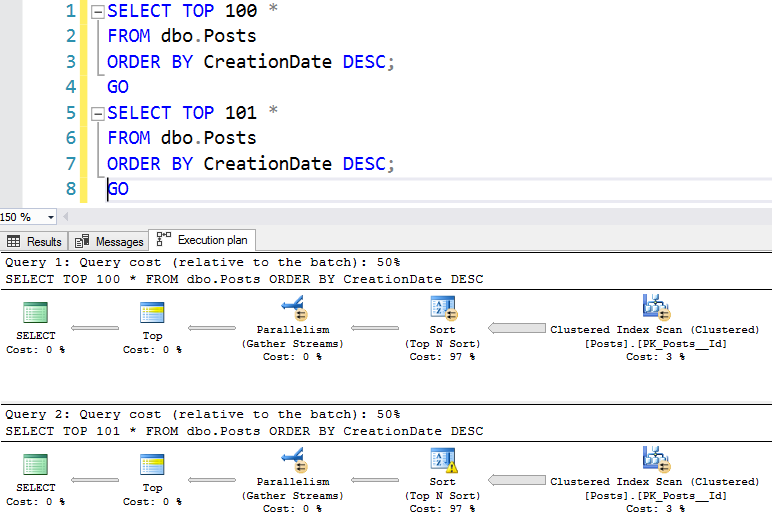
Earlier this week, I showed you two nearly identical queries and their estimated plans:

One of these things is much like the other

They look pretty darned identical – so how much worse can one query be? Here’s how much worse:

  • Top 100: 51.0 seconds duration, 141.6 seconds CPU time
  • Top 101: 160.0 seconds duration, 244.0 seconds CPU time

That’s right: adding just one row made the query take over three times longer. Let’s investigate the actual plans:

Note the yellow bang on the 101’s sort

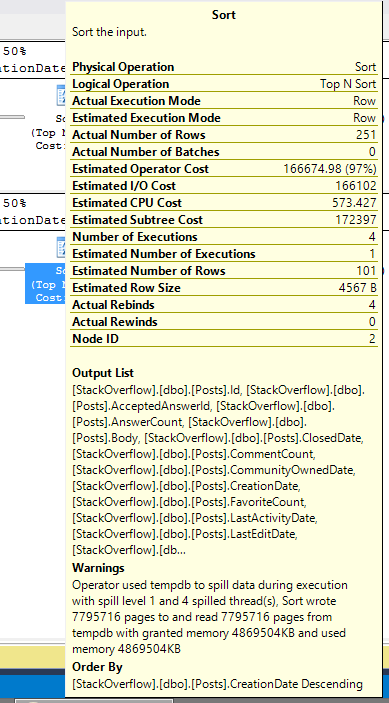
The TOP 101’s sort spills to disk – and it’s tempting to call that the root cause, because we all know spilling to disk is going to be slower. Hover your mouse over the sort, and you can see the spill details:

Crying over spilled pages

But just one row couldn’t cause a spill to disk by itself, would it? Surely SQL Server estimated enough memory in order to handle just one extra row coming back.

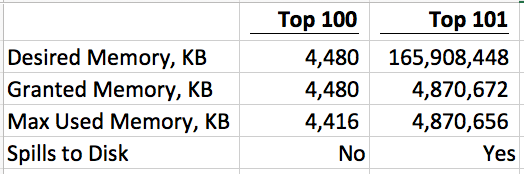
Dig a little deeper, and look at the amount of memory desired for each query. You can see this (in both the estimated and actual plans by right-clicking on the SELECT operator in the plan, click Properties, and head over to the right side properties window under Memory Grant Info. Here’s a summary:

Memory grant comparison

Gulp. I’m running a SQL Server VM with max server memory at 26,000, and this one TOP 101 query all by itself grabs 5GB of my memory – and holds it for the entire 2-minute duration of the query!

But why are the memory grants so different?

As Geoff Patterson pointed out in Part 1’s comments, SQL Server uses one sorting method for TOP 1-100 rows, and a different one for 101+ rows! Back in 2010, Paul White blogged about this TOP 100/101 problem and how even different data types can influence the memory grants.

Query authors rarely know this magic tipping point, so I see folks writing SELECT TOP 200 or SELECT TOP 1000 without understanding the additional cost. (And it’s not that TOP 100 is faster 100% of the time, either – read Paul’s post for an example where it’s actually slower.)

Query tuners rarely know it either, and they can’t spot it just by glancing at the execution plan. There’s nothing in the plan that clues you in to a different sort method – you just get a plain ol’ sort operator, and that’s it.

Thanks to the SQL Server team’s efforts lately, this kind of problem is much easier to spot.

How to Spot The Problem Faster in 2012+

First, get on a current patch level for 2012/2014/2016. Microsoft added memory grant details in the 2012 SP3 DMVs.

Then, get on SSMS 2017, too. If you’re lucky enough to have the actual plans for each query, you can also see this with the compare-showplan feature:

Why your boss needs to buy you the widescreen monitor

If you’re not that lucky – and I rarely am – then you probably have to troubleshoot it live as it’s happening, but without running the queries. In this case, check out sp_BlitzFirst @ExpertMode = 1, and/or sp_BlitzWho – both of which show you running queries, what memory grants they’ve picked up, and which queries are still waiting for memory grants:

We also have a Cajun version called sp_BlitzWhoDat

Wanna learn more of this stuff?

Erik and I will be covering these DMVs and the ways we use ’em in our Summit 2017 pre-con, Expert Performance Tuning for SQL Server 2016 & 2017. There’s over 200 seats sold, but there’s still seats available – get yours before they sell out.


Optional Parameters and Missing Index Requests

That’s when it all gets blown away

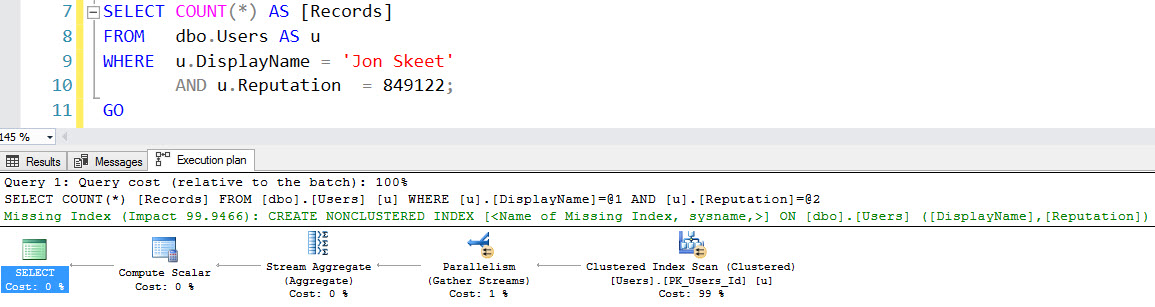
At one point or another in everyone’s SQL-querying career, they end up writing a query that goes something like this:

These are often called optional parameters, and if you spend any time looking at queries, this will make you shudder for many reasons. Poor cardinality estimates, full scans, etc.

One thing that often gets overlooked is that queries constructed like this don’t register missing index requests.

As usual, using the Stack Overflow database for a demo.

Askance

With literal values, the optimizer goes into index matching mode, finds nothing helpful, and tells you all about it. The missing index request is pretty predictable, on DisplayName and Reputation. Makes sense so far, right?

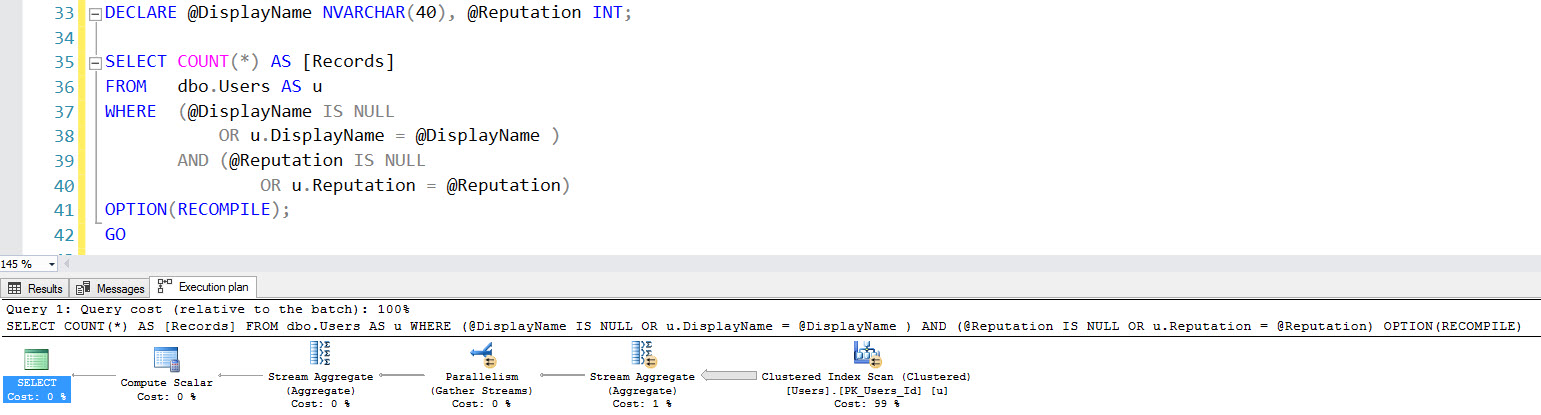
What about with NULL variables?

Kiss your missing index request goodbye

You may blame the NULLs, but it’s not their fault.

Milli VaNULLi

What about with a RECOMPILE hint? Someone on the internet told me that if I use RECOMPILE I’ll get an optimal plan.

Like Crest on plaque

Someone on the internet was, well, not wrong, but not right either. By most standards, you’ll get an optimal plan. But still no missing index request.

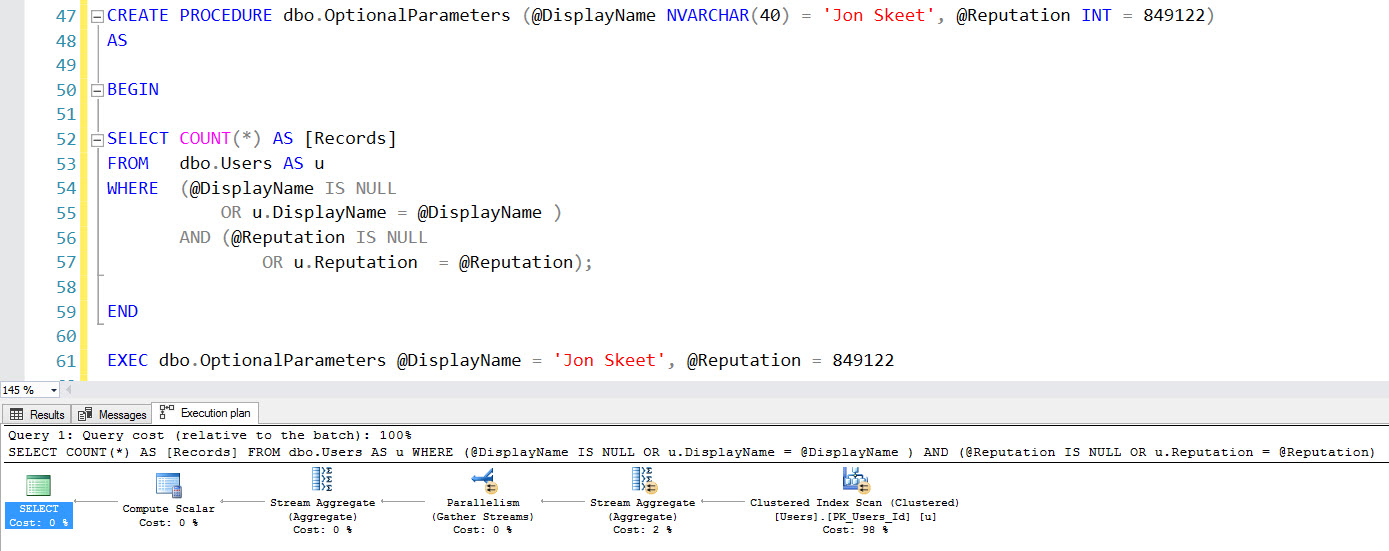
Using a stored procedure doesn’t help with that, either (unless you recompile, but that may not be ideal for other reasons).

Swamp of Sadness

Big Deal?

If we add an index with the correct definition, all of those queries will use it as written.

That’s not exactly the problem. Nor is the missing index request being missing a direct affront to anyone who has been tuning queries for more than 30 seconds. It’s obvious what a good enough index would be for this query.

What could be very misleading is if you’re using the DMVs to round up missing index requests, you’re unfamiliar with the overall schema and current index design, or if the optional parameter searches are part of a larger query where the index usage patterns being sub optimal aren’t apparent.

The bottom line on this type of search is that it’s not SARGable. Like using functions and other icky-messies across joins and where clauses, it will prevent missing index requests from popping up. And while missing index requests aren’t perfect, they are a valuable workload analysis tool, especially to beginners.

Thanks for reading!

Brent says: This is such a good example of why you need at least 3 tuning passes for performance tuning: run sp_BlitzIndex looking for obvious index improvements, then run sp_BlitzCache to tune the queries that are still slow, then after tuning them, run sp_BlitzIndex one more time to catch the new missing index requests.


Indexing for Windowing Functions: WHERE vs. OVER

Life Is Messy

Demo queries have this nasty habit of being clean. Even using a pit of despair like Adventure Works or World Wide Importers, it’s easy to craft demo queries that fit the scenario you need to make yourself look like a genius. Stack Overflow, in all its simplicity, makes this even easier (lucky me!) because there’s nothing all that woogy or wonky to dance around.

While working with a client recently — yes, Brent lets me talk to paying customers — we found a rather tough situation. They were using Windowing functions over one group of columns to partition and order by, but the where clause was touching a totally different group of columns.

The query plan wasn’t happy.

Users weren’t happy.

I was still dizzy from being on a boat.

Optimal?

If you’ve been reading the blog for a while, you may remember this post from about two years ago. Over there, we talked about a POC index, a term popularized by Itzik Ben-Gan.

But how does that work when your query has other needs?

Let’s meet our query!


We have a Windowing function that partitions and orders by three columns, and a where clause that uses three other columns. If we stick a POC index on the Posts table that prioritizes performance of the Windowing function, what happens? I’m going to put the three where clause columns in the include list to avoid troubleshooting key lookups later.

Now when I run the query, here’s my plan with — you guessed it! A missing index request.

You’re a wang

The missing index request is for nearly the EXACT OPPOSITE INDEX we just added. Oh boy.

96.8%! I must be a bad DBA. I made a backwards index. I hope someone automates this soon.

Okay, so, let’s create an index close in spirit to our original index. Just, y’know, backwards.

When we re-run our query, what happens?

Astronaughty

Oddball

Let’s pause here for a minute. Stuff like this can seem witchcrafty when it’s glossed over in a blog post.

The index I created is awesome for the Windowing function, and the index that SQL registered as missing was awesome for the where clause.

When I have both indexes, SQL chooses the where-clause-awesome-index because it judges the query will be cheaper to deal with when it can easily seek and filter out rows from the key of the nonclustered index, and then pass only those rows along to the Windowing function.

Now, it can still do this with the Windowing-function-awesome-index, because the where clause columns are included, just not as efficiently as when they’re key columns.

The trade-off here is a Sort operation to partition and order by for the Windowing function, but SQL says that will still be far cheaper to sort a bunch of data

Time bomb

If you’re query tuning with a small amount of data, you’ll take a look at these query costs, stick with the where clause awesome index, and go get extra drunk for doing a wicked good job.

Here they are back to back.

Sortless
Sorta kinda

What happens when we include more data?

Going back a year further, to 2015, the costs are close to even. The Sortless plan costs about 159 query bucks, and the Sorted plan costs about 124 query bucks.

Going back to 2013, the Sortless plan now costs 181 query bucks, the Sorted plan costs 243 query bucks, and the Sort spills to disk.

Little Blue Spills

So what’s the point?

Missing index requests don’t always have your long term health in mind when they pop up. Some may; others may just be a shot and a beer to get your query past a hangover.

If I go back and run the ‘2013’ query with only the original index on there (the one that helps the Windowing function), there’s still a missing index request, but with a lower value (75% rather than 98%). Part of this is due to how costs are estimated and where SQL expects the sort to happen (disk vs memory).

In our case, the Sort was a bit of a time bomb. At first, it didn’t matter. As we included more data, it got worse. This is the kind of challenge that a lot of developers face as their app goes from a couple hundred clients to a couple thousand clients, and exactly the kind of thing our Critical Care helps with.

Thanks for reading!

Brent says: this isn’t just about missing index hints in query plans, either: it’s also a great example of why you have to be a little bit careful with the missing index DMV recommendations, too. sp_BlitzIndex would report this index as missing, and you won’t know which queries are asking for it (or whether they’ve gotten better or worse.) Every now and then, you’ll add a missing index and performance will actually get worse – so you’ve also gotta be looking at your top resource-intensive queries via sp_BlitzCache. In this example, after you’ve added Clippy’s index, the now-slower query would show up in sp_BlitzCache with no missing index hints, and you’d need to know how to hand-craft your own.


How Much Can One Row Change A Query Plan? Part 1

Execution Plans
13 Comments

Last week, Erik showed two queries that were aaaaalmost identical, with only one extra column – and the execution plans were dramatically different. Adding just one eensy column made all the difference in the world.

Now, check out these two queries – the first asks for top 100, and the second asks for top 101:

They produce estimated plans that seem identical (PasteThePlan), even down to the estimated costs – note that they’re both 50%:

One of these things is much like the other

But one of these has a couple of very, very bad performance issues, and if you look very closely in the plan’s XML, you’ll discover the gotchas.

For the details, read on in Part 2.


How Much Can One Column Change A Query Plan? Part 2

What happened in Part 1?

Join Elimination, naturally. Until the end. My copy of the Stack Overflow database doesn’t have a single foreign key in it, anywhere.

If we go down the rabbit hole a couple steps, we end up at a very quotable place, with Rob Farley.

2. Duplicated rows

Not necessarily duplicated completely, but certainly a row in our original table may appear multiple times in our result set, if it matches with multiple rows in the new table. Notice that this doesn’t occur if the join-fields (those used in the ON clause) in the new table are known to be unique (as is the case with a Foreign-Key lookup).

When we select a distinct list from one column, or create a unique index on one column, the optimizer knows that that one column is unique and won’t produce multiples of a value. I’m assured by mathematicians that even if you left join two distinct lists, it won’t produce duplicates.

With more than one column involved in a DISTINCT/GROUP BY, there may be duplicates of a single value, which would change our results. There’s a little more information about this over here as well.

How does that apply to us?

The results are going to be every DisplayName in the Users table, but the way our left joins are written to DISTINCT/GROUP BY the list of Ids that each produces, we know that each would only occur once.

That isn’t true in the last join, where we messed with columns. That join may produce multiples of some Ids with the multi-column distinct, which means the join can’t safely be eliminated. You could end up needing to show some DisplayNames more than once, in other words.

Similarly

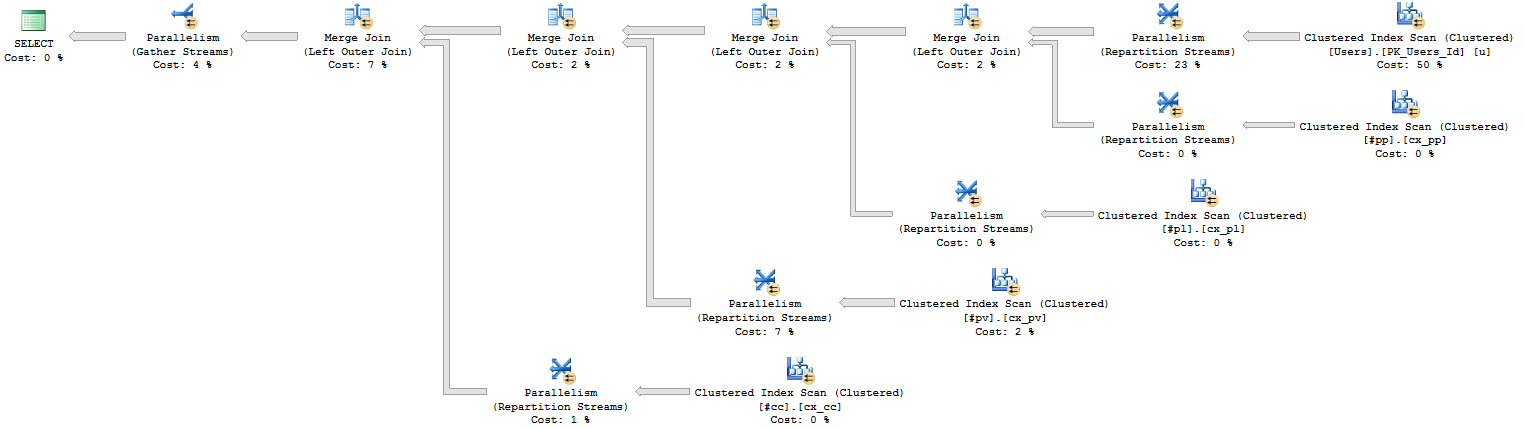
If I re-create all my joins by dumping them into temp tables, we get a similar effect. A difference I want to point out is that I’m not joining other temp tables to each other, like in the first query.  That’s why the “big” plan only has two joins. The multi-column-duplicate DISTINCT changed things up the whole tree of joins. Funny, right? Hysterical.

Here’s what happens.

Expected?

If I go back and add in the joins, the plan changes again. The duplicate producing join has a domino effect on the other joins — now they can’t be safely eliminated.

Dupes come out at night

Want a simple example?

If you’d like something a bit easier to follow along with, use this example.

Thanks for reading!


Creating Basic Indexes on the Stack Overflow Public Database

Indexing, Stack Overflow
0

My public SQL Server database copy of the Stack Overflow data dump only includes clustered indexes by default. I want to keep your database size as small as possible for quick downloading.

But like any database – when you create it, should you add your own indexes to make queries go faster? The answer lies in knowing your workloads, but we don’t usually know our database workloads until they start.

The general generic advice is to start by indexing your foreign key relationships between tables. After all, if tables are related, you’re probably going to join on them by those fields. I like this advice for brand-new databases where we truly don’t know the workloads at all – although I’ll quickly go back and revisit these indexes once they’ve been in production (or even in testing) for a few weeks.

With that in mind, here’s how to index the foreign key type fields in Stack, and here’s a Github Gist for it if you’re into that kind of thing:

Mind you, these aren’t officially foreign key relationships: the public database doesn’t ship with those. (I don’t have religious feelings about whether you should enforce foreign keys in the database.)

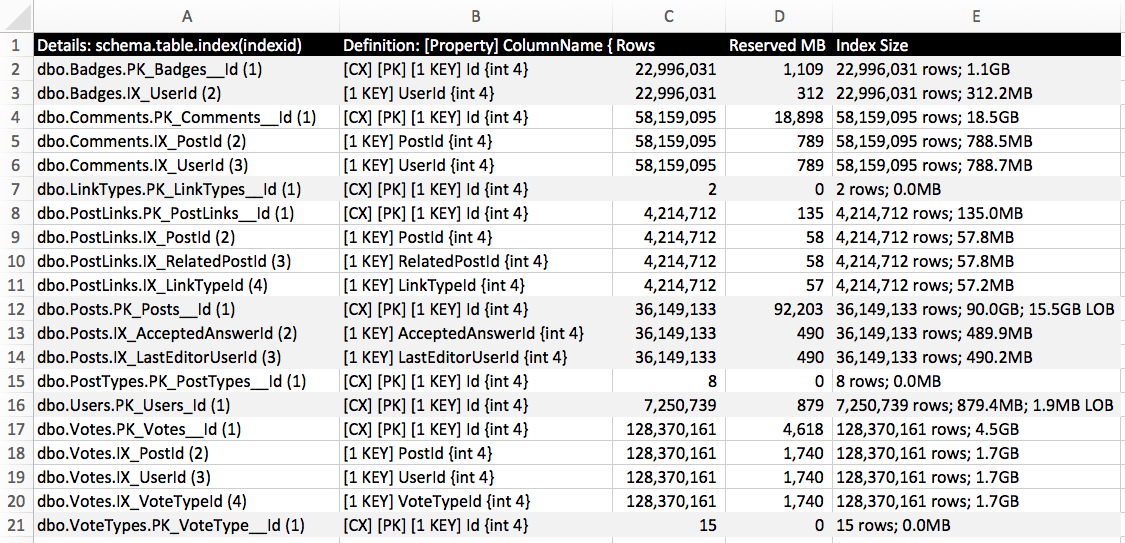
After creating those indexes on the 2017-06 data dump, here’s what sp_BlitzIndex @Mode = 2 has to say:

sp_BlitzIndex @Mode = 2
sp_BlitzIndex @Mode = 2 – click to zoom

Generally speaking, for OLTP tables, I recommend that folks start with 5 or less indexes per table, with 5 or less fields per index. Even though we’re not even close to hitting that number, you’ll notice that the nonclustered indexes for a couple of tables – PostLinks and Votes – have now grown larger than the size of their original clustered indexes. That’s because these tables are really narrow, and most of their fields define relationships to other tables.

At the other extreme, the Posts table has only 1GB of nonclustered indexes – but 90GB of data on the clustered index. That’s a wide table, with some big ol’ NVARCHAR fields. We might be able to afford several more indexes on that table – depending, of course, on our read/write ratios.

sp_BlitzIndex @Mode = 1 gives us the summary:

sp_BlitzIndex @Mode = 1

In all, we’ve got 115GB of clustered indexes, and 8GB of nonclustered indexes. The far right ratio column refers to size only, not quantity – but either a size or a quantity ratio gives you something to start thinking about when you’re evaluating index levels on an existing database.


SQL Server on Linux is the New SQL Server on Windows Core

SQL Server 2017
31 Comments

When Windows Server 2012 came out with Core, I heard some rather suspicious things at conferences like:

  • “I’ll be able to take way less patching outages!”
  • “It’ll be so much faster because it has less overhead!”
  • “Everyone will learn automation and be more powerful!”
  • “It’s the way of the future! Learn it or your career is doomed!”

As you know today, the promise didn’t match the reality. Most people don’t use Windows because it’s hard – they use it because it’s easy, and because working on their servers feels just like working on their desktops. Having a Windows GUI solves their administration problems, whereas learning a new language to do basic troubleshooting causes problems. There just wasn’t a big enough base of DBA staff who knew both SQL Server and PowerShell.

A different kind of bear

The market has spoken: I see SQL Server running on Windows Core less often than I see hairy men walking city streets wearing nothing but shock collars. (I live in a weird neighborhood.)

This year, the buzz will be back.

SQL Server 2017 runs on Linux, and the similarities between that and Windows Core are eerie:

  • Both present big stumbling blocks for traditional Windows DBAs
  • Both work mostly the same, but not exactly, as you can see in the SQL Server on Linux release notes
  • Both solved perceived problems for sysadmins
  • Neither solved a problem for database administrators

So why will you hear so much more about Linux support? Because this time around, it also solves a sales problem for Microsoft. Somebody, somewhere, has a spreadsheet showing that there will be a return on investment if they spend the development, marketing, and support resources necessary. (And I bet they’re right – if you compare this feature’s ROI against, say Hekaton or Polybase, surely Linux is going to produce a lot more new licenses sold.)

There’s just one missing piece: database administrators in the field with the unique combination of both SQL Server and Linux experience. Just like SQL Server on Windows Core, the most challenging problem isn’t technical – it’s a staff availability. But this time around, Microsoft has money riding on this bet (as opposed to Core), so they’re going to be extra-loud about how much they need you, dear reader, to learn to manage SQL Server on Linux.

So should DBAs learn Linux?

In large shops, I find that the Windows team tends to manage day-to-day Windows activities (server setup, hardware repair, patching) and then hands built servers over to the DBAs. As long as the SQL Server service starts, the DBAs take over from there. Heck, in large shops, the DBA team may not even have the rights to log into Windows via RDP.

If your shop is eager to run SQL Server on Linux, it’s probably because you’ve already got an experienced team of sysadmins who know and love Linux. They don’t need your help with the Linux part. In fact, I bet you’ve even already got Oracle running on Linux – so go talk to the Oracle DBAs about the kinds of day-to-day Linux administration tasks they do. You should expect a similar level of involvement.

But just because you don’t have to learn Linux doesn’t mean you shouldn’t. If you have the luxury of a current employer who decides to take the plunge to run SQL Server on Linux, you’ve got a killer opportunity. Take the chance to learn some basics from your Linux sysadmin team – sit with them while they build the servers for your deployments. It won’t make you a worse DBA.


[Video] Office Hours 2017/08/30 (With Transcriptions)

This week, Brent, Erik, and Richie discuss Availability Groups, versions of sp_BlitzIndex™, SQL Server installation issue, backing up SSRS reports, SQL Server on Linux, failovers, detaching/attaching databases, extended events, career progression of a DBA, and more.

Here’s the video on YouTube:

You can register to attend next week’s Office Hours, or subscribe to our podcast to listen on the go.

Enjoy the Podcast?

Don’t miss an episode, subscribe via iTunes, Stitcher or RSS.
Leave us a review in iTunes

Office Hours Webcast 2017-8-30


Can old compat mode databases be in an AG?

Brent Ozar: Larry says, “For a coworker…” Yeah, sure Larry, “Can a database on SQL Server 2012 Service Pack 3 running in 2008 R2 compatibility mode participate in an availability group?” I think so…

Erik Darling: I would say yes.

Brent Ozar: It shouldn’t matter.

Erik Darling: I have a more important question though; what’s stopping you from just trying it?

Brent Ozar: Do it live, that’s what we always say at Brent Ozar Unlimited.

Erik Darling: Well not in prod but, you know – because if you’re embracing availability groups then clearly you’re embracing the pre-prod staging environments; so you can test everything against an availability group. If you want to be a responsible availability group owner you can’t not have that staging environment.

Brent Ozar: And you can do it with one database with 1GB; just create a 1GB database and see what happens.

Erik Darling: Less than 1GB even, could be 512MB.

Brent Ozar: Larry says, “Yes, I swear a coworker. I would have tested it myself.” Good answer, Larry, we appreciate that; you pass.

Erik Darling: Thanks, Larry.


I’m having this odd SSL error…

Brent Ozar: Let’s see here, next up J.H says, “A developer is getting the following error… No one else is having problems, only him. ODBC encryption not supported on the client SSL provider. Client and server cannot communicate because they do not possess a common algorithm.”

Erik Darling: Where are they – from management studio?

Brent Ozar: Management studio and it looks like also via ODBC.

Erik Darling: You know, I ran into something kind of weird like that once, setting up mirroring, and I blogged about it. It was a problem with mirroring, like when I did mirroring with a GUI it set up two different encryption algorithms, for some reason. And then that was a big reason why mirroring wouldn’t work, but man, I got nothing on why management studio would do it. I would just make sure that you’re on the most recent version of management studio and see if that fixes it and breaks everything else.

Richie Rump: Uninstall, reinstall?

Erik Darling: Restart it.


What changed in sp_BlitzIndex since 2014?

Brent Ozar: Peter says, “I’m working on a server that’s got two versions of sp_BlitzIndex. One is old, from 2014, and one is current, 2017. The two versions report a lot of different stuff. Like the old one reports much more stuff. Why would an older version of sp_BlitzIndex report more stuff?”

Erik Darling: I think it’s a default mode. So with the new sp_BlitzIndex, you want to be running in mode four if you want the Full Monty of errors and warnings. Mode zero is kind of like a higher prioritized list of stuff. Mode four is like the deep dive end of stuff. Mode one, two and three are still the same though, where it’s like the aggregate stuff, the current definitions and then just missing indexes. But zero and four – I think four was new, right? Or four was…

Brent Ozar: I think it was new because I think before we just reported every tiny detail and people were freaking out… “Oh my god, I have a missing index on a table with four rows.”

Erik Darling: “What’s happening?” I don’t know, nothing… [crosstalk]


Can’t wait to see you at Summit 2017

Brent Ozar: James says, “I can’t wait to see you guys at the PASS Summit 2017, your pre-con.” Man, Erik has been working hard on his slide decks and I’m like way behind. I blocked out, I think, next week. Next week I’m working on my pre-con decks.

Erik Darling: You’ve already blacked out for next week?

Brent Ozar: I’m drinking so hard, I’m blacking out for next week. Richie, are you bitter that you’re not going to Summit?

Richie Rump: I am. It’s like the first time in four or five years that I’m not going. It’s kind of weird.

Brent Ozar: Halloween, you’ll enjoy it with your kids. That’ll be fun.

Richie Rump: I’m totally happy I’ll be home, but it’s one of those bittersweet things. It’s like it’s good to be home but you kind of want to be around everyone else and doing all the everyone else things.

Brent Ozar: It’s just that we figured out that you love your family more than you love us. We see how it is.

Richie Rump: Yes, and I’m still married, which is amazing. That’s a good thing…

Brent Ozar: To your wife, not your job, yes, that’s the important part.


I’m getting this odd setup error…

Brent Ozar: Kevin says, “I’m trying to install SQL Server for both standalone and clusters and it’s failing. I’m waiting on the database engine recover handle. Any and all help would be appreciated.” I bet you’ve got a bad download. I bet you’ve got a bad ISO file; because I’ve seen stuff like this happen when I had a corrupted ISO file that I downloaded or a corrupted CAB. So I would just try downloading a fresh install to see if that gets you.


How do I back up a folder of SSRS reports?

Brent Ozar: Richard says, “I have a number of reports on our reporting server. I need to back them up within the entire folder. Is there a way to backup my SSRS reports without doing them one at a time?”

Erik Darling: I have no idea.

Brent Ozar: Me neither. Who would we ask? Doug Lane – is it SQLtheatre.com? I think it’s SQLtheatre.com. I’ve got a web browser, let’s go use my web browser.

Richie Rump: DougLane.com…

Brent Ozar: Let’s look and see – and you know, once we start pulling up things, we’re going to pull entirely the wrong website up here…

Erik Darling: I think it’s SQLhater.com…

Brent Ozar: SQLtheater.com. And so from there, you can contact Doug, or not, maybe it shows on the blog…

Richie Rump: Twitter, Stack Overflow.

Brent Ozar: Twitter is good. Stack Overflow is a good way to contact as well.

Erik Darling: I would go with Twitter. He seems active on Twitter.

Brent Ozar: He certainly does; he’s very active on Twitter. If you’re scared of joining Twitter because you go, “Oh no one’s going to want to see what I had for breakfast or listen to my opinions…” That’s true, no one does, but all you do when you use it is go ask the questions you want to ask and go from there.


Can I see a transaction save point while debugging?

Brent Ozar: Speaking of which, Tracy Sells says she, “Tried the SQLhelp hash-tag on this for Twitter a couple of weeks ago and didn’t get any responses.”  So now she’s going to try us. “Is it possible to see the current transaction save point or name of a save point during a debugging session? I have a .NET app looping through code and it’s at a debug statement. Could I look at the SQL Server side, where a transaction is and what its save point is at?” She is a he. Tracy’s a guy. Sorry about that, Tracy. I bet that happens all the time. It happens all the time with me. [crosstalk]…

Richie Rump: Nice.

Brent Ozar: Moments like that, our transcriptionist is trying to rewind that going, “Wait, what did Richie just say?”

Richie Rump: I’ve been doing that for 20 years with that song, by the way.

Brent Ozar:  I don’t think any of us have an idea on that.

Erik Darling: Well, Richie might be able to answer the debugging side, but seeing where a transaction is – I mean, you’re reading the transaction log?

Richie Rump: Are we debugging the stored procedure or are we debugging the .NET?

Erik Darling: I’m guessing they’re doing something with BEGINTRAN and they’re naming their transactions. So it’s like BEGINTRAN TRAN1, do some stuff, roll back some stuff.

Richie Rump: Are we talking about nested transactions?

Erik Darling: I hope not, there’s no such thing.

Richie Rump: That’s usually a bad thing.

Brent Ozar: Oh man, Tracy says, “Yes we’re doing rolling back of save points.” Holy smokes, a transaction with save points. I have never used those in my life. I don’t know anyone who has. So ask on DBA.StackExchange.com and know that you’re in a rare world of hardly anybody using these things.

Erik Darling: That’s a Better Call Saul question; Solomon Rutzky who wrote the c# tools. He will have an answer for you because he knows everything I don’t want to know.


Will Linux’s dynamic threading make SQL Server faster?

Brent Ozar: Larry says, “I’m wanting to know your opinion of SQL Server on Linux. The reason that I’m running it is that Linux supports dynamic threading. A scheduler that has idle threads can dynamically reallocate those threads to another scheduler. This dramatically increases the performance of SQL Server on the same hardware over Windows.”

Erik Darling: Where did you paste that from?

Brent Ozar: Scroll down…

Erik Darling: It sounds like it came from the Linux brochure.

Brent Ozar: yeah, I’m going to call BS on that.

Richie Rump: Yeah.

Brent Ozar: Now, it’s not that it’s not possibly true. It could totally could possibly be true; but never in the entire history of my long illustrious career have ever gone, “I really need to move a task to a different core in order to go fast.” So…

Richie Rump: Or, “CPU is my problem” right?

Brent Ozar: It’s so rare. I mean, there are wait types where CPU is your problem, but usually, it’s due to single threaded functions; something causing your query to go single threaded. At that point, it doesn’t matter which scheduler you move it to; you’re screwed. And if you’re worried about contention of lots of queries that are all single threaded that end up on the same core, how about you tune your queries?

Larry says, “My source is deep within MS.” [crosstalk] So our answer – at least my answer, and anybody else you can talk to is, I’ve never seen that as a problem that I needed to solve; so deep of a problem that I would rather change operating systems than tune the code. So there you go.

Richie Rump: I agree, wow. If that’s the case then great, but I’ve never seen that problem and I’ve had databases that were 60TB and stuff like that, and CPU has never been a really huge issue. It’s always been memory…

Erik Darling: Or lack thereof.

Richie Rump: Or lack thereof, yeah.


Continued about older sp_BlitzIndex versions

Brent Ozar: Peter has a follow up on his earlier sp_BlitzIndex question. He says, “The new version will not allow mode four when specifying the table name.” You don’t have to whenever you specify a table name; it already is, kind of, a mode four. If you’re seeing missing indexes in an older version, they may not meet the basic cost thresholds we use these days. Like it may only have a very tiny benefit and the server’s been up for a year.

Erik Darling: From what I can remember, setting the mode was never valid when you set a table schema, or whatever, name. That was always something that was not allowed, or that had no effect. I think we were just more verbose about it not working in newer versions.


Why would CHECKDB cause a cluster to go down?

Brent Ozar: Robert says, “Hey guys, have you ever seen or heard a CHECKDB…” Yeah, I’ve held my ear to a server a few times and heard it carefully… “Cause a node in a two node cluster to go down and cause a failover when you’re doing CHECKDB – we think it’s a firmware upgrade that resource databases on C…” And he thinks it’s a CHECKDB on the master database that’s causing the failover. Wow…

Erik Darling: I’ve never had it on master. I’ve had it on a regular user database, which was fun. If you want the short story, it was – we had a server with 512GB of RAM and with max memory set to 485GB. The node would crash and restart on CHECKDB on a 4.5TB database. With max memory set to 475GB, so down 10GB, it would go just fine, bizarre. But with master, no; unless you have a 4.5TB master database.

Brent Ozar: Or unless you have corruption in the master database. That’s the only thing I can think of. It caused a severe enough server error that it would cause the server to go unresponsive; but I’m reaching in order to pull that up. And you would think it would happen on either node too.

Erik Darling: Also, it would have to happen on either node. Also, that error would bubble up somewhere, it wouldn’t just be like, “We don’t know.”

Brent Ozar: Yeah, check your error log; that should show it.


I have this really detailed AG question…

Brent Ozar: Grahame says, “Our server team has set up a Windows 2016 failover cluster for a network document share. I want to set up an availability group using the same cluster, but this is very concerning, in the current failover cluster, I see multiple supplicates of folders…” This is kind of more detail, I think, than we can answer in a quick Q and A here. I think you’re going to want to show a lot more details; try posting this one over at Stack Exchange. I also wouldn’t post this at DBA.StackExchange; I would post this on…

Erik Darling: Server Fault?

Brent Ozar: Yeah, Server Fault, ServerFault.com.


What version of SSDT do I need if…

Brent Ozar: M.M. says, “We are rolling to SQL 2014…” I don’t know if that means he’s like driving along in his 5-0 listening to a 2014 CD. “What determines the version of SQL Server data tools that the developers need? Does it depend on what version of visual studio they use? I think some of our developers are still using visual studio 2008.” I have no idea. I’ve never used DT in my life. For that one, I would post that on SQL Help, because it’s short enough that you could probably get by with that. There was a session at Lightning Talk at the PASS Summit last year about which versions you needed to use. And the presenter had this whole grid of stuff up on the screen, and I remember just looking at that going, “God help the poor guy who has to determine that licensing.” [crosstalk] Even worse than regular licensing.


What’s the difference between read-only and any connection allowed?

Brent Ozar: Courtney says, “In always on availability groups, what’s the difference in behavior when I say that a readable secondary allows queries, or that read only intent is on?” Well, what this means is, if someone connects in directly via listener and didn’t specify read only intent – like if they tried to connect directly to the database using the server name, the secondary replica name, if they didn’t specify read only intent they’re not allowed in the database. I have a lot of third party crappy apps that don’t have application intent in the connection string. Somebody maybe uses like some kind of reporting app and I want to just let them connect to the database, I know they’re only doing SELECTs, but they don’t put the read only intent in, they wouldn’t be allowed to connect.


Should I restore master when I move servers?

Brent Ozar: Let’s see, next up, Ronnie Jones asks – I try to only use the first names, I forgot there, sorry Ronnie…

Erik Darling: That’s such a good name.

Brent Ozar: that is a good – it’s like a country star’s name. Ronnie Jones next up with I Lost My Trailer In The Flood… Ronnie says, “We’re moving our SQL 2012 instance from one physical box to another. The new server will assume the same name as the old server. I have a whole bunch of linked server objects; do I need to move master across or should I just script everything out and then reload the new master?”

Erik Darling: I would rather script everything out. I’m not a fan of having things tag along like that because at least then you get to do some house cleaning, you know. Do I really need this, do I actually need this? This linked server hasn’t been around since 2002, why is this name …

Brent Ozar: Gotcha.


Yes, 2008 compat mode databases work in an AG

Brent Ozar: Larry follows up on his earlier question. He says he, “Confirmed by testing it’s a SQL Server 2012 database in 2008 compat. mode can participate in an availability group.” Awesome Larry, that’s one question down. Now we had a few more in the queue, if you can test those and let us know…

Erik Darling: That reminds me of a question that came up in the comments in the blog post earlier this week where someone asked if a database in 2012 compatibility mode could participate in direct seeding on a 2016 database. Yeah, there’s no good reason for that not to work because the database compatibility mode doesn’t really impact the higher server functions like that.

Brent Ozar: Larry says, “Pass them on.”


Could corruption in the resource DB cause a bluescreen?

Brent Ozar: Robert follows up, “This cluster is showing corruption in the MS SQL system resource database. Can that in itself cause the node to completely blue screen? If we run CHECKDB on master it actually causes the node to crash after its launch.”

Erik Darling: I think – I want to say Paul Randall has something about how when you run CHECKDB on master, it reaches out to MS SQL…

Brent Ozar: Automatically when you run CHECKDB on master it immediately follows by CHECKDB on the resource database. Can that cause a blue screen? Yes. So fun trivia, this is also one of the reasons that Azure SQL DB won’t just let you hand over a database and they’ll restore it and run it from there. They have no checking built into SQL Server to make sure that a database won’t cause a system to crash whenever it’s gone and restored. So this was never a problem in on premises because you’re the one who restores your own databases. So if you choose to restore something corrupt, you’re kind of on your own. Whereas up in the cloud, if you restore a database on a shared instance and you bone everybody, that wouldn’t be good for their availability.

Erik Darling: That reminds me of when I drop off laundry. I know what’s in the bag, they don’t know what’s in the bag. It could be anything in that bag. You see other bags in there and you don’t know what was in those bags. I wouldn’t want any of my laundry getting washed with what was in any of those other bags. [crosstalk]…

Brent Ozar: Oh, that makes sense. So like – so if somebody has weed in there or something that the drug dogs are going to come running into your place and you’re like, “It’s laundry.”

Richie Rump: What’s in that bag?

Brent Ozar: Nice Se7en reference. I like that; that was good.


More about SSDT versions

Brent Ozar: Kelly says, “For SQL Server data tools, I think you can download the most recent community edition of visual studio, the most recent SSDT and then specify the target version of SQL.” We’ll take your word for that, Kelly.

Richie Rump: I believe that is true.

Brent Ozar: Here comes Mr. Roboto, chiming in as well.


Do database properties change on restore?

Brent Ozar: Next up, Nestor says, “When you detach and attach a database, do some properties get reset? I recently performed a detach-attach and DB chaining was lost. Is this normal?” That one and Trustorthy. I know Trustworthy doesn’t come across with a restore. I don’t think there’s any others though.

Erik Darling: I used to have to attach – well, detach and attach databases fairly often, moving them from one drive to another, but I can’t think of anything – I can’t think of any weird settings that might have got lost. I know that, like, when I change things like auto shrink and auto close, that was just gone after a detach and attach. Thanks, sp_Blitz.

Brent Ozar: God, that’s horrible.


Is the DBA job dead?

Brent Ozar: let’s see, and then next up, Garland says, “One blogger has been blogging about moving towards data science because DBAs are getting automated away. What are your thoughts on career progressions past DBA? Is this just more hype about DBAs being phased out? “

Erik Darling: How many times has the DBA job been dead? I remember when NoSQL came out, the DBA was dead. When SQL 2005, because it was self-tuning, the DBA was dead. SQL Server 2000, there were no such promises; everyone back then was still pretty sure that the DBA was alive and kicking in some weird source code sort of way. Maybe sitting in a box attached to a bunch of tubes…

Brent Ozar: And there’s this weird race of automation. So on the one hand, Microsoft is racing to automate the parts of database administration that suck, which is great, I’m all for it. Managed backups was an example of that. Then on the other end, you have other teams in Microsoft racing to deploy new features; column store indexes, in memory OLTP, R, Python. These new features don’t even have instrumentation, let alone best practices, let alone any kind of automation to leverage them; so I kind of look at it as this moving sweeper. There’s always a part of Microsoft that’s sweeping up the crappy stuff off the street. After all, we don’t have to do a lot of performance tuning anymore on databases that are like 5GB or 10GB; that’s kind of taken care of now. Your skills will always be required at the higher end of the spectrum.

Erik Darling: I’ll give a good example of something that I heard a long time ago: extended events were going to kill the DBA because anybody was going to be able to find any problem in SQL Server. And to this day, extended events are still one of the most unusable features to most people in SQL Server. It’s a mess of XML and the GUI’s weird and takes forever. There’s just not a good set of, like, if you have this problem, use this extended event. Like, you have to go searching to find stuff, you might use one event or another. I still get confused about what extended event does what sometimes because the names and descriptions are like one word off sometimes. It’s like, I don’t know, I thought I had the right one, I’m sorry.

Brent Ozar: Richie, how many times does your … you’ve heard over the years, developers will be dead, everything will be so easy that managers will be able to…

Erik Darling: Self-writing code.

Richie Rump: Oh, you mean like RAD?

Brent Ozar: Yeah.

Richie Rump: Yeah, I mean, that’s – it seems like every time we get a new technology jump or new technology, some things speed up but other things slow down, right. And, you know, I jump from one technology to another and it seems to take the same amount of time for me to do, maybe a little bit more stuff, but it’s just never the panacea that it’s promised to be. The whole node thing, like we can just write JavaScript everywhere. And everyone realized that maybe that’s not such a good idea because we’re writing JavaScript everywhere.

Brent Ozar: XML was a great example. Like, we don’t need database anymore, the developers can just throw XML in some kind of property bag and they’ll be able to define their own schemas. No one will need data modelers ever again. And yeah, that didn’t pan out so well.

Richie Rump: Also, like, XML, JSON…

Erik Darling: Who? The question that no one really answers when they talk about that stuff happening is, what happens when the automation breaks? So we were talking about it earlier, you know, direct seeding in SQL Server 2016 comes along. You no longer have to worry about setting up a process that will join your databases and sync them across an availability group. But what happens when something goes wrong with direct seeding? A long time ago when it came out and I was excited about it and blogging about it and stuff would go wrong, it still required me to go in there and do a bunch of stuff to fix it. Like when it broke, it broke hard finding the error messages and figuring out what they meant and restarting things and kicking things back of. I had to go do that. That wasn’t automated then and I don’t think it’s automated now.

Brent Ozar: I have to show a screenshot too that I just utterly die about. In the Books Online section talking about automatic tuning, because now in Azure, you get some ability to do some automatic tuning, here’s a comment that’s on that post. “Hey, using under automatic index management, it says new index will be retained only if performance of the queries is worse.” Oh yeah, sorry about that. We’ll have to go in and fix that. At the end of the day – that’s like, of all the typos they could have, that’s the worst possible one. At the end of the day, it’s still human beings on the other side and this stuff will break at the same time you’re trying to push the game forward.

Richie Rump: I mean, if you go back to the actual question, is the DBA moving to data science and how much correlation is there between doing DBA work and doing data science work? I don’t think there’s much. I don’t think there’s much, at all. I mean, data science is a lot of math and statistics and you’re actually writing some sort of code and query to get all the data and form the data in the right spots. And then you’re actually running all these algorithms up against it and you have to understand what’s a positive, what’s a false positive.

And then you’re seeing all this data and you’re extrapolating information from it, giving it to an executive where he’s going to make a business decision on it. Well, if you’ve done your job correctly then that’s great, but if you’ve done it poorly, now you’ve given the business executive information to make his business decision which may tank the entire business because you didn’t understand this algorithm or you did things incorrectly.

I’ve actually worked with data scientists, and they’re Ph.D. type level people and I was like, this is really super interesting stuff. I just don’t want to stake my career on what you’re doing because you went to school for 12 years to understand all the math behind all this stuff. And I want to know, if I’m going to give this information and say that it’s right, I want to know that it’s right. And for me to know that it’s right, I have to understand all that algorithm and all that math and all that stuff. And I’m like, I’m interested in it, but I’m not going to go move my career that way.

Erik Darling: And if anyone’s ever seen a DMV query, we all know that DBAs hate math.

Richie Rump: As a matter of fact, I’ve been looking at DMV queries all week.

Brent Ozar: I will say too, so you asked what’s the career progression of a DBA. This one person chose to go off and do data science – you can. This is one of the things I love about database administration. You’re in the center of the business. You can go in any direction you choose. If you don’t like database administration and you want to go do something else – for example, that blogger, they might be just done with database administration and they may choose to go off and do something else. The world is your oyster as a DBA. You could become a developer, and architect, a consultant, data scientist, almost anything. The one thing that I’d be careful with data science is, if you don’t have a real college degree and you’re going up against people who do, just know that that’s going to be a real tough market. There’s a long difference, as any of you who’ve every hired a DBA know, there’s a long difference between a Microsoft certification and something like a professional degree when it comes time to take them seriously.

There was a brief rush during the dotcom rush in the early 2000s where anyone with an MCSE could get an amazing job at great rates. That’s true today in data science. If you can spell data science, you can probably get a pretty good job. I don’t know that that’s going to be true a few years from now.

Alright, well thanks everybody for hanging out with us today at Office Hours and we will see you all next week on Office Hours. Adios.


How Much Can One Column Change A Query Plan? Part 1

Execution Plans, SQL Server
27 Comments

Beyond Key Lookups

I’m going to show you two queries, and two query plans. The two queries are only different by one selected column, but the two query plans are wildly different.

Unless I’ve talked to you in the last few days, these may surprise you as well.

Here’s the first one.

Expected?

Here’s the second one.

Expected?

Part 2 coming up!

In part 2, I’ll discuss what happened and cite a couple of my favorite sources. In the meantime, feel free to have at it in the comments.

Unless you’re someone I talked about this with in the last couple days!

Thanks for reading!


The 2017 Company Retreat in Photos: Alaska

Company News
32 Comments

For our annual company retreat, we flew to Seattle, boarded the Ruby Princess, and visited Juneau, Skagway, Ketchikan, and Victoria.

No stories or explanations – just photos. Enjoy!

Ruby Princess in Alaska
After kayaking in Chilkoot Lake
Lots of glaciers
Watching glaciers calve
Mountain goats (the caramel-colored things)
Passing a sailboat in the fog
Bear eatin’ salmon on the shore
Ketchikan harbor
Outside Haines
Whale waving goodbye – 1
Whale waving goodbye – 2
Whale waving goodbye – 3
Whale waving goodbye – 4


Whale waving goodbye – 5


Hiking in Juneau


More hiking in Juneau


Some weird trees
Not Blue Flowers


Glacier Related


Sunset in Victoria
Glacier Related
Glacier Related
Glacier Related
Glacier Related
Glacier Related
Glacier Related
Glacier Related
Glacier Related


The bar being closed
My soul leaving my body because the bar was closed


Now, where should we go next for 2018? Don’t tell us your town – that’s too obvious. Tell us where you’d want to go if you were an employee.


Should You Enforce Foreign Key Relationships in the Database?

Foreign Keys
21 Comments

It’s one of those fierce religious wars that divides families and tears loved ones apart.

First, if two tables are related, should we tell SQL Server about it? If SQL Server knows that there’s a relationship, then it can make better decisions when building execution plans. The problem is that SQL Server has to be able to actually trust that relationship. Often, folks will disable keys and constraints temporarily in order to make a big operation go faster, like a bulk load, and then enable them again afterwards. However, if you don’t tell SQL Server to check the data afterwards, it simply doesn’t trust the constraints. I see it all the time in sp_Blitz warnings of “Foreign Keys or Check Constraints Not Trusted.” In those cases, the keys & constraints aren’t really helping your query plans.

Next, should we have SQL Server re-check our data? Once we’ve realized that our keys & constraints aren’t trusted, what do we do about it? We’ll go re-check the keys & constraints, which is an intensive operation that other users on the box will notice. Try it on a restored copy of production first, like in your development environment, because you’re likely going to discover that some of your data doesn’t match your defined relationships. We’ve got orphans, and they’re not as adorable as Annie.

Then what do we do about the bad data? You’ll need to clean that up, and it’s likely going to involve business discussions about data validity. How’d the junk get in there in the first place? How do we make sure it doesn’t happen again?

Finally, do your fixes in production. Script out the changes first in dev to delete the bad data and re-check the existing keys & constraints, then do it live. The changes are going to be logged operations, so the bigger they are, the more you have to look out for log shipping subscribers, replication subscribers, database mirrors, AG replicas, etc.

Is it all worth it? I’ve never seen a performance tuning case where I’ve said, “The one thing that will take you across the finish line is to have trusted foreign keys and constraints.” Usually, the simpler/easier/faster fix is to tune the queries and/or indexes. Plus, it’s an easier battle to fight with developers – who often don’t want to have any perceived overhead of enforcing foreign key relationships inside the database.

Even worse, sometimes the keys are the problem. If sp_Blitz reports serializable locking, your application may be doing updates and deletes, and relying on cascading updates & deletes to clean up child records. (You can learn more about this in Klaus Aschenbrenner’s key range locks demo.)

This is why I don’t pick a side on this particular religious war – neither side is right all the time, hahaha.

To learn more about the gotchas, read Erik’s 5-part adventure in setting up foreign keys in the Stack Overflow database, and why they didn’t really pay off:

  1. Setting Up Foreign Keys in Stack Overflow
  2. Common Errors with Foreign Keys on Existing Fields
  3. Why Cascading Deletes Perform Slowly
  4. How to Index Foreign Keys
  5. How Join Elimination Makes Queries Faster

First Responder Kit Release: Fully Hand Automated

First Responder Kit
2 Comments

Did you know there are more issues closed in this FRK than there are planets in this solar system?

Special thanks to Pluto for making that statement possible, and all the other planets that didn’t form.

Also thanks to @mches for making the FIRST EVER contribution to sp_foreachdb, and @rabryst for hooking us up with some Linux Love in sp_Blitz.

You can download the updated FirstResponderKit.zip here.

sp_Blitz Improvements

#1055#1094 — you know what’s funny about Debug modes? You have to debug them. Thanks to our many eagle-eyed users for letting us know about these!
#1056 — Did you know that the name Linux comes from the Greek word for “crossed lines”? It’s true, and that’s why their file system uses “/” instead of “\”. They got mixed up when Claudius Linuxus devised their file system after getting headbutted by a goat. It’s also why @rabryst had to write this code.
#1084 — Thanks to @GrzegorzOpara and @martin-guth for informing us about even more DBCC events that we can ignore in our checks. DBCC CHECKPANTS now finishes without error!
#1085 — We hate when things run slowly as much as you do, that’s why we turn off database level checks if you have more than 50 databases on your instance. Before, this was only a printed message behind the scenes. Now there’s a whole line in the regular results. We care.

sp_BlitzCache Improvements

#1073 — We hold ourselves to the lofty goal of documenting all of our inputs. And outputs. Brent keeps a diary. It’s cute. He just ends all his entries with “Mrs. DMX”. If you’ve ever wondered about that, or what the purpose of @IgnoreSqlHandlesis, isnow you know.
#1076 — There was some confusion about what would be in a column if it wasn’t a parallel query. Confusion has been abated. Now we can go back to making fun of serial queries together, bug-free.
#1079 — In the ultimate act of self immolation, the row estimate mismatches would sometimes fire for queries that didn’t match. Not, like, totally unrelated ones, but where there were multiple statements in a stored procedure, it would get all… French words.

sp_BlitzFirst Improvements

Nothing this time.

sp_BlitzIndex Improvements

#1068 — possibly the most ancient bug was uncovered by the part-alien, part-android @wendydroid. I’m assured that’s wendy droid, not wendy d. roid, though we’re not sure if she’s not on steroids after finding that one.

sp_BlitzWho Improvements

Nothing this time.

sp_DatabaseRestore Improvements

Nothing this time.

sp_BlitzBackups Improvements

Nothing this time.

sp_BlitzQueryStore Improvements

Just about the same stuff as sp_BlitzCache

sp_AllNightLog and sp_AllNightLog_Setup Improvements

Nothing this time.

sp_foreachdb Improvements

#1078 — WOOHOO! All your database name pattern matching dreams have come true. I mean, all the ones you’ve told us about. Thanks to @mches for being the first person brave enough to crack open Aaron Bertrand’s code and have a go at it.

You can download the updated FirstResponderKit.zip here.


Things Your SQL Server Monitoring Software Should Tell You

Tools
47 Comments

In our work as consultants, we see a lot of shops that have a monitoring tool, and yet they’re still not able to get to the root cause of a SQL Server performance or reliability issue. In many of these cases, the problem isn’t the people: the problem is that they bought a tool that doesn’t do what they think it’ll do.

I think of monitoring tools in terms of maturity tiers:

  • Level 1: Inexpensive Wall of Numbers – a tool that shows you a big dashboard of numbers, but has absolutely no guidance whatsoever on what’s a normal range for that number. It auto-scales every graph so that you always see peaks and valleys, making it even harder to diagnose problems. It’s not SQL Server specific at all, just a bunch of Perfmon and WMI counters. There’s nothing wrong with this tier – if you’re an advanced sysadmin, all you want is a metrics repository so you can do your own analysis, and you get exactly that here.
  • Level 2: Basic DMV Wall of Numbers – adds on a bunch of DMV queries for things like wait stats, but typically not the queries from the plan cache that are causing a given wait type. A good example of this is New Relic’s SQL Server agent, and a good example of user questions for these tools are, “Why is Page Life Expectancy going up and down regularly in a consistent sawtooth pattern?”
  • Level 3: Advanced DMV Wall of Numbers – if it’s in a DMV, you get it here, including Availability Groups diagnostics, execution plan cache, and index utilization. For performance tuning, tools like this typically start with a wait stats dashboard, and then let you drill down into the specific query causing your highest wait type. However, it’s still just a wall of numbers that you need to interpret: for example, if you’re seeing 100% CXPACKET waits, is it even a problem – or are we talking 6 seconds of CXPACKET waits per hour?
  • Level 4: Mentoring and Root Cause Analysis – tools that use this huge volume of data to actually tell you if your SQL Server is having a problem right now (or not!), and if so, what the root cause is. When you open the dashboard, you don’t have to ask if you have a problem – the tool tells you what the problem is, and guides you to a solution, leveling up your skills along the way.

So what level is your monitoring tool?

It’s easy to find out: on a dev box, trigger a few common SQL Server emergencies, and see how your monitoring tool surfaces that problem.

Have databases not been backed up recently? When I open the dashboard under its default configurations, this needs to be a full-blown emergency. If failed Agent jobs are gonna cause me to lose my own job, then the tool needs to make this blatantly obvious. There’s nothing more important to me as a data professional. I’m not asking for it to assess my RPO/RTO and make sure my backups match – just at least make it obvious that my backups aren’t working.

Are databases corrupt? If there’s rows in msdb.dbo.suspect_pages, sys.dm_hadr_auto_page_repair, or sys.dm_db_mirroring_auto_page_repair, we have a serious problem. (This happened to yet another client last month – their storage was actively corrupting their database, and yet their monitoring tool was happily singing along about CXPACKET being the biggest problem.)

Who’s the lead blocker in a blocking chain? If you open the dashboard when queries are piled up waiting on locks, it should be immediately obvious who the problem is. Ironically, the low-end monitoring tools show huge lock waits, but when you drill down, they only show the blocked queries experiencing the LCK* waits, leading DBAs down the completely wrong troubleshooting path.

If a log file or TempDB is full and growing, why? When someone or a broken app leaves a transaction open, I’ve got a ticking time bomb in terms of disk space. Don’t just tell me the disk is filling up – that’s a Wall of Numbers approach – tell me why.

Odds are, you don’t have a Level 4 tool, so when these emergencies happen, you’re going to be doing your own diagnostics using your monitoring tool. You have two options: learn to use your tool better, or get a better tool.

Your monitoring vendor wants to help! You can call their support and ask for a consulting engagement where they take control of your monitoring tool, walk you through it, and explain what they’re seeing in the tool. They want to teach you how to get the most out of the tool because after all, if you can’t figure out how to use it, you’re probably going to switch tools.

I know – you think you don’t have a budget or approval to get a better tool. I’ve got great news – other monitoring vendors will take trade-ins. They’ll swap your current licenses for another tool, and you just start paying them maintenance from here on out.