Blog

What Happens When Multiple Queries Compile at Once?

Execution Plans
5 Comments

An interesting question came in on PollGab. DBAmusing asked:

If a query takes 5-7s to calculate the execution plan (then executes <500ms) if multiple SPIDS all submit that query (different param values) when there’s no plan at start, does each SPID calc the execution plan, one after the other after waiting for the prior SPID to finish?

Well, it’s easy enough to demonstrate! Let’s take a query from my Fundamentals of Query Tuning class that takes tens of seconds (or longer) to generate a plan on most versions and compat levels:

And then let’s run it simultaneously across 10 threads with SQLQueryStress:
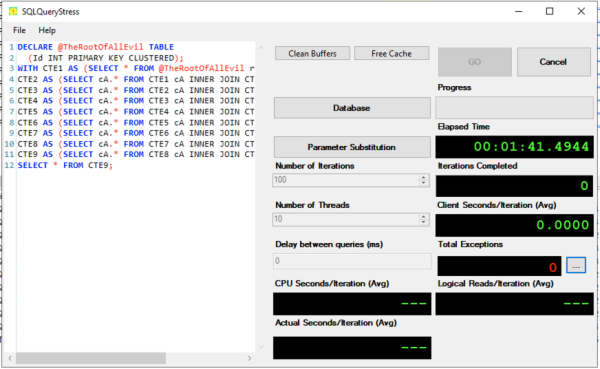
And run sp_BlitzWho to see what’s happening:

We see that most of the sessions are piled up waiting on RESOURCE_SEMAPHORE_QUERY_COMPILE. That means queries are waiting on memory in order to build execution plans. It’s not that the SQL Server is out of memory altogether – it’s just that it has gateways to prevent too many queries from compiling at once.

Most DBAs can go their entire career without seeing that bottleneck, but given my weirdo job – I’m like an emergency room trauma surgeon for SQL Servers – I see it at least a couple times a year when:

  • A SQL Server is under serious memory pressure (typically due to queries getting oversized memory grants), and
  • There are seriously complex queries in the workload (typically reporting queries), and
  • Those queries aren’t parameterized (because if they were properly parameterized, they’d stick around in the plan cache, avoiding the compilation problem)

In that situation, my first line of defense is to improve plan caching like we discuss in this module of my Mastering Server Tuning class. The last line of defense would be trace flag 6498, which allows more large queries to compile simultaneously. I’ve never needed that in my life, and I hope you don’t either!


Finding Sister Locations to Help Each Other: Answers & Discussion

This week’s query exercise asked you to find two kinds of locations in the Stack Overflow database:

  • Locations populated with users who seem to be really helpful, meaning, they write really good answers
  • Locations where people seem to need the most help, meaning, they ask a lot of questions, but they do not seem to be answering those of their neighbors

In the challenge post, I gave you the same kinds of requirements that our end users would typically give, but not the kinds of requirements that a business analyst might specify. This challenge was actually inspired by a friend of mine who transitioned into an analyst role, and I was reminded of just how hard that work really is. Translating vague requests into detailed specs is a lot harder than it looks, and the wide variety of this week’s answers reflects that.

Normally when I write these challenges, as soon as I’m done writing the challenge post, I immediately start writing my own solution. I didn’t do that here because I wanted to show your different interpretations of the request. As the answers started coming in, I copy/pasted ’em into SSMS just like everything else I find on the internet, and I used 3 sniff tests:

  1. Did your top locations have a decent number of people in them? I didn’t wanna see answers that said, “This podunk town is a location we should focus on.”
  2. Did your two sets of locations have overlaps? I didn’t wanna see answers that said, “This place has a lot of people who write questions, and a lot of people who write answers.” That’s just a list of big places, which violates the “they do not seem to be answering those of their neighbors” part of the request.
  3. Do the result sets show how they were sorted? Anytime I see a ranked list, I want to know how the data was ranked. (In this particular challenge, I’m really flexible on sorting methods – I just wanna know what it was.)

As an example, I’m showing a picture of one answer’s results here. The person shouldn’t be ashamed by any means – this was a hard question, for sure – but it serves to illustrate an answer that doesn’t pass the sniff test. The top result set are the helpful locations, and the bottom result set are the locations that need help. A single location shouldn’t be in both – and yet the same locations show up in both list. This is just a list of the biggest locations, basically.
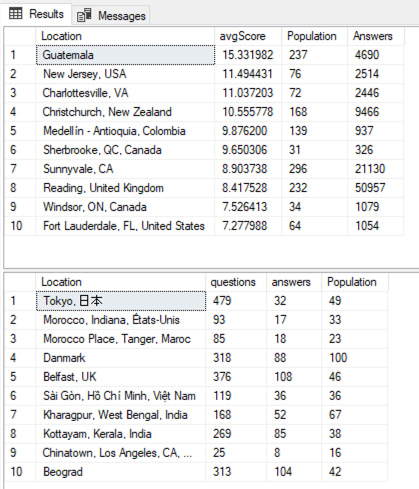
This would happen if your queries were just:

  • The users who posted the most answers (without posting questions), and
  • The users who posted the most questions (without posting answers themselves)

In any big location, you’ll get a lot of those, so that isn’t going to work. Instead, we’re going to need to get more creative with our filtering & sorting.

I’ll discuss two approaches.

I am a potato?’s Answer

I had to laugh out loud at their name on their comments, and they most certainly were not a potato. Here’s their answer in a Github Gist, and my edited version is a comment on theirs. The results will take a little explaining:

The first result is the helpful people, and to find it, they sorted by average answer score descending. This does favor places that seem to favor quality over quantity: note how #6 (Sherbrooke) produced only 326 answers, and #7 (Sunnyvale) produced over 64x more questions – but they’re ranked lower.

That sort order is completely fine – we gotta pick something to sort by, since the users didn’t tell us a specific sort order. This answer is just as valid as anybody else’s, and I wanted to pick a variety of sort orders to show how the request could be interpreted.

However, there’s another problem with line 6: population is only 31 people. If you look at both result sets, they’re both riddled with places with less than 100 people. So, how’d that happen? They started by building a list of locations with >100 people, but didn’t consider whether those people had produced over 100 questions or answers. To fix it, we just need to filter the result sets for >100 population, and then we’ll get better quality.

The second result set is the people who need help, and to find that, they sorted by a high ratio of questions to answers. The ratio isn’t shown in the results, and I would have preferred that, but that’s okay. The general idea makes sense. Again, we have small populations showing up here, and row 9 isn’t really better than row 10, but once we get a filter for at least 100 people in the location, it’ll be better.

Nick’s Answer

NotPotato’s answer averaged out Posts.Score across the entire population of the location. Nick’s answer took a different approach: he got the average answer score for each user in the location (because people may have posted multiple answers with varying scores), and then averaged out all of the users’ averages. As a result, this top 10 looks different than NotPotato’s:

But also, his second result set looks wildly different than NotPotato’s. Part of that is because Nick’s answer correctly filters for large populations, and another reason is because he used a different metric for what helpful means. He used the formula of (AnswerCount – QuestionCount), calling that AnswerDelta. This is interesting because places with higher volumes of answers will be favored, not necessarily tiny locations with tiny metrics (like 8 answers vs 1 question).

Both of those are valid approaches!

Sure, we had some bumps along the way, but I like this kind of challenge, especially for testing potential new hires. I don’t really care if their sorting choices match my own ideas – I’m much more interested in seeing if they can spot obvious bugs in their result sets, and how their T-SQL looks.

I hope you enjoyed this week’s challenge! The Query Exercises will be taking a break for the next couple of weeks because I’m traveling to Hong Kong and Shanghai. I’ve still got plenty of blog posts queued up, but the interactive exercises will return in April when I’m back. If you’re starving for homework, check out the prior Query Exercises posts and catch up on the ones you missed so far.


[Video] Office Hours From the Future

Videos
4 Comments

To answer today’s questions from https://pollgab.com/room/brento, I strapped on my Apple Vision Pro and recorded my persona as if we were on a FaceTime or Zoom call together. It’s delightfully creepy, as if I’m AI Brent from the Future.

Here’s what we covered:

  • 00:00 Start
  • 00:44 Rushabh Shah: I have a question regarding the DBCCSHRINKFILE command. Is it advisable to run the DBCCSHRINKFILE for the NDF file to the target site, leaving 10% free space? Do we need to consider any impact on HA/AG with 4 nodes? How to stop the DBCCSHIRNKFILE operation safely?
  • 01:41 SQLPadawan: hey Brent, asking for a friend: if you were an employee/freelancer DBA or DB developer again, how would you future-proof your career these days with lots of layoffs and AI?
  • 02:49 Walt Kowalski: Is ‘cranky’ a justified stereotype for the average DBA? Was Brent a cranky DBA during his working days?
  • 03:39 Marcus-The-German: Hi Brent, what is your recommendation regarding unlimited autogrowth? Right now I use to limit autogrowth but may rethink this setting.
  • 04:56 RollbackIsSingleThreaded: Hi Brent! I reduced the number of logical reads for one query from 306 thousand to 11200. The second query is only ~200ms faster (1.329ms vs 1.124). Is it worth it?

The video is creepy, although the audio’s quite good. No, I won’t be recording too many Office Hours with this technique/technology, hahaha. The only times I’ll use it for Office Hours is if I need to record a session, but I’m not in a visually appealing place or I don’t have my camera gear. For example, I can imagine recording with it in a hotel room in a less-than-glamorous location.

In case you missed it, I also recorded a video showing what I see when I use SSMS in the Vision Pro. I do love the heck out of it, but not for office usage – just for travel.


Read This Before Your Users Install SSMS 20

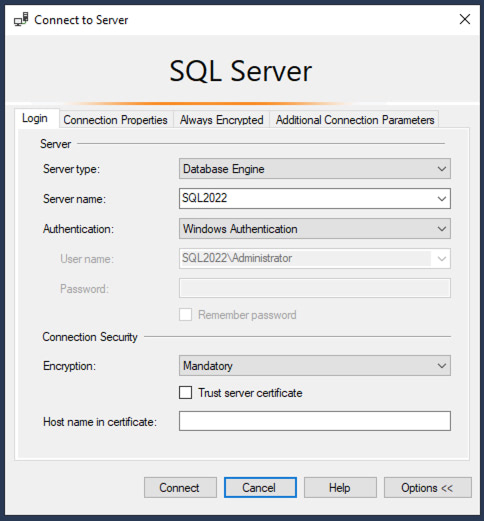
SQL Server Management Studio 20 Preview 1 is out, and the new connection dialog has a big change:

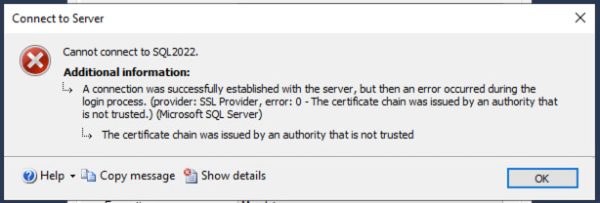
When you click Connect, you’re likely going to get an error:

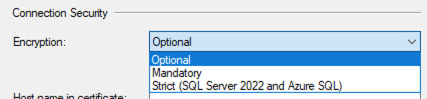
The fastest fix is to click the Encryption dropdown, and change it to Optional:

And then you’ll be able to connect fine.

The long term fix is to read this announcement post, then read this post about the certificate requirements, then set up certificates on all your SQL Servers. As far as I can tell, it’s not as easy as just copying a sample script from Stack Overflow, bucko – for example, if you’re using an AG listener, you have additional steps to take for each cert. Even when properly configured, you have to be careful because some features don’t work, like DTA, saving Profiler traces to tables, or viewing the errorlog files via Object Explorer.

It’s a good idea long term. We’ll go through some growing pains while folks build out a checklist of how to put in certs quickly and work around common problems. DBAtools already has a Set-DbaNetworkCertificate cmdlet, and I bet that’ll get a lot more activity in the coming weeks as people prepare for SSMS 20.


Updated First Responder Kit and Consultant Toolkit for February 2024

First Responder Kit Updates
0

New this month: better sp_BlitzIndex performance on databases with tens of thousands of objects, sp_DatabaseRestore can run test scripts, and David Wiseman and Sean Killeen implemented basic automated testing for the First Responder Kit.

How I Use the First Responder Kit
Wanna watch me use it? Take the class.

To get the new version:

Consultant Toolkit Changes

I updated it to this month’s First Responder Kit, but no changes to querymanifest.json or the spreadsheet. If you’ve customized those, no changes are necessary this month: just copy your spreadsheet and querymanifest.json into the new release’s folder. However, in the Dec 2023 release, we we did update those files, so if you haven’t updated the Consultant Toolkit in a while and you’ve customized it, read that version’s release notes about updating.

sp_Blitz Changes

  • Enhancement: add non-default database configuration check for Accelerated Database Recovery. (#3411, thanks Erik Darling.)
  • Fix: skip drive info and SSRS/AS/IS checks on Managed Instances. (#3441, thanks Vlad Drumea.)
  • Fix: skip xp_regread when we don’t have permissions. (#3425, thanks Erik Darling.)
  • Fix: avoid duplicate rows on AGs. (#3402, thanks gotqn.)
  • Fix: permissions checks not working as intended. (#3377, thanks Montro1981.)

sp_BlitzCache Changes

sp_BlitzIndex Changes

  • Enhancement: faster performance on databases with tens of thousands of objects or more. (#3394, thanks Henrik Stein Poulsen and Rich Benner.)
  • Fix: if a partitioned table had both columnstore and rowstore indexes, the columnstore visualization section showed extra blank rows. (#3415, thanks Chris May.)
  • Fix: improving language friendliness. (#3423, thanks Sean Killeen.)

sp_DatabaseRestore Changes

  • Enhancement: new @RunStoredProcAfterRestore parameter lets you specify a stored procedure name in the form of dbo.sp_Whatever to run after the restore completes. (#3429, thanks Greg Dodds.)
  • Enhancement: new @FileNamePrefix parameter to add to the names of all restored files. Useful when you need to restore different backups of the same database into the same directory. (#3431, thanks Lukasz Biegus.)

For Support

When you have questions about how the tools work, talk with the community in the #FirstResponderKit Slack channel. Be patient: it’s staffed by volunteers with day jobs. If it’s your first time in the community Slack, get started here.

When you find a bug or want something changed, read the contributing.md file.

When you have a question about what the scripts found, first make sure you read the “More Details” URL for any warning you find. We put a lot of work into documentation, and we wouldn’t want someone to yell at you to go read the fine manual. After that, when you’ve still got questions about how something works in SQL Server, post a question at DBA.StackExchange.com and the community (that includes me!) will help. Include exact errors and any applicable screenshots, your SQL Server version number (including the build #), and the version of the tool you’re working with.


Query Exercise: Finding Sister Locations to Help Each Other

Query Exercises
12 Comments

For this week’s query exercise, let’s start with a brief query to get a quick preview of what we’re dealing with:

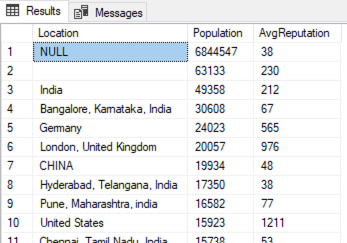
That query has a few problems, but hold that thought for a moment. (You’re going to have to solve those problems, but I just wanted to show you the sample data at first to give you a rough idea of what we’re dealing with.)

Our business users are thinking about doing some targeted advertising, and they have two questions.

First, what are the top 10 Locations populated with users who seem to be really helpful, meaning, they write really good answers?

Second, what are the top 10 Locations where people seem to need the most help? Meaning, they ask a lot of questions, but they do not seem to be answering those of their neighbors?

Your first guess would probably be to adapt the query above and simply sort in different directions, but buckle up. The data presents a lot of challenges that we need to consider.

  • There are null and empty locations. Those should probably be excluded.
  • In the Users table, the Location column’s datatype is NVARCHAR(100). People can type in whatever they want, which leads to a lot of oddball one-off locations. We should filter for a minimum number of people involved, especially since we’re considering paid advertising. Let’s filter for only locations with at least 100 people in them.
  • For the sake of this exercise, let’s pretend that each Location value is geographically unique. You’ll notice in the screenshot that there are entries for “India” and for “Bangalore”. You and I know that everyone who lives in Bangalore also lives in India, but for the sake of this question, let’s pretend that’s not the case. In reality, obviously we need to clean up our Location data, but I’ll save that for another challenge.
  • High values for Reputation do not necessarily mean that people write really good answers. You can earn Reputation points a lot of ways, including writing good questions.
  • You don’t have to join the first and second queries together. Just write one query for the top 10 helpful locations, and another query for the top 10 locations that need the most help. They can be separate queries, and I’m not worried about performance for the sake of this exercise.

Part of your solution is going to involve looking at the Posts table, which stores questions and answers (and other things.) A few columns to consider:

  • Posts.PostTypeId = when 1, the Post is a Question. When 2, it’s an Answer.
  • Posts.OwnerUserId = the Users.Id who owns the question or answer.
  • Posts.Score = the quality of the question or answer.

For this exercise, I’m not expecting a specific “right” or “wrong” answer – instead, for this one, you’re probably going to have a good time sharing your answer in the comments, and comparing your answer to that of others. Feel free to put your queries in a Github Gist, and include that link in your comments. After you’ve worked on it, check out my answers & discussion.


Find Recent Superstars: Answers & Discussion

Query Exercise Answers
1 Comment

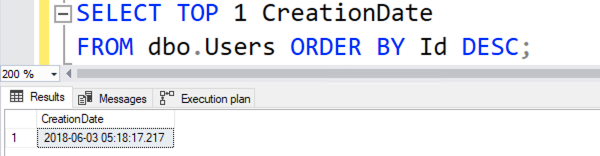
Your query exercise for this week was to write a query to find users created in the last 90 days, with a reputation higher than 50 points, from highest reputation to lowest. Because everyone’s Stack Overflow database might be slightly different, we had to start by finding the “end date” for our query. I’m working with the 2018-06 export that I use in my training classes, so here’s my end date:

So if I’m looking for that date range, here’s the query I came up with:

You might have written a slightly different query, so of course your homework may start to diverge from mine. More importantly, EVERYTHING on your system might be different from mine, so the rest of our homework is going to diverge a LOT. Here’s how my system is configured:

  • SQL Server 2022 Developer Edition
  • 2018-06 Stack Overflow database in 2022 compatibility level
  • Cost Threshold for Parallelism 50 (and changing that, changes the query plans a LOT in this example)

Question 2: Does It Perform?

The second part of our challenge was to compare the number of logical reads that our query does, versus the number of reads it would take to just scan the whole table. Let’s find out:

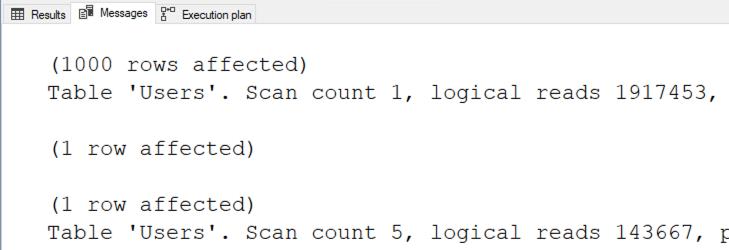
The results:

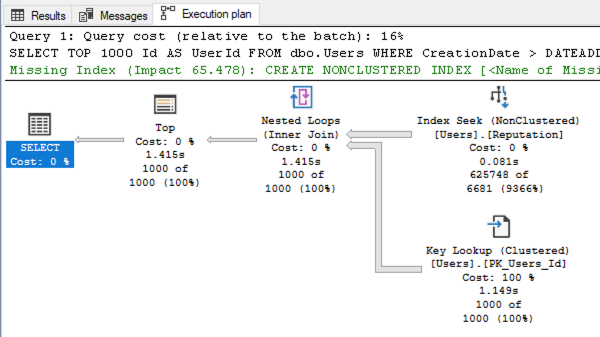
Redmond, we have a problem. Our query is doing more reads than scanning the entire table ten times over! What the hell does my execution plan look like?

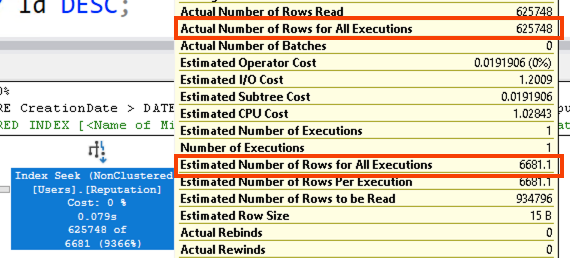
SQL Server is seeking on Reputation, and then scanning backwards from high values down to low. Check out those estimated-versus-actual numbers on the index seek:

SQL Server thought, “I’m going to scan from high reputations to low. There are a LOT of people with Reputation > 50, and there are a LOT of users created in the last 90 days, so I bet I won’t have to check too many CreationDates on the key lookups before I’ve found 1000 users that match.”

The core of the problem is that:

  • There are a lot of users with Reputation > 50
  • There are a lot of users with CreationDate > ‘2018-06-03 05:18:45.117’
  • But SQL Server doesn’t know there isn’t a lot of overlap in those two groups.

Fun Trivia About Parallelism

This query plan doesn’t get parallelism because SQL Server doesn’t use parallelism for backwards range scans, something I learned from Paul White’s excellent post. To see the scan direction, right-click on the Index Seek operator and click Properties, and check out the scan direction:

Neato mosquito. Anyway, moving on.

Question 3: Making It Perform Better

The core of this week’s problem is cardinality estimation: SQL Server doesn’t understand that there’s very little overlap in the Venn diagram’s circles for high Reputation and recent CreationDates. Your first instinct is probably to solve that problem, but let’s step back for a second. If a table scan performs better than using an index…

By adding an INDEX = 1 hint, we can force a table scan, and cut our logical reads by 10X. (And for bonus points, we even get parallelism.)

The drawback to this solution is that if the indexes change later, and a better index presents itself, our query won’t be able to use it. But hey, the whole point of this exercise was that we weren’t able to change the indexes. Sometimes at clients, I’m dealing with very mature databases with a core set of indexes that are needed to support a workload, and we can’t juggle indexes just to fix a single SQL Server estimation problem. In that case, Skeletor wins.

In Case You’re Not a Skeletor Fan

We do have indexes on CreationDate and Reputation. What if we have SQL Server find the people who match each filter individually, and then find their overlaps first before doing the key lookups? That’s the solution Peter Kruis went for:

The first part of his query plan is the CTE, which finds the reputation and creationdate people separately:

Note the estimates vs actuals on the join of the two result sets. SQL Server thought there was a lot more overlap in the Venn diagram: SQL Server expected to find 45301 rows, but only found 2644. But here’s the cool part: it doesn’t matter that the estimation is wrong here, because there are no key lookups here to get screwed up, no memory grant problems, etc.

Peter’s rewrite drops down to about 10,000 logical reads – about 14x better than Skeletor’s approach, and about 200x better than SQL Server’s original approach.

Peter rewrote the query with the knowledge of the indexes that were present on the database. Peter’s approach works well because there are separate indexes on Reputation and CreationDate. If a single covering index got added in later, Peter’s approach wouldn’t be able to leverage it to perform well – but that’s okay, after all, because remember that we said we can’t touch indexes in this challenge. This is a good, typical approach I use in mature databases where I can rely on the indexes to stay fairly stable over time.


Join Me in Orange County for Tuning Databases in One Day

Conferences and Classes
0

Brent OzarYou’ve got production databases in SQL Server or Azure SQL DB, and you want to make ’em faster. You need to identify the database’s bottleneck, prove the root cause, and then recommend fixes. You want to make the right choice for each bottleneck – should you do index changes, query tuning, or server-level settings?

The class will be a mix of 50% slides, and 50% live demos, with plenty of time for Q&A. We’ll even cover 3 sample client findings for the most common performance issues so you can see how I explain the issues to my own clients, and give them proof.

I’m Brent Ozar, and I do this for a living. In one day, I’ll teach you the exact same techniques I use with my clients. I can’t teach you everything about what I do in one day – but I’ll teach you the most important stuff.

This class is a one-day pre-conference workshop on Friday, April 26th before SQLSaturday Orange County. It’s at the Microsoft Irvine Office. Register for $149 here.

The class is in-person only, and will not be streamed online. See you there!


Sessions You Should Attend at SQLBits Online 2024

SQLBits
1 Comment

SQLBits 2024 is next month, and the session agenda is out, including the Microsoft-led sessions.

If you’re going to get the boss to buy you an online or in-person ticket, it’ll help if you have a specific list of sessions you wanna attend. Managers love it when you can point at each session and say, “Here’s why this is going to be useful to the business.”

If you’re focused on database performance like I am, here are the Wednesday 100-minute sessions I’d recommend putting in your agenda.

Wednesday Slot 1:

  • Always On AGs with Bob Ward – Microsoft’s legendary presenter teaches architecture, licensing, monitoring, troubleshooting, and debugging.
  • PostgreSQL for SQL Server Pros – overview of architecture, differences, and similarities, including Azure Database for PostgreSQL.

Wednesday Slot 2:

  • Intro to Python for Data Analysis – if you work with/around data scientists and analysts, it helps to understand the tool they’re most likely using. You don’t have to be a pro at it – but you just wanna see what they’re using, and why.
  • When to Avoid PaaS – your managers and developers are interested in Azure SQL DB and Amazon RDS, and for most new apps, those platform-as-a-service databases make sense. Learn when to avoid ’em. (I know a lot of you are seasoned old folks who default to avoid those databases as a service, but I’d encourage you to think the opposite way when talking to managers at least.)

Wednesday Slot 3:

  • Analyzing and Resolving Deadlocks – Erland Sommarskog explains how to read the deadlock XML and what to look for.
  • Where Estimates Come From – Hugo Kornelis digs into statistics, filters, and joins. Depending on which problems your developers are facing more often, that’ll drive your pick between this session and the above one. Both of ’em are useful for engine performance tuners, especially if you need to tell your manager, “Here’s an exact query I’m struggling with today, and I hope to get the answers in this session.”

Wednesday Slot 4:

  • Understanding Extended Events – senior folks in the crowd will need to up their tracing game as they deal with complex real time troubleshooting in complex environments, especially AGs, Azure SQL DB, and RDS. Grant Fritchey has been an XE evangelist for years.
  • Delta and Databricks vs SQL Server – I bet if you mention this session title to your manager, your manager will instantly “get” the value of a conference like this. Your manager has probably been hearing a lot about data lakes, deltas, and Databricks, even if they haven’t brought these topics to you, and your manager will recognize the value in getting someone on the team up to speed on it.

That’s a lot right there. You might want to just sit down with your manager and discuss those before you show them the monster Thursday, Friday, and Saturday session lists. If they don’t render correctly, refresh your page – it seems like the Bits navigation breaks down when you switch from day to day.

The Thurs/Fri/Sat sessions are much shorter. If you’re attending the conference in person, I would focus on picking the sessions you absolutely have to see to justify your business case to get your ticket paid for, and then budget time during the day to attend the hallway track – hanging out, meeting people, talking to presenters and Microsoft employees about business problems you’re facing.

With that in mind, I’m going to pick the 50-minute sessions that I would absolutely have to see:

  • Thursday 10:10 – Azure SQL Managed Instances – Microsoft’s Niko Neugebauer and crew will “unveil the latest advancements in SQL Managed Instance, setting new standards in the industry.” Right now, most of my clients going to the cloud are still using VMs, but they’re all eyeing MIs as the option they’d rather have if a lot of limitations were removed. Staying on top of this product is important.
  • Thursday 12:00 – Perfmon in the Cloud – Microsoft’s Bob Ward shows “exciting new capabilities in Azure” for monitoring. Many of my clients who go cloud are also trying to cut costs, which often means doing their own monitoring. New capabilities here are always good.
  • Friday 9:00 – Managing Database Fleets in Azure PaaS – if you’re involved with a software-as-a-service app that puts each client in their own database, it can be painful to manage costs and performance. It’s also hard to find good, current information on this topic.
  • Friday 10:10 – ACID in SQL Server – I’ve seen this session by Daniel Hutmacher, and even senior attendees will learn useful stuff in here. I did.
  • Friday 12:00 – Managing Replication with dbatools – Replication is such a pain in the ass. It breaks. It’s always mission-critical. And even though it breaks, people want more of it. If you’re cursed into working with it, you’re going to need the best automation you can get to fix the problems faster.
  • Friday 13:40 – Modern Authentication in SQL – because even if you’re not doing multi-factor authentication yet with your databases, your security team is gonna ask you to start doing it soon. The user in me loves it, but the DBA in me hates it.
  • Friday 16:50 – When to Stop Tuning a Query – the abstract reminds me of one of my favorite session styles, Watch Brent Tune Queries, and I always love seeing other peoples’ takes on this. I like seeing how their brain works and how they explain the process with a single query.
  • Saturday 9:00 – HADR on SQL Server on Azure VMs – like I mentioned in another session’s notes, this is the route most of my clients are taking (VMs). I always enjoy seeing Microsoft’s David Pless present, too.
  • Saturday 14:10 – SQL on VM Price-Performance – also by Microsoft’s David Pless, and also covering an extremely common topic whose content changes constantly. If you’ve got Azure VMs that you set up 2-3 years ago, they’re probably a bad config choice today, and it’s time to rebuild them with the newer VM types & config options.

Doesn’t that sound amazing? The icing on the cake: coupon code Brento10 gets you 10% off your registration, too. Show your manager the sessions you wanna attend, and why, and I bet your manager will spring for the 3-day pass for £1400, down to £1260 (about $1600) with the coupon. (Saturday is free!) Register here.


[Video] Office Hours: Hot Tub Edition

Videos
1 Comment

Today’s Office Hours comes from a very different office! I climbed into the hot tub to review your top-voted questions from https://pollgab.com/room/brento. Don’t worry, the webcast is completely safe for work.

Here’s what we covered:

  • 00:00 Start
  • 00:32 MooneyFlyer: Hey Brent, what are your thoughts on functions like PIVOT and window functions (last_value, first_value, etc). I haven’t heard much from you on these.
  • 01:14 icklemouse: Hi BrentO-Biwan. I know this ain’t your area (cowers for roasting) but when out and about do you see Policy Based Mgt in use? I know it’s dull-grey and clunky as anything but can be useful. Was wondering if lack of usage stops MS making it slightly more smooth and colourful.
  • 02:22 DWinOK: Love this Office Hours thing. So, two years out and 11 CUs from the release of SQL 2022. I’ve not heard anything about the next version. Did I miss something?
  • 02:57 HoldMyBeer: When you change the database page verify options do you need to rebuild heaps and CI?. Whats the best way to tell if a table has pages that dont have a checksum calculated.
  • 03:57 StraightBanana: What is your keyboard typing speed? Have you ever work on that skill to improve efficiency? I like to use monkeytype.com to practice
  • 04:33 Paul O: What are you pros / cons of storing XML in SQL Server as varbinary(max) data type vs other data types?
  • 05:12 MyTeaGotCold: Has experience shown that it is important to set the Trace Flags that Query Store cares about? Everyone links me to the Erin Stellato article about 7745 and 7752, but the article is nothing but speculation. I’m aware that 7752 is enabled by default in 2019+.
  • 05:55 Jonas: I love how passionate and knowledgeable you are as an expert in your field. What tips or advice would you give someone trying to figure out their ‘speciality’?
  • 06:23 Dimitra M: What bad things can happen if SQL Server VM max server memory setting is left unconfigured?
  • 07:07 Tom: Hi Brent, a table has NC indexes on each column (30+, can’t use columnstore). Sorted queries result in a clustered scan, the sort spills to tempdb, and takes seconds. Adding an index query hint does not and takes ms. Is this type of situation covered in Mastering Query Tuning?

Query Exercise: Find Recent Superstars

Query Exercises
44 Comments

For this week’s Query Exercise, we’re working with the Stack Overflow database, and our business users have asked us to find the new superstars. They’re looking for the top 1000 users who were created in the last 90 days, who have a reputation higher than 50 points, from highest reputation to lowest.

In your Stack Overflow database, create just these two indexes:

And then write the query. Now, because you’re all using different copies of the Stack Overflow database, with different end dates, find the most recently created user in your database:
Use that date as the finish date on your query, and write a query to find the top 1000 users created in the last 90 days (ending with the date you just found), who have a reputation higher than 50 points.

Your challenge has a few parts:

  1. Write the query.
  2. How does your query perform? Compare the number of logical reads your query does, versus what it’d take to scan the whole table once.
  3. If your query does more logical reads than a table scan, can you get it to do less, without changing the indexes on the table?

Post your solutions in the comments, and feel free to ask other folks questions about their solutions. If your solution involves code and you want it to look good, paste it as a Github Gist, and then include the Gist link in your comment. Then, check out my answers & discussion.


Finding Long Values Faster: Answers & Discussion

Query Exercise Answers
8 Comments

In last week’s Query Exercise, our developers had a query that wasn’t going as fast as they’d like:

The query had an index, but SQL Server was refusing to use the index – even though the query would do way less logical reads if it used the index. You had 3 questions to answer:

  1. Why is SQL Server’s estimated number of rows here so far off? Where’s that estimate coming from?
  2. Can you get that estimate to be more accurate?
  3. Can you get the logical reads to drop 100x from where it’s at right now?

Let’s get our learn on.

1. The estimate is hard-coded.

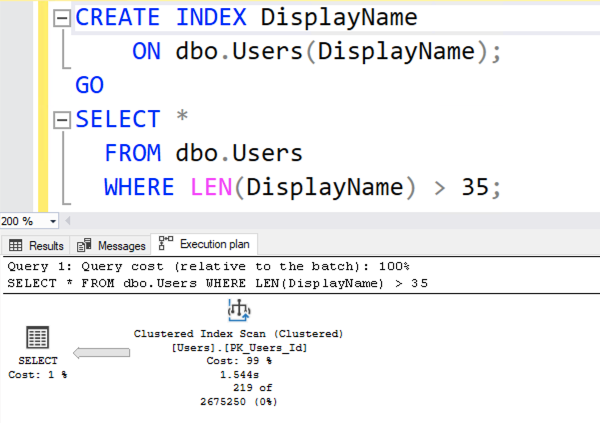
When SQL Server is just making up an estimate out of thin air, I really wish it would put a yellow bang on the execution plan. “Danger: I’m just pulling this number out of my back end.” Because when you’re looking at the query plan:

The number 2675250 looks awfully scientific. It looks like SQL Server put a lot of thought into that number. In reality…

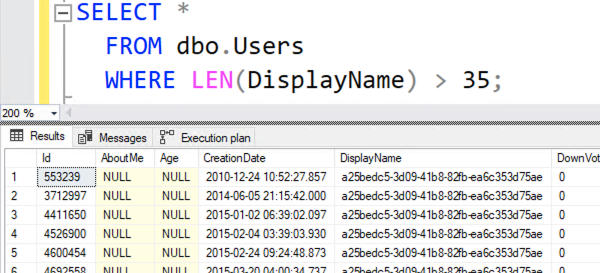
It’s just a hard-coded 30% of the table. It doesn’t matter whether you’re looking for LEN > 35, or LEN < 35, or LEN > 10000. SQL Server just says, “You’re doing an inequality comparison here – 30% sounds good.” To learn more about these not-so-magic hardcoded numbers, check out Dave Ballantyne’s cardinality estimation sessions.

2. The estimate can indeed be improved.

SQL Server has statistics on the DisplayName column’s contents, alphabetically sorted, but not sorted by length. If we want statistics on the length of a column’s contents, we have to create a computed column focused on that length. This is gonna sound weird, but:

Add a computed column, and then rerun the query. Suddenly, the execution plan is better:

ENHANCE!

Three things changed:

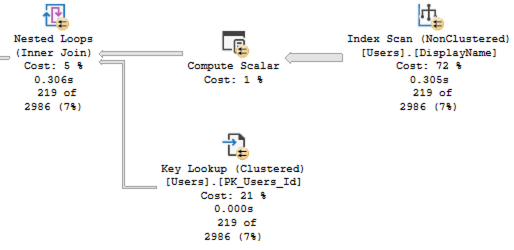
  • The estimated number of rows is way more accurate – down from the hard-coded 30% (2,675,250) to just 2,986
  • Because the estimate was more accurate, SQL Server understood that it wouldn’t have to do so many key lookups, so it scanned the DisplayName index, calculating the length of each one
  • Our logical reads dropped from ~142K down to ~40K – good, but still not 100X better

The estimate is better because SQL Server created a statistic on the computed column:

The estimate isn’t perfect because SQL Server created the stats in a hurry, only sampling a small percentage of the table’s data. If we updated those statistics with fullscan, we’d get absolutely perfect estimates – but we don’t need that here. We’ve done enough of an improvement to answer the question, which leads us to…

3. Getting a 100X Drop in Page Reads

The execution plan is still scanning the entire DisplayName index, calculating the length of each name, because the index on DisplayName is arranged alphabetically – not by length. Is there a way we can seek directly to the long DisplayNames? Indeed, there is – by indexing our newly created computed column.

The new execution plan is amazeballs:

We didn’t even have to change our query! SQL Server figured out that there’s an index sorted by the length of DisplayName, and seeked into just the long rows. This new plan is better in so many ways, but most importantly for the purposes of this challenge, we’re down to just 682 reads – an improvement of over 100x. Awww yeah.

There’s even a solution that gets the number of reads down to just 6! For that, check out Vlad Drumea’s post, Finding Long Values Faster. On Enterprise Edition, it works with no query changes, and has extremely low overhead.

Summary: 100x better, no code changes.

Computed columns, especially when indexed, can be a great way to make non-sargable queries go way faster. They’re certainly not the first tool I reach for – they have plenty of drawbacks and gotchas – but that’s why they’re covered in my Mastering Index Tuning class rather than the Fundamentals one.

Do I wish the developers would change the way the app works? Of course – but as a consultant, clients love me the most when I can simply leverage a built-in database tool and make things go faster right away. This is one of those awesome tools. Sure, like a chainsaw or a nail gun, you need to know what you’re doing – but you’re a smart cookie. You know which classes to attend.


#TSQL2sday Roundup: The Most Recent Issues You Closed.

Development
9 Comments

For this month’s TSQLTuesday, I asked y’all to describe the most recent issues you closed.

If you ask someone in IT, “What do you do for a living?” they struggle with job titles. They say things like:

  • “Well, my job title is sysadmin, but I spend most of my time in data”
  • “They call me a DBA, but I write a lot of reports”
  • “I was hired years ago as a developer, but I don’t really have a job title, and right now I’m working on a cloud migration”

So when I’m meeting a new team and learning what they do,  I’ve found it helpful to ask, “What specifically was the last issue you closed?” Note that I don’t ask, “What are you working on now?” because that tends to lead to long-term projects that people want to do, but not necessarily what they’re paid to do. If you ask them about the last specific task they checked off, that’s usually related to something the company demands that they do because it’s urgent. It leads to fun discoveries about what people think they do, versus why managers really keep them around on the payroll.

It’s also fun because sometimes people say, “Is AI going to take my job?” Well, to find out, let’s look at what you’re actually doing, and ask, “Could AI automate that today?” The answers usually make it obvious that your job is still safe, for better or worse.

Your Blog Posts

Hugo Kornelis and friends

Closing Out the Cancer Ticket – Hugo Kornelis had unquestionably the toughest issue: surviving leukemia. I’m so happy to read that he’s doing well and getting back to what he loves.

The Disaster Recovery Site Went Down – Eitan Blumin’s client did an exercise in the production environment and managed to bring down the DR site as well. Oops! The post explains the challenges with configuring quorum.

Importing Flat Files with BCP – Peter Schott gets the task that every data professional gets. Learn a tool to do this – any tool, doesn’t matter which one it is – and once you’ve learned it, you’ll rely on it for the rest of your career. In this case for Peter, it’s BCP.

Extracting Errors from Unstructured Text Logs – Jeff Mlakar had to figure out the aftermath from a “crime scene” (I love that expression) and used regular expressions in KQL to do it.

The Monitoring Went Down – Koen Verbeeck asks the classic question of, who monitors the monitoring software? Because when it goes down, all failures kinda snowball into larger issues.

Fixing a SQL Server 2022 Regression – when Deborah Melkin’s shop upgraded to SQL Server 2022, she found that a stored proc was taking way longer, and used sp_WhoIsActive and Query Store to diagnose the problem.

Visualizing F1 Team Journeys in Power BI – SQLDevDBA was tasked with showing how far customers will travel for one of their events. The first step was to try it in their home lab using public data. He even streamed a real-time video of the process! It’s 4 hours long, but it’s broken up into chapters listed in the video’s description.

Retrieving DAX in Microsoft Fabric – Kevin Chant didn’t have the permissions to edit the data models, so he wrote a Python notebook using the new SemPy library.

Slow Deletes Due to Foreign Keys – Aaron Bertrand couldn’t believe a simple delete could be so slow – until he checked out the query plan.

Slow Merge Due to Foreign Keys – Erik Darling hit a perfect storm of problems that ended up with no other option but to abandon referential integrity.

Problems Sending Mail – Shane O’Neill troubleshoots sp_send_dbmail and ends up in the horrible land of Kerberos.

Troubleshooting IO Spikes – Andy Mallon noticed that during log backups, the data files were active too, which shouldn’t be happening.

Smoothing IO Spikes – Michael J. Swart was tasked with an issue that sounds similar, but is wildly different: modeling IO and then figuring out how to smooth out the peaks with Resource Governor for server consolidation.

Splitting up CHECKDB – Mikey Bronowski had to split up corruption checking across lots of Agent jobs.

Checking Installed Versions – Lucas Kartawidjaja was tasked with finding out which clients were running unpatched OLEDB and ODBC drivers.

Reading the Documentation – Justin Bird has to deal with something that’ll ring true to all of us. Folks open issues because they haven’t read the fine manual.

Troubleshooting Replication – Deepthi Goguri has my sympathies because I’ve been there too, having to rebuild a complex replication setup from scratch when I wasn’t exactly functioning at my peak capacity.

Configuring Multiple Environments for Clients – Chad Callihan has to set things up for other folks every couple of months or so. It’s that awkward level of work: just enough work, and pops up just often enough, that it’s probably too time-consuming to automate.

Detecting File Changes – Steve Jones needed to stop a deployment if the contents of a file changed, so he used checksums.

A Post About Nothing – Rob Farley maintains his streak of blogging for every T-SQL Tuesday, and he keeps it up here without following the instructions in the T-SQL Tuesday request, ha ha ho ho. His post reminds me of the old saying about Seinfeld: it was a show about nothing, and yet we loved it. No hugging, no learning.

Performance emergency caused by GRANT PERMISSIONS by Brent Ozar – in which someone added a GRANT to the end of some stored procedures, and the GRANT was actually running every time the proc ran.

What Did We Learn?

Y’all do a lot of different tasks! We’re data professionals, but the work we do is all over the map. The posts covered different tools, different languages, different features, you name it. Furthermore, a lot of it boiled down to, “We have a new problem, and we had to do something new in order to solve it.”

Many of these posts cover completely new topics, too. For example, there just hasn’t been a good blog post before about how to model what IO consumption will look like after it’s been throttled with Resource Governor. That means this job isn’t going to be replaced by ChatGPT because ChatGPT simply couldn’t have learned this from something else before. (Go ahead, try to reproduce those same end results with ChatGPT – I’ll wait.)

That doesn’t mean AI won’t change your job over the coming years and decades. It will, just as the Internet changed IT jobs, and then Google changed it, and then Stack Overflow changed it. These are all new tools, and your company is going to need people like you who know how to operate tools proficiently.

Hope y’all had fun writing & reading! If you want to host a future T-SQL Tuesday episode, leave a comment on this post over here.


[Video] Office Hours: Ask Me Anything About Microsoft Databases

Videos
0

Post your database questions at https://pollgab.com/room/brento and upvote the ones you’d like to see me discuss on the stream. If you’d like to be alerted when I live stream these, follow me on Twitch.

Here’s what we discussed today:

  • 00:00 Start
  • 00:38 Steve E: Hi Brent, Have you ever come across any environment using Application Roles? If so, what was the use case?
  • 02:05 Broken_hearts_are_for_assholes: You discourage the use of AUTO_SHRINK because of fragmentation. But then you say “Stop Worrying About SQL Server Fragmentation”, especially on SSD. So is that OK to use AUTO_SHRINK on Azure SQL Database that use SSD? I’ve been doing that for 6 months now and I see problems.
  • 02:49 Ol’ CornCob: I attempted to hit the StackOverflow database. I couldn’t figure out what I was missing in my DBeaver connection settings, just got “SSL error: Connection reset”. I tried a few SSL settings but no dice. Is there a how-to-guide that could help out Ol’ CornCob?
  • 03:31 Eduardo: What are your pros / cons of running SSIS on your one and only single SQL server vs a dedicated server? As bad as SQL instance stacking?
  • 05:13 MyTeaGotCold: Where can I read up on the risks of having a database owned by someone who is going to leave my business? Google failed me and I what I could invent myself didn’t scare me. It’s not in your First Responder Kit URL either.
  • 05:53 Robinson511: When opening SSMS Activity Monitor state automatically changes to Paused. The small Icon on SQL Cylinder in Object Explorer shows a question mark. An outside monitoring tool also fails reporting The RPC Server is Unavailable.Unable to find solution that works. Would like help.
  • 08:48 Insecure DBA: New 3rd party app requires a cert for SSL connections to our SQL server. Will adding one require any additional work for all the other databases on the server?
  • 09:36 Romullo Araujo: Hi Brent, Is there any other way to dynamically save the stored Procedure results into a temp table without knowing the structure of the table and also not using OPENROWSET?
  • 10:07 Yusef: New Microsoft keyboards are adding a ChatGPT button. Good / bad idea? Will you be purchasing a Microsoft keyboard with this new button?
  • 11:28 Dimitra M: How do the DBA job opportunities differ for when a DBA specializes broadly but shallow vs narrowly but deep?
  • 13:08 Golshifteh F: SQL 2019… Updating fact table with linked server query takes over 20 hours. Does this prevent transaction log from clearing on both sides? Is NOLOCK helpful here?
  • 14:08 Soji: Is rows per page a good table metric? Is it actionable?
  • 14:27 Berglind I: What is your favorite app for generating synthetic data needed for query testing of large data in dev environment?
  • 15:10 DBA Emeritus: I’m having trouble with deadlocks in a proc that inserts records and then immediately updates the same records to calculate an expression based on identity values. I’ve tried every fix I could divine from your videos and sp_BlitzLock + RCSI. Any advice for this specific pattern?
  • 16:08 Eduardo: Do you ever forsee Azure SQL DB growth eclipsing boxed SQL Server?

Query Exercise: Finding Long Values Faster

Query Exercises
45 Comments

Our developers have come to us with a problem query that isn’t as fast as they’d like. Using any Stack Overflow database:

It has an index, but SQL Server refuses to use that index in the execution plan:

If we force the index with a query hint, we do indeed get dramatically lower logical reads. In my particular database’s case, the clustered index scan is 141,573 logical reads – but scanning the DisplayName index alone is just 38,641 logical reads.

Your Query Exercise challenges this week are threefold:

  1. Why is SQL Server’s estimated number of rows here so far off? Where’s that estimate coming from?
  2. Can you get that estimate to be more accurate?
  3. Can you get the logical reads to drop 100x from where it’s at right now?

Post your solutions in the comments, and feel free to ask other folks questions about their solutions. If your solution involves code and you want it to look good, paste it as a Github Gist, and then include the Gist link in your comment.

The Query’s Backstory

Someone’s going to sneer, “Well the answer is clearly that you shouldn’t be querying by the length of a column.” Yes, but… in this situation, whenever a user pushes the GDPR right-to-be-forgotten button, the app is currently setting the Users.DisplayName column contents to be a GUID:

In the web site, the DisplayName length is limited to 35, so anyone with a GUID DisplayName (length 36) is someone that we need to process for the GDPR. Our right-to-be-forgotten process takes some time to run – we have to purge their data from several systems, like reporting – so we keep the user around while the app slowly works through those systems. We can’t just delete their row.

Yes, it would be nice to add a column like “UserStatus” or “ForgetMe” and have the app set that, but here in the real world, we don’t always get to redesign entire processes just because a query is slow. Try to get across the finish line quickly, as if you have 100 other things that are fighting for your attention too.

You know, like your day job. The one you’re avoiding right now. (Did I say that out loud?) When you’re done giving it a shot, check out my answers & discussion in this post.


Improving Cardinality Estimation: Answers & Discussion

Query Exercise Answers
16 Comments

Your challenge for last week was to take this Stack Overflow database query to show the top-ranking users in the most popular location:

And make it read less pages only by tuning the query? You weren’t allowed to make index or server changes, and you weren’t allowed to hard code the location in the query since it might change over time.

The Core of the Problem

The main problem is that when we run a statement (like SELECT), SQL Server:

  1. Designs the execution plan for the entire statement all at once, without executing anything, then
  2. Executes the entire statement all at once, with no plan changes allowed

Think of it as two different departments, neither of which are allowed to do the job of the other. The design department sketches out the query plan, but it has no idea of what this part of the query will produce:

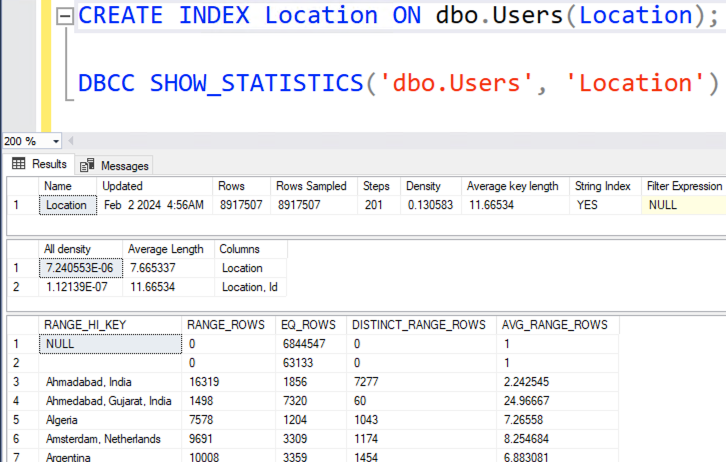
You might think, “Well, doesn’t SQL Server have statistics on Location? After all, we have an index on Location, right?” That’s true, and here are the stats:

In my histogram, the table has 8.9 million rows, and NULL is 6.8 million of them. Easy then, right? Our top location is null! Use the 6.8M row estimate. Except… look at the WHERE clause of our query again:

We’re filtering out the nulls and empty strings. To get that estimate right, SQL Server would have to execute the query by evaluating the where clause, doing the group by, doing the order by, etc. That’s way, way beyond what the query optimizer will do.

The design department has to design a query plan without knowing the output of the CTE. It simply doesn’t know what the top location will be, so it makes a guess:

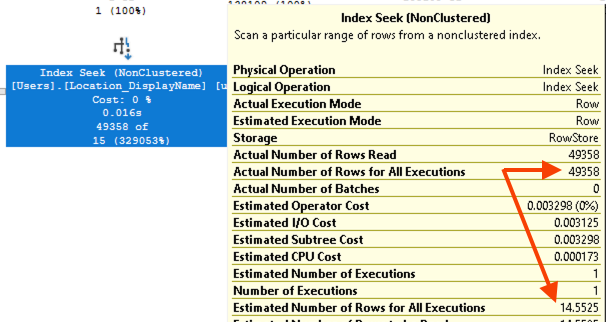
And of course that 14-row guess is nowhere near the 49,358 people who actually live in the top location. That’s fair: if the design department is forced to make a guess without being allowed to execute the query, then the estimate is going to be hot garbage.

The Core of the Solution

If the problem is:

  1. Designs the execution plan for the entire statement all at once, without executing anything, then
  2. Executes the entire statement all at once, with no plan changes allowed

Then the solution is to break the statement up into multiple statements. In pseudocode:

  1. Find the top location, then
  2. Find the users who live in that location, after we know what the location is

But it’s not enough to just do them in two statements. If I just do this:

Then the second query in the batch still has a crappy plan with bad estimates:

Because SQL Server doesn’t just build plans for a statement all at once, it builds plans for the entire stored procedure all at once, too. So the real core of the solution is:

  1. Find the top location, then
  2. Go back to the design department for a new plan to find the users who live in that location, after we know what the location is

The Easiest Solution: Option Recompile

One of the easiest-to-implement methods is to slap an OPTION (RECOMPILE) on the second statement in the newly fixed proc:

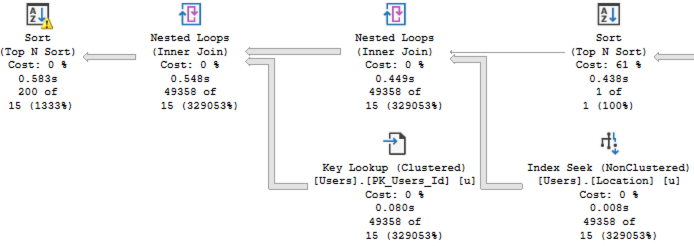
That tells SQL Server to go back to the design department at that specific point in the stored procedure, and build a new execution plan based on what we’ve learned so far. At that point in the plan, the @TopLocation’s value has been set, so instead of a crappy 15-row estimate, SQL Server estimates the exact 49,358 rows that’ll come back, as shown in the new plan:

The new plan has more accurate estimates, which drives:

  • Adding parallelism into the plan
  • Higher memory grant estimates for the sort, avoiding spills
  • A clustered index scan instead of using the index on Location

You might think that last one is a problem, but it’s actually good, because we’re doing less logical reads than we did before:

  • Original query: 160,419 logical reads
  • Two statements: 160,419 logical reads
  • Recompile: 155,726 logical reads

Option recompile has a bad reputation amongst DBAs because it does add additional CPU time to compile a new execution plan every time that the statement runs. Odds are, the top location isn’t changing all that often – so wouldn’t it be cooler if we could cache a plan for a longer period of time?

Harder, But Better: Caching a Plan

Ideally, we need SQL Server to sniff the most popular location, build a plan for it, and then cache that plan. One way to do that is by using dynamic SQL:

Now, when SQL Server goes to execute the entire stored procedure, it builds the execution plan for the entire stored procedure. Here’s what it thinks:

  • “I’m gonna declare a variable, @TopLocation.”
  • “I’m gonna set the contents of that variable with this here query, so I’ll build a plan for that.”
  • “I’m gonna declare another variable, @StringToExec, and set its contents to a string.”
  • “I’m gonna call sp_executesql with the contents of that string.”

But when it designs this execution plan, it doesn’t build the plan for what sp_executesql is gonna do. That’ll be done later, at the time sp_executesql is called. When sp_executesql is called, SQL Server will be spoon-fed the contents of @TopLocation – so parameter sniffing works in our favor! The plan will only be built once and the plan will stick around as long as practical in the plan cache.

A similar solution would be to break out the SELECT TOP 200 query into a separate child stored procedure, and that would have the same effect.

One drawback of both of those solutions: they’re not appropriate under this circumstance:

  • The @TopLocation keeps changing, and
  • The @TopLocation has dramatically different numbers of people who live in it, and
  • The statistics on the Users table don’t change quickly enough to keep up with those changes, and
  • Our plan cache is stable enough to keep the original plan around

But that’s quite unlikely.

How’d you do? What’d you think?

I hope you had fun, enjoyed this exercise, and learned a little something. If you’ve got comments or questions, hit the comment section below.

I know some folks are going to say, “But why didn’t you cover temp tables?” The problem with temp tables is that they’re like OPTION (RANDOM RECOMPILE), as I discuss in my Fundamentals of TempDB class and Paul White discusses in his temp table caching series. They’ll work great in standalone testing, and then at scale, your users will keep asking why they’re getting someone else’s execution plan.


The Last Ticket/Issue I Closed #TSQL2sday

T-SQL
19 Comments

For this month’s T-SQL Tuesday, I asked y’all to write about the most recent ticket or issue that you closed. (If you want to see other peoples’ posts, you can check out the comments on that invite post, or wait til next week and I’ll publish a wrap-up of everyone’s answers.)

T-SQL Tuesday logo

A past client emailed me with a performance emergency. Things had been going just fine, and then out of nowhere, things suddenly slowed down.

Their DBA opened up their monitoring software and saw a huge new bottleneck on the server. Their top wait type, by far, was blocking (LCK_M_SCH_M) – but that seemed odd given that their user quantity and query volume hadn’t changed, and of course…

Nobody Had Changed Anything™

To solve the problem faster, they got me involved. We started looking at the queries involved in the blocking.

Now if you’ve ever looked at the output of sp_BlitzWho, sp_WhoIsActive, or any monitoring tool, you’ll likely remember that when stored procedures are executed, you usually see something like this:

That doesn’t mean that the stored procedure is getting created every time. That’s just how SQL Server surfaces the code that’s being run. You have to open up the contents of that proc to see what’s going on.

Normally, when you open up a proc, it’s quite lengthy, but I’ve created a short one here to illustrate the problem:

When the client’s staff glanced at that screen (with their code of course, not mine), the code was several pages long, so it was only natural that they focused on the normal queries inside the proc.

However, I pointed out a couple of key problems:

  • The stored proc didn’t have a BEGIN or END, therefore
  • The GRANT EXECUTE was actually part of the proc
  • The permissions change was running every time the proc ran, which needed a schema modification lock in order to run – and that’s where the blocking was coming from

It turned out that someone had recently added new permissions on a bunch of procs, and as part of that, they dutifully checked the permissions change into source control. Unfortunately, the way they made that change – by tacking the permissions onto the end of each object’s deployment script – caused the blocking issue.

A lot of palms covered faces that morning, but I love problems like that because they’re unusual, hard to spot with most monitoring tools, but once uncovered, are really simple to fix. (And I’ve actually encountered that exact issue a couple times in my career!)


SQL ConstantCare® Population Report: Winter 2023

SQL Server
4 Comments

The short story: SQL Server 2019 continues its utter domination of the Microsoft data platform landscape this quarter.

The long story: ever wonder how fast people are adopting new versions of SQL Server, or what’s “normal” out there for SQL Server adoption rates? Let’s find out in the winter 2023 version of our SQL ConstantCare® population report.

Out of the thousands of monitored SQL Servers, SQL Server 2019 is now at 48% of the market! That’s the highest percentage we’ve seen for any version in the 3 years that we’ve been doing this analysis, up from last quarter’s 44% market share. Here’s how adoption is trending over time, with the most recent data at the right:

SQL Server 2019 still continues to grow while everything else shrinks, with the exception of 2022 treading water:

  • SQL Server 2022: 5%, up from 4% last quarter
  • SQL Server 2019: 48%, up from 44%
  • SQL Server 2017: 15%, down from 17%.
  • SQL Server 2016: 22%, down from 25%
  • SQL Server 2014: 6%, down from 7%
  • The remaining 4% is Azure SQL DB, Managed Instances, and all prior boxed product versions.

SQL Server 2014 goes out of support in July 2024, so if you’re still running 2014 (or prior) in production, it’s time to make those transition plans to get onto a supported version.

Like I mentioned in the last report, SQL Server 2017 is looking like the version that time forgot. People are skipping over it and going straight to 2019. I’m now convinced that SQL Server 2022 is going to suffer the same fate, given that it still isn’t finished yet. Folks who wanted the headline feature, the ability to fail over back & forth to Managed Instances in the cloud, have probably already given up on 2022 and are sitting it out til the next version.

There was an interesting discussion on Reddit asking if SQL Server 2022 is the final on-premises release, and I doubt that’d be the case. However, Microsoft has to get the next version right and avoid another 2022 fiasco. It’ll be interesting to see what Microsoft shows at the next SQLBits conference in March. There are Microsoft sessions that haven’t been announced yet, and it’s possible that they’ll do a demo or two showing what they’ve got up their sleeves for vNext.

I just gotta take that stuff with a grain of salt because leading up to prior releases, they demoed Availability Groups in Kubernetes, Big Data Clusters, and failovers back & forth to Managed Instances, and we know how those releases went.


[Video] Office Hours: Lumberjack Edition

Videos
0

On a chilly January day, I went through your top-voted questions from https://pollgab.com/room/brento. Yes, it actually gets cold in Vegas! It’s sub-freezing overnight before the sun comes out each day.

Here’s what we covered:

  • 00:00 Start
  • 02:53 MyTeaGotCold: Is BCP dead for both exporting and importing? When exporting, people seem to prefer not using SQL. When importing, people seem to prefer BULK INSERT or OPENROWSET.
  • 03:51 ParanoidDBA: Hi Brent, Do you think query tuners need to have a background in SQL development in order to be effective? If so, what the is the best book or course in order to get up to speed?
  • 06:01 mailbox: I’m currently a production DBA. I’m looking to increase Salary and Career prospects without moving to a consulting position. Should I try to get on a very big company, as they might have more high level positions available (Architects for example).
  • 08:28 BobTheLobster: Good day, Brent! Have you seen any interesting forks of the First Responder Kit?
  • 09:38 JanPL: Let’s imagine for a minute a very unlikely scenario where users/devs blame DB for an issue with app performance without any proof. What would you share with them (other than error log from sql) to prove that db is working fine.
  • 11:29 mailbox: Hey Brent, Are you planning on releasing a Fundamentals or mastering class on Stored Procedures? Also, What hotel do you recommend in Vegas?
  • 13:13 Pytzamarama: Hi Brent. When we update our customers, we drop/create all procedures and triggers. Does this affect performance? If so, a stats update after that, could fix it? Thanx
  • 13:47 Ricardo: What is a cheap cloud based sql server for demo’s? We use chromebooks onto windows servers for work … and this isn’t for work.
  • 14:47 Heiða S: For SQL Connect strings, what are the top app naming conventions you have seen in the wild?
  • 14:57 RobDB: Hi Brent! I cant seem to find guidance for MAXDOP on a SQL Instance with multiple databases! E.g. box with 10 dbs, 4 cores. If MAXDOP is set to 4 can one query to potentially block all others from CPU time? Is MAXDOP 1 better for contention? Albeit we cant go parallel.
  • 16:27 pete: Morning great Guru: I have a execution plan where everything works real fast and in a hurry EXCEPT the two place where Repartition Streams happens. Those nodes show .027s going into and 1:38s coming out and later 3:20s coming in and 5:09s going out. What should I do?
  • 17:25 Stu: Do you pick your intro music songs or are they randomly selected?
  • 18:10 Owl Kitty: How would you compare the SQL Community to the PostgreSQL community? Anything comparable to SQL Bits from PostgreSQL?
  • 20:23 mailbox: Hey Brent, How Do I watch your streams live? How do people know when you are going to stream?
  • 20:50 Pétur: Which SQL product is best for implementing query execution charge back to each customer in a multi tenant cloud environment: Azure SQL, Azure SQL VM, Aurora PostgreSQL?
  • 21:44 Najibah : In canned SQL Server, what is the best way to determine which apps are writing to a given table?
  • 23:14 Mr. Bean: Found a strange scenario where we paste the SSMS message pane stats into statisticsparser.com and after parsing it shows elapsed time of….
  • 23:56 Dimitris: Currently using ‘Optimize for Ad Hoc Workloads’ on canned SQL. Can this hide high memory grant single use queries? If so, does SQL monitoring software overcome this blind spot?
  • 24:47 BobTheLobster: Hello again, Brent. I read that the FRK isn’t supported on Azure SQLDB, due to (I suspect) Microsoft reserving the right to change things whenever they want. Do you know of people that maintain at least some of your excellent scripts on Azure SQLDB and how they do it?
  • 25:10 Kirk Saunders: Do you have a preferred method for tracking changes in a table that the app can then read (Order Status: Placed, Shipped, Delivered)? I am aware options in the top voted answer here
  • 26:48 Kirk Saunders: Do you have any functions/keywords/tricks/tips you have learned recently that you find fun/cool/useful?
  • 31:37 Nazanin H: Who is the Brent Ozar of Microsoft Fabric?
  • 32:27 Alexey: sp_blitzfirst question. I am getting Forwarded Fetches/Sec High: TempDB Object. What is the best way to find those temp tables location in SPs on queries? the same issue with a heaps in DB. I would like to know which heaps are heavily used. Thank you!
  • 32:32 Alexey: Is it possible to identify which query is hitting which CPU core?

Query Exercise: Improving Cardinality Estimation

Query Exercises
33 Comments

Your challenge for this week is to tune a query. Say Stack Overflow has a dashboard that shows the top-ranking users in their most popular location. It’s even got an index to support it:

You can test it with any version of the Stack Overflow database. To test it, we’ll turn on a couple of tuning options:

The actual execution plan does use our index – not just once, but twice:

But if you zoom in, there are a couple of problems:

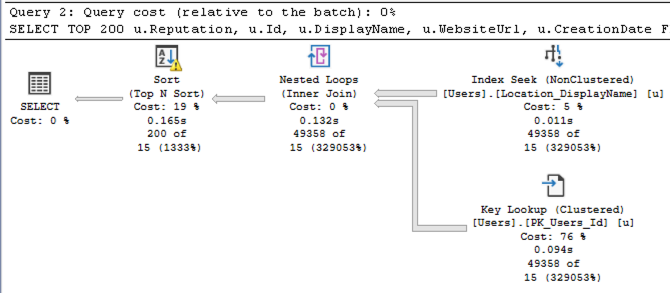
Problem #1: SQL Server under-estimated the number of rows that’d come out of that Location index seek. It thought only 15 rows would come out, when in reality 49,358 rows came out.

That lowball estimate caused a couple other problems:

  1. The sort has a yellow bang because it spilled to disk. SQL Server didn’t allocate enough memory to do the sort because it thought it’d only be sorting 15 rows.
  2. We did 49,358 key lookups, so it might have been more efficient to just scan the whole table. You can test that by adding an INDEX = 1 hint like this in the stored procedure, and compare the logical reads before & after:
That’s where you come in, dear reader: can you make this query read less pages only by tuning the query? I know, you love tuning indexes or changing server settings, but as you love to tell your developers, you can’t always throw indexes or go pulling on knobs every time there’s a query-level problem. You can make ANY changes you want to the stored procedure that you would actually implement in real life, but that’s it. (No, you can’t hard code the location, obviously: it can change over time as adoption changes.)

We’re not concerned with query duration, spills, memory grants, etc in this particular challenge because those will vary a lot from one run to another, especially with 2019 & 2022 compatibility modes. Here, we’re only focused on reducing the number of logical reads. Your answer won’t have a dramatically reduced number – we’re just looking for more accurate estimates that drive lower logical reads, period. Any improvement will be a good one.

Post your solutions in the comments, and feel free to ask other folks questions about their solutions. We revisit the answers & discuss ’em in this post. Have fun!