Azure SQL DB Managed Instances: Transactional Replication
4 Comments
I knew Brent and Erik wouldn’t touch replication, so I figured I’d give it a whirl.
My good, old friend replication
I have a love-hate relationship with replication. Mostly hate due to latency and errors, but it does serve its purpose. Before Availability Groups came out, I used Transactional Replication to copy data from the production OLTP database to another server so that we could offload reports.
Will it work with a Managed Instance?
I immediately crashed and burned as I didn’t read the limitations of Managed Instances. My bad.

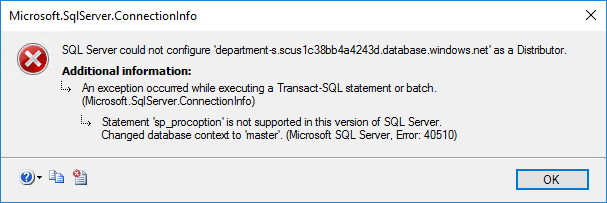
A Managed Instance can be a subscriber but not a distributor or a publisher. FINE.
I setup the distributor and a publisher on an Azure VM and then added the Managed Instance as the subscriber. I initially had some errors in Replication Monitor, but that was because I hadn’t touched replication in over 2 years and had forgotten some things that I once knew, such as replication needs a UNC path for the snapshot. Once the data was flowing between the two servers, I started pumping data into the publisher and watching Replication Monitor for latency and errors.

I inserted a tracer token to verify how fast data was making it to the subscriber: 4 seconds, not bad.

Those who’ve used replication know that rebuilding a large index can cause excessive replication latency. I didn’t have a large index for this test, but I still wanted to see how this setup would do.

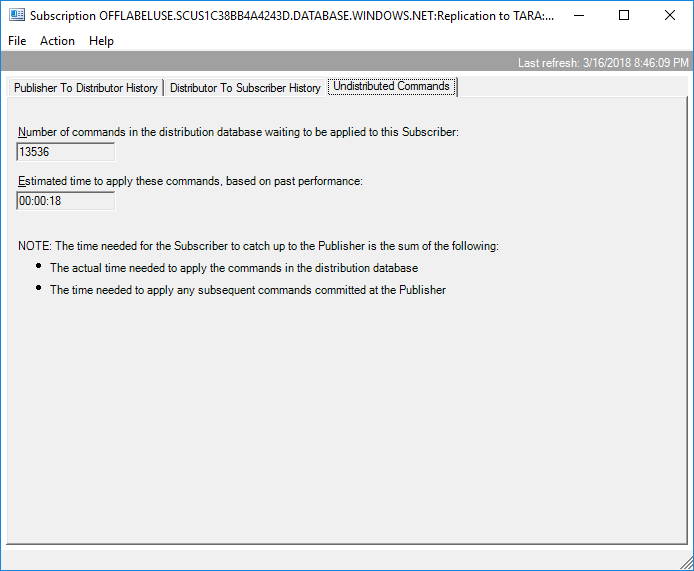
Latency was always under 20 seconds, and it recovered back down to 4 seconds fairly quickly.
Test, test, test
If you plan on using a Managed Instance as a subscriber in your replication topology, be sure you test for latency. Excessive latency is typically caused by a large transaction. The largest transaction on a particular database is often rebuilding the largest index. Start there for your latency testing.