Blog

Home Office Studio Tour

Home Office
7 Comments

Ever wonder what it takes to do this stuff behind the scenes? I’ll show you.

If you’re thinking about getting started with live streaming or training videos, don’t be intimidated by this setup. There’s a lot of gear involved, but it’s because I’ve been doing this for years, and I’ve accumulated a lot of gear that works well for me. You can start with much less gear!

Let’s start with the big picture:

At left, I use a motorized stand/sit desk from Vari. I usually stand when I’m streaming and working with clients, but after a few hours, I prefer to sit down. When I do, I can just hit a button, and the whole thing comes down (but not the main camera – more on that in a minute.) In the corner of the room, you see the the black stool with just one leg – that’s a Vari Active Seat. I pull that over to the desk when I’m sitting.

At right, I have my “Camera B” setup: a C-stand with another camera, a light, and a laptop. I don’t actually type on that laptop – that’s just my monitor for when I turn to the side to address my audience directly. See, when I live stream, I have multiple camera angles. When I’m chatting with the audience and I don’t need them to see what’s on the stream, I switch scenes so that my camera is full screen, and the audience sees my side office wall:

(The shutters on the right side are closed, but that’s just because I wrote this blog post early in the morning before the sun rose. Once the sun rises, I open those shutters and look out at my neighborhood.)

For the audience, that Camera B view looks like this:

This busy background was a big goal for me when I moved to this house a few years ago. Inspired by video game and tech streamers, I wanted a wall of stuff that would show off my personality. Sometimes I have this camera zoomed in, and other times I zoom it way out to show the whole flair wall.

Anyway, when I’m on Camera B, that laptop mounted right under the camera helps me continue to watch the audience chat live while still facing the camera, plus watch the output from Twitch as a public viewer just to make sure everything’s working okay.

Here’s a zoomed-in view of that Camera B setup:

The gear involved:

  • Light: Neewer 660 with softbox diffuser – the diffuser helps soften the light, which helps not only the viewers, but me because I have to stare at it
  • Camera: Sony ZV-E1 with Sony FE PZ 16-35mm F4 lens – complete overkill, do not recommend, and requires a SmallRig Peltier cooler just to stay on for live streams. If I had to go back and do this over again, I’d get another Sony ZV-E10 instead, which is more than good enough for live streaming, and doesn’t need a fan. The camera’s live feed goes into my MacBook Pro via an Elgato Cam Link 4K USB capture device. (I run a really long HDMI cable down through that closet and around the room.)
  • Laptop: every few years, I buy a Windows laptop in the hopes that I can switch back over from the Mac. I get pissed off, give up, and then I use the laptop for stuff like this.
  • C-stand: don’t use a tripod for stuff like this. A C-stand is much sturdier, has a smaller footprint, and can mount more devices like all the stuff you see here.
  • Magsafe camera attachment: when I wanna record TikTok comment response videos like this, I just slap my phone onto here and use the light, and my office is in the background. I record those directly in the TikTok app itself.

Now, over to my main desk, which gets a lot more complicated:

The gear:

  • Apple MacBook Pro – the current generation of M4 Max with 128GB RAM. It handles live streaming at 60 frames per second, two 4K 60fps camera inputs, multiple displays, 60fps recordings for archival, running a VM, a ton of USB gear, and the CPU fan is never even audible. It’s bananas how fast this thing is, not to mention how battery efficient. I took it on a one-week Alaska cruise recently and didn’t charge it even once.
  • Above the MacBookPro, there’s something a little odd: a Logitech Brio 501 mounted sideways on a Manfrotto Magic Arm.
  • Main monitor: MSI 32″ 3840×2160 – down under $500 these days, and really good value for money. When I’m streaming, this has a VM or RDP window with what I’m streaming, but I only stream that one app window. Around it, I put things like streaming utilities.
  • Teleprompter: Elgato Prompter – when I’m streaming, this shows the live chat. When I’m working with clients, I put the Zoom camera views up there so that it’s more natural – I’m looking directly at the camera, even when they’re talking. The camera is hidden behind that prompter.
  • Camera (not visible, inside Elgato Prompter): Sony ZV-E10 with Sigma 16mm f1.4 lens, piped through another Elgato Cam Link 4K – total workhorse. Love this thing. Powered by USB-C, no dummy battery or fan required, runs for hours even at 4K 60fps.

There’s more gear, but let’s stop here for a second and talk about that main camera. The teleprompter and Sony camera are mounted to a C-stand behind my desk because when I type or bang on the desk for emphasis, I don’t want the camera to wobble. Putting the camera on a separate C-stand, not tethered to the desk at all, keeps it more still.

When I’m standing, my main Sony camera is shooting directly at me, with my green wall in the background, so I can use a chroma key filter in OBS to make my background disappear, and let me float over what I’m streaming:

Camera A view

However, after a few hours of standing while working, I wanna sit down, so I push a button on the motorized Vari desk and it drops to a sitting position. But because the Sony camera is mounted to that separate C-stand, it’s still up high. That means I need another camera.

If you look closely at the desk screenshots, above my MacBook Pro, you’ll see something goofy: a Logitech Brio webcam turned sideways, mounted to the desk via a Manfrotto Magic Arm. It’s turned sideways because I want the max resolution possible (given that it’s a crappy webcam) and I use it in the stream like this:
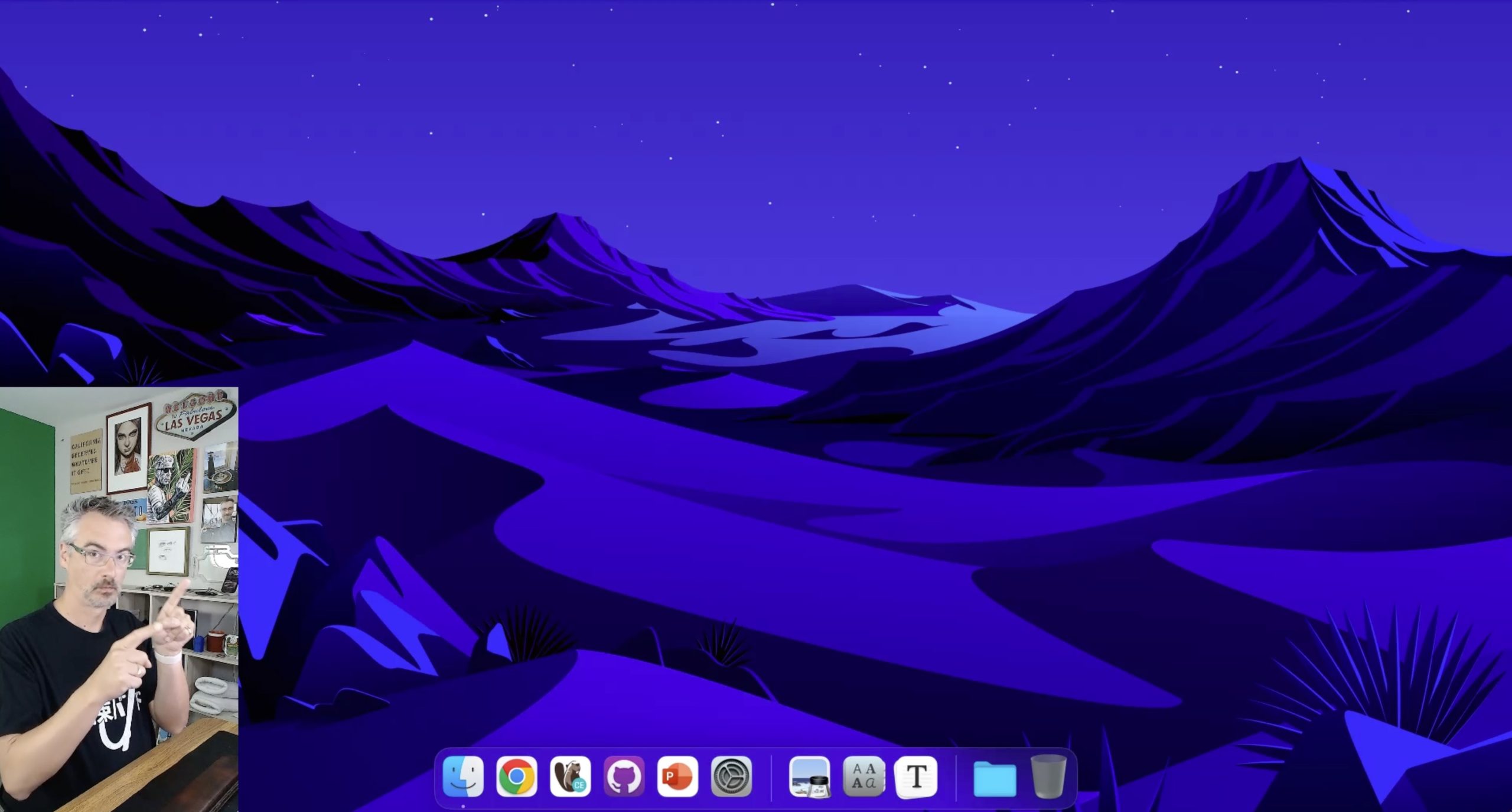
Sitting camera view

This view isn’t green-screened. This will probably be the next thing I upgrade in my home studio gear – switching to a different sitting camera, mounted to the C-stand, so that I’ve got nice green screen views whether I’m sitting or standing.

Back to the gear on the desk:

  • Lights: Neewer 192 soft lights – mounted on desk platforms from the old Elgato Key Light Air, so that they also work when the desk is in sitting position.
  • Control panel: Elgato Stream Deck XL – because I have a lot of sound effects and scenes.
  • Microphone (not shown): DPA directional headset plugged into a Sennheiser AVX wireless system, piped into a Focusrite Scarlett 2i2 – because I wanna move around a lot between different scenes, and walk around on the green screen demonstrating stuff, without the audio changing. Every now and then, some commenter gives me flak for using an “old” microphone, and I just shake my head and laugh. When I’m working with clients, I use a much simpler wired USB Plantronics monaural headset.
  • Connectivity: Sonnet Echo 20 Thunderbolt 4 SuperDock – I have tried so many docks, and this one has been the only one that’s stayed solid without randomly dropping SSD connections under really heavy load. (When I say heavy load, remember, I’m running Ethernet, multiple SSDs, USB video & audio feeds, the Stream Deck, and more.)
  • Input: Apple Magic Keyboard and Trackpad on a heated desk mat. Yes, it does get cold in Vegas during the winter.

For software, the big key is OBS Studio. It’s free, open source, frequently updated, and ridiculously powerful, but has an ugly learning curve. I still need to spend time learning how the latest features work, like simultaneous landscape & portrait video outputs (for streaming to both Twitch/YouTube and TikTok/Instagram simultaneously.) Hell, I even need to learn how the basic features work, like better audio settings and chroma key filters.

It’s a lot of gear, and a lot of work, but you can see the quality of the results in my training classes and live streams. See you there!


[Video] Office Hours Back at Home in Vegas

Videos
0

I’m back in Vegas, at least for the moment, so let’s hang out in my home office and talk through your top-voted questions from https://pollgab.com/room/brento. There’s a lot of good questions this week!

Here’s what we covered:

  • 00:00 Start
  • 02:26 Eric M: I’ve recently become very disenchanted with the commercial SQL Server monitoring tool I use. I’ve been taking a serious look at https://dbadash.com/ and It looks great thus far. Do you have any experience/thoughts with or about it? DISCLAIMER I am in no way affiliated with it!
  • 04:16 Boris: I’m a DWH admin and developer. My company wants to give edit access to Risk department to change SQL code that processes DWH data. What should I tell them?
  • 06:00 It’s 2025: Have you found any monitoring tools that gracefully work with PSOP?
  • 06:47 MyTeaGotCold: What correct predictions are you most proud of?
  • 09:41 Mikkel: A former team member chose to save raw image data in a table. When we remove the table column. Should we shrink the database or leave the database file sizes as they are? You always say that shrinking is bad.
  • 12:16 Erika: My business isn’t sophisticated enough for AGs. How can I achieve high availability in the cloud? Database mirroring isn’t an option.
  • 13:38 Q-Ent: Hi Brent, i reached a point where i cannot get additional value and growth if i do minor, repetitive tasks. I have to keep up with these tasks to have my job. Do you follow any work routine like email check cut off time or disconnect from social media to keep up with deep work?
  • 17:08 Running out of resourced: We have a historical log table which contains the date time of the transaction, user name, and a nvarchar(max) column containing a json object. Table has 250 million rows and size is 500gb. What are recommended practices for reducing storage and increasing query performance?
  • 18:49 Juan Pablo Gallardo: Is there a specific function to run to make sure is ok to reboot the sql server?
  • 20:07 Milos: Have you ever encountered SQL Server being rolled out and used as primarily an enterprise ready XML document DB? Any considerations or precautions for such a use case – which is using Sql Server akin to a MongoDB, just for XML instead of json?
  • 21:26 Brent Ozar Jr: What similarities and differences are there between being a developer / administrator for an online transaction processing (OLTP) DB vs an online analytical processing (OLAP) DB? What must you do differently for an OLAP DB vs an OLAP DB, and is there any overlap of skills?
  • 23:30 Just James: ChatGPT5 has read too many of your videos; it seems a bit sassy to me. I wrote a query and asked it if it could be improved. It came back with “No window + DISTINCT gymnastics:” I was using count over partition by. Should I give up my torrid love affair with over partition by?
  • 25:03 Artem: Implementing business logic inside/outside database. When it is appropriate to implement business logic inside the database. And when it is not. Considering CPU, network latency, long-running data processing. Any articles on the subject. Patterns, anti-patterns, pros, cons, etc.
  • 26:57 KnowEnoughDBAtoBeDangerous: I’ll be moving our SQL databases over to Aurora PostgreSQL. Now that you’ve started Smart Postgres, have you had any clients make the switch?
  • 28:25 Brent Ozar Jr: What are some tips for learning how to become a better Data Engineer on the SQL side of things?
  • 29:57 Winston : When you awaken in early morning what’s your routine? Do naps help?
  • 31:28 Aubrey Plaza: For a good decade, when we needed to create a test environment we were use to take a copy of the vanilla version of our database. Now someone mentioned words like “version control” and “Liquibase” and we need to rush to it immediately. In what scenario this makes sense to you?
  • 33:30 Brent Ozar Jr: What other security considerations do developers and DBAs have to make for SQL databases other than prevent SQL injection attacks?

Who’s Hiring in the Microsoft Database Community? September 2025 Edition

Who’s Hiring
4 Comments

Is your company hiring for a database position as of September 2025? Do you wanna work with the kinds of people who read this blog? Let’s make a love connection.

If your company is hiring, leave a comment. The rules:

  • Your comment must include the job title, and either a link to the full job description, or the text of it. It doesn’t have to be a SQL Server DBA job, but it does have to be related to databases. (We get a pretty broad readership here – it can be any database.)
  • An email address to send resumes, or a link to the application process – if I were you, I’d put an email address because you may want to know that applicants are readers here, because they might be more qualified than the applicants you regularly get.
  • Please state the location and include REMOTE and/or VISA when that sort of candidate is welcome. When remote work is not an option, include ONSITE.
  • Please only post if you personally are part of the hiring company—no recruiting firms or job boards. Only one post per company. If it isn’t a household name, please explain what your company does.
  • Commenters: please don’t reply to job posts to complain about something. It’s off topic here.
  • Readers: please only email if you are personally interested in the job.

If your comment isn’t relevant or smells fishy, I’ll delete it. If you have questions about why your comment got deleted, or how to maximize the effectiveness of your comment, contact me.

Each month, I publish a new post in the Who’s Hiring category here so y’all can get the latest opportunities.


Free Live SQL Server Classes This Month!

Conferences and Classes
2 Comments

This month, I’m teaching two of my classes live, online, completely free!

These are the two fundamentals classes that I think everybody should start with, regardless of their experience with SQL Server or Azure SQL DB. I’ll teach you the most important parts about how the database engine works, plus how to use free scripts to troubleshoot what’s going on with your database’s health and performance.

If you’re a senior database person in your shop, you might even want to send these to your fellow team members to get ’em started on the right foot. Anybody can attend these – from report writers to developers to sysadmins – and I often hear from senior folks who say, “Whoa, I didn’t realize how much I didn’t know in here too!”

I’m teaching them twice – one version in the morning and another week in the afternoon – to try to meet up with your schedules. Click on each link to download a calendar invite, which will also show you which time it is in your own time zone:

No registration required – it’ll be live on our YouTube channel. You can also use YouTube’s notification features to alert you when the streams start:

If you can’t make it, you can register for free access to the recordings. See you there!


[Video] Office Hours in Icy Strait Point, Alaska

SQL Server
2 Comments

For the last couple of months, I’ve been trying to get my on-location Office Hours episodes filmed with an Insta360 so you can pan the camera around to see the sights. Folks, I’ve finally pulled it off! If you watch the video on YouTube (rather than here on the blog), you can move the camera around with your clicker:

We covered your top-voted questions from https://pollgab.com/room/brento, including:

  • 00:00 Start
  • 02:28 I adjusted my chest today: On a new 2022 instance, do you default to varchar or nvarchar for strings? I remember that varchar got unicode support in 2019.
  • 03:59 Index_It_All: Hey Brent. I work in a small organization. The first 2-3 years were hell as I was the First DBA. Things are really slow now.I am in Most of the Courses you have going.Sp_Blitz helps me stay ahead.My manager wants things to brag about my job. What will you advice for my relevance.
  • 06:14 SQL Saturday Junkie: What location has been your favorite SQL/Data Saturday event to speak at world-wide and in the US? How much work is it to plan for a full day pre-con? Thanks!
  • 12:21 Mike: Hey Brent! Where do you think is a better place to post technical articles – mssqltips.com, sqlservercentral.com, red-gate.com, linkedin, or something else ? p.s. take into account “peer reviewed”, “speed of posting”, “number of views / popularity of the website”
  • 15:45 Hany: Hi Brent, in the year 2025 where SQL 2025 should be released anytime soon, and with no specific problem trying to solve, just a migration project from one cloud vendor to another, is it advisable to stay on SQL 2019 or should we upgrade to SQL 2022 with the migration?
  • 17:05 chris: How can one benchmark disk performance on a SQL Server PAAS offering? I’d like to ensure we’re getting the disk performance we’re paying for; however, I understand Crystal DiskMark is only meant to run locally from an OS.
  • 19:53 i_use_uppercase_for_SELECT: What’s a common problem you see that even though you see it often it’s hard to find the root case?

From now on, knock on wood, I should be able to do these 360 videos as I travel around the world. I’ve got upcoming visits to LA, Boston, and another Caribbean cruise, so I’ll take your eyeballs on vacation along with me.


Why Aren’t People Going to Local and Regional In-Person Events Anymore?

Steve Jones recently posted an update about SQL Saturday’s status, and it includes some news we need to talk about:

However, this year the number may stagnate or even decline slightly. Running events has become challenging for many communities. Organizers are busy, space is hard to find, and costs are rising…. The biggest challenge in running events is finding space at a reasonable cost. Many Microsoft offices are closing, which were strong supporters of events in the past.

Steve gives a couple of possible reasons for the decline, and I’d like to throw out a few more. I don’t know which ones are larger or smaller than the others, but they’re just all reasons I’ve heard from folks over the last few years.

Unknown person of dubious qualityObviously, COVID was a factor. We spent a couple of years not getting together with others in person. A lot of people switched to working remotely, and we told employers that we could do just as good of a job (or better) remotely than in-person. Well, that backfired on training budgets: companies responded by saying, “Okay, then you can attend training events remotely instead, too.” I’ve heard from many clients that their travel budgets turned off during COVID, and never turned back on because of this.

COVID made it harder to get in-person speakers. In-person events tried using remote speakers, but the experience was simply awful. As a speaker, I’ll never again present remotely for an in-person group, and I’m just not traveling as much as I used to. I used to hit as many SQL Saturdays as my schedule could allow, but now because almost all of my client work is remote, I can’t justify the expense and time of traveling to an in-person local/regional event.

I don’t think the problem is that people switched to organized live online events with the same enthusiasm and frequency that they used to attend in-person events. People learned to get by with online sessions instead, but then Zoom fatigue burned us out on voluntary online get-togethers. We’re forced to attend so many virtual meetings at work – that the last thing we wanna do is sign up for yet more. Some online events have popped up, and they’re good – but it’s nowhere near the diversity and frequency that we used to get local & regional events. So this might be part of it – but it’s not the whole story.

But some people switched how they’re learning. Some folks switched to recorded videos, individual live streamers, written blogs, or self-guided on-demand learning through AI tools like ChatGPT. (Yes, I’m being generous and assuming people are using it for learning here, not just saying “do my work for me,” but that does relate to the next point.)

Some people stopped learning and/or networking. Some people got off that hamster wheel during COVID and chose not to get back on, instead deciding to coast based on what they know, or just coast until retirement. I’ve actually talked to folks who decided, “I’ve only got a few years left – I’ll just keep doing what I’m doing, the same way, at the same company, until they let me go or until I decide to quit.” LLMs like ChatGPT made it easier to get by without actually knowing what you’re doing – at least in the short term – and that’s all these kinds of people care about. (I don’t say that with any negative feelings – I want you to work as little as possible, and retire as early as you practically can.)

Some technologies slowed down. We used to attend user groups and regional events because there was a frantic pace of change in SQL Server: 2014, 2016, 2017, 2019 – that was a rocket ship of versions, four versions in five years! But after the pandemic, the release schedules slowed dramatically to once every 3 years, and the new features weren’t really groundbreaking, not requiring deep education to keep up. The cloud evolution slowed as well – I keep looking at my Running SQL Server in AWS & Azure class, recorded in 2022, and I just don’t see anything in there that merits an update in 2025.

Some new tech (outside of relational databases) sped up. Microsoft’s analytics folks continue to throw stuff against the wall to see what sticks, and Fabric is evolving like crazy. However, because Fabric is new, there are few active local or regional events dedicated to it – just online and national ones. (Before you leave comments yelling about how many Fabric user groups you see, drill a little deeper to check whether they actually have meetings upcoming & past, and whether the topics are actually Fabric, and whether they’re online or in-person.

Global politics have made travel harder and more expensive. Wars, economics, and immigration policies are all putting a dent in voluntary travel. As a Las Vegas resident, I can tell you firsthand that tourism numbers are way down, and my friends in hospitality & retail report some pretty horrific numbers. A friend of mine who works in a high-end Vegas retail store reports that their foot traffic is down 25% from last year, revenue is down 40%, and their Asian and Central American repeat customers are holding off on any US visits for now. I think that impacts national/international conferences more than it does local/regional ones, though, but I feel like I just gotta mention it here because someone’s going to bring it up.

We had a new generation of people enter the workforce. Some people got hired into the data industry during COVID, and they simply never saw the benefit of attending in-person or regional events. The veterans might tell them, “You need to network in-person to get ahead,” but this new generation doesn’t see it that way as they were able to get their existing jobs online, and network online as well. Do I think they would be well-served by attending in-person local and/or regional events? Well, maybe – but now we’re faced with a chicken-and-egg problem. I can’t tell someone to attend events that don’t exist.

We’ve never done a great job marketing the hallway track. I think the biggest value, and the reason I personally get really excited to attend local and regional events, is the ability to have casual, non-rushed discussions outside of the session rooms. Former coworkers, other speakers, people who know something about a topic I’m curious about – those are the lucky chance interactions that I don’t get as easily online. It’s hard to explain the value of that to someone who hasn’t experienced it, and because people don’t know the value, they’re not tempted to go to an event to experience it for the first time.


Jeez, when I look at the entire list above, it’s like a perfect storm! What other reasons can you think of for the decline of local & regional in-person database events – or if you’re not attending ’em anymore, why not?

Update: there are also comments on HackerNews, like another reason: Twitter used to create a fear-of-missing-out (FOMO) feeling amongst those who weren’t there, plus make it easier for attendees to coordinate meetups with each other, but that’s greatly diminished now.


SQL Server 2025 RC0 Is Out with New Preview Features Settings

SQL Server 2025
1 Comment

The release of SQL Server 2025 keeps inching closer. Release Candidate 0 is out now, and here are the release notes. If you’re planning on replacing your SQL Server 2016 instances (which go out of support next July) with 2025, now would be a good time to start doing functionality testing. As a reminder, here’s my post on how to go live on a new SQL Server version.

SQL Server 2025 RC0 adds a new database-scoped option called PREVIEW_FEATURES. If you wanna use stuff that’s not officially supported yet, you have to turn this feature on. You can kind of think of this option as SUPPORTED = OFF. As of RC0, Change Event Streaming (which has a ton of limitations, but looks promising), vector indexes, and AI_GENERATE_CHUNKS are locked behind this setting.

This is awesome! I applaud Microsoft for being willing to ship a version, but hold back specific features until they’re ready. Some of my clients are itching to get onto the newest version as quickly as practical, and they don’t really care about the above features. (I also like this better than the server-wide trace flag approach.)

However, time to cue up the sad trombone: this is your sign that the above features probably won’t make the cut for SQL Server 2025’s initial release. If you were counting down the days to put those features into production, time to reset the clock and set expectations with management that we have no idea when that stuff will actually drop in a way that’s safe to use. I usually advise folks to rely adding application dependencies on brand-new T-SQL functionality for the first 30-60 days at least to see how the bugs shake out. (We all remember the challenges of inlined scalar functions.) If you don’t have to take a dependency on a new feature right away, then you probably shouldn’t.

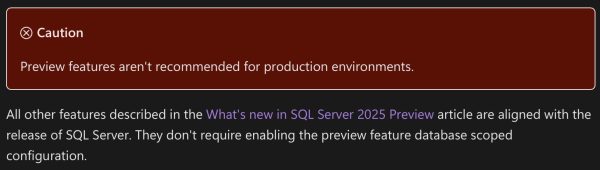
The release notes suggest that everything else in 2025 is destined for the first release, though:

Preview feature limitations

New Sys.Messages Entries in SQL Server 2025 RC0

In addition to the ones added in RC0 and in RC1, there are still more. I’ve bolded some of the ones that look particularly interesting:

  • 709: The available memory for this SQL Server instance (%I64u MB) is lower than the configured maximum server memory (%I64u MB). This might occur because of external memory pressure or faulty hardware. If the operating system does not have sufficient memory for this SQL Server instance, consider reducing the configured maximum server memory to avoid this message on instance startup.
  • 4716: TRUNCATE TABLE statement failed. The column set used to partition the %S_MSG ‘%.*ls’ is different from the column set used to partition index ‘%.*ls’
  • 5383: Cannot reference Index on Expression column ‘%.*s’ during index creation.
  • 8070: The incoming tabular data stream (TDS) remote procedure call (RPC) protocol stream is incorrect. Parameter %d (“%.*ls”): vector data type is not supported in TDS on the server side.
  • 11449: ALTER TABLE SWITCH statement failed because the table ‘%.*ls’ has %S_MSG on it.
  • 12145: Cannot disable the PREVIEW_FEATURES database-scoped configuration while the ‘%ls’ preview feature is active.
  • 12146: Database ‘%.*ls’ cannot be renamed while Mirroring to Microsoft Fabric is enabled. Disable Mirroring and retry rename operation.
  • 12467: The feature_id %d is invalid.
  • 12468: Removing feedback for feature_id %d is not supported.
  • 12469: Removing feedback for a specific plan is not supported.
  • 12470: Removing plan feedback is disabled.
  • 12526: An internal error occurred while cloning the specified warehouse.
  • 13689: DATA_COMPRESSION is not compatible with JSON index ‘%.*ls’. Please drop it and recreate it.
  • 13690: JSON index ‘%.*ls’ cannot be rebuilt. Drop and recreate it.
  • 13836: For onelake container paths, only files in ‘//Files’ directory are allowed.
  • 13837: ERRORFILE path ‘%ls’ and data path ‘%ls’ must have the same onelake endpoint, workspace, artifact and folder.
  • 16219: The value for %.*ls is out of range. The value must be greater than or equal to %I64u and less than or equal to %I64u.
  • 17077: Error spawning Heartbeat Monitor thread: %ls
  • 19545: ‘ALTER AVAILABILITY GROUP’ command failed for internal distributed availability group ‘%.*ls’. Altering internal distributed availability groups is not supported.
  • 19546: ‘ALTER DATABASE SET HADR’ command failed for database ‘%.*ls’. This command is not supported for databases participating in distributed availability group with SQL Managed Instance.
  • 19547: The integrity check for distributed availability group ‘%.*ls’ with SQL Managed Instance failed with error cause: ‘%S_MSG’. Corrective action: ‘%S_MSG’.
  • 19548: The integrity check for distributed availability group ‘%.*ls’ with SQL Managed Instance failed with error cause: ‘An availability database ‘%.*ls’ not participating in any internal distributed availability group.’. Corrective action: ‘Remove the availability database from the availability group and add it back again.’.
  • 19549: Provided distributed availability group name ‘%.*ls’ is invalid. Please provide a name of a distributed availability group with SQL Managed Instance.
  • 19550: Distributed availability group with managed instance does not support having multiple databases.
  • 19551: The CLUSTER_CONNECTION_OPTIONS argument can only be specified when the availability group uses a Windows Server failover cluster. Remove CLUSTER_CONNECTION_OPTIONS and try again.
  • 19552: The current value of HostNameInCertificate is too long. Current length: %ld characters, maximum length: %ld characters.
  • 19553: The current value of ServerCertificate is too long. Current length: %ld characters, maximum length: %ld characters.
  • 19554: Invalid key ‘%.*ls’ in the %.*ls argument. For more information, see %.*ls.
  • 19555: The format of the ‘%.*ls’ argument is invalid. The expected format is ‘<key=value>;<key=value>;…’. Spaces and semicolons in keys or values are not allowed. For more information, see %.*ls.
  • 19556: Invalid value ‘%.*ls’ for Encrypt. Valid values are Strict, Mandatory or Optional. For more information, see %.*ls.
  • 19557: Invalid value ‘%.*ls’ for TrustServerCertificate. Valid values are Yes or No. For more information, see %.*ls.
  • 19558: Duplicate key ‘%.*ls’ in %.*ls.
  • 19559: The key ‘Encrypt’ must be specified in %.*ls.
  • 22645: Fabric Mirroring cannot be enabled on a table where its primary key, or if no primary key exists, its clustered index, includes any of the following column types: user-defined types, geometry, geography, hierarchyid, sql_variant, timestamp, datetime2(7), datetimeoffset(7), or time(7).
  • 22799: Fabric Mirroring cannot be enabled on database ‘%s’ due to the reason: %S_MSG
  • 23667: Change Streams event delivery error : ‘%ls’.
  • 23668: User table ‘%s’ has reached the max number of Change Event Streaming destinations.
  • 23669: Microsoft Fabric Mirroring cannot be enabled on Linux.
  • 23670: No primary system assigned managed identity found.
  • 23671: Microsoft Fabric Mirroring is not supported on Azure VM.
  • 23672: Microsoft Fabric Mirroring is not supported with Arc user assigned managed identity. Please use Arc system assigned managed identity.
  • 24803: Encountered failure during database upgrade of internal tables.
  • 24804: This stored procedure supports only one-part or two-part names. Please use either [table] or [schema].[table].
  • 24805: Column ‘%s’ of type ‘%s’ could not be validated with the underlying table. Reason: %s.
  • 24806: Unexpected JSON data during parsing attempt in column type inference. Underlying data description: ‘%ls’
  • 24807: Cannot parse unquoted JSON value in the property ‘%ls’. Valid unquoted values can be true, false, null, and numbers. Underlying data description: ‘%ls’
  • 24808: Cannot convert a string value found in the JSON text to binary value because it is not Base64 encoded.
  • 24809: One or more log or checkpoint files have been deleted or overwritten. No operations can be performed on the external table. Please recreate the external table.
  • 24810: Updating source database is not supported.
  • 24811: SOURCE_DATABASE can only be altered only for warehouse snapshots in LIVE mode.
  • 24812: Setting SOURCE_DATABASE failed.
  • 24813: Specifying an explicit value for the identity column ‘%.*ls’ in table ‘%.*ls’ is not supported.
  • 25100: Storage is unavailable.
  • 25101: Provided lease is broken.
  • 25102: Lease was already released.
  • 25103: Incompatible lease mode.
  • 25104: Invalid parameter.
  • 27604: Your organization Microsoft Purview Information Protection label publishing policy requires a justification when the label assigned to the column is being changed to a different label with lower priority. Provide a valid justification. For more information, see https://aka.ms/SQLPurviewLabeling.
  • 27605: The label with ID ‘%.*ls’ is not a valid label in Microsoft Purview Information Protection. Provide a valid label ID. For more information, see https://aka.ms/SQLPurviewLabeling.
  • 27606: Microsoft Purview Information Protection label can only be assigned or changed by Microsoft Entra user. Use a valid Microsoft Entra user to execute this query. For more information, see https://aka.ms/SQLPurviewLabeling.
  • 27607: Microsoft Purview Information Protection labels cannot be assigned when the database has existing labels assigned via the SQL Data Discovery and Classification feature. Remove any existing labels from the database prior to assigning Microsoft Purview Information Protection labels. For more information, see https://aka.ms/SQLPurviewLabeling.
  • 27608: Labels via the SQL Data Discovery and Classification feature cannot be assigned when the database has existing Microsoft Purview Information Protection labels assigned to it. Remove any existing labels from the database and then try again. For more information, see https://aka.ms/SQLPurviewLabeling.
  • 27609: Internal error occurred while running billing background task. Major error code: %d, Minor error code: %d, State: %d.
  • 27610: Unable to access Microsoft Purview Information Protection on your behalf because your session has expired. Reconnect to SQL database and try again.
  • 31208: A fulltext fragment table is missing.
  • 31644: Server Managed Identity is disabled for this instance of SQL Server. Use sp_configure ‘allow server scoped db credentials’ to enable it. For more information, see https://go.microsoft.com/fwlink/?linkid=2325611.
  • 31734: The value ‘%I64d’ is not within range for the %ls parameter.
  • 31735: The JSON value for the JSON key ‘%ls’ must be ‘%.*ls’ type.
  • 31736: An error occurred during the execution of the function.
  • 31737: The size of the provided %ls would be at least %u bytes after converting to UTF-8, which exceeds the maximum allowed size of %u bytes.
  • 31738: Initialization of the ‘%ls’ process with session ID ‘%ls’ failed with HRESULT 0x%08x.
  • 31739: Generating embeddings from ‘%ls’ process with session ID ‘%ls’ failed with HRESULT 0x%08x.
  • 31740: An internal error has occurred in AI runtime with session ID ‘%ls’. Retry the operation, if the issue persists, contact support for assistance.
  • 35541: ai_generate_chunks
  • 35542: Drop and re-create the distributed availability group with SQL Managed Instance.
  • 35543: Stored procedure called on invalid distributed availability group type or on non-existing distributed availability group.
  • 35544: Empty internal distributed availability group.
  • 35545: Internal distributed availability group naming inconsistency.
  • 35546: An internal distributed availability group detected with more than one associated availability database.
  • 37579: The security policy ‘%.*ls’ cannot reference tables with vector indexes. Table ‘%.*ls’ has a vector index.
  • 42241: Input JSON contains out-of-range values for %ls.
  • 42242: Input JSON contains %ls type which is not supported in ARM64 architecture.
  • 42243: VECTOR_DISTANCE function does not support different base types for vector arguments.
  • 42244: A vector index cannot be created on tables with security policies. Table ‘%.*ls’ has security policy ‘%.*ls’.
  • 42245: Drop and recreate the incompatible vector index ID %d on object ID %d.
  • 45943: “The long-term retention backup with the desired legal hold value already exists backup file backup. ErrorOwner: sqldataintegration
  • 46560: External Table Location option must be a valid OneLake path.
  • 47700: Reason: The External Provider Access Token used for authenticating to the SQL Server is Blocklisted.
  • 49538: The dynamic space management force reset operation was aborted because the connected server is not a page server.
  • 49539: The dynamic space management force reset operation has failed for database ID %d, mode ID %d, failure name %ls.

SQLBits 2026 is Going Back to Newport, Wales.

SQLBits
7 Comments

SQLBits 2026 will be back at the International Convention Center Wales in Newport on April 22-25, and I’ll be there!

Bits was there in 2023, and they’ve got a recap video showing the venue.

This location is a little tricky for us Yanks: here’s where it’s at on Google Maps. For international visitors, you’ve got a few options:

  • Fly into London Heathrow, then take a 3-hour train to Newport. This is the option I chose because there are non-stop flights from Vegas to Heathrow. I’ll fly into London arriving April 19, spend a day and a half in London, and then take the train over to Newport on Tuesday the 21st, the day before the conference. After the conference, I’ll catch the train back and fly out of Heathrow on Sunday.
  • Fly into Cardiff (CWL, 15 mi away) or Bristol (BRS, 30 mi away), and take a taxi or train. If I lived on the East coast of the US, I’d check into this option, because there are affordable flights out of places like Atlanta. Nothing for Vegas though.
  • Fly into London, then rent a car. I wouldn’t recommend this unless you wanna spend more than a week roaming around the UK, and can take your time gradually getting used to driving on the other side of the road. It’s way more challenging than you might expect. I’m a pretty good driver – I’ve never been ticketed for an accident – but I had multiple close calls driving in England and the Isle of Man.

You don’t really want a car during the conference. This year, Bits is selling packages with your hotel room included, and they’re looking at getting buses to take you to/from your hotel. If you stay at the Celtic Manor, you can just walk over to the ICC.

SQLBits 2026 is Going Back to Newport, Wales.Plus, while you’re at the conference, the idea of this year’s event is to be really involved in the after-hours events at the venue itself. I’ll be at all of ’em this year.

When SQLBits is in London, the after-hours events like the Pub Quiz and the party aren’t very well-attended for a few reasons. Local transportation in London is kind of a pain in the butt, there are so many other distractions in London, and at the end of the day, a lot of locals just go home. In Newport, the venue is more all-encompassing: you’re going out there to have a good time with your fellow attendees during the day, AND after hours.

Early bird registrations will open up this month, and it’s time to start thinking about what sessions to submit. These days, there are so many tech topics: AI, Fabric, Azure, AWS, SQL Server 2025, and timeless dev & DBA topics. I need to think about what to submit, so I’ll put it to you, dear reader: what would be the topic that would compel your boss to whip out the credit card and buy your conference registration and plane ticket?


Helping Software Vendors Talk to DBAs

Software vendors have a wide variety of clients:

  • Some clients don’t have any IT staff at all, and just outsource everything. The client wants to hand an installation manual to their contractor and say, “Build whatever the software vendor wants.”
  • Some clients have a full time sysadmin or two, and those sysadmins don’t really know anything about Microsoft SQL Server. They want a 1-2-3 checklist of what needs to be done, and they’ll follow it to the letter, but they won’t put any independent thought into it, nor will they raise any objections.
  • Some clients have a big IT staff, including at least one full time DBA. Ironically, you’d think this kind of environment would be the easiest one when it comes to installations – but it’s the opposite! The sysadmins and DBAs raise all kinds of objections because they have internal standards, or they want things done a certain way.
That's a pair of baby potbelly pigs, sleeping atop each other on my lap, because they were inseparable.
I prefer mirrored pairs of highly available potbelly pigs

So when I’m working with software vendors to write installation instructions for their database back end, I encourage them to think about three tiers of SQL Server environment quality:

  • Good – typically a single VM, using whatever VM backup software that the client uses across all of their servers.
  • Better – adds in a method of high(er) availability, typically mirroring, because it needs to be simple enough to be managed by a non-DBA. I’d typically suggest manual (not automatic) failover here, which for a single database app is easy enough that a sysadmin can do the failover while following a checklist, or can call the vendor’s help desk to be walked through it.
  • Best – a complex high availability and disaster recovery topology, perhaps a failover cluster plus log shipping. This requires serious know-how on the client side, and the vendor isn’t going to be able to write instructions detailed enough for a n00b to follow along.

It might seem counterintuitive, but it’s easy to write the “Good” instructions. There just isn’t much work to be done. However, the more complex the environment is – and the more it relies on the client’s internal standards and processes – the less guidance a software vendor can give. It’s just too hard, too time-consuming, and too expensive to write a document that fully explains how to implement a multi-subnet cluster that works for every possible client.

I find that if the software vendor is honest about that, then it makes the situation easier for DBAs. The “Best”-tier installation guide starts with a simple disclaimer:

We want to be a great partner for you, so that means being flexible and working with your standards. In the next couple of pages, we’re going to describe a typical Best-tier infrastructure (a failover cluster plus log shipping) that works with our more complex and demanding clients. You don’t have to follow that scenario exactly! If there’s an infrastructure you’re an expert on – perhaps Availability Groups or SAN replication – we’d be glad to talk through that with you to make sure it works for everyone involved. Just understand that if you choose to implement your own infrastructure design, we can’t guide you on it, or troubleshoot it for you. We’re relying on you to do that part. But as long as the SQL Server service is up and we can connect to the database with SSMS, we’re happy!

That way, everybody’s on the same page: the vendor has one complex design that they’re familiar with, and they can guide you towards consultants for implementation or troubleshooting, and their support team will be comfortable working with it when the poop hits the fan. However, if you have a design that you’re comfortable supporting, the vendor is flexible and can work with that too – they just can’t do infrastructure support on that design.


[Video] Office Hours: Docked in Miami Beach

Videos
0

On the last day of my Caribbean cruise, as we pull into port in Miami, let’s go through your top-voted questions from https://pollgab.com/room/brento.

Here’s what we covered:

  • 00:00 Start
  • 01:45 Sean: How would you approach a task to remove 90% of the data to support lightweight test db servers. I’m thinking of a script with a recursion on foreign keys that would travel the keys and delete from the bottom up. Any thoughts to give me a kickstart?
  • 03:04 Symmetrical Docking DBA: What features does the AG Dashboard in SSMS lack that you expect to see in a paid monitoring tool?
  • 04:03 zlobnyfar: Clustered ColumnStore Indexes and Availability Groups on MS SQL Server 2014 Enterprise. Is it compatible? Will it impact AG(s)? any PROS and CONS? (some stats: 3 databases (~3 TB), each has up to 5 tables I want to convert to CCI, ~ 100000 updates per day on those tables)
  • 05:04 MyTeaGotCold: Any rules of thumb for when it’s time to stop using CAL licences? It seems like nobody ever talks about CAL.
  • 06:13 Lee: I got a slow query. I see that the pain point in the execution plan is a clustered index delete. I have ensured all foreign keys are indexed. I have tried batching the deletes. I have tried several of the common things to try. Any ideas what to try next to speed it up?
  • 08:02 5 hours without internet: I don’t trust myself to keep lists of waits up to date. So aside from the junk of Page Life Expectancy, how do I alert on memory pressure?
  • 08:43 WalkedIntoAPoll: Good day! What is your opinion of the use of the blue-green deployment method overall? If there is no problem to solve with its implementation, would you agree that it is a best practice to have anyway?
  • 09:41 AnonSoMyCoworkersDontFindOutLol: Previously you have suggested interviewing with employers even if content with current job. I agree and desire to, but am unable to make the first step. How far do you go with each employer? How do you decline a position you know you won’t take, if offered? Thanks for all you do.
  • 11:50 burnedmywatermakingtea: off-topic: forced aspiration or no? turbo or supercharger?. Yes I know it depends.
  • 13:30 LoGan The Librarian: What do you think if you heard someone say this? I personally love SQL, because I’m an algorithms person, so I love optimization. I love to know how the databases actually work, so I can match the SQL queries and the design of the tables to get optimal performance of the table.
  • 14:42 Culloden: What are the risks with using microsoft features that are in Preview and not GA?
  • 16:27 Sarkis: Hi Brent! I’ve never heard you talk about the Database Engine Tuning Advisor. Do you think it’s worth trying at all, or is it just not useful in real-world scenarios?
  • 17:07 Culloden: 3 years into Gen AI and no company is profitable. Is this turning into another tech company bubble for the big AI companies? Is this going to turnout to just be a feature enhancement to existing products rather than a whole new industry? Is AI just the next spell-check in Word?

AI is Like Outsourcing. #TSQL2sday

AI
12 Comments

When you ask data people how they feel about AI, you get pretty rabid, extreme reactions. People either love it or hate it. Set that aside for a second, and let’s zoom out and think about a bigger picture question.

What’s it like to work with someone you know, versus a stranger?

Known Person Unknown Person
Work Quality High Varies
Price Expensive Cheap
Availability Low High

With a known person, like a trusted employee, you know you can count on their work. However, they’re only available so many hours per week, and you have to pay a relatively high price for them to keep that same exact person on your staff.

With an unknown person, like contractors on Upwork or Fiverr, their work quality is highly unpredictable. You can put in a ton of work yourself to clarify the task at hand, build processes for them to follow, and build automated checks on their work – but unless you do that, you don’t really know what you’re going to get. However, companies are often willing to take that compromise in exchange for getting someone way cheaper, way more often, because it’s a giant pool of strangers. Over the last couple of decades, it’s become completely normal for companies to outsource as much as possible to other companies, with varying results. (I’m looking at you, Microsoft Support.)

You make this decision yourself too – compare having a dedicated car with your own full time chauffeur, as opposed to opening the Uber app and calling a car. Compare having a full time chef on your payroll, as opposed to going out to eat at a restaurant.

Now think about code:

Known Code Unknown Code
Work Quality High Varies
Price Expensive Cheap
Availability Low High

When a company builds their own app, they design the logic carefully, test it, and they’re confident that it produces the exact right result, every time, predictably. It’s expensive – especially if you do it right. Note that I said “Availability = Low” here because historically, you haven’t been able to just wave a magic wand and get yourself working app code. It takes time to produce. It’s not just instantly available.
Unknown person of dubious quality

AI is unknown, outsourced code.

When you send requests to large language models like ChatGPT and Claude, you can’t consistently predict the work quality over the course of everything you’re going to ask it to do, over time. Models change, prompts change, the quality of the data going in can vary, you name it.

Because you’re a technology professional – especially one that works with data, where we want very specific, predictable, accurate results – you probably read the above explanation and say to yourself, “Bingo, that’s everything I hate about AI. It’s as if I called a company’s support line – that sucks too, because I get some bozo who has no idea what they’re doing, and they keep asking me if I rebooted my router.”

I’m here to tell you it doesn’t matter what you think.

Many companies are willing to make that compromise because the work is available instantly, 24/7, and it’s cheap as hell. Just like they’re willing to outsource people in their call centers and other job roles (even tech ones.)

That’s why I expect to see SQL Server 2025’s AI used a lot in the wild.

SQL Server 2025 and Azure SQL DB’s new sp_invoke_external_rest_endpoint lets you call ChatGPT & friends directly via T-SQL. Clients have told me they want to try using it for tasks like:

  • Translating product descriptions, menus, etc into other languages (Spanish, German, Japanese) – one client told me they’ll just start all new translations this way, and then have humans review the results rather than build all new translations from scratch
  • Generating personalized customer emails – like passing in a customer’s details, order history, web site behavior, etc to deeply personalize email campaigns and transaction receipts, leading to better customer relationships and easier bypassing of spam filters
  • Improving customer support calls by summarizing a customer’s activity – when a call center operator takes a call, they’ll see a short, two-sentence description of the customer, plus get a customized greeting to use (“Hi Alice! It’s Charlie here in support. Congrats on your recent milestone of hitting six months straight! What can I help you with today?”)

AI is a hybrid of outsourcing people, but also outsourcing code. I’m excited to see what clients build – but also at the same time, I’m kinda gritting my teeth because as a consumer, I’m not all that fond of the results from outsourcing people. It’s coming, and it’s useless to try to fight it.

I’m also really not excited to see how that code ages. Hard-coding API calls into T-SQL is a serious form of technical debt, especially in the day and age of rapidly evolving AI. That custom model version you call today may not be available in 3 years, let alone 5-10.

This post was for T-SQL Tuesday #189, and you can read the comments on that post to see thoughts from other bloggers on the topic about how AI is changing their careers.


[Video] Office Hours: 15 Answers in 30 Minutes

Videos
2 Comments

The first few questions from this week’s crop at https://pollgab.com/room/brento are very much about what-problem-are-you-trying-to-solve, but they get more complex from there.

Here’s what we covered:

  • 00:00 Start
  • 02:49 My Erik is Strong: Do you suggest any steps after an upgrade to SQL Server 2022 in particular? I mean 2022 features to try, enjoy, or tweak. I’m not asking for generic migration advice.
  • 05:12 Pock Mages in Lemory: All of my SQL VMs only run SQL Server. How do I know when it’s time to turn on Lock Pages in Memory? How can I know that it’s safe?
  • 07:02 That’s_Not_Chocolate: On our Azure SQL Database park I discovered that most of the compatibility_levels are at 140 and 150. I will try to move to 160 hoping to make the query run faster. Is this a false hope?
  • 08:13 paul: Hi, multiple client’s outsource their infra support to us in a shared model and I’m on the DB team. With limited knowledge of their system design , how should I troubleshoot when they report the DB is slower than usual, so I can suggest next steps?” I have sys admin access.
  • 09:46 MyTeaGotCold: Your recent post resonated with me. I’m wondering: are DBAs doomed to misery? My experience is that any DBA job opening means the estate is unhealthy and will probably take YEARS of pain to fix. Is it worth it?
  • 11:36 chandwich: I’ve worked with SQL Server & T-SQL for 6 years (tuning, coding, backups, design, ETL, automation). I blog, post on LinkedIn, but can’t land a DBA job. At 28, I’m considering data engineering or DevOps instead. How do young professionals break into DBA or consulting roles today?
  • 14:04 NotaSqlQuestion: Sorry if this too off topic, you travels have me wondering, of all the places you haven’t been to, what’s top of the list to visit?
  • 15:26 That’s_Not_Chocolate: A few query are very slow and presents sometimes locking and blocking. After investigation I discovered with horror that the tables involved have over 1’000 columns. Can columnstore index be the low hanging fruit for now while we normalize the database?
  • 17:02 Simon Frazer: Hi Brent, late last year, I mentioned how much I’d love to see SQL Cruise make a return, and you hinted that you might be working on something similar, though more geared toward consultants. I was wondering if that idea has gained any traction since then?
  • 18:02 Dario-L: Hi Brent. Have you ever experienced a problem with multiple OPENJSON evaluations (evaluation occurred as many times as there were rows in the joined table) in a query? Changing (temporally) OPENJSON to WHERE IN speedup the query from 1m to 50ms. Unfortunately, we need this.
  • 19:30 Culloden: My company is looking to hire some BI consultants to design new analytics environment in fabric. I’ve lost the fabric battle! However, What questions would you ask consultants when interviewing them for potential work?
  • 22:13 Fuzzy: In the cloud consulting world, what are your pros / cons for acquiring deep knowledge in a specific database technology vs broader more shallow knowledge across multiple database technologies?
  • 23:51 Avi: Hi Brent, How do you see Database development changing with AI. We are seeing lot of AI tools are able to provide good database designs and SQL queries.
  • 26:20 Rob: Hi Brent, what is a common approach you’ve seen for hosting SQL Server databases for vendor applications. Suppose the database is less than 20GB. Do you think a dedicated Azure DB on a lower tier could be a good fit for this use case?
  • 27:57 Jrl: I am thinking about transitioning from working on database performance to a broader performance engineer career. With the limited facts I’ve given, does this strike you as a bad idea? Do you know of anyone else who has made a similar transition?

How to Make Leading Wildcard Searches Fast

Computed columns
11 Comments

99.9% of you are never gonna need this.

But let’s say you need to run queries with leading (not trailing) wildcards, like this search for all the different national versions of the Encabulator, each of which has different prefixes depending on which government it’s being sold to:

We’ll simulate it with a last name search in Stack Overflow Users table – granted, you would never store names in a single column, but let’s pretend we’re doing that for the sake of this post:

Even if you’ve got an index on DisplayName, SQL Server can’t dive into the particular area of the index where the Ozars are stored, because there’s everybody from Avery Ozar to Zion Ozar, scattered all through the alphabet, and an index on DisplayName is stored in alphabetical order.

However, if you’re only searching for leading wildcards, you can create an index on the reverse of DisplayName, like this:

I can almost hear your record-scratch reaction from here. Let me explain.

I’m using an indexed view here because I don’t want to modify the underlying table. I could have used a computed column instead, but I’m trying to maximize the goofy number of things that I can show you in one blog post.

Next up in the list of oddball things I’m showing: putting the ReverseDisplayName in the unique clustered index for the view. Normally when you create a clustered index, you wanna follow the SUN-E principles that we discuss in the Mastering Index Tuning class. However, here, the only reason we’re creating this data structure is to make our search query faster. Think of this view’s clustered index as just a nonclustered index on the Users table itself.

Then, modify our query to search for the reverse of the DisplayName:

If you’re using Enterprise Edition and you’ve been living a good clean life, SQL Server will automatically recognize that the function you’re trying to run is already computed and indexed in the view. If you’re unlucky like me or if you’re using Standard Edition, you’ll have to modify your query to get SQL Server to read from the indexed view:

In either case, you’ll end up with a nice tidy index seek. The data’s organized backwards from the end of the string to the beginning, so SQL Server can dive into the razO% area of the index and read the rows out with just a few logical reads:

Indexed view execution plan

Isn’t that cool? Like I said, you’re probably not gonna need that – but if you do, it’s fun to know that techniques like this exist. Of course, it only works for leading wildcards, because if the search predicate has both leading and trailing wildcards, then we’re right back where we started.

Indexed views have their own gotchas – to learn more about those, watch this module of the Mastering Index Tuning class.


Who’s Hiring in the Microsoft Database Community? August 2025 Edition

Who’s Hiring
8 Comments

Is your company hiring for a database position as of August 2025? Do you wanna work with the kinds of people who read this blog? Let’s make a love connection.

If your company is hiring, leave a comment. The rules:

  • Your comment must include the job title, and either a link to the full job description, or the text of it. It doesn’t have to be a SQL Server DBA job, but it does have to be related to databases. (We get a pretty broad readership here – it can be any database.)
  • An email address to send resumes, or a link to the application process – if I were you, I’d put an email address because you may want to know that applicants are readers here, because they might be more qualified than the applicants you regularly get.
  • Please state the location and include REMOTE and/or VISA when that sort of candidate is welcome. When remote work is not an option, include ONSITE.
  • Please only post if you personally are part of the hiring company—no recruiting firms or job boards. Only one post per company. If it isn’t a household name, please explain what your company does.
  • Commenters: please don’t reply to job posts to complain about something. It’s off topic here.
  • Readers: please only email if you are personally interested in the job.

If your comment isn’t relevant or smells fishy, I’ll delete it. If you have questions about why your comment got deleted, or how to maximize the effectiveness of your comment, contact me.

Each month, I publish a new post in the Who’s Hiring category here so y’all can get the latest opportunities.


[Video] Office Hours: Interview Horror Stories Edition

Videos
3 Comments

Wanna hear about my worst job interviews? I drove up to 8,000 feet where it’s 30 degrees colder than Las Vegas to bring you these answers to your top-voted questions from https://pollgab.com/room/brento. The audio’s a little odd on here because it was really windy, and I had to use noise reduction in post-production.

Here’s what we covered:

  • 00:00 Start
  • 01:56 neil: Our system admin team tried to quick format production SQL drive “because it says it doesnt lose data.” SQL admin stopped them. Would Windows admins be the team that would have to manage storage snapshot backups? Therefore I think I shouldn’t use it unless I had better sys admins
  • 03:03 myClusteredIndexSucks: Your 5 and 5 rule is great, but when the clustered index key is useless, do you ever create a non clustered index with a useful key and all or most of the columns to reduce key lookups?
  • 04:46 Mohit: Hi Brent, Have you ever gotten rejected in any of your interviews? What’s your favourite interview story? Last but not least, thanks for giving so much to the community.
  • 13:14 AG Avoider: Has the cloud made Failover Clustering any cheaper or more popular? Multi-attach EBS costs so little that I would predict it, but I haven’t seen any evidence.
  • 14:19 Kiwi_SQL: Hi Brent, Love your work since I started working with SQL Server. Who are the other consultants in the SQL Server world you follow and why?
  • 15:13 gserdijn: Hello Brent, is there a way to notify your followers a bit earlier when you are about to host Office Hours?
  • 16:06 Kulstad: Every Monday morning, I run sp_BlitzIndex @Mode=3, as well as Pinal Dave’s check index script. Pinal’s script usually returns many more index suggestions than sp_BlitzIndex. Is there really that much of a difference between what sp_BlitzIndex checks and what he checks?
  • 16:58 jrl: My impression is that your income went to the next level once you started to focus on delivering training, especially scalable forms of training. What would your plan B have been if training hadn’t grown your income to the level that you wanted?
  • 18:12 MyFriendAlwaysHasProblems: My friend has 2 SQL Servers in AOAG, 2 DBs (of several) in a replica set. CheckDB on the primary node DBs returns errors, but running several times comes up with different errors each time. Remove from AOAG (& set node Offline in WSFC) & no CheckDB errors. Ever see this?
  • 18:57 Neil: is it safe to bring an old version of msdb to a new server on sql 2022/2025? we have 1000’s of jobs we need to migrate
  • 19:41 TeaEarlGrayHot: Is there a less intrusive way to get page fullness than sys.dm_db_index_physical_stats in detailed mode? I have an app that suffers from low page density, detailed is too intrusive, sampled can be inaccurate and I have problems getting a picture of which indexes need attention

Poll Results: Yes, Your DBAs Can Read the Data.

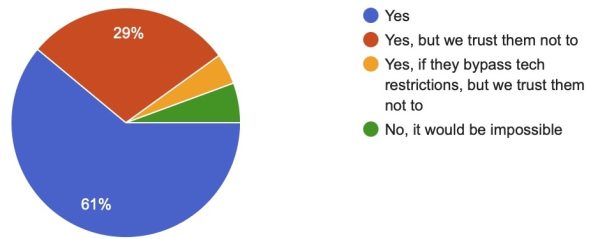
Last week, I asked if your database administrators could read all of the data in all databases. The results (which may be different from this post, because I’m writing the post ahead of time and the poll is still open):

DBA security poll results
  • Yes: 61%
  • Yes, but we trust them not to: 29%
  • Yes, if they bypass tech restrictions, but we trust them not to: 4%
  • No, it would be impossible: 6%

90% of DBAs can easily read everything.

In small companies, there’s not really a way around this. At the end of the day, someone has to be personally accountable for things like setting up encryption, and in small companies, people wear multiple hats. In small to midsize companies, there’s often just one database administrator, period, and they have rights to all the databases.

SQL Server’s Always Encrypted feature was supposed to assist with that by encrypting data at the app database driver level before it even went across the wire to Microsoft SQL Server. I didn’t see much adoption of that, but not because it’s a bad feature or there’s anything technically wrong about it, but:

  • It takes both developer and DBA work to implement
  • It can result in some pretty stiff performance penalties if it’s not done correctly, or if your app has some oddball query patterns (like leading wildcard string searches)
  • Data often ends up getting decrypted and dumped in an unencrypted data warehouse or data lake anyway

Those aren’t unsolvable problems by any means. The larger companies get, and the more security regulations they’re subject to, the more likely they can afford the work of mitigating those risks and paying for other security best practices.

This makes it harder to get a DBA job.

The fact that DBAs can read everything means the company really wants to know someone before they trust ’em with the ability to see everything. In small to midsize companies, that trust is typically built up over time by hiring the employee first as a developer or sysadmin, and then gradually segueing them over to database administration after they’ve proven their trustworthiness.

I don’t really have anything to add to this. It’s just the way the data business works. But I like conducting polls like this so that people can read the poll results from their peers and say, “Oh, I get it – it’s not just my shop that has these kinds of problems.”


The Query Tuning Trick You Should Use More: Pagination

T-SQL
6 Comments

When I’m tuning queries, the normal answer is to make the query perform better – either via changing the T-SQL, adding hints, or adding indexes so that the data’s better prepared for the query.

Average RowsHowever, sometimes when I’m looking at the output of sp_BlitzCache, I scroll across to the Average Rows column and double-check that the query’s actually returning a reasonable number of rows out in the wild.

I’ve uncovered some amusing situations, like a back end process that was supposedly fetching the emails that were ready to be sent out. We noticed that it was one of the top resource-consuming queries, but no one had been complaining about it since it ran as a back end service. However, it was retrieving hundreds of thousands of rows every time it ran. Upon checking the query and the source data, it turned out that the source data had a ton of outgoing emails with null “to” addresses – which the back end process ignored each time it ran. The developers purged that invalid data, and the server’s CPU returned back down to normal.

Another situation was a typical date-range report, as in, “Show me the orders shipped for @SalespersonID between @StartDate and @EndDate.” However, the average number of rows was over 50,000! I had so many questions, and I blurted them all out at once on the call:

  • Is there a salesperson that’s actually had 50,000 shipped orders, in total? (That seemed like a really high number for the kind of high-ticket items that this company sold.)
  • What’s the shortest date range where someone actually had 50,000 shipped orders? (In this case, it was a 10-year date range.)
  • Who would actually run this report for a 10-year date range?
  • What would they learn from this report?
  • Even if they needed it once – why would they continue to run it multiple times per hour, for a 10-year range?

After we all got done chuckling and shaking our heads, we did some research, and to the best of our abilities, we guessed that someone had this report on a scheduled task. I asked if we could implement one of my favorite query tuning techniques – so good that it inspired Sir Rod Stewart’s hit song from 40 years ago, “Pagination“.

Okay, well, actually Rod’s song is called Infatuation, but every time I say the term “pagination”, I can’t help but sing it to this tune, and my training class students will recognize it: “It’s pagination, WOO!”

In the case of this client, we changed the query to use pagination like I describe in this module of the Mastering Query Tuning class, adding new parameters to the stored procedure for @PageNumber (defaulted to 1) and @PageSize (defaulted to 1000). We figured out that most users would never need to see more than 1,000 rows, so we defaulted to 1,000 rows for the first page. We figured that if we got a support call asking for the second page, we’d cross that bridge when we came to it.

We never got that call.


[Video] Building a Brand By Sharing Your Work

You’ve got a good job, and some spare time. You’re thinking about giving back to the community by blogging, presenting, live streaming, or working on Github projects – and you’d like to make your next job search easier. Let’s talk about it.

I apologize for the ghosty nature of my video! I was in the midst of tweaking my home studio setup, and I made the mistake of changing lighting settings right before recording. Doh! I felt bad about that, but like I mention in the video, “Artists ship,” hahaha. I couldn’t put another 41 minutes of my life into that video to fix the ghosting, but hope the content is still worth it.

For this session’s resources, check out my career & professional development page.