Blog

Announcing Free MASTERING Week 2025!

Company News
7 Comments

You’ve been working with SQL Server, Azure SQL DB, or Amazon RDS SQL Server for years.

You’re jaded. You’re confident. You’re pretty sure you know what you’re doing.

Mastering Week

You’ve never taken my Mastering classes because you’ve read the blog, watched the live streams, and figured you’ve pieced it all together. You can’t imagine there’s anything left to learn — no surprises left in the box.

Well, now’s your chance to find out, for free.

From November 11-14, I’m running a brand-new special event: Mastering Week, four half-day classes, totally free to attend live.

  • Tuesday: Mastering Index Tuning
  • Wednesday: Mastering Query Tuning
  • Thursday: Mastering Parameter Sniffing
  • Friday: Mastering Server Tuning

Register here to grab your seat and download the calendar invites before your coworkers try to book you into yet another “quick sync.” At showtime, head to the live stream link in the invite — that’s where the magic happens.

Can’t make it live? The recordings won’t be on YouTube or free later. You’ll need my Recorded Class Season Pass: Mastering, which includes all four full-length classes — available for one-year or lifetime access.

In just four hours, you’ll know whether you’ve really mastered Microsoft databases… or if there are still a few tricks this old dog can teach you.

Let’s hang out and talk data. Bring your curiosity (and maybe your ego!)

[Video] Office Hours: Ask Me Anything About Microsoft Databases

Videos
8 Comments

I’m back at home in Vegas, taking your top-voted questions from https://pollgab.com/room/brento on a hillside enjoying the fall desert weather.

Here’s what we covered:

  • 00:00 Start
  • 03:10 Bruce: Howdy! When, if ever, would you recommend implementing a SQL Server Central Management Server?
  • 04:09 Impostor Syndrome: Are multi-TB databases really all that rare? I have several that are over 10 TB, but I don’t think of myself as being in a top 1% company.
  • 05:23 LikeHeardingCats: Hey Brent. You’ve mentioned in the past, I believe, that you deal with Imposter Syndrome. Being the SQL Guru that you are, do you still have doubts when it comes to SQL Server? If so, how do you manage those thoughts?
  • 07:29 Stefano: Hi Brent, I make extensive use of temporary tables (
  • #table) for complex reporting or data extraction queries, particularly for preprocessing data from linked servers (yes, they exist…). My tempdb is fast and capacious. Are there any drawbacks to this approach?
  • 10:31 Dopinder: What’s your opinion of the various AI engines ability to optimize TSQL queries and sprocs? Which one is best?
  • 12:02 Culloden: Hey Brent, Have you participated in any recent DBA interviews for your clients? If so, have you noticed any trends in what skillset employers are seeking?
  • 13:45 Parameter Sensitive Boyfriend: Terminology question: if I have a query with OPTION(RECOMPILE) that has massive variation in performance based on what arguments are passed in, is it considered parameter sensitive?
  • 14:47 MyTeaGotCold: People tell me that 32 GB of RAM is enough for a high-end gaming PC. I’m looking to build one, but my DBA instincts say that anything less than 100 GB is unacceptable. How do you resolve this conflict in your machines?

Updated First Responder Kit and Consultant Toolkit for October 2025

First Responder Kit Updates
0

This quarter’s release includes new checks for SQL Server 2025’s new memory pressure warnings, Azure SQL DB’s operations in progress, warnings about not using partitioned statistics where appropriate, plus bug fixes.

How I Use the First Responder Kit
Wanna watch me use it? Take the free class.

To get the new version:

Consultant Toolkit Changes

Updated to this quarter’s First Responder Kit, but no changes to the spreadsheet template. This release adds behind-the-scenes code to export to JSON, and then import that data into a database so you can keep a centralized database with all of your clients’ diagnostic data on their servers for easier analysis. If you’re interested in testing that, email me at help@brentozar.com with a short description of your use case.

sp_Blitz Changes

  • Enhancement: warn if the server is under memory pressure using SQL Server 2025’s new sys.dm_os_memory_history. (#3690)
  • Enhancement: reduced false warnings for Linux installations. (#3702, thanks bmercernccer and Tom Willwerth.)
  • Enhancement: add @UsualOwnerofJobs parameter so you can warn about logins other than SA if that’s your thing. (#3688, thanks James Davis.)
  • Fix: servers with German languages could get an error about a subquery returning more than one value. (#3673, thanks Dirk Hondong)
  • Fix: skip checks for Managed Instances. (#3685, thanks Klaas.)

sp_BlitzCache Changes

  • Fix: implicit conversions would have problems if the parameters involved were really long. (#3681, thanks DForck42.)

sp_BlitzFirst Changes

  • Enhancement: warn if the server is under memory pressure using SQL Server 2025’s new sys.dm_os_memory_history. (#3692, #3703, thanks Eilandor.)
  • Enhancement: warn about ongoing Azure operations like database restores, creations, deletions, setting up geo-replication, changing performance levels or service tiers, etc using sys.dm_operation_status. (#3708)
  • Enhancement: when a database is being restored to a new name, show the name. (#3695)

sp_BlitzIndex Changes

  • Enhancement: when @SkipStatistics = 0, warn if partitioned tables don’t have incremental statistics. (#3699, thanks Reece Goding.)
  • Enhancement: add warning for persisted sampling rates. (#3679, thanks Reece Goding.)
  • Fix: on a few warnings, instead of filtering out newly created indexes, we were only looking at the new ones, hahaha. (#3705, thanks Bruce Wilson.)
  • Fix: possible arithmetic overflow. (#3701, thanks Reece Goding.)

sp_BlitzLock Changes

  • Fix: unusual situations might have left folks unable to create permanent output tables. (#3666 and #3667, thanks Filip Rodik.)

sp_BlitzWho Changes

  • Enhancement: get live query plans by default on SQL Server 2022 & newer. (#3694)

sp_ineachdb Changes

  • Fix: change @is_query_store_on default to null. (#3668, thanks kmorris222.)

Watch Me Working On It

In this live stream, I handle a few pull requests, then add support for SQL Server 2025’s new sys.dm_os_memory_health_history:

The work continues in this video:

For Support

When you have questions about how the tools work, talk with the community in the #FirstResponderKit Slack channel. Be patient: it’s staffed by volunteers with day jobs. If it’s your first time in the community Slack, get started here.

When you find a bug or want something changed, read the contributing.md file.

When you have a question about what the scripts found, first make sure you read the “More Details” URL for any warning you find. We put a lot of work into documentation, and we wouldn’t want someone to yell at you to go read the fine manual. After that, when you’ve still got questions about how something works in SQL Server, post a question at DBA.StackExchange.com and the community (that includes me!) will help. Include exact errors and any applicable screenshots, your SQL Server version number (including the build #), and the version of the tool you’re working with.


Query Plans Pop Quiz: Three Simple Questions

Execution Plans
28 Comments

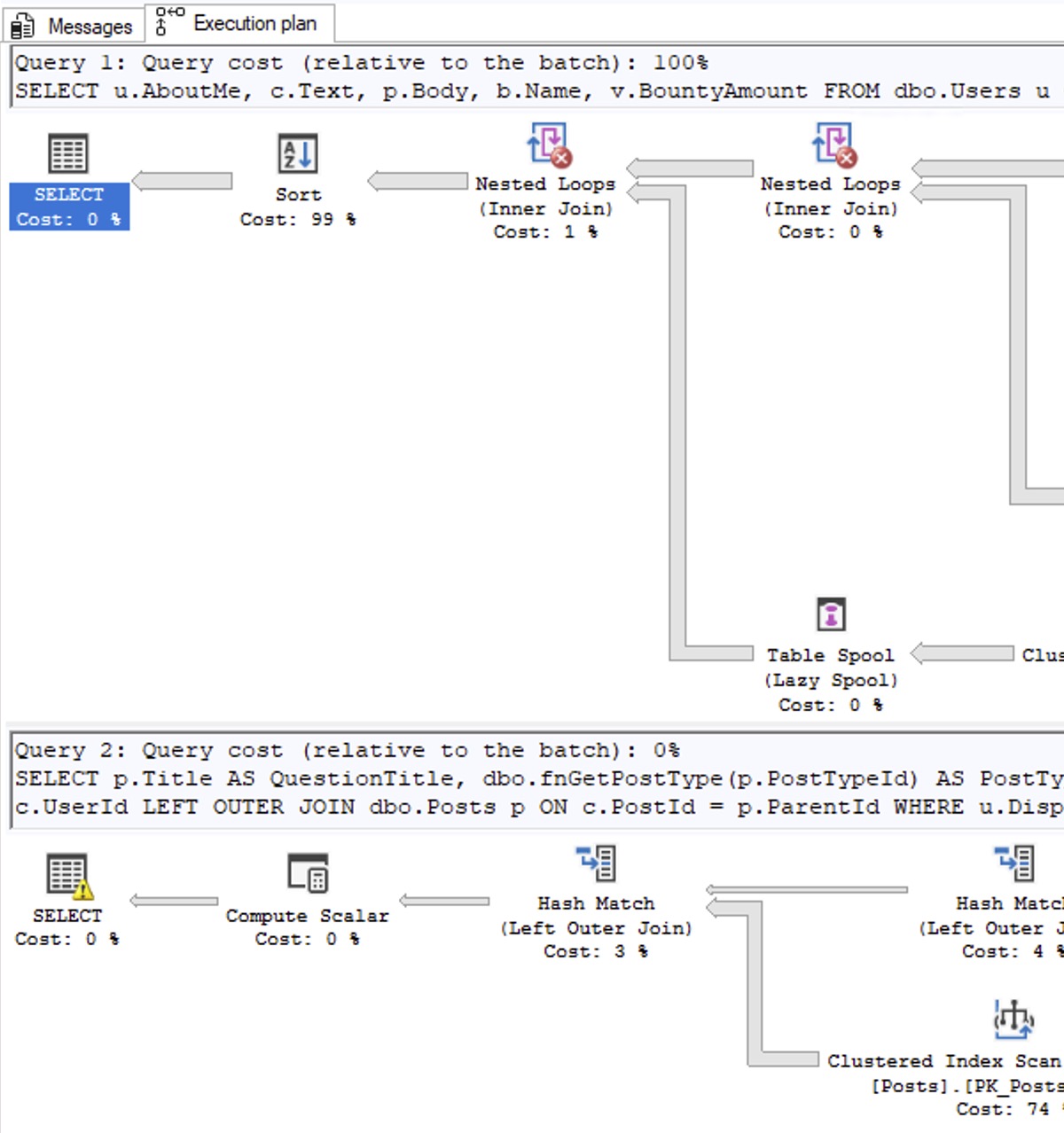
Question 1: Pick the Problematic Plan: someone hands you a pair of queries, and you get the estimated query plans. (Perhaps you get the estimated plans from SSMS, or from sp_BlitzCache, or from your monitoring tool.) Which one of these two should you focus on tuning first, Query 1 or Query 2?

Pick the Plan


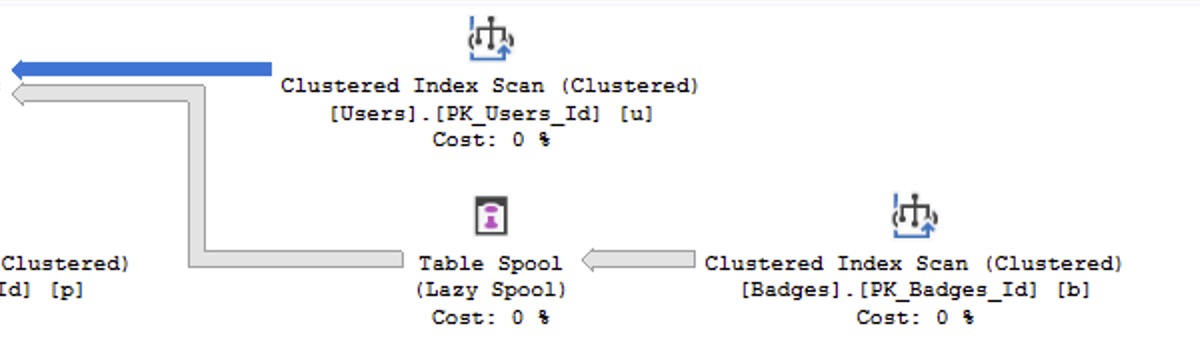
Question 2: on an estimated plan, what does the thickness of the colored arrow represent?

Estimated plan


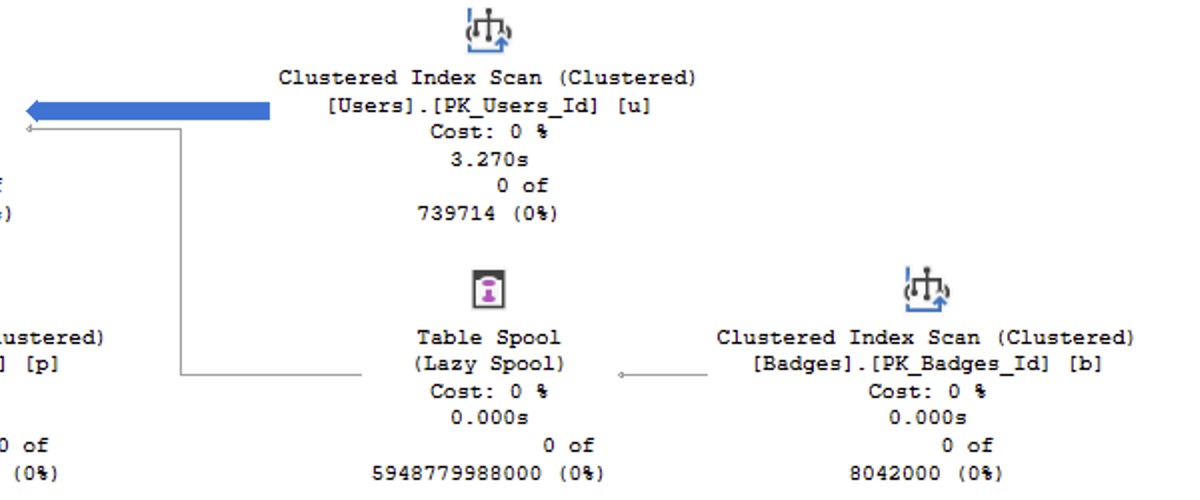
Question 3: on an actual plan, what does the thickness of the colored arrow represent?

Actual plan

Read the page carefully, come up with your 3 answers, and then start reading the right answers.


Free Fundamentals Classes Are Coming Next Week! Register Now.

Conferences and Classes
5 Comments

You’re a developer, analyst, database administrator, or anybody else working with SQL Server, Azure SQL DB, or Amazon RDS SQL Server. You want to learn how to make your databases go faster.

Good news! Next week, I’m teaching totally free half-day versions of my classes from 9AM-1PM Eastern time, 8AM-Noon Central, 6AM-10AM Pacific:

  • Monday: Fundamentals of Index Tuning
  • Tuesday: Fundamentals of Query Tuning
  • Wednesday: Fundamentals of Columnstore
  • Thursday: Fundamentals of TempDB

These half-day classes are totally free, no strings attached, and they’re a great way of getting started on your formal database education journey, or catching up on things that you’re a little too cocky to admit you didn’t know.

To attend, register here, then grab the calendar invites to block out your coworkers from trying to schedule you for meetings, hahaha. At the time of the class, head here for the live stream. (That URL is in the calendar invites too.)

If you can’t make the live classes, the recordings won’t be on YouTube or free – you’ll need to buy my Recorded Class Season Pass: Fundamentals bundle, which includes the full day-long versions of each of those classes, PLUS additional courses on Azure networking, PowerShell, parameter sniffing, and more. You can either buy one year of access, or lifetime access.

Be there or be square – see you in class!


Who’s Hiring Microsoft Data People? October 2025 Edition

Who’s Hiring
10 Comments

Is your company hiring for a database position as of October 2025? Do you wanna work with the kinds of people who read this blog? Let’s make a love connection.

Yes, you.
I think YOU should apply.

If your company is hiring, leave a comment. The rules:

  • Your comment must include the job title, and either a link to the full job description, or the text of it. It doesn’t have to be a SQL Server DBA job, but it does have to be related to databases. (We get a pretty broad readership here – it can be any database.)
  • An email address to send resumes, or a link to the application process – if I were you, I’d put an email address because you may want to know that applicants are readers here, because they might be more qualified than the applicants you regularly get.
  • Please state the location and include REMOTE and/or VISA when that sort of candidate is welcome. When remote work is not an option, include ONSITE.
  • Please only post if you personally are part of the hiring company—no recruiting firms or job boards. Only one post per company. If it isn’t a household name, please explain what your company does.
  • Commenters: please don’t reply to job posts to complain about something. It’s off topic here.
  • Readers: please only email if you are personally interested in the job.

If your comment isn’t relevant or smells fishy, I’ll delete it. If you have questions about why your comment got deleted, or how to maximize the effectiveness of your comment, contact me.

Each month, I publish a new post in the Who’s Hiring category here so y’all can get the latest opportunities.


Which Should You Use: VARCHAR or NVARCHAR?

Development
29 Comments

You’re building a new table or adding a column, and you wanna know which datatype to use: VARCHAR or NVARCHAR?

If you need to store Unicode data, the choice is made for you: NVARCHAR says it’s gonna be me.

But if you’re not sure, maybe you think, “I should use VARCHAR because it takes half the storage space.” I know I certainly felt that way, but a ton of commenters called me out on it when I posted an Office Hours answer about how I default to VARCHAR. One developer after another told me I was wrong, and that in 2025, it’s time to default to NVARCHAR instead. Let’s run an experiment!

To find out, let’s take the big 2024 Stack Overflow database and create two copies of the Users table. I’m using the Users table here to keep the demo short and sweet because I ain’t got all day to be loading gigabytes of data (and reloading, as you’ll see momentarily.) We’re just going to focus on the string columns, so we’ll create one with VARCHARs and one with NVARCHARs. Then, to keep things simple, we’ll only load the data that’s purely VARCHAR (because some wackos may have put some fancypants Unicode data in their AboutMe.)

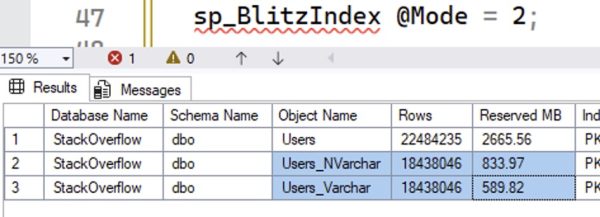
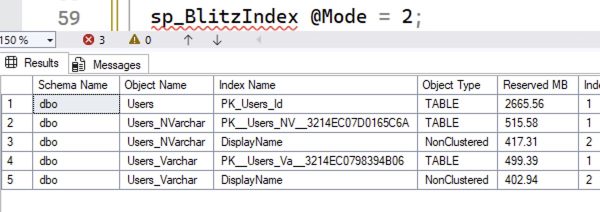
Let’s compare their sizes with sp_BlitzIndex @Mode = 2, which lists all the objects in the database. (I’ve dropped everything else because YOLO.)

Table sizes compared

The NVARCHAR version of the table is bigger. You might have heard that it’d be twice as big – well, that’s not exactly true because the rows themselves have some overhead, and some of the rows are nulls.

The difference shows up in indexes, too. Let’s create indexes on the DisplayName column:

Table & index sizes before compression

The NVARCHAR version of the index is 629MB, and the VARCHAR version is 439MB. That’s a pretty big difference.

I used to hate it when people said, “Who cares? Disk is cheap.”

The first problem with that statement is that up in the cloud, disk ain’t cheap.

Second, memory ain’t cheap either – again, especially up in the cloud. These object sizes affect memory because the same 8KB pages on disk are the same ones we cache up in memory. The larger our objects are, the less effective cache we have – we can cache less rows worth of data.

Finally, whether the data’s in memory or on disk, the more of it we have, the longer our scans will take – because we have to scan more 8KB pages. If you’re doing an index seek and only reading a handful of rows, this doesn’t really matter, but the more data your query needs to read, the uglier this gets. Reporting queries that do index scans will feel the pain here.

But then I started using compression.

If you’re willing to spend a little more CPU time on your writes & reads, data compression can cut the number of pages for an object. Let’s rebuild our objects with row compression alone to reduce the size required by each datatype. (I’m not using page compression here because that introduces a different factor in the discussion, row similarity.)

The size results:

After row compression

Now, the object sizes are pretty much neck and neck! The difference is less than 5%. So for me, if I’m creating a new object and there’s even the slightest chance that we’re going to need to store Unicode data, I’m using NVARCHAR datatypes, and if space is a concern, I’m enabling row compression.

What about the new UTF-8 collation?

SQL Server 2019 introduced UTF-8 support to allow VARCHAR columns to store more stuff. At the time it came out, character guru Solomon Rutzky said it was tearin’ up his heart, concluding:

While interesting, the new UTF-8 Collations only truly solve a rather narrow problem, and are currently too buggy to use with confidence, especially as a database’s default Collation. These encodings really only make sense to use with NVARCHAR(MAX) data, if the values are mostly ASCII characters, and especially if the values are stored off-row. Otherwise, you are better off using Data Compression, or possibly Clustered Columnstore Indexes. Unfortunately, this feature provides much more benefit to marketing than it does to users.

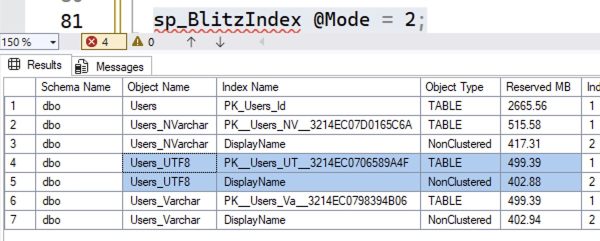
Yowza. Well, we call him a character guru for more reasons than one. At the time, I wrote off UTF-8, but let’s revisit it today in SQL Server 2025 to see if it makes sense. We’ll create a table with it, and an index, and compress them:

The resulting sizes:

UTF-8 sizes with compression

Sure, the UTF-8 versions are about the same as the VARCHAR version – but, uh, neither of those is really a savings compared to compressed NVARCHAR. What if we remove the compression from all 3 versions?

The resulting sizes:

Without compression

Like Solomon wrote years ago, UTF-8 really only makes sense when you’re not allowed to use compression for some reason.

The verdict: just use compressed NVARCHAR.

If you’re positive your application will never need to store Unicode data there, sure, default to VARCHAR. You get a disk space savings, you can cram more in memory, and your index scans will be faster because they’ll read less pages. (Not to mention all your maintenance operations like backups, restores, index rebuilds, and corruption checks.)

But you also need to be sure that the application will never pass in NVARCHAR parameters in its queries, which introduces the risk of implicit conversion.

I say if there’s even a chance that you’ll hit implicit conversion, or that you’ll need to put Unicode data in there, just default to NVARCHAR columns. Compress ’em with row-level compression to reduce their overhead to within a few percent of VARCHAR, and that mostly mitigates the concerns about about disk space, memory caching capacity, or long index scans.

Bye bye bye.


Set MAXDOP in Azure SQL DB or You’ll Get This Cryptic Error.

Azure SQL DB
1 Comment

Max Degrees of Parallelism (MAXDOP) tells the database engine, “If you decide to parallelize a query, go parallel with this many worker threads.”

(It’s a little more complex than that – there is also a coordinating thread, plus a single plan might have multiple parallel zones that each consume MAXDOP worker threads, but for the sake of this blog post, let’s keep it simple.)

Microsoft’s recommendations on how to set MAXDOP are a little long-winded, but again, in the interest of brevity, I’m going to summarize it as setting it to the number of cores in each physical processor, up to 8. (Again, the rules are much more complex – but if you want the full story, click on that link. I’m going to keep moving.)

In Azure SQL DB, you set max degrees of parallelism at the database level. You right-click on the database, go into properties, and set the MAXDOP number.

I say “you” because it really is “you” – this is on you, bucko. Microsoft’s magical self-tuning database doesn’t do this for you.

And where this backfires, badly, is that Azure SQL DB has much, much lower caps on the maximum number of worker threads your database can consume before it gets cut off. You’ll get an error like this:

The request limit for the database is 2000 and has been reached.

Thing is, that error message is a vicious lie: you haven’t hit 2,000 requests. You’ve just hit 2,000 worker threads! In the case of my client, on their 20-core Azure SQL DB, queries were going parallel and consuming 20+ worker threads. All it took was ~90 simultaneous parallel queries, and they’d hit the worker thread limits. It was so confusing because they thought there was no way their app could possibly be sending in 2,000 requests – and they were right.

The Azure SQL DB resource limits page explains:

The request limit for the database has been reached

The first fix you should try: check your database’s maxdop setting, and if it’s 0, read how to set MAXDOP, and set it. Don’t waste money upsizing your server, and don’t waste time tuning code until you’ve corrected this terrible default setting first.


Here Are the YouTube Channels We Both Loved.

Company News
4 Comments

Last week, I announced that we’ve hit 50,000 YouTube subscribers, and I celebrated by letting y’all submit your favorite YouTube channels in the comments, and 5 of you would win my Fundamentals & Mastering Class Bundle.

You did not disappoint.

First, I’m giving 5 Fundamentals Bundles to these 5 folks who suggested channels that already happen to be among my favorites. I just wanted to reward them for their great taste, and also to share these channels with the rest of you, dear readers:

  • Alexey for suggesting Rick Beato, a really nice musician who conducts interviews with brilliant talent
  • Francesco for suggesting Mentour Pilot, who recaps aircraft crashes and disasters
  • HappyDBA for suggesting the Fire Department Chronicles, who uses comedy to recap real-life experiences of 911 calls
  • Jeremy for suggesting Chocodogger, a dog that eats things with human hands
  • Laurens Bracke for suggesting The OG Crew, a hilarious combination of game show and improv

Next, I couldn’t stop at 5 winners – I ended up picking TEN of them because there were so damn many good ones!

  • Alexander for suggesting The Tim Traveller, a nerdy travel show
  • Andreea Podariu for suggesting Shanbai, an artist with beautiful ASMR-style recordings of their art processes
  • An Gie Cech for suggesting Sumo Food, a chronicle of the daily life of sumo wrestlers practicing and eating, which sounds bizarre, but ends up being chill background material showing a lifestyle I didn’t know existed
  • Ben Belnap for suggesting Stuff Made Here, a cool inventor who doesn’t publish a lot of videos, but when he does, they’re of extremely high quality and production value
  • Joe for suggesting Erik Aanderaa, who sails through vicious storms, making for amazing background video material while I work
  • Joseph for suggesting Jacob Knowles, a lobster fisherman who shares behind-the-scenes stories of his work
  • Richard L. Dawson for suggesting Neural Derp, a channel that builds AI remixes like Redneck Star Trek TNG – these should not be as funny as they are
  • SabiBi for suggesting 40 Over Fashion, a channel with clear, simple advice for looking and feeling your best (I don’t necessarily agree with a lot of the advice, but I like the guy’s opinion and approach already)
  • Shane for suggesting Nat’s What I Reckon, a one-man very not-safe-for-work Aussie cooking show
  • Steve Earle for suggesting 3Dbotmaker, die cast car racing captured with absurdly high production values

Thanks again for making my work fun, for making it possible for me to do this stuff and share my work with y’all, and thanks for being such fun people to interact with. I really love my work, and I love that y’all join in.


We Hit 50,000 YouTube Subscribers! Let’s Run a Contest.

Company News
176 Comments

This is kinda amazing to me: our YouTube channel has broken the 50,000 subscriber mark!

We hit 50,000 YouTube subscribers!

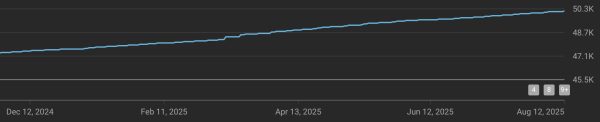
That’s wild to me because I don’t put “please like and subscribe” type stuff in the videos, and I don’t try to build viral content. I just show up every week and publish answers to y’all’s questions from PollGab. And yet, our subscriber growth is slow and steady over time, growing by about 10% per year:

Subscriber growth over time

To celebrate, let’s give away 5 Fundamentals & Mastering Bundles! To enter, leave a comment with a link to your favorite YouTube channel (other than ours) – I love finding new unusual stuff to watch. On Sunday, I’ll pick 3 random winners, plus 2 winners with the YouTube channels I haven’t seen before that strike me as the most interesting.

I suppose I should inspire you with a few of my favorites that you might not have discovered yet:

When you submit your comment, it may not show up right away because comments with multiple links require moderation around here to prevent spam. I’ll moderate & approve ’em daily though.


Microsoft Now Recommends You Set Max Memory to 75% and Min Memory to 0%.

Configuration Settings
20 Comments

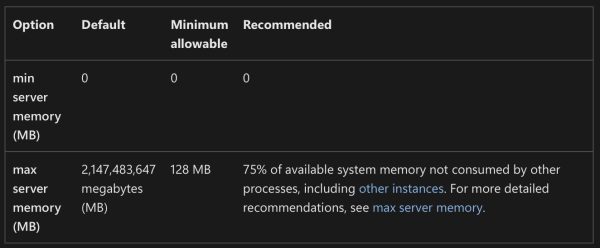
Somehow I missed this a few years ago, and I bet a lot of y’all did too. Note the new “Recommended” column in the memory settings documentation:

Min and max memory recommendations

These recommendations are also set by the SQL Server 2022 setup wizard if you choose the recommended settings on the memory step.

The documentation change was made in this pull request, and I don’t see a Github issue or documentation/comments around the recommendation, which is totally fine. I don’t expect (or desire) Microsoft to have a public discussion on every settings change they make – nobody would ever get anything done, hahaha.

When I noticed it, I posted about it on LinkedIn, and there was a vibrant discussion. Randolph West (of Microsoft’s Docs team) posted about it too. People talked about how this should probably be automatically managed, and I’d point out that if you follow Microsoft’s recommendations, it actually is automatically managed! SQL Server will size its memory up (and under pressure, down) based on what’s happening on the server.

I do wish Microsoft’s recommendations added another factor: a different recommendation for big servers. 25% unused memory is pretty high when the server has 512GB memory or more. For example, in my setup checklist, I recommend leaving 10% free or 4GB, whichever is greater. Here’s part of the script that my lab servers run on Agent startup, where I use a 15% number instead because I also run SSMS on those:

That way, when I change an instance’s size, I don’t have to worry about going back and touching max server memory.

I’m not saying 10%, 15%, 25%, or 4GB is the right number, but I think we do need to consider both a percentage and a floor at the same time. Otherwise, people with 16GB VMs are going to say 25% sounds about right, and the people with 1TB servers are going to say 5% is plenty of memory to leave unused.

I’m not opening a pull request to change the documentation recommendation (let alone the setup wizard) because I think y’all will have strong opinions, and I’d rather hear those first. I certainly don’t have the right definitive answer on this one – I’m confident enough to put it in my setup checklist, but not so confident that I’d ask my guidelines to be the official documentation, hahaha.


Announcing Free Fundamentals Week 2025!

Conferences and Classes
2 Comments

You’re a developer, analyst, database administrator, or anybody else working with SQL Server, Azure SQL DB, or Amazon RDS SQL Server. You want to learn how to make your databases go faster.

Good news! In October 13-16, I’m teaching totally free half-day versions of my classes from 9AM-1PM Eastern time, 8AM-Noon Central, 6AM-10AM Pacific:

  • Monday: Fundamentals of Index Tuning
  • Tuesday: Fundamentals of Query Tuning
  • Wednesday: Fundamentals of Columnstore
  • Thursday: Fundamentals of TempDB

These half-day classes are totally free, no strings attached, and they’re a great way of getting started on your formal database education journey, or catching up on things that you’re a little too cocky to admit you didn’t know.

To attend, register here, then grab the calendar invites to block out your coworkers from trying to schedule you for meetings, hahaha. At the time of the class, head here for the live stream. (That URL is in the calendar invites too.)

If you can’t make the live classes, the recordings won’t be on YouTube or free – you’ll need to buy my Recorded Class Season Pass: Fundamentals bundle, which includes the full day-long versions of each of those classes, PLUS additional courses on Azure networking, PowerShell, parameter sniffing, and more. You can either buy one year of access, or lifetime access.

Be there or be square – see you in class!


[Video] Office Hours: Database Questions & Answers

Videos
1 Comment

In between clients, I hopped onto my Twitch channel to take your top-voted questions from https://pollgab.com/room/brento. If you’d like to get notified whenever I do one of those live streams, you can follow my channel for free and you’ll get email notifications automatically. I do ’em whenever I have time, usually about once a week when I’m at home.

Here’s what we covered:

  • 00:00 Start
  • 02:26 DemandingBrentsAttention: Are you aware of any solutions to run SSMS or manage on-prem SQL servers from a Linux/*nix OS? There does not seem to be anything viable, but I’m not sure what I’m missing.
  • 05:24 DataBeardAdministrator: I’ve been tasked with building my first data warehouse. With goals like adding temporal fields and updating reports to use date ranges rather than filtering by active = 1. Any tips on getting started with data collection and ETL? Any personal favorite tools or books you like?
  • 06:56 Wrapped the Tenga with Hello Kitty and Kuromi: Do you ever see Distributed Availability Groups at all? Not even work on, just see.
  • 07:39 Karen from IT: Should DBAs even care about normalization anymore when storage is cheap and SSDs are fast?
  • 09:00 I’mTrying: Our company is pushing us to AWS, including all databases (currently MSSQL and Oracle). Obviously, I’m still learning, but is Amazon RDS for SQL Server a good idea? Are there any apparent gotchas I need to do further research on?
  • 10:05 Online transaction procrastinator: I want to move my 4-node AG to super fast local storage. This means losing the ability to offload corruption checks with SAN snapshots. Is there any other good way to offload them? Failing over to a corrupt database is my worst nightmare.
  • 11:49 MyTeaGotCold: Any advice for dealing with Tableau in particular? My users swear to me that they have no control over the queries it generates, so the only way I’ve found to get good performance is to throw clustered columnstore in wildly inappropriate places.
  • 12:46 JuniorDBA: We take care of multiple customers database servers, Standalone, FCI, Always on AG. Whenever we inherit servers within the company or the customer comes to our company and they migrate here, what kind of checklist should we go through before official accepting the handover?
  • 13:29 Petert: What is your favorite event to go to these days?
  • 14:48 Partitioning Pete: Is table partitioning actually worth it in real-world workloads, or is it just a resume-driven feature nobody really needs anymore?
  • 16:21 My Coffee Got COLD: Why do the run dates in SQL Agent – Job Activity Monitor show in DD/MM/YYYY format? As far as I know all language settings are US-English. Running SSMS Ver 15.0.1824
  • 17:46 SQLbuddy: I have multiple SQL Server instances on one cluster. SSAS, SSRS are also working on it. Is there an easy way to have it working in disaster recovery (in case of one of nodes will fail). Only move these services to separate machine/vm and buy new licenses?
  • 18:40 SQLbuddy: My company has 25TB DataWarehouse (already migrated from async 2016 to sync 2022). All of their jobs (related with Tabular, SSRS etc. only exists on primary node. What is the easiest way to have it replicated in case of failover (and working with minimal impact on business)?
  • 20:25 SQLClueless: We’re working on a problem where USERSTORE_TOKENPERM balloons out of control, even on SQL 2019. I’ve read your post about this and periodically free this memory using an agent job. Have you heard of any new solutions to this issue? Sometimes the job alone doesn’t keep up.
  • 21:14 Chakra: What is the future of SQL DBAs, required to switch to PostgreSQL, NoSQL DBAs, along with AI/ML Vector DBs?
  • 22:10 Dopinder: In SQL 2019, Is there a good way using first responder kit or other tool to see which queries are consuming the most tempdb?
  • 23:10 IWriteSQLInPortuguese: You reference of not using “You Should NoT Linked-Server”. But when inner joins are required, I still need the data. I’ve solved most with data replication, but with some big tables replication is not “possible”. What other solution recomended? TableFunctions? StoredProcedures?
  • 24:54 ParameterSneezing: If OPTION (RECOMPILE) solves parameter sniffing, why not just sprinkle it everywhere and be done with it?

Your Developers Need Cheap SQL Training.

Conferences and Classes
0

Your developers haven’t ever been to formal Microsoft database training on SQL Server or Azure SQL DB.

They’re struggling with trying to tune queries and indexes. Your apps keep getting slower as the data grows, and your queries keep getting more complex.

They’ve exhausted their free resources like YouTube videos and blogs, and they’re just not making progress in upping their skills. ChatGPT is giving them confusing and contradictory answers, and every team member uses it differently.

You want to get everyone on the same page, quickly.

That’s where my new All-Hands Fundamentals comes in!

For just $1,995/year, all of your staff get access to my Fundamentals of Index Tuning, Query Tuning, and Parameter Sniffing classes. They can work through the classes at their own pace, doing the hands-on exercises to make sure they’re really getting the concepts down, and then earn certificates of completion to make your HR department happy. Your HR department can just email us at help@brentozar.com whenever they want to add staff, all year long.

To keep costs low, we only sell the All-Hands package online with payments via credit card. If your accounting team wants to pay via invoice, purchase order, check, or wampum beads, they’ll need to contact us for a quote based on the exact head count and the exact classes they want to enroll. It won’t be anywhere near as cheap as this, for sure – so if they wanna spend more, hey, that’s cool too.

But for those of you who wanna get smart, fast, it’s time to call an All-Hands!


SQL Server 2025 Makes Memory Troubleshooting Easier.

SQL Server 2025
5 Comments

SQL Server 2025 introduces a new sys.dm_os_memory_health_history view to make it easier for meatbags like you and robots like Copilot to know if the SQL Server has been under memory pressure recently.

To show how it works, let’s run a bunch of simultaneous high-memory-grant queries in the Stack Overflow database:

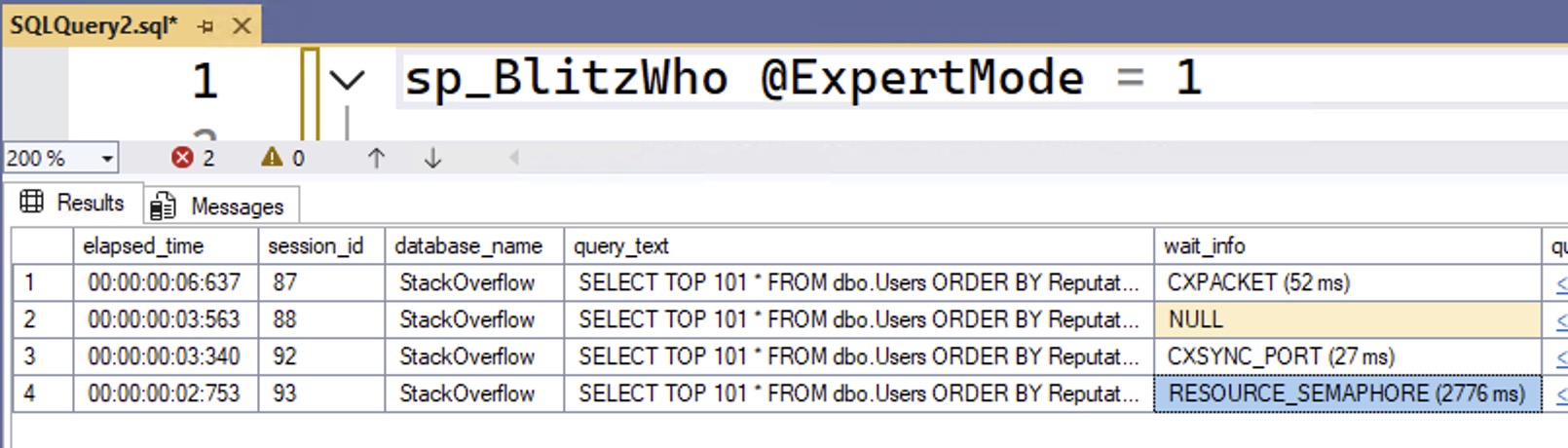
Those of you who have been through my query tuning classes will understand why that query produces particularly high memory grants. I’ll run several of them simultaneously in different sessions, and then check to see what queries are running using sp_BlitzWho:

sp_BlitzWho Results

We can see that we have a query waiting on RESOURCE_SEMAPHORE, which means that SQL Server has run out of memory to give to queries, and queries are being forced to queue up before they can get granted the memory they need to begin running.

As soon as our workload finishes, though, that memory pressure disappears, and it can be tough to know that memory pressure was the reason queries were held back at the starting gate. Let’s query that new DMV to see what it shows:

sys.dm_os_memory_health_history

When the database engine isn’t under any memory pressure, the severity_level will be 1, and severity_level_desc will be LOW. There’s no such thing as severity 0, or a description of “we’re not having a memory problem right now.” I guess to the Microsoft developers, there’s always a need for more memory, and I can’t get mad about that diagnosis.

To see more details about your own server’s memory history, query the DMV, and expand the top_memory_clerks column to show the parts of SQL Server that were using the most memory in each snapshot:

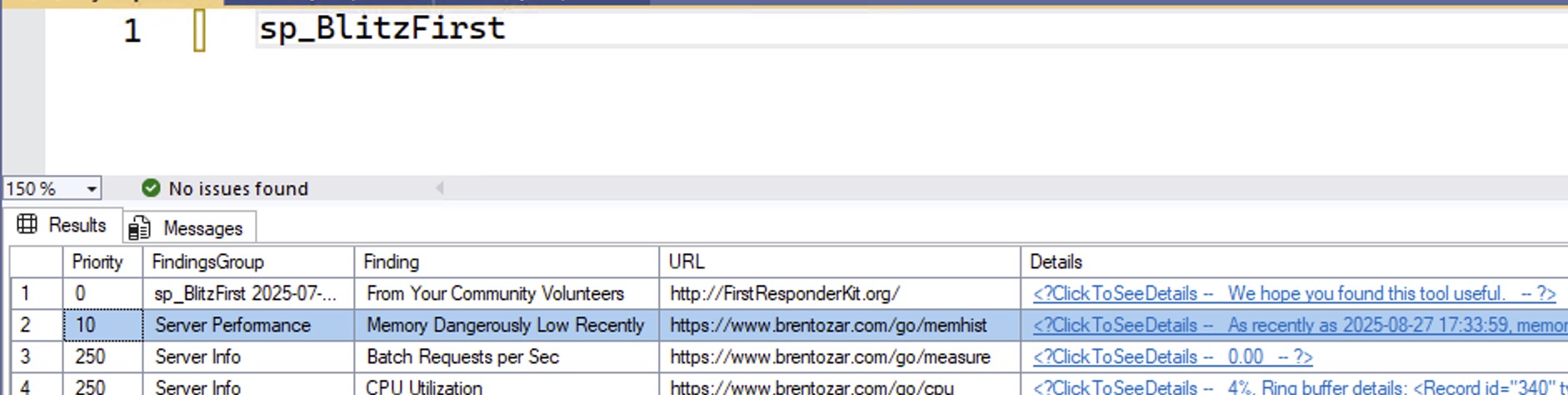
In the upcoming October 2025 release of the First Responder Kit, we warn you in both sp_Blitz and sp_BlitzFirst when this is happening to you, too, making it even easier to troubleshoot your servers:

sp_BlitzFirst Results


Free Webcasts Tomorrow & Wednesday

Conferences and Classes
0

I’m teaching my two most important classes live, online, completely free!
These are the two fundamentals classes that I think everybody should start with, regardless of their experience with SQL Server or Azure SQL DB. I’ll teach you the most important parts about how the database engine works, plus how to use free scripts to troubleshoot what’s going on with your database’s health and performance.

If you’re a senior database person in your shop, you might even want to send these to your fellow team members to get ’em started on the right foot. Anybody can attend these – from report writers to developers to sysadmins – and I often hear from senior folks who say, “Whoa, I didn’t realize how much I didn’t know in here too!”

I’m teaching them twice – one version in the morning and another week in the afternoon – to try to meet up with your schedules. Click on each link to download a calendar invite, which will also show you which time it is in your own time zone:

No registration required – it’ll be live on our YouTube channel. You can also use YouTube’s notification features to alert you when the streams start:

If you can’t make it, you can register for free access to the recordings. See you there!


[Video] Office Hours on the Beach in Cancun

Videos
4 Comments

In retrospect, I should have put on sunscreen – even for just a 20-minute Office Hours session on the beach! Dang, that sun is powerful. Let’s go through your top-voted questions from https://pollgab.com/room/brento. This is a 360-degree video, so if you watch it on YouTube, you’ll be able to pan the camera around and take a little virtual vacation with me.

Here’s what we covered:

  • 00:00 Start
  • 00:45 AGony: I’ve taken all of the standard advice – I’ve read every page of documentation, built a lab, bought a monitoring tool, and even contributed to open source – but I still suck at debugging AG outages. Who/Where do I go to for learning more? I need a guru.
  • 03:00 BlakeDBE: In an OLTP database we DBEs have a standard to create indexes for all Foreign Keys to support joins on the FK for performance. The DBAs quarterly request to drop unused (in the last 90 days) indexes which sometimes scoops up the indexes supporting FKs. Which side would you be on?
  • 04:19 CXPhoenix: Did Query Store really fix anything in practice, or did it just give us one more DMV to ignore?
  • 06:12 MyTeaGotCold: I’ve run out of good jokes about what DBA stands for. Please give me some.
  • 06:38 zlobnyfar: Very important Thank you Brent for keeping DBA’s life a little bit easier!
  • 06:52 Otto Optimizer: You talk a lot about why people shouldn’t store XML and JSON in the database. So why do developers love doing it if it usually makes queries slower and indexes useless?
  • 08:14 CycleToWork: Why does SQL Server need to do a Compute Scalar operation when returning a computed PERSISTED computed column from a table? If SQL Server does the Compute Scalar operation regardless of column being persisted or not, why bother persisting it and spending storage space doing so?
  • 08:50 CloudyWithAChanceOfDTU: Was the DTU model the worst thing Microsoft has ever done to SQL Server, or am I missing something?
  • 11:07 JohnSteak: Our company is migrating from SQL Server to Postgres to cut costs. I’m concerned about performance degradation with our complex, ORM-generated queries. What are the key performance differences to anticipate, especially with execution plans and query optimization?
  • 13:05 Otto Optimizer: Do query hints make you a bad DBA, or are they just practical tools Microsoft secretly expects us to use?
  • 14:23 IWriteSQLInPortuguese: You mentioned some time ago that you would be doing a Mastering ColumnStore (I’m one of the future customers ) any plans on this or you scraped the idea?
  • 15:44 Licensing Larry: Given SQL Server’s licensing costs, why would anyone choose Enterprise Edition instead of just building around Standard’s limitations?

No, Accelerated Database Recovery Doesn’t Fix NOLOCK.

Development
8 Comments

I have never seen a T-SQL feature that people love as much as NOLOCK.

I keep thinking I’ve written enough blog posts about it, but a client came up with a new one:

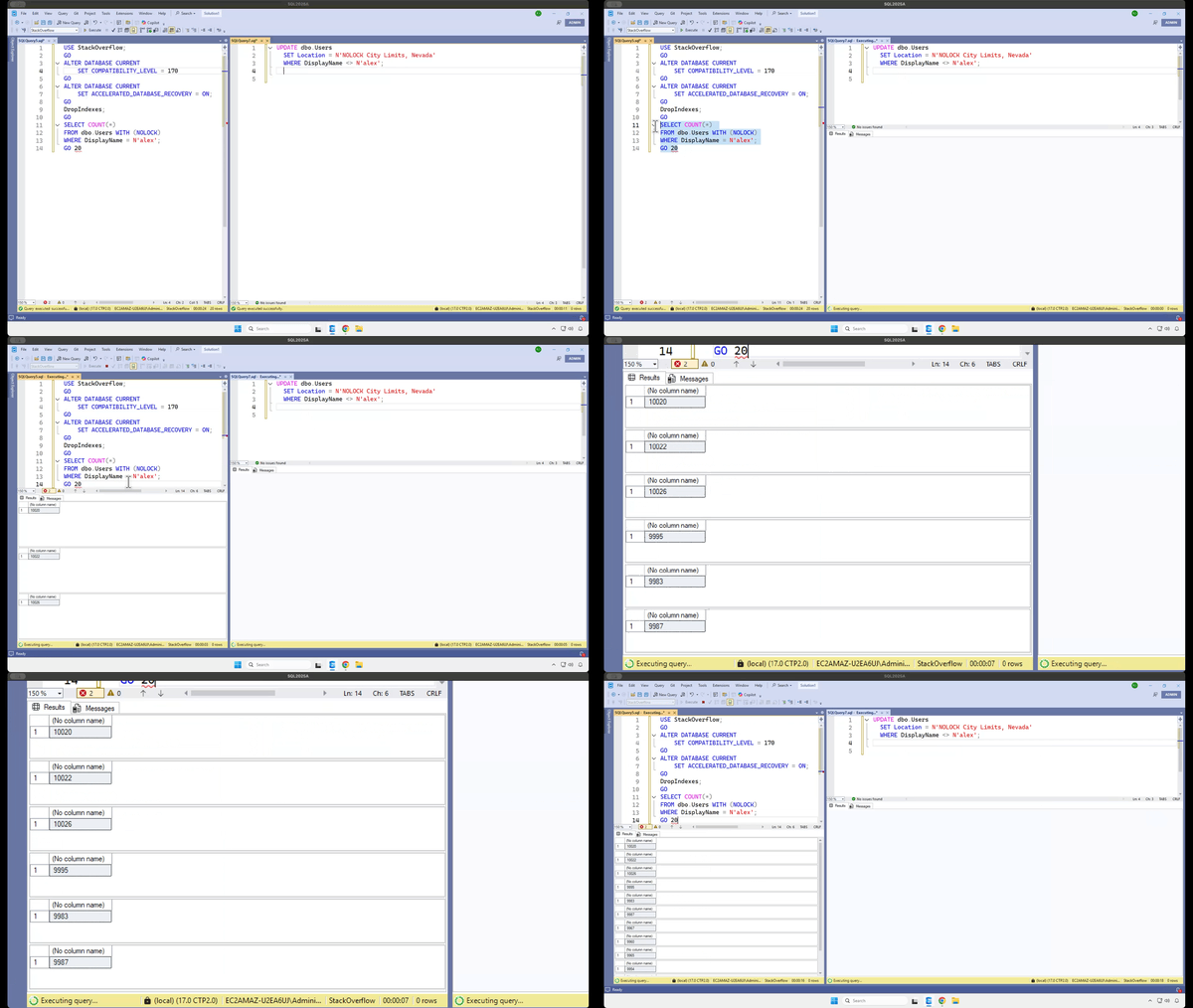
We use SQL Server 2022’s Accelerated Database Recovery, which keeps copies of versions inside the table. Plus, we don’t use transactions – our inserts, updates, and deletes are done one table at a time, and your demos always have transactions in them, so we’re not affected.

That’s not how this works. That’s not how any of this works. To illustrate it, we’ll set up our SQL Server 2025 and Stack Overflow database with the latest and greatest of everything:

And while those selects run, we’ll run a single update in another session, no transaction:

And the select’s row counts keep changing – hang in there, and I zoom in:

I’m not playing. When your queries use NOLOCK or SET TRANSACTION ISOLATION LEVEL READ UNCOMMITTED:

  • You can read rows twice
  • You can skip rows altogether
  • You can see data that was never committed
  • Your query can fail with an error (could not continue scan with nolock due to data movement)

If you think your scenario is somehow magically different, check out these other NOLOCK demos before you claim victory.

In the client’s case, someone on the call said, “Your demo drops indexes, but we have indexes, so we’re fine.” No, my demo just drops indexes because I wanna demonstrate the issue as quickly as possible. Depending on what you’re querying, and the kinds of data modifications that are going on, and what indexes exist, you can absolutely still see random results.

Someone else piped up and said, “We’ve never seen an issue, though.” The answer: well, are you monitoring the accuracy of your app’s output? Of course not. You’re relying on users to tell you when the data on the screen is wrong, but they have no reason to suspect that it is. If the report says we sold $1,234,567 of widgets last quarter, then that’s what the user’s going to believe. If they run it again five minutes later and see $1,324,765 of widgets, they’ll assume someone’s been changing/fixing things, and the latter number is the right one. Users are gullible suckers.

That doesn’t mean I always avoid nolock! In situations where I don’t need exact accuracy, nolock is totally fine. You’ll find it in a lot of the First Responder Kit scripts, for example. It’s not like I need transactional accuracy when I’m rendering how many reads your index had.

But if your queries do need accurate results no matter what else is happening in the database, no matter what indexes happen to exist at the time, then check out Read Committed Snapshot Isolation (RCSI) or Snapshot Isolation (SI). Implement those, pull out your nolock hints, and get the accuracy your users expect.


Home Office Studio Tour

Home Office
7 Comments

Ever wonder what it takes to do this stuff behind the scenes? I’ll show you.

If you’re thinking about getting started with live streaming or training videos, don’t be intimidated by this setup. There’s a lot of gear involved, but it’s because I’ve been doing this for years, and I’ve accumulated a lot of gear that works well for me. You can start with much less gear!

Let’s start with the big picture:

At left, I use a motorized stand/sit desk from Vari. I usually stand when I’m streaming and working with clients, but after a few hours, I prefer to sit down. When I do, I can just hit a button, and the whole thing comes down (but not the main camera – more on that in a minute.) In the corner of the room, you see the the black stool with just one leg – that’s a Vari Active Seat. I pull that over to the desk when I’m sitting.

At right, I have my “Camera B” setup: a C-stand with another camera, a light, and a laptop. I don’t actually type on that laptop – that’s just my monitor for when I turn to the side to address my audience directly. See, when I live stream, I have multiple camera angles. When I’m chatting with the audience and I don’t need them to see what’s on the stream, I switch scenes so that my camera is full screen, and the audience sees my side office wall:

(The shutters on the right side are closed, but that’s just because I wrote this blog post early in the morning before the sun rose. Once the sun rises, I open those shutters and look out at my neighborhood.)

For the audience, that Camera B view looks like this:

This busy background was a big goal for me when I moved to this house a few years ago. Inspired by video game and tech streamers, I wanted a wall of stuff that would show off my personality. Sometimes I have this camera zoomed in, and other times I zoom it way out to show the whole flair wall.

Anyway, when I’m on Camera B, that laptop mounted right under the camera helps me continue to watch the audience chat live while still facing the camera, plus watch the output from Twitch as a public viewer just to make sure everything’s working okay.

Here’s a zoomed-in view of that Camera B setup:

The gear involved:

  • Light: Neewer 660 with softbox diffuser – the diffuser helps soften the light, which helps not only the viewers, but me because I have to stare at it
  • Camera: Sony ZV-E1 with Sony FE PZ 16-35mm F4 lens – complete overkill, do not recommend, and requires a SmallRig Peltier cooler just to stay on for live streams. If I had to go back and do this over again, I’d get another Sony ZV-E10 instead, which is more than good enough for live streaming, and doesn’t need a fan. The camera’s live feed goes into my MacBook Pro via an Elgato Cam Link 4K USB capture device. (I run a really long HDMI cable down through that closet and around the room.)
  • Laptop: every few years, I buy a Windows laptop in the hopes that I can switch back over from the Mac. I get pissed off, give up, and then I use the laptop for stuff like this.
  • C-stand: don’t use a tripod for stuff like this. A C-stand is much sturdier, has a smaller footprint, and can mount more devices like all the stuff you see here.
  • Magsafe camera attachment: when I wanna record TikTok comment response videos like this, I just slap my phone onto here and use the light, and my office is in the background. I record those directly in the TikTok app itself.

Now, over to my main desk, which gets a lot more complicated:

The gear:

  • Apple MacBook Pro – the current generation of M4 Max with 128GB RAM. It handles live streaming at 60 frames per second, two 4K 60fps camera inputs, multiple displays, 60fps recordings for archival, running a VM, a ton of USB gear, and the CPU fan is never even audible. It’s bananas how fast this thing is, not to mention how battery efficient. I took it on a one-week Alaska cruise recently and didn’t charge it even once.
  • Above the MacBookPro, there’s something a little odd: a Logitech Brio 501 mounted sideways on a Manfrotto Magic Arm.
  • Main monitor: MSI 32″ 3840×2160 – down under $500 these days, and really good value for money. When I’m streaming, this has a VM or RDP window with what I’m streaming, but I only stream that one app window. Around it, I put things like streaming utilities.
  • Teleprompter: Elgato Prompter – when I’m streaming, this shows the live chat. When I’m working with clients, I put the Zoom camera views up there so that it’s more natural – I’m looking directly at the camera, even when they’re talking. The camera is hidden behind that prompter.
  • Camera (not visible, inside Elgato Prompter): Sony ZV-E10 with Sigma 16mm f1.4 lens, piped through another Elgato Cam Link 4K – total workhorse. Love this thing. Powered by USB-C, no dummy battery or fan required, runs for hours even at 4K 60fps.

There’s more gear, but let’s stop here for a second and talk about that main camera. The teleprompter and Sony camera are mounted to a C-stand behind my desk because when I type or bang on the desk for emphasis, I don’t want the camera to wobble. Putting the camera on a separate C-stand, not tethered to the desk at all, keeps it more still.

When I’m standing, my main Sony camera is shooting directly at me, with my green wall in the background, so I can use a chroma key filter in OBS to make my background disappear, and let me float over what I’m streaming:

Camera A view

However, after a few hours of standing while working, I wanna sit down, so I push a button on the motorized Vari desk and it drops to a sitting position. But because the Sony camera is mounted to that separate C-stand, it’s still up high. That means I need another camera.

If you look closely at the desk screenshots, above my MacBook Pro, you’ll see something goofy: a Logitech Brio webcam turned sideways, mounted to the desk via a Manfrotto Magic Arm. It’s turned sideways because I want the max resolution possible (given that it’s a crappy webcam) and I use it in the stream like this:

Sitting camera view

This view isn’t green-screened. This will probably be the next thing I upgrade in my home studio gear – switching to a different sitting camera, mounted to the C-stand, so that I’ve got nice green screen views whether I’m sitting or standing.

Back to the gear on the desk:

  • Lights: Neewer 192 soft lights – mounted on desk platforms from the old Elgato Key Light Air, so that they also work when the desk is in sitting position.
  • Control panel: Elgato Stream Deck XL – because I have a lot of sound effects and scenes.
  • Microphone (not shown): DPA directional headset plugged into a Sennheiser AVX wireless system, piped into a Focusrite Scarlett 2i2 – because I wanna move around a lot between different scenes, and walk around on the green screen demonstrating stuff, without the audio changing. Every now and then, some commenter gives me flak for using an “old” microphone, and I just shake my head and laugh. When I’m working with clients, I use a much simpler wired USB Plantronics monaural headset.
  • Connectivity: Sonnet Echo 20 Thunderbolt 4 SuperDock – I have tried so many docks, and this one has been the only one that’s stayed solid without randomly dropping SSD connections under really heavy load. (When I say heavy load, remember, I’m running Ethernet, multiple SSDs, USB video & audio feeds, the Stream Deck, and more.)
  • Input: Apple Magic Keyboard and Trackpad on a heated desk mat. Yes, it does get cold in Vegas during the winter.

For software, the big key is OBS Studio. It’s free, open source, frequently updated, and ridiculously powerful, but has an ugly learning curve. I still need to spend time learning how the latest features work, like simultaneous landscape & portrait video outputs (for streaming to both Twitch/YouTube and TikTok/Instagram simultaneously.) Hell, I even need to learn how the basic features work, like better audio settings and chroma key filters.

It’s a lot of gear, and a lot of work, but you can see the quality of the results in my training classes and live streams. See you there!


[Video] Office Hours Back at Home in Vegas

Videos
0

I’m back in Vegas, at least for the moment, so let’s hang out in my home office and talk through your top-voted questions from https://pollgab.com/room/brento. There’s a lot of good questions this week!

Here’s what we covered:

  • 00:00 Start
  • 02:26 Eric M: I’ve recently become very disenchanted with the commercial SQL Server monitoring tool I use. I’ve been taking a serious look at https://dbadash.com/ and It looks great thus far. Do you have any experience/thoughts with or about it? DISCLAIMER I am in no way affiliated with it!
  • 04:16 Boris: I’m a DWH admin and developer. My company wants to give edit access to Risk department to change SQL code that processes DWH data. What should I tell them?
  • 06:00 It’s 2025: Have you found any monitoring tools that gracefully work with PSOP?
  • 06:47 MyTeaGotCold: What correct predictions are you most proud of?
  • 09:41 Mikkel: A former team member chose to save raw image data in a table. When we remove the table column. Should we shrink the database or leave the database file sizes as they are? You always say that shrinking is bad.
  • 12:16 Erika: My business isn’t sophisticated enough for AGs. How can I achieve high availability in the cloud? Database mirroring isn’t an option.
  • 13:38 Q-Ent: Hi Brent, i reached a point where i cannot get additional value and growth if i do minor, repetitive tasks. I have to keep up with these tasks to have my job. Do you follow any work routine like email check cut off time or disconnect from social media to keep up with deep work?
  • 17:08 Running out of resourced: We have a historical log table which contains the date time of the transaction, user name, and a nvarchar(max) column containing a json object. Table has 250 million rows and size is 500gb. What are recommended practices for reducing storage and increasing query performance?
  • 18:49 Juan Pablo Gallardo: Is there a specific function to run to make sure is ok to reboot the sql server?
  • 20:07 Milos: Have you ever encountered SQL Server being rolled out and used as primarily an enterprise ready XML document DB? Any considerations or precautions for such a use case – which is using Sql Server akin to a MongoDB, just for XML instead of json?
  • 21:26 Brent Ozar Jr: What similarities and differences are there between being a developer / administrator for an online transaction processing (OLTP) DB vs an online analytical processing (OLAP) DB? What must you do differently for an OLAP DB vs an OLAP DB, and is there any overlap of skills?
  • 23:30 Just James: ChatGPT5 has read too many of your videos; it seems a bit sassy to me. I wrote a query and asked it if it could be improved. It came back with “No window + DISTINCT gymnastics:” I was using count over partition by. Should I give up my torrid love affair with over partition by?
  • 25:03 Artem: Implementing business logic inside/outside database. When it is appropriate to implement business logic inside the database. And when it is not. Considering CPU, network latency, long-running data processing. Any articles on the subject. Patterns, anti-patterns, pros, cons, etc.
  • 26:57 KnowEnoughDBAtoBeDangerous: I’ll be moving our SQL databases over to Aurora PostgreSQL. Now that you’ve started Smart Postgres, have you had any clients make the switch?
  • 28:25 Brent Ozar Jr: What are some tips for learning how to become a better Data Engineer on the SQL side of things?
  • 29:57 Winston : When you awaken in early morning what’s your routine? Do naps help?
  • 31:28 Aubrey Plaza: For a good decade, when we needed to create a test environment we were use to take a copy of the vanilla version of our database. Now someone mentioned words like “version control” and “Liquibase” and we need to rush to it immediately. In what scenario this makes sense to you?
  • 33:30 Brent Ozar Jr: What other security considerations do developers and DBAs have to make for SQL databases other than prevent SQL injection attacks?