Blog

The 9 Letters That Get DBAs Fired

I’m proud to say that I’ve only lost one job in my life.  I was a grocery store bagger when the store came under pressure to increase their percentage of minority workers.  They laid off all of the Caucasian baggers, but I’m not bitter.  I actually loved bagging groceries, and if I hadn’t been laid off, I’d still be the guy asking you “Paper or plastic?”

I probably didn’t deserve to lose that job, but I’ve deserved to lose others.  I’ve just been lucky.  Through my career, I’ve seen a lot of database administrators go through some dicey situations that cost them their jobs.  Maybe not right away – but once these situations happen, it’s only a matter of time until management finds a legally defensible reason to swing the axe.  These situations often involve just nine letters.

The First Three Letters That Get you Fired: RPO

Recovery Point Objective (RPO) measures how much data you’d lose if your server went down and you brought up the secondary server.  It’s measured in time, not megabytes.  The less time you have, the more frequently you have to get the data to a secondary location.

In theory, if you’re doing transaction log backups every 5 minutes to a network share, so you’ve got a 5-minute RPO.

In theory, “in theory” and “in practice” are the same.  In practice, they are different.

If you lit up the oxygen tank, the view would actually improve.
The Gremlin of Disaster

In practice, you’re unlucky, and your transaction log backups will fail before the engine itself does.  I know this because it’s happened to me and my clients.  In one case, the volume for backups filled up and the transaction log backups stopped working.  Since the log backups didn’t run, the transaction logs didn’t clear, and they continued to grow.  The Gremlin of Disaster arrived, sowing corruption in his wake.  By the time the dust cleared, we’d lost over an hour of data – permanently.

If you’re backing up to a local drive and the RAID controller fails, check out this helpful article.  You’ll be needing it, because with a failed RAID controller, you can’t access any of the data on the local drives.  Before you try pulling the hard drives out of the failed server and putting them into another server, check out this article.  After all, you’re gambling – gambling that the RAID controller firmware matches between servers and that it’ll be able to read and rebuild the newly inserted drives.  Guess wrong, and it will format the drives, thereby erasing your backups.

Savvy readers will detect a sense of acerbic humor in the post so far – even more biting than my usual pieces.  Brace yourself, because it’s going to get worse.

The Next Three Letters: RTO

Recovery Time Objective is how much time you’ve got to get your server’s act together.  Some companies measure it from the time you learn about the problem, some measure when the service is first unavailable.

Beep beep, back that thing up. Wait, on second thought...
The Pinto of Peril

The clock’s starting point matters a lot.  When things go wrong, SQL Server Agent might just email the failsafe operator – if you’ve gone to the trouble of setting one up and configuring alerting.  Even then, you probably won’t notice the email because you’ll be drunk at the pub having a nutritious dinner with your lovely family.  An hour later, when you realize that your cell phone is set on vibrate, you’ll panic, run to the car, fire up your laptop, and try connecting over your phone’s 1-bar internet connection.  Should we start the clock when the server started failing, when the email was sent to you, when you saw the email, or when you finally connected to the VPN?  If the business wants to start the clock when the server stops, you have to account for the meatbag reaction time, and with most of us, there’s a pretty long delay.  (If you’re the kind of DBA who sets up rules to move automated alerts into a separate email folder, you’re off to a bad start.)

If our idea of disaster protection is restoring the databases onto another server, we might assume that the RTO just needs to cover the length of time to do a full restore.  Not so fast, Speedy McPinto – here’s a few things you’ll need to do to get the server online:

  • Provision enough space to do the restore – do you know how much space you need on each drive?
  • Make sure it’s on the right version/build of SQL Server – sometimes we have to install service packs, cumulative updates, or hotfixes to get production to work right.  There’s no guarantee our standby box has those same binaries.
  • Get the sp_configure settings right – if production had a certain maxdop, for example, it might fail terribly on the new hardware.
  • Get security working correctly – you did script out the logins and passwords, didn’t you?
  • Configure TempDB correctly – I’ve seen people restore production databases onto dev environments where TempDB was just configured with a few gigabytes of storage, and it instantly started growing when handling production load.  TempDB ran out of space, and the server went Pete Tong.
  • Restore the database – and hope to hell it restores correctly the very first time.

The less time you have, the more tasks you have to perform ahead of time, and the more you have to document, test, and rehearse the steps you’re going to perform at the moment of disaster.

The Most Important Three Letters: CYA

Right now, all of your users believe your RPO and RTO is zero.  They believe you’ve got everything under control, and that when disaster strikes, you’re going to instantly bring up another server with no data loss whatsoever.  We both know the truth, though – you spend your time at work checking blogs, not backups, so we’ve got some work to do.

You have to put it in writing – and that’s where our worksheet comes in:
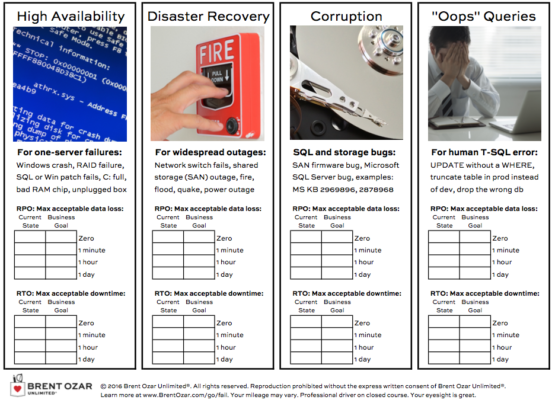
HA Worksheet Page 1 (from our free First Responder Kit)

There are four columns: high availability, disaster recovery, corruption, and “oops” queries.

For each column, you have to define the maximum amount of data you’re willing to lose, and the amount of downtime you’re willing to have. Start by filling out the current state. (If you’re not familiar with calculating your current RPO/RTO, that’s where our DBA’s Guide to HA/DR class comes in.)

I know, you’re going to think the business says “ZERO!” but that’s where the next page of the worksheet comes in:

HA Worksheet Page 2 (from our free First Responder Kit)

Down the left side, choose how much data loss you’re willing to tolerate. Across the top, choose your downtime. Where they meet, that’s the cost.

When the business users understand the costs, they’re able to make better decisions about RPO and RTO. But it all starts with getting them in writing.

Silent CPU Killers

10 Comments

It’s always important to make sure that SQL Server is running at peak efficiency – nobody wants to waste resources. In the past we’ve concentrated on ways to reduce I/O – either network I/O or disk I/O. The increasing number of cores available in modern CPUs meant that CPU tuning wasn’t as much of a concern. With the licensing changes coming in SQL Server 2012, tuning SQL Server for CPU should be in front of every DBA and developer’s mind.

Old or Missing Statistics

Statistics help SQL Server determine the best way to access data. When we have accurate statistics, the database is able to examine the statistics and make good guesses about how much data will be returned by a given query. The statistics are then used to determine the most appropriate join or data access method (seek vs scan, for instance). The problem with statistics is that they’re only good for a short period of time. Statistics are recorded as a histogram that describes how data is distributed in a table or index. If the histogram is inaccurate, then SQL Server has no reliable way of knowing how much data is present.

Looking at the AdventureWorks sample database, we can see there’s an index on the SalesOrderHeader table IX_SalesOrderHeader_OrderDate. If we use DBCC SHOW_STATISTICS to look at the index, we can see that the most recent valued for RANGE_HI_KEY is ‘2008-07-31 00:00:00’. What happens when we query for data that’s outside of that range? SQL Server assumes that there’s only 1 row present no matter how many rows there are. There could be 0 rows, 5 rows, or 500,000 rows. SQL Server doesn’t have any statistics about the data, so it cannot make an accurate decision.

Old, or missing, statistics can be cause huge performance problems because SQL Server will have to make a bad guess (1 row) regardless of how much data is present. SQL Server may choose an inappropriate join type and perform a large number of additional reads; a nested loop join may be used when a merge or hash join would be more appropriate.

The solution is to make sure that statistics are kept up to date.

  1. Understand data change rates. If data is loaded as part of regular jobs, make sure that index maintenance is performed on a regular basis and that statistics are updated during index maintenance.
  2. Understand the type of data change. If data is written at the end of table, there’s a chance its data won’t be included in statistics (especially in the case of something like an order date). If a lot of data coming into the system is time sensitive, regular statistics updates will be necessary to keep things performing well.
  3. Make sure that AUTO_UPDATE_STATISTICS is enabled for all databases. Even if your jobs to update statistics fail to run, having AUTO_UPDATE_STATISTICS enabled will make sure that SQL Server updates your data as it changes. Statistics will not get updated as often as we’d like, but it is better than nothing.

Ordering Data

The ORDER BY clause exists with good reason, right? Users don’t just need to get data back from the database, they want to get it back in a specific order. While that’s true, ordering data has a definite cost associated with it, if the data isn’t already in the correct order. Take a look at this query:

When we look at the actual execution plan, sorting the results take up 79% of the cost of the query. While this is a simple query, it’s easy to see how sorting can chew up a lot of CPU in SQL Server.

There’s no easy solution. However, many programming languages have the ability to use functional programming techniques to sort data in memory. The .NET framework makes it even easier by providing datatypes like the DataTable and DataSet. Both of these datatypes make it easy to sort data in memory in an application server. The idea here is that CPU is cheap on a Windows Server – we only pay to license the server, not each socket or CPU core. It is also much easier to horizontally scale the middle tier of an application than it is to horizontally scale SQL Server.

Functions

Functions are one of the biggest offenders when it comes to wasting SQL Server’s CPU time. The tricky part about functions is that they seem like they an easy way to encapsulate and re-use functionality. While functions accomplish this goal, there are other aspects of functions that make them a bad choice for many activities.

Simple, single statement table valued functions can be easily inlined by SQL Server. That is to say SQL Server will be able to include the execution plan of the function in the calling execution plan. The function’s execution plan can be optimized with the rest of the query. This can potentially lead to additional optimizations within the function. Multi-statement table valued functions and scalar functions won’t be optimized much of the time. Instead SQL Server will repeatedly execute the underlying function – once for every row in the result set. Over very large result sets this can result in a considerable amount of CPU utilization. IT’s often best to replace functions like this with inlined query logic. For a look at the behavior of functions in SQL server, take a gander at SQL Server Functions: The Basics.

Another downside to functions in SQL Server is that they frequently don’t get good statistics from the optimizer. When a table valued function returns data, SQL Server has no way to know (at compile time) how much data will be returned from the function. Instead it makes the assumption that there is only 1 row present in the result set from the TVF. This can result in poor join choice as well as bad data lookup decisions, just as if there were incorrect or missing statistics on an index or table.

Summing It Up

Keeping statistics up to date, moving ordering out of the database, and eliminating costly functions will go a long way to keeping your CPU utilization low. There are, of course, many other ways to combat high CPU, but these are some of the biggest culprits and some of the items that can be most easily fixed by database administrators and developers alike.


sp_Blitz® Updated to v5

SQL Server
6 Comments

Happy holidays! Santa SQL comes bringing tidings of cheer with a new sp_Blitz® – but also doom and gloom about configuration problems in your servers.  Here’s some of the recent contributions from readers:

  • John Miner suggested tweaking checkid 48 and 56, the untrusted constraints and keys, to look for is_not_for_replication = 0 too.  This filters out constraints/keys that are only used for replication and don’t need to be trusted.
  • Ned Otter caught a bug in the URL for check 7, startup stored procs.
  • Scott (Anon) recommended using SUSER_SNAME(0x01) instead of ‘sa’ when checking for job ownership, database ownership, etc.
  • Martin Schmidt caught a bug in checkid 1 and contributed code to catch databases that had never been backed up.
  • Added parameter for @CheckProcedureCache.  When set to 0, we skip the checks that are typically the slowest on servers with lots of memory.  I’m defaulting this to 0 so more users can get results back faster.
  • Andreas Schubert caught a typo in the explanations for checks 15-17.
  • K. Brian Kelley added checkid 57 for SQL Agent jobs set to start automatically on startup.
  • Added parameter for @CheckUserDatabaseObjects.  When set to 0, we skip the checks that are typically the slowest on large servers, the user database schema checks for things like triggers, hypothetical indexes, untrusted constraints, etc.
  • David Tolbert caught a bug in checkid 2.  If some backups had failed or been aborted, we raised a false alarm about no transaction log backups.
  • Fixed more bugs in checking for SQL Server 2005. (I need more 2005 VMs!)
  • Ali Razeghi added checkid 55 looking for databases owned by <> SA.
  • Fixed bugs in checking for SQL Server 2005 (leading % signs)

Whew!  And there’s more to come – I’ve got another half-dozen improvements queued up that also require new web pages, so those will take a little while longer.

If you’ve already downloaded sp_Blitz®, you can run master.dbo.sp_BlitzUpdate to fetch the latest version from The Clouds.  Enjoy!


Consulting Lines: SQL Server Needs a Dog

Consulting Lines
30 Comments

SQL Server isn’t lonely, but it needs a dog.  In today’s Consulting Lines series post, I’ll share my very favorite consulting line of all – one that makes people laugh while illustrating a point.

The Situation: Bob the Button Basher

My Blitz script helps me quickly spot SQL Server settings that have been changed from the default values.  I always work with the client’s staff in the room, and when I see a changed setting, I turn to them and ask:

Me: “Hey, Bob, I notice that max degree of parallelism has been set to 1.  The default is zero.  Can you tell me why that was set to 1?”  (The key here is to not say anything whatsoever about what the setting does – let Bob explain it to you.)

Bob: “Yeah, I read a blog saying that all OLTP servers should have maxdop set to 1.”

Me: “Ah, yeah, I’ve read those too.  Did we measure the before and after impact of the change?”

Bob: “No, it just seemed like a good setting to change.”

Me: “Gotcha.  Funny thing there – SQL Server is like an airplane.  Modern airplanes are so advanced that there’s only two things in the cockpit: there’s the pilot, and there’s the dog.  It’s the pilot’s job to feed the dog, and it’s the dog’s job to bite the pilot if he touches anything.”

Bob: “HA HA HO HO”

Me: “The problem with SQL Server is that it doesn’t have a dog.”

Bob: “Wait, what?”

Me: “SQL Server has a lot of knobs in the cockpit, and there’s a lot of advice out on the web that tells us to push all kinds of buttons to go faster.  Thing is, SQL Server ships out of the box with a pretty good set of defaults.  Let’s use those defaults until we have a really good reason to change something, and when we do, we need to document what we change so we know how it improved performance or reliability.”

What That Line Does

SQL Server really does have a lot of knobs, but every setting – every single one of them, including the defaults – has drawbacks.  I salute Microsoft for doing a really good job of weighing the pros and cons and coming up with a solid set of defaults.

In my line of work, I flip a lot of knobs, but for every one I touch, I try to explain thoroughly what I’m doing.  I may casually say, “This server needs Optimize for Ad Hoc Workloads enabled,” but when I do it, I also explain what I’m seeing about that particular server’s workload that justifies the change.

Jonathan Kehayias (Blog@SQLPoolBoy) recently wrote an excellent article about Lock Pages in Memory, one of those settings people just love playing with.  Before he posted the article, we had a great discussion about why we have differing opinions on that recommendation.  I understand why he recommends using it as a default, but the reason I don’t recommend it is illustrated beautifully by the fourth comment on the post:

“With LPIM, SQLOS will back down its usage to your ‘min server memory’ value. At that point Windows can try and hard trim the other processes, and potentially page the process requiring the 30GB memory out, or if it can’t respond efficiently this way, you may face a crash due to Out Of Memory for the OS.” – Jonathan

Ouch.  I’m not a big fan of giving a default recommendation that might crash the OS.  There’s also a bug in SQL2008R2 that causes corruption with LPIM.  I understand why Microsoft doesn’t enable Lock Pages in Memory by default, and I agree with them – it’s just not a safe button to push if you aren’t intimately familiar with the consequences and how to monitor for them.

This consulting line helps establish whether the other person understands the real ramifications of pushing buttons.  If they’re blindly bashing buttons based on blogs, it helps them understand the risks.

What Happens Next

The success of this line depends on your ability to dive deep and explain the concepts.  You have to be able to explain the pros and cons of both settings – the default setting and the one they chose.  Jonathan’s post on LPIM is a great example – if you can be comfortable explaining a topic to that level of detail, then you should feel comfortable flipping that switch.  (If, on the other hand, you’re not even comfortable reading a post with that level of detail, then you shouldn’t be flipping that switch.)

Bob: “So should we leave maxdop set to 1, or go back to the default?  We have no CXPACKET waits, so it must be working.”

Me: “Well, that’s true – no queries are going parallel. But parallelism isn’t always a bad thing – sometimes we want to throw lots of CPU power at queries.  Right now, we’ve got queries that aren’t running as fast as they could because they’re not getting the CPU they need.”

Bob: “But the server isn’t CPU-bound – CPU % is usually under 10%.”

Me: “That’s because you’re measuring CPU use as a total, not per thread.  We’ve only got a few active queries at a time, but we’ve got a four-socket server with 10 cores per processor, and hyperthreading is turned on.  Our CPUs are sitting around bored.  If we let some queries go parallel, we’ll be able to use those CPUs more effectively.  Based on what I’m seeing in your procedure cache, I recommend setting maxdop to 4 and cost threshold for parallelism to 100.  Here’s the evidence that supports it, and here’s how we’ll measure the success of that change…”

More of My Favorite Consulting Lines


Perk Up Your Career with the SQL Server Troubleshooting Checklist

10 Comments

When an application is offline or performing so badly that the users are complaining, what do you turn to?

When your cellphone says a major incident is ongoing and you can’t get to a computer, where do you send the team at the office?

When you’re putting out fires with whatever you can find, how do you record what steps you’ve taken and what information you’ve gathered?

You’re Only As Strong As Your Team

One major reason to put together a troubleshooting checklist is simple: you can’t always be working.

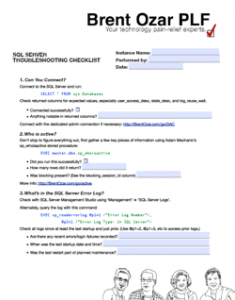
SQL Server Troubleshooting Checklist
What Would Brent Ozar PLF Do? (PDF)

If you’re the only person who knows how to use SQL Server in your office, you need to train someone. They don’t need to be an expert, they just need to be able to run through your checklist successfully and gather information. Find someone sensible, practical, and with a steady hand who you can practice the steps with, and tailor the checklist so it makes sense to your secondary.

If you work with a large team of SQL Server experts, you need a troubleshooting checklist just as much. As we all gain experience we all develop different ways of doing things. We each focus on different things and may interpret things differently.

The troubleshooting checklist gives your team consistency: it gives everyone a base process to make sure the major areas are covered.

You’re Only As Smart As Your Documentation

The other major reason you want a troubleshooting checklist is that all the rules change when things get really bad.

When a company is losing money, it’s hard to do things in a logical fashion. You’ve got four people at your desk asking all manner of questions from “we just bounced the Heffalamps services, is it OK now?” to “are the Wuzzles impacted by this problem?” Your boss’ boss keeps poking their head around your monitor saying, “I’m just checking in.” You’ve got 500 emails from your monitoring.

When this happens, you remember about 75% of all the basic stuff to check. It’s incredibly easy to miss some obvious things, though. After all, you’ve needed to go for the bathroom for about forty five minutes and still can’t leave your desk.

The troubleshooting checklist helps here in three ways:

  • You always hit a consistent list of things that are important to your business.
  • If someone misses a step when following up on a problem, you have a place to add a step to ensure the mistake doesn’t happen again. The troubleshooting checklist gives you a way to correct human error— that’s the secret to de-personalizing an embarrassing mistake and instead showing you’re a professional who follows up on errors and is in control of their process.
  • You have a place to record information which others can read. This helps you clear out that crowd from behind your desk! Save the checklist in a place where they can read it, and let them know they can see updates on your progress if they let you get going.

To Do: Give Our Checklist To Your Manager

There’s one person who really wants you to have a troubleshooting checklist, but they think of it in slightly different terms. They think of this as an ‘Incident Management Response Process’.

Your manager would love to have predictable response to problems. This helps them understand and explain to others what value you add to the company. It also helps them understand and justify having someone who can be your backup when you’re not available. It helps your manager show that you’re working to have an organized production environment with defined processes for keeping applications available.

Here’s how to handle this. Download our SQL Server Troubleshooting Checklist and give it a read. Think about a couple of things you’d customize for your environment.

Then show the checklist to your manager and say, “I think having a basic process like this would be helpful for our team. I’d like to lead a project customizing it for our applications. What do you think?”

According to Penelope Trunk, the path to promotion is shortest in December.

Now there’s a holiday score.

Check Out the Troubleshooting Checklist

Download the free SQL Server Troubleshooting checklist (PDF).


Coping with Change Control Video

1 Comment

Managing change is part of a DBA’s job. If you aren’t managing database changes effectively, though, disaster can strike. Jeremiah Peschka has worked with good and bad change management practices and even brought some awful ones under control. In this session, he introduces you to tools, tips, and techniques that will help you effectively handle changes in the database. If you need to deploy changes to the database, this session is for you.

This is a three pronged attack covering a set of techniques for gauging the scope of change, tracking code and configuration changes, and coping with the inevitable 3:00AM production hot fix. This is aimed at development teams and DBAs who are deploying both configuration and code changes to production servers.

https://www.youtube.com/watch?v=OthGRqibDqc

Change Control Scripts & Resources

Coping With Change Control T-SQL Scripts


My Thoughts on SQL Server 2012’s Licensing Changes

Licensing
67 Comments

A few weeks ago, Microsoft announced that SQL Server 2012 will no longer be licensed by the CPU socket, and will instead be licensed by the core.  You can read more at Microsoft’s recap.

After contemplation and discussing the issues with companies, I think of this as a few related announcements.

SQL Server is getting more expensive overall.

This shouldn’t come as a surprise to anybody: good things get more expensive over time, and crappy things get cheaper.  This change simply doesn’t affect me because I’ve never paid a single penny for SQL Server myself anyway, and I don’t plan to start now.  If I had to pay my own money for a database platform, I’d have switched to PostgreSQL long ago.

When I talked to my clients about this change, they all had one of two reactions:

  • “OMG, THIS IS UNBELIEVABLE!”  These people were more worried about their individual careers than their budgets: DBA managers wanted to know if SQL Server would start waning in popularity, thereby reducing the value of their skills.  (If the high salaries of Oracle DBAs are anything to go by, bring on the licensing price increases.)
  • “No big deal, but no new 2012 projects next year.”  These people understood that they were already licensed for their existing servers anyway, and only their ongoing maintenance fees would be impacted.  However, they immediately crossed Availability Groups off their list of 2012 projects, and that really sucks for me.  I’d been so excited about the ability to scale out with multiple read-only replicas, but the pricing just makes this a no-go for most of my clients.  Between the licensing changes and the traditional hesitation to deploy before Service Pack 1, 2012 is dead in the water for them.

Nobody decided to throw SQL Server out of the shop altogether, but some of them did start asking tough questions about their future projects.  It’s really hard to hire a good production SQL Server DBA right now (email us your resume if you’re looking in the Chicago, Los Angeles, or Portland areas, but no remote workers) so many of our clients are running understaffed.  One client said to me, “As long as I’m relying on outsiders for my database administration, what difference does it make whether it’s MSSQL, Oracle, DB2, Postgres, or the cloud?”

SQL Server used to be seen as the middle ground between expensive-but-awesome Oracle and free-but-limited open source.  Those days are gone – SQL’s pricing is higher, and open source platforms have gotten pretty darned good.

Limits kick in quickly on Standard Edition.

Standard Edition’s limits haven’t really changed significantly – but today’s hardware has, and Standard Edition isn’t keeping up.  If you’re struggling with application performance on Standard and you survive by throwing hardware at the problem, your options run out once you hit 16 cores and 64GB of memory.  At that point, you have to throw hardware and licensing at the problem by upgrading to Enterprise Edition.

I don’t think 16 CPU cores is really all that limiting.  CPU-intensive SQL Server queries tend to be the easiest ones for me to tune, and I’ve always argued that database servers aren’t app servers anyway.  The core-based licensing change just gives me more ammo to tell developers not to do string processing in the database server.

While 10-core Xeon CPUs are already available, they’re not typically deployed in 2-socket configurations.  You can technically buy a 4-socket box like the HP DL580 and populate it with 2 10-core CPUs, but that config just doesn’t make sense for Standard Edition due to the high cost.  With Intel’s upcoming tick/tock roadmap, the next couple of Xeon families are still slated to be in the 6-10 core range, so I don’t think the 16-core limitation is going to have a dramatic impact in 2012/2013.

The 64GB memory limitation, on the other hand, is frustratingly small given today’s memory prices.  32GB of server memory runs around $1,000, and memory can hide a lot of sins.  Standard Edition just doesn’t let you hide sins – you’re forced to spend manpower to keep tuning applications, and unfortunately, that’s not an option with third party applications.  I do a lot of work with independent software vendors (ISVs), and they’re frustrated that their customers can’t just buy $1,000 worth of memory to get awesome performance quickly.

There’s an opening for DBAs who love performance tuning.

It’s just you and me here, so let’s be honest: I make money when companies are in pain, and SQL Server’s licensing changes will inflict some pain.  Companies can’t just throw more CPU or memory at the problem anymore without writing a big check to Microsoft for additional licensing.  As a consultant, I can say, “I’ll fix that problem for less money than Enterprise Edition costs, let alone the cost of a server with more CPU sockets.”

If Microsoft had raised the 64GB memory limit, then companies could afford to mask problems longer by throwing memory at the problem.  They can’t, so I win.

The bummer for me is that I just can’t make the math work for scaling out with Availability Groups now.  I was really, really hoping for a lower-tier license cost for the read-only replicas (after all, they only support a subset of the work) but the cost to run a 5-node Availability Group is staggering.  Even if we use just 2-socket, 6-core servers across the board, that’s $412,440 of licensing – simply unthinkable, even if we throw in discounts.  It kills me, because I’m a huge fan of this feature, but right now companies have to be under tremendous pain in order to write a check that large to scale one application.  It’s just easier to tune SQL Server, and that’s where I come in.

It’s hard to be upset about that.


What the Users Want: Ad Hoc Reporting

SQL Server
10 Comments

Eventually we all run into a situation that makes us cringe: the users want to design their own reports. If this were something as simple as giving users a color picker and some visual layout tools, that would be one thing. Most of the time it’s more complex. Business users know their problem domain very well; they want to be able to view widget sales for the last three quarters broken up by sales person, location, and four other factors that you couldn’t possibly dream of, but you know you have the data for. What are the best options? How do you get the job done?

Dynamic SQL

It’s no secret that I’m a fan of dynamic SQL and when you’re building ad hoc reports, dynamic SQL can be the quickest way to get the job done. For those of you unfamiliar with the term, dynamic SQL is SQL that has been built in the database in response to inputs from some outside source. Dynamic SQL is frequently used to respond to two separate code paths. For example:

Depending on the age of the data, the code will read from one of two tables. The idea, of course, is to keep our implementation invisible from the user. This doesn’t tell us how we can use dynamic SQL to respond to ad hoc queries from users.

In order to use dynamic SQL to respond to user reports, the features must meet some pretty strict requirements – we need to be able to base all of our ad hoc reports on a stable core query. “Stable core query” is just my way of saying “all of these reports join to the same base set of tables.” This makes it easy to dynamically add join conditions to the end of the FROM clause. In effect, we’re just shoving strings together in the database to get data back to the users.

Unfortunately, dynamic SQL doesn’t always produce the best results. It’s difficult to build true ad hoc querying capacity with dynamic SQL. Users can be given a reasonable facsimile of dynamic SQL by providing many canned choices, but creating this SQL may be time consuming, error prone, and ultimately it can become difficult to maintain. The more options that users have, the more complex the T-SQL becomes. Clearly this pattern doesn’t work for large applications.

Lucene and SOLR

Apache Lucene is an open source search engine written in Java. SOLR adds functionality like document indexing (PDF, Word documents, etc), database integration, geospatial search, and faceted search. Both of these products are free and scale independently of SQL Server. Another benefit is that Lucene and SOLR can be fed documents to index in many formats – XML, JSON, PDF, or Word docs are all acceptable. Developers merely have to point the documents at SOLR and they will be indexed.

If you think this sounds an awful lot like full text search, you’d be right. Lucene and SOLR share a lot with SQL Server’s full text search feature. One of the big differences is that they exist outside of the database. Another difference is that you can query SOLR directly and return all of the fields that you want without having to read from tables in a database.

What’s more, SOLR has a very fluent search syntax making it possible to many types of complex queries. SOLR’s rich syntax makes it very easy to construct complex queries according to user needs without having to worry about writing SQL that can perform the underlying search. Finding sales data for the third quarter of the last five years where the sale contained headphones would look like this: items_sold:headphones sale_date:[NOW-5YEARS/DAY TO *] quarter:3. It’s certainly not something that business users could write, but neither is SQL.

OLAP

I’m not a huge fan of OLAP databases because I fear all things I don’t understand.

Okay, that last paragraph is a lie. SQL Server Analysis Services is a fantastic way to build crazy reports, the likes of which the world has never seen. I hadn’t even thought of this mechanism until I talked with a client recently and they told me what they were doing to deliver ad hoc reporting. New or modified data is marked with a timestamp. The data is periodically fed into an Analysis Service cube, right now this is once a day. The users get ad hoc reporting capabilities through the cube. The data currently isn’t real time enough, but the cube processing is fast enough on the current hardware that the frequency could be increased dramatically.

Here’s the best part: many different tools can be pointed at the cube to make this happen. Right now, users are generating reports with Excel and pivot tables, but nothing says that additional front ends can’t be stood up. Excel, Power Pivot, and SQL Server Reporting Services all make it easy for users to create their own reports and get to data in ways that the business can use.

What’s Your Secret?

There are as many ways to implement ad hoc reporting as there are developers implementing it. What are some of the ways that you’ve seen ad hoc reporting implemented. Sound off in the comments.


Read-Only View Permissions and Roles in VMware vSphere

SQL Server, Virtualization
11 Comments

When Ronald Reagan said, “Trust, but verify,” he was talking about DBAs working with their VMware sysadmins.

For the record, he didn't really trust the Soviets either.
"Trust, but verify." Ronald Reagan

As a consultant, I get to see a lot of SQL Server implementations – both successes and failures.  The successes have one thing in common: transparency.  The database administrators, VMware admins, and storage admins have clear, open discussions about the way their respective systems are configured.  They give read-only access to other teams so everyone can double-check to make sure everything is working well.  After all, these teams share a common goal – fast, reliable applications for end users.

You can easily get read-only access to the VMware vSphere Client, the tool VMware admins use to manage your virtualization environment.  Here’s how:

1. Walk over to your sysadmins and show them this blog post.

This is the hardest step in the entire process.

The rest of the steps are simple and predictable: click a button, get a result.  This step, however, involves complex, unpredictable meatbags.  Soft skills are the hardest one to master, and finessing this is outside of the scope of this particular article.  Start by brushing up with my Consulting Lines series.

You need to walk over there because you’re asking for access into their domain.  This implies that you don’t trust them.  You do, but like Reagan said, you just need to verify.

2. Open VMware vSphere, Home, Hosts and Clusters.

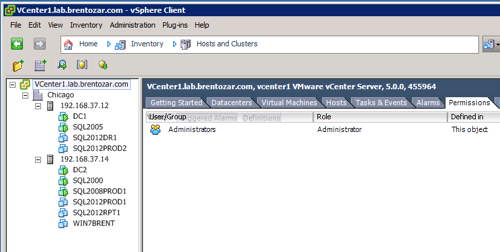
The vSphere Client is a thick front end that connects to Virtual Center, a service that keeps an eye on your hosts and guests.  In the vSphere Client, click Home, Hosts and Clusters.  Here’s a screenshot of what you’ll see:

Hopefully yours won't say Lab.
VMware vSphere Client

On the left side, click on the thing you want access to – which brings up the first question for your VMware admins: what do you need read-only access to?  Your VMware sysadmins may have built a separate cluster just for SQL Server use, or your VMs may be intermingled with other virtual machines.

On the right side, click the Permissions tab, right-click, and click Add Permissions.

3. Add the DBA domain group.

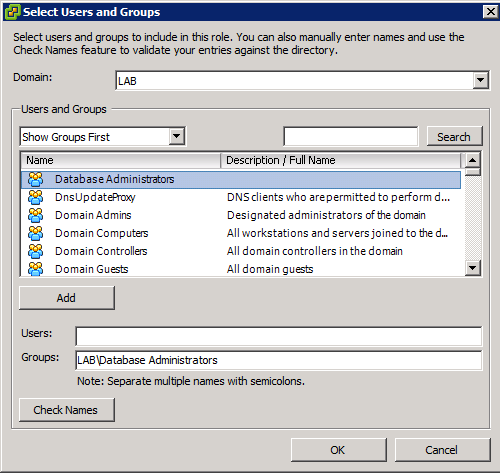
In the Add Permissions popup, click Add.  In the dropdown for domain, choose your Active Directory domain, and in the Users and Groups dropdown, click Show Groups First.  Your screen will look like this:

Active Directory Groups in VMware

In my lab, I’ve created an Active Directory group called “Database Administrators” that includes me, Jeremiah, Kendra, and Tim.  That way, anytime I need to grant additional permissions for the DBAs (like when I build a new SQL VM that they’ll need to administer), I can just use that domain group instead of individual user accounts.

Click your own DBA group’s name, click Add, and click OK.  On the right side of the Assign Permissions window, the Read-Only permission will be defaulted, and that’s fine – click OK.  Presto, you’re in.

If you click on child objects in the left tree (like one of your SQL VMs) and click the Permissions tab, you’ll notice that your read-only permissions have propagated to this object too.

4. Install the VMware vSphere client on your desktop.

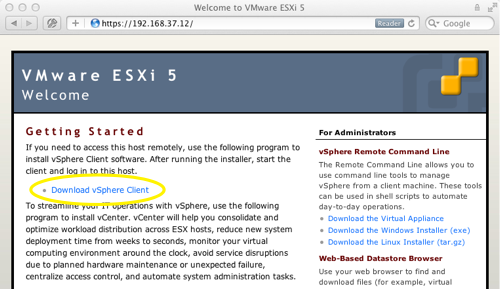
The client is a free download from VMware.com as part of other products, but the easiest way to get it is to simply point your web browser at one of your in-house VMware hosts.  In my lab, here’s what that looks like:

Downloading vSphere From Your VMware Host

Click the Download vSphere Client link and the installer will come flying through the tubes.  Yes, the installer includes Visual J#, and yes, I laugh at that too.

5. Launch the vSphere Client and start poking around.

After the installation finishes, double-click the VMware vSphere Client icon.  You’ll need to enter the name or IP address of your Virtual Center server – ask your sysadmins for that.  Check the box labeled “Use Windows session credentials,” and thanks to the magic of Active Directory, you’ll be poking around in virtualization in no time.  (Actually, it takes about 30 seconds to launch the dang thing.)

Want to Learn More?

Check out Virtualization, Storage, and Hardware for the DBA. It’s our 5-hour training video series explaining how to buy the right hardware, configure it, and set up SQL Server for the best performance and reliability. Here’s a preview:

https://www.youtube.com/watch?v=S058-S9IeyM

Buy it now.


SQL Server App Store Reviews

Humor
21 Comments

If SQL Server cost $4.99 in the App Store, what would the reviews look like?

Not as good as the Access app – **
By B. Analyst, December 6, 2011
I don’t understand what all the fuss is about.  The GUI in this app sucks.  It’s hard to build reports, and it’s overpriced.  $4.99?!? Save your money and get the free Access app instead.

Secret Performance Hints – *****
By JuniorHacker, December 5, 2011
Go into Settings and check the box for Priority Boost.  If you’re running low on space, check the Auto-Shrink box for each database.  When you need to beat the final level, hit up-up-down-down-left-right-left-right-B-A-Start.

No Twitter integration? – *
By Teenagur, December 5, 2011
C’mon, Microsoft, get with it, this app is so Web 1.0, I can’t share my favorite tables with my friends, I can’t post pictures of my schema on Twitter, WTF?!?!??!

THIS GAME SUXXXX – *
By l337, December 4, 2022
adventureworks is boring why anybody pay for apps? stupid

Best Database Ever – *****
By MVP99, December 4, 2011
I’ve built hundreds of rock-solid solutions with this app. My customers love me, and it keeps my bills paid. Thanks, Microsoft!

ADS ARE DECEPTIVE – *
By SingleGuy18, December 3, 2011
App description said it had highly available bis and models on tables, but there’s no pictures of hot chicks or anything, just a bunch of lines and squares.  Wasted that $5.

Good, but needs better graphics – ***
By Reports4Me, December 2, 2011
The graphics in this haven’t really changed since v7.0, and there’s no easter eggs.  It needs like a hot coffee mod or something.

Works for me – *****
By I. Ben-Gan, December 1, 2011
Works mostly as advertised, although it’s not clear whether some behaviors are a bug or a feature.

HELP!!! ASAP!!! – ***
By panic42, November 30, 2011
MY PHONE CRASHED AND I NEED MY DATA. CAN’T FIND MY BACKUPS. PLEASE CALL ME!!!


SQL Server First Responders Kit Video

7 Comments

When your SQL Server is critically injured you need a first responder kit to help you diagnose the problem and apply emergency aid. In this session, Kendra Little introduces you to invaluable tools and techniques for triaging an emergency. If you have one year’s experience with database administration, this half-hour session will set you up to triage like a pro.

Want a list of links referenced in the video? Scroll on down!

https://www.youtube.com/watch?v=V8JEenuz1SM

Links from the video:


Brent’s 2012 Conference Schedule

#SQLPass
5 Comments

I feel like the luckiest guy in the world: I get to take part in six major SQL Server events in 2012.  Here’s where I’m going and why:

January 26-Feb 4: SQLCruise Miami

SQLCruise is the highlight of my year.  This year, we’ve transitioned SQLCruise completely to Tim Ford – he owns the event start to finish.  I’m really excited because I get to sit back and enjoy the event a little more, and Tim gets to do what he truly shines at: bringing good people together to learn and bond.

I’m doing three all-new in-depth sessions on SQLCruise Miami: Procedure Cache BI, Scaling SQL with Solid State, and SAN Features for Senior DBAs.  All three are targeted at DBAs who have to make applications go faster.  You need 3-5 years of experience with SQL Server, and you should already be familiar with the basics of reading execution plans and designing indexes.

I like SQLCruise because it’s a limited number of people together for an extended period of time.  I get to know every single attendee, hear about their challenges at work, and have plenty of one-on-one time for design questions.  Some attendees have started bringing their laptops armed with a SQL Server instance, a copy of their production database, and their toughest queries or design problems.  I love discussing this stuff for hours over margaritas.

Trust me, this is the cheapest way to get the most honest consulting, and it’s not just from the presenters – it’s also from your fellow attendees.  Learn more at SQLCruise.com.

Feb 28-Mar 2: MVP Summit Redmond and SQLSaturday Redmond

The annual international MVP shindig is the coolest benefit of being a Microsoft MVP.  We have to pay for our flights to Seattle, but once we’re there, Microsoft picks up pretty much everything else.  We get insider NDA sessions, and given the timing on the below event, I’m hoping that we’ll get insider content on SQL Server 2012 at the MVP Summit this year.  The training really isn’t my favorite part – I just like getting the chance to spend more time with my favorite community and Microsoft people.  There’s no substitute for face time with these folks.

The public isn’t invited to the MVP Summit, but the good news is that the MVP Summit will bring a ton of great speakers to SQLSaturday Redmond!  This might be the best SQLSaturday all year.  I try to work in SQLSaturdays whenever it matches my travel schedule, and this one fits perfectly.  I bet lots of out-of-town MVPs will make a similar decision.

March 25-31: SQL Connections Las Vegas

This Connections is billing itself as a SQL Server 2012 launch event, and it just so happens that the conference date exactly lines up with the next SQLBits conference too.  Does this mean we’ll see SQL Server 2012 released here?  Who knows – it’s tough for conference planners and software vendors to get all the stars to line up simultaneously.

Connections feels like the most training-oriented of the conferences: it focuses on quality, not quantity.  There’s less simultaneous sessions, but the presenters tend to be very polished professionals who are very accustomed to being onstage.  (Presenters get free registration, hotel, and a fee per session.)  It lacks the rowdy, party, community feeling of the PASS Summit: but there’s clearly an audience for a more traditional learning event.  I like both events for different reasons – I meet more friends at the Summit, but I make more consulting business connections at Connections.

I’m doing a few sessions at Connections, but the official itinerary isn’t out yet.  The only one I can announce for sure is my all-day Virtualization and SAN Basics for DBAs session, which will be a $399 post-con session on March 30th.  Registration is open now.

May 24-June 2: SQLCruise Alaska

I’m doing the same presentations that I did on SQLCruise Miami.  Neither cruise is more junior or senior than the other – it just boils down to whether you’d like to see the islands or the icebergs.

There’s one big difference, though: in Alaska, I teamed together with Jeremiah, Kendra, and a friend of ours to get the Garden Villa suite.  SQLCruisers will all get to hang out with us here:

Look like fun?  Book yourself a cheap inside room (they’re as low as $679 per person right now) and register for SQLCruise.

Fall: SQL Connections Las Vegas

Sometime in the fall, I’ll be returning to Vegas for another round of Connections.  The dates, exact location, and session agendas are still to be determined.

November 6-9: PASS Summit Seattle

The PASS Summit is the biggest event of the year in terms of quantity: thousands of SQL Server professionals from all over the world gather together to talk shop.  It’s a zoo of nonstop activity, a whirlwind of tweeting and meeting that goes by in a blur.  I love getting the chance to meet up with some of my best friends for the briefest of moments.

There’s at least a dozen sessions going on simultaneously at any given time, but as big as the event is, there’s fierce competition for speaking spots.  Speakers get free registration (roughly $1500 value), so speakers from all over the world vie for spots.  The call for sessions hasn’t gone out yet, so I have no idea whether I’ll be accepted, but I’d pay to go out of my pocket even if I didn’t get the chance to speak.

And I Wish I Could Hit More!

The good news – heck, the GREAT news – is that I’ll be hitting so many major conferences next year.  I pinch myself when I think about this because it just seems too good to be true.

The bad news is that I’d love to do more: I would love to do SQLBits, TechEd, a few CodeCamps, storage conferences, and VMworld, but with just these ones above, I’m already away from home for six weeks.  In order to keep a good work/life balance, I try to only travel one week per month, and that only leaves me 6 more weeks of travel in 2012.  Since I like to eat and pay rent, I gotta use those other 6 weeks for client projects to make moolah. <sigh>  Decisions, decisions.


3 SQL Server Book Review Short Takes

Book Reviews
13 Comments

Here’s what I’ve been reading lately on the SQL Server front.  I’d like to thank all three authors and publishers for providing these books for review.

Securing SQL Server by Denny Cherry
PaperbackKindle

Denny’s a jack of all trades, and a Microsoft Certified Master of SQL Server to boot.  I’ve had the pleasure of knowing Denny for a few years, and he’s on the short list of people who I’d trust with my server password list.  (I wouldn’t trust him with my laptop password, though, because he’s got a wicked sense of humor.)  When Denny first told me he was writing a security book by himself, I asked him why – it seemed like such a dry topic.  Amazingly, Denny was able to bring this material to life in a friendly, readable way.

It’s easy to recommend this book for companies that store financial, medical, or personally identifiable data in their databases, but going beyond that, I think every company with a multi-DBA team should have a copy of this book on their bookshelf.  A lot of my clients ask questions that are answered well in this book, and this book is way cheaper than a HIPAA/PCI/SOX audit.

If you’re a solo DBA at a shop, I probably wouldn’t recommend this book, though.  The topics covered in this book take time to implement, and they’re usually beyond the scope of what a single person has the time to do when they’re firefighting.  Yes, I wish all our databases were secure, but solo DBAs probably need to start with more basic security concepts such as how to configure service accounts, and that’s not covered here.  This focuses on senior DBA level knowledge.

Troubleshooting SQL Server by Jonathan Kehayias and Ted Kreuger
Paperback

Jonathan and Ted are forum monsters: they’re constantly patrolling user questions looking for ways they can help.  As a result, they’re well-versed in the typical problems DBAs face and the best ways to solve those problems.  They’ve compiled the results into a book.  The book reads like a very polished forum answer: if you’ve got a CPU problem, turn to Chapter 3.  You’ll learn what tools to use to diagnose the issue, the most common problems, and the best solutions.

Jonathan was one of the coauthors on Professional SQL Server 2008 Internals and Troubleshooting (PaperbackKindle), and at first glance, it might sound like those two books are similar.  This book is different because it takes a problem-and-solution approach, whereas our Pro 2008 Internals teaches the reader about internals first, then explains troubleshooting tools you can use to look under the hood.  I’d say that Troubleshooting SQL Server is a faster approach to getting ‘er done, and I’m adding it to my list of recommended books for SQL Server DBAs.

SQL Server 2008 R2 Administration Cookbook by Satya Shyam K Jayanty
PaperbackKindle

Lemme just start out by saying that I don’t like posting negative reviews.  I first received a review copy of this, marked it up, and emailed the publisher and author with a list of questions.  Despite a long dialog, I never got answers to the technical issues, so I tossed the book in the closet.  I wouldn’t have posted this review, but I noticed a disturbing number of five-star reviews for the book on Amazon.  It wouldn’t be fair for me to let people spend their money on this, because by buying it and following the advice, they’re hurting their SQL Servers.

Here’s a few examples of the advice:

  • P335 – in a section on designing maintenance tasks in a mission-critical environment, the reader is instructed to check maintenance plans for reorganize indexes, rebuild indexes, and update statistics.  This is the worst approach possible for a mission-critical environment: it will do all three tasks against every index in the database, every time.  If we absolutely had to use this approach, we could accomplish the same thing by simply rebuilding all indexes, but again, even that is a bad idea in a mission-critical environment.  It even tells the reader to create separate schedules, but doesn’t say how or when these tasks should run.
  • P361 – “Place transaction logs on RAID5 rather than RAID1+0 for sequential workloads.”  Not true, as Microsoft documented in Table1A of this doc.
  • P360 – in a section on building a scalable server: “…edition-wise it must be either DataCenter or Enterprise edition to host production data.” What, Standard isn’t good enough for production?
  • P70 – in the wait stats troubleshooting query, useless wait stats aren’t filtered out.  The example screenshot shows that the server is bottlenecked by SQLTRACE_INCREMENTAL_FLUSH_SLEEP, XE_TIMER_EVENT, and FT_IFTS_SCHEDULER_IDLE_WAIT, none of which are wait events that a DBA should spend time investigating.  Contrast this with the well-thought-out, production-tested queries in Troubleshooting SQL Server, and it’s pretty disappointing.
  • P360 – “Configure the storage and memory L2 cache per CPU has a minimum of 2 MB to improve memory.”  There are so many grammatical and technical errors here I don’t even know where to begin.

To top it all off, many of the book’s sample queries simply don’t work – keywords are mashed together with no spacing, like page 69’s “SELECTTOP” and “CROSSAPPLYsys”.  Ouch.

Needless to say, I don’t recommend adding this book to your collection, but if you’re itching for holiday reading, check out my recommended SQL Server book list.


Three Things That Rock About SQL Server

3 Comments

When something remarkable is around for a while, it becomes easy to take it for granted.

Today, I’ll share three awesome things about SQL Server with tips to give you an edge when using each one.

#1. The Free Online Documentation is Mind Blowing

SQL Server is a huge product. We’ve got the database engine, Analysis Services for cubes, Integration Services to process and transform data, and an increasing set of other complex products for working with data documented in Books Online.

Tip: When using Books Online, check the Community Content at the bottom of the page first for any errors or questions others have raised— this can save you time and trouble if an important detail is missing or in error. Check other versions of the same page using the link at the head of the topic, and always read critically. Even encyclopedias can’t be perfect!

Microsoft’s documentation doesn’t stop with Books Online. Microsoft also publishes in-depth whitepapers for SQL Server. I recommend you periodically review the list to make sure you know what’s available, then set aside time to read the topics which are most useful to you.

We also have sites where community members publish high quality documentation for SQL Server. The SQL Server community is so vast that it’s impossible to mention them all. Three of my favorite sites for technical documentation are:

Tip:  When you see unusual behavior in SQL Server, search Microsoft Connect. This is where users report bugs and suggestions for the product. Make sure you log in to search: external search engines typically won’t lead you to what you need to find.

#2. Lots of Ways to Find Out “What’s Happening Now?”

We have many ways to check out what’s currently happening in SQL Server. The instrumentation for the product is very well developed and gives a lot of options to see what’s processing at any given time.

The top four ways I check to see what’s happening are by using:

  1. Dynamic Management Objects – We can find out an awful lot with queries— and more with each version of the product;
  2. SQL Trace – Our old friend, sometimes used with SQL Server Profiler;
  3. Extended Events – The new, leaner and meaner hotness for tracing: SQL 2008 and higher;
  4. Perfmon Counters – Windows and SQL Server specific counters.

Each of these techniques has its own strengths, and Extended Events is becoming increasingly powerful. Together, all of these methods provide a vast array of information about what’s happening in and around SQL Server.

Gathering data with each technique has its own cost. It takes experimenting and research to know what you can get away with and where you need to hold back.

Tip: When it comes to finding out what’s going on in production, treat your investigation like a database change. That means you should test your method against another environment, even if you can’t reproduce the issue there. Always think about how your method of investigating may be impacted by increased load, and make sure you have a way to monitor its impact.

#3. Tools, Tools, Tools

SQL Server ships with rich, user-friendly tools.

SQL Server Management Studio covers a lot of ground with different features. It helps us navigate a given installation and also develop Transact SQL. It has built-in reports to help describe what’s going on at instance and database levels.

It has sqlcmd mode if you prefer a different kind of scripting and want to interact more with Windows. You can use Object Explorer Details to select multiple items like Windows Explorer. We can view Graphical Execution Plans. Or, we can just run Transact SQL statements in multiple windows.

Tip: SSMS lets you choose to generate a script for almost every action you want to do rather than just executing it through the GUI. This feature is just plain awesome. Even if you choose to execute a change through the GUI, I recommend you always script out the command and save it off as a record of your change.

Want more SSMS tips? Check out Jes Schultz Borland’s blog post Tips and Tricks to Make SQL Server Management Studio Awesome.

What’s Cool About These Things Together

SQL Server may be complicated, but we have a lot of ways to work with it and to learn more about it.

As the SQL Server product grows, the tools and increasingly improved instrumentation allow us to understand the product more deeply. Books Online is just a launch board– the tools and the methods we have to see what’s going on in SQL Server help us take off from there.

Together with community members who want to share knowledge, this creates an interested, invested group of technologists who write about what they’re learning. And that’s something we really shouldn’t take for granted.


Virtualization and SAN Basics for DBAs Video

SQL Server
4 Comments

These two technologies can make a very big — and very bad — difference in how your SQL Server performs. Wouldn’t it be great if you could get the real, honest lowdown from a virtualization administrator, a SAN administrator, and a DBA? Wouldn’t it be even better if one person had done all three, and could give you the pros and cons of each point of view?

In this one-hour session, I explain how virtualization changes CPU, memory, and monitoring, and I show how to get specific recommendations for your make & model of SAN:

https://www.youtube.com/watch?v=V38bzhrfTHU

The links I discuss in the video are BrentOzar.com/go/san and BrentOzar.com/go/virtual.


Third Normal Form is Snake Oil

13 Comments

Step right up, ladies and gentlemen, and I will sell you the solution to all of your database needs. That’s right, it’s Doctor Codd’s Third Normal Form, guaranteed to cure all ailments of the schemata, pragmata, and performata. Doctor Codd’s Form will make your data performant and compressive. Accept no substitutes or imitators; Doctor Boyce’s lamentable attempts cannot soothe your aches and pains like Doctor Codd’s Third Normal Form. Why, with just a simple application of Doctor Codd’s Third Normal Form, thrice daily, and you’ll be jumping around to the tune of normal forms and transactions in no time!

Sound Familiar?

Anyone pushing a single idea is pushing snake oil, plain and simple. They’re selling you a warm and fuzzy feeling that you’ll make your problems go away by following their simple prescriptions. Deviation from the remedy will, of course, result in problems, failure, and potentially phlebitis.

Can I Cure You?

No, I can’t. Well, I can, but I’m not going to. Not yet, at least. You need to pay attention, first.

The Forms, Both Magnificent and Normal, Are A Not Panacea

Slavish adherence to normalization is bad for your health. There are as many reasons to not normalize data as there are reasons to normalize your data. Don’t believe me? What if I asked you to design a database to persist items that we might sell in a store?

It’s easy, at first, to design an items table with a few columns to describe the main properties that we want to persist about an item in our store. Problems begin when different departments in the store need to save different properties. Different parts of our IT systems will need different views of the data. While adding a column is trivial on small databases, adding a column in a large database is decidedly non-trivial. Eventually the database boils down to an items and item_properties table and at that point the database becomes impossible to query reasonably.

A Solution Most Surprising

We can solve this problem a few ways, but with Microsoft’s Hadoop announcements, it makes sense to look at what the non-relational world can offer. HBase is a real-time column-oriented database that runs on top of Hadoop.

HBase is helpful modeling dynamic properties because of flexible data model. While HBase does have tables, rows, and columns there are some powerful differences. HBase’s columns are split up into column families – these are logical groupings of columns. Columns can be added on the fly once a column family has been created.

Jumping back to our example, instead of modeling a items and item_properties table, we can create an items table and create column families to store properties specific to a department or for a common purpose. Rather than create many tables, we can add a shipping_info column family, a accounting column family, and a sales_promotion column family. Over time this flexible data model can be used to populate reporting tables in an enterprise data warehouse. Rather than focus initial efforts on building a robust general purpose schema in an RDBMS, it’s easy to create a flexible schema in HBase and pull out the data we need for reporting at a later time.

A Final Commentary on Data

Denormalization doesn’t have to be a dirty word. There are many reasons to denormalize data. Ultimately, the process of shredding data apart should depend not on blind adherence to the principles of normalization but to the needs of the applications that consume the data. If you have a log file processing application, does it make sense to read log files from disk into a relational database? Every log entry will need to be shredded into multiple columns doesn’t make sense when log files are only infrequently processed and used to produce aggregations.

Even when you eventually need to query the log file data, there are tools suited to performing SQL-like operations across flat files. Hive provides a SQL-like querying layer on top of the Hadoop framework making it possible to run bulk queries across large volumes of data stored in flat files and spread across many servers.

Know how data is used; know the problem that the business wants to solve. Let the principle of consumption drive the structure of your information. You will thank me, some day, for freeing you from the false rigor of normalization.


Local Backups Are The New Offsite Backups

Backup and Recovery
3 Comments

Years ago, Microsoft’s Jim Gray said that memory is the new disk, and disk is the new tape.  (You can read more in his 2006 “Tape is Dead, Disk is Tape, Flash is Disk” PowerPoint presentation or the Google Quick View.)  Many of the things he predicted have come to pass, and it’s time we explore this a little more because it has so many impacts for today’s database administrator.

When I first started in database administration, I did regular fire drill restores because I was paranoid.  (Chalk that up to dropping a table when I was a teenager working with SCO XENIX.  Damn, I feel old.)  As often as I could, I’d restore databases from production over to our development servers and time how long they took.  That way, I could report up to my managers and say, “If we lose production, it’ll take X hours to restore onto dev and go live.”  Every now and then – never as often as we should – we shipped backups offsite to the boss’s house.  As I moved up in life, I started working for companies that sent backups offsite via storage services.

My primary method of recovery was to restore a local backup first (which took a known length of time), but if things really went to hell in a handbasket, I could call the offsite storage service and get them to courier a backup over.  I had no idea how long that would take, and when it arrived, it’d take another unknown time to read the backup off tape and get it onto the live servers.

In today’s multi-terabyte world, most of us don’t test our restores as often as we should.

Heck, most of us don’t even do backups as often as we should.  We have clients who have even abandoned the thought of doing multi-terabyte data warehouse backups because it’s faster to reload the data from source, and because they’ve got schema changes they’ve always wanted to make along the way anyway.

Local Disk is the New Tape

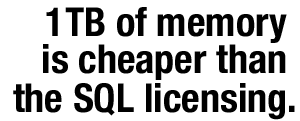
Unless you're running Developer Edition in production. Arrr, pirates!The HP DL580 G7 holds up to 2TB of memory, but even if you cheap out and only get 1TB of memory, you’ll pay under $50k for that memory.  While that might sound expensive at first, keep in mind that SQL Server Enterprise Edition is roughly $30k per socket, so you’ll spend $120k just licensing the four CPU sockets in that DL580.  The memory isn’t the biggest expense in that server – 1TB of memory is cheaper than the SQL Server licensing.  If you need four CPU sockets worth of power, you’re probably going to be caching a great deal of your database in memory.

That is, as long as the server’s up.

Two ugly things happen when that server restarts.  First, it needs to check the memory upon booting.  One of our clients with a 1TB memory system reports that it takes over 15 minutes for the server to boot up into Windows.  That’s some pretty ugly downtime if you need to do Windows patches or firmware upgrades, and this is why clustering starts to be a no-brainer when you go past the 256GB memory mark.  It’s just so much faster to have the second node already up and running – you lose much less time.

Second – and clustering doesn’t fix this – is that your server is starting from scratch with nothing cached in memory whatsoever.  The data’s all sitting on disk.  Even with whiz-bang solid state drives, it takes a long time to read 1TB of data off disk to warm up SQL Server’s cache.

One of our performance-freak clients had us write scripts to do a SELECT * across every table just to make sure all of the data would be brought into cache after a restart.  And if you’d like to attempt a similar exercise, keep in mind that you’ll also need to use index hints for every index in the database too, because just doing a SELECT * will only hit the clustered index.  If you’ve got filtered indexes, you’ll need to use a WHERE clause that matches your clustered index, or else use DMV tricks that will hit the filtered index.

For these kinds of companies, a SQL Server restart is a serious outage-causing event.  Their systems will perform below par for up to an hour as the database server recovers.  To a manager, this is akin to restoring from backup – it’s an event they don’t want to see more than once a quarter.

Caching Servers are the New Memory

The rest of yours are pretty damn slow, believe me.Database administrators think of SQL Server’s memory as the cache.  That is completely and utterly wrong.  The database is the persistence layer – the place things go where they need to be permanently saved somewhere.

The first place your applications should be querying isn’t the database: it’s a caching server tier like Redis, Memcached, Couchbase (aka Membase), and Windows AppFabric Caching.  Only if your apps can’t find the data in cache should they ask the database, and then they should store the database results in the cache to lessen load on the database.  The fastest query is the one you never make.

Don’t think the caching tier doesn’t need to be reliable just because it doesn’t have original data in it.  When this caching tier goes down, your database server will feel it.  As your loads grow, your app can get to the point where the database tier can’t survive the load if the cache servers are completely flushed, and you have to build cache-server-warming code.  That’s why I consider caching to be the new buffer pool – it’s the database’s first line of defense, long before queries hit the database server’s buffer pool.

When You’re Performance Tuning Queries, Zoom Out

When someone brings me a query to tune, the first question I ask is, “Why are we running this query?”  It’s not just that there may be a faster way to get the data, but there might be a reason not to run the query at all.

Are we repeatedly running the same get-configuration-data query over and over?  Maybe that should be cached inside the application itself.

Are thousands of users asking for their dynamic home page over and over?  Maybe we should use a cache tier like Redis that every web and app server can query.

It can take your developers months to fully implement and test a good caching solution like Redis, so think like Jim Gray.  The time to prepare for tomorrow’s massive architecture changes is now.  Start asking the caching question so your developers can start building out your new buffer pool.


How to Tell if TempDB Is a Performance Problem

TempDB
9 Comments

Years ago, I came across an article about a gentleman who made a cat camera. Without boring you too much, this camera gave him a detailed view (including GPS info) about what his cats got up to all day. I got excited about the idea of finding out what my pets did all day. Not having the means to build a cat camera of my own and being far too cheap to buy one, I rigged up a web cam at home to watch the cats all day. It turns out that my pets do nothing all day. They slept and ate and slept and ate until I got home. At which point, they kept doing the exact same thing.

In a wonderful bit of quantum boringness, it turns out that I had no idea what kind of chaos my pets were causing until I directly observed them. I had no idea if they were actually moving things around in the house or if I was simply forgetting where I was putting things (turns out I’m very forgetful). TempDB is a lot like a basket of cats – you don’t know for sure that it’s causing your problems, you have some sneaking suspicions, but you’re not sure how to prove anything.

Watching Over TempDB

If TempDB is like a basket of cats, we need to watch what it’s doing; there’s no telling when it’s going to go from adorable to shredding the drapes. Knowing what to watch in TempDB is just as important as knowing that you should even be watching TempDB at all.

How Many Cats Do I Have? (Watching TempDB Free Space)

Excessive TempDB usage isn’t necessarily a sign that TempDB is a problem, but it is an indicator that you have problems worth looking into. When TempDB starts getting full, it’s an indicator that there’s a lot of temporary object creation as well as out of memory sorting and joining going on in the database. None of these things are bad, but they’re indicators that we should be taking a closer look at TempDB.

There’s no hard and fast metric for what you should do when your TempDB data file is large, but it’s a good indicator that you can stand to do one of a few things:

  1. Enable Instant File Initialization
  2. Add Multiple TempDB Files

These changes won’t always cure the problem, but they are starting points. Waiting for TempDB to grow can be a cause of performance problems and enabling Instant File Initialization makes it possible to quickly grow TempDB data files. Using multiple TempDB files uses more storage bandwidth, reduces file contention, and adds magical pixie dust to your queries.

What Are My Cats Doing? (Monitoring TempDB Usage)

The next step, after you know how much TempDB you’re using, is to find out how TempDB is being used. TempDB is used for a few distinct things: joins, aggregations, sorting, the version store, temporary tables (and table variables), and table/index spooling. While these are different operations, they all consume TempDB space. Understanding how your applications use TempDB is critical to understanding if TempDB is causing performance problems.

This is where things get more complicated; there’s never a right or wrong answer, but TempDB usage varies heavily by application and workload. Sometimes even the same application, with different customer workloads, can have wildly different TempDB usage characteristics. By monitoring TempDB through a variety of DMO calls, server side traces, and performance counters it’s possible to get an accurate picture of the health and utilization of TempDB over time. Through some careful DMO/DMV scripting it’s even possible trace who the biggest consumers of TempDB are back to the stored procedure or query that’s using TempDB.

Just like trying to watch a basket of cats through a webcam, you can only catch quick glimpses of what’s going on. This process makes it possible to capture a sample of what’s going on inside TempDB at any moment, but it’s only for a quick moment. The DMOs to monitor TempDB only look at the currently running queries, there is no historical record. The best way to get an accurate picture of what’s happening is to sample these DMOs on a regular basis and sample aggressively during peak performance periods. You won’t catch every query this way but you should be able to catch most.

Benchmark, Rinse, Repeat

Whenever I talk about performance tuning or general SQL Server problems, I always advise people to benchmark everything that they can. Having a steady baseline is the only way to verify that changes are having a positive effect on performance. Without a performance baseline in place, all you have to go on is a feeling that things are faster. Unfortunately, feelings don’t translate into quantifiable numbers (unless you’re trying to quantify how you feel about a basket of cats).

Establishing a performance baseline is one of my favorite parts of working with clients. As we go through the health check, I work with our clients to figure out where it hurts and help them build a solution. I cover how they can use the baseline to keep monitoring their system. With these tools in place, it’s easy to monitor a system’s health over time.

Focusing on performance metrics makes it easy to see which parts of an application are causing performance problems. It TempDB usage spikes after a change to a few stored procedures, it’s easy to identify the problem when you have a baseline established.

Determining whether or not TempDB is a performance problem boils down to establishing a baseline, monitoring performance before and after changes, and carefully making changes until acceptable performance levels are reached. This may involve adding more TempDB data files, forcing memory grant allocations, or using solid state drives for TempDB.

Want to learn more? Take my class.

My Fundamentals of TempDB class is for curious folks who want to learn:

  • What uses TempDB, and how that affects performance: not just temp tables and table variables, but also triggers, cursors, sorting indexes, workspace spills, the version store, and more
  • How to host TempDB depending on how you use it: understanding what goes in the log file, the data files, why the number of data files matter, and whether your particular workload should be on SAN, local storage, or ephemeral storage, and why
  • How to monitor it: after you understand what uses it and how to host it, you need to keep tabs on how its performance changes over time using DMVs, Perfmon counters, and the First Responder Kit scripts

Learn more and register now.


What People are Finding with sp_Blitz®

SQL Server
4 Comments

My new sp_Blitz® stored procedure helps you take over SQL Servers, identify risks, and build an inventory of what needs to be fixed.  Here’s the video from our Tech Tuesday Triage webcast series this week when I explained how to use it:

https://www.youtube.com/watch?v=OUdIe_eLpco

In the sp_Blitz® output, I include a link to learn more about each problem on your server.  Thanks to the magic of web site analytics, I can see the most popular issues.

  1. Slow Storage Reads or Writes – so often, our biggest bottleneck is storage.
  2. Untrusted Foreign Keys or Check Constraints – I just recently started checking for this problem myself, and it’s popping up everywhere.
  3. Single-Use Plans in the Procedure Cache – just one isn’t a problem, of course, and the severity of the problem is based on the number you have and the size of memory they take up.  Those numbers are listed in the sp_Blitz® output.
  4. Databases Owned by Users <> SA – and I love that this one hit the top 5 because it was our first user-contributed query in sp_Blitz®, sent in by Ali Razeghi.
  5. Triggers Found on Tables – no surprise there because this was one of the reasons I first started writing my Blitz scripts.  My developers were troubleshooting problems with insert/update statements and had no idea someone else had written a trigger to modify their data.

Those are just five of the checks – and there’s already over fifty.  If you’d like to add a check, email me with your script and the permission to use it, and I’ll add it into sp_Blitz® too.

Check out sp_Blitz® and see what it finds on your own servers!


My 3 Favorite Connection String Tips

Connection strings – boring topic, right?  Well, it turns out there’s a few things that can save your behind.

Tip 1: Build your application with 3 connection strings.

If you want to scale, write your application from the start with 3 different connection strings:

  1. Writes and real-time reads
  2. Reads that can tolerate data older than 15 seconds (no writes allowed with this connection string)
  3. Reads that can tolerate data several hours old (like reports, and no writes allowed with this string)

In the beginning, all three connection strings will have the same content – they’ll all point to your production database server.  When you need to scale, though, the production DBA can use different techniques to scale out each of those tiers.

1. Writes and real-time reads – this is pretty tough for DBAs to scale, so we need to keep the number of queries here to a minimum.  Our only option right now for writing in two SQL Servers at once for the same database is to use replication.  I like replication in theory, but it isn’t a set-it-and-forget-it option when you’re trying to scale more load than one SQL Server can handle, plus do active development.  I only recommend this option for clients with full time DBA teams that are on call around the clock.  Fortunately, you probably won’t have to pursue this option because most of your load will be using the other two connection strings anyway.

2. Reads that can tolerate data older than 15 seconds – here we start to have more options to scale out.  When we don’t have to worry about merging data from multiple sources, we can use easier-to-manage tools like transactional replication or SQL Server 2012’s Availability Groups.  This is where the bulk of your queries should go – but I mean bulk in terms of execution count, not in terms of load generated.  Think of this as the default connection string for your application.

Honey badger don't care about your reports.

3. Reads that can tolerate data several hours old – users love reports.  As your application grows, you won’t have time to make all of the report queries clean.  Users will build really crazy reports with nasty, ugly queries that burn up all kinds of CPU and IO.  There will come a point when management will have to make a decision: do they allow reports to slow down production in order to get near-real-time data, or do they shove these ugly queries over to a more delayed data source?  Let this be a political decision, not a technical decision: if you’ve got a separate connection string already for queries that can be hours old, then we’ve got all kinds of ways to scale those reads out.  My favorite technique for this is log shipping because I can log ship to an unlimited number of read-only database servers.  I do have to kick running queries out when I restore, but we’ve got tricks for that too.

To be really successful, dev managers need to police the use of these 3 connection strings – even long before we implement different SQL Servers:

  1. Writes and real-time reads – all code that uses this connection string must be signed off by a senior developer and a DBA.  Must go through change control.
  2. Reads older than 15 seconds – all queries must be peer-reviewed.
  3. Reads several hours old – free-for-all.  Anybody can write craptastic queries here, like with off-the-shelf reporting tools.

Treat that #1 connection string like a valuable resource, and your database apps will scale like crazy.

Tip 2: Get connection string examples at ConnectionStrings.com.

Much like DownForEveryoneOrJustMe.com, this is one of those simple sites that just does what it says on the label.  Scroll down the page on the SQL Server 2008 examples and you might be stunned at just how many cool things you can do, including my next favorite tip.

Tip 3: Set up a backup server with the Failover Partner parameter.

SQL Server Database Mirroring lets us set up a primary server and a secondary server.  All logged transactions are sent to the secondary server, either synchronously or asynchronously.  If we’re really serious about availability, we can even set up a witness server that will automatically fail over the database to the secondary server.  Your applications don’t have to change a thing – as long as you specify Failover_Partner in the connection string like this:

Data Source=ProductionSQLServerName;Failover Partner=ProductionSQLMirrorName;Initial Catalog=myDataBase;Integrated Security=True;

When your application tries to connect to the ProductionSQLServerName and times out, it’ll automatically try the failover partner.  If it’s up, it’ll keep right on working as normal.  You don’t have to get up in the middle of the night to change anything.

Here’s the cool part: you don’t need to use database mirroring to use Failover Partner.  Whether you’re using database mirroring, replication, log shipping, or duct tape, much like the honey badger, your applications don’t care.  They’ll just try to connect to the Failover Partner name whenever the primary server is down.

If you wanna get really fancy, you can even move the failover partner around from server to server using aliases.  Aliases are SQL Server’s equivalent of a hosts file: your client machines check the registry first to see if a SQL Server name is actually an alias that points somewhere else.  Normally aliases are set up using SQL Server Configuration Manager, but they’re just registry settings, and that means you can roll aliases out via Active Directory Group Policy.  (No, I don’t expect you to know how to do that, but it’s just another tool in the arsenal of big companies that need to scale.)

When you add this Failover Partner trick, just make sure you don’t leave the production database writable on both the production server AND the failover partner at any one time.  Don’t use a dev server as the failover partner, for example.  If your production server goes down for a simple reboot, your applications will start connecting to the dev server, write their transactions in dev.  I know you only want your production data in one database, not two, but remember – your application is the honey badger.  He don’t care.