SQL ConstantCare® Population Report: Winter 2022
19 Comments
Ever wonder how fast people are adopting new versions of SQL Server, or what’s “normal” out there for SQL Server adoption rates, hardware sizes, or numbers of databases? Let’s find out in the winter 2022 version of our SQL ConstantCare® population report.
Out of 3,679 monitored servers, here’s the version adoption rate:
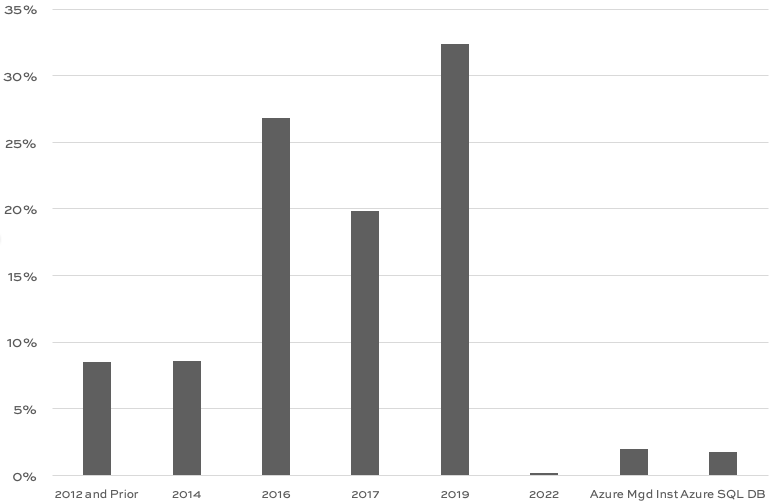
The big ones:
- SQL Server 2019: 32% – taking the lead from SQL Server 2016 for the first time!
- SQL Server 2017: 20%
- SQL Server 2016: 27%
- That combo is 79% of the population right there (83% with Azure), and it supports a ton of modern T-SQL, columnstore, etc features, so it’s a fun time to be building apps with T-SQL
Companies are leapfrogging right past SQL Server 2017. I’m going to hazard a guess that SQL Server 2017 came out too quickly after 2016, and didn’t offer enough features to justify upgrades from 2016.
Does that offer us any lessons for SQL Server 2022? Is 2022 going to be a 2017-style release that people just leapfrog over? Well, as I write this, it’s late December 2022, and I’m not seeing the widespread early adoption that I saw for 2019 where people had it in development environments ahead of the release, learning how to use it.
Me personally, one of the most awesome features of 2022 is the ability to fail back and forth between SQL Server and Azure SQL DB Managed Instances. However, that feature is still in limited public preview that requires a signup. Combine that with the fact that both 2022 and Managed Instances have really low adoption rates, and … I just don’t think this feature is going to catch on quickly. (As a blogger/speaker/trainer, that’s useful information, too – I only have so many hours in the day, and I gotta write material for things I think people are actually going to adopt.)
Okay, next up – adoption trends over time. You’re going to be tempted to read something into this chart, but I need to explain something first: we saw a huge drop in Azure SQL DB users for SQL ConstantCare. In the past survey, we had exactly 500 Azure SQL DBs being monitored – and this round, it dropped to just 64. I talked briefly with a couple of the SaaS customers who stopped monitoring their databases, and they both said the same thing: “We’re not going to change the app’s code or indexes based on what you found, so we’re not going to monitor it further.” That’s fair – throwing cloud at it is a perfectly legit strategy. So now, having said that, let’s see the trends:

This quarter’s numbers are a little misleading because it looks like SQL Server 2019 stole Azure’s market share – but now you know why. If I look at pure installation numbers (not as a percentage):
- We finally have a customer using SQL Server on Linux in production! It’s only one, but … still, I’m excited about that because I can dig into their diagnostic data and figure out which recommendations aren’t relevant for them.
- Azure SQL DB Managed Instances stayed steady (but it’s still a tiny number relative to the overall population)
- SQL Server 2019 definitely grew, and every other version went down
- There are only 6 instances of SQL Server 2022 (and several of those are Development Edition)
The low early adoption rate of 2022 is more interesting to me when I combine it with another number: Availability Groups adoption is 26%, kinda. Of the production SQL Servers that can (2012 & newer, non-Azure, etc), 26% have turned on the Always On Availability Groups feature. Note that I didn’t say 26% of databases are protected, nor 26% of data volume – just 26% of the servers have the feature turned on, period, and that says something because the feature isn’t on by default, and requires a service restart to take effect. Actual databases protected is way, way less.
One of SQL Server 2022’s flagship features is Managed Instance link, the ability to fail over databases back & forth between your SQL Server 2022 instances and Azure SQL DB Managed Instance. In theory, that’s awesome. In practice, I’ve never seen a concise live demo setting it up, failing it over, and failing it back. The setup part 1 and part 2 doesn’t look terrible, and the failover looks fairly straightforward, but … there are no docs on troubleshooting it. Between the low adoption rates, the complexity of existing AGs, the complexity of cloud networking, and this brand new feature, I’m … not ready to dig into Managed Instance link anytime soon.
I totally appreciate those of y’all who have the guts to try it, though, especially in production. I think that kind of thing is the future of hybrid databases. Looking at the current population numbers, though, it’s a pretty far-off future.





 Is your company hiring for a database position as of December 2022? Do you wanna work with the kinds of people who read this blog? Let’s set up some rapid networking here. If your company is hiring, leave a comment.
 Update 2025/11/18: SQL Server 2025 came out today, and Tim Elley nailed it! He correctly guessed 2025/11/18 way back on November 23, 2022.




 Right now, as you read this, a bunch of us are wearing #TeamHugo shirts in Seattle to raise awareness of Hugo’s fight. Here’s what you can do to help: