Blog

Want a better job?

17 Comments

About two years ago, I made the leap from working as a production DBA to working as a SQL Server expert for Quest Software.  When I tell someone what I do for a living, they usually have the same reaction: “Wow, you’ve got a really cool job.”  It has its ups and downs, but it definitely beats being a production DBA, and I never would have thought I’d end up in a job like this.

Recently Tom LaRock (Blog@SQLRockstar) made the same jump.  He left a database management position and went to work for Confio.  I’m proud of Tom because ever since I’ve known him, I’ve told him that he’d be great for a job like mine.  He liked doing presentations, blog posts, and helping the community – so why not work towards getting a full time job doing that stuff?  He set goals for himself, worked hard at building the right relationships, and next thing you know, he’s livin’ the dream too.

But I know what you’re thinking – jobs like this happen to other people.  They happen to people with deep industry connections, people who get elected to the PASS Board, people who know the secret handshake.  Companies don’t just go out and post a job description that says something like:

Key responsibilities:
Engaging directly with technical professionals from Microsoft’s top 50 Global ISV partners. Travel is required.
Mentoring and training ISV Performance Engineering and Development staff to ensure quality technical adoption of SQL Server technologies
Developing training content for ISV partner Sales professionals.
Community championship – driving best practices through blogs, discussion forums and key conferences.
Engaging directly with customers of our ISV partners. This includes using our MTC assets to prove SQL capabilities and direct on location customer QA and problem solving.
Training System Integrators, ISV Technical Staff and key implementers.
This position is ideally based in Redmond and requires some domestic and international travel.

Yes, that’s a real job description at Microsoft.

Dress Blog for the Job You Want

Career books remind us that we need to dress for the job we want.  If we aim to be CIOs, then we need to come to work wearing a suit so that the executives see us in the right light.  If we look like DBAs, then executives believe that’s our chosen route in life, and that’s the end of the line for us.

Today, there’s a new guideline: build the web presence for the job you want. The first impression is made long before you step foot in someone’s office.  People search the web for you to check out whether you’re qualified.  Ideally, they approach you for the job before you even know there’s a job available – both Tom and I got our positions by working directly with companies before they’d even posted a job, and I know other expert DBAs doing that same thing as we speak.

When you see a job posting like the Microsoft one, it’s too late to start building your brand online.  You need to start now to invest in your future career.  More and more companies are hiring for evangelist positions – not just big companies, but small ones too.  Two or three years from now, I can’t imagine an IT company of any sort (hardware, software, or services) competing without a credible community champion.  Lots of these positions will be open, and companies will fight over the (very) few visible people with strong online presences and a history of community involvement.

Start building your history today:

None of this is hard – it just takes free time – but trust me, it pays off.  You never know when a job like this will become available, and when it does, you want to be ready to click “Apply.”  It worked for me, it worked for Tom, and now it’s going to work for someone who reads that Microsoft job description.


Another Free Day-Long Training Event

6 Comments

Remember the last day-long virtual training event I did with Kevin Kline (Blog@KEKline)?  The one where I dressed up like Dr. Horrible and played doctor with your DMVs?

We’re doing another one!  This time it’s Wednesday, July 21st, and we’re adding another great presenter – Buck Woody (Blog@BuckWoody)!  He’s Microsoft’s real world DBA, and he has the awesome distinction of being voted 3 of the top 10 sessions at last year’s PASS Summit.  This promises to be a killer event.

Register for the free training today!


The Top 10 Developer Mistakes That Won’t Scale

SQL Server
29 Comments

Microsoft records TechEd sessions, and you can watch the recording of mine.  Here’s the abstract:

You’ve heard it before: “It worked fine on my machine, but the users say it’s too slow.” Don’t blame the developers: they’re using SQL Server features that look great on paper, but in reality, they won’t scale up to production loads. Learn to recognize these common mistakes before they go into production and be armed with alternatives.

Feedback From The Attendees

Here’s some of the comments I got from presenting it at TechEd:

“All developers should be forced to see this.”

“One of the interesting session attended. Quite humorous too. Well done.”

“Wonderful. Good info wrapped up into a nice package that was easy to understand.”

“The speaker made this one very enjoyable.”

So far so good – but then here’s a rough one:

“I would suggest that Brent not make blatant political references during his presentation. He compared the intellect of Albert Einstein to President George Bush. Also, other pictures included a person with clown makeup on holding a gun to his head. Maybe he thinks these are funny, but I really don’t… Inappropriate for a professional environment.”

Handling this kind of feedback is part of being a presenter.  It would be easy for me to call this person a stick in the mud and disregard their opinion, but that’s not the right thing to do here. I want to reach as many people as possible, teaching things while having fun.  My slides made this person so angry that they stewed in their chair throughout my session, then promptly went over to the feedback computers and banged out an eval.  I don’t care about the evaluation scores – but I do care about reaching more people.

Jar Jar at Work
Too Subtle?

To do the right thing, I have to stop and ask myself, “How did the audience react when I showed those slides?”  Nobody really reacted to the clown, so I need to pull that image out and swap it with something funnier or more appropriate.  No sense in aggravating audience members if I’m not gaining anything.  (I examine most of my photos that way – for example, the duct tape on the airplane window on the TempDB slide didn’t elicit so much as a chuckle, so that one comes out and either gets replaced with another photo or none at all.)

The Einstein vs Bush slides, on the other hand, made the audience erupt in raucous laughter.  Most of the audience doesn’t know that I’m a Republican, so I could ease the pain for the hard-core guys by saying something like, “I’m allowed to make fun of Dubya because I’m a Republican myself.”  That statement would generate negative comments for another reason, so that doesn’t work either.  I need to find someone that is universally recognized as less-than-brilliant – preferably someone who isn’t well-loved, so that when I show their picture, nobody gets pissed off.

  • Paris Hilton – might get interpreted as sexist, so no go.
  • Me – pictured doing something really stupid.  Usually I’m quick to jump in as a self-deprecating punch line, but because this is so early in the slide deck and I just got done touting my credentials, I don’t think it’d flow very well.
  • Fictional character – ahh, now, here we go.  I thought about the Three Stooges, but that might not play everywhere.  Maybe Vanilla Ice.  The only tough part about using fictional characters is that it’s sometimes harder to find Creative Commons-licensed pictures to use, but I’ll figure this out.

Feedback From Other Presenters

I was lucky enough to have a few other presenters in the audience, and I asked for their feedback individually.  They gave me feedback on how to craft my message better and how to interact more smoothly with the audience.

I still have to work on repeating questions from the audience, and I need to avoid belittling someone with a controversial opinion.  I cringe when I listen to the way I handled the Heap Heckler at about 50 minutes in:

  • HH: “I get great performance from heaps, and *I* speak from experience.”
  • BGO: “You’re experienced and I’m not?  What?  Call me when you’re up here.” (referring to him being in the audience and me being on the podium)

Ouch.  Not good enough.  It felt good at the time to zing somebody, but that’s not how I want to treat audience members.  Thankfully he came up to me after the presentation and we hugged it out.  He admitted he only used it for staging tables (which makes perfect sense) and I paid him off with Starbucks gift cards.

A presenter’s work is never done.  This is why it’s so important to do your presentations at progressively larger sessions – I’d done this particular presentation at local user groups, the SSWUG Virtual Conference, and finally in front of 204 live meatbags at TechEd.  Even now, I’m still honing this presentation and working on my delivery.


How I Travel

14 Comments

Buck Woody (Blog@BuckWoody) tagged me in a blog post called How I Travel where he talks about how he packs, how he works on the road, and his journey logistics.  Paul Randal responded with the Paul and Kimberly Travel Guide, and those two are definitely hard-core travelers.  I think I’m probably the most amateur of that group.  I’ve blogged my Travel Tips for Non-Frequent Fliers, but here’s a few more thoughts.

My Travel History

I got started working in the hospitality business – hotels & restaurants – and worked my way up to hotel general manager, then to a hotel management company’s corporate office.  I traveled full time for a couple of years, and I do mean full time: I didn’t even have an apartment.

After I switched my career into IT, I met up with the love of my life, Erika.  She went to work for an airline, and airline jobs come with unbelievable travel benefits.  We flew all over the world for $10-$20 per flight, often first class.

These days, I prefer not to travel more than a week per month because Erika’s waiting back home for me here in Chicago.  Therefore, my travel routines look a little more rushed – take my Germany trip next week, all times local:

  • Saturday 6PM – leave Chicago on a flight
  • Sunday 10AM – arrive in Munich, try to get acclimated to time zone changes
  • Monday – present in Munich during the day, then grab dinner and catch a flight to Cologne.  Get to hotel at 9pm.
  • Tuesday – present in Cologne, then grab dinner and catch a flight to Berlin.  Get to hotel at 9pm.
  • Wednesday – present in Berlin, then grab dinner and catch a flight to Vienna.  Get to hotel at 9pm.
  • Thursday – present in Vienna, thankfully get one night without travel.
  • Friday 9AM – leave Vienna, stop in Dusseldorf
  • Friday 11AM – thanks to the magic of jumping time zones, arrive back home in Chicago completely exhausted
Me in San Francisco
Me in San Francisco

This kind of travel isn’t fun at all – it’s tiring even when everything goes flawlessly.  Unfortunately, it never goes flawlessly, and some of my travel highlights include losing my ATM card in Mexico, getting food poisoning in Paris, crashing a laptop in Sweden, getting all my clothes soaking wet in London, and on and on.  I try to prepare as much as I can to lessen the pain.

How I Plan My Trips

I try to avoid layovers when I’m planning my flights.  Every time you change planes, you increase the chances that bad things will happen; your bags might not make the switch, weather might pop up in that middle airport, or delays might cause you to miss your connection.  Employers these days have policies about taking the cheapest flight no matter what, without regard to flight cost, but I can usually work around that.  I write something like, “The nonstop flight is $150 more than the cheapest one with a layover, but it’s worth the gamble here because I’ve got an event to attend first thing in the morning.  I can’t afford to get delayed by a missed connection – we’ll miss the entire event.”

I stick with my main airline or its partners as often as possible because airlines treat frequent fliers better.  When you’re elite, your bag is among the first ones off the plane, you get preferential treatment during boarding, and you can get bumped up a class if there’s space available.  To learn more about how the reward game works, check out FlyerTalk, a forum site loaded with tips on how to get to elite levels fast.  If you’re on the cusp of hitting elite, but you won’t make it before the year ends, read their mileage run forum.  Readers post cheap, long flights that rack up lots of miles for very little cost, thereby ensuring you make elite.

My favorite airline isn’t always the one with the cheapest rate, so I’ve been known to tweak my arrival/departure dates & times in order to make my airline the cheapest choice.  If I’m doing a conference from Tuesday to Friday, and my airline isn’t the cheapest choice for a Monday night and Friday night flight, I’ll switch to Monday morning or Saturday morning flights to see if that makes a difference.  I prefer early morning departures because weather hasn’t mucked up the day’s flight schedule yet.

I don’t usually have much of a choice when it comes to my hotels or car rentals – that’s dictated by my employer – but sign up for the frequent flier rewards on those no matter what.  They rack up much faster than you’d expect.

How I Pack

I look at my itinerary and try to narrow down my schedule to one pair of shoes.  If I have to wear a blue Quest shirt for a particular event, I’ll try to coordinate the rest of my outfits on that trip to match, thereby letting me survive with just brown shoes.  If I have to wear a black PASS shirt, same idea – set up all my clothes so I can just wear black shoes.  This one decision determines whether I can do the trip with a carryon bag or if I have to check my luggage.  If my flights involve a layover and I have to check my bags, then I’ll bring a carryon too, because I don’t want to worry about arriving without my bags.

Buy good luggage – not expensive luggage, just good luggage.  The stuff you find at big-box discount stores isn’t made well and falls apart after a few trips.  Check out FlyerTalk’s travel products forum for mind-boggling discussions of the lightest bags and how to pack them.  For example, here’s how to pack a suit jacket into a carryon without wrinkling it too badly – a trick I’ve used on transatlantic flights:

Inside my checked bag, I put instructions in big print on where to send the bag if it gets lost.  I print them out on an 8×11 sheet of paper and set them on top of all the clothes, saying, “IF THIS LUGGAGE IS FOUND, PLEASE SEND TO…” and list my home address.  I don’t bother with my trip itinerary – I don’t have good luck with luggage catching up to me on a multi-city trip.

How I Work on the Road

I tried carrying just my iPad to TechEd this year, and that was a failure. Almost as soon as I got into the airport, I got a T-SQL question from the guys at StackOverflow, and I would have been able to solve it immediately if I’d had SQL Server with me. Several times during the week, I said to myself, “Dammit, this would be so much easier if I had this one file.” There’s solutions to put all your files in the cloud, but TechEd attendees will recall that the cloud failed us more than a few times during the week too.

SQL Server Cooks in Germany

There’s a few iPhone and iPad apps that make travel a lot easier:

  • 1Password – syncs with the Mac 1Password app, so I’ve always got my passwords on the go. Great for security – generates extremely strong passwords for each web site. Not cheap, but makes security really easy.
  • GoodReader – excellent document viewer with built-in library. I put my PDF ebooks in here for reference, but I don’t usually read from this when I’m on the road. I prefer reading magazines until the plane hits 10,000 feet, at which point I switch to working or playing games.
  • RememberTheMilk (free) – companion to RememberTheMilk.com, which stores all my tasks in one place.
  • Shanghai Mahjong ($.99) – iPad/iPhone game. I seem to have a new favorite game every few months.
  • TripIt (free) – companion to TripIt.com, which stores all my travel plans in one place. Just forward your confirmation emails to them, and they parse out all of the details.
  • Yelp (free) – business directory with reviews. Restaurants conveniently located near tourists are almost always horrendous. They don’t have to be good, because they don’t have to win your business twice. They just have to get you in the door once, and then repeat that over and over with thousands of tourists. Avoid ’em with Yelp.

How I Travel

Once I hit the road, I’ve got a binary philosophy; either things matter, or they don’t.

Sounds stupid, right?  Bear with me.

When I’m hungry, I either want to just eat, or I want to have an experience.  There’s nothing in between.  If I’m in a hotel on the road, getting ready to do a day-long seminar, I’ll eat breakfast at the most convenient location.  I don’t care what’s on the menu, I don’t care how bad the service is, and I’m not concerned with the ambiance.  My goal is to get fed, and to be the most pleasant human being possible during that transaction.  Someone else is taking care of me, and I want to show my appreciation for them making my life easier.  They didn’t aspire to work in the food service industry at an airport hotel, and a few moments of kindness will make their lives better.

When I’ve got the time and I want an experience, then I put effort into planning things out.  I open up the Yelp app on my iPhone, check reviews for local (not chain) restaurants, and do some comparison shopping.  I learn what the restaurant specializes in before I arrive, and I know what menu items to avoid.  I go in with wide eyes, take my time, and savor what I’m experiencing.

I approach everything in travel with that same binary mentality.  Pick your battles – not every experience on the road can be eating at WD-50 or taking pictures of the Eiffel Tower.

The most important thing, though, is to take care of yourself.  When you’re traveling for fun, sure, you can abuse yourself by staying out late every night, drinking the bar out of Jägermeister, and walking around mumbling during conference sessions.  When you’re doing this for a living and you have to present yourself in front of customers, then you have to get enough water, sleep, and downtime to project a good image.  It’s tempting to stay out with the gang and go crazy, and I’ll let myself have one night like that at the very end of a long trip, but do that every night, and you won’t get paid to travel for too long.


Sargability: Why %string% Is Slow

T-SQL
46 Comments

People love to search.

Google has us addicted to fast, easy search functions.  Users expect every application to have a built-in blazing-fast search functionality.  To pull that off, developers build search queries that let users enter a string, and we ask SQL Server to find matches.  For example, say our users need to find some nuts.  We take their string, put percent signs on either side, and then search for that field in the product names:

This works great on our machine – but when we scale it up to hundreds or thousands of simultaneous users, or if we ramp up the number of products, our response time sucks.  Let’s find out why by checking the execution plan.  In SQL Server Management Studio, click Query, Display Estimated Execution Plan, and we get:

Query Execution Plan

There’s only one operation, which would sound like a good thing, but that one operation is a clustered index scan.  That means SQL Server has to read every row out of the Product table, check to see whether it’s got “nut” anywhere in the name, and then return our results.

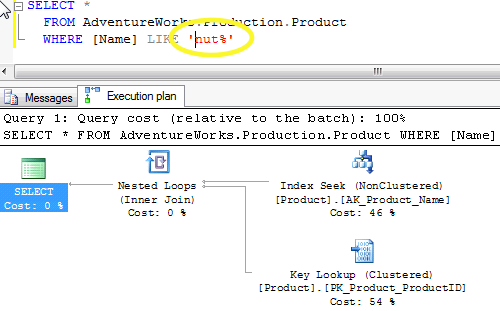
But wait – there’s an index on Production.Product for the Name field, and SQL Server will use that index if we have a slightly different query:

Less Wildcards, Same Nuts

If we take the leading % wildcard out, notice that this time it does two operations.  First, it does an index seek against our Name index, then it looks up the corresponding rows in the base table (Product).  Two operations might sound more expensive, but if we looked at the total cost for each query, the second one would be faster in situations where we’re only pulling a small number of search results back.  If this table was for a company called Nothin’ But Nuts, on the other hand, we would probably still need to scan the entire table, but that’s a discussion for another day.

So why doesn’t SQL Server use the index for the %nut% query?  Pretend for a moment that you held a phone book in your hand, and I asked you to find everyone whose last name contains the letters HAM.  You would have to scan every single page in the phone book, because the results would include things like:

  • Beckham
  • Chambers
  • Hamilton
  • Thames

If, on the other hand, I asked you to find everyone whose last name began with the letters HAM, you could turn straight to the H page in the phone book, scan through a few lines, and quickly get the information you need.

When I asked you for everyone beginning with the letters HAM, my query was sargable.  When I asked you for all last names containing HAM anywhere in the name, my query was not sargable – meaning, you couldn’t leverage the indexes to do an index seek.  (Yes, sargable is sort of a real word – it stems from the phrase Search Arguments.)

Since we can’t talk users out of using search queries, and since non-sargable queries don’t scale, we need to find a better way to search for text.  That’s where SQL Server’s Full Text Search comes in.  Unfortunately, your queries must change – normally when you add an index, your queries just magically become faster.  Full text indexes don’t work that way.  You have to tweak your queries to use operators like CONTAINS instead of LIKE.  If you’re dealing with an old boat anchor of a database and the developers are long gone, you might be out of luck.

%String% is just one thing that will cause SQL Server to do slower scans instead of high-performing index seeks.  To learn more about sargability, check out:


SQL Server 2008 R2 Standard Supports Less Memory

Licensing
51 Comments

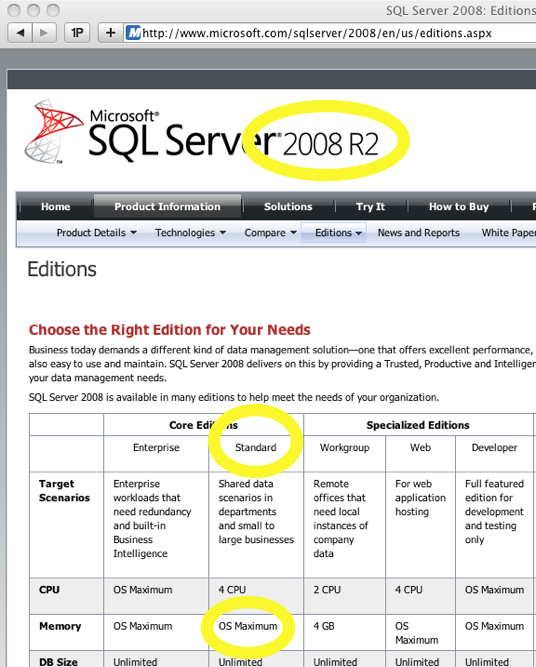
Pop quiz: how much memory does SQL Server 2008 R2 Standard Edition support?

If you’re like me, you’d head to Microsoft’s site and check the SQL Server edition comparison:

SQL Server Edition Comparison

Looks pretty straightforward, right?

Wrong.  As it turns out, the marketing material is incorrect – both Books Online and TechNet show that starting with SQL Server 2008 R2, Standard Edition maxes out at 64GB of memory.

If you bought any licenses of SQL Server 2008 R2 Standard Edition, now would be a good time to call your Microsoft contacts and start asking what’s going to happen when you add memory to your servers over time.  I doubt anyone will get free upgrades to Enterprise Edition, but this is definitely something I’d raise if I was negotiating a company-wide licensing agreement.  If the marketing materials say “OS Maximum” and the software you sold me doesn’t support that, then give me something that will.

Note – this doesn’t mean you should only use 64GB of RAM in the server.  SQL Server will only use 64GB – but you should still leave some for the operating system, file copies, backup agents, etc.  I tend to use 96GB of memory (just because it’s a roundish number).


Get SQL Server and Oracle Help on Twitter

Oracle
3 Comments

When you’ve got database questions, you can get fast, free, friendly help.  Here’s how to do it:

  1. Join Twitter. It’s completely free, and you don’t have to post boring stuff.  Just use it for questions.
  2. Post your question in a tweet with the word #SQLHelp or #OracleHelp.  People in the community have searches set up for these phrases, and they’ll respond.
  3. Watch for responses. On the right side of your http://Twitter.com page, you’ll see an @Username link.  My username is @BrentO, so on the right side mine says @BrentO.  Click on that link, and you’ll see the tweets sent to you.
  4. Respond back to them. Click on the Reply link under each tweet, and in your reply, include the #SQLhelp or #OracleHelp tag.  That way everyone else will see your responses, which is helpful when you’re doing a lot of back-and-forth conversations to troubleshoot something.
  5. Close Twitter when you’re done. Don’t feel obligated to hang out in the community if it’s not your thing.  Some folks just pop in to ask questions – and that’s completely okay.

Coming to Germany & Austria in June

8 Comments

I’m returning to the land of great cars, superb beer, and friendly database administrators.  In June, I’m visiting four cities in four days to do eight presentations.  Ready, set, go!

Monday 21.6 – Munich, Germany
Expert Campus on SQL Server

I’m presenting, “SQL Server Storage: Files, Filegroups, Partitioning, & More.”

It’s hard to find good information about SQL Server storage.  Should you put data and log files on different drives when they’re on a SAN?  How do you know when to add more data files?  Is there an advantage to using multiple filegroups?  Brent’s a former SAN administrator and wrote the storage chapter of Professional SQL Server 2008 Internals and Troubleshooting.  He’s got the answers you’re looking for, and he’ll help demystify what SQL Server’s doing inside the black box.

Attendees will learn:

  • Why you shouldn’t add files to an existing filegroup
  • How to get faster performance from TempDB
  • How to check your file performance using DMVs

Other speakers at the event include George Urban and Michael Sass.  You can register for the Munich event here.

Tuesday 22.6 – Cologne, Germany
Wednesday 23.6 – Berlin, Germany
Meet the Experts with Brent Ozar

Beautiful German
Gorgeous German

I’m presenting a few sessions at these:

Performance Tuning for Race Car Drivers

Times are tough even for the best drivers: Helio Castroneves is dancing for money and Danica Patrick is doing ads for what appears to be an adult services company.  Maybe it’s time to switch careers, and Brent has just the thing.  Use your hard-earned knowledge of high speeds, million-dollar hardware and surviving disastrous crashes to become a SQL Server performance tuner!

In this session, Brent will show you:

  • Why Colin Chapman would check for indexes before adding new ones
  • The importance of well-tested safety gear to performance tuning
  • Why not monitoring your servers is like overdriving your headlights
  • Just like races are lost in the pits, uptime records are lost during maintenance windows

The Top 10 Developer Mistakes That Won’t Scale

You’ve heard it before: “It worked fine on my machine, but the users say it’s too slow.” Don’t blame the developers: they’re using SQL Server features that look great on paper, but in reality, they won’t scale up to production loads. Learn to recognize these common mistakes before they go into production, and be armed with easy fixes for:

  • User-defined functions that go through too much data
  • Triggers that perform business logic
  • Cursors that process data row by row

Virtualization and SAN Basics for DBAs

Brilliant Bavarian
Brilliant Bavarian

These two technologies can make a very big – and very bad – difference in how your SQL Server performs. Wouldn’t it be great if you could get the real, honest lowdown from a virtualization administrator, a SAN administrator, and a DBA? Wouldn’t it be even better if one person had done all three, and could give you the pros and cons of each point of view? That person is Brent Ozar, a Microsoft Certified Master who’s been there and done that.

  • Three things you should NEVER do when virtualizing SQL Server
  • Three things you should ALWAYS do when using SQL on a SAN
  • Three metrics you should always capture on virtual & SAN-connected SQL Servers

You can register for the free Cologne and Berlin events here.

Thursday 24.6 – Vienna, Austria
Solid Quality Summit

Adorable Austrian
Adorable Austrian

I’m heading to the home of PEZ to present “Virtualization and SAN Basics for DBAs.”

These two technologies can make a very big – and very bad – difference in how your SQL Server performs. Wouldn’t it be great if you could get the real, honest lowdown from a virtualization administrator, a SAN administrator, and a DBA? Wouldn’t it be even better if one person had done all three, and could give you the pros and cons of each point of view? That person is Brent Ozar, a Microsoft Certified Master who’s been there and done that.

  • Three things you should NEVER do when virtualizing SQL Server
  • Three things you should ALWAYS do when using SQL on a SAN
  • Three metrics you should always capture on virtual & SAN-connected SQL Servers

You can register for the Solid Quality Summit Vienna here and hear sessions by Itzik Ben-Gan, Rushabh Mehta, Thomas Grohser, and more.

My fingers are crossed that this will be my first good European trip for Quest.  I’m batting 0 for 3 so far – my 2008 trip was rough, my 2009 trip was a mess, and my spring 2010 trip got canceled when the volcano erupted.  My personal vacations to Europe are always great, but my work trips, not so much.  Wish me luck!


Quest #QTweetup at TechEd – SOLD OUT!

SQL Server
1 Comment

Think fast!  The first 75 people who sign up at http://QuestTweetup.eventbrite.com can join me, Kevin Kline, Joel Oleson, and the rest of the Quest experts for an evening of fun on Bourbon Street.

Bourbon Street Blues Company

We’re getting together on Wednesday night at 9pm at the Bourbon Street Blues Company smack in the middle of the action.  (If you can call a gathering of thousands of geeks “action.”)

Register for the #QTweetup quick, because I’m sure this will fill up due to the limited space.  You can also check out my TechEd schedule.

See you in New Orleans!

Update – Sold Out! Well, that was quick.  It sold out!  See you there.


How to Solve the Environmental Crisis

8 Comments

I don’t usually get involved with issues like this, but I think it’s time I step in to help.

SQL injection caught on film

Your SQL Server environment is a disaster.  There’s data spilling out all over the place.  Users are writing bad queries, developers are throwing triggers in all over the place, and your BI team is about to give every mid-level manager a PowerPivot spreadsheet with umpteen gazillion rows in it.

The KILL command in T-SQL just isn’t getting the job done, so I’m working with Microsoft to implement a new command: TOPKILL.

Q: What does it do? A: It puts a stop to runaway queries that are destroying your environment.

Q: How does it work? A: By using dirty reads.

Q: Why doesn’t anything change when I run it? A: You have to wait two days to see results.

Q: Aren’t you the guy who wrote the JUNKSHOT command? A: This one will be better.  Promise.


NoSQL Basics for Database Administrators

Architecture
37 Comments

Most SQL Server DBAs don’t even like MySQL, let alone NoSQL.  They cringe when they hear people say things like, “I don’t need transactions” or “The data will eventually be consistent” or “Indexes will be supported in the next version.” SQL Server and Oracle people are constantly trying to out-feature each other, and the abject lack of features in the NoSQL world comes as a complete shock to both parties.

Thing is, NoSQL and cloud databases do fill some very real business needs.  Today, I’m going to give you a peek into the NoSQL/cloud-database world. You can be a better database professional if you understand what these tools are trying to achieve, who wants to use them, and how your database compares with theirs.

Let’s start at the beginning: who needs this stuff? To answer the question, let’s look at a few common projects that are probably happening right now in your company with conventional databases.

Use Case #1: Logging High-Volume, Low-Value Data

Most companies have a web filtering system that makes sure employees aren’t surfing dangerous sites during business hours. They want to reduce their Internet connection needs by eliminating streamed music or video, and they want to avoid sexual harassment lawsuits caused by employees surfing for porn at work. The filtering system maintains two databases: configuration data such as employees, departments, and not-allowed web sites, and monitoring data that covers who surfed for what, and when. The config data has to be perfect – we can’t have our configuration data disappearing, but that isn’t too big of a problem because it’s a fairly small amount of records.

I can tell when someone's been surfing dirty web sites.
I can always tell who surfs the dirty sites.

The monitoring data is important, but not all that important. We want to capture as much history as possible, and we’re going to be inserting data fast and furious, but it wouldn’t kill us if we missed a few rows. Odds are someone won’t surf for illicit material just once – they’ll do it repeatedly over time. We don’t make money on this data (although we could make an argument that it helps us avoid risk) so the CIO isn’t prepared to spend a fortune archiving Johnny’s Google searches. The only time we query this data is when HR wants to check Johnny’s web activity – we don’t need to run fancy reports to see the average web use by department.

This system could live without fancy transactional backups. We just need to do a full backup periodically – even once a week or per month would be fine if it saved us a lot of money. When it goes down, we don’t need to restore it quickly – or maybe not even at all, if HR doesn’t ask for a report. We just need to set up a new database to start taking inserts again.

What if we had a way to store multiple terabytes of this data on commodity hardware that would have a very low cost, pretty high availability, but might not give us very good reporting options or transactional consistency?

Use Case #2: One-Time, One-Way, Big-Load Analysis

When a company’s data gets large enough, they start asking questions about what the data might reveal. I’ve worked with PhD’s and analysts who say things like, “I need a copy of the data warehouse to solve a problem I’m working on. I’ve got a hunch about the numbers, and I’ll need to do a week or two of slicing and dicing to figure things out.” It’s just one or two rocket scientists working on the data for a relatively short amount of time.

They don’t want to synchronize the company’s incoming data with this research dataset, and they don’t need to back it up. They just want you to hand over the data, and then you won’t hear from them again. If it goes down, that’s okay – it doesn’t affect sales. Sometimes they use their own SQL Servers, sometimes analytic tools, sometimes its plain old Excel or Access. They won’t write production reports on this data – they’re just going to dive into specific queries and analytics, and then write PowerPoint decks or white papers on the results.

They might do similar projects like this over and over with different datasets from different areas in the company, but they use fresh sets of data every time. They could use a completely different toolset each time without training worries – these are rocket scientists, after all.

What if you could give them a tool that could handle rapid loads of completely different data each time, perform wild and crazy queries, but it might not use traditional query tools or database languages? These users aren’t proficient with SQL queries or RDBMS technologies anyway – they could use anything as long as it’s cheap and scales well.

Why Not Use SQL Server or Oracle?

Mozilla Labs Test Pilot Project

I bet you’ve run into projects just like these in your career, and until now, you’ve solved them with the only tool you really know well – relational databases like SQL Server.  SQL Server, when properly configured and managed, doesn’t blink at the requirements of most NoSQL projects.  Take the Mozilla Test Pilot experiment:

  • Expected amount of data stored per experiment: 1.2 TB
  • Expected peak traffic: approximately 75 GB per hour for two 8 hour periods following the conclusion of an experiment window.  This two day period will result in collection of approximately 90% of the total data.
  • Remain highly available under load
  • Provide necessary validation and security constraints to prevent bad data from polluting the experiment or damaging the application

Here’s my personal take on it – NoSQL doesn’t mean NoSQLServer, but rather NoMySQL.  MySQL doesn’t scale as easily to these levels, whereas it’s not much of an event anymore for a single-node SQL Server to scale to multiple terabytes.  I’ve worked with plenty of SQL Server data warehouse systems that have much larger volumes and loads of data than this.  In the last month, I’ve worked with two in particular that ran on less than $50k of commodity hardware.

It’s not that SQL Server or Oracle can’t scale to these levels.

It’s that NoSQL and cloud databases have a few crucial differences about how they scale.

NoSQL Has a Different Cost Model

If you’re doing multi-terabyte databases, you probably need SQL Server Enterprise Edition, which is licensed in one of two ways:

  • $27,495 per CPU socket for unlimited users, or
  • $8,592 per server plus $164 per user (unless the user already has a SQL CAL)

When you start a SQL Server project, you need to have an accurate CPU count and stick to it.  If you decide halfway into the project that you need a lot more power to get the job done, you have to buy more licenses.  These licenses stick around, and that long-term overhead becomes a business problem.  Businesses don’t like to see expensive software licenses not in use when a project isn’t doing number-crunching.

In addition, even just four sockets of Enterprise at $35-120k is a lot of money that could be spent on hardware – and therefore performance – instead.  Even if SQL Server was 50% faster than a competing solution, that advantage is negated when the user spends 50% more on hardware instead to get the same speed at a lower overall cost.  Tough sell.

The advantage of buying an industry standard database with a long history (whether it be DB2, Oracle, SQL Server, or Sybase) is that it’s relatively easy to find staff and software that interact with that database.  NoSQL and cloud databases, on the other hand, come with no up-front licensing – but because there’s no established industry standard, it’s very tough to find experienced staff off the street.

An early build of MulletDB

How do I hire experienced NoSQL-savvy-staff when the very NoSQL databases out there keep changing?  Here’s a sampling of announcements from one 24-hour period:

NoSQL solutions have different costs.  Immature platforms suffer from a lack of documentation, tooling, and commonly-needed features, thereby driving implementation costs up.

But is that really a problem?  There’s an abundance of documentation, tools, and features for Microsoft SQL Server, but I almost never see it implemented correctly. Just because there’s a manual doesn’t mean anybody’s going to read it or heed it, and just because there’s a tool doesn’t mean users will use it appropriately.  It’s easy for me to hire SQL Server people off the street, but that doesn’t mean that they’re good, either.

The best NoSQL solutions solve the human cost problem by building in the things you need in order to scale, store data, and consume data.  It’s not all that hard, either – the scenarios I described in the beginning of the post had one thing in common: a very limited number of features.  Some NoSQL and cloud database users need to insert a lot, and they need to run very specific queries, but that’s about it. This is where open source products can really shine – they need even less features than MySQL has.

NoSQL Makes Smart Compromises to Achieve Scale

Right from the start, cloud databases and NoSQL projects aimed to scale out. Whether you’re using pizza boxes or virtual servers in the cloud, you can get more capacity by throwing more of them into your resource pool and letting the platform spread the load around.  The Visual Guide to NoSQL Systems illustrates the compromises – between consistency, availability, and partition tolerance, you can pick any two. If every client needs to see an identical copy of the data, there’s an app for that. If you can tolerate different query results in exchange for higher availability, there’s plenty of choices for that too.

MongoDB’s feature set is a good example.  They tout:

  • Auto-Sharding – Scale horizontally without compromising functionality.
  • Replication & High Availability – Mirror across LANs and WANs for scale and peace of mind.
  • GridFS – Store files of any size without complicating your stack.

If I was a business manager, I’d take those bullet points straight to my database team and ask, “Can our database do this?  If not, why don’t we try MongoDB for our next project?”  If the use case matches one of the two I described earlier, it might be a better fit than SQL Server.

No, you can’t have your cake and eat it too, and NoSQL systems don’t support anything even remotely near SQL Server’s feature set.  Forget things like joins, stored procedures, triggers, spatial indexes, CLR in the database, foreign keys, and so on.  As a performance tuner, though, that list makes me grin – because for years, I’ve been telling programmers to keep their CPU-intensive work out of the database server if you want to scale.  The NoSQL camp understands the importance of that.  These systems are about storing data – period.

No Licensing Revenue Means No Buzzword Features

My poker face, let me show you it
From my SQL Server 2008 R2 review

In my SQL Server 2008 R2 review, I lamented that the last couple of versions of SQL Server have focused heavily on Business Intelligence because it’s a sexy buzz-phrase that sells licenses. I imagine Microsoft marketing thinks of customers as saying, “We’re a business and we need intelligence – get me some of that SQL Server!” Don’t get me wrong – I’m all for BI – but sometimes it feels like buzzwords get emphasized over basics, like working IntelliSense for all versions of SQL.

Since NoSQL tools are built by the users, they’re fat-free. If nobody needs it, it doesn’t get built. On the other hand, if one very determined person needs it badly, that person builds it or pays someone else to build it.

This leads to some interesting design decisions. Many of the NoSQL tools have abandoned any sense of schema – they want to store chunks of data, but that data layout can change at any time with no rhyme or reason. Take our web filtering example – if we design our application to suddenly start saving more information, like the browser agent or the remote site’s web server type, we can do that without a problem. When we pull the data back out, we need to handle whatever kind of data we find, but we’re not worried about joining this data to another table. It’s just flat web history data without relationships.

No Licensing Revenue Means Different Development Models

Five years ago, Microsoft wanted to conquer the VLDB market, so they poured money into making SQL Server scale better.  SQL Server 2005 took on the “SQL Server can’t scale” challenge and knocked it out of the park.  We got things like partitions for fast data loads, DMVs for easy management, and online piecemeal restore for quicker disaster recovery.  Microsoft’s business decision to go after large databases paid off for SQL Server DBAs everywhere because we could use our skills on progressively larger databases.

When you pick a NoSQL or cloud database provider, the first question to ask yourself is, “Who will be developing this thing next year?”  If the platform doesn’t have a really strong developer infrastructure, and your company runs into a data storage problem, the answer might be you.  I dunno about you, but I’m pretty good at administering databases – but absolutely useless at coding them.

That means long-term customers should either:

  • Choose a database with a commercial company supporting the development
  • Have coders on staff who start getting familiar with the project’s source code
  • Consider sponsoring development of the database.  Sponsored open source development is a foreign concept to most businesses, but I’ve seen it work well even in small dollar amounts.

On the other hand, short-term customers have a completely different decisionmaking process.  Consider the second use case I described – repeated one-time, one-way analysis projects.  In that case, who cares if the database platform is still being developed a year from now?  Your database team is probably already used to repeatedly learning new systems for data import/export, and they’re skilled at techniques, not just technologies.  They’ll be comfortable switching to another platform if development dies off or if another more attractive platform comes out.  So how do you pick the most attractive platform?

How I Would Choose a NoSQL or Cloud Database

Ignore throughput performance benchmarks. The market and the tools are changing way too fast.  By the time a well-written benchmark comes out, it’s outdated in this rapidly evolving environment.  Poorly-done benchmarks can come out much quicker – but they’re not good for making decisions.

Focus on developer performance. How fast can you get started deploying and storing data in it?  Shaving days off the development time will probably outweigh the computing gains, especially since you’re going to be throwing your most skilled people at these problems.

Ask the team who will do the work. If you’re a manager on the project rather than a hands-on coder, let the hands-on people decide.  If they have personal connections to someone else using a particular tool, they might be able to get faster answers or code help.

Prioritize difficult-to-code features that work right now. If you need your reporting team to be able to write SQL-style queries against the data, only pick platforms that offer that support today.  If transaction support is important to you, rule out any solutions without it.  Don’t gamble on these challenging features possibly coming out later, because it’s tough to adapt these into existing databases.

Prefer systems that tolerate a node failure. If the database is stored across a dozen cheap pizza box servers, one of the servers is going to go down.  Your data loads and queries should still run while you provision a new pizza box and add it to the system.  Ideally, you want this systems management function to be performed by your infrastructure team, not the database people.  The closer this system comes to being an invisible managed appliance, the lower it will keep your manpower costs.  This feature is extremely difficult to add to a database system – just ask Microsoft, who still haven’t done it yet for SQL Server, and believe me, we’ve all been asking.

I want to end this with a recommendation for a specific NoSQL or cloud database solution, but I can’t bring myself to do it.  After all, the market is still evolving so fast, and I just told you to ask your team who will do the work.  If you’re looking to play around with one, though, I’d recommend trying MongoDB.  It’s the closest to a conventional database while still meeting most of the criteria I’d want for a scaling solution, and there’s even an easy-to-play-with online tutorial so you don’t have to install anything.

But don’t do it from your work computer.

You don’t want SQL Server to know you were cheating on her.


The Beer Trials Review

18 Comments

In high school, my dad’s side of the family had a restaurant and bar in Whitehall, Michigan.  The Galleon was a high-end (well, for the local price range, anyway) seafood and steak restaurant on the shores of White Lake, and we catered to the tourists and well-off locals with a taste for the finer things.  Between the restaurant’s target market and my family’s penchant for alcohol, I just bypassed the whole beer thing and went straight for the hard stuff.

Ayinger Celebrator and The Beer Trials

I never tasted a beer until the ripe old age of eighteen; I went to the University of Houston and someone handed me a Shiner Bock.  I said to myself, “Hey, this beer thing isn’t bad at all!  I’ve been missing out.”

So I tried a few other beers, and … wow, was I disappointed.  In the early 90s, everybody in Houston drank Corona, and more often than not, that beer left a really bad taste in my mouth.  Literally.  I couldn’t understand why sometimes it was great, but most of the time it tasted skunky.  How could there really be so much variation in the same brand of beer?

For a decade, I stuck with Shiner Bock, venturing out only when a restaurant didn’t have it or when they offered a flight of beers.  I discovered a few other good beers in different styles, and I built up a little repertoire of favorites.  I enjoyed Dogfish Head 90 Minute IPA (thanks to Houston beer guru, IT guru, and all around nice guy Sean Stoner, aka @MaslowBeer), Guinness, a few hefeweizens, and preferred Kirin Ichiban with my sushi.

When Alexis Herschkowitsch, one of the authors of The Wine Trials (see my review), shipped me a review copy of their new book, I gotta confess that I wasn’t expecting much.  I figured they did a file-save-as, called it The Beer Trials, and had tried – and failed – to reproduce the awesome parts of The Wine Trials.  I was very, very, very pleasantly surprised to be wrong.

Thanks to page 52 of The Beer Trials, I now know why Corona is usually skunky. The clear glass lets in unfiltered light in a way that harms the beer.  If I want to find better Corona, it’s just a matter of finding places that know how to store beer properly.  Even better, I can simply glance at a beer bottle and rule it out because it’s got clear or green glass, thereby making it more likely to be skunky.  Presto – book price saved.

Thanks to the categories on page 59, I discovered that Ayinger Celebrator is even better than Dogfish Head 90 Minute IPA.  I’d been trying to figure out what kinds of beers were most like 90minIPA, and I hadn’t been very successful.  I never would have gambled on Ayinger because of its fancypants packaging – I mean, really, a plastic thingamabob hanging around the beer’s neck?  What kind of jerkface drinks something like that?  Well, now, I do, because it’s unbelievably smooth, very rich and complex, and it tastes like I’m drinking warm brown velvet.  That may not sound appetizing, I admit, but that’s why I write about databases instead of beer.

I tried several 9-rated beers out of the book before etching the pixels in stone for this review.  I wanted to know that the book was more reliable than a typical bartender.  I can report that I’m completely satisfied, and the only complaint I have is that the book doesn’t come with a companion iPhone app – at least, not yet.  In the meantime, I’ve typed the list of 9 and 8 rated beers into RememberTheMilk by category so I can access ’em from anywhere.

Authors Seamus Campbell and Robin Goldstein have pulled off a winner.  Thanks to them, I’ve found several new beers that have surprised me in a good way and made me interested in trying new beers again.  I would wholeheartedly recommend trying any beer rated highly in their trials, and because of that, the book is a downright steal at under $15.  The $15 you spend on this book will pay for itself in the first beer you try.

A few links:


Sessions I Submitted for the PASS Summit

#SQLPass
9 Comments

Every year, the Professional Association for SQL Server (PASS) holds an international Summit.  This year it’s Monday, November 8th through Thursday, November 11th in Seattle, Washington.

Anyone can submit sessions to present.  If your session is accepted, you get a free registration, saving you around $2,000.  Even if you’re not planning on going to the Summit, you should consider submitting a session if you’ve ever done presentations at the local level.  If your submissions are accepted, you get a free PASS (ha ha ho ho), and your employer is much more likely to send you to Seattle.  It’s cheaper for them, and there’s some prestige for them if their staff speak at national events.  You can submit your PASS Summit sessions here.

Hey Ma, Watch This!
Hey Ma, Watch This!

Here’s what I’ve submitted for this year:

Hey Ma, Watch This: Useless and Dangerous Stunts

If you want useful stuff, go to another session. If you’re looking for things to do on your production server, you’re in the wrong place. In this presentation, Brent will be running around with scissors, doing all kinds of oddball T-SQL stunts that have no business in the business world. If you’re the kind of person who loves using a number after the GO statement (like GO 10), then you’ll love this session.

(This is an all-new session that I’ve submitted to SQLSaturday South Florida and SQLSaturday Columbus OH.  I want to present it at smaller events before I try it at the Summit.)

You’re Not Attractive – But Your Presentations Can Be

Come hear Buck Woody (Microsoft’s Real World DBA) and Brent Ozar (SQL Server Certified Master) explain how they make high scores at presentations. It’s not luck, charm or (surprisingly) good looks – there are tips and tricks you can use to make your own presentations rock. With Buck and Brent in the same room it’s much like Forest’s Box of Chocolates, but you’re sure to learn more about presentation techniques that you can extract into your own style.

(If this one doesn’t get accepted, I’ll be seriously bummed. Buck and I have been swapping notes, laughing our rears off as we plan it out.)

Performance Tuning for Race Car Drivers

F1 - Old School
F1 - Old School

Times are tough even for the best drivers: Helio Castroneves is dancing for money and Danica Patrick is doing ads for what appears to be an adult services company. Maybe it’s time to switch careers, and Brent has just the thing. Use your hard-earned knowledge of high speeds, million-dollar hardware and surviving disastrous crashes to become a SQL Server performance tuner! In this session, Brent will show you why Colin Chapman and Enzo Ferrari would have used index tuning, database mirroring, and other tools that can give you an edge.

(This is one of my favorite presentations.  I originally gave it at SQLbits in the UK and I’ve given it at a couple of smaller online events, but never at a national event in the US.)

Virtualization and SAN Basics for DBAs

These two technologies can make a very big – and very bad – difference in how your SQL Server performs. Wouldn’t it be great if you could get the real, honest lowdown from a virtualization administrator, a SAN administrator, and a DBA? Wouldn’t it be even better if one person had done all three, and could give you the pros and cons of each point of view? That person is Brent Ozar, a Microsoft Certified Master who’s been there and done that.

(I’ve done a few virtualization and SAN presentations over the last couple of years, and I’m trying to distill them into a single “basics” presentation.  I did a webcast on this, and I got feedback that some of the topics were too advanced, so I’m still refining this one.  I’ll probably put an “advanced” one into my rotation for next year.)


Why I Pimp Our Book

33 Comments

My presentation style is really interactive.  I try to write my presentations so that I can go off on wild tangents when it’s a great question that pertains to the presentation.

It slaps! It chops!
It slaps! It chops!

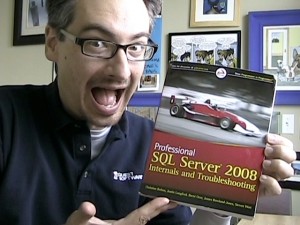
In every session, though, I get at least a couple of questions that are good, but don’t quite relate to the topic.  They’re just enough off-topic that it would take me more than 5 minutes to answer.  When that happens, I either point people to a webcast or a book.  Sometimes the book is Grant Fritchey’s excellent Query Performance Tuning Distilled, and sometimes – many times – it’s Professional SQL Server 2008 Internals and Troubleshooting, and my name’s on the cover of that one.

Inevitably somebody groans and says, “Here he goes promoting his book again.”  Wanna know why I do it?

Because nobody else will, and I think it’s worth the money.

When you write a book for a publisher, that publisher has a team of marketing people who want to help promote your work.  One of their tricks is to give free copies out to encourage bloggers to write reviews. They ask the authors who should get review copies of the book.  Rather than guess, I just tweeted, “Who wants a free copy of our book to review it on their blog?”  I got dozens of responses, so Wiley shipped them out back in January.

We got exactly one blog review.  Pinal Dave (Blog@PinalDave) wrote in his review:

“There is no doubt that this book is by far one of the best books available for anybody who is interested in SQL Server Internals and applying its knowledge to real world troubleshooting scenarios. I think this is one of the must-have books for understanding SQL Server, and believe me, you will find yourself flipping the pages of the book when you are facing a trouble with the SQL Server instead of using search engine!”

So at least it was a good review, so I wanna thank him for that.  We’ve also gotten 8 5-star reviews on the book’s Amazon page, all glowing.  (Granted, a couple of them are from my family, who share my wacko sense of humor.)  But that’s it on the blog front.  I’m not upset with the people who got free review copies and didn’t write reviews.  I know people are busy, and they’ve got real jobs, and it’s a massive book to try to digest.  This post isn’t about them.

This post is about what it takes to have a successful book go out the door.  You can’t bang away on a word processor for months, throw your baby out into the wild, and expect it to fend for itself.  You have to get in front of people and say, “The answer to your question is in here.  I know, because I either wrote it, or I read the work of my coauthors, and I give it My Seal of Approval.”  Chapter 6 on Locking & Latches alone by James Rowland-Jones is one of the best chapters I’ve ever read in a technical book.

I don’t make money off the book royalties.  To put things in perspective, I would have a bigger impact on my money if I changed my health plan from PPO to HMO.  I flack this book because it solves real problems, and I know because I hear the same questions over and over when I present.  How do I troubleshoot deadlocks?  Page 216.  How do AWE, PAE, and /3GB interact?  Page 36.  How should you configure MAXDOP?  Page 163.  How many TempDB data and log files should I have?  That’s page 300.  I could go on and on.

It’s a good book, and if you’re struggling with how SQL Server works, you should buy it.  If you buy it and read it, you should review it, whether you liked it or not, because there’s some really crappy books out there, and your fellow SQL Server professionals need your help to pick the right one.


Why Use Schemas?

Development
100 Comments

The ever-insightful Buck Woody (Blog@BuckWoody) wrote a post telling you to use database schemas.  He writes:

“But I still see a lot of applications, developed by shops I know as well as vendors, that don’t make use of a Schema. Everything is piled under dbo…. But if you’ll use them properly you can make your application more understandable and portable.”

I disagree – and Buck and I started a conversation on Twitter which quickly turned into a group discussion.  It merits more than 140-character comments, but since Buck’s blog temporarily has comments turned off, I wanted to give people a place to discuss.

My thoughts: schemas are naming conventions in lipstick.  When I look at somebody’s code, the last thing I ever think is, “Man, if these tables just had schemas, I could understand everything better.”  In fact, when I see objects broken up into different schemas, I usually end up asking questions like, “Why are we writing user reports against something in the ETL schema?”  The answer comes back, “Well, it used to be an ETL table, but then our needs changed, and we couldn’t rewrite all our code, so it just turned into a production table.”  Great.

If they’re used right, they let you segregate permissions by groups of objects.  But here’s the thing – almost nobody ever does that.  It’s more work than it’s worth except in the largest of databases.  When we’re talking about a vendor app that gets sold to third parties, you usually don’t want anybody jury rigging permissions together – just query through the app like you’re supposed to, and keep your filthy hands out of my database.

Thoughts?


Free Quest TechEd 2010 T-Shirts

8 Comments

Not going to TechEd, but you wish you could pick up some of those cool vendor freebies?  I got your hookup right here.

Register for a free Quest t-shirt and you’re also entered into a drawing for a $200 AmEx gift card.  Rules and restrictions apply.  Drawing not open to my family members, people who live in other countries, or people who dilly-dally – time limited….


TechEd 2010 Schedule and Info

6 Comments

Here’s the sessions I’m planning on attending at TechEd 2010 (my first TechEd!):

Sunday:

Monday:

  • 7:30AM – at Cafe Dumonde (800 Decatur St) with Buck Woody and anybody else who likes chicory coffee and addictive beignets.
  • 9:00AM – Keynote by Bob Muglia
  • 10:30-2:45PM – Quest booth #1800 in the expo hall
  • 2:30PM – Media briefing with Brendan Cournoyer (TechTarget)
  • 2:45PM – MGT203 System Center Roadmap by Garth Forth – auditorium B
  • 4:30PM – DAT307 SQL Server Private Clouds by Rob Reinauer – room 283
  • 5:45PM – Partner Expo – Quest Booth. Tell your friends, “I’m at the bar with Ozar.”

Tuesday:

  • 7:30AM – at Cafe Dumonde (800 Decatur St) with Buck Woody and anybody else who likes chicory coffee and addictive beignets.
  • Morning – Quest booth in the expo hall
  • 10:30AM-12:30PM – Microsoft SQL Server Mission Critical Booth
  • 1:30PM – VIR304 Hyper-V and Dynamic Memory by Benjamin Armstrong – room 295
  • 3:15PM – DAT313 Planning Large-Scale SharePoint/SQL Deployments by Joel Oleson – room 283
  • 4:30PM – Interview with Kevin Kline and Karen Forster (PlatformVision)
  • 5:00PM – DAT210 Database Design Methodologies by Buck Woody – room 293
  • 7:00PM – Microsoft Community Influencer Party (wasn’t sure if I was supposed to blog this, but it’s listed here)
  • 8:00PM – Double-Take Cluster Funk Party (I’ll be at the Influencer party, but I’m listing this one here in case you’re looking for something to do)

Wednesday:

  • 7:30AM – at Cafe Dumonde (800 Decatur St) with Buck Woody and anybody else who likes chicory coffee and addictive beignets.
  • 8:00AM – VIR315 Windows Hyper-V Performance Analysis by Clint Huffman and Kenon Owens – room 391
  • 9:45AM – OPS310 Fine Tuning Your SharePoint Environment by Mike Watson – room 388
  • 11:45AM – DAT316 – My session!  Top 10 Developer Mistakes That Won’t Scale – room 391
  • 1:30PM – BOF23-IT – Going To The Cloud: Are We Crazy? room 354
  • 2:30PM – Media briefing with Ian Murphy (Data Centre Times, ComputerWeekly.com)
  • 3:15PM – DAT317 -The OVER Clause: Your Key to No-Sweat Problem Solving by Adam Machanic – room 293
  • 4:30PM – Media briefing with Megan Keller and Sheila Molnar (SQL Server Magazine)
  • 5:00PM – WCL404 – Windows 7 & Server 2008 Kernel by Mark Russinovich – auditorium B
  • 7:00PM – Best of TechEd Awards Ceremony – Hard Rock Cafe
  • 9:00PM – Quest Tweetup at Bourbon Street Blues Company (RSVP only, sold out)

Thursday:

  • 7:30AM – at Cafe Dumonde (800 Decatur St) with Buck Woody and anybody else who likes chicory coffee and addictive beignets.
  • 8:00AM – SIA334 – Secrets of Effective Tech Talks by Mark Russinovich – auditorium C
  • 9:45AM – DAT405 – T-SQL Tips and Tricks by Itzik Ben-Gan and Tobias Ternstrom – room 272
  • 3:15PM – DEV301 – Oracle Development Using Visual Studio by Daniel Norwood – room 281
  • 5:00PM – DAT305 – Largest Mission Critical Deployment of SQL in the World by Kevin Cox – room 272
  • 6:30PM – TechEd Party

TechEd Twitter Accounts:

  • @TechEd_NA – the official feed.  Retweets planners and vendors, runs contests now and then.
  • @RobNic_TechEd – Twitter feed for a TechEd planner.  You can check his photos to see the swag like the water bottle and backpack.
  • @TheKrewe – hard-partying TechEd attendees with a private Facebook page that denied me entry.  See, you guys think I have all kinds of inside connections, and I can’t even get into a damn Facebook page.  Famous my rear.

Did I miss anything?  Is there anywhere I should be?  I might have missed some cool sessions – there’s just so many with conflicting times.  So many sessions, so little time…


I passed the MCM! iPads for everyone!

Quest: “Brent, here’s a top-of-the-line Apple iPad 3G, case, camera kit, dock, and all the trimmings.”

One for me, one for you.

Me: “What?  Why?”

Quest: “Before you went for the Microsoft Certified Master program, you kept telling us how hard it was and how high the failure rate was.  We wanted to thank you for putting in so much hard work.  We really appreciate it.”

Me: “Wow, that’s awesome!  What other tests can I take next?”

Quest: “Speaking of that, we need you to come up with ten questions about yourself.  We’re going to run a test of our own, asking people questions about you.  Then we’ll take the entries, hold a drawing, and give one of them an iPad too.”

Me: “Are you kidding me?  All this because I passed the MCM?  What if I wouldn’t have passed?”

Quest: “Instead of a whole pad, you would have gotten just a slip.  A pink slip.”

Me: “Right.”

Wanna win an iPad? Go take the test! (Update: contest over.)


SQL Server 2008 R2 Review

27 Comments

In August 2008, Lady Gaga released her premier album The Fame. This 13-track work produced several hit singles including Just Dance, Poker Face, and Paparazzi – but it also produced plenty of controversy. Her exaggerated use of fashion, musical cliches, and sex gave her plenty of media attention – both good and bad. If you’ve never heard one of her songs or seen a video, the first 30 seconds of Poker Face will give you a pretty good idea of her style (musical and otherwise). Actually, you don’t even really have to hit play – the first frame showing her poolside between to two Great Danes probably gives you a pretty good idea where things will go next.

Anybody can get famous doing an Internet donkey Great Dane show. The big challenge for suddenly-famous artists isn’t the first release, though – it’s the sophomore release. The second album shows if the star has the potential to keep cranking out new material, or if they drop off the face of pop culture as a flash-in-the-pan.

A little over a year later, Gaga released a followup album called The Fame Monster, but there’s some debate over whether it should even be considered her sophomore work. Due to the short time between releases, its shorter length (only 8 tracks), and its sales method (often packaged with The Fame in a single box), it was seen as an extension of her debut album. This effort didn’t win over any new fans; if you didn’t like The Fame, then The Fame Monster wasn’t going to turn you into a Little Monster, as Gaga fans are known.

It’s a lot like SQL Server 2008 and 2008 R2.

Microsoft SQL Server 2008: The Fame

It’s impossible to review this month’s newest release from Microsoft, SQL Server 2008 R2, without reflecting back on the recent release of SQL Server 2008. R2 comes quickly on the heels of 2008 and tells more of the story that was first started in 2008.

SQL Server 2008’s hit singles for production DBAs included:

  • Backup compression – this instant-winner of a feature has been available in third party software like Quest LiteSpeed for years, and 2008 Enterprise Edition users got it built into the engine.
  • Transparent Data Encryption – if you need it, you desperately need it. TDE makes it ridiculously easy to protect your company’s data from headlines about stolen backup tapes.
  • IntelliSense – wildly popular at first, but quickly fell off the charts as users discovered it didn’t work with previous versions of SQL Server.

The less popular B-side songs were:

  • Data compression – like backup compression, this feature can give an instant performance benefit under certain circumstances. Even better, the data is only compressed once, and then all backups are smaller and faster without repeated CPU work. I think this is the most underrated song in the album, although filtered indexes & statistics are a close second.
  • Policy-Based Management – a cult favorite that hasn’t managed to crack the charts for widespread adoption. Everybody’s heard about this song, but nobody knows the words.
  • Resource Governor – originally touted as the ability to stop runaway queries or ease consolidation pains, this didn’t actually work as intended due to its inability to throttle IO. Storage is usually SQL Server’s biggest bottleneck.
  • Spatial data – programmers have worked around the challenges of storing latitude/longitude data in RDBMS’s for years. With support built into the engine, now developers could use spatial indexes to execute tough queries much faster.
  • Filestream storage – answering a question DBAs everywhere kept asking, “How can we make our databases larger and more difficult to back up?”

The release was chock full of upbeat songs, but the beats were just a little too tricky for mainstream dance clubs. SQL Server 2005 was good enough, and companies didn’t have the money to roll through quick upgrade projects, so I didn’t see a widespread adoption of 2008. In the recent PASS Summit poll, 52% of responders said less than half of their servers were SQL Server 2008. I haven’t heard anyone say they dislike SQL Server 2008 – they just didn’t care quite enough to deploy it to every server in the shop.

SQL Server 2008 R2: The Fame Monster

Real music critics seem to have a somewhat positive view of The Fame Monster, giving it 75 points out of 100 on Metacritic. Gaga clearly resonates with the purchasing public, having earned over 17 platinum records as of this writing. People between those two extremes have a much more negative reaction, however – my music-critic friends (people who think they know a lot about music, yet don’t have jobs in the business) uniformly hate her. They say she’s low-brow, populist, and oversexed.

SQL Server 2008 R2 will have a similar reputation in the database world. Analysts, the IT industry’s equivalent of music critics, love SQL Server. On the other extreme (paying customers), Microsoft sells the heck out of SQL Server, so it seems to be popular with the folks with money. People in the middle are more divided, though – I hear plenty of people on other platforms referring to SQL Server as not good enough for all kinds of reasons. It’s too expensive, it’s not full-featured enough, it’s too-full-featured (yes, that’s the NoSQL claim), it’s not open source, the list goes on and on.

People who liked SQL Server 2008 will like 2008 R2, but for different reasons. It brings some really new material to the party, albeit with exactly the same theme as 2008.

PowerPivot Caters to the Paparazzi

Lady Gaga Fan Art
She's no Donald Farmer, but she'll do

Microsoft used sex to sell SQL Server 2008 – and that sex was Business Intelligence. BI is by far the sexiest topic for businesses today. It’s in every magazine, every book, and companies are dying to figure out how to get more actionable information out of their raw data. SQL 2008’s material read like a pinup calendar – “We’ve got all your forms of data right here, big boy! C’mon over and analyze me.”

R2 takes the sex appeal even further – BI isn’t in the hands of pros anymore, but rather amateurs. Any sleazy middle manager with a fetish for data can whip out an Excel spreadsheet and get his PowerPivot on, doing multi-million-row analysis on his laptop.

This high-quantity, low-quality analysis comes with its own challenges. Who rates the data? Are you sure the numbers in that loose schema are right? Is that juicy profit figure really profit, or a big, fat, hairy loss masquerading as something else? Who let that underage data into the corporate report? And in the middle of a steamy analysis session, does anyone even care?

PowerPivot doesn’t appeal to buttoned-down database administrators accustomed to pure, cleansed data stored behind locked doors, but that’s not the point. It sells to managers and executives who want fast, easy access to decisionmaking numbers, and they’re going to love it – especially when combined with SharePoint.

StreamInsight: It’s Money Honey

Packaging StreamInsight in the SQL Server box will be controversial, but the feature is great for developers. StreamInsight helps developers analyze massive amounts of incoming data – think stock trades, Twitter, or clickstream data for web sites. Developers can then build rules (no, not with T-SQL) to handle and parse that data.

Notice how I said “developers” three times in three sentences?

StreamInsight doesn’t really have anything to do with SQL Server. The coding is done in Visual Studio and the data doesn’t go through the SQL Server engine. SQL Server just happens to be a really expensive box – especially the Datacenter Edition, where StreamInsight is best used – and Microsoft needs to monetize this product. Presto: StreamInsight becomes part of SQL Server.

Database administrators can safely ignore this feature because they won’t be deploying it, managing it, backing it up, etc. CIOs, however, need to pay close attention to what features are bundled into what editions, because buying SQL Server is getting a little more complicated.

CIOs are Seeing Microsoft’s Poker Face

My poker face, let me show you it

SQL Server 2008 R2 brings a new top-end SKU, Datacenter Edition. Microsoft breaks down features by edition, but here’s my simplified explanation:

Express Edition (Free) has:

  • Databases up to 10GB
  • Completely free

Standard Edition (roughly $6k/socket) adds:

  • No limits on database size
  • Backup compression

Enterprise Edition (roughly $30k/socket) adds:

  • Up to 8 CPU sockets
  • Management features for up to 25 instances
  • Virtualization rights for four guests – on a two-socket server, you can buy two sockets of SQL Server 2008 R2 Enterprise Edition, then run four virtual servers on there with SQL Server.
  • Data compression, online index rebuilds, and other engine features that help with databases over around 100GB

Datacenter Edition (roughly $60k/socket) adds:

  • Unlimited CPU sockets
  • Management features for over 25 instances
  • Unlimited virtualization rights – on a two-socket server, you can buy two sockets of SQL Server 2008 R2 Datacenter Edition, then run an unlimited number of virtual servers on there with SQL Server.

With R2, prices went up, and I’m totally okay with that. I’m not a Microsoft shill here – I think the market has changed, and Microsoft’s prices needed to reflect it. Virtualization is on fire. Microsoft has to price products not just for today, but for now through the next release. Intel’s packing more and more cores per chip, Cisco’s got blades that handle an insane amount of memory, and I routinely see virtualization hosts with more than 4 guests on them – usually several times that many. It’s not inconceivable that we’ll see hosts with more than 4 virtual SQL Servers on them soon as well, and Microsoft licensing revenues would plummet.

The price increase also sort of reflects the new tools like PowerPivot and StreamInsight – but only kinda. Some of the new features don’t have polish, and there’s a risk of them being one-and-done.

I Like It Rough: DAC Packs

Maybe not that rough.

The iTunes release of Fame Monster includes a bonus track, “I Like It Rough,” that depicts a relationship where both sides do a lot of giving and taking. It’s insanely catchy, but with the subject matter, I can see why it didn’t get widespread release.

DAC Packs are R2’s bonus track. I’ve written about DAC Packs before, and I believe they have an awesome long-term potential. The version shipped in R2 is very rough for all kinds of reasons – it does side-by-side deployments (copying your entire database just to change a single stored proc), it doesn’t support a lot of database features, there’s no tooling whatsoever for DBAs, and it does a worse job of just about everything than Data Dude did. (And nobody bought Data Dude, either.)

Microsoft says that DACs are a down payment on a bigger vision – and I do believe in that vision – but Microsoft has a pretty bad credit score. They make an awful lot of down payments, and then when the first monthly invoice comes in, they seem to have left their wallet in their other pants. Want to see a credit check?

  • SQL Server Notification Services
  • English Query
  • DTS (how do you like rewriting all those packages into SSIS? Good times, eh?)
  • HTTP SOAP access (I’d almost forgotten about that one, but it was even one of Microsoft’s Top 10 Features for DBAs in 2005. Quote: “…eliminating the need for a middle-tier listener, such as IIS, to access a Web services interface that is exposed by SQL Server 2005.”)
  • Vardecimal (yes, we actually had a one-and-done datatype)
  • Service Broker (yes, it still works great, but there haven’t been any investments here whatsoever)

Ouch. That’s a lot of things they bought on layaway, and then never paid for.

In my Top 10 Developer Mistakes That Won’t Scale presentation, my #1 thing to avoid is relying on v1.0 features. Sometimes Microsoft follows through and improves the feature over time, like SQL Server Integration Services. Sometimes, though, they forget their wallet and look the other way. When I’m making architectural decisions on where to invest programmer resources, I follow Microsoft’s own lead – if they didn’t care enough to invest the time it takes to do something right, then I won’t invest my own time in it either. Let’s see if they make the next payment first.

The old adage used to be, “I won’t deploy it until Service Pack 1, because there might be bugs.”

Now I tell my developers, “Don’t code against it until V2, because there might not be one.”

Like Fox Mulder, I want to believe, but Microsoft needs to pour a whole lot more work into DAC Packs – fast. Otherwise, server virtualization is going to bypass database virtualization as a better way to solve management problems.

SQL Server 2008 R2: Not a Bad Romance

If you’re into dance music, you couldn’t help but hear The Fame when it came out. If you liked it, you’re going to like The Fame Monster, but if you didn’t like it, The Fame Monster won’t change your mind about Lady Gaga. The Fame Monster is really just more of the same songs in the same style.

Most SQL Server professionals who liked SQL 2005 are going to pick up this latest release, throw it into their playlists, and keep right on working as if nothing changed – because for the most part, it hasn’t. SQL Server’s engine hasn’t really changed since 2005 came out. Unlike The Fame Monster, though, I think R2 has a chance of winning over people who weren’t fans of SQL Server before. Microsoft is extending its range with StreamInsight, PowerPivot, and Parallel Data Warehouse Edition, and these might bring in a new audience.


5 Things SQL Server Should Truncate

47 Comments

Paul Randal (Blog@PaulRandal) nailed a blog post to the church wall entitled, “What 5 things should SQL Server get rid of?” His choices included auto-shrink, putting databases in full recovery by default, GUIDs as clustered indexes, and more.  He tagged me, and I knew right away what I’d say.

5. IntelliSense restrictions on 2000/2005.

Look, the game is up.  We know it worked in the early betas of SQL Server 2008’s Management Studio, and you pulled it at the last minute.  We have a sneaking hunch you pulled it because you wanted to force users to upgrade their servers from 2000 and 2005 up to the new hotness, but that’s not how it works.

Sex Panther: 60% of the time, it works every time.

The execution of this feature managed to instill doubt in the quality of SQL Server.  Even when it works right, it only works on some of our servers (since they’re not all 2008), so we keep pausing when we expect IntelliSense to kick in.  Do I feel lucky?  Maybe I should wait another second?  Ah, screw it.  We end up asking ourselves, “Why isn’t IntelliSense working here?  Is it a bug, or is it – oh, wait, I’m just connected to a crippled server.”

And don’t give me the excuse that you didn’t have time to test it fully with the older versions, Microsoft, because it didn’t get any better in SQL 2008 R2.  You just gave up implementing and went on to the next shiny thing, which brings me to #4.

4. Any feature described using the phrase “down payment.”

Where I’m from, if you can’t pay for something, you don’t bring it to the cashier.  Layaway is for suckers, because the store makes money off the interest your money makes while they’re holding on to it for you.  Credit cards aren’t much better, but at least you can give it to the cashier and take the item home with you right there.

Microsoft has been putting a lot of features on layaway lately.  They make a down payment, and when the next payment comes due in vNext, gee golly, they left their wallet in their other pants.  I’ll talk about this in more detail in my SQL Server 2008 R2 review coming out this week.

Xzibit's really been phoning it in lately

Wanna make a down payment?  Go ahead – but don’t tell all your friends you just started paying for something on layaway.  Mum’s the word.  Nobody needs to know you’re living paycheck to paycheck and that you can’t afford those dub spinners just yet.  Make your payments, and when you’ve got all four, get ’em mounted and show ’em off.  Otherwise, you look like a moron saying, “My truck is gonna look *awesome* next year when I get that Resource Governor paid off – don’t look at it yet, though.”

3. Database Diagrams.

In SSMS, when you drill into a database, the very top thing is “Database Diagrams.”  You might think the list is in alphabetical order, but no – look closer.  Synonyms comes above Programmability.

Because, you know, THE ONE THING WITH ABSOLUTELY NO FUNCTIONALITY THAT’S NEVER INSTALLED ON ANY SERVER BY DEFAULT SHOULD BE THE VERY TOP OPTION.

Bonus points for putting it right next to Tables, thereby ensuring that I accidentally click on Database Diagrams at least once a week.  But those hard-working Microsofties just couldn’t stop there, no.  Clicking into Database Diagrams gives you a big, ugly error because nobody ever installs this craptastic feature.

This has annoyed the holy hell out of me for the last five years.  It’s not just a layaway feature problem – it’s a simple basic design error.  You don’t put rarely used optional stuff at the top of the list.  Period.  Design 101.  Which leads me to the next thing SQL Server should get rid of…

2. Every SSMS UI designer.  Send in Donald Trump.

The Cobra
You're Fired

Your server can have blocked transactions, huge rollbacks going on, databases with autoclose/autoshrink enabled, 99% fragmentation, and you’ll never know.  SSMS is the worst server administration tool I’ve ever seen when it comes to telling me if my servers are healthy.  I have to drill way, way, way down into submenus to discover – oh my goodness – I’ve had hundreds of database corruption errors in the last 24 hours.  That sounds awfully critical – SO WHY IS IT BURIED IN LOGS NOBODY EVER READS?

It’s not called SQL Server Development Studio.

It’s called MANAGEMENT Studio.

And everything about this design is wrong – even just start with the basics, the list of things you see when you connect to a server.  There’s Databases, Security, Server Objects, Replication, Management, and SQL Server Agent.

Pop quiz – is the Distributed Transaction Coordinator a Server Object or Management?  Nope, I never remember either.  How about Operators?  Those sound like they could be Security or Management – nope, SQL Server Agent.  Throw a stick of dynamite in there and start over – and by “there” I don’t mean the code, because it’s too late for that now.  Every DBA has been trained to this ridiculous system, but we need to make sure any future tools work better, so the dynamite goes into the cubicles.

1. The shrink option in maintenance plans.

I totally understand that sometimes you need to shrink stuff.  I get it.  I’ve been there.  But you shouldn’t ever automate this to happen every X days.  Ever.

After all that ranting, I’m spent.  I’m supposed to tag 5 more people, but I’m gonna do something different this time.  I’ve heard from bloggers (not just Kevin Kline, either) that they get frustrated when nobody tags ’em, so if this post resonates with you and you’ve got something to add, tag yourself below in the comments.

I need a cigarette.  And maybe some Sex Panther.

Update 5/12: David Ramel, a columnist at Redmond Developer News, says this post is full of “rambling, inchoate gripes.”  I found out not because I read his blog (I’d never heard of it) but because I’ve got Google Alerts set up.  Anytime anyone says the word “inchoate” I want to know about it right away.  I wasn’t quite sure how to react, though, because he said there was “bellicose bombast across the blogosphere,” and I wasn’t entirely sure what any of those words meant.  I tried asking him a question on his Twitter account, but it looks like he hasn’t been around since about a year ago when he was looking for some jobs training:

Crickets
Crickets

Hmmm.  I’d leave a comment on his blog, but it’s only had two comments since April, and he hasn’t responded to either of ’em.  Hey, maybe he’s taking tips from my blog!  Sounds like he’s reading this, so I’ll just leave him this note here.  😉

Just having a little rambling fun, sir…