Blog

Index Hints: Helpful or Harmful?

Indexing, SQL Server
25 Comments

Let me ask you a question: do you want to boss the SQL Server query optimizer around?
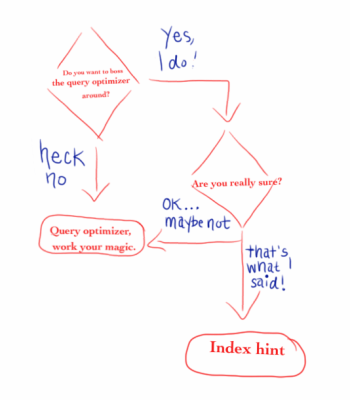
Query Optimizer flowchart

If you answered no: good. You’re willing to let the query optimizer do its job, which is to find the least expensive way to run a query, as quickly as possible.

If you answered yes: you’re a brave person.

Maybe you’ve hit upon the perfect index for a specific query, but for some reason the optimizer won’t use it. But you know it improves performance. How can you make the query optimizer listen to you?

Index hints are a powerful, yet potentially dangerous, feature of SQL Server.

Let’s look at an example. I’m working with AdventureWorks2012. The database has two related tables, HumanResources.Employee and Person.Person. They are related through the BusinessEntityID column. I want to retrieve information about the users and their logins.

Let’s look at the execution plan.

index hints 1

A nonclustered index seek is performed on Employee.AK_Employee_LoginID, a nonclustered index on the LoginID column. A clustered index seek is performed on Person. Note the cost is 0.217439.

I notice that the Employee table has another index, PK_Employee_BusinessEntityID, which is on the BusinessEntityID column. I want to force my query to use this index instead. I can do this by using the WITH (INDEX) hint.

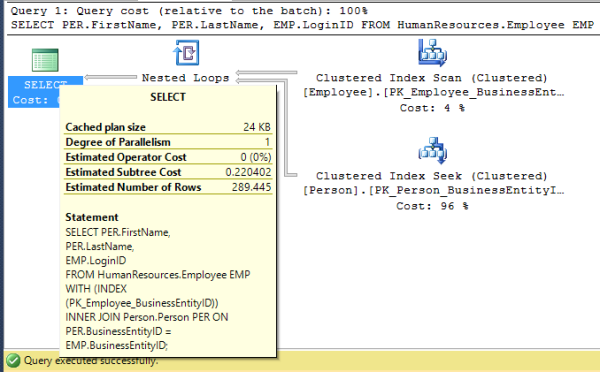
Let’s look at this execution plan.

index hints 2

Now, a clustered index scan is performed on Employee. Note, though, that the query cost has increased – to 0.220402.

In your case, the index you force the query to use might get the better cost – for now. But what happens when more data is added to the table, and statistics change? What happens if you update SQL Server, and the query optimizer changes?

Eventually, the index you’re using may not be the best one for the job – but SQL Server is going to continue to use it anyway. You’ve told it to do so, and it’s doing to keep doing it.

Think about how you would get rid of it. Is there an easy way to search all of your code – application code, stored procedures, report definitions – for this specific index hint, to remove it?

Another point to consider is what would happen to that code if the index was disabled or deleted? Would it continue to run? Let’s give it a try. I issue a disable index command.

Then I run the same query as before, and what happens? I get an error:

Msg 315, Level 16, State 1, Line 1
Index “PK_Employee_BusinessEntityID” on table “HumanResources.Employee” (specified in the FROM clause) is disabled or resides in a filegroup which is not online.

Index hints can be a powerful feature, but use with caution. Look for other ways to optimize your query – perhaps a different index can be created, or your query can be rewritten. If you can’t find a better way, document the use of the index hint and its purpose. When you upgrade SQL Server, test whether that index is as effective.

Remember, the query optimizer does its job really well – let it.


Announcing sp_BlitzFirst® for Troubleshooting Slow SQL Servers

SQL Server
34 Comments

When someone tells you the SQL Server is slow, what do you do?

  • Run sp_who looking for queries that might be blocking someone
  • Check the SQL Agent jobs to see if there’s a backup job running
  • Fire up Activity Monitor looking for problems
  • Remote desktop into the server to look at CPU use
  • Open Perfmon to check your favorite metrics
  • Run a wait stats sampling query looking for the biggest bottleneck

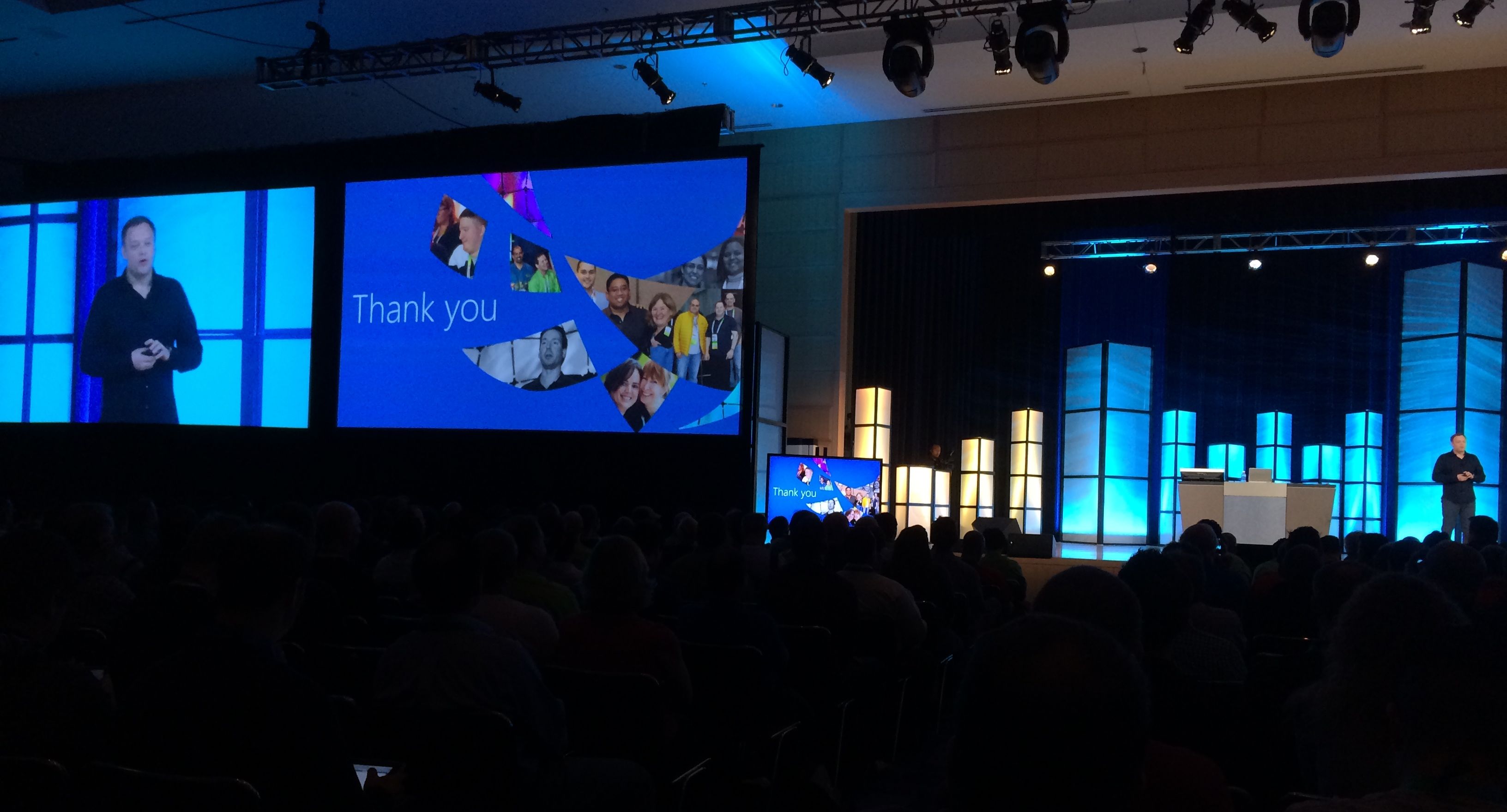
That’s all a lot of work, and I’m lazy. So right now, as we speak, I’m onstage at the PASS Summit unveiling a single stored procedure that does all that in ten seconds, plus more.

You already know how our free sp_Blitz® gives you a prioritized list of configuration and health problems on your SQL Server. Now when your SQL Server is slow, you can find out what’s going on just by asking Brent – with sp_BlitzFirst®. Here’s how it looks:

sp_BlitzFirst® in Action

In this example, I’ve got three problems, and I can click on links to get more details about the specific finding, how to stop it, and the query text.

I can also turn on Expert Mode and see some of the raw data that sp_BlitzFirst® checked for diagnostics. Here’s Expert Mode turned on with a server having a whole mess of problems:

sp_BlitzFirst with Expert Mode Enabled
sp_BlitzFirst® with Expert Mode Enabled

It returns results including:

  • Which wait stats were the biggest during the last five seconds
  • Which data and log files are getting the most reads & writes, and how fast they’re responding
  • Which queries consumed the most resources during the sample

Using the @OutputDatabase parameters, you can also log the results to table. This means you can set up a SQL Agent job to run it every few minutes, and then when someone wants to know why the server was slow last night, you can run it with the @AsOf parameter to get the results as of a past date and time.

To learn more, check out sp_BlitzFirst®’s download page.


#SQLPASS #Summit13 Women in Technology Lunch – Live!

#SQLPass
1 Comment

Welcome to the second day of #SQLPASS #Summit13! I’ve been having a blast this week – presenting a precon with Brent and Kendra, watching great speakers like Erin Stellato and Bob Ward, chatting at the Community Zone, and walking the vendor booths.

Today is one of my favorite events – the annual Women In Technology Luncheon! Our topic is Beyond Stereotypes: Equality, Gender Neutrality, and Valuing Team Diversity. We have a great panel – Erin Stellato, Rob Farley, Cindy Gross, Kevin Kline, and Gail Shaw. This is an incredibly diverse and brilliant group! 

12:10 pm – Tom LaRock is kicking off the event! He introduces our moderator, Mickey Stuewe. She reminds us to ask questions and follow along on Twitter using the #passwit hashtag. 

12:12 – Today we’re talking about diversity – making sure everyone is included. Mickey introduces the panelists! Cindy Gross is an MCM and member of AzureCAT. Rob Farley is a business owner and MCM and MVP, and outgoing PASS board member. Kevin Kline, pass president of PASS, MVP, and author – and father of several daughters! Erin Stellato is an MVP and brilliant consultant. Gail Shaw is an MCM and MVP, and contributes to the community in many ways. 

12:14 – Our first question is about fitting in. Gail tells us she doesn’t always fit in – not because she’s a woman, but because she’s a geek. She spends her weekends playing D&D! (I played many years ago. I loved it. I want to do it again!) 

12:15 – Have you experienced subtle cultural differences that make it hard to fit in? Rob says he does see people who exclude others because they are different. But that’s not him. In any environment where there is a large number of the same people, it can happen that there are assumptions. Let’s not forget about religious differences as a form of diversity and exclusion as well – important to remember at a large, international event like this too! Remember to tell people how you value them. 

12:19 – Cindy, how can you tell when you’re being treated differently, and why? She’ll go to a coworker or friend and ask for advice. She has a group of people she can go to for a second opinion. “When I react to something, would I react that way if it came from someone else?” is what she often asks. 

Kevin: There’s a lot of interesting scientific research going on right now. The average person can know about 150 people really well. Beyond that, stereotypes can save time. “They’re like the index pages in a database” gets a good laugh. He talks about the difference between introverts and extroverts. Introverts will internalize and be introspective about comments made towards them. Follow Cindy’s advice – talk to others about a situation or comment that was made and get their advice about it. 

12:26 – Kevin, how do you explain that you think you’ve been treated differently to your boss? Database professionals will spend a lot of time debugging code and resolving problems, but we don’t spend enough time figuring out the people we work with. Why do they get up in the morning? What drives them? Talk to your boss. If you ask them if you made a molehill into a mountain, and he or she says yes, you did – think of it in one of two ways. They could have a very different set of values from you. Or, we may not have properly expressed how this behavior affects our values. You need to have your own “values statement” – and share that with your boss, and even coworkers. (What I hear is: we need to realize that although our job is technology, we work with PEOPLE. You have to be willing to understand and talk to PEOPLE.) 

12:33 – Rob, how do you deal with being on a team when you’re excluded? If you see someone being excluded, you have to speak up. If you see a situation that is wrong and you don’t say something about it, it doesn’t help. You’ll be wracked by guilt. Stand up and be the person who champions what is right. 

Gail says that if the person you call friends are the ones that say you need to change, you might need to redefine who your friends are. She recently had to “break up” with a friend because she wanted Gail to be something she wasn’t. She wasn’t accepting. Sometimes it’s best to burn those bridges. Find friends that are interested in who YOU are and who listen to your concerns. 

12:40 – Cindy says there is so much more than just gender that we need to take into consideration. It could be so many things – your personality, what you support politically or socially. We all have our own stereotypes, too. 

Gail says that she has many male, geek friends. They feel excluded because they would rather stay in and play a card game instead of going to a football game. It’s not just women who feel this. 

12:45 – Erin, how do you establish and build relationships with coworkers in a diverse setting? You have to look at how you build any relationship – you build a common ground. You share interests and beliefs. Find common ground with your coworkers – we can all find something. You have to grow and celebrate that. Use the common ground to make your team better. “You can lead without being the leader.” Reach out to every member of your team – even if a “boss” isn’t doing so. Any good relationship takes time – and that’s OK, you just need to accept that. Find people’s strengths and celebrate the diversity. 

Kevin: Even if you don’t have an opinion on a topic, say that. Don’t say nothing. People take silence as you don’t care, or you agree with what is going on. Introverts will often be quiet, and let extroverts run the show – even when it’s, “Where do we go for lunch?” 

12:50 – What techniques have you seen to make events more inclusive in a professional setting? Kevin says when PASS was being founded, they didn’t have the resources other groups did – like money. They had to be better at people. “The antidote to swagger is humility.” 

12:55 – Best part of the day! Questions from the audience! 

Question from online – how do we celebrate conclusions vs. milestones? Rob says we need to recognize that different people celebrate different things. Even here this week, some people come to Summit to see friends. Some come to work on their career. Some come for specific sessions. We are all different. Recognize that we all need to celebrate – support others in the way they choose to do so. 

“How do we foster compassion in the workplace? There’s a feeling that compassion is the antithesis of a successful team.” Kevin – there’s a ton of research in how to make teams work faster, but what about “how do we make this team higher quality?” Someone has to start by demonstrating it – one person. You have to get the people with influence and authority to model those behaviors. Erin reminds us, “You can lead even if you aren’t the leader.” And if it bothers you that much, sometimes, you may be at the wrong company. If you can’t affect change, you may need to leave. 

“What is the best way to disarm someone who is applying a stereotype to you?” Gail says, there is something in common between you. Be polite. Find that something in common and work from there. You’ll never get someone to stop applying a stereotype by bashing your head against it. Cindy adds that if you try to take it head-on and convince that person that YOU aren’t that stereotype, you’re not solving that problem. The stereotype will still be in that person’s head. Rob says, on the inside, have pity for them. They are missing out on who you actually are. Care for them. Try to get to know them for who they are. 

“I was walking around the expo yesterday and had a conversation. You’re a woman, in technology, you’re a foreigner, you’re an athlete – how are you going to succeed in this industry? How would have you answered?” Erin says, “I would have said, “How am I NOT going to succeed?”” Gail would have said, “Who are you to tell me I’m not going to succeed?” Cindy had a professor call her into his office right before graduation. He commented on her hair color and told her she wouldn’t succeed in the real world. Now look at her! What other people think is irrelevant. 

1:12 – We could talk about this all day, but what is our call to action? 

Gail – take a look in the mirror and make sure you’re not the one doing it. Don’t be the problem. 

Rob – love people back regardless of how they are treating you. Don’t be part of the stereotype. 

Wow, this was inspiring! Thank you to our panelists for being on stage and sharing your experiences. Thank you to those who stepped up and asked questions. Thank you to the audience, both in person and online. I look forward to next year’s event! 


#SQLPASS #Summit2013 Professor DeWitt Keynote

This morning at the PASS Summit, we have the pleasure of listening to Professor David DeWitt talk about Hekaton internals.

I’m actually not going to liveblog this – I’m going to sit back and take in the presentation as an attendee because it’s going to be so damn good, and I’m not going to be able to do justice to it in a live blog post. I need to explain why.

Yesterday, a few of us bloggers were given an advance question-and-answer session with him to talk about – well, whatever. Here’s what I asked him, and keep in mind that the answers are paraphrased. I took notes as fast as I could, and it’s possible probable guaranteed that I misheard things, so don’t take this as a word-for-word transcription. I’m trying to maintain the spirit of what he said.

BGO: Out of your accomplishments this year, what are you the most proud of?

Shipping PDWv2 with Polybase.

Seeing Hekaton emerge in SQL Server 2014 CTP2. I didn’t have ownership of that project at the very beginning – I got it after 3 months – and then I owned it for a year and a half. Seeing it come out the door was exciting.

Professional driver on closed course.

I’ve been working on this keynote since July 1st. I went canoeing in the Arctic in 1st of August, and I had to have it done by then, so the month of July was spent banging the talk out. In 75 minutes with 77 slides (with complex animations), I’m trying to explain to the PASS Summit audience something that I would normally cover a couple of lectures to students. It’s going to be complex.

Hekaton is totally different than the relational engine. How Hekaton stores data is just as different from the regular engine as the column store engine is different. Just as we saw Apollo’s column store indexing folded into the mainstream engine over time, we may fold in Hekaton improvements over time too.

BGO: What do you enjoy about speaking at Summit?

The high of doing this. It’s a very appreciative audience, unlike an undergraduate audience. <laughter> In a college environment, I don’t really want people to have laptops in class. They’re probably shopping online.

PASS is a great environment where you can tell people are here because they want to learn voluntarily. It’s all volunteers. Volunteers make such a big commitment to the event.

At the same time, it’s not all fun. There are periods like 2 weeks before where I’m incredibly stressed out. Two years ago I got a 5 on my session feedback evaluations, and then last year I got a 3. What am I going to get this year? I’m really stressed about that.

(Note from Brent: I really do get the vibe that DeWitt cares passionately about the session materials and how PASS attendees receive it. He’s not under fire from Microsoft to produce amazing materials – he is just totally self-motivated to beat expectations of the audience.)

BGO: What’s the toughest part about your job?

Not being able to ship stuff as fast as I want. I’m not at a startup. I’ve come to appreciate what it means to be part of a company that prides itself on delivering really high quality software. SQL Server has a sterling reputation for really high quality. I’ve learned so much about the testing process.

In the upcoming release of PDW, we’ve got a feature coming, and it’s really important to me. It’s what most people would consider a small thing, but it’s very important to me. Unfortunately, we can’t enable it – we can’t ship it to the public because we don’t have enough time to test it. That’s frustrating, but it’s fair, and the bar for testing PDW isn’t even as high as regular SQL Server testing. The bar for SQL Server engine testing is incredibly high.

I could do with 2-3x the number of resources than I have.

I’m old enough to get Medicare, but I still have lots of good ideas. Mike Stonebraker turned 70 this fall. Mike was my graduate TA for my first graduate class. I’ve known him for 40 years. He’s had a lot of successful startups, and he doesn’t need to work, but he has 4 startups and still goes to work every day.

BGO: Is there anything you regret not doing?

I’m envious of Stonebraker and all the startups he’s done.

I was part of Vertica, so I’ve never worked on the Microsoft column store stuff because of non-competes. But being part of a startup would be really gratifying. It takes guts, has challenges, and I’m not sure I would have been successful, but that’s the one thing I regret.

And I wish I would have been better at mathematics.

BGO: What’s the one thing you want people to take away from the keynote?

Building Hekaton was really a serious long term endeavor. We’ve been at it a full 5 years. It was a big deal. It could be the basis for a lot of new SQL products down the road.

For relational database storage, columnar stuff was really the first chink in the armor. It’s processed in vectors, the vectors get combined with bit masking, we use a lot of different query processing techniques. More chinks are coming.

Look at what’s happening with computer hardware, specifically memory prices. There’s a chance technology will drive us to a place where we have large amounts of memory, some non-volatile RAM, we may end up with database systems whose databases are all in memory or near memory (NVRAM). In the next 10-20 years, the Hekaton approach of memory-intensive, core-intensive approach could become the de facto way of storing data as opposed to the disk-based product (the way SQL Server stores data & logs today).

My hope is that people will take those slides and study them carefully for the exam. <laughter> I want them to read them closely and understand why we did it this way.

BGO: So it sounds like it’s not a one-and-done feature like so many others we’ve seen. Development is actively ongoing, and there’s still more investments being made here?

Apollo (column store indexes) came out in SQL Server 2012, and in SQL Server 2014, it’s v2 with updates and investments. PDW v2 is out with more features – except for that one small feature that’s my favorite that we can’t ship. These storage investments aren’t one-and-done – we’re focusing on these.

Hekaton CTP 1 had hash indexes only, and CTP2 adds B-tree indexes. There’s a white paper coming out on the index types we’ll support.

We have lots of exciting things in the language hopper for Hekaton. We’re broadening the language and data type support in Hekaton V2.

BGO: Can I quote you on that? I want to make sure I can actually blog that Hekaton V2 is going to have expanded language support.

<discussions> Yes.


My thoughts on what’s about to go down

For the keynote, DeWitt’s tackling something really challenging. How do you teach database internals – and not just regular internals, but really all-new internals – to a very wide audience? In this room, we’ve got database administrators, BI developers, database developers, and managers. Many of us in here don’t regularly work with latching problems in SQL Server’s current engine, much less a new one.

I admire what he’s trying to achieve, and having read the slide deck, I admire how he’s going to do it. The snark department is going to make fun of his clip art, but pay close attention. In the next 75 minutes, you’re going to learn internals of both the current engine and the Hekaton one. You’re probably not going to deploy Hekaton v1 for existing applications, but if Microsoft continues making payments on this vision, you’re probably going to want v2. Today’s session will explain why.


#SQLPASS #Summit2013 Microsoft Keynote Liveblog

#SQLPass, SQL Server
16 Comments

Charlotte, NC – Your intrepid reporter is onsite at the convention center, settling in at the Blogger’s Table. At 8:15AM Eastern time, PASS President Bill Graziano will take the stage, discuss PASS, and then hand things over to Microsoft’s Quentin Clark for product announcements.

Some of the things I’m looking for include:

  • Attendance numbers on the Summit (was a record-setting 3,894 last year)
  • Graziano recapping his last year as PASS president and introducing the new president
  • SQL Server 2014’s release date, pricing, and edition restrictions (will this be the year Standard Edition is cut down to 4 cores and 32GB of RAM, or will our outcries finally be heard?)
  • A couple of customer stories about how SQL 2014 is already helping them out
  • The next Community Technology Preview (CTP2) download of SQL 2014
  • A strategic vision for Microsoft’s business intelligence products (I wouldn’t expect in-depth BI talk here because that’s where the PASS Business Analytics conference comes in)
  • A Metro-looking PowerPoint slide deck with multiple “pillars” of “synergy” that “surprise and delight” you with “big data” on your “smart devices”

I don’t expect this to be a year of surprises for the core SQL Server product. At this point, the feature set of SQL 2014 is pretty well baked and publicized (Hekaton, buffer pool extensions, better column store indexes, better AlwaysOn AG management, etc). It’s too late in 2014’s development cycle to pull a “one more thing” moment with the engine, and it’s too early to start talking about vNext.

For live updates, refresh this page every few minutes. The latest stuff will be at the bottom. To follow the live stream on Twitter, use http://tweetchat.com and follow hash tag #sqlpass or #summit13. I’ll be using #sqlpass just because it’s been used heavily in the past. You can also watch the live stream here.

8:18 – The room is filled up and the lights are still bright. Stay tuned.

8:21 – Showing a video with attendees discussing what they’re interested in. Hilarious energy from Jes Schultz Borland, Stacia Misner, Christina Leo.

8:24 – Bill Graziano took the stage and he’s introducing the PASS Board. “Please reach out to any of us during the Summit with ideas and questions.” They’re serious about that – they take a lot of notes with your ideas.

8:26 – 700K technical training hours, 227 chapters, 22 virtual chapters, 81 SQLSaturday events, 5 24 Hours of PASS, 2 SQL Rally events – all in the most recent fiscal year.

8:30 – The winner of the PASSion Award this year for outstanding volunteerism is Amy Lewis, and the runner up was Ryan Adams.

2013 PASSion Award Winner Amy Lewis

8:33 – Bill has an “ask” for you to sign up as a PASS volunteer.

8:36 – Video intro for Microsoft’s Quentin Clark showing a bunch of statistics about SQL Server. Folksy guitar music in the background. I’m not sure if this is a protest song or what this is.

Microsoft's Quentin Clark
Microsoft’s Quentin Clark

8:40 – When talking to the community and users, he’s heard us say that we want a complete story end to end for our databases. He’s covering the transformation from brick and mortar to e-commerce. The old fear was that retail was going to die and e-commerce was going to take over. As an Amazon Prime member who rarely steps foot in stores, I’m curious to how he’s going to disprove that.

8:42 – OH, I see what he did there. He’s saying that retail and e-commerce is merging – you can buy stuff online and return it to the store. Now, IT is undergoing a similar transformation where we need both on-premise and cloud. This is quite a change from Microsoft’s screaming “WE’RE ALL IN THE CLOUD” in times past.

8:44 – Saying that in the past, Microsoft has done keynotes that were all over the place with software that never actually came out and wasn’t tied together. Today is about stuff that is either generally available now, or will available really soon, and will all tie together.

8:47 – The next Community Technology Preview (CTP2) download of SQL 2014 is available. This is the final public CTP before release.

8:48 – Quentin says Microsoft is “pushing the boundaries” of in-memory performance, better availability, redefining mission critical in the cloud, bringing BI to everyone, etc. I think that’s true for historical SQL Server implementations, but not necessarily other platforms. He’s focusing on Oracle’s columnar in-memory keynote a couple of weeks. Is Oracle really the big competitor in the in-memory database space?

8:50 – Regarding Hekaton’s in-memory OLTP, he says, “We’re not asking you to rebuild your application.”  This just isn’t true – I still haven’t seen a single application that could take the move to Hekaton’s full benefits (compiled SQL and in-memory tables) without schema changes, and schema changes are serious business for existing applications.

8:52 – Demoing an online store with 1mm users, and 20k simultaneous transactions. I gotta be honest: if you’re querying the database live in an online store, you are doing it completely and utterly wrong. Meet Mr. Cache.

Demoing Hekaton
Demoing Hekaton

8:55 – Oh, this demo fills me with rage and sadness. Everything about the tables and the queries is worst practices. This has absolutely no business in a production database and an online store. If your site and your code is this bad, and you refuse to use a cache, then sure, Hekaton is for you.

9:00 – Talking about “breakthroughs in availability in recovery” by allowing AlwaysOn secondaries in Windows Azure, backup to Windows Azure, and data files in Windows Azure. Already covered my very skeptical take on those features.

9:03 – Announcing the Backup to Azure Tool for all supported SQL Server versions. You get encrypted, automated backups to Windows Azure file storage.

9:09 – IT’S A FREAKIN’ FILE SYNC TOOL. You have got to be kidding me. This is disgusting. What a joke. You back up locally and the tool uploads your files to Windows Azure file storage. Golf clap. Across the face.

UPDATE 4PM – turns out this is a filter driver. Your backup goes directly to Windows Azure file storage, and doesn’t reside on local storage. If your Internet connection blips, your backup breaks. This also means you have no local copy of your backups. It’s not designed to be your primary backup method, but more designed to be a quarterly archive of offsite backups. Thing is, I think you’re much better off just copying an existing already-done backup to Windows Azure rather than setting up yet another product to take yet another backup and monitor yet another job. Use one tool to manage offsite backups of all kinds of products, whether they’re SQL or Oracle. However, the MS folks I’ve talked to are really taking that opinion hard – they really believe small businesses will install this tool to get offsite backups. They talk about how small businesses want something simple – but remember, small businesses can’t even handle maintenance plans, much less add yet another backup tool into their environment and configure it correctly.

9:10 – And the Azure demo failed due to network problems. But I’m sure that’ll never happen to you, buddy. You’re much better at networking than Microsoft.

9:16 – Recapping Windows Azure HDInsight, DW Virtual Machine in Windows Azure, PDW with PolyBase. Older announcements.

Quentin-Onstage
Microsoft’s Quentin Clark recapping customer stories at PASS Summit 2013

9:22 – Customer testimonial video from Barcelona. Has a nice beat to it. Evidently people in Barcelona walk through the streets taking pictures with Microsoft Surfaces. I’m sure there’s no propaganda in that video at all.

9:25 – Power* product listing.

9:28 – Excel demo using Skype data. 35TB of data per day. “Let me show you what a typical Skype analyst does.” And then: “We take your privacy seriously, so we’ll show fake data.” If you care about privacy, why do you have Skype analysts and gather 35TB of data per day? Seriously, this is awful given the NSA paranoia, don’t demo this.

9:32 – Merging Skype data with country sources. This is exactly what NSA does. Ugh, what a tasteless demo. Who approves this stuff?

9:33 – “Now I can bring in the locations of the nearest prisons, call in a black helicopter, and track it live with PowerMap.” Wait, they didn’t actually say that. But they should.

9:36 – Demoing on a Surface. Although…not actually clicking anything.

Demoing on a Surface 2

9:39 – Showing Power BI for Office 365 Preview with an equivalent of English Query back from SQL Server 2000. You can put in something like “calls per capita by country” and it figures out the right query to run.

Power BI Mapping demo

9:42 – They’re asking for data over and over in different ways, and it automatically interprets how to query the data, and more interestingly, how to render it. Uses Bing maps, bar charts, scatter plots.

9:43 – You can sign up for it now at PowerBI.com.

9:45 – Power BI Contest at http://www.facebook.com/microsoftbi where you can submit BI solutions with Power BI and vote on submissions from others. Top 5 finalists get Surface Pros, top 10 get Xbox Ones.

9:47 – And that’s a wrap. Off to the sessions! Total letdown in terms of what we didn’t hear: release date, pricing on SQL 2014.


3 Signs Your DBA Skills Need an Upgrade (video)

SQL Server
1 Comment

You’re a Database Administrator who gets the job done day in and day out– but you’re worried that maybe your skills aren’t quite up to par. How do you know if you’ve fallen behind? Join Kendra in this free webcast for a simple test to learn if your DBA knives are as sharp as they need to be.

Looking for the resources from the talk? Head on over to https://www.brentozar.com/go/dbaupgrade

https://www.youtube.com/watch?v=LcsT0x_JCf4&feature=share&list=UU5B27ZdPle33KaQqsisR3mQ


Celebrating Two Years of sp_Blitz® (And a New Version)

Two years ago this week, I took to the stage at the PASS Summit 2011 and unveiled sp_Blitz®, my free health check stored procedure that helps you rapidly take over SQL Servers you’ve never seen before.

Some historical highlights include:

  • 117,125 downloads
  • 117 checks (technically much more than that, because we look for variations of stuff)
  • 30 versions (including today’s updates with even more bug fixes)
  • Dozens of public code contributions
  • Analyzes the SQL Server plan cache for performance issues
  • Can store data to a table for analysis over time
  • Can take an input table to skip any checks on any servers or databases

People often stop me at conferences and say two things: they’re so thankful for it making their job easier, and they can’t believe we give it away for free. Between sp_Blitz®, sp_BlitzIndex®, our weekly webcast, our YouTube channelour ebooksour 6 month DBA training newsletter, and in-depth blog posts, we just give a ridiculous amount of stuff away for free. It’s going to get even better at the PASS Summit – I can’t wait to share my next free tool with you guys.

This is why, when we announced that we’re looking for Employee #2, Kendra specifically said in the post:

First, we need to know where you’ve spoken recently and what you talked about. This can include all sorts of public speaking– it doesn’t have to be technical. Next, tell us how you give back to a technical community. (It doesn’t have to be the SQL Server community.)

We wanted to find people who were passionate about making a difference in the community. People who give back to make jobs easier for others. People who openly share their knowledge with the public whenever possible.

That’s also why I’m excited to see my friends again at the Summit this week. This is where the giving-back happens, and it’s where the giving-back people get together. Here’s to another year of giving back.


What Do Developers Need to Know About SQL Server?

SQL Server
11 Comments

The database comes with a manual, but let’s be honest: nobody’s got time for that. DBAs – help me distill the most important concepts and rules down to 140-character chunks. I’ll work with Dell to compile the best tips into a free ebook for developers.

SQL Server should come with warning labels, too.

There’s three ways you can contribute:

  1. Register for the live webcast on Thursday, October 24th from 10AM to 11AM Eastern. Leave a comment in chat during the webcast, and we’ll talk through the best ones to help boil them down to a perfect essence.
  2. Join me on Twitter on Thursday, October 24th from 10AM to 11AM Eastern using the hash tag #dellsql. If you just want to read along, you can use TweetChat.com at that time.
  3. Leave a blog post comment below with your nuggets of genius.

Make sure to keep it upbeat and helpful – after all, your name will be next to your suggestion, and you don’t want to look like That DBA. Let’s help developers get started on the right foot!


How Much is Offline During an Index Rebuild?

Index Maintenance
17 Comments
Kendra with her Not-A-SAN

This question came up in the pre-show chat for our weekly webcast: when you rebuild a nonclustered index offline, does it impact only the nonclustered index? Or does it impact the entire table?

Showing is more fun than telling! Let’s take a look.

First I restore AdventureWorks to slow storage

Sometimes slower storage is handy. To demo any questions like this, I like to restore a copy of AdventureWorks2012 onto a handy external Seagate drive. I love having SSDs in my workstation, but when it comes to wanting to test out things like blocking on a reasonably small amount of data, it pays to have some poky storage around.

Now I run a super slow nonclustered index rebuild

Once AdventureWorks is restored, I set up an offline index rebuild in one session window— and to make it take longer I set up my index rebuild command in a BAD way. I set fillfactor to 1 percent, which means SQL Server is going to explode this table and leave 99% of each page empty.

In another session, I query the table’s clustered index

While the index rebuild is running, I open a second window and run a SELECT query. This select query is designed to specifically read from the clustered index of the table and not use the nonclustered index at all:

Now I check out the blocking

Now, from a third session I check and see– is my SELECT from the clustered index blocked by the rebuild on the nonclustered index? To get all the details, I run Adam Machanic’s sp_whoisactive with a parameter to get information on locking. (This can be a bit expensive, so only use this option when you need it.)

Sure enough, my SELECT query is blocked by my index rebuild.

Blocking-Index-Rebuild

Clicking on the ‘locks’ XML column for my blocked SELECT statement, I can see more detail:

This confirms that the read has requested an intent shared lock on the Production.TransactionHistory object– but it can’t get the lock.

Finding: offline rebuilds of a nonclustered index prevent querying the clustered index

If you need to rebuild indexes offline, this means that you can’t minimize the impact by only rebuilding the nonclustered index– rebuilding them places locks on the object itself. We saw this by seeing that queries who just wanted an intent shared lock on the table were blocked.

If our indexes were large and tables needed to be available constantly, this could be a huge problem!

Enterprise Edition Doesn’t Fix Everything

With SQL Server Enterprise Edition, you can specify that you’d like to do an “ONLINE” rebuild. In this case things are a little different– users can access the table during most of the index rebuild. However, at the end of the rebuild SQL Server still needs an exclusive “Schema Modification” lock (SCH-M) to finish the operation– and in highly concurrent systems, that can still be an issue.

If you’d like to reproduce that issue at home to demo for yourself, it’s easy! Just start up the SELECT statement first and change the rebuild to use the “ONLINE” option.

But Wait, There’s More

This logic also applies to creating indexes– if you’ve got Enterprise Edition, you want to remember to always create your nonclustered indexes with the “ONLINE” option if you need to avoid blocking on the table. Even then, that pesky SCH-M lock can be a killer on very busy systems.


Get a Report of Your Server’s Top 10 Worst Queries

SQL Server
5 Comments

Problem: your database server’s performance stinks like Limburger cheese.

Photo courtesy of http://en.wikipedia.org/wiki/File:Wisconsin_Limburger_Cheese.JPG

Solution: find the queries that are making that smell.

Hiding in Plain Sight

Your database server knows exactly which queries are performing the worst. When queries are executed, the execution plans – and associated execution statistics – are stored in memory (with a few exceptions). This information is stored in the plan cache, and you can access it by querying a couple of DMVs.

We even have a script on our website that can help you with that.

One way you can get this information is to run this query in SSMS. But what if you wanted it on a regular schedule, like every Monday morning, so you knew what queries hit your server the hardest in the last week? What if you wanted developers to have access to this information, without letting them run wild in SSMS?

Write a report!

Building a Basic Table Report

The most basic way to display information in SQL Server Reporting Services (SSRS) is by using a table. I’m going to go into Report Designer, add a new data source to connect to my instance, use a slightly modified version of the above query to return the top 10 queries by total CPU, and add a table to the report.

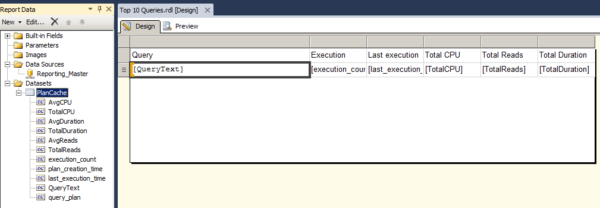
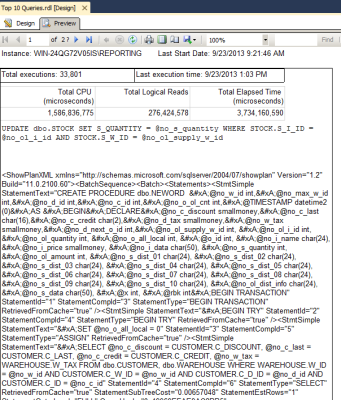
Here’s my design:

top 10 1

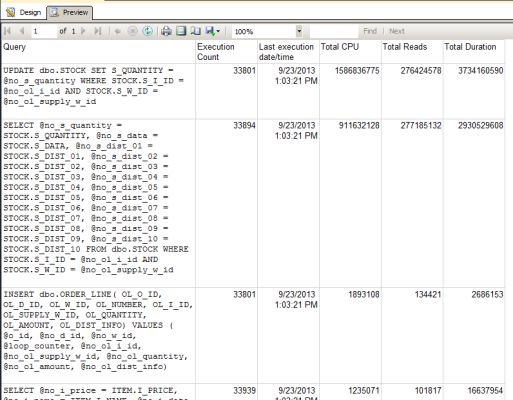
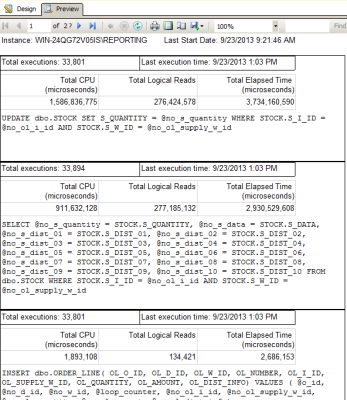
And here’s a preview of it:

top 10 2

It’s functional, but it could be better. Some of the things I’d like to see in this report:

  • The time the service started. The plan cache is only good from the time of the last restart (or the last time the plan cache was cleared, but I hope you’re not doing that on a regular basis).
  • Formatting. Some of the numbers are hard to read, and it’s ugly. No one wants to look at ugly data.
  • Measurements. Is that CPU in milliseconds? How about the duration?
  • Can I get a link to the execution plan?

Improving the Report

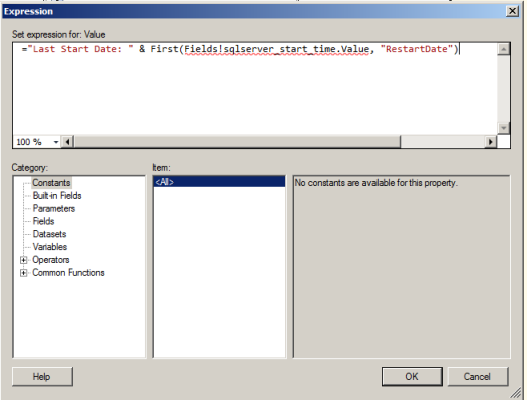
I’m going to add a header to the report to display the last restart date. I add a new dataset which queries sys.dm_os_sys_info for the last start time. I add a header to the report, and add a textbox. I build an expression to display the last start time.

top 10 3

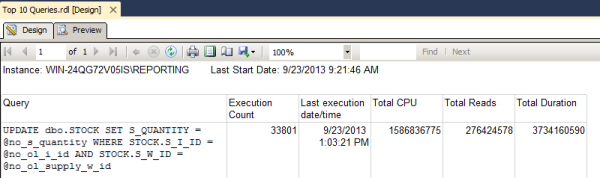
The report looks sharper already!

top 10 4

To display the rest of the information, I’m going to use the list control – I think it’s one of the most under-used features of SSRS. A list lets you add multiple report elements – text boxes, tables, images – to one space and arrange them as you wish. The list starts with two textboxes, one for the number of executions and one for the last execution date. Since I’m combining text and data, I use expressions.

Then I add a table to display the CPU, reads, and duration. I make sure I add appropriate labels for the measurements. I also format each of the results as a number so the numbers have commas in them.

Then, I add another textbox, display the query text, and format it with a fixed-width font so it’s easier to read.

Here’s the design:

top 10 5

Here is what the report looks like when run:

top 10 6

That’s a lot easier to read!

I’ve knocked everything off my list except the execution plan. I’m going to add another text box and add the plan.

top 10 7

That is not readable. Here’s the issue: the plan is stored as XML, and SSRS can’t natively display XML. I could leave this here for a user to copy and paste into SSMS or SQL Sentry Plan Explorer, but that’s a lot of work. I decided to take it out of the final version of my report.

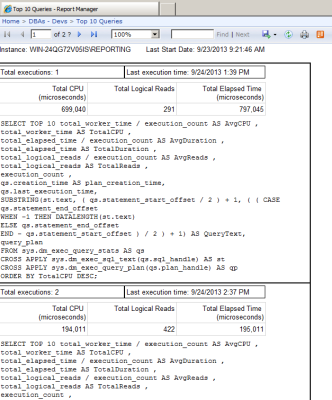
The last step is to deploy this to Report Manager. After I deploy it, users that have permissions to the folder it’s deployed to can view it – without having to go into SSMS or coming to me for the information. They can also subscribe to it to receive a copy on a regular basis.

top 10 8

The next step to be taken: tune those queries!

SSRS can be used to solve a variety of issues – it isn’t solely the realm of analysts that need to know the sales from last quarter or what products are the most profitable.


Performance Tuning kCura Relativity

kCura Relativity, SQL Server
5 Comments

In the e-discovery business, kCura Relativity is the big gorilla, and I’ve been working with kCura and their clients since 2011. I think it’s one of the most interesting businesses I’ve ever worked with – up there with StackOverflow – and like Stack, they’re really open with their customers.

Me and George Jon staffing the Relativity infrastructure booth at RelativityFest 2012
George Nedwick and I staffing the Relativity infrastructure booth at RelativityFest 2012

Today marks my second year being at Relativity Fest, the conference for Relativity users, and I’m presenting two sessions on performance tuning Relativity’s SQL Servers.

First, A Quick Introduction to Electronic Discovery

Say Microsoft sees sp_Blitz® and decides to build it into SQL Server 2015 without giving us any credit. Brent Ozar Unlimited®’s top-notch law firm would approach Microsoft, try to negotiate a settlement, but if all else fails, we’d have to sue Microsoft.

Our lawyers would make a list of evidence we want to get from Microsoft – say, all email, source code, file server contents, and laptop contents belonging to Buck Woody, Mark Souza, and a few other key employees that we believe would prove our case. Naturally, because this is a big case, there’s dozens of Microsoft people that we want to investigate. After the judge agrees, now comes the tough part: we have to actually get the data.

Our lawyers, God bless ’em, aren’t very good with computers, and they’re certainly not good enough to run around the country taking images of file servers, email servers, laptops, and backup tapes. They would hire an e-discovery partner that would:

  • Get copies of all computers/servers involved
  • Reverse engineer every file format
  • Convert the documents into an easy-to-view format (like a TIFF image or a PDF)
  • Convert the document contents into an easy-to-search format (like text stored in a database)
  • Store all of the document metadata in a document (like whose computer it was found on)

After a few more steps, document review starts. Our lawyers would go searching through this data looking to find evidence that supports our case. Unfortunately, our lawyers aren’t a very big company, so they’d probably hire a large outsourced firm with hundreds or thousands of lawyers who can rapidly sift through all of these documents looking for evidence. After all, court cases are a race with deadline dates imposed by judges. We need as many incriminating documents as we can find, as quickly as possible, to help our lawyers build their case strategy.

kCura Relativity is a popular hub for this whole process, and it uses Microsoft SQL Server as a database back end. I first started working with kCura when Andrew Sieja approached me in 2011, and we’ve had a great relationship ever since. I really like this industry because it’s facing and solving so many cool technical, logistical, and legal challenges.

How Relativity Uses SQL Server

SQL Server is the backbone of Relativity. As documents come in from the field, the document metadata (source, file name, document type, etc) are loaded into SQL Server. As processing software figures out the file’s contents, the extracted text is also added.

Databases grow large quickly even though document itself isn’t loaded into the database. Each case (workspace) is its own SQL Server database, and these databases can easily grow into the terabytes. Database management is made more difficult because when the case is first created, we have no idea how big it’ll become – some cases are just a few gigs, and others grow into the terabytes with no warning.

How Relativity Challenges SQL Server

Lawyers want near-zero downtime. Any given SQL Server can be hosting dozens (or hundreds) of live cases, all of which have different law firms involved, often with global staff analyzing documents around the clock. Typically this means multi-node failover clusters with complex disaster recovery strategies.

Users can add databases on any server at any time. New cases are added without warning. Your disaster recovery mechanism had better be able to keep up.

Users can add their own columns at any time. This is extremely unusual for ISV applications, especially ones that have 24/7 OLTP-style loads. When you add columns in SQL Server, you need a table lock, and this can create all kinds of blocking havoc.

Anybody can search for anything, anytime. It’s extremely difficult to design an indexing strategy when every incoming query is different. This element of Relativity is more like a data warehouse where end users are constantly asking new questions of the data, trying to spot trends.

We’re talking about lawyers building SQL. One awesome thing about Relativity is that it empowers anybody to build really complex searches fast without the help of a developer or a DBA. The drawback is that the queries aren’t exactly optimized. I will say this: the queries by lawyers look a lot better than a lawsuit written by DBAs.

And all the while, people are still loading documents. New batches of data come in from the field at unpredictable times. It’s like having a data warehouse that loads data in the middle of the day.

Other apps are hitting the server too. Relativity has lots of third party partners who either query the databases directly or use Relativity’s API. While the kCura developers put a ton of work into tuning their queries, not everybody is as focused on performance.

Security and auditing are vital. We have to make sure no one sees a document they’re not allowed to see, and that every access to privileged information is tracked.

Every case is different. Even though the basic application code is the same, the added fields and the search patterns vary wildly. You can’t just make one set of indexes and call it a day.

These things add up to make performance tuning SQL Server significantly more complex – but still totally doable.

The Easy, Expensive Way to Tune Relativity’s SQL Server

Follow my instructions from my TechEd 2012 session, Building the Fastest SQL Servers:

  1. Buy as much memory as your server can hold.
  2. Build your storage infrastructure to deliver SQL Server’s maximum consumption rate (MCR) for your number of CPU cores.
  3. Before going live, load test to make sure it actually delivers that throughput.
  4. After going live, monitor your storage throughput and latency, looking for surprise problems.

To learn more about how this works, dig through Microsoft’s Fast Track Data Warehouse Reference Architectures. Those documents teach you how to calculate SQL Server’s MCR, how to design storage networks to deliver data that quickly, and show you how to configure SQL Server correctly for massive damage throughput.

Done right, you’re done here. This gives you an infrastructure that can tolerate any kind of search queries at any time, indexed or not. Well, not exactly: you still have to follow basic good design processes. You can’t lather on dozens of indexes, thereby slowing down inserts/updates during document loads. You also have to stay on top of your case loads because they’re only going to grow over time, and you can still outgrow your hardware’s speed capacity.

The Hard but Cheaper Way to Performance Tune

Manage with automation in mind. Each time you do a performance tuning or availability task, think about how you’re going to accomplish it automatically going forward. (I mention this first just because it’s important as you think about the rest of these tasks.)

Proactively create, modify, and disable indexes. Because anybody can query for anything at any time, kCura’s developers can’t possibly come up with an index strategy that will work for your users. They build in a basic set that should be good enough for most use cases, but if you want killer performance with minimal hardware spends, you’re going to have to roll up your sleeves. Start with our How to Think Like the Engine training, and then move on to our How to Tune Indexes and Speed Up SQL Server videos.

Use an index naming convention. You’ll need to be able to instantly identify which indexes were created by your shop, and which are natively shipped with Relativity. Don’t go dropping Relativity’s built-in indexes – even though some may be duplicates or not used in your environment. Consider disabling them instead, and notify kCura’s support team first.

Monitor the most resource-intensive queries. Use a SQL Server performance monitoring tool or analyze the plan cache to find queries doing the most logical reads. Since every database will have its own execution plans, you may also need to zoom out and look at aggregated execution plan stats.

When something new pops up, attack it. Your options are:

  • If it’s coming from outside of Relativity (like a monitoring app or a loading tool), try tuning the query first. If you can’t eliminate common antipatterns like implicit conversions and non-sargable where clauses, you may need to use indexes.
  • If it’s a Relativity saved search, work with the client support reps to find the most efficient way to get the data the client needs. Sometimes just a few tweaks to the search can make an unbelievable difference.
  • If it’s part of Relativity’s own code, tune it with indexing. This is where tuning an ISV app gets challenging, because your work never really ends. Every new version of Relativity brings changed queries, and you have to make sure you don’t leave indexes lying around that aren’t helping anymore.

If you can’t tune it, start a case with kCura support. Include your Relativity version, plus specific metrics showing how much load the query is causing on your server and where the query is coming from. kCura’s developers love making the Relativity experience better for everyone involved, and they need your real-world feedback on what’s causing you problems. Just make sure to keep it upbeat and positive – don’t just say “Relativity sucks at writing this query” and hit Send.

The Bottom Line on Scaling kCura Relativity

It’s really just like performance tuning any other database: when you blow past a terabyte of data, and you’re doing a combination of OLTP and reporting-style access, you’re going to have to roll up your sleeves.

It doesn’t matter whether the app is homegrown or from an ISV – the DBA needs to:

  • Know the database schema well
  • Know the queries well
  • Know how hardware can offset query and schema challenges
  • Know when to turn SQL Server’s knobs (and when not to)

I’m excited that kCura invites me to talk about these topics at Relativity Fest, and if you manage Relativity instances, I’d highly recommend the conference. kCura takes performance seriously – it’s why they send me around to some of their clients for in-person visits, and the changes I suggest actually get implemented into the product. At last year’s Fest, I was proud when Andrew Sieja took the stage and talked about the big CPU performance improvements – some of those were from me working directly with customers, and folding those changes back into the product.

The value of Fest isn’t just about the topics that are being presented – it’s also about meeting your fellow SQL Server professionals who are facing exactly the same challenges. Heck, that’s one of the big values of attending our training classes, too! You can make bonds with people that you’ve met on Twitter or through email, and make new friendships with people who can help you through the rest of your career.


We’re Restarting the Chicago .NET User Group

SQL Server
6 Comments

This Wednesday night, come join me at DevMynd. Here’s the topic I’ll be presenting:

How StackOverflow Uses (And Doesn’t Use) SQL Server

This insanely popular Q&A site serves millions of web pages per day from a Microsoft SQL Server 2012 back end. Believe it or not, the questions and answers come down to just one SQL Server with no full time database administrator. Success at scaling any database-driven app boils down to knowing when it’s appropriate – and not appropriate – to use the database.

RSVP at MeetUp.


Solving SQL Server Scalability Problems

You’ve been nursing your SQL Server through day after day of increasing load. Stored procedures are taking longer and longer to run. There are timeouts on the client side. Both customers and management are getting upset. As you’re bemoaning the terrible code that the developers wrote, it hits you: you don’t have a code problem, you have a scalability problem.

A slight scale problem

The Types of SQL Server Scalability Problems

Hardware

It seems obvious to an outsider, but hardware has to be replaced on a regular basis. Between replacements, hardware is like code: it requires attention and maintenance to keep it running smoothly. As a DBA, it’s your job to pay as much attention to the database hardware as you do to the wait stats, slow queries, and missing indexes.

This doesn’t mean you can throw a monitoring package in place and walk away. Understanding how SQL Server and the underlying hardware respond under your application’s workload is important. Once you have a baseline on SQL Server and the hardware, you can easily tell if a problem is bad code or you need to call up your friendly hardware salesperson.

Design

Database design is probably not your bailiwick; you might even say you’re not a database architect, you’re a database administrator. That may be, but you’ve also got the keys to the kingdom of database performance.

Through the DMVs you can tell which indexes have lock escalation problems, which files have slow reads, and even narrow these problems down to specific queries and times of day. Even if you can’t tell Boyce-Codd Normal Form from Backus-Naur Form, you have tools to help you identify problems at a physical level.

You probably want an example – if you add several new queries to the application and suddenly there are a lot more lock escalation attempts on a table, you can safely conclude that at least one of those queries would benefit from a new index.

Code

I lied, sometimes the scalability problem is a code problem.

DBAs love to blame those pesky developers for causing problems. There’s some truth in that statement – developers introduce changes into an otherwise stable system. But when developers are adding new features and functionality, they can’t always know which indexes will be the best; after all, you didn’t have the resources to provide them with a full copy of the database, right?

Thankfully, you can track down top resource consuming queries very easily. Once you’ve identified those queries, you can either tune them or work with the developers to educate them about what they can do better the next time. All too often, time is the only issue that prevents things from being done correctly – developers are pressed for time to get a feature out, so they don’t spend as much time tuning code as they’d like. Help them out – find the bad queries and share the knowledge or just tune them yourself.

Outside of bad T-SQL, there are a number of patterns that can cause problems for database performance. So bad, in fact, that they’re going in a new section.

No matter what you call it, that doesn't work.
No matter what you call it, that doesn’t work.

(Anti)Patterns

If you’ve thought that something didn’t smell quite right in the database, you were probably right. There are a number of ways to use SQL Server that work… for a while. I like to call these scalability anti-patterns. These anti-patterns work well as long as you can keep throwing more physical resources at the problem.

Anti-patterns can be difficult to identify as an anti-pattern – is it just bad code or are you seeing something worse? Over at ACM Queue there’s a guide 20 Obstacles to Scalability that lists patterns that will prevent you from moving forward. The most common patterns you’ll find are a lack of caching, serial processing, using the database as a queue, and full-text search.

Fixing anti-patterns will take a long time. These are architectural decisions that are baked into the entire application, not just the database. In order to fix these, you’re going to need to work with the developers, research new tools, and figure out how to implement the features

Solving the Problems

Easy Mode: Hardware

Let’s be honest, using money to solve your scalability problems isn’t a solution. Using money to solve scalability problems can often be a quick fix. If storage is slow, you can embark on a query tuning project or buy additional memory (or even SSDs). Although you’ll eventually need to tune those queries, you can buy yourself some breathing room by adding new hardware.

Don’t let new hardware lull you into a false sense of security. If you buy hardware to temporarily solve a problem, make sure you also record the performance problems and get time scheduled in the future to put a fix in place.

Medium Difficulty: Tuning

When you finally decide to tune your application, identify your biggest bottlenecks (if you don’t know, we can teach you how) to make sure that you’re tuning in the right place. You can’t tune T-SQL to make the network faster. Once you know what you’re trying to fix, identify the queries cause the most pain. Is memory a problem? Look for queries with large memory grants and tune them. Think about adding indexes.

Database performance tuning is as much about improving code as it is about making the database do less. Better indexes mean you have to sort less, but so does sorting in the application layer. Maybe you can pre-compute complex queries – even aggregations may be slightly out of date, there may not be a real-time requirement.

The Hard Stuff: Redesign

When hardware and tuning aren’t enough, it’s time to roll up your sleeves and redesign parts of the application. You’ll still need to identify bottlenecks, but you aren’t going to be tuning code.

Got a queue in the database? Figure out how you can move that queue based processing outside of SQL Server or process the queue in large batches rather than line by line.

Reporting against live data? Find ways to report against readable secondary servers or even report against a time delayed copy of the data in a data warehouse.

There are ways to redesign any feature for scalability. Tools and techniques have been documented in books, articles, blog posts, and conference talks. The question is no longer “How could you possibly do that?” The question is “Which technique are we going to use?”

What Should You Do?

For most of you, the answer is simple: find your bottleneck and decide if you can make a simple fix or if you need to devote more time to the problem. If you need more time, buy a bit of hardware to help you through. Don’t jump on the re-write bandwagon too early, but always keep ideas in the back of your head. And, above all else, make sure you’re solving the right problem with the right solution. Adding more processors won’t help if every query is wrapped in a SERIALIZABLE transaction.


Making Tables Look Good

SQL Server
5 Comments

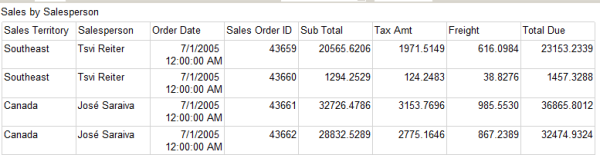
I could be talking about the tables in my database – I do make them skinny by using the right data types – but in this case I’m talking about SQL Server Reporting Services tables. You’ve seen them before. The average table is bland and boring, with nothing to distinguish it from the next, and no reason for you to remember the data in it.

Is this memorable?

table 1

Being the Tim Gunn of SSRS, I’m going to transform this table so it looks good.

Formatting

The default formatting isn’t easy to read. For example: for Order Date, I only want to see the date; and I want the sales columns to show dollar signs and decimal points. All of this can be done using the Format property of a cell. (You can find formatting options here.)

I set my OrderDate text box to “d” for short date, and my Subtotal, Tax Amt, Freight, and Total Due text boxes to “c” for currency.

I do other minor cleanup as well – I set the font of the report title to bold, I set the font of the column headers to bold, and I adjust the width of some of the columns.

table 3

The report is looking better already.

Grouping

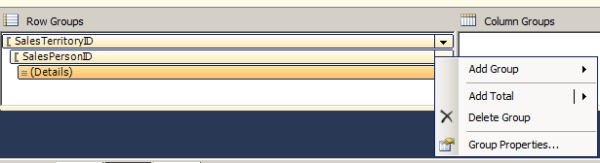
The order of the records isn’t the way I want to see it. We’re looking at the information sorted by order ID. The purpose of this report is to see, at a glance, which sales territory and which sales person have the highest sales for a given date range. I need to add groups for territory and salesperson.

Groups can be added at the row and column level, by using the grouping pane. I add two groups to this table – one based on sales territory ID, and the other based on sales person ID.

table 5

I add totals at the group levels and preview the report again. It’s much easier to read now.

table 6

Toggling

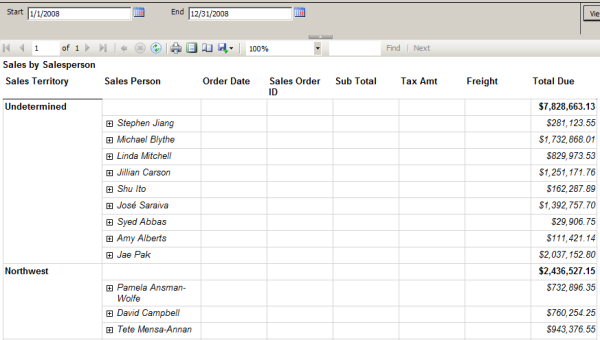
If I exported this report to PDF, it would be 27 pages. No one is going to read through all of that to try to figure out which territory had the most sales. I need to either reduce the information in the report, or make it more readable. If I wanted to show only the totals at the territory and salesperson levels, I could select the detail row and set the Hidden property to True – but the blank rows would still appear under the groups. Or, I could delete the detail row – but then I couldn’t view the data for a sales person if I wanted to.

What I really want to do is make it so I can collapse and expand each section as needed. In SSRS, this is called toggling. I pick the row I want to change the visibility for – in this case, the detail row – and then I set a field that I will toggle on.

table 7

In the group properties, I go to the visibility section. I choose whether this row should be hidden or visible when the report is first run. To enable toggling, I check “Display can be toggled by this report item” and choose a text box – in this case, sales person.

table 8

This is a huge improvement in readability. The next step is to add toggling at the sales person level, triggered by the sales territory.

table 9

Expressions

Not all properties in SSRS are true/false or a set list of options. Many can be configured dynamically, using expressions. Expressions are based on Visual Basic, and can help you do things like set dynamic background colors on cells, change grouping on the fly, or perform mathematical calculations.

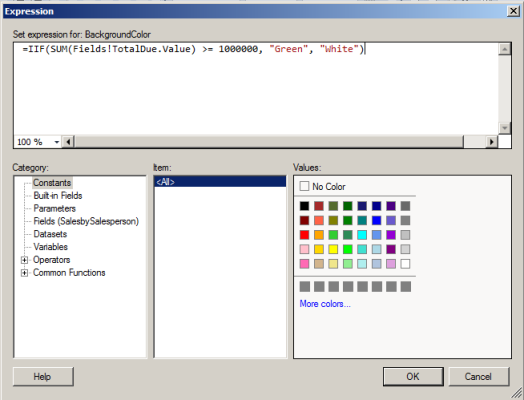
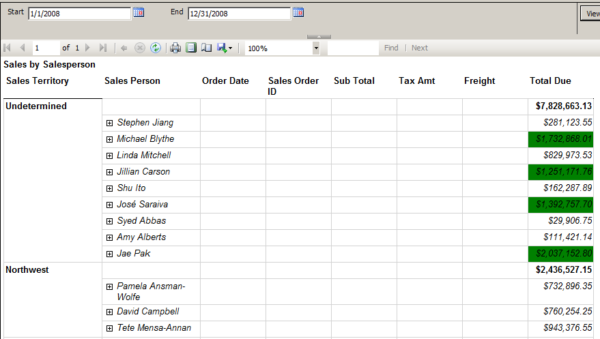
Let’s take a simplistic and not-too-realistic example: I want the value at the salesperson level to have a green background if the sales are over $1,000,000. (This isn’t terribly realistic because I’m letting the user choose a date range. It would be more realistic if that was a one-year goal and the user had to pick a specific year.)

In the text box Background Color property, I choose Expression and the expression builder opens. Using an IIF statement, I say, if the total due field is greater than or equal to 1,000,000, the color should be green; otherwise, it should be white.

table 10

Now, at a glance I can tell which sales people were “high performers” – without having to look at each field and mentally calculate that.

table 11

Expressions allow you to extend the functionality of properties greatly. Become familiar with expressions. Then become great at them. You’ll thank yourself for this bit of knowledge.

Make it Work

Building an SSRS table can be a quick, simple process. Your report will look simple. I challenge you to consider how you can improve it. In each report, pick one element – the formatting of a cell, the ordering of the data, something that can be visualized – and change it. Your reports will stand out, and tell the story better.


My Favorite Things About Being a DBA

SQL Server
9 Comments

I get to work with everybody. Developers need to push data in and out of the database. End users want to get reports out. Executives want to make better decisions. Vendors need to update code. Anytime something’s happening in the company, I’m one of the first to know.

I get to play with new technologies first. Databases push hardware harder than anything else in the company. When solid state drives started showing up, end users wanted them in the database servers first. When we look at big new servers with lots of memory, odds are they’re for the database.

I don’t have to learn new languages constantly. ANSI SQL has been the same for decades, only incrementally adding new capabilities. I really admire developers who can constantly learn new languages and frameworks, but that ain’t me.

The t-shirts.
The t-shirts.

My work often has a beginning and an end. When someone hands me a slow query, I can use my skills to make it go faster, and then hand them the end result. Granted, sometimes they want it to keep going faster, but at least I know when I’m done.

I’m seen as a problem solver. When something’s broken or running slow, I’m usually called in. The bad news is that it’s because they’re blaming the database, but the good news is that I can help get to the real root cause. When I do it right, I’m seen as a helper and a facilitator, not a blame-game guy.

The other IT staff can’t do what I do. It’s not that I’m better than anybody else – I’ve just developed a set of skills that are very specialized, and I take pride in knowing what happens inside the black box.

I have a highly refined BS detector. Because I work with so many different departments, even end users, I’ve gotten used to sniffing out explanations that aren’t quite legit.

I’ve got good job opportunities. There’s still no real college degree for database administrators, and outsourcing isn’t the problem that we expected for a while. Companies still need DBAs, and DBAs still aren’t easy to find. As long as I keep improving my knowledge, I’ve got great career prospects.

I’m in a community of people that love to help. The SQL Server database community is the envy of many disciplines. We love helping each other with free blog posts, webcasts, user groups, SQLSaturdays, mailing lists, forums, you name it.


What’s the Right Server for Your Business? Tweet Chat Recap

SQL Server
1 Comment

Last week, after blogging about What Server Should You Buy, I partnered with Microsoft and Dell to host a Twitter chat about choosing the right server hardware. (Disclaimer: Dell and Microsoft paid me for my time.)

Some of the interesting questions and answers included:

https://twitter.com/JayMunnangi/statuses/382916856148795392

There’s much more, and you can read the full Twitter chat archive here, and if you’ve got more questions about Dell, Microsoft, and server hardware in general, feel free to post ’em in the comments. I’ll work with Dell and Microsoft to help get the answers posted here.


Make SQL Apps Go Faster – Only 60 Seats Left!

#SQLPass
0

In just a few weeks, Brent, Jes and I will be giving a full day pre-conference session at the SQLPASS 2013 Conference in Charlotte, North Carolina. Our pre-conference will be Tuesday, October 15, 2013.

There’s only a few seats left!

This pre-con’s going to be killer– we’ve got 240 folks registered and ready to learn. Capacity is capped at 300 due to logistics, so as of this writing there’s room for 60 more students.

What you’ll learn

You’re a developer or DBA stuck with a database server that’s not going fast enough. You’ve got a hunch that the biggest bottleneck is inside the database server somewhere, but where? In just one day, you’ll learn how to use powerful scripts to identify which queries are killing your server, what parts of the database server are holding you back, how to tackle indexing improvements, and how to identify query anti-patterns.

This pre-conference session will cover the following topics and more:

  • How wait stats tell you where to focus your tuning
  • How the plan cache shows you which queries are the worst
  • How to make fast improvements by picking the right indexes
  • How to identify and fix the most common query anti-patterns

How much does it cost?

When you register for the PASS Summit, our “Make SQL Server Apps Go Faster” is just $395.

If you’ve already registered for the Summit, email Shannon.Cunningham@sqlpass.org to get in on the fun.

Brent, Kendra and Jes in their final Pre-Con planning session.

And for those of you who scrolled down to the bottom of the post in your excitement looking for a call to action,  here’s how to register.


High Availability Doesn’t Fix Poor Performance

Development, High Availability
1 Comment

Imagine this: you have a database, and it’s on a SQL Server instance, which is on a server. That server may be physical or it may be virtualized. The database, or the instance, or the server, has a high availability solution implemented. It might be failover clustering; it might be synchronous mirroring; it might be VMware HA.

One day, your queries start to run a little slower. But the performance degradation is slow, and gradual. Weeks or months slip by, and bit by bit, millisecond by millisecond, the queries are taking longer. Before you know it, queries are taking out locks, blocking each other, and leading to timeouts.

What You Want To Happen

Your server is overloaded. CPU usage is high. Available memory is low. I/O times are dragging on. You know there is another server sitting in the data center that is waiting to take on this load. It’s just sitting there, idle!

You want your HA solution to kick in and take over. Why doesn’t it realize that performance has tanked and it needs to come to the rescue?

Your SQL Server Isn’t Down, It’s Just Thinking

The Thinker shutterstock_61948642Chances are that if there was a disaster and your HA solution kicked in right now, you’d experience the same terrible performance on the other server, too – with the added pain of having downtime to failover.

Why?

High availability solutions are implemented to be there in case of failure. High CPU usage, low memory warnings, or excessive I/O times don’t constitute a failure. As much as you wish the workload could be transferred to the server with lower utilization, it won’t be – you have to tune your workload.

Yes, I’m telling you to roll up your sleeves and start performance tuning.

Do you have monitoring in place so you can check your baselines to see what resources are being used more than normal?

Have you checked the plan cache for the most resource-intensive queries in your server?

Are you performing regular index tuning (using a tool like sp_BlitzIndex®, so you have the right indexes for your workload?

Remember, your HA solution is there to pick up the pieces when something fails – not to be a safety net for poor performance.


The Network and the Update

SQL Server
17 Comments

We work with SQL Server every day, happily sending and receiving millions of packets of data across the network. Have you stopped to think about what happens when something goes wrong?

The Situation

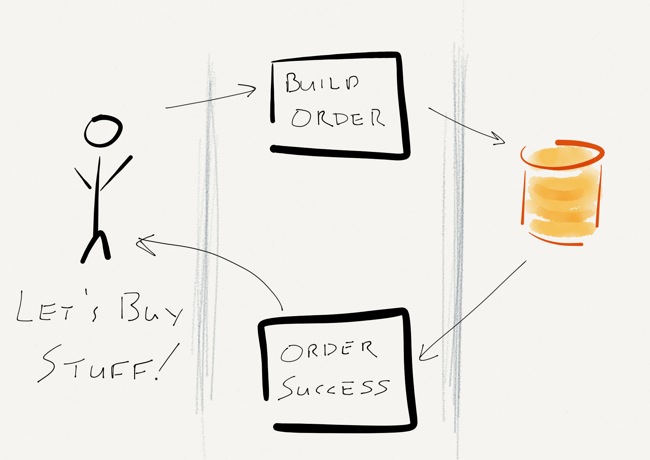
It’s a regular Tuesday afternoon. Users are happily submitting orders into the shopping cart. After browsing around the website for a while, the users decide that it’s time to buy something. After clicking “Check out now”, the user goes through the check out process, enters their payment information, and then clicks “Buy some stuff!” A few milliseconds later, they get a message that their order was successful and everything is zipping over to their house.

It’s something that we do every day, right? Heck, it’s simple enough that I drew a little diagram:

The state of the application... when it's working.
The state of the application… when it’s working.

The Problem

What happens when something goes wrong?

There are a lot of places where things could go wrong – a browser bug could prevent form submission, the shopping cart application could go down, the ordering system could be down for maintenance, or SQL Server might even crash (but you’ve configured a solid HA system, so that ain’t gonna happen).

What’s left to fail? The network.

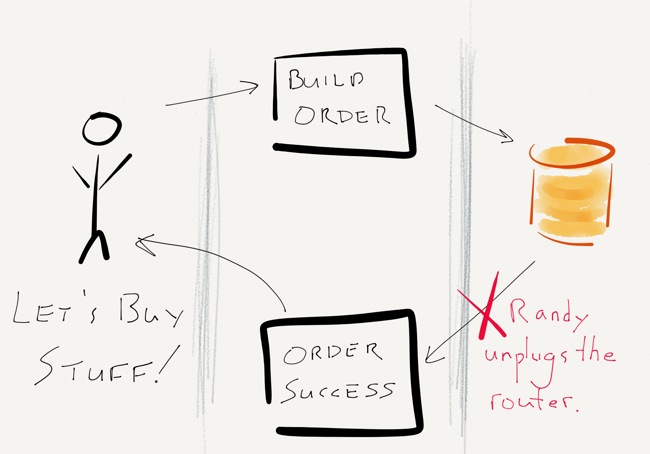
Everything works as it should – the user clicks “Buy some stuff!” and a message is sent to the application servers. The application servers do their magic, approve the credit card, build an order, and save the order in SQL Server. Immediately after SQL Server acknowledges the write and commits the transaction, but before any confirmation is sent to the user, the top of the rack switch power cycles. Randy, the operations intern, accidentally unplugged the power cord before plugging it back in.

There goes the network neighborhood.

Now What?

This is the part that’s up to you. Sound off in the comments:

  • Did the user’s write succeed or fail?
    • What does SQL Server think?
    • What does the application think?
    • Did SQL Server do the right thing?
  • What can you do about this sort of thing?
  • How can your application handle failures like this?