Blog

Who’s Hiring in the Microsoft Data Platform Community? September 2024 Edition

Who’s Hiring
3 Comments

Is your company hiring for a database position as of September 2024? Do you wanna work with the kinds of people who read this blog? Let’s set up some rapid networking here.

If your company is hiring, leave a comment. The rules:

  • Your comment must include the job title, and either a link to the full job description, or the text of it. It doesn’t have to be a SQL Server DBA job, but it does have to be related to databases. (We get a pretty broad readership here – it can be any database.)
  • An email address to send resumes, or a link to the application process – if I were you, I’d put an email address because you may want to know that applicants are readers here, because they might be more qualified than the applicants you regularly get.
  • Please state the location and include REMOTE and/or VISA when that sort of candidate is welcome. When remote work is not an option, include ONSITE.
  • Please only post if you personally are part of the hiring company—no recruiting firms or job boards. Only one post per company. If it isn’t a household name, please explain what your company does.
  • Commenters: please don’t reply to job posts to complain about something. It’s off topic here.
  • Readers: please only email if you are personally interested in the job.

If your comment isn’t relevant or smells fishy, I’ll delete it. If you have questions about why your comment got deleted, or how to maximize the effectiveness of your comment, contact me.

Each month, I publish a new post in the Who’s Hiring category here so y’all can get the latest opportunities.
[Video] Office Hours: Abrupt Intro Edition

Videos
4 Comments

Today’s Office Hours had a ton of technical difficulties because it was my first live stream on both Twitch and TikTok. The first few minutes were cut off, and you can’t see the questions onscreen. Nonetheless, there are good answers in here, so let’s do it:


Here’s what we covered:

  • 00:00 Start
  • 00:03 LivingTheDream: I’m the DBA for a medium sized city. We’re dealing with a ransomware attack and in 3 days every acct/pswd in our environement will get reset based on input from 3 security vendors. Do you have any suggestions for handling such a situation for others that may run into this issue?
  • 01:45 DB: I’m using SQL Server 2019 on-premises, and it feels like the quality of Cumulative Updates has gone down over the years.
  • 02:44 The People’s Elbow: What’s the closest you have come to getting violent with a database server?
  • 05:32 Addi_Fen_Tan: How do I learn Azure for a DBA role?
  • 07:01 Vishnu: I suspect we have unreported SQL Server instances running onprem and in Azure but not sure where they are located. What tool do you like to use for scanning for unreported SQL Server instances?
  • 07:51 Hal Jordan: Is there demand for a Postgres version of SQL ConstantCare?
  • 08:23 Stefanos: Is there automation for testing restores?
  • 09:34 IRDBA: Hi brent I have some table with 40 50 million record, reorganize indexes on that tables takes much longger versus rebuild?index optimize job failed because of reorganizing index .. Ive changed index optimize job to rebuild online and do not reorganize any indexes any more
  • 10:16 Lucy MacLean: Will the Crowdstrike issue cause more shops to ditch SQL VM and move to managed SQL (Azure SQL Managed Instance, Azure SQL DB, Amazon RDS, etc)? Will Crowdstrike recover from this?
  • 12:04 Addi_Fen_Tan: Is Ola Hallgren’s maintenance script what you recommend?
  • 13:16 Mattia: There’s been a lot of talk about CS disaster, but I can’t think of a disaster recovery strategy to avoid going down (except not using It, but that’s not for the DBA to say). I’m thinking that It was inevitable, am I missing something?
  • 14:50 Stefanos: What’s the best for a SQL Server VM: 1 core or 2, 8GB or 16GB RAM?
  • 16:11 Addi_Fen_Tan: How can a DBA be better at performance tuning and monitoring?
  • 16:41 S2ray: Where would you start if you wanted to start over in SQL database development after 9 years?
  • 17:38 user317: I’m about to hit Azure SQL DB’s 4TB limit. Would you recommend sharding or something else?
  • 19:02 john: What’s your view for running database servers on Kubernetes?
  • 20:30 JerseyDBA: A lot of people at my company use a subquery in the FROM clause of queries instead of using a WHERE clause in the main query. Does this by itself cause performance issues?
  • 21:28 Steve E: Hi Brent, How might we explain why queries that usually run OK sometimes experience regression performance wise. The queries do not have any parameters but are often full of famous T-SQL anti patterns. My theory is bad plan choice given too many options due to the anti patterns?
  • 22:27 Moldaver: Is YouTube office hours short form or long form more popular? Why is this?
  • 23:23 Addi_Fen_Tan: What are your thoughts on SQL Server 2022?
  • 24:03 One_of_the_Party_People: Hi Brent. Working with a client whose database is in Managed Instance. Creating a nonclustered index on a specific table causes database corruption. Tried completely rebuilding the table with no improvement. The same index builds fine in an on-prem instance. Any suggestions?
  • 25:09 Ricardo: Howdi Brent, I’ve a new customer with raw queries from an app server, that regularly run for over 10 minutes. They have no waits, and execution plans which look fine, ok indexing, and estimated-subtree-costs like 0.723. They execute almost instantly for me. Any ideas?
  • 27:11 David: Why is it that there exists so little content on in memory sql features? Is it due to the restrictions those features bring or is just not necessary to use them if you database is well designed?
  • 28:11 TD: What are your thoughts on Azure Managed Instances vs Azure SQL DB?
  • 29:01 Accidental DBA: Hey Brent, Is it acceptable to apply for jobs where some of the key skills are lacking but have others (given I’m upfront with them)? I find myself avoiding to apply to jobs currently, however, am capable/willing to learn. Just not sure the protocol on this type of thing.
  • 31:20 gserdijn: Got this VM 2019 Enterprise,130 GB Physical Memory and Datafile over 400GB. The MEMORY_CLERK (all the cached data) only has 30GB with all other clerks well below 1 GB, so I expected a much higher value. Is this normal behaviour for a quite busy instance running for a few weeks?

Query Exercise Answers: Solving the 201 Buckets Problem

Query Exercises
8 Comments

In this week’s Query Exercise challenge, I explained SQL Server’s 201 buckets problem. SQL Server’s statistics only handle up to ~201 outliers, which means that outliers ~202-300 get wildly inaccurate estimates.

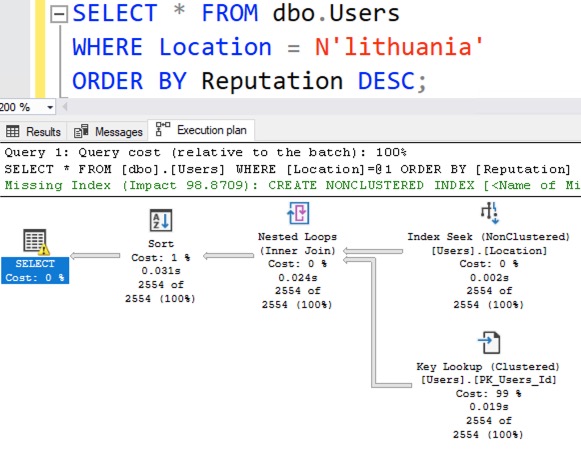
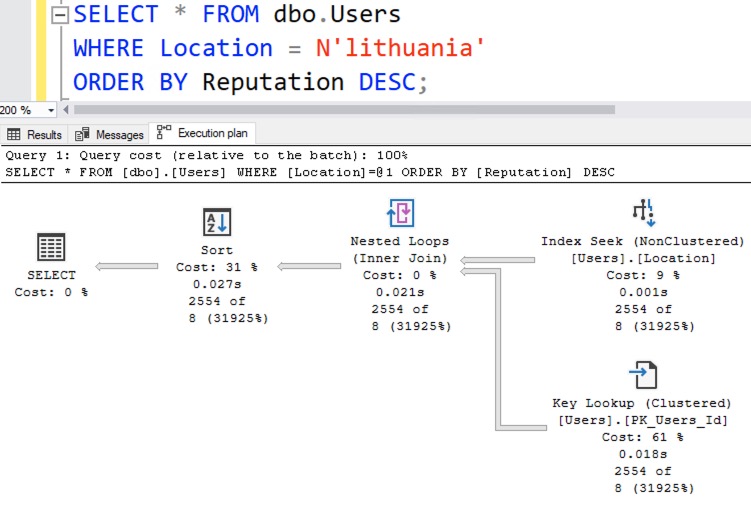
In our example, I had an index on Location and perfectly accurate statistics, but even still, this query gets bad estimates because Lithuania is in outliers ~202-300:

SQL Server estimates that only 8 rows will be found for Lithuania, when in reality 2,554 rows come back:

This under-estimation isn’t really a problem for this particular query’s performance, but when I’m teaching you concepts, I gotta teach you how the simple things break before I start getting into real-world specifics. If you can’t solve this simplistic version, then there’s no way you’re gonna be able to solve the real-world version, which we’re gonna get into in the next Query Exercise.

Solving It with a New Filtered Statistic

I cringe when I type that heading out because it’s such a slimy solution. I’ll start with a simple version, and it’s actually something I hinted at you not to do in the challenge instructions because it’s a bad idea, but bear with me for a second.

SQL Server lets you create your own statistic on specific outliers by using a statistic with a WHERE clause, like this:

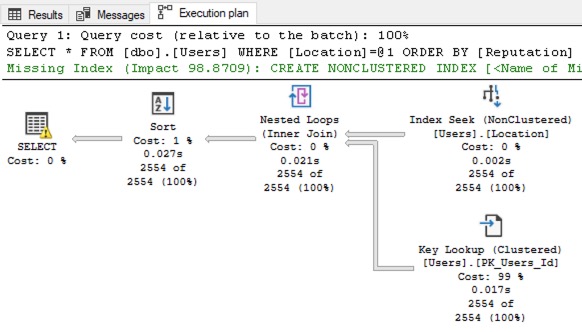
The query gets a new execution plan with bang-on estimates:

Okay, great – but like I mentioned in the challenge requirements, you wouldn’t actually do this in the real world because you’d probably have multiple outliers, not just 1. If you only had 1 big outlier, then… it’d be in your regular 201 buckets!

Instead, if we’re going to solve this with a filtered statistic, we need to create our own manual statistic for the next 200 outliers. First, let’s write a query to find outliers 201-400. Keep in mind, I’m not guaranteeing that they’re not in the existing Location statistics yet – I’m just trying to illustrate how we would find Locations with a large population, but that aren’t in the top 200:

To keep things simple, I’m not using a tiebreaker here. (There are only so many things I can cover in a blog post, and at the end of the day, remember that the focus here is on statistics & outliers.)

Next, let’s use that to build a string that will create our filtered statistic:

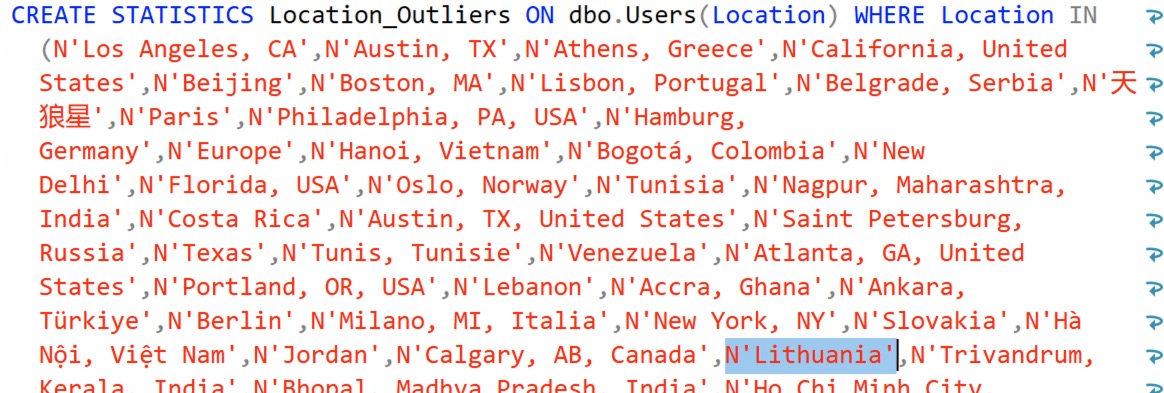
Which gives us a string we can execute, and I’ve highlighted Lithuania just to show that it’s there:

Note that my dynamic SQL is not checking for the existence of the stat and dropping it – if you were going to productize a solution like this, that’s left as an exercise for the reader. You could either drop & create the statistic on a regular basis (like, say, quarterly – the top outliers shouldn’t change that much in a mature database) or create a new filtered state with a date-based name, and then drop the old one. That’s much more work though.

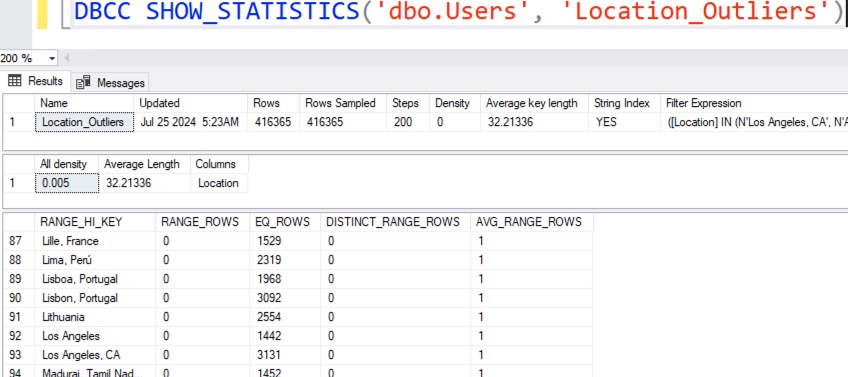
For now, let’s create the statistic and check out its contents:

We now have a bucket dedicated exclusively to Lithuania. Try the Lithuania query filter again, and look at the new actual query plan:

Presto, Lithuania gets accurate estimates, as do any of the other top 200 values.

To see why, right-click on the SELECT operator, click Properties, and go into OptimizerStatsUsage. Both the Location and the Location_Outliers statistics were used when building the query plan’s estimates.

Like I said when I first started talking about this solution above, this solution makes you cringe. It feels dirty, like it’s made out of chewing gum and duct tape. This feels like something that should have a more intuitive solution. For example, over in the free database crowd, Postgres lets you set the number of buckets at the server level with default_statistics_target, and lets you override it with an ALTER TABLE SET STATISTICS command. Postgres lets you pick up to 10,000 outliers – and hell, SQL Server’s filtered statistics solution only gives you another 200 per filtered stat that you create!

At the same time though, the vast majority of tables will never grow large enough to experience this problem. In this blog post, I’m illustrating the problem with the Users table in the most recent Stack Overflow database, and that table has over 22 million rows, with over a decade of activity for a very large web site. Even still, the query we’re talking about doesn’t even have a performance problem!

It’s also important to note that both the 201 buckets problem and the filtered statistics solution have nothing to do with parameter sniffing, trivial optimization, plan reuse, or anything like that. People often get these problems confused because they’re similar, but in this specific example, I’m looking at best-case scenarios for query optimization – this query doesn’t even have parameters, and we’re getting a fresh execution plan each time, specifically designed for Lithuania. (You can try recompile hints to prove to yourself that plan reuse isn’t the issue here, and even with the filtered stats solution, you’d also still have parameter sniffing issues on reusable plans for different locations.)

So would I recommend this solution to solve the above problem? Probably not – but again, like I said, I have to teach you how to solve it in a simple scenario before I move into a more complex, real-world scenario. That one’s coming up in the next Query Exercise where we’ll add in larger tables and more query complexity.

If you want to see even more solutions, check out the comments on the challenge post. Thomas Franz had a particularly interesting one: he created 26 filtered stats, one for each letter of the alphabet, effectively giving him over 5,000 buckets for his statistics!

Hope you enjoyed the challenge! For more exercises, check out the prior Query Exercises posts and catch up on the ones you missed so far.


About Half Of You Don’t Have Your Databases Under Control.

I ran a poll over on LinkedIn to find out if people have 100% of their databases under some kind of source control or version control.

I broke the answers up into two sets, developers and non-developers, because I had a hunch that the developers’ answers would be very different than the rest, and indeed they were:

Half (36% + 13% = 49%) of the audience says they have 100% of their database structure & logic under source control – and that’s fantastic for them! I love it. That’s actually better than I expected – however there’s a catch, and I’ll talk about that in a second.

Half (23% + 27% = 50%) says they don’t – and while I’d love for that to be different, I understand that it’s really, really hard. I wish databases like SQL Server just had a “put the source control here” option that would automatically check all changes into a repository, along with who made the change and when, so we had a history. The reality is that today’s databases have no built-in integration with source control, which means you’re gonna have to put in some kind of product and process to make that happen.

Half of the audience is better than none, right? Well, not so fast: remember how I split the audience into developers and non-developers? When I’ve discussed this issue with client teams, the developers have often believed everything was in source control, but the DBAs and sysadmins told a very different story. They’d say, “Uh, well, actually, there have been a lot of changes made to the environment post-deployment, especially by support engineers and vendors, and that stuff hasn’t quite made it back to version control.”

So in reality, even though a high percentage of developers believe they’re doing it right, they’re being let down by other people at the company. Hell, you can even be let down by Microsoft themselves! The ever-funny Sean Alexander pointed out:

Because Azure SQL DB can automatically add and remove indexes in your production database without leaving a bread crumb trail behind to undo its work. Don’t get me wrong, I think that’s a good thing for small to midsize businesses who can’t afford to have a DBA paying attention to every database – but it’s amusing that it works against the goals of source control.

If your databases are 100% in source control, great! I’m so happy for you, and you’re doing it right. You should be really proud of yourself and your team for putting in good practices. It’s now up to you to blog, present, and stream about how other companies can follow in your footsteps. There’s a severe lack of online content around how to do this well with SQL Server and the other Microsoft databases.

If not, take heart: you’re not alone. Even in 2024, lots of your peers are still struggling with the same challenge. To read more about their struggles, check out Mala’s recent roundup of SQL source control blog posts.


[Video] Office Hours: Professional Development Q&A

Videos
0

I was supposed to be on a flight to Mexico, but had to cancel at the last minute. While waiting for my favorite bagel shop to open, I went through your professional development questions from https://pollgab.com/room/brento.

Here’s what we covered:

  • 00:00 Start
  • 03:25 Asking for a friend: As a prod dba, should I know what data is available in my database? Asking for finance related risks
  • 04:40 Oracle DBA: Hey Brent. I really appreciate all the effort that goes into the office hours streams. I was looking at the youtube channel to find the long form office hours from your San Diego place but couldn’t find much of them. Were those streams deleted?
  • 05:10 Dirk Hondong: “Here is a non-technical question: Is there a book or movie you’ve read or watched recently that you would recommend?”
  • 06:30 Mr. SqlSeeks: What do you do to reset your brain/help you refocus during a work day when you are feeling stressed or overwhelmed?
  • 10:12 Qimir: Will AI soon make it practical for a company to migrate off of one RDBMS and onto another?
  • 11:45 FutureBlogger: Hi Brent, I was interested by your post on the future of the Stack Overflow data dump. Do you think their direction of travel will make it harder for people to use the existing data dumps and databases in blog posts and presentations in the future?
  • 12:50 Venkat: What is your opinion of the recent Azure outage? Did it impact your clients?
  • 14:04 TeaEarlGreyHot: Have you done any work other markets where compensation standards are much lower? Did you adapt your rates to that market? If so, how do you go about what would be a fair compensation rate?

Query Exercise: Solving The 201 Buckets Problem

Query Exercises
14 Comments

When you run a query, SQL Server needs to estimate the number of matching rows it’ll find – so that it can decide which indexes to use, whether to go parallel, how much memory to grant, and more.

For example, take any Stack Overflow database, and let’s say I have an index on Location, and I want to find the top-ranking users in Lithuania:

Then SQL Server has to guess how many people are in Lithuania so it can decide whether to use the index on Location, or do a table scan – because if there are a lot of folks in Lithuania, then it would mean a lot of key lookups to get the Reputation value for each of them.

We’ll run the query in the small StackOverflow2010 database and review the actual execution plan:

In the top right operator, the Index Seek, SQL Server only estimated 5 rows, but 84 rows actually came back. Now, that’s not really a problem for this particular query because:

  • SQL Server used the index – which makes the query fast
  • SQL Server did 84 key lookups instead of 5 – but still, that’s less logical reads than a table scan
  • The query went single-threaded – but there was so little work that it didn’t matter
  • The query didn’t spill to disk – there’s no yellow bang on the sort operator

As our database grows, though, the lines start to blur. Let’s run the same query on the largest current version of the StackOverflow database and see what happens in the actual execution plan:

The top right operator, the Index Seek, shows just 8 rows estimated, but 2,554 rows were actually found. As our data size grows, these estimate variances start to become problematic. Now granted, this succeeds in the same way the 2010 query succeeds: we get an index seek, it’s still less logical reads than a key lookup plan would be, the single-threaded thing isn’t a problem for a 27 millisecond query, and we don’t spill to disk.

However, if we start to join to other tables (and we will, in the next Query Exercise), then this under-estimation is going to become a problem.

Why is the estimate wrong?

We do indeed have statistics on the Location index, and they were created with fullscan since we just created the index. Let’s view the statistics for the large database:

And check out the histogram contents – we’ll page down to Lithuania:

Or rather, we’ll page down to where you would expect Lithuania to be, and there’s a problem: Lithuania’s not there. SQL Server’s statistics are limited to just 201 buckets, max. (Technically, it’s up to 200 buckets for “normal” values in the table, plus 1 bucket for null.)

SQL Server does the best job it can of picking outliers in order to paint a perfect picture of the data, but it’s hard with just 201 buckets.

Typically – but not always – when SQL Server picks the locations that it’ll use for outliers, it uses around the top 200 locations by size, but this can vary a lot depending on the sort order of the column and the distribution of the data. Let’s look at the top locations:

And Lithuania is at row 240 in this case:

So it’s a big location – but not big enough to hit the top 201, which means it’s not going to get accurate estimates. The estimates are derived by looking at which bucket Lithuania is in – in the screenshot below, it’s row 100:

Lithuania is higher than Lisbon, but less than London, so it’s in the row 100 bucket. The row 100’s AVG_RANGE_ROWS is 7.847202, which means that any location between Lisbon and London has an average number of rows of about 8. And that’s where the estimate is coming from in our query:

Your challenge: get an accurate estimate.

You can change the query, the database, server-level settings, you name it. Anything that you would do in a real-life situation, you can do here. However, having done this exercise in my Mastering classes, I can tell you a couple things that people will try to do, but don’t really make sense.

You don’t wanna dump the data into a temp table first. Sometimes people will extract all of the data into a temp table, and then select data out of the temp table and say, “See, the estimate is accurate!” Sure it is, speedy, but look at your estimate from when you’re pulling the data out of the real table – the estimate’s still wrong there.

You don’t wanna use a hard-coded stat or index for just ‘Lithuania’. That only solves this one value, but you’ll still have the problem for every other outlier. We’re looking for a solution that we can use for most big outliers. (It’s always tricky to phrase question requirements in a way that rules out bad answers without pointing you to a specifically good answer, hahaha.)

Put your queries in a Github Gist and the query plans in PasteThePlan, showing your new accurate estimates, and include those link in your comments. Check out the solutions from other folks, and compare and contrast your work. I’ll circle back next week for a discussion on the answers. Have fun!


Make Money Referring Folks to My Training!

Company News
0
YOU! Wanna make easy money?

Black Friday is coming.

Every November, we run a big sale on our training & apps. It’s a really big deal for us – and for you. I like to think of it as a reward for my long-term readers who can hold out, make plans, and budget to buy at a specific time of year.

This year, I’m making it even more of a reward: you can literally make money.

When you sign up for our new Affiliate Program, you get links to my training site with your personal affiliate code embedded. When folks buy through your link, you make 10% of whatever they buy. If it’s a subscription, you even continue to make money with each renewal. To further incentivize folks to make money, we’ll give you a unique 10%-off coupon code that your friends can use to save – even on our Black Friday prices.

I’m telling you about this now so that you can prepare for our Black Friday sales, which run November 1-30 every year. Stay tuned for the details on this year’s savings & packages in October.

The Fine Print

  • Payouts are done via Paypal on the 1st of every month, with a 30-day waiting period. So all your November purchases are solidified December 1, then we wait for 30 days for chargebacks or cancelations, and pay you on January 1. (The only payout option is Paypal, period.)
  • All referred purchases are attributed to the buyer’s last-clicked affiliate link or code. If they read about me from you, and delay, and then click someone else’s referral link instead, then that someone else gets the credit.
  • The default referral window allows referrals from initial clicks within 30 days. If people click on your link, but don’t buy for a month, you lose credit.
  • Teachable (our sales platform) will work with you to gather the appropriate tax information. If you have any problems, work with them first, but feel free to escalate to Help@BrentOzar.com if necessary.

Sharing the Word With Your Friends

After you sign up, we’ll create a custom 10%-off coupon for you – that’s a manual process right now – and then email it to you. If you haven’t heard back from us within a day of signing up, email us at Help@BrentOzar.com and we’ll follow up on it.

After we send it over, go to your Affiliate Resources page, which has personalized affiliate links to our most popular products and the all-products page. For example, your personal link to my Fundamentals Bundle might look like this:
https://training.brentozar.com/p/recorded-class-season-pass-fundamentals?affcode=920087_sdgtwc9_

Make sure to get that URL right! That’s the key to you getting your share. Then, when your friends check out, have them put the coupon code in at the same time they put in their payment info, here:

If you’ve got questions about the program, feel free to email me at Help@BrentOzar.com. I look forward to a successful partnership and putting money in your pocket!


[Video] Office Hours: Ask Me Anything About #SQLServer

Videos
0

I took your top-voted questions from https://pollgab.com/room/brento, including a few career-oriented ones:

Here’s what we covered:

  • 00:00 Start
  • 01:10 Trushit: You mention in your career internals guide that you focused on high value things for which business are willing to pay. How did you control the temptation of trying to learn everything & focus on just sql server? Btw, looking forward to see you at PASS Summit – fan boy moment.
  • 05:17 Keith: I have a vendor application that is creating over 7,000 connections and my concern is potential Threadpool exhaustion. How do I find out how much memory each connection is taking?
  • 06:58 Trushit: I have been through your fundamental classes. I write T-SQL for reporting & don’t deal with execution plans that often. I am struggling to choose between your precon, Eric’s and Kendra’s performance tuning internals & conquer SQL Server performance monsters. Any thoughts?
  • 08:49 Davros: What’s your opinion of PowerBI and Databricks?
  • 09:31 MustangKirby: I was investigating a customer’s query that seemed stuck. Watching with live query stats showed me that it was hung up on a sort operation. Running sp_whoasactive showed the physical reads were climbing and greater than logical reads. What can cause that?
  • 10:18 Mattia Nocerino: I want to show my developers the problems of abusing NOLOCK but I’m having problems replicating your demo in my database. I’m updating a varchar column and at the same time i’m doing a select count(*), but I don’t see big swings in the result. There are 0 NCI. Any idea?
  • 11:04 Donna Noble: Do you ever see clients with too many SQL cooks in the kitchen (sysadmins)? What misfortunes have you seen from this?
  • 13:15 Vinesh: What’s your opinion of SQL 2022 CETaS functionality to export cold data to Azure storage in Parquet format?
  • 14:28 Dr Disrespect: I’m thinking about changing careers. How hard is it to become a DBA?
  • 15:40 ChompingBIts: I swapped to being a DBA about three years ago now. Your same year of experience over and over comment felt a little too familiar. I’ve been learning to automate more with DBA Tools and finding ways to improve process, but what’s your advice for better experience beyond quiting.
  • 17:14 Kate Stewart: What’s the top issue you run into with locating SQL temp DB on the cloud VM’s ephemeral drive?
  • 18:11 MyTeaGotCold: What’s your favourite way to sabotage a server? Does sp_Blitz catch it?
  • 19:26 WouldLiketoKnow: Is there a way to protect custom SQL from being viewed by others in a Stored Procedure that is being sold? Creating a SP “with encryption” offers some protection but there are still ways to view it. Would storing SP code in a DLL type of file offer any more protection.

Query Exercise Answer: What Makes SELECT TOP 1 or SELECT MAX Different?

This Query Exercise was very different: I didn’t ask you to solve a particular problem. I pointed out that I’ve heard advice that SELECT MAX is faster than SELECT TOP 1, and that’s not quite true. I asked you to find factors that would cause these two queries to get different execution plans:

In the exercise post, I showed that with a nonclustered rowstore index like this, whose leading column is not LastAccessDate:

That would give them different execution plans, leading to TOP 1 being faster because it went parallel, while MAX stayed single-threaded and ran longer.

I tell you what, when I was writing that blog post, the hardest thing by far was not to give away too many answers. I worded that sentence above really, really carefully because right there in that sentence alone, there’s a factor that changes the answers. We could just change something about the environment so that the MAX query goes multi-threaded too (or the TOP 1 query goes single-threaded!)

Cost Threshold for Parallelism

Continuing with the above example, let’s change Cost Threshold for Parallelism from the common 50 down to, say, 25:

And then run our two queries again. Now, both of them go parallel, as shown in the actual execution plans:

Now both queries qualify for parallelism, and the MAX is faster. On the flip side, if we raise CTFP to a much higher number, like 500, the new execution plans are… wait… hang on a second here…

How does the TOP 1 query still have parallelism? Let’s hover our mouse over the SELECT and examine its Estimated Subtree Cost:

How’s that possible? If my Cost Threshold for Parallelism is 500, how can a query with a cost of 499.193 go parallel? Well, there’s a trick: we’re looking at the estimated cost of the parallel query, not the serial one. To see the cost of the serial query, add an OPTION (MAXDOP 1) hint to it:

And we can see that the serial cost is a whopping 977 query bucks:

So that’s why the query goes multi-threaded. Parallelism: it’s a hell of a drug. Alright, let’s reset the playing field before we try other factors:

Columnstore Indexes

They’re great for aggregate queries like MAX, so let’s slap one on and see how it affects performance:

The actual query plans look similar in the sense that they have the same operator, but the devil’s in the details on this one:

The TOP 1 uses a sort, which sounds bad, because it sounds like it would sort all 8,917,507 rows – especially with that monster arrow coming out of the columnstore index scan operator. However, that arrow doesn’t mean jack, as we explain in the Fundamentals of Columnstore training class.

The bottom line is that the TOP 1 uses 93ms of CPU time and runs in 205ms. The MAX uses 16ms of CPU time and runs in 97ms. The MAX wins both ways here, but it’s not a dramatic win – most folks aren’t going to complain too much about the difference between these two plans.

However, there’s a catch to this comparison: my database happens to be in SQL Server 2016 or newer compatibility mode for this one. Watch what happens when we introduce yet another variable into this experiment…

Compatibility Level

I’ve still got the columnstore index in place, but let’s drop back to 2014 compatibility level:

And then check our new actual query plans:

Sometimes, smaller plans are better. However, not in this case: the wide TOP 1 plan finishes in just 351ms, but the seemingly-simple MAX plan takes a whopping 2.2 seconds to run!

This comparison is also a great reminder that the percentage query costs on plans are absolutely useless and meaningless! I catch people saying, “The bottom query looks better because it’s only 4% of the cost,” but that’s just garbage:

It drives me crazy that Microsoft even includes this junk in query plans in the year 2024. They’re doing a disservice with that number.

What We Learned in This Exercise

I’ve only covered a few variables in the equation that make TOP 1 and MAX perform differently. For more, check out the comments on the Query Exercise post.

Database servers have a butterfly effect: even the slightest change, seemingly unrelated to anything else, can affect query performance all over the place. I’m not saying you have to test everything before you change anything at all – the real world is just too busy and complicated to do that.

That butterfly effect should teach you 3 things:

  1. Just because 2 simple queries produce the same result doesn’t mean they get the same query plan.
  2. Never say “This T-SQL syntax is faster than that other T-SQL syntax,” because there are tons of butterfly effect variables.
  3. Before you give advice on how to write a query, get familiar with the target environment first.

SQL ConstantCare® Population Report: Summer 2024 (And Upcoming Gamification Badges)

The short story: SQL Server 2022 finally saw some growth this quarter! Two years after the release, 1 in 10 SQL Servers is finally running the latest version.

The long story: ever wonder how fast people are adopting new versions of SQL Server, or what’s “normal” out there for SQL Server adoption rates? Let’s find out in the summer 2024 version of our SQL ConstantCare® population report.

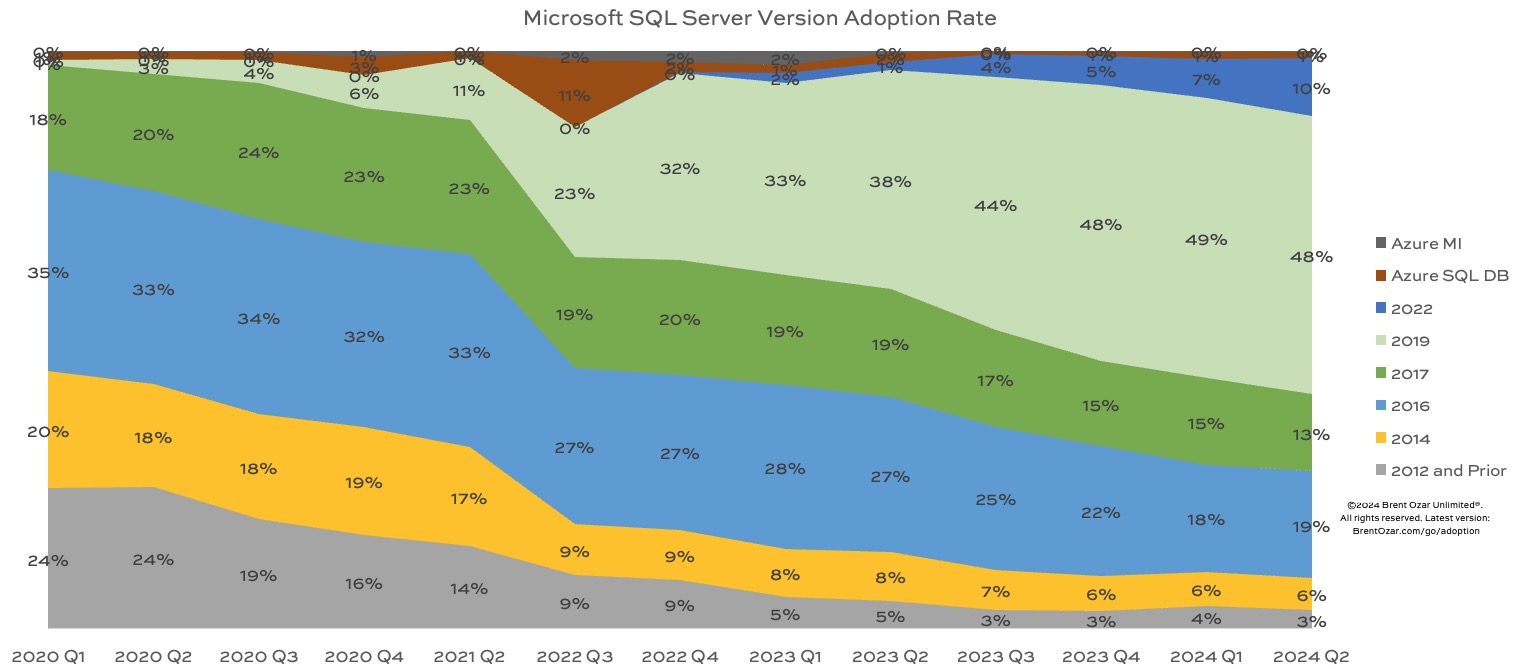
SQL Server 2019 is still the king of the hill with >2x more market share than any other version, but it did drop by one percentage point this month. Here’s how adoption is trending over time, with the most recent data at the right:

SQL Server 2019 still continues to grow while everything else shrinks, with the exception of 2022 treading water:

  • SQL Server 2022: 10%, up from 7% last quarter
  • SQL Server 2019: 48%, holding steady
  • SQL Server 2017: 13%, fairly steady
  • SQL Server 2016: 19%, steady
  • SQL Server 2014: 6%, steady – and is now unsupported as of July
  • SQL Server 2012 & prior: 3%, steady
  • Azure SQL DB and Managed Instances: 1%, steady

Now that 2014 is officially unsupported, it’s interesting to see that the market share of SQL Server 2022 is about the same as the share of unsupported versions. I bet out in the wild, the unsupported version share is even higher just because folks don’t care enough to monitor the oldest zombies. (Plus, SQL ConstantCare doesn’t support pre-2008 versions, which actually still exist – I just got a consulting request for a SQL Server 2005 box this month. And the answer was no.)

If you compare SQL Server 2022’s adoption curve to 2019’s, you’ll notice that SQL Server 2019’s adoption didn’t really take off until 2022 Q3-Q4 – when SQL Server 2022 was released. There might be a few different reasons for that:

  • Maybe people like being 1 version behind, and once 2022 was out, 2019 was the preferred one-behind version
  • Maybe people were waiting for SQL Server 2022, but when the feature list & pricing came out, they decided it wasn’t worth the wait, and moved forward with 2019 instead
  • Maybe they were holding off for the much-anticipated cloud HA/DR integration, but when Microsoft announced that it wouldn’t be included in 2022’s release after all, they decided to move forward with 2019 for now

No matter which one it is (or something else), I’ll be curious to see what happens to 2022’s adoption rate when Microsoft announces the feature list, CPU core & memory limitations, and pricing of the next version of SQL Server. Will that be the thing that finally makes SQL Server 2022 take off?

New SQL ConstantCare® Feature Coming: Gamification

Because we’ve got data for so many servers, consulting clients often ask me, “How big is our database relative to others? Are we using a similar amount of hardware? Are we out of the ordinary compared to our peers?”

Soon, we’re going to give monthly badges to SQL ConstantCare® customers (both free and paid) based on a bunch of rankings. Who has the most data? Who has the largest servers? Who has the longest uptime? And they won’t just be badges of pride – there are also badges of shame, like whose servers have the most problems, or who’s muted/ignored the most recommendations.

I’ll be blogging about the various badges over the coming weeks, explaining how the rankings are calculated, where the data comes from, and what the typical leaderboard looks like so that you get a rough idea of what it looks like at the top – and at the bottom.

If there’s a metric that you’d like to see rankings for, feel free to add it in the comments! We just might build a badge for it.


As a SQL Server DBA, Postgres Backups Surprised Me.

I’ve worked with Microsoft SQL Server for so long that I just kinda took backups for granted. We run a backup command, and SQL Server:

  1. Logs activity to the transaction log while the backup is running
  2. Reads the exact contents of the database files, and writes them out to a backup file
  3. When it’s done, it also includes the transaction log changes so that it can use the combination of the data files, plus the transactions that happened during the backup itself, to get a single point in time version of the database files

All without stopping transactions or closing the data files. It’s pretty nifty, and it works really well. The good part is that it’s very efficient at backing up the entire database, and restoring the entire database to a single point in time.

The drawback is that it’s impossible to restore a single object from backup, by itself. Oh sure, we’ve complained about it for years, and it’s the #2 top voted feature request, but it doesn’t seem to be happening anytime soon. We’ve learned to work around that by restoring the entire database somewhere else, and then extracting just the data we need.

PostgreSQL Backups are Totally Different.

One of the gotchas of Postgres is that there are a million different ways to accomplish any task. You could stop the database service and get file-level backups, but of course that’s a bad idea for production databases. You could install extensions like Barman to automate backups for you, and in many cases that’s a great idea for production databases. However, we’re going to focus on the built-in way that most shops start with.

When you back up a database with pg_dump, it actually generates a text file with statements like CREATE TABLE and INSERT that reconstruct the data from scratch.

I’ll give you a moment to re-read that sentence.

At first, you’re going to be horrified, but give it a second and open your mind.

Sure, there are drawbacks: if you work with databases over a few hundred megabytes in size, it probably horrifies you to think about a text file that large. No worries: you can tell pg_dump to compress (zip) the output into a custom file format as it goes. Another drawback is that there’s no such thing as combining transaction log backups with this – if you want to get point-in-time recovery, you’re going to need a better solution than pg_dump.

However, pg_dump has some pretty intriguing advantages – for starters, table-level restores. The pg_restore documentation page has all kinds of switches for just restoring one table, or only restoring the data (not the schema), or just restoring specific indexes, or more.

Speaking of indexes, get a load of this: because pg_dump is only backing up the data, indexes don’t bloat your backup files. You could have 50 indexes on a table, but that index data itself isn’t getting backed up – only the index definition, aka the CREATE INDEX statement! At restore time, pg_restore reads the backup file, runs insert commands to load the data, and then when it’s all there, runs the CREATE INDEX statements necessary to re-create your indexes. Your database can be partially online while the indexes are re-created. (Is this restore strategy going to be faster? Probably not, and I’m not going to test it, but it’s wild to know.)

But here’s the part that’s really going to blow your mind: since the dump file is just a list of commands, it’s technically possible to restore a Postgres database back to an earlier version. Take a plain-text backup (or convert the existing one to plain-text format), and then execute the commands, looking for any errors caused by newer engine features. Edit the backup file to remove the unavailable features in your older version, and then try again.

Which Approach Is Better?

Microsoft’s approach focuses on backing up (and restoring) the exact data file contents at extremely high speed, shoving the data out without concern for its contents. Properly tuned, it’s fast as hell. I’ve had clients who regularly backed up and restored 1-5TB databases in just 5-20 minutes. That’s useful when you’ve got very short SLAs, but not shared storage.

Microsoft’s integration with the transaction log also means that the full backup is very extensible. You can integrate it with log backups, or use it to seed transaction log shipping, database mirroring, or Always On Availability Groups. There’s just one backup approach in SQL Server, but it has all kinds of flexibility that Microsoft has built up over the decades.

On the other hand, there are a bunch of different ways to back up Postgres databases. If you choose the pg_dump approach, it also lends itself to all kinds of creative use cases right out of the box. The more I played with it, the more amused I was at its capabilities. For example, backing up data from AWS Aurora Postgres and restoring it to my local Postgres instance was a no-brainer. The fact that one was a platform-as-a-service database in the cloud, and the other was an on-premises database, just simply didn’t matter – something Azure SQL DB just can’t pull off, even though Microsoft manages the whole code stack.

Microsoft has just one backup tool, and it works really well – as long as you don’t need to do something unusual, like restore a single table or downgrade versions. Postgres has lots of backup tools that have more flexibility and power overall – buuuut, it’s up to you to pick the right one and then configure it in a way that supports your RPO/RTO.


Free DBA Job Interview Q&A Course This Weekend

Interviewing
4 Comments

DBA Job Interview Questions and AnswersIf you’re facing an upcoming SQL Server DBA job interview, or if you’re a manager who has to interview DBAs, I want to help. This weekend, I’m giving away my DBA Job Interview Questions & Answers course absolutely free!

Just hit up my training product page, find the DBA Job Interview course, add it to your cart, and check out with coupon code TikTok.

In that course, I give you questions for core DBAs, infrastructure, development, screenshot-based questions, open-ended questions, and more. I read the question, then I pause to let you answer it, and then I tell you what I was looking for in a great answer.

I did a quick live version of the first few questions if you’d like a feel for it:

I hope it helps make the DBA job interview process suck a little less for everybody involved. Cheers!


[Video] Office Hours with a Special Guest: Count Distinct

Videos
3 Comments

I was busy, so I asked a friend to fill in for me and answer your top-voted questions from https://pollgab.com/room/brento. He did a pretty good job:


Here’s what we covered:

  • 00:00 Start
  • 00:52 Confused: Who uses differential backups, really? I don’t get the point.
  • 02:20 Chris: Are third-party tools a necessity or a luxury for managing SQL Server?
  • 03:26 SwissDBA: Statistics can only store 8kb of data, but often it would useful it it could store more info about that table. Can we make stats bigger and would this be a good idea to do?
  • 05:29 Stockburn: Hi Brent, any advice on running sp_blitzindex against a 1TB db with over 60000 tables and over 130000 Indexes. I have tried but it never finishes. Old Microsoft Navision environment. As always love what you do, cheers!
  • 07:06 Pat: Which team should the DBA be in: devs, sysadmins, devops, or something else?
  • 08:06 Indara: Is query store beneficial / necessary if you have third party SQL monitoring software?
  • 08:52 Tobin: Does Microsoft ever watch office hours / read your blog? Any resulting changes?
  • 10:52 DBANoob: Is it possible to perform transactional replication from one HA listener to another HA listener? Before you make fun and ask why, just know we are aware of how crazy this may sound and I don’t have enough characters to explain why we need to do this. Appreciate any input on this!
  • 11:29 TheyBlameMe: Online index creation on a big table in primary DB causing transaction log to max out at 100% due to slow transfer over wire to an AlwaysOn ReadOnly replica in a different geo-location. How can this be better managed, mitigated? No hickups primary, online index duration secondary
  • 12:33 End Try Begin Cry: We need to test our response to checkdb finding corruption. Is there a way to intentionally corrupt a database in various ways?
  • 13:22 FloydianDB: How can I convince our head of the company that adding columns in a certain position in the table is a bad idea. He won’t listen and I’m tired of doing create/drop table statement and re-adding the data back in.

Query Exercise: What Makes SELECT TOP 1 or SELECT MAX Different?

Query Exercises
10 Comments

These two queries both get the same answer from the Stack Overflow database:

But do they go about their work the same way? As it turns out, no – even with no indexes at all, the two queries get different execution plans, and one of them is faster than the other:

On my particular server, with my server-level settings, database settings, and table structure, MAX runs faster and uses about 15% less CPU time to accomplish the same result.

But read these instructions carefully, because this week’s Query Exercise is not about making them faster! I wanna emphasize that really clearly because I know I’m gonna get a bunch of people who yell “create an index” in the comments.

Your challenge is to find things that will change their performance, things that will cause them to produce even more different execution plans. I’ll give you an example: let’s create an index that does not lead with LastAccessDate, and then try the queries again:

The new actual execution plans:

TOP 1 uses a sort, burns 3.3 seconds of CPU time, runs in <1 second, and goes parallel.

MAX uses a stream aggregate, burns 1.5 seconds of CPU time, but stays single-threaded, so it takes longer.

If you wanted to call a winner by lower CPU time, it’d be the MAX, but if you wanted lower execution time, it’d be the TOP 1. Of course, you could change those queries further in order to get a different winner, but I just wanted to start with an example to show you the kinds of influencing factors we’re looking for.

Again, your challenge is to find things that change their performance. I’m doing this because I saw someone say online that MAX is always faster, and that’s just not even close to the truth. There are many, many factors involved in affecting whether TOP 1 or MAX is best for a particular use, and your challenge this week is to find as many of those factors as you can. Absolutely anything is on the table! You can change the server settings, database settings, the table itself, and the query.

Put your queries in a Github Gist and their actual query plans in PasteThePlan, and include that link in your comments. Check out the solutions from other folks, and compare and contrast your work. Then, read my thoughts in the answer post. Have fun!


[Video] I Must Be an Idiot: Automatic Tuning Never Works for Me.

SQL Server 2022
20 Comments

I don’t get it. I’ve given this feature one chance after another, and every time, it takes a smoke break rather than showing up for work.

The latest instance involved the recent Query Exercise where you were challenged to fix a computed column’s performance. In the comments, some folks noted that performance of the query was actually great on old compat levels, like SQL Server 2008, and that it only sucked on newer compat levels like 2016 and later.

That would be the perfect use case for Automatic Tuning, I thought to myself! I’ve said this so many times over the last five years, but I’m an endlessly hopeful optimist, as anyone who knows me well would never say, so I gave it another chance.

We’ll set up the same user-defined function and computed column described in that blog post:

We’ll set up an index on the Reputation column, and a stored procedure that’ll benefit from using that index:

We’ll put our database in old-school compat level, and turn on Query Store to start collecting data at a frantically quick pace:

We’ll run the query a few times, noting that it runs blazing fast, sub-second:

And check Query Store’s Top Resource Consuming Queries report to show that the plan is getting captured:

Now, let’s “upgrade” our SQL Server to the latest and “greatest” compatibility level, and turn on Automatic Tuning so that it’ll “automatically” “fix” any query plans that have gotten worse:

Now, when we go to run our query again, it takes >30 seconds to run, burning CPU the entire time – and zee Automatic Tuning, it does nothing. Query Store shows that there’s a new plan, and that the runtime is way, way worse:

But sys.dm_db_tuning_recommendations shows nothing, even though Query Store is on and so is “Automatic” “Tuning”:

To see it in inaction, here’s a live stream:

I don’t get it. I’ve given this feature so many chances, and it’s never kicked in for me at the right times. I’m guessing I’m missing some secret set of steps I need to take, but whatever it is, it’s beyond me. Maybe you can get it to work in this scenario, and share your magic? Now’s your chance to make me look like a fool.

Well, I mean, like even more of a fool.

Update Aug 7 – in the comments, Uri reminds us of Kendra Little’s post about problems with automatic plan correction. She’s frustrated with it as well.

Update October 16 – Erik Darling gave it a shot too and video’d his efforts. He got it working, but the query had to run poorly ~20 times for Automatic Tuning to wake up:

He’s using the much smaller StackOverflow2013 database, so he could actually get 20 runs to finish – whereas in the current StackOverflow databases, the video would have been a whoooole lot longer before Automatic Tuning would have kicked in. He also had some problems with SQL Server abandoning automatic tuning, reporting that the query was error-prone.


Who’s Hiring in the Microsoft Data Platform Community? August 2024 Edition

Who’s Hiring
4 Comments

Is your company hiring for a database position as of August 2024? Do you wanna work with the kinds of people who read this blog? Let’s set up some rapid networking here.

If your company is hiring, leave a comment. The rules:

  • Your comment must include the job title, and either a link to the full job description, or the text of it. It doesn’t have to be a SQL Server DBA job, but it does have to be related to databases. (We get a pretty broad readership here – it can be any database.)
  • An email address to send resumes, or a link to the application process – if I were you, I’d put an email address because you may want to know that applicants are readers here, because they might be more qualified than the applicants you regularly get.
  • Please state the location and include REMOTE and/or VISA when that sort of candidate is welcome. When remote work is not an option, include ONSITE.
  • Please only post if you personally are part of the hiring company—no recruiting firms or job boards. Only one post per company. If it isn’t a household name, please explain what your company does.
  • Commenters: please don’t reply to job posts to complain about something. It’s off topic here.
  • Readers: please only email if you are personally interested in the job.

If your comment isn’t relevant or smells fishy, I’ll delete it. If you have questions about why your comment got deleted, or how to maximize the effectiveness of your comment, contact me.

Each month, I publish a new post in the Who’s Hiring category here so y’all can get the latest opportunities.

[Video] Office Hours in Cabo San Lucas, Mexico

Videos
0

What a comfy morning to sit down with a breakfast margarita and tackle your top-voted questions from https://pollgab.com/room/brento.

Here’s what we covered:

  • 00:00 Start
  • 00:36 DBA_Mufasa: When we restore a DB from a prod source to a different server, does the DB come with the index usage stats from the original source server or do they get reset on the destination server once the DB is restored. Trying to figure out if people are using a daily restored DB in Dev.
  • 01:44 Trushit: I have a stored procedure that uses XML path to create the XML tree. I want to store this in variable. However, stored procedure returns a column with a link to XML tree. Only when I click on the link, full tree is visible. Any ideas how to access the entire XML tree?
  • 02:43 MyTeaGotCold: I like your arguments for always setting fill factor to 100. But do the same arguments mean that I should default to using DATA_COMPRESSION = PAGE on my rowstore indexes?
  • 04:02 Rose Noble: You’ve mentioned your aversion to linked server queries. Are linked server sprocs acceptable?

  • 04:49 Genuinely Curious: We’re using Standard Edition at the moment. When should I start thinking about Enterprise Edition?
  • 05:27 Yord: What are the top issues you see for rolling out read only AG replicas?
  • 06:32 Pink Pony: What’s your opinion on db setting “auto update statistics asynchronously”? Should we change value to True?
  • 07:49 Miles: Hi Brent, When we’ve resource intensive queries, which ones one should focus on first? high I/O or high CPU or head blocker queries or parallelism or based on waits or user complained queries? Please suggest? Whats the approach one should follow?
  • 08:44 Genuinely Curious: If Azure SQL DB Managed Instances are as good as SQL Server, but require less maintenance, why would people keep using SQL Server?
  • 10:51 TJ: Redo thread on secondary replica tends to get blocked by SELECT queries which in turn block other queries. We have to currently kill the select queries to resolve blocking. Is this the correct way to handle this situation?
  • 12:26 SQL_Stormlight: A friend needs to design a DR solution across datacenters for 2300+ dbs. It /seems/ like the best option is a FCI but how do they deal with the shared storage? Would SAN replication get them further than clustering or are the two used in tandem?

Free Online SQL Server Internals Conference Next Week

Conferences and Classes
0

The EightKB conference is a free event that focuses on SQL Server internals.
You can get the session details and register for the August 8th event at eightkb.online. The session lineup is below, each link being a calendar invite just so you can block out your calendar:

To see the full session abstracts and register, head to eightkb.online.


Thoughts About Stack Overflow’s Annual Developer Survey

SQL Server
7 Comments

Every year, Stack Overflow runs a developer survey about technology, work, community, and more. This year’s results include 65,437 responses from developers around the world.

The results are biased towards the kinds of developers who use Stack Overflow – 76% of the respondents reported that they have a Stack Overflow account. I would guess that it’s nowhere near a perfect picture of all developers worldwide, but let’s just focus on the fact that it does represent how over 65,000 developers feel – and that alone is useful enough to give you a picture of what’s happening in at least a lot of shops worldwide.

The most-used databases were PostgreSQL, MySQL, SQLite, and Microsoft SQL Server, in that order:

When Jeff Atwood and Joel Spolsky first started Stack Overflow, Jeff did a lot of evangelization work for it, and Jeff’s audience was heavily biased towards .NET development. I would imagine that’s part of why SQL Server is by far the highest paid database in the list (as opposed to open source.)

I have a total blind spot around SQLite, but often on my TikTok videos when the discussion of licensing costs comes up, some commenters will ask why everyone in the world doesn’t use SQLite. I’m sure there are a lot of apps worldwide that simply don’t need a database server, only a small local relational storage, and I can understand why those developers would have a similar blind spot about what it’s like to handle concurrent load in an enterprise-wide ERP app or e-commerce store.

The next chart, admired-vs-desired, doesn’t make sense to me and I don’t trust the numbers:

From what I can tell, the blue scores indicate how much the respondents have worked with the database in the last year, and red scores indicate how much they want to work with it next year? I’m pretty confused by this one. Are the red scores exclusive to only the people who actually worked with the technology this year – meaning, out of the 15.4% of the audience that worked with SQL Server in the past year, 54.5% of them want to work with it next year?

And why don’t these numbers come anywhere near agreeing with the prior question? The prior question says 25.3% of the audience used it last year, but the admired-vs-desired question says only 15.4% did? I’m so lost. At first I thought this question is taking about “extensive” development work, whereas the first one might just be ANY database work – but the numbers don’t make sense there either, because Supabase scored 4% on the first question (any work), but 5.9% on this question (extensive work.) Both questions use the term “extensive.” I’m lost.

So yeah, I just discarded that question and didn’t bother to think about the results. It doesn’t make sense, so I don’t trust it.

There was also a question about which cloud provider folks used, and AWS dominated the market:

That’s been my experience too – the vast, vast majority of my cloud clients are on AWS – but I’m mentioning it here because I know that Azure users really seem to believe Azure’s the only game in town. When I talk to Microsoft MVPs, they seem dumbfounded that companies are actually using AWS extensively, and they also seem surprised that Microsoft is competing with Google for second place. (Google’s been throwing a lot of discounted/free compute power at prospective clients to win them over.)

There’s a lot more stuff in the overall results, especially the workplace trends section that talks about employment status, hybrid/remote/in-office, and salary. When you’re looking at each workplace graph, make sure to click on the geographic filter at the top of that graph so the numbers will be more meaningful to you, based on where you’re located.


[Video] Office Hours in a Mexican Hot Tub

Videos
2 Comments

While taking a dip in Cabo, I went through your top-voted questions from https://pollgab.com/room/brento.

Here’s what we covered:

  • 00:00 Start
  • 01:00 OpportunityKnocking: What are your thoughts on when to implement a NoSQL strategy over traditional RDBMS for large enterprise-wide database platform solutions? I see scalability advantages in using NoSQL but do you see this becoming more of a preferred go-to solution for organizations over time?
  • 01:57 SwissDBA: In a table with 8M rows, 2 GB data + 4GB indexes, Clustered ix on a GUID column. INSERTs are slow bc SQL has to squeeze them in between existing rows. I would switch the clustered ix to a new IDENTITY column, so new records can be added at the end of the tbl. How would you do it?
  • 03:01 MyTeaGotCold: You recently said that your Hekaton clients are trying to get off. The faults of Hekaton are well-known, so what changed between when they started using it and now?
  • 03:54 Tim Rogers: 90 TB database in AWS, all data active. Tables partitioned across 100 filegroups (4 files each) for ease of index maintenance. Would like to consolidate to a single “data” filegroup with ~100 files, because we don’t do anything that benefits from multiple filegroups. Thoughts?
  • 06:30 Kevin M: Would like to learn Amazon Aurora despite current company not using Amazon stack. What’s the best / cheapest way to learn Amazon Aurora?
  • 07:47 SadButTrue: Hey Brent! Who’s the “Brento” in Postgres community?
  • 08:26 RadekG: When was the last time that you faced a query so poorly written that you had to have a drink before fixing it? What was so bad about it?
  • 11:19 Jökull: What are the top issues you see when storing / searching XML/JSON in SQL Server?