Blog

Set MAXDOP in Azure SQL DB or You’ll Get This Cryptic Error.

Azure SQL DB
1 Comment

Max Degrees of Parallelism (MAXDOP) tells the database engine, “If you decide to parallelize a query, go parallel with this many worker threads.”

(It’s a little more complex than that – there is also a coordinating thread, plus a single plan might have multiple parallel zones that each consume MAXDOP worker threads, but for the sake of this blog post, let’s keep it simple.)

Microsoft’s recommendations on how to set MAXDOP are a little long-winded, but again, in the interest of brevity, I’m going to summarize it as setting it to the number of cores in each physical processor, up to 8. (Again, the rules are much more complex – but if you want the full story, click on that link. I’m going to keep moving.)

In Azure SQL DB, you set max degrees of parallelism at the database level. You right-click on the database, go into properties, and set the MAXDOP number.

I say “you” because it really is “you” – this is on you, bucko. Microsoft’s magical self-tuning database doesn’t do this for you.

And where this backfires, badly, is that Azure SQL DB has much, much lower caps on the maximum number of worker threads your database can consume before it gets cut off. You’ll get an error like this:

The request limit for the database is 2000 and has been reached.

Thing is, that error message is a vicious lie: you haven’t hit 2,000 requests. You’ve just hit 2,000 worker threads! In the case of my client, on their 20-core Azure SQL DB, queries were going parallel and consuming 20+ worker threads. All it took was ~90 simultaneous parallel queries, and they’d hit the worker thread limits. It was so confusing because they thought there was no way their app could possibly be sending in 2,000 requests – and they were right.

The Azure SQL DB resource limits page explains:

The request limit for the database has been reached

The first fix you should try: check your database’s maxdop setting, and if it’s 0, read how to set MAXDOP, and set it. Don’t waste money upsizing your server, and don’t waste time tuning code until you’ve corrected this terrible default setting first.


Here Are the YouTube Channels We Both Loved.

Company News
4 Comments

Last week, I announced that we’ve hit 50,000 YouTube subscribers, and I celebrated by letting y’all submit your favorite YouTube channels in the comments, and 5 of you would win my Fundamentals & Mastering Class Bundle.

You did not disappoint.

First, I’m giving 5 Fundamentals Bundles to these 5 folks who suggested channels that already happen to be among my favorites. I just wanted to reward them for their great taste, and also to share these channels with the rest of you, dear readers:

  • Alexey for suggesting Rick Beato, a really nice musician who conducts interviews with brilliant talent
  • Francesco for suggesting Mentour Pilot, who recaps aircraft crashes and disasters
  • HappyDBA for suggesting the Fire Department Chronicles, who uses comedy to recap real-life experiences of 911 calls
  • Jeremy for suggesting Chocodogger, a dog that eats things with human hands
  • Laurens Bracke for suggesting The OG Crew, a hilarious combination of game show and improv

Next, I couldn’t stop at 5 winners – I ended up picking TEN of them because there were so damn many good ones!

  • Alexander for suggesting The Tim Traveller, a nerdy travel show
  • Andreea Podariu for suggesting Shanbai, an artist with beautiful ASMR-style recordings of their art processes
  • An Gie Cech for suggesting Sumo Food, a chronicle of the daily life of sumo wrestlers practicing and eating, which sounds bizarre, but ends up being chill background material showing a lifestyle I didn’t know existed
  • Ben Belnap for suggesting Stuff Made Here, a cool inventor who doesn’t publish a lot of videos, but when he does, they’re of extremely high quality and production value
  • Joe for suggesting Erik Aanderaa, who sails through vicious storms, making for amazing background video material while I work
  • Joseph for suggesting Jacob Knowles, a lobster fisherman who shares behind-the-scenes stories of his work
  • Richard L. Dawson for suggesting Neural Derp, a channel that builds AI remixes like Redneck Star Trek TNG – these should not be as funny as they are
  • SabiBi for suggesting 40 Over Fashion, a channel with clear, simple advice for looking and feeling your best (I don’t necessarily agree with a lot of the advice, but I like the guy’s opinion and approach already)
  • Shane for suggesting Nat’s What I Reckon, a one-man very not-safe-for-work Aussie cooking show
  • Steve Earle for suggesting 3Dbotmaker, die cast car racing captured with absurdly high production values

Thanks again for making my work fun, for making it possible for me to do this stuff and share my work with y’all, and thanks for being such fun people to interact with. I really love my work, and I love that y’all join in.


We Hit 50,000 YouTube Subscribers! Let’s Run a Contest.

Company News
176 Comments

This is kinda amazing to me: our YouTube channel has broken the 50,000 subscriber mark!

We hit 50,000 YouTube subscribers!

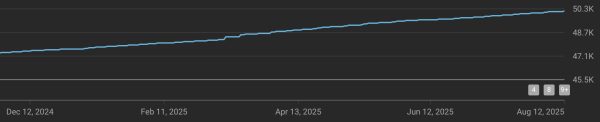
That’s wild to me because I don’t put “please like and subscribe” type stuff in the videos, and I don’t try to build viral content. I just show up every week and publish answers to y’all’s questions from PollGab. And yet, our subscriber growth is slow and steady over time, growing by about 10% per year:

Subscriber growth over time

To celebrate, let’s give away 5 Fundamentals & Mastering Bundles! To enter, leave a comment with a link to your favorite YouTube channel (other than ours) – I love finding new unusual stuff to watch. On Sunday, I’ll pick 3 random winners, plus 2 winners with the YouTube channels I haven’t seen before that strike me as the most interesting.

I suppose I should inspire you with a few of my favorites that you might not have discovered yet:

When you submit your comment, it may not show up right away because comments with multiple links require moderation around here to prevent spam. I’ll moderate & approve ’em daily though.


Microsoft Now Recommends You Set Max Memory to 75% and Min Memory to 0%.

Configuration Settings
20 Comments

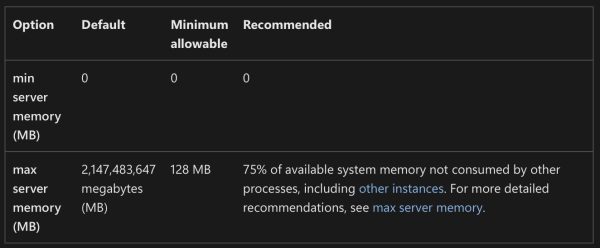
Somehow I missed this a few years ago, and I bet a lot of y’all did too. Note the new “Recommended” column in the memory settings documentation:

Min and max memory recommendations

These recommendations are also set by the SQL Server 2022 setup wizard if you choose the recommended settings on the memory step.

The documentation change was made in this pull request, and I don’t see a Github issue or documentation/comments around the recommendation, which is totally fine. I don’t expect (or desire) Microsoft to have a public discussion on every settings change they make – nobody would ever get anything done, hahaha.

When I noticed it, I posted about it on LinkedIn, and there was a vibrant discussion. Randolph West (of Microsoft’s Docs team) posted about it too. People talked about how this should probably be automatically managed, and I’d point out that if you follow Microsoft’s recommendations, it actually is automatically managed! SQL Server will size its memory up (and under pressure, down) based on what’s happening on the server.

I do wish Microsoft’s recommendations added another factor: a different recommendation for big servers. 25% unused memory is pretty high when the server has 512GB memory or more. For example, in my setup checklist, I recommend leaving 10% free or 4GB, whichever is greater. Here’s part of the script that my lab servers run on Agent startup, where I use a 15% number instead because I also run SSMS on those:

That way, when I change an instance’s size, I don’t have to worry about going back and touching max server memory.

I’m not saying 10%, 15%, 25%, or 4GB is the right number, but I think we do need to consider both a percentage and a floor at the same time. Otherwise, people with 16GB VMs are going to say 25% sounds about right, and the people with 1TB servers are going to say 5% is plenty of memory to leave unused.

I’m not opening a pull request to change the documentation recommendation (let alone the setup wizard) because I think y’all will have strong opinions, and I’d rather hear those first. I certainly don’t have the right definitive answer on this one – I’m confident enough to put it in my setup checklist, but not so confident that I’d ask my guidelines to be the official documentation, hahaha.


Announcing Free Fundamentals Week 2025!

Conferences and Classes
2 Comments

You’re a developer, analyst, database administrator, or anybody else working with SQL Server, Azure SQL DB, or Amazon RDS SQL Server. You want to learn how to make your databases go faster.

Good news! In October 13-16, I’m teaching totally free half-day versions of my classes from 9AM-1PM Eastern time, 8AM-Noon Central, 6AM-10AM Pacific:

  • Monday: Fundamentals of Index Tuning
  • Tuesday: Fundamentals of Query Tuning
  • Wednesday: Fundamentals of Columnstore
  • Thursday: Fundamentals of TempDB

These half-day classes are totally free, no strings attached, and they’re a great way of getting started on your formal database education journey, or catching up on things that you’re a little too cocky to admit you didn’t know.

To attend, register here, then grab the calendar invites to block out your coworkers from trying to schedule you for meetings, hahaha. At the time of the class, head here for the live stream. (That URL is in the calendar invites too.)

If you can’t make the live classes, the recordings won’t be on YouTube or free – you’ll need to buy my Recorded Class Season Pass: Fundamentals bundle, which includes the full day-long versions of each of those classes, PLUS additional courses on Azure networking, PowerShell, parameter sniffing, and more. You can either buy one year of access, or lifetime access.

Be there or be square – see you in class!


[Video] Office Hours: Database Questions & Answers

Videos
1 Comment

In between clients, I hopped onto my Twitch channel to take your top-voted questions from https://pollgab.com/room/brento. If you’d like to get notified whenever I do one of those live streams, you can follow my channel for free and you’ll get email notifications automatically. I do ’em whenever I have time, usually about once a week when I’m at home.

Here’s what we covered:

  • 00:00 Start
  • 02:26 DemandingBrentsAttention: Are you aware of any solutions to run SSMS or manage on-prem SQL servers from a Linux/*nix OS? There does not seem to be anything viable, but I’m not sure what I’m missing.
  • 05:24 DataBeardAdministrator: I’ve been tasked with building my first data warehouse. With goals like adding temporal fields and updating reports to use date ranges rather than filtering by active = 1. Any tips on getting started with data collection and ETL? Any personal favorite tools or books you like?
  • 06:56 Wrapped the Tenga with Hello Kitty and Kuromi: Do you ever see Distributed Availability Groups at all? Not even work on, just see.
  • 07:39 Karen from IT: Should DBAs even care about normalization anymore when storage is cheap and SSDs are fast?
  • 09:00 I’mTrying: Our company is pushing us to AWS, including all databases (currently MSSQL and Oracle). Obviously, I’m still learning, but is Amazon RDS for SQL Server a good idea? Are there any apparent gotchas I need to do further research on?
  • 10:05 Online transaction procrastinator: I want to move my 4-node AG to super fast local storage. This means losing the ability to offload corruption checks with SAN snapshots. Is there any other good way to offload them? Failing over to a corrupt database is my worst nightmare.
  • 11:49 MyTeaGotCold: Any advice for dealing with Tableau in particular? My users swear to me that they have no control over the queries it generates, so the only way I’ve found to get good performance is to throw clustered columnstore in wildly inappropriate places.
  • 12:46 JuniorDBA: We take care of multiple customers database servers, Standalone, FCI, Always on AG. Whenever we inherit servers within the company or the customer comes to our company and they migrate here, what kind of checklist should we go through before official accepting the handover?
  • 13:29 Petert: What is your favorite event to go to these days?
  • 14:48 Partitioning Pete: Is table partitioning actually worth it in real-world workloads, or is it just a resume-driven feature nobody really needs anymore?
  • 16:21 My Coffee Got COLD: Why do the run dates in SQL Agent – Job Activity Monitor show in DD/MM/YYYY format? As far as I know all language settings are US-English. Running SSMS Ver 15.0.1824
  • 17:46 SQLbuddy: I have multiple SQL Server instances on one cluster. SSAS, SSRS are also working on it. Is there an easy way to have it working in disaster recovery (in case of one of nodes will fail). Only move these services to separate machine/vm and buy new licenses?
  • 18:40 SQLbuddy: My company has 25TB DataWarehouse (already migrated from async 2016 to sync 2022). All of their jobs (related with Tabular, SSRS etc. only exists on primary node. What is the easiest way to have it replicated in case of failover (and working with minimal impact on business)?
  • 20:25 SQLClueless: We’re working on a problem where USERSTORE_TOKENPERM balloons out of control, even on SQL 2019. I’ve read your post about this and periodically free this memory using an agent job. Have you heard of any new solutions to this issue? Sometimes the job alone doesn’t keep up.
  • 21:14 Chakra: What is the future of SQL DBAs, required to switch to PostgreSQL, NoSQL DBAs, along with AI/ML Vector DBs?
  • 22:10 Dopinder: In SQL 2019, Is there a good way using first responder kit or other tool to see which queries are consuming the most tempdb?
  • 23:10 IWriteSQLInPortuguese: You reference of not using “You Should NoT Linked-Server”. But when inner joins are required, I still need the data. I’ve solved most with data replication, but with some big tables replication is not “possible”. What other solution recomended? TableFunctions? StoredProcedures?
  • 24:54 ParameterSneezing: If OPTION (RECOMPILE) solves parameter sniffing, why not just sprinkle it everywhere and be done with it?

Your Developers Need Cheap SQL Training.

Conferences and Classes
0

Your developers haven’t ever been to formal Microsoft database training on SQL Server or Azure SQL DB.

They’re struggling with trying to tune queries and indexes. Your apps keep getting slower as the data grows, and your queries keep getting more complex.

They’ve exhausted their free resources like YouTube videos and blogs, and they’re just not making progress in upping their skills. ChatGPT is giving them confusing and contradictory answers, and every team member uses it differently.

You want to get everyone on the same page, quickly.

That’s where my new All-Hands Fundamentals comes in!

For just $1,995/year, all of your staff get access to my Fundamentals of Index Tuning, Query Tuning, and Parameter Sniffing classes. They can work through the classes at their own pace, doing the hands-on exercises to make sure they’re really getting the concepts down, and then earn certificates of completion to make your HR department happy. Your HR department can just email us at help@brentozar.com whenever they want to add staff, all year long.

To keep costs low, we only sell the All-Hands package online with payments via credit card. If your accounting team wants to pay via invoice, purchase order, check, or wampum beads, they’ll need to contact us for a quote based on the exact head count and the exact classes they want to enroll. It won’t be anywhere near as cheap as this, for sure – so if they wanna spend more, hey, that’s cool too.

But for those of you who wanna get smart, fast, it’s time to call an All-Hands!


SQL Server 2025 Makes Memory Troubleshooting Easier.

SQL Server 2025
5 Comments

SQL Server 2025 introduces a new sys.dm_os_memory_health_history view to make it easier for meatbags like you and robots like Copilot to know if the SQL Server has been under memory pressure recently.

To show how it works, let’s run a bunch of simultaneous high-memory-grant queries in the Stack Overflow database:

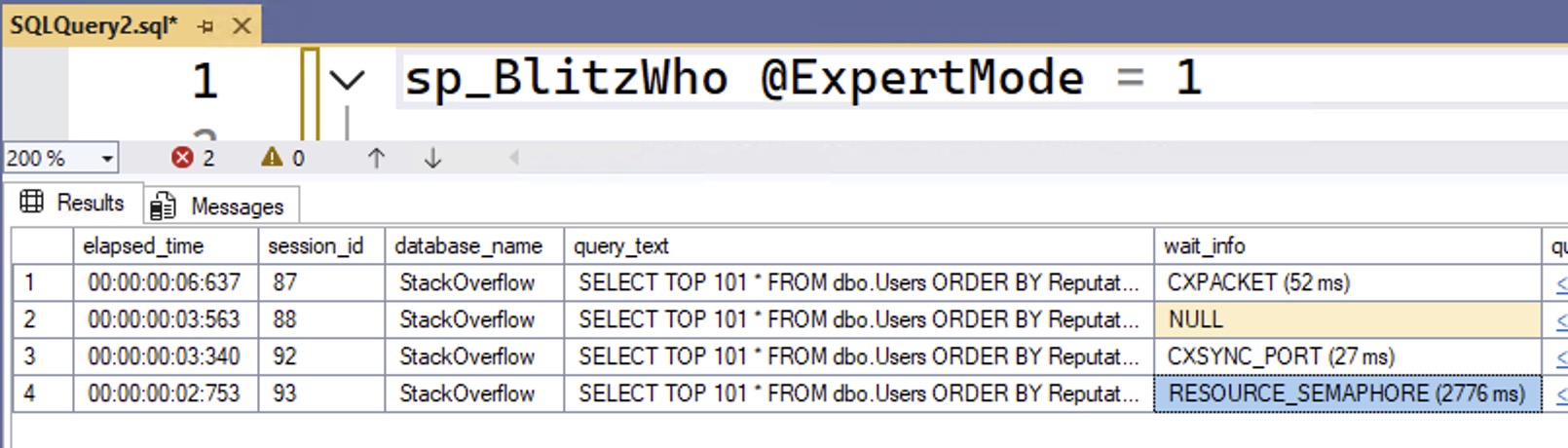
Those of you who have been through my query tuning classes will understand why that query produces particularly high memory grants. I’ll run several of them simultaneously in different sessions, and then check to see what queries are running using sp_BlitzWho:

sp_BlitzWho Results

We can see that we have a query waiting on RESOURCE_SEMAPHORE, which means that SQL Server has run out of memory to give to queries, and queries are being forced to queue up before they can get granted the memory they need to begin running.

As soon as our workload finishes, though, that memory pressure disappears, and it can be tough to know that memory pressure was the reason queries were held back at the starting gate. Let’s query that new DMV to see what it shows:

sys.dm_os_memory_health_history

When the database engine isn’t under any memory pressure, the severity_level will be 1, and severity_level_desc will be LOW. There’s no such thing as severity 0, or a description of “we’re not having a memory problem right now.” I guess to the Microsoft developers, there’s always a need for more memory, and I can’t get mad about that diagnosis.

To see more details about your own server’s memory history, query the DMV, and expand the top_memory_clerks column to show the parts of SQL Server that were using the most memory in each snapshot:

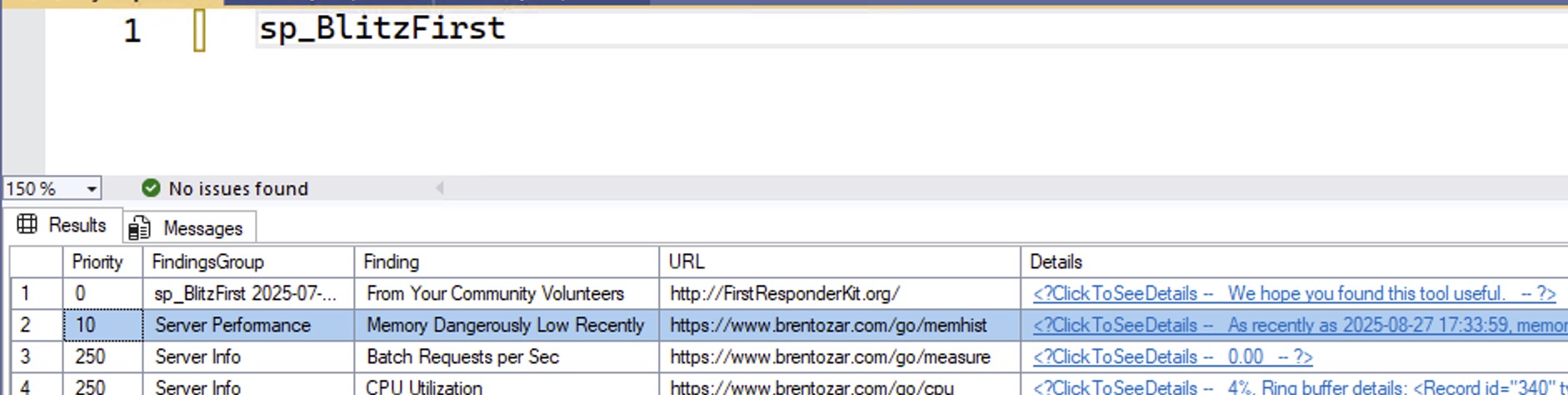
In the upcoming October 2025 release of the First Responder Kit, we warn you in both sp_Blitz and sp_BlitzFirst when this is happening to you, too, making it even easier to troubleshoot your servers:

sp_BlitzFirst Results


Free Webcasts Tomorrow & Wednesday

Conferences and Classes
0

I’m teaching my two most important classes live, online, completely free!
These are the two fundamentals classes that I think everybody should start with, regardless of their experience with SQL Server or Azure SQL DB. I’ll teach you the most important parts about how the database engine works, plus how to use free scripts to troubleshoot what’s going on with your database’s health and performance.

If you’re a senior database person in your shop, you might even want to send these to your fellow team members to get ’em started on the right foot. Anybody can attend these – from report writers to developers to sysadmins – and I often hear from senior folks who say, “Whoa, I didn’t realize how much I didn’t know in here too!”

I’m teaching them twice – one version in the morning and another week in the afternoon – to try to meet up with your schedules. Click on each link to download a calendar invite, which will also show you which time it is in your own time zone:

No registration required – it’ll be live on our YouTube channel. You can also use YouTube’s notification features to alert you when the streams start:

If you can’t make it, you can register for free access to the recordings. See you there!


[Video] Office Hours on the Beach in Cancun

Videos
4 Comments

In retrospect, I should have put on sunscreen – even for just a 20-minute Office Hours session on the beach! Dang, that sun is powerful. Let’s go through your top-voted questions from https://pollgab.com/room/brento. This is a 360-degree video, so if you watch it on YouTube, you’ll be able to pan the camera around and take a little virtual vacation with me.

Here’s what we covered:

  • 00:00 Start
  • 00:45 AGony: I’ve taken all of the standard advice – I’ve read every page of documentation, built a lab, bought a monitoring tool, and even contributed to open source – but I still suck at debugging AG outages. Who/Where do I go to for learning more? I need a guru.
  • 03:00 BlakeDBE: In an OLTP database we DBEs have a standard to create indexes for all Foreign Keys to support joins on the FK for performance. The DBAs quarterly request to drop unused (in the last 90 days) indexes which sometimes scoops up the indexes supporting FKs. Which side would you be on?
  • 04:19 CXPhoenix: Did Query Store really fix anything in practice, or did it just give us one more DMV to ignore?
  • 06:12 MyTeaGotCold: I’ve run out of good jokes about what DBA stands for. Please give me some.
  • 06:38 zlobnyfar: Very important Thank you Brent for keeping DBA’s life a little bit easier!
  • 06:52 Otto Optimizer: You talk a lot about why people shouldn’t store XML and JSON in the database. So why do developers love doing it if it usually makes queries slower and indexes useless?
  • 08:14 CycleToWork: Why does SQL Server need to do a Compute Scalar operation when returning a computed PERSISTED computed column from a table? If SQL Server does the Compute Scalar operation regardless of column being persisted or not, why bother persisting it and spending storage space doing so?
  • 08:50 CloudyWithAChanceOfDTU: Was the DTU model the worst thing Microsoft has ever done to SQL Server, or am I missing something?
  • 11:07 JohnSteak: Our company is migrating from SQL Server to Postgres to cut costs. I’m concerned about performance degradation with our complex, ORM-generated queries. What are the key performance differences to anticipate, especially with execution plans and query optimization?
  • 13:05 Otto Optimizer: Do query hints make you a bad DBA, or are they just practical tools Microsoft secretly expects us to use?
  • 14:23 IWriteSQLInPortuguese: You mentioned some time ago that you would be doing a Mastering ColumnStore (I’m one of the future customers ) any plans on this or you scraped the idea?
  • 15:44 Licensing Larry: Given SQL Server’s licensing costs, why would anyone choose Enterprise Edition instead of just building around Standard’s limitations?

No, Accelerated Database Recovery Doesn’t Fix NOLOCK.

Development
8 Comments

I have never seen a T-SQL feature that people love as much as NOLOCK.

I keep thinking I’ve written enough blog posts about it, but a client came up with a new one:

We use SQL Server 2022’s Accelerated Database Recovery, which keeps copies of versions inside the table. Plus, we don’t use transactions – our inserts, updates, and deletes are done one table at a time, and your demos always have transactions in them, so we’re not affected.

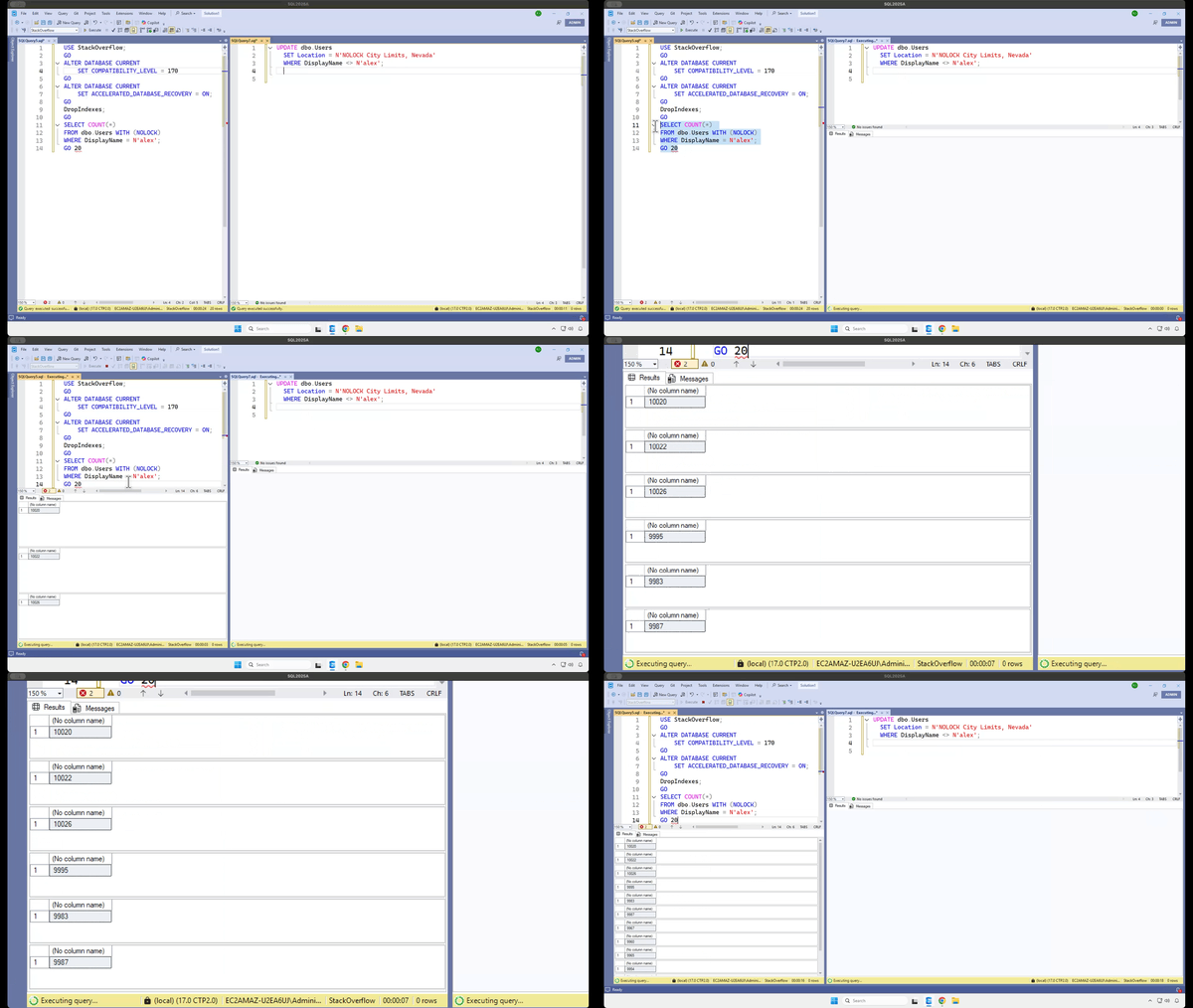
That’s not how this works. That’s not how any of this works. To illustrate it, we’ll set up our SQL Server 2025 and Stack Overflow database with the latest and greatest of everything:

And while those selects run, we’ll run a single update in another session, no transaction:

And the select’s row counts keep changing – hang in there, and I zoom in:

I’m not playing. When your queries use NOLOCK or SET TRANSACTION ISOLATION LEVEL READ UNCOMMITTED:

  • You can read rows twice
  • You can skip rows altogether
  • You can see data that was never committed
  • Your query can fail with an error (could not continue scan with nolock due to data movement)

If you think your scenario is somehow magically different, check out these other NOLOCK demos before you claim victory.

In the client’s case, someone on the call said, “Your demo drops indexes, but we have indexes, so we’re fine.” No, my demo just drops indexes because I wanna demonstrate the issue as quickly as possible. Depending on what you’re querying, and the kinds of data modifications that are going on, and what indexes exist, you can absolutely still see random results.

Someone else piped up and said, “We’ve never seen an issue, though.” The answer: well, are you monitoring the accuracy of your app’s output? Of course not. You’re relying on users to tell you when the data on the screen is wrong, but they have no reason to suspect that it is. If the report says we sold $1,234,567 of widgets last quarter, then that’s what the user’s going to believe. If they run it again five minutes later and see $1,324,765 of widgets, they’ll assume someone’s been changing/fixing things, and the latter number is the right one. Users are gullible suckers.

That doesn’t mean I always avoid nolock! In situations where I don’t need exact accuracy, nolock is totally fine. You’ll find it in a lot of the First Responder Kit scripts, for example. It’s not like I need transactional accuracy when I’m rendering how many reads your index had.

But if your queries do need accurate results no matter what else is happening in the database, no matter what indexes happen to exist at the time, then check out Read Committed Snapshot Isolation (RCSI) or Snapshot Isolation (SI). Implement those, pull out your nolock hints, and get the accuracy your users expect.


Home Office Studio Tour

Home Office
6 Comments

Ever wonder what it takes to do this stuff behind the scenes? I’ll show you.

If you’re thinking about getting started with live streaming or training videos, don’t be intimidated by this setup. There’s a lot of gear involved, but it’s because I’ve been doing this for years, and I’ve accumulated a lot of gear that works well for me. You can start with much less gear!

Let’s start with the big picture:

At left, I use a motorized stand/sit desk from Vari. I usually stand when I’m streaming and working with clients, but after a few hours, I prefer to sit down. When I do, I can just hit a button, and the whole thing comes down (but not the main camera – more on that in a minute.) In the corner of the room, you see the the black stool with just one leg – that’s a Vari Active Seat. I pull that over to the desk when I’m sitting.

At right, I have my “Camera B” setup: a C-stand with another camera, a light, and a laptop. I don’t actually type on that laptop – that’s just my monitor for when I turn to the side to address my audience directly. See, when I live stream, I have multiple camera angles. When I’m chatting with the audience and I don’t need them to see what’s on the stream, I switch scenes so that my camera is full screen, and the audience sees my side office wall:

(The shutters on the right side are closed, but that’s just because I wrote this blog post early in the morning before the sun rose. Once the sun rises, I open those shutters and look out at my neighborhood.)

For the audience, that Camera B view looks like this:

This busy background was a big goal for me when I moved to this house a few years ago. Inspired by video game and tech streamers, I wanted a wall of stuff that would show off my personality. Sometimes I have this camera zoomed in, and other times I zoom it way out to show the whole flair wall.

Anyway, when I’m on Camera B, that laptop mounted right under the camera helps me continue to watch the audience chat live while still facing the camera, plus watch the output from Twitch as a public viewer just to make sure everything’s working okay.

Here’s a zoomed-in view of that Camera B setup:

The gear involved:

  • Light: Neewer 660 with softbox diffuser – the diffuser helps soften the light, which helps not only the viewers, but me because I have to stare at it
  • Camera: Sony ZV-E1 with Sony FE PZ 16-35mm F4 lens – complete overkill, do not recommend, and requires a SmallRig Peltier cooler just to stay on for live streams. If I had to go back and do this over again, I’d get another Sony ZV-E10 instead, which is more than good enough for live streaming, and doesn’t need a fan. The camera’s live feed goes into my MacBook Pro via an Elgato Cam Link 4K USB capture device. (I run a really long HDMI cable down through that closet and around the room.)
  • Laptop: every few years, I buy a Windows laptop in the hopes that I can switch back over from the Mac. I get pissed off, give up, and then I use the laptop for stuff like this.
  • C-stand: don’t use a tripod for stuff like this. A C-stand is much sturdier, has a smaller footprint, and can mount more devices like all the stuff you see here.
  • Magsafe camera attachment: when I wanna record TikTok comment response videos like this, I just slap my phone onto here and use the light, and my office is in the background. I record those directly in the TikTok app itself.

Now, over to my main desk, which gets a lot more complicated:

The gear:

  • Apple MacBook Pro – the current generation of M4 Max with 128GB RAM. It handles live streaming at 60 frames per second, two 4K 60fps camera inputs, multiple displays, 60fps recordings for archival, running a VM, a ton of USB gear, and the CPU fan is never even audible. It’s bananas how fast this thing is, not to mention how battery efficient. I took it on a one-week Alaska cruise recently and didn’t charge it even once.
  • Above the MacBookPro, there’s something a little odd: a Logitech Brio 501 mounted sideways on a Manfrotto Magic Arm.
  • Main monitor: MSI 32″ 3840×2160 – down under $500 these days, and really good value for money. When I’m streaming, this has a VM or RDP window with what I’m streaming, but I only stream that one app window. Around it, I put things like streaming utilities.
  • Teleprompter: Elgato Prompter – when I’m streaming, this shows the live chat. When I’m working with clients, I put the Zoom camera views up there so that it’s more natural – I’m looking directly at the camera, even when they’re talking. The camera is hidden behind that prompter.
  • Camera (not visible, inside Elgato Prompter): Sony ZV-E10 with Sigma 16mm f1.4 lens, piped through another Elgato Cam Link 4K – total workhorse. Love this thing. Powered by USB-C, no dummy battery or fan required, runs for hours even at 4K 60fps.

There’s more gear, but let’s stop here for a second and talk about that main camera. The teleprompter and Sony camera are mounted to a C-stand behind my desk because when I type or bang on the desk for emphasis, I don’t want the camera to wobble. Putting the camera on a separate C-stand, not tethered to the desk at all, keeps it more still.

When I’m standing, my main Sony camera is shooting directly at me, with my green wall in the background, so I can use a chroma key filter in OBS to make my background disappear, and let me float over what I’m streaming:

Camera A view

However, after a few hours of standing while working, I wanna sit down, so I push a button on the motorized Vari desk and it drops to a sitting position. But because the Sony camera is mounted to that separate C-stand, it’s still up high. That means I need another camera.

If you look closely at the desk screenshots, above my MacBook Pro, you’ll see something goofy: a Logitech Brio webcam turned sideways, mounted to the desk via a Manfrotto Magic Arm. It’s turned sideways because I want the max resolution possible (given that it’s a crappy webcam) and I use it in the stream like this:

Sitting camera view

This view isn’t green-screened. This will probably be the next thing I upgrade in my home studio gear – switching to a different sitting camera, mounted to the C-stand, so that I’ve got nice green screen views whether I’m sitting or standing.

Back to the gear on the desk:

  • Lights: Neewer 192 soft lights – mounted on desk platforms from the old Elgato Key Light Air, so that they also work when the desk is in sitting position.
  • Control panel: Elgato Stream Deck XL – because I have a lot of sound effects and scenes.
  • Microphone (not shown): DPA directional headset plugged into a Sennheiser AVX wireless system, piped into a Focusrite Scarlett 2i2 – because I wanna move around a lot between different scenes, and walk around on the green screen demonstrating stuff, without the audio changing. Every now and then, some commenter gives me flak for using an “old” microphone, and I just shake my head and laugh. When I’m working with clients, I use a much simpler wired USB Plantronics monaural headset.
  • Connectivity: Sonnet Echo 20 Thunderbolt 4 SuperDock – I have tried so many docks, and this one has been the only one that’s stayed solid without randomly dropping SSD connections under really heavy load. (When I say heavy load, remember, I’m running Ethernet, multiple SSDs, USB video & audio feeds, the Stream Deck, and more.)
  • Input: Apple Magic Keyboard and Trackpad on a heated desk mat. Yes, it does get cold in Vegas during the winter.

For software, the big key is OBS Studio. It’s free, open source, frequently updated, and ridiculously powerful, but has an ugly learning curve. I still need to spend time learning how the latest features work, like simultaneous landscape & portrait video outputs (for streaming to both Twitch/YouTube and TikTok/Instagram simultaneously.) Hell, I even need to learn how the basic features work, like better audio settings and chroma key filters.

It’s a lot of gear, and a lot of work, but you can see the quality of the results in my training classes and live streams. See you there!


[Video] Office Hours Back at Home in Vegas

Videos
0

I’m back in Vegas, at least for the moment, so let’s hang out in my home office and talk through your top-voted questions from https://pollgab.com/room/brento. There’s a lot of good questions this week!

Here’s what we covered:

  • 00:00 Start
  • 02:26 Eric M: I’ve recently become very disenchanted with the commercial SQL Server monitoring tool I use. I’ve been taking a serious look at https://dbadash.com/ and It looks great thus far. Do you have any experience/thoughts with or about it? DISCLAIMER I am in no way affiliated with it!
  • 04:16 Boris: I’m a DWH admin and developer. My company wants to give edit access to Risk department to change SQL code that processes DWH data. What should I tell them?
  • 06:00 It’s 2025: Have you found any monitoring tools that gracefully work with PSOP?
  • 06:47 MyTeaGotCold: What correct predictions are you most proud of?
  • 09:41 Mikkel: A former team member chose to save raw image data in a table. When we remove the table column. Should we shrink the database or leave the database file sizes as they are? You always say that shrinking is bad.
  • 12:16 Erika: My business isn’t sophisticated enough for AGs. How can I achieve high availability in the cloud? Database mirroring isn’t an option.
  • 13:38 Q-Ent: Hi Brent, i reached a point where i cannot get additional value and growth if i do minor, repetitive tasks. I have to keep up with these tasks to have my job. Do you follow any work routine like email check cut off time or disconnect from social media to keep up with deep work?
  • 17:08 Running out of resourced: We have a historical log table which contains the date time of the transaction, user name, and a nvarchar(max) column containing a json object. Table has 250 million rows and size is 500gb. What are recommended practices for reducing storage and increasing query performance?
  • 18:49 Juan Pablo Gallardo: Is there a specific function to run to make sure is ok to reboot the sql server?
  • 20:07 Milos: Have you ever encountered SQL Server being rolled out and used as primarily an enterprise ready XML document DB? Any considerations or precautions for such a use case – which is using Sql Server akin to a MongoDB, just for XML instead of json?
  • 21:26 Brent Ozar Jr: What similarities and differences are there between being a developer / administrator for an online transaction processing (OLTP) DB vs an online analytical processing (OLAP) DB? What must you do differently for an OLAP DB vs an OLAP DB, and is there any overlap of skills?
  • 23:30 Just James: ChatGPT5 has read too many of your videos; it seems a bit sassy to me. I wrote a query and asked it if it could be improved. It came back with “No window + DISTINCT gymnastics:” I was using count over partition by. Should I give up my torrid love affair with over partition by?
  • 25:03 Artem: Implementing business logic inside/outside database. When it is appropriate to implement business logic inside the database. And when it is not. Considering CPU, network latency, long-running data processing. Any articles on the subject. Patterns, anti-patterns, pros, cons, etc.
  • 26:57 KnowEnoughDBAtoBeDangerous: I’ll be moving our SQL databases over to Aurora PostgreSQL. Now that you’ve started Smart Postgres, have you had any clients make the switch?
  • 28:25 Brent Ozar Jr: What are some tips for learning how to become a better Data Engineer on the SQL side of things?
  • 29:57 Winston : When you awaken in early morning what’s your routine? Do naps help?
  • 31:28 Aubrey Plaza: For a good decade, when we needed to create a test environment we were use to take a copy of the vanilla version of our database. Now someone mentioned words like “version control” and “Liquibase” and we need to rush to it immediately. In what scenario this makes sense to you?
  • 33:30 Brent Ozar Jr: What other security considerations do developers and DBAs have to make for SQL databases other than prevent SQL injection attacks?

Who’s Hiring in the Microsoft Database Community? September 2025 Edition

Who's Hiring
4 Comments

Is your company hiring for a database position as of September 2025? Do you wanna work with the kinds of people who read this blog? Let’s make a love connection.

If your company is hiring, leave a comment. The rules:

  • Your comment must include the job title, and either a link to the full job description, or the text of it. It doesn’t have to be a SQL Server DBA job, but it does have to be related to databases. (We get a pretty broad readership here – it can be any database.)
  • An email address to send resumes, or a link to the application process – if I were you, I’d put an email address because you may want to know that applicants are readers here, because they might be more qualified than the applicants you regularly get.
  • Please state the location and include REMOTE and/or VISA when that sort of candidate is welcome. When remote work is not an option, include ONSITE.
  • Please only post if you personally are part of the hiring company—no recruiting firms or job boards. Only one post per company. If it isn’t a household name, please explain what your company does.
  • Commenters: please don’t reply to job posts to complain about something. It’s off topic here.
  • Readers: please only email if you are personally interested in the job.

If your comment isn’t relevant or smells fishy, I’ll delete it. If you have questions about why your comment got deleted, or how to maximize the effectiveness of your comment, contact me.

Each month, I publish a new post in the Who’s Hiring category here so y’all can get the latest opportunities.


Free Live SQL Server Classes This Month!

Conferences and Classes
2 Comments

This month, I’m teaching two of my classes live, online, completely free!

These are the two fundamentals classes that I think everybody should start with, regardless of their experience with SQL Server or Azure SQL DB. I’ll teach you the most important parts about how the database engine works, plus how to use free scripts to troubleshoot what’s going on with your database’s health and performance.

If you’re a senior database person in your shop, you might even want to send these to your fellow team members to get ’em started on the right foot. Anybody can attend these – from report writers to developers to sysadmins – and I often hear from senior folks who say, “Whoa, I didn’t realize how much I didn’t know in here too!”

I’m teaching them twice – one version in the morning and another week in the afternoon – to try to meet up with your schedules. Click on each link to download a calendar invite, which will also show you which time it is in your own time zone:

No registration required – it’ll be live on our YouTube channel. You can also use YouTube’s notification features to alert you when the streams start:

If you can’t make it, you can register for free access to the recordings. See you there!


[Video] Office Hours in Icy Strait Point, Alaska

SQL Server
2 Comments

For the last couple of months, I’ve been trying to get my on-location Office Hours episodes filmed with an Insta360 so you can pan the camera around to see the sights. Folks, I’ve finally pulled it off! If you watch the video on YouTube (rather than here on the blog), you can move the camera around with your clicker:

We covered your top-voted questions from https://pollgab.com/room/brento, including:

  • 00:00 Start
  • 02:28 I adjusted my chest today: On a new 2022 instance, do you default to varchar or nvarchar for strings? I remember that varchar got unicode support in 2019.
  • 03:59 Index_It_All: Hey Brent. I work in a small organization. The first 2-3 years were hell as I was the First DBA. Things are really slow now.I am in Most of the Courses you have going.Sp_Blitz helps me stay ahead.My manager wants things to brag about my job. What will you advice for my relevance.
  • 06:14 SQL Saturday Junkie: What location has been your favorite SQL/Data Saturday event to speak at world-wide and in the US? How much work is it to plan for a full day pre-con? Thanks!
  • 12:21 Mike: Hey Brent! Where do you think is a better place to post technical articles – mssqltips.com, sqlservercentral.com, red-gate.com, linkedin, or something else ? p.s. take into account “peer reviewed”, “speed of posting”, “number of views / popularity of the website”
  • 15:45 Hany: Hi Brent, in the year 2025 where SQL 2025 should be released anytime soon, and with no specific problem trying to solve, just a migration project from one cloud vendor to another, is it advisable to stay on SQL 2019 or should we upgrade to SQL 2022 with the migration?
  • 17:05 chris: How can one benchmark disk performance on a SQL Server PAAS offering? I’d like to ensure we’re getting the disk performance we’re paying for; however, I understand Crystal DiskMark is only meant to run locally from an OS.
  • 19:53 i_use_uppercase_for_SELECT: What’s a common problem you see that even though you see it often it’s hard to find the root case?

From now on, knock on wood, I should be able to do these 360 videos as I travel around the world. I’ve got upcoming visits to LA, Boston, and another Caribbean cruise, so I’ll take your eyeballs on vacation along with me.


Why Aren’t People Going to Local and Regional In-Person Events Anymore?

Steve Jones recently posted an update about SQL Saturday’s status, and it includes some news we need to talk about:

However, this year the number may stagnate or even decline slightly. Running events has become challenging for many communities. Organizers are busy, space is hard to find, and costs are rising…. The biggest challenge in running events is finding space at a reasonable cost. Many Microsoft offices are closing, which were strong supporters of events in the past.

Steve gives a couple of possible reasons for the decline, and I’d like to throw out a few more. I don’t know which ones are larger or smaller than the others, but they’re just all reasons I’ve heard from folks over the last few years.

Unknown person of dubious qualityObviously, COVID was a factor. We spent a couple of years not getting together with others in person. A lot of people switched to working remotely, and we told employers that we could do just as good of a job (or better) remotely than in-person. Well, that backfired on training budgets: companies responded by saying, “Okay, then you can attend training events remotely instead, too.” I’ve heard from many clients that their travel budgets turned off during COVID, and never turned back on because of this.

COVID made it harder to get in-person speakers. In-person events tried using remote speakers, but the experience was simply awful. As a speaker, I’ll never again present remotely for an in-person group, and I’m just not traveling as much as I used to. I used to hit as many SQL Saturdays as my schedule could allow, but now because almost all of my client work is remote, I can’t justify the expense and time of traveling to an in-person local/regional event.

I don’t think the problem is that people switched to organized live online events with the same enthusiasm and frequency that they used to attend in-person events. People learned to get by with online sessions instead, but then Zoom fatigue burned us out on voluntary online get-togethers. We’re forced to attend so many virtual meetings at work – that the last thing we wanna do is sign up for yet more. Some online events have popped up, and they’re good – but it’s nowhere near the diversity and frequency that we used to get local & regional events. So this might be part of it – but it’s not the whole story.

But some people switched how they’re learning. Some folks switched to recorded videos, individual live streamers, written blogs, or self-guided on-demand learning through AI tools like ChatGPT. (Yes, I’m being generous and assuming people are using it for learning here, not just saying “do my work for me,” but that does relate to the next point.)

Some people stopped learning and/or networking. Some people got off that hamster wheel during COVID and chose not to get back on, instead deciding to coast based on what they know, or just coast until retirement. I’ve actually talked to folks who decided, “I’ve only got a few years left – I’ll just keep doing what I’m doing, the same way, at the same company, until they let me go or until I decide to quit.” LLMs like ChatGPT made it easier to get by without actually knowing what you’re doing – at least in the short term – and that’s all these kinds of people care about. (I don’t say that with any negative feelings – I want you to work as little as possible, and retire as early as you practically can.)

Some technologies slowed down. We used to attend user groups and regional events because there was a frantic pace of change in SQL Server: 2014, 2016, 2017, 2019 – that was a rocket ship of versions, four versions in five years! But after the pandemic, the release schedules slowed dramatically to once every 3 years, and the new features weren’t really groundbreaking, not requiring deep education to keep up. The cloud evolution slowed as well – I keep looking at my Running SQL Server in AWS & Azure class, recorded in 2022, and I just don’t see anything in there that merits an update in 2025.

Some new tech (outside of relational databases) sped up. Microsoft’s analytics folks continue to throw stuff against the wall to see what sticks, and Fabric is evolving like crazy. However, because Fabric is new, there are few active local or regional events dedicated to it – just online and national ones. (Before you leave comments yelling about how many Fabric user groups you see, drill a little deeper to check whether they actually have meetings upcoming & past, and whether the topics are actually Fabric, and whether they’re online or in-person.

Global politics have made travel harder and more expensive. Wars, economics, and immigration policies are all putting a dent in voluntary travel. As a Las Vegas resident, I can tell you firsthand that tourism numbers are way down, and my friends in hospitality & retail report some pretty horrific numbers. A friend of mine who works in a high-end Vegas retail store reports that their foot traffic is down 25% from last year, revenue is down 40%, and their Asian and Central American repeat customers are holding off on any US visits for now. I think that impacts national/international conferences more than it does local/regional ones, though, but I feel like I just gotta mention it here because someone’s going to bring it up.

We had a new generation of people enter the workforce. Some people got hired into the data industry during COVID, and they simply never saw the benefit of attending in-person or regional events. The veterans might tell them, “You need to network in-person to get ahead,” but this new generation doesn’t see it that way as they were able to get their existing jobs online, and network online as well. Do I think they would be well-served by attending in-person local and/or regional events? Well, maybe – but now we’re faced with a chicken-and-egg problem. I can’t tell someone to attend events that don’t exist.

We’ve never done a great job marketing the hallway track. I think the biggest value, and the reason I personally get really excited to attend local and regional events, is the ability to have casual, non-rushed discussions outside of the session rooms. Former coworkers, other speakers, people who know something about a topic I’m curious about – those are the lucky chance interactions that I don’t get as easily online. It’s hard to explain the value of that to someone who hasn’t experienced it, and because people don’t know the value, they’re not tempted to go to an event to experience it for the first time.


Jeez, when I look at the entire list above, it’s like a perfect storm! What other reasons can you think of for the decline of local & regional in-person database events – or if you’re not attending ’em anymore, why not?

Update: there are also comments on HackerNews, like another reason: Twitter used to create a fear-of-missing-out (FOMO) feeling amongst those who weren’t there, plus make it easier for attendees to coordinate meetups with each other, but that’s greatly diminished now.


SQL Server 2025 RC0 Is Out with New Preview Features Settings

SQL Server 2025
1 Comment

The release of SQL Server 2025 keeps inching closer. Release Candidate 0 is out now, and here are the release notes. If you’re planning on replacing your SQL Server 2016 instances (which go out of support next July) with 2025, now would be a good time to start doing functionality testing. As a reminder, here’s my post on how to go live on a new SQL Server version.

SQL Server 2025 RC0 adds a new database-scoped option called PREVIEW_FEATURES. If you wanna use stuff that’s not officially supported yet, you have to turn this feature on. You can kind of think of this option as SUPPORTED = OFF. As of RC0, Change Event Streaming (which has a ton of limitations, but looks promising), vector indexes, and AI_GENERATE_CHUNKS are locked behind this setting.

This is awesome! I applaud Microsoft for being willing to ship a version, but hold back specific features until they’re ready. Some of my clients are itching to get onto the newest version as quickly as practical, and they don’t really care about the above features. (I also like this better than the server-wide trace flag approach.)

However, time to cue up the sad trombone: this is your sign that the above features probably won’t make the cut for SQL Server 2025’s initial release. If you were counting down the days to put those features into production, time to reset the clock and set expectations with management that we have no idea when that stuff will actually drop in a way that’s safe to use. I usually advise folks to rely adding application dependencies on brand-new T-SQL functionality for the first 30-60 days at least to see how the bugs shake out. (We all remember the challenges of inlined scalar functions.) If you don’t have to take a dependency on a new feature right away, then you probably shouldn’t.

The release notes suggest that everything else in 2025 is destined for the first release, though:

Preview feature limitations

New Sys.Messages Entries in SQL Server 2025 RC0

In addition to the ones added in RC0 and in RC1, there are still more. I’ve bolded some of the ones that look particularly interesting:

  • 709: The available memory for this SQL Server instance (%I64u MB) is lower than the configured maximum server memory (%I64u MB). This might occur because of external memory pressure or faulty hardware. If the operating system does not have sufficient memory for this SQL Server instance, consider reducing the configured maximum server memory to avoid this message on instance startup.
  • 4716: TRUNCATE TABLE statement failed. The column set used to partition the %S_MSG ‘%.*ls’ is different from the column set used to partition index ‘%.*ls’
  • 5383: Cannot reference Index on Expression column ‘%.*s’ during index creation.
  • 8070: The incoming tabular data stream (TDS) remote procedure call (RPC) protocol stream is incorrect. Parameter %d (“%.*ls”): vector data type is not supported in TDS on the server side.
  • 11449: ALTER TABLE SWITCH statement failed because the table ‘%.*ls’ has %S_MSG on it.
  • 12145: Cannot disable the PREVIEW_FEATURES database-scoped configuration while the ‘%ls’ preview feature is active.
  • 12146: Database ‘%.*ls’ cannot be renamed while Mirroring to Microsoft Fabric is enabled. Disable Mirroring and retry rename operation.
  • 12467: The feature_id %d is invalid.
  • 12468: Removing feedback for feature_id %d is not supported.
  • 12469: Removing feedback for a specific plan is not supported.
  • 12470: Removing plan feedback is disabled.
  • 12526: An internal error occurred while cloning the specified warehouse.
  • 13689: DATA_COMPRESSION is not compatible with JSON index ‘%.*ls’. Please drop it and recreate it.
  • 13690: JSON index ‘%.*ls’ cannot be rebuilt. Drop and recreate it.
  • 13836: For onelake container paths, only files in ‘//Files’ directory are allowed.
  • 13837: ERRORFILE path ‘%ls’ and data path ‘%ls’ must have the same onelake endpoint, workspace, artifact and folder.
  • 16219: The value for %.*ls is out of range. The value must be greater than or equal to %I64u and less than or equal to %I64u.
  • 17077: Error spawning Heartbeat Monitor thread: %ls
  • 19545: ‘ALTER AVAILABILITY GROUP’ command failed for internal distributed availability group ‘%.*ls’. Altering internal distributed availability groups is not supported.
  • 19546: ‘ALTER DATABASE SET HADR’ command failed for database ‘%.*ls’. This command is not supported for databases participating in distributed availability group with SQL Managed Instance.
  • 19547: The integrity check for distributed availability group ‘%.*ls’ with SQL Managed Instance failed with error cause: ‘%S_MSG’. Corrective action: ‘%S_MSG’.
  • 19548: The integrity check for distributed availability group ‘%.*ls’ with SQL Managed Instance failed with error cause: ‘An availability database ‘%.*ls’ not participating in any internal distributed availability group.’. Corrective action: ‘Remove the availability database from the availability group and add it back again.’.
  • 19549: Provided distributed availability group name ‘%.*ls’ is invalid. Please provide a name of a distributed availability group with SQL Managed Instance.
  • 19550: Distributed availability group with managed instance does not support having multiple databases.
  • 19551: The CLUSTER_CONNECTION_OPTIONS argument can only be specified when the availability group uses a Windows Server failover cluster. Remove CLUSTER_CONNECTION_OPTIONS and try again.
  • 19552: The current value of HostNameInCertificate is too long. Current length: %ld characters, maximum length: %ld characters.
  • 19553: The current value of ServerCertificate is too long. Current length: %ld characters, maximum length: %ld characters.
  • 19554: Invalid key ‘%.*ls’ in the %.*ls argument. For more information, see %.*ls.
  • 19555: The format of the ‘%.*ls’ argument is invalid. The expected format is ‘<key=value>;<key=value>;…’. Spaces and semicolons in keys or values are not allowed. For more information, see %.*ls.
  • 19556: Invalid value ‘%.*ls’ for Encrypt. Valid values are Strict, Mandatory or Optional. For more information, see %.*ls.
  • 19557: Invalid value ‘%.*ls’ for TrustServerCertificate. Valid values are Yes or No. For more information, see %.*ls.
  • 19558: Duplicate key ‘%.*ls’ in %.*ls.
  • 19559: The key ‘Encrypt’ must be specified in %.*ls.
  • 22645: Fabric Mirroring cannot be enabled on a table where its primary key, or if no primary key exists, its clustered index, includes any of the following column types: user-defined types, geometry, geography, hierarchyid, sql_variant, timestamp, datetime2(7), datetimeoffset(7), or time(7).
  • 22799: Fabric Mirroring cannot be enabled on database ‘%s’ due to the reason: %S_MSG
  • 23667: Change Streams event delivery error : ‘%ls’.
  • 23668: User table ‘%s’ has reached the max number of Change Event Streaming destinations.
  • 23669: Microsoft Fabric Mirroring cannot be enabled on Linux.
  • 23670: No primary system assigned managed identity found.
  • 23671: Microsoft Fabric Mirroring is not supported on Azure VM.
  • 23672: Microsoft Fabric Mirroring is not supported with Arc user assigned managed identity. Please use Arc system assigned managed identity.
  • 24803: Encountered failure during database upgrade of internal tables.
  • 24804: This stored procedure supports only one-part or two-part names. Please use either [table] or [schema].[table].
  • 24805: Column ‘%s’ of type ‘%s’ could not be validated with the underlying table. Reason: %s.
  • 24806: Unexpected JSON data during parsing attempt in column type inference. Underlying data description: ‘%ls’
  • 24807: Cannot parse unquoted JSON value in the property ‘%ls’. Valid unquoted values can be true, false, null, and numbers. Underlying data description: ‘%ls’
  • 24808: Cannot convert a string value found in the JSON text to binary value because it is not Base64 encoded.
  • 24809: One or more log or checkpoint files have been deleted or overwritten. No operations can be performed on the external table. Please recreate the external table.
  • 24810: Updating source database is not supported.
  • 24811: SOURCE_DATABASE can only be altered only for warehouse snapshots in LIVE mode.
  • 24812: Setting SOURCE_DATABASE failed.
  • 24813: Specifying an explicit value for the identity column ‘%.*ls’ in table ‘%.*ls’ is not supported.
  • 25100: Storage is unavailable.
  • 25101: Provided lease is broken.
  • 25102: Lease was already released.
  • 25103: Incompatible lease mode.
  • 25104: Invalid parameter.
  • 27604: Your organization Microsoft Purview Information Protection label publishing policy requires a justification when the label assigned to the column is being changed to a different label with lower priority. Provide a valid justification. For more information, see https://aka.ms/SQLPurviewLabeling.
  • 27605: The label with ID ‘%.*ls’ is not a valid label in Microsoft Purview Information Protection. Provide a valid label ID. For more information, see https://aka.ms/SQLPurviewLabeling.
  • 27606: Microsoft Purview Information Protection label can only be assigned or changed by Microsoft Entra user. Use a valid Microsoft Entra user to execute this query. For more information, see https://aka.ms/SQLPurviewLabeling.
  • 27607: Microsoft Purview Information Protection labels cannot be assigned when the database has existing labels assigned via the SQL Data Discovery and Classification feature. Remove any existing labels from the database prior to assigning Microsoft Purview Information Protection labels. For more information, see https://aka.ms/SQLPurviewLabeling.
  • 27608: Labels via the SQL Data Discovery and Classification feature cannot be assigned when the database has existing Microsoft Purview Information Protection labels assigned to it. Remove any existing labels from the database and then try again. For more information, see https://aka.ms/SQLPurviewLabeling.
  • 27609: Internal error occurred while running billing background task. Major error code: %d, Minor error code: %d, State: %d.
  • 27610: Unable to access Microsoft Purview Information Protection on your behalf because your session has expired. Reconnect to SQL database and try again.
  • 31208: A fulltext fragment table is missing.
  • 31644: Server Managed Identity is disabled for this instance of SQL Server. Use sp_configure ‘allow server scoped db credentials’ to enable it. For more information, see https://go.microsoft.com/fwlink/?linkid=2325611.
  • 31734: The value ‘%I64d’ is not within range for the %ls parameter.
  • 31735: The JSON value for the JSON key ‘%ls’ must be ‘%.*ls’ type.
  • 31736: An error occurred during the execution of the function.
  • 31737: The size of the provided %ls would be at least %u bytes after converting to UTF-8, which exceeds the maximum allowed size of %u bytes.
  • 31738: Initialization of the ‘%ls’ process with session ID ‘%ls’ failed with HRESULT 0x%08x.
  • 31739: Generating embeddings from ‘%ls’ process with session ID ‘%ls’ failed with HRESULT 0x%08x.
  • 31740: An internal error has occurred in AI runtime with session ID ‘%ls’. Retry the operation, if the issue persists, contact support for assistance.
  • 35541: ai_generate_chunks
  • 35542: Drop and re-create the distributed availability group with SQL Managed Instance.
  • 35543: Stored procedure called on invalid distributed availability group type or on non-existing distributed availability group.
  • 35544: Empty internal distributed availability group.
  • 35545: Internal distributed availability group naming inconsistency.
  • 35546: An internal distributed availability group detected with more than one associated availability database.
  • 37579: The security policy ‘%.*ls’ cannot reference tables with vector indexes. Table ‘%.*ls’ has a vector index.
  • 42241: Input JSON contains out-of-range values for %ls.
  • 42242: Input JSON contains %ls type which is not supported in ARM64 architecture.
  • 42243: VECTOR_DISTANCE function does not support different base types for vector arguments.
  • 42244: A vector index cannot be created on tables with security policies. Table ‘%.*ls’ has security policy ‘%.*ls’.
  • 42245: Drop and recreate the incompatible vector index ID %d on object ID %d.
  • 45943: “The long-term retention backup with the desired legal hold value already exists backup file backup. ErrorOwner: sqldataintegration
  • 46560: External Table Location option must be a valid OneLake path.
  • 47700: Reason: The External Provider Access Token used for authenticating to the SQL Server is Blocklisted.
  • 49538: The dynamic space management force reset operation was aborted because the connected server is not a page server.
  • 49539: The dynamic space management force reset operation has failed for database ID %d, mode ID %d, failure name %ls.

SQLBits 2026 is Going Back to Newport, Wales.

SQLBits
7 Comments

SQLBits 2026 will be back at the International Convention Center Wales in Newport on April 22-25, and I’ll be there!

Bits was there in 2023, and they’ve got a recap video showing the venue.

This location is a little tricky for us Yanks: here’s where it’s at on Google Maps. For international visitors, you’ve got a few options:

  • Fly into London Heathrow, then take a 3-hour train to Newport. This is the option I chose because there are non-stop flights from Vegas to Heathrow. I’ll fly into London arriving April 19, spend a day and a half in London, and then take the train over to Newport on Tuesday the 21st, the day before the conference. After the conference, I’ll catch the train back and fly out of Heathrow on Sunday.
  • Fly into Cardiff (CWL, 15 mi away) or Bristol (BRS, 30 mi away), and take a taxi or train. If I lived on the East coast of the US, I’d check into this option, because there are affordable flights out of places like Atlanta. Nothing for Vegas though.
  • Fly into London, then rent a car. I wouldn’t recommend this unless you wanna spend more than a week roaming around the UK, and can take your time gradually getting used to driving on the other side of the road. It’s way more challenging than you might expect. I’m a pretty good driver – I’ve never been ticketed for an accident – but I had multiple close calls driving in England and the Isle of Man.

You don’t really want a car during the conference. This year, Bits is selling packages with your hotel room included, and they’re looking at getting buses to take you to/from your hotel. If you stay at the Celtic Manor, you can just walk over to the ICC.

SQLBits 2026 is Going Back to Newport, Wales.Plus, while you’re at the conference, the idea of this year’s event is to be really involved in the after-hours events at the venue itself. I’ll be at all of ’em this year.

When SQLBits is in London, the after-hours events like the Pub Quiz and the party aren’t very well-attended for a few reasons. Local transportation in London is kind of a pain in the butt, there are so many other distractions in London, and at the end of the day, a lot of locals just go home. In Newport, the venue is more all-encompassing: you’re going out there to have a good time with your fellow attendees during the day, AND after hours.

Early bird registrations will open up this month, and it’s time to start thinking about what sessions to submit. These days, there are so many tech topics: AI, Fabric, Azure, AWS, SQL Server 2025, and timeless dev & DBA topics. I need to think about what to submit, so I’ll put it to you, dear reader: what would be the topic that would compel your boss to whip out the credit card and buy your conference registration and plane ticket?


Helping Software Vendors Talk to DBAs

Software vendors have a wide variety of clients:

  • Some clients don’t have any IT staff at all, and just outsource everything. The client wants to hand an installation manual to their contractor and say, “Build whatever the software vendor wants.”
  • Some clients have a full time sysadmin or two, and those sysadmins don’t really know anything about Microsoft SQL Server. They want a 1-2-3 checklist of what needs to be done, and they’ll follow it to the letter, but they won’t put any independent thought into it, nor will they raise any objections.
  • Some clients have a big IT staff, including at least one full time DBA. Ironically, you’d think this kind of environment would be the easiest one when it comes to installations – but it’s the opposite! The sysadmins and DBAs raise all kinds of objections because they have internal standards, or they want things done a certain way.
That's a pair of baby potbelly pigs, sleeping atop each other on my lap, because they were inseparable.
I prefer mirrored pairs of highly available potbelly pigs

So when I’m working with software vendors to write installation instructions for their database back end, I encourage them to think about three tiers of SQL Server environment quality:

  • Good – typically a single VM, using whatever VM backup software that the client uses across all of their servers.
  • Better – adds in a method of high(er) availability, typically mirroring, because it needs to be simple enough to be managed by a non-DBA. I’d typically suggest manual (not automatic) failover here, which for a single database app is easy enough that a sysadmin can do the failover while following a checklist, or can call the vendor’s help desk to be walked through it.
  • Best – a complex high availability and disaster recovery topology, perhaps a failover cluster plus log shipping. This requires serious know-how on the client side, and the vendor isn’t going to be able to write instructions detailed enough for a n00b to follow along.

It might seem counterintuitive, but it’s easy to write the “Good” instructions. There just isn’t much work to be done. However, the more complex the environment is – and the more it relies on the client’s internal standards and processes – the less guidance a software vendor can give. It’s just too hard, too time-consuming, and too expensive to write a document that fully explains how to implement a multi-subnet cluster that works for every possible client.

I find that if the software vendor is honest about that, then it makes the situation easier for DBAs. The “Best”-tier installation guide starts with a simple disclaimer:

We want to be a great partner for you, so that means being flexible and working with your standards. In the next couple of pages, we’re going to describe a typical Best-tier infrastructure (a failover cluster plus log shipping) that works with our more complex and demanding clients. You don’t have to follow that scenario exactly! If there’s an infrastructure you’re an expert on – perhaps Availability Groups or SAN replication – we’d be glad to talk through that with you to make sure it works for everyone involved. Just understand that if you choose to implement your own infrastructure design, we can’t guide you on it, or troubleshoot it for you. We’re relying on you to do that part. But as long as the SQL Server service is up and we can connect to the database with SSMS, we’re happy!

That way, everybody’s on the same page: the vendor has one complex design that they’re familiar with, and they can guide you towards consultants for implementation or troubleshooting, and their support team will be comfortable working with it when the poop hits the fan. However, if you have a design that you’re comfortable supporting, the vendor is flexible and can work with that too – they just can’t do infrastructure support on that design.