Blog

Updated First Responder Kit and Consultant Toolkit for July 2019

Nothing too dramatic, mostly bug fixes this month. Been pretty quiet on the development front the last couple of months. Some stability is nice around here, eh?

To get the new version:

Consultant Toolkit Changes

  • Improvement: the sp_BlitzCache recent compilations tab is now populated first to make sure that it shows user queries, not queries from the Consultant Toolkit itself.
  • Improvement: if deep dive is turned on, also turn on sp_BlitzIndex’s @BringThePain = 1. This gathers data for over 50 databases.
  • Fix: on the Plan Cache tab, the contents of column G are now accurate. (They were being overwritten by the contents of column H before.)

sp_Blitz Changes

  • Improvement: easier troubleshooting when implicit transactions are running. (#2042)
  • Improvement: @OutputType = ‘XML’ will now export the entire result set as a single XML field. (#2047, thanks Rich Benner.)
  • Fix: fixed link typo on alerts URL. (#2055, thanks Rich Benner.)

sp_BlitzCache Changes

  • Fix: excludes readable secondaries on 2016 by default. Otherwise, it was throwing an error when the database wasn’t available without specifying read-only intent. (We could probably improve this code to check for that as well.) (#2027, thanks sivey42.) Note that Adrian Buckman is still having issues with logging sp_BlitzCache to table on a readable secondary, and he’s tracking that down in issue #2072 if you want to give him a hand over there.
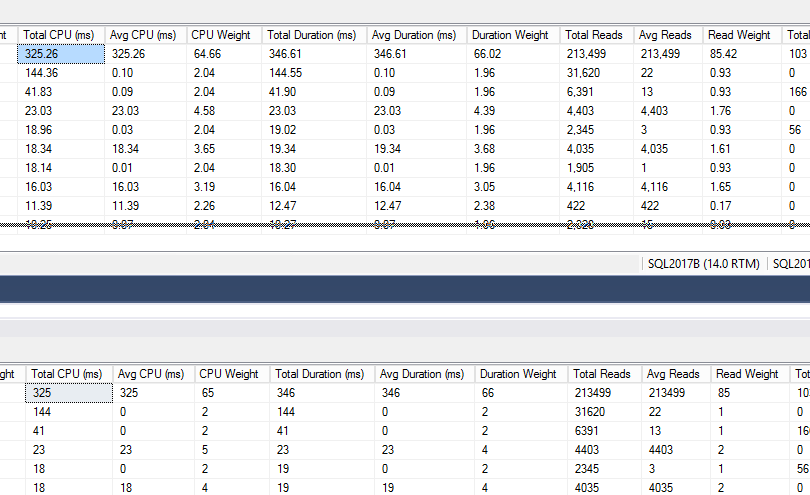
  • Fix: many display fields are now rounded to ints (rather than formatting with the money datatype.) An example of the output is below – the top is before, below is after, showing the new rounded numbers. (#2046, thanks Ian Manton.)
sp_BlitzFirst Changes

  • Improvement: easier troubleshooting when implicit transactions are running, and now only shows lead blockers. (#2042)

sp_DatabaseRestore Changes

  • Fix: when @BackupPathFull was null, no transaction log backups were being applied. (#2036, thanks Troy Jennings for the bug report & code.)

sp_ineachdb Changes

  • Improvement: compatibility with 2008 and R2, VMware snapshots where @@SERVERNAME returns the wrong name. (#2061, thanks sm8680.)

For Support

When you have questions about how the tools work, talk with the community in the #FirstResponderKit Slack channel. If you need a free invite, hit SQLslack.com. Be patient – it’s staffed with volunteers who have day jobs.

When you find a bug or want something changed, read the contributing.md file.

When you have a question about what the scripts found, first make sure you read the “More Details” URL for any warning you find. We put a lot of work into documentation, and we wouldn’t want someone to yell at you to go read the fine manual. After that, when you’ve still got questions about how something works in SQL Server, post a question at DBA.StackExchange.com and the community (that includes us!) will help. Include exact errors and any applicable screenshots, your SQL Server version number (including the build #), and the version of the tool you’re working with.

Yet Another Way Missing Index Requests are Misleading

Indexing
5 Comments

Graduates of my Mastering Index Tuning class will already be familiar with the handful of ways the missing index DMVs and plan suggestions are just utterly insane. Let’s add another oddity to the mix: the usage counts aren’t necessarily correct, either. To prove it, Let’s take MattDM’s Stack Exchange query, “Who brings in the crowds?” He’s querying to see which users’ questions bring in the most new views:

When I run that against the Stack Overflow database without any indexes on the Posts table, SQL Server 2017 CU15 (the latest) helpfully pipes up with a missing index request.

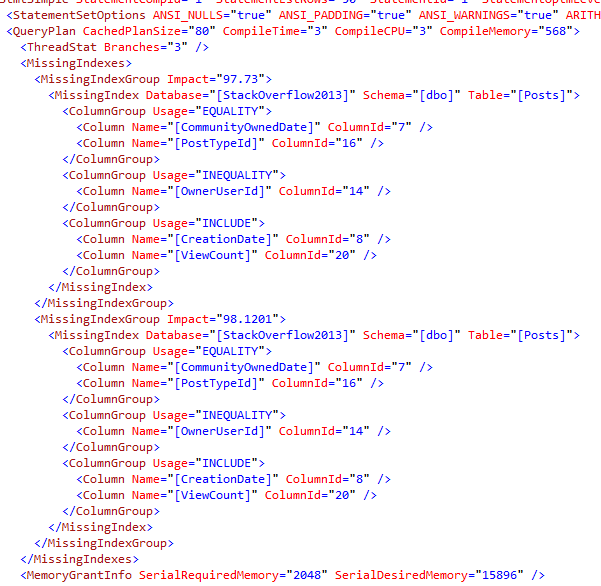
Make that two missing index requests.

And they’re identical twins:

Identical twins

HEY BUDDY!

In my head, I hear Clippy saying:

“HEY BUDDY! IT LOOKS LIKE YOU’RE TRYING TO QUERY BY COMMUNITY OWNED DATE AND POST TYPE ID! YOU KNOW WHAT WOULD MAKE YOUR QUERY 97.73% FASTER? AN INDEX ON THOSE FIELDS!”

“OH AND YOU KNOW WHAT…”

“WHILE YOU’RE AT IT, YOU KNOW WHAT WOULD MAKE YOUR QUERY 98.1201% FASTER? AN INDEX ON COMMUNITY OWNED DATE AND POST TYPE ID! DOESN’T THAT SOUND AMAZING? WHAT DO YOU MEAN YOU’VE HEARD THAT BEFORE?”

This artificially inflates the missing index DMVs.

When this query runs just once, sys.dm_db_missing_index_details records not one, but two requests for this same index, so sp_BlitzIndex looks like this:

sp_BlitzIndex output

The query only ran once – but it’s showing 2 uses for that missing index. <sigh>

There are parts of me that would love to see inside SQL Server’s source code to know how this kind of thing happens. The other parts of me are glad that I don’t know.


Poll: what’s in your development database?

SQL Server

When the developers at your company are working on building an app, where do they work? Production, a development database restored from production, or a development database with made-up contents?

One-question poll, and you can watch the live results.

I’ll post the results and my thoughts on Friday. I know what I see regularly out in the wild, but I’m curious to see how the population stacks up. Comments are disabled on this post just because when I post polls, folks tend to leave comments here rather than answering the poll, hahaha.

Update: if you’re reading the results, Google’s chopping the labels off for two of the answers. The answer with more results is the one you probably wish it wasn’t.


4 Ways to Move Data Into a Reporting Server

Architecture
48 Comments

You’ve decided that you need to offload reports to a different SQL Server, and you’re willing to pay the costs. Here are the most common ways to move the data from production to a reporting server, arranged roughly from easiest-to-implement to hardest:

1. Log shipping. Log shipping is more of a technique than a feature: it just means that every time you take a transaction log backup in production, another server restores that backup elsewhere. This has worked for decades, is fairly simple to set up, and even works from on-premises up to the cloud. It’s fairly bulletproof – changes to tables, indexes, etc don’t break it. However, to update the readable replicas, you have to apply the latest transaction log backups – and that can only be done when no one else is using the database. This means it’s mostly a good fit for restores that can run after hours, like 6PM-6AM, and all day long users see a snapshot of the data as of this morning. It’s cheap – but it’s not a good fit for real-time reporting.

2. Always On Availability Groups. Kinda like log shipping in that transactions are copied over to the replicas, but independent of log backups, and changes are applied in real-time (or near-real-time) while users are still in the database. Availability Groups are available in Standard Edition, but you can’t read from them – you need Enterprise Edition to offload reads to secondary replicas. The bummer is that every single replica has to be licensed with Enterprise Edition.

3. Replication. SQL Server can replicate transactions from one server to another, giving you the capability to copy only specific tables (or subsets of them) to the reporting server – something neither of the above options can do. You can even index the reporting servers differently, too. However, this can be tougher to set up and maintain in some circumstances, especially when the source table structures change. It’s not a great fit for third party applications where you don’t control the schema.

4. ETL tools like SSIS, BIML, or Azure Data Factory. Sometimes the source data tables just aren’t well-suited for reporting queries, like the source tables are overly normalized and require too many joins. Other times, the source data is stored in trickier-to-query structures like XML or JSON. This is by far the most complex and expensive way to do reporting, though: you have to pick the right tool, design the target tables, figure out how to detect changes in the source system, move the data between systems with as little impact as possible, and then maintain that pipeline whenever the source table structure changes.

I said I’d arranged those from easiest-to-implement to hardest, but I should note that the further you go down this list, the more benefits you gain on the reporting side of the equation. With #3 and #4, your reporting apps are more progressively isolated from changes in the source system. You don’t have to update your reports every time the source system tweaks something about their table structures. (You will, however, have to change the way you move data between systems.)


Things to Think About When Your Databases Grow Quickly

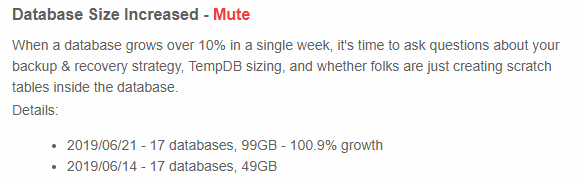
Database size increased

In SQL ConstantCare®, we’re adding a notification for when your data size grows >10% in a single week. When this happens, you want to stop for a second to ask yourself a few questions:

Did someone just create a backup table? Folks often do a SELECT INTO to back up an important table right before they make a dangerous change. Unfortunately, they rarely remember to go back and delete that table. Run sp_BlitzIndex @Mode = 2, which gives you an inventory of objects in the database. Copy/paste that into Excel, and sort it by size descending (either number of rows, or space allocated), and just make sure you don’t have a bunch of backup tables using up space. If you’re not sure if they’re still used, try renaming them, like rename SalesBckup to SalesBckup_ToBeDeleted_20191231. That way, if someone comes running back in saying they need that table, you can rename it back and you’re good to go. Otherwise, delete it on the specified date.

Did someone just create a bunch of indexes? Someone might have gone a little overboard with the Database Tuning Advisor creating covering indexes for a whole bunch of queries.

Is Instant File Initialization properly configured? Will we be able to grow out data files instantly? This is a massive help for restores, too: when you’re under the gun to get back online quickly, you need the ability to instantly grow out the data files before a restore begins.

Do I need to reconfigure the database’s log file? Instant File Initialization only works on the data files, not the log files, so large file growths can be slow. Make sure you don’t have the log file configured with a large percentage growth, like 10%, which might take a long time on a 100GB log file. It’s also a good time to make sure you don’t have shrink jobs – if someone’s really growing the data by 10% per week, you’re going to need some log space while these events happen.

Big tequila
Big tequila

Am I backing up the log often enough? If we’re only doing log backups once per hour, the log file might be growing to a large size, and log backup times might be getting ugly. Consider backing up the log more frequently to nibble off the changes over time.

Do I have enough space for TempDB? My general rule of thumb is that you want TempDB to be able to handle 25% of the server’s total data size, or the size of your largest table, whichever is larger. Sooner or later, somebody’s gonna dump your largest table into TempDB as part of a reporting query, and you’re going to need to be able to handle that workload without taking the server down.

Do I have enough space in DR? It’s not enough to monitor space on your primary replicas: you also have to check your disaster recovery environments to make sure you’ll be able to fail over. Don’t just think about data & log space – think about TempDB size and backup capacity over there, too.


Brace Yourself for These 9 Database Horror Stories

Humor
24 Comments

Last week, I asked for your worst database horror stories. Hoowee, did you deliver. Make yourself a nice cup of cocoa, gather around the campfire, and listen up for these terrible tales. Illustrations courtesy of Swear Trek (not safe for work.)

The mistake we’ve all made

Russ did an update without a where clause, but his storytelling earns a laugh and a prize:

One of my first SQL 6.5 scripting tasks was to correct the spelling for a customer’s last name. When I got finished, everyone in the database was related, everyone’s last name was Anderssen. Learned a lot about restores early in my career.

“We did miss the guy who did it”

Richard’s tale merited inclusion just for that phrase:

The best is the oldest: did something in Production, thinking it was Dev. and an airport came to a halt.

Thankfully not my doing – we did miss the guy who did it.

This is always a tough decision with major mistakes: do you punish the person, or embrace the mistake as a learning opportunity and move on? I like the concept of blameless post-mortems, but I understand why it’s tough for most organizations to really embrace.

DBA-101: two power outages in a row

Viking’s story ends with the most appropriate Jira issue number ever:

Right at the beginning of my DBA (AKA: “software dev with good SQL skills”) career, we had a power outage, which left us with an…unhappy…server. The first solution was to restore a server level backup. In the middle of that, there was another power outage. This is where we learned that the first one fried the UPS (though it didn’t report any errors), so the server went down again, mid restore. I can’t remember all the details, but this resulted in lost data, so we had to restore the server from an older backup and then apply the SQL backups to get the data back. This is where we learned that, while we did have backups (full/diffs/logs), we’d never actually tested a restore to a point in time using the full log chain….we’d just tested the full backups. The restore failed after something like the second log file and we were still out ~12 hours of data. “Luckily”, this all happened on a Friday morning, so the business only lost a day of work, while I, and a couple of our most experienced devs, spent the weekend rebuilding the lost data from one of our replicated servers, which still had everything up to the point of the first power failure.

The icing on the cake: The number I got when I started a new ticket to track the work in my DBA project in Jira? DBA-101.

Let's get drunk

Reverse engineering the worst database ever

Miu’s tale is a few paragraphs long, but I think that’s fair given the 18-month project from hell:

Just got off a project where I was tasked with archaeologically rebuilding an application that had ceased working and the source code was gone into the aether 20 years before.

That in and of itself wasn’t too bad. The real problem was the database: Oracle 8, hadn’t seen an update in nearly 2 decades. Its latest iteration been architected by a rank amateur in 1987 when they pulled the data off a mainframe, and had been maintained by a random combination of offshore firms and amateurs in the same time frame.

The database had more than 8,000 tables spread across three discrete clusters. Every time some new data needed to be stored, a new table was born. Column and table names were inconsistent, no keys, indexes, or documented relationships. Several of the tables had column names in transliterated Portuguese. Just determining what wasn’t needed, used, or was just someone’s data dumping ground was months of work. There was even a permanent set of tables that were earmarked as temp nomenclaturally for the application that had stale data containing everything from SOAP messages to credit card numbers and PII. A table of usernames and passwords (plaintext) were stored under the name “NOT_SECURITY.” Only bright side to that is we were never able to determine what system they were for, as they didn’t match any scheme used at the company over it’s 100+ year history.

Over the course of 18 months, we managed to reverse engineer most of it and get the application replacement stood up with just under 100 tables and a sane domain model, documented business process. Definitely the worst I’d ever seen.

I’m still laughing and crying about passwords being stored in plaintext as a table called “NOT_SECURITY” – that’s awesome. Congratulations, Miu.

Shutting down your machine to cancel a transaction

I laughed so hard at Gordon’s cold sweat – I have totally been there:

Early in my career, I was working as a developer on a system that used an Oracle database. I had written a script to reset my test data. It had several deletes to clear tables and I included a final commit in the script. I had given a demo to executives of the new functionality I had built. After the demo, the execs wanted to know how much data would be affected in the production database. So I changed my environment to point to prod and queried row counts. After this I decided to reset my test database so I ran my reset script. Wondering why it was running so long, I realized I was running it against the production database! I immediately broke out in a cold sweat. Not sure what to do, I shut down my computer and ran back to my desk where for the next 30 minutes I ran row counts to convince myself that the script was shut down before the commit executed.

Users will find a workaround

Recce had to fix corruption, and then found out the data wasn’t any good anyway:

Got a support call that our software at a French client was down. Dialed in over the PSTN line and quickly determined the SQL6.5 database (this was a while ago) was corrupt. Massively corrupt. Table scans were failing due to the data pages linked list points being incorrect. The logs showed that the corruption has started 3 months previously, 2 hours after someone had created a new, compressed, data device and added it to the database. The users had been clicking through the errors that bubbled up through the UI for 3 months, until they could perform order allocations anymore.

The oldest backup was 1 month old. All the new orders and inventory levels were in the corrupt data device. Worked until dawn to get as much data out as I could as the client was adamant they couldn’t organise a stock count. With my best efforts it wasn’t really representative of reality, it turned out the forklift truck drivers had started ignoring the system weeks earlier because they couldn’t complete transaction either.

Learning about conversions the hard way

JChertudi ran into something that you will all run into sooner or later as you work with different platforms & databases:

We were using a forked php-mssql driver ~2008, and converting user data to support HTML (CHAR(10) to ) for example) with a php script. Due to a code mismatch between Unicode and non-Unicode SQL strings , the php script left a “land mine” in the center of the user data. It looked fine after conversion, but once the user edited their data, the last half of the data disappeared on save. Sigh, that was a few days of finding impacted customers, restoring a copy of their data, and copy/pasting it back into the documents.

Don’t force it, get a bigger hammer

Steve faced the perfect storm:

There was a unit at my work that did 500 million dollars a year in revenue for both company and independent locations. The only backups they had were on the same raid array as the data. The corporation did have an exabyte tape backup at the time, but no one wanted to pay for the tapes.

One day, they bought a serial drive array so they could back up to off the server. The technician jammed it into the port and shorted out the board. All data is toast. Cue $50k in data recovery services. Failure.

They went to dev. Nothing there, really. Most development is done live in prod.

3 weeks of 18 hour days to get the app running again. Corporate stores can enter in 3-week old data on contracts that bill nightly. Independent locations are completely out of luck.

Lawsuits drag on for years with 7 figure awards.

I can't work this thing

Havesting Blackberries

If you use SQL Server’s database mail for notifications, sooner or later you’re probably gonna make the same mistake as Anon, too:

My darkest hour took place one Saturday morning.

It was a perfect storm – a Friday afternoon change, insufficient testing, someone else on-call and Blackberry safely left behind while taking the kids surfing.

The Change was simple enough, an update to the daily Data Load / notification process. Unfortunately, there was some code missing which resulted in an endless loop.

The Data Load completed and SQL Server sent the notification e-mail. Then it sent the e-mail again, and again and again. In total, 12.6 million e-mails over the course of four hours.

The on-call agent forgot that they were on-call so they remained oblivious to the issue. I returned home and picked up my Blackberry to see a record number of unread e-mails. Logging onto the SQL Server was almost impossible as the Network had somehow frozen.

SQL Server had become unresponsive, Exchange Servers died. Reports came in of Blackberrys vibrating themselves to death as they notified of each e-mail arriving until the battery ran out. One Blackberry decided enough was enough, vibrating off a table and smashing on the tiled floor below. The only physical casualty, although my mental scars remain even now.

The mess was cleared and the “DeNigel of Service Attack” went into IT folklore to join “Nickageddon”.
I have not surfed since.

Swear Trek

So what did we learn?

Kenzo sums it up well and earns a prize too:

Couple things I learned from all these comments:
1: every single person who supports relational databases likely has multiple horror stories to tell.
2: The ultimate, #1, primary, existential, responsibility of a DBA – for which all other responsibilities pale in comparison – is to implement database backup and restore processing adequate to support the business’s acceptable level of data loss.

Congrats to the “winners” – let’s call them winners just for surviving – who each picked up their choice of a Recorded Class Season Pass or the Consultant Toolkit to help ease their pains.


What the Arrow Sizes in Query Plans Really Mean

Execution Plans
12 Comments

Precisely 80.3% of you are going to learn something in this post.

Earlier this week, I asked what you thought the arrows in estimated and actual query plans meant. I asked you to just guess without doing any research, and here’s what you answered:

There are a lot of different opinions, and I can see why you’re confused. Books Online doesn’t make it clear, and Internet explanations are all over the map:

  • Simple Talk: “The thickness of the arrow reflects the amount of data being passed, thicker meaning more rows.”
  • TuneUpSQL.com throws column size into the mix too: “arrow thickness is based on the number of rows, not on the size of data on disc. As an example, 100 rows of bits will result in a thicker arrow than 5 rows each of which is 5000 bits.”
  • SQLShack.com takes it even further, using arrow size for performance analysis: “The thickness of the arrow can also be an indication of a performance issue. For example, if the execution plan shows a thick arrows, the number of the rows that are passed through the arrows is large, at the beginning of the plan and the number of rows passed through the last arrow to the SELECT statement and returned by the query is small then a scan operation is performed incorrectly to a table or an index that should be fixed.”
  • But Hugo Kornelis’s SQLServerFast.com points out a hint of the truth: “You see, the source of each execution plan is a large chunk of XML (which in turn is a representation of the internal structures SQL Server uses). And in this XML, there is nothing that represents these arrows.

That means the entire concept of the arrow is made up by the rendering application – like SQL Server Management Studio, Azure Data Studio, SentryOne Plan Explorer, and all the third party plan-rendering tools. They get to decide arrow sizes – there’s no standard.

SSMS’s arrow size algorithm changed back in SQL Server Management Studio 17, but most folks never took notice. These days, it’s not based on rows read, columns read, total data size, or anything else about the data moving from one operator to the next.

Let’s prove how they’re built in SSMS.

To demonstrate it, let’s set up two tables, each with 100K rows – but one has a tiny string field, and the other has a large one (meaning scans will read more pages)

Now, let’s query the tables using a specially crafted UNION ALL that scans both tables twice, but produces different numbers of rows:

In the estimated plan, arrow size is the number of rows OUTPUT by the operator.

Good news! About half of you were right! (And half were wrong, but hey, the glass is half full around here.) Here’s the estimated query plan:

In the estimated plan, the arrow sizes are based on the number of rows coming out of the operator. The statistics we manually created mean that SQL Server accurately estimates just 1 row will come out when we filter for String = ‘Rare’.

The arrow sizes here for the estimated plans have nothing to do with the data size – note that the top two arrows are equal in size, even though one produces 100K wide rows and one produces 100K tiny ones.

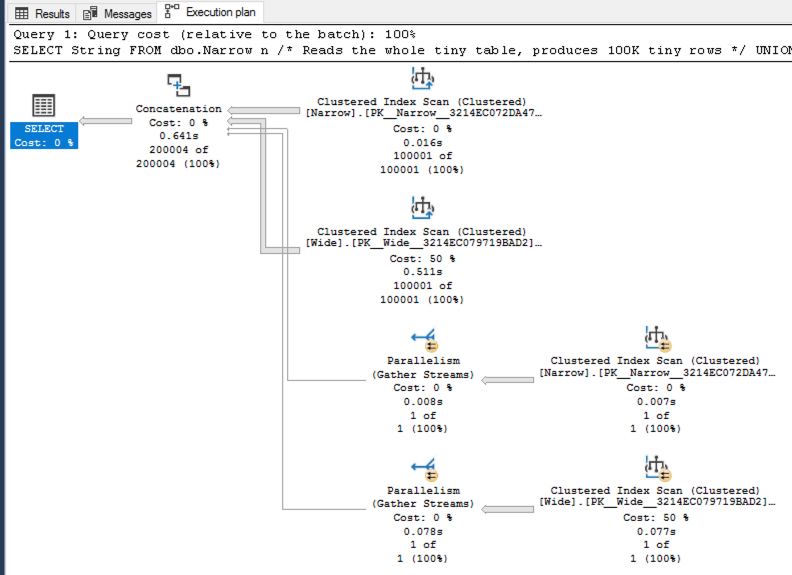
In the actual plan, it’s the number of rows READ by the operator.

Good news: 20% of you are staying current with your SSMS knowledge!

Great news: 80% of you needed this blog post, so my instincts for what to write about are still bang on. Thank you, dear 80% of readers, for confirming my knowledge about your skills. You’re doing me a favor. I love you just the way you are. Now, let’s do this:

Note that the arrows coming directly out of each clustered index scan are the same size – even though they produce different numbers of rows – because in an actual plan, arrow sizes are based on the number of rows read by that operator. (That’s also why the parallelism gather streams operator output arrows are so tiny – that operator only has to handle 1 row.)

That’s counterintuitive, because you would think the arrow size coming out of an operator would represent data coming out of that operator – but it’s not. The arrow size is based on the work done by that operator.

The documentation on this is pretty thin – the closest to official documentation that I’ve found is this SSMS 17.4 bug report where Microsoft wrote:

Hello Hugo, the thickness now takes into account the actual rows read by the operator, if available, which as per previous user community feedback, is a more accurate measure of the operator weight in the plan, and it makes it easier to pinpoint problem areas. In some cases, the problem operator had the narrowest line as actual rows is zero, but actual rows read was > 0.

This is also why I love Plan Explorer.

SentryOne Plan Explorer is a free execution plan visualization & analysis tool that lets you configure all kinds of things – including the sizes of the arrows. When you’re viewing a plan, right-click on it and choose your line width preferences (and your costs, too, like if you want the cost % to be CPU or reads):

Which one is “right”, SSMS or Plan Explorer? Well, I’d say they’re both right – as long as you understand the metric they’re measuring.

And don’t feel bad if you were wrong, by the way. I wasn’t sure if estimated plans were doing the same thing (rows read) as actuals, thus the research, and then the blog post. Strikes me as odd that they’re not consistent, though.

This is one of those posts where I know I’m going to get a bunch of questions in the comments asking me for more clarifications. By all means, grab the demo code out of the post – I wanted to make it as easy as possible to let you get started answering your own questions by building your own demos. That’s the best way to learn more about SQL Server – roll up your sleeves and get started. I’m looking forward to seeing what you find!


Contest: What’s Your Worst Database Horror Story?

Humor
121 Comments

At SQL Intersection in Orlando last week, a few of us were sitting around a table talking shop. One thing led to another, and as so often happens at conferences, we started talking about our worst scars from database misfortunes.

That got me thinking – I could kinda bring that fun experience to y’all here at the blog. Even if you can’t go to a conference, you can still have the fun of commiserating with your peers. Leave your comment here with your worst database horror story.

Nothing's wrong, everything's fine
One of the very rare safe-for-work gifs from the very not-safe-for-work Swear Trek

Just a few ground rules:

1: Keep it anonymous-ish. Don’t put details in here that your manager wouldn’t want to see out in public.

2: Don’t throw anybody under the bus. Remember that your fellow coworker might be reading this, and they might recognize the scenario. (I’m being polite. I’m really just trying to make sure your fellow coworkers don’t throw YOU under the bus. We’ve all had our days, am I right? Especially you.)

3. It needs to involve you and databases. And no, I don’t really wanna hear about how your data was involved in somebody’s data breach, hahaha. We’re to the point where newspapers are going to start including a “data breach” section just like they do a sports section.

This weekend, I’ll read through the comments and pick 5 of my favorites to be re-published in a blog post next week. Those 5 commenters will get their choice of a Recorded Class Season Pass or the Consultant Toolkit. My judgment is final. Not good, just final.

I’ll go make the popcorn.


Forced Parameterization Doesn’t Work on Partially Parameterized Queries.

Development
3 Comments

Over and over again, I run into applications that don’t parameterize their queries, and as a result:

  • Compilations/sec is nearly as high as Batch Requests/sec
  • CPU is high due to all those compilations
  • Plans rarely last for more than a few hours in the cache
  • Monitoring tools that track resource-intensive queries are useless because every query looks “unique” to them
  • Optimize for Ad-Hoc Workloads doesn’t help because compilations still cause high CPU, and the queries aren’t grouped in the plan cache (and age out so quickly)

Normally, this is where Forced Parameterization saves the day. Hit this one switch, and bam, CPU falls down to nothing. I have a love/hate relationship with Forced Parameterization, though, because there is a long list of scenarios where Forced Parameterization doesn’t work:

  • INSERT…EXECUTE statements.
  • Statements inside the bodies of stored procedures, triggers, or user-defined functions. SQL Server already reuses query plans for these routines.
  • Statements that contain XQuery method calls, where the method appears in a context where its arguments would typically be parameterized, such as a WHERE clause. If the method appears in a context where its arguments would not be parameterized, the rest of the statement is parameterized.
  • Statements inside a Transact-SQL cursor. (SELECT statements inside API cursors are parameterized.)
  • Deprecated query constructs.
  • Any statement that is run in the context of ANSI_PADDING or ANSI_NULLS set to OFF.
  • Statements that contain more than 2,097 literals that are eligible for parameterization.
  • Statements that reference variables, such as WHERE T.col2 >= @bb.
  • Statements that contain the RECOMPILE query hint.
  • Prepared statements that have already been parameterized on the client-side application.
  • (And more, but I’ll stop there)

That last one struck me recently, and in a way I wasn’t expecting. The code was partially parameterized, like this contrived example:

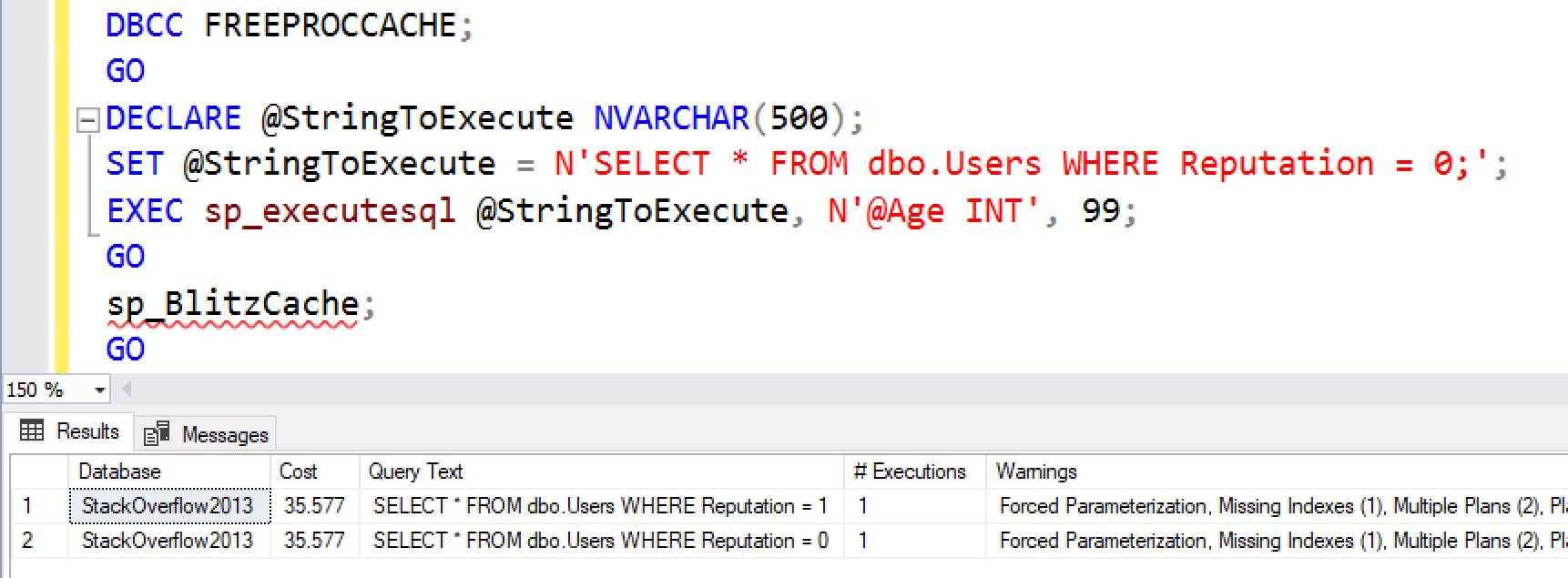
Note that the @Age one is parameterized, but the Reputation value is not. SQL Server looks at the string and says, “Well, it’s already parameterized – my work here is done, no need to force parameterization.” I get one plan in the cache per hard-coded Reputation value:

Unforced parameterization

Diabolical. The moral of the story: either parameterize EVERYTHING in your strings, or don’t parameterize ANYTHING.

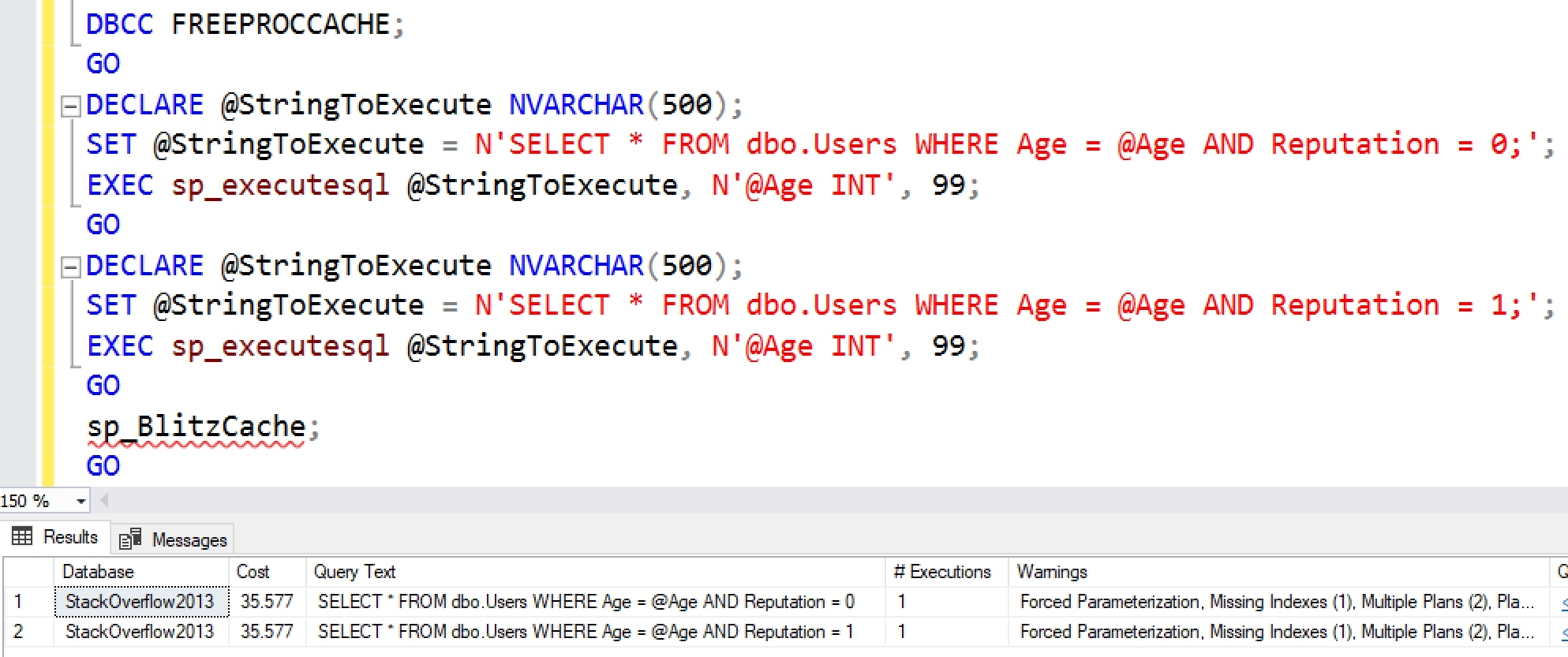
Believe it or not, it gets worse. Some of the queries were built with dynamic SQL, but didn’t use the parameters – they just reused the same framework to build the strings. So they had hard-coded Reputation numbers like this, but didn’t use the @Age parameter at all:

Forced parameterization

And yet, they didn’t get parameterization forced. SQL Server just assumed the query had already been parameterized since we were using sp_executesql and passing in a parameter – even if that parameter was completely irrelevant to the query.

Just to be clear: the app involved wasn’t doing something quite this simple, but rather building lists of “in” strings in Entity Framework with a technique like this. <soapbox>Do not copy/paste code from Stack Overflow into production without analyzing the performance impact.</soapbox>

Is it a bug? I’d say yes – but not a SQL Server bug, rather a bug in the query-building app code. It doesn’t make me angry at Forced Parameterization – it’s a really cool tool, and I’m just so thankful for the times when it works. (Did that sound convincing? I hope it sounded convincing.)


Now is the time to sharpen your cloud database skills. Here’s how to start.

Microsoft Azure
16 Comments

Many of us DBAs have been able to put off dealing with the cloud. That time is quickly coming to an end. But when was resistance to change ever a great career strategy in a tech field? Besides, two or three or four years from now, you might not have much choice in the matter. You don’t want to be way ahead of the curve, but you do wanna be just ahead enough, and so the  time to start your cloud education is now.

The imperative to adopt cloud solutions will likely come down from on high. The good news is that you can ramp up fast. Operating a database in the cloud is different, but it’s not that different. Your mileage may vary, depending on whether you’re doing a lift and shift or moving to a different platform altogether. Thankfully, Microsoft has blessed the SQL world with a plethora of options, from running your favorite flavor of SQL as an Azure VM to the Azure SQL DB platform-as-a-service. (The plethora of options can be a curse, too – so many choices that you can get analysis paralysis, but that’s why you need to get educated about your choices to have a good discussion with management.)

You might get to make the change slowly—or you might not. In either case, if you play your cards right, the cloud has the potential to make your job a whole lot more interesting. I meet a lot of DBAs and I don’t know many who love to see their beautifully tuned database crunched by a disk failure, or enjoy getting up at 2:00 AM because an OS patch failed. In the cloud, those problems are someone else’s to deal with. You get to deal with the enjoyable problems – the problems where you look like a hero instead of a failure.

Other skills, like query optimization and performance tuning, are just as relevant in the cloud, if not more so. And hopefully, with the time you’re not spending babysitting hardware, you can do cool things like learn new technologies and muck about with machine learning.

There’s work to be done, for sure, but it’s nothing to be scared of. Microsoft has published a good one-pager about some of the most common myths that might stand in the way of your ascendancy to the Cloud DBA Throne. Here are a few:

  • “I’ll lose a lifetime’s worth of work.” Migrating doesn’t mean losing all your stuff. You can send your scripts, queries, and macros to the cloud using script libraries, and the vast, vast majority of your skills are still relevant – just used slightly differently.
  • “Cloud performance can’t compare to my on-prem server.” It might be better, especially if you take advantage of automatic performance tuning recommendations provided by Azure. Let’s be honest: you’re not doing a great job of tuning all of the indexes, on all of your databases, on all of your servers. You’re stretched a little thin.
  • “Cloud is cloud.” Not exactly. For one thing, Microsoft can save you big bucks when you apply your on-prem licenses to Azure. Plus, the platform for Azure SQL DB is tuned by the folks who make SQL Server. They know stuff, stuff like the new Azure SQL DB Hyperscale white paper that I’ve been giddily consuming.

You can check out the full list here. If you’re a sharp DBA, the cloud is more opportunity than threat. Grab it by the horns. (Wait, which one has horns, opportunities or threats?)


What Happens to DBAs When We Move to the Cloud?

I’m finishing up a bit of a summer tour – Techorama Belgium, SQL Saturday Dallas, SQL Saturday South Florida, and this week, SQL Intersection in Orlando – and I’ve gotten the same question from several attendees. It goes something like this:

“My company hasn’t moved to the cloud yet, but at every conference session, I keep hearing Microsoft talk about the cloud. Is everybody else really doing it? And if they do, what happens to my job?”

To answer it, I usually start with a show of hands – asking the other attendees how many of them run their production databases in the cloud. I don’t have exact numbers here, since I do show-of-hands, but I’ll give you a rough rundown:

SQL Saturday Dallas

  • Most attendees aren’t running production databases in the cloud yet
  • Of the ones who are, most of them are using infrastructure-as-a-service (VMs)
  • Relatively few (5-10%) are hosting their production databases in platform-as-a-service (Azure SQL DB, Amazon RDS)

Microsoft sessions are about the future.

The 5-10% Azure SQL DB ratio is very much the opposite of the content ratios that you see from Microsoft presenters at conferences: those can sometimes seem like 90-95% Azure services. However, it makes sense: there’s already an army of community presenters who can teach you about on-premises servers or VMs – those are the same as they’ve always been. Microsoft needs to tell you information you can’t get anywhere else, and that’s Azure. They need to tell you about the future, not the present.

It’s no different than SQL Server versions. You don’t see a lot of Microsoft presenters talking about how to get the most performance out of SQL Server 2012 and 2014. To them, that’s old hat. They’re focused on telling you about what’s new in  SQL Server 2019, a version we don’t even have a release date for yet – and again, that makes sense too. Microsoft already gave presentations about how to manage SQL Server 2012 and 2014 – they did it back in 2012 and 2014, hahaha. They’re moving on – and that’s fair.

That can seem odd to attendees who are only just now adopting 2014 or 2016, but have no fear: there are still plenty of other conference sessions for you. They’re just not taught by Microsoft employees, and that’s totally okay.

Even in Microsoft’s vision of the future,
there are still production DBAs.

Let’s run with the Microsoft presentations about SQL Server 2019 for a minute. Even in 2019 – the version you don’t have yet, and you lust after with hungry eyes – it’s still a plain ol’ boxed product that you download and install. In the cloud, that means infrastructure-as-a-service – but it’s just plain ol’ VMs, only more complicated. Microsoft’s talking a lot about running it on Linux and in Kubernetes clusters – again, things you have to set up yourself, things not exactly known for their ease of use.

You still have to figure out patching.

You still have to figure out high availability and disaster recovery.

You still have to figure out troubleshooting on that Big Data Cluster.

You still have to manage permissions. And Agent jobs. And corruption checking. And restores. I could go on and on, but you get the point: there is still a lot of administration for that database.

If your app fits into a few profiles, you can outsource some of that production database administration work to Microsoft if you move to Azure SQL DB. Today, Azure SQL DB, Hyperscale, and Managed Instances are great fits for a lot of databases that, frankly, never had production database administrators to begin with. I love that – I’d rather have someone taking care of a database than no one taking care of it.

And in platform-as-a-service,
development DBAs are hella valuable.

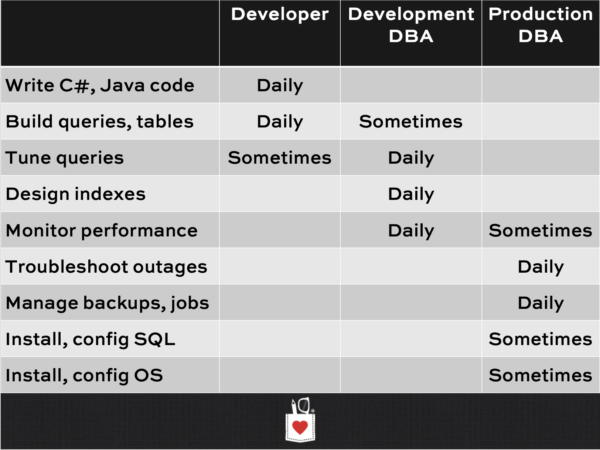
There’s a big difference between development DBAs and production DBAs. I know, you think you do all of those things, but you only kinda sorta halfway do all of ’em. As you gain seniority, it’s time to specialize in one of those two:

DBA job roles

The development DBA job role is incredibly valuable in the cloud. See, on premises, when I tune a query, the company doesn’t get a refund for those unused CPU cycles. They can’t instantly downgrade from Enterprise Edition to Standard Edition and get their licensing money back.

In the cloud, they can.

One of my favorite recent examples was a company who came to me saying, “We’re spending about $2M per year in the cloud just on our databases alone. Can you help us reduce those costs?” Absolutely: with just a couple of days spent query & index tuning, we chopped their biggest database expenses in half while increasing performance.

At the end of that engagement, the CTO told me, “I thought I’d save money in the cloud by not having a DBA, but what I’m learning is that in the cloud, I actually get a return on my DBA investments.

Bingo.

In the cloud, a good development DBA pays for herself.

It’s up to you to communicate that.

If you’re a DBA and your company uses the cloud – whether it’s infrastructure-as-a-service or platform-as-a-service – it’s time for you to start learning more about:

  • How much your company is spending on your databases
  • What your workloads look like on each of those
  • How you could do performance tuning to cut the costs
  • How to make sure to reduce your instance sizes after your tuning work completes
  • How to follow up with the end users to make sure they’re still happy after the cost cuts
  • How to take the credit for your hard work, and prove that you’re paying for yourself

This is how you’ll get your raise this year, and how you’ll be the obvious no-brainer candidate next time you’re looking for work. The cloud isn’t killing your job – the cloud is making you the hero of the executive suite.


Updated Stack Overflow Public Data Set for June 2019

Stack Overflow
5 Comments
Stack Overflow
The place that saves your job

Taryn and the kind folks at Stack Overflow have updated their public XML data dump for June, so I’ve imported that into an updated sample database for your blogging and presenting satisfaction.

You can download the 40GB torrent (magnet) and it expands to a ~350GB SQL Server 2008 database. Because it’s so large, we only distribute it with BitTorrent – if you’re new to that, here are more detailed instructions.

Fun facts about this month’s release:

  • The Votes table is up to 172,502,324 rows, but only takes 6.2GB space (since it’s fairly narrow.)
  • The PostHistory table, on the other hand, only has 118,390,637 rows, but consumes 196GB (185GB of which is off-row text data.)
  • The Users table finally broke 8 digits: it’s got 10,528,666 rows, and is still a nice tidy 1.3GB (it’s wide, but most people don’t populate much in the text fields like Location, WebsiteUrl, AboutMe.)

I’m torn about whether or not I’ll distribute the next one in SQL Server 2008 format, or start using SQL Server 2012. The VM I use to build the database has 2008, so it’s not like it costs me extra work to continue using 2008. Plus, you can still attach this in 2019 – gotta love how robust SQL Server’s file handling is. Is there a reason I should change to distributing the next one in 2012 format instead?


What’s Better, CTEs or Temp Tables?

T-SQL
37 Comments

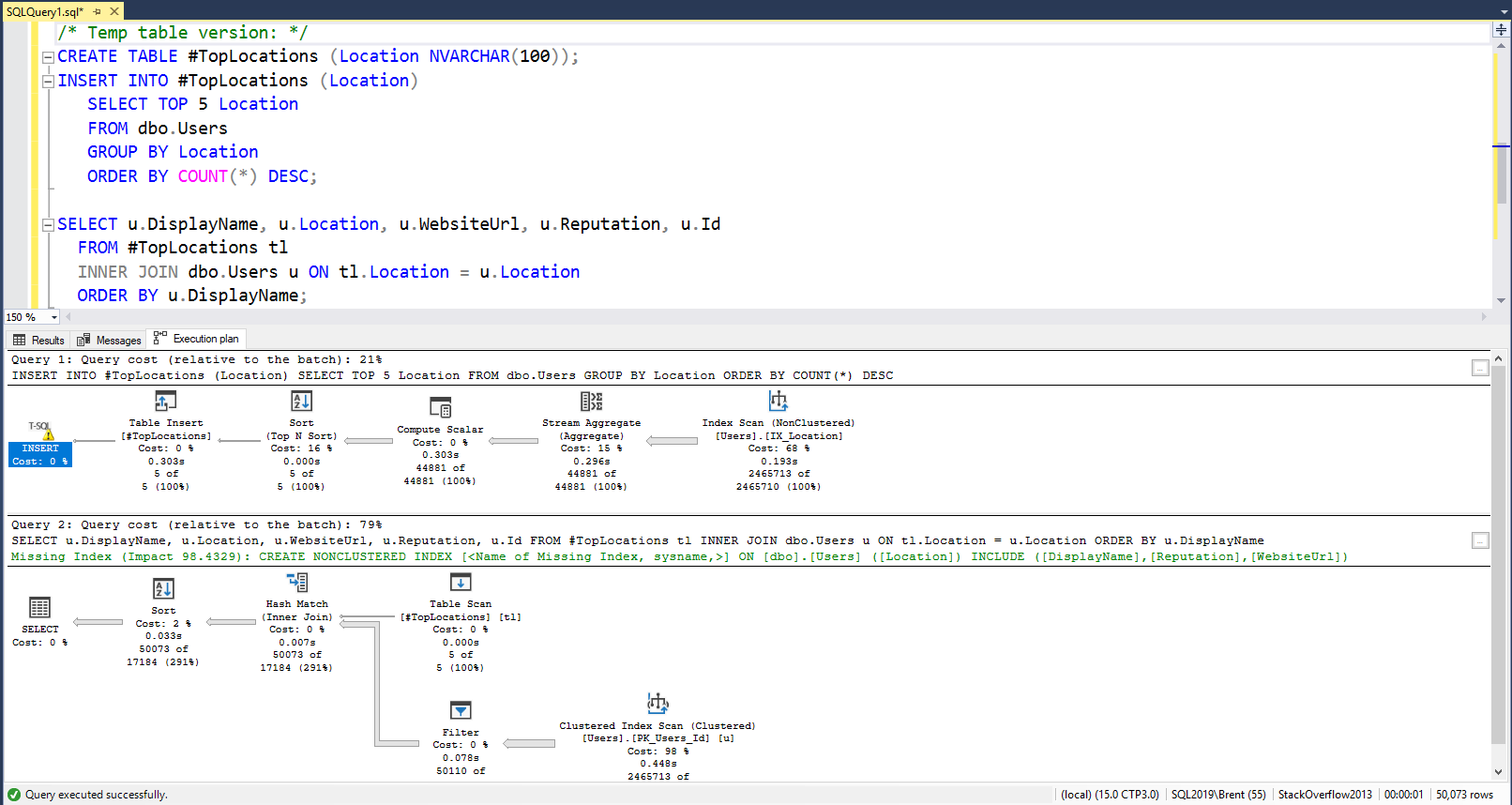
I get this question a lot, so let’s set up an example with the Stack Overflow database. My query’s goal is to:

  1. Find the top 5 Locations
  2. List the users who live in those top 5 Locations, alphabetized by their DisplayName

There are a LOT of ways I could write this query, but for the purpose of this post, I’m only going to contrast common table expressions (CTEs) versus temp tables:

We’re talking about a relatively small table here – less than 1GB in the Stack Overflow 2013 (50GB) version – so both versions of the query perform fairly quickly.

Here’s the execution plan for the CTE:

The CTE does both operations (finding the top locations, and finding the users in that location) in a single statement. That has pros and cons:

  • Good: SQL Server doesn’t necessarily have to materialize the top 5 locations to disk
  • Good: it accurately estimated that 5 locations would come out of the CTE
  • Bad: it didn’t know what those 5 locations would be, so…
  • Bad: it wildly under-estimated how many Users would be found in those locations (est: 66 rows, actual: 50,073 rows)
  • Bad: it chose to do index seeks + key lookups for a total of 158,916 reads

Here’s the execution plan for the temp table:

The temp table version splits the work up into two phases, which means that by the time the second operation happens, SQL Server has the benefit of knowing what happened in the first phase. That also has pros and cons:

  • Good: SQL Server accurately estimated that 5 locations would come out of the temp table
  • Great: it even estimated what those 5 locations would be, so
  • Great: it guessed much more accurately about how many Users lived in those locations (est: 24,657 rows, actual: 50,073 rows)
  • Great: it chose to do a table scan, leading to less logical reads (just 49,900 total for both operations)

So what’s better, and when?

CTEs are usually better when:

  • SQL Server can do a good job of estimating how many rows will come out of it, and the contents of what those rows will be, or
  • When what comes out of the CTE doesn’t really influence the behavior of the rest of the query, or
  • When you’re not sure what portions of the CTE’s data will actually be necessary for the rest of the query (because SQL Server can figure out what parts to execute, and what parts to simply ignore)

Temp tables are usually better when:

  • You have to refer to the output multiple times, or
  • When you need to pass data between stored procedures, or
  • When you need to break a query up into phases to isolate unpredictable components that dramatically affect the behavior of the rest of the query

I’d suggest starting with CTEs because they’re easy to write and to read. If you hit a performance wall, try ripping out a CTE and writing it to a temp table, then joining to the temp table.

To learn more and watch me build queries where different solutions are more effective, check out the CTEs, Temp Tables, and APPLY module of Mastering Query Tuning.


Tips for Better Presentations

Today’s post is for those of you who give presentations to user groups and conferences.

Upload your resources before the session starts. When you say “I’ll upload the resources later,” the attendee hears you saying, “I’m winging this, I barely finished this deck 15 minutes ago, and I didn’t even have the time to upload it to the Internet.” For bonus points, upload your resources at least 2 days before the session. SQL Saturday attendees frequently tell me, “I read through your slides and they looked really interesting, so I picked your session. Thanks for sharing them in advance.” On the flip side, I’ve sat through sessions where the abstract looked really compelling, but the slides had absolutely nothing to do with the abstract – and if I’d have seen those slides ahead of time, I’d have picked a session that was a better fit for my goals. Honor your attendees’ time: upload the slides first.

Brent Ozar presenting at SQL Saturday Israel 2019

While people are walking in, show the abstract. The first slide in your deck should show the session title and the first paragraph of the abstract in large print. Make it easy for people to understand if they’re in the right session, and remind them of your goals. This helps set expectations so that your feedback forms don’t say, “The presentation didn’t match the abstract.” (This also helps remind *you* of what you need to teach.) No slide deck? No problem – put it in a text editor in large print.

Record yourself at least once. It doesn’t have to be fancy – just leave your phone on the podium and use its sound recording app. Later – at least a day later – go back and listen. You’re probably going to cringe at first, hearing yourself speak, but it’ll clue you in to all kinds of nervous habits you didn’t realize you had. Your attendees won’t write in the feedback forms, “You say ‘right?’ at the end of every single sentence.” They’re going to assume you already know. You don’t, thus the recording.

If you teach T-SQL, restore the database before every presentation. Set up an Agent job to restore your demo database from scratch. Before you rehearse or deliver your presentation, start by running that job. This will make sure you’ve got all your dependencies lined up as part of your demo scripts, making it more likely that your demos will work as you designed ’em – especially important when you only give the presentation once or twice a year. It’ll also be easier for attendees to follow along with your demo scripts later. They won’t be stuck wondering why a particular query doesn’t work the way you demo’d – because you’d forgotten to include a crucial index change or server setting.


Why That “DBA” Job Posting Sounds So Terrible

What follows are just some of the highlights from an actual job posting. I’m not including the job description, just the requirements that an applicant has to have in order to even throw their hat in the ring:

  • Requires Bachelor’s degree or equivalent experience.
  • Experience running and maintaining a 24×7 production computing environment
  • Hands-on experience driving improvements in product performance via changes in database schema, logical and physical data organization (partitioning), tuning and configuration.
  • Experience implementing/maintaining database failover mechanism (mirroring, log-shipping, clustering, etc.) and perform disaster recovery exercises for mission-critical databases.
  • Strong SQL/T-SQL skills with hands-on experience in successful database design, schema design, SQL performance tuning and optimization.
  • Strong skills in SSRS report development and SSIS/ETL.
  • Experience with maintaining and optimizing MongoDB is preferred
  • Experience with AWS services is a plus.
  • Experience with data profiling/metadata analysis/data modeling and relational schema design in object oriented or component based projects is a plus.

Sounds impossible, right? It wasn’t.
There was probably someone doing it.

Here’s how these job descriptions get written:

Debbie in IT starts as a developer. Over the years, she gradually takes on more duties, building reports in SSRS, a few ETL packages in SSIS. She’s proud of her work, and rightfully so, because she’s growing her skill set. She’s proactively learning on her own. She models the data, builds metadata repositories about where the data warehouse’s data is coming from.

Someone in the team builds something in MongoDB, and they quit, and Debbie has to take over the administration of the MongoDB servers.

The company comes out with a mandate that the servers can never go down, but they don’t give Debbie any money to make it happen. She duct-tapes things together as best she can, putting in a cluster and log shipping, and tries her hardest to make sure it stays online.

Then one day, the company says, “Let’s move everything to the cloud. Debbie, you’ve been able to get things done – you’re in charge.” Debbie rolls up her sleeves, works late nights and long weekends, and makes it happen.

Eventually, Debbie becomes tired of burning the candle at both ends. She mentions to a friend of hers that she’s burned out, and her friend says, “Whoa, come on over here and join me at Acme. We’ll take much better care of you. You won’t have to spread yourself so thin, and you can focus on the parts of the job you really love.” She turns in her two weeks’ notice.

And now her old boss says, “Well, we’ll just write up a job description for what Debbie used to do.”

Except nobody wants that job.

The whole reason Debbie left is because that job sucks.

Don’t let those requirements scare you off,
but be open about your fears.

If you see a job like that, and you’re too intimidated by the list of “requirements,” throw your hat in the ring anyway. The company probably isn’t going to find someone who has all of those skills – at least, not at the rate they’re likely to pay. Be honest with them and say, “Here are the parts of those requirements that I already have, but here are the parts I don’t. Also, is this really one job, or is this maybe two jobs? Is there someone else on staff who can help back me up on parts of these, or am I maybe the backup?”

Sometimes when companies say “requirements,” what they really mean is nice-to-haves – only they don’t know that yet.

Just make sure you ask one crucial question when you’re interviewing for the position: “Is this a new position, or am I replacing someone who left? And if I’m replacing a former person, can you tell me a little about why they’re no longer here? That job description reads like it might be a cause for burnout, and I just want to make sure I don’t get myself stretched too thin. After all, you wouldn’t want me to get burned out and leave too – what can we do to make sure I’m not stretched too thin?”


Things SQL Server Setup Doesn’t Do – And Should

During the setup wizard, SQL Server should ask for your email address. It should suggest that you use a distribution list for people on your team, so that someone gets the alerts when you’re out on vacation. Then, it should send these common failure alerts to you rather than making you set them up manually.

It should ask where you want your backups written to. It should suggest that you back up to a UNC path, not store the backups locally, lest the box crash and you lose everything.

It should ask if this is a new server, or replacing an existing server. Your phone probably does this – shouldn’t your expensive database server? I’m not saying it has to migrate the existing data and settings over – that’s genuinely hard, I get it. (However, I’ll say that the fact that Apple phones & laptops do this means that I upgrade more often. Upgrading is painless – go buy the new one, your stuff transfers over, boom, done. The pain of moving to a new SQL Server means we don’t do upgrades as often, and I know Microsoft wants to spur adoption. This kind of enhancement would make that happen.) I get that we’re not going to get automated moves, but the very least, go connect to that SQL Server to get a rough idea of how many databases and how much size is involved for this next step…

It should ask how much backup history you want to keep in that backup folder. As you move a slider back and forth between, say, 1 day and 1 year, it should show you how much space will be required on your backup target, and whether you have enough space for that now. Sure, you probably have something to sweep those backups off to a more long-term destination, but this is a good start.

It should ask how much data you’re willing to lose. As you move a slider back and forth between 1 minute and 1 week, it should show you the full, differential, and log backup schedule it’s going to use in order to meet your goal, plus corruption checking jobs. If you’re replacing an existing server, it should also show you roughly how long your restores are going to take. At the very least, it could open the maintenance plan wizard with suggestions already filled out. (I know, you prefer Ola Hallengren’s maintenance scripts, and I do too, but…baby steps, right?)

Shouldn’t we start users off by helping them protect the data?


User-defined scalar functions suck – even when they don’t access data.

T-SQL
22 Comments

The performance of scalar functions sucks hard. Let’s see it in action using the Stack Overflow database – any size will work. I’ll set things up first in case you want to follow along:

I’m purposely setting my Cost Threshold for Parallelism to be low here because I want to demonstrate what happens when a query goes parallel, but I want to use short demo queries so you’re not twiddling your thumbs as you wait to reproduce this stuff on your Pentium 3.

I’m using compat level 140 (2017), but any compat level prior to 150 (2019) will work. (SQL Server 2019 has dramatically different effects, sometimes not so good.)

Let’s create a scalar function that just returns the number 1. Nothing more, nothing less:

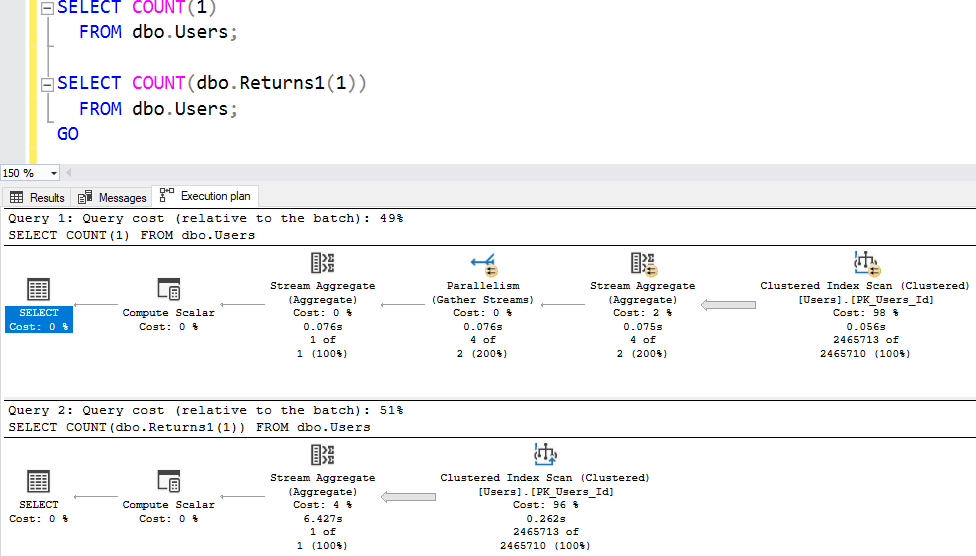
Then test its overhead by turning on actual execution plans and running these two queries back-to-back:

The execution plan looks like no big deal – one of ’em costs 49%, and the other is 51% – what’s a couple of percent between friends?

Scalar function execution plans, SQL Server 2017

But remember, the percentages are based on the estimated costs – even when you’re looking at an actual plan. The percentages are simply garbage and meaningless – execution plans are full of lies. However, there’s one interesting thing that does stand out: the plan with the function doesn’t have parallelism. Until SQL Server 2019, if your query has a scalar function anywhere in it, your entire query plan goes single-threaded. Ouch. (Ironically, the contents of the function are allowed to go multi-threaded, so…yay.)

A better indicator of performance here is in the Messages tab:

  • Without the function: 93 milliseconds elapsed time, 299 ms CPU time
  • With the function: 6,427 ms elapsed time, 5,375 ms CPU time

Ouch. tl;dr – even if your scalar function doesn’t touch tables, it still cripples performance by forcing serial processing, blowing up your CPUs, and obfuscating your query plans. Scalar user-defined functions: not even once.


5 Questions to Ask When You Upgrade SQL Server

Whether you’re looking to go cutting-edge and hop on SQL Server 2019 as soon as it’s available, or whether you’re just trying to evacuate from SQL Server 2008 to anything that’s going to be supported after this summer, you’re probably doing upgrade projects. This is a good time to ask yourself 5 questions:

1. Do we really need the higher compatibility level right away? When you flip the switch at the database level to enable a newer compat level, you’re taking a risk that your performance will be better across the board for every single query. The reality is that sometimes, it’s not. You probably tested your slow queries and found they went faster with the new compat level, but you didn’t test your fast queries to see if they regressed. After migrating to a newer version, just leave the compat level at the same one you had before for a week or two. Later, flip the switch on the newer compat level, watch what queries perform better or worse, and be ready to pop back to the older compat level temporarily if necessary. This just buys you and your team time to do performance mitigations on queries that regressed.

2. Will we enable Query Store? This built-in tool helps you do a better job of identifying which queries are regressing, and why. It’s not intuitive, and the default settings are a really bad idea, but you can work around those if you spend some time learning it ahead of time. It’s just a question of whether you’re willing to invest that time. (The tool isn’t going away, and I think learning how to configure and use it is a good investment that would pay you dividends in the long term.)

3. What’s our back-out plan? I’m not a fan of upgrading in place because it leaves you without a safety net. However, even if you build new VMs and migrate over to them, you still need to do a round of user acceptance testing to make sure everything’s okay on the new environment. Once you go live on a newer version, and you start doing deletes/updates/inserts (DUIs) on that new version, your data just flat out now lives in the new version. You can’t restore a database to an earlier SQL Server version. So before you let the users in, designate a team to do a round of quick performance tests, and have everyone agree on the success criteria. If they don’t sign off on go-live data, scratch it, and stay on the older infrastructure for another week or two (or more) until you iron out the performance issues.

4. What sp_configure settings and trace flags are we using, and why? Over the years, we might have implemented different tweaks in order to fix performance or reliability issues. When you upgrade, that’s a good time to stop and revisit those settings to see if they’re still relevant. Plus, their behavior can change – here’s a problem I’m running into right now with trace flag 834 and CTP 3.0:

Microsoft just doesn’t have the bandwidth to test every possible combination of trace flags and sp_configure settings. The more you venture away from the defaults, the more you’re taking risks that your particular combination won’t behave the way it has in the past.

Update May 29: with the help of the brilliant @sqL_handLe, we traced down that it’s a bug in the Hybrid Buffer Pool feature that’s trying to use conventional memory as a PMEM device. Boy, talk about a good example of it being difficult to test every combination of feature – I never would have thought to investigate Hybrid Buffer Pool as a culprit, and I’m still not sure how to do good root cause analysis on that feature given the limited instrumentation that I found during my investigation.

5. How often will we patch? SQL Server 2017 doesn’t have Service Packs anymore, only Cumulative Updates. Going to 2017 or 2019 is a good time to stop and talk with management about their expectations for patch outages. If they’re used to only taking annual outages for Service Packs, they’re going to be in for a big surprise with the frequency of Cumulative Updates: every 30 days for the first year of a product, and then every 60 days after that. When managers tell me they want less frequent maintenance windows, I walk them through the list of things fixed in recent updates. Take SQL Server 2017 Cumulative Update 15, for example: 2017’s been out for almost two years now, and yet CU15 still found & fixed bugs involving incorrect query results, Dynamic Data Masking security leaks, incorrect query results, stack overflows during backups, slight memory issues, and incorrect query results. Bugs are real, y’all.

What, you’re upset that SQL Server has bugs?

Well, it could be worse. The bugs could be there, and not getting fixed. Like, uh, the SQL Server 2008 that you’re supposed to be binning this summer.


Setting MAXDOP During SQL Server 2019 Setup

SQL Server 2019
19 Comments

Just a short note – in SQL Server 2019, the setup process has a new MAXDOP tab:

The hyperlink about MAXDOP configuration points here.

I did a few quick test installs:

  • 4 cores gave me a MAXDOP 4
  • 8 cores offered MAXDOP 8
  • 12 cores offered MAXDOP 6

Historically, the 0 default meant unlimited cores. I like this setting instead because if somebody amps up the VM’s core count later, MAXDOP won’t automatically rise to match. If you jump from, say, 4 cores to 8, then I still kinda like the 4 setting better.

In vaguely-related-news, this week’s CTP 3.0 adds a lot of diagnostics for Azure SQL DB Hyperscale, plus a new sp_configure option for hybrid_buffer_pool (no trace flag required.)