Blog

Why DBAs should care about storage virtualization

Storage
2 Comments

Vendor hype aside, storage virtualization is really expensive technology that few shops really use.  Don’t get me wrong, I love the technology, but seriously, it’s expensive.  And that’s just the hardware/software – try hiring somebody with storage virtualization experience – hoo, boy.  But something is coming that’s changing the game, redefining what storage virtualization means.

When I speak at user groups, I usually ask for a show of hands to see how many database administrators are running production SQL Servers in virtual environments like VMware ESX and Windows 2008 Hyper-V.  Lately I’ve seen about a third of the group raising their hands.

VMware ESX 3.5 added a feature called Storage VMotion that enables sysadmins to move a server’s hard drives from one array to another.

In real time.  No reboot or downtime required.

Without telling you.

That specific feature isn’t usually lumped in as “storage virtualization”, but for all practical purposes, that’s what it is – or at least a light version of storage virtualization.  It enables fast, fluid change in datacenter storage.

And since more and more database servers are getting virtualized, DBAs need to understand how storage virtualization affects their storage planning, performance tuning and budgeting.

At this fall’s SSWUG SQL Server Virtual Conference, I’ve got a session to explain this very topic.  In an hour, you’ll learn why you care about this new feature in VMware (and from other vendors), what it can do for you as a DBA, and what you need to look out for.


When will you use SQL Server 2008 in production?

5 Comments

The last several times I’ve spoken at user groups, I’ve asked for a show of hands to find out when people plan to put their first SQL Server 2008 instance in production. I ask because it helps me write better presentations – there’s no sense in me talking about something you don’t plan to use, or to give you a getting-started-101 presentation on something you’ve been using for months.

The results have been surprisingly low – usually less than 10-20% plan to do it in the next 30-60 days. I’m curious to see if my readership has the same plans, so with no further ado, my first poll is below.  (This may not work for readers with RSS readers.)

Update: the poll has closed.  Thanks!


Watch a former F1 driver drive his wife (crazy) around the track

2 Comments

The below video records what happens when former F1 driver Riccardo Patrese drives his wife around a track in a Honda Civic Type R.  Not a race car, mind you, just a street car with some special go-fast gear.  Fast forward to two minutes in, when they’ve gotten off Pit Road.

I had to laugh because it reminded me so much of what it was like when I took Erika for a spin around a go-cart track.  She kept screaming continuously, only stopping to draw deep breaths.  “EEEEEEEEEEE <wheeze> EEEEEEEEEE <wheeze> EEEEEEEE!”


Spend a Day with the Experts – Oct 14 – Redmond, WA

0

So you’ve been dying to meet me, but your job at Microsoft won’t allow you to leave the Redmond area?  Or maybe you’re tired of hearing all those bright people at Microsoft speak, and you want to hear a rank amateur fill your head with gobbledygook? Or maybe you just want free breakfast and lunch?

Well, it’s your lucky day – not today, but on October 14th, when Ron Talmage, Trent Mera and l will be speaking in Redmond.  You can register at that link to hear me ramble on about:

  • Got Performance Headaches?  Detect, Diagnose & Resolve – It can often take years of on-the-job experience as a DBA to learn how to understand when a problem is occurring, diagnose its root-cause, and then resolve it using manual techniques. This presentation will focus on techniques and tools for detecting, diagnosing and resolving performance issues in SQL Server.
  • SAN Tips for First-Time Users – This session will cover some of the risks and rewards, as well as tips and tricks that the sales folks don’t cover.  We’ll talk about how to get the most out of your SAN from the beginning with a good initial design.

Sound like fun?  Well, there’s always free food.  Sign up today, because seating is limited.

Update 9/17 3:30PM Central – changed my topics, plus fixed a typo found by eagle eye Arthur Langham.  Me talk pretty one day.  Hopefully he won’t be in attendance in Redmond, where my verbal skillz will make my writing look like awesome poetry.


Steel Cage Blogmatch: How to Configure a SAN

SQL Server, Storage
13 Comments

Jason Massie and Brent Ozar work with SQL Server for a living and write blogs for fun, but that’s where the similarities end.  Jason’s a fan of shared storage SANs: putting SQL Server data and logs on the same set of physical hard drives.  Brent’s a cheerleader for dedicated configurations where the arrays are separated by purpose.  We locked the two of them in a virtual room to see what would happen.  No database administrators were harmed in the making of this article.

Brent Says: You’re crazy.  Well, I mean, you’re crazy just in general – anybody who writes a comic about SQL Server needs some medication – but I mean you’re wrong on this issue.  Since the dawn of time, we’ve been telling SQL Server DBAs to put their data, logs and TempDB on different arrays for a reason: they get better performance.

Jason Says: We you say “need medication” I take it you mean more medication. Anyway…. Yes, that SQL Server 6.5 book we read a decade ago is, in fact, outdated. We once thought the earth was flat and we were the center of the universe. You can now file “dedicated raid 1 for logs” along with those busted myths.  That book was written back when servers had a small number of locally attached drives, and we were lucky if we got two hard drives in a mirrored pair for the logs.  Today, SQL Servers are attached to huge SANs with large numbers of hard drives.  Are you saying a shared piece of fifty or a hundred drives isn’t enough?

Brent Says: For small servers, you’re completely right, but let’s talk about an extreme example: established multi-terabyte data warehouses need very high I/O for long periods of time, several hours a night, during their nightly load windows.  They need to load as much data as possible, as fast as possible, and these windows often coincide with the nightly backup windows of other systems on that same storage.   They have dedicated DBAs who monitor performance closely, and they want to get every last dollar out of their SAN.  They carefully partition the data to balance load across different arrays and make it easier to do simultaneous ETL and reporting.

Jason Says: In situations like this when money for hardware and manpower is not an object, you can just throw enough resources at it that it is hard to mess up. However, you should spend some resources on testing and make sure you’re not flushing money down the toilet.  Separate drives for data, logs and ETL load files might best but having a higher total spindle count might still be better. The proof is in the test numbers, and blanket statements are not safe.  Not to mention by designing for the ETL, you will have idle drives when you are not loading – and you don’t want to have expensive SAN hardware sitting idle, do you?

Brent Says: You have a point there.  It’s easy to recommend dedicated drives in situations where there’s a consistently high utilization rate, like for 24×7 OLTP systems, email archiving databases or very heavily used data warehouses.  It’s harder to recommend them when the database servers just aren’t being that heavily used around the clock.  But talking about virtualization reminds me – I don’t want any SQL Servers sharing spindles with virtual servers, ever.  Virtual servers have such a high I/O utilization already that it’s like playing with fire.

Jason Says: It’s like buying a new house – you want to check out the neighborhood first and find out what your neighbors are like.  You wouldn’t build a brand new mansion in a sketchy part of town, and you wouldn’t put a data warehouse and a bunch of VMware guests on the same spindles.  I would suggest going to the Mayor (SAN Admin) and demanding a performance SLA. I have found by doing that, with executive sign off, that the Mayor makes sure the streets are clean and the riff raff out of sight.

Brent Says: Getting a good performance SLA is the first step to peace and harmony in the datacenter.  Data warehouses are a special case: they have lots of dedicated staff, generally experienced people, who can focus on things like IO throughput and latency.  But what about the rest of the databases, like your typical OLTP or application databases?  A single DBA has to manage dozens, sometimes a hundred instances.  They don’t have time to benchmark.

Jason Says: Hey, just because they’re a DBA doesn’t mean they spend every weekend in the datacenter, alone with their servers.  Not all of them are single.

Brent Says: Don’t be so sure.  My girlfriend refused to even think about marrying me until after I got out of the production DBA on-call rotation.   She says it’s a coincidence, but I dunno.

Jason Says: If you don’t have the time to benchmark, then you don’t have the time to micromanage storage performance, and you really don’t have the time to build a good estimate of how many individual drives you need for TempDB, logs, and so on to begin with.  Using a shared set of drives is the easiest way to achieve high performance.  If you’re not getting enough performance, add more drives, and it’ll even out.  Don’t try this with, say, 6 hard drives and expect to get good results.

Brent Says: That’s the same with dedicated drive setups, too.  I’ve been at shops where the developers swore SQL Server couldn’t scale – only to find out they had the data, logs and TempDB all on a handful of drives.  Whether you’re using dedicated drives or shared drives, don’t expect to scale a database server on any software platform without adding storage.  If you want a real eye-opener, go read the TPC benchmark records and look at the number of hard drives that were used.  It’s not unusual to see drive utilization rates of 1-5% – meaning, on a 146gb drive, they’re only storing a few gigs of data.  More spindles equals more speed, period.

Jason Says: Another problem is changing app requirements like adding audit trails or replication. These adding read IO to you dedicated log drives. There is also reporting mayhem(large sequential scans) being added to your OLTP app. These are the bad elements but once they are in your ‘hood, how do you move them out?

Brent Says: That’s actually a problem with some dedicated spindle SAN configurations.  When each array is configured on just a few disks, management can be a nightmare.  I’ve worked with one major SAN vendor who could only add drives two at a time to arrays, no matter how large the array was, and all drive management had to stop while that array was restriped – sometimes taking hours.  Adding more drives for more performance to handle new load was a real pain point, and I would have gladly traded off some performance in exchange for easier management.

Jason Says: Easier management is a big selling point for shared drive configurations.  When multiple servers draw out of a common pool, it’s easy to allocate space in smaller increments.  You can build multiple pools with different tiers: a Solid State Disk tier, a 15k RAID 10 tier, a SATA RAID 5 tier, and so on.

Brent Says: Speaking of Solid State Disk, when SSDs go mainstream, all SANs will just use shared drive configurations.  With SSDs, the random access problem goes away, because there’s no heads to move around, no platters to spin.  We’ll be able to gauge SAN utilization strictly on the number of queued-up requests instead of worrying about drive latency, and then it’ll be easy to tell when we need to add more drives.

Jason Says: Are you saying that maybe then you’ll get around to admitting the earth isn’t flat and shared drive configurations are always the best?

Brent Says: Get off my lawn, whippersnapper.

Jason Says: This is me getting in the last word. ?

Updated November 2008…

Now there’s more – we revisit it by taking a look at how virtualization affects SAN configuration.


The Glamour of International Travel

3 Comments

Saturday

It’s Labor Day weekend.  I would love to hang out and relax, but I have a plane to catch.  I pack my laptop bag and a single large suitcase.  I’d love to take a carryon too, because it’d be a nightmare if my luggage didn’t arrive with me.  I’m going to be checking the suitcase on five different flights, so the odds of losing it are pretty good, and if it gets lost, they won’t be able to get it to the right city on the right day.  I gamble and skip the carryon because it’ll be a pain to shuffle that many bags around Europe.  (That gamble pays off.)

At 2pm, we leave the house.  Five minutes into the drive, I get an email saying I need to bring a suit.  I don’t own a suit (never have) but I race back home to grab ties.  We make it to the airport in time, and I board a nine hour flight from Houston to London in coach.  I’m productive for the first few hours, banging away on presentations on my laptop, and take a sleeping pill to catch some Z’s.  It’s my only chance to get rest in the next day.  I can’t get comfortable, though – coach seats for a 6’3″ guy don’t work – and I only get a few minutes of fitful rest.

Sunday

I meet up with fellow Questie Heather Eichman in London and we board the one-hour flight to Dusseldorf.  When we arrive, we meet up with Cristoph and Oliver from PASS Gemany.  They’re absolutely hilarious, and they’re just great guys.  We have a laugh-filled ride to the hotel, which they warn us is of dubious quality.  Who cares, when the company is this good?

After we get our hotel keys, a maid offers to guide me to my room because I’m lost.  (There’s no signs.)  We start walking toward another building when she suddenly starts screaming.  I turn around, and after several seconds of screaming and gesturing, I figure out there’s a bee on my back.  I wave and dance around to her enjoyment, and we both get a good laugh out of it.

Cristoph and Oliver warn us that the hotel isn’t fancy, but I thought it was cute.  I’ve stayed in much, much worse hotels in the States.  There’s no iron, so my clothes won’t look too good, but everybody’s wearing shorts and t-shirts anyway.

We head down to the hotel beer garden (WOOHOO) and meet up with Rushabh Mehta, one of the presenters.  We immediately hit it off and talk for quite a while about SQL Server communities.  The waitstaff ignores us despite much waving, but we manage to score a beer after maybe twenty minutes.  I’m exhausted, though, so I retire to the room to take a one-hour nap before dinner.

Dinner with the DBAs was the highlight of the entire trip.  I won’t go into details here, but these Germans are the most hospitable people I’ve ever met.  We had a truly wonderful time.

Monday

The hotel has no hot water.

I hoped that it was just my wing of the hotel, or that it was because I’d woken up a little later than everyone else, but it happened to everybody.  Ouch.

The PASS guys have their own morning meeting, so a few of us pile into a car and head off to the next hotel where PASSCamp is being held in the hopes of getting a hot shower there.  The stunning hotel does not let us down.  I get a warm shower and a quick nap before the afternoon events start.

My presentation went well, and I meet even more DBAs that I could talk to for hours.  The more I talk to the attendees, the presenters and the PASS board members, the more I wish I could stay for the 3-day BI track, but no luck – I’m scheduled for more presentations in other cities.

We have dinner and great conversations, and I would love to stay up with these great guys and drink beer, but we have a car coming to pick us up long before dawn to whisk us off to the airport, so it’s off to bed at 10pm.

I wanted to avoid medication, and I was completely exhausted, so I skipped the sleeping pill and just hit the sack.  I regretted that mistake about four hours later when I woke up, wide awake.  It was too late to take a sleeping pill – I only had a few hours before I needed to wake up – so I stayed up.

Tuesday

Wake up, shower, pack the bags, check out, drag the bags to the waiting taxi, ride to an ATM, withdraw Euros to pay the driver, ride to the airport, go through security, board a plane to London, go through security, pick up the bags, and then it gets interesting.

Cabs in London are expensive.  Really expensive.  So to save money, we take the express train from Heathrow to Paddington Station, board a subway and transfer to another subway.

All with luggage.

During the morning rush hour.

After over an hour of dragging bags and elbowing for space in the Tube, we make it out of the subway station to find that it’s raining.  We walk a couple of blocks to the office and set the bags down.  It’s barely 10am, and already we need showers and fresh clothes, but it’s not happening – we have to work.  We grab coffee and muffins from Starbucks and sit down at laptops.

I’m an architecture buff, and London has so much to see.  The closest I get to tourism, though, is a shot of the Gherkin through the Quest office window.  I can tell you all about the Gherkin.  I had pictures of it on my desktop wallpaper for a while.  I would love to see it in person, walk up to it, maybe go up to the observation deck, but that photo is as close as I’ll get this trip.

After a few of hours of email and presentation prep, we drag the bags downstairs, find a taxi, ride to the hotel and deplete Heather’s stash of pound coins just to pay the driver.  We don’t actually have enough money to pay him, but he doesn’t want to drive to the nearest ATM – he would rather take less money than have to put up with the London traffic.

I check into the swanky hotel – that’s right, air conditioning and an iron!  One of them even works, but it’s the wrong one for this particular part of the trip.  I’ve only got a few minutes before I have to run back downstairs and find an ATM to pay the next cab, so I settle for the shirt that looks the least wrinkled.  I go back downstairs, walk two blocks to an ATM, then we board a cab to the meeting.

My presentation goes well.

After the presentation, I excuse myself and catch a cab back to the hotel.  A Quest exec is there and I’d love to stay to talk to him, but I’m a mental mess after sleeping only 4 hours in the last 40+ hours, so odds are I’d sound like an idiot anyway.  I leave before I have the chance to say something stupid.

Upon arriving at the hotel at 9pm, I have horrible stomach cramps.  I try to think back about what I might have eaten to cause food poisoning, and I realize the only thing I ate the entire day was a single muffin.

I call room service again and again, but don’t get an answer.  The hotel desk just keeps forwarding me back there.  I walk down to the restaurant, and the hostess says no, she can’t take a room service order, just keep calling and someone will answer.  I leave the speakerphone on continuously ringing, and eventually they pick up.  I order a chicken caesar salad, a small bowl of soup and a bottle of water – safe stuff for a dangerous stomach.

Only it’s not – the salad arrives about half an hour later and it’s covered with anchovies.  I pick those off and wolf the rest down along with a sleeping pill.  Not taking any chances tonight.

Wednesday

I have a couple of hours before my car arrives at 11am to take me to the airport for my next event, so I wander around the Tower Bridge shooting pictures with my iPhone.  (I lost my digital camera just before this trip.)  I pick up some chocolates for a friend, and then it’s back to the hotel.

I have a one hour ride to the airport, then grab lunch at an airport restaurant after going through tight international security.  Our flight changes gates at the last minute, and then takes forever to get off the ground.  The one hour flight takes over two hours, with plenty of wild turbulence.  I have to hang on to my laptop to keep it from bouncing onto the floor.

We touch down in Geneva and go through the most surreal passport check I’ve ever had: he didn’t even look at our passports, just waved us past.  Uh, okay.  While waiting at baggage claim, Heather recognizes the woman next to us as Melanie Lynskey – Rose from the TV show Two and a Half Men.

We drag the luggage through the airport and into the train station, buy two round trip tickets to Lausanne, drag the luggage to the train, and throw it up on the overhead racks because the train is full.  The 45-minute ride to Lausanne is nice – good scenery, very quiet and smooth train.

We arrive in Lausanne and drag our luggage over to the nearest ATM in order to get Swiss Francs for the cab ride to the hotel.  (The hotel doesn’t have a shuttle.)  We head outside to the taxi stand and thank our lucky stars that it’s got a roof, because it’s raining.

We suddenly realize the cab driver may not be happy when we try to hand him a $50 bill, the smallest denomination dispensed by the airport ATM.  When he clicks on the meter and it starts – STARTS – at $7, we relax.  Thank goodness for the high cost of living in Switzerland.  A 2km cab ride costs us nearly $20.

After nine hours of travel (and remember, I’m still in the EU) I finally set my luggage down.

The hotel is in a residential neighborhood, and there’s no hotel restaurant.  We ask the hotel desk clerk for the nearest restaurant, and he recommends a steak place three blocks away.  He gives us not one but two umbrellas to aid in our journey (because it’s still raining), walks us outside, and points to the right street to make sure we get there.  He rocks.

The restaurant rocks even more: they have steak tartare.  The waitstaff are funny, friendly, and go out of their way to make it an enjoyable dining experience.  Big tip.

During the discussion, though, I find out that a coworker suggested that I’m tacking on an extra day at the end of this trip on the company dime, and he thinks I’m slacking off on this trip, abusing company funds.  I hit the roof.  I would love to kick this guy in the balls, but he clearly doesn’t have any if he’s not willing to say this to my face before he says it to high-ranking executives.  I decide to settle for writing a blog post about the joys of international travel instead.

The rain stops long enough for us to walk back to the hotel.  I try to avoid medication, but I give up at 1am when I’m still wide awake.  I have to keep the windows open because it’s so hot in the room without air conditioning, but it’s so noisy outside that I can’t fall asleep.  I take my last sleeping pill.

Thursday (Today)

The hotel room is so small that the shower is visible through both the bathroom window and the bedroom window, so I can’t leave the windows open while I take a shower.  Since I don’t have air conditioning, the tiny room is a steamy sauna by the time I get out.  After dressing, I open the windows again, but at that point I’m sweaty from the heat.  Argh.

Good news and bad news: the good news is that I don’t have to worry about the iron heating up the room, because there’s no irons here or at the front desk.  The bad news: my clothes are a wrinkled mess.  Next time I’ll bring a travel iron.

We eat a continental breakfast at the hotel, then catch up on emails before heading out to catch a cab to the hotel where we’re holding the customer meeting.  They didn’t put us up at that hotel because it’s too expensive, so we’ll be dragging our briefcases and promo stuff out to find the place.

I’m doing a couple of presentations today, dinner with the DBAs, and then back to the hotel.  Hopefully my sleeping schedule has adjusted enough that I can make it without sleeping pills.

Tomorrow is a free day in Lausanne to make up for traveling & working the entire Labor Day weekend, and then Saturday morning I start the long travel process to get back to the States.  It’ll be a cab to the train station, a train to the Geneva airport, a flight from Geneva to London, a short layover, and a nine-hour flight from London to Houston in coach class.  I’ll have one day at home with Erika, and then it’s off to New York City and LA for the next presentations and meetings.

Don’t get me wrong, I love my job, but the travel is nowhere near as fun and easy as it might look on my Twitter stream.

The travel part sucks, but the people make it all worthwhile.  I have a long list of names that I’ll never forget, and I’d love to type them all in here, but if you’ll excuse me, I have to go catch a cab in the rain.

Hopefully the nice guy at the desk will loan us an umbrella again.


Surprise! I’m on the intrawebz!

4 Comments
Me!
Me!

I opened the company intranet this morning and got a surprise – I’m featured front and center.  Looks like I’m going to have to change my browser’s home page for the next couple of weeks, because I can’t face this first thing in the morning without coffee.

When I first started at Quest Software, I did a video interview with Heather Eichman to talk about what I did at Southern Wine, why I came to work for Quest, what I like about database administration, and what I like about the Quest product line.

I don’t have a copy of that video I can post here, but I’ll get one.


SQL Server 2008’s new Central Management Server

SQL Server
62 Comments

Got more than one DBA?  Want to make your life easier?  You might want to configure a Central Management Server.

This is useful for fast-changing shops where there’s a lot of servers added and removed.  At my last company, we had a hard enough time telling everybody when we’d finished adding a new server, or what the new server’s name was, or when we didn’t need to look at a server anymore.

A SQL Server CMS is just a central repository that holds a list of managed servers. Sounds simple – and it is – but it comes in handy, and it’s practically a requirement for a good policy-based management deployment.

In a shop with two DBAs, they both have their own desktops (plus maybe laptops) and each machine has its own list of registered servers.  With a CMS, the list of registered servers is stored on the central SQL Server.  When the DBA opens SQL Server Management Studio, they point at the CMS, and SSMS grabs the list of registered servers from there.

How to Set Up a Central Management Server

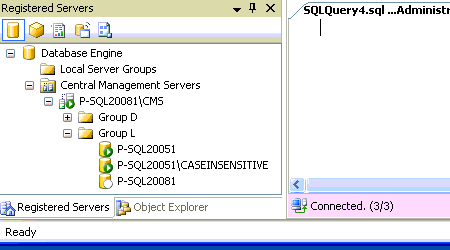
To configure it, open SSMS 2008 and go into the Registered Servers window.  Right-click on Central Management Servers and you get options to set one up.  From there, it’s basically the same as your local registered server list – only it’s centralized:

Registered Servers window showing a CMS

In that above screenshot, I connected to a CMS on P-SQL20081\CMS, and that instance stores the list of SQL Servers.  The list is initially empty – it doesn’t automatically detect all of the database servers in your enterprise – you just add servers and groups manually.

After you set it up from any workstation, then on any OTHER workstation, you can point SQL Server Management Studio at that CMS, and the list of servers is always in sync.  Think of it as a server list repository.

CMS Drawback: Windows Authentication Only, And Only Your Login

The CMS server list is just a list of server names: nothing more, nothing less.  Authentication is not saved at all.  When you connect to any server in the CMS list, your Windows authentication is used.  You can’t save an override list of logins, like an SA login for a specific server in the DMZ.

DBAs in large shops administer databases all over the world, in lots of domains that don’t trust each other, and in DMZs, and the Central Management Server is useless here.  We can set up multiple CMS’s, one in each domain, but that’s not exactly ideal.

I hate this limitation.  It means the CMS is nothing more than a centralized text file list of servers.  But it’s what we’ve got, so let’s get over it.  Either you can use a CMS, or you can’t.  Those of you who can, keep reading.

Next Drawback: Group Management Won’t Apply to the CMS

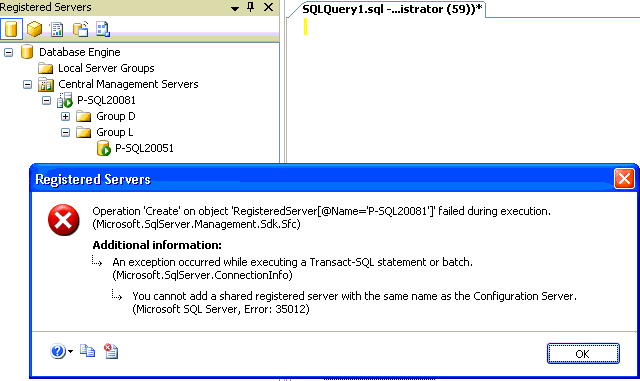
When you pick your Central Management Server, it needs to be a server that you won’t need to run multi-server queries against.  In the screenshot below, my CMS is the server P-SQL20081, and I’m trying to register P-SQL20081 as one of the registered servers:

Cannot Register the CMS Server In Itself

To understand why this is an issue, you have to understand what CMS registered server groups are useful for: multi-server queries and policy-based management.  Say I have groups for Development, Lab, QA and Production.  When I want to run a multi-server query against all of my development boxes, or I want to evaluate a policy against all of them, I right-click on the Group D registration and click New Query or Evaluation Policies:

Taking an Action on a Registered Group

The problem is that if I can’t register the server P-SQL20081 inside Group D, then I can’t include it in group queries or policy-based management for that group.

Furthermore, if I right-click on P-SQL20081 and click New Query, I do get a group-execute query – but it does not include the CMS.  The query only executes against all of the registered servers, and since you can’t include the CMS as a registered server in its own server lists, it’s effectively outside of all management groups.  Therefore, when choosing a CMS, choose carefully – it needs to be a somewhat highly available server, since all of your DBAs will be relying on it for a server list, but at the same time, it can’t really be managed the same way, so it’s almost a throwaway.

My solution was to add a separate instance on a development box just to be my CMS – MyDevServerName\CMS.  That way, the box was reliable, but the instance doesn’t store any databases.


LiteSpeed v5.0 is out!

0

Presto chango, version five.

This one was in the oven long before I arrived at Quest back in May, and I’ve been using it for the last couple of months.  Some of the big improvements are the ability to query backup files just like databases, the Backup Analyzer that automatically tests a bunch of compression & encryption methods for the best match on your server, much easier log shipping, the ability to read transaction logs to generate undo & redo scripts for transactions, and an all-new user interface from the ground up.

When I was working with the documentation team to tweak the v5 readme file, I had to pinch myself – I couldn’t believe I was actually working for Quest, actually a part of the team that makes this cool stuff.  As a DBA, this is about the best job you can have.  I’m really lucky.

I could just go on and on, but I won’t – for more info, hit the official Quest LiteSpeed v5.0 site.  If you have questions about 5.0, the best place to ask is on the Quest SQL Server Forums.

And now, if you’ll excuse me, I’m emailing back and forth with the LiteSpeed head honcho about what we should include in v5.1.  Time to go pinch myself again….


SQL Server on a SAN: Dedicated or Shared Drives?

SQL Server, Storage
36 Comments

A reader wrote in and asked:

We’re running SQL Server with blades and a NetApp SAN. We have a few hundred databases from 100mb to 200gb.  All data, logs, tempdb, etc. are located in the same 30-disk pool.

Apparently this was setup using NetApp’s guidelines. NetApp recommendations are to put everything in one aggregate, or a couple of aggregates with the caveat that performance will suffer if you don’t use all disks in the same aggregate. They actually recommend putting data and log files together!

Have you ever seen anything like this before? Is this a stable system or is it craziness?

By the way, your blog is absolute genius!  I love everything you’ve ever read, and your SQL Server expertise is surpassed only by your good looks!

(Okay, so maybe I added that last paragraph myself.)

First off, yeah, I’ve seen that before, and it’s not craziness.  There’s times when this is the right way to do a SAN configuration, and there’s times where it’s wrong.  Some SAN vendors (like EMC and NetApp) recommend this type of configuration as a default, and they only recommend changing it when you can justify better performance in a dedicated drive setup – meaning, physical drives are dedicated to specific tasks, like a six-disk raid 10 setup for your transaction logs.

Before I give an answer for this one specific scenario, let’s talk about the decision factors.

When you’re choosing between two things, you want to be as specific as possible about the options.  If someone asks you what’s better, a Chevy or a Mercedes, you can’t just say Mercedes.  They may be asking about a late-model Corvette versus a clapped-out 1970’s Mercedes wagon.  Or that Mercedes might be pristinely restored, whereas the Corvette’s been in an accident.  You get the idea.  If you were choosing between cars, you’d want to know the age, the mileage, and what the person wanted the car for – performance, family travel, reliability, etc.

When you’re choosing between SQL Server storage options, here’s what you need to know about each of your choices:

  • The number of drives – sounds simple, but try to get that information out of your SAN administrator in a shared-drive environment.  Then, just for laughs, ask them, “If I was going to take my drives out of the shared pool and switch to my own dedicated spindles, how many spindles will I get?”  It’s probably going to be a pretty small number, and you’ll need to know this before you decide to switch.
  • The RAID level – some SAN vendors will say that the RAID level doesn’t matter anymore, and in huge shared pools, that’s vaguely true.  A 30-drive RAID 5 and a 30-drive RAID 10 are going to overwhelm your HBAs anyway.  However, in dedicated drive setups, we’re probably talking about much lower numbers of drives, and then it starts to matter.
  • The peak load windows for other apps on those drives – if you’re sharing drives with a couple of tiny servers, and you’re the biggest load in the group, then this probably isn’t an issue.  On the other hand, if you’re sharing drives with a large ERP system with hundreds of users that all log in around 8am, you’re going to want to expect that.
  • The backup method – if you’re using SAN snapshots, you want as many spindles as possible to make your backups less invasive.  I’m not saying SAN snapshot backups are invasive, but if you suddenly present that snapshot to another server on the SAN, your load on those hard drives just doubled.  That changes your SAN bottleneck, and for this, you’ll want shared spindles.
  • The current performance bottleneck – We could write a whole training course on this, and we have. Well, to condense it into a single bullet point, you need to find out where your performance bottleneck is, because it may not be your hard drives.  You want to focus on your bottleneck first, eliminate it, and then move on to the next bottleneck.  If the current one is the drive arrays, then even moving to dedicated spindles may not be the answer if we don’t get enough of them (see our first bullet point).
  • And there’s more – like the amount of time you want to spend managing the SAN, whether you want to use SQL Server partitioning, and so on – but these are a good start.

Now that we know the questions, let’s look at some of the answers for this one scenario.

The number of drives – right now you’ve got 30 drives in a single pool for a cluster.  If you carved it up into dedicated drives, you might do something like this:

  • 12 drives in a raid 10 for data
  • 10 drives in a raid 10 for logs
  • 8 drives in a raid 10 for TempDB

I’m just pulling these out of the air to illustrate that you’ve got a lot of drives, and you can play around with the config here.  To make a good design decision, you’d want to know the read/write mix and the activity on TempDB.  Bottom line, you’ve got enough drives that you could get some performance with dedicated drives instead of shared.  If you were running, say, 10 drives altogether in the pool, then the decision changes.

The backup method – NetApp’s snapshot solution has some great SQL Server integration, so just generally, if you’re using NetApp, I would use a shared drive config.  You may not be using their snapshots now, but as your databases get bigger, it’s nice to have the snapshot option available.  If your backup window gets out of control, call your NetApp guys about getting a demo.

The current performance bottleneck – it takes a lot of work to figure this out, but the key word in the question was “blades”.  I love blades, but I’ve seen a few implementations where people have shoved a bunch of SQL Servers in a single blade chassis, only put two HBAs in each blade, and only used two fiber cables to connect the entire blade chassis to the SAN.  That means all of the servers are choking on a small amount of bandwidth.

When we look at these answers together, I’d say that the shared drives are not holding back this server’s performance.  Before changing from shared to dedicated drives, I’d add HBAs in each SQL Server, enable & test multipathing software, and connect the blade chassis to the SAN infrastructure with as many fiber cables as feasible.  Otherwise, changing from shared to dedicated spindles for this setup won’t make a performance difference.

At the same time, I would only make these changes if you’re seeing disk performance bottlenecks on the SQL Server.  (This reader mentioned that he used Quest Spotlight, and it’s easy to see this in Spotlight.)

Does that mean NetApp’s original recommendation was right?  Not necessarily, but here’s why they do it: most people have setups just like this.  People will throw hundreds of thousands of dollars into a storage controller and a bunch of drive enclosures, only to kill the performance by not giving it any bandwidth.  The more time and effort you put into the setup around the edges, the more it’ll pay off in performance.


SQL P2V: What Really Killed the Dinosaurs

Virtualization
22 Comments

Say we have a physical database server sitting over there in the rack.  For the sake of discussion, let’s pretend it’s a slightly older model, a HP DL380 G2 with a couple of P3 CPUs, 4gb of ram, and six local 36gb drives.  The storage is broken up into a mirrored pair of drives for C (the OS), and a four-disk raid 5 for the data and the logs.  (No, that’s not best practices, but it was built before we came to work here, and you know how that last DBA was.)

It serves the databases for our help desk software.  It’s a dedicated machine with no high availability solution: not only is it not clustered, but we don’t even have another DL380 G4 in the shop that we could replace it with if we had a hardware failure.  If this box goes, we’re in trouble: we have to drop everything and rebuild it with whatever hardware is lying around the shop at the time.

To make matters worse, it’s SQL 2000, and it has some applications installed on it.  It’s got some kind of help desk service on it that does something to the database, and nobody knows exactly how it works.  We try not to look directly at it, because we’re afraid it will crash, and we’ll be out of luck.

It’s a dinosaur, and we need it to go away.

In A Perfect World, The Dinosaurs Don’t Fight Back

In a perfect world, we’d buy a new server, transition everything to SQL 2008, get the help desk vendor to do the installations, get the help desk group to test the application, and have a controlled, orderly migration over to the new platform.

How often does that happen?

All that costs money, and all that takes time – two things we can never seem to keep around the shop.

The help desk department won’t put any money in the budget because they’re happy with the performance.  They don’t need it to go faster, they don’t need high availability (because SQL just works, right?) and they don’t want you to touch it because it might break.

We DBAs want to make sure that if the hardware fails (because sooner or later it will) we’ll be okay, and we won’t have to drop everything to rebuild something we don’t really understand.  Unfortunately, we can’t get the budget money either, and even if we get the money, we don’t always get the time.  We need the process to be seamless and fast, and maybe even nearly free.

Enter the Physical to Virtual (P2V) Process

If you haven’t done a P2V migration before, you’re going to think I’m crazy.  You’re going to call this stuff a big fat lie, a bunch of vaporware that can’t possibly work.  I know: I thought the same exact thing before I started doing it a few years ago.  I still get a big grin on my face every time it works, because it’s such cool technology.  As you read through the next couple of paragraphs, just bear with me and trust me – it really does work.

The process goes like this:

  • Take a backup of the dinosaur
  • Shut the dinosaur down
  • Create a new virtual machine in a VMware ESX or Windows 2008 Hyper-V farm
  • Restore the dinosaur’s OS and data to it
  • Power on the new virtual dinosaur

By now, probably half of you have called BS.  The other half of you are about to call BS when you read this next sentence: the new virtual dinosaur is going to need a completely different set of drivers for the virtual server’s storage, networking and video.  Wow.  How often have you been able to pull hard drives out of one model of server, slide them into a completely different model of server, and have everything work correctly?

Back in 2005 when I started doing this, it was rocket science, and it was scary.  It went wrong more often than it went right, and I earned a lot of my gray hairs on lonely weekend nights in the datacenter.  However, even when it goes wrong, it’s still not that bad, because we have our original physical server standing by.  If the P2V process doesn’t work, we just power the physical server back on, and the data is untouched!  Things keep chugging along the way they were, and we can try the P2V process again in a couple of weeks after we’ve recovered.

You, dear reader, are lucky.  You have the good fortune to not be an early adopter the way I was, and you can buy a package off the shelf to do this stuff – or just download one, because there’s good free ones out there too.  Search for P2V, and you’ll find a ton of reviews.  (Disclaimer: the company I work for makes one of the products, but I’m not doing marketing today – just talking about your options.)

These solutions take P2V to the next level.  Here’s how easy they make the process:

  • Create a new virtual machine in a VMware ESX or Windows 2008 Hyper-V farm
  • Install the agent on the current physical dinosaur
  • Shut down SQL Server (but leave the OS running)
  • Take a VSS snapshot of the dinosaur’s drives
  • Copy the data over the network to the new virtual server
  • Shut down the old physical dinosaur
  • Power on the new virtual dinosaur

The cool part is that since they’re installed while Windows is running, and since they work while Windows is running, you avoid a lot of the hardware-specific driver issues.

SQL Server in VMware or Hyper-V?  Are You Crazy?

I know: I talk to you folks out there, and you hate the idea of virtual SQL Servers.  I feel your pain.  But before you throw this idea out the window, stop and think about the alternative.  Our options are:

  • Keep the old physical dinosaur up, wait for it to die, and then run around in a panic
  • Wait for budget money we’re never going to get
  • Virtualize the server and have it perform better than the original hardware

Remember, even though it’s a virtual server and it may have some performance penalties, we’re still talking about virtualizing hardware that has already outlived its usefulness.  When you move a SQL Server from an old P3-based system and a few gigs of ram onto a new Xeon-based system and maybe crank up the ram a little, performance will go up – not down – as long as you’re not heavily oversubscribing your virtual server farm.  (That’s a separate discussion.)

Running virtual SQL Servers isn’t the best solution.  The best solution is for me to be driving a Porsche 911 Targa while my army of junior DBAs manage my crisp, newly installed SQL Server 2008 boxes.  But stop getting distracted from ideals that will never happen, stop trying to kill the dinosaurs with a cardboard sword, and do what you can with the tools you have.


Recommended Books for SQL Server DBAs and Developers

Book Reviews, SQL Server
93 Comments

Here’s my favorite SQL Server books for 2016-2014:

T-SQL Fundamentals – (updated for SQL 2016) – don’t be fooled by this “fundamentals” title, because everybody who writes T-SQL queries needs this book. It’s the manual we should have been given when we started, and everyone’s going to learn something about concurrency, performance, and updates here.

T-SQL Querying – (updated for SQL 2016) – if you need to make queries go faster, this is the book.

SQL Server Performance Tuning – (updated for 2014) – if you need to make servers go faster, this is the book. The title says query tuning, but it’s actually more server-oriented than the above book. It’s good even if you can’t tune the T-SQL queries.

Securing SQL Server – I know, security sounds like a boring topic, but Denny brings it to life.

Time Management for System Administrators – As a knowledge worker, you’re never going to catch up. You’re always going to feel behind. Tom teaches you how to manage a deluge of requests in a way that works – I’ve used these approaches for over a decade.


Had a photo shoot by Tracy Manford

6 Comments

I had a photo shoot yesterday by Tracy Manford to get some new head shots for presentations and whatnot, and I’m absolutely thrilled with how they came out.  Hopefully you, dear reader, have never seen me before, because her photos make me look gooood.  I’ll write more about this later (I’m on a short trip through Michigan at the moment) but I had to post a link up.  These photos are so darned good that I’m going to redo the theme on my blog just to blend in with the color scheme of my new head shots.

Check out Tracy Manford’s photos of me, or check out Tracy’s blog or her Twitter feed.  If you’re in the Houston area and you need gorgeous photos done, you need to talk to her.  She’s absolutely hilarious, makes the whole photo shoot fun and enjoyable, and she’s just a great person to know.


Microsoft DPM 2007 review

Backup and Recovery
30 Comments

I spent some time last week digging into Microsoft Data Protection Manager 2007, Microsoft’s solution for SQL Server backups, and I’m going to share some of my findings here with you, dear reader.

“But You Work For Quest Software! You can’t write a Microsoft DPM review!”

Yeah, disclaimer time – I work for the people who make Quest LiteSpeed, a big player in the SQL Server backup market.  What you’re about to read is not sanctioned by Quest, is not the opinion of Quest, has not been edited by Quest, etc.  This is just Brent talking to DBAs out there.

This review is not going to be the pros versus cons.  This review is only going to cover the things I uncovered that surprised me – things I didn’t expect to find, and things that I would have really wanted to know as a DBA before I bought the product.  There are plenty of places where you can find gushing, glowing reviews of DPM that say things like DPM is the “ultimate solution for protecting SQL Server data.” You will not find that language here.

I’m not saying DPM sucks, and I’m not saying you shouldn’t buy it.  DPM struck me as a really cool solution for its target audience, but DBAs that fall outside that target audience need to understand some of the limitations.

Microsoft DPM installation involves agents and reboots.

Software companies, Quest included, get in trouble when we use agents because there’s some agents out there that slow servers down.  Some DBAs have big problems with installing additional agents on their servers, and those DBAs are going to have a problem with the DPM agent.

The DPM agent relies on the Volume Shadow Copy Service (VSS), and before you even get started with DPM, you have to apply Microsoft hotfix #940349 to all DPM-protected servers.  That hotfix requires a reboot, and only then can you install the DPM agent – which also requires a reboot.

Further DPM upgrades may also require a reboot.  In the case of DPM 2007 and the updated Feature Pack that came out afterwards to address some issues, the agent updates required reboots for me.  The release notes aren’t clear about whether or not a reboot is required for the agents, but for me, it was.  Your mileage may vary.

As a DBA, this bothers me because scheduling reboots is such a pain.  You can’t schedule the DPM agent update & deployment ahead of time – you have to reboot to get it to take effect – so it means the DBA is sitting at a console on a Saturday night, pushing out agents and doing reboots.  This is a tough sell for me because other conventional backup software doesn’t require reboots.  I’m thinking back to when I used Idera SQLsafe or Veritas NetBackup, for example, and I don’t think those required reboots for agent updates.

Microsoft DPM backup jobs don’t show up in SQL Server Agent.

Backup jobs are controlled by the DPM service, not by SQL Server Agent.  This isn’t good or bad, it’s just different.  It means that DBAs can’t look at SQL Server Agent to see when backups are running, how long they’re taking, whether they were successful, or when the most recent backup was.  Instead, to get any information about backups, the DBA has to open Microsoft DPM.

I love having backups controlled inside Agent because if someone complains that the server is running slow, I like going into Agent to see what jobs are currently running.  SP_Who2 is great as well, but I like Agent’s status because I can tell what regularly scheduled jobs are going on.  DPM’s jobs aren’t there, though, so I have to resort to sp_who2 and poking around.

On the other hand, I gotta tell you that DPM’s management console interface is pretty nice for Wintel admins.  It does a great job of showing what jobs are currently running across your enterprise, and the restore process is really intuitive.  Shops that have a few Wintel admins, no DBA, and a few SQL Servers to back up will be comfortable working with the DPM user interface.

Microsoft DPM can’t back up faster than once every 15 minutes.

Vipul’s DPM article says “Transaction logs are continuously synchronized to the DPM 2007 server, as often as every 15 minutes.”

That is not “continuously”.

If you manage financial data, sales data, healthcare data, security & auditing data, etc, and you lose 15 minutes of data, you can lose your job.

I’ll give you another example – before application upgrades, server firmware upgrades or SQL Server patches, I like to take a quick t-log backup before I make changes.  I hop into SQL Server Agent, right-click on the t-log backup job, start it, and wait for it to finish.  It’s an easy and quick insurance policy, but you can’t do that with DPM.

DPM is sometimes called Continuous Data Protection (CDP), but that only works if you can access the server’s live log file.  The theory is that if you have a crash between t-log backups, you restore all of the t-log backups, and then apply the live transactions from the SQL Server log file (LDF).

But wait – didn’t we have a crash?

How do we access the SQL Server’s LDF files if the server crashed?

If the LDF files are still available, then the SQL Server is still available.  So you only have CDP if there’s data corruption in the MDF file, or if there’s some kind of problem that stops SQL Server but still lets the log files be read and copied somewhere else.  I’m not saying that never happens, but it’s pretty rare.  Usually, when I have a crash, I can’t even get the server to boot, like I’ve had a serious hardware issue or a Windows issue.  In those events, DPM isn’t continuous data protection, and I lost the data since the last 15-minute backup.

That isn’t a showstopper problem for most shops, but it’s just something to be aware of.

Microsoft DPM backups can only be written to DPM servers.

DPM is a service-based backup: the agent on your SQL Server communicates directly with the DPM Server, and the backups go straight to the DPM server.  Makes sense, right?

Now what happens when you need to do a bunch of backups at once, like if your servers have similar maintenance windows?  Suddenly the DPM server becomes a bottleneck, because it’s only got so much network throughput and IO speed.  With backup software like LiteSpeed, you can put your backups anywhere you want.  You can write to different file servers, you can write to CIFS appliances like NetApp or EMC SAN controllers, you can write to local disk, you can write to DR servers, etc.

And now what happens if your DPM server goes offline?  The sad reality is that no server is ever 100% reliable.  With LiteSpeed, if your file share server goes offline, you can point your backups somewhere else.  With DPM, when your DPM server is down, you’re unprotected – no backups, and even scarier for me, no restores.

Ideally, DPM would use a farm-style architecture like Veritas NetBackup.  With NetBackup, you can put backup servers in pools, and when you set up backups, you can point backups at entire pools of servers.  That way NetBackup can automatically load-balance the backup activity across multiple media servers.

You can’t see DPM backups in Windows Explorer.

Call me old school, but I like to go into Windows Explorer and see that my backup files exist.  That’s not possible with DPM – it uses raw disk space to create storage pool partitions, and you can’t access these.  You can’t back the backups up to tape with your enterprise backup software like TSM or NetBackup or Backup Exec.

This isn’t necessarily better or worse – DPM is doing you a favor in the sense that it’s masking a lot of complexity from you.  But for those of us who are used to poking around behind the scenes, running verify-only backups, or just plain looking at file datestamps and sizes, that’s no longer an option.

DPM’s Active Directory reliance means problems for DMZ servers, workgroups.

Yes, it’s bad practice, but I had to manage SQL Servers in the DMZ, in workgroups, and in other domains.  DPM relies on Active Directory, so setting up these servers is more complex than typical backup software setup.

I didn’t build out a multi-domain lab, but if you have multiple domains, test the deployment of this.  I’d be curious to hear if any of my readers (that’s right, EITHER of you) have tried this.

DPM doesn’t allow log shipping.

DPM backup files aren’t traditional backup files per se.  If you want to do log shipping, you have to use something else – either native SQL Server backup files or a third party product like LiteSpeed.

That means shops with log shipping will have to manage their backups under two systems: both under DPM, and under their log shipping.  One of the selling points of DPM is that it reduces complexity, but if you use log shipping, you need to be aware that this is going to get tricky.

“My sources are unreliable, but their information is fascinating.” – Ashleigh Brilliant

I work for a company that in some ways competes with Microsoft DPM 2007, so take my info with a grain of salt.

If I had to choose a backup method for your database servers, and if I was seriously considering Microsoft DPM, I would spend two days evaluating traditional third-party backup products like Quest LiteSpeed, Red Gate SQL Backup, and Idera SQLsafe.  (Yep, that’s right, I’m linking to my competitors, and I’d also like to give a shout-out to Red Gate SQL Backup for winning SQL Magazine’s Gold Award this year.  Enjoy it while it lasts, fellas, because I’m gonna wipe the floor with you next year.  (Ha!  I kid.  (Not really.)))  These kinds of products basically operate the same way, but with different featuresets and user interfaces.  You can get a really good feel for any of these products within a few hours.

Then, I would spend three very solid days evaluating Microsoft DPM.  DPM is seriously, significantly different than conventional SQL backup software, and it’s going to take you a few days to dig deep enough into it to discover the ways that it’s different.  (Remember, it installs agents that require multiple reboots, so you can’t test this on your normal SQL boxes.)

Data Protection Manager is not necessarily better or worse, it’s just dramatically different from the SQL Server backups that you’ve used in the past.  When you evaluate DPM, you need to start with a fresh, open mind and don’t take anything for granted.  Build yourself a lab and do several backups and restores to get a feel for what the process is like.  Make a list of all of your servers and how they get backed up, and make sure DPM can fit those needs – especially DMZ servers, mission-critical servers and log shipped servers.

DPM has some awesome features, like restoring Windows system state info and detecting which blocks got changed instead of doing a full backup, but in your excitement about those features, make sure you don’t miss things that you just assume it’s going to handle.

If You Liked This Review…

Check out my Microsoft SQL Server Best Practices for Backup article.


SQL Server 2008 Release Date: Today.

3 Comments

Microsoft SQL Server 2008 has been released, and the release date was Wednesday, August 6.  Awesome – less than three years since SQL 2005, thereby meeting their goals and keeping the whole Software Assurance benefits worth the money.

You can download it now if you’ve got an MSDN subscription – those are a great deal at around $300 per year.

SQL Server Performance has a good summary blog entry talking about what’s great with SQL 2008.

I’ve started rebuilding my machines & demos for my SQL 2008 presentations over the next couple of weeks.


Change of travel plans

1 Comment

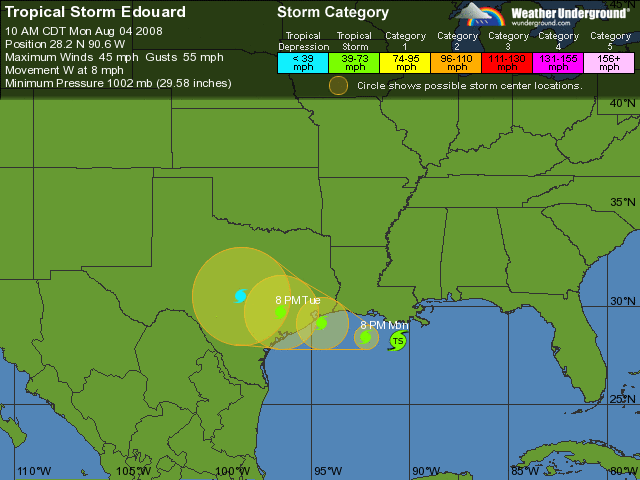
This weekend, we changed our travel plans and headed back home to Houston instead of driving on out to California.  We probably should have checked the maps a little more carefully – particularly this map:

Tropical Storm Edaeiou(and sometimes y)rdo is heading right for Houston tomorrow.  Both Ed and I have conflicting reservations at the Houston airport tomorrow, and I have the feeling he’s going to win.

I’m worried about the effects of this storm.  My spell checker is already screaming in agony.  Sean Stoner suggested that this name was probably sitting on the shelf for years, and the hurricane planners pulled it off the shelf when they saw it was only going to be a short storm, figuring they’d lessen the damage.


Long live the DBA

2 Comments

Jason Massie (aka StatisticsIO.com) wrote a blog post this week called The Death of the DBA.  He talks about why the coming cloud computing craze creates career chaos.

I have the exact opposite opinion: I can’t wait for databases to move toward the cloud because it makes database administrators even more vital.

Reason #1: Cloud computing costs real money, and DBAs can help cut costs.

When you move your database into the cloud, your cloud vendor starts billing you on a per-month basis for CPU time, memory, and storage space.  Normally, when DBAs say they cut costs for a company, they’re talking about funny money: if we optimize indexes and cut storage space by 10%, we don’t suddenly get cash back.  When software is a service, though, we will see real savings, a real reduction in our next monthly cloud bill.

Cloud vendors won’t get involved in tuning indexes, cutting storage space, optimizing memory and cleaning up CPU cycles because they make money off bad application design and bad production decisions.  Want to make a bunch of duplicate indexes on your Amazon EC2-hosted MySQL server?  Knock yourself out – Amazon’s happy to let you do it, and they make more money off every bad decision.  Go long enough without a DBA, and the applications will start racking up big monthly bills.

Reason #2: Disaster recovery becomes even more important.

How many of us have been shafted when some kind of third party provider suddenly closed up shop in the middle of the night and disappeared?  Think back to the online storage craze in the initial dot-com boom: everybody and their brother was offering online storage space for free or for cheap.  Some of the providers are still around, but most of them folded up and died, taking user data along with them.

Disaster recovery no longer just means preparing for your own business failures: with cloud computing, it means preparing for the failures of your cloud vendor too.  No cloud vendor is too big to experience problems: check out the Amazon S3 outage in July 2008 and the Amazon S3 outage in February 2008.

Reason #3: Web hosting hasn’t killed the need for sysadmins.

Web sites have been hosted at third party hosting providers for more than a decade, but try calling your hosting company and getting good help with a problem.

I just recently chatted with a sysadmin who sat through a grueling contract renegotiation with their hosting provider.  They’re spending tens of thousands of dollars per month on hosting, and the hosting provider touted all kinds of advantages like redundant internet connections across multiple datacenters.  Come to find out – they only had a single datacenter, and were thinking about growing to another one.  The hosting provider also mentioned that they had the right to move machines between datacenters at any time without warning as part of planned maintenance windows.

Without a skilled sysadmin, these unfortunate problems wouldn’t have come to light, and the poor client would have only found out when their machines went down and came back up with new IP addresses.  This is a huge security risk for the client, who has to pay external security auditing firms to verify that their private data is in good hands.  They would have to redo their security audits and fork out big bucks.

Does third party hosting solve solutions and offer value?  Absolutely.  But does it eliminate the need for administration, security auditing, day to day maintenance, planning, and app design?  No way.

Reason #4: The economy of scale means it can be cheaper to manage your own servers.

Say three companies came out right now offering SQL Server hosting services:

  • Company A offers no-frills hosting for $X per month
  • Company B offers hosting with backups & restores for $X * 1.5 per month
  • Company C offers managed hosting with backups, restores and performance tuning for $X * 3 per month

Your company has to evaluate each hosting option, and the larger you get, the more sense Company A makes.  At a certain number of databases, you’ll save money by doing the management yourself.

Company C can’t offer management features without paying for DBAs.  The DBAs have to work somewhere, and you can bet that Company C will heavily mark up their DBA costs because everybody has to make money somehow.

Reason #5: Security & SOX compliance.

I did a short stint at a major financial firm who wouldn’t even allow their employees to get their email over the web.  Imagine putting their financial data on databases in “the cloud” – no way.  Private companies might be able to get away with it, but after a couple of security scares (think lost tape backups) the paranoia will set in.

I can already visualize the ads for consulting companies.  “Think your data is safe in the cloud?  How do you know Mr. Hacker Guy isn’t connecting a USB drive to your server right now?  Pay us and we’ll find out.”

Reason #6: Do you stand next to your servers now?

The good DBAs I know don’t work in the datacenter (except when it’s time for OS reinstalls, and these days a lot of that is handled with imaging and deployment tools).  They work from a cubicle, office, or coffeeshop miles away from their servers.  We don’t have to put our hands on the servers, and they could be anywhere.  I’d love for my databases to move to the cloud, because it makes it easier to justify telecommuting.  Preferably from a beach.  With margaritas.  (Might be able to expense those during meetings, too.)

Bottom Line: The cloud is coming, but it’s not going to rain on the DBA party.

Now is a great time to be a DBA, and while I think there are disruptive computing forces on the horizon, I don’t think the cloud is going to put an end to the DBA career.

So what about the future is going to change the DBA career in say, five or ten years?  Well, as RAM and solid state disks get cheaper, I can foresee the day where databases run entirely in memory and just back up to disk.  Performance tuning becomes less of an issue, and we get to focus on functionality instead of the number of bytes an index will take.

Think back ten years ago in general computing & programming: people were still writing programs in assembly because they needed the speed.  Now, raw speed of an app isn’t as much of an issue for general programmers and they get to focus on which cool new language will make the programming faster, not the code execution.

To me, that’s really cool and exciting.  It means in a few years, we might be able to do more data mining and predictive analysis with even the most basic, everyday databases.  I might be able to say, “Man, remember when we had to worry about the number of indexes on a table?  Wow.  Yesterday sucked.”  That’s awesome!


8 DBAs talk about their jobs

Professional Development
3 Comments

OdinJobs.com interviewed eight different DBAs from completely different backgrounds and careers.  The one thing we’ve got in common is that we blog, but outside of that, we’ve got wildly different points of view about the career and what we like about SQL Server.

I shall now copy/paste Jason Massie’s hard work at listing each person’s blog URL and feed, because I have no shame:

The Panel Blogroll

Inside the articles, the links don’t work too well, so you can jump to the three parts from here:

I love reading articles like this because they tell me a lot about the people answering the question.  I got a chuckle out of Pinal Dave’s answer to the question about the differences between production DBAs, development DBAs, and SQL Server Developers.  (Pinal – if you read this, no, we are not all the same, and I’ll buy you a drink at PASS to tell you about some horror stories there.)

More DBA Career Articles

  • Moving from Help Desk to DBA – a reader asked how to do it, and I gave a few ways to get started.
  • Development DBA or Production DBA? – job duties are different for these two DBA roles.  Developers become one kind of DBA, and network administrators or sysadmins become a different kind.  I explain why.
  • Recommended Books for DBAs – the books that should be on your shopping list.
  • Ask for a List of Servers – DBA candidates need to ask as many questions as they answer during the interview.
  • Are you a Junior or Senior DBA? – Sometimes it’s hard to tell, but I explain how to gauge DBA experience by the size of databases you’ve worked with.
  • So You Wanna Be a Rock & Roll Star – Part 1 and Part 2 – wanna know what it takes to have “SQL Server Expert” on your business card?  I explain.
  • Becoming a DBA – my list of articles about database administration as a career.

SQL Server support on virtual servers

Virtualization
1 Comment

The Microsoft knowledge base article on SQL Server virtualization support just got an update.  Here’s the interesting part:

“Versions of SQL Server after SQL Server 2005 will incorporate full support for running on a supported guest operating system that is installed on a Windows Server 2008 Hyper-V virtual machine.”

That means SQL Server 2008 will be fully supported even as a virtual server – but only when it’s running inside Hyper-V. That gives Hyper-V a competitive advantage over VMware ESX.  Even if a company’s admins prefer to use VMware, they still might want to use Windows 2008 virtualization just to get full support when things break.

The interesting part to me is what comes next: hopefully, we’ll get virtualization support for Microsoft Project and Sharepoint running as virtual guests.  Those two have always been thorns in my side.


Taking a cross-country road trip

2 Comments

We’ve packed up the Honda and we’re heading out this morning on a road trip of epic proportions: Just over 5,000 miles. Erika, Ernie (our miniature Schnauzer) and I are driving from Houston to Memphis today, overnighting there. On Sunday we’re continuing up to Muskegon, Michigan to spend some time with Dad and Caryl, my stepmom.

Houston to Memphis to Muskegon to Aliso Viejo to Houston

Next up on the itinerary: a slow drive across the country to Aliso Viejo, California to the Quest offices. I’ve got some meetings there in early August for the LiteSpeed v5 RTM party.

Finally, we’ll drive through Arizona and New Mexico to get back home to Houston.

Shortly after arriving back in Houston, I’ll fly back out to Michigan again, this time to speak at the West Michigan SQL User Group and Detroit SQL User Group.  (If only these meetings would have been two weeks prior, I might have been able to expense this whole thing!  Wouldn’t that be hilarious.)

This whole thing will take between two and a half to four weeks, depending on how we mix it up.  We have a couple of alternate plans in case we want to spend more time in a specific area.

Our only concern: we won’t be able to go to as many cool restaurants since we’ll have Ernie with us.  Ah, well – that’ll keep the road trip budget down, at least.  Speaking of budget, gas prices were enough of a concern to make us take the Honda instead of my beloved Jeep Wrangler.  33mpg versus 15, hmmm, lemme think about that – no.

You can track our progress on BrightKite or on Flickr, and I’ll blog periodically.  I’ll still be working (love ya, AT&T) so I’ll be doing work-related blog entries on here too as usual.