My Apple iPad Review
18 Comments
I need a backup presentation device when I travel. During my epic European trip failure, my laptop failed in Copenhagen, and all kinds of hell broke loose. I decided I’d always travel with a second device that could do PowerPoint presentations. For a while, I used a netbook, but I hated carrying fifteen pounds of gear on my shoulder through the airport.
I bought an iPad because:
- It has VGA output (albeit through a crappy dongle)
- It can do PowerPoint presentations
- It’s really light (1.5 pounds)
- It has a tiny charger (and can be charged via USB)
There’s plenty of places on the web where you can read volumes of well-written stuff about the iPad (Anandtech – Engadget), so I’ll just focus on the drawbacks that trouble me the most.
The Virtual Keyboard Sucks
I love my iPhone’s onscreen keyboard. I can type on that thing like nobody’s business, and sometimes I even do it without looking. I can’t call it touch-typing, since there’s no feel of keys, heh.
In theory, the iPad onscreen keyboard should be even better. It’s bigger, and in landscape mode, I should be able to set my hands down and sorta-touch-type. My hands fit great – here’s my right hand with my index finger on the J key, just like a real full-sized keyboard:
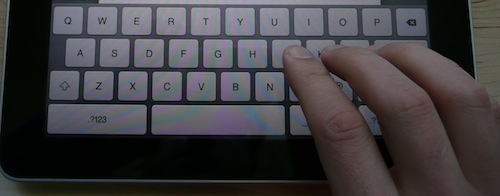
Looks great, right? Well, not so much. To figure out the problem, you have to compare the iPad keyboard with a real keyboard and see what my fingers are actually hovering over:

On a real keyboard, your four right fingers hover over J, K, L, and ;. On the iPad keyboard, they hover over J, K, L, and the return key. That one little difference, coupled with the keyboard size and lack of tactile feedback, means this is a really bad replacement for a real keyboard. Apple makes an iPad keyboard dock, but if I have to carry that around, I’m right back up to netbook territory.
On an iPhone, I just changed my method of typing altogether – I either use one thumb or two thumbs, depending on how fast I want to type. When the iPad is in landscape mode, two-thumb typing is impossible – the keyboard is just too darned wide. In portrait mode, it’s somewhat more doable for me, but I have pretty big hands. I’ve seen Erika try to type with it, and it just doesn’t work.
The Lack of Multitasking Sucks
The iPad is almost the perfect thing to carry around at conferences. The ten-hour battery life would let me take notes all day while responding to tweets and emails, and I wouldn’t have to drag a power adapter around or look for power outlets to recharge. The form factor on this thing is great for a meeting/conference device.
Except that there’s no multitasking. I could either take notes OR do Twitter OR do email.
The upcoming OS v4 upgrade will add multitasking (and support for Bluetooth keyboards, yay!), but it’s not coming out for the iPad until the fall. I’m crossing my fingers in the hope that the iPad will be the only thing I have to carry at the PASS Summit. I’d love to stop hassling with power outlets and shoulder bags.
The App Scene Sucks Right Now
Some of your favorite iPhone apps have been upgraded to add iPad support at no extra charge. Simply go into the App Store, hit Upgrade, and you’ll get all of the latest and greatest apps.
Some developers have decided to sell “HD” or “XL” versions of their apps for the iPad. Pay one price for the iPhone version, another price – usually much higher – for the iPad version. Forget the extra price – this is just painful to manage. Every couple of days, I go into the App Store looking to see if my favorite apps have been reintroduced for the iPad. I don’t want to do this manually – just alert me when there’s a new version of TripIt or RememberTheMilk available for the iPad. And no, I don’t want to run the regular iPhone versions on the iPad, because they look like hell. Even a lot of the new iPad app versions leave something to be desired – check out this WordPress app’s blog editing screen, which only shows a tiny sliver of my post content and wastes huge areas of the screen on greyed-out and non-scrolling title/tags/status fields:
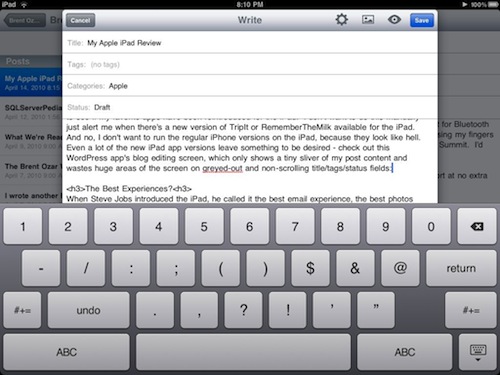
Not good enough.
The Best Experiences?
When Steve Jobs introduced the iPad, he called it the best email experience, the best photos experience, the best web surfing experience, and the best video experience. I’d agree about two of them, but I didn’t really need a photo or video device, and I don’t think you do either.
The best web experience requires Flash.
I hate Flash. It’s slow, and the web sites that rely on it frustrate me. But I can’t argue that it’s the dominant tool out there for building interactive web sites (no offense, Silverlight guys.) Excluding Flash support means I can’t view a lot of web site videos, and that means it’s not the best web experience.
The best email experience requires a better keyboard.
I seriously prefer using the iPad to handle my mail over the laptop. It’s a quick, fun experience. It’s so fun, in fact, that I’ve started leaving the iPad propped up on my desk to act as a separate email monitor. But when it comes time to composing a reply of more than a paragraph, I prefer my iPhone keyboard over the iPad, and my laptop keyboard over that, and an ergonomic keyboard over all of those. The iPad’s keyboard is a very distant last place. If you insist on using the iPad keyboard, the Apple iPad case helps somewhat by tilting the iPad up as it lays on a flat surface.
The best video experience requires stereo speakers.
Listening to music or watching movies on the iPad infuriates the audiophile in me. It absolutely requires headphones. Mono sound comes out of just one speaker at the bottom of the iPad, or one side when your using it in landscape mode. I’m distracted by the audio, it’s so bad. Headphones makes this problem disappear, but he said this was the BEST video experience, and without headphones, that’s just not the case. And it doesn’t ship with headphones. Or the USB adapter. Or the VGA adapter. And $300 netbooks come with stereo speakers, USB, and VGA out.
My Bottom Line: Apple Users Only for Now
Today, the iPad is an expensive, limited alternative to a Windows 7-equipped netbook. If you’re happy with a Windows laptop, you’ll prefer a Windows-equipped netbook over the iPad for day to day use. The iPad, sexy as it is, can’t compete with the practicality of a machine that offers multitasking and a physical keyboard. Months from now, when the iPad OS v4 brings multitasking to the party and when HTML5 video replaces Flash, things might be different.
If you’re an Apple iPhone user, though, full speed ahead. You’re already used to a lot of the compromises in the iPhone OS, and the iPad will seem like the next logical step. If I didn’t have to do so many SQL Server demos on the road, I’d switch from my laptop to the iPad. I’m even kicking around the thought of building Amazon EC2 SQL Servers in the cloud to demo the things I need, and then booting them up to remote control them from my iPad for demos. Stay tuned.