Blog

Moved to Michigan and got older

9 Comments

Home Sweet Home
Home Sweet Home

Erika and I drove up to Michigan this weekend and started moving into our family’s house on White Lake near where I grew up.  I went to high school near here, and I’m pretty familiar with the rough winters.  On our drive up, we drove through freezing rain and snow – Erika’s first time behind the wheel in inclement weather, since we took both cars up.  I’d wanted to give her an ice-driving training session in a parking lot somewhere, but no time for that!

It’s birthday central around here:

  • November 9 – Joe Sullivan (the guy who taught me how to program)
  • November 10 – me, Don Duncan (my manager at Southern, another former Michigander)
  • November 11 – my much better half Erika, my sister Emily

These people all rock.

And now, if you’ll excuse me, it’s time to go catch up on the hundreds of emails I missed since I took off on Thursday for the moving voyage.  Inbox Zero is going to be especially tough today!


Whoops! The SQL DBA Quiz

10 Comments

Chris Shaw started a new blog quiz for SQL Server DBAs: name two mistakes you’ve made in your career.  I’m glad he restricted it to two entries, or else I’d have had to start a whole separate blog category just for this.

Mistake #1: deleting without a where clause. You’ve heard that horror story before, but here’s what makes it different: I was a teenager working as a SCO Unix sysadmin for a photographer with a small chain of photo studio.

What’s that, you ask?  How does a teenager get a job as a SCO Unix sysadmin?  Two reasons: first, I was cheap, and second, I was slightly more qualified than the last sysadmin, a high school cheerleader who was hired solely for her looks. (I know this because they both told me separately.)

Thankfully, I had a tape backup running every night, and the delete was literally the first thing I did in the morning when I got in.  The moment I realized what I’d done, I put the tape back in, started the restore, and began hoping that my early-bird boss decided to drive through a nail-laden construction site on his way into work.  No such luck, of course.

When he showed up (before the restore finished, of course), I promptly explained what I did and how I was recovering.  He was pissed, but I think he’d forgotten it by the next day.  That taught me an important lesson as a DBA: get coffee before you start work.  I’ve been addicted to espresso ever since.

Mistake #2: lifting servers to the top of the rack by myself. It was a dark and stormy Saturday night a couple of short years ago, and there I was, alone in the datacenter.  I was fairly new in the company, and I wanted to make a great impression on the other admins.  I’d carefully arranged an outage window during my on-call weekend to defrag some space in our racks so that I could cram more gear in.  I was almost done manhandling a bunch of heavy servers around, and my last opponent was an old server built long before the days of tool-free rails.  In order to get the server in, you had to hold it in midair, balance it so the rails lined up, and fasten it with six of the tiniest screws you’ve ever seen in your life.  Wristwatches are built with larger screws than this server.

By that time of the night, what little strength I had was already drained, and my awareness level wasn’t that high either.  With the server balanced precariously on my shoulder, aimed at the very top slot in the rack, I started putting in the microscopic screws with one free hand when disaster struck.

The server fell from 6′ up in the air down to the floor, diagonally onto a front corner so the whole server’s weight smashed down on one tiny little area.  It missed my foot by an inch, tops, and put a big hole in the datacenter’s recessed floor tiles.  Metal tiles, mind you.

I looked up to thank God that I still had my foot attached and I saw him looking back down on me – in the form of a surveillance camera.

When my heart stopped racing a few minutes later, I swapped out the broken datacenter tile, mounted the server in a lower slot and booted it up.  Worked the first time, although the faceplate was trashed and the server wouldn’t slide all the way into the rack because of the damage.  I locked everything up and headed out of there, glancing at the security cameras every minute or so.

The facilities manager was a good old boy who’d been with the company for decades and knew where all the bodies were buried, so to speak.  First thing on Monday morning when he came in, I took him into the datacenter, showed him the damaged floor tile and told him the story.  He gave me a stern warning about the relative worth of my job and my health, and asked how I would have handled a 911 call from the datacenter about blood all over the floor from a smashed foot.  He grinned when he said it, though, and he took the floor tile and never mentioned it again.  For all I knew, he was holding the floor tile as ransom, and that was fine with me.

That taught me a bunch of lessons: never rack an old server by yourself, bring a cell phone into the datacenter when you’re working alone, and know the guys who bury the bodies (and floor tiles).

Who I’m tagging: Chris already tagged Jason Massie of StatisticsIO.com, and I’ll tag Jeremiah Peschka of Facility9.com, David Stein of Made2Mentor.com (especially because his Vegas mistake story was so hilarious) and the masked man behind SQLBatman.com.


Bad storage performance on Amazon EC2 Windows servers

Amazon Web Services (AWS)
6 Comments

This week I presented at the SSWUG Virtual Conference on how to benchmark your storage performance with Microsoft’s SQLIO utility.  Last week I talked about running SQL Server in the cloud on Amazon EC2.  Take those two things together, and we’ve got storage benchmarking on Amazon EC2 servers:

  • Maximum write speed: 68 MBs/sec
  • Maximum read speed: 8 MBs/sec

I find this too horrifying to comprehend.  I can’t imagine running a database server using a first-generation USB thumb drive for storage, but that’s essentially what this is.

If anybody out there is using Windows on Amazon EC2, I’d be really curious to hear what your SQL Server performance is like relative to your physical in-house servers.  If you’ve got the time, running SQLIO on your EC2 instances would be even better, but it takes several hours to run through my full battery of SQLIO tests.  Running any storage testing utility against an EC2 hard drive would be interesting.

This was not a one-time result – this was a continuous overnight test against an m1.large instance with nothing installed on it.  Every single read test maxed out at around 8 MBs/sec.  Unbelievable.

I’d love to spend more time digging into this, but I’m signing off the computer tonight to start our move up to Michigan.  (I have a linkpost scheduled for Friday already.)  When I get to Michigan, I’ll try a couple of other storage performance test utilities against EC2 instances to see if I’m missing something obvious, and I certainly hope I am.  I’ve never seen performance this bad on a desktop, let alone a server.

Update from Amazon EC2 Support

There’s a thread about slow Amazon EC2 performance for storage on the Amazon forums.  The official answer from Amazon is yes, it’s that slow but they believe it’s normal for SAN storage.  They’re way off base there – I routinely get faster performance out of my home lab gear – but at least they’re watching the forums.


Barack Obama’s campaign let Twitter down

5 Comments

So it’s the day after a really historic election: the first guy with a Twitter account to be elected as president!

What an awesome chance to send 140 characters of hope, change, dreams, opportunity, you name it. It’s so exciting!  Me personally, I’d have picked “Yes We Did!”  That would have been so cool, and people would have been retweeting it like crazy.

So what’d the campaign post when he won?

Nothin’.

Here’s his Twitter stream as it still looks the morning after the election:

Barack Obama on Twitter

As a fellow Twitter user, regardless of my political alignments, I feel kinda bummed out about the campaign letting the ball drop like this.  They’d been really bangin’ out the tweets up til the election.  Why stop now?  I hope this isn’t one of those “changes we can believe in.”


Live-blogging the Seattle PASS Summit Keynotes

#SQLPass, Blogging
2 Comments

Whoa – I’ve hit the big time!  I got an email inviting me to be one of a handful of SQL Server industry bloggers who’ll get reserved seating with power and internet access during the PASS Summit keynotes.  Awesome!  That means I’ll be able to post live updates via my Twitter feed and here on the blog.  (Maybe Ustream too, but no promises.)

Last year was my first PASS summit and I did my best to convey as much information here in my blog recaps as I could for people who couldn’t attend.  I knew I was really lucky to get the expenses approved and get the week off to go to Denver, and I was in the minority.  This year, things aren’t any better for a lot of us: travel budgets have gotten slashed, and it’s even harder to get travel approved.  This year, thanks to the PASS staff, it sounds like I’ll be able to post my updates even faster live from the keynote.

I love it.  When I find out who thought of this, I’m gonna buy ’em a beer.


Houston Tweet-Up: The Morning After

4 Comments

Yesterday afternoon, the Houston tweeps converged on Coffee Groundz.  I had a great time and got to finally meet some of the folks I’ve Twittered with for months.

Photos from around the web:

And for your notes, the two beers of choice for the night were:


Somebody created a Halloween monster #SQLputdowns

Humor
5 Comments

I think Tim Ford aka SQLAgentMan was the first with this, but now it’s turned into a monster.  On Twitter, we’re trading SQL putdowns.  You can find ’em on search.twitter.com by searching for #SQLputdowns.

Here were my personal favorites from the chatter:

All over the world, DBAs are chuckling to themselves….


Watch a free 10-minute preview of SSWUG videos (update with discount)

7 Comments

You’ve heard me talk about my SSWUG video conference sessions, but you’re not sure whether it’ll work, or whether it’s worth the money?  Well, Chris Shaw and the good folks at SSWUG are giving away free previews to show you how good it looks.  You can watch the first ten minute of my SQLIO session for frrrrrrrreeeeeee:

Yes, I really do talk with my hands, and yes, I use an Apple Macbook Pro.  The stickers are:

More stickers to come – I’m looking forward to getting some at PASS and plastering them all over the Mac.  Erika hates it when I do that because the Mac does indeed look better naked, but I don’t want you guys thinking I’m a graphic designer or something.

Update 10/29 – I just got word that if you use the VIP code “BOZAVIP” when signing up, you get $10 off your registration, bringing it down to $90.

There’s a drawback, though, and I’m going to tell you about it because I believe that honesty is the best policy.  If you use that signup code, I get $5.  If more than ten of you use the code, my cut goes up to $10 per person.  Here’s where the drawback comes in: Erika has already given me permission to spend my SSWUG money as “fun money” on my week-long Caribbean cruise in December.  I might come back with alcohol-induced amnesia or a bad tattoo.  So maybe it’s better for all of us if you don’t use that code.  I’m just putting it out there, your choice.


Before you upgrade to SQL Server 2008…

10 Comments

This month’s Redmond Mag glows about some new features in SQL 2008, and yes, it does have a lot of cool tricks up its sleeve.  But before you go upgrading your servers to get those new features, there’s one thing you need to know.

New versions of SQL Server are not always faster for every query.

This may come as a surprise to you, but every versions of SQL Server have areas where they require manual tweaking in order to be as fast as the last version.  I worked with Jeff Atwood and the guys at StackOverflow this past weekend to move them onto SQL Server 2008, and we had a nasty surprise.  Jeff summed up the issues with the SQL 2008 upgrade on his blog, but I’ll cover it here from a DBA perspective.

The app and SQL 2005 were on the same box (which tells you a lot about the performance of his code, because that site is doing pretty well) and they got a new box running SQL 2008.  We restored the databases over to the 2008 box for testing, ran queries, and compared performance.

Full text search results were slower, but we didn’t catch just how slow they were because we focused on the queries that were currently running slow on the 2005 box.  Some of the queries we didn’t test had been running great on 2005, but were dead slow on 2008.

Why slower? Different execution plans.

We did catch a second issue: on a particularly slow set of queries, SQL 2008 was building a different execution plan than 2005.  This execution plan worked – but not for the kind of load StackOverflow has.  I narrowed down the differences and I was able to overcome it with trace flag 2301, which lets SQL spend a little more time building a good execution plan. By spending more time compiling the plan initially, and saving that plan in cache, we got phenomenally better results.  Query times went from 190ms on SQL 2005 to 40ms on SQL 2008.  Hubba hubba.  All systems go.

Denny Cherry, a performance tuning guru with a long history at MySpace.com and Awareness Technologies, asked me why I didn’t manually set up query execution plans for them.  If it was my server and I was Jeff’s full-time employee, that’s exactly what I’d do.  Problem is, if you don’t have a full-time DBA to watch the server and identify what the right (and wrong) execution plans are, you introduce an element of mystery.  I can imagine what would happen three months down the road: performance would go to hell in a handbasket as schemas, queries and indexes changed over time.  Jeff wouldn’t know what things were the fault of the engine, versus what things were the fault of the DBA who’d changed these settings a while back.  So I had to pick a solution that wouldn’t require StackOverflow to incur a huge new payroll expense.

Went live with 2008, -T2301 killed us.

We went live with SQL 2008, rebuilt the indexes & stats, turned on the site (now hosting IIS on a separate box, mind you) and immediately the server slowed to a crawl.  I figured it’d take a few minutes to get a good set of execution plans built, but the server just wasn’t recovering.  Doing diagnostics on the server, I discovered that queries using sp_executesql were just knocking the server over.  Ahhh-ha!  Those were dynamic SQL strings, and those would probably get new execution plans built every time.  The trace flag -T2301 failed us there, so we had to rip it back out.

How much would you pay to avoid a scenario like this?  $19.95?  $29.95?  But wait, there’s more!

After ripping out the trace flag, the server stabilized around 20-30% CPU, but those numbers were too high for a weekend night.  When they came up to full load during the week, the server fell over, averaging 100% CPU for a few minutes at a time.  The problem query was doing a union between three full text searches, but before you scream bloody murder about a union, even running the three searches independently was taking 60-70% of the time they took when unioned together.  We were screwed.  The guys had to make a change to their application and cache data on the web server’s hard drive in order to sustain their normal load.

Ugh.  As a DBA, that’s a failure when the app guys tell me that.  This is an application that used to live fine on a single box, and now, even with SQL 2008 on its own hardware, the app guys have to work around a weakness in SQL 2008.  Ouch.  I take that pretty personally.

The lesson: capture a full trace before you upgrade SQL Server.

The lesson: before you upgrade, capture a full trace of your server’s load and replay it against the new version.  Analyze before and after duration times and CPU numbers for both versions, and identify the list of queries that run slower.  Examine how often they actually run in production, and think about how that’s going to affect your load.  This was my own failure – after working with the guys at StackOverflow and seeing how tight their queries were, it seemed like the slowest queries on SQL 2005 were still in pretty good shape.  Unfortunately, hidden below the surface in queries that were running in 50-75ms on SQL 2005, were some queries that ballooned to over 1 second on SQL 2008, and went much higher under load.

Furthermore, a simple trace replay still won’t give you the full picture because traces don’t throw the same amount of load at the replay server in the same time.  In a web server scenario, you may have a hundred queries come in simultaneously, and you want to see exactly how the new server will be affected by that – but replaying a trace with the Microsoft native tools won’t give you that answer.  For that, you need a benchmarking tool like Quest Benchmark Factory or HP Mercury LoadRunner, etc – something that can capture a load and then replay it with the same velocity and bandwidth.

Do I like SQL Server 2008?  Yeah.  But do I wish we could have avoided what happened this week with StackOverflow?  Hell yeah.


Office in the web + BI in Excel != SSAS DBA jobs

6 Comments

Add these two things together:

If that doesn’t scream hosted-BI, I don’t know what does.

This is more fuel for Jason Massie’s belief that cloud services will kill the DBA, and I gotta tell you, it’s starting to look more and more convincing.  If I was a DBA who made my living solely on SQL Server Analysis Services, I would start making a Plan B right now.  SSAS won’t go away for years – there will be plenty of corporations who won’t want to host their private decision-making data in Cloud v1 – but it isn’t a rosy picture.


Want to stop Windows from locking your screen?

3 Comments

I work for a company whose IT department has a group policy enforced so that our screens lock after 10 minutes of inactivity.  That’s great in theory, but I run my corporate workstation inside VMware, which means I’m back and forth between different windows all the time.  When I go away from my Windows VM for 10 minutes and come back, the screen is locked – pain in the rear.

Jason Hall of Quest pointed out the fix: a free screensaver prevention app called Caffeine.  On Windows 2000 and Windows XP, it does a left-shift-up event every minute, thereby defeating screen saver lockouts.  Add a shortcut to it in your Startup menu, and presto, never get locked out again.


Getting Started with Amazon EC2 SQL Server 2005

Sometimes you need an offsite database server in case something goes wrong, but you can’t afford a full-blown disaster recovery datacenter.  Or maybe you’ve got some ideas that you’d like to try out with a big SQL Server 2005 box, but you don’t have the hardware sitting around idle.  Or maybe you’d just like to learn SQL Server 2005 – sure, it’s not the latest and greatest, but it’s still the most popular version out in the wild.  Now you’ve got a way to accomplish this for around $1 per hour.

With Amazon EC2, DBAs can “rent” virtual servers running Windows 2003 and SQL Server 2005.  In this article, I’ll explain the five big steps required to turn on your own SQL Server in Amazon’s datacenters.

Step 1: Understand what “cheap” SQL Server hosting costs.

As of this writing (10/2008), here’s the smallest SQL Server you can get at Amazon EC2, what’s known as a “Standard Large” configuration:

  • 7.5 GB of memory
  • 4 EC2 compute units (2 virtual cores with
  • 850 GB of storage
  • 64-bit Windows 2003
  • SQL Server 2005 Standard
  • $1.10 per hour, or roughly $800 per month

Yes, that’s a lot of money, and no, that does not include your bandwidth.  You’ll also incur some additional fees for bandwidth – probably nowhere near $100/mo, but you can use the Amazon EC2 pricing calculator to estimate your numbers.

Let me put it this way: $9 for this much power for one day is a heck of a deal.  I can do a lot of learning and experimenting for my $9.  Even if I use it as a lab box one day per week, that’s still around $40/mo – not a bad deal, especially if I’m a junior DBA who wants a sandbox to break stuff.  At $800/mo, well, we’re in Jaguar XF territory.

Step 2: Get an Amazon EC2 hosting account.

Sign up for an account at aws.amazon.com.  It’s free to enroll, but you have to link it to a method of payment like your credit card or checking account.  Your server usage will be deducted automatically from your account, so don’t blame me if you turn on a whole virtual datacenter and you can’t pay your rent.

After you’ve got the account set up, enable your account for EC2 (the virtual server hosting part) and S3 (where you can store your hard drives):

Step 3: Get the Elasticfox plugin for Firefox to manage your virtual EC2 SQL Servers.

Elasticfox is a browser-based way to manage your virtual army.  It’s free, it’s open source, and it’s the easiest way to get started with EC2.  There’s a guide on getting started with Elasticfox, but I’ll give you the highlight reel:

  • Download the Elasticfox plugin and install it
  • Launch Firefox and click Tools, Elasticfox.
  • Click the Credentials button and input your Amazon Web Services access key and secret key.  Click OK.
  • Create a key pair (to encrypt your Windows admin login) by clicking the KeyPairs tab and click the button to create a new keypair.  Type in anything for the key name, and save the certificate file.
  • Build a set of firewall rules by clicking the Security Groups tab.  In theory, you could skip this step and leave all your ports open, but come on.  Click the Create Security Group button and create a group named SQL Servers.
  • Click the Grant Permission button to set up a firewall rule.  For testing purposes, you can leave the CIDR (source) IPs at 0.0.0.0/0, which means the entire internet.  For production, you would want to restrict this access to your company’s subnet.  In the Protocol Details, set up each of these:
    • TCP/IP 3389 – remote desktop
    • TCP/IP 1433 – SQL connections (if you want to connect to your cloud-based server using SSMS on your desktop)

Step 4: Start up a virtual EC2 SQL server.

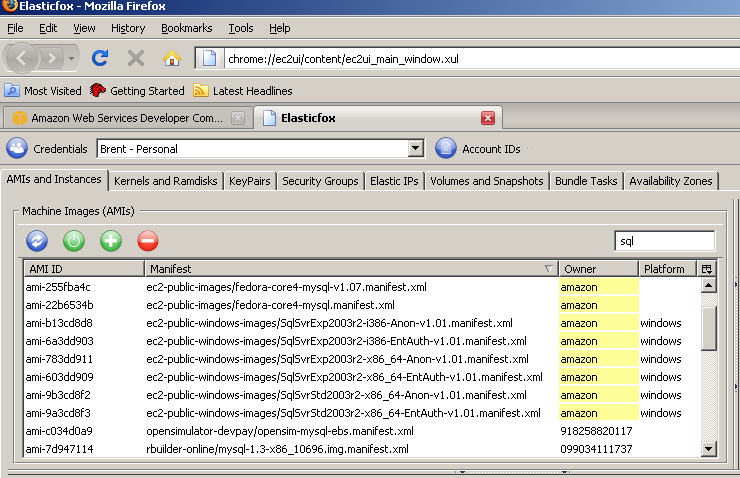
Go back to the AMIs and Instances tab and your Elasticfox screen will look something like the below screenshot (you can click on it to enlarge).  I’ve resized my columns to make it easier to see the instances I want:

Elasticfox AMI List
Elasticfox AMI List

In the screenshot, there’s an edit box at the right side where I typed in “sql” to help filter down the list of instances.  Amazon has a ton of servers available, and you have to pay close attention to get the right one.  Here’s a zoomed screenshot, and the highlighted one is the one I’ll be using:

Readthe filename carefully: the “Anon” means it’s not using the extra-charge Windows Authentication Services, and the “v1.01” is the latest version available as of this writing (10/2008).  Newer versions mean newer patches of Windows and SQL, so the newer the better.

Right-click on the instance you want and click Launch Instance.  The next screen is full of pitfalls.

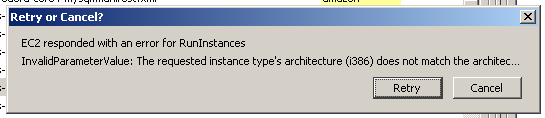
The Instance Type must be m1.large or greater.  The default is probably going to be m1.small, but that won’t work.  If you try to launch a SQL Server with m1.small, you’ll get this error:

Amazon EC2 Launch Error

The error says:

“EC2 responded with an error for RunInstances
InvalidParameterValue: The requested instance type’s architecture (i386) does not match the architec…”

The virtual image for SQL Server is a 64-bit machine, and you have to launch it with an InstanceType of m1.large or larger.  This catches me all the dang time.

For the KeyPair dropdown, choose the certificate name you generated, and under Security Groups, move SQL Server over into the “Launch In” group.

Click Launch, and if all goes well, your instance will show up in the “Your Instances” list in the bottom of the screen.  It takes a minute for the server to boot, but the Elasticfox screen doesn’t update on its own – you have to push the Refresh button manually to see if the server’s available.

Step 5: Connect to your new virtual EC2 SQL Server.

When the server’s State shows “running”, right-click on it and click Get Administrator Password.  Elasticfox will ask for the key pair certificate file that we created earlier.  I’ve had problems with it not always recognizing the file, so just try again and it’ll probably work.  The administrator password will be saved to your clipboard.  Windows doesn’t always allow pasting into the password field, so you may need to bring up Notepad, paste the password in there, and then look at that Notepad screen while you’re logging in.

Click on the server and click the Connect button in Elasticfox.  Elasticfox starts the Remote Desktop client and directs it to the server’s public DNS name, which is going to be something completely forgettable.  Don’t worry – if you’re planning to use this server for disaster recovery, you can assign it a permanent IP address and a better DNS name, and there’s plenty of instructions for that in the Amazon documentation.

When you start SQL Server Management Studio, you’ll either have to put in (local) for the server name to connect to, or start the SQL Server Browser service.

Before you create databases, go into Windows Explorer and take a look at your hard drive configuration:

800 GB, here I come!

In this screenshot, I’ve got two local drives, D and E, each with 420 GB.  Cha-ching!

From here, the world is your oyster.  You could set up database mirroring, and use this as a disaster recovery server.  Be aware that SQL 2005’s database mirroring is not compressed, so your bandwidth charges may be higher.  Instead, I’d suggest doing log shipping.  The advantage to using log shipping is that you can compress it with Quest LiteSpeed, plus you don’t necessarily have to be running the SQL Server at all times.  You can copy the files to a cheap non-SQL box at Amazon, and only start up the SQL Server once per day (or per week!) to apply the log files.  (I see a blog post coming on that after PASS when things die down.)

Another great use: testing software.  The whole reason I wrote this article today was that I had to test a new beta of Quest Change Director, and I needed a quick new environment to test it in.

I’ve got an upcoming project where I’m working with a European client on a SharePoint whitepaper, and both of us work for secure public companies with paranoid IT departments.  Neither company wants to give VPN access to the others’ staff, so instead we can just build our lab in Amazon EC2 from scratch and both access it from anywhere on the planet.  Everybody wins.

Just don’t forget to shut the server down when you’re done with it, or else you’ll keep paying by the hour!

Update 10/30Stephen Moore asked about SQL Express, and yes, they do have AMIs prebuilt with SQL Express and they start as low as $.125 per hour.  That’s a steal if you only have small databases.


SQL 2008 upgrade & tuning for StackOverflow.com

Stack Overflow
4 Comments

I’ve mentioned Jeff Atwood of CodingHorror.com a few times over the years here, and it bears repeating: he writes a great blog for developers, and DBAs need to read it too.  I also follow him on Twitter, and a couple of weeks ago he mentioned he was having problems deciphering execution plans:

Holy cow – I could actually help the world’s most dangerous programming blogger with something!  I fired off a Tweet and started helping him read execution plans.  One thing led to another, and next thing I know, I’m tuning StackOverflow‘s SQL Server for him.

Now, I’ve done a fair bit of performance tuning, but I should have known that tuning is a little different in Jeff’s world.  The easiest way to explain it is by relaying the first thing out of somebody’s mouth when we start performance tuning:

  • Data warehouse manager – “The nightly loads are taking 6-7 hours a night, and we need to get that number down.”
  • Web site manager – “Our queries are timing out after 30-60 seconds.”
  • Jeff Atwood – “This query is taking 150ms, and I want it faster.”

Gulp.

And I should mention that Jeff’s written blog entries like:

Nooo pressure.  No pressure.

But wait, there’s more.  Usually, when I go into a shop that’s never had a DBA, the server is a mess.  Tables, views, field naming conventions and formats all over the place, no consistency, nobody knows if anything’s actually in use, etc.  Not here.  The schema on this thing was tighter than the Pope’s poop chute, as they say.  (Really, they do.  “They” being my parents.)

There is almost no low-hanging fruit here.  Well, I mean, there’s a little, but we’re not talking big fruit.  Berries.  And they’re eight feet up.  I got all the way down to comparing specific query plans on 2005 vs 2008 to find out why exactly one table was in the wrong join order on the execution plan to save 80ms on a query.  I fixed it with SQL Server’s trace flag 2301 to get it to spend more time building the execution plan, but when we went live, the server couldn’t handle the load on queries using sp_executesql, so I had to rip that back out.  Dammit, I want my 80ms back, and I gotta figure out a way to get it.

Anyway, I’m proud to say that last night I helped Geoff Dalgas upgrade StackOverflow to SQL Server 2008, do more performance tuning.  If StackOverflow is slow today, it’s all me.

Update 10/30 – it was in fact slower, but it wasn’t me.  I blogged about the problems we’re having with SQL Server 2008 full text search performance.


Welcome to the Social…Hell! (My Zune experience)

1 Comment

I bought a Microsoft Zune 8 to test the new SQLServerPedia video podcasts and the user experience was so unpolished, so unprofessional that I just had to bang out a blog about it.  Looking at the iPod Nano next to the Zune 8, I could never understand why somebody would buy the Zune 8.  Now having used both of them, it makes even less sense.

Forget the bulky size of the device.  Forget the user interface.  Check out the software.  Brand new Zune fresh out of the box, brand new install of the Zune software, connect them together and:

Kablammo.  Okay, okay, no problem, I’ll reboot.  I know how this stuff works.

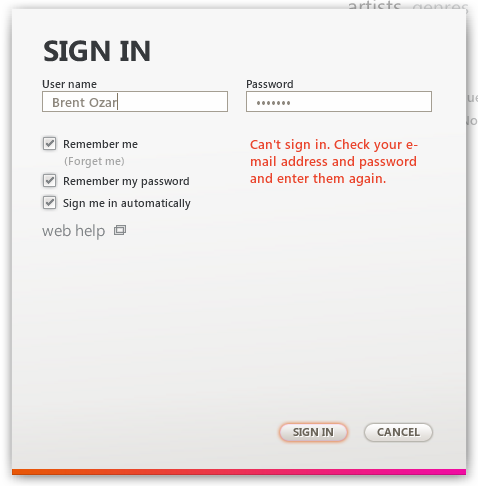
After a reboot and some black magic, I got it installed.  Great, now I’ll log in.  The window tells me to put in my user name and my password, so I do that, and:

Wait – the error says you want my email address, not the user name I just set up.  Fix your login screen.  And hey, while you’re at it, can you get rid of all the empty space across the bottom?  It looks like I bought the stripper version with no options, and I’m missing a bunch of option boxes or something.  Or maybe you’re being “artsy”.  Whatever.

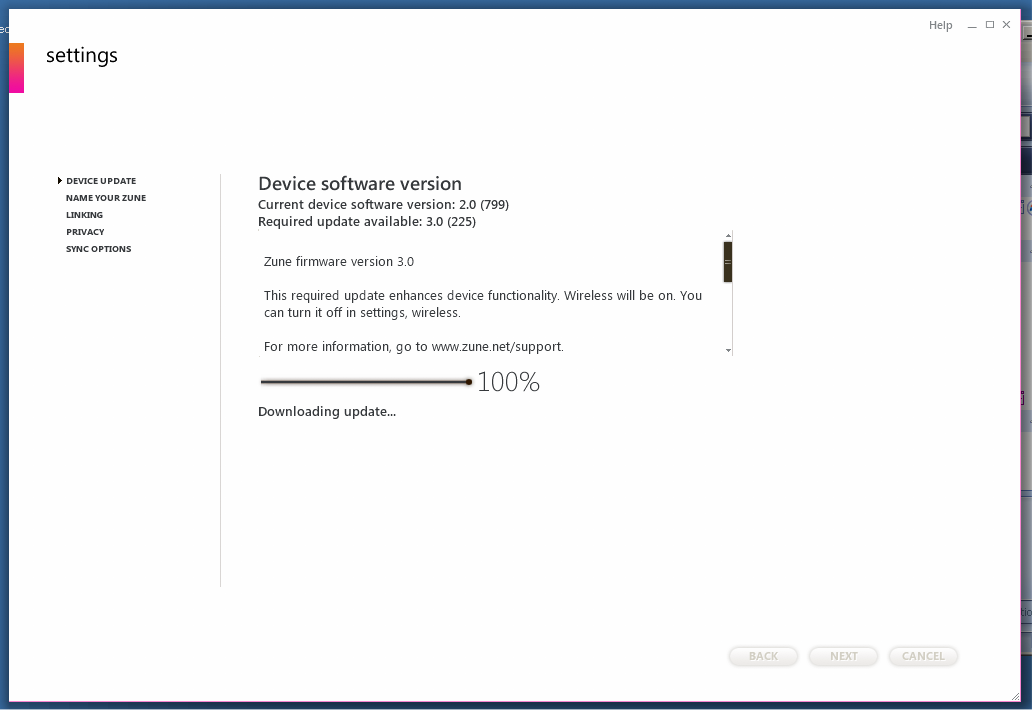
Poor decisions on screen space abound throughout the program.  Check out this screenshot:

Big huge window, tons of white space, and they choose to cram the message into a tiny messagebox in the middle of the screen and put a scroll bar on it.  Why do I need to scroll through a message when you have all this white space all over the screen?  You think I want to concentrate on the white space?  Is the message that bad that you don’t want me to see it?

Now let’s test those podcasts.  I set up the Zune one-click subscription link (rather spiffy), subscribe to the podcasts and watch the downloads start.  Nice download progress bars – or are they?

Both progress bars are gradients, and they don’t change as the download changes?  The 27% bar and the 10% bar look exactly the same.  I’m not sure what you call the opposite of a progress bar, but that’s what this is.

I was going to keep this thing after I tested our podcasts because I really wanted to give it a shot, but every time I interact with it, it makes my blood pressure rise.  I can EXPENSE this thing as a part of my job, and I STILL won’t keep it – it’s going back to the store tomorrow.

During the several times I had to reboot to get it to work, I ran across an absurdly in-depth review of the Zune 8 versus the iPod Nano.  Read that, and you’ll get a good idea of what a train wreck this thing is.


SQL Server 2008 Management Studio: Group Execute

29 Comments

I’m going to show how to use a new feature in SQL Server 2008 Management Studio: the ability to query groups of servers simultaneously.

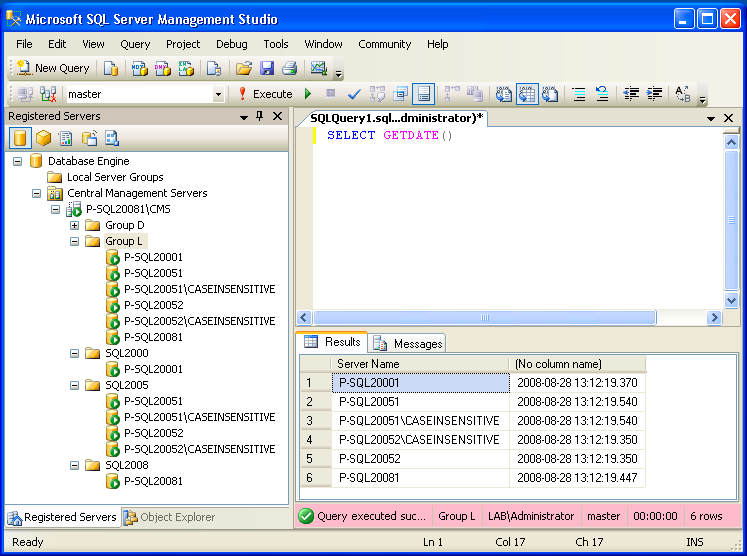
In Registered Servers, right-click on a group of servers and click New Query. What comes up will look like a normal query window, but pay close attention to the very bottom of the screen after we run a query:

SQL Server 2008 Management Studio Group Execute

“Group L” shows the name of my registered server group. I keep my lab servers in Group L for Lab.

“LAB\Administrator” is the login that was used for authentication. (Okay, you caught me, I’m logging in as the domain admin. Thank goodness this isn’t a blog post about security.)

“Master” is the database, of course, and it would make sense to use Master because it’s one of the few databases we know exist on every server.

“6 rows” is obviously the number of rows the query returned, but let’s take a look at the query and the number of rows:

SSMS 2008 Querying Multiple Servers At Once

I ran a “SELECT GETDATE()” against this group of servers, and SQL Server Management Studio did the hard work for me: it connected to every SQL Server in the group, ran that query, and then combined the results back into a single results grid. It automatically added a “Server Name” column at the beginning of my results to identify which server (and which instance) the results came from. If we ran a query that returned multiple rows per server, that would work fine too.

This query would be useful if we wanted to check the dates on all of our servers, but let’s be honest – that’s not a big problem for us database administrators. We’re geniuses.

Taking a SQL Server Inventory with SSMS 2008

Let’s go tackle a harder problem, like taking an inventory:

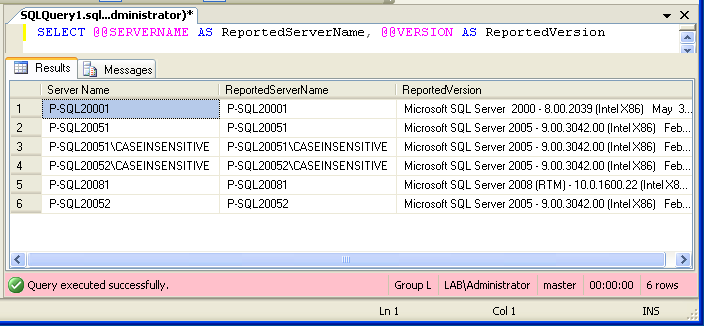
Getting Multiple SQL Server Versions
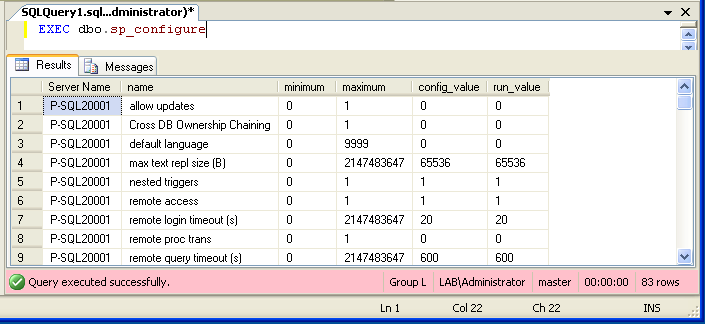
Run SP_Configure on Multiple Servers

In the above example, I’ve grabbed the SQL Server version for each of my instances. Now we’re starting to get somewhere, but what we really want is the kind of detailed information we can get from sp_configure, so let’s see how that looks:

Now we’re cookin’ with gas – but wait. Look at that first column. We’re getting lots of data back, multiple rows for each server, and it’s hard to compare this data back and forth. For example, maybe I want to see whether “allow updates” is turned on for all of my servers – so I should probably sort by “name”, right?

Can’t Really Order By with SSMS 2008 Group Execute

Uh oh – turns out that doesn’t work. Remember, SQL Server Management Studio simply runs this same query on every single instance, then dumps the data into the SSMS results window. It doesn’t process the query results together. You can’t “join” between tables on different servers – well, you can, but you have to set up linked servers, and that doesn’t really have anything to do with the Group Execute functionality.

Another thing you’ll want to do is take this data and insert it into a table. Again, no dice there – if you try to insert this into a temp table like this:

SELECT @@SERVERNAME INTO #MyServerList

SSMS will execute that query on every single server, so every server will end up with its own temporary table with one record in it. Not exactly what you wanted.

Next up on our feature list: the ability to schedule these multi-server queries and take action on the results. I might want to run a query every night checking for failed jobs or sp_configure changes. Again, not going to happen – this can’t be automated with a SQL Server Agent job. This functionality only lives in SQL Server Management Studio.

Be Aware of Case Sensitive Collations

One more thing you want to be aware of: if any of your servers are case-sensitive, then you need to write all of your group execute queries in the proper case. I recommend that if you’ve got any case-sensitive instances, then use a case-sensitive instance as your personal testbed server like on your workstation. That way, as you’re writing new utility queries, you’ll know for sure that they’ll succeed on your case-sensitive instances. It’s a real pain to bang out a hundred-line utility query only to find out you’ve got case errors all over the place when you try to execute it.

It might sound like I’m down on this feature, but I’m not: it’s really useful. I love using it to quickly find out a piece of information across lots of servers, like find out if there’s any locking or deadlocks going on. It’s also really useful if you’ve implemented a Central Management Server as a centralized list of your instances. But it’s not a solution for automated reporting or proactive reporting.

Worry not – SQL Server 2008 has a different new feature specifically aimed at automated, proactive management: Policy-Based Management.  More on that later.


Amazon EC2 Windows support now live!

Amazon Web Services (AWS)
0

You can now spin up a virtual server in Amazon’s datacenter with Windows running.

Even better, you can spin up a fresh new SQL Server for around $1 per hour.

And of course, this comes on a day when I just told myself I wasn’t going to do anything except work on SQLServerPedia, and on a weekend when I’ve got a ton of stuff planned.  You guys will get a head start on me with this one.  I’ll definitely be all over it next week – I can’t wait to write a video tutorial on how to do database mirroring to Amazon’s datacenter.  Gosh, if only there was somewhere that I could host that training video…


Being the Porsche of job candidates

Stephen Wynkoop blogged about social networking as a part of the hiring process.  I’ll sum it up in a line: like it or not, you are being Googled when you submit your resume.  Get over it.

Would you buy a car without searching for an online review?  Sure, some people do – otherwise the dismal Chrysler Sebring would never sell a copy.  If you haven’t read Jeremy Clarkson’s review of the Chrysler Sebring, go do it, because it’ll brighten your day with gems like this:

Wanda is not your typical Sebring driver.
The Chrysler Sebring Convertible of job candidates, but I like her already.

“A Sebring can do nothing well. It was hopeless in crosswinds and the only option you need on a twisty road are sick bags. Interestingly, however, while the ride is very soft, the suspension still manages to crash about like a drawer full of cutlery when it is asked to deal with a small pothole.”

Pretty funny, eh?  Well, it still sells, and I know it does because I get it sometimes as a rental car.  And yes, the car really does suck that bad – the driver’s side armrest on my last Sebring had already worn through the colored part of the plastic, and it had less than 6,000 miles.  I’d never be caught at a Chrysler dealer buying one of those.

No, not me – I want a Porsche 911 Targa.  I’ve never driven one, but I’m quite positive that it’s the car for me.  I know because I’ve read all about it on the internet.  I can tell you how much it costs, how fast it goes, what kind of leather I want, you name it.  I’m all over that thing and I read about it every chance I get.

Now, replace cars with job candidates.

Imagine yourself as an IT manager or DBA manager getting ready to hire a new person.  You have a few candidates:

  • Candidate A – you’ve never heard of them, and they don’t show up in Google.
  • Candidate B – you’ve never heard of them, and they show up in Google.  Looks like they contribute answers on online forums, and their questions line up with the experience they say they’ve had.
  • Candidate C – oh yeah, this guy!  You’ve been to his web site and you’ve subscribed to his blog.

  • Candidate D – he says he’s a DBA, but last week he posted a rudimentary forum question on how to back up a database.

Guess which resume goes to the top of the stack?

And even better, guess which resume automatically demands a salary premium?  Which one is the Porsche of job candidates?

If you’re a good DBA – and I’m guessing you’re good, because by reading this, you’re actively seeking out DBA web sites to further your eduction – then you want to go to the top of the stack.  You do that by being an active member of the community.  It doesn’t directly pay off in cash, but boy does it pay off when it comes time to sift through the resume stack.

Hiring managers, IT managers and DBAs are going to search the web for you.  It can either be an advantage, or a disadvantage.  Make it work in your favor, and think of this situation every time you post under your public name on the web.

More DBA Career Articles

  • Moving from Help Desk to DBA – a reader asked how to do it, and I gave a few ways to get started.
  • Development DBA or Production DBA? – job duties are different for these two DBA roles.  Developers become one kind of DBA, and network administrators or sysadmins become a different kind.  I explain why.
  • Recommended Books for DBAs – the books that should be on your shopping list.
  • Ask for a List of Servers – DBA candidates need to ask as many questions as they answer during the interview.
  • Are you a Junior or Senior DBA? – Sometimes it’s hard to tell, but I explain how to gauge DBA experience by the size of databases you’ve worked with.
  • So You Wanna Be a Rock & Roll Star – Part 1 and Part 2 – wanna know what it takes to have “SQL Server Expert” on your business card?  I explain.

The problem with SQL Server training today

14 Comments

I haven’t been doing a lot of in-depth technical blogging here lately because I’ve been working on a very big problem: the state of SQL Server training today.  DBA training today has all kinds of problems:

I’d go buy a book, but books take forever to come out.

I’d like to learn about SQL Server 2008 now.  Like, right now.  Today.  So if I go to my local bookstore or to Amazon.com, I can buy books, but they’re half-baked and they don’t include any real-world implementation problems or howtos that have popped up since RTM.  People write books long before the final code is even deployed.  Heck, I’ve seen SQL 2008 books that don’t even call features by the right names, because the feature names like Policy-Based Management change during development!  By the time the right book is ready, my boss already wants things deployed.

I want to learn, but I don’t have the time to go to user group meetings.

SQL Server user groups like PASS are a great way to hear from smart presenters, but unfortunately these meetings only happen once a month, and even then they’re not always in the same city.  I was at the West Michigan SQL Server User Group and some of the attendees had traveled 45-60 miles just to get to the meeting.  I admire their dedication, but the only thing that makes me drive 45-60 miles after a long day of work is a hurricane evacuation, and even then only for a category 3 or above.

The economy sucks, and nobody’s got any budget money.

We all want to be able to further our DBA eduction, but budgets are getting cut like crazy.  We can’t all travel around to the latest and greatest conferences, and we can’t go out to a week-long boot camp that costs thousands of dollars.  At the same time, technology is marching forwards faster, and our training gets out of date fast.  So when I run into a SQL Server problem, what do I do?  I search the web.

It’s dangerous to take production SQL Server advice from “Surfer69”.

When I run into SQL Server problems, I end up Googling the web to find answers.  I might find a few forum posts from unknown people, or maybe some Experts Exchange threads.  Do I really want to try those solutions on my production SQL Servers?  Not really, especially not when they’re written by “BigFreddy22” or “HotMamma31”.  I want to know that the person on the other end actually knows what they’re doing, and that they’re a SQL Server professional, not a pimply-faced kid who’s giving bad answers as a joke or somebody who’s just reciting something they heard secondhand from a developer.

I want to be able to drill down into topics and learn more.

I want more than just a one-line answer that says, “Enable AWE.”  I want my junior DBAs to be able to see what AWE is, understand what it means, and see it in context of other SQL Server topics.  If the instructions call for them to rebuild an index, I want them to click on that instruction and see why indexes need to be rebuilt, and how to do it.  The more they drill into a topic, the more they understand the mechanics of SQL Server, and the better their code and their databases will perform.

Some topics are only halfway covered by a bunch of different sites.

I’ve gone to web pages and said, “Well, they’ve got most of it right, but they left off these three crucial details that make a world of difference in a good implementation.”  Sometimes I can leave a comment on those sites to enhance the content – but sometimes the author or blog doesn’t allow comments, like Books Online.  I don’t have the time to write complete articles from scratch every time the way I did with my SQL Server 2005 Setup Checklist, but sometimes I do have enough time to enhance somebody else’s coverage and make it better.

So with a lot of help, these problems are about to be solved.

I’m working with a team of great SQL Server experts to solve this problem for once and for all.  We’re going to change the way DBAs get answers, the way DBAs get trained and the way DBAs interact with each other.  Next Monday, I’ll explain it in detail, but for now, check out some of the guys helping to build it:


Houston Twitter party at Coffee Groundz on Nov 2

2 Comments

Want to meet your mostest favoritest Houston tweeps and talk trash about your leastest favoritest ones?  Coffee Groundz in Midtown is hosting a Twitter party on Sunday, November 2nd from 2pm to 6pm.

Those of you who follow me on Twitter or on BrightKite know that I’m here all the time – I’m typing this from Groundz as we speak.  I love this place for all kinds of reasons:

  • They have plenty of electric outlets and free WiFi
  • They have a great outdoor patio with lots of seating (AND outlets there too!)
  • The morning staff are fun and friendly (can’t speak for the afternoon staff because I just grab a beer and go straight out to the patio)
  • They serve surprisingly good sandwiches, plus gelato and smoothies
  • They play fun music on XM, not dark or artsy stuff
  • THEY HAVE A FULL BAR!  WOOHOO!  Not just Bud and vodka, but a great variety of beer and wine.

I’ll be here, and odds are there will be a ton of other interesting Tweeps here too.  I’ve met a ton of fun people on Twitter that I’ve got a lot in common with, and I know I always love getting the chance to meet them and shake their hands.  Or hug them.  Whatever.

If you like the place, follow them online to find out news like the Twitter party:


SSWUG Virtual Conference discount code

0

Psst – want $25 off the SSWUG Virtual Conference, bringing it down to only $75?

I got a promo email today from my employer (see, when it comes from the people who pay your check, you can’t call it “spam”) that says to enter VIPVC2510 in the VIP code field.  For all I know, this might be restricted to the first X people, so if it doesn’t work, it’s worth what you paid me for it.

Funny how this stuff works – I find out about some things via email because my personal email is still in the Quest customer database!