Database Changes to Find Tagged Questions Faster: Answers and Discussion
5 Comments
In the last Query Exercise discussion, we hit a performance wall when we were trying to quickly find questions with a specific tag. We threw up our hands and said it’s time to make database changes, but we had a few restrictions:
- We have a lot of existing code that uses the Posts.Tags column
- That code does selects, inserts, and updates
- We want our changes to be backwards-compatible: old code still has to work
- We need to give developers an option for slow queries, letting them change those slow queries to get faster performance if they want it
The core of our problem is the structure of the Tags column:
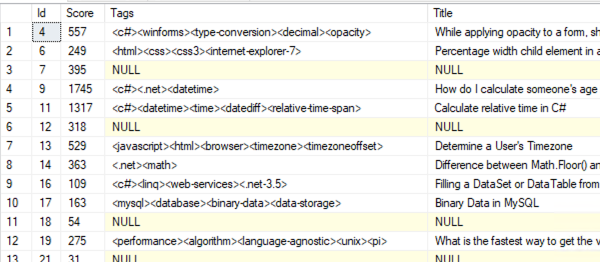
It’s one long string, but the tag we’re looking for could be anywhere in the string. So instead of doing this:
|
1 |
WHERE Tags LIKE '%<sql-server>%' |
We need a way to dive bomb into specific rows without that leading % sign. We need to be able to index the contents of Tags so that our queries look more like this:
|
1 |
WHERE Tags = '<sql-server>' |
But we can’t just change the queries to use =, because a question can have multiple tags.
First, design a child table to normalize Post.Tags.
That one phrase right there – “a question can have multiple tags” – is our sign that we have a data modeling problem. We really need a child table, more like this:
|
1 2 3 4 5 |
CREATE TABLE dbo.PostTags (PostId INT, Tag NVARCHAR(50)); CREATE INDEX Tag_PostId ON dbo.PostTags(Tag, PostId); |
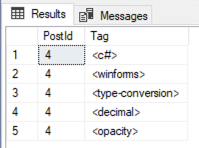 Any given Post.Id could have up to 5 rows in the PostTags table.
For example, Post.Id 4 has Tags = “<c#><winforms><type-conversion><decimal><opacity>”. That post would have 5 rows in the PostTags table instead, one for each tag.
Then, if we had queries that we wanted to go faster, we could modify them to point to the new indexed child table:
|
1 2 3 4 5 |
SELECT TOP 100 p.* FROM dbo.PostTags pt INNER JOIN dbo.Posts p ON pt.PostId = p.Id WHERE pt.Tag = '<sql-server>' ORDER BY p.Score DESC; |
And they’d get nice, quick index seeks.
For bonus points, you might consider storing the Tags in a separate normalized structure like this:
|
1 2 3 4 5 6 7 8 9 |
CREATE TABLE dbo.Tags (Id INT IDENTITY(1,1), Tag NVARCHAR(50) PRIMARY KEY CLUSTERED); CREATE TABLE dbo.PostTags (PostId INT, TagId INT); CREATE UNIQUE CLUSTERED INDEX Tag_PostId ON dbo.PostTags(TagId, PostId); |
So that we only have to store the full string contents of the Tag (‘sql-server’) just once instead of on every PostTags row. In the comments, readers will have vigorous arm-wrestling matches trying to decide the primary key and clustered index structures of these tables. I’ll just point out that the only reason we’re really building these tables is to make queries of Posts.Tags go faster, so in your table design, consider these tables to be more like indexes, less like fancypants table designs.
Second, we gotta keep the new tables up to date.
In a perfect world, when Posts rows are deleted/updated/inserted, I would have the app code also maintain the PostTags rows. However, in the real world, I don’t always have the luxury of changing all the app code at once.
The answer: triggers.
STOP SCREAMING, it’s actually fine here. We just need to be careful about a few things:
- Only touch the PostTags tables when the contents of Post.Tags actually changed
- Insert new rows in dbo.Tags when a tag doesn’t exist yet – because right now, there aren’t any constraints on the contents of the Posts.Tags column. The app could just insert a new Posts row with wild new tags that we’ve never seen before, and it’s gonna be up to our trigger to handle that.
- Handle multi-row transactions – because that’s the silent bug I find in most triggers, especially when they use the built-in UPDATE() function
Once we’ve written our triggers, we’ll want to backfill the new tables in a one-time process. I actually like enabling the triggers first, then backfilling the existing data, because it lets me use gradual batch processes to populate all the existing Posts, while the triggers handle ongoing changes while my batch stuff runs.
Here’s a proof of concept that I whipped up in my secret lab:
|
1 2 3 4 5 6 7 8 9 10 11 12 13 14 15 16 17 18 19 20 21 22 23 24 25 26 27 28 29 30 31 32 33 34 35 36 37 38 39 40 41 42 43 44 45 46 47 48 49 50 51 52 53 54 55 56 57 58 59 60 61 62 63 64 65 66 67 68 69 70 71 72 73 74 75 76 77 78 |
DROP TABLE IF EXISTS dbo.Tags; DROP TABLE IF EXISTS dbo.PostTags; GO CREATE TABLE dbo.Tags (Id INT IDENTITY(1,1), TagName NVARCHAR(150) PRIMARY KEY CLUSTERED); CREATE NONCLUSTERED INDEX Id ON dbo.Tags(Id); CREATE TABLE dbo.PostTags (PostId INT, TagId INT); CREATE UNIQUE CLUSTERED INDEX Tag_PostId ON dbo.PostTags(TagId, PostId); CREATE NONCLUSTERED INDEX PostId_TagId ON dbo.PostTags(PostId, TagId) GO /* Populate Tags with distinct list of existing tags */ INSERT INTO dbo.Tags (TagName) SELECT DISTINCT(REPLACE(t.value, '>', '')) AS TagName FROM dbo.Posts p CROSS APPLY STRING_SPLIT(p.Tags, '<') t WHERE t.value <> '' AND NOT EXISTS(SELECT * FROM dbo.Tags tE WHERE tE.TagName = REPLACE(t.value, '>', '')) GO CREATE OR ALTER TRIGGER dbo.Posts_Tags ON dbo.Posts AFTER DELETE, UPDATE, INSERT AS BEGIN SET NOCOUNT ON; /* Remove PostTags for deleted rows (rows that exist in deleted, but not inserted virtual tables) */ DELETE dbo.PostTags FROM deleted d LEFT OUTER JOIN inserted i ON d.Id = i.Id INNER JOIN dbo.PostTags pt ON d.Id = pt.PostId WHERE i.Id IS NULL; /* Add any new tags that don't exist */ INSERT INTO dbo.Tags(TagName) SELECT DISTINCT(REPLACE(t.value, '>', '')) AS TagName FROM inserted p CROSS APPLY STRING_SPLIT(p.Tags, '<') t WHERE t.value <> '' AND NOT EXISTS(SELECT * FROM dbo.Tags tE WHERE tE.TagName = REPLACE(t.value, '>', '')) /* Add PostTags that exist in inserted */ INSERT INTO dbo.PostTags(PostId, TagId) SELECT p.Id AS PostId, t.Id AS TagId FROM inserted p CROSS APPLY STRING_SPLIT(p.Tags, '<') pt INNER JOIN dbo.Tags t ON REPLACE(pt.value, '>', '') = t.TagName LEFT OUTER JOIN dbo.PostTags ptE ON p.Id = ptE.PostId AND t.Id = ptE.TagId WHERE pt.value <> '' AND ptE.PostId IS NULL; /* Remove PostTags that have been edited out */ DELETE pt FROM inserted i INNER JOIN dbo.PostTags pt ON i.Id = pt.PostId /* No join requirement for correct tags */ INNER JOIN dbo.Tags t ON pt.TagId = t.Id WHERE t.TagName NOT IN (SELECT REPLACE(value, '>', '') FROM STRING_SPLIT(i.Tags, '<')) END GO /* Backfill existing rows, takes a few minutes */ INSERT INTO dbo.PostTags(PostId, TagId) SELECT p.Id AS PostId, t.Id AS TagId FROM dbo.Posts p CROSS APPLY STRING_SPLIT(p.Tags, '<') pt INNER JOIN dbo.Tags t ON REPLACE(pt.value, '>', '') = t.TagName LEFT OUTER JOIN dbo.PostTags ptE ON p.Id = ptE.PostId AND t.Id = ptE.PostId WHERE pt.value <> '' AND ptE.PostId IS NULL; GO |
Standard disclaimers apply there: I only tested for a few minutes, didn’t put any error handling in, etc. It should be enough to get you started when you need to solve problems like this, though.
Finally, change the slowest queries to use the new tables.
Once the new child tables are populated, we can present the solution to our developers like this:
“Hi! We’ve heard your complaints about queries being slow when you’re looking for a specific tag. Good news! We’ve got a new table structure that you can use, but it’s entirely up to you when you want to migrate over to it. You can change any queries, at any time, and use either the old or new table structures. Here’s an example of a slow query:”
|
1 2 3 4 |
SELECT TOP 100 * FROM dbo.Posts WHERE Tags LIKE '%<sql-server>%' ORDER BY Score DESC; |
“And here’s the faster version using the new tables:”
|
1 2 3 4 5 6 |
SELECT TOP 100 p.* FROM dbo.Posts p INNER JOIN dbo.PostTags pt ON p.Id = pt.PostId INNER JOIN dbo.Tags t ON pt.TagId = t.Id WHERE t.TagName = N'<sql-server>' ORDER BY Score DESC; |
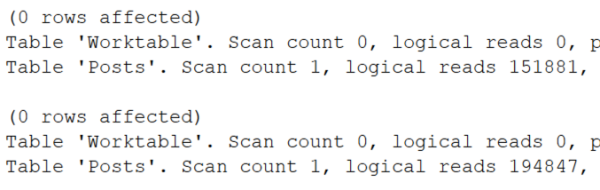
“When changing your code, a few things to be aware of: use equality searches on T.TagName, not like searches, and don’t use % signs in your search. Follow those guidelines, and your queries will typically see a 99% reduction in duration. If you don’t see at least a 90% reduction, send the before & after query to a member of the DBA team, and we’ll help you with the query changes.”
I like this approach because it lets the existing code work as-is, and lets developers opt into faster performance whenever they have time to edit queries. If we can’t just use a magic button to make everything faster, then this is the next best thing.
Bonus Points for Thomas Franz
In the comments on the challenge, Thomas Franz took things to the next level when discussing a solution similar to mine above. Thomas wrote:
Problem with your first approach: when you write direct into the dbo.PostTags table, it will not be reflected in dbo.Posts.Tags (you are still using this column).
And one part of the goal was, that the devs should be able to use faster queries (on the new structure) and in my opinion this does include INSERT/UPDATE/DELETE too (e.g. deleting the tag from all Posts (if there would be any).
And of course you are saving the tags twice (disk space / memory) and on the long term it is almost guaranteed, that it will differ (maybe because someone disabled the trigger for a short maintenance or there are some edge cases …).
So Thomas wrote an even more ambitious solution: he turned Posts into a view, and broke out the underlying normalized data into separate tables. He used triggers on the view to push deletes/updates/inserts (DUIs) into the right places. He also only stored the normalized data once, ensuring its accuracy and eliminating the chance that it’d get out of sync. I love it!

 If your company is hiring, leave a comment. The rules: