Blog

Moving to Michigan temporarily

5 Comments

One of the sweet things about telecommuting is the ability to pack up the tents and head off to a new location for a while.  Erika’s never seen a real winter, so we’re moving up to my hometown of Whitehall, Michigan.  We’re staying in the Colby State Park – not a real state park, of course, but that’s the family nickname for Grandma & Grandpa Colby’s old house on White Lake.

It’s probably not permanent – we love Houston and warm weather too much to make it permanent.  It’s fun for a while, though.

Expect to see more white and less sun in my photo stream for a while!

Side note – if anybody wants to buy a Vizio 42″ 1080p flat panel with a long warranty, I’ll let it go for $600.  No shipping, local Houston buyers only.  Not really looking forward to putting that thing in storage with the rest of our furniture or moving it up to Michigan.  Update: the TV is sold to Jessica Grieves of Ecor Rouge Photography here in Houston, where it will be displaying beautiful baby pictures during the day and XBox games at night when her husband Jay plays with it.

IBM SVC Entry Edition pricing out

Storage
0

IBM just unveiled a smaller-scale edition of their storage virtualization solution called IBM System Storage SVC Entry Edition.  From the interwebs comes a press release which includes this juicy quote:

“The idea is to make it more affordable for smaller companies – the entry edition is priced per disk drive with a starting configuration costing around $35,000 for five drives. The regular SVC is priced per usable capacity, starting at $50,000 for 1 TB.”

Wow.  It’s definitely expensive, but I’ve heard from two separate customers at two different SQL Server events now that SVC has met or exceeded their expectations.

One of my SSWUG Virtual Conference sessions is Virtual Storage Pros & Cons, and I talk about the ideas behind products like IBM SVC, what to look out for during implementations, and how they can benefit database administrators.  That virtual conference is only $100 – look at that price in comparison to SVC’s pricing, and it’s a no-brainer to go get some independent opinions before you buy.  I definitely don’t have anything negative to say about SVC, but I do talk about some cautions you need to heed during implementations.


PASS 2008 Summit Meetups

#SQLPass
5 Comments

If you’re going to the Professional Association for SQL Server summit in Seattle, let’s meet up!  Here’s my travel info:

Flight in: Houston to Seattle, Continental 1767 – arrives Sunday, 11:41 AM
Hotel: Sunday to Tuesday night, Hotel 1000.  Rest of week, Sheraton.
Flight out: Seattle to Houston, Continental 223 – leaves Saturday, 6:10 AM
Cell: 281-433-4054
Twitter (will be posting what we’re up to with the company account): http://twitter.com/Quest_SQLServer

If you want to meet up, you can post your travel info here.  You can link to this page with https://www.brentozar.com/pass as a shortcut.


A little ninja work before breakfast

Stack Overflow
1 Comment

Mornings like this, I can’t believe I get paid to do this stuff:

That’s Jeff Atwood of Coding Horror and Stack Overflow, whose blog I’ve been reading for years.  I actually bought a t-shirt with his site’s logo way back in 2006.  Jeff effing Atwood.  If I saw him, I’d ask for his autograph on my shirt, but I wore the shirt out long ago.

And today, I’m in Redmond to give a couple of SQL Server presentations for local users at the Microsoft campus.

Life rocks.


What I learned at Tulsa Tech Fest 2008

8 Comments

Tulsa Tech Fest is a ginormous cross-discipline tech event that drew over 800 people to two days of fun sessions at OSU-Tulsa.  I learned so much from so many different people that I can’t even begin to lay it all out, but I’m going to throw in the highlights here.

Tulsa developers “get” social media. During one of the keynotes, the speaker asked for a show of hands from everybody on Twitter, and something like 1 in 5 hands went up.  That’s way, way higher of a participation rate than I see when I ask that same question in other cities.  Then, add in the fact that Twitpic and Ping.fm are both born and raised in Tulsa.  Wow.

Ping.fm consists of two guys in Tulsa. Ping.fm is a service that broadcasts your status updates to all of the social networking sites you use – Facebook, Twitter, LinkedIn, MySpace, and so on.  Post your update in one place, and boom, it goes out everywhere.  You can do updates via the web or via email, and if you attach a picture to your email, it handles that too.  Without Ping.fm, I wouldn’t be able to keep up with my friends on so many different social networks.  It works so well and stays up so much more than Twitter that it’s hard to believe it’s done by only two guys.  I met @seamoss and he’s totally down-to-earth.  If I ever started a site that cool, I’d be full of myself.  Heck, I’m full of myself now, and all I have is a blog!  Caught you reading it, though.  Heh.

People still believe virtual servers are smoke and mirrors. I gave a session on VMware and Hyper-V to an audience of people who hadn’t done any work with either platform yet.  About halfway through, I could tell that it wasn’t resonating with the audience, so I stopped and asked, “Okay, wait, how many of you actually believe me that this stuff works?  That say, VMotion works?”  The only raised hands were from the two guys in the audience who’d already done large (200+ host) VMware deployments.  I had to drop out of the slide deck, remote desktop into my lab, and show it in action.  Even then, they still didn’t seem to believe it.  Folks, this stuff is for real, and it’s coming fast.

Mint.com is a free web-based replacement for Quicken. I used to love Quicken, but it’s such a manual pain in the rear.  Mint screen-scrapes your bank’s web site, automatically categorizes your expenses based on the business name, and saves you money by suggesting things like cheaper insurance.  I’m sold.

Chris Bernard is a hell of a presenter. He’s a user experience evangelist for Microsoft, and his design experience carries over to his presentations.  He doesn’t keep turning around and pointing at the slide deck.  He doesn’t go “Uhhh, well, kinda, like, you know.”  He just bangs out his points, and the slides serve to illustrate what he’s talking about in amazing ways.  You can’t get the experience by watching Chris’s keynote on Slideshare, because like a good presenter, he’s not reading bullet points off a screen.  He’s talking about concepts, and supporting images or quotes will pop up behind him, but if you just watch the screen you’re missing the point.  I have a new benchmark to aim for in my presentations.

People love Perfmon. I gave a session on performance tuning, ran right up against my time limit, and people wanted more.  There’s a strong desire to learn more about what specific Perfmon counters mean, and what actions you should take when those counters are high.

Profiler groupings & aggregates can be enabled on the fly. If you get the chance to see Red Gate’s Brad McGehee speak on Profiler, attend, because everybody can learn something.  I eat, breathe and sleep Profiler, and I still didn’t know that you could enable groupings while a profile was running.  He got a lot of oohs and aahs when he showed deadlock graphs too.

Telligent is building cool stuff with social networking inside companies. I use a lot of social networking tools like Twitter to communicate quickly with other SQL Server professionals, and it helps me get my job done faster and have more fun doing it.  Rob Howard of Telligent gave a great keynote on social networking in the enterprise, and everybody was nodding their heads.  The products just made sense.  I’m sure they’re hard to sell to older executives who don’t get the power of things like Twitter, Facebook and LinkedIn yet, but integrated social portals like Telligent’s will help the younger generation get their job done better.

I’m still not seeing an interest in SQL 2008. The vast majority of DBAs I talked to just weren’t interested in putting in the time and effort to do upgrades because the business didn’t see an ROI in it.  They like some of the new features, but they can’t justify the manpower cost.  They also liked a lot of the Enterprise-only features in 2008, and they weren’t sure that management would spring for Enterprise.  Interesting.

Jeremy Marx and David Walker are really nice guys. One of the side effects of using Twitter is that you end up with friends all over the globe who you’ve never actually seen before. I finally got the chance to shake hands with Jeremy & David and talk with ’em for a while, and they’re both great people.  I’ve met more cool people through Twitter in the last few months than I’ve probably met in real life the last 5 years!

I’ll be back next year. I had a great time, and I’m only scratching the surface of everything that happened.  If you’re anywhere near Tulsa, I highly recommend attending Tulsa Tech Fest.  At $2 or 2 cans of food, it’s the best IT conference bargain around.


Brian Gorbett’s TulsaTechFest keynote on the Live platform

1 Comment

#TulsaTechFest @msftguy keynote on Live platform – blog to follow

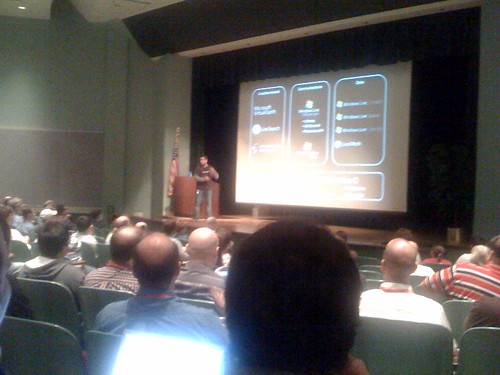
Brian is a great presenter, but my problem with the entire Live platform can be summed up in this one slide.

This slide shows all the different Live services, including Virtual Earth, Search, Hotmail, MSN, SkyDrive, etc. It’s hard to see with my iPhone camera’s emailed photo.

These sites don’t look or feel anything like each other.

Contrast this with Google, where every single product they have looks and feels like it’s part of the same family. It really feels like a platform. Microsoft’s Live stuff is a whole ton of services that are elbowed into the same phone booth using the same name. That doesn’t make it a platform, and it sure isn’t a compelling sales pitch.

Update 9:18 AM – argh.  He’s pushing Windows Live ID, and I have a big problem with corporate ownership of identity.  If Microsoft owns my login ID and controls it across the sites.  Sure, right now it’s free to use for sites up to 1 million logins per month, but that can change at any time, and monopoly on ID is a problem.  I’m not saying Google’s login ownership is any better, but OpenID is better.  Way better.

Update 9:26 AM – ARGH. Now he’s pimping Live’s ability to share your friends with other sites.  Why restrict that to the closed Live system?  Why not pimp the XFN or FOAF open standards?  Dang it!  Where are my open source evangelists?  I love Microsoft – I make a great living off their kick-butt products – but identity ownership gives me the creeps.

Update 9:38 AM – he’s selling the ability to embed Live Messenger in your web site, so visitors can log in to do their instant messaging on your web site.  Uh, what?  Why?  Why would I want to give up screen space on my web site to let users do instant messengers?  He’s showing this “invite a friend” feature and saying it was really easy, but it wasn’t – it involved a multi-step login-and-wait procedure.  Bad user experience, too much screen real estate, and not compelling.  He does a great job of delivering the message, but it’s just a bad message.

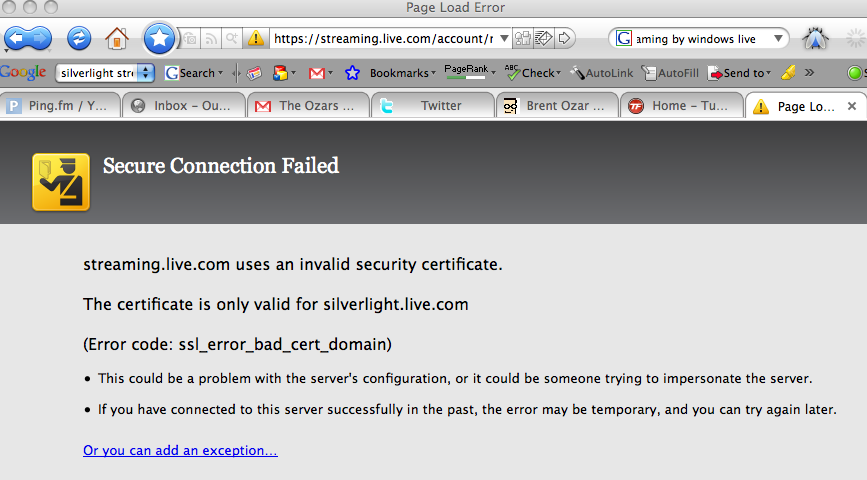
Update 9:57 AM – he pitches Silverlight Streaming by Windows Live, and I’m actually interested in that because I want to do some video streaming.  I go to sign up for a free account, and – uh oh….


Self service and full service, BI and gas

2 Comments

Earlier, I blogged about the upcoming Kilimanjaro and Gemini releases from Microsoft: self-service BI tools that are delivered inside Excel.  David Stein left a comment which prompted me to write this separate blog entry about self-service BI in general.  Basically, David’s comment was that the quality of data won’t be as good because the end users don’t really know what they’re doing with the data.

He’s right, but it’s the lesser of two evils, and it’s a choice that the organization has to make, and every case is different.

Think back to those movies and TV shows of full service gas stations back in the 1950’s-60’s.  I remember seeing snappily-dressed ladies pulling up to full service pumps where the attendant hustled out, started pumping the gas, and proceeded to pop the hood to check the car’s oil and the tire pressures while the tank filled up.  If it needed oil, he’d grab a few quarts, take care of the engine, and the driver sat comfortably in the car the whole time.

Today, when I pull up to the gas station, I fill the car up, but I gotta be honest: I don’t check the oil level and tire pressure every time.  It’s probably okay, but it might not be, and if it’s not, the only person I’m hurting is myself.

I could go to a full service pump, pay more, and get that taken care of.  I could drive happily knowing that everything in my car was operating at its perfect levels, and that I was avoiding disaster.  But I don’t – I save a few bucks and go to self-service.  Judging by the vanishing number of full-service pumps, I’m not alone.

Plus, it’s not always my car: when I’m rushing to return a rental car before I jet off somewhere else in my glamorous (cough) life as a traveling SQL Server expert, I don’t give a rip whether there’s any oil or if my tires are underinflated.  I wanna throw gas in there and get out as fast as I can to make my flight.

BI faces a similar pressure.  With the advent of self-service BI, our end users will have a choice: do they want perfectly maintained data with no chance of disaster?  Or are they willing to save a few bucks, vet their own data (or not vet it at all) and pump their own reports?  If they choose self-service, they won’t have to sit around waiting for the attendee to come by.

Heck, they can build their own BI reports anytime, anywhere, much like I enjoy driving up to an unmanned pump and filling up my rental car without speaking to a single human being.  (Sorry if that sounds antisocial, but the folks at service stations aren’t always the best conversationalists.)  Sometimes, people just want the best data they can get in the least amount of time so that they can race off to make the next business decision.  Not everything can wait for an ETL process design meeting.

Oh, and by the way, there aren’t a lot of jobs available as full-service gas station attendees….


SQL Server Kilimanjaro, Gemini announcements

3 Comments

At the BI Conference in Seattle, Microsoft unveiled some components of project code name Kilimanjaro, a sort of R2 release for SQL Server expected in the first half of 2010.  Here’s a couple of relevant news sources:

Here’s the part I really like: Gemini centers around Excel as its user interface.

Let’s face it: our power users live, eat and breathe Excel.  They’re all over it.  They know it forwards and backwards, and they pull tricks with pivot tables that make DBAs scratch their heads.  My bosses have always been able to out-Excel me, and that’s been fine with me.

If Excel is going to be the future interface for self-service BI, with SQL Server as the back end, I for one welcome our new spreadsheet overlords.

Why am I embracing Excel so much?  Because the cloud is coming, open source is coming, and our competitors just keep coming.  The one thing none of them do well is the front end, the power user interface.  None of them have anything even remotely close to a user interface as rich and powerful as Excel.

If my BI team comes in and says, “Give me one good reason we shouldn’t switch our data warehouse over from SQL Server to Oracle/cloud-based MySQL/cheap Postgres/fast-database-du-jour,” I’ve got a new cool answer: our power users love self-service BI with Excel, and nobody else is going to be able to touch that.

Are there beautiful BI front ends out there that put lipstick on Oracle, MySQL and cool new databases?  Sure – but most companies are already licensing Excel on the desktop, and their users know how to use it.  Cheaper, less training, less implementation time – it’s a win all the way around for SQL Server.

And you know what I like the most?  It lets the SQL Server Management Studio team focus on day-to-day DBA task management and stay out of the BI power user business.


GTD for my coworkers

SQL Server
10 Comments

Dear Coworker,

Hi.  I work differently than other people you may have worked with.  I wanna take a minute to bring you up to speed on how I do it, and what this might mean for you.

I use the Getting Things Done methodology from David Allen, and here’s how I work.

When You Email or Call Me…

When I get an email, phone call or meeting from you, I figure out what specific actions you want me to perform.  When it’s clear what I need to do, there are only 3 possibilities:

  • I’m going to do it in the next hour
  • I’m going to put it in RememberTheMilk.com as a to-do for sometime in the future
  • I’m going to bring in someone else who should do it instead of me

One of those three things will happen every time, and then I’m going to delete your email/voicemail/meeting request.  My goal is to eliminate the clutter, and keep everything I need to do in a single place (RememberTheMilk.com).  Email and voicemail inboxes make for really crappy to-do list management systems.  Don’t freak out if you look over my shoulder and you see an empty email in-box – it’s not that I have nothing to do, and it’s not that people don’t want things from me.  I’m an in-box ninja.

I’m 100% transparent, so if you want access to my to-do list on RememberTheMilk.com, just let me know and I’ll hook you up.  At any time, you can look on my RTM to-do list to see what I’m currently working on, and where your request ranks in the list.

If You Want Me To Do It Faster…

If you disagree with my priorities, let’s talk, and I promise I’ll never take offense.  I’m here to serve you because you’re my customer.  I will never leave you disagreeing with my priorities: we will come to an agreement, and if we can’t, we’ll get my manager involved because I might be getting the priorities wrong.  It wouldn’t be the first time!

I truly don’t care what I do first.  I’m going to be busy for the rest of my life because when you’re good at what you do, people find out and they give you more stuff to do.  I’m cool with that.  At the same time, I need you to be cool with it too: I can’t work 60 hours a week to accomplish everything on my to-do list, because I can never possibly be done, no matter how hard I work.

If you believe that I need to work through the weekend to accomplish your goal, then we’ll get together and have a conversation with my manager.  I’m totally okay with working the occasional weekend in order to knock out an ugly emergency, but when it happens, I want to make sure my manager’s aware so that he can start budgeting for another person to help me out.  Plus, sometimes my manager knows about another resource that has time to do that particular task.

Before You Schedule A Meeting With Me…

If you want to schedule a meeting with me, stop for a second to consider if the meeting is about assigning an action.  If it is, just drop me an email with the action that you need me to perform.  My job is to service my customers.  If you’re my manager, or if you’re “above” me in the company in any way, then it’s my job to do what you’re asking me to do, or find the right person to do it.  I’m not a “yes” man by any means, but you don’t have to sell me on something you want me to do.  Point me where you want me to go, and I’m on it.  I’ll keep you posted on my progress.

On the other hand, if you’re not my manager, and you’re scheduling a meeting with me to get me to do something, don’t be offended if I ask you to cut to the chase and just give me the action item instead.  You’re still my customer, but keep in mind that my managers have my plate chock full.  If you want something from me, I’m going to need to push something else out of the way, and a meeting isn’t going to “sell” me on pushing other things out of my to-do list in order to fulfill your request.  Instead, just send me the request, and I’ll do one of the three things: just do it, put it in my to-do list for the future, or point you to the right person to fulfill that request.

GTD is about being at one with your to-do list.  I’m really comfortable with it, but I find that it helps when my coworkers understand the basics of it too.  I’ll never try to get you to convert to GTD, but if you know how I work, you’ll understand why I quickly divert some tasks to other people or why I’m so reticent to join meetings with no apparent deliverable.

The payoff is that I’ll be one of the most productive, responsive and timely people you’ll ever work with.


Cringely says databases are dead

11 Comments

Robert X. Cringely is a columnist for PBS – you know, the worldwide authority on hot information technology issues.  You might recognize some of their other experts like Norm Abrams and Big Bird.  Cringely’s just like them, only with less name recognition.

In his latest blog, Cringely explains how cloud computing is going to make databases disappear altogether. Cloud services are going to be so fast that traditional things like SQL Server and Oracle won’t matter anymore.

It’s a really interesting opinion, but you know how it is – there’s two sides to every story.  I’d like to see a larger panel of opinions.  Maybe he could get Rick Steves and Ray Suarez to do a roundtable panel.  Maybe toss in some folks from Masterpiece Theater.

(Note to self: it’s my own fault for reading Cringely’s column in the first place.  He’s like the Enquirer of IT.)


SAN Tips for First-Time Users

Storage
0

If you’re thinking about buying your first storage area network, do yourself a favor and go to the Aston Martin dealership first.  Smell the leather – that is, if they’ll let you sit in one – and play with the switchgear to feel how nice and solid it feels.  Pretty nice, huh?

Or maybe that’s not your thing – maybe you’re a boat person.  In that case, swing by Hinckley and check out the T38R, which has a no-fuss, no-sweat power top just like the one in the Aston Martins.  They don’t have as many local dealers as Aston Martin, and you can’t swing into Cabela’s to check out their boats, but trust me, it’s worth the trip.  They’re just gorgeous machines, very elegant and timeless.

After either of these two trips, your first SAN will seem inexpensive by comparison.

Getting into storage area networking is very expensive, and every mistake in SAN technology will cost you and your company six or seven figures.

Want to learn from my many expensive mistakes?  Register for the SSWUG Virtual Conference on SQL Server, and for $100, you can attend my SAN Tips for First-Time Users seminar along with dozens of other SQL Server presentations from experts like Brian Knight, Buck Woody, Chris Shaw, Stephen Wynkoop and more.  I crammed a lot of information into that seminar – so much, in fact, that I had to race through the last half-dozen slides to finish the presentation before the 57 minute limit!

And by the way – the other reason to check out Astons and Hinckleys is because SAN admins make the big bucks.  Might as well start that relationship with the dealer now – if you get into SANs, you’ll be picking up your own Picnic Boat in no time.


Amazon EC2 will offer Windows hosting

Amazon Web Services (AWS)
0

A lot of cool things are happening at PDC this year, and Amazon’s already showing their cards: Amazon EC2 will offer Windows hosting.

That means you can turn on a brand new Windows machine – or ten – and pay by the hour according to the capacity you’re using.  Less than a dollar an hour in most cases.

What’s that mean for DBAs?

Let’s say you want to have a disaster recovery option for your SQL Server, but you can’t afford a full-time datacenter.  You can turn on a very low-power server in Amazon EC2, just fast enough to handle your incoming logged work, and keep it ready at all times.  When your primary server dies, you could shut down that Amazon instance, turn on a much higher-powered server, and be able to keep up with your load no matter how bulky it is – but without having to pay for that high-powered server all the time.

Or how about another scenario – log shipping.  Copy your transaction logs to Amazon S3 storage – cloud-based, by-the-gb storage – and whenever your main datacenter craters, you can turn on a new Windows box at Amazon and be running your databases from there.  Is it the best solution?  Of course not – but in a disaster, sometimes any solution is better than being completely down.

But wait, there’s more.  Say you want to do proof-of-concept development & testing, like you want to test what happens if you make a major schema change, or you want to test using SQL Server Analysis Services against your data, but your management won’t give you the money to go buy a new testbed server.  Start up a Windows machine at Amazon EC2, pay $1/hour, and do all the development you want.

That’s it – between this and Microsoft’s stuff, I’m adding a cloud category to the blog.


Back up your database to the network – not local disk

Database administrators: are you backing up your SQL Servers to local drives?  If so, you need to stop for a minute to think about a few possible side effects, and maybe think about backing up to a network share instead.  Why?  I’m glad you asked!

Get your data off the server faster

The only reason you back up is to be able to restore.  If your server crashes, you need to be able to restore as fast as possible.  In the event of a hardware or operating system error, if your data is on a local drive on that dead SQL Server, you’re going to take much longer to do a restore.  You might be running into the datacenter to go pull out the hard drives, or maybe you might spend valuable time trying to resuscitate a dead operating system.

Instead, if the backups are on a network share, you can immediately start restoring those backups onto an other server.  The faster you can get back online after disaster strikes, the better you look.  Then you can take your time troubleshooting the dead gear.

Restore your data to dev/QA faster

Do you frequently refresh your development and testing SQL Servers from production backups?  You can do this faster and with less impact to your production servers if those backup files live on a network share instead of on your production server.

Easier log shipping with multiple subscribers

When you have multiple log shipping subscribers pointing to the same publisher, they all need to read those same backups from your central publisher server.  The more subscribers you have, the more impact it is on the production publisher because all of those subscribers will be copying the data off the publisher.

Save yourself performance by simply writing the backup to a network share in the first place.  Then the write is done once, it’s off the production publisher, and it can go on doing what it needs to do: serve database users.

Faster writes to long term storage

If you’re writing backups to disk first, and then offloading those backups to a cloud provider or tape, you suffer a performance hit whenever that backup agent connects to grab the backup files from local disk.  You’ll get a performance improvement if you write those files off to the network to begin with, because then the backup software can grab the files off the network share – hammering your file server instead of your valuable database server.

Your bottleneck probably isn’t the network card

Sometimes I hear DBAs say that they’d rather dump the data onto local disk first to get the backup over and done with faster.  Sometimes – but rarely – is that actually true.  Many times, especially if you’re using backup compression, the network isn’t the bottleneck.

Want to prove it?  Try it yourself – do a backup to a known fast network share, not some slow junky machine in the antique section of the datacenter.  Time to see how long it takes to finish the backup as compared to writing to local disk.  If it takes less time, you should switch to the share right away.  Even if it takes 10-20-30% longer, I would still argue that you should switch because the faster you can get those backups off your server, the safer you are.  And I like you – I don’t want you getting fired for not being able to recover your data!  I can’t afford to lose any of my blog readers.


SQL Server 2008 upgrade poll results & thoughts

1 Comment

Last week I posted a poll asking DBAs when they would use SQL Server 2008 in production.  Here’s the results after one week:

  • In the next 3-6 months. (40%, 8 Votes)
  • Not planning it yet. (30%, 6 Votes)
  • In the next month or two. (20%, 4 Votes)
  • Already done. (10%, 2 Votes)

This week, I had the pleasure of going to a few meetings at Microsoft.  Roger Doherty gave us a presentation talking about why database administrators need to upgrade to SQL Server 2008.  He’s a member of the Developer & Platform Evangelists team, and he’s rightfully excited about all the cool stuff inside SQL 2008.

I played devil’s advocate – and when I say devil, I mean database administrator.

One of the slides was this spiffy graph that showed different approaches to upgrades: when you should do an upgrade-in-place, when you should use the Upgrade Advisor, and so on:

Upgrade Testing Options

Apps that are simple and have a low strategic importance can just be upgraded in place, whereas on the opposite end of the spectrum, apps that are very complex and have a high strategic importance should have careful planning with code changes to take advantage of the new features.

Okay, I get it, that makes sense.

So how do we as DBAs gather the information to populate this chart?  How do we analyze all of the applications (not just servers, but the individual databases) to determine whether they’re simple or complex, and whether they have a high or low strategic importance?  Roger discussed some of the options in determining app complexity, and basically, we don’t have a good option right now.  The closest thing we have to an automated solution is simply gathering a trace of all queries that hit the database over the course of say, a week, and looking at the queries to see whether they’re using SQL Server’s advanced or deprecated features.  We can pass the profiler data to the Upgrade Advisor, but it won’t give us a measure of how complex the app is – it will only tell us whether the SQL Server upgrade will pass or fail.

During the presentation, I sent out a Twitter message asking my readers how many instances they support per DBA.  The answers I got back ranged around 20-70.  Whaddya know – that’s kinda like the number of instances shown on that slide.

So here’s my problem: that’s a beautiful line graph.  Makes perfect sense.  But now let’s look at how much time it will take to actually upgrade all 20-70 instances that a DBA has to manage:

  • Gather a good inventory of servers & databases
  • Find out from the app owner whether SQL 2008 is supported (either internally or by the vendor)
  • Gather the information to populate the line chart
  • Take the actions suggested by the line chart (Upgrade Advisor, plan code changes, etc)
  • Arrange for an outage window with the application owners
  • Perform the SQL 2008 upgrade
  • Test the application post-upgrade

Holy moly.  If each of those took an average of four hours (and I know I’m seriously underestimating that) we’re still talking about 3 days per app.  Say your instances host just one app apiece (a truly laughable concept in the days of consolidation) and we’re talking about 60-210 business days to upgrade 20-70 instances!

Starts to make sense why Microsoft needs guys like Roger – you really do have to bang the drum to get users excited about doing that much work to upgrade.  It’s a tough battle.  I know when I was a DBA a few months ago, I was excited about 2008, but I knew there were few apps I could upgrade right away.  For the rest, the vast majority, I planned to wait until the application owners wanted to drive the upgrade process – so that way they could hassle with the meetings!


Cutting to the Chase

People come running into the DBA’s corner office (okay, windowless cube) with all kinds of issues and they’re not sure what’s a database problem, what’s an application problem, or what is just a general complaint.

Here’s some examples of vague requests:

  • “Man, this application is so slow.”
  • “The profit numbers on this report don’t seem right.”
  • “I think it’d be really cool if we had a new tool for our warehouses.”
  • “Have you read this article on database report tools?”

DBAs, being the selfless workers that we are, want to immediately drop everything and focus on their problem – but that’s not always the right answer.

As a DBA, you can help eliminate the confusion with a simple question: “Okay, let’s make sure we’re on the same page: what actions do you want me to take right now?”

The three bold words are the important ones to stress, because sometimes you’ll get answers like:

  • “Oh, I didn’t really want you to do anything – I just wanted to see if you’d heard that from anybody else too, or if it was just me.”
  • “I want you to double-check the numbers in the report.” (Well, that may not be the DBA’s job – it may be better to route them to the reporting team.)
  • “It depends – are you doing anything right now?” (Answer yes, and take a minute to show them what you’re doing.  It’ll scare them off just knowing you don’t sit around dreaming of ways to spend that big fat paycheck.)

Do yourself a favor: before you jump into the telephone booth to change into your Superhero costume, take a minute to ask the person exactly whose life they want you to save.  No need to be seen in those tights if you can avoid it.


HIPAA vs SOX for database administrators

0

A database administrator asked me, “If I’ve been working at a company subject to Sarbanes-Oxley regulations, and I needed to learn what was different about HIPAA regulations, what would be the difference between the two?”

First, in my answer, don’t think about credit card data or customer social security numbers.  That has its own security implications separate from HIPAA or SOX. In our cases, we’re going to assume there’s none of that involved, and later, you’ll see why I kept that out of the conversation.

HIPAA is designed to protect the patient’s confidentiality.

SOX is designed to protect the shareholder’s transparent view into the company.

I’ll keep coming back to those two points because it helps illustrate what we need to protect.

If you’ve been working at a SOX-affected company as a DBA, you implement safeguards to make sure that financial data doesn’t get inserted/updated/deleted without somebody knowing.  Your worst nightmare as a DBA is someone modifying profit & loss data without you being able to catch it, like sliding money around into different accounts.

With HIPAA, on the other hand, your worst nightmare is your database’s contents getting out into the public.  If somebody mucks with health data, sure, that’s a problem, but there’s not much motivation to do it.  The bigger concern is confidential patient data getting into the wrong hands.  In theory, you want tight security on ANY database server, of course, and you don’t want anybody doing unauthorized inserts/updates/deletes.  You still want that at HIPAA-affected companies, but the select auditing is a real pain in the butt, because off-the-shelf 2000/2005 databases aren’t set up for that.

There are some vendors who provide this by doing monitoring on the SQL Server with traces or with behind-the-scenes code analyzing what SQL Server is doing. Other vendors take the approach of a network appliance that sits between your SQL boxes and the rest of the network, and they sniff network traffic going into the SQL box.  Both approaches have their pros and cons, but you get the idea – we’re talking about infrastructure mods, not something DBAs take lightly.  (My employer, Quest Software, has solutions for HIPAA and SOX compliance for databases and Windows, but I’m not up to speed on that software yet.)

But it gets tougher: auditing is just the start.  In a SOX-affected company, you don’t lose that much sleep wondering what would happen if somebody stole your tape backups en route to an offsite location.  Sure, they’d get a copy of your balance sheets, but that stuff is pretty much public sooner or later anyway, because only public companies are really subject to SOX.  If you’re a private company and you’re choosing to abide by SOX regulations, then the tape theft scenario is a problem, but as the DBA, it’s not really technically YOUR problem.  If somebody gets the tape backup, they can restore it and read it, but it’s not like they’re going to set up a fake balance sheet and do something with it.

On the other hand, with HIPAA-affected data, we’re talking about patient health histories.  If somebody gets a tape backup with health insurance data for a million customers, finds out what people are sick with what diseases, there is a HUGE financial risk there.  The patients can sue, or the thief can sell that data to a private company who would do targeted advertisement at those customers.  Imagine getting a phone call from a spammer saying, “We hear you’ve got herpes, and we’ve got a great drug to treat it.”  Ugh.  Lawsuit city.

So not only do you have to protect the data, you have to make schema design decisions in an effort to abstract the customer from the treatment records.

I’ll give you an example: take a survey company that sends surveys to hospital patients.  The hospital would send over a list of patients, but not any information about their treatments whatsoever.  The survey company would email out the surveys, compile the data, and then return the raw survey data back to the hospital for their own processing.  See, the hospital wants to do reporting to find out if people who got a particular treatment were more or less satisfied than patients who got another treatment, but they can’t give that data out to the survey company because that might violate HIPAA. If the hospital wanted to give out that data, they would need to make sure that all of the survey company’s data was as secure as the hospital data, and that’s an auditing mess.

Something else you see in HIPAA-affected databases are app-level encryption – like encrypting a patient’s name/address/SSN/etc in the application, and then storing that encrypted data in SQL Server – but not the key.  That way, even if the DBA gets curious and selects patient data, he won’t be able to grab a list of people with broken arms or whatever.

Now you see why I left out the credit card data.  Sure, that’s private, and it can affect both HIPAA and SOX companies if they store that kind of thing, but it’s unrelated to either.

I’ve made a lot of grand sweeping generalizations in this post, but it’s just to illustrate the basic differences.  I know SOX people are having fits that I’d say they’re not worried about auditing select statements, for example, but it’s just not the top thing on their to-do list when they wake up in the morning.

Finally, this article is accompanied by a picture of a new ThinkGeek item.  I didn’t want to do a separate blog entry about it, but it’s hilarious, and I like pictures in my blog entries.  So there ya go.


SQLIO Tutorial: How to Test Disk Performance

SQL Server, Storage

Storage is a black box, right?  The SAN admins ask how much storage space you need, you tell them, and then they give it to you.  They don’t tell you how fast (or slow) it is, they don’t know whether it meets your needs, and they probably don’t know where the bottlenecks are.

It’s time to find out how fast your storage really is using SQLIO – perhaps the worst-named tool in history.  SQLIO has absolutely nothing to do with SQL Server – it’s just a tool to test IO.  Whether you’re an Exchange guy, a SQL DBA, or a file & print fella, SQLIO will help you push your storage to the limit to see when it breaks.

Step 1: Download SQLIO from Microsoft for Free

Download SQLIO from Microsoft and install it on the Windows server you’d like to test.  It’s extremely lightweight – it takes less than 1MB on disk – and works on any version of Windows.  The support page doesn’t say Windows 2008, but it works fine.

Install it in c:\Program Files no matter what drive you want to test.  I prefer installing it in C because I delete and recreate my non-system partitions repeatedly while I’m testing them.  That way, I can find out if various parameters are faster or slower without reinstalling the OS.

After installing SQLIO, you won’t see anything in the Start menu because it doesn’t have a graphical user interface.  Deep calming breaths – this is easier than it looks.  Fire open Windows Explorer and go into the directory where you installed SQLIO, like c:\Program Files(x86)\SQLIO.

Step 2: Set Up SQLIO’s Configuration Files

If you just start running SQLIO, it uses a laughably small 8MB test file by default.  The problem with such a small test file is that it’s probably smaller than the cache involved in your various storage components (drives, storage processor, etc.)  I prefer using a 20GB testing file for starters.  Your SAN might have a larger cache, but keep in mind that it divides that cache across all of the servers connected to the SAN.

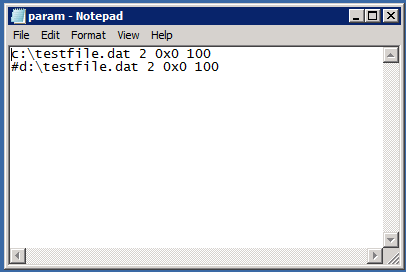
To create a larger file, we need to edit the param.txt text file in the directory where you installed SQLIO.  If you’re using Windows 2008 R2 or newer, this file is protected by the OS, so we need to start Notepad as Administrator first.  Go into Start, Program Files, Accessories, and then right-click Notepad and click Run As Administrator.  Then open the param.txt file where you installed SQLIO.

Param.txt
Param.txt

The c:\testfile.dat is the name of the test file that will be created.  Change that to be whatever drive you want to test, like e:\testfile.dat.

The last parameter (100 by default) is the test file size in megabytes.  To get a 20GB test file, replace 100 with 20480.  Your end result will look like this if you want to test the E drive:

You can ignore the second line since we’ll only be working with one test file at a time.  The # at the beginning means it’s commented out.

Save the file, but don’t close Notepad yet.  While you’re in there, click File, New, and let’s create a couple of batch files to run SQLIO lots of times with different parameters.  Copy/paste these lines into Notepad:

Save this in the SQLIO directory as test.bat.

What Do the SQLIO Parameters Mean?

While we’re looking at that set of commands, here’s a quick breakdown:

  • -kW and -kR: means we’re testing writes or reads
  • -t8 and -o8: means 8 threads with up to 8 outstanding requests at once.  SQLIO isn’t CPU-bound at all, and you can use more threads than you have processors.  The more load we throw at storage, the faster it goes – to a point.
  • -s120: means the test will last 120 seconds
  • -b8 and -b64: the size of our IO requests in kilobytes.  SQL Server does a lot of random stuff in 8KB chunks, and we’re also testing sequential stuff in 64KB chunks.
  • -frandom and -fsequential: random versus sequential access.  Many queries jump around randomly in the database, whereas things like backups, bulk loads, and table scans generally work sequentially.

You’ll notice I’m using a lot of general terms here about how some application patterns work.  Every SQL Server database has its own access patterns – random, sequential, big chunks, small pieces, and so on.  The four test lines you see above are shorthand examples of how some SQL Server IO patterns work.  We’re going to run a quick 4-part test first, and then come back to run much more in-depth tests shortly.

Step 3: Test the Disk Performance

Go to a Command Prompt (as administrator – yay, Windows) in the SQLIO directory and type:

This will do a fast 10-second test, but more importantly it’ll create the test file using the file location and size parameters you specified in param.txt.  The first time you run it for a given drive, it’s going to be dead slow – it’s going to warn you that it has to create the test file.  Depending on your storage speed, this could take 15-20 minutes.  Once the test file creation is done, the subsequent tests will go much, much faster.  You can ignore the output of the above statement (as long as it’s not errors) and then type:

This fires off the four-line test file.

Step 4: How to Interpret the SQLIO Results

SQLIO results look like this:

I’ve bolded the most important numbers above.  IOs/sec are the number of operations performed per second.  Storage guys call this IOPs.  MBs/sec are how much data moved around per second.  Storage guys call this throughput.

The histogram at the bottom shows how fast the storage responded in milliseconds.  Generally the numbers will either be all the way over to the left (0-3ms) or all the way over to the right (24+ ms).  We’re not too worried about this yet – first, we just want to see how fast the storage can go regardless of how long it takes to respond, because odds are, it’s not even going to respond fast.

So what do the numbers mean? Well, it depends – this is where everything’s relative.  You can compare your drive throughput to storage reviews at Tom’s Hardware.  In the example above, my storage only gave me 12 MBs/sec, which sounds atrocious at first – it’s in USB thumb drive territory – but that particular test was the random write test with just 8kb chunks.  That’s actually not terribly bad for the size of RAID array I was using at the time.

Disk Testing Alternatives: CrystalDiskMark, SQLIOSIM, Iometer

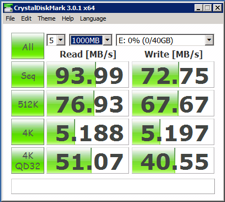
CrystalDiskMark Results

Let’s face it: SQLIO isn’t the easiest tool to use.  Sometimes you just want the easy button.  Here’s three popular tools that you can use to test the throughput of your storage.

CrystalDiskMark: The easy, free one-button solution (shown). This is about as easy as disk performance testing gets.  You download this tool, no installation required, and just click the big All button to start testing.  CrystalDiskMark generates sequential & random, read & write loads at your storage system in 512KB and 4KB chunks.  This gets you quick answers, but not necessarily SQL-related – after all, SQL Server doesn’t read or write in 512KB or 4KB chunks.  It’s an easy start though.  Download the portable edition CrystalDiskMark for free here. (To be clear, don’t get the installer version which may come with spyware, and don’t get CrystalDiskInfo.)

Iometer: The open-source, cross-platform tool. If you do a lot of SAN work, you might prefer a cross-platform tool that you can use across all of the clients that connect to the SAN.  Iometer works on Windows and Linux.  I gotta be honest with you: Iometer isn’t the friendliest tool around.  I think it makes SQLIO look easy.  Download Iometer free here.

SQLIOSim: Like SQLIO, but really SQL-related. While SQLIO doesn’t really simulate SQL Server IO at all, that’s where SQLIOSim comes in.  You can pass in all kinds of parameters to simulate OLTP databases, OLAP databases, Enterprise Edition read-aheads, and much more.  Download SQLIOSim for free here, and then get the free SQLIOSim Parser from Microsoft’s Jens Suessmeyer & Jimmy May.

More Tools for Slow SQL Servers

sp_Blitz®: Free SQL Server Health Check – You’ve inherited a SQL Server from somebody, and you have no idea why it’s slow. sp_Blitz® gives you a prioritized list of health and performance issues, plus gives you URLs for more details about each issue.

Our Free 6-Month DBA Training Plan – Every Wednesday, you get an email with our favorite free SQL Server training resources. We start at backups and work our way up to performance tuning.

SQL Critical Care® – Don’t have time to learn the hard way? We’re here to help with our quick, easy process that gets to the root cause of your database health and performance pains. Contact us for a free 30-minute sales consultation.


Oracle announces cloud computing support

Oracle
0

I don’t have much insight to add here, but it’s something my readers are probably into: Oracle now supports running on Amazon EC2.  They’ve got prebuilt EC2 instances that you can just turn on, a cloud management portal, and licensing options.

This is such a cool time to be a database administrator.  I can’t wait for the day where people don’t make bad architecture decisions just because they can’t afford to get a real database (and I don’t just mean Oracle by that, of course) from the get-go.