
Who’s Changing the Table? Answers and Discussion
Your challenge for this week was to find out who keeps mangling the contents of the AboutMe column in the Stack Overflow database.
Conceptually, there are a lot of ways we can track when data changes: Change Tracking, Change Data Capture, temporal tables, auditing, and I’m sure I’m missing more. But for me, there are a couple of key concerns when we need to track specific changes in a high-throughput environment:
- I need to capture the login, app name, and host name that made the change
- I need to capture a subset of table columns, not all
- I need to capture a subset of the before & after changes, not all
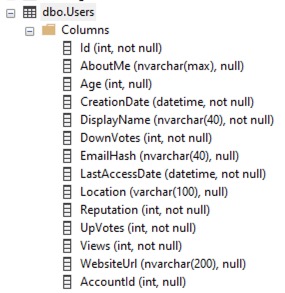 For example, in this week’s query challenge, the Users table has a lot of really hot columns that change constantly, like LastAccessDate, Reputation, DownVotes, UpVotes, and Views. I don’t want to log those changes at all, and I don’t want my logging to slow down the updates of those columns.
Furthermore, I probably don’t even want to capture the entire before or after values of the AboutMe column, either. It’s NVARCHAR(MAX), which can be huge. Depending on what “mangling” means, I might only need to grab the first 100 characters, or the length of the before/after changes. That’ll reduce how much I store, too, important in high-transaction environments that push the data to several Availability Group replicas.
Let’s say here’s the data I decided to gather:
|
1 2 3 4 5 6 7 8 9 10 11 12 13 |
CREATE TABLE dbo.Users_Changes (Id INT IDENTITY(1,1) PRIMARY KEY CLUSTERED, UserId INT NOT NULL, ChangeDate DATETIME2, AboutMe_Before NVARCHAR(100), AboutMe_After NVARCHAR(100), AboutMe_Length_Before BIGINT, AboutMe_Length_After BIGINT, HostName NVARCHAR(128), AppName NVARCHAR(128), SystemUser NVARCHAR(128) ) GO |
You could refine that further by capturing less data if you knew exactly how the data was being mangled. For example, if the mangler always sets the rows to null or to short strings, you wouldn’t have to gather the before/after contents – just the length would be enough.
You could also get a little fancier by only storing the “before” data, but I kept it simple and just logged both before & after here for simplicity’s sake. (Spoiler alert: the next Query Exercise at the end of this post is going to be a related challenge.)
To populate this data, I love triggers. Here’s the one I came up with after a little testing:
|
1 2 3 4 5 6 7 8 9 10 11 12 13 14 15 16 17 18 19 20 |
CREATE OR ALTER TRIGGER dbo.Users_Update_Audit ON dbo.Users AFTER UPDATE AS BEGIN SET NOCOUNT ON; INSERT INTO dbo.Users_Changes (UserId, ChangeDate, AboutMe_Before, AboutMe_After, AboutMe_Length_Before, AboutMe_Length_After, HostName, AppName, SystemUser) SELECT i.Id, GETDATE(), LEFT(d.AboutMe, 100), LEFT(i.AboutMe, 100), LEN(COALESCE(d.AboutMe,'')), LEN(COALESCE(i.AboutMe,'')), HOST_NAME(), APP_NAME(), SYSTEM_USER FROM inserted i INNER JOIN deleted d ON i.Id = d.Id WHERE COALESCE(i.AboutMe,'') <> COALESCE(d.AboutMe,'') END GO |
The actual query plan on an update is nice and quick. A few things about the code that may not be intuitively obvious:
- I didn’t use the UPDATE() function because it doesn’t handle multi-row changes accurately
- The SET NOCOUNT ON stops the trigger from reporting back the number of rows affected by the insert, which can break apps that weren’t expecting to see multiple messages back about how many rows just got inserted/updated
- The COALESCEs in the WHERE are to handle situations where someone sets the AboutMe to null (or changes it from null to populated)
- The COALESCEs in the SELECT are to properly set the length columns to 0 when the AboutMe is null
- I only fire the trigger on updates, not inserts or deletes, because the business request was about mangling existing AboutMe data
If you knew the exact kind of mangling that was happening, you could refine the WHERE clause even further, looking for specific data patterns.
Here’s what the output table contents look like after changing a few rows:
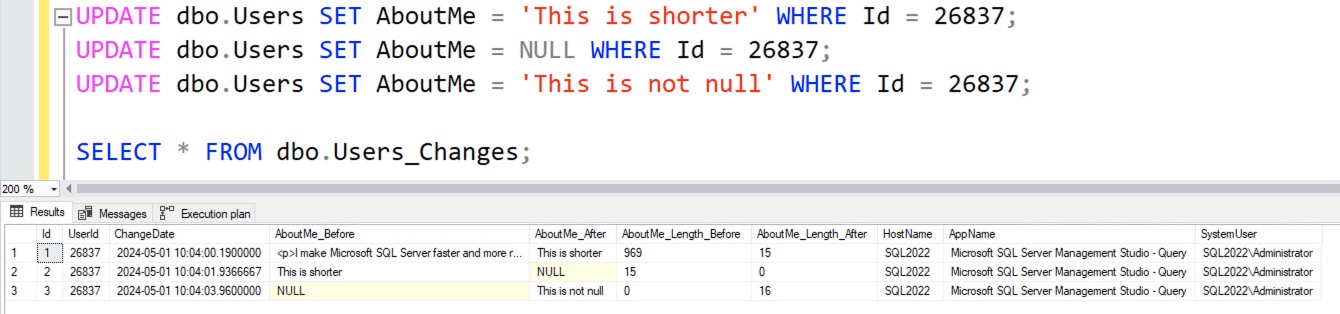
Nice and simple, and makes for really easy investigations. Just make sure to drop the trigger and the change table when you’re done! I had a really hearty laugh at one client when I returned a year later and they still had both in place.
Other Solutions
Tom aka Zikato aka StraightforwardSQL commented with a pointer to an awesome blog post he’s written on this very topic! He compared & contrasted a few different solutions, and then ended up with a hybrid solution involving a trigger, XE, and Query Store.
Connor O’Shea wrote an extended events session that filters query text based on its literal contents. I get a little nervous about that kind of thing, because they often miss weirdo situations (like synonyms and aliases), and they’re a little tricky to debug. For example, his first iteration also caught selects – something that would be terrible on a production system. It’s a good starting point though.
Erik Darling used temporal tables to capture the changes, and I especially love his security disclaimer. I don’t have any experience with login impersonation either – it’s funny, but my contract actually prohibits any security work whatsoever. I hate security work.
ChatGPT is helpful for tasks like this, even for a starting point if you don’t end up actually using the code. I asked ChatGPT to do this for me, and it came up with different results, but a good starting point nonetheless.
Your Next Query Challenge:
Getting Data Out of a Fancier Trigger
The above process works great if we’re willing to store both the before AND after values, but what if we’re dealing with a really high-throughput system with a ton of changes per second, and we want to avoid storing the “after” values each time? The table & triggers would look like this:
|
1 2 3 4 5 6 7 8 9 10 11 12 13 14 15 16 17 18 19 20 21 22 23 24 25 26 27 28 29 30 31 |
DROP TABLE IF EXISTS dbo.Users_Changes; GO CREATE TABLE dbo.Users_Changes (Id INT IDENTITY(1,1) PRIMARY KEY CLUSTERED, UserId INT NOT NULL, ChangeDate DATETIME2, AboutMe_Before NVARCHAR(100), AboutMe_Length_Before BIGINT, HostName NVARCHAR(128), AppName NVARCHAR(128), SystemUser NVARCHAR(128) ) GO CREATE OR ALTER TRIGGER dbo.Users_Update_Audit ON dbo.Users AFTER UPDATE AS BEGIN SET NOCOUNT ON; INSERT INTO dbo.Users_Changes (UserId, ChangeDate, AboutMe_Before, AboutMe_Length_Before, HostName, AppName, SystemUser) SELECT i.Id, GETDATE(), LEFT(d.AboutMe, 100), LEN(COALESCE(d.AboutMe,'')), HOST_NAME(), APP_NAME(), SYSTEM_USER FROM inserted i INNER JOIN deleted d ON i.Id = d.Id WHERE COALESCE(i.AboutMe,'') <> COALESCE(d.AboutMe,'') END GO |
Now, when we want to get data out to see the before & after values, it gets a little trickier. Say we run 3 update statements, and then check the value of the change table:
|
1 2 3 4 5 |
UPDATE dbo.Users SET AboutMe = 'Update Numero Uno' WHERE Id = 26837; UPDATE dbo.Users SET AboutMe = NULL WHERE Id = 26837; UPDATE dbo.Users SET AboutMe = 'Update Part 3' WHERE Id = 26837; SELECT * FROM dbo.Users_Changes; |
The resulting query only shows the before data, but not the change that was actually affected during that update statement:

For example, notice that the last update above set the contents to Update Part 3, but that value doesn’t show in the screenshot. That’s your challenge: I want you to write a SELECT query that reproduces the full before & after data for each change, like the earlier query from the blog post:
Share your answer in the comments, and feel free to put your queries in a Github Gist, and include that link in your comments. After you’ve worked on it for a while, check out the answers discussion post.

12 Comments. Leave new
Thanks for the shoutout, Brent!
SELECT *
FROM (
SELECT UserId
, ChangeDate
, AboutMe_Before
, AboutMe_After = LEAD(AboutMe_Before) OVER (PARTITION BY UserId
ORDER BY ChangeDate)
, AboutMe_Length_Before
, AboutMe_Length_After = LEAD(AboutMe_Length_Before) OVER (PARTITION BY UserId
ORDER BY ChangeDate)
, HostName
, AppName
, SystemUser
FROM ( SELECT UserId
, ChangeDate
, AboutMe_Before
, AboutMe_Length_Before
, HostName = ‘Dummy Host’ — for Security reason
, AppName
, SystemUser = ‘Dummy System Name’ — for Security reason
FROM dbo.Users_Changes
C
UNION ALL
SELECT U.Id
, ‘2099-01-01’
, U.AboutMe
, Len(AboutMe)
, NULL
, NULL
, NULL
FROM dbo.Users
U
JOIN ( SELECT UserId
FROM dbo.Users_Changes
GROUP BY UserId
) C
ON C.Userid = U.Id
) X
) X2
WHERE X2.ChangeDate != ‘2099-01-01’ — Someone else problem with hard coded dates
“I didn’t use the UPDATE() function because it doesn’t handle multi-row changes accurately”
Yes, it does “handle” them accurately. UPDATE() is ONLY about the columns in the UPDATE statement, it does NOT tell you anything about rows being updated. Mutiple rows updated, one row updated, no rows updated, any number of rows updated with the same value – UPDATE() doesn’t care. It only tells you if the column is in the UPDATE statement.
Using your trigger code, if I run this update (with StackOverflow2013, SQL 2016, SSMS 17.9.1):
UPDATE dbo.Users
SET LastAccessDate = GETDATE()
WHERE ID BETWEEN 1 AND 20;
I get this actual execution plan https://www.brentozar.com/pastetheplan/?id=HJGvzoFfA
Note that the trigger has the overhead of joining the inserted and deleted table and inserting the results (of 0 rows) into dbo.Users_Changes, even though the AboutMe column wasn’t even in the UPDATE statement. The actual UPDATE to the dbo.Users table is 23% of the query cost of the batch, and running the trigger is 77% of the cost, according to SSMS.
If I modify the trigger to (properly) use the UPDATE function, like so –
CREATE OR ALTER TRIGGER dbo.Users_Update_Audit
ON dbo.Users AFTER UPDATE AS
BEGIN
SET NOCOUNT ON;
IF UPDATE(AboutMe) /* ONLY do this if AboutMe column is in the UPDATE statement (but do NOT know if value was changed) */
BEGIN
INSERT INTO dbo.Users_Changes (UserId, ChangeDate,
AboutMe_Before, AboutMe_Length_Before,
HostName, AppName, SystemUser)
SELECT i.Id, GETDATE(),
LEFT(d.AboutMe, 100), LEN(COALESCE(d.AboutMe,”)),
HOST_NAME(), APP_NAME(), SYSTEM_USER
FROM inserted i
INNER JOIN deleted d ON i.Id = d.Id
WHERE COALESCE(i.AboutMe,”) COALESCE(d.AboutMe,”) /* UPDATE(AboutMe) above is NOT a change detector, still need to see if value is changed */
END
END
GO
Then when I run the same UPDATE query, the execution plan is this https://www.brentozar.com/pastetheplan/?id=SJyAVstzR
In this case, the plan does not include the overhead of the join in the trigger, because we detected that the AboutMe column was not in the UPDATE statement and bypassed that whole section of the trigger.
This is the magic of PROPERLY using UPDATE() in a trigger.
Dave – right, but there’s bad news in your description. Try setting AboutMe to itself with your trigger, like this:
UPDATE dbo.Users SET AboutMe = AboutMe WHERE Id = 1;
You’ll find that the trigger still fires, and the joins aren’t avoided. By default, most app code (EF, NHibernate, etc) passed in all of the columns every time – they don’t try to do change detection to figure out which column they’re changing.
That means according to UPDATE(), those columns “changed” – so there’s not really a benefit of using it at all in the vast, vast majority of apps out there.
And even if there was, we’re only talking about a join between two virtual tables with a small number of rows, so…
Yes, that’s the downside of using most modern ORMs out of the box – they don’t discriminate updates to “hot” columns (LastAccessDate) vs “cold” columns (AboutMe), and use an “update all the fields all the time” methodology. At which point, using UPDATE() in the trigger is useless, as you point out.
If the ORM updates all the fields all the time, and the web site is updating LastAccessTime on each page load for each user (and thereby “updating” all the other fields as well – and by “updating” I mean “the column is in the UPDATE statement” not “the value is changed”), and there’s no performance issue with the web site, then I suppose you could call using UPDATE() in the trigger like I did a “premature optimization.” It’s not really hurting anything, but it’s not giving you any benefit, either.
But if a performance issue does arise, and the developers split the update path for “hot” columns vs “cold” columns, so AboutMe is no longer “updated” every time LastAccessDate is “updated”, then there would be a performance benefit by using UPDATE() in the trigger. And from my quick & dirty testing, it’s about a 2x-3x improvement (for a one-record update with no change to the AboutMe value, the trigger was still 56% of the batch when not using UPDATE()), which is nothing to sneeze at.
I guess what it comes down to is the “it doesn’t handle multi-row changes accurately” statement really just stuck in my craw, and I would argue is technically inaccurate. It’s blaming SQL Server’s UPDATE() function for a problem that’s actually the fault of the ORM and/or lazy developers. The UPDATE() function works as documented (and yes, there’s another issue with SQL devs not reading / comprehending the docs, and there are long comment threads in two previous posts on that already, but that could be said of any feature in any code language – Read The Fine Manual).
BTW, thanks for building / hosting Paste The Plan – that’s really cool & helpful.
You’re welcome about PasteThePlan! Richie did all the hard work, for sure.
I totally agree that the problem is the fault of the ORM, and it blows that as the database, we have to deal with whatever technically valid queries come our way. I wish that ORMs would be more performance-focused, but… I get it. There are only so many hours in the day, and they gotta pick their battles.
The thing I’d be aware of, though, is that when you say “the trigger was still 56 of the batch” – that’s only the estimated costs, which are completely and utterly meaningless. (It just popped out there because I’m teaching the Fundamentals Week classes as we speak, and in there, I show why those numbers are meaningless, and prove it with multiple demos.)
The original problem statement is to figure out who is mangling the contents of the table. For purposes of answering that question, updates that don’t modify the contents are irrelevant.
Typically, when I’m trying to ingest data, I’ll update every column for every modified row, even if some cells in some rows were unchanged. However, I won’t update rows that are entirely unchanged. So, I’m not sure update is especially practical. Brent’s toy example only updated one column, so filtering out spurious cell updates was feasible. However, for real-world data, the best you can do is to filter out row changes (possibly even that is sometimes infeasible, though that’s not a scenario I’ve encountered).
If a tool repeatedly fails his clients, the fact that it works as designed/documented/intended is probably not enough to claim it isn’t broken. From a customer relationship perspective (Brent is a consultant!), “update is broken!” is perhaps a better message than “your developers messed up.”
I’m not sure if update should be described as broken. It’s less broken than autoshrink.
> From a customer relationship perspective (Brent is a consultant!), “update is broken!” is perhaps a better message than “your developers messed up.”
Yep, and to the extent that Entity Framework is a Microsoft product, and the way it does updates (updating all columns whether they changed or not), the customers can totally say, “Microsoft messed up.”
[…] Who’s Changing the Table? Answers and Discussion (Brent Ozar) […]
[…] last week’s post, I gave you a trigger that populated a history table with all changes to the Users.AboutMe column. It was your job to write a T-SQL query that turned […]
[…] For this exercise, I’m not expecting a specific “right” or “wrong” answer – instead, for this one, you’re probably going to have a good time sharing your answer in the comments, and comparing your answer to that of others. Feel free to put your queries in a Github Gist, and include that link in your comments. After you’ve worked on it for a while, check out the answers discussion post. […]
Love your content! Always packed with useful insights.