
How to Query JSON Data Quickly in SQL Server, Part 2: SQL Server 2025
 SQL Server 2025 and .NET 10 bring several new improvements to storing JSON natively in the database and querying it quickly.
On the SQL Server 2025 side, the two big ones are the new native JSON indexes and the new JSON_CONTAINS function. Let’s see their improvements in action. On the .NET 10 side, EF 10 not only supports the new JSON data type, but on databases of compatibility level 170 or higher, EF will automatically migrate JSON data from NVARCHAR(MAX) data types over to JSON the next time you do a migration, as explained in the What’s New in EF Core 10 doc. That makes it especially important for you to understand how the new JSON indexes work, because they may be coming at you quickly the instant you change your compatibility level.
In my opinion, the short story is that for now, you should probably stick with yesterday’s technique using indexed computed columns. The long story is in the new JSON indexing module of my Mastering Query Tuning class. The rest of this post is the medium story, I suppose.
Start with storing the data in JSON.
As we did in yesterday’s post about how to get fast JSON queries pre-2025, we’ll create a Users_JSON table, but this time we’ll use the new native JSON datatype, then create a native JSON index on it. The create table statement uses 2025’s new JSON datatype:
|
1 2 3 4 5 6 7 8 9 10 11 12 13 14 15 16 17 18 19 20 21 22 23 24 25 26 27 28 29 30 |
CREATE TABLE dbo.Users_JSON_Indexed ( Id int NOT NULL PRIMARY KEY CLUSTERED, UserAttributes json ); INSERT INTO dbo.Users_JSON_Indexed (Id, UserAttributes) SELECT Id, JSON_OBJECT( 'DisplayName': DisplayName, 'Reputation': Reputation, 'Age': Age, 'CreationDate': CreationDate, 'LastAccessDate': LastAccessDate, 'Location': Location, 'UpVotes': UpVotes, 'DownVotes': DownVotes, 'Views': Views, 'WebsiteUrl': WebsiteUrl, 'AboutMe': AboutMe, 'EmailHash': EmailHash, 'AccountId': AccountId ) FROM dbo.Users; GO CREATE JSON INDEX UserAttributes ON dbo.Users_JSON_Indexed(UserAttributes) WITH (MAXDOP = 0); |
Note that last CREATE JSON INDEX statement because there are a few cool things about it.
Create a new JSON index.
Make a pot of tea. Buy RAM.
- The JSON part is new as of SQL Server 2025.
- I only specify the source column (UserAttributes) – and whatever’s in it gets indexed, period.
- WITH (MAXDOP = 0) lets me throw all of the server’s CPU power at it, no matter what the server-level MAXDOP setting is.
That last part has always been supported with any create index statements, but… it’s especially important here. What we’re doing is like creating an index on every column, something you might imagine would take quite a while. It’s like… well, you know, while I’m waiting for the above to finish, I can demo exactly what it’s like on another table. It’s like creating a clustered columnstore index on that same amount of data, breaking the data up into columns, storing it separately, sorting it, and compressing it. That can be pretty time and CPU intensive, as demonstrated by how long it takes to create a clustered columnstore index:

18 seconds on the clock, and 43 seconds of CPU-burning time – that’s a lot for a table that’s only 8 million rows and 1GB in size.
Although in comparison, let’s look at my fancy new JSON index now that it finally finished building, and:

I just… I don’t understand:
- CPU time: 43 seconds for columnstore, 24 minutes for the JSON index
- Elapsed time: 18 seconds for columnstore, 8 minutes for the JSON index
What the hell is this thing doing?!? Sure, I get that the columnstore index has a defined list of columns to start with, whereas the JSON object could have any number of columns, including nested ones, but this feels like a best case scenario – my JSON doesn’t have anything nested at all, and it’s still this bad! Here’s what the query plan shows:

I don’t think I’ve ever seen an index creation have two stages before. Looks like the first part took about 6 minutes, and there’s a yellow bang on the insert operator – hover your mouse over that, and there’s a warning about using more memory than the query was granted:

Sounds like we better go check out the memory grant properties to see how much memory the index creation wanted – let’s look at Desired Memory:

7,722,451,296.
SQL Server wanted eight terabytes of memory in order to build a JSON index on a 1GB table. And in fact, if our server had 32TB of memory, 8TB would have actually been granted to this query. How’d you do that? I’m not even mad. That’s amazing.
The resulting index is about 12GB in size – on 1GB of base tabular data! sp_BlitzIndex doesn’t show that yet because as of RC1, the data is stored in a really wonky way – with a child object, and child indexes on that object. For now, you can manually query the DMVs to see it:
|
1 2 3 4 5 |
SELECT ao.name AS json_index_object_name, ao.object_id, ps.* FROM sys.all_objects ao WITH (NOLOCK) LEFT OUTER JOIN sys.dm_db_partition_stats ps WITH (NOLOCK) ON ao.object_id = ps.object_id WHERE OBJECT_NAME(ao.parent_object_id) = N'Users_JSON_Indexed' AND ao.name LIKE N'json_index_%'; |
Just replace the Users_JSON_Indexed table name with the name of the table you’re examining.
But at least all our JSON queries are fast… right?
We’ll use the same query syntax we used in yesterday’s post, using JSON_VALUE because that’s what our developers have standardized on over the last decade because that’s the way to get fast queries with tidy index seeks:
|
1 2 3 |
SELECT * FROM dbo.Users_JSON_Indexed WHERE JSON_VALUE(UserAttributes, '$.DisplayName') = N'Brent Ozar'; |
And it, uh… takes the same CPU time and table scan that it took without an index?!?

Because SQL Server is ignoring the JSON index. We can actually force usage of the JSON index with an index hint:
|
1 2 3 4 5 6 7 |
SELECT * FROM dbo.Users_JSON_Indexed WHERE JSON_VALUE(UserAttributes, '$.DisplayName') = N'Brent Ozar'; SELECT * FROM dbo.Users_JSON_Indexed WITH (INDEX = UserAttributes) WHERE JSON_VALUE(UserAttributes, '$.DisplayName') = N'Brent Ozar'; |
The first query is the one SQL Server picks, and the second one is my index hint:
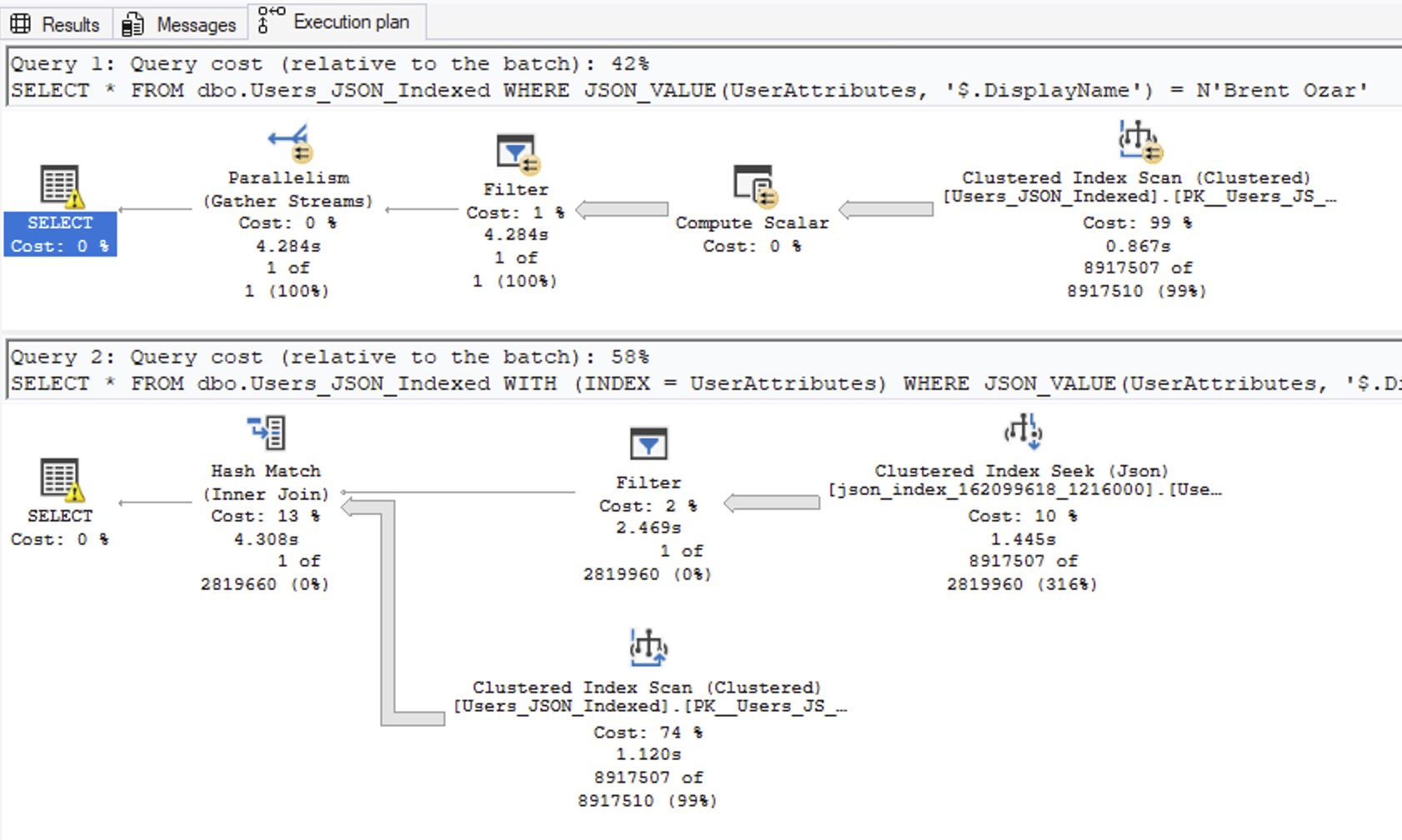
The second query uses the index due to my hint, and uses way less CPU time, but… there’s something really odd about the index usage plan. Why are we doing a clustered index scan of the entire table? The top operator only brought back one row – why would we need to join that to the entire contents of the Users table? Even if I change the SELECT * to just SELECT ‘Hi Mom’, it still has the same problem, insisting on joining to the entire contents of the Users table:

I just don’t understand this plan. It doesn’t make any sense.
I do understand the 2,819,960 row estimate, though: it’s a hard-coded 30% of the table, and that’s a serious warning sign.
2025’s JSON indexes aren’t ready yet.
Whenever a new T-SQL function comes out, I ask a few questions:
- Does it actually work in the way users would expect? This sounds like obvious table stakes, but it’s not.
- Can it use an index – aka, is it sargable?
- Can it do an index seek rather than scan?
- Does the query optimizer estimate the number of rows it’ll produce, or use a hard-coded guess?
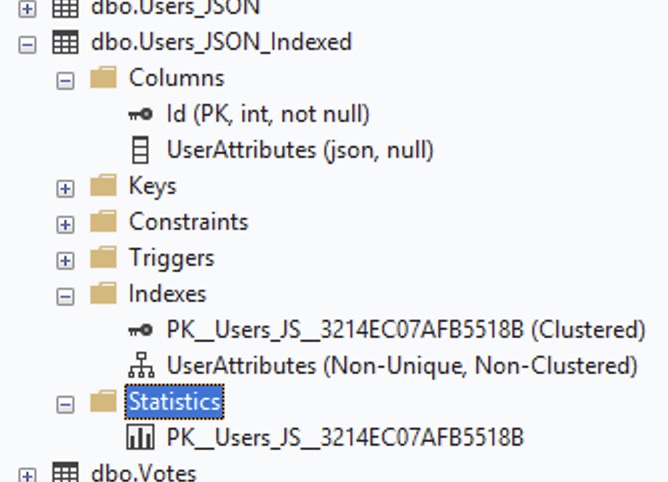
Here, the T-SQL function isn’t new – but the index is, and it doesn’t seem to work well with the existing JSON_VALUES function. It performs poorly during build, performs poorly during execution, and unlike yesterday’s computed column strategy, JSON indexes don’t appear to have statistics:
If we only had the JSON_VALUE function, I’d end the story here, but SQL Server 2025 also introduced a new function, JSON_CONTAINS. Let’s rewrite our query with that new function and see how it goes:
|
1 2 3 |
SELECT * FROM dbo.Users_JSON_Indexed WHERE JSON_CONTAINS(UserAttributes, N'Brent Ozar', '$.DisplayName') = 1; |
YAY! The query runs in milliseconds!

But it still insists on joining to the contents of the clustered index – even when we just select ‘Hi Mom’, nothing from the table. Daniel Hutmacher noticed this in May during the early previews, too, and doesn’t seem that’s been fixed yet.
SQL Server 2025’s JSON indexes only make sense when:
- You can’t use the easy technique of storing the data in NVARCHAR(MAX) with indexed computed columns, like we’ve been doing for the last decade
- You don’t care how long the index creation & maintenance takes
- You can deal with index sizes that are several times larger than the underlying data
- You can rewrite your queries from JSON_VALUE to JSON_CONTAINS
Otherwise, stick with yesterday’s technique for now. I say “for now” because it feels like a lot of these problems could be solved with cumulative updates over time, and Microsoft does have a track record of doing this. Columnstore indexes were awful when they first came out in SQL Server 2012, but Microsoft made steady investments in that feature.
In addition, you’re going to need to have a chat with your developers before touching the compatibility level. The instant you change it to 170, and your developers do their first migration, their NVARCHAR(MAX) columns may get converted over to JSON, which would be a pretty ugly upgrade and outage. You can avoid that for now by having them set those columns’ data types to NVARCHAR(MAX). I’m not saying not to use EF Core 10 – there is an awesome improvement in there that I’ll discuss in another blog post.
If you enjoyed this post, you’ll love the new JSON indexing module in my Mastering Query Tuning class.

11 Comments. Leave new
Is it creating trigrams and GIN/GiST indexes like PostgreSQL?
No clue – I haven’t dug into the internals at all, and I wouldn’t bother since it’s not really in a workable state at the moment. No sense learning something that doesn’t work well – not like I can fix the code.
Regarding the conversion of VARCHAR(MAX) datatypes, is compat level 170 going to change EVERY VARCHAR(MAX) column into a JSON column regardless? We have some which are for storing really big comments (>8000 chars) – actually documents – and turning those into JSON wouldn’t make any sense for our application…
(Yes, I am trying to see if we can get the column size cut down but…)
No, only the collections.
Hello Brent thanks again as usual. I used the method of creating an index on the virtual column, and the query Actual execution plan was very precise.
ALTER TABLE dbo.Users_JSON_Indexed
ADD vDisplayName AS JSON_VALUE(UserAttributes, ‘$.DisplayName’);
CREATE INDEX idx_Displayname
ON dbo.Users_JSON_Indexed(vDisplayName);
SELECT *
FROM dbo.Users_JSON_Indexed
WHERE JSON_VALUE(UserAttributes, ‘$.DisplayName’) = N’Brent Ozar’;
Yep! That’s the method we talked about in the last post, the one I said you should still use – computed columns. Did you have a question for me about that?
I missed last class. Dang!!! Thanks for clarifying this
“Can it use an index – aka, is it sargable?” + “Can it do an index seek rather than scan?” – Are these the same things? I don’t know of anything in T-SQL that can’t use an index. I know of things that can’t seek indexes, but “use” is a much stronger claim. For example, I do not know of anything that is a function of exactly one column but would decide to not use a non-clustered index containing only that column.
You don’t know of anything like that, huh? Dang! It’s a shame that the very blog post you’re commenting on doesn’t have an example of that. Do a control-F for “there’s something really odd about the index usage plan”, and read that part carefully, out loud. Cheers!
[…] How to Query JSON Data Quickly in SQL Server, Part 2: SQL Server 2025 (Brent Ozar) […]
I was testing NVARCHAR to JSON column type conversion on some tables in Azure SQL DB a week ago. (It doesn’t support the indexes yet; so much for cloud-first).
It took 6 hours for 800 DTU to process a few hundred GB and results were extremely disappointing. No magical space benefit or automatic performance benefit from this, “new binary format”.
I also saw weirdness, where indexes including those columns tripled in size, but I didn’t dig further to determine if this was the result of fragmentation or something else.
So I’m glad to read all of this. This is the first time Microsoft have added a magic feature and the marketing has let me down. /s /s Okay okay second time. Third time. Fifth time?
Maybe I’ll try again later after JSON indexes are released to cloud but it’s legitimately terrifying that EF10 users will be migrated automatically.