
TempDB Filling Up? Try Resource Governor.
TempDB is one of the banes of my existence.
Anybody, anybody who can query your server can run a denial-of-service attack in a matter of seconds just by filling it up with a simple query:
|
1 2 3 4 5 6 7 8 9 |
DROP TABLE IF EXISTS #big_problem; CREATE TABLE #big_problem (filler VARCHAR(8000)); WHILE 1 = 1 INSERT INTO #big_problem SELECT REPLICATE('X', 8000) FROM GENERATE_SERIES(1, 100000); |
This while loop will gradually fill up TempDB, and when one of the attempts eventually fails, that’s okay because the session stays open. It’s still using the rest of the space, preventing other folks (and other system tasks) from using it.
You definitely shouldn’t run that on your last day of work, right before you walk out the door, because even though they’ll disable your login, your existing already-running queries will continue until they finish, or in this query’s case, until it pulls a finishing move on your storage, and your TempDB files expand like a pair of Sansabelt pants trying to handle an all-you-can-eat buffet. And you definitely shouldn’t run it in a loop. (If you do, make sure to drop the table if it exists at the start.)
If you’re not on SQL Server 2025 yet, your main line of defense is to pre-size your TempDB data files ahead of time to whatever max size you want them to be, and then turn off auto-growth. That’s… not much of a defense. Badly behaved queries can still run the entire TempDB out of space, causing problems for other users.
On SQL Server 2025,
use Resource Governor.
We’ve finally got a way to defend ourselves. We can configure Resource Governor to divide people into groups (something that seems to be trendy lately), and then cap how much TempDB space each group can consume. You don’t even have to divide them into groups, either (take note, politicians) – you can just cap how much resources everyone can use altogether. This even works on SQL Server 2025 Standard Edition because Microsoft made that feature available to everybody in that version.
To keep things simple for the sake of this blog post, let’s just assume we’re limiting everyone’s usage altogether. You can either set a fixed-size cap:
|
1 2 3 4 |
ALTER WORKLOAD GROUP [default] WITH (GROUP_MAX_TEMPDB_DATA_MB = 10240); GO ALTER RESOURCE GOVERNOR RECONFIGURE; |
Or a percentage of TempDB’s overall size:
|
1 2 3 4 |
ALTER WORKLOAD GROUP [default] WITH (GROUP_MAX_TEMPDB_DATA_PERCENT = 75); GO ALTER RESOURCE GOVERNOR RECONFIGURE; |
Strangely, you can configure both of those at the same time – more on that in a second. Run this query to see what the configured limits are, how much space they’re using right now, what their peak space usage was, and how many times their queries got killed due to hitting the TempDB space limits:
|
1 2 3 4 5 6 7 8 9 |
SELECT r.group_id, r.name, r.group_max_tempdb_data_mb, r.group_max_tempdb_data_percent, dm.tempdb_data_space_kb, dm.peak_tempdb_data_space_kb, dm.total_tempdb_data_limit_violation_count FROM sys.resource_governor_workload_groups r INNER JOIN sys.dm_resource_governor_workload_groups dm ON r.group_id = dm.group_id; |
The results:

And what it looks like to your end users when they fill up their quota:

Instead of causing a system-wide problem when there’s no space left at all in TempDB, now it’s just a… well, I wanted to finish this sentence by typing “just a query-level problem,” but that’s not entirely true. The query’s still holding all of the TempDB space available to the entire default workload pool, and that’s not gonna cut it. To do it right, we have to deal with a lot more gotchas than I can cover in one blog post.
The gotchas (and there are many)
The trickiest gotcha is that the limits only take effect if your TempDB file autogrowth configuration matches your Resource Governor limitations. The documentation on this is a little wordy, but the short story is that if you only cap by percent (not by exact MB size), then the percent limitation only takes effect when either:
- Auto-growth is turned OFF for ALL TempDB data files, and max size is unlimited, or
- Auto-growth is turned ON for ALL TempDB data files, and max file size is set
 It has to be all or nothing. At least Resource Governor warns you if you try to enable RG when TempDB’s file configuration won’t support the caps, but if you later modify TempDB’s configurations, there’s no warning to tell you that your TempDB configuration changes just broke Resource Governor.
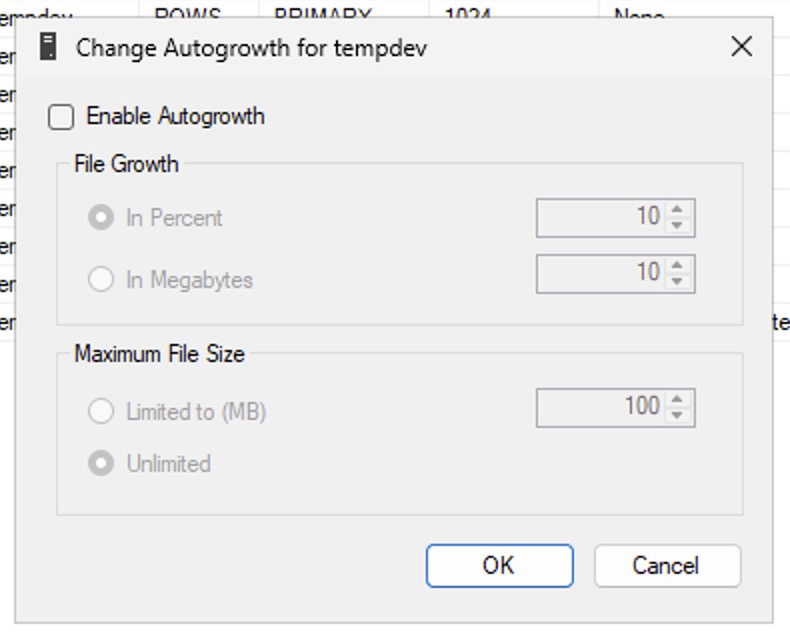
I don’t really understand why they did this because if you turn off auto-growth, it doesn’t matter what the max file size is. Growth is done, finito, the end. You can’t even set max file size once you’ve turned off autogrowth because it’s irrelevant, as shown here in SSMS.
Similarly, if auto-growth is turned on, I don’t wanna have to set a max file size: I want the OS to grow the files to whatever space is available at that time. I understand why calculating limits is hard in that scenario, though, because the query processor has to calculate the limit and enforce it before the engine tries (and fails) to grow a data file out.
These rules feel like someone did the best coding job they could, with limited resources, trying not to break other pieces of the engine’s code, in order to get this feature out the door – and I’m fine with that. It’s a good compromise, but it does require you being aware of these limitations, otherwise you’re gonna think the feature’s turned on when it’s not. (That’s exactly what happened to me repeatedly during testing – I didn’t understand why the percentage limitations weren’t being enforced, thus this new check in sp_Blitz.)
 Another gotcha is that for this to really help, you need to configure Resource Governor in a way that breaks queries into different workload groups. If everybody’s still lumped into the default workload group, then any one query can still run everybody else out of space.
Finally, for the limits to not bring down SQL Server itself, you have to be aware of the resource utilization of other TempDB consumers like the version store and triggers. That’s way outside of the scope of this blog post, but to learn more about that, check out my Fundamentals of TempDB class – which has been recently updated with a new module on this exact topic.

5 Comments. Leave new
Interesting post, thanks Brent
[…] TempDB Filling Up? Try Resource Governor. (Brent Ozar) […]
[…] Brent Ozar tries out an update to resource governor: […]
[…] your TempDB runs out of space, I love Resource Governor’s new ability to cap space usage for workload groups (or everybody altogether.) This should be a part of everybody’s standard builds for 2025 […]
[…] I was testing SQL Server 2025’s new ability to limit TempDB usage with Resource Governor, I wrote a few fun diabolical demos. One of them was to generate giant spills to TempDB, […]