
SQL ConstantCare® Population Report: Fall 2025
In this quarter’s update of our SQL ConstantCare® population report, showing how quickly (or slowly) folks adopt new versions of SQL Server, the data is very similar to last quarter:
- SQL Server 2025: exactly 1 server being monitored, heh. God bless y’all for giving it a shot this early.
- SQL Server 2022: 25%, up from 24% last quarter
- SQL Server 2019: 43%, was 45%
- SQL Server 2017: 10%, was 11%
- SQL Server 2016: 13%, was 12%
- SQL Server 2014: 5%, same as last quarter
- SQL Server 2012 & prior: 1%, same
- Azure SQL DB and Managed Instances: 2%, same
SQL Server 2022’s market share has remained pretty stable since its huge jump in Q1, when people replaced a lot of 2016 servers with 2022. With SQL Server 2025’s release approaching quickly, I’m not sure SQL Server 2022 will ever approach the amazing dominant streak that 2019 experienced – that thing’s been a monster! It’s held over 40% market share for two years straight now. Here’s how adoption is trending over time, with the most recent data at the right: 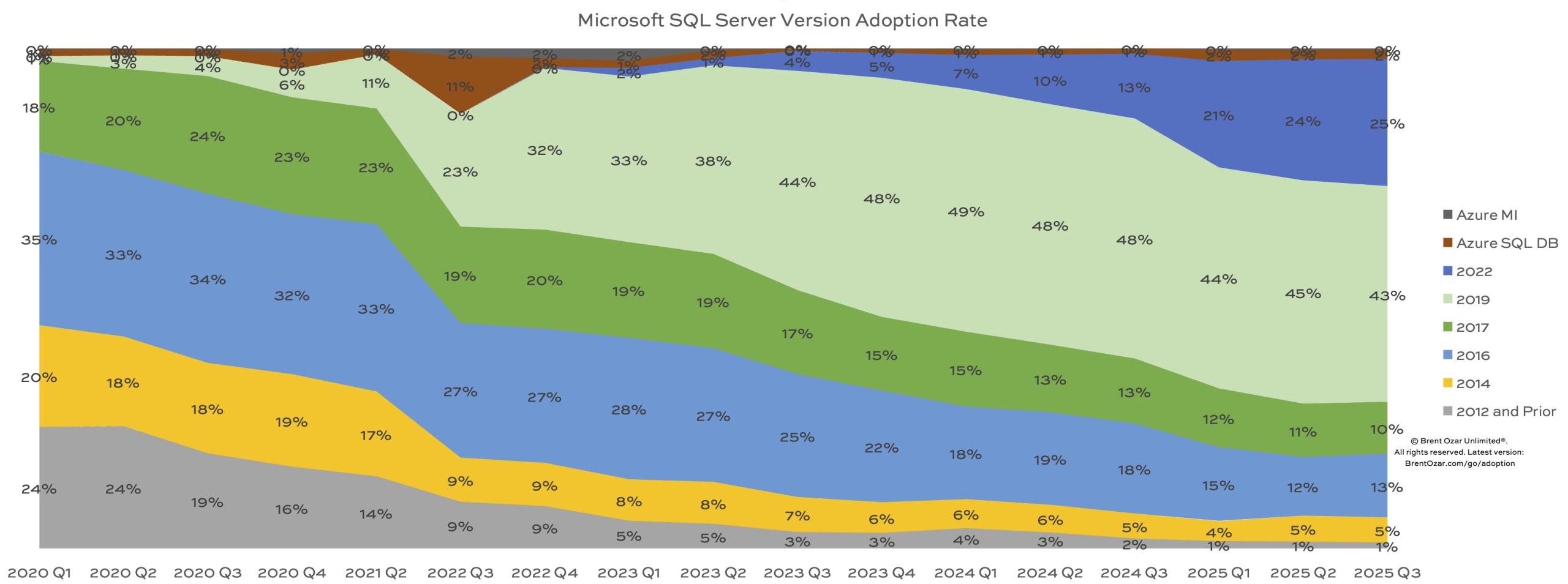
With both Microsoft Ignite and the PASS Data Community Summit on the week of Nov 17-21, I think it’s fair to say that SQL Server 2025’s release is probably imminent, so let’s start thinking about its upcoming adoption rate.
Unlike 2022, I expect SQL Server 2025 to catch on fast.
SQL Server 2022 faced a perfect storm that slowed adoption. 2022 just wasn’t ready in time for users who needed to plan their migrations off of the soon-to-be-unsupported SQL Server 2008, 2008R2, and 2012. The pandemic threw a monkey wrench in a lot of IT projects, and honestly, that included SQL Server 2022 itself. 2022 wasn’t feature-complete for a year, and the cumulative updates were a mess.
I think SQL Server 2025 faces nearly the opposite conditions, and I think it’ll catch on faster.
One reason is that SQL Server 2016 goes out of support in July, yet it still holds 13% of the market. Assuming that 2025 doesn’t suffer from the same rocky CU start that 2022 did, 2025 is primed to capture 2016’s market. SQL Server 2017 follows right behind, going out of support in October 2027, and that’s another 10% of the market. Surely people won’t be replacing 2017 with 2019 or 2022, not in the year 2026.
Another reason is that even though 2025 won’t be feature-complete at release, Microsoft has gotten smarter about that this time around by gating features behind a database-scoped option called PREVIEW_FEATURES. Because change event streaming (aka, low-overhead mirroring to Fabric) is one of those preview features, and because Microsoft looooves getting that sweet sweet Azure revenue, I bet features like that will move out of preview quickly. (I mean, I say that, but at the same time, on-prem AGs with Azure Managed Instance secondaries was a similar situation, and that one took ’em over a year with 2022, so… maybe?)
Finally, I think developers want to call REST endpoints from T-SQL. I know, I know, the DBAs in the audience aren’t excited about that, and I totally understand the risk of dramatically slower transactions and increased blocking problems if external app servers (especially outside of the company network) are suddenly in the critical path of getting transactions completed. It’s like any other tool, it’s gonna have good and bad use cases, but at least I think developers will want to use it, unlike 2019’s ability to call Java with T-SQL.
That’s why I’m updating all of my training classes.
SQL Server 2019 was a big deal, with a lot of intelligent and adaptive query processing stuff. After that, though, 2022 was a yawner. I didn’t bother updating my training classes for it because there just wasn’t that much to share with you. Even if you adopted 2022 – and relatively few shops did – it didn’t make a radical difference in how you tuned indexes, query plans, or wait stats.
SQL Server 2025 is another story. These days, between SQL Server 2025, Azure SQL DB, Managed Instances, and AWS RDS SQL Server, the majority of servers you’re tuning all have adaptive and intelligent query plans, monitored and tuned with Query Store, tracked with Extended Events, indexed with columnstore, and tuned with newer query hints. You’re gonna need new skills – Profiler and Perfmon counters ain’t gonna cut it – and I’m here to help.

5 Comments. Leave new
Do you mind considering cloud sql, why just aws and azure?
There are plenty of cloud and hosting vendors, but they’re not really innovating when it comes to hosting, managing, or tuning Microsoft SQL Server databases. They’re just running it as a service, usually with less (not more) capabilities, and that doesn’t affect student training any differently than the choice of AMD vs Intel processors. It doesn’t change the way we work with databases.
Ouch… “Surely people won’t be replacing 2017 with 2019 or 2022, not in the year 2026.”
Well, we needed to put in a new server, and I certainly wasn’t going to use 2025 at this point, so yes we’re using 2022. And last year we were still putting out 2019. I know it’s not 2026 yet, but I will be either recommending 2022 or installing it myself, and highly doubt I’ll change that opinion until 2027.
I work in manufacturing, and “features” aren’t a driver at all – we want something that runs consistently and accurately. Additional features are a “nice to have”, which eventually of course will become “why aren’t you using (x)?? It’s been out for years!”
I fully expect the 2019 and 2022 population to be well used until it goes out of support.
[…] released to the public. The RC0 has been out for awhile and slowly we see people testing it. Even Brent has a server being monitored that’s a 2025 instance. Between Ignite and the PASS Data Community Summit, it has to release […]
We have SQL Server 2016 currently in our organization. We are planning to finish the upgrade by mid of next year, before MS Support ends for 2016. What should I choose SQL 2022 or SQL 2025?
Considering the messy cumulative updates for SQL 2022 after the release, I am more aligned to go with 2022.