
SQL ConstantCare® Population Report: Spring 2026
It’s time for our quarterly update of our SQL ConstantCare® population report, showing how quickly (or slowly) folks adopt new versions of SQL Server. There were only slight 1-2% shifts, nothing big:
- SQL Server 2025: 1%
- SQL Server 2022: 31%, up 2% from last quarter
- SQL Server 2019: 42%, down 1%
- SQL Server 2017: 9%, no change
- SQL Server 2016: 9%, down 1%
- SQL Server 2014 & prior: 6%, no change
- Azure SQL DB and Managed Instances: 2%, no change
SQL Server 2025’s 1% adoption rate might sound small, but it mirrors the adoption rate curves of 2019 and 2022 when those releases came out. It took 2019 a year to break 10% adoption, and it took 2022 a year and a half. I’ve grouped together 2014 & prior versions because they’re all unsupported, and 2016 will join them quickly in July when it goes out of extended support. (I can’t believe it’s been almost 10 years already!) Here’s how adoption is trending over time, with the most recent data at the right: 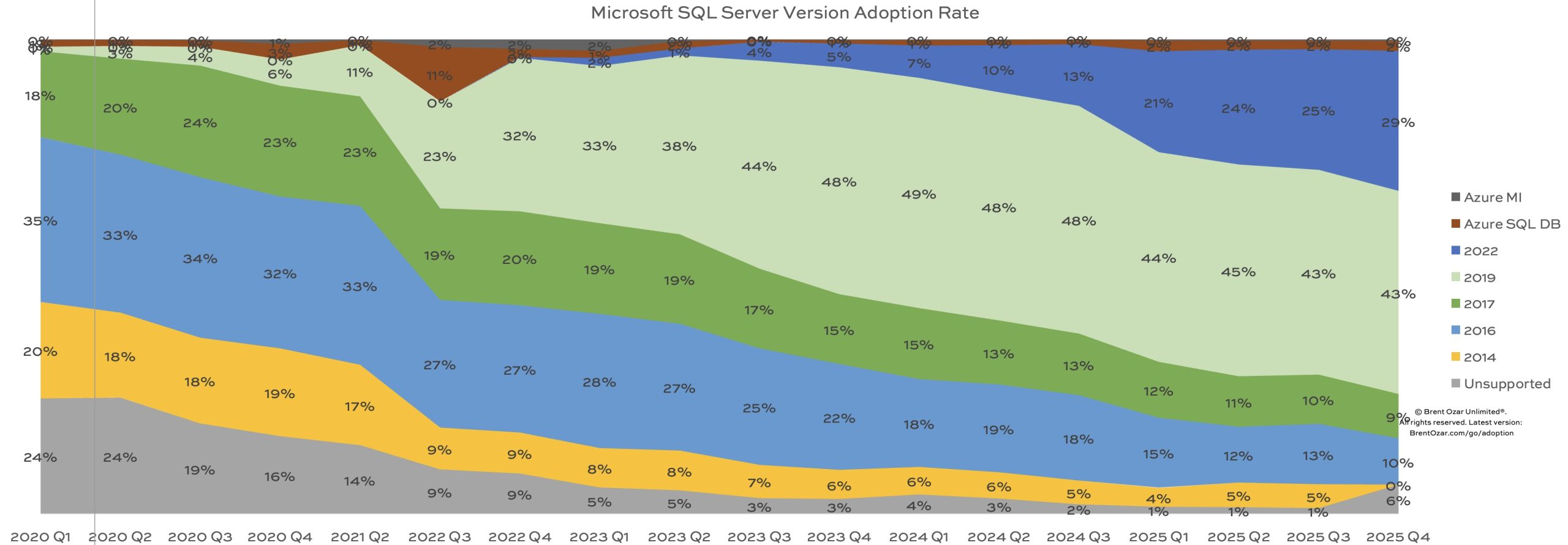
The new stuff continues its steady push from the top down, driving down the old versions out of support.
How big are the servers out there?
How much total data is on each of the monitored servers?
- < 50GB: 31%
- 50-250GB: 23%
- 250GB-1TB: 23%
- 1-3TB: 12%
- >3TB: 11%
For a long time, the measure of a “very large database” was around 1 billion rows or 1 terabyte. These days, 23% of all SQL Servers out there have over 1TB, and 1 in 10 are over 3TB! Those numbers aren’t all that big in the grand scheme of things these days. Our jobs just keep getting more challenging as organizations continue to gather more data, and hold off on archival or purging. Some of the other interesting big numbers: we’ve got servers in the audience with >400TB data, 128-448 CPU cores, 2-6TB RAM, and thousands of databases. Y’all are putting that data to work!

9 Comments. Leave new
Part of the challenge with these very large databases is that they have so little depth of information regarding best practices and such. Even DB integrity checks are nigh impossible with always available servers. I’ve found code to split them into 7 days and do a running check that way, but that’s not viable either due to each day taking over 4 hours. With the same logic it could (theoretically) be split into 28-day segments and skip the few days of the month we can’t even squeeze a few hours out for the task. That way is fraught with complexity issues going forward though. If it would even work.
Might you know someone who could help us with this issue?
No, I don’t know anyone who does SQL Server consulting. Nobody at all. Definitely haven’t seen any links for “Consulting” at the top of this page.
WINK
WINK WINK
WINK WINK WINK
(sprains eye from winking)
Fair enough. Not sure hy I thought you would not be versed in such things specifically but that’s a lack of imagination on my part.
I’ll work with my manager to see what we can do about hiring you for consulting on this. Thanks-
Hey Brent!
I’m curious if you can explain the AzureDB outlier and divestment around Q3 2022.
I discussed it back at that time.
Anybody have a link to that discussion? I can’t seem to find it and would appreciate it.
https://www.brentozar.com/archive/2022/12/sql-constantcare-population-report-winter-2022/
I think it’s this one
Is the graph meant to be one quarter behind?
I would rephrase your last sentence to: “Are y’all putting that data to work?”