
Should That Be One Update Statement or Multiple?
Let’s say we have a couple of update statements we need to run every 15 minutes in the Stack Overflow database, and we’ve built indexes to support them:
|
1 2 3 4 5 6 7 8 9 10 11 12 13 14 15 16 |
EXEC DropIndexes @TableName = N'Users'; CREATE INDEX LastAccessDate ON dbo.Users(LastAccessDate); CREATE INDEX AccountId ON dbo.Users(AccountId); GO BEGIN TRAN /* Give reputation points if folks did something in the last 15 minutes: */ UPDATE dbo.Users SET Reputation = Reputation + 100 WHERE LastAccessDate >= DATEADD(MINUTE, -15, GETDATE()); /* If we're having account sync problems (AccountId = 0), reset their name/location: */ UPDATE dbo.Users SET DisplayName = N'Unknown', Location = NULL WHERE AccountId = 0; |
I’ve got a BEGIN TRAN in there before the updates just so I can test the same queries repeatedly, and roll them back each time. The execution plan for the updates is quite nice: SQL Server divebombs into the supporting indexes:

Relatively few rows match, so our query does less than 1,000 logical reads – way less than there are pages in the table. In this case, separate UPDATE statements make sense.
However:
- The more update statements you have
- The more columns they affect
- The more rows they affect (because they have less selective WHERE clauses, especially when they’re up over the lock escalation threshold)
- The more unpredictable their WHERE clauses are (like SQL Server gets the row estimates hellaciously wrong)
Then it can actually make sense to rewrite the query into a single faster (albeit heinous) UPDATE statement. To illustrate, let’s pretend that instead of giving reputation points away every 15 minutes, let’s say we only give them out once per day, to people who accessed the system yesterday. I’m going to use a hard-coded date in my WHERE clause because my Stack Overflow database didn’t have activity yesterday:
|
1 2 3 4 5 6 7 8 9 10 11 |
BEGIN TRAN /* Give reputation points if folks did something yesterday: */ UPDATE dbo.Users SET Reputation = Reputation + 100 WHERE LastAccessDate >= '2018-06-02' AND LastAccessDate < '2018-06-03'; /* If we're having account sync problems (AccountId = 0), reset their name/location: */ UPDATE dbo.Users SET DisplayName = N'Unknown', Location = NULL WHERE AccountId = 0; |
Now, because we’re awarding points to more people, our actual execution plan looks different:
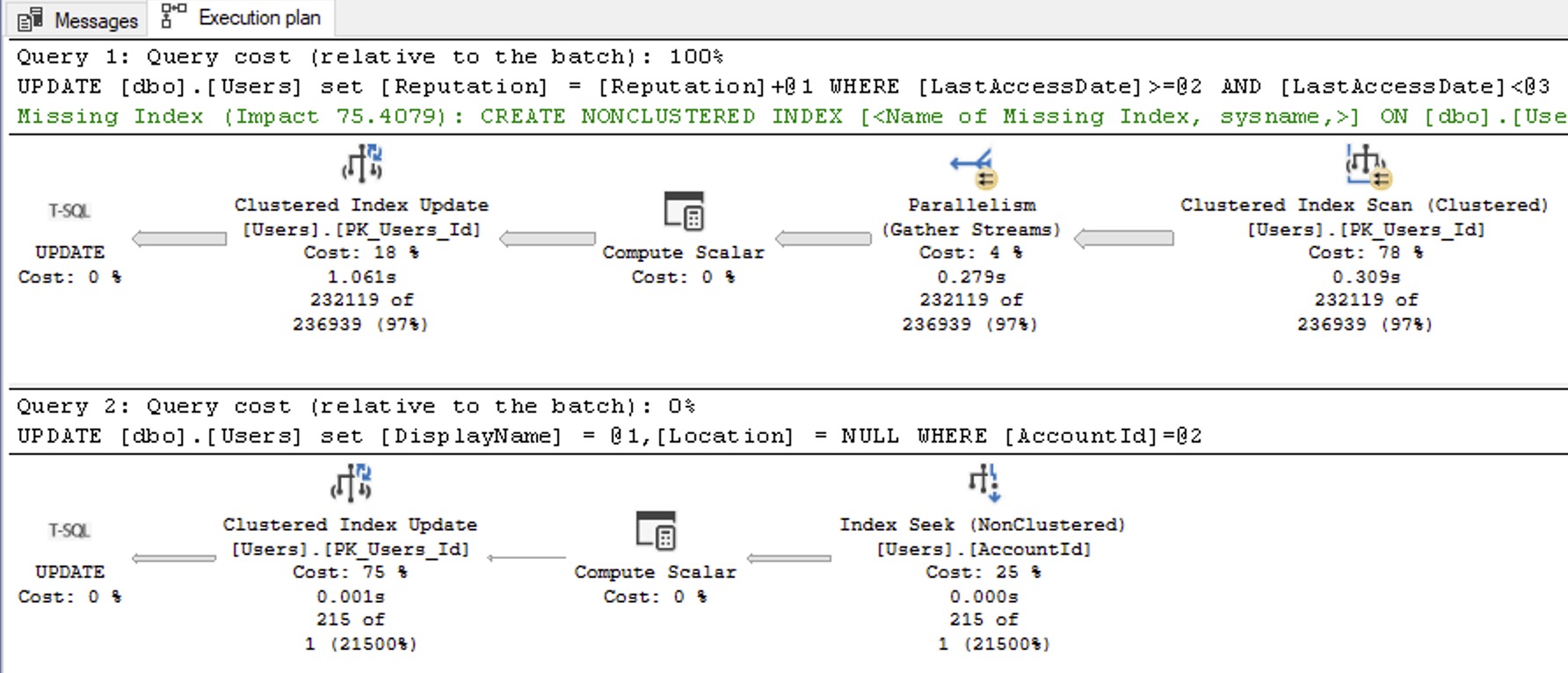
And it does a lot more logical reads because it’s scanning the table, plus doing the work in the second update.
If the performance problem you’re facing is multiple table scans – and that’s an important distinction that we’ll come back to – then it may make sense to rewrite the multiple update statements into a single, albeit heinous, T-SQL statement:
|
1 2 3 4 5 6 7 8 9 10 11 |
BEGIN TRAN UPDATE u SET Reputation = CASE WHEN LastAccessDate >= '2018-06-02' AND LastAccessDate < '2018-06-03' THEN Reputation + 100 ELSE Reputation END, DisplayName = CASE WHEN AccountId = 0 THEN N'Unknown' ELSE DisplayName END, Location = CASE WHEN AccountId = 0 THEN NULL ELSE Location END FROM dbo.Users u WHERE (LastAccessDate >= '2018-06-02' AND LastAccessDate < '2018-06-03') OR AccountId = 0; |
Here, the WHERE clause pulls in all rows that matched EITHER update statement before. Then we’re setting EVERYONE’S Reputation, DisplayName, and Location – but we’re either setting it to its original value, or we’re setting it to the required update value.
Is this easier to read or debug? Absolutely not. However, it gets us down to just one table scan:

In the client example that prompted this blog post, there were half a dozen update statements, each of which did a table scan on a giant table way too big to fit into memory, so storage was getting hammered and the buffer pool kept getting flushed due to this issue.
However, only do this if you need to solve the multi-scan problem. Most situations are just fine with multiple isolated updates running in a row, and it’s fairly unusual that I need to solve for the multi-scan issue. When I do have to implement the single-update solution, it comes with a few problems. Say you’re dealing with 3 updates, and each of them update a different 1/3 of a 1TB table. Before, each update was only changing 1/3 of the table at a time, which meant:
- Each update wrote 1/3 of the table into the transaction log
- Each update wrote 1/3 of the table to its Availability Group neighbors
- Each update wrote 1/3 of the table into the Version Store
- Each update only needed enough memory to sort 1/3 of the table (due to the particulars of the update statement involved, there was a memory grant)
But if we combined those 3 update statements, then we’d be dealing with one massive update that caused all kinds of problems with the logs, HA/DR, Version Store, memory grants, and TempDB spills. A single update might make things far worse, and in fact, we’d probably be better off doing our changes in small batches like I talk about in this module of the Mastering Query Tuning class.
What’s that, you say?
You aren’t subscribed to my Mastering classes?
Well, it just so happens they’re on sale next month. See you in class!
Update Oct 16 – in the comments, Thomas Franz points out additional performance enhancements to consider. His points are great, and you should read ’em!

12 Comments. Leave new
Your combined UPDATE has a very common problem – you are potentially updating a lot of rows, that doesn’t needed to be updated, as Account_id = 0 where location and Display_name are already correct and it wasn’t used the last x days.
In my opinion we should always check explicit, if the rows really needs an UPDATE, except we are sure that this is the case (as in the single UPDATE of Reputation = Reputation + 100 with its WHERE).
The modified Update (posted at https://gist.github.com/samot1/cb517c2c481279f407b71f6fa52dd90a too) would look like this:
UPDATE u
SET Reputation = u.new_Reputation
, DisplayName = u.new_DisplayName
, Location = u.new_Location
FROM (SELECT *,
CASE WHEN LastAccessDate >= ‘2018-06-02’ AND LastAccessDate = ‘2018-06-02’ AND LastAccessDate < '2018-06-03')
OR AccountId = 0
) AS u
WHERE u.Reputation IS DISTINCT FROM u.new_Reputation
OR u.DisplayName IS DISTINCT FROM u.new_DisplayName,
OR u.Location IS DISTINCT FROM u.new_Location
/* before SQL 2022 there is no IS DISTINCT FROM but you can use this instead
CONCAT_WS('µ', u.Reputation, u.DisplayName, u.Location)
CONCAT_WS(‘µ’, u.new_Reputation, u.new_DisplayName, u.new_Location)
*/
;
PS: in this special case you could alternatively modify the WHERE condition to
WHERE (LastAccessDate >= ‘2018-06-02’ AND LastAccessDate < '2018-06-03')
OR (AccountId = 0 AND NOT (Location IS NULL AND DisplayName = 'Unknown'))
but this is error prone, when the code will be changed later (and the junior dev or the busy senior only changes the CASE in the SET but forgets the WHERE)
Thomas – that’s a GREAT point, and I’m going to edit the post to point readers to read your comments because I love it. Good work!
I’m sure there’s a reason, I’m just not seeing it, I need more coffee, so I’ll just ask –
What’s the reason to use:
CONCAT_WS(‘µ’, u.Reputation, u.DisplayName, u.Location)
CONCAT_WS(‘µ’, new_Reputation, new_DisplayName, new_Location)
Instead of:
CONCAT(u.Reputation, u.DisplayName, u.Location)
CONCAT(new_Reputation, new_DisplayName, new_Location)
?
Compare the output of the CONCAT_WS and CONCAT for the following two cases:
u.DisplayName = ‘happpy’
u.Location = ‘dbatest’
u.DisplayName = ‘happpydba’
u.Location = ‘test’
Ah yeah okay thanks!
I’ll note that even Concat_WS doesn’t entirely eliminate ambiguity, since the delimiter is elided if one of the adjacent pair is null. Happily, DisplayName is not nullable, so it’s not an issue here.
Still, I thought it worth providing a warning about this gotcha in an interesting tool.
Another point when you combine multiple UPDATEs into a single one are indexes.
When you have indexes that includes one of the updated columns (as the Location) somewhere (not necessary as main column as in your first example), SQL server has to update this index not just for those few rows with AccountID = 0 but for all the thousand people who where active in the last two days and got just a Reputation bonus. The Location and DisplayName will (usually) be unchanged for those users but SQL Server can’t know this and has to “change” both columns too.
Triggers that are using the UPDATE()-function to check if a specific column was touched may be another little performance problem with combined updates too (even if this is a very special / rare edgecase)
[…] Should That Be One Update Statement or Multiple? (Brent Ozar) […]
As a “replacement” for IS DISTINCT FROM I am using this construct:
WHERE EXISTS
(
SELECT u.Reputation, u.DisplayName, u.Location
EXCEPT
SELECT u.new_Reputation, u.new_DisplayName, u.new_Location
)
It would be nice to have a time and compare EXCEPT vs. CONCAT_WS solutions from different angles 😉
[…] Brent Ozar thinks about consolidation: […]
Except that EXCEPT is slow.
Thank you for this blog post. But I can’t understand Thomas Franz’s comment. Please execute the following script. SQL Server does not change or update anything.
Drop Table If Exists Test;
Create Table Test
([Location] Nvarchar(20))
GO
Insert Into Test Values(N’USA’)
GO 10
Checkpoint
GO
Update Test Set [Location] = ‘USA’
GO
Select * From sys.fn_dblog(NULL, NULL)
Thanks!