
SQL ConstantCare® Population Report: Summer 2024 (And Upcoming Gamification Badges)
The short story: SQL Server 2022 finally saw some growth this quarter! Two years after the release, 1 in 10 SQL Servers is finally running the latest version.
The long story: ever wonder how fast people are adopting new versions of SQL Server, or what’s “normal” out there for SQL Server adoption rates? Let’s find out in the summer 2024 version of our SQL ConstantCare® population report.
SQL Server 2019 is still the king of the hill with >2x more market share than any other version, but it did drop by one percentage point this month. Here’s how adoption is trending over time, with the most recent data at the right:
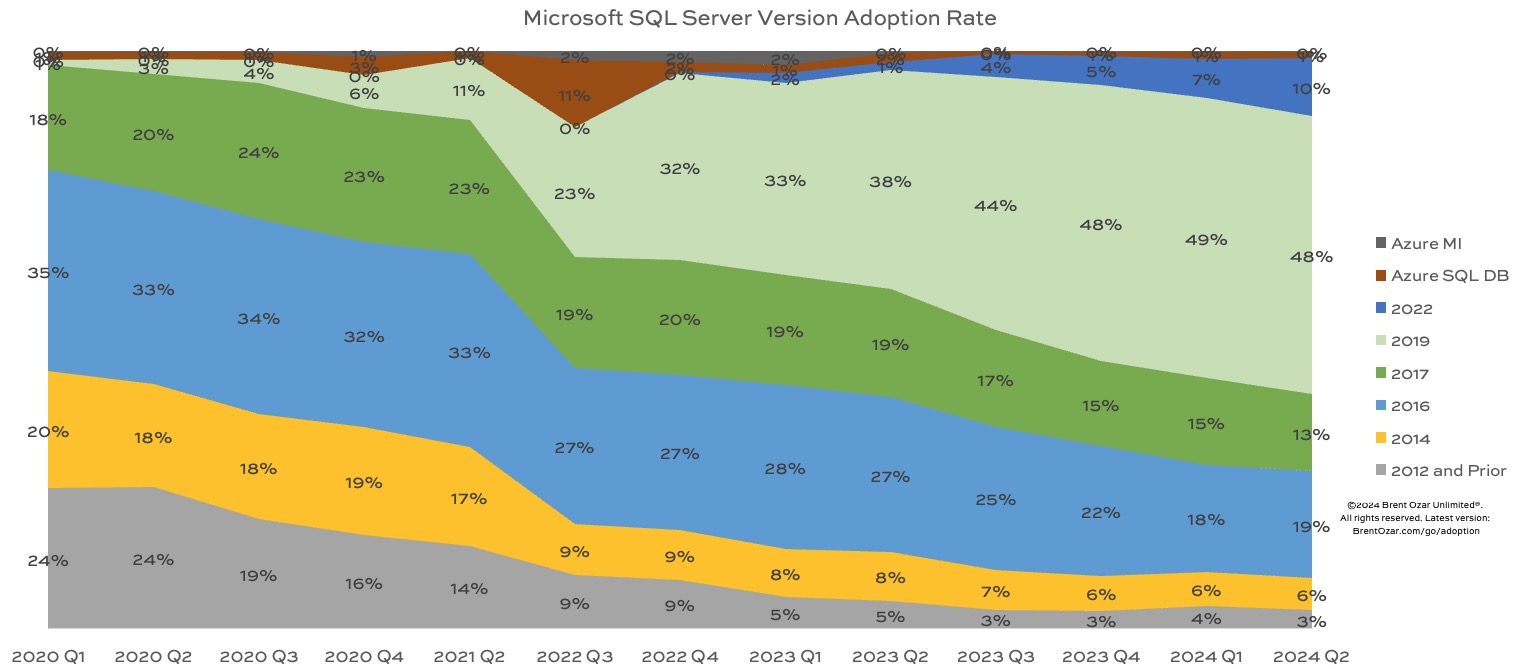
SQL Server 2019 still continues to grow while everything else shrinks, with the exception of 2022 treading water:
- SQL Server 2022: 10%, up from 7% last quarter
- SQL Server 2019: 48%, holding steady
- SQL Server 2017: 13%, fairly steady
- SQL Server 2016: 19%, steady
- SQL Server 2014: 6%, steady – and is now unsupported as of July
- SQL Server 2012 & prior: 3%, steady
- Azure SQL DB and Managed Instances: 1%, steady
Now that 2014 is officially unsupported, it’s interesting to see that the market share of SQL Server 2022 is about the same as the share of unsupported versions. I bet out in the wild, the unsupported version share is even higher just because folks don’t care enough to monitor the oldest zombies. (Plus, SQL ConstantCare doesn’t support pre-2008 versions, which actually still exist – I just got a consulting request for a SQL Server 2005 box this month. And the answer was no.)
If you compare SQL Server 2022’s adoption curve to 2019’s, you’ll notice that SQL Server 2019’s adoption didn’t really take off until 2022 Q3-Q4 – when SQL Server 2022 was released. There might be a few different reasons for that:
- Maybe people like being 1 version behind, and once 2022 was out, 2019 was the preferred one-behind version
- Maybe people were waiting for SQL Server 2022, but when the feature list & pricing came out, they decided it wasn’t worth the wait, and moved forward with 2019 instead
- Maybe they were holding off for the much-anticipated cloud HA/DR integration, but when Microsoft announced that it wouldn’t be included in 2022’s release after all, they decided to move forward with 2019 for now
No matter which one it is (or something else), I’ll be curious to see what happens to 2022’s adoption rate when Microsoft announces the feature list, CPU core & memory limitations, and pricing of the next version of SQL Server. Will that be the thing that finally makes SQL Server 2022 take off?
New SQL ConstantCare® Feature Coming: Gamification
Because we’ve got data for so many servers, consulting clients often ask me, “How big is our database relative to others? Are we using a similar amount of hardware? Are we out of the ordinary compared to our peers?”
Soon, we’re going to give monthly badges to SQL ConstantCare® customers (both free and paid) based on a bunch of rankings. Who has the most data? Who has the largest servers? Who has the longest uptime? And they won’t just be badges of pride – there are also badges of shame, like whose servers have the most problems, or who’s muted/ignored the most recommendations.
I’ll be blogging about the various badges over the coming weeks, explaining how the rankings are calculated, where the data comes from, and what the typical leaderboard looks like so that you get a rough idea of what it looks like at the top – and at the bottom.
If there’s a metric that you’d like to see rankings for, feel free to add it in the comments! We just might build a badge for it.

13 Comments. Leave new
Badge idea – most tempdb files 😀
Badge idea: most number of columns in a table
Microsoft announced that managed instance link won’t be launched? Are you referring to the feature being in preview or have they completely given up on RTMing it?
Badge Idea – most frequently run checkdb jobs – monthly or weekly, whatever 😀
While the “most number of” badges would call out the worst offenders, I think that “current status” type of badges would be instrumental for most people. A badge for “CheckDB not run in 1 month / 3 months / 6+ months” or “First Responder kit 6 months / 9 months / 12+ months out of date” type of thing would show in a nice little icon that you’re not keeping up with your responsibilities.
Likewise, you could also have good badges for things like consistently low overall waits, all indexes under certain fragmentation, no first responder hits under a certain priority, applying updates in < 30 days, or even meeting certain parameters within the “3 measures for SQL server speed” as per Brent Ozar’s training 🙂 Stuff like that.
If Query Store on AG secondaries worked, I’d probably move to 2022, but as-is there isn’t anything worth the hassle of upgrading. Probably more likely to skip the version entirely at this point, depending on when the next release shows up.
Isn’t the longest uptime for a server a badge of shame too? At least once per month there are new updates for Windows and (for newer versions) SQL server itself. So if your uptime is 1 year it means, that there are a lot unfixed security bugs lingering in the dark.
I would agree that longer uptimes are bad. We patch 2x a month.
“oh my” – badge for the largest tlog file,
“secrewity” – badge for the greatest number of sysadmin accounts,
“know-it-all” – badge for leaving all settings by default after install
[…] Brent Ozar shares an update: […]
Typo: “SQL Server is still the king…”
I think you wanted to say: “SQL Server 2019 is still the king”
Great catch! Fixed. Thanks!
[…] 2024/08/16: I should have made a more measurable goal here. If I look at SQL Server and Azure SQL DB adoption rates, Azure SQL DB doesn’t appear to be catching on that quickly. However, I don’t think […]