
If you’re using SQL Server 2012’s hot new AlwaysOn Availability Groups feature, your databases will go offline when your network connection does – even if you’re using asynchronous replication.
This is not a bug. This is working as designed – and it’s important to understand the underlying concepts.
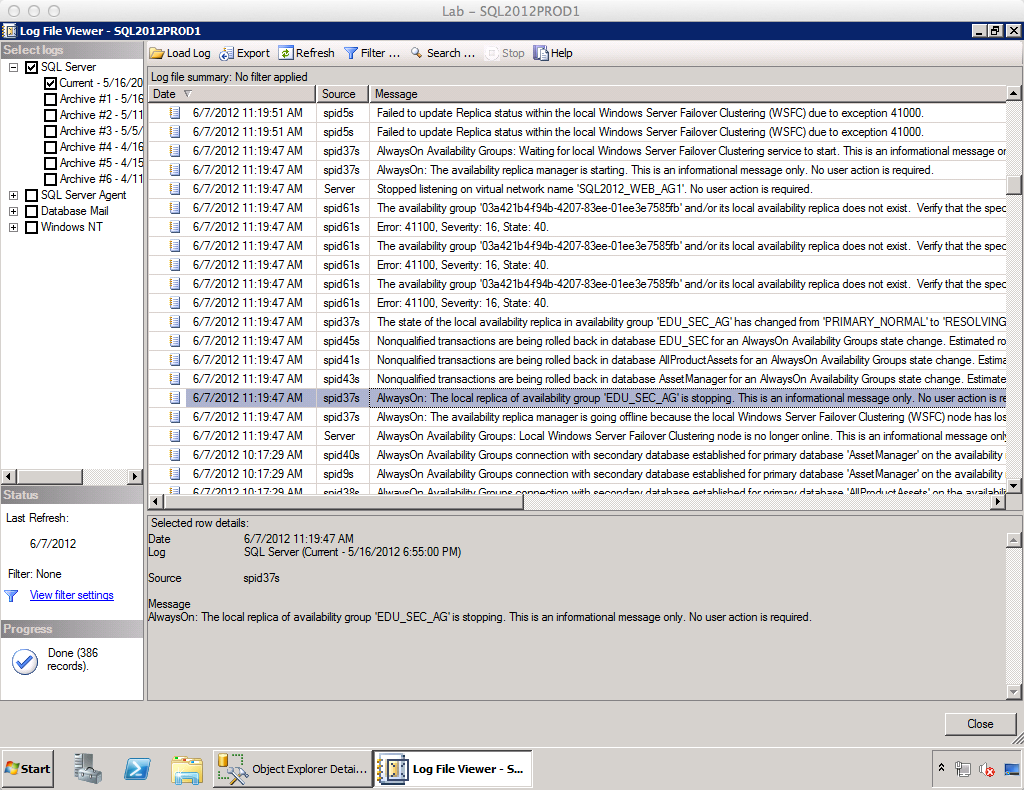
AlwaysOn Availability Group functionality relies on Windows Failover Clustering technology to know when things are going well, or when the poop has hit the fan. A core concept of failover clustering is quorum – the voting mechanism that lets each individual node understand whether it’s online or isolated. Windows Server 2008 has a variety of quorum methods, but in the vast majority of configurations, each server needs to be able to see the network in order to reserve its IP address, network name, and see other nodes in the cluster.
Take the following scenario:
- SQL2012PROD1 – primary active node. All read/write connections are going here.
- SQL2012PROD2 – secondary node with asynchronous replication. I could let users query this server, or just let it run in standby – it doesn’t matter for this scenario.
If I disconnect the network connection for SQL2012PROD1 – even for a brief moment – all of the databases in my availability groups roll back all open transactions and then go offline. The informational messages in the SQL Server event log are shown at right for humor purposes.
The SQL Server itself is still up – but the databases in the availability group aren’t because they have a dependency on the availability group’s listener and IP address. Since those aren’t available without a valid network connection, the databases are taken offline.
This is a dramatic departure from database mirroring or replication on a standalone (not clustered) database server. Both of those technologies leave the primary SQL Server’s databases up and running when the network drops.
Bottom line – when deploying AlwaysOn Availability Groups, make sure you understand the risks of everything presented in the cluster validation wizard. Some of the alerts (like some storage alerts) can be skipped for shared-nothing AlwaysOn Availability Group deployments, but others (like the network redundancy alert) definitely can’t. Just a general tip: mission-critical SQL Servers should be connected to two separate network switches, as should all other mission-critical servers. That way when one network switch fails, the mission-critical servers can still all talk to each other and nothing will go down.
More SQL Server AlwaysOn Resources
If you want to learn more about how to design, test, and manage this slick feature that offers high availability, disaster recovery, and scale-out reads, visit our AlwaysOn Availability Groups resources page.

58 Comments. Leave new
Hi Brent – I need your help. Want to run sql queries from my desktop PC (SQL 2008 R2) via ServerA (SQL 2008 R2) on ServerB (SQL 2008 R2). Is this possible, if it is how dio you do it ?
Hi, Kevin. That question is completely valid, but it’s totally unrelated to this post. It sounds like you’re struggling to find the right place to get answers. There’s a saying – if you give a man a fish, he eats for a day, but if you teach him how to catch fish, he’ll never go hungry again. Rather than giving you the fish, I’d rather teach you how to go fishing. Try posting this question on http://StackOverflow.com or http://www.SQLServerCentral.com. Those are vibrantly active question-and-answer sites that can get you help from lots of qualified professionals quickly, for free. Try that, and if you don’t get a good answer within a day or two, let me know and we can help refine your question.
Try configure a linked server between serverA and B
What is the answer to this?
Adrian – for questions & answers, head over to https://dba.stackexchange.com.
Brent, so with a network blip your availability groups go down. If network is reestablished, do the Availability Groups resync or do you manually have to do it from scratch? This of course poses an issue with multi-terrabyte DB’s…..
Richard – thankfully, when the network is reestablished, the Availability Groups resync automatically. Whew!
Whew, really….. we’re starting to see if we can setup a small lab here with a couple of VM servers to set this up, and do these type of tests….
Thanks!
That’s a very big catch, Brent. Something further: assuming that you have two physically separated sites for an Availability Group. Then you’re relying on (in the simplest case) two NIC cards, two sets of cabling, two routers or switches, and so on … until you hit the outside world! Then what?
For this, you should also have two ISPs (Comcast and Verizon, for example). I’ve worked for companies where the ISP connection went down and there had to be physical attention to fix it (someone dug it up!). Needless to say, that didn’t happen overnight!.
Michael – that wouldn’t actually be a problem. In that case, as long as your primary server can still contact things like its own DNS server and gateway, you’d be fine. Typically in multi-site environments you have a DNS server on each side, so a temporary blip wouldn’t force the cluster offline as long as you configured quorum correctly.
Or, at least, only one side would go down – right? So then the HA functionality would be working for the customers. Thanks. Like I said, great catch! Thanks!
I don’t get it how HA is achieved there… We have same situation, two physical sites with no redundant ISP link between then. As I understand, if WAN link would fail, then users in site with secondary replica would not be able to write to database, although they could read data. So to achieve full HA (where users in both sites could do read-writes) we still need redundant ISP providers?
There are some Multimaster solutions for MySQL where this scenario would be possible with only one WAN link, but not for SQL and AlwaysON is not one of them.
Ognjen – correct, if you want a reliable solution, you need redundancy everywhere. You’re only as strong as your weakest link.
This is an excellent point Brent,thanks for sharing !
Hi Brent,
I am a huge fan of MS SQL Server. I work with SQL Server and Oracle, and I think Oracle database is more complex to setup and to manage.
In spite of this difference, Oracle RAC is a unique feature that MS still does not has similar and I do not think allways on is the answer.
Do you think MS thinks about something similar to RAC?
Alex – that’s an interesting question. What’s the business problem that you need to solve? Rather than comparing features, let’s talk about the business use case that you’re faced with.
Reduncancy is the key feature of RAC. Some people think that RAC can enhance performance, but in some cases, it slows down data access. It should be used with care.
Business continuity can be guaranteed with RAC because, if one of the nodes crashes, other node(s) can still handle connections. It does not dependes on one primary node.
In spite of that, with cloud solutions and database in cloud, I do not see much more use of this feature.
Do you think cloud solutions could kill MS clusters and Oracle RAC use?
Alex – I happen to think one of the the important features of RAC is the ability to scale out. From a commercial perspective, this is important on Oracle because Oracle do not allow you to turn off cores on an x86 server using BIOS settings. Thus, the only real way to “pay as you grow” (without purchasing Oracle’s database appliance) is to use RAC and add nodes as you grow.
With SQL Server, this hasn’t been so much of an issue historically – you scale up with SQL, so you purchase the right size server. The issue is now that CPUs have many cores and SQL 2012 is licensed by core. Microsoft do NOT give you flexibility to turn off cores in a CPU (like Oracle) so unfortunately right now, you have to make sure you buy the correct size server. If your workload grows, then you may well need to throw the old server in the bin and buy a new (bigger) one. There is no “add another node” option in SQL unless you can distribute individual databases across different SQL instances.
So do you recommend teaming the NICs and plugging them into two separate switches?
This post has come up a few times in relation to a recent outage. We have a network blip that takes down the VLAN that the clustered AG IPs reside on for a few seconds. The AGs then go offline and remain offline until they are manually brought back online.
To clarify what you’re describing is that the loss of an interface will offline a database until that interface comes back online, at which point the databases will resync and become available again?
Mark – yes, and I’ve seen the situation you’re describing (AGs going offline and staying offline) with Windows Server 2008R2. Make sure you apply all of the relevant Windows hotfixes from the KB posts that cover clustering and AlwaysOn Availability Groups. They don’t show up in Windows Update.
Awesome, thanks Brent. You were right about the 2008R2 bit. Our DBAs have had a look and appear to have found a few missing hotfixes.
Merry Christmas from the Network/Storage side of datacentre. 🙂
Mark
Hahaha, great, glad I could help. Merry Christmas to you too!
I see in your post here (https://www.brentozar.com/archive/2013/11/update-on-stack-overflow-recovery-strategy-with-sql-server-2014/) that it’s fixed with 2014…does this still happen with SQL 2012 on Server 2012? And if so, is there a way to ‘fix’ this feature?
The change was introduced in SQL 2014. There is currently no way to fix this in SQL 2012.
Hi, Brent. I’m using SQL 2012 SP1 – 11.0.3128.0 (X64) with Windows 2012 R2 Standard with latest updates in virtual environment. The quorum is achieved by means of witness share. I couldn’t reproduce the scenario when AGs goes offline when I switch off one of the nodes. Is that a kind of sporadic? Are my tests inaccurate?
MrSol – yes, it’s kind of sporadic, unfortunately.
Hello Brent
In FCI+AG model- can we have same name for AG & it’s listener ?
Ishtiaq – The AG is actually always referred to by its listener name. Thanks!
Ok just bought your SQL Storage Class and just finished SSD portion, have a hybrid thought, if you have a read-only server for reporting, (Other server is active/passive cluster), would you architect(please not a Ted Mosby) SSD for you tempdb for the read-only server? Since AG is not like the old cluster days where MS wanted you to have everything the same, wonder if the might be a performance gain.
Tim – rather than guess, I’d start with the basics: is the read-only server seeing bottlenecks in TempDB? If so, add in solid state drives. That’s a relatively easy change to make after going live, so I’d start there.
Hi Brent,
With my recent project on a mission critical system with higher avail requirement. I’m thinking of setting up a 2node FCI cluster in each of our dual data center envir(DC1and DC2). They will have window DC 2012 sp2, sql 2012 sp2 ES. at least 2 NIC, 1 for heartbeat, 1 for the lan/wan, static ip address, One named instance in each site. Shared cluster disk between local nodes of the cluster, no shared disk across two data centers.
The cluster will be on “node and file shared majority quorum model” with quorum disk outside the clustered node, indpendent filreshare on the active site, no vote from the secondary FCI cluster in the secondary database. This is similar to fig 4 of doc called “Building_a_HA_and_DR_Solution_using_AlwaysON_SQL_FCIs_and_AGs%20v1.docx” from microsoft.
Availability group will be used (if possible) to allow auto failover between the local cluster nodes. In between DC, we have a 10Gbe link but async commit will be defined to the Availability group. I understand AlwaysOn only support manual failover between FCI’s.
We have a requirement of planned regular failover or site transfer activities, application will have to be able to run on either site, with one of the DC being active, replicating data to the other standby DC. For example, say we have active site on DC1, so application will be running against databases on the FCI on DC1. After a site transfer from DC1 to DC2, DC2 will be active and applcation will have to continue to run against databases on the FCI on DC2 with data replicated back to DC1 (with no loss of data, except in the case of DR due to emergency or disaster)
Questions I have
1) In the quorum model, shall I add another voting members (quorum disk) in the DC2 and remove the previous voting member (independent quorum disk) in DC1 during the transfer (Assuming we need an odd no of vote overall, and we want to avoid the spilt brain scenario in a 2 datacenter model).
2) Will SQL Availability group support synchronise commit across the WAN like in our case? The two DC are in different state but we have 10Gbe network link. I am thinking of switching the AV group to synchronouse commit temporarily before the scheduled site transfer to avoid any data lost and switch it back to async after the activities completed.
3) If the two replica are in sync before the site transfer, will the previous primary replica still in sync with the new primary after the site transfer?
4) We can’t afford data lost in between scheduled site transfer (RPO is 24 with emergency or disaster). If Availability group is not a solution , will I be able to combine FCI with SQL Log shipping? I am thinking of setting up two independent FCI clusters (two independent WFSC with 2 nodes each, instead of one WFSC with 4 nodes), auto failover between nodes of the same cluster (without Availability group defined), then will I be able to use log shipping and reverse logshipping mechanism to avoid data lost and to avoid rebuild of the previous primary for failover between sites or data centers?
Can you please shed some light on this?
Thanks & regards,
Irene Lam
Irene – this kind of complex analysis is exactly what we do in our consulting services – but not in blog post comments. Your best bet for personal advice like this would be to click Contact at the top of the site, and we can talk about what a paid engagement would look like. Thanks!
Hi Brent,
Is it possible to have VMWare HA cluster (instead of SQL FCI cluster) with Availability group set up? In that case, will SQL still need to aware of the individual cluster nodes still? Have you come across that before?
THanks & regards,
Irene
Irene – AlwaysOn Availability Groups is built atop Windows clustering. You don’t need a SQL FCI cluster – the I in FCI stands for Failover Clustered Instance. You do need a Windows cluster, but you don’t necessarily need an FCI involved. For more details, check out: https://www.brentozar.com/sql/sql-server-alwayson-availability-groups/
Brent, I’ve been trying to find out if the same CPU limitations database mirroring has apply to Availability Groups. My guess is that the same limitations exists, given that Availability Groups was built on the same technology as Mirroring, so the following would still apply.
•Principal server: 1 global thread and 2 threads per each of the mirrored databases.
•Mirror server:
– 64 bit architectures: 1 global thread, 2 threads per mirrored databases and one additional thread for each mirrored database for every 4 processor cores.
Is this correct?
Thank you!
Guillermo – that’s not really related to the blog post here, so what I’d recommend doing is posting it over on http://DBA.StackExchange.com. There’s a lot of smart folks over there who can get you answers to your questions quickly – that’s a lot better than just posting random questions on random blog posts. 😉 Good luck!
Thanks for the tip! I will do that 🙂
Hi Brent,
Has the issue been fixed with SQL 2012 on Windows 2012 with all those hotfixes? Or are we being nudged to SQL 2014 for the fix?
Sri – no, this is as-designed. This behavior was intentional in SQL Server 2012.
Brent, any reprieve from this behavior in either SQL 2014 or SQL 2016?
Sri – yep!
Thanks Brent. Wasn’t expecting such a prompt reply for an old post :).
Hi Brent,
Thank you so much for sharing your knowledge. It is a great help for database administrators like me who are just starting in this field.
I wanted to get your advice on some of the networking training that a database administrator should get. We have implemented AlwaysOn in our production servers. But, during the testing and installation, I had to rely on our network administrator (For hearbeat connections, etc.). I’d appreciate if you can provide some guidance on any training (Cisco certification, etc.) that would help database administrators in their daily duties. Any blogs, training sites, classes that provide networking understanding.
My apologies for asking question on an old thread. Hope to hear from you.
Thanks.
Raj – sorry, I don’t really have any insight to add on good training for networking.
Brent – we just went away from sql clusters in sql 2008 to 2012 with AG – have five servers with replicas in a secondary datacenter and syncing over a dedicated eline/LAN layer 2 connection….switch to switch…
had an incident that for the duration of about 2 hours we had several logs showing that replication was terminated and then reestablished with the termination lasting about 10-20 seconds at a pop…happened “a ton” of times in those two hours and our users were complaining of latency and problems accessing the databases on the AG. This happened only on 2 of our 5 AGs that are going between the 2 datacenters.
Assuming intermittent network issues, took a look at switches, firewalls, (all redundant), the eline between and found no indications of any loss of connection issues. No indicators that the SANS had issues either. During those 2 or so hours we also go “blocking” alerts from the DB warden database that runs on all the AGs …for the two that had the replication issues.
If I have ruled out network connectivity issues, should I be looking at the SQL transactions that were running at the time? Is it possible that something in our code/long running job/query could have caused long waits or something that would have triggered the replication errors? If we have replication issues, does that cause latency on the residing databases in the AG?
I am NOT a dba…unless you count me as accidentally forced into it by default – i’m the network and sys admin/datacenter manager and sql has just fallen into my realm of responsibility so this one has me grasping for explanation to our users…any suggestions or insight?
Celest – when you have a multi-paragraph support question, your best bet is DBA.StackExchange.com.
Brent – i have 4 servers in AlwaysON ; 2 servers in HA(Sync/Auto failover) and 2 servers in DR (Async) using multisubnet failover cluster.
i have a problem . if there is a link fail between primary – DR for 1 min or more we are seeing sync failover with in HA servers .
My question , if we loose DR connection my HA servers should act as-is but why failover happening with in HA.
I have dynamic quorum configuration SQL server 2012 R2
Hi Brent,
I want to ask how to make single database offline on primary and secondary replica in Availability group. What are the steps to do this activity.
PS – for random, unrelated questions, head over to dba.stackexchange.com
I frequently get error 35206(connection time out) on the primary around the same time and error 976 on the secondary replica as as result of the timeout. I am clueless currently. Do you think i should increase the time out settings to more relaxed ? Any suggestions will be greatly appreciated….
Ahmed – for Q&A, head on over to https://dba.stackexchange.com.
thank you
Hi Brent,
I am grateful to you and your team for sharing insightful knowledge on SQL Server. Your technical expertise and witty wisdom are wonderful and reach the heart.
I was wondering if it is possible to configure Always on like following.
Node 1, Node 2 share a database with traditional Windows Failover Cluster using shared storage for the database.
Node 3, Node 4 another traditional Windows failover cluster share a secondary replica of the database hosted on 1 and 2 using always on. besides being expensive, I wonder if it is possible?
Thank you,
Kashyap
Kashyap – sure, that’s the kind of consulting we do with our SQL Critical Care. Click on SQL Critical Care at the top of the site, and you can see sample deliverables about the kind of HA/DR advice we give.
Is there any network speed or bandwith requirment. because in my DRC is some time always on in DC site intermiten, not stable.
It would depend on the kind of queries & traffic you’re running through the server.
Site 1 : Primary
Site 2 : Secondary
Site 3 : File Share Witness
If connectivity goes down between site 1 & site 2.
But still site 1 & site 2 is connected with site 3