
Row-Level Security Can Slow Down Queries. Index For It.
The official Azure SQL Dev’s Corner blog recently wrote about how to enable soft deletes in Azure SQL using row-level security, and it’s a nice, clean, short tutorial. I like posts like that because the feature is pretty cool and accomplishes a real business goal. It’s always tough deciding where to draw the line on how much to include in a blog post, so I forgive them for not including one vital caveat with this feature.
Row-level security can make queries go single-threaded.
This isn’t a big deal when your app is brand new, but over time, as your data gets bigger, this is a performance killer.
Setting Up the Demo
To illustrate it, I’ll copy a lot of code from their post, but I’ll use the big Stack Overflow database. After running the below code, I’m going to have two Users tables with soft deletes set up: a regular dbo.Users one with no security, and a dbo.Users_Secured one with row-level security so folks can’t see the IsDeleted = 1 rows if they don’t have permissions.
|
1 2 3 4 5 6 7 8 9 10 11 12 13 14 15 16 17 18 19 20 21 22 23 24 25 26 27 28 29 30 31 32 33 34 35 36 37 38 39 40 41 42 43 44 45 46 47 48 49 50 51 52 53 54 55 56 57 58 59 60 61 62 63 64 65 66 67 68 69 70 71 72 73 74 75 76 77 78 79 80 81 82 83 84 85 |
USE StackOverflow; GO /* The Stack database doesn't ship with soft deletes, so we have to add an IsDeleted column to implement it. Fortunately this is a metadata-only operation, and the table isn't rewritten. All rows just instantly get a 0 default value. */ ALTER TABLE dbo.Users ADD IsDeleted BIT NOT NULL DEFAULT 0; GO /* Copy the Users table into a new Secured one: */ CREATE TABLE [dbo].[Users_Secured]( [Id] [int] IDENTITY(1,1) NOT NULL, [AboutMe] [nvarchar](max) NULL, [Age] [int] NULL, [CreationDate] [datetime] NOT NULL, [DisplayName] [nvarchar](40) NOT NULL, [DownVotes] [int] NOT NULL, [EmailHash] [nvarchar](40) NULL, [LastAccessDate] [datetime] NOT NULL, [Location] [nvarchar](100) NULL, [Reputation] [int] NOT NULL, [UpVotes] [int] NOT NULL, [Views] [int] NOT NULL, [WebsiteUrl] [nvarchar](200) NULL, [AccountId] [int] NULL, [IsDeleted] [bit] NOT NULL, CONSTRAINT [PK_Users_Secured_Id] PRIMARY KEY CLUSTERED ( [Id] ASC )WITH (PAD_INDEX = OFF, STATISTICS_NORECOMPUTE = OFF, IGNORE_DUP_KEY = OFF, ALLOW_ROW_LOCKS = ON, ALLOW_PAGE_LOCKS = ON, OPTIMIZE_FOR_SEQUENTIAL_KEY = OFF, DATA_COMPRESSION = PAGE) ON [PRIMARY] ) ON [PRIMARY] TEXTIMAGE_ON [PRIMARY] GO ALTER TABLE [dbo].[Users_Secured] ADD DEFAULT ((0)) FOR [IsDeleted] GO SET IDENTITY_INSERT dbo.Users_Secured ON; GO INSERT INTO dbo.Users_Secured (Id, AboutMe, Age, CreationDate, DisplayName, DownVotes, EmailHash, LastAccessDate, Location, Reputation, UpVotes, Views, WebsiteUrl, AccountId, IsDeleted) SELECT Id, AboutMe, Age, CreationDate, DisplayName, DownVotes, EmailHash, LastAccessDate, Location, Reputation, UpVotes, Views, WebsiteUrl, AccountId, IsDeleted FROM dbo.Users; GO SET IDENTITY_INSERT dbo.Users_Secured OFF; GO DropIndexes @TableName = 'Users'; GO CREATE LOGIN TodoDbUser WITH PASSWORD = 'Long@12345'; GO CREATE USER TodoDbUser FOR LOGIN TodoDbUser; GO GRANT SELECT, INSERT, UPDATE ON dbo.Users TO TodoDbUser; GO CREATE FUNCTION dbo.fn_SoftDeletePredicate(@IsDeleted BIT) RETURNS TABLE WITH SCHEMABINDING AS RETURN SELECT 1 AS fn_result WHERE ( DATABASE_PRINCIPAL_ID() = DATABASE_PRINCIPAL_ID('TodoDbUser') AND @IsDeleted = 0 ) OR DATABASE_PRINCIPAL_ID() <> DATABASE_PRINCIPAL_ID('TodoDbUser'); GO CREATE SECURITY POLICY dbo.Users_Secured_SoftDeleteFilterPolicy ADD FILTER PREDICATE dbo.fn_SoftDeletePredicate(IsDeleted) ON dbo.Users_Secured WITH (STATE = ON); GO |
Now let’s start querying the two tables to see the performance problem.
Querying by the Primary Key: Still Fast
The Azure post kept things simple by not using indexes, so we’ll start that way too. I’ll turn on actual execution plans and get a single row, and compare the differences between the tables:
|
1 2 3 4 5 |
SELECT * FROM dbo.Users WHERE Id = 26837; SELECT * FROM dbo.Users_Secured WHERE Id = 26837; |
If all you’re doing is getting one row, and you know the Id of the row you’re looking for, you’re fine. SQL Server dives into that one row, fetches it for you, and doesn’t need multiple CPU cores to accomplish the goal. Their actual execution plans look identical at first glance:
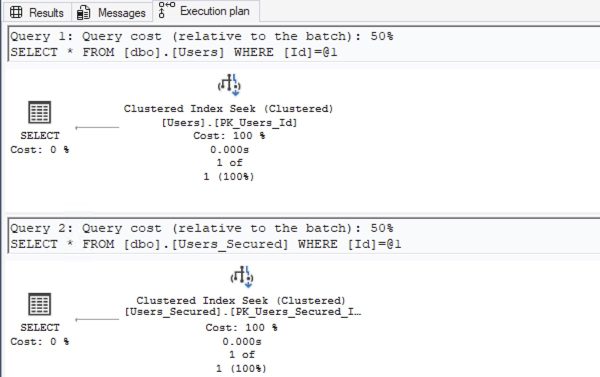
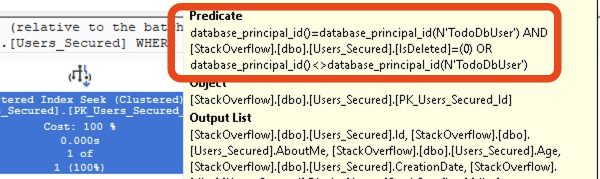
If you hover your mouse over the Users_Secured table operation, you’ll notice an additional predicate that we didn’t ask for: row-level security is automatically checking the IsDeleted column for us:
Querying Without Indexes: Starts to Get Slower
Let’s find the top-ranked people in Las Vegas:
|
1 2 3 4 5 6 7 8 9 |
SELECT TOP 101 * FROM dbo.Users WHERE Location = N'Las Vegas, NV' ORDER BY Reputation DESC; SELECT TOP 101 * FROM dbo.Users_Secured WHERE Location = N'Las Vegas, NV' ORDER BY Reputation DESC; |
Their actual execution plans show the top query at about 1.4 seconds for the unsecured table, and the bottom query at about 3 seconds for the secured table:
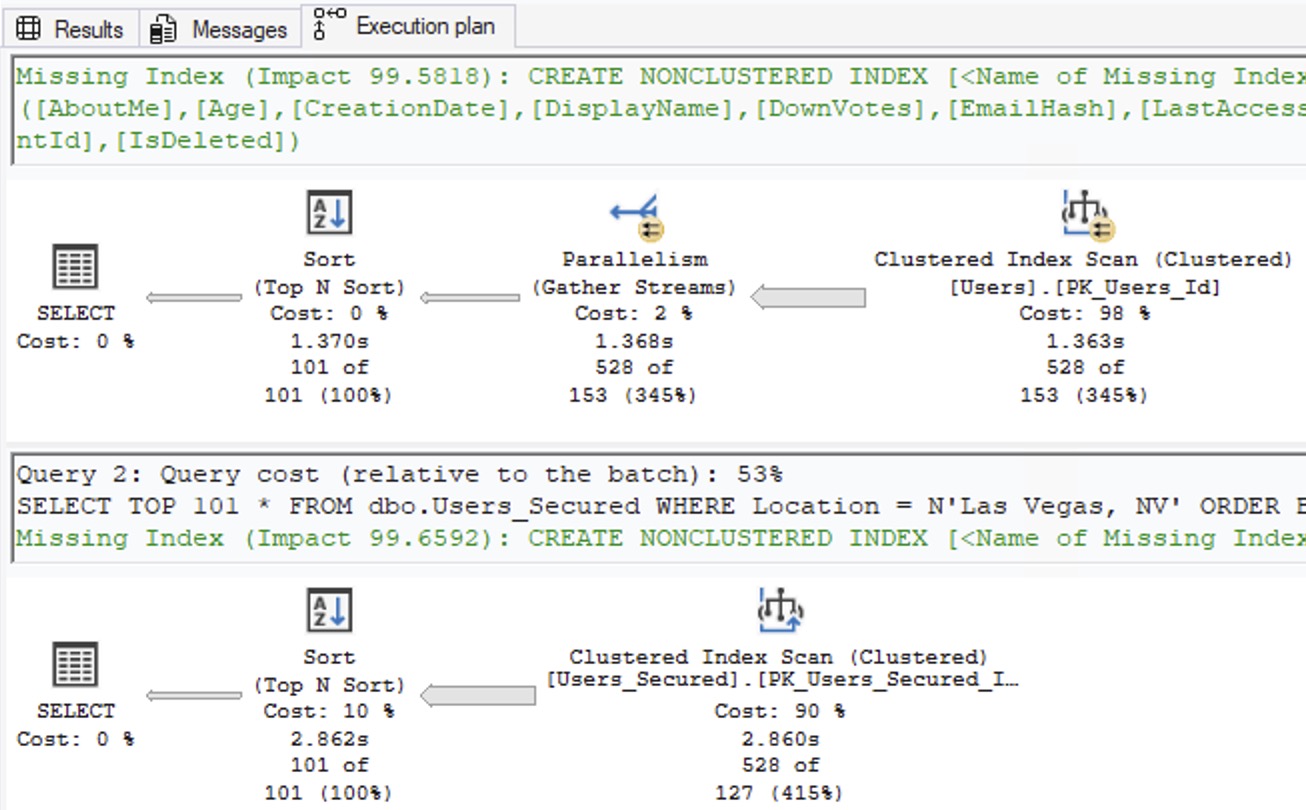
The reason isn’t security per se: the reason is that the row-level security function inhibits parallelism. The top query plan went parallel, and the bottom query did not. If you click on the secured table’s SELECT icon, the plan’s properties will explain that the row-level security function can’t be parallelized:

That’s not good.
When you’re using the database’s built-in row-level security functions, it’s more important than ever to do a good job of indexing. Thankfully, the query plan has a missing index recommendation to help, so let’s dig into it.
The Missing Index Recommendation Problems
Those of you who’ve been through my Fundamentals of Index Tuning class will have learned how Microsoft comes up with missing index recommendations, but I’mma be honest, dear reader, the quality of this one surprises even me:
|
1 2 3 4 5 6 |
Missing Index (Impact 99.6592): CREATE NONCLUSTERED INDEX [<Name of Missing Index, sysname,>] ON [dbo].[Users_Secured] ([Location]) INCLUDE ([AboutMe],[Age],[CreationDate],[DisplayName],[DownVotes], [EmailHash],[LastAccessDate],[Reputation],[UpVotes],[Views], [WebsiteUrl],[AccountId],[IsDeleted]) |
The index simply ignores the IsDeleted and Reputation columns, even though they’d both be useful to have in the key! The missing index hint recommendations are seriously focused on the WHERE clause filters that the query passed in, but not necessarily on the filters that SQL Server is implementing behind the scenes for row-level security. Ouch.
Let’s do what a user would do: try creating the recommended index on both tables – even though the number of include columns is ridiculous – and then try again:
|
1 2 3 4 5 6 7 8 9 10 11 12 13 14 15 16 17 18 19 20 21 22 |
CREATE NONCLUSTERED INDEX Location_Includes ON [dbo].[Users] ([Location]) INCLUDE ([AboutMe],[Age],[CreationDate],[DisplayName],[DownVotes], [EmailHash],[LastAccessDate],[Reputation],[UpVotes],[Views], [WebsiteUrl],[AccountId],[IsDeleted]); GO CREATE NONCLUSTERED INDEX Location_Includes ON [dbo].[Users_Secured] ([Location]) INCLUDE ([AboutMe],[Age],[CreationDate],[DisplayName],[DownVotes], [EmailHash],[LastAccessDate],[Reputation],[UpVotes],[Views], [WebsiteUrl],[AccountId],[IsDeleted]); GO SELECT TOP 101 * FROM dbo.Users WHERE Location = N'Las Vegas, NV' ORDER BY Reputation DESC; SELECT TOP 101 * FROM dbo.Users_Secured WHERE Location = N'Las Vegas, NV' ORDER BY Reputation DESC; GO |
Our actual execution plans are back to looking identical:

Neither of them require parallelism because we can dive into Las Vegas, and read all of the folks there, filtering out the appropriate IsDeleted rows, and then sort the remainder, all on one CPU core, in a millisecond. The cost is just that we literally doubled the table’s size because the missing index recommendation included every single column in the table!
A More Realistic Single-Column Index
When faced with an index recommendation that includes all of the table’s columns, most DBAs would either lop off all the includes and just use the keys, or hand-review the query to hand-craft a recommended index. Let’s start by dropping the old indexes, and creating new ones with only the key column that Microsoft had recommended:
|
1 2 3 4 5 6 7 8 9 10 11 12 13 14 15 |
CREATE INDEX Location ON dbo.Users(Location); DROP INDEX Location_Includes ON dbo.Users; CREATE INDEX Location ON dbo.Users_Secured(Location); DROP INDEX Location_Includes ON dbo.Users_Secured; GO SELECT TOP 101 * FROM dbo.Users WHERE Location = N'Las Vegas, NV' ORDER BY Reputation DESC; SELECT TOP 101 * FROM dbo.Users_Secured WHERE Location = N'Las Vegas, NV' ORDER BY Reputation DESC; GO |
The actual execution plans of both queries perform identically:

Summary: Single-Threaded is Bad, but Indexes Help.
The database’s built-in row-level security is a really cool (albeit underused) feature to help you accomplish business goals faster, without trying to roll your own code. Yes, it does have limitations, like inhibiting parallelism and making indexing more challenging, but don’t let that stop you from investigating it. Just know you’ll have to spend a little more time doing performance tuning down the road.
In this case, we’re indexing not to reduce reads, but to avoid doing a lot of work on a single CPU core. Our secured table still can’t go parallel, but thanks to the indexes, the penalty of row-level security disappears for this particular query.
Experienced readers will notice that there are a lot of topics I didn’t cover in this post: whether to index for the IsDeleted column, the effect of residual predicates on IsDeleted and Reputation, and how CPU and storage are affected. However, just as Microsoft left off the parallelism thing to keep their blog post tightly scoped, I gotta keep mine scoped too! This is your cue to pick up this blog post with anything you’re passionate about, and extend it to cover the topics you wanna teach today.

3 Comments. Leave new
And I saw the same problem with RLS in Power BI. And Fabric and ADF have Change Data Capture .
All those names sounds so familiar…
The suspect is that behind all those so called “modern technology” there is still a VM and a Database. 🙂
[…] Row-Level Security Can Slow Down Queries. Index For It. (Brent Ozar) […]
[…] Brent Ozar speeds up some operations: […]