
Get Free AI Query Advice in PasteThePlan.
At PasteThePlan.com, you can paste execution plans into your browser, then send a link to someone else to get query advice. It’s useful for online forums, Stack Exchange, and the like.
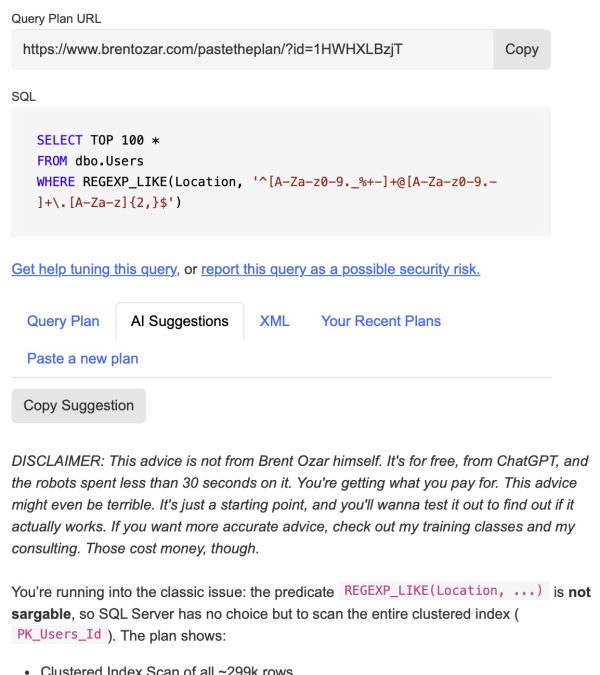
After you paste the plan, you’ve got a new AI Suggestions tab. It sends your query plan (and my custom prompt) up to ChatGPT 5.3, and in 30 seconds or less, you get a second opinion on ways to make it go faster:
Here’s the prompt we’re using for now, in case you’d rather do this kind of thing yourself:
Please give specific, actionable advice for the attached Microsoft SQL Server query plan. You can give recommendations to tune the query or the indexes on the underlying tables. Do not give server-level or database-level advice: stay focused on this specific query, these specific tables. Your one-time advice will be handed to the developer responsible for the database. They will not be able to change server-level or database-level settings, and they will not be able to correspond with you again. Distill your advice down to the most important things that are likely to make a difference in performance. Deliver your advice in a friendly, upbeat way because you are on the same team, rooting for their success, and having a good time.
Right now, we’re using OpenAI’s ChatGPT 5.3 with a 25-second timeout. If it times out, we advise you to get out your own wallet and use your own AI tool, since we have to pay for these API calls. I like you, though. I think you’re worth it.

2 Comments. Leave new
I think we broke PasteThePlan. It’s down today 🙁
Makes me wonder if the “future” of our jobs is now the present, and that we’re charged of fixing AI mistakes, rather than our own.
Ch-ch-ch-changes… Turn and face the strange…
Oh, just kidding! Of course, 5 minutes later, it’s back up.
As always, thanks for the tools, Brent!