
Automatic Stats Updates Don’t Always Invalidate Cached Plans
Normally, when SQL Server updates statistics on an object, it invalidates the cached plans that rely on that statistic as well. That’s why you’ll see recompiles happen after stats updates: SQL Server knows the stats have changed, so it’s a good time to build new execution plans based on the changes in the data.
However, updates to system-created stats don’t necessarily cause plan recompiles.
This is a really weird edge case, and you’re probably never gonna hit it, but I hit it during every single training class I teach. I casually mention it each time to the class, and I don’t even take much notice of it anymore. However, a student recently asked me, “Is that documented anywhere?” and I thought, uh, maybe, but I’m not sure, so might as well document it here on the ol’ blog.
To illustrate it, I’ll take any version of the Stack Overflow database (I’ll use the big 2024 one), drop the indexes, free the plan cache. I’m using compat level 170 (2025) because I’m demoing this on SQL Server 2025, and I wanna prove that this still isn’t fixed in 2025. Then run a query against the Users table:
|
1 2 3 4 5 6 7 8 9 10 11 |
DropIndexes; GO DBCC FREEPROCCACHE; GO ALTER DATABASE CURRENT SET COMPATIBILITY_LEVEL = 170; /* 2025 */ GO SELECT TOP 101 * FROM dbo.Users WHERE Location = N'Netherlands' ORDER BY Reputation DESC; GO |
To run this query, SQL Server needs to guess how many rows will match our Location = ‘Netherlands’ predicate, so it automatically creates a statistic on the Location column on the fly. Let’s check it out with sp_BlitzIndex, which returns a result set row with all of the stats histogram data for that table:
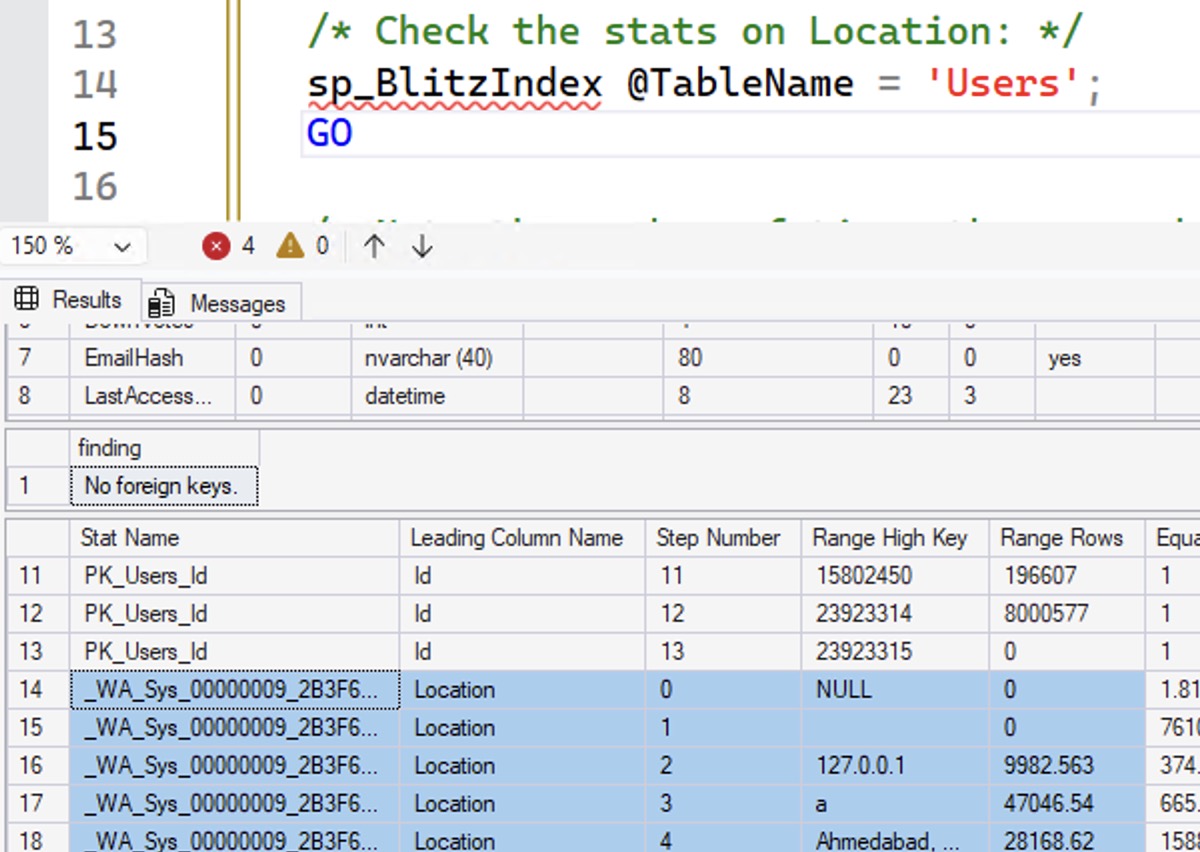
I’m going to scroll down to the Netherlands area, and show a few more relevant columns. You’ll wanna click on this to zoom in if you want to follow along with my explanation below – I mean, if you don’t trust my written explanation, which of course you do, because you’re highly invested in my credibility, I’m sure:

Things to note in that screenshot:
- It’s an auto-created stat with a name that starts with _WA_Sys (system-created)
- It was sampled: note the fractional numbers for range rows and quality rows, plus notice the “Rows Sampled” near the far right
- It was last updated at 2025-12-24 01:10:55.0733333 – which tells you that I’m writing this post on Christmas Eve day, but the timing is odd because I’m writing this at a hotel in China, and my server is in UTC, so God only knows what time it is where you’re at, and no, you don’t have to worry about my mental health even though I’m blogging on Christmas Eve Day, because I’m writing this at the hotel’s continental breakfast while I wait for Yves to wake up and get ready, because we’re going out to Disney Shanghai today, which has the best popcorn varieties of any Disney property worldwide, and you’re gonna have to trust me on that, but they’re amazing, like seriously, who ever knew they needed lemon popcorn and that it would taste so good
- Note the estimate for Netherlands: Equal Rows is 17029.47
Now let’s say we’re having performance issues, so we decide to update statistics with fullscan. Then, we’ll check the stats again:
|
1 2 3 4 5 6 |
UPDATE STATISTICS dbo.Users WITH FULLSCAN; GO /* Check the stats on Location again: */ sp_BlitzIndex @TableName = 'Users'; GO |
The updated stats for Netherlands have indeed changed:

Stuff to note in that screenshot after you click on it while saying the word “ENHANCE!” loudly:
- Netherlands Equal Rows has changed to 17100
- The numbers are all integers now because Rows Sampled is the same as the table size
- Stats last updated date has changed to 2025-12-24 01:17:54.5133333, so about 6 minutes have passed, which gives you an idea of what it’s like writing a blog post – this stuff looks deceivingly easy, but it’s not, and I’ve easily spent an hour on this so far, having written the demo, hit several road blocks along the way, then started writing the blog post and capturing screen shots, but it doesn’t really matter how long it takes because I’m sure Yves will be ready “in five minutes”, and we both know what that means, and by “we both” I mean you and I, dear reader
So if I run the query again, it gets a new plan, right? Let’s see its actual execution plan:
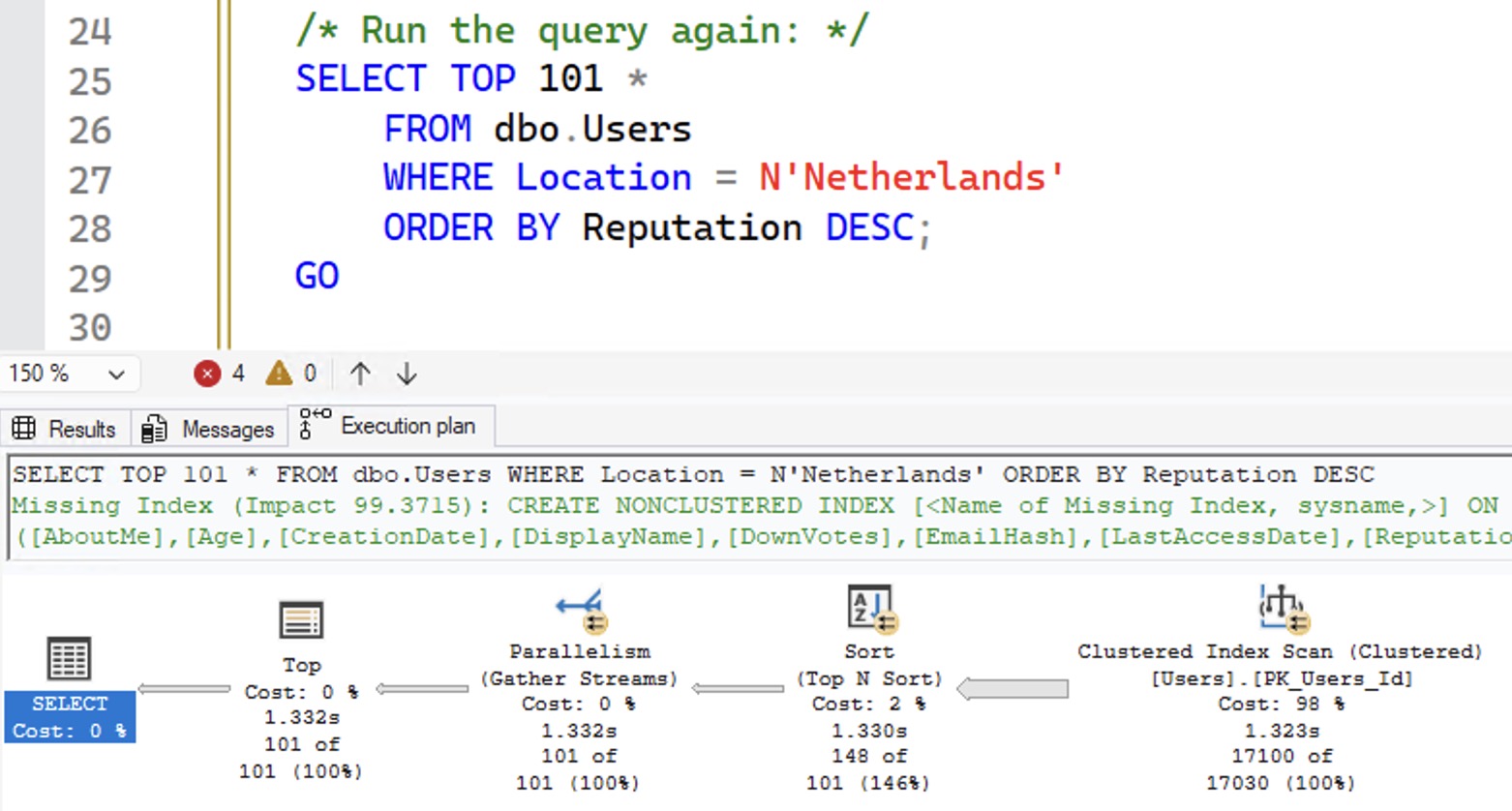
Focus on the bottom right numbers: SQL Server brought back 17,100 rows of an estimated 17,030 rows. That 17,030 estimate tells you we didn’t get a new query plan – the estimates are from the initial sampled run of stats. Another way to see it is to check the plan cache with sp_BlitzCache:
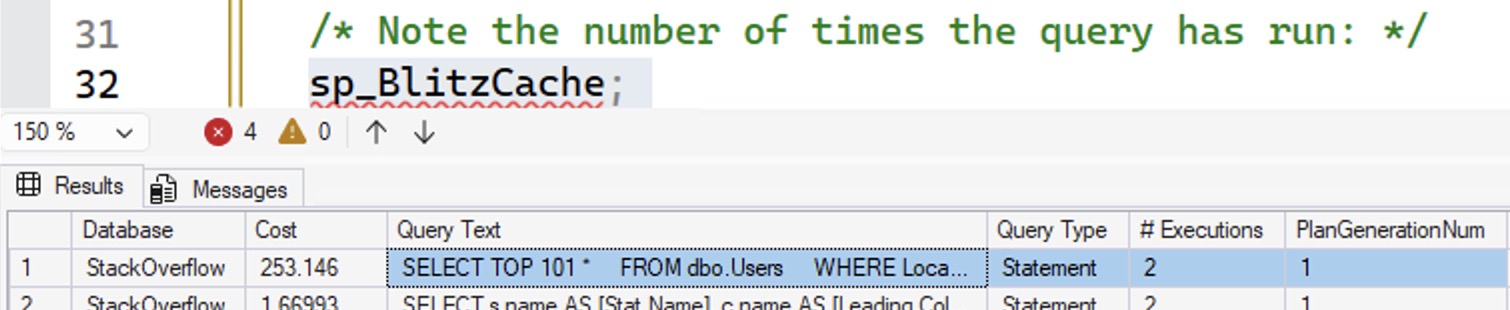
I’ve rearranged the columns for an easier screenshot – usually these two columns are further out on the right side:
- # Executions – the same query plan has been executed 2 times.
- PlanGenerationNum – 1 because this is still the first variation of this query plan
 So, what we’re seeing here is that if a system-generated statistic changes, even if the contents of that stat changed, that still doesn’t trigger an automatic recompilation of related plans. If you want new plans for those objects, you’ll need to do something like sp_recompile with the table name passed in.
In the real world, is this something you need to worry about? Probably not, because in the real world, you’re probably more concerned about stats on indexes, and your plan cache is likely very volatile anyway. Plus, in most cases, I’d rather err on the side of plan cache stability rather than plan cache churn.
Now, some of you are going to have followup questions, or you’re going to want to reproduce this demo on your own machines, with your own version of SQL Server, with your own Stack Overflow database (or your own tables.) You’re inevitably going to hit lots of different gotchas with demos like this because statistics and query plans are complicated issues. For example, if you got a fullscan on your initial stats creation (because you had a really tiny object – no judgment – or because you had an older compatibility level), then you might not even expect to see stats changes. I’m not going to help you troubleshoot demo repros here for this particular blog post just because it’d be a lot of hand-holding, but if you do run into questions, you can leave a comment and perhaps another reader might be willing to take their time to help you.
Me? I’m off to Shanghai Disneyland. Whee!

9 Comments. Leave new
Yeah, I have come across weird stuff like the above article mentions. Only for me it was dealing with the system table stats not updating as they should, which in turn would cause TFS builds to fail. I setup a SQL job to update those stats on the days when we do our roll outs. Resolved the issue for us, for the time being at least. DBs involved had partitioned tables with lots of files.
Hey Brent. I know that you can have multiple Execution Plans for the same query and that the last Execution Plan is the one that gets executed next time that query is used. I know you can force a plan as well which by definition means that the plan being forced more than likely won’t be the last executed plan.
My question is there an automated way that I can determine what might be the best plan if I have several Execution Plans for the same query? Is there a way to that “Plan X” is the best plan without me having to spend 30 minutes on the issue?
Not really, given that queries can have different parameters.
Are they ever going to expand the 8K stat to include more rows? I am not worried if my distribution is 1 but if I have a massively skewed distribution my stats may be screwed up if the value I am looking for is between two rows with low counts. Or maybe picking better values that doesn’t throw off the majority of the values I might be looking for. Example might be if the two values where my value lies between have counts of say 10 but the majority of those counts between those two values are more than the “Brent Ozar’s Factor of 10” value.
I don’t have any inside information there, but they haven’t made any announcements about it. Rather than getting estimates right in the first place, they seem to be moving more towards intelligent query processing (IQP) features that do a better job of recovering when an estimate is wrong. If they can pull that off well, I can’t argue with it!
If? If I was 6’4″, tall dark and handsome I would have every supermodel knocking on my door.
My biggest battle is poor database design and developers using tools like EF that permits developers not to understand the tables they are working against. I have written tools that I can run a query in development and morph the stats from Production onto the Dev execution plan to get better numbers. Something I don’t think those big shots in Microsoft have the ability to understand as I don’t think most have ever done application database world in their lives.
I encountered once or twice for the situation described in this article ! BTW, Welcome to Shanghai !
[…] Automatic Stats Updates Don’t Always Invalidate Cached Plans (Brent Ozar) […]
Enhance! ENHANCE! (I got to see if Brent took a picture of that popcorn) ENHANCE! 🙂