
SQL Server 2025 Makes Memory Troubleshooting Easier.
SQL Server 2025 introduces a new sys.dm_os_memory_health_history view to make it easier for meatbags like you and robots like Copilot to know if the SQL Server has been under memory pressure recently.
To show how it works, let’s run a bunch of simultaneous high-memory-grant queries in the Stack Overflow database:
|
1 2 3 |
SELECT TOP 101 * FROM dbo.Users ORDER BY Reputation DESC; |
Those of you who have been through my query tuning classes will understand why that query produces particularly high memory grants. I’ll run several of them simultaneously in different sessions, and then check to see what queries are running using sp_BlitzWho:
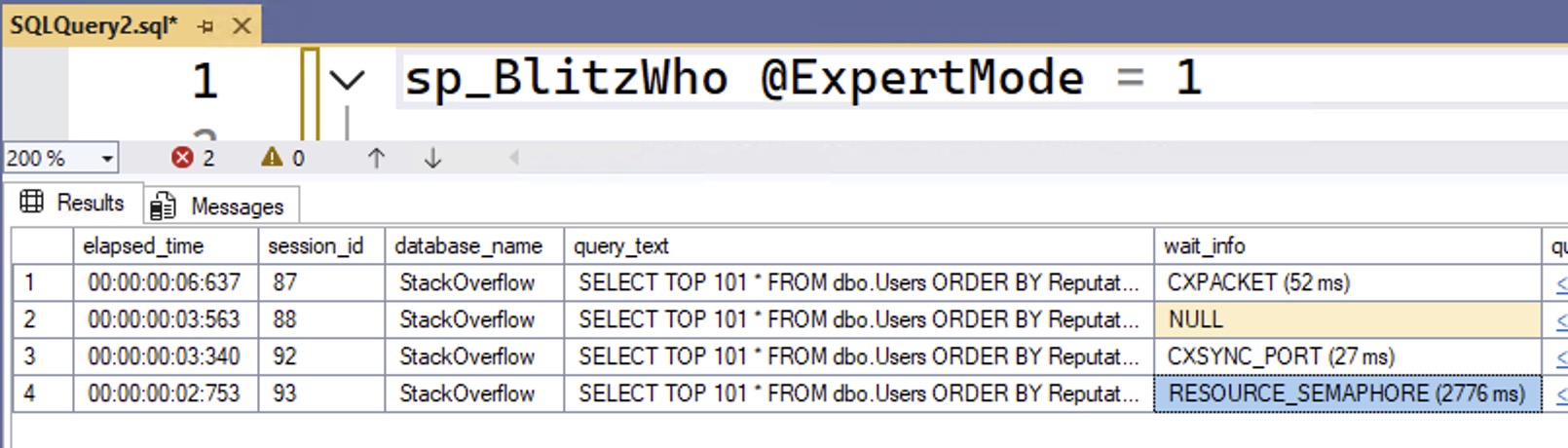
We can see that we have a query waiting on RESOURCE_SEMAPHORE, which means that SQL Server has run out of memory to give to queries, and queries are being forced to queue up before they can get granted the memory they need to begin running.
As soon as our workload finishes, though, that memory pressure disappears, and it can be tough to know that memory pressure was the reason queries were held back at the starting gate. Let’s query that new DMV to see what it shows:

When the database engine isn’t under any memory pressure, the severity_level will be 1, and severity_level_desc will be LOW. There’s no such thing as severity 0, or a description of “we’re not having a memory problem right now.” I guess to the Microsoft developers, there’s always a need for more memory, and I can’t get mad about that diagnosis.
To see more details about your own server’s memory history, query the DMV, and expand the top_memory_clerks column to show the parts of SQL Server that were using the most memory in each snapshot:
|
1 2 3 4 5 6 7 8 9 10 11 12 13 14 |
SELECT snapshot_time, severity_level, allocation_potential_memory_mb, reclaimable_cache_memory_mb, clerk_type, pages_allocated_kb FROM sys.dm_os_memory_health_history h CROSS APPLY OPENJSON(top_memory_clerks) WITH ( clerk_type sysname '$.clerk_type', pages_allocated_kb bigint '$.pages_allocated_kb' ) WHERE h.severity_level > 1 ORDER BY snapshot_time DESC, pages_allocated_kb DESC; |
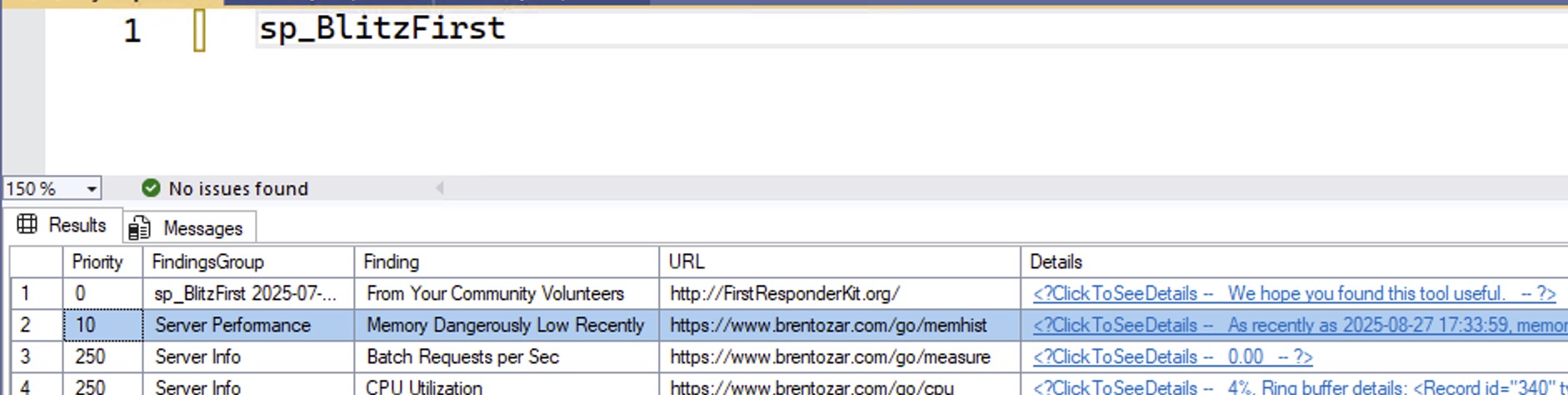
In the upcoming October 2025 release of the First Responder Kit, we warn you in both sp_Blitz and sp_BlitzFirst when this is happening to you, too, making it even easier to troubleshoot your servers:

5 Comments. Leave new
Hello guys, please also note that you can use MemoryManagerInfo SP to see break down of how memory is currently used by your SQL Server (and Azure SQL DB / MI) instance.
https://github.com/aleksey-vitsko/Database-Administrator-Tools/blob/master/MemoryManagerInfo.sql
It will show components such as database cache, plan cache, lock memory, log pool memory, connection memory, stolen memory, granted memory (queries), etc., as well as memory clerks (in the expert mode).
Hi Brent, Being mute, I am stuck texting but if I could speak I could explain with relative ease in front of a white board.
The problem with the DBA approach and problems with sp_blitz is you have to wait for the TSQL developer to run the query and run those queries frequently enough to gain the attention of the DBA. Chinese imperial exam had a question on how to drain a swamp, but the first issue is to stop the flow of water entering the swamp in the first place. This is the problem with SQL development.
In C#, with SqlParser, I can detect “SELECT *” as this these SqlCodeObject classes are of type SqlNullStatement. If you deserialize the SqlCodeObject tree this is a simple LINQ statement to find all the “SELECT *” statements. With SqlParser you can easily find every table and column reference in a query so when you do your magic of recasting something to NVARCHAR(4000) on a column that was much smaller it’s easy to gather that information and come up with a WARNING of potentially high memory grants. SSMS and Visual Studio job does a terrible job or aiding the TSQL developer.
If you write a replacement class for ADO classes like SqlCommand I can prior to calling Microsoft.Data.SqlClient, I can insert at “SET STATISTICS XML ON” and I can get the actual execution plan returned. As that is an XML Document, I can dump that 2nd dataset returned into an XDocument and I can find large memory grants as well as TABLE/INDEX SCANs and IMPLICIT CONVERT. If I see a problem I can because I know Roslyn I can find the exact C# file as well as the line number where that SqlCommand was called from. Now I can tell the C# developer to go back and clean up their mess.
With Entity Framework it’s a bit easier with Roslyn because for any given solution, I can scan every project for all Entity Framework database calls and get the SQL that is being generated by converting that project code into a testing project code thus I can not only tell you where that Entity Framework is being called but can easily highlight that code in the editor.
Since I know what the queries and programmability code resides in the C# application I can now fully document not only where each and every table and column are being referenced but also what kind of CRUD statement and what kind of clause in those CRUD statements as well for documentation. If I decided to change Ben Miller’s name to “SQLDuck” I can tell you where that is possible within an application.
Programmability code is easier.
Trick is to catch to stop the flow of water from entering the swamp. Developers never really test.
If I could get somebody to speak at a presentation for me, I think what I have here could compete with you at any SQL conference anywhere in the world.
Your best bet would be to write a blog post about your topic. I don’t think a comment here on an unrelated post is really going to get you any traction, and most of the readers here aren’t your target audience. I literally don’t even know what Roslyn is.
(And nothing personal, but please don’t try to explain it here – this isn’t the right forum for this. You really wanna start a web site so you can write and share your knowledge in a way that works for you.)
I know it’s not the answer you wanna read – I can feel that you want me to get involved in this – but my plate is really full right now. Hope that’s fair.
[…] SQL Server 2025 Makes Memory Troubleshooting Easier. (Brent Ozar) […]
[…] Brent Ozar checks out a new DMV: […]