
Microsoft Now Recommends You Set Max Memory to 75% and Min Memory to 0%.
Somehow I missed this a few years ago, and I bet a lot of y’all did too. Note the new “Recommended” column in the memory settings documentation:
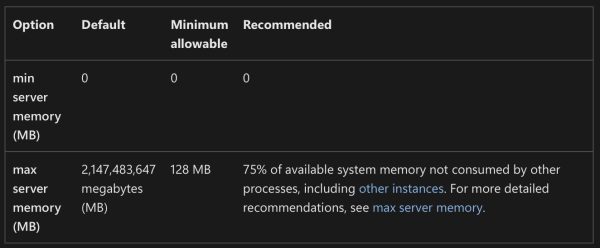
These recommendations are also set by the SQL Server 2022 setup wizard if you choose the recommended settings on the memory step.
The documentation change was made in this pull request, and I don’t see a Github issue or documentation/comments around the recommendation, which is totally fine. I don’t expect (or desire) Microsoft to have a public discussion on every settings change they make – nobody would ever get anything done, hahaha.
When I noticed it, I posted about it on LinkedIn, and there was a vibrant discussion. Randolph West (of Microsoft’s Docs team) posted about it too. People talked about how this should probably be automatically managed, and I’d point out that if you follow Microsoft’s recommendations, it actually is automatically managed! SQL Server will size its memory up (and under pressure, down) based on what’s happening on the server.
I do wish Microsoft’s recommendations added another factor: a different recommendation for big servers. 25% unused memory is pretty high when the server has 512GB memory or more. For example, in my setup checklist, I recommend leaving 10% free or 4GB, whichever is greater. Here’s part of the script that my lab servers run on Agent startup, where I use a 15% number instead because I also run SSMS on those:
|
1 2 3 4 5 6 7 8 9 10 11 12 |
/* Set max server memory to MIN(85% of total RAM, total RAM - 4 GB). */ DECLARE @target_mb BIGINT; SELECT @target_mb = CASE WHEN (physical_memory_kb * .85) + (4 * 1024 * 1024) >= physical_memory_kb THEN (physical_memory_kb - (4 * 1024 * 1024)) / 1024 ELSE (physical_memory_kb * .85) / 1024 END FROM sys.dm_os_sys_info; EXEC sys.sp_configure N'max server memory (MB)', @target_mb; RECONFIGURE WITH OVERRIDE; |
That way, when I change an instance’s size, I don’t have to worry about going back and touching max server memory.
I’m not saying 10%, 15%, 25%, or 4GB is the right number, but I think we do need to consider both a percentage and a floor at the same time. Otherwise, people with 16GB VMs are going to say 25% sounds about right, and the people with 1TB servers are going to say 5% is plenty of memory to leave unused.
I’m not opening a pull request to change the documentation recommendation (let alone the setup wizard) because I think y’all will have strong opinions, and I’d rather hear those first. I certainly don’t have the right definitive answer on this one – I’m confident enough to put it in my setup checklist, but not so confident that I’d ask my guidelines to be the official documentation, hahaha.

20 Comments. Leave new
I think that’s an improvement over the old *default* and much safer starting point for the subset of admins who will never touch that setting. I still prefer a scaling factor that takes into account the total server memory.
I get the reasoning, but what if you have several instances on the same server… they can’t all be 75%
That’s called instance stacking. Check this out: https://www.brentozar.com/archive/2016/12/install-multiple-instances-sql-server/
We just did testing this summer on a SQL Server with 128 GB of RAM. We gave SQL 96 GB of RAM and tried leaving 24 GB, 28 GB and 32 GB for the operating system in 3 different tests. The server only became stable once 32 GB was available proving the 25% memory rule. Have not had a single issue since. I’d be interested to hear if anyone has tested larger RAM configurations in this way.
Like I wrote in the post above – seriously, you should read it, it’s pretty good – there is no one percentage guideline that works for all server sizes because different servers have different things installed on them.
What all is installed on that server?
Good question. There is quite a bit installed on that server including SSMS, SSIS, anti-virus and a bunch of monitoring tools. I would consider it to be operating system heavy with all the extra stuff and hence the 25% memory requirement in my case.
One thing I’d like to add is that when we had less that 25% allocated to the operating system, we ended up with an unstable event happening as Windows patches were being downloaded to the SQL Server via WSUS in the middle of the afternoon. My gut feeling is that there is a local Windows process that is using 25% of server memory as its upper memory limit while executing and whatever it is, it interferes with SQL Server. Maybe it’s related to DataStore.edb but I never took the time to investigate deeper. Our server has not encountered any unstable events since by using the 75% SQL/25% OS memory guideline.
The other factor is whether or not you’re using the server for anything else. I’ve noticed that in some cases you have a SQL/application/web server all wrapped into one and the memory requirements there are going to be very different.
Similar for a server that also hosts SQL services like SSIS, SSAS, and SSRS. We have a couple of those for work units that don’t want to share. Actually, I don’t think I’ve seen any solid recommendations on how much memory should be left for those services when co-hosted with SQL server.
But for a stand-alone SQL server with no additional services? I don’t know why the OS would need more than 8 GB of memory… pretty much ever. It doesn’t do anything but run SQL server.
I’ve been following your recommendations for max server memory for over a decade, I usually set minimum server memory to zero already. Given how certain sites stack databases on an instance and how much they starve the memory[1], I just try to leave 5 or 6 GB free on the machine for OS and SSMS on the smaller ones and a bit more on the larger ones.
[1] Some get a default of 16GB per a template. Yes, they’ve blocked off using SSMS from the desktop or even jump servers for 90-95% of the servers.
Be careful on Linux, even on 1TB servers, 25% can get leaked away.
The article does say you should test, and that the 75% is a guideline, but you know what people are like with magic numbers.
My personal opinion is to just use Jonathan’s script, and that’s why my blog has a table for this very thing: https://bornsql.ca/s/memory/
I don’t know what Microsoft’s plan was with this when they started this effort. The Exchange Team from at least 2003-2016 (never worked with other versions) figured out how to make memory recommendations and provided an excel calculator to help you figure it out. While the workload was totally different, they did have recommendations for minimum memory requirements for the OS and Binaries.
As a default, I think their numbers are fine, and better than what is in place now. (for what they are charging for the product and not delivering, they could pay an intern to write a powershell script that runs during set up to make a more precise recommendation.) But this is the product that ships with a memory limit that is matched by a fairly standard developer laptop now.
I am curious if they got pressure from the Windows team to not directly acknowledge that windows server with a desktop needs 4 Gb of RAM to run optimally doing absolutely nothing, likely a minimum of 8 to host any role or light application without memory pressure and adding any SQL role is likely at least another 2-4 Gb needed at minimum for each SQL role. While RAM may be cheap, this amount of RAM is not cheap in IaaS.
Adding other applications onto the SQL server, sure it will need more memory, but every application that has ever been installed has needed its own memory. I think this requirement is only going to create problems for DBAs down the road when management or systems see the documented recommendations and don’t want to deviate from it. Some DBAs may get more hardware than they need, some are going to end up with a migration to a different database like postgres when the 16 core SQL server becomes a 32 core SQL server because the recommendation steals a quarter of the memory from the instance.
I’d rather see a recommendation for server core, server gui, actual memory requirements for each SQL role and then stern recommendations around memory needs of other apps, particularly for development tools and web browsers.
We recently had a runaway process (caused by a corrupt index file) on one of our production servers which used a huge amount of memory. We didn’t notice at first because SQL Server was holding onto a large chunk of memory, it only became apparent when the server was rebooted after patching, the mem usage of the runaway process crept up at a faster rate than SQL Server was needing buffer space. This was a really basic Windows process at fault and it seems like a rare issue but we want to avoid anything similar happening in future. We’ve therefore set a nonzero value for min server memory to avoid the instance becoming starved. Made me think leaving min server memory at 0 doesn’t seem sensible if you don’t fully trust whatever else is on the server (including your OS!), and particularly if your baseline memory usage is known and fairly predictable.
With SQL Server running on a VM, you have a couple of additional things to consider. Where do you set the max memory and memory buffer in the VM settings? Do you use Dynamic Memory? We run our SQL Servers as SQL only on VMs. Nothing else, including users or SSMS is running there. We set the Dynamic memory Min to 16 GB, the max to 128 GB, the memory buffer of the VM to 15%, and the SQL max to 112 GB. Memory scales up gently as the server is loaded, and can scale back down if we need to unload a node and start causing memory pressure.
instead a flat percentage they should really have invested more thoughts into it – what’s the problem to make different recommentations based on the OS (Linux/Windows), total RAM size etc.
25 % RAM on a 128 GB RAM server are 32 GB free RAM. 25% on a 1 TB RAM system are 256 GB RAM and even 10% would be 102 GB.
Regardless how many SSMS instances you are running on the server (that you shouldn’t – use a separate VM for this) – it is very unlikely that this will be ever used (even the 32 GB on small server, that’s a upper class laptop nowadays)
As long as people aren’t leaving it set to 2,147,483,647 MB and put some thought into, then I’ll be happy
[…] Microsoft Now Recommends You Set Max Memory to 75% and Min Memory to 0%. (Brent Ozar) […]
As everyone agrees, a single percentage is clearly not really helpful. We have 1T RAM and there seems no plausible reason why on this SQL-only server 256GB should be set aside … for what!? Microsoft’s laziness in this (and other matters too numerous to mention!) will continue to fuel the transition to open source alternatives.
I’m sure this is more about a safety margin. It’s a recommendation that applies to all scenarios, including small servers with limited resources. Those dealing with a larger server usually already have more knowledge and know what fits best. After all, it’s a recommendation, not an obligation.