
How SQL Server 2025’s Optional Parameter Plan Optimization Works
About three years ago, SQL Server 2022 introduced Parameter-Sensitive Plan Optimization (PSPO). At the time, I explained that it didn’t work particularly well, and went so far as to pronounce PSPO in a rather unflattering way. I wouldn’t suggest that anyone turn it off – it’s fine, just fine – but it isn’t powerful enough, and poses serious challenges for monitoring and plan cache analysis.
SQL Server 2025 improved PSPO to handle multiple predicates that might have parameter sensitivity, and that’s great! I love it when Microsoft ships a v1 feature, and then gradually iterates over to make it better. Adaptive Memory Grants were a similar investment that got improved over time, and today they’re fantastic.
SQL Server 2025 introduces another feature to mitigate parameter sniffing problems: Optional Parameter Plan Optimization (OPPO). It ain’t perfect today – in fact, it’s pretty doggone limited, like PSPO was when it first shipped, but I have hopes that SQL Server vNext will make it actually usable. Let’s discuss what we’ve got today first.
OPPO is for those kitchen-sink stored procedures where one query has a lot of optional parameters that might or might not be called at runtime, like this example using the Stack Overflow database:
|
1 2 3 4 5 6 7 8 9 10 11 12 13 14 15 16 |
CREATE OR ALTER PROC dbo.SearchUsers @DisplayName NVARCHAR(40) = NULL, @Location NVARCHAR(100) = NULL, @WebsiteUrl NVARCHAR(200) = NULL AS SELECT TOP 100 * FROM dbo.Users WHERE (DisplayName = @DisplayName OR @DisplayName IS NULL) AND (Location = @Location OR @Location IS NULL) AND (WebsiteUrl = @WebsiteUrl OR @WebsiteUrl IS NULL) ORDER BY Reputation DESC; GO CREATE INDEX DisplayName ON dbo.Users(DisplayName); CREATE INDEX Location ON dbo.Users(Location); CREATE INDEX WebsiteUrl ON dbo.Users(WebsiteUrl); GO |
You can search by display name, location, website url, or any combination thereof. I’m not going to illustrate the problems with this in previous versions of SQL Server – they’re well-known and well-documented – and instead I’ll jump to SQL Server 2025 compatibility level, and turn on OPPO:
|
1 2 3 4 5 6 7 |
ALTER DATABASE CURRENT SET COMPATIBILITY_LEVEL = 170; ALTER DATABASE SCOPED CONFIGURATION SET OPTIONAL_PARAMETER_OPTIMIZATION = ON; GO DBCC FREEPROCCACHE; GO EXEC dbo.SearchUsers @DisplayName = N'Brent Ozar'; |
The query runs in milliseconds and does a nice, fast index seek into our DisplayName index:

If you scroll through the query in the plan, you’ll notice that the query has been modified by both PSPO and OPPO. I’m formatting it here to make it a little easier to read:
|
1 2 3 4 5 6 7 8 |
SELECT TOP 100 * FROM dbo.Users WHERE (DisplayName = @DisplayName OR @DisplayName IS NULL) AND (Location = @Location OR @Location IS NULL) AND (WebsiteUrl = @WebsiteUrl OR @WebsiteUrl IS NULL) ORDER BY Reputation DESC option (PLAN PER VALUE(ObjectID = 1957582012, QueryVariantID = 1, predicate_range([StackOverflow].[dbo].[Users].[Location] = @Location, 100.0, 10000.0), predicate_range([StackOverflow].[dbo].[Users].[WebsiteUrl] = @WebsiteUrl, 100.0, 1000000.0), optional_predicate(@DisplayName IS NULL))) |
The “PLAN PER VALUE” and “predicate_range” stuff comes from PSPO, but the “optional_predicate” stuff is new! That means that OPPO detected that DisplayName is an optional parameter that might or might not get passed in.
So now, if we search by location instead:
|
1 |
EXEC dbo.SearchUsers @Location = N'Las Vegas, NV'; |
We get an execution plan that’s perfectly tuned for… wait, hang on a second:

That query plan is doing an index scan, not a seek, on the Location index. It’s reading all of the rows in the table, which takes about a second. Plus, the estimate of 5 rows isn’t all that great, either. What query was created?
|
1 2 3 4 5 6 7 8 |
SELECT TOP 100 * FROM dbo.Users WHERE (DisplayName = @DisplayName OR @DisplayName IS NULL) AND (Location = @Location OR @Location IS NULL) AND (WebsiteUrl = @WebsiteUrl OR @WebsiteUrl IS NULL) ORDER BY Reputation DESC option (PLAN PER VALUE(ObjectID = 1957582012, QueryVariantID = 2, predicate_range([StackOverflow].[dbo].[Users].[Location] = @Location, 100.0, 10000.0), predicate_range([StackOverflow].[dbo].[Users].[WebsiteUrl] = @WebsiteUrl, 100.0, 1000000.0), optional_predicate(@DisplayName IS NULL))) |
The only thing that changed here is that we’ve got a different QueryVariant, but, uh… this is still a bad plan. It’s just a different plan. What if we search by website?
|
1 |
EXEC dbo.SearchUsers @WebsiteUrl = N'https://www.brentozar.com' |
The query takes SEVENTEEN SECONDS to run, eventually producing this query plan:
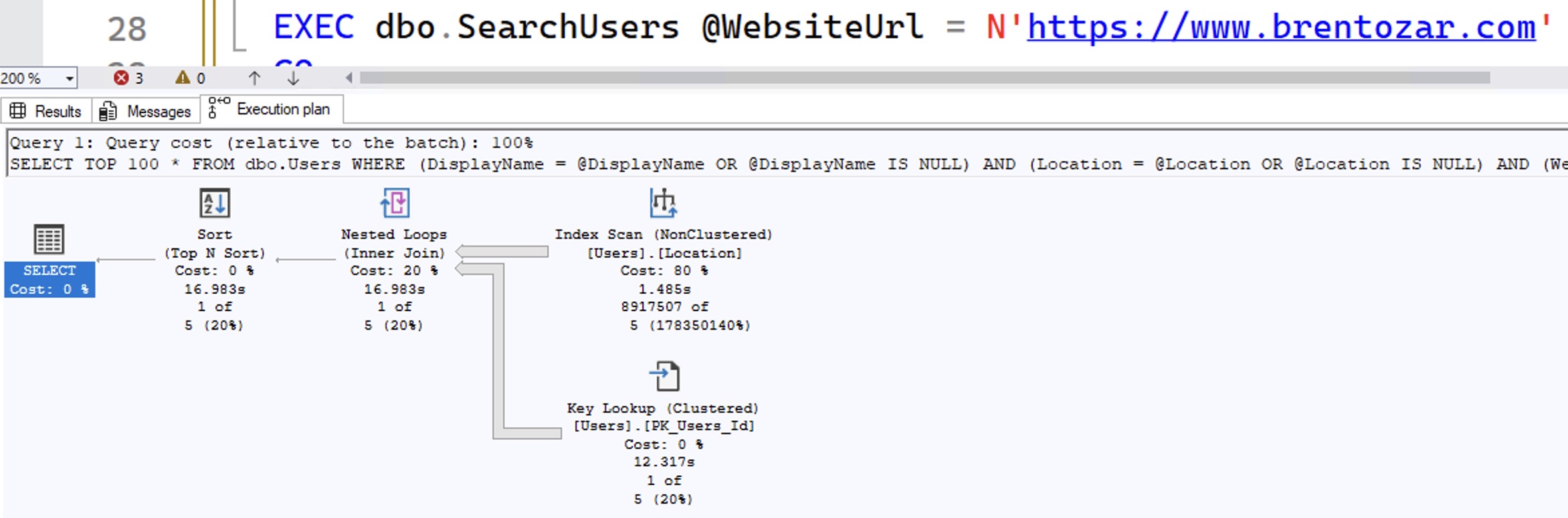
Because it’s reusing the Location query, as evidenced by the QueryVariantID = 2 in the query it came up with:
|
1 2 3 4 5 6 7 8 |
SELECT TOP 100 * FROM dbo.Users WHERE (DisplayName = @DisplayName OR @DisplayName IS NULL) AND (Location = @Location OR @Location IS NULL) AND (WebsiteUrl = @WebsiteUrl OR @WebsiteUrl IS NULL) ORDER BY Reputation DESC option (PLAN PER VALUE(ObjectID = 1957582012, QueryVariantID = 2, predicate_range([StackOverflow].[dbo].[Users].[Location] = @Location, 100.0, 10000.0), predicate_range([StackOverflow].[dbo].[Users].[WebsiteUrl] = @WebsiteUrl, 100.0, 1000000.0), optional_predicate(@DisplayName IS NULL))) |
To make matters worse, if we blow the plan cache and try these queries again, but in different order this time:
|
1 2 3 |
DBCC FREEPROCCACHE; GO EXEC dbo.SearchUsers @WebsiteUrl = N'https://www.brentozar.com' |
If WebsiteUrl is searched for first, then it’s fast, running in milliseconds:

Because SQL Server picked a different parameter to use as the optional one! Check out the query that OPPO built:
|
1 2 3 4 5 6 7 8 |
SELECT TOP 100 * FROM dbo.Users WHERE (DisplayName = @DisplayName OR @DisplayName IS NULL) AND (Location = @Location OR @Location IS NULL) AND (WebsiteUrl = @WebsiteUrl OR @WebsiteUrl IS NULL) ORDER BY Reputation DESC option (PLAN PER VALUE(ObjectID = 1957582012, QueryVariantID = 1, optional_predicate(@WebsiteUrl IS NULL), predicate_range([StackOverflow].[dbo].[Users].[Location] = @Location, 100.0, 10000.0), predicate_range([StackOverflow].[dbo].[Users].[WebsiteUrl] = @WebsiteUrl, 100.0, 1000000.0))) |
Before, when @DisplayName ran first to populate the plan cache, the optional_predicate was @DisplayName.
Now, when @WebsiteUrl runs first, the optional predicate is determined to be @WebsiteUrl! When Location runs next, it’s relatively quick, although with the same bad scan plan:
|
1 |
EXEC dbo.SearchUsers @Location = N'Las Vegas, NV'; |
The resulting plan:

Then, when DisplayName runs:
|
1 |
EXEC dbo.SearchUsers @DisplayName = N'Brent Ozar'; |
It takes 17 seconds to run:

Even though both PSPO and OPPO kicked in to build it a custom query variant:
|
1 2 3 4 5 6 7 8 |
SELECT TOP 100 * FROM dbo.Users WHERE (DisplayName = @DisplayName OR @DisplayName IS NULL) AND (Location = @Location OR @Location IS NULL) AND (WebsiteUrl = @WebsiteUrl OR @WebsiteUrl IS NULL) ORDER BY Reputation DESC option (PLAN PER VALUE(ObjectID = 1957582012, QueryVariantID = 10, optional_predicate(@WebsiteUrl IS NULL), predicate_range([StackOverflow].[dbo].[Users].[Location] = @Location, 100.0, 10000.0), predicate_range([StackOverflow].[dbo].[Users].[WebsiteUrl] = @WebsiteUrl, 100.0, 1000000.0))) |
Summary: OPPO’s Pretty Limited in 2025.
Before Microsoft introduced 2022’s PSPO and 2025’s OPPO, we struggled with the problem of queries getting dramatically different performance depending on which parameters go into cache first.
Aaaaand we still do.
OPPO does seem to help if your query has exactly one, and only one, optional parameter. In real-world complex query scenarios, that doesn’t cut it. However, I hold out hope that OPPO will get the same gradual investments that Adaptive Memory Grants and PSPO got over time, and by the time SQL Server 2028 (or whatever they call it) rolls around, we’ll be in a better situation for parameter sniffing problems.
I mean, by the time your organization deploys SQL Server 2028. So, like, uh, 2030.

15 Comments. Leave new
So, really no performance improvements between the mistakes known as 2019 and 2022 and 2025?
Sorry… it’s become a sarcastic “Dad Joke” that isn’t really a joke for me.
Them: “Hey Jeff! How does that proc run???”
Me: “Significantly Slower in SQL 2022”.
Brent would write “Read the second last paragraph again” 🙂
When there is just a single optional parameter, it would work. So not for search formulars with a ton of possible parameters, but for the typical either-process-all-stuff-or-when-I-give-you-an-ID-just-this-one procedures (we have a lot of them – currently usually with an OPTION (RECOMPILE)
Hahaha, bonus points to Thomas for that psychic reply.
Jeff – it’s way too early in my testing to tell – I’m onsite with a client this week, and from here I head out to Europe for a month of vacation & conferences. I would suggest that folks get a replay of their production workloads and test it out, compare execution plan changes, etc.
I used to offer that as a service to clients myself – give me access to production-grade hardware and the production server’s monitoring, and I’d take the top queries and compare them on the new CTP version to see what changed. I can’t do that for this release given my summer schedule though. I miss doing that because it gave me better insight into real-world workload changes, and it helped me build better training material & blog posts. I just don’t think it’s in the cards for this release due to some stuff going on in my personal life.
I’ll do those rounds of testing, but not until after the final version goes live.
I don’t actually need to replay a production load, Brent. I have some “tattle tale” test code that I run on a 2017 instance and a 2022 instance that clearly demonstrates that there’s something gone fundamentally wrong with CPU processing performance. When the RTM of 2025 hits the street, I’ll just do the same simple testing on the same machine. For some reason, I expect 2025 to be even slower than 2022.
And, enjoy your month of relaxation.
Ooo awesome! Yeah, I wouldn’t be surprised if every version got incrementally slower. As they add new query compilation choices, for example, it’s gonna take longer to compile queries, like deciding whether or not to use OPPO. I can imagine a PM saying, “The new version is 3% slower, but CPUs have gotten a lot more than 3% faster since the last release, so it’s a wash.”
I’m not saying I agree, but I can imagine that discussion happening.
We are still on 2019, but there too I see a lot of queries having issues with inter-thread communication, causing very long wait times for no clear reason. We remedy it by using maxdop 2 or maxdop 1 for such queries. After that, performance is usually good, which is strange, in the past most queries actually benefited from more parallel operations.
As for the original topic of catch-all queries, most SQL get generated in the application layer, so SQL Server never gets to see a catch-all query. But in case it happens, option recompile does the job.
If we have to do it in a stored procedure, there is always the option to generate SQL dynamically there. Less pretty, but only worth it if it’s on a critical execution path IMO.
“I mean, by the time your organization deploys SQL Server 2028. So, like, uh, 2030.” …wow, optimistic much? 😀
Finally persuading management we need to go to 2022; won’t all happen this year.
so SQL 2025 fixes the missing execution plans in pisspoor?
After experiencing extremely slow stored procedure performance due to parameter sniffing I have since structured my Stored Procs so that the Parameter was first assigned to an internal Parameter (Declare) so the internal parameter is used in the query instead. It looks like that is still the way to go?
That is definitely not the way to go, and I explain why in my Fundamentals of Parameter Sniffing training class. See you there!
The only reason I can think of to do this when you have partitioned tables – their queries should not simply join to another table on the partition column (in this case there would be no partition elimination, since the SQL server doesn’t know at compile time, that there are just two days in your #tmp, that you are joining).
Instead declare and fill @min_date / @max_date and use it in the WHERE (even if it is a bit reduntant)
SELECT … FROM orders o INNER JOIN #last_orders as lo on lo.order_date = o.order_date and lo.order_id = o.order_id WHERE o.order_date BETWEEN @min_date and @max_date
This way the SQL server knows at compile time that there is a limited period in #last_orders and eliminiates unused partitions depending on the two variables.
——–
For queries as in Brent’s example you can/have still to specify an OPTION(RECOMPILE) and hope that this is not a query that will run 500 times per second (in this case create repeat yourself and write multiple IFs / procedures / functions for each parameter combination).
Or use dynamic SQL. I once worked on a project, where the whole statement with all optional parameters where in a table/txt/whatever and the app commented removed every line with a check on a parameter that was not specified e.g. in the search formular before sending it to the SQL server.
Have struggled with this kind of stored procedures for 20+ years, have been doing a list of workarounds, recompile, dynamic sql in the SP, my own dispatcher that creates multiple versions of SPs rewriting references to parameters that get called with null values, lots of if statements, temp tables, other rewrites of SPs,…
So when I read about this feature I thought – Finally!
Did a similar test.
Got the same result – it only makes two execution plans, so works only if you have one nullable parameter.
Is there no way to get it to work? Some parameter for the PSPO feature that makes it want to create more execution plans for each query/SP ?
Please tell me there is!
[…] Brent Ozar – How SQL Server 2025’s Optional Parameter Plan Optimization Works […]
[…] Brent Ozar – How SQL Server 2025’s Optional Parameter Plan Optimization Works […]
[…] Brent Ozar – How SQL Server 2025’s Optional Parameter Plan Optimization Works […]