
SQL Server 2022 Finally Fixed a SQL Server 2008 Query Plan Bug!
For yeeeeeears, when I’ve explained execution plans, part of my explanation has included the instructions, “Read the plan from right to left, top to bottom, looking for the place where the estimates vs actuals are suddenly way off.” Here’s an example:

Things seem to be going okay on the query plan until you hit the key lookup, which brought back 13 rows of an estimated 19,452. That would appear to be a pretty doggone bad estimate.
However, that’s not an estimation problem: it’s a decade-old bug in SQL Server. ENHANCE:
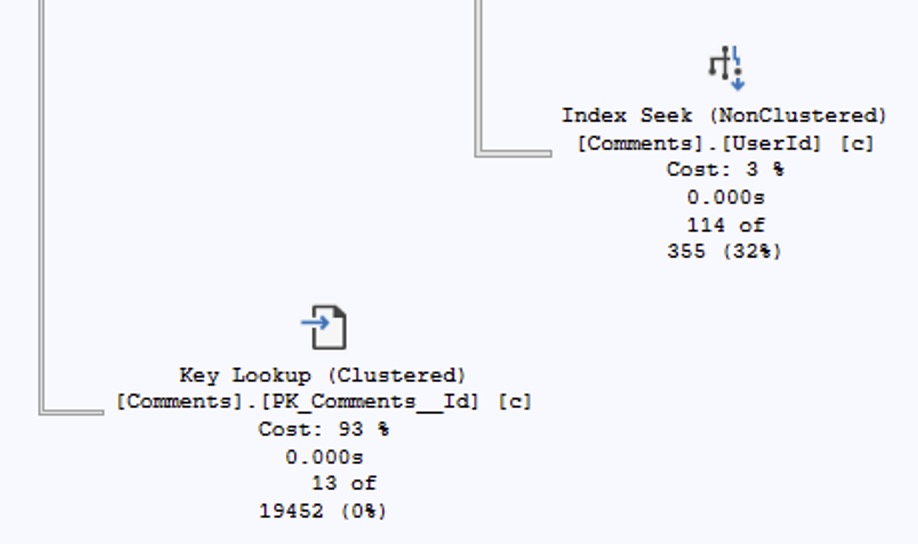
If a nonclustered index seek is estimated to produce 355 rows, then when we look up their keys in the clustered index, we will only find 355 matching rows, full stop. (I mean, unless there’s database corruption, ha ha ho ho.) The correct estimate for the key lookup has to be 355 rows, not 19,452.
So in my execution plan explanations, I’ve had to constantly add, “Unless it’s a key lookup, in which case, ignore it because the estimates aren’t even right. Just keep moving through the plan and look at the join operator instead.” Paul White first blogged about this back in 2012, but it’s been the case going all the way back to 2008.
Good news! I just learned last week (shout out to Tim Tanner) that compatibility level 160 (SQL Server 2022) finally fixed this bug!

You might think, “Hey, wait, that’s a new bug, because shouldn’t the key lookup produce 355 rows, not 55?” That estimate is actually accurate, because the query’s doing some filtering on the key lookup itself. To learn more about the math on that, check out Paul’s post – which he updated in October 2024 to announce the fix, but I missed it because I don’t regularly go back and re-read Paul’s posts. That’s on me, because I should probably re-read all of them every quarter or two. Not because he updates them that frequently, but because they’re complex enough that they require re-reading, hahaha.

5 Comments. Leave new
Is it just me, or should it be: read Execution Plans right to left, BOTTOM to TOP? Or am I wrong here?
Sounds like it’s time for someone to report in for my training classes! WINK WINK
If it helps remember the order, imagine that you’re diagramming the execution path of an imperative software program. For an individual function, you’d write out each statement from top to bottom. For each statement that represented a subcall, you’d draw an arrow to the right and then document that function, again from top to bottom. So, you basically have a tree, but with the root on the left.
If a statement was problematic, this could be due to:
A) A sub-function (look right) feeding it bad data.
B) A previous call feeding it bad data (look up)
C) The statement itself
It’s possible for the problem to any combination of A, B, and C. However, if the problem is due to A or B, C will also spit out bad data (GIGO), even if there’s otherwise nothing wrong with C. Hence, if you already know A and/or B have problems, it’s inefficient to try to investigate C: At a minimum, one of the problems with C is A/B: Fix that first (it’s definitely broken), then see if C is still wrong.
I suppose someone at MS read your 1st April post and thought “Oh God, maybe we can fix at least one of that multi-decade-old bug…”
Just kidding (after all, if Paul confirmed that the fix works in October…), but who knows? ?
[…] SQL Server 2022 Finally Fixed a SQL Server 2008 Query Plan Bug! (Brent Ozar) […]