
What If You Need to Index a Lot of Duplicate Data?
Let’s get a little nerdy and look at database internals. Create two tables: one with a million unique values, and one with a million identical values:
|
1 2 3 4 5 6 7 8 9 10 11 12 13 14 15 16 17 18 |
DROP TABLE IF EXISTS dbo.AllTheSame; DROP TABLE IF EXISTS dbo.AllDifferent; CREATE TABLE dbo.AllTheSame (Id INT IDENTITY(1,1) PRIMARY KEY CLUSTERED, TimeItHappened DATETIME2 INDEX IX_TimeItHappened); CREATE TABLE dbo.AllDifferent (Id INT IDENTITY(1,1) PRIMARY KEY CLUSTERED, TimeItHappened DATETIME2 INDEX IX_TimeItHappened); INSERT INTO dbo.AllTheSame (TimeItHappened) SELECT GETDATE() FROM generate_series(1,1000000); INSERT INTO dbo.AllDifferent (TimeItHappened) SELECT DATEADD(ss, value, GETDATE()) FROM generate_series(1,1000000); |
I’m just using dates here, not strings, numbers, or other values – those are great experiments for you to play around with as well, dear reader, but I have a specific case I needed to explain to a client, thus the blog post, and if you want me to write tailored blog posts to your specific scenario, you’re welcome to hire me just as these fine folks did.
Anyhoo, compare their index sizes with sp_BlitzIndex:

Both indexes are 17.7MB. Right about now, you’re thinking, “But Brent, who cares? They both store 1 million dates and 1 million IDs.” Yes, but why does SQL Server store the same date over and over?
Proving the Duplicate Storage
Shout out to AI for banging out a quick query to list the 8KB pages involved with an index:
|
1 2 3 4 5 6 7 8 9 |
SELECT allocation_unit_type_desc, page_type_desc, allocated_page_file_id, allocated_page_page_id, page_level, is_allocated FROM sys.dm_db_database_page_allocations(DB_ID(), OBJECT_ID('AllTheSame'), 1, NULL, 'DETAILED') ORDER BY allocated_page_file_id, allocated_page_page_id; |
Nice, easy-to-read results:

We can pass the database name, file number (1), page id, etc to DBCC PAGE to see its contents:
|
1 2 |
DBCC TRACEON(3604); DBCC PAGE('DBAtools', 1, 1456, 3) |
Output type 3 (the last parameter) gives us a detailed breakdown of the page’s contents:

And as you scroll down through the output, you’ll see TimeItHappened stored over and over, and they’re all identical. That’s… dumb.
Fixing It with Rowstore Index Compression
Use this command to enable page-level compression for each index, which uses a dictionary to avoid repeating common values:
|
1 2 3 4 5 |
ALTER INDEX IX_TimeItHappened ON dbo.AllTheSame REBUILD WITH (DATA_COMPRESSION = PAGE); ALTER INDEX IX_TimeItHappened ON dbo.AllDifferent REBUILD WITH (DATA_COMPRESSION = PAGE); |
And then recheck their sizes:
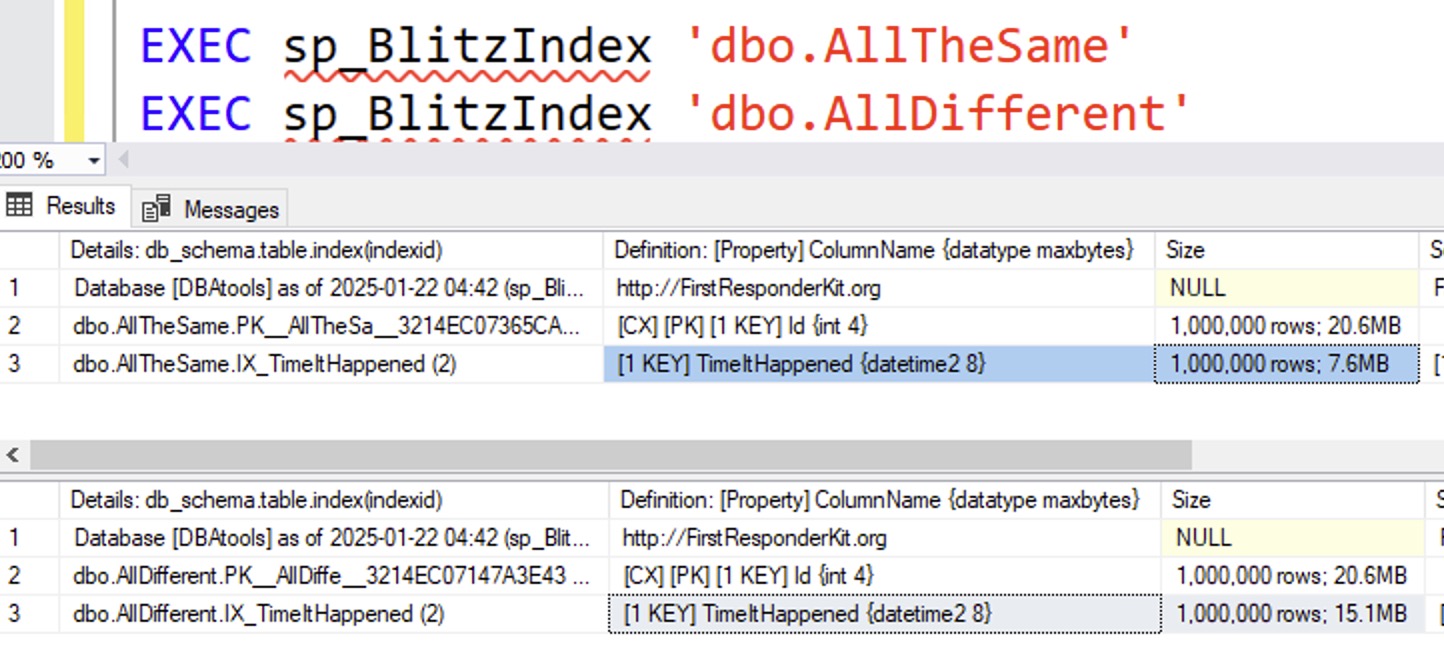
The AllTheSame table’s index is now half the size of the AllDifferent table because AllTheSame’s values are, uh, all the same, so they get compressed much better.
On the other hand, the AllDifferent table’s values are completely, wildly different, and there’s clearly no way that they could be compressed:
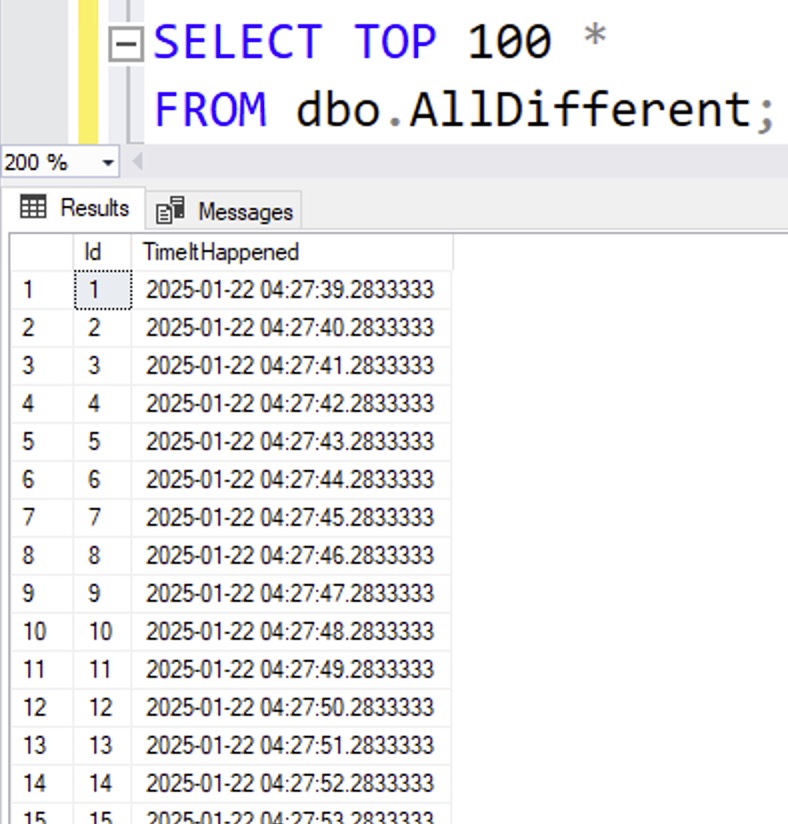
Yep, no way that data could possibly be compressed. </s>
What About Columnstore?
I often say that if you really want compression, your best bet is columnstore. However, I need to do a better job of explaining that, because some kinds of data don’t compress very well. Let’s try nonclustered columnstore indexes on both tables:
|
1 2 |
CREATE INDEX NCCI_TimeItHappened ON dbo.AllDifferent(TimeItHappened); CREATE INDEX NCCI_TimeItHappened ON dbo.AllTheSame(TimeItHappened); |
And then check their sizes:
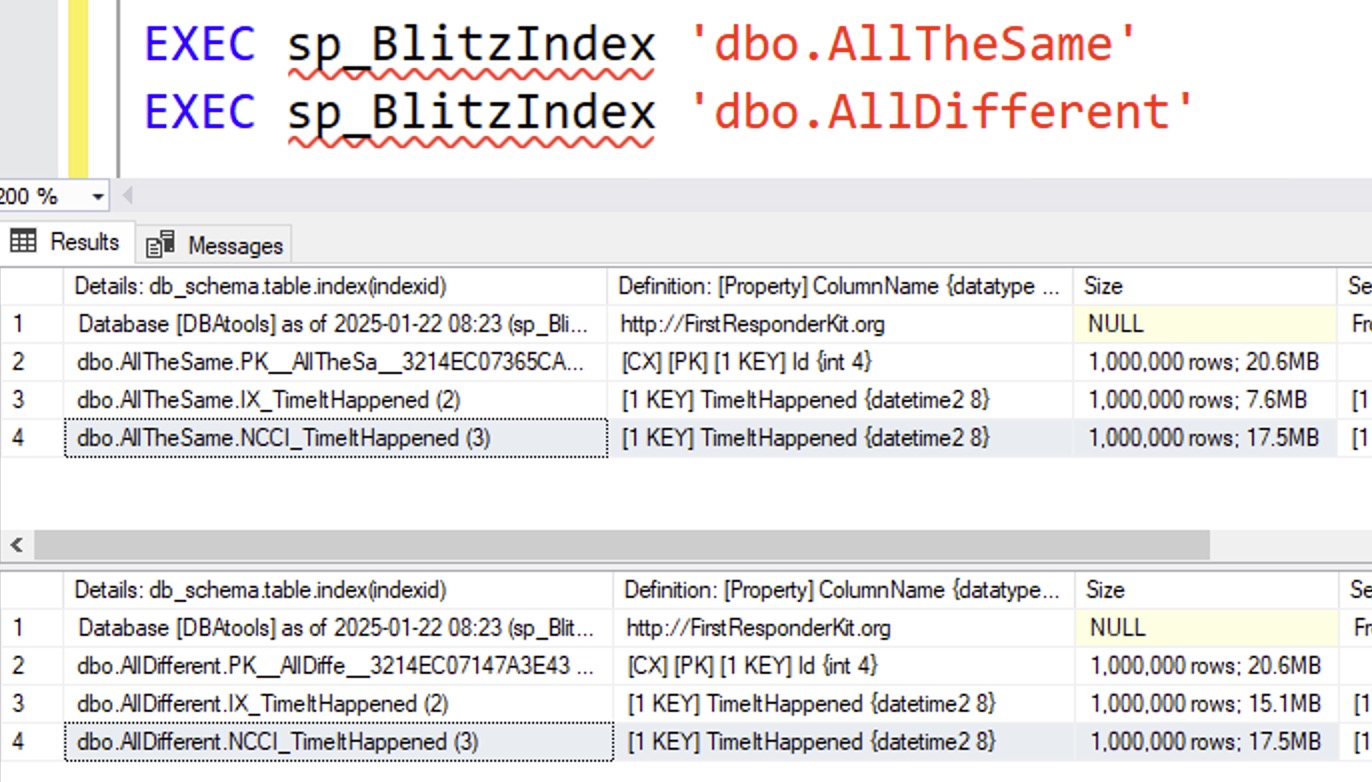
In this particular situation, nonclustered columnstore indexes are actually larger than their rowstore counterparts! That’s no bueno. What about clustered columnstore?
|
1 2 3 4 5 6 7 8 9 10 11 12 13 14 15 16 17 18 19 20 21 22 23 |
DROP TABLE IF EXISTS dbo.CS_AllTheSame; DROP TABLE IF EXISTS dbo.CS_AllDifferent; CREATE TABLE dbo.CS_AllTheSame (Id INT IDENTITY(1,1), TimeItHappened DATETIME2, INDEX CS CLUSTERED COLUMNSTORE ); CREATE TABLE dbo.CS_AllDifferent (Id INT IDENTITY(1,1), TimeItHappened DATETIME2, INDEX CS CLUSTERED COLUMNSTORE ); INSERT INTO dbo.CS_AllTheSame (TimeItHappened) SELECT GETDATE() FROM generate_series(1,1000000); INSERT INTO dbo.CS_AllDifferent (TimeItHappened) SELECT DATEADD(ss, value, GETDATE()) FROM generate_series(1,1000000); GO EXEC sp_BlitzIndex 'dbo.CS_AllTheSame' EXEC sp_BlitzIndex 'dbo.CS_AllDifferent' |
The size results:
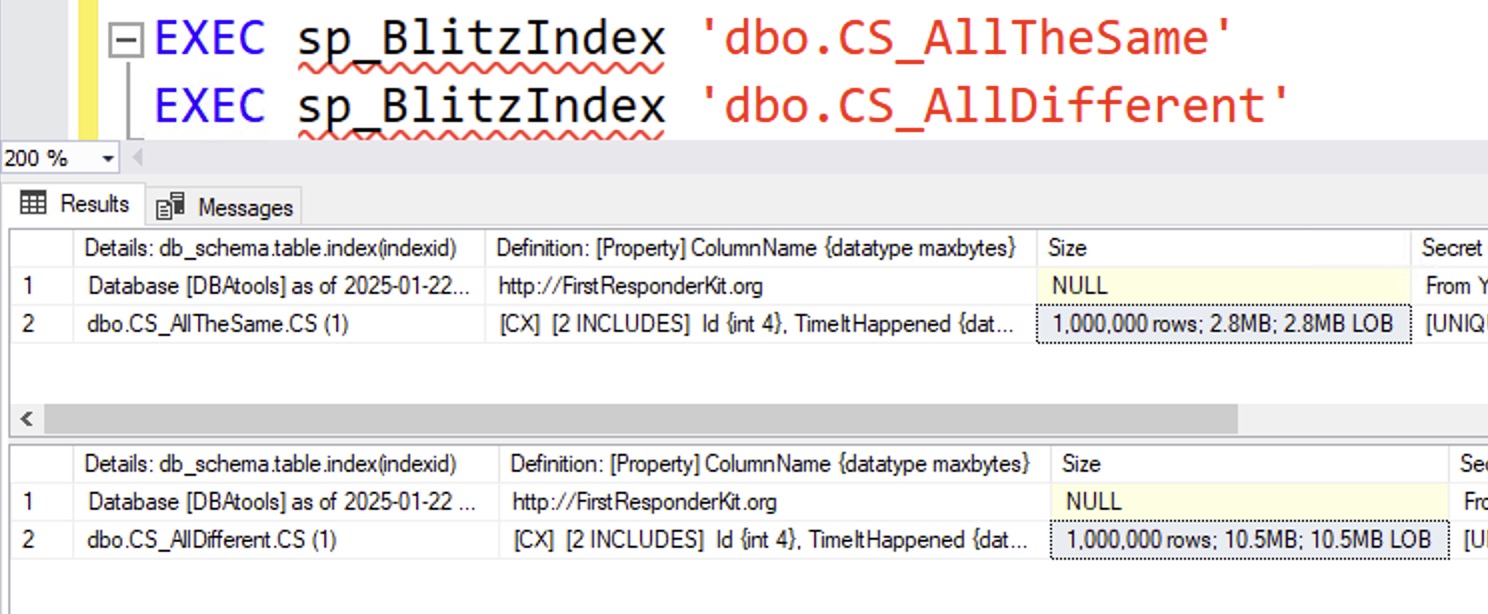
Now we’re talkin’: if the dates are absolutely identical, then clustered columnstore compresses the bejeezus out of these dates. However, I wouldn’t just say across the board, “You should default to clustered columnstore indexes” – because the effectiveness of them varies a lot based on the kinds of data you’re storing (not uniqueness, but more about the datatypes), how you load the data, and how you query it after it’s loaded.
In summary
If you’ve got a lot of identical data, and you need to index it, you’re going to need to tell SQL Server to use some kind of compression – either page compression for rowstore indexes, or clustered columnstore indexes.
In the case of this particular client, we were dealing with a multi-terabyte table consisting of just several columns with dates and numbers. We built out a proof of concept to choose between:
- ~50% space savings with a page compressed rowstore index, which maintained their existing execution plan shapes, keeping query testing simple, or
- ~75% space savings with a clustered columnstore index, which dramatically changed their execution plan shapes, which would require more dev time to test queries to make sure we didn’t get screwed when going live
I was fine either way, and the business chose to go with the former just to get across the finish line quickly. The results really are different when you change the kind of data you store, though, based on its datatypes, uniqueness, query patterns, etc. If you can run your own experiments and take the time to test stuff like this, hopefully my blog posts alone get you across the finish line. If not, you know who to call.

18 Comments. Leave new
[…] found this really interesting because Microsoft SQL Server does not share that same behavior! In SQL Server, a b-tree index’s size is the same whether all the values are unique or all […]
Oh no. I have too many thoughts.
1) I always wondered why Postgres didn’t have its own index compression options. I guess that it’s kind of accurate to say that it’s PAGE compressed by default?
2) I wonder if COLUMNSTORE_ARCHIVE does any better. It should. And I should shut up and load the demo myself to find out, but I only have a 2019 box handy.
3) Niko Neuguebauer’s (what happened to that guy?) old guess for why non-clustered columnstore gets worse compression than clustered was that clustered secretly makes a rowstore index first, thus sorting the data and giving it much better opportunities for compression. This blog is more evidence for that. When you sort this data, you’re going to get a massive run of identical values. Any good compression algorithm will use that well.
Nice! I was able to compress a few indexes, especially on some logging tables. But there’s a caveat — the data compression is incompatible with SPARSE columns or column sets. It’s bonkers to me that indexes with low selectivity don’t already compress themselves to avoid massively repeated values.
This is so well explained, it’s going back to relearning the basics of Databases but wth keen eyes , yes any software is not perfect, humans will always be one bit better than technology. Thanks Brent for unpacking so much in each of your knowledge posts..
– make snippets / macros / templates for index creation that have the page compression set by default
– very small dimenstion tables (as dbo.genders) do not need compression, since even the smallest table takes 2 pages = 16 kb disk space
– compression slows down the write (INSERT / UPDATE) a bit, so if you have some sort of temporary / staging tables where the data sits only for a short time you don’t want to compress it, since it is a waste of time
– compression uses the CPU (~2-5% increase). So if you are already struggeling with very high CPU usage, you may consider to not use it (or not everywhere)
– if you are using partitioning you can compress different partitions with different levels (e.g. COLUMNSTORE_ARCHIV for the very old stuff and the classic COLUMNSTORE for your current data)
– there is ROW compression too (is part of the PAGE compression) which is faster but works only on row level and basically just cuts of unused space because you saved a single digit number in a BIGINT or a datetime without milliseconds in a DATETIME2(7) or used CHAR instead of VARCHAR and the values have spaces at the end.
– I have no idea, why SQL server can’t compress dates and times separate (as in this example, where just the seconds went up). If it fits to your code/workload you could do it by yourself by using a DATE and a TIME column instead of a DATETIME2(x)
– and of course be always aware what you are doing when you are designing your tables. Do you really need a DATETIME2 without specifying the number of digits which is equal to DATETIME2(7)? Are the milliseconds really relevant (e.g. in the OrderDate / ShippingTime) or would a DATETIME2(0) not be a better fit (and increase the compression rate). Are you aware of the “breakpoints”, e.g. that a DATETIME2(3) uses one byte more disk / memory space per row than a DATETIME2(2)? Same for 9 vs. 10 or 19 vs. 20 digits in a DECIMAL/NUMERIC. Does every column needs to be an INT or would not TINYINT or SMALLINT be more fitting often?
This is very well explained, thx
Just in case anyone is having syntax issues with Blitzindex (step 2) try as an alternative
exec sp_BlitzIndex @TableName=’AllTheSame’
exec sp_BlitzIndex @TableName=’AllDifferent’
Thanks, Brent.
In regard to performance impact of nonclustered index compression or columnstore clustered index, as I understood from the comments there is a slight hit on the writes (any numbers available?) and increase of CPU usage (~ 2.5%).
What about reading the data? Is there any performance impact?
Great question, and I have a whole class dedicated to it! Click Training at the top of the page and check out my columnstore class.
Was this an exercise to learn internals? To what purpose? Did execution time improve? Space savings doesn’t seem significant.
50%-75% compression doesn’t seem significant? Interesting! Well, I’ll have to give up on trying to impress Brenda Grossnickle.
Compresion ratios are impressive. But overall there was a savings of 8 mb?
Read the “In summary” section again, slowly. Out loud perhaps. Sound the words out. You can do it – I believe in you.
Kinda.
it looks as there is an error in the script part about the “What About Columnstore?”
when you create the Index you use these commands
Transact-SQL
CREATE INDEX NCCI_TimeItHappened ON dbo.AllDifferent(TimeItHappened);
CREATE INDEX NCCI_TimeItHappened ON dbo.AllTheSame(TimeItHappened);
And both index are 17.7MB, same as a normal index, and this script only create a normal nonclustered index.
The Script should have been:
CREATE COLUMNSTORE INDEX NCCI_TimeItHappened ON dbo.AllDifferent(TimeItHappened);
CREATE COLUMNSTORE INDEX NCCI_TimeItHappened ON dbo.AllTheSame(TimeItHappened);
And now the size are 2.8MB for AllDifferent, and 10.5MB for AllTheSame, better than the normal index.
Same size as clustered columnstore, later in the blog.
and of cause i write size wrong, should have been:
And now the size are 10.5MB for AllDifferent, and 2.8MB for AllTheSame.
Why is this not an option for your IndexOptimize script or is it and I am missing it? I have several excellent candidates for data_compression but my understanding is that if I manually do it and then run the standard alter database rebuild statement as in the script it will no longer be compressed? I prefer to use your IndexOptimize script for my DB’s but I could do it differently if need be.
my what
Yep, I screwed that question up. My apologizes.