
Index Rebuilds Make Even Less Sense with ADR & RCSI.
Accelerated Database Recovery (ADR) is a database-level feature that makes transaction rollbacks nearly instantaneous. Here’s how it works.
Without ADR, when you update a row, SQL Server copies the old values into the transaction log and updates the row in-place. If you roll that transaction back, SQL Server has to fetch the old values from the transaction log, then apply them to the row in-place. The more rows you’ve affected, the longer your transaction will take.
With ADR, SQL Server writes a new version of the row inside the table, leaving the old version in place as well.
Because you’re a smart cookie, you immediately recognize that storing multiple versions of a row inside the same table is going to cause a storage problem: we’re going to be boosting the size of our table, quickly. However, the problem’s even bigger than that, and it starts right from the beginning when we load the data.
ADR Tables Are Larger From the Start.
We’ll demo it by creating two databases, Test and Test_ADR. I have to use different databases since ADR is a database-wide setting. Then, I’ll create two test tables, Products and Products_ADR, and load them both with a million rows.
|
1 2 3 4 5 6 7 8 9 10 11 12 13 14 15 16 17 18 19 20 21 22 23 24 25 26 27 28 29 30 31 32 33 34 35 36 37 38 39 40 41 42 43 44 45 46 47 48 49 50 51 52 53 54 55 56 57 58 59 60 61 62 63 64 65 66 67 68 69 70 71 72 73 74 75 76 77 78 79 80 81 82 83 84 85 86 87 88 89 90 91 92 93 94 95 96 97 98 99 100 101 102 103 104 105 106 107 108 109 110 111 112 113 114 115 116 117 118 119 120 121 122 123 124 125 126 127 128 129 130 131 132 133 134 135 136 137 138 139 140 141 142 143 144 145 146 147 148 149 150 151 152 153 154 155 156 157 158 159 160 161 162 163 164 165 166 167 168 169 170 171 172 173 174 175 176 177 178 179 180 181 182 183 184 185 186 187 188 189 190 191 192 193 194 195 196 197 198 199 200 201 202 203 204 |
DROP DATABASE Test; DROP DATABASE Test_ADR; DROP DATABASE Test_ADR_RCSI; DROP DATABASE Test_RCSI; CREATE DATABASE Test; CREATE DATABASE Test_ADR; ALTER DATABASE Test_ADR SET ACCELERATED_DATABASE_RECOVERY = ON; GO CREATE TABLE Test.dbo.Products (Id INT IDENTITY(1,1) PRIMARY KEY CLUSTERED, ProductName NVARCHAR(100) INDEX IX_ProductName, QtyInStock INT INDEX IX_QtyInStock); GO CREATE TABLE Test_ADR.dbo.Products_ADR (Id INT IDENTITY(1,1) PRIMARY KEY CLUSTERED, ProductName NVARCHAR(100) INDEX IX_ProductName, QtyInStock INT INDEX IX_QtyInStock); GO WITH Cuisines AS ( SELECT Cuisine FROM (VALUES ('Italian'), ('Mexican'), ('Chinese'), ('Japanese'), ('Indian'), ('French'), ('Greek'), ('Spanish'), ('Korean'), ('Thai'), ('Cajun'), ('Cuban'), ('Moroccan'), ('Turkish'), ('Lebanese'), ('Vietnamese'), ('Filipino'), ('Ethiopian'), ('Caribbean'), ('Brazilian'), ('Peruvian'), ('Argentinian'), ('German'), ('Russian'), ('Polish'), ('Hungarian'), ('Swiss'), ('Swedish'), ('Norwegian'), ('Danish'), ('Portuguese'), ('Irish'), ('Scottish'), ('English'), ('American'), ('Hawaiian'), ('Middle Eastern'), ('Afghan'), ('Pakistani'), ('Bangladeshi'), ('Nepalese'), ('Sri Lankan'), ('Tibetan'), ('Malay'), ('Indonesian'), ('Singaporean'), ('Malaysian'), ('Burmese'), ('Laotian'), ('Cambodian'), ('Mongolian'), ('Uzbek'), ('Kazakh'), ('Georgian'), ('Azerbaijani'), ('Armenian'), ('Persian'), ('Iraqi'), ('Syrian'), ('Jordanian'), ('Saudi Arabian'), ('Israeli'), ('Palestinian'), ('Yemeni'), ('Sudanese'), ('Somali'), ('Kenyan'), ('Tanzanian'), ('Ugandan'), ('Zimbabwean'), ('South African'), ('Nigerian'), ('Ghanaian'), ('Senegalese'), ('Ivory Coast'), ('Cameroonian'), ('Malagasy'), ('Australian'), ('New Zealand'), ('Canadian'), ('Chilean'), ('Colombian'), ('Venezuelan'), ('Ecuadorian'), ('Paraguayan'), ('Uruguayan'), ('Bolivian'), ('Guatemalan'), ('Honduran'), ('Nicaraguan'), ('Salvadoran'), ('Costa Rican'), ('Panamanian'), ('Belizean'), ('Jamaican'), ('Trinidadian'), ('Barbadian'), ('Bahamian'), ('Antiguan'), ('Grenadian'), ('Grandma''s'), ('Grandpa''s') ) AS t(Cuisine) ), Adjectives AS ( SELECT Adjective FROM (VALUES ('Spicy'), ('Savory'), ('Sweet'), ('Creamy'), ('Crunchy'), ('Zesty'), ('Tangy'), ('Hearty'), ('Fragrant'), ('Juicy'), ('Crispy'), ('Delicious'), ('Mouthwatering'), ('Toasted'), ('Smoky'), ('Rich'), ('Light'), ('Buttery'), ('Tender'), ('Flaky'), ('Succulent'), ('Bitter'), ('Peppery'), ('Charred'), ('Piquant'), ('Nutty'), ('Velvety'), ('Chewy'), ('Silky'), ('Golden'), ('Satisfying'), ('Gooey'), ('Caramelized'), ('Luscious'), ('Hot'), ('Cool'), ('Bold'), ('Earthy'), ('Subtle'), ('Vibrant'), ('Doughy'), ('Garlicky'), ('Herby'), ('Tangy'), ('Mild'), ('Spiced'), ('Infused'), ('Ripe'), ('Fresh'), ('Citrusy'), ('Tart'), ('Pickled'), ('Fermented'), ('Umami'), ('Wholesome'), ('Decadent'), ('Savoured'), ('Fizzy'), ('Effervescent'), ('Melty'), ('Sticky'), ('Toothsome'), ('Crumbly'), ('Roasted'), ('Boiled'), ('Braised'), ('Fried'), ('Baked'), ('Grilled'), ('Steamed'), ('Seared'), ('Broiled'), ('Poached'), ('Simmered'), ('Marinated'), ('Dusted'), ('Drizzled'), ('Glazed'), ('Charred'), ('Seared'), ('Plated'), ('Whipped'), ('Fluffy'), ('Homemade'), ('Comforting'), ('Heartwarming'), ('Filling'), ('Juicy'), ('Piping'), ('Savored'), ('Seasoned'), ('Briny'), ('Doused'), ('Herbed'), ('Basted'), ('Crusted'), ('Topped'), ('Pressed'), ('Folded'), ('Layered'), ('Stuffed') ) AS t(Adjective) ), Dishes AS ( SELECT Dish FROM (VALUES ('Pizza'), ('Taco'), ('Noodles'), ('Sushi'), ('Curry'), ('Soup'), ('Burger'), ('Salad'), ('Sandwich'), ('Stew'), ('Pasta'), ('Fried Rice'), ('Dumplings'), ('Wrap'), ('Pancakes'), ('Stir Fry'), ('Casserole'), ('Quiche'), ('Ramen'), ('Burrito'), ('Chow Mein'), ('Spring Rolls'), ('Lasagna'), ('Paella'), ('Risotto'), ('Pho'), ('Gyoza'), ('Chili'), ('Bisque'), ('Frittata'), ('Toast'), ('Nachos'), ('Bagel'), ('Croissant'), ('Waffles'), ('Crepes'), ('Omelette'), ('Tart'), ('Brownies'), ('Cupcakes'), ('Muffins'), ('Samosa'), ('Enchiladas'), ('Tikka Masala'), ('Shawarma'), ('Kebab'), ('Falafel'), ('Meatballs'), ('Casserole'), ('Pot Pie'), ('Fajitas'), ('Ravioli'), ('Calzone'), ('Empanadas'), ('Bruschetta'), ('Ciabatta'), ('Donuts'), ('Macaroni'), ('Clam Chowder'), ('Gazpacho'), ('Gnocchi'), ('Ratatouille'), ('Poke Bowl'), ('Hotdog'), ('Fried Chicken'), ('Churros'), ('Stuffed Peppers'), ('Fish Tacos'), ('Kabobs'), ('Mashed Potatoes'), ('Pad Thai'), ('Bibimbap'), ('Kimchi Stew'), ('Tteokbokki'), ('Tamales'), ('Meatloaf'), ('Cornbread'), ('Cheesecake'), ('Gelato'), ('Sorbet'), ('Ice Cream'), ('Pavlova'), ('Tiramisu'), ('Custard'), ('Flan'), ('Bread Pudding'), ('Trifle'), ('Cobbler'), ('Shortcake'), ('Soufflé'), ('Eclairs'), ('Cannoli'), ('Baklava'), ('Pecan Pie'), ('Apple Pie'), ('Focaccia'), ('Stromboli'), ('Beignets'), ('Yorkshire Pudding') ) AS t(Dish) ) INSERT INTO Test.dbo.Products (ProductName, QtyInStock) SELECT TOP 1000000 a.Adjective + ' ' + c.Cuisine + ' ' + d.Dish, 1 FROM Cuisines c CROSS JOIN Adjectives a CROSS JOIN Dishes d ORDER BY NEWID(); WITH Cuisines AS ( SELECT Cuisine FROM (VALUES ('Italian'), ('Mexican'), ('Chinese'), ('Japanese'), ('Indian'), ('French'), ('Greek'), ('Spanish'), ('Korean'), ('Thai'), ('Cajun'), ('Cuban'), ('Moroccan'), ('Turkish'), ('Lebanese'), ('Vietnamese'), ('Filipino'), ('Ethiopian'), ('Caribbean'), ('Brazilian'), ('Peruvian'), ('Argentinian'), ('German'), ('Russian'), ('Polish'), ('Hungarian'), ('Swiss'), ('Swedish'), ('Norwegian'), ('Danish'), ('Portuguese'), ('Irish'), ('Scottish'), ('English'), ('American'), ('Hawaiian'), ('Middle Eastern'), ('Afghan'), ('Pakistani'), ('Bangladeshi'), ('Nepalese'), ('Sri Lankan'), ('Tibetan'), ('Malay'), ('Indonesian'), ('Singaporean'), ('Malaysian'), ('Burmese'), ('Laotian'), ('Cambodian'), ('Mongolian'), ('Uzbek'), ('Kazakh'), ('Georgian'), ('Azerbaijani'), ('Armenian'), ('Persian'), ('Iraqi'), ('Syrian'), ('Jordanian'), ('Saudi Arabian'), ('Israeli'), ('Palestinian'), ('Yemeni'), ('Sudanese'), ('Somali'), ('Kenyan'), ('Tanzanian'), ('Ugandan'), ('Zimbabwean'), ('South African'), ('Nigerian'), ('Ghanaian'), ('Senegalese'), ('Ivory Coast'), ('Cameroonian'), ('Malagasy'), ('Australian'), ('New Zealand'), ('Canadian'), ('Chilean'), ('Colombian'), ('Venezuelan'), ('Ecuadorian'), ('Paraguayan'), ('Uruguayan'), ('Bolivian'), ('Guatemalan'), ('Honduran'), ('Nicaraguan'), ('Salvadoran'), ('Costa Rican'), ('Panamanian'), ('Belizean'), ('Jamaican'), ('Trinidadian'), ('Barbadian'), ('Bahamian'), ('Antiguan'), ('Grenadian'), ('Grandma''s'), ('Grandpa''s') ) AS t(Cuisine) ), Adjectives AS ( SELECT Adjective FROM (VALUES ('Spicy'), ('Savory'), ('Sweet'), ('Creamy'), ('Crunchy'), ('Zesty'), ('Tangy'), ('Hearty'), ('Fragrant'), ('Juicy'), ('Crispy'), ('Delicious'), ('Mouthwatering'), ('Toasted'), ('Smoky'), ('Rich'), ('Light'), ('Buttery'), ('Tender'), ('Flaky'), ('Succulent'), ('Bitter'), ('Peppery'), ('Charred'), ('Piquant'), ('Nutty'), ('Velvety'), ('Chewy'), ('Silky'), ('Golden'), ('Satisfying'), ('Gooey'), ('Caramelized'), ('Luscious'), ('Hot'), ('Cool'), ('Bold'), ('Earthy'), ('Subtle'), ('Vibrant'), ('Doughy'), ('Garlicky'), ('Herby'), ('Tangy'), ('Mild'), ('Spiced'), ('Infused'), ('Ripe'), ('Fresh'), ('Citrusy'), ('Tart'), ('Pickled'), ('Fermented'), ('Umami'), ('Wholesome'), ('Decadent'), ('Savoured'), ('Fizzy'), ('Effervescent'), ('Melty'), ('Sticky'), ('Toothsome'), ('Crumbly'), ('Roasted'), ('Boiled'), ('Braised'), ('Fried'), ('Baked'), ('Grilled'), ('Steamed'), ('Seared'), ('Broiled'), ('Poached'), ('Simmered'), ('Marinated'), ('Dusted'), ('Drizzled'), ('Glazed'), ('Charred'), ('Seared'), ('Plated'), ('Whipped'), ('Fluffy'), ('Homemade'), ('Comforting'), ('Heartwarming'), ('Filling'), ('Juicy'), ('Piping'), ('Savored'), ('Seasoned'), ('Briny'), ('Doused'), ('Herbed'), ('Basted'), ('Crusted'), ('Topped'), ('Pressed'), ('Folded'), ('Layered'), ('Stuffed') ) AS t(Adjective) ), Dishes AS ( SELECT Dish FROM (VALUES ('Pizza'), ('Taco'), ('Noodles'), ('Sushi'), ('Curry'), ('Soup'), ('Burger'), ('Salad'), ('Sandwich'), ('Stew'), ('Pasta'), ('Fried Rice'), ('Dumplings'), ('Wrap'), ('Pancakes'), ('Stir Fry'), ('Casserole'), ('Quiche'), ('Ramen'), ('Burrito'), ('Chow Mein'), ('Spring Rolls'), ('Lasagna'), ('Paella'), ('Risotto'), ('Pho'), ('Gyoza'), ('Chili'), ('Bisque'), ('Frittata'), ('Toast'), ('Nachos'), ('Bagel'), ('Croissant'), ('Waffles'), ('Crepes'), ('Omelette'), ('Tart'), ('Brownies'), ('Cupcakes'), ('Muffins'), ('Samosa'), ('Enchiladas'), ('Tikka Masala'), ('Shawarma'), ('Kebab'), ('Falafel'), ('Meatballs'), ('Casserole'), ('Pot Pie'), ('Fajitas'), ('Ravioli'), ('Calzone'), ('Empanadas'), ('Bruschetta'), ('Ciabatta'), ('Donuts'), ('Macaroni'), ('Clam Chowder'), ('Gazpacho'), ('Gnocchi'), ('Ratatouille'), ('Poke Bowl'), ('Hotdog'), ('Fried Chicken'), ('Churros'), ('Stuffed Peppers'), ('Fish Tacos'), ('Kabobs'), ('Mashed Potatoes'), ('Pad Thai'), ('Bibimbap'), ('Kimchi Stew'), ('Tteokbokki'), ('Tamales'), ('Meatloaf'), ('Cornbread'), ('Cheesecake'), ('Gelato'), ('Sorbet'), ('Ice Cream'), ('Pavlova'), ('Tiramisu'), ('Custard'), ('Flan'), ('Bread Pudding'), ('Trifle'), ('Cobbler'), ('Shortcake'), ('Soufflé'), ('Eclairs'), ('Cannoli'), ('Baklava'), ('Pecan Pie'), ('Apple Pie'), ('Focaccia'), ('Stromboli'), ('Beignets'), ('Yorkshire Pudding') ) AS t(Dish) ) INSERT INTO Test_ADR.dbo.Products_ADR (ProductName, QtyInStock) SELECT TOP 1000000 a.Adjective + ' ' + c.Cuisine + ' ' + d.Dish, 1 FROM Cuisines c CROSS JOIN Adjectives a CROSS JOIN Dishes d ORDER BY NEWID(); GO |
The end result looks like this:

Let’s compare the sizes of the two tables using sp_BlitzIndex. The first result set is Products (the normal table), and the second result set is Products_ADR.
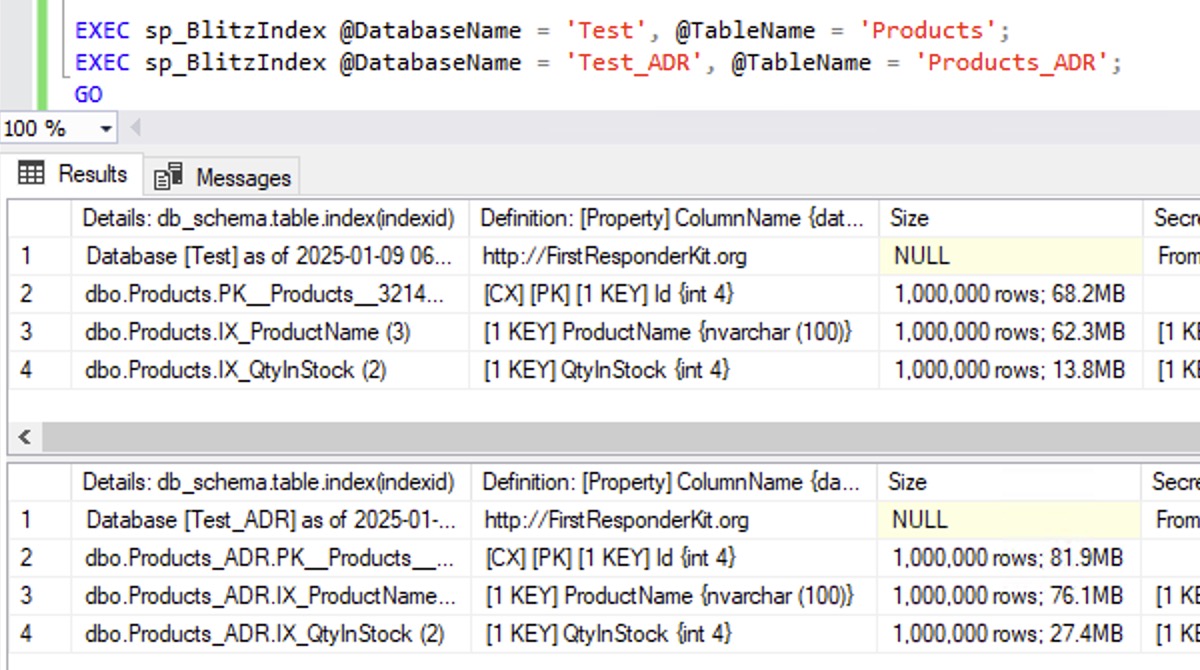
The clustered and nonclustered indexes on the Products_ADR table are all larger because like Read Committed Snapshot Isolation (RCSI), ADR needs to add a timestamp to each row to track its version. That timestamp must take up extra space, and that’s the reason, right?
Well, not exactly – rebuild the indexes on both tables and watch what happens:
|
1 2 3 4 5 6 |
ALTER INDEX ALL ON Test.dbo.Products REBUILD; ALTER INDEX ALL ON Test_ADR.dbo.Products_ADR REBUILD; GO EXEC sp_BlitzIndex @DatabaseName = 'Test', @TableName = 'Products'; EXEC sp_BlitzIndex @DatabaseName = 'Test_ADR', @TableName = 'Products_ADR'; |
The results:

The ADR version of the database plummets in size down to match the non-ADR version. That’s… odd to me. If I had an unlimited amount of time, I’d be curious to find out why that is, but I’m just a man standing in front of a database, asking it to love me, and I’m on the clock, so I gotta move on to the real problem.
I can understand why folks historically said, “After you turn on RCSI, you should rebuild your indexes to reduce space lost to page splits.” That isn’t what happened here, though – ADR was already on at the time we loaded the data, so we shouldn’t have had page splits to add versioning data. The versioning timestamps should have gone in with the initial inserts. Really odd.
I’ve also repeated this demo with additional databases with both ADR & RCSI, and just RCSI, complete with rebuilding the indexes after the load so everyone’s on the same starting point. To keep this blog post short, I’ve omitted the demo code, but you can download the full demo code here.

The results all have similar sizes:
- No features enabled
- ADR on
- ADR and RCSI on
- RCSI on
However, things start to change when the data does.
ADR & RCSI Tables Grow Really Quickly.
Let’s update 10% of the rows in all of our tables:
|
1 2 3 4 |
UPDATE Test.dbo.Products SET QtyInStock = QtyInStock + 1 WHERE Id % 10 = 0; UPDATE Test_ADR.dbo.Products_ADR SET QtyInStock = QtyInStock + 1 WHERE Id % 10 = 0; UPDATE Test_ADR_RCSI.dbo.Products_ADR_RCSI SET QtyInStock = QtyInStock + 1 WHERE Id % 10 = 0; UPDATE Test_RCSI.dbo.Products_RCSI SET QtyInStock = QtyInStock + 1 WHERE Id % 10 = 0; |
And then check their sizes:

In the “normal” database, the object sizes remain pretty similar because SQL Server was able to update the rows in place. The nonclustered index on QtyInStock grows because about 10% of our rows are changing from 1 to 2, so we’re going to have to move them to their new sort order, which will require new pages.
On the other hand, in the databases with ADR & RCSI enabled, the object sizes exploded, nearly doubling.
If we update another 10% of the rows:
|
1 2 3 4 |
UPDATE Test.dbo.Products SET QtyInStock = QtyInStock + 1 WHERE Id % 10 = 1; UPDATE Test_ADR.dbo.Products_ADR SET QtyInStock = QtyInStock + 1 WHERE Id % 10 = 1; UPDATE Test_ADR_RCSI.dbo.Products_ADR_RCSI SET QtyInStock = QtyInStock + 1 WHERE Id % 10 = 1; UPDATE Test_RCSI.dbo.Products_RCSI SET QtyInStock = QtyInStock + 1 WHERE Id % 10 = 1; |
And check the sizes again:

All of the databases see growth on the QtyInStock indexes as values move from 1 to 2, different places in the b-tree, which is going to cause some new page allocations. But the clustered indexes remain the same. We already had an explosive amount of page splits there that left a lot of empty space behind, and we’re able to reuse that space for our new round of updates.
Let’s try several rounds of updates – this is gonna take a while:
|
1 2 3 4 5 6 7 8 9 10 |
DECLARE @Remainder INT = 2; WHILE @Remainder <= 9 BEGIN UPDATE Test.dbo.Products SET QtyInStock = QtyInStock + 1 WHERE Id % 10 = @Remainder; UPDATE Test_ADR.dbo.Products_ADR SET QtyInStock = QtyInStock + 1 WHERE Id % 10 = @Remainder; UPDATE Test_ADR_RCSI.dbo.Products_ADR_RCSI SET QtyInStock = QtyInStock + 1 WHERE Id % 10 = @Remainder; UPDATE Test_RCSI.dbo.Products_RCSI SET QtyInStock = QtyInStock + 1 WHERE Id % 10 = @Remainder; SET @Remainder = @Remainder + 1; END GO 2 |
And then check our sizes:

In the ADR & RCSI databases, the clustered index has stabilized at around twice the size of the “normal” database. Is that a problem? Well… in most folks’ eyes, yes. They see this larger table as wasted space, and they want to fix it.
You Can “Fix” That With Index Rebuilds. Don’t.
To fix table bloat caused by old row versions sticking around, just rebuild the indexes:
|
1 2 3 4 |
ALTER INDEX ALL ON Test.dbo.Products REBUILD; ALTER INDEX ALL ON Test_ADR.dbo.Products_ADR REBUILD; ALTER INDEX ALL ON Test_ADR_RCSI.dbo.Products_ADR_RCSI REBUILD; ALTER INDEX ALL ON Test_RCSI.dbo.Products_RCSI REBUILD; |
And the objects drop back to their initial small sizes, same as right after our data loads:

People get all excited, saying they’ve “saved” disk space – but guess what’s gonna happen as our user workloads start up again, updating just 10% of the rows:
|
1 2 3 4 |
UPDATE Test.dbo.Products SET QtyInStock = QtyInStock + 1 WHERE Id % 10 = 0; UPDATE Test_ADR.dbo.Products_ADR SET QtyInStock = QtyInStock + 1 WHERE Id % 10 = 0; UPDATE Test_ADR_RCSI.dbo.Products_ADR_RCSI SET QtyInStock = QtyInStock + 1 WHERE Id % 10 = 0; UPDATE Test_RCSI.dbo.Products_RCSI SET QtyInStock = QtyInStock + 1 WHERE Id % 10 = 0; |
ADR and/or RCSI are both right back to double the clustered index size:

Summary: What’s the Problem That You’re Trying to Solve?
If you’re still rebuilding indexes like it’s 2005, thinking that you’re accomplishing something, stop. Time has moved on, and best practices have moved on.
You have to zoom out and rethink about what the real problem is. You’re not really saving disk space, because it’s going to blow right back up again in no time. You’re still going to need that disk space because users gonna use.
I’m not saying you should never do index rebuilds – there are absolutely cases where you should. A good example is when rows go in with a lot of null defaults, but then over the next several minutes/hours, those nulls are populated in, and then the rows are never touched again. In that case, your older pages don’t need the extra empty space that resulted from all those early-on page splits, and an index rebuild will help cram ’em back in tightly.
In. most cases, though, if you think you’re saving space, and you’ve turned on ADR or RCSI, your index rebuild space gains are illusionary and temporary.
Update 2025-08-19: Fill Factor Helps Here Too
There was a discussion on LinkedIn about this post, and Vedran Kesegic wrote that setting fill factor to 90% would help here. Leaving 10% free on every page was enough to let SQL Server write ADR’s version information to the same page. Only the smallest index jumped in size (by 40%) because SQL Server was packing in so many rows per page that even 10% empty space wasn’t enough to keep the version info on-page.
Vedran noted that as SQL Server adds new pages to existing objects (to handle inserts or rows moving around due to key updates), the fill factor setting is ignored, and data’s still going to get pumped in with 100% fill factor. In that case, Vedran suggested index maintenance jobs with a rebuild threshold of 50% might make sense – again, using a 90% fill factor so that the newly distributed data would leave enough empty space to avoid the problem.
I’d add: remember that a 90% fill factor means you’re leaving 10% empty space on every page, which means your database just grew by 10%, your memory was cut by 10%, your maintenance jobs (backups, checkdb, index rebuilds, stats updates, etc) will take 10% longer, table scans will take 10% longer, etc. I’m not dead-set against lowering fill factor – just make sure you’re solving a problem with it rather than creating new problems.

6 Comments. Leave new
This should be mandatory reading for SQL Server folks that blindly follow _any_ conventional wisdom. I’ve been saying something similar to this since around SQL 2000. I came from an Oracle background where the storage engine is radically different than SQL Server’s (for starters…there is no concept of “clustered indexes” b/c they are not _needed_). In the ora world there is no conventional wisdom to regularly rebuild indexes b/c they realized that fundamentally an index rebuild is treating the _symptoms_ (poor page utilization, bloat, etc) instead of _the cause_ (fundamentally, you got a bad physical design). The notion of requiring regular rebuilds should indicate to you that you are simply causing pages to split again.
I love how you worded it…”what is the problem you are trying to solve”? Back in 2000 DBA folks, to me, seemed overly obsessed with disk space utilization and failing to see that they were needlessly causing page splits later, and likely causing slowness for the app users at the worst possible times.
There are tons of examples of _SQL Server conventional wisdom_ that took decades to dispel…blindly upping the MAXDOP settings on every server, autoclose/autoshrink, various conflicting guidances on correct tempdb settings, I can think of at least a dozen just on tran log myths…
Even the case you mention where “null defaults are populated later” (hence requiring a rebuild) is still fundamentally a design problem.
It felt like it took decades to convince folks that _regularly scheduled rebuilds_ were something that really required a bit more scrutiny.
_A firm understanding of 10% of SQL Server is way better than misunderstanding 100% of it_
The objectives in the year 2000 would have been different. That was long before my time, but I worked with clients’ old exchange and SQL servers from even the late mid 2000s and from the old invoices, there were boxes approaching 100k dollars with less than 60Gb usable disk space. There were also performance killing features that were commonly used like single instance storage whose sole purpose was to economize the, at the time, extremely expensive disk capacity. I distinctly (and painfully) remembering fighting to free up 500 Mb on those crap boxes and it was a meaningful victory.
I’ll agree with you on bad design, but in the SQL server world, even with enterprise edition, bad design and then throwing resources at it is cheaper than better design and development. I hate it, but in a platform where 8 more cores only cost another 60 grand instead of half a million, you are going to end up with web developers, full stack developers and ‘self-taught’ report writers doing design and development.
I agree with a lot of this. Certainly I worked on machines where we ran out of capacity on a LUN and you had to free up disk space. That to me is different than merely saying, “Hey, I’m gonna reindex weekly because it removes a lot of “air” in my data…because, well, that seems smart to me.”
And, yup, throwing hardware at a problem is often much cheaper than dealing with refactoring.
What I’m talking about, and I think Brent as well, is that there are many DBAs that follow outdated advice as though it was dogma without truly thinking through the problem. I’ve seen so many DBAs over the years that install their set of standard “maintenance” jobs on every server they ever touch, and one of those jobs is index rebuilds. 95% of the time it probably doesn’t hurt anything or even improves things marginally…but this leads to so many conversations like “my reindex job runs weekly and I still have a lot of air in the tables, I guess I’ll run the reindex job nightly then.” And that just makes no sense to me.
RCSI has been around for more than a decade, but I’m only just learning this now? I would not have expected the rebuilds to make the tables suddenly forget the row versioning overhead. Online rebuilds certainly wouldn’t.
[…] Brent Ozar lays out an argument: […]
Whoa, and for the bonus round, why not throw in some Change Tracking and enable all three to really stir the pot? Like some crazy game show, where each update triggers 7 extra writes with the possibility of a page split for the daily double to get us to 9.