
Does Separating Data and Log Files Make Your Server Faster?
I’ve already explained that no, it doesn’t make your database server more reliable – and in fact, it’s the exact opposite. But what about performance?
The answer is going to depend on your hardware and workload, but let’s work through an example. I’ll take the first lab workload from the Mastering Server Tuning class and set it up on an AWS i3en.2xlarge VM, which has 8 cores, 64GB RAM, and two 2.5TB NVMe SSDs. (This was one of the cheapest SQL-friendly VM types with two SSDs, but of course there are any number of ways you could run a test like this, including EBS volumes.)
I’ll run the workload two ways:
- With the data files on one SSD, and the log file on another SSD, then
- Stripe the two SSDs together into one big volume, and put both the data files & log file on the same big volume
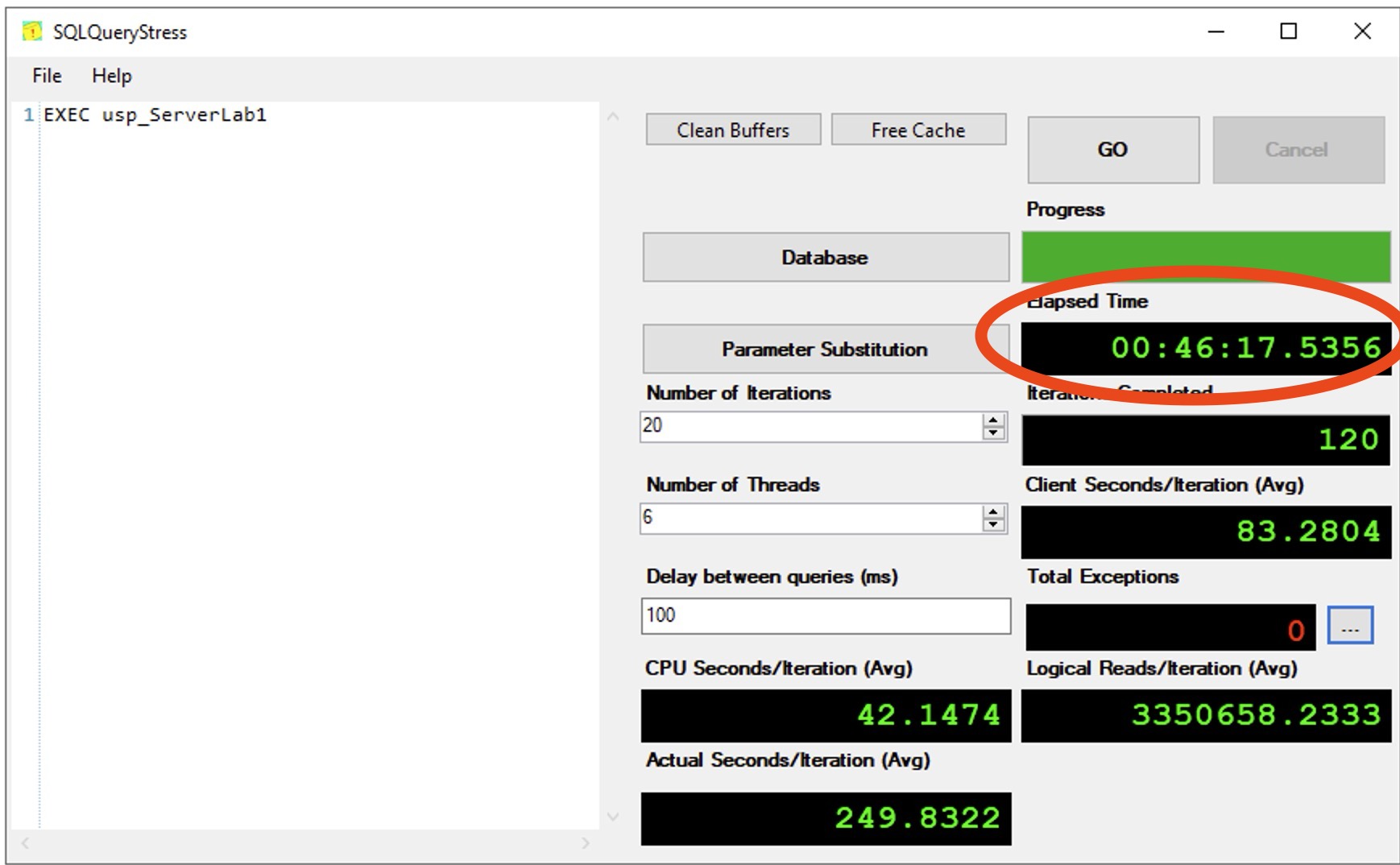
Here’s how long the test took for scenario 1, the data & logs separated:
And then with everything on one big striped volume:
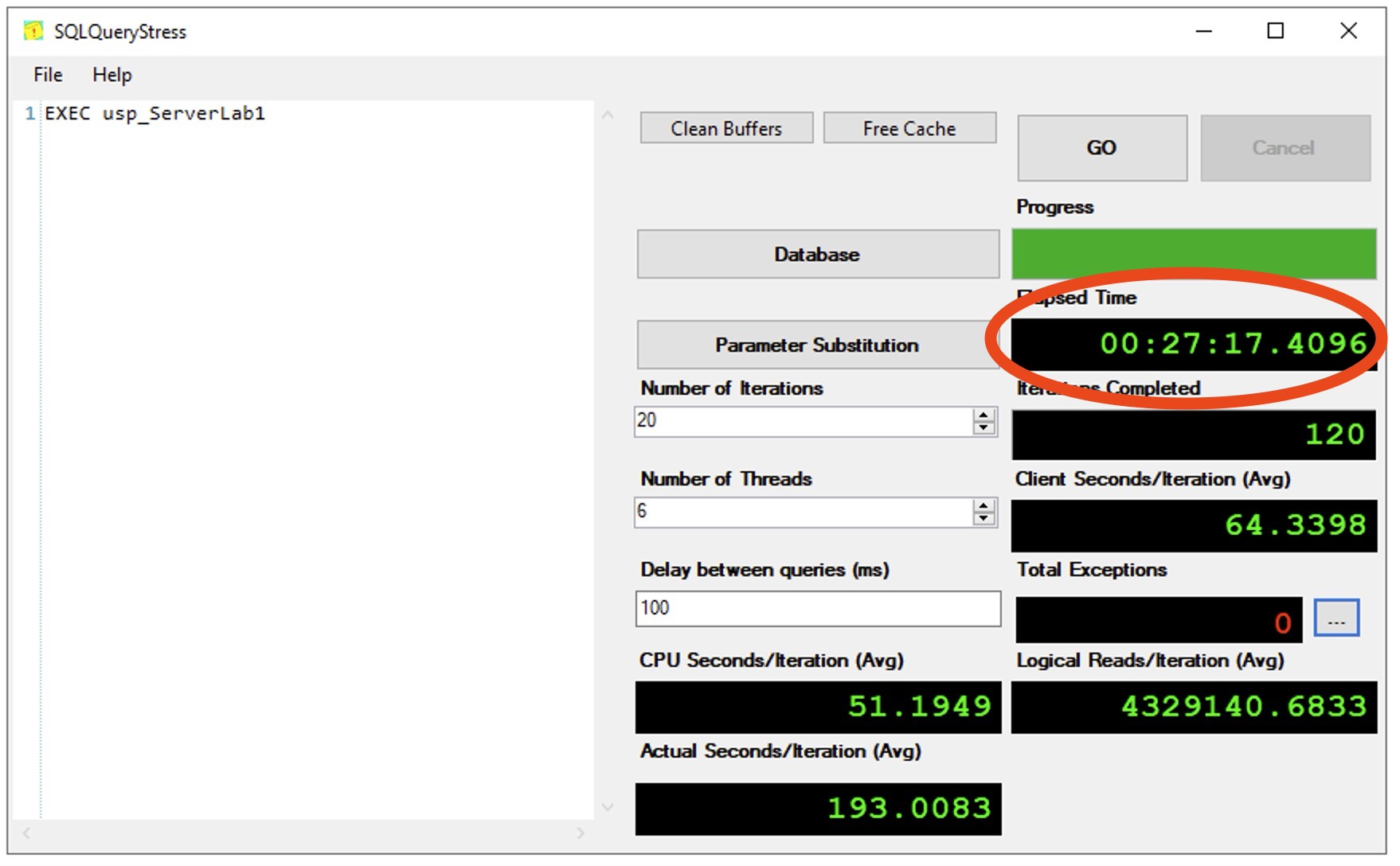
In this test, less time equals a better result – the single big striped volume wins.
This particular workload has a storage bottleneck because in the class scenario, the database didn’t have good indexes to support the queries. SQL Server had to keep hitting the storage to read uncached data up into memory. When we only have one SSD volume to service our requests, our top wait by a long shot is PAGEIOLATCH, with about 339 seconds of that wait in a 75-second sample:
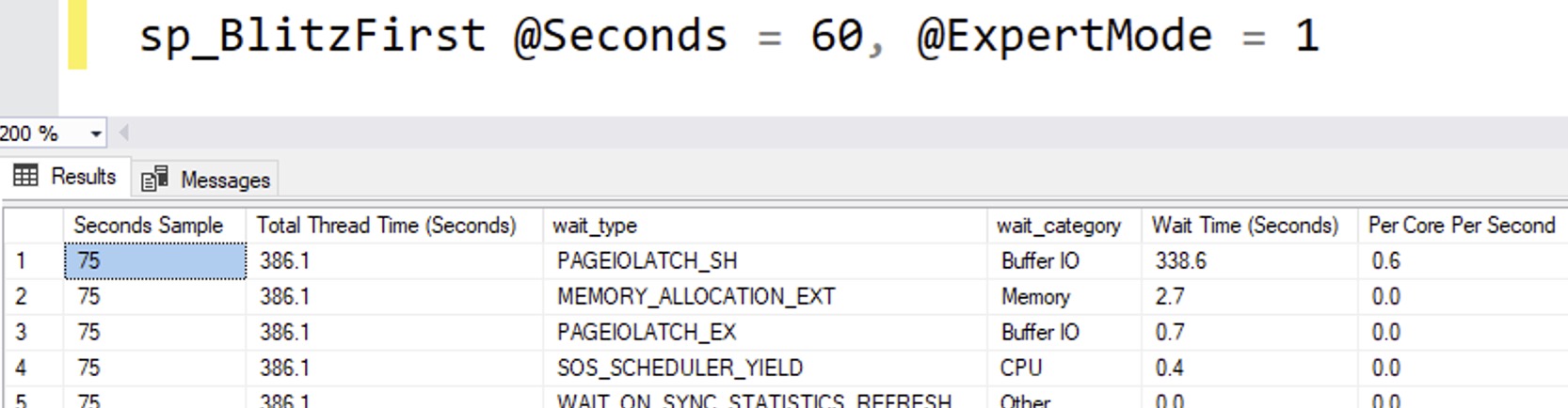
However when we stripe the data across two SSD volumes, that gives us more read throughput, so the test runs faster.
“But my workload is different!”
Oh yes, of course, your app’s workload is quite, uh, “special.” You should pin it on the fridge. Mom & Dad will be very proud. However, you’re still just assuming that your special workload will perform better with its storage IOPs and throughput cut in half, and its latencies doubled.
And that’s a pretty odd assumption to make.
Disclaimer: this post is specifically about separating the underlying storage, not the abstractions that you use between the disks and SQL Server itself. We’re not talking about using different Windows volumes, partitions, physical storage adapters, virtual storage adapters, or SQL Server data files. Those are all great discussions to have too, though!

21 Comments. Leave new
This just gave me an idea.
Some larger r5d instances come with 2 direct-attached NVMe storage drives that are ephemeral and fast. They survive reboots, but they do not survive between power off/power on. I would love to stripe these two disks on startup and configure TempDB to use the new path. I do this currently without striping the disks. You may have just given me a “free” performance upgrade.
You noted that this could theoretically be used on EBS volumes. While technically true, you may run into bottlenecks at the instance level depending on the instance types used. Instances have bandwidth and throughput limits to EBS as a service regardless of how many individual volumes are attached. One would need to test multiple configurations to see if any benefit would exist for the increased complexity introduced. Volume snapshots would also become… complicated.
I would recommend r6idn instead of r5b. To your points on iops/throughout limits at the EC2 instance the r6in and r6idn have about a 2.5x EBS storage perf increase and 5x on Networking throughput (great if backing up over the network). We’re currently rolling out the nVMEs to utilize Buffer Pool Extensions, but I think we will at some point move TempDB there as well.
I like those newer instances. I have 1 year left on my 3yr RI with the current ones.
I haven’t considered adding Buffer Pool Extensions into the mix before on these volumes. More testing fun ahead!
You are considering to use Buffer Pool Extensions on NVMe Disks (wich are not that much faster than “usual” SSEs) instead of just adding more RAM? I would understand this with NVRAM disks…
But even in this case I’d prefer to use it for TempDB or Log files than for Buffer Pool Extensions
BTW: I used Buffer Pool Extension on our old local server (1 TB RAM, ~40 TB databases). Had to disable it again because it caused several strange errors (sadly don’t remember the exact problem) and didn’t really improve the performance / life time of the pages in the buffer pool (maybe because of the already big RAM). I think this is one of those abdoned features that sounds good / very useful when introduced, but was stopped to improve, because nobody uses it because RAM is too cheap nowadays.
I appreciate your experience here. Perhaps I shouldn’t waste my time investigating it. But, I will point out that in the cloud choosing to add RAM almost always means doubling the number of vCPUs, too. That doubles the MS licensing tax along with it. It’s usually not cheap, but I will concede that “cheap” is relative.
In my opinion, this test is flawed by using a single SSD vs striped SSDs for comparison. This introduces an additional variable (change in the performance of the underlying disk subsystem) into the test that skews the results.
I think a better test for separating data and logs would be either of the following:
– A single SSD for both data and logs vs a single SSD for data and single SSD for logs
– One set of striped SSDs for both data and logs vs one set of striped SSDs for data and another set of striped SSDs for logs
I’m not implying that the overall recommendation would change, but it would be a fair test for making that determination.
By all means, go for it! Cheers!
I think the point is that in this case you did not compare apple and orange cart to apple and orange cart, you basically have two single carts going to two different destinations, but they “hold” the same amount items. Then you decided to have them both going to the same destination, and doubling the number of carts. All you’ve proven is striping is faster, which is already obvious. If you want to do the separated test correctly against your striped setup you should have two sets of striped disks, one for logs and one for data and redo the test, or do what the poster recommended. Otherwise you have not empirically proven your thesis.
If that kind of test is what you’re looking for, by all means, go for it, as I explain in the summary of the post. I do wish I could do every test for you, but at some point here you’ve gotta pick it up and run with it. Cheers!
The precise impact of striping on performance may be interesting as an academic exercise. However, I think Brent’s post does a good job adressing the more pragmatic question: “How should a DBA provision their server?” In some sense, this experiment tests whether sharing IOPS between log and data files is better than provisioning separate IOPs for log and data.
Having a shared IOPS budget means that any time one of the files is not saturating its IOPs, those IOPs are available for the other file. The results of this test are signficant and not at all surprising: Which is quite convenient if you’re a DBA trying to decide how to provision your new server.
Possibly the two drives approach could win if the drives where HDDs, since contention can introduce disk seeks into what should have been contiguous IO. But if you’re trying to figure out how to make your SQL database faster, a first step would be to not use an HDD.
Hi,
I got PowerEdge R6615 EPYC 9174F in 2023 and it offers the PERC H755N RAID Controller, that is able to support the speed of NVMe Disks. So I got Raid 10 in Hardware and Speeds around 9000MB/S with 4 x 1,6 TB P5620 NVMe.
All Data & Logs goes to that Storage, OS is on a different NVMe Disk.
I tested different type of setups but that seemed to be the fasted for all te test I ran ( many thanks for you info on this site on how to do that )
Awesome, I’m glad I could help!
Haven’t had to really crunch numbers on IOPS for heavy-duty stuff in some time, but I remember setting up the various perfmon traces and such way back in the day to get the actual throughput that we were seeing for our various DB files and then we could take _that_ to the SAN team to make sure that we had something that made sense. Of course, that was also in the spinning disk SAN days where those sorts of things could have a much larger impact than with SSDs, but the principal was the same. Monitor, analyze, test, repeat, then apply that to the configuration.
Some workloads might be more special than others, but if so – prove it out rather than just assuming. 🙂 Good reminder that we need to actually look at the metrics when making these choices.
I sort of thought the discussions of performance/reliability on disk separation were over and was primarily done for management purposes: i.e. storage or backup admin says luns of up to 4 tb (arbitrary number) are allowed unless there is a file of more than 4 tb, rationing out storage bandwidth in an anything with storage bandwidth constraints, tiered storage, etc
I completely agree with what you are saying. One scenario worth considering is SQL on Azure VMs, where typically we enable local disk caching on the data disks, but not the log disks. By combining, you’d get better throughput, but some of the local caching would be ‘wasted’ on the log files that don’t benefit from disk caching. Consequently some queries may need to access remote storage for data that might otherwise have been in the local disk cache.
On the whole, unless there was unusually high log activity, I expect the benefits of faster combined storage would more than offset having less of the data files cached in the local disk cache.
I think the test approach and conclusion are too much generalized and without a better explanation / understanding this could lead to the wrong decitions.
Of course – for the common DBA of a small company with its tiny SQL server for 20 concurrent users that manually enter stuff into their WebGUI the test and result are fully okay (on the other hand it wouldn’t really matter if you did the wrong choice in this case). And it is fully okay if you say “test for your own workload” (even if this is usually the hardest part to do without already going on prod with the test system).
To find the theoretitcal best solution (and limit the possible test scenarios) the DBAs needs to know, that every INSERT/UPDATE/DELETE will write to the log file first and only when it is completely written there the statement is considered as finished / returns as successfull.
The data pages itself will be written in the asynchron CHECKPOINT process (to prevent thousands of writes, if somebody updates the same page with thousands single minor UPDATE statements).
Knowing both could be generalized to:
– when you have much stuff to write put your log file onto the fastest storage / raid level etc. available for you
– for the data file their write speed is not that important
– since fast storage is often more expensive you may want to separate your log file from the data files in this case
– when your server is read heavy (e.g. archive databases / some datawarehouses) the read speed of the data files may be more important and the write speed of the log files can be mostly ignored (e.g. since it doesn’t matter if your nightly load finsishs 10 min earlier / later)
PS:
Some years ago slow would mean HDDs, fast = SSDs. Today with almost every as SSD you could consider using RAID 1 (= striped volume in Windows) or RAID 10 (mirroring + striping) for the fast drives and e.g. RAID 5 for slow but more reliable. And often the SAN / raid controllers etc. allows you to priorize some volumes / define it as fast / avarage oder slow, so you could play with those options if you don’t have better informations.
PPS: as always: it depends. And there are tons of exceptions from general recommentations.
The reality of writing free stuff for the Internet is that you have to generalize, and you can’t teach everything in every blog post. Hope that’s fair!
[…] Brent Ozar performs a test: […]
[…] Does Separating Data and Log Files Make Your Server Faster? (Brent Ozar) […]
Question regarding Bandwith Requirements
I remember from years ago when you held a workshop in Lisboa, that around 400 MB/s of data are needed to saturate one CPU core in SQL Server. So for like 16 Cores, that would already be around 6400 MB/s.
Is that still a metric that is true and relevant today and should it be conidered when planing for the throughput of the disks where the data and logs are stored on ?
Hi! For updated info on that, check out my Mastering Server Tuning class.