
How Many Indexes Is Too Many?
Let’s start with the Stack Overflow database (any size will work), drop all the indexes on the Users table, and run a delete:
|
1 2 3 4 |
SET STATISTICS IO ON; GO BEGIN TRAN DELETE dbo.Users WHERE DisplayName = N'Brent Ozar'; |
I’m using SET STATISTICS IO ON like we talk about in How to Think Like the Engine to illustrate how much data we read, and I’m doing it in a transaction so I can repeatedly roll it back, showing the effects each time. Here’s the actual execution plan:
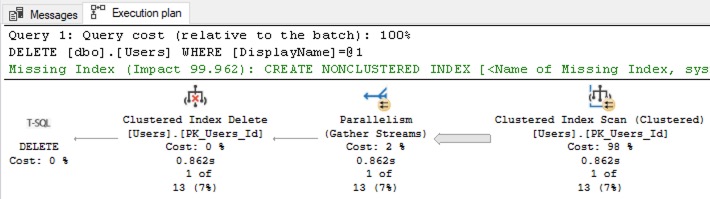
We read that from right to left. The first thing SQL Server has to do is scan the entire Users table to find the row(s) with DisplayName = ‘Brent Ozar’ because we don’t have an index on DisplayName. After it’s found them, then it’ll delete them from the clustered index.
On the 2018-06 copy of Stack Overflow that I’m using, SQL Server has to read 143,670 8KB pages to find the rows it’s looking for:

We need an index on DisplayName.
We want our delete to run faster, and we wanna quickly find the rows where DisplayName = ‘Brent Ozar’. To do that, let’s roll back our delete and create an index:
|
1 2 |
ROLLBACK CREATE INDEX DisplayName ON dbo.Users(DisplayName); |
Then try our delete again:
|
1 2 |
BEGIN TRAN DELETE dbo.Users WHERE DisplayName = N'Brent Ozar'; |
Now, the actual execution plan is simpler:

From right to left, SQL Server can open the index on DisplayName, seek into just the row it’s looking for, then delete the row from the clustered index. Be aware that the plan is simplifying things a little: if you hover your mouse over the Clustered Index Delete operator, you’ll see that at the very bottom of the tooltip, SQL Server shows two objects, not one:
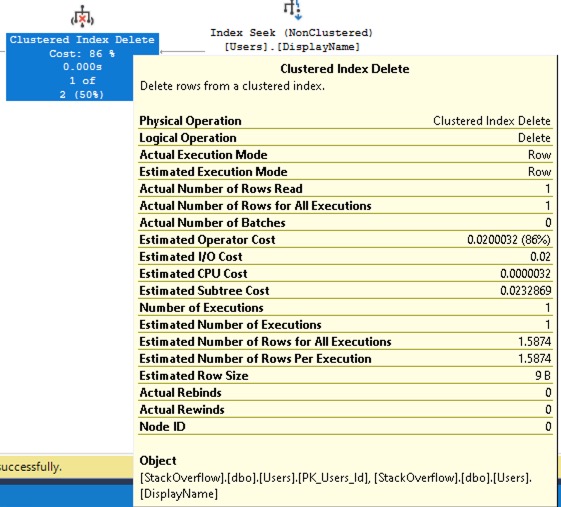
At the bottom, it says “Object: PK_Users_Id” (that’s the clustered index) and “DisplayName” (that’s our new nonclustered index.) Still, the work involved is way less now, as evidenced by query runtime and logical reads:

We cut logical reads from 143670 down to just 12 pages! I’m no data scientist, but I think the term we’re looking for here is “good.”
That index helped. We should add more!
When clients come to me for performance problems, it’s usually one of two extremes: either they’ve never discovered the magic of good nonclustered indexes, or they’ve gone wildly overboard with ’em, adding tons of ’em. Let’s throw on a few more indexes, and then run our delete again:
|
1 2 3 4 |
CREATE INDEX Location ON dbo.Users(Location); CREATE INDEX LastAccessDate ON dbo.Users(LastAccessDate); CREATE INDEX Reputation ON dbo.Users(Reputation); CREATE INDEX WebsiteUrl ON dbo.Users(WebsiteUrl); |
Now, our delete’s actual execution plan looks the same, but…

The graphical plan hides a secret, and to see that secret, we’ll need to hover our mouse over the “Clustered Index Delete” operator, which is a vicious lie:

See that Object at the bottom? The so-called “Clustered Index Delete” is actually deleting the row in every nonclustered index too. That also means we’re doing more logical reads to find the rows:

We’ve gone from 12 logical reads up to 24. Now, is 24 8KB reads a big deal? Not at all! You should feel totally comfortable adding a handful of indexes to most tables when your query workloads need those indexes.
However, the more you add…
Let’s add a few more indexes, each of which have a few included columns:
|
1 2 3 4 5 6 7 8 9 10 11 12 13 14 |
CREATE INDEX Age ON dbo.Users(Age) INCLUDE (DisplayName, Location, Reputation); CREATE INDEX CreationDate ON dbo.Users(CreationDate) INCLUDE (DisplayName, Location, Reputation); CREATE INDEX DownVotes ON dbo.Users(DownVotes) INCLUDE (DisplayName, Location, Reputation); CREATE INDEX UpVotes ON dbo.Users(UpVotes) INCLUDE (DisplayName, Location, Reputation); CREATE INDEX EmailHash ON dbo.Users(EmailHash) INCLUDE (DisplayName, Location, Reputation); |
And then try our delete again. The actual execution plan still looks simple:

But the logical reads keep inching up:

It’s still not bad – and in most cases, your workload and hardware are probably just fine with 5, 10, maybe even 15 or 20 indexes. After all, keep it in perspective: this is still way better than the 143670 logical reads we started with!
So how many indexes is too many?
It’s not a question of an exact number of indexes because:
- Your workload might be primarily read-only
- Your workload may not involve any transactions or contention – queries may run one at a time, isolated from each other, with little worry about long locks, blocking, or deadlocking
- Your hardware might be blazing fast
- Your users might just not care about the speed of inserts/updates/deletes – like if that work is done exclusively by back end batch processes
So rather than looking at a specific number of indexes, here are signs that you’ve got too many indexes for your workload & hardware:
- People are complaining about the speed of inserts/updates/deletes
- You’re getting deadlock alerts from your monitoring software or end users
- You’ve already tried RCSI or SI
In those cases, it’s time to bust out the free open source sp_BlitzIndex, run it with no parameters in the database you’re investigating, and look at the warnings for:
- Duplicate or near-duplicate indexes
- Unused indexes that aren’t getting read at all
- Indexes with a lot of writes, but few reads
We put a lot of work into that tool to make the results as easy to interpret as possible, but if you want training, check out my Fundamentals of Index Tuning class, but don’t buy it today – it goes on sale next month.

4 Comments. Leave new
We have moved our application databases over to Azure SQL Database from SQL on Azure VM’s. We got away with the non-essential and duplicate indexes in the old architecture. Now, storage is no longer cheap, and everyone wants to crank up the cores to increase performance. The sins of the past indexes are now being purged but they have already cost us money.
This is great post, I will wait for the next month sales
Thanks Brent for sharing knowledge
[…] How Many Indexes Is Too Many? (Brent Ozar) […]
I once worked at a place where the reporting table had 112 fields and 116 indexes (1 for each field), including Date_ASC and Date_DESC on the same column. The first thing to do to speed up the reports and extracts was to drop all of the indexes apart from eventID (PK) and Date_ASC. The best way to look at indexes is for every index you add you have to update another table which contains the columns in the index.