
Query Exercise Answers: Solving the 201 Buckets Problem
In this week’s Query Exercise challenge, I explained SQL Server’s 201 buckets problem. SQL Server’s statistics only handle up to ~201 outliers, which means that outliers ~202-300 get wildly inaccurate estimates.
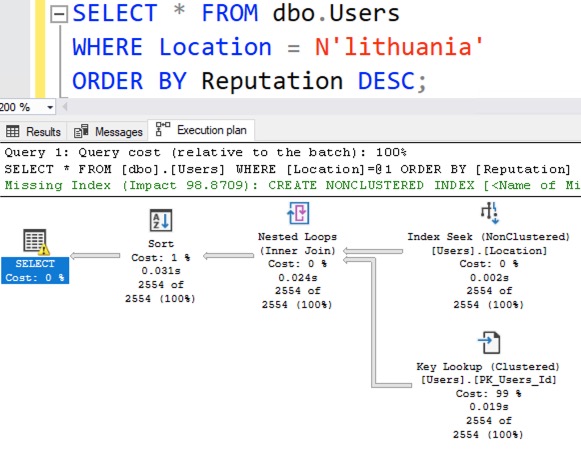
In our example, I had an index on Location and perfectly accurate statistics, but even still, this query gets bad estimates because Lithuania is in outliers ~202-300:
|
1 2 3 4 5 |
CREATE INDEX Location ON dbo.Users(Location); GO SELECT * FROM dbo.Users WHERE Location = N'lithuania' ORDER BY Reputation DESC; |
SQL Server estimates that only 8 rows will be found for Lithuania, when in reality 2,554 rows come back:
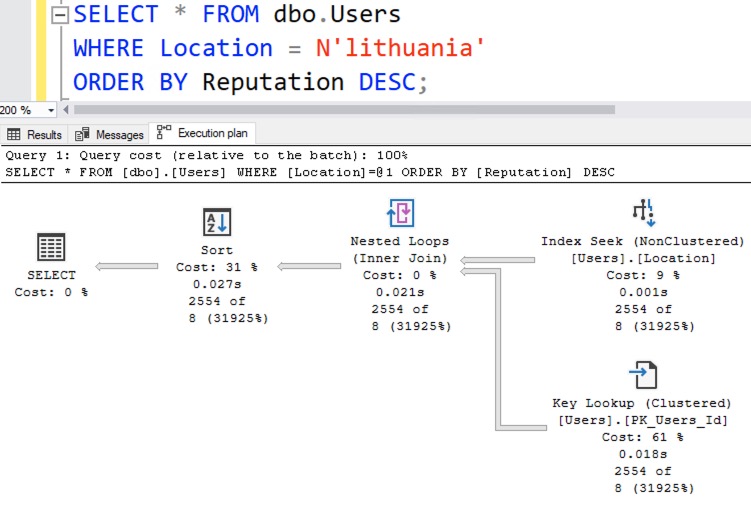
This under-estimation isn’t really a problem for this particular query’s performance, but when I’m teaching you concepts, I gotta teach you how the simple things break before I start getting into real-world specifics. If you can’t solve this simplistic version, then there’s no way you’re gonna be able to solve the real-world version, which we’re gonna get into in the next Query Exercise.
Solving It with a New Filtered Statistic
I cringe when I type that heading out because it’s such a slimy solution. I’ll start with a simple version, and it’s actually something I hinted at you not to do in the challenge instructions because it’s a bad idea, but bear with me for a second.
SQL Server lets you create your own statistic on specific outliers by using a statistic with a WHERE clause, like this:
|
1 2 3 4 5 6 7 8 |
CREATE STATISTICS Outliers ON dbo.Users(Location) WHERE Location = N'lithuania' WITH FULLSCAN; GO SELECT * FROM dbo.Users WHERE Location = N'lithuania' ORDER BY Reputation DESC; |
The query gets a new execution plan with bang-on estimates:
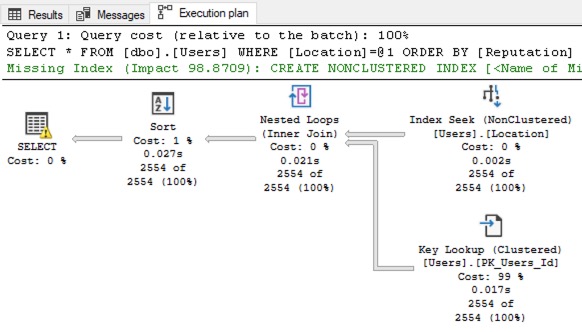
Okay, great – but like I mentioned in the challenge requirements, you wouldn’t actually do this in the real world because you’d probably have multiple outliers, not just 1. If you only had 1 big outlier, then… it’d be in your regular 201 buckets!
Instead, if we’re going to solve this with a filtered statistic, we need to create our own manual statistic for the next 200 outliers. First, let’s write a query to find outliers 201-400. Keep in mind, I’m not guaranteeing that they’re not in the existing Location statistics yet – I’m just trying to illustrate how we would find Locations with a large population, but that aren’t in the top 200:
|
1 2 3 4 5 6 7 |
SELECT CAST((N'N''' + Location + N'''') AS NVARCHAR(MAX)) AS Location FROM dbo.Users WHERE Location IS NOT NULL AND Location <> '%''%' /* Exclude ones with a ' in it, since that'd break our dynamic SQL */ GROUP BY Location ORDER BY COUNT(*) DESC OFFSET 200 ROWS FETCH NEXT 200 ROWS ONLY |
To keep things simple, I’m not using a tiebreaker here. (There are only so many things I can cover in a blog post, and at the end of the day, remember that the focus here is on statistics & outliers.)
Next, let’s use that to build a string that will create our filtered statistic:
|
1 2 3 4 5 6 7 8 9 10 11 12 13 14 15 |
DECLARE @StringToExecute NVARCHAR(MAX); WITH OutlierValues AS ( SELECT CAST((N'N''' + Location + N'''') AS NVARCHAR(MAX)) AS Location FROM dbo.Users WHERE Location IS NOT NULL AND Location <> '%''%' /* Exclude ones with a ' in it, since that'd break our dynamic SQL */ GROUP BY Location ORDER BY COUNT(*) DESC OFFSET 200 ROWS FETCH NEXT 200 ROWS ONLY ) SELECT N'CREATE STATISTICS Location_Outliers ON dbo.Users(Location) WHERE Location IN (' + STRING_AGG(Location, N',') + N') WITH FULLSCAN;' AS DynamicSQL FROM OutlierValues; |
Which gives us a string we can execute, and I’ve highlighted Lithuania just to show that it’s there:
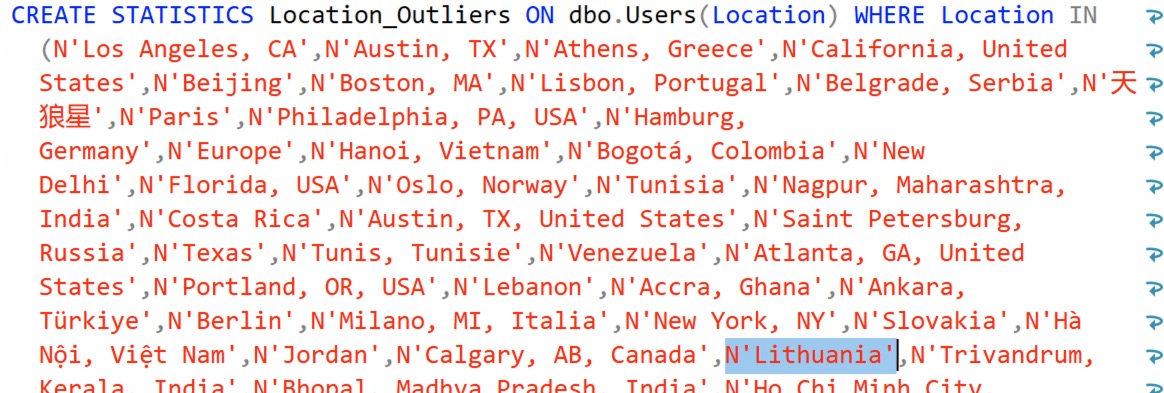
Note that my dynamic SQL is not checking for the existence of the stat and dropping it – if you were going to productize a solution like this, that’s left as an exercise for the reader. You could either drop & create the statistic on a regular basis (like, say, quarterly – the top outliers shouldn’t change that much in a mature database) or create a new filtered state with a date-based name, and then drop the old one. That’s much more work though.
For now, let’s create the statistic and check out its contents:
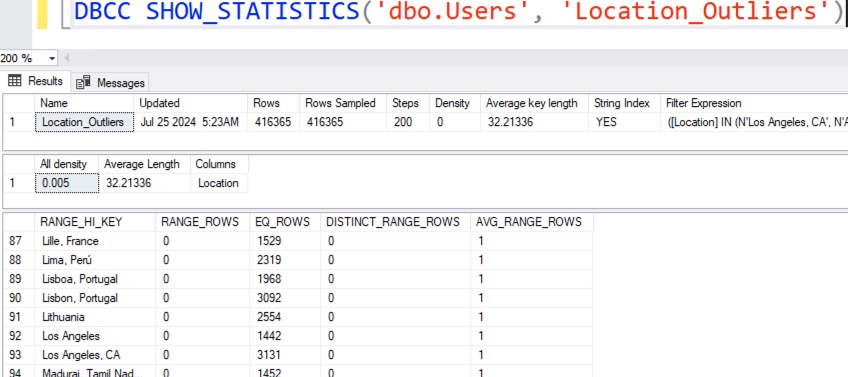
We now have a bucket dedicated exclusively to Lithuania. Try the Lithuania query filter again, and look at the new actual query plan:
Presto, Lithuania gets accurate estimates, as do any of the other top 200 values.
 To see why, right-click on the SELECT operator, click Properties, and go into OptimizerStatsUsage. Both the Location and the Location_Outliers statistics were used when building the query plan’s estimates.
Like I said when I first started talking about this solution above, this solution makes you cringe. It feels dirty, like it’s made out of chewing gum and duct tape. This feels like something that should have a more intuitive solution. For example, over in the free database crowd, Postgres lets you set the number of buckets at the server level with default_statistics_target, and lets you override it with an ALTER TABLE SET STATISTICS command. Postgres lets you pick up to 10,000 outliers – and hell, SQL Server’s filtered statistics solution only gives you another 200 per filtered stat that you create!
At the same time though, the vast majority of tables will never grow large enough to experience this problem. In this blog post, I’m illustrating the problem with the Users table in the most recent Stack Overflow database, and that table has over 22 million rows, with over a decade of activity for a very large web site. Even still, the query we’re talking about doesn’t even have a performance problem!
It’s also important to note that both the 201 buckets problem and the filtered statistics solution have nothing to do with parameter sniffing, trivial optimization, plan reuse, or anything like that. People often get these problems confused because they’re similar, but in this specific example, I’m looking at best-case scenarios for query optimization – this query doesn’t even have parameters, and we’re getting a fresh execution plan each time, specifically designed for Lithuania. (You can try recompile hints to prove to yourself that plan reuse isn’t the issue here, and even with the filtered stats solution, you’d also still have parameter sniffing issues on reusable plans for different locations.)
So would I recommend this solution to solve the above problem? Probably not – but again, like I said, I have to teach you how to solve it in a simple scenario before I move into a more complex, real-world scenario. That one’s coming up in the next Query Exercise where we’ll add in larger tables and more query complexity.
If you want to see even more solutions, check out the comments on the challenge post. Thomas Franz had a particularly interesting one: he created 26 filtered stats, one for each letter of the alphabet, effectively giving him over 5,000 buckets for his statistics!
Hope you enjoyed the challenge! For more exercises, check out the prior Query Exercises posts and catch up on the ones you missed so far.

8 Comments. Leave new
I never know filtered statistics let you use IN!
Great solution
Thanks! I love the IN approach on this.
[…] from other folks, and compare and contrast your work. I’ll circle back next week for a discussion on the answers. Have […]
As a former Sybase DBA, this is one point where ASE beats up on MSS: the statistics don’t have a hardwired limit on buckets.
[…] Query Exercise Answers: Solving the 201 Buckets Problem (Brent Ozar) […]
[…] inability to accurately estimate rows for more than 201 outliers in a table. I followed up with a solution using filtered statistics to help with the next 200 outliers, and I talked about how that’s really overkill for the […]
Thanks for this blog post, But:
Who does this ???
Nobody. They just can’t figure out why their estimates aren’t right, and they do things like updating stats and rebuilding indexes thinking it’ll help.