
Finding Long Values Faster: Answers & Discussion
In last week’s Query Exercise, our developers had a query that wasn’t going as fast as they’d like:
|
1 2 3 4 5 |
CREATE INDEX DisplayName ON dbo.Users(DisplayName); GO SELECT * FROM dbo.Users WHERE LEN(DisplayName) > 35; |
The query had an index, but SQL Server was refusing to use the index – even though the query would do way less logical reads if it used the index. You had 3 questions to answer:
- Why is SQL Server’s estimated number of rows here so far off? Where’s that estimate coming from?
- Can you get that estimate to be more accurate?
- Can you get the logical reads to drop 100x from where it’s at right now?
Let’s get our learn on.
1. The estimate is hard-coded.
When SQL Server is just making up an estimate out of thin air, I really wish it would put a yellow bang on the execution plan. “Danger: I’m just pulling this number out of my back end.” Because when you’re looking at the query plan:
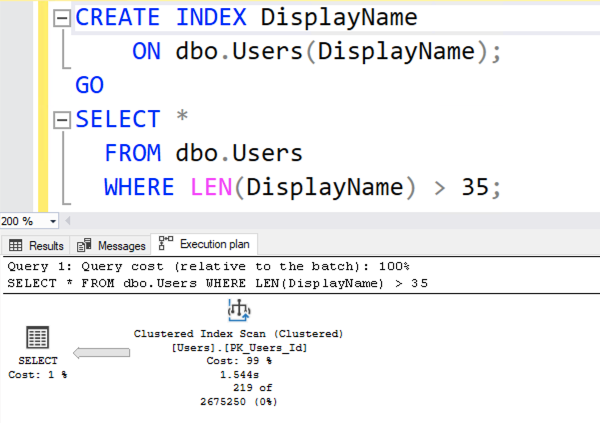
The number 2675250 looks awfully scientific. It looks like SQL Server put a lot of thought into that number. In reality…

It’s just a hard-coded 30% of the table. It doesn’t matter whether you’re looking for LEN > 35, or LEN < 35, or LEN > 10000. SQL Server just says, “You’re doing an inequality comparison here – 30% sounds good.” To learn more about these not-so-magic hardcoded numbers, check out Dave Ballantyne’s cardinality estimation sessions.
2. The estimate can indeed be improved.
SQL Server has statistics on the DisplayName column’s contents, alphabetically sorted, but not sorted by length. If we want statistics on the length of a column’s contents, we have to create a computed column focused on that length. This is gonna sound weird, but:
|
1 2 3 4 5 |
ALTER TABLE dbo.Users ADD DisplayNameLen AS LEN(DisplayName); GO SELECT * FROM dbo.Users WHERE LEN(DisplayName) > 35; |
Add a computed column, and then rerun the query. Suddenly, the execution plan is better:

ENHANCE!
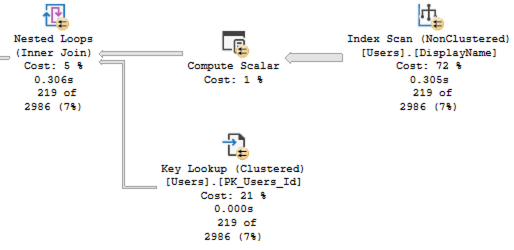
Three things changed:
- The estimated number of rows is way more accurate – down from the hard-coded 30% (2,675,250) to just 2,986
- Because the estimate was more accurate, SQL Server understood that it wouldn’t have to do so many key lookups, so it scanned the DisplayName index, calculating the length of each one
- Our logical reads dropped from ~142K down to ~40K – good, but still not 100X better
The estimate is better because SQL Server created a statistic on the computed column:

The estimate isn’t perfect because SQL Server created the stats in a hurry, only sampling a small percentage of the table’s data. If we updated those statistics with fullscan, we’d get absolutely perfect estimates – but we don’t need that here. We’ve done enough of an improvement to answer the question, which leads us to…
3. Getting a 100X Drop in Page Reads
The execution plan is still scanning the entire DisplayName index, calculating the length of each name, because the index on DisplayName is arranged alphabetically – not by length. Is there a way we can seek directly to the long DisplayNames? Indeed, there is – by indexing our newly created computed column.
|
1 2 3 4 5 |
CREATE INDEX DisplayNameLen ON dbo.Users(DisplayNameLen); GO SELECT * FROM dbo.Users WHERE LEN(DisplayName) > 35; |
The new execution plan is amazeballs:

We didn’t even have to change our query! SQL Server figured out that there’s an index sorted by the length of DisplayName, and seeked into just the long rows. This new plan is better in so many ways, but most importantly for the purposes of this challenge, we’re down to just 682 reads – an improvement of over 100x. Awww yeah.
There’s even a solution that gets the number of reads down to just 6! For that, check out Vlad Drumea’s post, Finding Long Values Faster. On Enterprise Edition, it works with no query changes, and has extremely low overhead.
Summary: 100x better, no code changes.
Computed columns, especially when indexed, can be a great way to make non-sargable queries go way faster. They’re certainly not the first tool I reach for – they have plenty of drawbacks and gotchas – but that’s why they’re covered in my Mastering Index Tuning class rather than the Fundamentals one.
Do I wish the developers would change the way the app works? Of course – but as a consultant, clients love me the most when I can simply leverage a built-in database tool and make things go faster right away. This is one of those awesome tools. Sure, like a chainsaw or a nail gun, you need to know what you’re doing – but you’re a smart cookie. You know which classes to attend.

8 Comments. Leave new
How would this same technique work with date columns?
Ron – hmm, I’m not sure what you mean. Are some dates longer than others? Can you give me a specific example of the problem you’re trying to solve?
Oh, sorry. Yes, the inequality comparisons making query predicates non-sargable when looking for dates before or after a specific date.
Right, that doesn’t really have anything to do with what we’re discussing here. Sorry about that!
If the most frequent queries are against recent dates, you might be able to use something similar to Vlad Drumea’s solution where you have an indexed view that filters on, eg.
your_date_column >= DATEADD(MONTH, -2, GETDATE())
Indexed views can’t have dynamic filters like that because the date changes constantly, and the indexed view doesn’t have a mechanism to keep itself updated when the data isn’t changing.
As a performance optimization, I’ll often replace “where tb.mydate between @start and @end” with “join getdaterange(@start,@end) helper on helper.date = tb.mydate.” Of course, this only works for dates, not for datetimes. Also, it only helps if date is indexed.
Excellent read, Brent. Thank you. Your 100x better summary is definitely comparable to the gains I made when implementing an intelligent computed column to make up for the less intelligent table definition that nobody would permit me to change. It was the nail gun that I needed to make the incredibly large volume of data usable. Kept it behind the scenes, invisible to the front end, and saw huge gains in terms of performance. Almost shocking in comparison to the performance beforehand. Good stuff.