
Query Exercise: Find Posts with the Wrong CommentCount
For 2024, I’m trying something new: weekly homework challenges! For this week’s query challenge, we’re going to do some data validation. Pop open the Stack Overflow database and check out the CommentCount column on the Posts table:

In theory, that’s a fast way to check how many Comments a particular Post has, without querying the Comments table to find them all. For example, if I want to see the Comments for Post.Id 13, I might write:
|
1 |
SELECT * FROM dbo.Comments WHERE PostId = 13; |
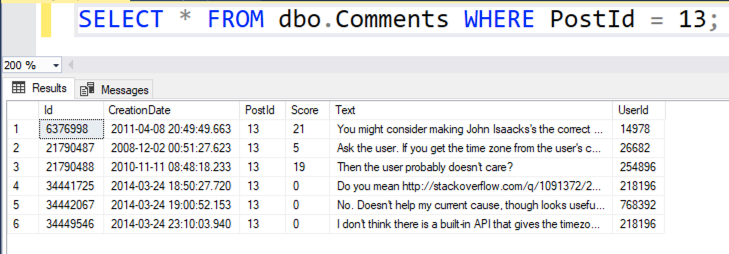
And presto, I get the 6 comments, matching the CommentCount = 6 value in the above screenshot:
But… I’m a DBA, and you know what DBA stands for: Doesn’t Believe Anyone. So our query exercise for this week is to:
- Write a query that finds the top 100 problematic Posts with the biggest CommentCount variance versus the actual number of comments on that post. This is a little tricky for two reasons: the Posts.CommentCount could be off in either direction, AND these tables are ginormous, so your queries are going to take a while. You’ll want to put in some thought before you just go hit execute.
- Think about a long term solution to keep that Posts.CommentCount as up to date as practical. We’re not worried about a one-time update – we’re more concerned with making sure the data is relatively accurate. It doesn’t have to be transactionally consistent here – these aren’t bank balances, after all.
Have fun, and once you’ve given it a shot, read this post with solutions.

31 Comments. Leave new
Which version of the Stackoverflow database do we need to use for the homework?
You can use any one you like. I keep these pretty flexible – the concepts should work the same way on all of the databases.
Environment: StackOverflow2013, 52GB, Compat mode 150, SQL Server 2019
Performance problems:
CREATE NONCLUSTERED INDEX IX_Comments_Post ON dbo.Comments (PostId)
CREATE NONCLUSTERED INDEX IX_Posts_CommentCount ON dbo.Posts(CommentCount)
Maybe these could be indexed views instead. (Possible issue for a 3rd party app.)
Without the index on dbo.Posts, the query does a boat load of logical reads. I was surprised that clippy didn’t suggest it.
SELECT TOP (100)
P.Id,
ISNULL(P.CommentCount, 0) [Stored Comment Count],
C.comment_count [Computed Comment Count],
ABS(C.comment_count – ISNULL(P.CommentCount, 0)) [variance]
FROM
dbo.Posts P
CROSS APPLY (SELECT COUNT(*) comment_count FROM dbo.Comments C WHERE C.PostId = P.Id) C
ORDER BY
ABS(C.comment_count – ISNULL(P.CommentCount, 0)) DESC,
P.Id ASC
This takes around 1.4 seconds of elapsed time on my laptap and 11 seconds of CPU time.
It’s not necessary to put P.Id in the ORDER BY but I wanted to always break ties the same way.
I tried using LEFT JOIN instead of CROSS APPLY. I also tried using a CTE but the execution times were basically the same.
Long term solutions:
– Could do an agent job or cron job to perform the update. (That might be using SQL Server Agent as an app server.)
– Could increment dbo.Posts.CommentCount whenever a comment is added. I think that would have to be part of the same transaction. It’s error-prone because a new dev might add code to INSERT a comment record without realizing she also needs to increment the counter. Can you delete a comment? That would require a little extra code to decrement dbo.Posts.CommentCount.
– Could add a trigger to dbo.Comments to maintain dbo.Post.CommentCount. That means it’s transactional and the transaction just got bigger.
– Could drop the dbo.Posts.CommentCount column. Might be less expensive to query dbo.Comments given a PostId than it is to maintain dbo.Posts.CommentCount. I think this would be the solution where I work.
– there may be Posts with no (longer existing) Comment, but you are using CROSS APPLY / INNER JOIN instead of OUTER APPLY / LEFT JOIN; don’t forget to handle NULL in c.CommentCount in this case
– the Index on the Posts makes no sense, it would need at least a leading (Post)Id column and is overload in my opinion (you run the statement once and have to maintain the index on every of the thousands inserts per day)
Thomas – I’ll be honest with you, my own answer to this used an INNER JOIN! Congrats on spotting the need for the LEFT OUTER and the need for null comment counts. Great work!
– CROSS APPLY is correct because SELECT COUNT(*) always returns 1 row even if there are 0
comments. You might need a LEFT JOIN, but you don’t need an OUTER APPLY
– I don’t need to put Id into the index on CommentCount, do I? Doesn’t the index have the primary key in it even without specifying it explicitly? Brent?
Did you check your query plan to see if the index is getting used?
Yeah, it’s used. Logical reads on dbo.Posts decrease from 4.2M to 30K.
CREATE NONCLUSTERED INDEX PostId_CreationDate ON dbo.Comments
( PostId, CreationDate )
WITH (OPTIMIZE_FOR_SEQUENTIAL_KEY = ON, DATA_COMPRESSION = PAGE) ON [PRIMARY]
GO
CREATE NONCLUSTERED INDEX PostId_CommentsCount ON dbo.Posts
( Id, CommentCount )
WITH (OPTIMIZE_FOR_SEQUENTIAL_KEY = ON, DATA_COMPRESSION = PAGE) ON [PRIMARY]
GO
SELECT TOP 100
PostID = P.ID
, PostCount = P.CommentCount
, CommentCount = C.PostIdCount
, Variance = ABS(P.CommentCount – C.PostIdCount)
FROM dbo.Posts
P
JOIN ( SELECT PostId
, COUNT_BIG(*) AS PostIdCount
FROM dbo.Comments
GROUP BY PostId
) C
ON C.PostId = P.Id
ORDER BY Variance DESC
— Long term:
— After the first update since the Comments table has a Creation Date
— we can save the last time that the Post table was updated and read
— only the records from the Comments table that have been created
— since the last update and the update was performed.
— Or create a trigger to update the Post table once the Comment has been
— created but since the requirement that the count does not have to be
— accurate… a nightly update
– you need an LEFT JOIN, otherwise you miss Posts without an comment
– you need to handle NULL values in the CommentCount of p and c
– no need for COUNT_BIG since it is VERY unlikely, that there are more than 2 billion comments on a post and the column is just an INT
– creation date in the first index is not needed for this goal but may be useful on long term (since the GUI shows the comments in this order)
SELECT TOP 100
PostID = P.ID
, PostCount = P.CommentCount
, CommentCount = COALESCE(C.PostIdCount, 0)
, Variance = ABS(P.CommentCount – COALESCE(C.PostIdCount, 0))
FROM dbo.Posts
P
LEFT
JOIN ( SELECT PostId
, COUNT_BIG(*) AS PostIdCount
FROM dbo.Comments
GROUP BY PostId
) C
ON C.PostId = P.Id
ORDER BY Variance DESC
Carlos – I’m curious, why are you optimizing these indexes for sequential keys? Are they sequential?
not really needed them. brain fart
not really needed them. brain fart
IF NOT EXISTS (SELECT * FROM sys.indexes AS i WHERE i.object_id = OBJECT_ID(‘dbo.Comments’) AND name = ‘inc_Comments__PostId’)
CREATE NONCLUSTERED INDEX inc_Comments__PostId ON dbo.Comments
(PostId)
WITH (DATA_COMPRESSION = PAGE, DROP_EXISTING = OFF, FILLFACTOR = 100, STATISTICS_INCREMENTAL = OFF, SORT_IN_TEMPDB = ON)
ON [PRIMARY]
;
GO
— Find wrong enties
SELECT TOP (100)
p.Id, p.CommentCount CommentCount_Shall, c.CommentCount AS CommentCount_Is
, calc.diff
FROM dbo.Posts AS p
LEFT JOIN (SELECT c.PostId, COUNT(*) CommentCount FROM dbo.Comments AS c GROUP BY c.PostId) AS c
ON c.PostId = p.Id
AND p.CommentCount IS DISTINCT FROM c.CommentCount
CROSS APPLY (SELECT ISNULL(p.CommentCount, 0) – ISNULL(c.CommentCount, 0) AS diff) AS calc
ORDER BY ABS(calc.diff) DESC
GO
Long term:
CREATE OR ALTER TRIGGER TR_Posts_Set_CommentCount ON dbo.Comments
FOR INSERT, UPDATE, DELETE
AS
BEGIN
— exit after empty operations (e.g. WHERE 1=2)
— or when the DBA run SET CONTEXT_INFO 0x1000 to explicit bypass this trigger for his current session (without disabling it for everyone else)
— Usually this trigger will only a single comment at the same time (Web-GUI), when there is need for an mass insert/update/delete the DBA can handle the updating of the Posts table by himself this way (if this is faster)
IF @@ROWCOUNT = 0 OR CONTEXT_INFO() = 0x1000 RETURN;
SET NOCOUNT ON; — must not before the IF @@ROWCOUNT statement, since it resets the variable
IF NOT UPDATE(PostId) — PostId was not part of the UPDATE statement and it was not an INSERT
AND EXISTS (SELECT * FROM Inserted) — it was not a DELETE operation (UPDATE() is not set in this case and Inserted is empty)
RETURN; — skip trigger execution on UPDATE, when e.g. just the text but not the PostID was modified (this should happen in 99.9% of cases)
RAISERROR (‘Running Trigger’, 0, 0) WITH NOWAIT; — debug message, ToDo: remove when taking to prod
UPDATE p
SET p.CommentCount = c.CommentCount
FROM dbo.Posts AS p — optional: WITH (ROWLOCK)
INNER JOIN (SELECT i.PostId FROM Inserted AS i
UNION — makes an implicit DISTINCT, so you get unique IDs
SELECT d.PostId FROM Deleted AS d
) AS sub
ON p.Id = sub.PostId
LEFT JOIN (SELECT c.PostId, COUNT(*) AS CommentCount
FROM dbo.Comments AS c
GROUP BY c.PostId
) AS c
ON c.PostId = p.Id
WHERE p.CommentCount IS DISTINCT FROM c.CommentCount — no update, when already correct (e.g. because the trigger fires multiple times in a MERGE)
END
GO
I’m curious. Why do you want to introduce a trigger that counts all the comments per post every insert and update?
If you have a post with lots of comments and no index supporting that counting you’ll end up with big ugly scans on the comments tables.
I’m mean every insert and delete
Yeah, I’m with Martin on this one. I do like the idea of a trigger as a solution, but it might be cleaner to just increment the CommentCount up or down based on the activity detected in the trigger. That’d avoid hitting the Comments table altogether in the trigger.
But overall, Thomas, you did a great job on this! I really liked the context info on the trigger, that was neat.
Well, first I HAVE an index (it was the very first I created), so it is a simple short lookup / 3 logical reads and the page should already in the buffer (because it was just written), so no physical reads on the Comment table are involved, except there are tons of comments on this posts and the user had it open in his browser for several times, so it aged out of the buffer pool.
And second: there are already differences in the count, so the usual approach with increasing / decreasing seems not to fit always, when counting I would fix those wrong posts (as long they are still “active”) on the long term automatical
PS: If you want you could replace the UPDATE in the trigger with the following for a increase/decrease approach (which is not that easy as it sounds :-), if it should still be fast):
UPDATE p
SET p.CommentCount = NULLIF(ISNULL(p.CommentCount, 0) + sub.diff, 0)
FROM dbo.Posts AS p
INNER JOIN (SELECT s.PostId, SUM(s.diff) AS diff
FROM (SELECT i.PostId, +1 as diff FROM Inserted AS i
UNION ALL
SELECT d.PostId, -1 AS diff FROM Deleted AS d
) AS s
GROUP BY s.PostId
) AS sub
ON p.Id = sub.PostId
WHERE sub.diff 0
Quote “Well, first I HAVE an index (it was the very first I created), so it is a simple short lookup / 3 logical reads and the page should already in the buffer (because it was just written), so no physical reads on the Comment table are involved, except there are tons of comments on this posts and the user had it open in his browser for several times, so it aged out of the buffer pool.” Unquote.
In my opinion, an index created for the fact-finding doesn’t count and should be removed after the fact-finding unless the index is introduced in a proper change request and has been performance-tested in a production-like environment with a production-like read and write load (preferably with a higher than production-like load).
Introducing indexes on the fly can have nasty consequences later on.
But that is just my two cents on the index matter.
You are reading the comment just posted, and all other comments linked to that post (you want to count them all) so you can’t predict that all the pages that are needed for that read action are in memory. The index is small enough however that you can read the whole thing into memory many times over.
I checked the CommentCount values in the SO2013 database and none of them are too low, just too high. So incrementing (when posting) seems to work properly, but decrementing (when deleting) doesn’t seem to work properly.
So why not make it the “problem” of the app developers to update the code to handle updating CommentCount properly when deleting?
And if they can’t (or don’t want to) then the trigger is a viable solution.
PS: I didn’t create an Index on the Posts over Id and CommentCount, since the query finishs in 13 seconds, which is fine for a one-time-execution. And the trigger would not benefit from this index (will usually handle only single-line-updates when users posts / edit / delete their comments), while it would slow down the write process (the index has to be maintained after every INSERT/DELETE)
Thomas – I agree absolutely about not wanting a Posts index on (Id, CommentCount).
/*
Assignment part 1: Brent asks:
Write a query that finds the top 100 problematic Posts with the biggest CommentCount variance versus the actual number of comments on that post. This is a little tricky for two reasons: the Posts.CommentCount could be off in either direction, AND these tables are ginormous, so your queries are going to take a while. You’ll want to put in some thought before you just go hit execute.
*/
/*
Database: StackOverflow2013
Compat: 160 (SQL Server 2022 Development)
Okay, somebody from management from “Brent Ozar unlimited” asked if the report “Posts with lots of comments” was still accurate.
We don’t believe anything, so we assume that the report is not accurate as it as build around the CommentCount in the Posts table
Things to consider:
1. We have a 15-year-old application, and the posts and comments tables are quite large, solution: Create temporary indexes to support our query.
2. Our fact-finding query will need to do some aggregation and some sorting on the aggregate column, solution: Store the result in a temp table
*/
/* Set up a temp table to hold our results */
IF OBJECT_ID(N’tempdb..#RealCommentCount’) IS NOT NULL
DROP TABLE #RealCommentCount;
CREATE TABLE #RealCommentCount
(
PostId int NOT NULL
,PostsCommentCount int NOT NULL
,RealCommentCount int NOT NULL
,DeltaCountABS int NOT NULL
);
/* Create supporting indexes for our queries */
CREATE NONCLUSTERED INDEX nci_CommentCount ON dbo.Posts (CommentCount ASC);
CREATE NONCLUSTERED INDEX nci_PostId ON dbo.Comments (PostId ASC);
/* Fill the temporary table */
INSERT INTO #RealCommentCount
(
PostId
,PostsCommentCount
,RealCommentCount
,DeltaCountABS
)
SELECT
PostId = p.Id
,PostsCommentCount = p.CommentCount
,RealCommentCount = realCount.RealCommentCount
,DeltaCountABS = ABS(p.CommentCount – realCount.RealCommentCount)
FROM dbo.Posts AS p
CROSS APPLY
(
SELECT RealCommentCount = COUNT(*)
FROM dbo.Comments AS c
WHERE p.Id = c.PostId
GROUP BY c.PostId
) AS realCount;
/* What is the “damage”? */
SELECT
AmountTotal = SUM(AmountTotal)
,AmountIncorrectToHigh = SUM(AmountIncorrectToHigh)
,DiffPercentageToHigh = ROUND(CAST(SUM(AmountIncorrectToHigh) AS float) / CAST(SUM(AmountTotal) AS float) * 100, 2)
,AmountIncorrectToLow = SUM(AmountIncorrectToLow)
,DiffPercentageToLowh = ROUND(CAST(SUM(AmountIncorrectToLow) AS float) / CAST(SUM(AmountTotal) AS float) * 100, 2)
FROM
(
SELECT
AmountTotal = COUNT(*)
,AmountIncorrectToHigh = 0
,AmountIncorrectToLow = 0
FROM #RealCommentCount
UNION ALL
SELECT
AmountTotal = 0
,AmountIncorrectToHigh = COUNT(*)
,AmountIncorrectToLow = 0
FROM #RealCommentCount
WHERE DeltaCountABS > 0
AND PostsCommentCount > RealCommentCount
UNION ALL
SELECT
AmountTotal = 0
,AmountIncorrectToHigh = 0
,AmountIncorrectToLow = COUNT(*)
FROM #RealCommentCount
WHERE DeltaCountABS > 0
AND PostsCommentCount < RealCommentCount
) AS amounts;
/* These are the top 100 posts with incorrect CommentCounts */
SELECT TOP 100
PostId
,PostsCommentCount
,RealCommentCount
,DeltaCountABS
FROM #RealCommentCount
ORDER BY DeltaCountABS DESC, PostId ASC;
/* Clean up after ourself */
IF OBJECT_ID(N'tempdb..#RealCommentCount') IS NOT NULL
DROP TABLE #RealCommentCount;
DROP INDEX nci_CommentCount ON dbo.Posts;
DROP INDEX nci_PostId ON dbo.Comments;
/* Tasty beverage time */
/*
Assignment part 2: Brent asks:
Think about a long term solution to keep that Posts.CommentCount as up to date as practical. We’re not worried about a one-time update – we’re more concerned with making sure the data is relatively accurate. It doesn’t have to be transactionally consistent here – these aren’t bank balances, after all.
Before we can come up with a solution we need to know the source(s) of the problem.
At this moment (2014-01-01) there are only posts with a too high CommentCount in the database.
With the knowledge we can make some assumptions on the source(s) of the problem:
1. When deleting a comment the CommentCount in the post table is not decremented but rather stays the same.
2. When posting a new comment the CommentCount in the post table is updated regardless if the comment post actually gets through.
Case 1:
More likely to happen and solving this requires change in the code that deletes a comment, this code will need to decrement Posts.CommentCount by one when deleting the comment, much like the posting of a comment increments the Posts.CommentCount by 1.
Case 2:
If this is the case it is likely a deadlocking issue, which are harder to find, by using the First Responder Kit sp_BlitzLock we can find out if deadlocks are possible cause of these scenario.
If deadlocks are a cause we need to review the code that does comment posts to see how and why it deadlocks. (Or hire Master Ozar to help us with the issue)
Then we get to question, do we need or want to fix the current differences?
*/
I updated a small piece of code as I forgot proper NULL handling:
/* Fill the temporary table */
INSERT INTO #RealCommentCount
(
PostId
,PostsCommentCount
,RealCommentCount
,DeltaCountABS
)
SELECT
PostId = p.Id
,PostsCommentCount = ISNULL(p.CommentCount, 0)
,RealCommentCount = ISNULL(realCount.RealCommentCount, 0)
,DeltaCountABS = ABS(p.CommentCount – realCount.RealCommentCount)
FROM dbo.Posts AS p
OUTER APPLY
(
SELECT RealCommentCount = COUNT(*)
FROM dbo.Comments AS c
WHERE p.Id = c.PostId
GROUP BY c.PostId
) AS realCount;
I’m a dupe … *** waits from Brent to take a sip of his tasty beverage ***
/* Fill the temporary table */
INSERT INTO #RealCommentCount
(
PostId
,PostsCommentCount
,RealCommentCount
,DeltaCountABS
)
SELECT
PostId = p.Id
,PostsCommentCount = ISNULL(p.CommentCount, 0)
,RealCommentCount = ISNULL(realCount.RealCommentCount, 0)
,DeltaCountABS = ABS(ISNULL(p.CommentCount, 0) – realCount.RealCommentCount)
FROM dbo.Posts AS p
OUTER APPLY
(
SELECT RealCommentCount = COUNT(*)
FROM dbo.Comments AS c
WHERE p.Id = c.PostId
GROUP BY c.PostId
) AS realCount;
Last update before I shoot myself
/* Fill the temporary table */
INSERT INTO #RealCommentCount
(
PostId
,PostsCommentCount
,RealCommentCount
,DeltaCountABS
)
SELECT
PostId = p.Id
,PostsCommentCount = ISNULL(p.CommentCount, 0)
,RealCommentCount = ISNULL(realCount.RealCommentCount, 0)
,DeltaCountABS = ABS(ISNULL(p.CommentCount, 0) – ISNULL(realCount.RealCommentCount, 0))
FROM dbo.Posts AS p
OUTER APPLY
(
SELECT RealCommentCount = COUNT(*)
FROM dbo.Comments AS c
WHERE p.Id = c.PostId
GROUP BY c.PostId
) AS realCount;
HAHAHA, this is where you need a Github gist so that you can continue updating the answer after you submit it.
In fairness, I missed the left outer join stuff for 0 comments found in my first shot at the answer too.
I actually like the temp table approach here because in real life, we’d probably have to take several passes over the query trying to find the errors, HAHAHA, so dumping the Comments summary data to a temp table once might help us during our troubleshooting.
Yeah, the temp table allows for slicing and dicing of the results we get back. Like checking if we have posts with a too high or too low CommentCount (which in the SO2013 db only is too high)
This eliminates the need to search for causes why it might be too low.
[…] Your Query Exercise was to find denormalization accuracy problems: checking the accuracy of a reporting column, Posts.CommentCount. There were two parts: finding the top 100 most problematic Posts with the biggest variances, and thinking about a long term solution to keep the CommentCount accuracy as high as practical. […]