
Estimated and Actual Plans Can Have Different Shapes.
A reader posted a question for Office Hours:
Hi Brent, What is your take on Hugo Kornelis’s explanation of execution plan naming. As her his explanation, estimated exec plan is simply an execution plan whereas actual execution plan = execution plan+run-time stats. Do you agree that the naming is flawed and confusing? – Yourbiggestfan
I like Hugo a lot – brilliant fella, and he knows way more than I do about execution plans – but he’s wrong on this one. Estimated and actual plans don’t always have the same shape.
I’ll use the training version of the Stack Overflow database, but any size will work here. Start with a few indexes:
|
1 2 3 4 5 6 |
DropIndexes; GO CREATE INDEX Location ON dbo.Users(Location); CREATE INDEX UserId ON dbo.Comments(UserId); CREATE INDEX Score ON dbo.Comments(Score); GO |
Then create a stored procedure – yes, doing this with a temp table is silly, but I need a short, simple example to show the problem:
|
1 2 3 4 5 6 7 8 9 10 11 12 13 14 15 16 |
CREATE OR ALTER PROC dbo.TopCommentsByLocation @Location NVARCHAR(100) AS BEGIN CREATE TABLE #UsersIWant (Id INT); INSERT INTO #UsersIWant (Id) SELECT Id FROM dbo.Users WHERE Location = @Location; SELECT TOP 100 c.Score, u.DisplayName, c.CreationDate, c.Text FROM #UsersIWant t INNER JOIN dbo.Users u ON t.Id = u.Id INNER JOIN dbo.Comments c ON t.Id = c.UserId ORDER BY c.Score DESC; END GO |
Then get the estimated execution plan for India:
|
1 |
EXEC TopCommentsByLocation N'India'; |
The estimated plans for procs are a little weird in that they look like they’re a single statement:

But let’s zoom in on the second query in the proc. I’m not concerned about the plan for the insert into the temp table – that one’s pretty straightforward since we have an index on Location. Pay particular attention to the second query’s plan, though:
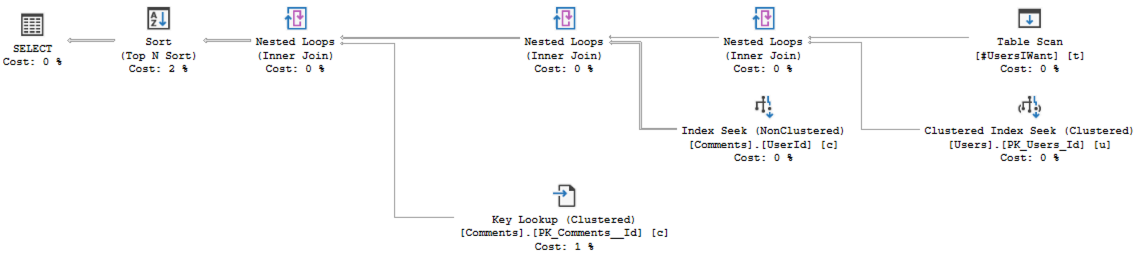
Read right to left, top to bottom to see that SQL Server estimates it will use a single CPU core (no parallelism) to:
- Scan the temp table
- Do a series of clustered index seeks on Users, then
- Do a series of UserId index seeks on Comments, then
- Sort the comments by Score, descending
But when you actually run the query and include the actual plan, the shape is totally different:
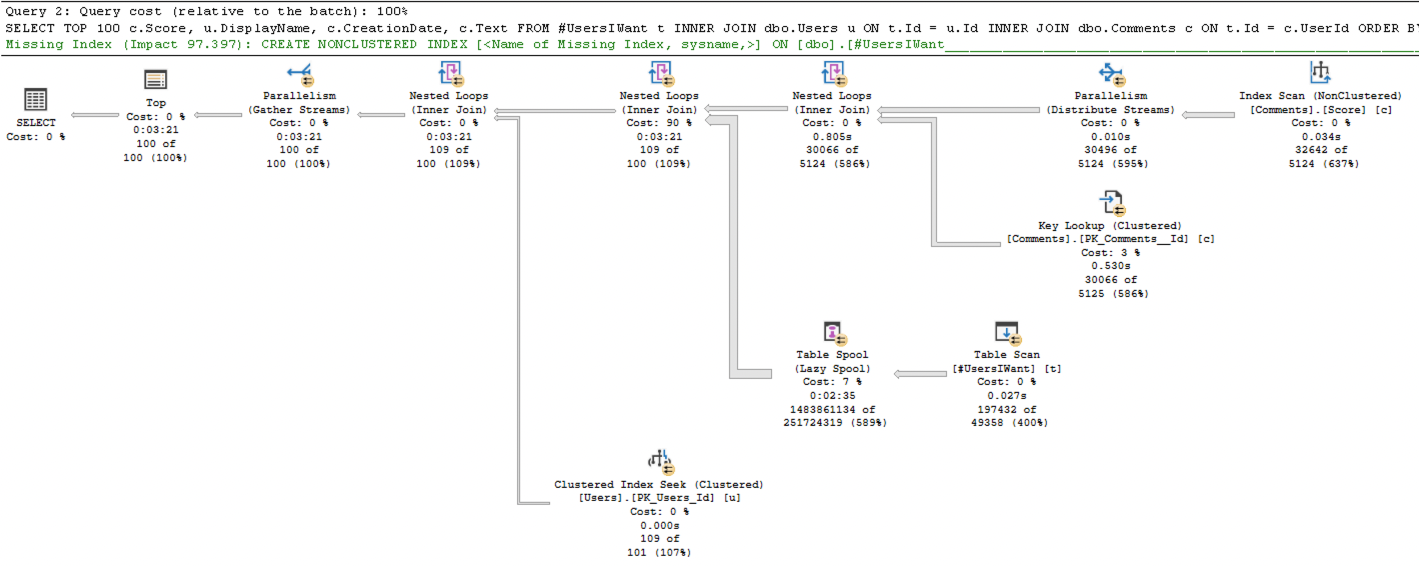
The query went parallel, and it chose a completely different query plan. Because there were so many rows in the temp table, SQL Server decided to scan the Score index on the Comments table, from highest-ranking Comments to lowest. It figured it wouldn’t have to read too many Comments before it stumbled across 100 that were written by people in the temp table. There were tons of differences, and here are just a few:
- The estimated plan was serial, but it actually went parallel
- The estimated plan used the Comments.UserId index, the actual one used Comments.Score
- The estimated plan started with the temp table, the actual one started with Comments
The root cause on this one was the fact that when the estimated plan was generated, SQL Server hadn’t created the temp table yet, and it didn’t have any statistics on its contents. At runtime, the new creation of statistics caused SQL Server to go back and recalculate the plan while the proc ran, so the actual plan had a wildly different shape.
SQL Server 2022 is even worse.
I’ll do a classic parameter sniffing demo that I do all the time:
|
1 2 3 4 5 6 7 8 9 10 11 |
ALTER DATABASE [StackOverflow] SET COMPATIBILITY_LEVEL = 160 GO CREATE INDEX Reputation ON dbo.Users(Reputation); GO CREATE OR ALTER PROC dbo.UsersByReputation @Reputation INT AS SELECT TOP 100000 * FROM dbo.Users u WHERE u.Reputation = @Reputation ORDER BY u.DisplayName; GO |
Execute it for Reputation = 2 – no need to get the actual plan, just run it:
|
1 |
EXEC UsersByReputation 2 |
And then try to get the estimated plan for Reputation = 1:
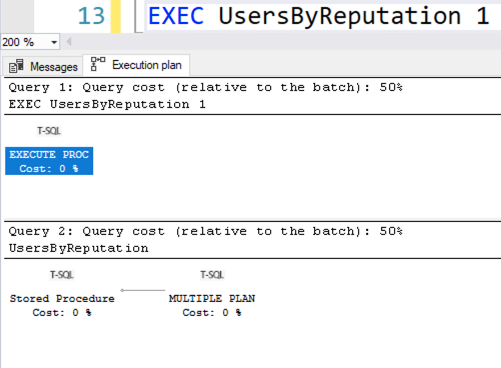
SQL Server 2022 is all, “Estimated plan? I could tell you – but then I’d have to kill you.”
That’s why I keep using the terms estimated plan & actual plan. For another example, check out Erik Darling’s recent post about estimated plan parallelism. (I’d already written & scheduled mine when his published, and I had to link to it here because the timing’s great.)

17 Comments. Leave new
*predicts comment wars today*
You know, it’s really funny, I can never predict what’s gonna explode in the comments, and what’s gonna land like a dud! I still like trying to guess though.
Guess I was wrong! 😀
Isn’t that wild? I can’t predict this stuff at all.
Also, the posts I’m the proudest of, hardly get any traction. The quick, throwaway posts go viral. Weird how that works.
This is my favorite post. Ive been fighting so many bad queries lately, I just want everyone to look at their query plans! Is that too much to ask?!
Yes.
I don’t understand when you say “[…] when you actually run the query and include the actual plan…”
Have you just pressed F5 and the query used the cached plan?
Or is there a command in order to enable/disable the use of the query plan?
When you display the estimated execution plan, that doesn’t put the plan into cache.
You have to actually execute the query – and that’s what builds the *actual* plan that gets used at runtime, and is then subsequently cached. (And may change each time it’s run, too.)
Darling link is broken.
Looks like his blog’s having problems temporarily.
Hi Brent,
Thanks for the post. It really helps. I have a question on this, What would be the plan shape stored in query store for the above example ? Serial or Parallel ?
Karthik – you’re welcome! Read this: https://ozar.me/2017/01/the-two-best-things-paul-randal-taught-me/
Thx for sharing the link, it was a good read 🙂
Back to my original question – During my recent troubleshooting using QueryStore, sometimes I have seen that plan in QS is not the actual plan being used by the optimizer in 150 compat level. Please suggest, am I missing something ?
I wish I could do unlimited free answers in blog posts, but you’re asking about something completely unrelated to this blog post.
If you need personal help from me, click Consulting at the top of the page. Hope that’s fair.
Sure Brent. Will reach out. Thanks
I can’t believe I only now found this blog! (Through a mention on LinkedIn, of all places). Brent mentions me, yeah! And he calls me a great dude, double yeah! And he says I am … wait, what? I’m wrong?
~puts on reading glasses.
So, I see where the confusion is coming from. Sorry Brent. I love you, and I hope to meet again real soon. But I am not wrong. You are … well, also not wrong. But not right either.
Here is the somewhat longer version, the way I usually explain my point of view. The terms estimated and actual are misleading, because they carry the suggestion that SQL Server has two versions of the query optimizer. A version that does a half-hearted job to give us a quick estimate of what the execution plan might be, and a more thorough version that then computes the actual plan. And that is simply not true.
When you hit that “estimated plan” button, the optimizer goes to work as if we want to execute the query. Except we don’t. We grab the plan and show it. But that is the exact plan that would have been executed if we had not interrupted the process.
When you hit that “actual plan” button, the optimizer does the EXACT SAME thing. And it comes up with the EXACT SAME plan. That we then execute, and add run-time statistics to.
The only cases where you can see an “actual” plan that looks different from the “estimated” plan are specific exceptions that are related to recompiles. (At this point, I usually stop the explanation, saying that reasons for recompiles are out of scope for the session. Time limits and all. Here, I can afford to expand.)
Your example? You say it: “it chose a completely different query plan. Because there were so many rows in the temp table,” Well, SQL Server never just “chooses a different query plan”. All it does is check whether one of the items on the list of reasons for a recompile has been triggered. Such as lots of new rows added to a table.
Want to see? One way is to set up an extended events session that tracks compiles and recompiles. Another way is to look at the data in the execution plan. Specifically the TableCardinality property of the Table Scan on #UsersIWant. If you ask for the execution plan only, without executing, it will be zero (assuming first execution). Execute it, and the execution plan with run-time statistics will show a much higher number (I don’t have StackOverflow installed, so I don’t know which number). And if you then change the country and ask for execution plan only again, you’ll see the number that is still correct for India, but then execute it and the statement will once more recompile, and the number will once more be different. (And potentially the plan shape too).
So, yes. In this example, you do see a different plan if you ask “estimated” execution plan only versus “actual” plan with run-time stats. But that does not mean that estimated plans are different from actual plans. It means that the plan before the recompile is different from the plan after the recompile – which is of course the very reason why recompiles are triggered.
And even though Erik Darling’s example is just a single statement and does not use temporary tables or other tables that change cardinality during the batch, his, too, is caused by a recompile. His demo only works on SQL Server 2017 and up, and only if the compat level is high enough, and the INTERLEAVED_EXECUTION_TVF feature has not been disabled. For more details: https://learn.microsoft.com/en-us/sql/relational-databases/performance/intelligent-query-processing-details. Short version: statements that read data from a MSTVUDF (multi-statement table-valued user-defined function – sorry, I don’t name features) can, if the right conditions are matched, recompile halfway through their execution. And that is what happens in Erik’s example.
To my knowledge, recompiles are the ONLY reason why the estimated and actual buttons might bring different plans. Not because an estimated plan is different from an actual plan, but because a recompile can change the plan – and a recompile only happens when the code is actually executed.
Yep, I feel like we agree because that’s exactly what I said in the post here: “caused SQL Server to go back and recalculate the plan while the proc ran”