How to Use the #SQLHelp Hash Tag on Twitter or Slack
You’ve got questions, we’ve got answers.
No, not Radio Shack – Twitter and the SQLcommunity Slack. Right now, no matter when you’re reading this, there are people on Twitter who can answer quick questions for you. Thanks to an excellent idea by Aaron Nelson (@SQLVariant), it’s even easier now. In this post, I’ll show how to ask questions and how to answer them.
How to Ask #SQLHelp Questions in Slack
- Go to SQLslack.com to get a free instant invite, and then join
- Go to https://SQLcommunity.Slack.com, or download the Slack app
- Join the #SQLhelp channel or #PowerShellHelp channel
And that’s it – you can ask whatever questions you’d like there. It’s a great place to have an extended back-and-forth discussion with lots of community experts. Just be mindful that they’re volunteers: say please and thank you. Especially thank you!
How to Ask #SQLHelp Questions on Twitter
Sign up for a Twitter account. You don’t have to follow anyone, but if you want to, I’d suggest following my SQL Server Twitter list instead of individual people. Lists let you keep in touch with a lot of people who focus on a particular topic. The cool part is that their tweets don’t clutter up your main Twitter page, which is important because there’s several hundred SQL Server folks on Twitter as of this writing.
When you need help, write a tweet and include #SQLHelp in the tweet, like this:
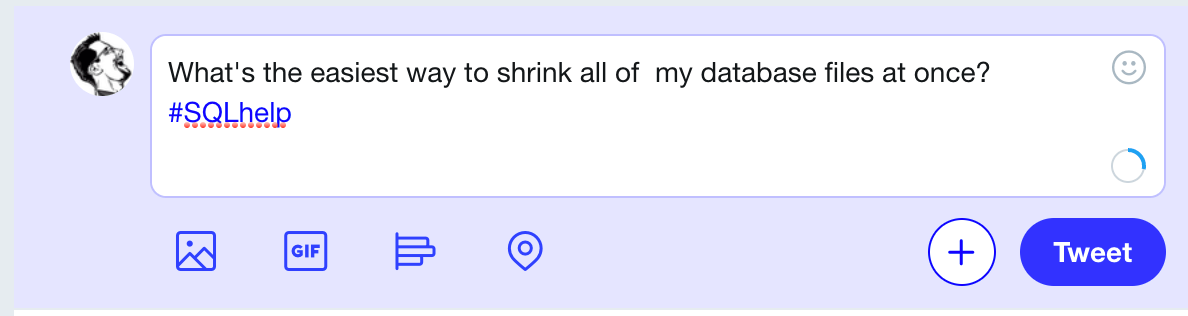
If your question involves more than 280 characters, you’ve got a few options:
- Post a question to StackOverflow if it’s a programming question, to ServerFault if it’s an infrastructure question, or DBA.StackExchange.com if it’s a SQL question. Tweet the link to your question.
- Include screenshots if possible.
- If you need to share an execution plan, use PasteThePlan
- If you need to share code, copy/paste it into a Github Gist
After you click Update to post your question, click on the Notifications tab (or bell icon) at the top of your Twitter home page. This page is your replies page – it shows anyone who’s mentioned your name. Then sit tight – as people reply to you, you’ll see the new tweets on this page.
If you need to reply to someone to include clarifications, include the #SQLhelp hash tag in your tweets to keep everyone in the loop.
How to Answer #SQLHelp Questions
Set up a search in your Twitter client for #SQLHelp, or search Twitter results for #SQLHelp.
As you’re interacting with the questioner, remember that they’re probably new to Twitter, so be gentle and helpful.
Thanks again to Aaron Nelson (Blog – @SQLVariant) for suggesting this! I think it’s a great way for the community to get even more involved in real time.
Free, 3× a week
Get my new posts by email
Three posts a week, plus a Monday roundup of the best database news from around the web.
I wondered why you guys kept replying in Twitter with .@brento.
Makes sense now.
Alright, you got me, I’m finally tweeple now. Or does that make me a twit?
Haha. I like the test case tweets, Brent 😉 Great idea. I’ll enjoy following that hashtag. To be honest, I don’t answer much on serverfault or stackoverflow or even the msdn forums because typically by the time I hit the site there are a lot of answerers already. In twitter even without the hash tag I’ve been able to be a part of a task force helping folks’ problems. Following this tag will make it easier.
Hahaha, I thought you’d like those…
Brent, Thanks a lot. I am still somewhat of a jr. SQL Server DBA and I also do Oracle and Sybase. This will help a lot I think and because of this I finally had to give in and start tweeting.
Thanks for all your posts they have been a big help to me.
Cool, glad I got you started!
Brent,
Perhaps this article should be updated to reflect include dba.stackexchange.com in addition to stackoverflow.com as a place to store questions. Also, I think gist.github.com and pastebin should be mentioned as places to store (broken) example code.
Justin – great idea! Done.
Awesome!
Minor grammatical nitpicking, shouldn’t the to preceding “ServerFault” be removed?
I still see this post getting passed around quite a bit to explain how #sqlhelp works. I’m feeling too lazy to write an updated version myself, so instead I’m just going to point out a few updates:
– twitter now allows you to upload photos (and video, and animated GIFs)
– twitpic is dead
– there’s a “Notifications” tab (and/or a bell icon, depending on your screen size) at the top of twitter to see replies now (vs “click on the @YourName link on the right side of your Twitter home page”)
Andy – awesome, thanks sir! Updated the post.
[…] you can’t get access? Maybe you’re helping out a colleague over Skype, responding to a #sqlhelp request or asking for help yourself and want to provide more information. Quite often, […]
Post on could be updated to include https://twitter.com/hashtag/sqlhelp as the link to search for the hashtag – link in post not functional as of this writing). http://sqlfiddle.com/ and/or http://gist.github.com could also be mentioned.
Lars – great, thanks, updated!
generate
zero administration