SQL Server Table Partitioning Tutorial: Videos and Scripts
There’s a secret to learning about SQL Server’s table partitioning feature: you need to get your hands on some code and really play with it in a test environment.
In this tutorial, Kendra will walk you through test scripts that set up a sample table partitioning environment. These scripts demonstrate gotchas to look out for and the cool features that can dramatically change your database’s performance.
Want to run the demos yourself? Download Table Partitioning Tutorial: Scripts.
Part 1: Our Mission
How can you use the demo and scripts from today in the best way possible? Find out here. 3.5 minutes

Part 2: How to create your test database and helper objects
It’s demotime! We create a test database with views that will help us quickly see critical information about out partitioned object. 3.5 minutes
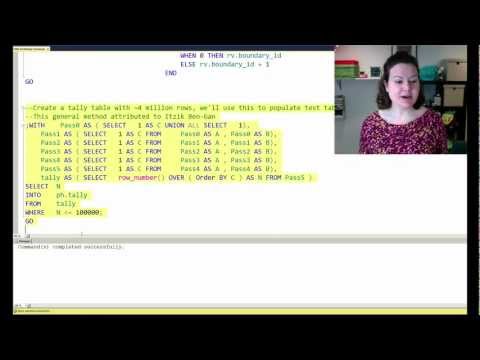
Part 3: How to create partitioned objects
Next up we create a partition function. We create filegroups and files, and use a partition scheme to map the filegroups. We then create a partitioned object and indexes. Our helper views (created in Part 2), help us make sure things went as expected. 15 minutes
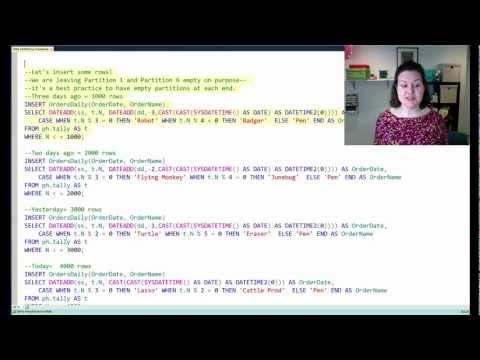
Part 4: Switch IN! How to use partition switching to add data to a partitioned table
Now for the cool stuff. In this session we explore how partition switching can allow us to snap a pile of data quickly into a partitioned table– and a major gotcha which can derail the whole process. 12 minutes
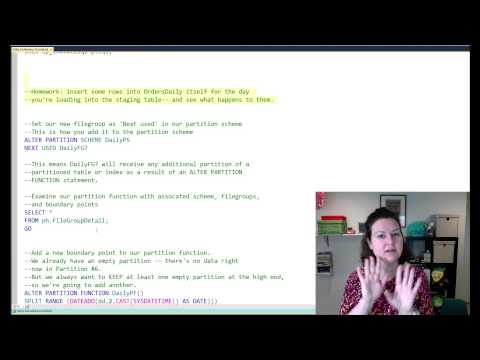
Part 5: Switch OUT! How to move data out of a partitioned table and merge boundary points
Deleting data is never fun… unless you’re switching data out of a partitioned table. But make sure to mind those best practices. In this section we show how to remove a lot of data from a partitioned table quickly and safely. 8 minutes

Part 6: Table partitioning takeaways
What are the big things we covered that you need to remember? Make sure you got all the important points here. 3 minutes

Learn More
The good news: we’ve got tons more information on table partitioning at https://www.brentozar.com/go/partitioning
The bad news: things get even more complicated than you see in this post. If you’re looking at switching out and merging partitions, before you get started on that read my post here on best practices and merging boundary points.
Looking for the scripts? Download Table Partitioning Tutorial: Scripts.
Free, 3× a week
Get my new posts by email
Three posts a week, plus a Monday roundup of the best database news from around the web.
Kendra,
Excellent demo and scripts. Thanks for posting it.
Ameena
Hi Kendra,
thanks
Excellent article!
Itzik Ben-Gan uses “Virtual Auxiliary Table of Numbers” in his articles and books.
for example here http://www.sqlmag.com/article/sql-server/virtual-auxiliary-table-of-numbers-103056
I think you have a typo… Create a taily table with 4 million rows… What for? You do not use more than 5,000 rows.
More comments are comming.
Whenever I load up a numbers table I just throw in a ton of rows in case I want to increase the rowcount by some factor. I love this method of creating the numbers table because it’s so fast!
Thanks. I will go through these videos as soon as I can.
FYI,
I could not recognize Kendra as first time I have seen the glasses missing:-)
Regards
Chandan
Ha! I go through love/hate phases with contact lenses. I’m getting back into the “love” phase, I guess!
Kendra, I just discoverd you last week and have gone through a number of your videos. I first found you when I was looking for info on SQL DBA jobs and I stumbled across your video “Getting Your First DBA Job”. I use to develope DB systems long ago and in a product called FOCUS. Became a Master in it but it wasn’t Relational. Took another job that exposed me to SQL, DB2 and Relational Database design. I always wanted to work only as a DBA but just never got the opportunity, lost job, struggled to get back into IT, finally landed back on my feet. My current role is ETL Informatica / Cognos but would love an entry level / Mid level DBA job. I’ve been reading all the MS MCITP books related to SQL Server database technology. You’re Video “Getting Your First” you mention that the DBA industry is (((HOT))). I agree, never wanted out of IT, but got caught in the down economy. Now I can’t seem to find anything that a guy that’s been out as long as I, in the DBA areana. I know I can do the job if there is a DBA shop set up in a Team Environment. Thought maybe you could help point me in a direction. I’m willing to relocate for the right $ and Location. Thougths. I’m taking a chance that this gets to you..
Dale.
Kendra,
Thank you! Excellent work.
Hello,
I have a couple questions.
In your demo you mentioned that # of filegroups = # of ranges + 1. Yet, all files are created on the same logical volume. Does it affect performance to map all partitions to less number of filegroups or just to single filegroup?
Also, I understand why you recommend to create a ‘sandwich’ type of partitioning. But how can one leave first and last partition empty while loading data with BCP utility?
And thank you for the great step-by-step videos!
First of all congratulations on an amazing set of videos that gets us “very interested” in the world of table partitioning.
The videos are amazing as they explain (and we can test) how partitioning works, what needs to be taken care of and some of the things we need to pay attention when working with partitioned objects.
One thing that I haven’t seen discussed that much is “Partitioning Existing Tables”. If you ever have time it would be nice if you explained your recommended approach on this subject.
Let’s say you have a database with tables that are growing very large (and after plenty of analysis you’ve decided that partition will help), which are becoming very difficult to maintain. What would be better?
– Create a new (and partitioned) table, dump all the rows and start fresh?
– Partition the existing object and all its indexes?
– Would the same steps apply for this scenario?
Thanks for any future comments on this and once again, congrats and keep it up.
You just earned a new fan 🙂
Thanks for the comment, Nestor! I’m glad you enjoyed it.
For transitioning an existing partitioned table, I just always seek the path that’s least likely to end me up watching a production database with a long rollback in progress and nobody able to access the tables. I’ve just been there too often. So for this reason I prefer to load everything up in a new object and do a cutover to it whenever possible– and often this leads to the smallest downtime as well, with the best rollback opportunities.
This tends to be relatively straightforward for tables that are partitioned by date, where new data coming in all goes into more recent partitions. It can be much trickier when data can be modified across all partitions of the table. Michael Swart did some blog posts on strategies for migrating tables online that might be helpful in making this work: http://michaeljswart.com/2012/04/modifying-tables-online-part-1-migration-strategy/
Sometimes partitioning the existing data can be OK. I would just be really careful testing everything on a restored copy of the database first to make sure that the amount of IO, log, etc available is all OK, that the runtime is acceptable, and that if you need to roll it back you still have a plan in that scenario.
But I do have to admit, the “change the one copy of the data” approach just gives me the heebie jeebies. Man, do I hate watching a rollback on that one copy of the data.
Edit: if you have fancy storage and a TON of data you can get really creative to make this work using SAN snapshots and storage on secondary servers to offload some of the CPU usage/locking issues. Making notes to do a blog post discussing some options!
Thanks for the tips, will give the article a read!
Great stuff Kendra, very informative and clearly explained. Thanks for taking the time to do this, it is really appreciated.
I am about to start on a mini project partitioning some large production tables. What I have learnt here will be invaluable.
Paul
Curious about how switch outs relate to foreign key constraints. If I were to partition by client in a multi-client database and I needed to delete a client, I presume I would need to partition all my tables accordingly and switch out the data in a cascading manner from table to table, i.e. transactions table first, subscriptions table second, users table third….
Perhaps it is best to simply use partitioning on the lowest level tables (which are usually the highest volume) to avoid this.
I would start much farther back — What are you trying to gain by partitioning by client? Is it specifically for a data loading/archive project, or are you trying to solve a query performance problem?
Well Kendra, I only started contemplating partitioning today so I haven’t given it a whole lot of thought yet. One of the possible advantages of doing it by client is that we can bulk load new clients into the system without interrupting existing clients. Many clients bring historical data when they join our software and importing 500,000 records without other clients noticing can be tricky. The same thing with deleting. Currently deleting a large client effectively locks the database for several hours so it can only be done during major releases with scheduled downtime.
We are also looking at partitioning by date which strikes me as the more common approach. It is pseudo-archiving.
We don’t currently have major issues that demand using partitioning but we have a team of developers working on a new version of our software and are future-proofing. In fact, we don’t even use Enterprise edition right now.
Hi Kendra,
I watched your presentations and developed a slightly contrived ‘sliding window’ scenario script. It took about 2 hours, over 1 hour was wasted fumbling around with constraints on a table being switched in.
This worked:
ALTER TABLE dbo.HeartBeatIn ADD CONSTRAINT [Partition_PK_GE60] CHECK (Partition_PK >= 60)
This was the original constraint and didn’t work:
ALTER TABLE dbo.HeartBeatIn ADD CONSTRAINT [Partition_PK_GE60] CHECK (Partition_PK > 59)
My ‘sliding window’ script, based loosely on your presentation is on http://www.paulbrewer.net . Your presentation was really useful and informative, thanks.
Hi Kendra!
After I SWITCHED OUT, Can I delete the orphan filegroup/file?
Ah! Nice Article!
Hi Felipe!
After you switch out, you can merge a boundary point to get rid of the empty partition. It can be a little tricky, more on it here: https://www.brentozar.com/archive/2013/01/best-practices-table-partitioning-merging-boundary-points/
Hi, stumbled across your site today and it’s very informative. Trying to think of my current problem and how to address as i’m sure it’s not a new problem!
I would like to partition a large Fact table by day as per your example. In my scenario I receive feeds for the latest day at different points across the day but need to load them as and when they arrive so they are available to users. As soon as i load one feed then the partition is no longer empty and any attempt to switch subsequent feeds for today in will fail with the Partition x must be empty.
At the moment I think I need 2 tables along lines of
tblFacts_current ( for all of todays data, drip fed )
tblFacts_allOtherData (table partition on day for anything older than today)
At the end of today I know i have all required data, switch in todays data to tblFacts_allOtherData, drop and recreate ready for the next days data.
Am i thinking of this problem in the wrong way? Sure it’s a problem others have encountered.
Thanks
Hi Ceri,
Your approach could work. Build a prototype and check out if a partitioned view including tblFacts_current and tblFacts_allOtherData might help simplify some of your read queries with the model you’re describing.
With your model, you could still have contention between loads of incoming data and reads of current day’s data. The way around that would be to just use a partitioning granularity smaller than one day so you could switch in each feed as it comes (perhaps a composite partitioning key using a computed column to partition by day source). But that adds complexity, particularly because making sure your queries use the partitioning key properly for elimination.
So there are pros and cons to different approaches.
Hope this helps!
Kendra
I loved the video series, but I had a question. I am trying to create an automated sliding window and I can’t seem to get it working correctly. Do you happen to have a video on automating things or a script to assist me?
Andre – no, we don’t have one, but if you Google for SQL Server sliding window load partition, you’ll find a lot of posts with examples. Hope that helps!
in a word this was AWESOME!!!
It was VERY helpful with dealing with a Billion rows (yes with a B) table but are there any guidelines for partition size 10 million rows, 100 million rows?
Thanks for this Detailed Post.. Appreciate the Time taken…It was very useful to start with…
Very, Very, Very informative video, Thanks so much.
However, i can’t let go the idea that uniqueness is so very difficult to enforce. Take your example, I believe you had “OrderName” as one column in the PK. The other column is OrderDate which is the partitioning column. I am pretty old school, i don’t like over-identifying the PK. Moreover, in data warehouse environment most dims and fact tables are set up with simple PKs, which makes partitioning very difficult unless we come up with a PK alogrithm that ensures uniqueness and can also be used as a partition column. Are there any best practices or good articles that discuss methods on enforcing uniqueness in a pK column in a partitioned table?
Hi Joe,
You can enforce uniqueness by doing a non-aligned nonclustered index: those don’t have to contain the partitioning key. But then you lose the ability to switch partitions in and out as long as they’re enabled. So in terms of enforcing uniqueness, it’s a rock and hard place situation. I don’t know of any articles on it just because the limitation is so hard to deal with if you want to use partition switching.
Kendra
Hi Kendra,
In your example script, RANGE RIGHT is used to partition data in multipe file groups. The script includes the steps needed to switch data in but doesn’t include a sequence of actions to switch old data out. I think there is a problem using multiple, ascending file groups to partition data when RANGE is RIGHT. An ALTER INDEX REBUILD is required to complete the physical movement of the data, potentially a very expensive operation on a large table. I’ve reproduced the problem here Thanks – http://paulbrewer.wordpress.com/2014/03/06/table-partitioning-bug-merge-range-switch-out/
Hi Paul,
I believe this is technically functioning as designed (unfortunately).
Can you give my post here on merging boundary points a read? I think it’s consistent with what you’re seeing, and in the post I link to where this is documented in Books Online. https://www.brentozar.com/archive/2013/01/best-practices-table-partitioning-merging-boundary-points/
I didn’t set this example up with much about merging boundary points because of the complexity– I wanted to start things off simple. However, I think I should at least add a note/link at the end to that alternate point about merging so readers know it gets complicated. Doing that now.
Kendra
I found and read your post about merging boundaries after posting a comment here, it’s very good and explains it well. As you say, it’s a really complicated subject but I realised my mistake, using the wrong boundary. I followed your rule and maintain an empty partition at the start and end of the partition range. When you switch out the oldest data (last but one partition), you need to merge the now empty, last but one partition with the empty last one (for RANGE LEFT & RANGE RIGHT). Then there is no data movement between file groups, in my lab I merged at the wrong boundary point. Thanks very much all the info about partitioning, I use your posts as a guideline and reference. Best wishes
I’m so glad it helped! And thank you very much for commenting on this post, I didn’t realize I didn’t have a direct link to the splitting issue on this post. Now that I’ve added that with a note to the bottom of the page, it might keep help someone else learn more quickly with less confusion.
This is a better example of the problem – http://www.sqlservercentral.com/Forums/Topic1548437-2799-1.aspx
Best Wishes
I am having a slight issue with this script. When I attempt to run:
CREATE PARTITION SCHEME DailyPS
AS PARTITION DailyPF
TO (DailyFG1, DailyFG2, DailyFG3, DailyFG4, DailyFG5, DailyFG6)
all of my partition_ranges end up in the first file group. Did I miss something along the way?
Sorry it took me so long to get to your comment!
I’m a little confused by the question — it sounds like none of the commands are throwing errors?
I just dug out the script and re-tested, and on SQL Server 2014 I’m getting what I got before at this point — five range values which are mapped to six filegroups, all of which are empty. (We haven’t created a partitioned object yet).
Having PRIMARY show up is really odd. Are you seeing that from the results of the query “SELECT * FROM ph.FileGroupDetail;”, or in some other way?
This is a great article. But what do you do in a situation where you have table that is partitioned by month. ANd it had filegroups created upto the month of AUgust. And all the september and october data went into the primary filegroup. How do you create additional partition schemas for the next couple of months and move the data over to these months.
Sharmila – sure, start here: http://blogs.msdn.com/b/sql_pfe_blog/archive/2013/08/13/oops-i-forgot-to-leave-an-empty-sql-table-partition-how-can-i-split-it-with-minimal-io-impact.aspx
Thanks Kendra. This video tutorial helped me to understand all the things i can do with table partitioning. Thumbs up!
Can I use partition relation tables?
1. Can we user ‘partition table’ feature in MS SQL Server 2014 for 3 tables with reletionship are 1-many
2.If I partition table A for column ‘OrderDate’ , how can i partition for 2 tables ? which column at table B and table C will be used?
Please advice
Thank you very much.
Jeab – let’s take a quick step back. For partitioning design, we need to know what your goal is. How big is the database, and what’s your goal with partitioning?
I found a new feature that is called Reference Partition on Oracle 11g. Using reference partitioning, a child table can inherit the partitioning characteristics from a parent table. but i cannot find like this in SQL Server 2014
Is there an equivalent feature in SQL Server?
Can I switch out partition tables with reference partitioning from parent table to child table (table A ,B,C) ?
Thank you very much
Anyone can help me?
Thank you very much.
Jeab – for personalized one-on-one Oracle guidance, try a question and answer site like http://dba.stackexchange.com. You’re commenting about Oracle on a post called “SQL Server Table Partitioning.” That isn’t the best place to get your answers.
I found a new feature on oracle 11g can use referremce partition but i cannot find the solution for sql server for reletion tables .
Can i switch out prtition tables with referrence key (table A ,B,C):.
Just POC for my project.
Thank you very much
Hi Kendra,
Thanks for the great video tutorial on partitioning.
Most or perhaps all partitioning tutorials focus on datetime datatypes for their partitioning. I have a situation where I have a partitioning column with only 3 values: A (actual), D (done) and P (in progress). A-records are there for a short time and are stable at some 18-21,000 rows. Once the task is done, the A-status changes to D. D-records keep piling up and total many, many millions of rows. unfortunately we cannot remove the D-records for some time.
We are for the vst majority of day-to-day tasks interested in A records. However, querying is rather slow and we thought that partitioning might help. Three partitions, for each status one. If we only need to query the few thousand records in partition A, then we must have great performance. Obviously, partition D is very large and will keep growing. No other partitions are necessary.
Question, is it advisable to continue investigating in that direction? Are there any other pointers where to look and what to check? We are mainly looking at partitioning for performance gains.
Regards,
Erik.
Sorry for the unclear message: we have one large table and we are INVESTIGATING partitioning that table around a three-valued column. Accessing only the partition with the 20,000 records should give the expected performance gain.
Regards,
Erik.
One of the biggest strengths of partitioning is switching partitions in and out– and it doesn’t seem like your design gets that benefit (from a quick read).
When you move data between the partitions, you’re going to get logged data movement. So the first question to ask is just what advantages you’ll get over the long term from a partitioned table that you wouldn’t get from individual tables (where you’ll get separate statistics and indexes for each, and could potentially store your “D” records in another database). More flexibility and less weird query tuning long term.
Thanks for your comment. I’ll re-think the concept.
Hi Kendra, thank you for this post.
so, i have a request, i don’t know how to transfert existing data.
i have a customer with a table configured with 5 partitions with :
part1 2009 and 2010 and 2011 and 2012
the problem is all data > 2012 until today are in the same partition (2012-2013-2014-2015)
i don’t understand how split every year in that partiton in multipl partition for exemple :
part2012
part2013
part2014
part2015
partXXX
thank’s for ypur help
You’ve got a couple of different options, but mapping them out is a bit too long for a blog comment. Essentially, you could switch the large partition out, fix the partitions, then re-insert manually, or you could split in place. The most important thing for you is to get a restored copy of the database in a test environment and to test out different options so you understand how long it’s going to take, how much log will be generated, and can find the most efficient method for that database.
I’m wondering if this is a mistake or not
–I want to load data for tomorrow and then switch it in.
–First, add a filegroup.
ALTER DATABASE PartitionThis ADD FILEGROUP DailyFG7
–Add a file for the filegroup.
….
–Create a staging table on our new filegroup (dailyFG6)
–Why are we seeding the identity here?
–What would happen if we didn’t?
CREATE TABLE OrdersDailyLoad (
OrderDate DATETIME2(0) NOT NULL,
OrderId int IDENTITY (10001,1) NOT NULL,
OrderName nvarchar(256) NOT NULL
) on [DailyFG6]
GO
Shouldn’t this be FG7, since that is the one you just created?
Thanks for your reply! 🙂 Other then that GREATE tutorial
Yep, great catch!
Hi Kendra,
Nice tutorial videos! I am thinking of partitioning tables of our 16 years Sales & Inventory database. However, my impression based on your videos and some comments, the partitioning is only best flat file tables.
My database is having master /detail tables and look ups with mostly with 1 to many relationships. My SalesDetail alone is having 10M rows and I’m thinking to partition it by Year based Sales table.
Can this be doable also on relational databases?
Jimi J
Jimi – it can totally work, but start with these posts:
https://www.brentozar.com/archive/2015/09/why-is-this-partitioned-query-slower/
https://www.brentozar.com/archive/2008/06/sql-server-partitioning-not-the-answer-to-everything/
https://www.brentozar.com/archive/2012/03/how-decide-if-should-use-table-partitioning/
Saved my day!Thank you very much.
Now I know about indexes in partitioning completely. Thanks heaps
I was doing SWITCHING OUT OLD DATA. i created the staging table, created the Pk and also created the clustered index just like the original table. However i keep on getting this exception thrown out…
Msg 7733, Level 16, State 4, Line 29
‘ALTER TABLE SWITCH’ statement failed. The table ‘[myoriginal table]’ is partitioned while index ‘[the primary key on the table which however is not a clustered index]’ is not partitioned.
I thought the staging table and its index in switching out were not required to be partitioned. what am i missing here?
Thank you for this great tutorial.
I followed what you did but am stumped.
Everything worked well creating the partition. It’s the switching new data in that isn’t working.
I get an error saying that:
ALTER TABLE SWITCH statement failed. Check constraints of the source table allow values that are not allowed by the range defined by partition ## on target table.
Here’s the catch… I can successfully execute an INSERT INTO facttable SELECT * FROM loadtable.
So I’m not sure what could be preventing the switch. My load table is in the same file group as the partition that I’m trying to switch it into. I tried dropping all constraints and that didn’t help. There aren’t any primary key violations, and as I said, an INSERT statement works for all the records.
Any thoughts on where to look for the problem? I’m at a loss.
Respectfully,
Brian
Hi Brian,
I’ve run through the script a few times on my end, and I can’t reproduce your error. If you haven’t already, try dropping the database and starting fresh. If that doesn’t work, download the scripts again to make sure there weren’t any changes made to it that are throwing things off.
Thanks,
Erik
We have multiple tables which is partitioned by business date column (365 partitions for a year),and we are running out of space in the Existing filegroup.Is there a way to drop and recreate a future date partitions on other filegroup where I have enough space??? Can you please suggest me how to move a partitioned table data (partitions with and without(Future partitions) data )from one filegroup to another filegroup .
Prem — for Q&A, use dba.stackexchange.com
Thanks!
Hi Erik,
Could not able to post throwing some JavaScript error which blocking failing to post.
Hi Kendra,
Just to give a huge shout out ‘Thank you!!’
Top notch explanation and super useful tips and detailed scripting.
Amazing!!
Hi Kendra, many thanks for the videos. I was interested in your poster on Partitioning, but I cannot seem to find it on this site or yours?
Thanks
Richard
Richard – Kendra’s not here anymore, but you can email her on her site: https://littlekendra.com/contact-kendra-little/
After merge, I could still see the physical file on the disk, also i could see the merged file group on the data base.
is it fine to remove them?.
Ramesh – for questions, head to a Q&A site like https://Dba.stackexchange.com.
Thanks very much to Kenrda for the great videos. I have used the knowledge to implement poartitioning on a large 2TB table. However I have a question. The tutorial uses a staing table for current data then switching it into the partitioned table as we move into a new period. Can’t we just have the current data inserted dirtectly into appropriate partition in the partitioned table (and so skipping the use of staging table)? I guess technically we can do it but it may be better to use a staging table for performance purpose?
Long – unfortunately we can’t do justice to those kinds of big questions here in the comments. This is where consulting comes in.
Hi,
the videos on this page appear to be unavailable. The links show a message saying that the videos are private.
Regards
Excellent video and explanation Sir.
I just have a question. Can we add a new data file to existing file group in partition and restrict the existing data file. I mean if i want to place a new data file for partition in a seperate drive.
For unrelated questions, head on over to https://dba.stackexchange.com.